audio TOYOTA COROLLA 2021 (in English) User Guide
[x] Cancel search | Manufacturer: TOYOTA, Model Year: 2021, Model line: COROLLA, Model: TOYOTA COROLLA 2021Pages: 624, PDF Size: 20.3 MB
Page 104 of 624
1042-1. Instrument cluster
COROLLA_U
with full-speed range (if
equipped) (P.229)
■Navigation system-linked
display (if equipped)
Select to display the following
navigation system-linked infor-
mation:
Route guidance to destination
Compass display (head-
ing-up display)
Select to enable selection of an
audio source or track on the
meter using the meter control
switches.
This menu icon can be set to be
displayed/not displayed in .
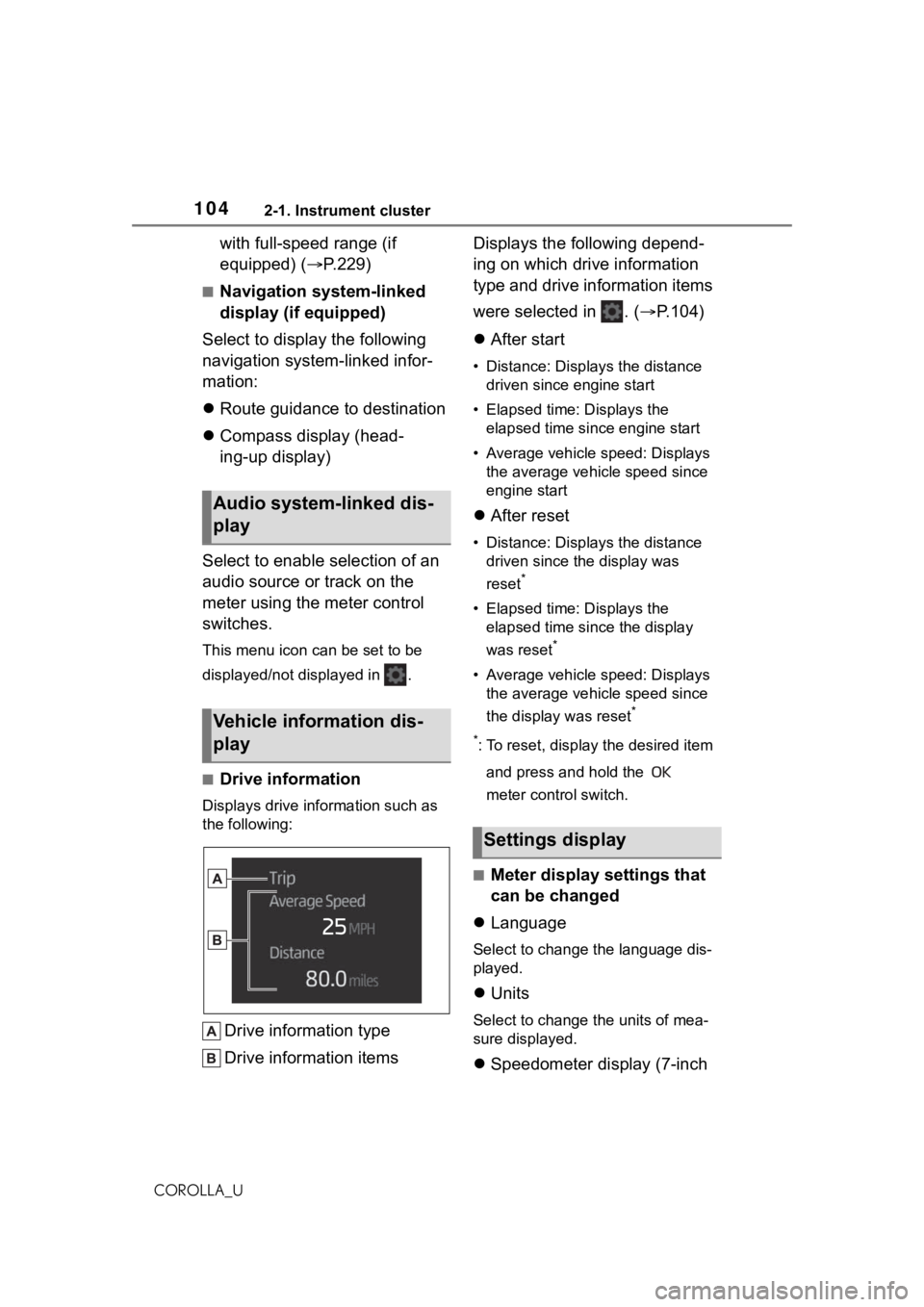
■Drive information
Displays drive information such as
the following:
Drive information type
Drive information items Displays the following depend-
ing on which drive information
type and drive information items
were selected in . (
P.104)
After start
• Distance: Displays the distance
driven since engine start
• Elapsed time: Displays the elapsed time since engine start
• Average vehicle speed: Displays the average vehicle speed since
engine start
After reset
• Distance: Displays the distance
driven since the display was
reset
*
• Elapsed time: Displays the elapsed time since the display
was reset
*
• Average vehicle speed: Displays the average vehicle speed since
the display was reset
*
*
: To reset, display the desired item and press and hold the
meter control switch.
■Meter display settings that
can be changed
Language
Select to change the language dis-
played.
Units
Select to change the units of mea-
sure displayed.
Speedometer display (7-inch
Audio system-linked dis-
play
Vehicle information dis-
play
Settings display
Page 105 of 624
1052-1. Instrument cluster
2
Vehicle status information and indicators
COROLLA_U
display)
Select to set the display of the
speedometer to analog/digital.
Eco Driving Indicator Light (if
equipped)
Select to enable/disable the Eco
Driving Indicator Light.
• Fuel economy display
Select to change the average fuel
consumption display between after
start/after reset. ( P.102)
Select to display/not display the
audio system linked display.
Select to change the displayed con-
tent of the following:
• Drive information type
Select to change the drive informa-
tion type display between after
start/after reset.
• Drive information items
Select to set the first and second
items of the drive information dis-
play to any of the following: aver-
age vehicle
speed/distance/elapsed time.
Pop-up display
Select to enable/disable pop-up
displays for each relevant system.
Multi-information display off
Select to turn the m ulti-information
display off.
To turn the multi-in formation display
on again, press any of the following
meter control switches //// /.
Default setting
Select to reset the meter display
settings to the default setting.
■Vehicle functions and set-
tings that can be changed
P.581
■Suspension of the settings dis-
play
●Some settings cannot be changed
while driving. When changing set-
tings, park the vehicle in a safe
place.
●If a warning message is displayed,
operation of the settings display
will be suspended.
WA R N I N G
■Cautions during setting up
the display
If the engine is running when
changing the dis play settings,
ensure that the vehicle is parked
in a place with adequate ventila-
tion. In a closed area such as a
garage, exhaust gases including
harmful carbon monoxide (CO)
may collect and enter the vehicle.
This may lead to death or a seri-
ous health hazard.
NOTICE
■During setting up the display
To prevent batte ry discharge,
ensure that the engine is running
while setting up the display fea-
tures.
Page 106 of 624
1062-1. Instrument cluster
COROLLA_U
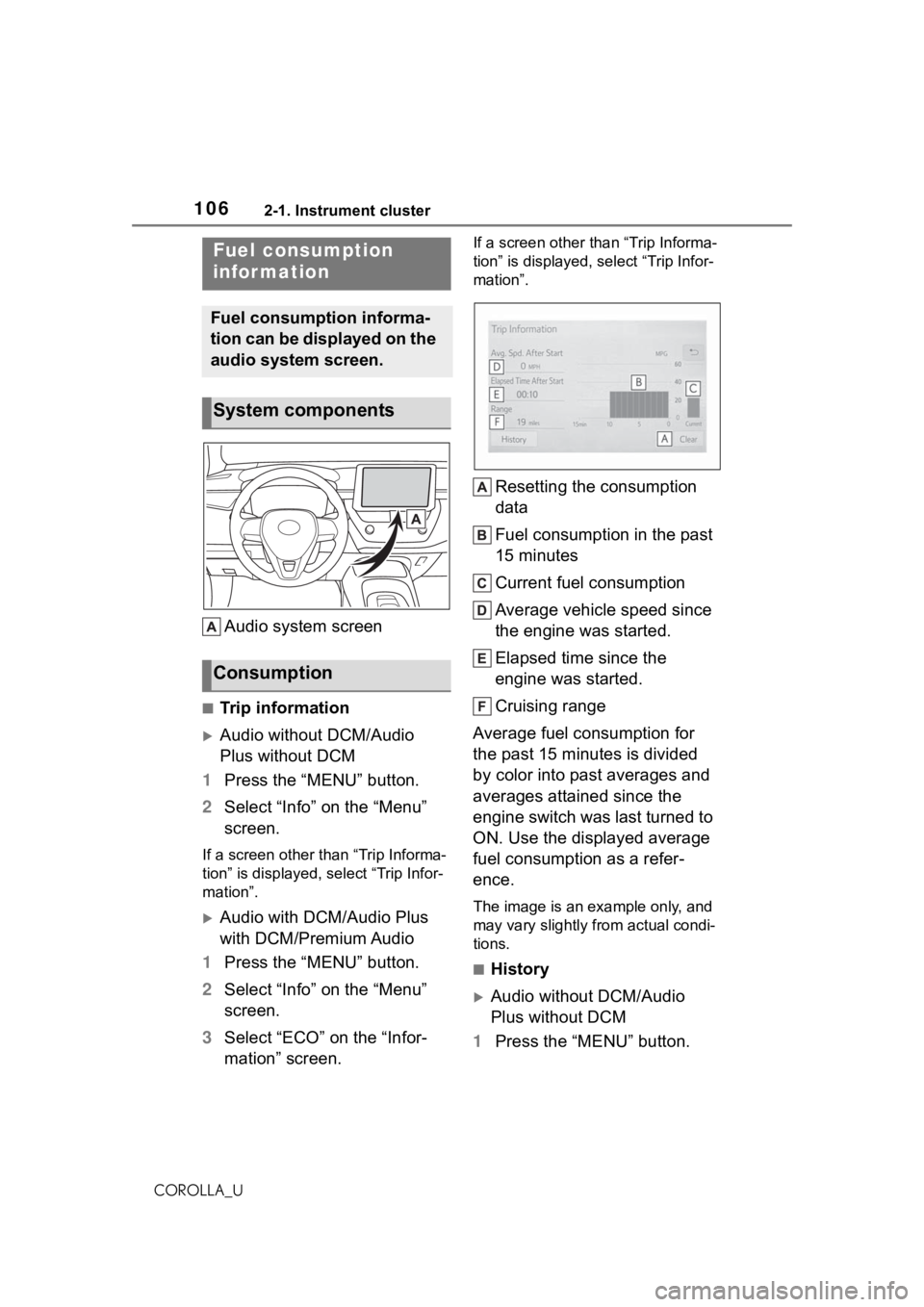
Audio system screen
■Trip information
Audio without DCM/Audio
Plus without DCM
1 Press the “MENU” button.
2 Select “Info” on the “Menu”
screen.
If a screen other than “Trip Informa-
tion” is displayed, select “Trip Infor-
mation”.
Audio with DCM/Audio Plus
with DCM/Premium Audio
1 Press the “MENU” button.
2 Select “Info” on the “Menu”
screen.
3 Select “ECO” on the “Infor-
mation” screen.
If a screen other than “Trip Informa-
tion” is displayed, select “Trip Infor-
mation”.
Resetting the consumption
data
Fuel consumption in the past
15 minutes
Current fuel consumption
Average vehicle speed since
the engine was started.
Elapsed time since the
engine was started.
Cruising range
Average fuel consumption for
the past 15 minutes is divided
by color into past averages and
averages attained since the
engine switch was last turned to
ON. Use the displayed average
fuel consumption as a refer-
ence.
The image is an example only, and
may vary slightly from actual condi-
tions.
■History
Audio without DCM/Audio
Plus without DCM
1 Press the “MENU” button.
Fuel consumption
infor mation
Fuel consumption informa-
tion can be displayed on the
audio system screen.
System components
Consumption
Page 107 of 624
1072-1. Instrument cluster
2
Vehicle status information and indicators
COROLLA_U
2Select “Info” on the “Menu”
screen.
If a screen other than “History” is
displayed, select “History”.
Audio with DCM/Audio Plus
with DCM/Premium Audio
1 Press the “MENU” button.
2 Select “Info” on the “Menu”
screen.
3 Select “ECO” on the “Infor-
mation” screen.
If a screen other than “History” is
displayed, select “History”.
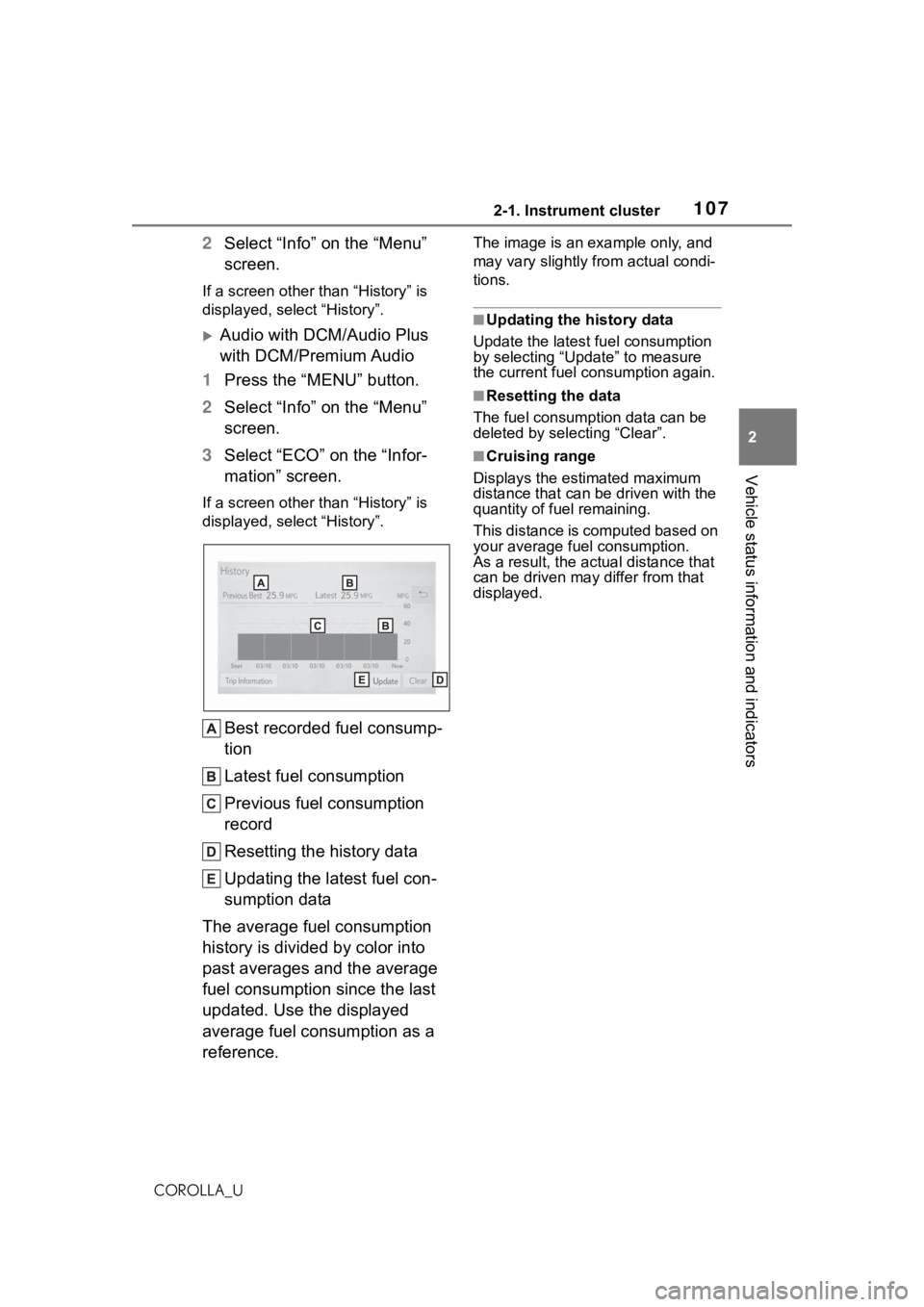
Best recorded fuel consump-
tion
Latest fuel consumption
Previous fuel consumption
record
Resetting the history data
Updating the latest fuel con-
sumption data
The average fuel consumption
history is divided by color into
past averages and the average
fuel consumption since the last
updated. Use the displayed
average fuel consumption as a
reference.
The image is an example only, and
may vary slightly from actual condi-
tions.
■Updating the history data
Update the latest fuel consumption
by selecting “Update” to measure
the current fuel consumption again.
■Resetting the data
The fuel consumption data can be
deleted by selecting “Clear”.
■Cruising range
Displays the estimated maximum
distance that can be driven with the
quantity of fuel remaining.
This distance is computed based on
your average fuel consumption.
As a result, the actual distance that
can be driven may differ from that
displayed.
Page 112 of 624
1123-1. Key information
COROLLA_U
The keys are equipped with the
following wireless remote con-trol:
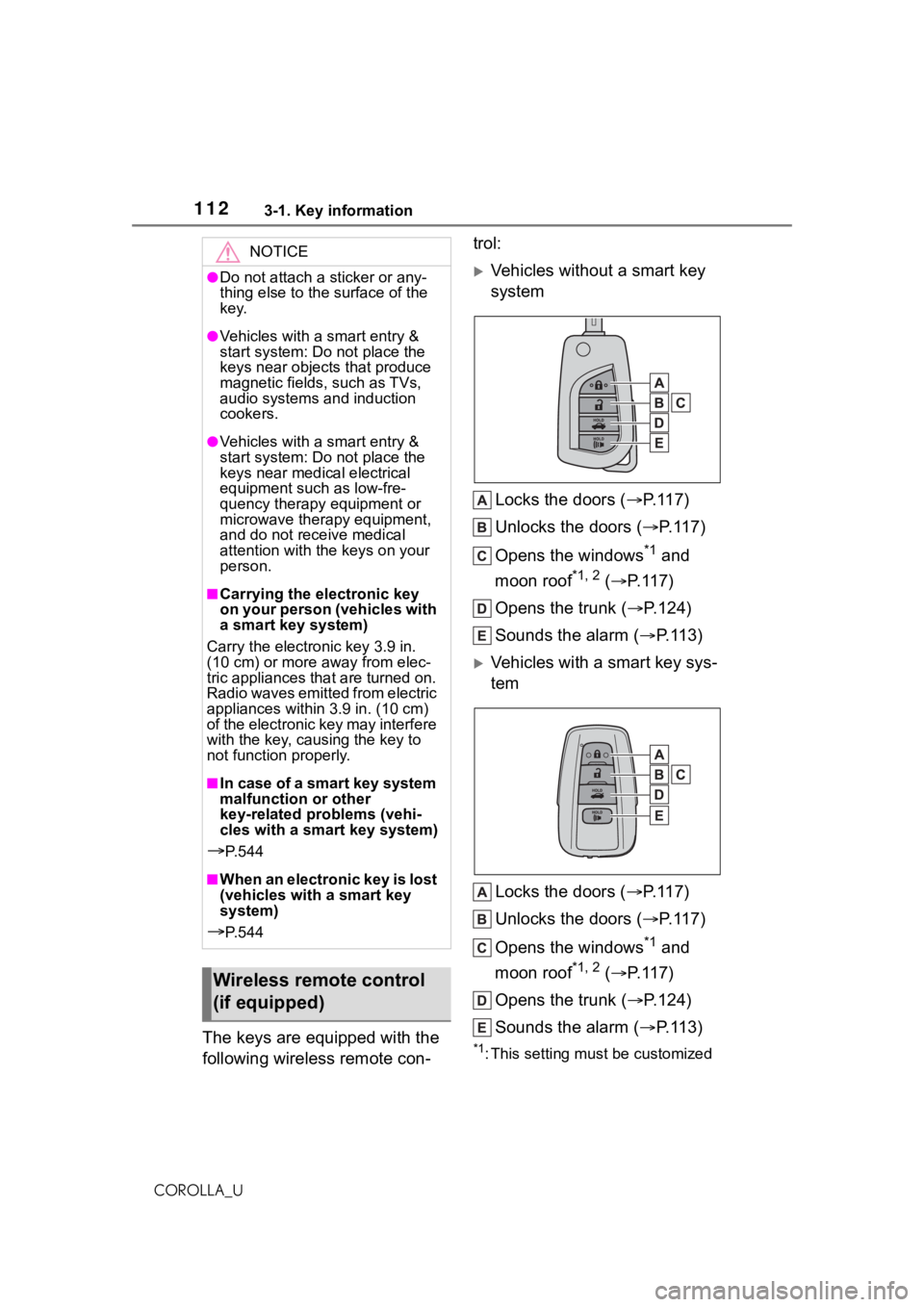
Vehicles without a smart key
system
Locks the doors ( P.117)
Unlocks the doors ( P.117)
Opens the windows
*1 and
moon roof
*1, 2 ( P.117)
Opens the trunk ( P.124)
Sounds the alarm ( P. 1 1 3 )
Vehicles with a smart key sys-
tem
Locks the doors ( P.117)
Unlocks the doors ( P.117)
Opens the windows
*1 and
moon roof
*1, 2 ( P.117)
Opens the trunk ( P.124)
Sounds the alarm ( P. 1 1 3 )
*1: This setting must be customized
NOTICE
●Do not attach a sticker or any-
thing else to the surface of the
key.
●Vehicles with a smart entry &
start system: Do not place the
keys near object s that produce
magnetic fields, such as TVs,
audio systems and induction
cookers.
●Vehicles with a smart entry &
start system: Do not place the
keys near medical electrical
equipment such as low-fre-
quency therapy equipment or
microwave therapy equipment,
and do not receive medical
attention with the keys on your
person.
■Carrying the electronic key
on your person (vehicles with
a smart key system)
Carry the electronic key 3.9 in.
(10 cm) or more away from elec-
tric appliances that are turned on.
Radio waves emitted from electric
appliances within 3.9 in. (10 cm)
of the electronic key may interfere
with the key, causing the key to
not function properly.
■In case of a smart key system
malfunction or other
key-related problems (vehi-
cles with a smart key system)
P. 5 4 4
■When an electronic key is lost
(vehicles with a smart key
system)
P. 5 4 4
Wireless remote control
(if equipped)
Page 127 of 624
1273-2. Opening, closing and locking the doors
3
Before driving
COROLLA_Ubeen used for 5 days or longer.
●If the smart key system has not
been used for 14 days or longer,
the doors cann
ot be unlocked
from any door except the driver’s
door. In this case, hold the driver’s
door handle, or use the wireless
remote control or mechanical key
to unlock the doors.
■Electronic key battery-saving
function
When battery-savi ng mode is set,
battery depletion is minimized by
stopping the electronic key from
receiving radio waves.
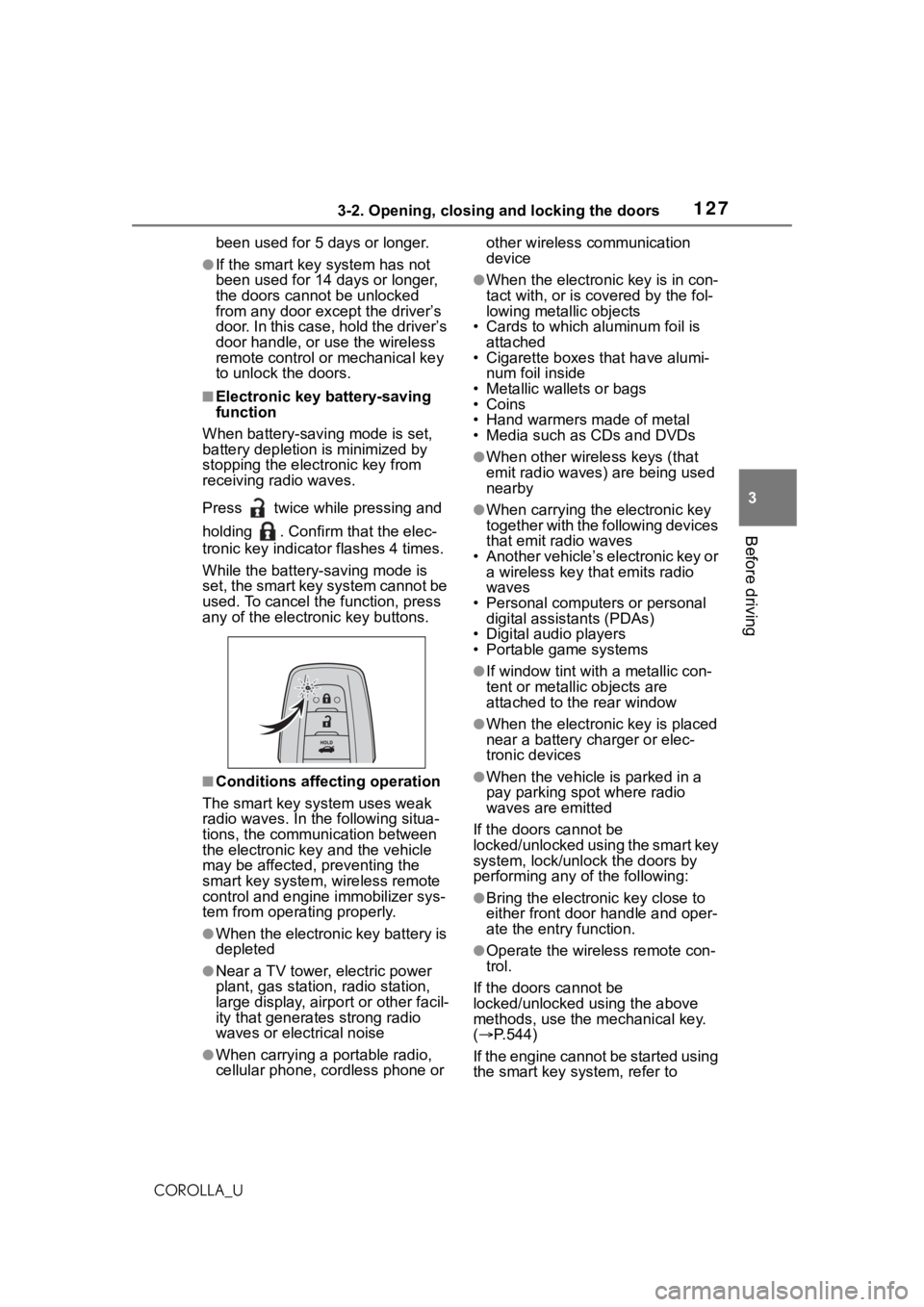
Press twice while pressing and
holding . Confirm that the elec-
tronic key indicator flashes 4 times.
While the battery-saving mode is
set, the smart key system cannot be
used. To cancel the function, press
any of the electronic key buttons.
■Conditions affecting operation
The smart key system uses weak
radio waves. In the following situa-
tions, the communication between
the electronic key and the vehicle
may be affected, preventing the
smart key system, wireless remote
control and engine immobilizer sys-
tem from operating properly.
●When the electronic key battery is
depleted
●Near a TV tower, electric power
plant, gas station , radio station,
large display, airpo rt or other facil-
ity that generates strong radio
waves or electrical noise
●When carrying a portable radio,
cellular phone, cordless phone or other wireless communication
device
●When the electronic key is in con-
tact with, or is c
overed by the fol-
lowing metallic objects
• Cards to which aluminum foil is
attached
• Cigarette boxes that have alumi-
num foil inside
• Metallic wallets or bags
•Coins
• Hand warmers made of metal
• Media such as CDs and DVDs
●When other wirel ess keys (that
emit radio waves) are being used
nearby
●When carrying the electronic key
together with the following devices
that emit radio waves
• Another vehicle’s electronic key or a wireless key that emits radio
waves
• Personal computers or personal digital assistants (PDAs)
• Digital audio players
• Portable game systems
●If window tint wit h a metallic con-
tent or metallic objects are
attached to the rear window
●When the electronic key is placed
near a battery charger or elec-
tronic devices
●When the vehicle is parked in a
pay parking spot where radio
waves are emitted
If the doors cannot be
locked/unlocked using the smart key
system, lock/unlock the doors by
performing any of the following:
●Bring the electronic key close to
either front door handle and oper-
ate the entry function.
●Operate the wireless remote con-
trol.
If the doors cannot be
locked/unlocked using the above
methods, use the mechanical key.
( P.544)
If the engine cannot be started using
the smart key system, refer to
Page 164 of 624
1644-2. Driving procedures
COROLLA_Uas the audio system can be used.
3
ON ( “ON” position)
All electrical com ponents can be
used.
4 START ( “START” position)
For starting the engine.
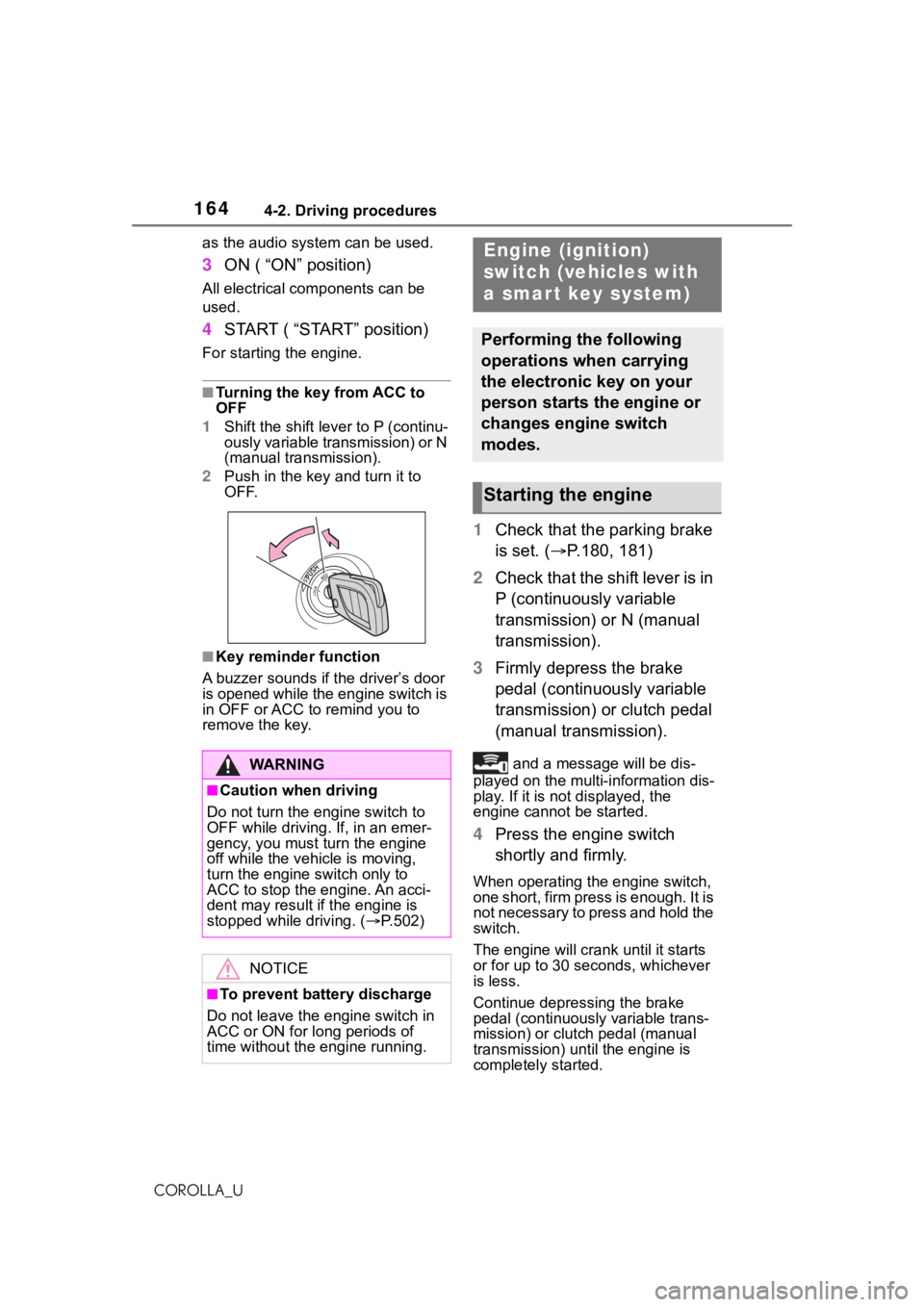
■Turning the key from ACC to
OFF
1 Shift the shift lever to P (continu-
ously variable transmission) or N
(manual transmission).
2 Push in the key and turn it to
OFF.
■Key reminder function
A buzzer sounds if the driver’s door
is opened while the engine switch is
in OFF or ACC to r emind you to
remove the key.
1 Check that the parking brake
is set. ( P.180, 181)
2 Check that the shift lever is in
P (continuously variable
transmission) or N (manual
transmission).
3 Firmly depress the brake
pedal (continuously variable
transmission) or clutch pedal
(manual transmission).
and a message will be dis-
played on the multi-information dis-
play. If it is not displayed, the
engine cannot be started.
4 Press the engine switch
shortly and firmly.
When operating the engine switch,
one short, firm press is enough. It is
not necessary to press and hold the
switch.
The engine will crank until it starts
or for up to 30 seconds, whichever
is less.
Continue depressing the brake
pedal (continuously variable trans-
mission) or clutch pedal (manual
transmission) unt il the engine is
completely started.
WA R N I N G
■Caution when driving
Do not turn the engine switch to
OFF while driving. If, in an emer-
gency, you must turn the engine
off while the vehicle is moving,
turn the engine switch only to
ACC to stop the engine. An acci-
dent may result i f the engine is
stopped while driving. ( P.502)
NOTICE
■To prevent battery discharge
Do not leave the engine switch in
ACC or ON for long periods of
time without the engine running.
Engine (ignition)
switch (vehicles with
a smar t key system)
Performing the following
operations when carrying
the electronic key on your
person starts the engine or
changes engine switch
modes.
Starting the engine
Page 168 of 624
1684-2. Driving procedures
COROLLA_U
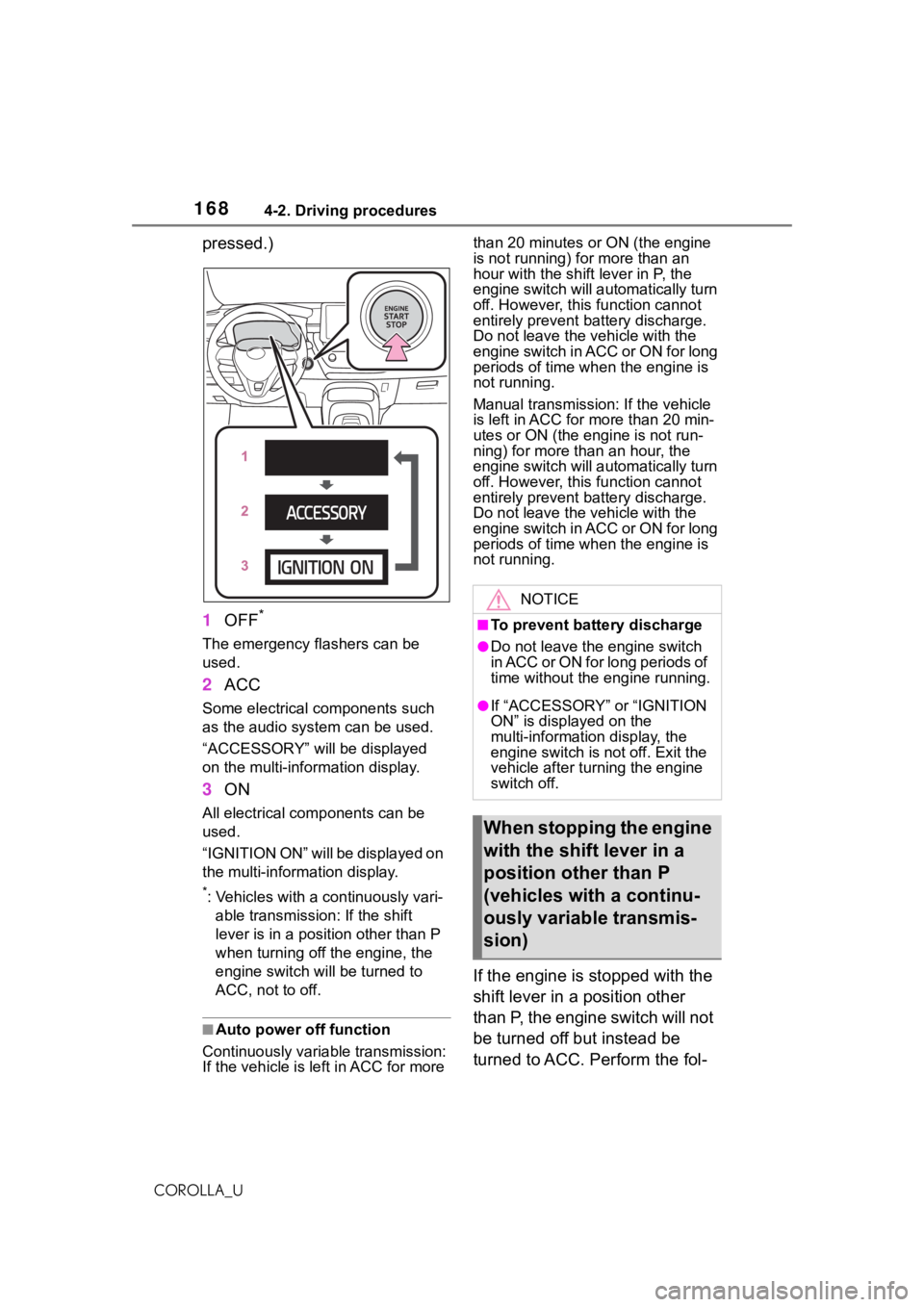
pressed.)
1OFF
*
The emergency flashers can be
used.
2ACC
Some electrical components such
as the audio system can be used.
“ACCESSORY” will be displayed
on the multi-information display.
3ON
All electrical com ponents can be
used.
“IGNITION ON” will be displayed on
the multi-information display.
*: Vehicles with a continuously vari- able transmissio n: If the shift
lever is in a position other than P
when turning off the engine, the
engine switch will be turned to
ACC, not to off.
■Auto power off function
Continuously variable transmission:
If the vehicle is le ft in ACC for more than 20 minutes or ON (the engine
is not running) for more than an
hour with the shif
t lever in P, the
engine switch will automatically turn
off. However, this function cannot
entirely prevent b attery discharge.
Do not leave the vehicle with the
engine switch in ACC or ON for long
periods of time when the engine is
not running.
Manual transmission: If the vehicle
is left in ACC for more than 20 min-
utes or ON (the engine is not run-
ning) for more than an hour, the
engine switch will automatically turn
off. However, this function cannot
entirely prevent b attery discharge.
Do not leave the vehicle with the
engine switch in ACC or ON for long
periods of time when the engine is
not running.
If the engine is stopped with the
shift lever in a position other
than P, the engine switch will not
be turned off but instead be
turned to ACC. Perform the fol-
NOTICE
■To prevent battery discharge
●Do not leave the engine switch
in ACC or ON for long periods of
time without the engine running.
●If “ACCESSORY” or “IGNITION
ON” is displayed on the
multi-information display, the
engine switch is not off. Exit the
vehicle after turning the engine
switch off.
When stopping the engine
with the shift lever in a
position other than P
(vehicles with a continu-
ously variable transmis-
sion)
Page 219 of 624
2194-5. Using the driving support systems
4
Driving
COROLLA_Uthe following cond
itions are met.
• Setting for “Sway Warning” in of the multi-information display is
set to “ON”. ( P.581)
• Vehicle speed is approximately 32
mph (50 km/h) or more.
• Width of traffic lane is approxi- mately 9.8 ft. ( 3 m) or more.
• No system malfunctions are detected. ( P.220)
●Lane centering function
This function oper ates when all of
the following cond itions are met.
• LTA is turned on.
• Setting for “Steering Assist” and
“Lane Center” in of the
multi-information di splay are set to
“ON”. ( P.581)
• This function recognizes white (yellow) lane lines or the position
of a preceding vehicle (except
when the preceding vehicle is
small, such as a motorcycle).
• The dynamic radar cruise control
with full-speed range is operating
in vehicle-to-vehic le distance con-
trol mode.
• Width of traffic lane is approxi- mately 10 to 13 ft. (3 to 4 m).
• Turn signal lever is not operated.
• Vehicle is not being driven around a sharp curve.
• No system malfunctions are
detected. ( P.220)
• Vehicle does not accelerate or decelerate by a fixed amount or
more.
• Steering wheel is not operated with a steering force level suitable
for changing lanes.
• ABS, VSC, TRAC and PCS are not operating.
• TRAC or VSC is not turned off.
• Hands off steering wheel warning
is not displayed. ( P.220)
• The vehicle is being driven in the
center of a lane.
• Steering assist function is not operating.
■Temporary cancelation of func-
tions
●When operation conditions are no
longer met, a function may be
temporarily canceled. However,
when the operation conditions are
met again, operation of the func-
tion is automatically restored.
( P.218)
●If the operation conditions
( P.216) are no longer met while
the lane centering function is
operating, the buzzer may sound
to indicate that the function has
been temporarily canceled.
■Steering assist function/lane
centering function
●Depending on the vehicle speed,
lane departure situation, road con-
ditions, etc., the driver may not
feel the function is operating or
the function may not operate at
all.
●The steering control of the func-
tion is overridden by the driver’s
steering wheel operation.
●Do not attempt to test the opera-
tion of the steering assist function.
■Lane departure alert function
●The warning buzzer may be diffi-
cult to hear due to external noise,
audio playback, etc.
●If the edge of the course* is not
clear or straight, the lane depar-
ture alert function may not oper-
ate.
●Vehicle with BSM: It may not be
possible for the system to deter-
mine if there is a danger of a colli-
sion with a vehicl e in an adjacent
lane.
●Do not attempt to test the opera-
tion of the lane departure alert
function.
*: Boundary between asphalt and
the side of the road, such as
grass, soil, or a curb
Page 227 of 624
2274-5. Using the driving support systems
4
Driving
COROLLA_U
*: Boundary between asphalt and the side of the road, such as
grass, soil, or a curb
■Operation conditions of each
function
●Lane departure alert function
This function oper ates when all of
the following cond itions are met.
• LDA is turned on.
• Vehicle speed is approximately 32 mph (50 km/h) or more.
• System recognizes white (yellow)
lane lines or a course
*. (When a
white [yellow] line or course* is
recognized on only one side, the
system will operat e only for the
recognized side.)
• Width of traffic lane is approxi-
mately 9.8 ft. ( 3 m) or more.
• Turn signal lever is not operated.
(Vehicle with BSM : Except when
another vehicle is in the lane on
the side where the turn signal was
operated)
• Vehicle is not being driven around a sharp curve.
• No system malfunctions are
detected. ( P.228)
*: Boundary between asphalt and
the side of the road, such as
grass, soil, or a curb
●Steering assist function
This function oper ates when all of
the following conditions are met in
addition to the operation conditions
for the lane departure alert function.
• Setting for “Steering Assist” in of the multi-information display is
set to “ON”. ( P.581)
• Vehicle is not accelerated or decelerated by a fixed amount or
more.
• Steering wheel is not operated with a steering force level suitable
for changing lanes.
• ABS, VSC, TRAC and PCS are not operating. • TRAC or VSC is not turned off.
• Hands off steering wheel warning
is not displayed. ( P.228)
●Vehicle sway warning function
This function operates when all of
the following conditions are met.
• Setting for “Sway Warning” in of the multi-information display is
set to “ON”. ( P.581)
• Vehicle speed is approximately 32
mph (50 km/h) or more.
• Width of traffic lane is approxi- mately 9.8 ft. (3 m) or more.
• No system malfunctions are detected. ( P.228)
■Temporary cancelation of func-
tions
When operation conditions are no
longer met, a func tion may be tem-
porarily canceled. However, when
the operation conditions are met
again, operation of the function is
automatically restored. ( P.227)
■Steering assist function
●Depending on the vehicle speed,
lane departure situation, road con-
ditions, etc., the driver may not
feel the function is operating or
the function may not operate at
all.
●The steering control of the func-
tion is overridden by the driver’s
steering wheel operation.
●Do not attempt to test the opera-
tion of the steering assist function.
■Lane departure alert function
●The warning buzzer may be diffi-
cult to hear due to external noise,
audio playback, etc.
●If the edge of the course* is not
clear or straight, the lane depar-
ture alert function may not oper-
ate.
●Vehicle with BSM: It may not be
possible for the system to deter-
mine if there is a danger of a colli-
sion with a vehicl e in an adjacent
lane.