cruise control TOYOTA COROLLA 2021 (in English) Owner's Manual
[x] Cancel search | Manufacturer: TOYOTA, Model Year: 2021, Model line: COROLLA, Model: TOYOTA COROLLA 2021Pages: 624, PDF Size: 20.3 MB
Page 241 of 624
2414-5. Using the driving support systems
4
Driving
COROLLA_U
WA R N I N G
●Set the speed appropriately
depending on the speed limit,
traffic flow, road conditions,
weather conditions, etc. The
driver is responsible for check-
ing the set speed.
●Even when the system is func-
tioning normally, the condition of
the preceding vehicle as
detected by the system may dif-
fer from the condition observed
by the driver. Therefore, the
driver must always remain alert,
assess the danger of each situ-
ation and drive safely. Relying
solely on this system or assum-
ing the system ensures safety
while driving can lead to an
accident, resulting in death or
serious injury.
●Switch the dynamic radar cruise
control setting to off, using the
cruise control main switch when
not in use.
■Cautions regarding the driv-
ing assist systems
Observe the following precau-
tions, as there are limitations to
the assistance provided by the
system. Failure to do so may
cause an accident resulting in
death or serious injury.
●Assisting the driver to measure
following distance
The dynamic radar cruise control
is only intended to help the driver
in determining the following dis-
tance between the driver’s own
vehicle and a designated vehicle
traveling ahead. It is not a mecha-
nism that allows careless or inat-
tentive driving, a nd it is not a
system that can assist the driver
in low-visibility conditions.
It is still necessary for driver to
pay close attention to the vehi-
cle’s surroundings.
●Assisting the driver to judge
proper following distance
The dynamic radar cruise control
determines whether the following
distance between the driver’s own
vehicle and a desi gnated vehicle
traveling ahead is within a set
range. It is not capable of making
any other type o f judgement.
Therefore, it is absolutely neces-
sary for the driver to remain vigi-
lant and to dete rmine whether or
not there is a possibility of danger
in any given situation.
●Assisting the driver to operate
the vehicle
The dynamic radar cruise control
does not include functions which
will prevent or a void collisions
with vehicles ahead of your vehi-
cle. Therefore, if there is ever any
possibility of danger, the driver
must take immediate and direct
control of the vehicle and act
appropriately in order to ensure
the safety of a ll involved.
■Situations unsuitable for
dynamic radar cruise control
Do not use dynamic radar cruise
control in any of the following situ-
ations. Doing so may result in
inappropriate speed control and
could cause an accident resulting
in death or serious injury.
●Roads where there are pedes-
trians, cyclists, etc.
●In heavy traffic
●On roads with sharp bends
●On winding roads
●On slippery roads, such as
those covered with rain, ice or
snow
Page 244 of 624
2444-5. Using the driving support systems
COROLLA_UThe system accelerates until the
set speed is reached. The system then
returns to constan t speed cruising.
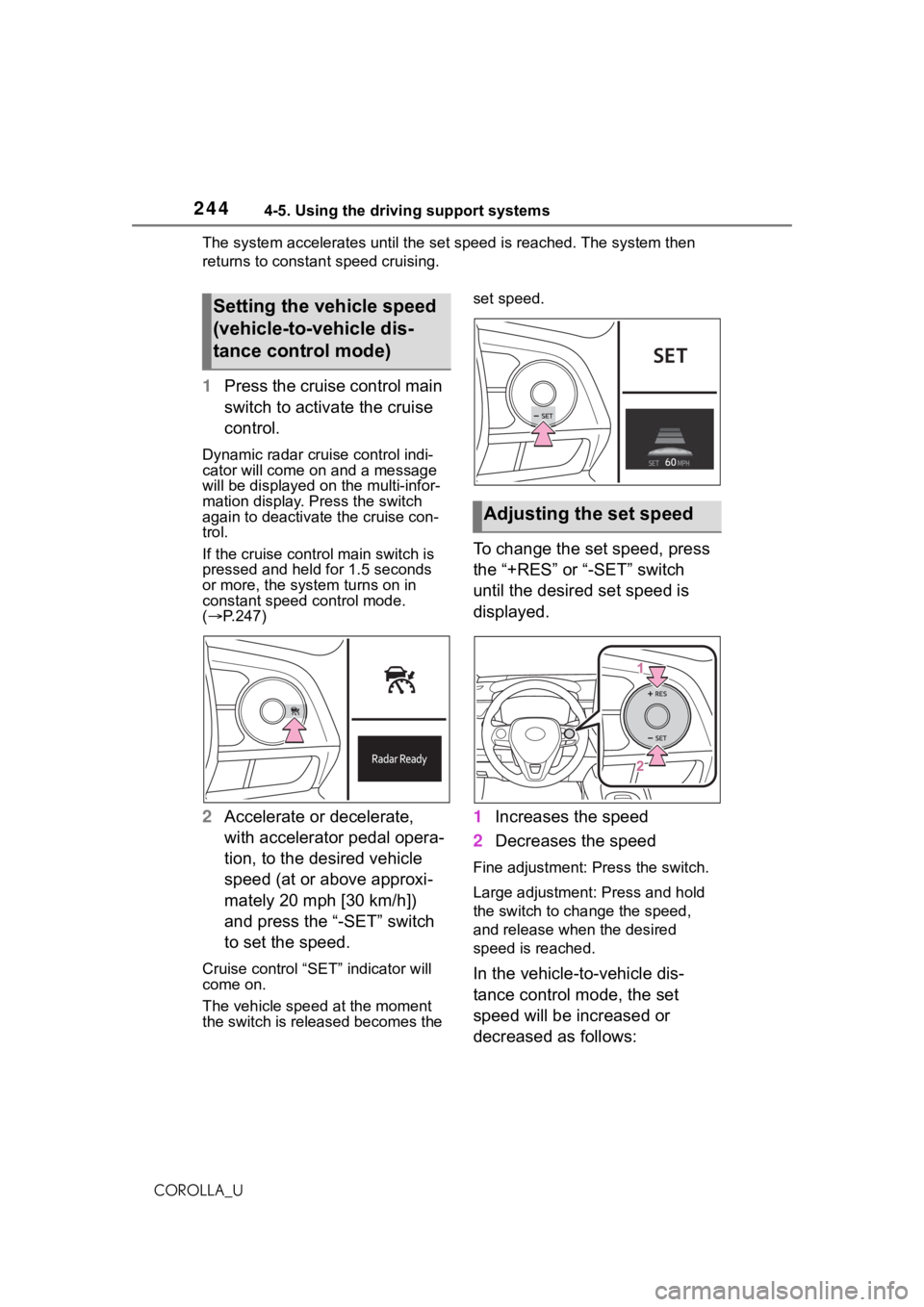
1Press the cruise control main
switch to activate the cruise
control.
Dynamic radar cruise control indi-
cator will come on and a message
will be displayed on the multi-infor-
mation display. Press the switch
again to deactivate the cruise con-
trol.
If the cruise cont rol main switch is
pressed and held for 1.5 seconds
or more, the syste m turns on in
constant speed control mode.
( P.247)
2 Accelerate or decelerate,
with accelerator pedal opera-
tion, to the desired vehicle
speed (at or above approxi-
mately 20 mph [30 km/h])
and press the “-SET” switch
to set the speed.
Cruise control “SET” indicator will
come on.
The vehicle speed at the moment
the switch is released becomes the set speed.
To change the set speed, press
the “+RES” or “-SET” switch
until the desired set speed is
displayed.
1
Increases the speed
2 Decreases the speed
Fine adjustment: Press the switch.
Large adjustment: Press and hold
the switch to cha nge the speed,
and release when the desired
speed is reached.
In the vehicle-to-vehicle dis-
tance control mode, the set
speed will be increased or
decreased as follows:
Setting the vehicle speed
(vehicle-to-vehicle dis-
tance control mode)
Adjusting the set speed
Page 246 of 624
2464-5. Using the driving support systems
COROLLA_U
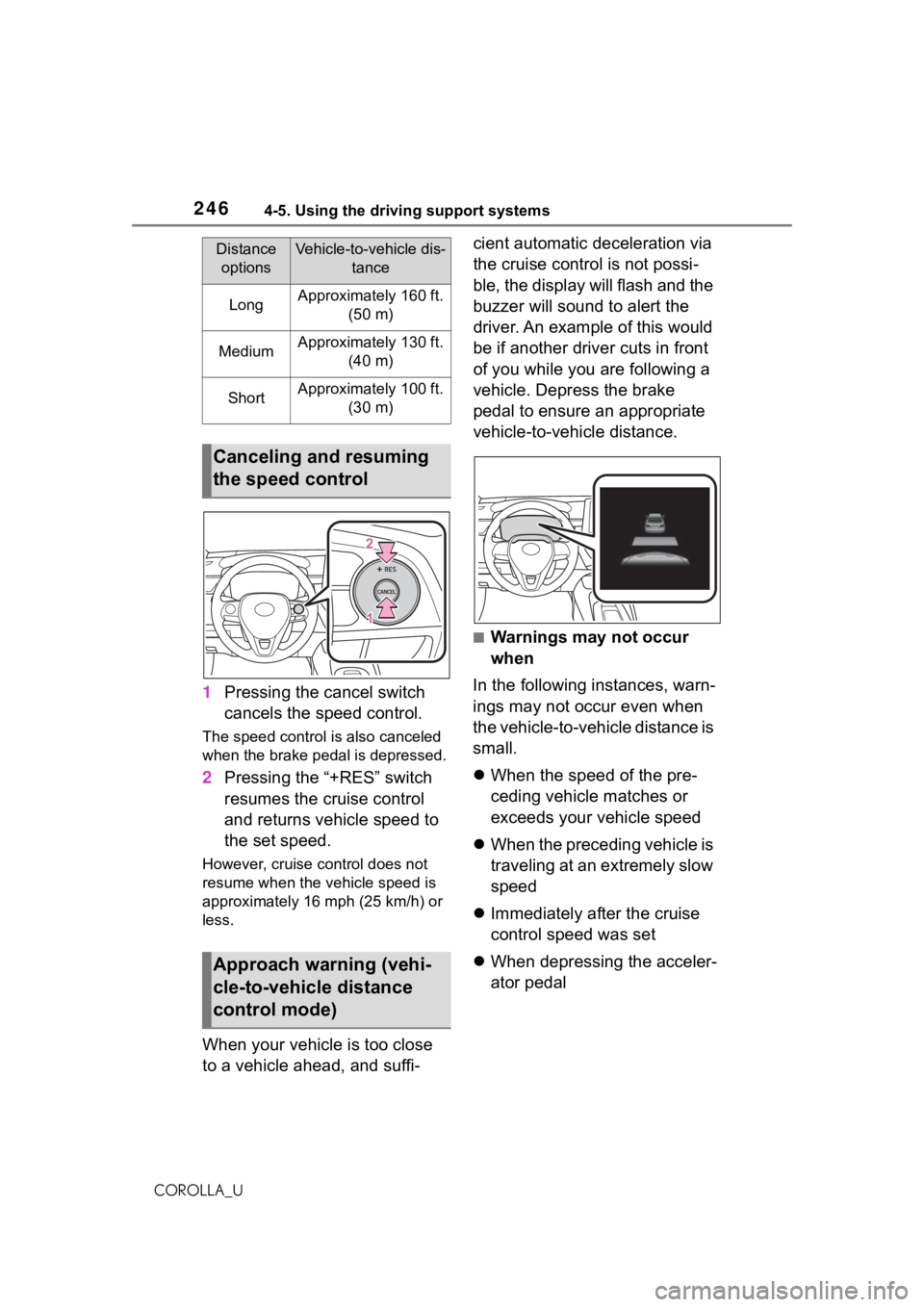
1Pressing the cancel switch
cancels the speed control.
The speed control is also canceled
when the brake pedal is depressed.
2Pressing the “+RES” switch
resumes the cruise control
and returns vehicle speed to
the set speed.
However, cruise control does not
resume when the vehicle speed is
approximately 16 mph (25 km/h) or
less.
When your vehicle is too close
to a vehicle ahead, and suffi- cient automatic deceleration via
the cruise control is not possi-
ble, the display will flash and the
buzzer will sound to alert the
driver. An example of this would
be if another driver cuts in front
of you while you are following a
vehicle. Depress the brake
pedal to ensure an appropriate
vehicle-to-vehicle distance.
■Warnings may not occur
when
In the following instances, warn-
ings may not occur even when
the vehicle-to-vehicle distance is
small.
When the speed of the pre-
ceding vehicle matches or
exceeds your vehicle speed
When the preceding vehicle is
traveling at an extremely slow
speed
Immediately after the cruise
control speed was set
When depressing the acceler-
ator pedal
Distance
optionsVehicle-to-vehicle dis- tance
LongApproximately 160 ft. (50 m)
MediumApproximately 130 ft. (40 m)
ShortApproximately 100 ft. (30 m)
Canceling and resuming
the speed control
Approach warning (vehi-
cle-to-vehicle distance
control mode)
Page 247 of 624
2474-5. Using the driving support systems
4
Driving
COROLLA_U
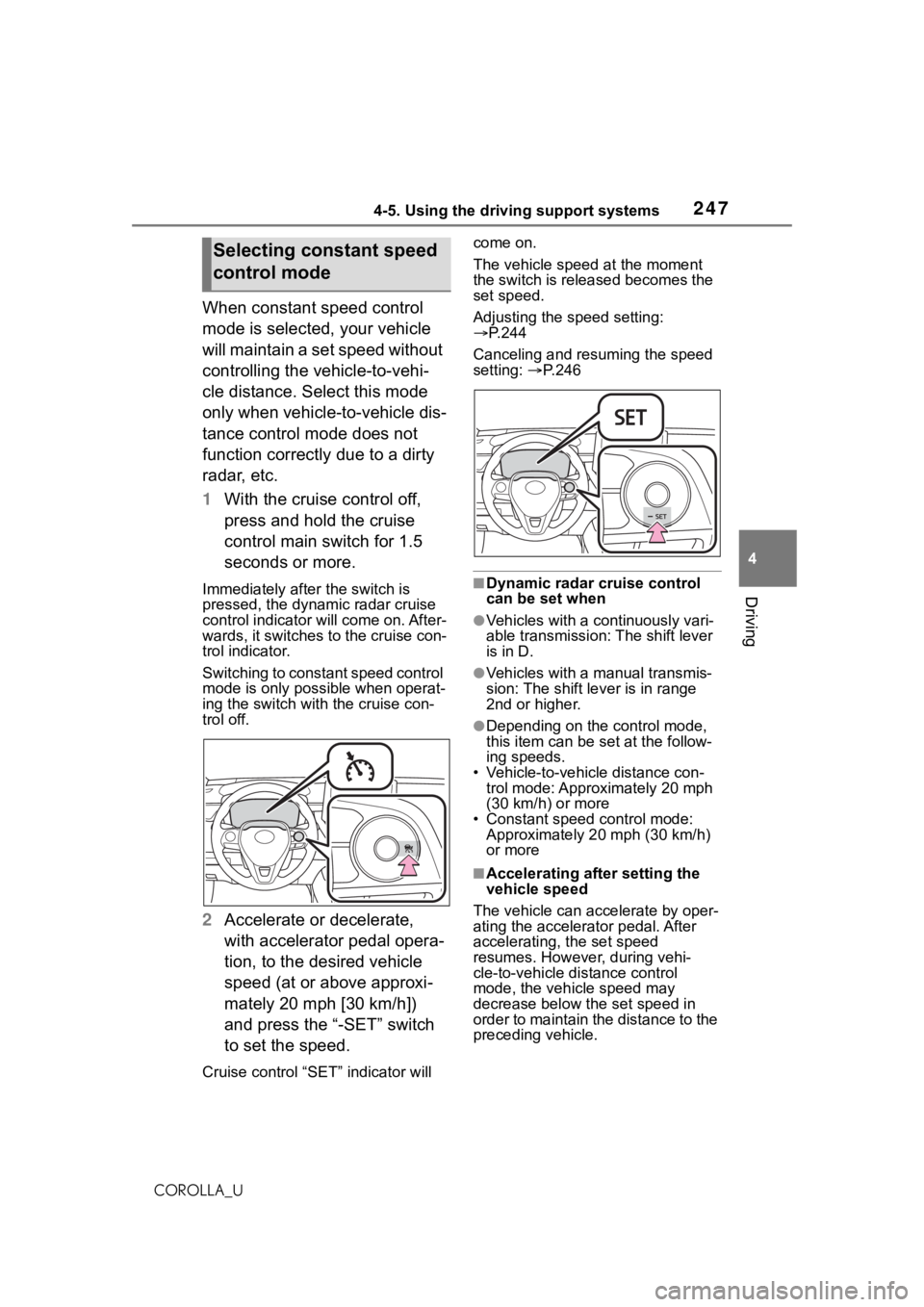
When constant speed control
mode is selected, your vehicle
will maintain a set speed without
controlling the vehicle-to-vehi-
cle distance. Select this mode
only when vehicle-to-vehicle dis-
tance control mode does not
function correctly due to a dirty
radar, etc.
1With the cruise control off,
press and hold the cruise
control main switch for 1.5
seconds or more.
Immediately after the switch is
pressed, the dynamic radar cruise
control indicator will come on. After-
wards, it switches to the cruise con-
trol indicator.
Switching to constant speed control
mode is only possible when operat-
ing the switch wit h the cruise con-
trol off.
2 Accelerate or decelerate,
with accelerator pedal opera-
tion, to the desired vehicle
speed (at or above approxi-
mately 20 mph [30 km/h])
and press the “-SET” switch
to set the speed.
Cruise control “SET” indicator will come on.
The vehicle speed at the moment
the switch is released becomes the
set speed.
Adjusting the speed setting:
P.244
Canceling and resuming the speed
setting: P. 2 4 6
■Dynamic radar cruise control
can be set when
●Vehicles with a continuously vari-
able transmission: The shift lever
is in D.
●Vehicles with a manual transmis-
sion: The shift lever is in range
2nd or higher.
●Depending on the control mode,
this item can be set at the follow-
ing speeds.
• Vehicle-to-vehicle distance con- trol mode: Approximately 20 mph
(30 km/h) or more
• Constant speed control mode: Approximately 20 mph (30 km/h)
or more
■Accelerating after setting the
vehicle speed
The vehicle can a ccelerate by oper-
ating the accelera tor pedal. After
accelerating, the set speed
resumes. However, during vehi-
cle-to-vehicle distance control
mode, the vehicle speed may
decrease below the set speed in
order to maintain the distance to the
preceding vehicle.
Selecting constant speed
control mode
Page 248 of 624

2484-5. Using the driving support systems
COROLLA_U
■Shift position selection (vehi-
cles with a manual transmis-
sion)
Select a shift position according to
the vehicle speed. If the engine
speed is too high or too low, control
may be automatically canceled.
■Automatic cancelation of vehi-
cle-to-vehicle d istance control
mode
Vehicle-to-vehicle distance control
mode is automatically canceled in
the following situations.
●Actual vehicle speed falls below
approximately 16 mph (25 km/h).
●VSC is activated.
●TRAC is activated for a period of
time.
●When the VSC or TRAC system is
turned off.
●The sensor cannot detect cor-
rectly because it is covered in
some way.
●Pre-collision braking is activated.
●Vehicles with a manual transmis-
sion: When the shif t lever is in N
or the clutch pedal is depressed
for a certain amount of time or
more.
If vehicle-to-vehicle distance control
mode is automatically canceled for
any reasons other than the above,
there may be a malfunction in the
system. Contact your Toyota dealer.
■Automatic cancelation of con-
stant speed control mode
Constant speed control mode is
automatically cance led in the follow-
ing situations:
●Actual vehicle speed is more than
approximately 10 mph (16 km/h)
below the set vehicle speed.
●Actual vehicle speed falls below
approximately 20 mph (30 km/h).
●VSC is activated.
●TRAC is activated for a period of
time.
●When the VSC or TRAC system is
turned off.
●Pre-collision braking is activated.
●Vehicles with a manual transmis-
sion: When the shift lever is in N
or the clutch pedal is depressed
for a certain amount of time or
more.
If constant speed control mode is
automatically canceled for any rea-
sons other than the above, there
may be a malfunction in the system.
Contact your Toyota dealer.
■Brake operation
A brake operation sound may be
heard and the brake pedal response
may change, but these are not mal-
functions.
■Warning messages and buzzers
for dynamic radar cruise con-
trol
Warning messages and buzzers are
used to indicate a system malfunc-
tion or to inform the driver of the
need for caution while driving. If a
warning message is shown on the
multi-information display, read the
message and follow the instructions.
( P.201, 521)
■When the sensor may not be
correctly detecting the vehicle
ahead
In the case of the following and
depending on the conditions, oper-
ate the brake pedal when decelera-
tion of the system is insufficient or
operate the accelerator pedal when
acceleration is required.
As the sensor may not be able to
correctly detect th ese types of vehi-
cles, the approach warning
( P.246) may not be activated.
●Vehicles that cut in suddenly
●Vehicles traveling at low speeds
●Vehicles that are not moving in the
same lane
●Vehicles with small rear ends
(trailers with no load on board,
Page 522 of 624

5228-2. Steps to take in an emergency
COROLLA_Usteering control) (if equipped)
●Automatic High Beam
●RSA (Road Sign Assist) (if
equipped)
●Dynamic radar cruise control with
full-speed range (if equipped)
●Dynamic radar cruise control (if
equipped)
■If “Radar Cruise Control
Unavailable S
ee Owner's Man-
ual” is displayed
The dynamic radar cruise control
with full-speed range system or
dynamic radar cruise control system
is suspended temporarily or until the
problem shown in the message is
resolved. (causes a nd coping meth-
ods: P.201)
■If “Radar Cruise Control
Unavailable” is displayed
The dynamic radar cruise control
with full-speed range system or
dynamic radar cruise control system
cannot be used temporarily. Use the
system when it becomes available
again.
■If “Maintenance Required
Soon” is displayed
Indicates that all maintenance
according to the dr iven distance on
the maintenance schedule
* should
be performed soon.
Comes on approximately 4500
miles (7200 km) after the message
has been reset. If necessary, per-
form maintenance. Please reset the
message after the maintenance is
performed. ( P.458)
*: Refer to the separate “Scheduled
Maintenance” or “Owner’s Man-
ual Supplement” for the mainte-
nance interval applicable to your
vehicle.
■If “Maintenance Required Visit
Your Dealer” is displayed
Indicates that all maintenance is
required to correspond to the driven distance on the maintenance sched-
ule
*.
Comes on approximately 5000
miles (8000 km) after the message
has been reset. (The indicator will
not work properly unless the mes-
sage has been rese t.) Perform the
necessary maintenance. Please
reset the message after the mainte-
nance is performed. ( P.458)
*: Refer to the separate “Scheduled
Maintenance” or “Owner’s Man-
ual Supplement” for the mainte-
nance interval applicable to your
vehicle.
■If a message that indicates the
need for visiting your Toyota
dealer is displayed
The system or part shown on the
multi-information di splay is malfunc-
tioning. Have the vehicle inspected
by your Toyota dealer immediately.
■If a message that indicates the
need for referring to Owner’s
Manual is displayed
●If “Engine Coolant Temp High” is
displayed, follow t he instructions
accordingly. ( P.550)
●If the following message is dis-
played on the multi-information
display, it may indicate a malfunc-
tion. Have the vehicle inspected
by your Toyota dealer immedi-
ately.
• “Smart Key System Malfunction”
●If any of the following messages
are displayed on the multi-infor-
mation display, it may indicate a
malfunction. Immediately stop the
vehicle and contact your Toyota
dealer.
• “Braking Power Low”
• “Charging System Malfunction”
• “Oil Pressure Low”
Page 541 of 624
5418-2. Steps to take in an emergency
8
When trouble arises
COROLLA_U
WA R N I N G
■When the compact spare tire
is attached
The vehicle speed may not be
correctly detecte d, and the follow-
ing systems may not operate cor-
rectly:
• ABS & Brake assist
•VSC
•TRAC
• Automatic High Beam
• AFS (Adaptive Front-lighting System) (if equipped)
• Dynamic radar cruise control with full-speed range (if
equipped)
• Dynamic radar cruise control (if equipped)
•EPS
• PCS (Pre-Collision System)
• LDA (Lane Departure Alert with steering control) (if equipped)
• LTA (Lane Tracing Assist) (if equipped)
• Tire pressure warning system (if equipped)
• BSM (Blind Spot Monitor) (if equipped)
• RCTA (Rear Cross Traffic Alert) function (if equipped)
• Rear view monitor system
• Navigation system (if equipped)
■Speed limit when using the
compact spare tire
Do not drive at speeds in excess
of 50 mph (80 km/h) when a com-
pact spare tire is installed on the
vehicle.
The compact spare tire is not
designed for driving at high
speeds. Failure to observe this
precaution may lead to an acci-
dent causing death or serious
injury.
■After using the tools and jack
Before driving, ma ke sure all the
tools and jack are securely in
place in their storage location to
reduce the possibility of personal
injury during a collision or sudden
braking.
NOTICE
■Be careful when driving over
bumps with the compact
spare tire installed on the
vehicle.
The vehicle becomes lower when
driving with the compact spare tire
compared to when driving with
standard tires. Be careful when
driving over uneven road sur-
faces.
■Driving with tire chains and
the compact spare tire
Do not fit tire chains to the com-
pact spare tire. Tire chains may
damage the vehicle body and
adversely affect d riving perfor-
mance.
■When replacing the tires
(vehicles with a tire pressure
warning system)
When removing or fitting the
wheels, tires or th e tire pressure
warning valve and transmitter,
contact your Toyota dealer as the
tire pressure warning valve and
transmitter may be damaged if not
handled correctly.
Page 609 of 624
609Alphabetical Index
COROLLA_URiding with children ................ 47
Types of child restraint system
installation met hod ............... 50
Using an anchor bracket ........ 68
Child safety Airbag precautions ................. 36
Battery precautions ...... 473, 550
Child restraint system............. 50
Heated steering wheel and seat
heater precautions ............. 426
How your child should wear the seat belt................................ 28
Moon roof precau tions ......... 146
Power window lock switch.... 144
Power window precautions .. 143
Rear door child-protectors.... 121
Removed electronic key battery precautions......................... 491
Seat belt extender precautions ............................................. 28
Seat belt precautions ............. 47
Trunk precautions................. 122
Child-protectors ..................... 121
Cleaning Exterior ................................. 452
Interior .................................. 454
Radar sensor........................ 197
Seat belts ............................. 454
Wheels and wheel ornaments........................................... 452
Clock ............... 91, 93, 95, 98, 322
Coat hooks .............................. 443
Command list ......................... 367
Condenser .............................. 471
Console box ............................ 432
Consumption screen.............. 106
Continuously variable transmis- sion ................................ 169, 172If the shift lever cannot be shifted from P......................... 171, 173
M mode ................................ 175
Paddle shift switches.... 174, 175 Cooling system .......................470
Engine overheating ..............550
Cruise control Dynamic radar cruise control 240
Dynamic radar cruise control with full-speed range ..........229
Cup holders.............................431
Current fuel consumption......102
Curtain shield airbags ..............31
Customizable featu res ...........581
D
Daytime running light system186
DCM .................................406, 407
Defogger
Outside rear view mirrors ...418, 422
Rear window.................418, 422
Windshield ....................417, 422
Dimensions .............................556
Dinghy towing .........................162
Display Dynamic radar cruise control 240
Dynamic radar cruise control with full-speed range ..........229
LDA (Lane Departure Alert with steering control)..................226
LTA (Lane Tracing Assist) .....217
Multi-information display.......100
RCTA ....................................258
Warning message.................521
Display change button .......92, 97
Do-it-yourself maintenance ...458
Door lock Doors .................................... 117
Key ....................................... 118
Smart key system .................125
Wireless remote control........ 112
Doors Automatic door locking and unlocking system ................121
Door glasses ........................142
Page 610 of 624
610Alphabetical Index
COROLLA_UDoor lock .............................. 117
Open door warning buzzer . 119,
121
Outside rear view mirrors ..... 140
Rear door child-protectors.... 121
Side doors ............................ 117
Drive distance ......................... 104
Drive information ................... 104
Drive-start control .................. 152
Driving Break-in tips ......................... 152
Correct driving posture ........... 25
Driving mode select switch... 271
Procedures ........................... 150
Winter drive tips ................... 277
Driving information display ... 101
Driving range .......................... 102
Driving support system informa- tion display ........................... 103
Dynamic radar cruise control 240 Warning message ................ 248
Dynamic radar cruise control with full-speed range ........... 229Warning message ................ 238
E
Eco Driving Indicator ............. 102
Eco Driving Indicator Light ... 102
EDR (Event data recorder)......... 9
Elapsed time ........................... 104
Electric Power Steering (EPS) ............................................... 272Warning light ........................ 514
Electronic key ......................... 110 Battery-saving function......... 126
If the electronic key does not operate properly ................. 544
Replacing the battery ........... 489
Emergency flashers ............... 502
Emergency tire puncture repair kit ........................................... 523 Emergency, in case of
If a warning buzzer sounds .. 511
If a warning light turns on ..... 511
If a warning message is dis-played .................................521
If the battery is d ischarged ...546
If the electronic key does not operate properly .................544
If the engine will not start......542
If the vehicle is trapped in rising water...................................504
If you have a flat tire .....523, 534
If you lose your keys.............544
If you think something is wrong ...........................................509
If your vehicle becomes stuck ...........................................553
If your vehicle has to be stopped in an emergency .................502
If your vehicle needs to be towed ...........................................505
If your vehicle ove rheats ......550
Engine ACCESSORY mode . ............167
Compartment........................466
Engine switch ...............163, 164
Fuel pump shut off system ...510
Hood .....................................464
How to start the engine 163, 164
Identification number ............557
If the engine will not start......542
If your vehicle has to be stopped in an emergency .................502
Ignition switch (engine switch) ...................................163, 164
Overheating ..........................550
Tachometer.......................91, 95
Engine coolant Capacity ...............................561
Checking ..............................470
Preparing and checking before winter ..................................277
Page 614 of 624
614Alphabetical Index
COROLLA_UManual air conditioning system
............................................... 416
Manual transmission ............. 176 iMT ....................................... 178
Media button (Menu screen).. 285
Menu icons ............................. 100
Menu screen ........................... 285 Menu screen operation ........ 285
Meter Clock ................................ 91, 95
Indicators................................ 88
Instrument panel light control93, 98
Meter control switches ......... 101
Meters .............................. 91, 95
Multi-information display ...... 100
Settings ................................ 104
Warning lights....................... 511
Warning message ................ 521
Microphone ............................. 376
Mirrors Inside rear view mirror.......... 139
Outside rear view mirror defog-gers ............................ 418, 422
Outside rear view mirrors ..... 140
Vanity mirrors ....................... 442
Mobile Assistant ..................... 371 Connectable devices and avail-able functions ..................... 371
Mobile Assistant operation ... 371
Moon roof Door lock linked moon roof oper-ation ................................... 145
Jam protection function ........ 145
Operation ............................. 145
Multi-information display Audio system-linked display . 104
Clock ................................ 93, 98
Driving information display ... 101
Driving support system informa-tion display ......................... 103
Dynamic radar cruise control 240 Dynamic radar cruise control
with full-speed range ..........229
Eco Driving Indicator ............102
Fuel economy .......................102
LDA (Lane Departure Alert with steering control)..................226
LTA (Lane Tracing Assist) .....217
Menu icons ...........................100
Meter control switches..........101
Navigation system-linked display ...........................................103
Settings ................................104
Tire pressure ...... ..................477
Vehicle information display ...104
Warning message.................521
N
Navigation system-linked display ...............................................103
Noise from under ve hicle...........7
O
Odometer.............................92, 97
Odometer and trip meter display
Display change button ......92, 97
Display items ....................92, 97
Oil Engine oil......................558, 559
Manual transmission ............562
Open trays ...............................432
Opener Fuel filler door.......................194
Hood .....................................464
Trunk ....................................123
Outside rear view mirrors Adjustment ...........................140
BSM (Blind Spot M onitor) .....253
Folding..................................141
Outside rear view mirror defog- gers ............................418, 422
RCTA function.......................258