sat nav TOYOTA COROLLA 2021 Owners Manual (in English)
[x] Cancel search | Manufacturer: TOYOTA, Model Year: 2021, Model line: COROLLA, Model: TOYOTA COROLLA 2021Pages: 624, PDF Size: 20.3 MB
Page 201 of 624
2014-5. Using the driving support systems
4
Driving
COROLLA_U
■If a warning message is displayed on the multi-information display
A system may be tempor arily unavailable or there may be a malfu nction in
the system.
●In the following situations, perform the actions specified in t he table. When
the normal operating conditions are detected, the message will disappear
and the system will be come operational.
If the message does not disapp ear, contact your Toyota dealer.
SituationActions
When the area around a sensor is
covered with dirt, moisture (fogged
up, covered with condensation, ice,
etc.), or other foreign matterTo clean the part of the windshield in
front of the front camera, use the
windshield wipers or the windshield
defogger of the air conditioning sys-
tem ( P.417, 422).
Page 368 of 624
3685-11. Voice command system operation
COROLLA_U
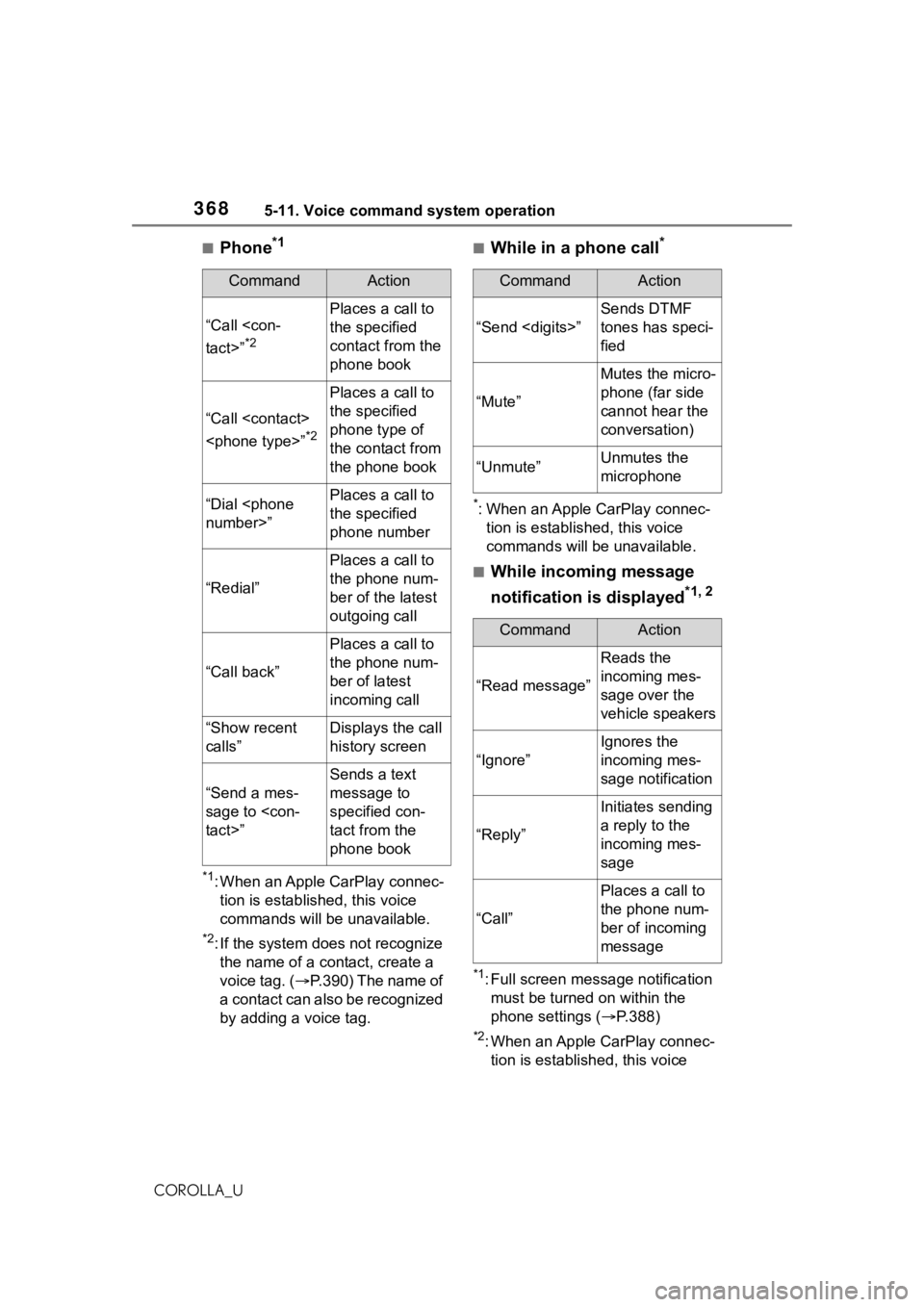
■Phone*1
*1: When an Apple CarPlay connec-tion is established, this voice
commands will be unavailable.
*2: If the system does not recognize the name of a con tact, create a
voice tag. ( P.390) The name of
a contact can also be recognized
by adding a voice tag.
■While in a phone call*
*: When an Apple CarPlay connec- tion is established, this voice
commands will be unavailable.
■While incoming message
notification is displayed
*1, 2
*1: Full screen message notification must be turned on within the
phone settings ( P.388)
*2: When an Apple CarPlay connec-
tion is established, this voice
CommandAction
“Call
*2
Places a call to
the specified
contact from the
phone book
“Call
*2
Places a call to
the specified
phone type of
the contact from
the phone book
“Dial
the specified
phone number
“Redial”
Places a call to
the phone num-
ber of the latest
outgoing call
“Call back”
Places a call to
the phone num-
ber of latest
incoming call
“Show recent
calls”Displays the call
history screen
“Send a mes-
sage to
Sends a text
message to
specified con-
tact from the
phone book
CommandAction
“Send
Sends DTMF
tones has speci-
fied
“Mute”
Mutes the micro-
phone (far side
cannot hear the
conversation)
“Unmute”Unmutes the
microphone
CommandAction
“Read message”
Reads the
incoming mes-
sage over the
vehicle speakers
“Ignore”
Ignores the
incoming mes-
sage notification
“Reply”
Initiates sending
a reply to the
incoming mes-
sage
“Call”
Places a call to
the phone num-
ber of incoming
message
Page 369 of 624
3695-11. Voice command system operation
5
Audio
COROLLA_Ucommands will be unavailable.
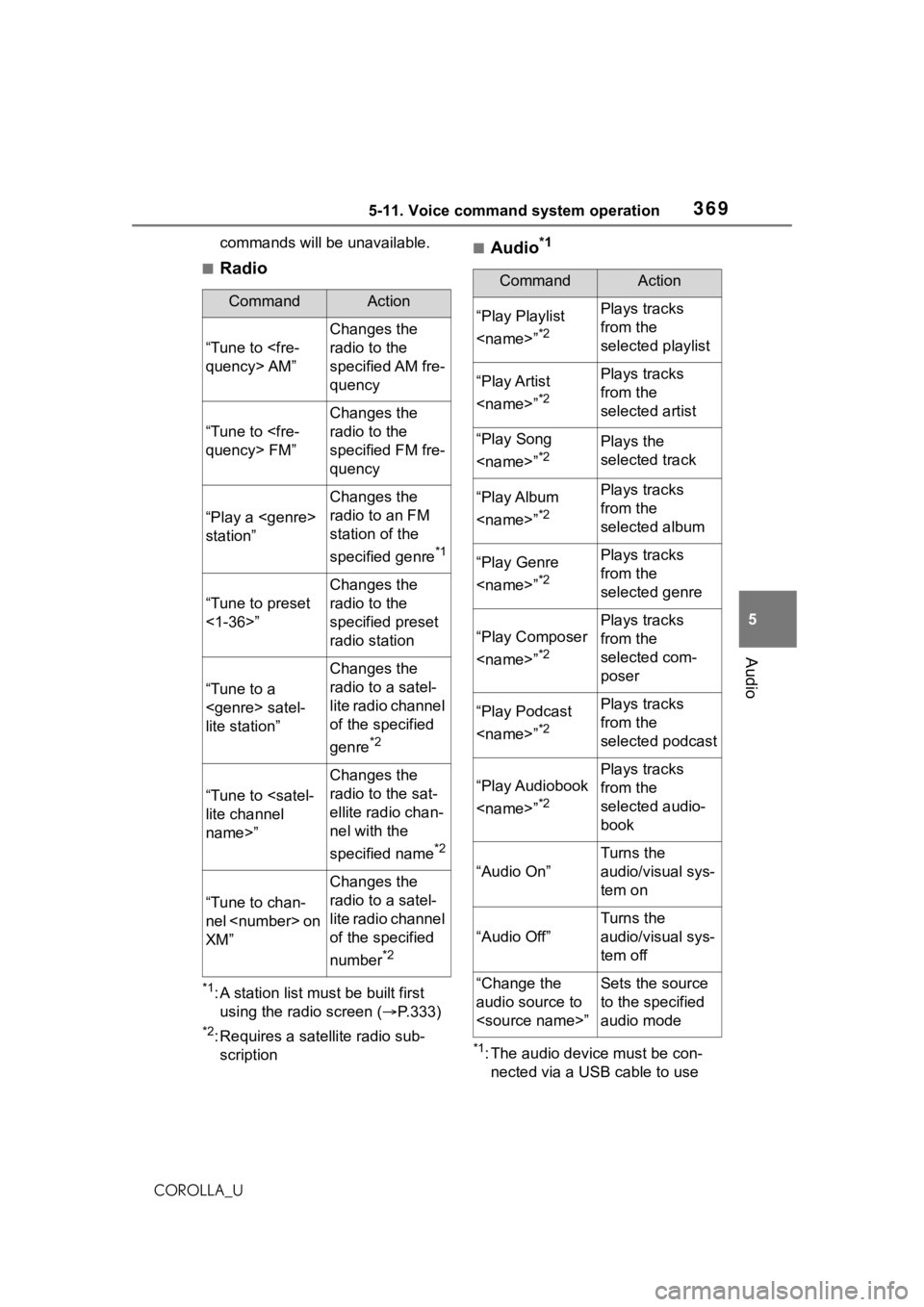
■Radio
*1: A station list must be built first
using the radio screen ( P.333)
*2: Requires a satellite radio sub-
scription
■Audio*1
*1: The audio device must be con-nected via a USB cable to use
CommandAction
“Tune to
Changes the
radio to the
specified AM fre-
quency
“Tune to
Changes the
radio to the
specified FM fre-
quency
“Play a
station”
Changes the
radio to an FM
station of the
specified genre
*1
“Tune to preset
<1-36>”
Changes the
radio to the
specified preset
radio station
“Tune to a
lite station”
Changes the
radio to a satel-
lite radio channel
of the specified
genre
*2
“Tune to
name>”
Changes the
radio to the sat-
ellite radio chan-
nel with the
specified name
*2
“Tune to chan-
nel
XM”
Changes the
radio to a satel-
lite radio channel
of the specified
number
*2
CommandAction
“Play Playlist
*2
Plays tracks
from the
selected playlist
“Play Artist
*2
Plays tracks
from the
selected artist
“Play Song
*2Plays the
selected track
“Play Album
*2
Plays tracks
from the
selected album
“Play Genre
*2
Plays tracks
from the
selected genre
“Play Composer
*2
Plays tracks
from the
selected com-
poser
“Play Podcast
*2
Plays tracks
from the
selected podcast
“Play Audiobook
*2
Plays tracks
from the
selected audio-
book
“Audio On”
Turns the
audio/visual sys-
tem on
“Audio Off”
Turns the
audio/visual sys-
tem off
“Change the
audio source to
to the specified
audio mode
Page 551 of 624
5518-2. Steps to take in an emergency
8
When trouble arises
COROLLA_U
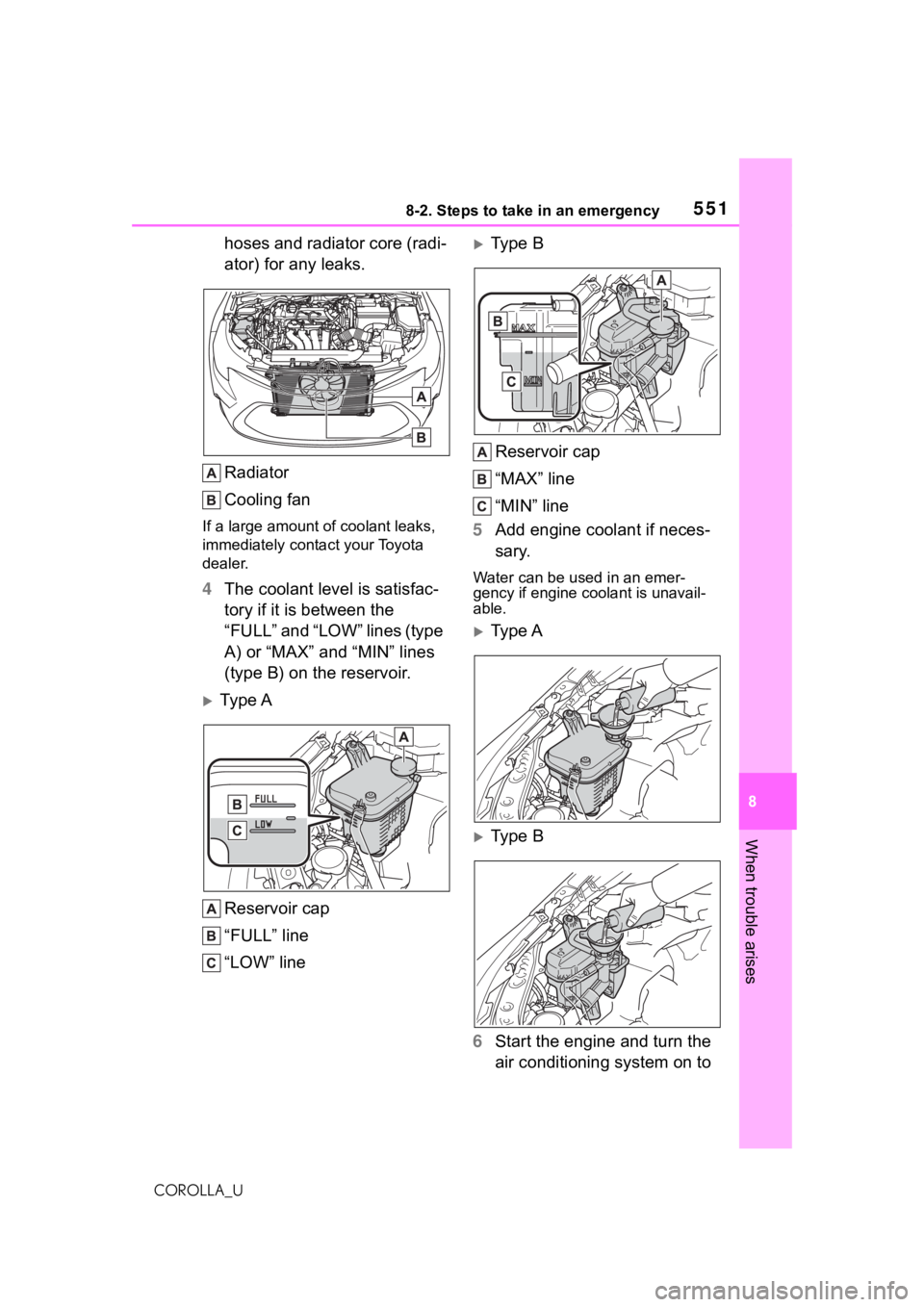
hoses and radiator core (radi-
ator) for any leaks.
Radiator
Cooling fan
If a large amount of coolant leaks,
immediately contact your Toyota
dealer.
4 The coolant level is satisfac-
tory if it is between the
“FULL” and “LOW” lines (type
A) or “MAX” and “MIN” lines
(type B) on the reservoir.
Ty p e A
Reservoir cap
“FULL” line
“LOW” line
Type BReservoir cap
“MAX” line
“MIN” line
5 Add engine coolant if neces-
sary.
Water can be used in an emer-
gency if engine coolant is unavail-
able.
Type A
Type B
6 Start the engine and turn the
air conditioning system on to