mirror TOYOTA COROLLA 2022 (in English) Owner's Guide
[x] Cancel search | Manufacturer: TOYOTA, Model Year: 2022, Model line: COROLLA, Model: TOYOTA COROLLA 2022Pages: 678, PDF Size: 147.24 MB
Page 383 of 678
381
6
6-1. Using the air conditioning system and defogger
Interior features
(decrease).
Pressing the on/off switch to turns off
the fan.
When the fan is off, pressing the on/off
switch or turning the fan speed control
switch clockwise will turn on the fan.
■Change the airflow mode
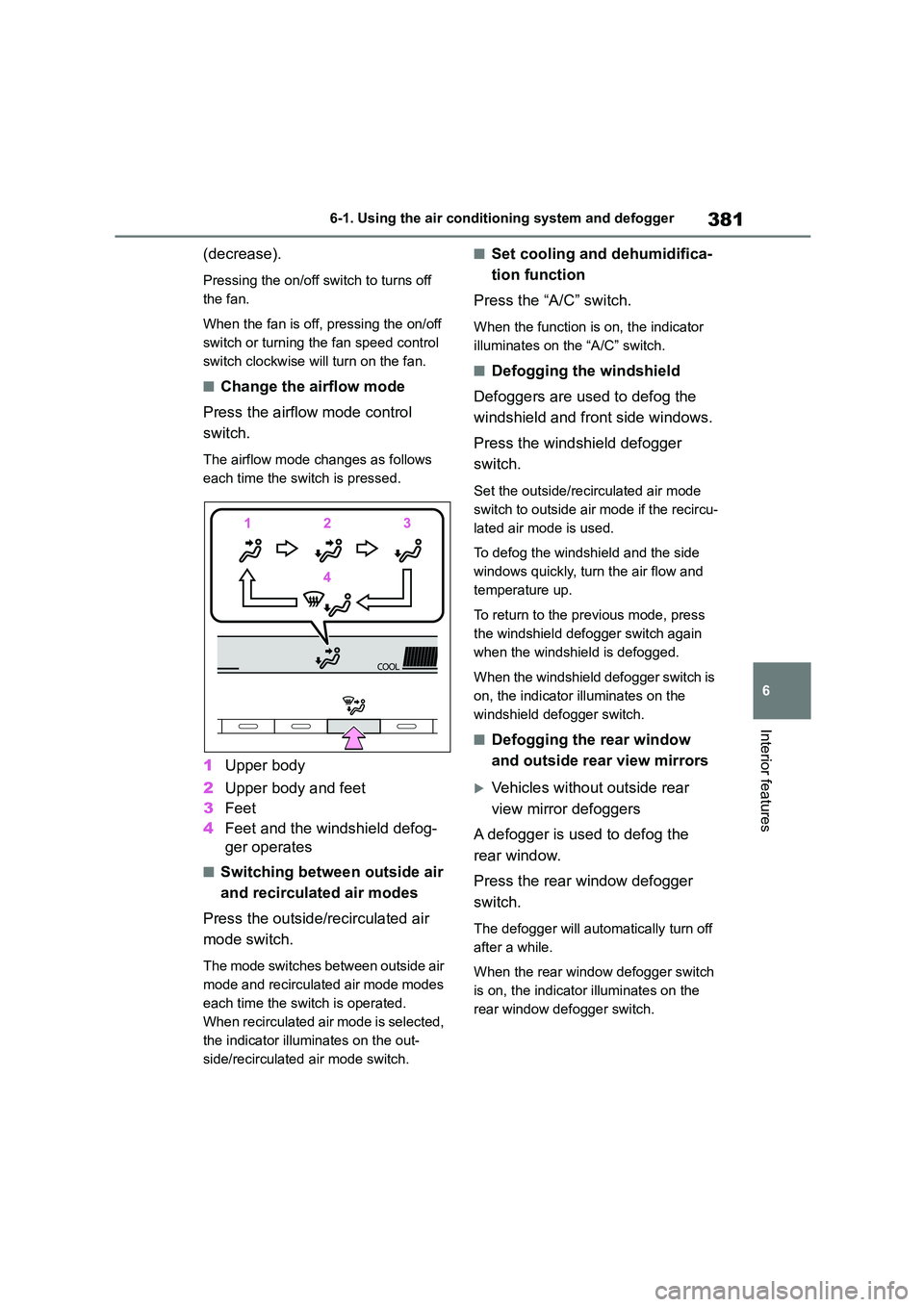
Press the airflow mode control
switch.
The airflow mode changes as follows
each time the sw itch is pressed.
1Upper body
2 Upper body and feet
3 Feet
4 Feet and the windshield defog-
ger operates
■Switching between outside air
and recirculated air modes
Press the outside/recirculated air
mode switch.
The mode switches between outside air
mode and recirculated air mode modes
each time the sw itch is operated.
When recirculated air mode is selected,
the indicator illuminates on the out-
side/recirculated air mode switch.
■Set cooling and dehumidifica-
tion function
Press the “A/C” switch.
When the function is on, the indicator
illuminates on the “A/C” switch.
■Defogging the windshield
Defoggers are used to defog the
windshield and front side windows.
Press the windshield defogger
switch.
Set the outside/recirculated air mode
switch to outside air mode if the recircu-
lated air mode is used.
To defog the windshield and the side
windows quickly, turn the air flow and
temperature up.
To return to the previous mode, press
the windshield defogger switch again
when the windshield is defogged.
When the windshield defogger switch is
on, the indicator illuminates on the
windshield defogger switch.
■Defogging the rear window
and outside rear view mirrors
Vehicles without outside rear
view mirror defoggers
A defogger is used to defog the
rear window.
Press the rear window defogger
switch.
The defogger will automatically turn off
after a while.
When the rear window defogger switch
is on, the indicator illuminates on the
rear window defogger switch.
Page 384 of 678
3826-1. Using the air conditioning system and defogger
Vehicles with outside rear view
mirror defoggers
Defoggers are used to defog the
rear window, and to remove rain-
drops, dew and frost from the out-
side rear view mirrors.
Press the rear window and outside
rear view mirror defoggers switch.
The defoggers will automatically turn off
after a while.
When the rear window and outside rear
view mirror defoggers switch is on, the
indicator illuminates on the rear window
and outside rear view mirror defoggers
switch.
■Fogging up of the windows
●The windows will easily fog up when the humidity in the vehicle is high.
Turning “A/C” switch is on will dehu-
midify the air from the outlets and defog the windshield effectively.
●If you turn “A/C” switch is off, the win-dows may fog up more easily.
●The windows may fog up if the recir-culated air mode is used.
■When driving on dusty roads
Close all windows. If dust thrown up by
the vehicle is still dr awn into the vehicle
after closing the windows, it is recom- mended that the air intake mode be set
to outside air mode and the fan speed to
any setting except off.
■Outside/recirculated air mode
●Setting to the recirculated air mode
temporarily is recommended in pre- venting dirty air from entering the
vehicle interior and helping to cool the
vehicle when the outside air tempera- ture is high.
●During cooling operation, setting the recirculated air mode will also cool the
vehicle interior effectively.
■When the outside temperature falls
to nearly 0°C (32°F)
The dehumidification function may not
operate even when “A/C” switch is
pressed.
■Ventilation and air conditioning odors
●To let fresh air in, set the air condition-ing system to the outside air mode.
●During use, various odors from inside and outside the vehicle may enter into
and accumulate in the air conditioning
system. This may then cause odor to be emitted from the vents.
●It is recommended that the air condi-tioning system be set to outside air
mode prior to turning the vehicle off.
●When parking, the system automati-
cally switches to outside air mode to
encourage better air circulation throughout the vehicle, helping to
reduce odors that occur when starting
the vehicle.
■Air conditioning filter
P. 4 4 7
WA R N I N G
■To prevent the windshield from
fogging up
Do not use the windshield defogger switch during cool air operation in
extremely humid weather. The differ-
ence between the temperature of the outside air and that of the windshield
can cause the outer surface of the
windshield to fog up, blocking your vision.
■When the outside rear view mir-ror defoggers are operating
(vehicles with outside rear view
mirror defoggers)
Do not touch the outside rear view
mirror surfaces, as they can become
very hot and burn you.
Page 387 of 678
385
6
6-1. Using the air conditioning system and defogger
Interior features
*: If equipped
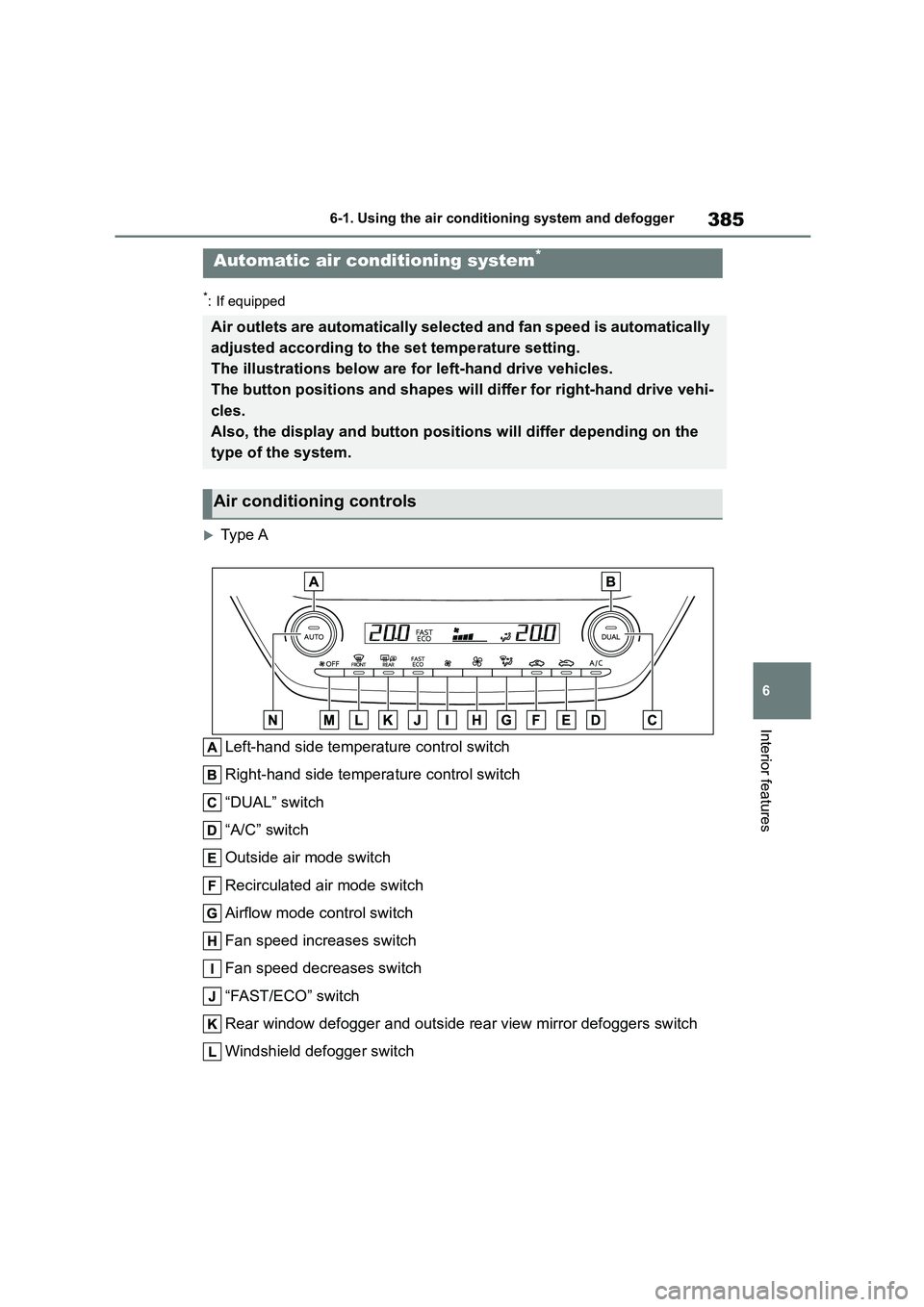
Type A
Left-hand side temperature control switch
Right-hand side temperature control switch
“DUAL” switch
“A/C” switch
Outside air mode switch
Recirculated air mode switch
Airflow mode control switch
Fan speed increases switch
Fan speed decreases switch
“FAST/ECO” switch
Rear window defogger and outside rear view mirror defoggers switch
Windshield defogger switch
Automatic air conditioning system*
Air outlets are automatically selected and fan speed is automatically
adjusted according to the set temperature setting.
The illustrations below are for left-hand drive vehicles.
The button positions and shapes will differ for right-hand drive vehi-
cles.
Also, the display and button positions will differ depending on the
type of the system.
Air conditioning controls
Page 388 of 678
3866-1. Using the air conditioning system and defogger
Off switch
Automatic mode switch
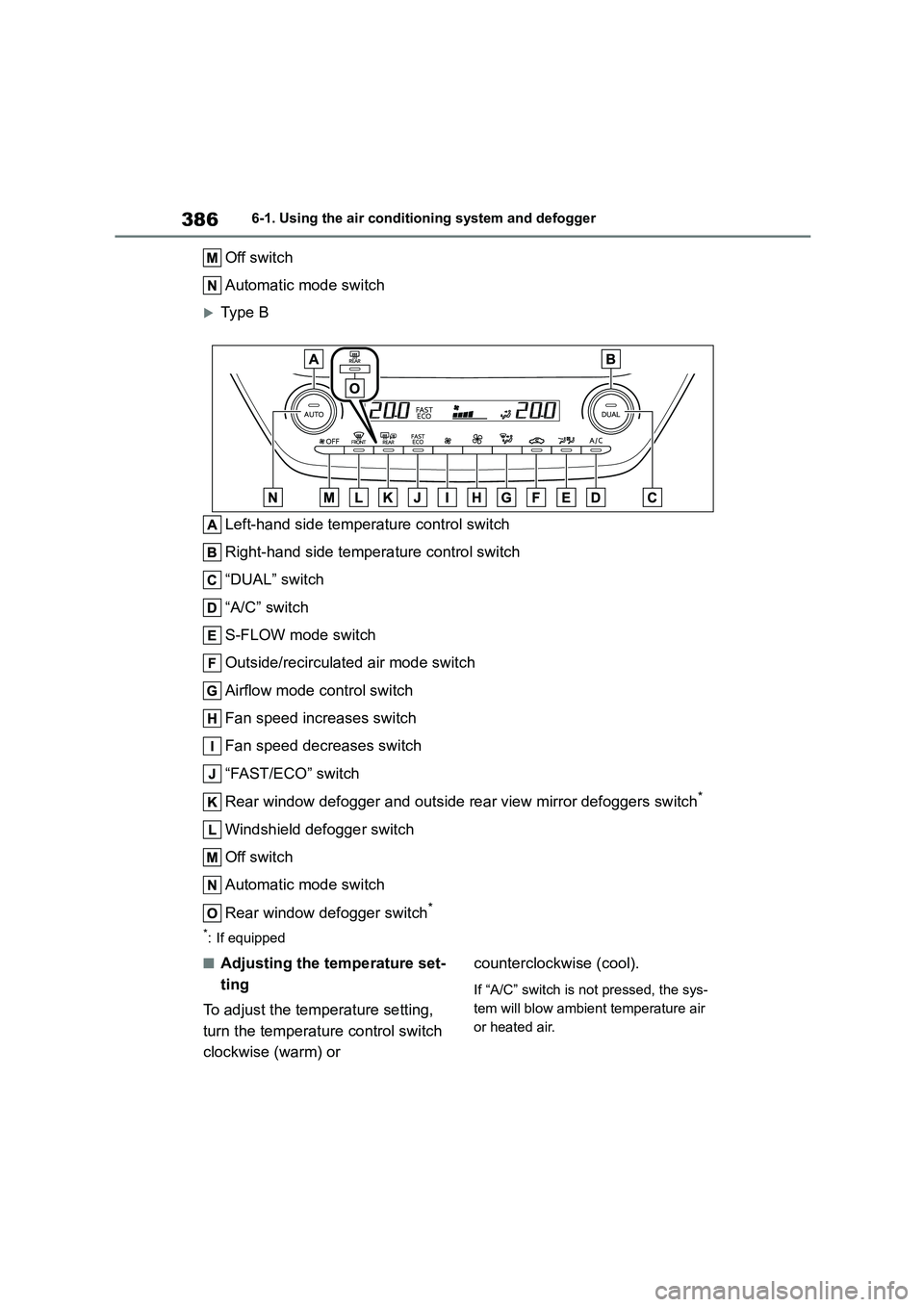
Type B
Left-hand side temperature control switch
Right-hand side temperature control switch
“DUAL” switch
“A/C” switch
S-FLOW mode switch
Outside/recirculated air mode switch
Airflow mode control switch
Fan speed increases switch
Fan speed decreases switch
“FAST/ECO” switch
Rear window defogger and outside rear view mirror defoggers switch*
Windshield defogger switch
Off switch
Automatic mode switch
Rear window defogger switch*
*: If equipped
■Adjusting the temperature set-
ting
To adjust the temperature setting,
turn the temperature control switch
clockwise (warm) or
counterclockwise (cool).
If “A/C” switch is not pressed, the sys-
tem will blow ambient temperature air
or heated air.
Page 390 of 678
3886-1. Using the air conditioning system and defogger
■Defogging the rear window
and outside rear view mirrors
Vehicles without outside rear
view mirror defoggers
A defogger is used to defog the
rear window.
Press the rear window defogger
switch.
The defogger will automatically turn off
after a while.
When the rear window defogger switch
is on, the indicator illuminates on the
rear window defogger switch.
Vehicles with outside rear view
mirror defoggers
Defoggers are used to defog the
rear window, and to remove rain-
drops, dew and frost from the out-
side rear view mirrors.
Press the rear window and outside
rear view mirror defoggers switch.
The defoggers will automatically turn off
after a while.
When the rear window and outside rear
view mirror defoggers switch is on, the
indicator illuminates on the rear window
and outside rear view mirror defoggers
switch.
■Using the Climate Preference
1 Press the Automatic mode
switch.
2 Press the “FAST/ECO” switch.
Each time the “FAST/ECO” switch
is pressed, the fan speed setting
mode toggles as follows.
Normal “ECO”“FAST”Normal
When “ECO” is displayed on the air
conditioning screen, the air condi-
tioning is controlled with low fuel
consumption prioritized such as
reducing fan speed, etc.
When “FAST” is displayed on the
screen, fan speed will be
increased.
■S-FLOW mode (if equipped)
In S-FLOW mode, priority for the
airflow is given to the driver’s seat,
reducing the airflow and air condi-
tioning effect on the front passen-
ger’s seat and rear seats.
When the S-FLOW mode switch is
pressed, S-FLOW mode will be
manually enabled/disabled.
When the S-FLOW mode is on, the
indicator illuminates on the S-FLOW
mode switch and the temperature indi-
cator for the passenger side will turn off.
■Fogging up of the windows
●The windows will easily fog up when the humidity in the vehicle is high.
Turning “A/C” on will dehumidify the
air from the outlets and defog the
windshield effectively.
●If you turn “A/C” off, the windows may
fog up more easily.
●The windows may fog up if the recir-
culated air mode is used.
■When driving on dusty roads
Close all windows. If dust thrown up by
the vehicle is still drawn into the vehicle
after closing the windows, it is recom- mended that the air intake mode be set
to outside air mode and the fan speed to
any setting except off.
■Outside/recirculated air mode
●Setting to the recirculated air mode
Page 391 of 678
389
6
6-1. Using the air conditioning system and defogger
Interior features
temporarily is recommended in pre-
venting dirty air from entering the vehicle interior and helping to cool the
vehicle when the outside air tempera-
ture is high.
●Outside/recirculated air mode may
automatically switch depending on the temperature setting or the inside tem-
perature.
■When the outside temperature falls
to nearly 0°C (32°F)
The dehumidification function may not
operate even when “A/C” switch is
pressed.
■Ventilation and air conditioning odors
●To let fresh air in, set the air condition-ing system to the outside air mode.
●During use, various odors from inside and outside the vehicle may enter into
and accumulate in the air conditioning
system. This may then cause odor to be emitted from the vents.
●To reduce potential odors from occur-ring:
• It is recommended that the air condi-
tioning system be se t to outside air mode prior to turning the vehicle off.
• The start timing of the blower may be
delayed for a short period of time immediately after the air conditioning
system is started in automatic mode.
●When parking, the system automati-
cally switches to outside air mode to
encourage better air circulation throughout the vehicle, helping to
reduce odors that o ccur when starting
the vehicle.
■Air conditioning filter
P.447
■Customization
Some functions can be customized.
( P.538)
1Press the automatic mode
switch.
2 Adjust the temperature setting.
3 To stop the operation, press the
off switch.
If the fan speed setting or air flow
modes are operated, the automatic
mode indicator goes off. However,
automatic mode fo r functions other
than that operated is maintained.
■Using automatic mode
Fan speed is adjusted automatically
according to the temperature setting and
the ambient conditions.
Therefore, the fan may stop for a while
WA R N I N G
■To prevent the windshield from
fogging up
Do not use the windshield defogger switch during cool air operation in
extremely humid weather. The differ-
ence between the temperature of the outside air and that of the windshield
can cause the outer surface of the
windshield to fog up, blocking your
vision.
■When the outside rear view mir-
ror defoggers are operating (if equipped)
Do not touch the outside rear view
mirror surfaces, as they can become very hot and burn you.
NOTICE
■To prevent battery discharge
Do not leave the air conditioning sys-
tem on longer than necessary when
the engine is off.
Using automatic mode
Page 408 of 678
4066-4. Other interior features
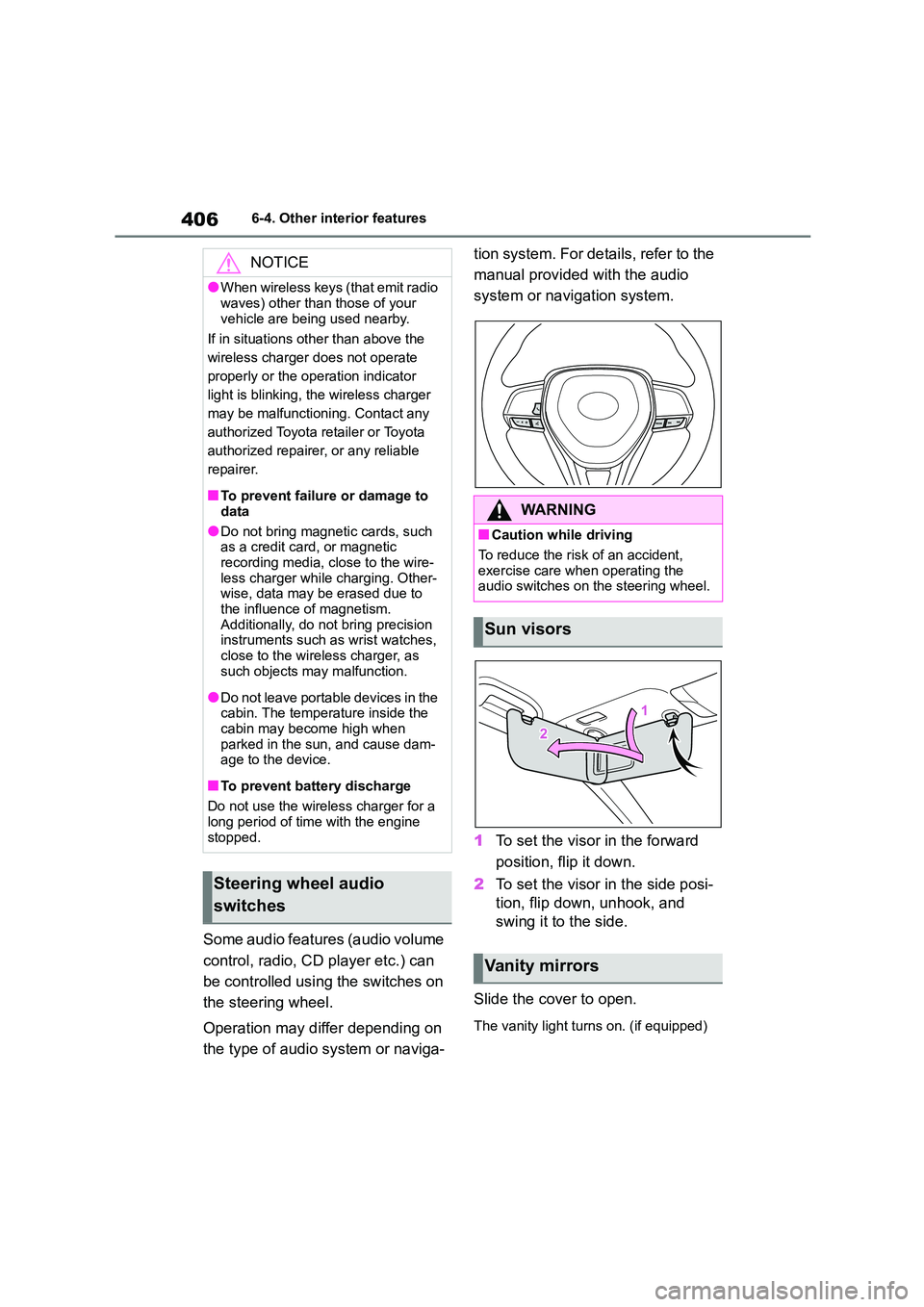
Some audio features (audio volume
control, radio, CD player etc.) can
be controlled using the switches on
the steering wheel.
Operation may differ depending on
the type of audio system or naviga-
tion system. For details, refer to the
manual provided with the audio
system or navigation system.
1 To set the visor in the forward
position, flip it down.
2 To set the visor in the side posi-
tion, flip down, unhook, and
swing it to the side.
Slide the cover to open.
The vanity light turns on. (if equipped)
NOTICE
●When wireless keys (that emit radio
waves) other than those of your
vehicle are being used nearby.
If in situations other than above the
wireless charger does not operate
properly or the operation indicator
light is blinking, the wireless charger
may be malfunctioning. Contact any
authorized Toyota retailer or Toyota
authorized repairer, or any reliable
repairer.
■To prevent failure or damage to
data
●Do not bring magnetic cards, such
as a credit card, or magnetic
recording media, close to the wire- less charger while charging. Other-
wise, data may be erased due to
the influence of magnetism. Additionally, do not bring precision
instruments such as wrist watches,
close to the wireless charger, as such objects may malfunction.
●Do not leave portable devices in the cabin. The temperature inside the
cabin may become high when
parked in the sun, and cause dam- age to the device.
■To prevent battery discharge
Do not use the wireless charger for a
long period of time with the engine
stopped.
Steering wheel audio
switches
WA R N I N G
■Caution while driving
To reduce the risk of an accident,
exercise care when operating the audio switches on the steering wheel.
Sun visors
Vanity mirrors
Page 412 of 678
4107-1. Maintenance and care
7-1.Maintenance and care
Working from top to bottom, lib-
erally apply water to the vehicle
body, wheel wells and underside
of the vehicle to remove any dirt
and dust.
Wash the vehicle body using a
sponge or soft cloth, such as a
chamois.
For hard-to-remove marks, use
car wash soap and rinse thor-
oughly with water.
Wipe away any water.
Wax the vehicle when the water-
proof coating deteriorates.
If water does not bead on a clean sur-
face, apply wax when the vehicle body
is cool.
■Automatic car washes
●Fold the mirrors before washing the
vehicle. Start washing from the front of
the vehicle. Make sure to extend the mirrors before driving.
●Brushes used in automatic car washes may scratch the vehicle sur-
face, parts (wheel, etc.) and harm
your vehicle’s paint.
■High pressure car washes
As water may enter the cabin, do not
bring the nozzle tip near the gaps
around the doors or perimeter of the
windows, or spray these areas continu-
ously.
■When using a car wash (vehicles with entry function)
If the door handle becomes wet while
the electronic key is within the effective range, the door may lock and unlock
repeatedly. In that case, follow the fol-
lowing correction procedures to wash the vehicle:
●Place the key in a position 2 m (6 ft.) or more separate from the vehicle
while the vehicle is being washed.
(Take care to ensure that the key is not stolen.)
●Set the electronic key to battery-sav-ing mode to disable the smart entry &
start system. ( P.122)
■Wheels and wheel ornaments
●Remove any dirt immediately by using
a neutral detergent.
●Wash detergent off with water immedi-
ately after use.
●To protect the paint from damage,
make sure to observe the following
precautions. • Do not use acidic, alkaline or abrasive
detergent
• Do not use hard brushes • Do not use detergent on the wheels
when they are hot, such as after driv-
ing or parking in hot weather
■Brake pads and calipers
Rust may form if the vehicle is parked
with wet brake pads or disc rotors, caus-
ing them to stick. Before parking the vehicle after it is washed, drive slowly
and apply the brakes several times to
dry the parts.
■Bumpers
Do not scrub with abrasive cleaners.
■Plated portions
If dirt cannot be removed, clean the
parts as follows:
●Use a soft cloth dampened with an
approximately 5% solution of neutral
detergent and water to clean the dirt
Cleaning and protecting
the vehicle exterior
Perform cleaning in a manner
appropriate to each compo-
nent and its material.
Cleaning instructions
Page 544 of 678
5429-2. Customization
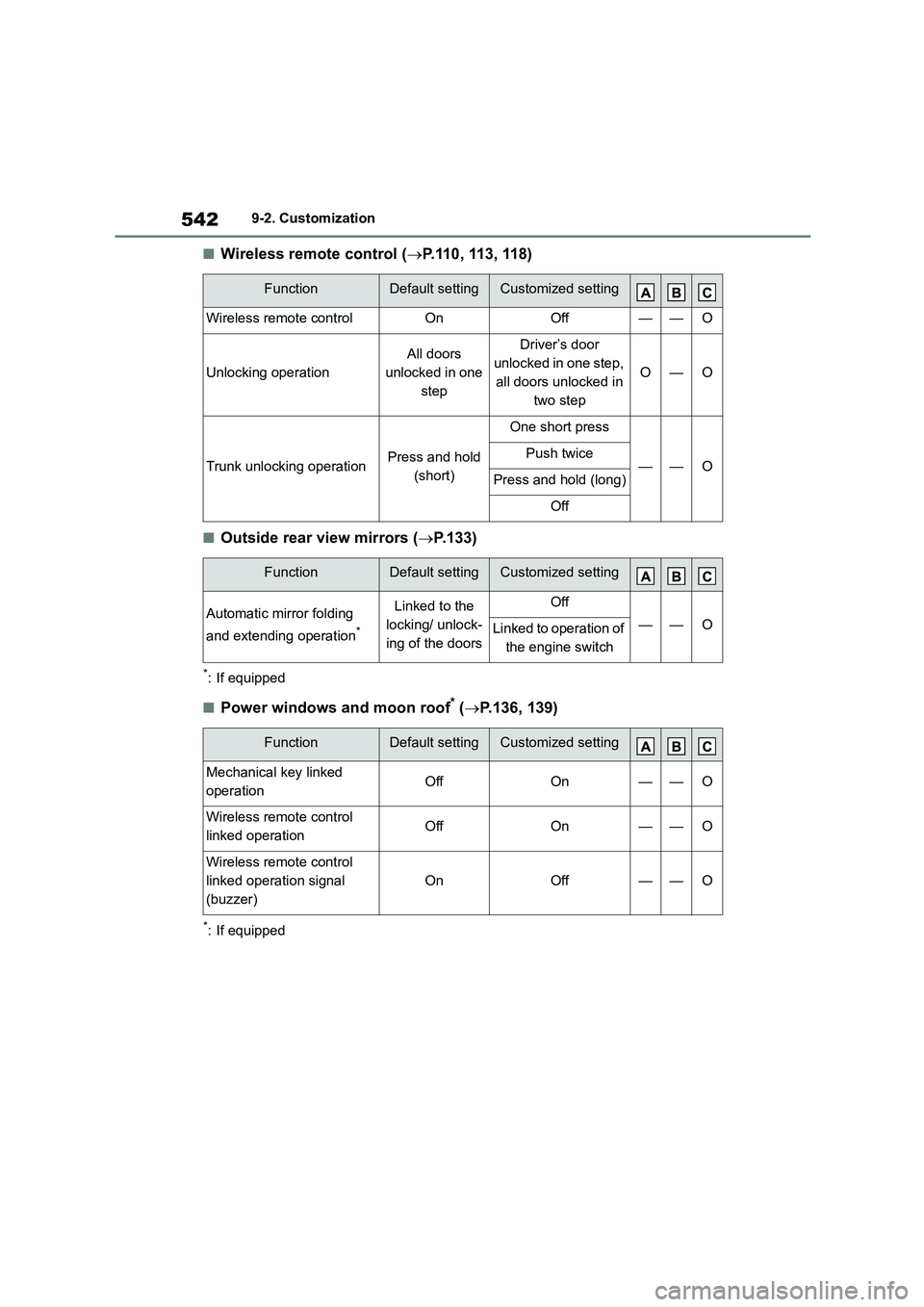
■Wireless remote control (P.110, 113, 118)
■Outside rear view mirrors (P.133)
*: If equipped
■Power windows and moon roof* (P.136, 139)
*: If equipped
FunctionDefault settingCustomized setting
Wireless remote controlOnOff——O
Unlocking operation
All doors
unlocked in one
step
Driver’s door
unlocked in one step,
all doors unlocked in
two step
O—O
Trunk unlocking operationPress and hold
(short)
One short press
——OPush twice
Press and hold (long)
Off
FunctionDefault settingCustomized setting
Automatic mirror folding
and extending operation*
Linked to the
locking/ unlock-
ing of the doors
Off
——OLinked to operation of
the engine switch
FunctionDefault settingCustomized setting
Mechanical key linked
operationOffOn——O
Wireless remote control
linked operationOffOn——O
Wireless remote control
linked operation signal
(buzzer)
OnOff——O
Page 547 of 678
545
9
9-2. Customization
Vehicle specifications
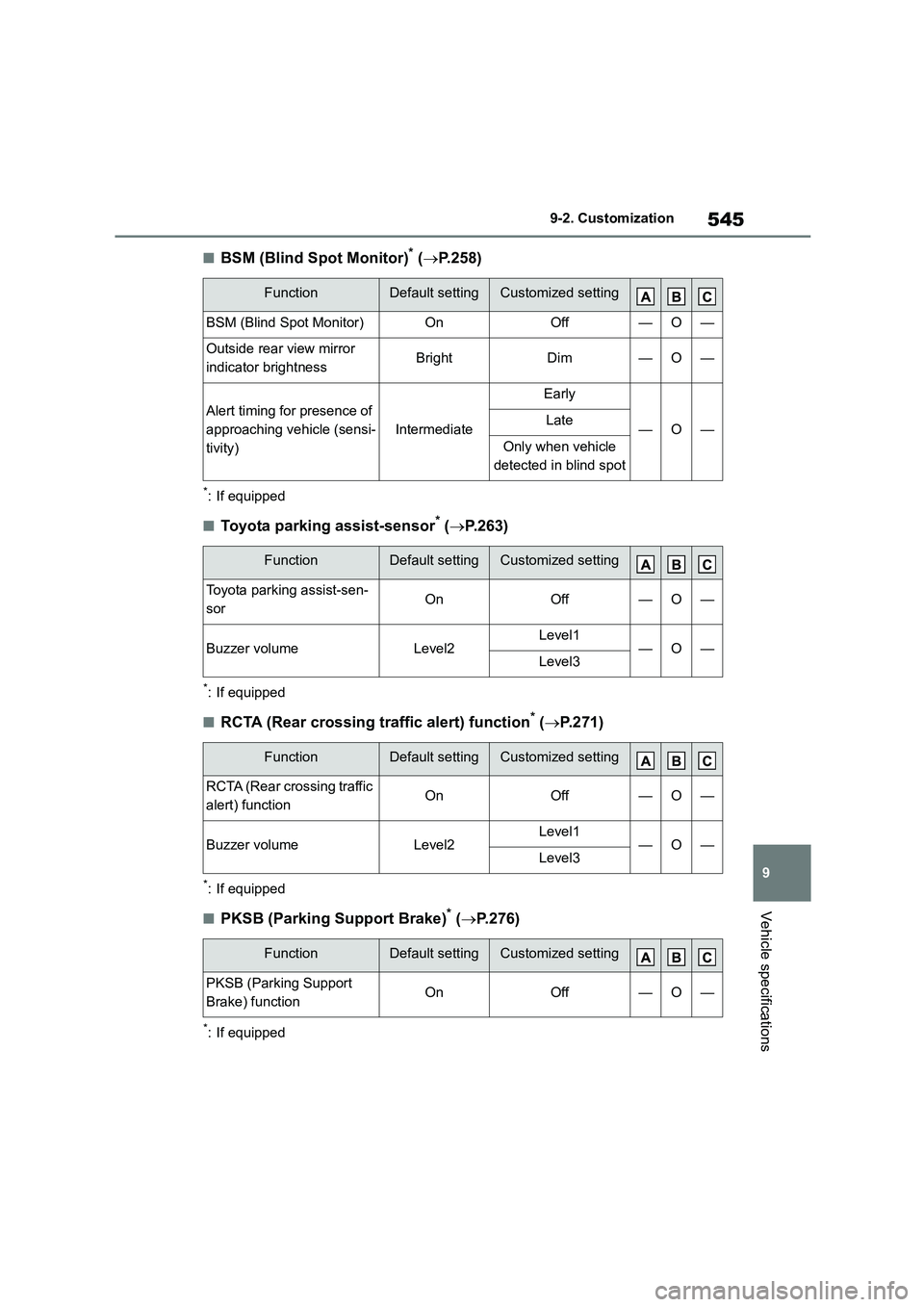
■BSM (Blind Spot Monitor)* ( P.258)
*: If equipped
■Toyota parking assist-sensor* (P.263)
*: If equipped
■RCTA (Rear crossing traffic alert) function* (P.271)
*: If equipped
■PKSB (Parking Support Brake)* (P.276)
*: If equipped
FunctionDefault settingCustomized setting
BSM (Blind Spot Monitor)OnOff—O—
Outside rear view mirror
indicator brightnessBrightDim—O—
Alert timing for presence of
approaching vehicle (sensi-
tivity)
Intermediate
Early
—O—Late
Only when vehicle
detected in blind spot
FunctionDefault settingCustomized setting
Toyota parking assist-sen-
sorOnOff—O—
Buzzer volumeLevel2Level1—O—Level3
FunctionDefault settingCustomized setting
RCTA (Rear crossing traffic
alert) functionOnOff—O—
Buzzer volumeLevel2Level1—O—Level3
FunctionDefault settingCustomized setting
PKSB (Parking Support
Brake) functionOnOff—O—