warning TOYOTA COROLLA 2023 Owners Manual
[x] Cancel search | Manufacturer: TOYOTA, Model Year: 2023, Model line: COROLLA, Model: TOYOTA COROLLA 2023Pages: 468, PDF Size: 14.4 MB
Page 171 of 468
1714-2. Driving procedures
4
Driving
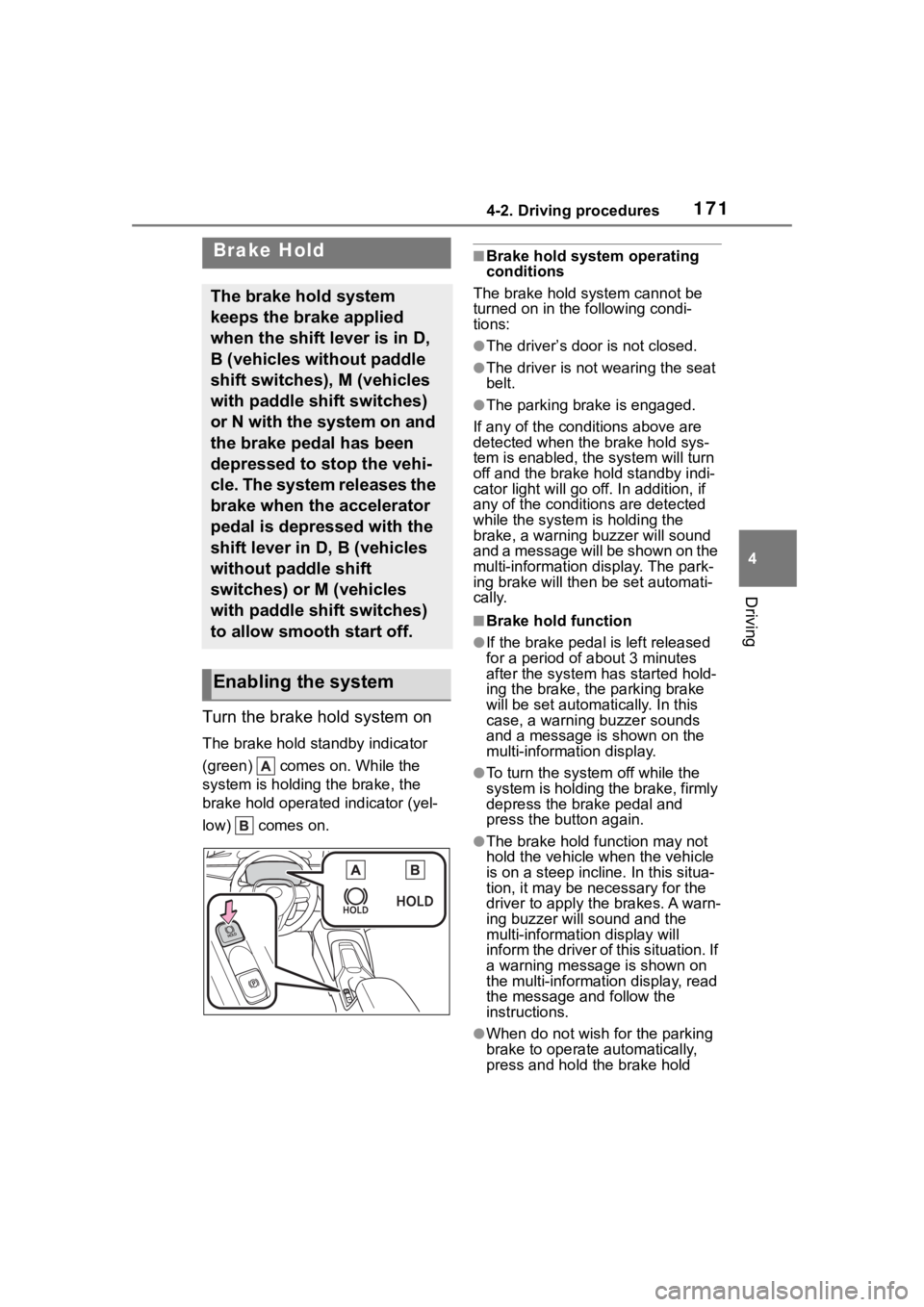
Turn the brake hold system on
The brake hold standby indicator
(green) comes on. While the
system is holding the brake, the
brake hold operated indicator (yel-
low) comes on.
■Brake hold system operating
conditions
The brake hold system cannot be
turned on in the following condi-
tions:
●The driver’s door is not closed.
●The driver is not wearing the seat
belt.
●The parking brake is engaged.
If any of the cond itions above are
detected when the brake hold sys-
tem is enabled, the system will turn
off and the brake hold standby indi-
cator light will go off. In addition, if
any of the conditions are detected
while the system is holding the
brake, a warning buzzer will sound
and a message will be shown on the
multi-information display. The park-
ing brake will then be set automati-
cally.
■Brake hold function
●If the brake pedal is left released
for a period of about 3 minutes
after the system has started hold-
ing the brake, the parking brake
will be set automatically. In this
case, a warning buzzer sounds
and a message is shown on the
multi-information display.
●To turn the system off while the
system is holding the brake, firmly
depress the brake pedal and
press the button again.
●The brake hold function may not
hold the vehicle when the vehicle
is on a steep incline. In this situa-
tion, it may be ne cessary for the
driver to apply the brakes. A warn-
ing buzzer will sound and the
multi-information display will
inform the driver of this situation. If
a warning message is shown on
the multi-information display, read
the message and follow the
instructions.
●When do not wish for the parking
brake to operate automatically,
press and hold the brake hold
Brake Hold
The brake hold system
keeps the brake applied
when the shift lever is in D,
B (vehicles without paddle
shift switches), M (vehicles
with paddle shift switches)
or N with the system on and
the brake pedal has been
depressed to stop the vehi-
cle. The system releases the
brake when the accelerator
pedal is depressed with the
shift lever in D, B (vehicles
without paddle shift
switches) or M (vehicles
with paddle shift switches)
to allow smooth start off.
Enabling the system
Page 172 of 468
1724-2. Driving procedures
switch until the standby indicator
(green) turns off, and then turn the
engine switch off.
■When the parking brake is set
automatically while the system
is holding the brakes
Perform any of the following opera-
tions to release the parking brake:
●Depress the accelerator pedal.
(The parking brake will not be
released automatic ally if the seat
belt is not fastened.)
●Operate the parking brake switch
with the brake pedal depressed.
Make sure that the parking brake
indicator light goes off. ( P.168)
■When an inspection at your
Toyota dealer is necessary
When the brake hold standby indi-
cator (green) does not illuminate
even when the brake hold switch is
pressed with the brake hold system
operating conditions met, the sys-
tem may be malfunctioning. Have
the vehicle inspected at your Toyota
dealer.
■If “Brake Hold Malfunction
Press Brake to Deactivate Visit
Your Dealer” or “Brake Hold
Malfunction Visit Your Dealer”
is displayed on the multi-infor-
mation display
The system may be malfunctioning.
Have the vehicle inspected by your
Toyota dealer.
■Warning messages and buzzers
Warning messages and buzzers are
used to indicate a system malfunc-
tion or to inform the driver of the
need for caution. If a warning mes-
sage is shown on the multi-informa-
tion display, read the message and
follow the instructions.
■If the brake hold operated indi-
cator flashes
P. 3 6 3
WARNING
■When the vehicle is on a
steep incline
Take care when using the brake
hold system on a steep incline,
exercise caution. The brake hold
function may not hold brakes in
such situations.
Also, the system may not activate
depending on the angle of the
slope.
■When stopped on a slippery
road
The system cannot stop the vehi-
cle when the gripping ability of the
tires has been exceeded. Do not
use the system w hen stopped on
a slippery road.
NOTICE
■When parking the vehicle
The brake hold system is not
designed for use when parking
the vehicle for a long period of
time. Turning the engine switch off
while the system is holding the
brake may release the brake,
which would cause the vehicle to
move. When operating the engine
switch, depress the brake pedal,
shift the shift lever to P and set
the parking brake.
Page 175 of 468
1754-3. Operating the lights and wipers
4
Driving
■Customization
Some functions can be customized.
( P.412)
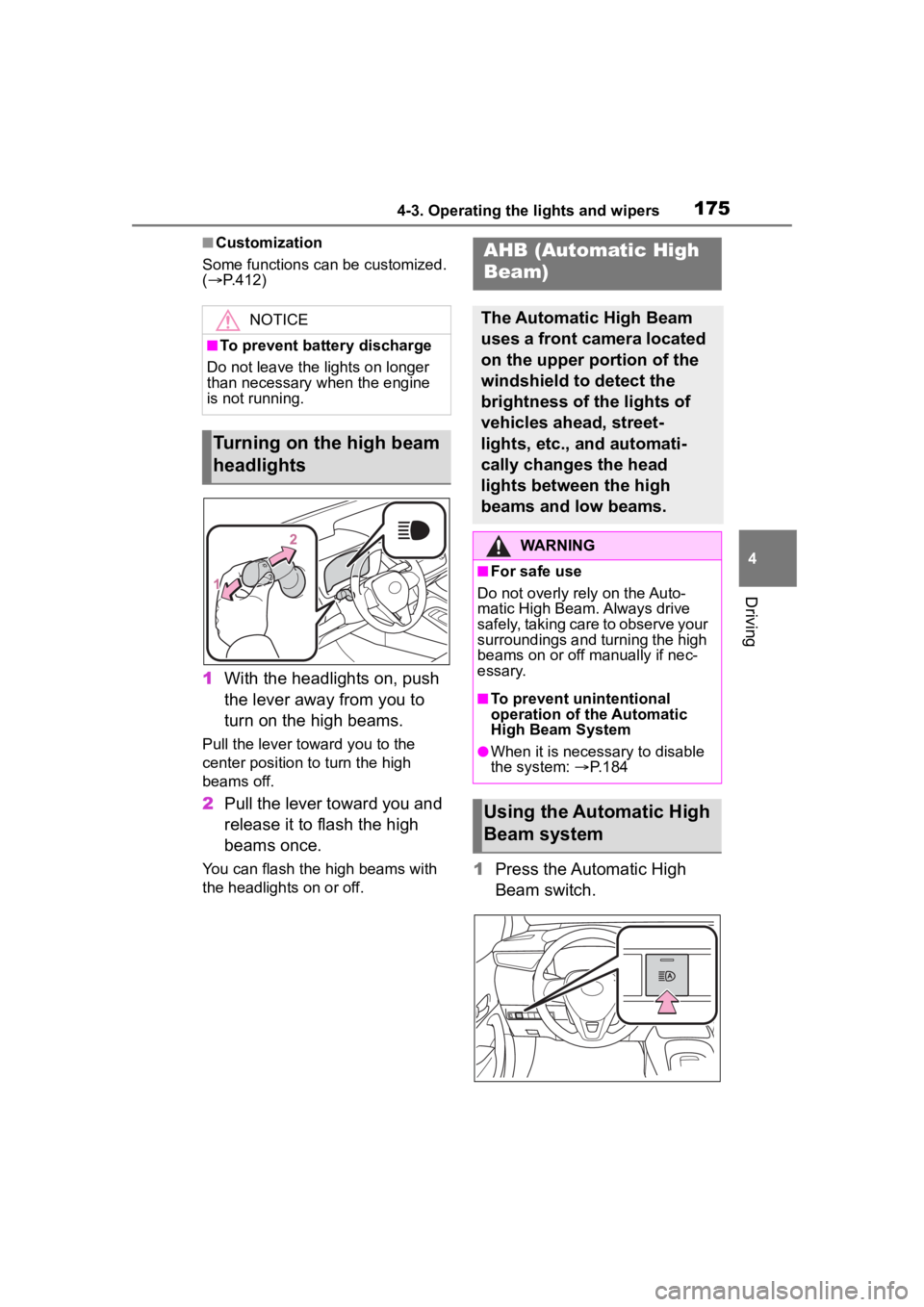
1 With the headlights on, push
the lever away from you to
turn on the high beams.
Pull the lever toward you to the
center position to turn the high
beams off.
2Pull the lever toward you and
release it to flash the high
beams once.
You can flash the high beams with
the headlights on or off.1Press the Automatic High
Beam switch.
NOTICE
■To prevent battery discharge
Do not leave the lights on longer
than necessary when the engine
is not running.
Turning on the high beam
headlights
AHB (Automatic High
Beam)
The Automatic High Beam
uses a front camera located
on the upper portion of the
windshield to detect the
brightness of the lights of
vehicles ahead, street-
lights, etc., and automati-
cally changes the head
lights between the high
beams and low beams.
WARNING
■For safe use
Do not overly rely on the Auto-
matic High Beam. Always drive
safely, taking care to observe your
surroundings and turning the high
beams on or off manually if nec-
essary.
■To prevent unintentional
operation of the Automatic
High Beam System
●When it is necessary to disable
the system: P.184
Using the Automatic High
Beam system
Page 179 of 468
1794-3. Operating the lights and wipers
4
Driving
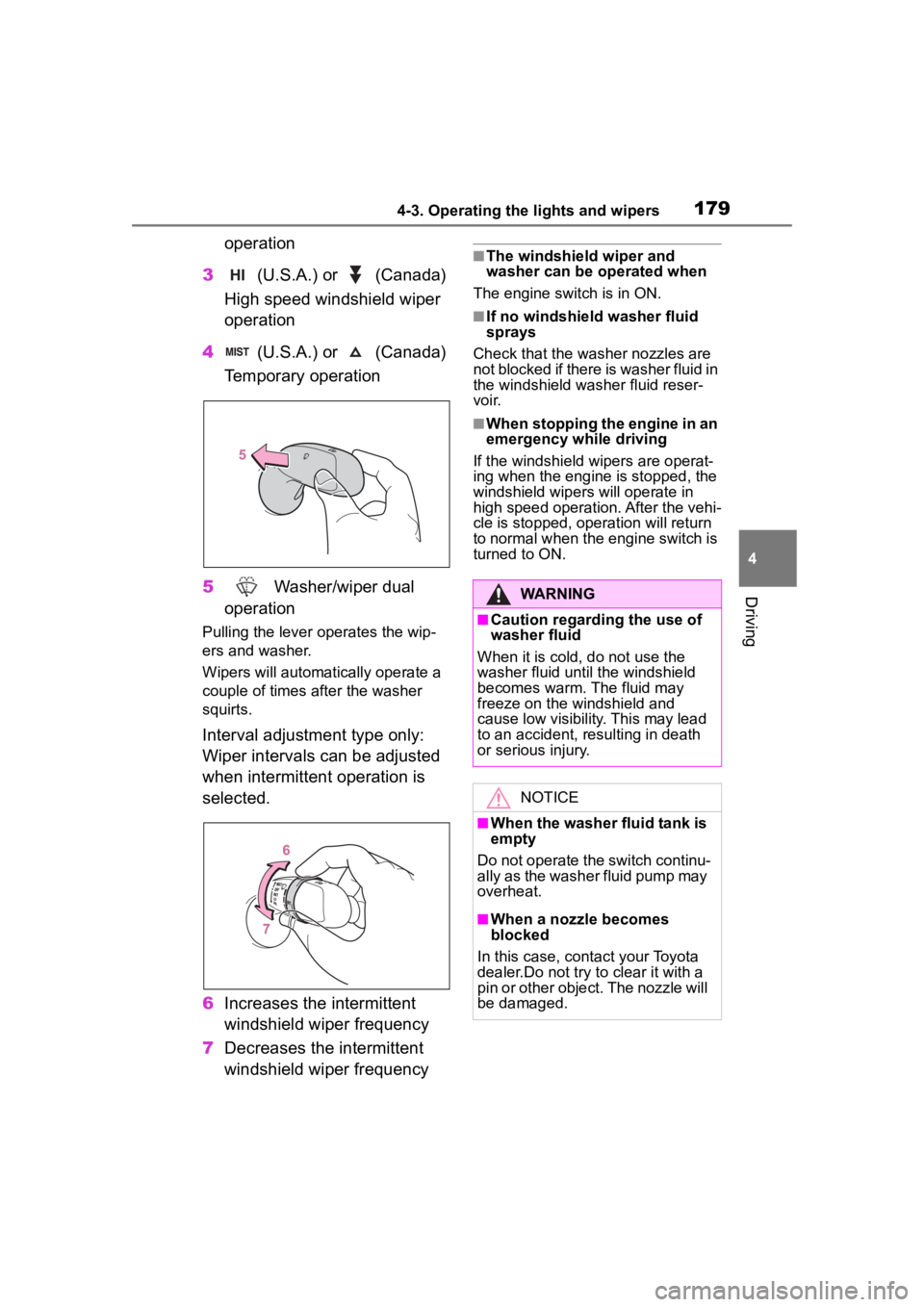
operation
3 (U.S.A.) or (Canada)
High speed windshield wiper
operation
4 (U.S.A.) or (Canada)
Temporary operation
5 Washer/wiper dual
operation
Pulling the lever o perates the wip-
ers and washer.
Wipers will automatically operate a
couple of times after the washer
squirts.
Interval adjustment type only:
Wiper intervals can be adjusted
when intermittent operation is
selected.
6 Increases the intermittent
windshield wiper frequency
7 Decreases the intermittent
windshield wiper frequency
■The windshield wiper and
washer can be operated when
The engine switch is in ON.
■If no windshield washer fluid
sprays
Check that the washer nozzles are
not blocked if there is washer fluid in
the windshield washer fluid reser-
voir.
■When stopping the engine in an
emergency while driving
If the windshield wipers are operat-
ing when the engine is stopped, the
windshield wipers will operate in
high speed operation. After the vehi-
cle is stopped, operation will return
to normal when the engine switch is
turned to ON.
WARNING
■Caution regarding the use of
washer fluid
When it is cold, do not use the
washer fluid unt il the windshield
becomes warm. The fluid may
freeze on the windshield and
cause low visibility. This may lead
to an accident, resulting in death
or serious injury.
NOTICE
■When the washer fluid tank is
empty
Do not operate the switch continu-
ally as the washer fluid pump may
overheat.
■When a nozzle becomes
blocked
In this case, contact your Toyota
dealer.Do not try to clear it with a
pin or other object. The nozzle will
be damaged.
Page 180 of 468
1804-4. Refueling
4-4.Refueling
Turn the engine switch off and
ensure that all the doors and
windows are closed.
Confirm the type of fuel.
■Fuel types
P. 3 9 9
■Fuel tank opening for unleaded
gasoline
To help prevent incorrect fueling,
your vehicle has a fuel tank opening
that only accommodates the spe-
cial nozzle on unle aded fuel pumps.
■If the malfunction indicator
lamp illuminates
The malfunction indicator lamp may
illuminate erroneous ly if refueling is
performed repeatedly when the fuel
tank is nearly full.
Opening the fuel tank
cap
Perform the following steps
to open the fuel tank cap:
Before refueling the vehi-
cle
WARNING
■When refueling the vehicle
Observe the following precautions
while refueling the vehicle. Failure
to do so may result in death or
serious injury.
●After exiting the vehicle and
before opening the fuel door,
touch an unpainted metal sur-
face to discharge any static
electricity. It is important to dis-
charge static electricity before
refueling because sparks result-
ing from static electricity can
cause fuel vapors to ignite while
refueling.
●Always hold the grips on the
fuel tank cap and turn it slowly
to remove it.
A whooshing sound may be
heard when the f uel tank cap is
loosened. Wait until the sound
cannot be heard before fully
removing the cap. In hot
weather, pressurized fuel may
spray out the filler neck and
cause injury.
●Do not allow anyone that has
not discharged static electricity
from their body to come close to
an open fuel tank.
●Do not inhale vaporized fuel.
Fuel contains substances that
are harmful if inhaled.
●Do not smoke while refueling
the vehicle.
Doing so may cause the fuel to
ignite and cause a fire.
●Do not return to the vehicle or
touch any person or object that
is statically charged.
This may cause static electricity
to build up, resulting in a possi-
ble ignition hazard.
■When refueling
Observe the following precautions
to prevent fuel overflowing from
the fuel tank:
●Securely insert the fuel nozzle
into the fuel filler neck.
●Stop filling the tank after the fuel
nozzle automatically clicks off.
Page 181 of 468
1814-4. Refueling
4
Driving
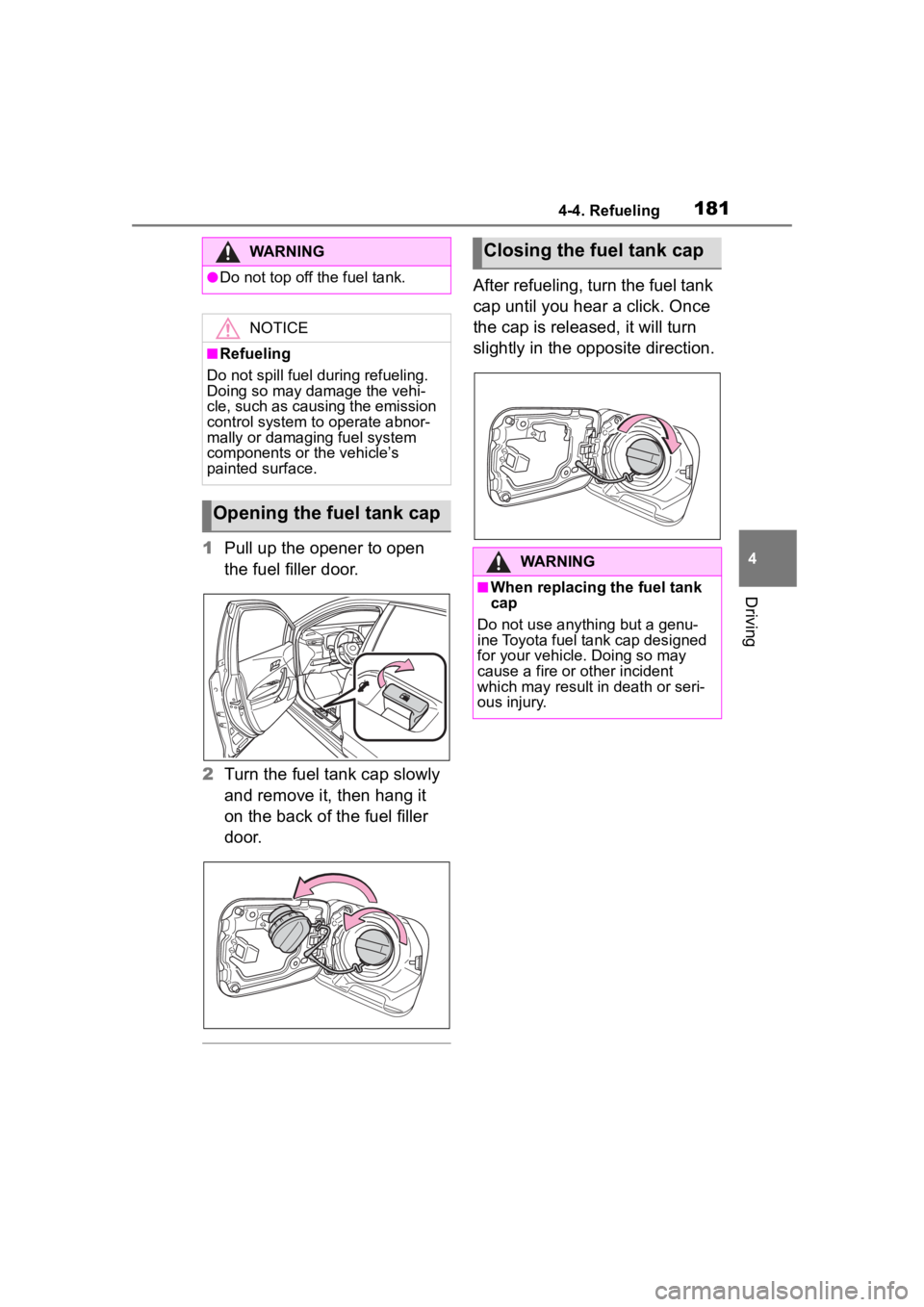
1Pull up the opener to open
the fuel filler door.
2 Turn the fuel tank cap slowly
and remove it, then hang it
on the back of the fuel filler
door.
After refueling, turn the fuel tank
cap until you hear a click. Once
the cap is released, it will turn
slightly in the opposite direction.
WARNING
●Do not top off the fuel tank.
NOTICE
■Refueling
Do not spill fuel during refueling.
Doing so may damage the vehi-
cle, such as causing the emission
control system to operate abnor-
mally or damaging fuel system
components or the vehicle’s
painted surface.
Opening the fuel tank cap
Closing the fuel tank cap
WARNING
■When replacing the fuel tank
cap
Do not use anything but a genu-
ine Toyota fuel tank cap designed
for your vehicle. Doing so may
cause a fire or other incident
which may result i n death or seri-
ous injury.
Page 182 of 468
1824-5. Using the driving support systems
4-5.Using the driving support systems
*: If equipped
This Owner's Manual contains
information for Ver. 1. For the
latest information about the con-
trols, use, warnings/precautions,
etc. of each function of Toyota
Safety Sense, refer to the Digital
Owner's Manual at the Owner's
Manual website.
If the software of this system
has been updated after initial purchase of the vehicle, before
using this system, be sure to
read the Owner's Manual which
corresponds to the software ver-
sion of the system.
■Precautions for use
●Be aware that some functions
may temporarily be disabled if a
legal or safety related issue
occurs.
●If a connected services contract
has not been entered or has
expired, software updates will not
be able to be performed wire-
lessly.
If the software of this system
has been updated after initial
purchase of the vehicle, to
access the appropriate Owner’s
Manual, it is necessary to check
the software version of the sys-
tem and then visit the Owner's
Manual website.
The software version of the sys-
tem can be checked using One-
App.
Toyota Safety Sense
3.0 software update
*
It is necessary to enter a
connected services con-
tract, provided by Toyota, to
use these functions. For
details, contact your Toyota
dealer.
WARNING
■For safe use
When the Toyota Safety Sense
3.0 software is updated, the oper-
ating methods of functions may
change. Using this system without
knowing the correct operating
methods may lead to an accident
resulting in death or serious injury.
●Make sure to read the Digital
Owner's Manual which corre-
sponds to the software version
of the system, available at the
Owner's Manual website, before
using this system.
Content of the Toyota
Safety Sense Owner's
Manual
Checking your vehicle’s
Toyota Safety Sense ver-
sion
Checking the version
using OneApp
Page 184 of 468
1844-5. Using the driving support systems
Toyota Safety Sense
3.0
The Toyota Safety Sense 3.0
consists of the driving
assist systems and contrib-
utes to a safe and comfort-
able driving experience:
WARNING
■Toyota Safety Sense 3.0
The Toyota Safety Sense 3.0
operates under the assumption
that the driver will drive safely,
and is designed to help reduce
the impact to the occupants in a
collision and assist the driver
under normal driving conditions.
As there is a limit to the degree of
recognition accuracy and control
performance that this system can
provide, do not ov erly rely on this
system. The driver is solely
responsible for paying attention to
the vehicle’s surroundings and
driving safely.
■For safe use
●Do not overly rely on this sys-
tem. The driver is solely respon-
sible for paying attention to the
vehicle’s surroundings and driv-
ing safely. This system may not
operate in all situations and pro-
vided assistance is limited.
Over-reliance on this system to
drive the vehicle safely may
lead to an accident resulting in
death or serious injury.
●Do not attempt to test the oper-
ation of the system, as it may
not operate properly, possibly
leading to an accident.
●If attention is necessary while
performing driving operations or
a system malfunction occurs, a
warning message or warning
buzzer will be operated. If a
warning message is displayed
on the display, follow the
instructions displayed.
●Depending on external noise,
the volume of the audio system,
etc. it may be difficult to hear the
warning buzzer. Also, depend-
ing on the road conditions, it
may be difficult to recognize the
operation of the system.
■When it is necessary to dis-
able the system
In the following si tuations, make
sure to disable the system.
Failure to do so may lead to the
system not operating properly,
possibly leading to an accident
resulting in death o r serious injury.
●When the vehicle is tilted due to
being overloaded or having a
flat tire
●When driving at extremely high
speeds
●When towing another vehicle
●When the vehicle is being trans-
ported by a truck, ship, train,
etc.
●When the vehicle is raised on a
lift and the tires are allowed to
rotate freely
●When inspecting the vehicle
using a drum tester such as a
chassis dynamometer or speed-
ometer tester, or when using an
on vehicle wheel balancer
●When the vehicle is driven in a
sporty manner or off-road
●When using an automatic car
wash
Page 185 of 468
1854-5. Using the driving support systems
4
Driving
■PCS (Pre-Collision System)
P.190
■LTA (Lane Tracing Assist)
P.201
■LDA (Lane Departure Alert)
P.206
■AHB (Automatic High
Beam)
P.175
■PDA (Proactive driving
assist)
P. 2 1 1
■RSA (Road Sign Assist)*
P.217
*: If equipped
■Dynamic radar cruise con-
trol
P.219
■Cruise control
P.227
■Emergency Driving Stop
System
P.230
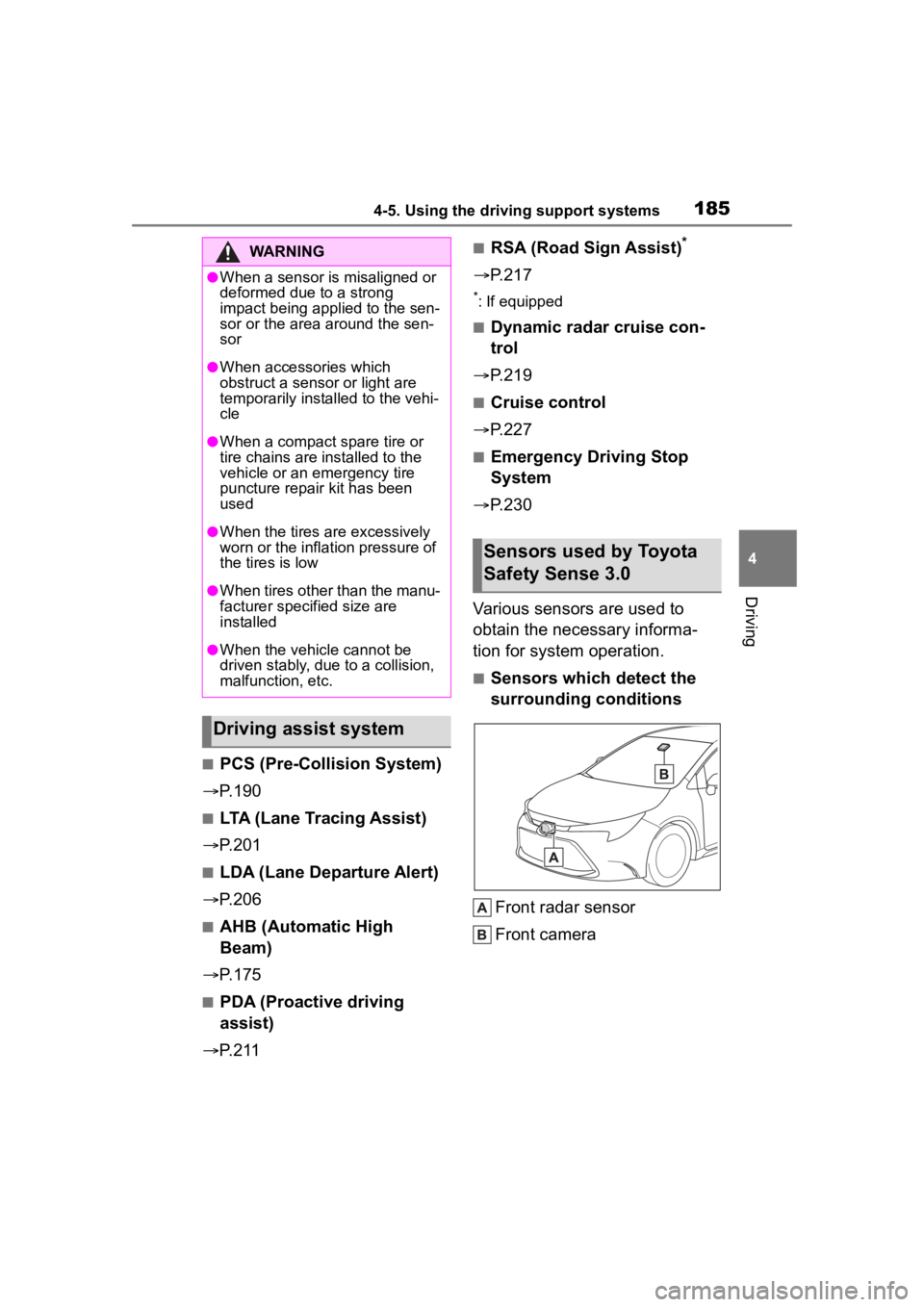
Various sensors are used to
obtain the necessary informa-
tion for system operation.
■Sensors which detect the
surrounding conditions
Front radar sensor
Front camera
WARNING
●When a sensor is misaligned or
deformed due to a strong
impact being applied to the sen-
sor or the area around the sen-
sor
●When accessories which
obstruct a sensor or light are
temporarily installed to the vehi-
cle
●When a compact spare tire or
tire chains are installed to the
vehicle or an emergency tire
puncture repair kit has been
used
●When the tires are excessively
worn or the inflation pressure of
the tires is low
●When tires other than the manu-
facturer specified size are
installed
●When the vehicle cannot be
driven stably, due to a collision,
malfunction, etc.
Driving assist system
Sensors used by Toyota
Safety Sense 3.0
Page 186 of 468
1864-5. Using the driving support systems
WARNING
■To prevent malfunction of the
radar sensors
Observe the following precau-
tions. Failure to do so may lead to
a radar sensor not operating prop-
erly, possibly leading to an acci-
dent resulting in death or serious
injury.
●Keep the radar sensors and
radar sensor covers clean at all
times.
Clean the front of a radar sensor
or the front or back of a radar sen-
sor cover if it is dirty or covered
with water drople ts, snow, etc.
When cleaning the radar sensor
and radar sensor cover, use a soft
cloth to remove di rt so as to not
damage them.
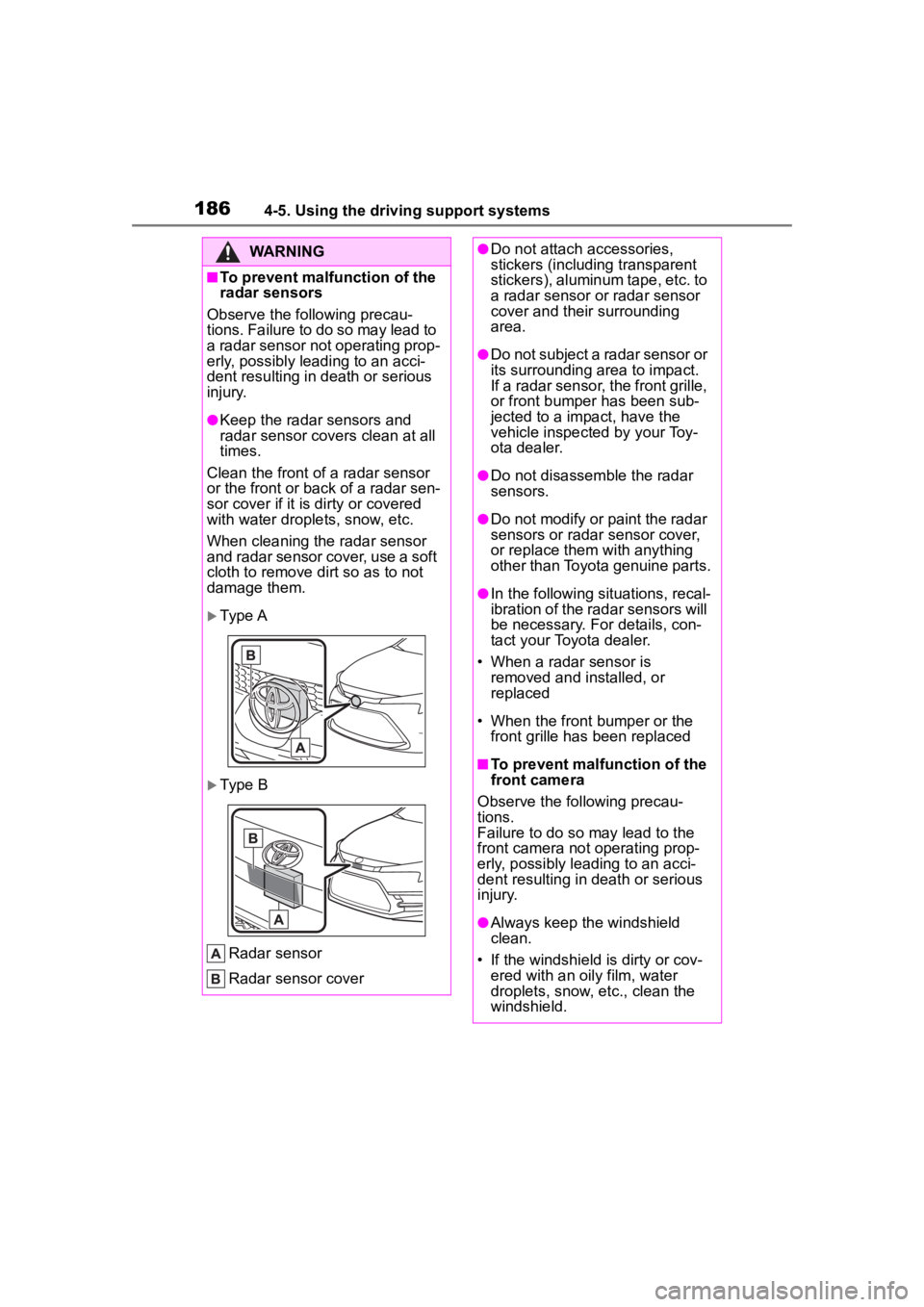
Type A
Type B
Radar sensor
Radar sensor cover
●Do not attach a ccessories,
stickers (including transparent
stickers), aluminum tape, etc. to
a radar sensor or radar sensor
cover and their surrounding
area.
●Do not subject a radar sensor or
its surrounding area to impact.
If a radar sensor, the front grille,
or front bumper has been sub-
jected to a imp act, have the
vehicle inspected by your Toy-
ota dealer.
●Do not disassemble the radar
sensors.
●Do not modify or paint the radar
sensors or radar sensor cover,
or replace them with anything
other than Toyota genuine parts.
●In the following situations, recal-
ibration of the radar sensors will
be necessary. For details, con-
tact your Toyota dealer.
• When a radar sensor is removed and installed, or
replaced
• When the front bumper or the front grille has been replaced
■To prevent malfunction of the
front camera
Observe the following precau-
tions.
Failure to do so may lead to the
front camera not operating prop-
erly, possibly leading to an acci-
dent resulting in death or serious
injury.
●Always keep the windshield
clean.
• If the windshield is dirty or cov-
ered with an o ily film, water
droplets, snow, etc., clean the
windshield.