lights TOYOTA COROLLA 2023 User Guide
[x] Cancel search | Manufacturer: TOYOTA, Model Year: 2023, Model line: COROLLA, Model: TOYOTA COROLLA 2023Pages: 468, PDF Size: 14.4 MB
Page 81 of 468
81
2
2
Vehicle status information and indicators
Vehicle status informationand indicators
.2-1. Instrument cluster
Warning lights and indica-tors ............................... 82
Gauges and meters (4.2-inch display) .......... 86
Gauges and meters (7-inch display) ......................... 89
Multi-information display (4.2-inch display) .......... 91
Multi-information display (7-inch display) ............. 97
Fuel consumption informa- tion ............................ 102
Page 82 of 468
822-1. Instrument cluster
2-1.Instrument cluster
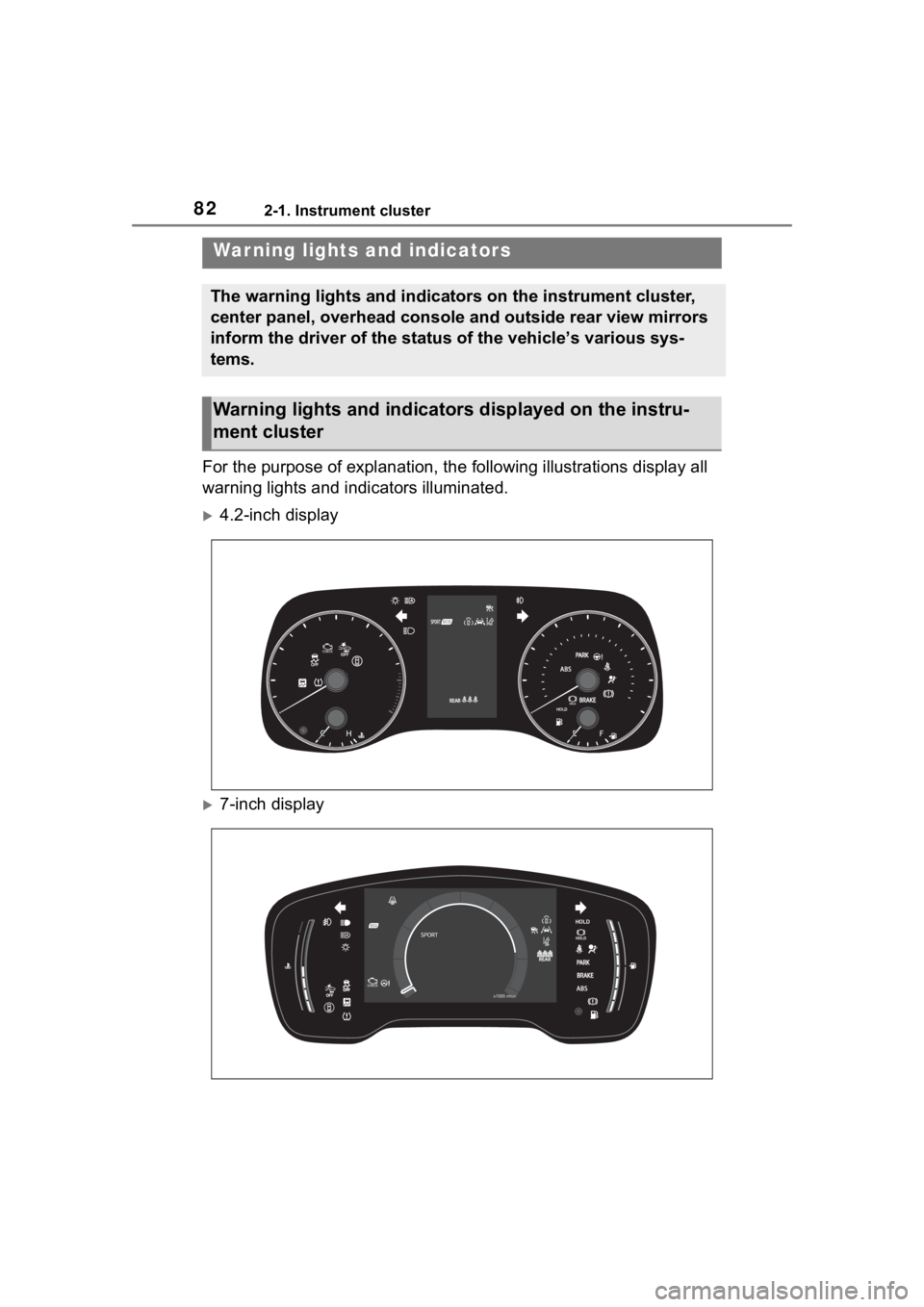
For the purpose of explanation, the following illustrations display all
warning lights and indicators illuminated.
4.2-inch display
7-inch display
War ning lights and indicators
The warning lights and indicators on the instrument cluster,
center panel, overhead console and outside rear view mirrors
inform the driver of the status of the vehicle’s various sys-
tems.
Warning lights and indicators displayed on the instru-
ment cluster
Page 83 of 468
832-1. Instrument cluster
2
Vehicle status information and indicators
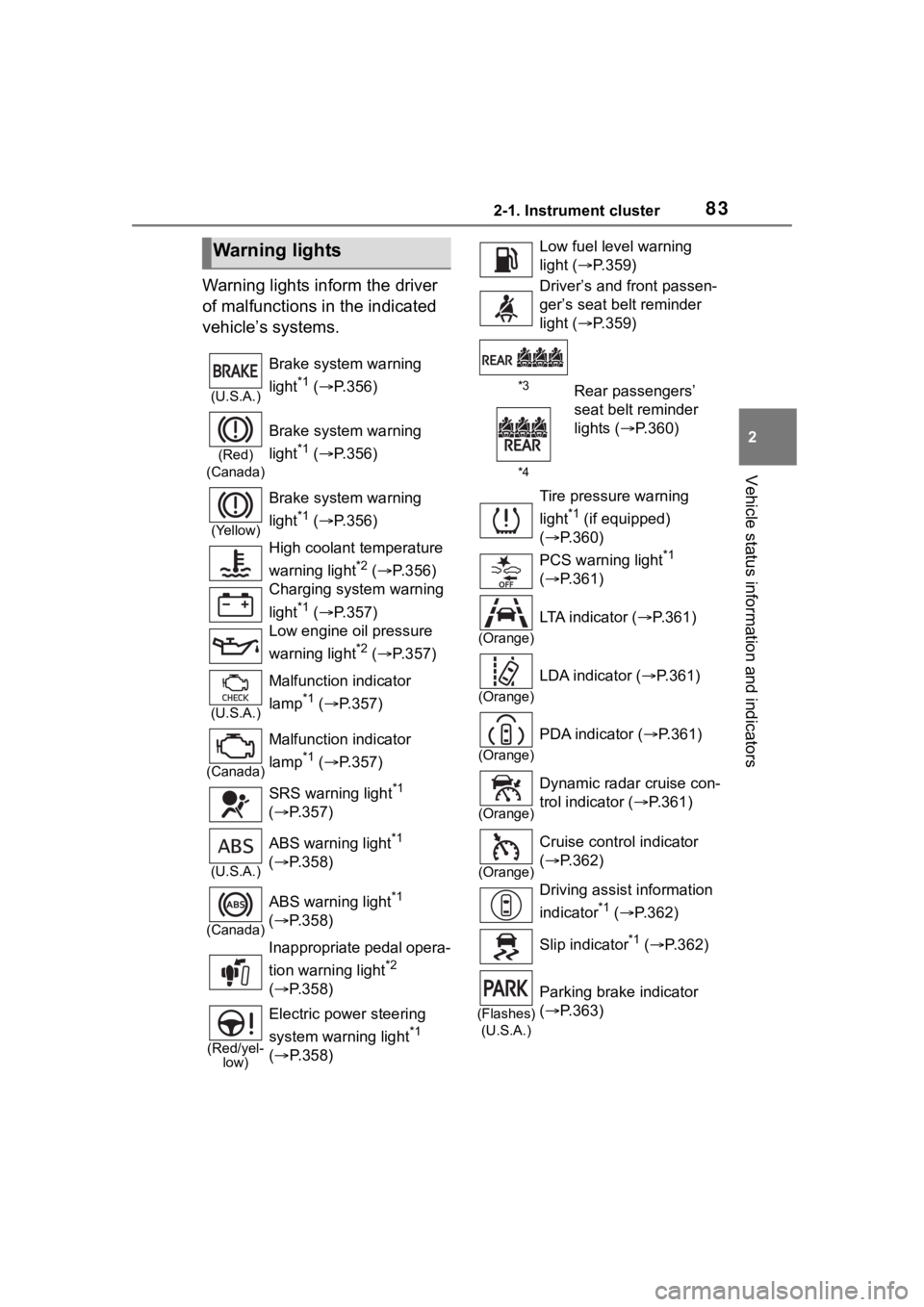
Warning lights inform the driver
of malfunctions in the indicated
vehicle’s systems.
Warning lights
(U.S.A.)
Brake system warning
light
*1 ( P.356)
(Red)
(Canada)
Brake system warning
light
*1 ( P.356)
(Yellow)
Brake system warning
light
*1 ( P.356)
High coolant temperature
warning light
*2 ( P.356)
Charging system warning
light
*1 ( P.357)
Low engine oil pressure
warning light
*2 ( P.357)
(U.S.A.)
Malfunction indicator
lamp
*1 ( P.357)
(Canada)
Malfunction indicator
lamp
*1 ( P.357)
SRS warning light
*1
( P.357)
(U.S.A.)
ABS warning light*1
( P.358)
(Canada)
ABS warning light*1
( P.358)
Inappropriate pedal opera-
tion warning light
*2
( P.358)
(Red/yel-
low)
Electric power steering
system warning light
*1
( P.358)
Low fuel leve l warning
light ( P.359)
Driver’s and front passen-
ger’s seat belt reminder
light ( P.359)
*3Rear passengers’
seat belt reminder
lights ( P.360)
*4
Tire pressure warning
light
*1 (if equipped)
( P.360)
PCS warning light
*1
( P.361)
(Orange)
LTA indicator ( P.361)
(Orange)
LDA indicator ( P.361)
(Orange)
PDA indicator ( P.361)
(Orange)
Dynamic radar cruise con-
trol indicator ( P.361)
(Orange)
Cruise control indicator
( P.362)
Driving assist information
indicator
*1 ( P.362)
Slip indicator
*1 ( P.362)
(Flashes)
(U.S.A.)
Parking brake indicator
( P.363)
Page 84 of 468
842-1. Instrument cluster
*1: These lights come on when the engine switch is turned to ON to
indicate that a system check is
being performed. They will turn
off after the engine is started, or
after a few seconds. There may
be a malfunction in a system if
the lights do not come on, or turn
off. Have the vehicle inspected
by your Toyota dealer.
*2: This light illuminates on the multi-information display.
*3: 4.2-inch display.
*4: 7-inch display.
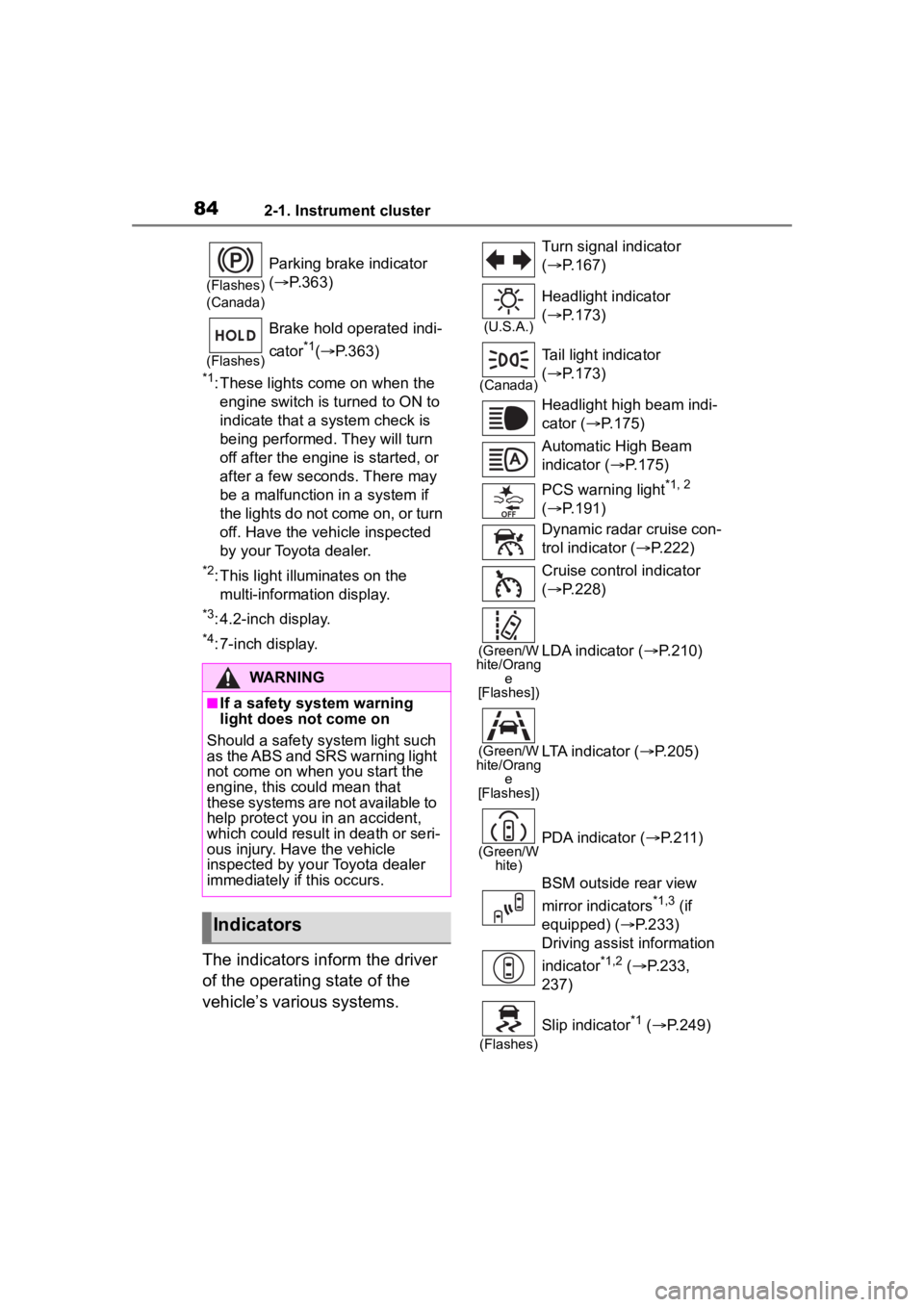
The indicators inform the driver
of the operating state of the
vehicle’s various systems.
(Flashes)
(Canada)
Parking brake indicator
( P.363)
(Flashes)
Brake hold operated indi-
cator
*1( P.363)
WARNING
■If a safety system warning
light does not come on
Should a safety system light such
as the ABS and SRS warning light
not come on when you start the
engine, this could mean that
these systems are not available to
help protect you in an accident,
which could result in death or seri-
ous injury. Have the vehicle
inspected by your Toyota dealer
immediately if this occurs.
Indicators
Turn signal indicator
( P.167)
(U.S.A.)
Headlight indicator
( P.173)
(Canada)
Tail light indicator
( P.173)
Headlight high beam indi-
cator ( P.175)
Automatic High Beam
indicator ( P.175)
PCS warning light
*1, 2
( P.191)
Dynamic radar cruise con-
trol indicator ( P.222)
Cruise control indicator
( P.228)
(Green/W
hite/Orang e
[Flashes])LDA indicator ( P.210)
(Green/W
hite/Orang e
[Flashes])LTA indicator ( P.205)
(Green/W
hite)PDA indicator ( P. 2 1 1 )
BSM outside rear view
mirror indicators
*1,3 (if
equipped) ( P.233)
Driving assist information
indicator
*1,2 ( P.233,
237)
(Flashes)
Slip indicator*1 ( P.249)
Page 85 of 468
852-1. Instrument cluster
2
Vehicle status information and indicators
*1: These lights come on when the engine switch is turned to ON to
indicate that a system check is
being performed. They will turn
off after the engine is started, or
after a few seconds. There may
be a malfunction in a system if
the lights do not come on, or turn
off. Have the vehicle inspected
by your Toyota dealer.
*2: This light comes on when the system is turned off.
*3: This light illumi nates on the out-
side rear view mirrors.
*4: This light illuminates on the multi-information display.
*5: When the outside temperature is approximately 37°F (3°C) or
lower, this indicator will flash for
approximately 10 seconds, then
stay on.
*6: This light illuminates on the cen-ter panel.
*7: This light illuminates on the over-head console.
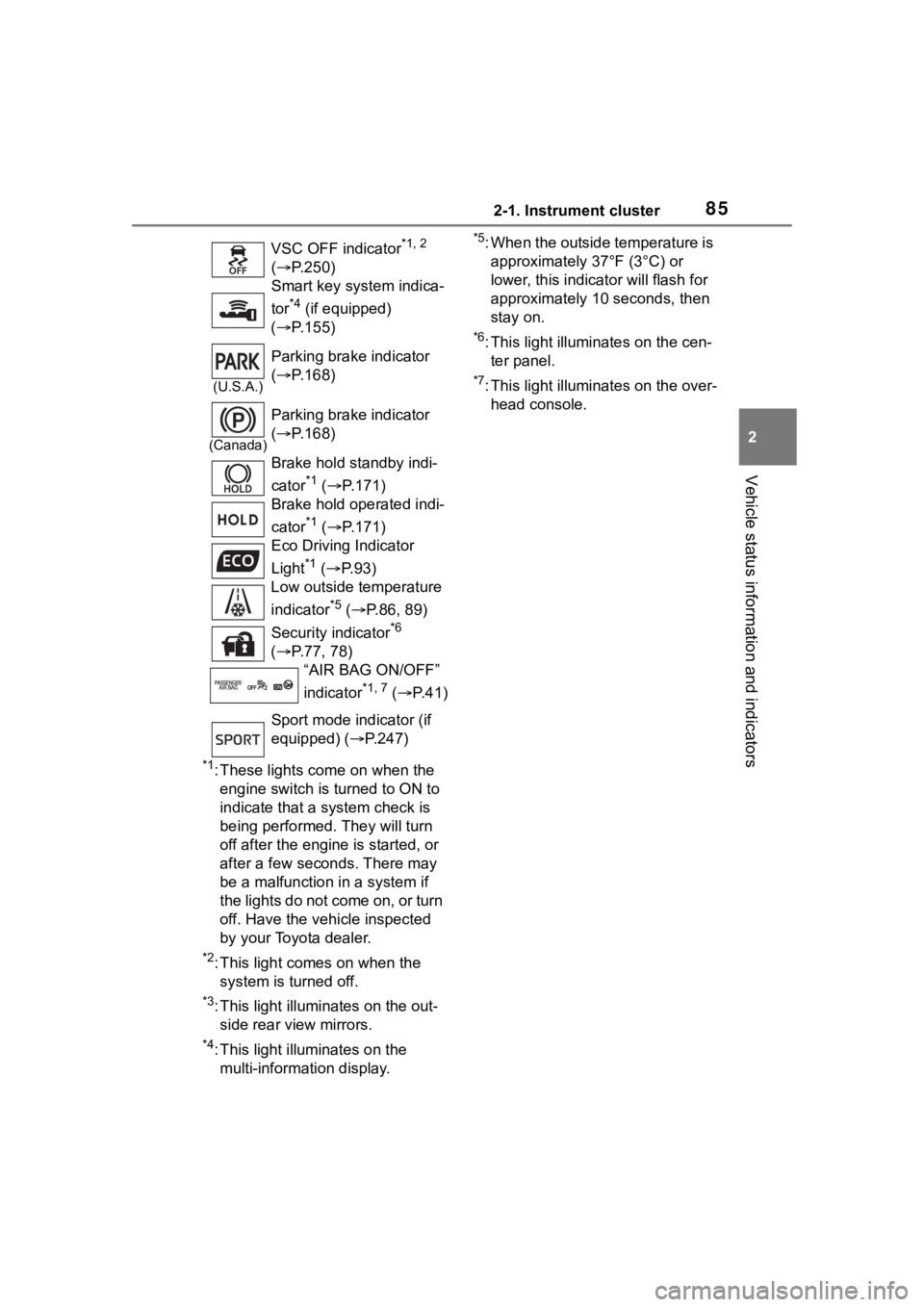
VSC OFF indicator
*1, 2
( P.250)
Smart key system indica-
tor
*4 (if equipped)
( P.155)
(U.S.A.)
Parking brake indicator
( P.168)
(Canada)
Parking brake indicator
( P.168)
Brake hold standby indi-
cator
*1 ( P.171)
Brake hold operated indi-
cator
*1 ( P.171)
Eco Driving Indicator
Light
*1 ( P. 9 3 )
Low outside temperature
indicator
*5 ( P.86, 89)
Security indicator
*6
( P.77, 78)
“AIR BAG ON/OFF”
indicator
*1, 7 ( P. 4 1 )
Sport mode indicator (if
equipped) ( P.247)
Page 88 of 468
882-1. Instrument cluster
different distances independently.
To reset, display the desired trip
meter and press and hold the dis-
play change button.
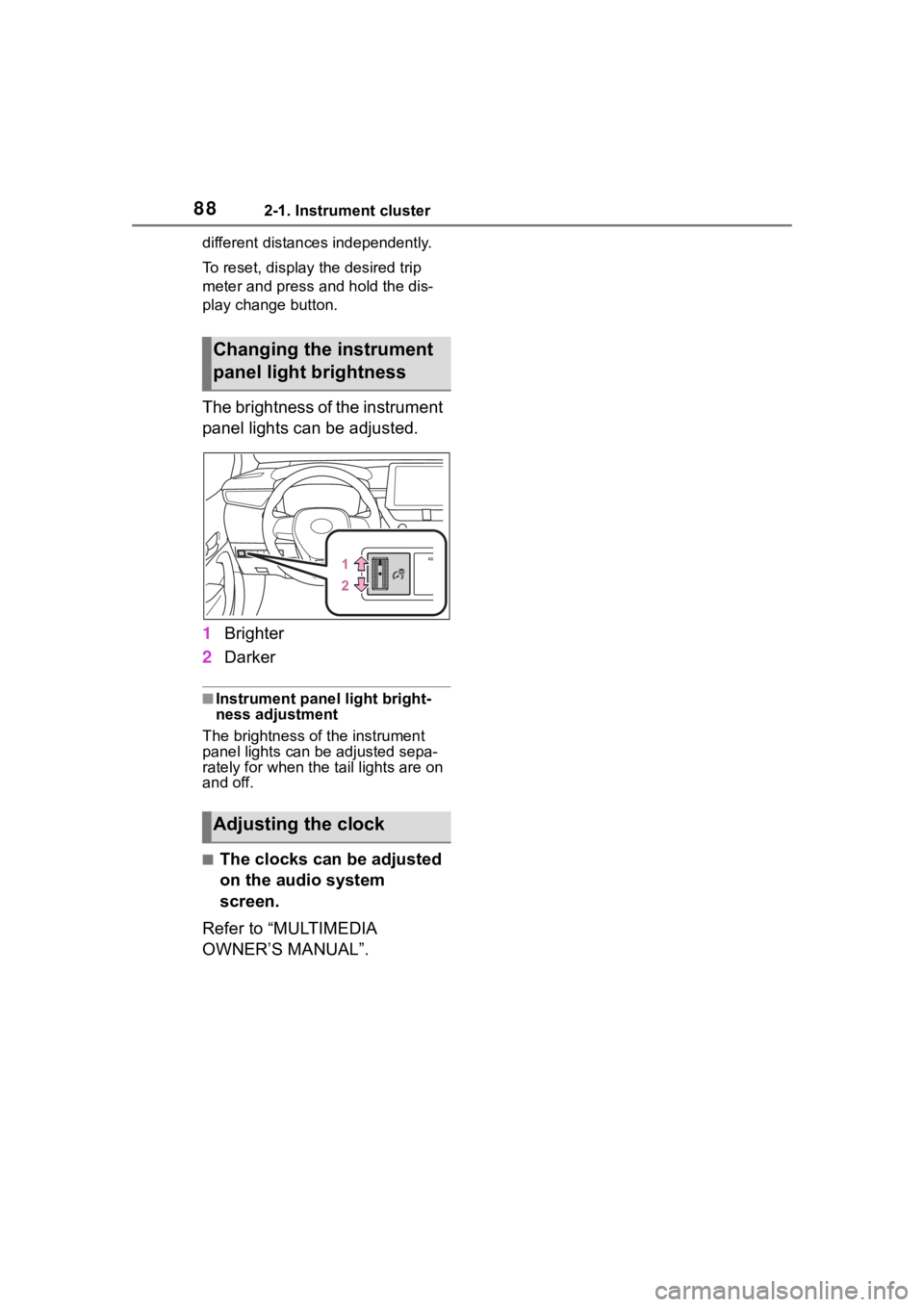
The brightness of the instrument
panel lights can be adjusted.
1Brighter
2 Darker
■Instrument panel light bright-
ness adjustment
The brightness of the instrument
panel lights can be adjusted sepa-
rately for when the tail lights are on
and off.
■The clocks can be adjusted
on the audio system
screen.
Refer to “MULTIMEDIA
OWNER’S MANUAL”.
Changing the instrument
panel light brightness
Adjusting the clock
Page 91 of 468
912-1. Instrument cluster
2
Vehicle status information and indicators
can be used to record and display
different distances independently.
To reset, display the desired trip
meter and press and hold the dis-
play change button.
The brightness of the instrument
panel lights can be adjusted.
1Brighter
2 Darker
■Instrument panel light bright-
ness adjustment
The brightness of the instrument
panel lights can be adjusted sepa-
rately for when the tail lights are on
and off.
■The clocks can be adjusted
on the audio system
screen.
Refer to “MULTIMEDIA
OWNER’S MANUAL”.
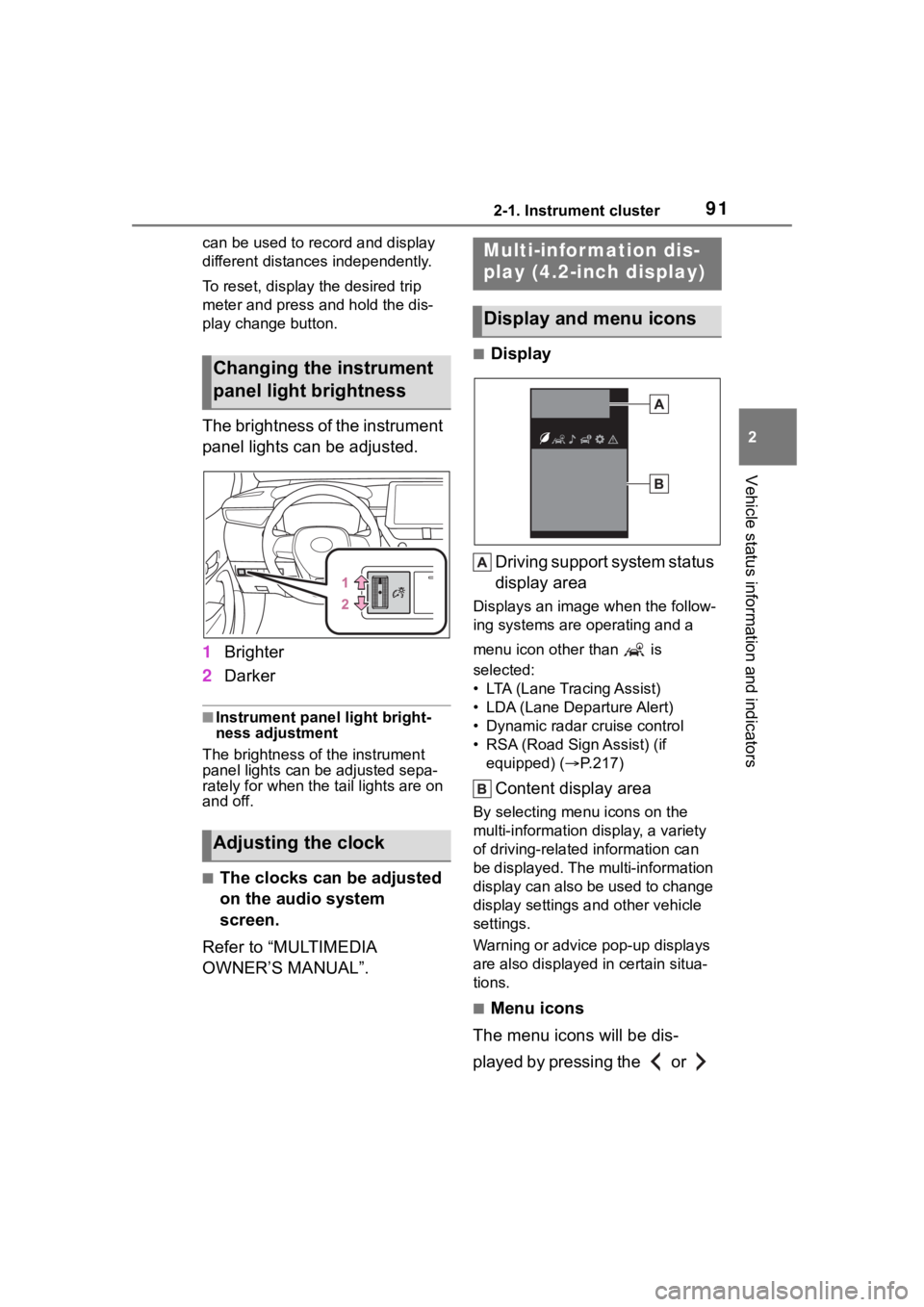
■Display
Driving support system status
display area
Displays an image when the follow-
ing systems are operating and a
menu icon other than is
selected:
• LTA (Lane Tracing Assist)
• LDA (Lane Departure Alert)
• Dynamic radar cruise control
• RSA (Road Sign Assist) (if equipped) ( P.217)
Content display area
By selecting menu icons on the
multi-information di splay, a variety
of driving-related information can
be displayed. The multi-information
display can also be used to change
display settings and other vehicle
settings.
Warning or advice pop-up displays
are also displayed in certain situa-
tions.
■Menu icons
The menu icons will be dis-
played by pressing the or
Changing the instrument
panel light brightness
Adjusting the clock
Multi-infor mation dis-
play (4.2-inch display)
Display and menu icons
Page 109 of 468
1093-1. Key information
3
Before driving
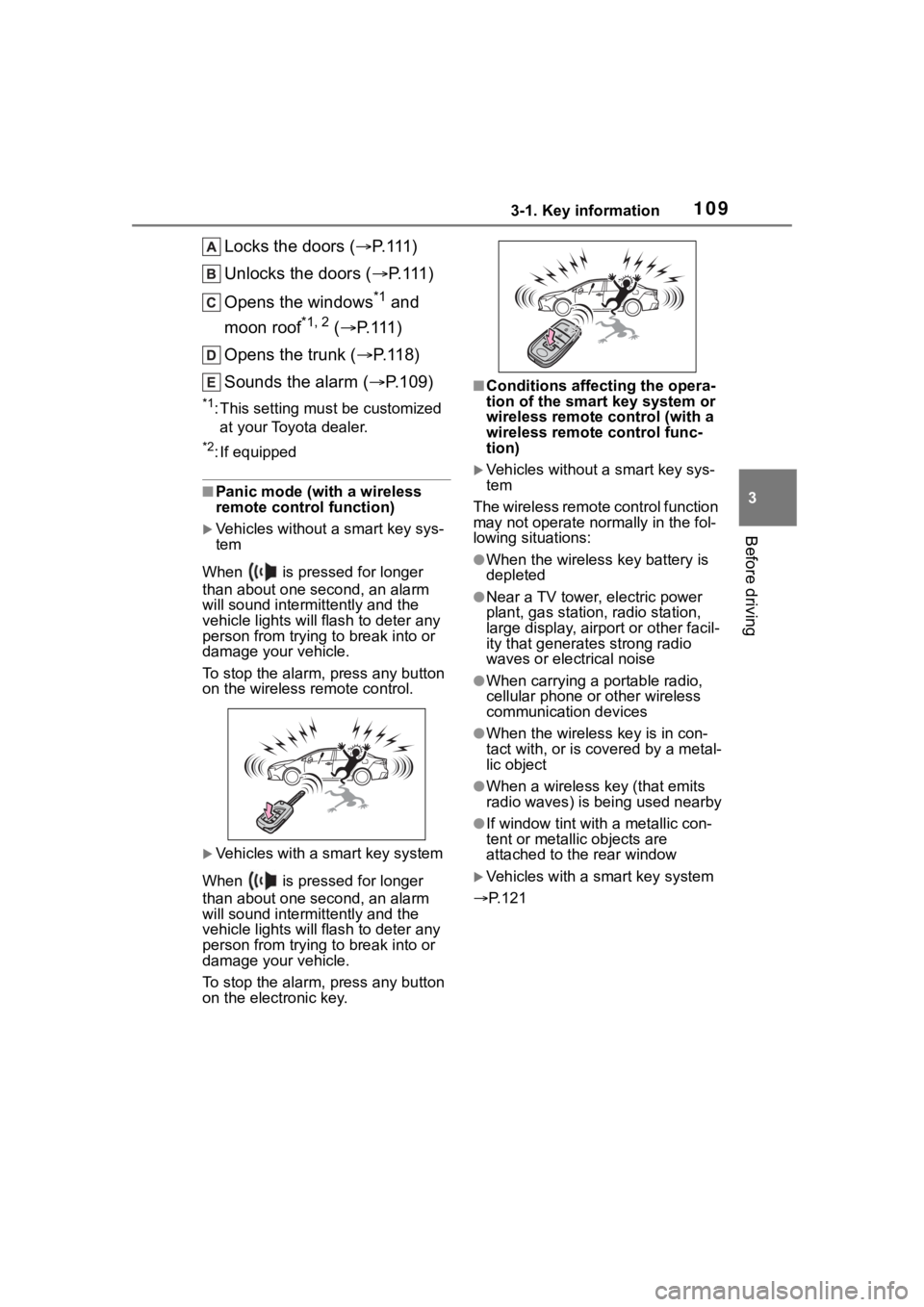
Locks the doors (P. 1 1 1 )
Unlocks the doors ( P. 1 1 1 )
Opens the windows
*1 and
moon roof
*1, 2 ( P. 1 1 1 )
Opens the trunk ( P. 1 1 8 )
Sounds the alarm ( P.109)
*1:This setting must be customized
at your Toyota dealer.
*2: If equipped
■Panic mode (with a wireless
remote control function)
Vehicles without a smart key sys-
tem
When is pressed for longer
than about one second, an alarm
will sound intermittently and the
vehicle lights will f lash to deter any
person from trying to break into or
damage your vehicle.
To stop the alarm, press any button
on the wireless re mote control.
Vehicles with a smart key system
When is pressed for longer
than about one second, an alarm
will sound intermittently and the
vehicle lights will f lash to deter any
person from trying to break into or
damage your vehicle.
To stop the alarm, press any button
on the electronic key.
■Conditions affecting the opera-
tion of the smart key system or
wireless remote control (with a
wireless remote control func-
tion)
Vehicles without a smart key sys-
tem
The wireless remote control function
may not operate normally in the fol-
lowing situations:
●When the wireles s key battery is
depleted
●Near a TV tower, electric power
plant, gas station, radio station,
large display, airpo rt or other facil-
ity that generates strong radio
waves or electrical noise
●When carrying a portable radio,
cellular phone or other wireless
communication devices
●When the wireless key is in con-
tact with, or is c overed by a metal-
lic object
●When a wireless key (that emits
radio waves) is being used nearby
●If window tint wit h a metallic con-
tent or metallic objects are
attached to the rear window
Vehicles with a smart key system
P.121
Page 131 of 468
1313-4. Adjusting the steering wheel and mirrors
3
Before driving
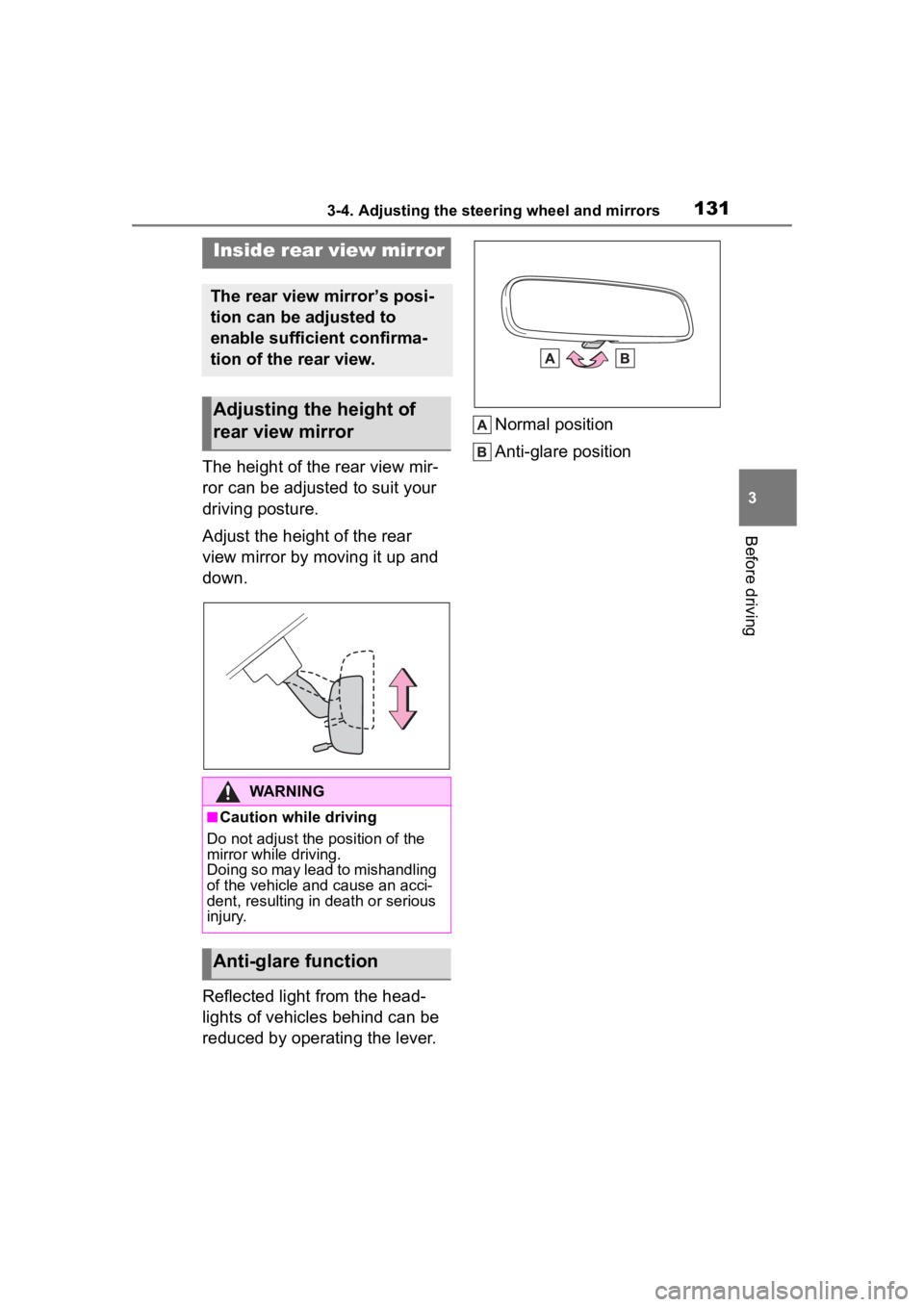
The height of the rear view mir-
ror can be adjusted to suit your
driving posture.
Adjust the height of the rear
view mirror by moving it up and
down.
Reflected light from the head-
lights of vehicles behind can be
reduced by operating the lever.Normal position
Anti-glare position
Inside rear view mirror
The rear view mirror’s posi-
tion can be adjusted to
enable sufficient confirma-
tion of the rear view.
Adjusting the height of
rear view mirror
WARNING
■Caution while driving
Do not adjust the position of the
mirror while driving.
Doing so may lead to mishandling
of the vehicle and cause an acci-
dent, resulting in death or serious
injury.
Anti-glare function
Page 141 of 468
141
4
4
Driving
Driving
.4-1. Before drivingDriving the vehicle....... 143
Cargo and luggage ..... 149
Vehicle load limits ....... 152
Trailer towing............... 152
Dinghy towing ............. 153
4-2. Driving procedures Engine (ignition) switch (vehicles without a smart
key system) ............... 154
Engine (ignition) switch (vehicles with a smart key
system)...................... 155
Continuously variable trans- mission (vehicles without
paddle shift switches).................................. 160
Continuously variable trans- mission (vehicles with pad-
dle shift switches) ...... 162
Turn signal lever.......... 167
Parking brake .............. 168
Brake Hold .................. 171
4-3. Operating the lights and wipers
Headlight switch .......... 173
AHB (Automatic High Beam)........................ 175
Windshield wipers and washer....................... 1784-4. Refueling
Opening the fuel tank cap.................................. 180
4-5. Using the dr iving support
systems
Toyota Safety Sense 3.0 software update ......... 182
Toyota Safety Sense 3.0 .................................. 184
PCS (Pre-Collision System) .................................. 190
LTA (Lane Tracing Assist) .................................. 201
LDA (Lane Departure Alert) .................................. 206
PDA (Proactive driving assist) ........................ 211
RSA (Road Sign Assist) .................................. 217
Dynamic radar cruise con- trol ............................. 219
Cruise control .............. 227
Emergency Driving Stop System ...................... 230
BSM (Blind Spot Monitor) .................................. 232
RCTA (Rear Cross Traffic Alert) function ............ 237
Safe Exit Assist ........... 243
Driving mode select switch .................................. 247
Driving assist systems .................................. 248