mirror TOYOTA COROLLA 2023 User Guide
[x] Cancel search | Manufacturer: TOYOTA, Model Year: 2023, Model line: COROLLA, Model: TOYOTA COROLLA 2023Pages: 468, PDF Size: 14.4 MB
Page 130 of 468
1303-4. Adjusting the steering wheel and mirrors
3-4.Adjusting the steering wheel and mirrors
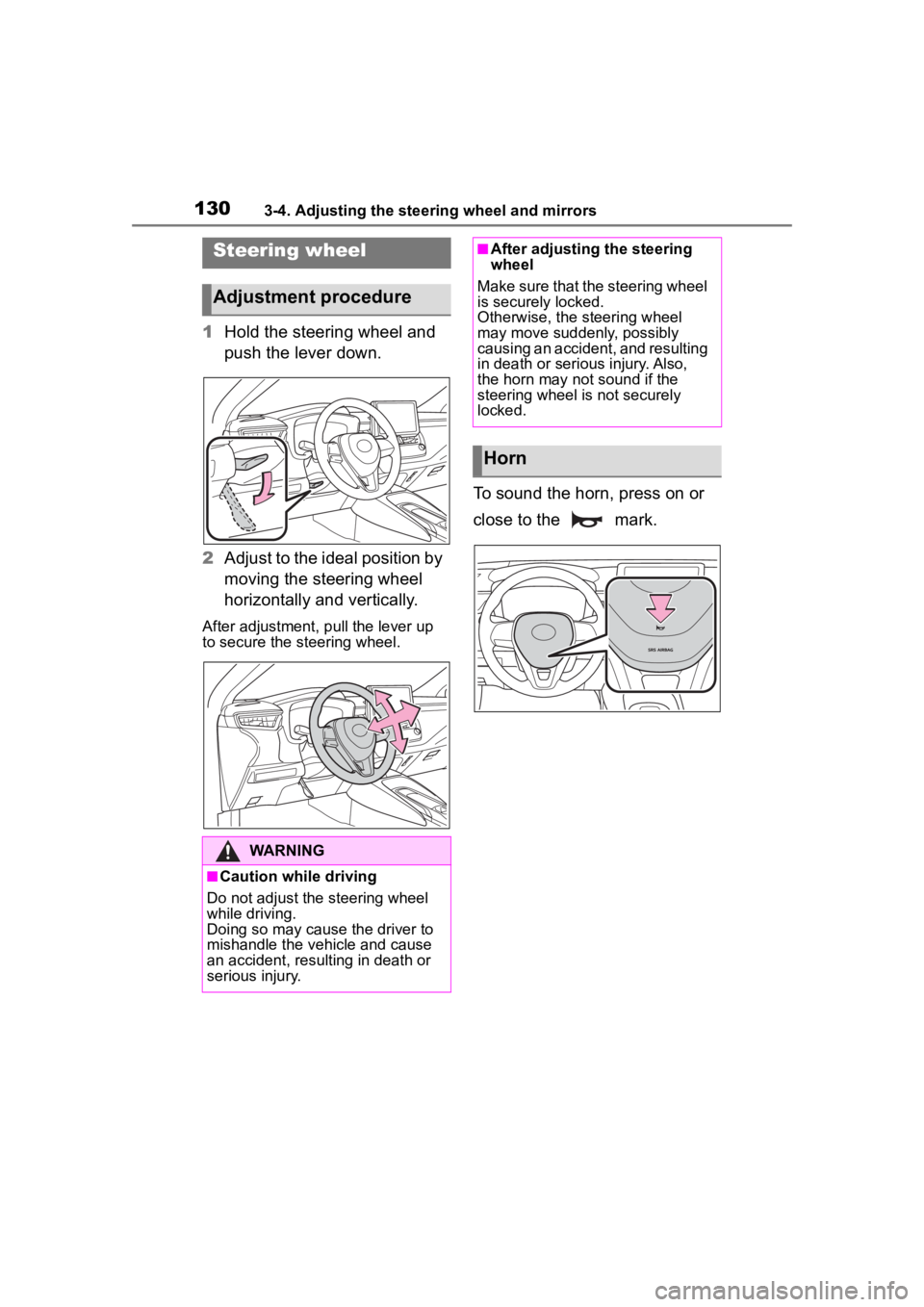
1Hold the steering wheel and
push the lever down.
2 Adjust to the ideal position by
moving the steering wheel
horizontally and vertically.
After adjustment, pull the lever up
to secure the steering wheel.
To sound the horn, press on or
close to the mark.
Steering wheel
Adjustment procedure
WARNING
■Caution while driving
Do not adjust the steering wheel
while driving.
Doing so may cause the driver to
mishandle the vehicle and cause
an accident, resul ting in death or
serious injury.
■After adjusting the steering
wheel
Make sure that the steering wheel
is securely locked.
Otherwise, the steering wheel
may move suddenly, possibly
causing an accident, and resulting
in death or serious injury. Also,
the horn may not sound if the
steering wheel is not securely
locked.
Horn
Page 131 of 468
1313-4. Adjusting the steering wheel and mirrors
3
Before driving
The height of the rear view mir-
ror can be adjusted to suit your
driving posture.
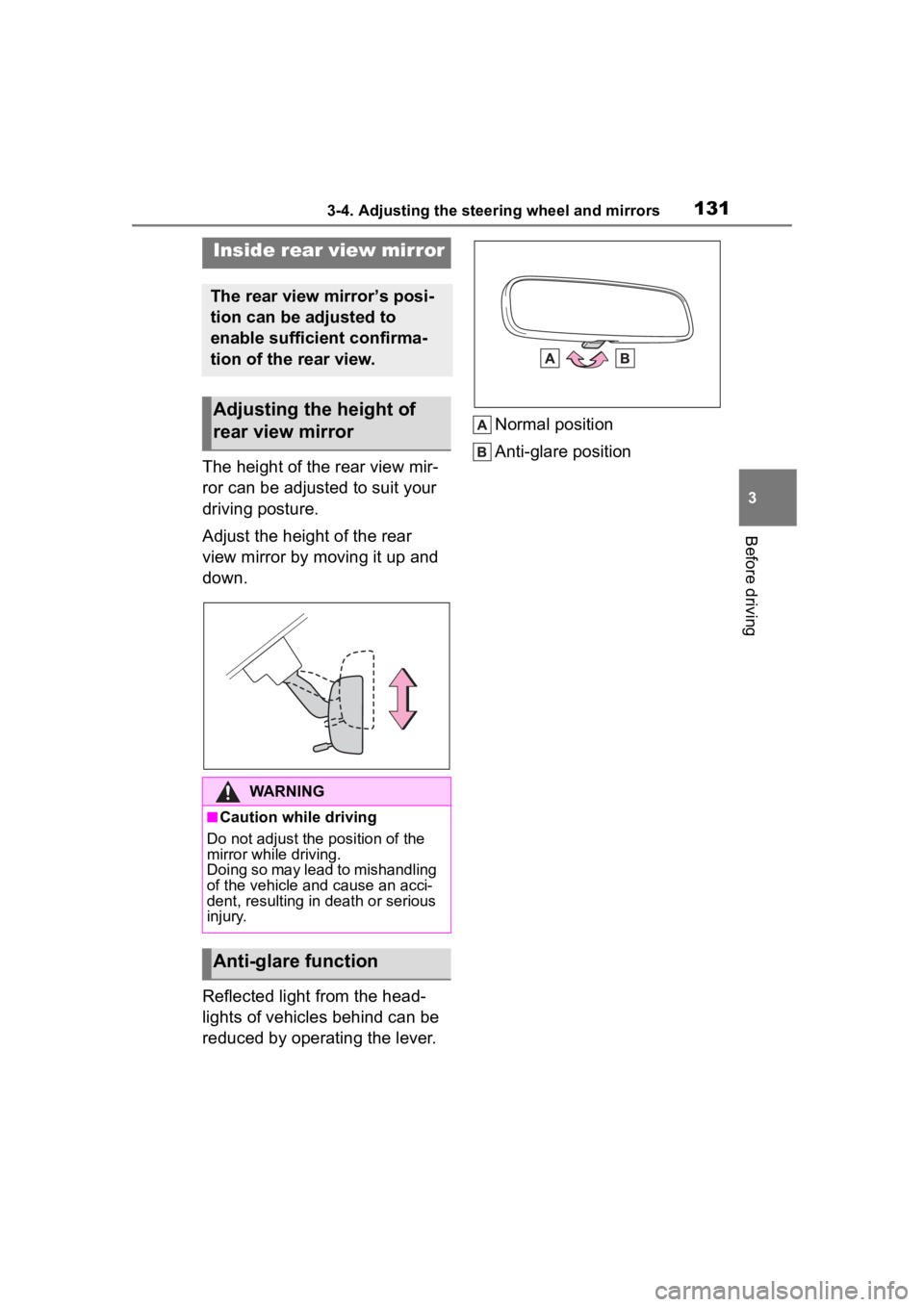
Adjust the height of the rear
view mirror by moving it up and
down.
Reflected light from the head-
lights of vehicles behind can be
reduced by operating the lever.Normal position
Anti-glare position
Inside rear view mirror
The rear view mirror’s posi-
tion can be adjusted to
enable sufficient confirma-
tion of the rear view.
Adjusting the height of
rear view mirror
WARNING
■Caution while driving
Do not adjust the position of the
mirror while driving.
Doing so may lead to mishandling
of the vehicle and cause an acci-
dent, resulting in death or serious
injury.
Anti-glare function
Page 132 of 468
1323-4. Adjusting the steering wheel and mirrors
■When using the outside rear
view mirrors in a cold weather
When it is cold and the outside rear
view mirrors are frozen, it may not
be possible to fold /extend them or
adjust the mirror surface. Remove
the ice, snow, etc. covering the out-
side rear view mirrors.
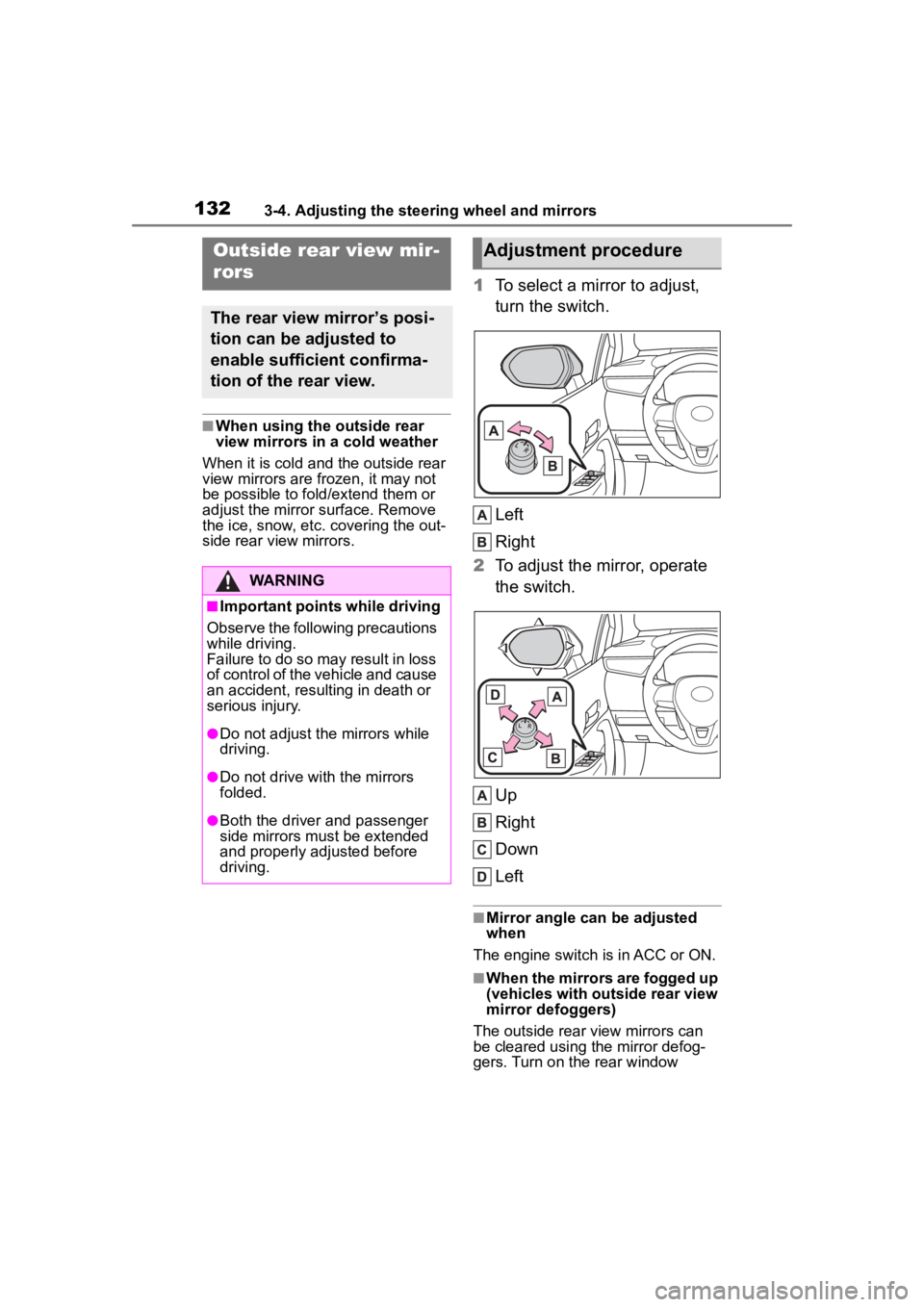
1 To select a mirror to adjust,
turn the switch.
Left
Right
2 To adjust the mirror, operate
the switch.
Up
Right
Down
Left
■Mirror angle can be adjusted
when
The engine switch i s in ACC or ON.
■When the mirrors are fogged up
(vehicles with outside rear view
mirror defoggers)
The outside rear view mirrors can
be cleared using the mirror defog-
gers. Turn on the rear window
Outside rear view mir-
rors
The rear view mirror’s posi-
tion can be adjusted to
enable sufficient confirma-
tion of the rear view.
WARNING
■Important points while driving
Observe the following precautions
while driving.
Failure to do so may result in loss
of control of the vehicle and cause
an accident, resul ting in death or
serious injury.
●Do not adjust the mirrors while
driving.
●Do not drive with the mirrors
folded.
●Both the driver and passenger
side mirrors must be extended
and properly adjusted before
driving.
Adjustment procedure
Page 133 of 468
1333-4. Adjusting the steering wheel and mirrors
3
Before driving
defogger to turn on the outside rear
view mirror defoggers. (P.260,
265)
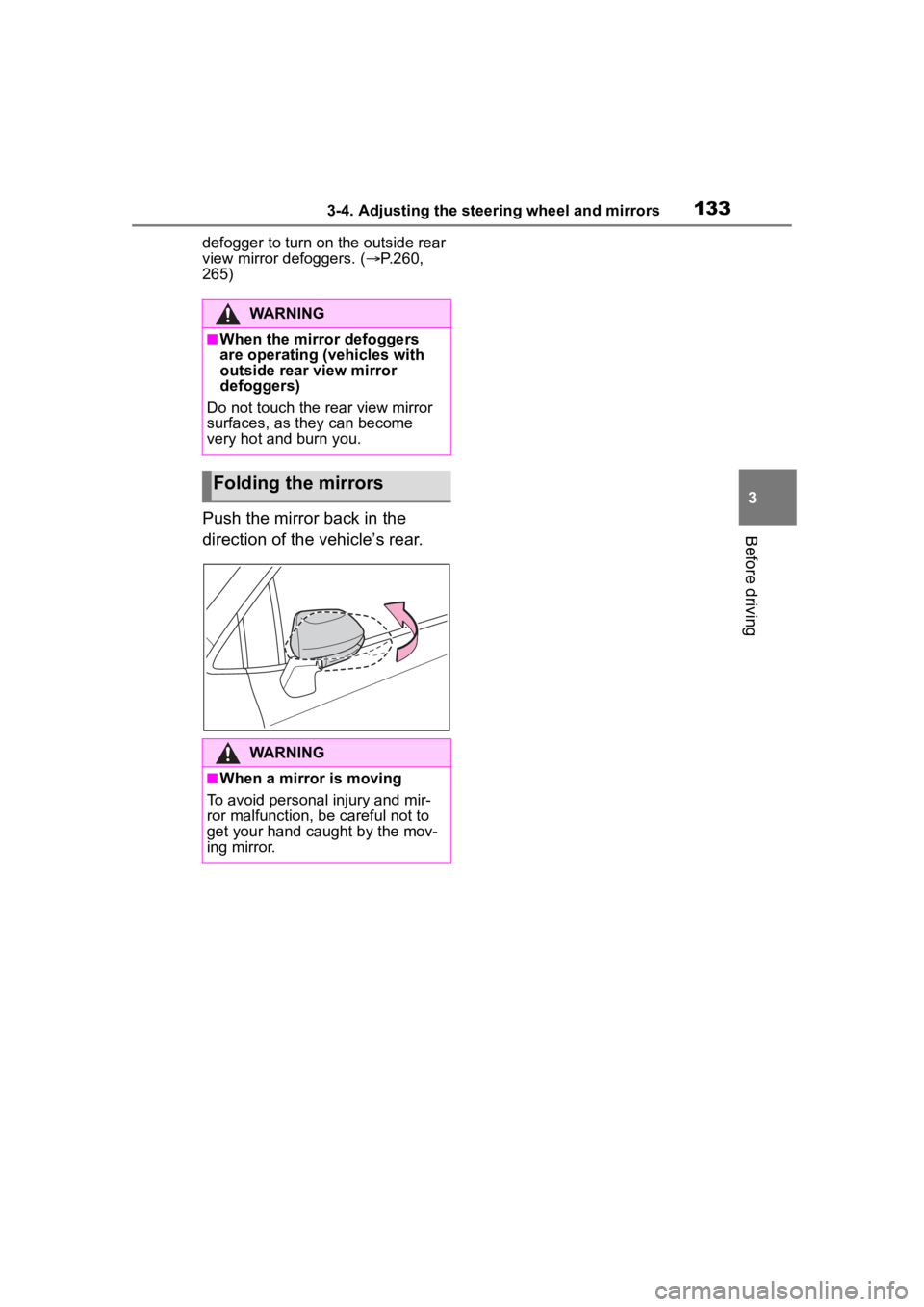
Push the mirror back in the
direction of the vehicle’s rear.
WARNING
■When the mirror defoggers
are operating (vehicles with
outside rear view mirror
defoggers)
Do not touch the rear view mirror
surfaces, as they can become
very hot and burn you.
Folding the mirrors
WARNING
■When a mirror is moving
To avoid personal injury and mir-
ror malfunction, be careful not to
get your hand caught by the mov-
ing mirror.
Page 145 of 468
1454-1. Before driving
4
Driving
WARNING
●During normal driving, do not
turn off the engine. Turning the
engine off while driving will not
cause loss of steering or brak-
ing control, but the power assist
to these systems will be lost.
This will make it more difficult to
steer and brake, so you should
pull over and stop the vehicle as
soon as it is safe to do so.
However, in the event of an
emergency, such as if it
becomes impossible to stop the
vehicle in the normal way:
P. 3 4 8
●Use engine braking (shift posi-
tion B*1 or downshift*2) to main-
tain a safe speed when driving
down a steep hill.
Using the brakes continuously
may cause the brakes to over-
heat and lose effectiveness.
(
P.160, 162)
*1: Vehicles without paddle shift
switches
*2: Vehicles with paddle shift switches
●Do not adjust the positions of
the steering wheel, the seat, or
the inside or ou tside rear view
mirrors while driving.
Doing so may result in a loss of
vehicle control.
●Always check that all passen-
gers’ arms, heads or other parts
of their body are not outside the
vehicle.
●Do not drive in excess of the
speed limit. Even if the legal
speed limit permits it, do not
drive over 85 mph (140 km/h)
unless your vehicle has
high-speed capability tires. Driv-
ing over 85 mph (140 km/h)
may result in tire failure, loss of
control and possible injury. Be
sure to consult a tire dealer to
determine whether the tires on
your vehicle are high-speed
capability tires or not before
driving at such speeds.
■When driving on slippery
road surfaces
●Sudden braking, acceleration
and steering may cause tire
slippage and reduce your ability
to control the vehicle.
●Sudden acceleration, engine
braking due to shifting, or
changes in engine speed could
cause the vehicle to skid.
●After driving through a puddle,
lightly depress the brake pedal
to make sure that the brakes
are functioning properly. Wet
brake pads may prevent the
brakes from functioning prop-
erly. If the brakes on only one
side are wet and not functioning
properly, steering control may
be affected.
■When shifting the shift lever
●Do not let the vehicle roll back-
ward while a fo rward driving
position is selected, or roll for-
ward while the shift lever is in R.
Doing so may cause the engine
to stall or lead to poor brake and
steering performance, resulting
in an accident or damage to the
vehicle.
Page 232 of 468
2324-5. Using the driving support systems
the brake lights may illuminate,
depending on the road conditions,
etc.
After entering the deceleration
stop phase, a buzzer will sound
continuously and a message will
be displayed to warn the driver,
and the vehicle will slowly decel-
erate and stop. After the vehicle
stops, the system will enter the
stop and hold phase.
After the vehicle is stopped, the
parking brake will be applied
automatically. After entering the
stop and hold phase, the buzzer
will continue sounding continu-
ously, the emergency flashers
(hazard lights) will flash to warn
other drivers of the emergency.
*: If equippedDeceleration stop phase
Stop hold phase
BSM (Blind Spot Moni-
tor)*
The Blind Spot Monitor is a
system that uses rear side
radar sensors installed on
the inner side of the rear
bumper on the left and right
side to assist the driver in
confirming safety when
changing lanes.
WARNING
■Cautions regarding the use of
the system
●The driver is solely responsible
for safe driving. Always drive
safely, taking care to observe
your surroundings.
●The Blind Spot Monitor is a sup-
plementary function which alerts
the driver that a vehicle is in a
blind spot of the outside rear
view mirrors or is approaching
rapidly from behind into a blind
spot. Do not overly rely on the
Blind Spot Monitor. As the func-
tion cannot judge if it is safe to
change lanes, over reliance
could lead to an accident result-
ing in death or serious injury. As
the system may not function
correctly under certain condi-
tions, the driver’s own visual
confirmation of safety is neces-
sary.
Page 233 of 468
2334-5. Using the driving support systems
4
Driving
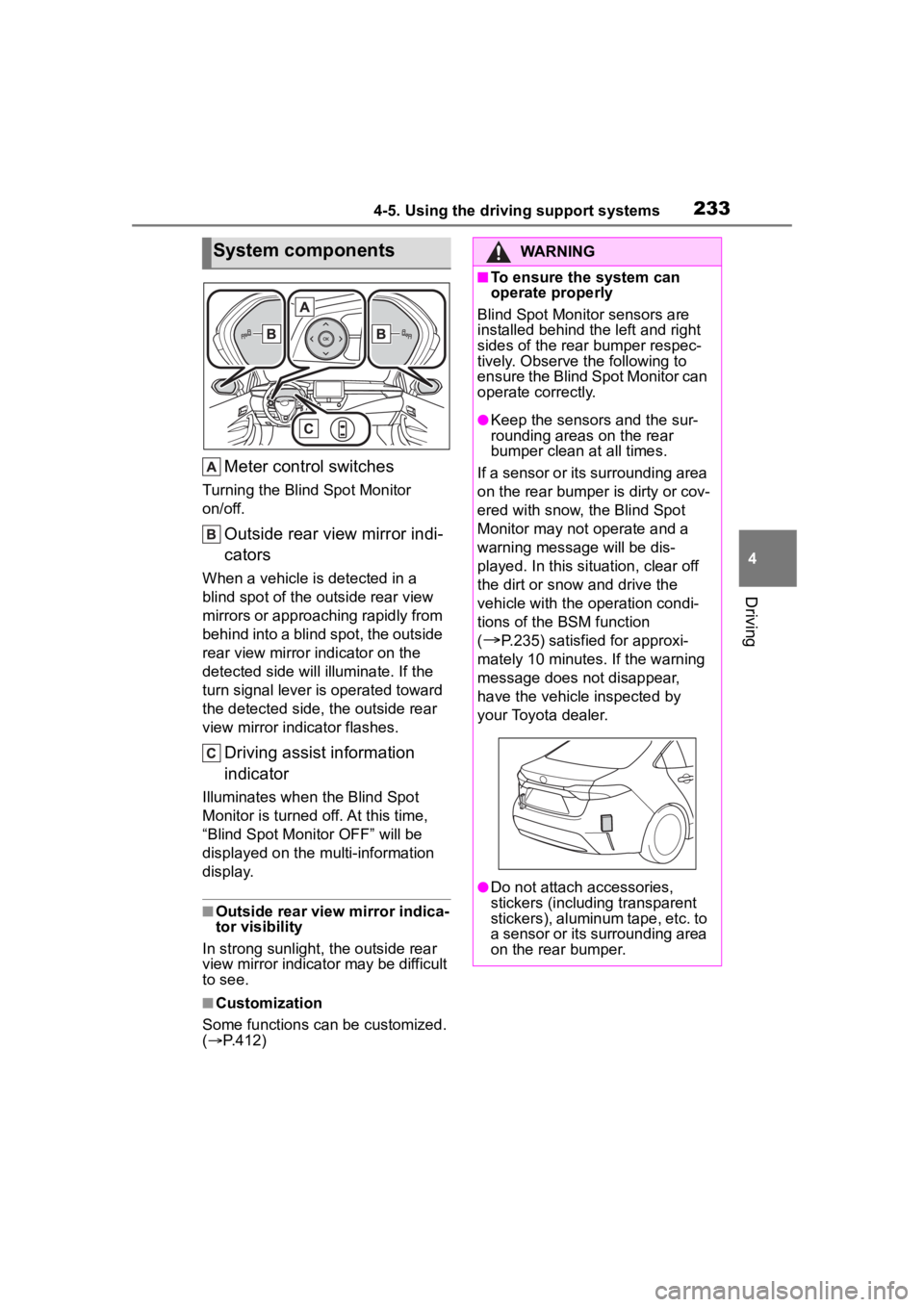
Meter control switches
Turning the Blind Spot Monitor
on/off.
Outside rear view mirror indi-
cators
When a vehicle is detected in a
blind spot of the outside rear view
mirrors or approaching rapidly from
behind into a blind spot, the outside
rear view mirror indicator on the
detected side will illuminate. If the
turn signal lever is operated toward
the detected side, the outside rear
view mirror indicator flashes.
Driving assist information
indicator
Illuminates when the Blind Spot
Monitor is turned of f. At this time,
“Blind Spot Monitor OFF” will be
displayed on the multi-information
display.
■Outside rear view mirror indica-
tor visibility
In strong sunlight, the outside rear
view mirror indicato r may be difficult
to see.
■Customization
Some functions can be customized.
( P.412)
System componentsWARNING
■To ensure the system can
operate properly
Blind Spot Monitor sensors are
installed behind the left and right
sides of the rear bumper respec-
tively. Observe the following to
ensure the Blind Spot Monitor can
operate correctly.
●Keep the sensors and the sur-
rounding areas on the rear
bumper clean at all times.
If a sensor or its surrounding area
on the rear bumper is dirty or cov-
ered with snow, the Blind Spot
Monitor may not operate and a
warning message will be dis-
played. In this situation, clear off
the dirt or snow and drive the
vehicle with the operation condi-
tions of the BSM function
(
P.235) satisfied for approxi-
mately 10 minutes. If the warning
message does not disappear,
have the vehicle inspected by
your Toyota dealer.
●Do not attach a ccessories,
stickers (including transparent
stickers), aluminum tape, etc. to
a sensor or its surrounding area
on the rear bumper.
Page 234 of 468
2344-5. Using the driving support systems
The Blind Spot Monitor can be
enabled/disabled on
(4.2-inch display) or (7-inch
display) of the multi-information
display. (P.412)
When the Blind Spot Monitor
function is off, the driving assist
information indicator ( P.84)
will illuminate. At this time,
"Blind Spot Monitor OFF" will be
displayed on the multi-informa-
tion display.
Each time the engine switch is
turned to ON, the Blind Spot
Monitor is enabled.
■Objects that can be detected while driving
The Blind Spot Monitor uses rear side radar sensors to detect the fol-
lowing vehicles traveling in adjacent lanes and advises the driver of
the presence of such vehicles via the indicators on the outside rear
view mirrors.
WARNING
●Do not subject a sensor or its
surrounding area on the rear
bumper to a strong impact.
If a sensor is moved even
slightly off position, the system
may malfunction and vehicles
may not be detected correctly.
In the following si tuations, have
your vehicle inspected by your
Toyota dealer.
• A sensor or its surrounding area is subject to a strong impact.
• If the surrounding area of a sen- sor is scratched or dented, or
part of them has become dis-
connected.
●Do not disassemble the sensor.
●Do not modify the sensor or sur-
rounding area on the rear
bumper.
●If a sensor or th e rear bumper
needs to be removed/installed
or replaced, contact your Toyota
dealer.
●Do not paint the rear bumper
any color other than an official
Toyota color.
Turning the Blind Spot
Monitor on/off
Blind Spot Monitor operation
Page 235 of 468
2354-5. Using the driving support systems
4
Driving
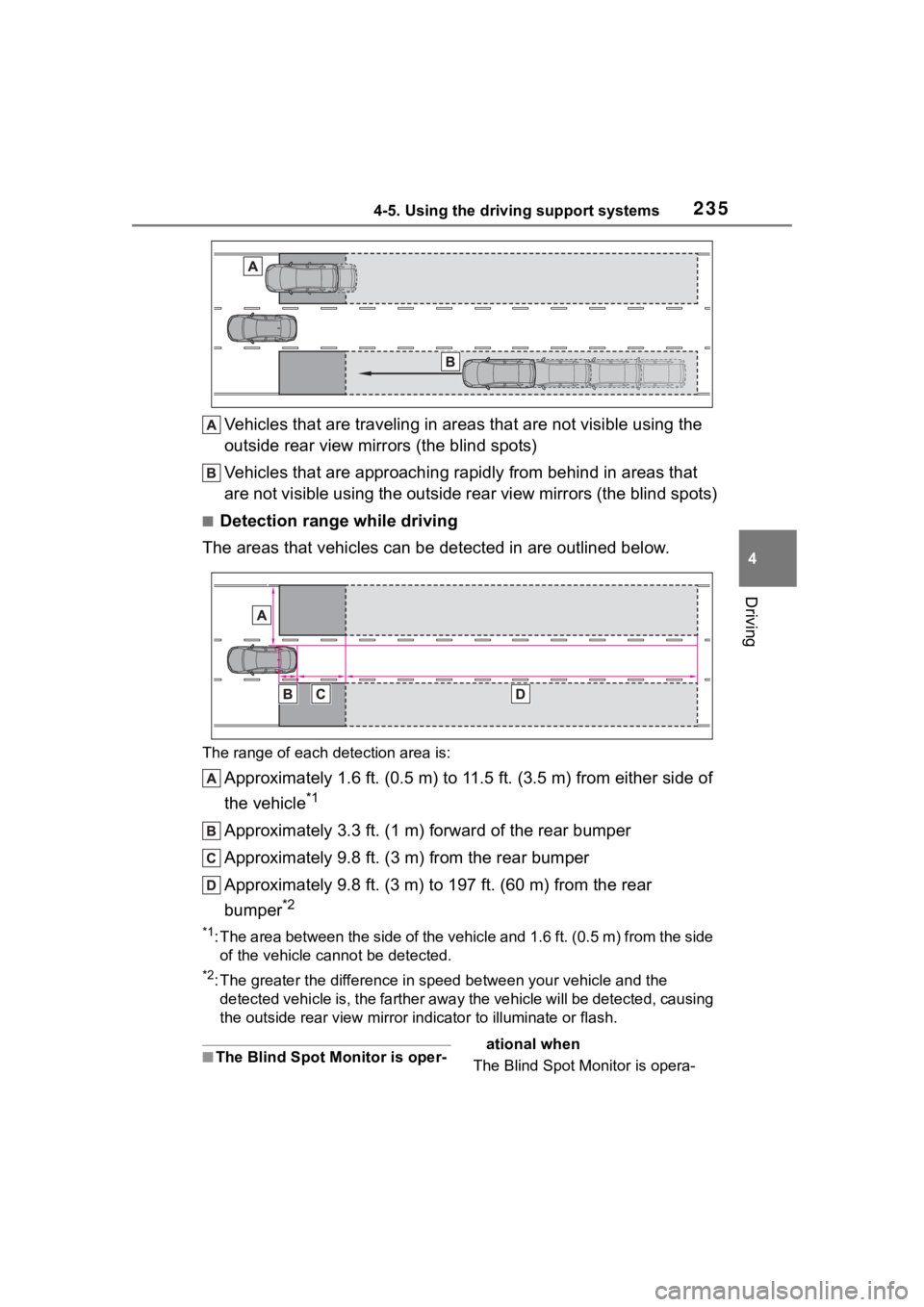
Vehicles that are traveling in areas that are not visible using the
outside rear view mirrors (the blind spots)
Vehicles that are approaching r apidly from behind in areas that
are not visible using the outside rear view mirrors (the blind spots)
■Detection range while driving
The areas that vehicles can be detected in are outlined below.
The range of each detection area is:
Approximately 1.6 ft. (0.5 m) to 11.5 ft. (3.5 m) from either s ide of
the vehicle
*1
Approximately 3.3 ft. (1 m) forward of the rear bumper
Approximately 9.8 ft. (3 m) from the rear bumper
Approximately 9.8 ft. (3 m) to 197 ft. (60 m) from the rear
bumper
*2
*1: The area between the side of the vehicle and 1.6 ft. (0.5 m) f rom the side
of the vehicle cannot be detected.
*2: The greater the difference in speed between your vehicle and t he
detected vehicle is, the farthe r away the vehicle will be detec ted, causing
the outside r ear view mirror indicato r to illuminate or flash.
■The Blind Spot Monitor is oper- ational when
The Blind Spot Monitor is opera-
Page 238 of 468
2384-5. Using the driving support systems
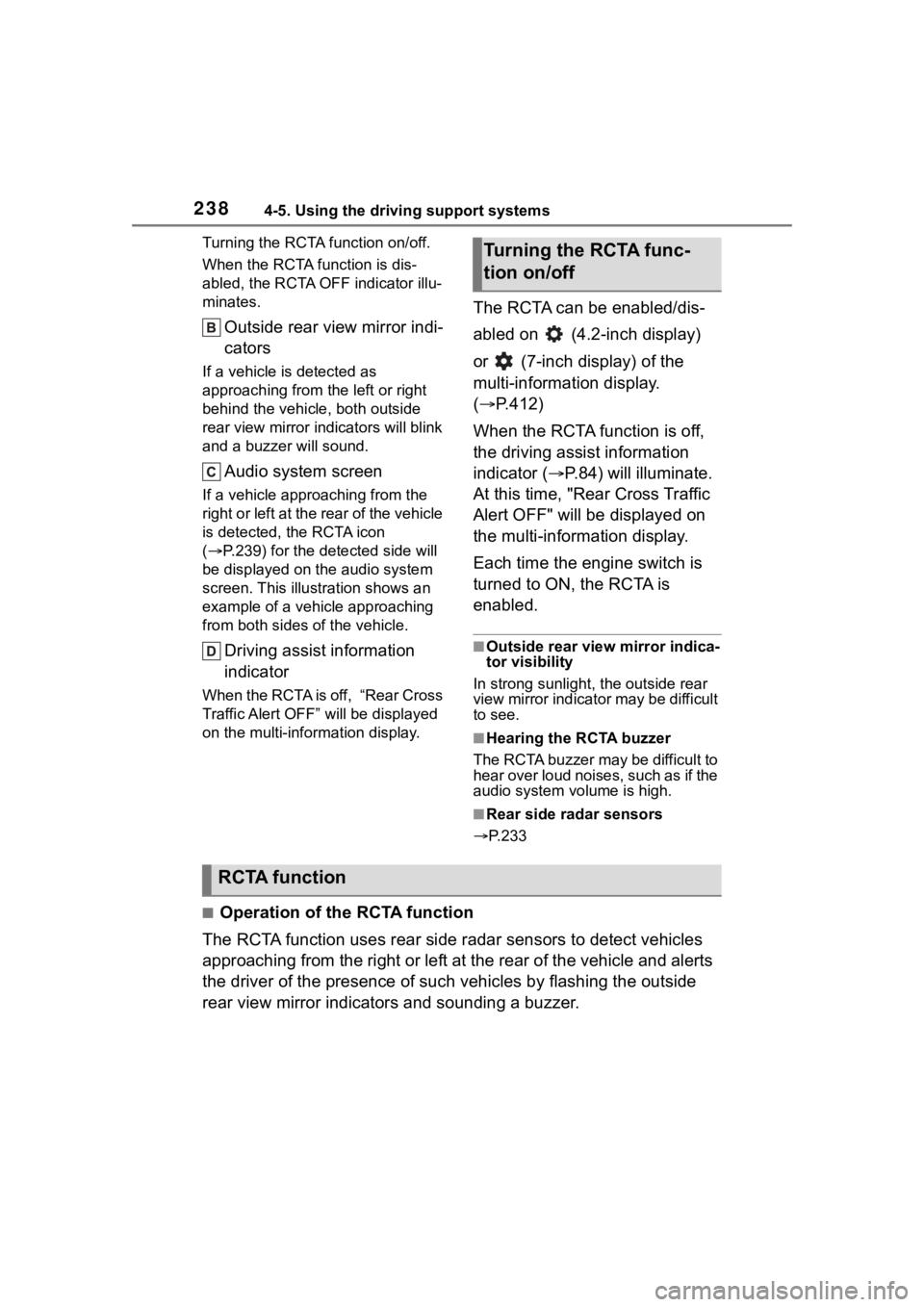
Turning the RCTA function on/off.
When the RCTA function is dis-
abled, the RCTA OFF indicator illu-
minates.
Outside rear view mirror indi-
cators
If a vehicle is detected as
approaching from the left or right
behind the vehicle, both outside
rear view mirror indicators will blink
and a buzzer will sound.
Audio system screen
If a vehicle approaching from the
right or left at the rear of the vehicle
is detected, the RCTA icon
( P.239) for the det ected side will
be displayed on t he audio system
screen. This illustration shows an
example of a vehicle approaching
from both sides of the vehicle.
Driving assist information
indicator
When the RCTA is off, “Rear Cross
Traffic Alert OFF” will be displayed
on the multi-information display.
The RCTA can be enabled/dis-
abled on (4.2-inch display)
or (7-inch display) of the
multi-information display.
( P.412)
When the RCTA function is off,
the driving assist information
indicator ( P.84) will illuminate.
At this time, "Rear Cross Traffic
Alert OFF" will be displayed on
the multi-information display.
Each time the engine switch is
turned to ON, the RCTA is
enabled.
■Outside rear vie w mirror indica-
tor visibility
In strong sunlight, the outside rear
view mirror indicator may be difficult
to see.
■Hearing the RCTA buzzer
The RCTA buzzer may be difficult to
hear over loud noises, such as if the
audio system volume is high.
■Rear side radar sensors
P.233
■Operation of the RCTA function
The RCTA function uses rear side radar sensors to detect vehicles
approaching from the right or left at the rear of the vehicle a nd alerts
the driver of the presence of such vehicles by flashing the out side
rear view mirror indicators and sounding a buzzer.
Turning the RCTA func-
tion on/off
RCTA function