fuel TOYOTA COROLLA 2023 Owner's Manual
[x] Cancel search | Manufacturer: TOYOTA, Model Year: 2023, Model line: COROLLA, Model: TOYOTA COROLLA 2023Pages: 468, PDF Size: 14.4 MB
Page 102 of 468
1022-1. Instrument cluster
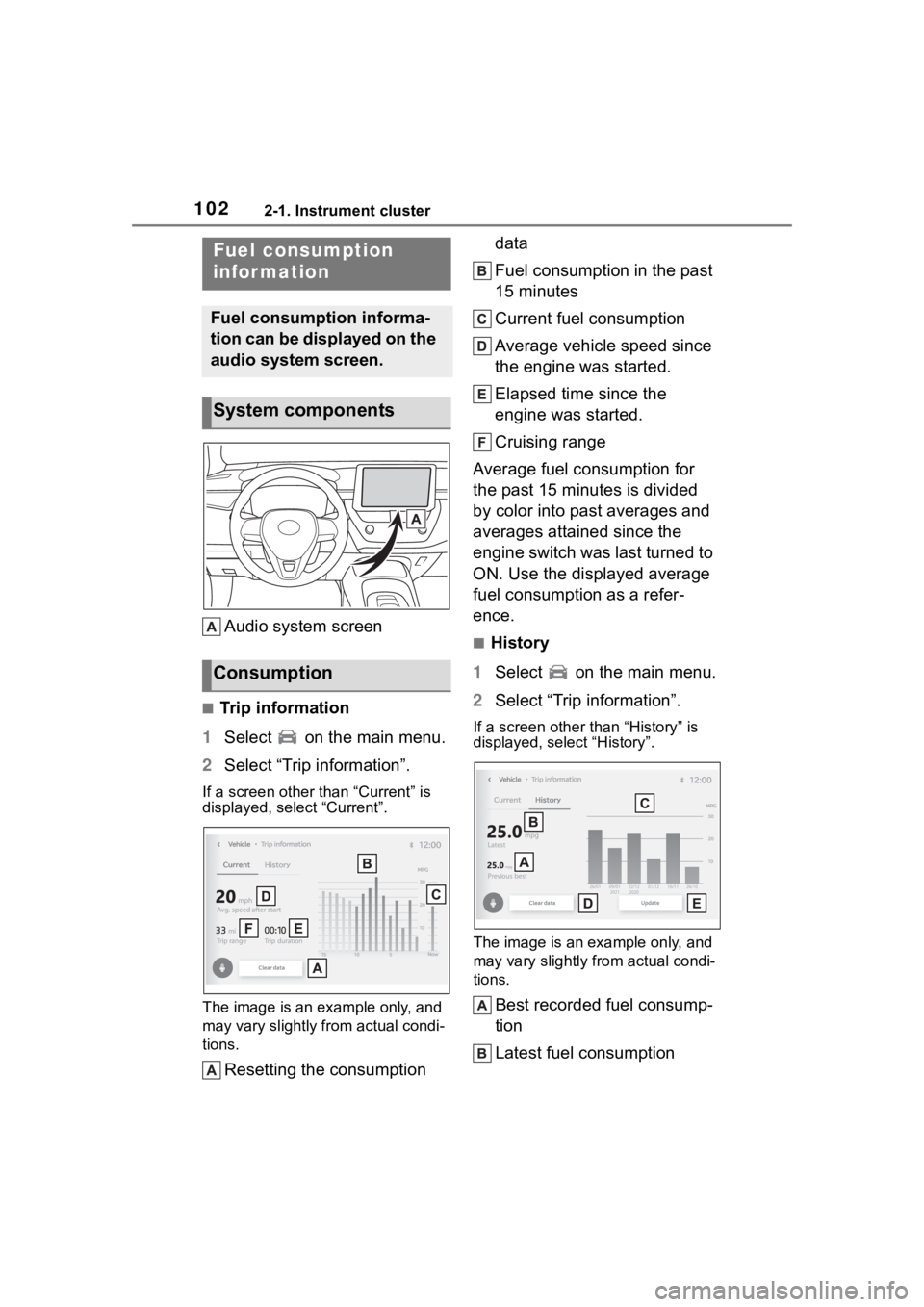
Audio system screen
■Trip information
1 Select on the main menu.
2 Select “Trip information”.
If a screen other than “Current” is
displayed, select “Current”.
The image is an example only, and
may vary slightly f rom actual condi-
tions.
Resetting the consumption data
Fuel consumption in the past
15 minutes
Current fuel consumption
Average vehicle speed since
the engine was started.
Elapsed time since the
engine was started.
Cruising range
Average fuel consumption for
the past 15 minutes is divided
by color into past averages and
averages attained since the
engine switch was last turned to
ON. Use the displayed average
fuel consumption as a refer-
ence.
■History
1 Select on the main menu.
2 Select “Trip information”.
If a screen other than “History” is
displayed, select “History”.
The image is an example only, and
may vary slightly from actual condi-
tions.
Best recorded fuel consump-
tion
Latest fuel consumption
Fuel consumption
infor mation
Fuel consumption informa-
tion can be displayed on the
audio system screen.
System components
Consumption
Page 103 of 468

1032-1. Instrument cluster
2
Vehicle status information and indicators
Previous fuel consumption
record
Resetting the history data
Updating the latest fuel con-
sumption data
The average fuel consumption
history is divided by color into
past averages and the average
fuel consumption since the last
updated. Use the displayed
average fuel consumption as a
reference.
■Updating the history data
Update the latest fuel consumption
by selecting “Upda te” to measure
the current fuel consumption again.
■Resetting the data
The fuel consumption data can be
deleted by selecting “Clear data”.
■Cruising range
Displays the estimated maximum
distance that can be driven with the
quantity of fuel remaining.
This distance is computed based on
your average fuel consumption.
As a result, the actual distance that
can be driven may differ from that
displayed.
Page 141 of 468
141
4
4
Driving
Driving
.4-1. Before drivingDriving the vehicle....... 143
Cargo and luggage ..... 149
Vehicle load limits ....... 152
Trailer towing............... 152
Dinghy towing ............. 153
4-2. Driving procedures Engine (ignition) switch (vehicles without a smart
key system) ............... 154
Engine (ignition) switch (vehicles with a smart key
system)...................... 155
Continuously variable trans- mission (vehicles without
paddle shift switches).................................. 160
Continuously variable trans- mission (vehicles with pad-
dle shift switches) ...... 162
Turn signal lever.......... 167
Parking brake .............. 168
Brake Hold .................. 171
4-3. Operating the lights and wipers
Headlight switch .......... 173
AHB (Automatic High Beam)........................ 175
Windshield wipers and washer....................... 1784-4. Refueling
Opening the fuel tank cap.................................. 180
4-5. Using the dr iving support
systems
Toyota Safety Sense 3.0 software update ......... 182
Toyota Safety Sense 3.0 .................................. 184
PCS (Pre-Collision System) .................................. 190
LTA (Lane Tracing Assist) .................................. 201
LDA (Lane Departure Alert) .................................. 206
PDA (Proactive driving assist) ........................ 211
RSA (Road Sign Assist) .................................. 217
Dynamic radar cruise con- trol ............................. 219
Cruise control .............. 227
Emergency Driving Stop System ...................... 230
BSM (Blind Spot Monitor) .................................. 232
RCTA (Rear Cross Traffic Alert) function ............ 237
Safe Exit Assist ........... 243
Driving mode select switch .................................. 247
Driving assist systems .................................. 248
Page 144 of 468
1444-1. Before driving
■Engine speed while driving
In the following conditions, the
engine speed may become high
while driving. This is due to auto-
matic up-shifting control or
down-shifting implementation to
meet driving conditions. It does not
indicate sudden acceleration.
●The vehicle is judged to be driving
uphill or downhill
●When the accelerator pedal is
released
●When the brake pedal is
depressed while sport mode is
selected (if equipped)
■Restraining the engine output
(Brake Override System)
●When the accelerator and brake
pedals are depressed at the same
time, the engine output may be
restrained.
●A warning messag e is displayed
on the multi-information display
while the system is operating.
■Breaking in your new Toyota
To extend the life of the vehicle,
observing the following precautions
is recommended:
●For the first 186 miles (300 km):
Avoid sudden stops.
●For the first 621 miles (1000 km):
• Do not drive at extremely high
speeds.
• Avoid sudden acceleration.
• Do not drive continuously in low gears.
• Do not drive at a constant speed for extended periods.
■Operating your vehicle in a for-
eign country
Comply with the relevant vehicle
registration laws and confirm the
availability of the correct fuel.
( P.393)
WARNING
Observe the following precau-
tions.
Failure to do so may result in
death or serious injury.
■When starting the vehicle
Always keep your foot on the
brake pedal while stopped with
the engine running. This prevents
the vehicle from creeping.
■When driving the vehicle
●Do not drive if you are unfamil-
iar with the location of the brake
and accelerator pedals to avoid
depressing the wrong pedal.
• Accidentally depressing the accelerator pedal instead of the
brake pedal will result in sudden
acceleration that may lead to an
accident.
• When backing up, you may twist your body around, leading to a
difficulty in operating the pedals.
Make sure to operate the pedals
properly.
• Make sure to keep a correct driving posture even when mov-
ing the vehicle only slightly. This
allows you to depress the brake
and accelerator pedals properly.
• Depress the brake pedal using your right foot. Depressing the
brake pedal using your left foot
may delay response in an emer-
gency, resulting in an accident.
●Do not drive the vehicle over or
stop the vehicle near flammable
materials.
The exhaust system and
exhaust gases can be
extremely hot. These hot parts
may cause a fire i f there is any
flammable material nearby.
Page 160 of 468
1604-2. Driving procedures
*: To improve fuel efficiency and reduce noise, shift the shift lever
to D for normal driving.
■To protect the continuously
variable transmission
If the continuously variable trans-
mission fluid temperature is high,
“Transmission Oil Temp High Stop in
a Safe Place and See Owner’s
Manual” will be displayed on the
multi-information display and the
vehicle will go into transmission pro-
tection mode automatically. Have
the vehicle inspected by your Toyota dealer.
■When driving with the dynamic
radar cruise control activated
Even when switching the driving
mode to sport mode with the intent
of enabling engine braking, engine
braking will not occur because
dynamic radar cruise control will not
be canceled. ( P.247)
■Restraining sudden start
(Drive-Start Control)
P.149
■G AI-SHIFT
G AI-SHIFT automat ically selects a
suitable gear for sporty driving
according to driver’s input and driv-
ing conditions. G AI-SHIFT operates
automatically when th e shift lever is
in D and sport mode is selected for
the driving mode. (Selecting normal
mode or shifting the shift lever to the
B position cancels this function.)
■After recharging/reconnecting
the battery
P.385
■Continuously variable transmis-
sion fail-safe control
The system detects malfunctioning
parts targeted (all of the solenoids
that perform the shifting function) by
the On-Board Diagnostics, and per-
forms fail-safe mechanisms, such
as restricting the shifting function or
transmission ratio control.
In this event, the malfunction indica-
tor lamp turns on.
Continuously variable
transmission (vehi-
cles without paddle
shift switches)
Select the shift position
depending on your purpose
and situation.
Shift position purpose
and functions
Shift posi-
tionObjective or function
PParking the vehi-
cle/starting the engine
RReversing
N
Neutral
(Condition in which the power is not transmit- ted)
DNormal driving*
B
Applying moderate
engine braking driving down hills
WARNING
■When driving on slippery
road surfaces
Do not accelerate or shift the shift
gears suddenly.
Sudden changes in engine brak-
ing may cause the vehicle to spin
or skid, resulting in an accident.
Page 162 of 468
1624-2. Driving procedures
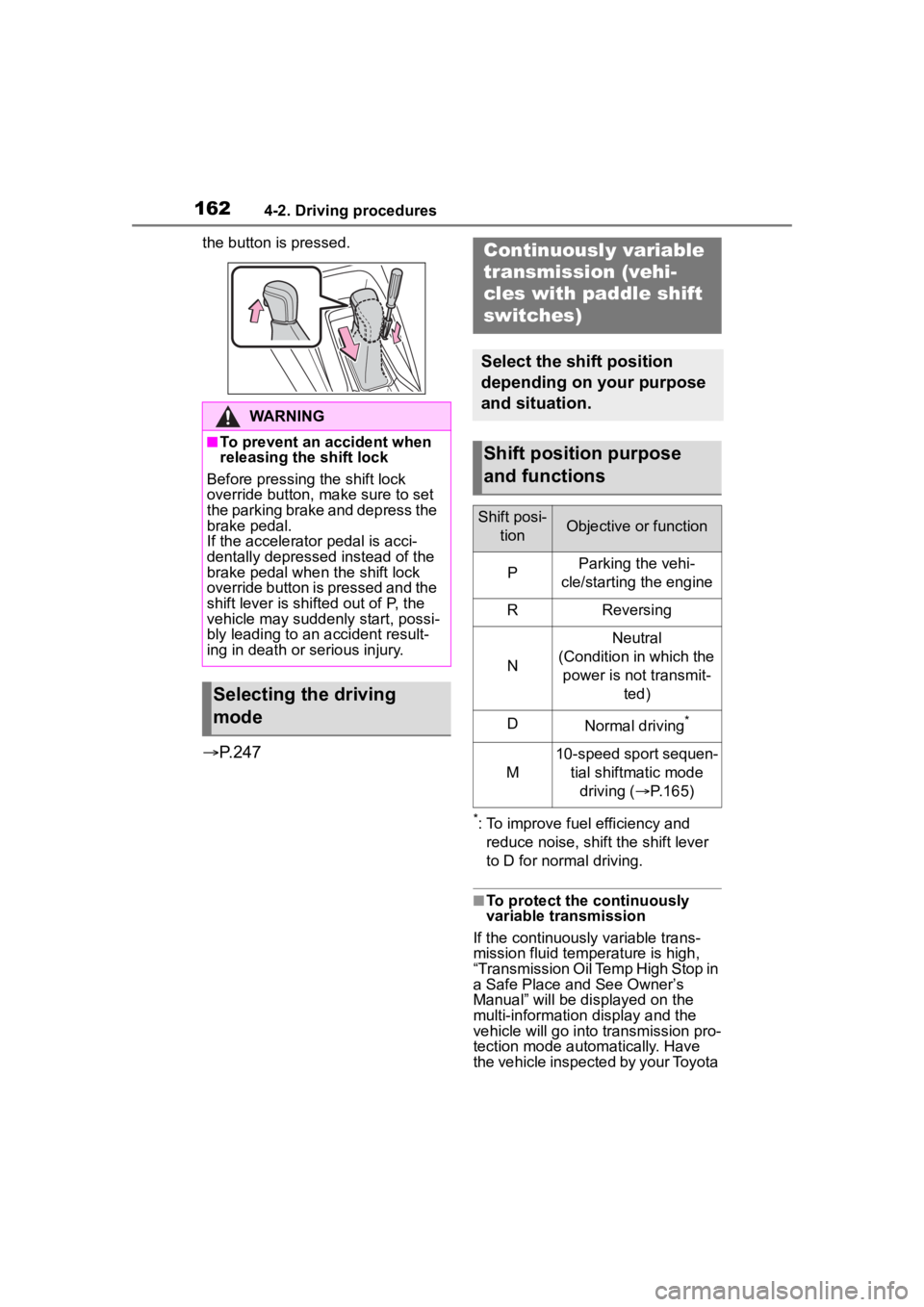
the button is pressed.
P.247
*: To improve fuel efficiency and
reduce noise, shift the shift lever
to D for normal driving.
■To protect the continuously
variable transmission
If the continuously variable trans-
mission fluid temperature is high,
“Transmission Oil Temp High Stop in
a Safe Place and See Owner’s
Manual” will be displayed on the
multi-information display and the
vehicle will go into transmission pro-
tection mode automatically. Have
the vehicle inspected by your Toyota
WARNING
■To prevent an accident when
releasing the shift lock
Before pressing the shift lock
override button, make sure to set
the parking brake and depress the
brake pedal.
If the accelerator pedal is acci-
dentally depressed instead of the
brake pedal when the shift lock
override button is pressed and the
shift lever is shifted out of P, the
vehicle may suddenly start, possi-
bly leading to an accident result-
ing in death or serious injury.
Selecting the driving
mode
Continuously variable
transmission (vehi-
cles with paddle shift
switches)
Select the shift position
depending on your purpose
and situation.
Shift position purpose
and functions
Shift posi- tionObjective or function
PParking the vehi-
cle/starting the engine
RReversing
N
Neutral
(Condition in which the power is not transmit- ted)
DNormal driving*
M
10-speed sport sequen-tial shiftmatic mode driving ( P.165)
Page 174 of 468
1744-3. Operating the lights and wipers
●To make your vehicle more visible
to other drivers during daytime
driving, the daytime running lights
turn on automatically when all of
the following conditions are met.
(The daytime running lights are
not designed for use at night.)
• The engine is running
• The parking brake is released
• The headlight switch is in the
or
* position
*: When the surroundings are bright
The daytime running lights remain
on after they illumi nate, even if the
parking brake is set again.
●For the U.S.A.: Daytime running
lights can be turned off by operat-
ing the switch.
●Compared to turning on the head-
lights, the daytime running light
system offers gr eater durability
and consumes less electricity, so
it can help improve fuel economy.
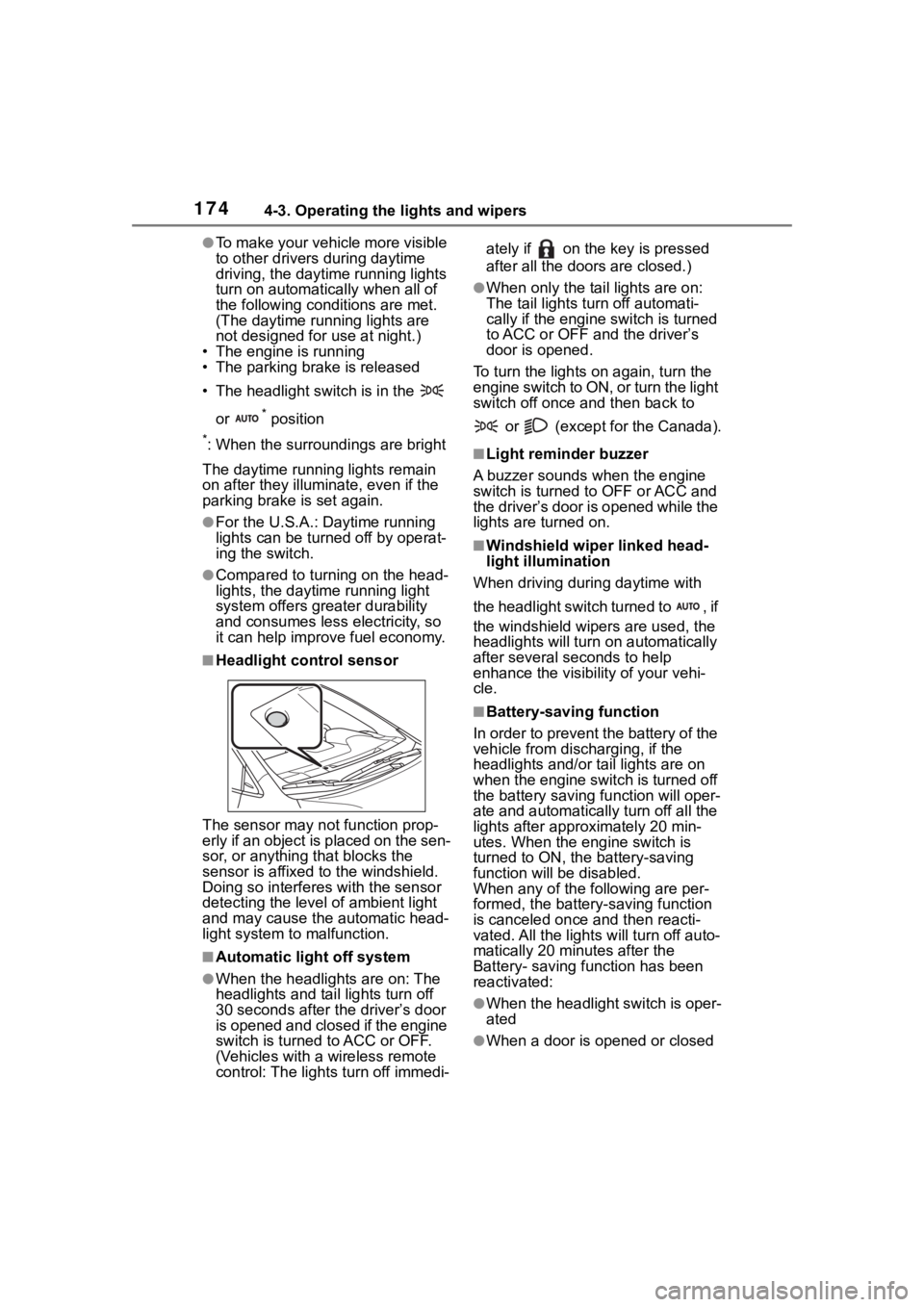
■Headlight control sensor
The sensor may not function prop-
erly if an object is placed on the sen-
sor, or anything that blocks the
sensor is affixed to the windshield.
Doing so interfere s with the sensor
detecting the level of ambient light
and may cause the automatic head-
light system to malfunction.
■Automatic light off system
●When the headlights are on: The
headlights and tail lights turn off
30 seconds after the driver’s door
is opened and closed if the engine
switch is turned to ACC or OFF.
(Vehicles with a wireless remote
control: The lights turn off immedi- ately if on the key is pressed
after all the doors are closed.)
●When only the tail lights are on:
The tail lights turn off automati-
cally if the engine switch is turned
to ACC or OFF and the driver’s
door is opened.
To turn the lights on again, turn the
engine switch to ON, or turn the light
switch off once and then back to
or (except for the Canada).
■Light reminder buzzer
A buzzer sounds when the engine
switch is turned t o OFF or ACC and
the driver’s door is opened while the
lights are turned on.
■Windshield wiper linked head-
light illumination
When driving during daytime with
the headlight switch turned to , if
the windshield wipers are used, the
headlights will turn o n automatically
after several se conds to help
enhance the visibility of your vehi-
cle.
■Battery-saving function
In order to prevent the battery of the
vehicle from discharging, if the
headlights and/or tail lights are on
when the engine switch is turned off
the battery saving function will oper-
ate and automatically turn off all the
lights after approximately 20 min-
utes. When the engine switch is
turned to ON, the battery-saving
function will be disabled.
When any of the following are per-
formed, the battery-saving function
is canceled once and then reacti-
vated. All the lights will turn off auto-
matically 20 minutes after the
Battery- saving function has been
reactivated:
●When the headlight switch is oper-
ated
●When a door is opened or closed
Page 180 of 468
1804-4. Refueling
4-4.Refueling
Turn the engine switch off and
ensure that all the doors and
windows are closed.
Confirm the type of fuel.
■Fuel types
P. 3 9 9
■Fuel tank opening for unleaded
gasoline
To help prevent incorrect fueling,
your vehicle has a fuel tank opening
that only accommodates the spe-
cial nozzle on unle aded fuel pumps.
■If the malfunction indicator
lamp illuminates
The malfunction indicator lamp may
illuminate erroneous ly if refueling is
performed repeatedly when the fuel
tank is nearly full.
Opening the fuel tank
cap
Perform the following steps
to open the fuel tank cap:
Before refueling the vehi-
cle
WARNING
■When refueling the vehicle
Observe the following precautions
while refueling the vehicle. Failure
to do so may result in death or
serious injury.
●After exiting the vehicle and
before opening the fuel door,
touch an unpainted metal sur-
face to discharge any static
electricity. It is important to dis-
charge static electricity before
refueling because sparks result-
ing from static electricity can
cause fuel vapors to ignite while
refueling.
●Always hold the grips on the
fuel tank cap and turn it slowly
to remove it.
A whooshing sound may be
heard when the f uel tank cap is
loosened. Wait until the sound
cannot be heard before fully
removing the cap. In hot
weather, pressurized fuel may
spray out the filler neck and
cause injury.
●Do not allow anyone that has
not discharged static electricity
from their body to come close to
an open fuel tank.
●Do not inhale vaporized fuel.
Fuel contains substances that
are harmful if inhaled.
●Do not smoke while refueling
the vehicle.
Doing so may cause the fuel to
ignite and cause a fire.
●Do not return to the vehicle or
touch any person or object that
is statically charged.
This may cause static electricity
to build up, resulting in a possi-
ble ignition hazard.
■When refueling
Observe the following precautions
to prevent fuel overflowing from
the fuel tank:
●Securely insert the fuel nozzle
into the fuel filler neck.
●Stop filling the tank after the fuel
nozzle automatically clicks off.
Page 181 of 468
1814-4. Refueling
4
Driving
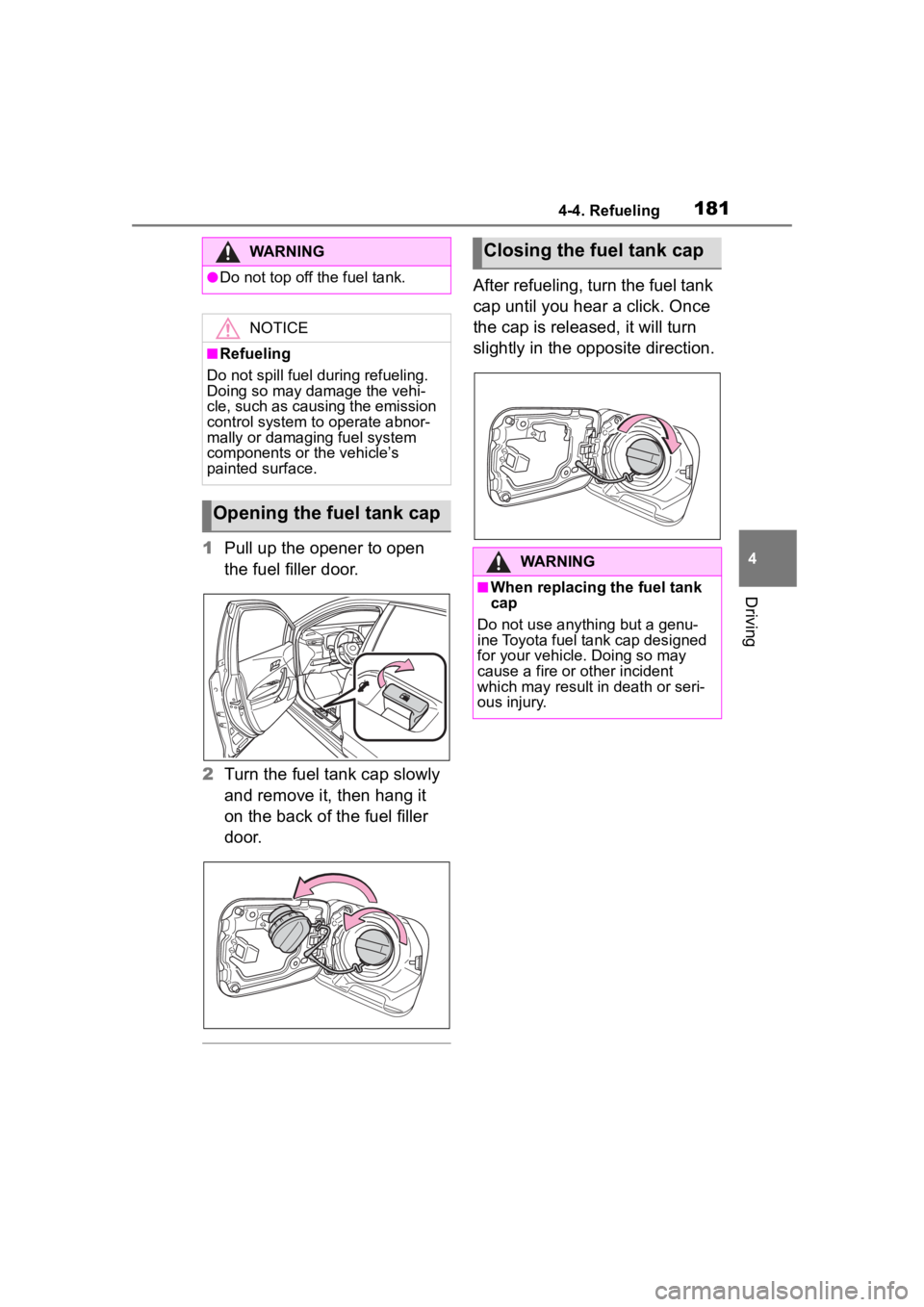
1Pull up the opener to open
the fuel filler door.
2 Turn the fuel tank cap slowly
and remove it, then hang it
on the back of the fuel filler
door.
After refueling, turn the fuel tank
cap until you hear a click. Once
the cap is released, it will turn
slightly in the opposite direction.
WARNING
●Do not top off the fuel tank.
NOTICE
■Refueling
Do not spill fuel during refueling.
Doing so may damage the vehi-
cle, such as causing the emission
control system to operate abnor-
mally or damaging fuel system
components or the vehicle’s
painted surface.
Opening the fuel tank cap
Closing the fuel tank cap
WARNING
■When replacing the fuel tank
cap
Do not use anything but a genu-
ine Toyota fuel tank cap designed
for your vehicle. Doing so may
cause a fire or other incident
which may result i n death or seri-
ous injury.
Page 247 of 468
2474-5. Using the driving support systems
4
Driving
approaches from behind your
vehicle at an angle
• When the vehicle is stopped at an
angle to the road
• When a vehicle or bicycle approaches from behind a parked
vehicle at an angle
• When a parked vehicle, wall, sign, person or other stationary object
is behind the vehicle
• When an approaching vehicle or bicycle suddenly changes direc-
tion
• When an approaching vehicle or bicycle is traveling along a station-
ary object, such a wall or sign
• When the trunk is open
• When a bicycle carrier, ramp, or other accessory is installed to the
back of the vehicle
• When a vehicle or bicycle is
approaching at high speed
• When towing with the vehicle
• When stopped on a steep slope
• When stopped on a curve or at the exit of a curve
*: If equipped
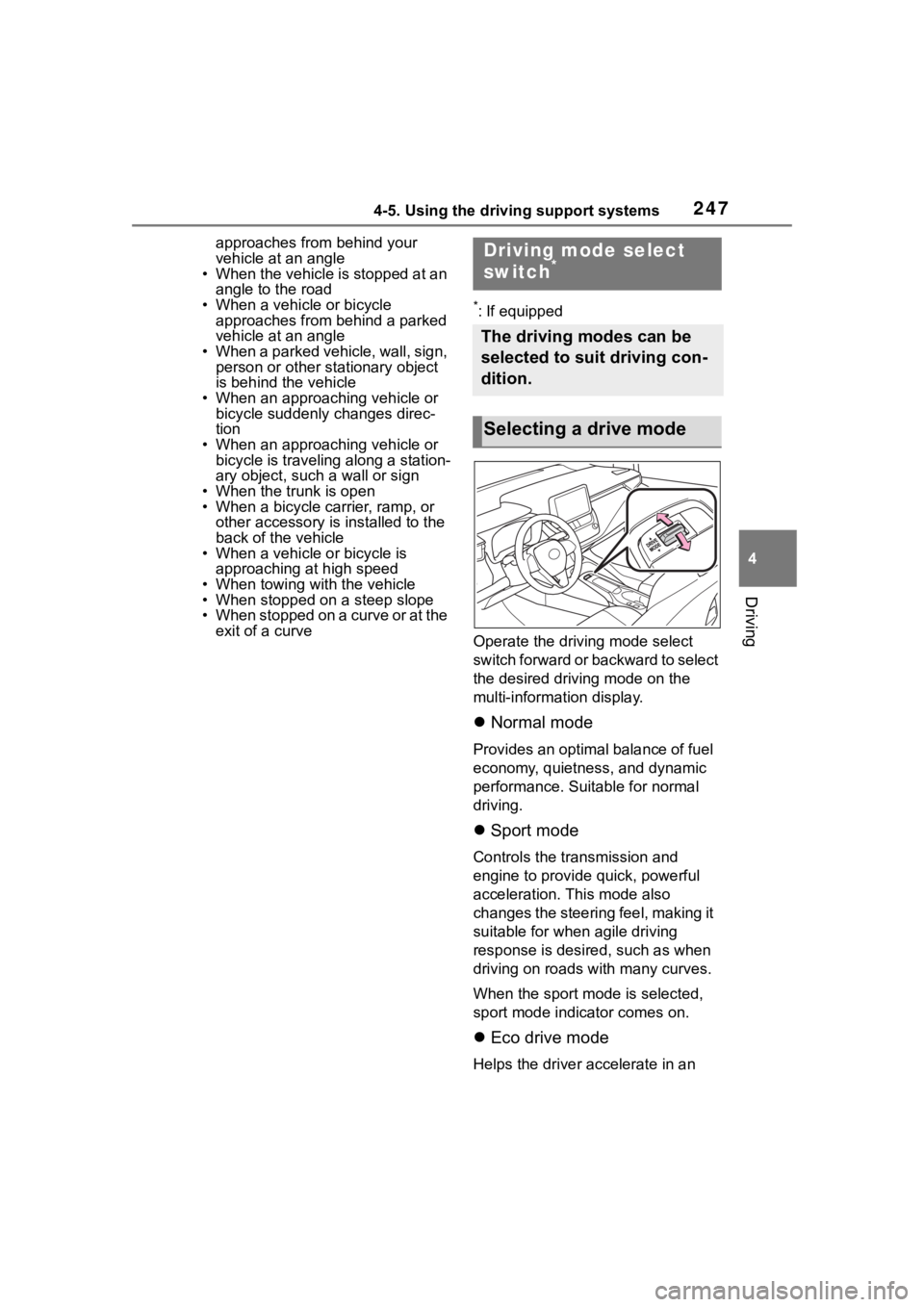
Operate the driv ing mode select
switch forward or backward to select
the desired driving mode on the
multi-information display.
Normal mode
Provides an optimal balance of fuel
economy, quietness, and dynamic
performance. Suitable for normal
driving.
Sport mode
Controls the transmission and
engine to provide quick, powerful
acceleration. This mode also
changes the steering feel, making it
suitable for when agile driving
response is desire d, such as when
driving on roads w ith many curves.
When the sport mode is selected,
sport mode indicator comes on.
Eco drive mode
Helps the driver accelerate in an
Driving mode select
switch*
The driving modes can be
selected to suit driving con-
dition.
Selecting a drive mode