maintenance TOYOTA COROLLA 2023 Repair Manual
[x] Cancel search | Manufacturer: TOYOTA, Model Year: 2023, Model line: COROLLA, Model: TOYOTA COROLLA 2023Pages: 468, PDF Size: 14.4 MB
Page 341 of 468
3416-3. Do-it-yourself maintenance
6
Maintenance and care
■LED light bulbs
The lights other th an the front turn
signal lights/parking lights (vehicles
without side turn sig nal lights), front
side marker lights (bulb type), rear
turn signal lights, rear side marker
lights (bulb type) and back-up lights
consist of a number of LEDs. If any
of the LEDs burn out, take your
vehicle to your Toyota dealer to
have the light replaced.
■Condensation build-up on the
inside of the lens
In certain situatio ns, such as when
driving in the rain or when washing
the vehicle, condensation may form
on the inner side of the headlight
lens and other li ghts. As each light
has a ventilation hole, moist air may
enter. If the ambient temperature is
low, condensation may form tempo-
rarily, but it will di ssipate as the
inside of the light i s warmed up. As
the condensation is due to a phe-
nomenon similar to windows fogging
in the rain, it doe s not indicate a
malfunction.
Contact your Toyota dealer for more
information in the following situa-
tions:
●Large drops of water have built up
on the inside of the lens.
●Water has built up inside the
headlight.
■When replacing light bulbs
P. 3 3 8
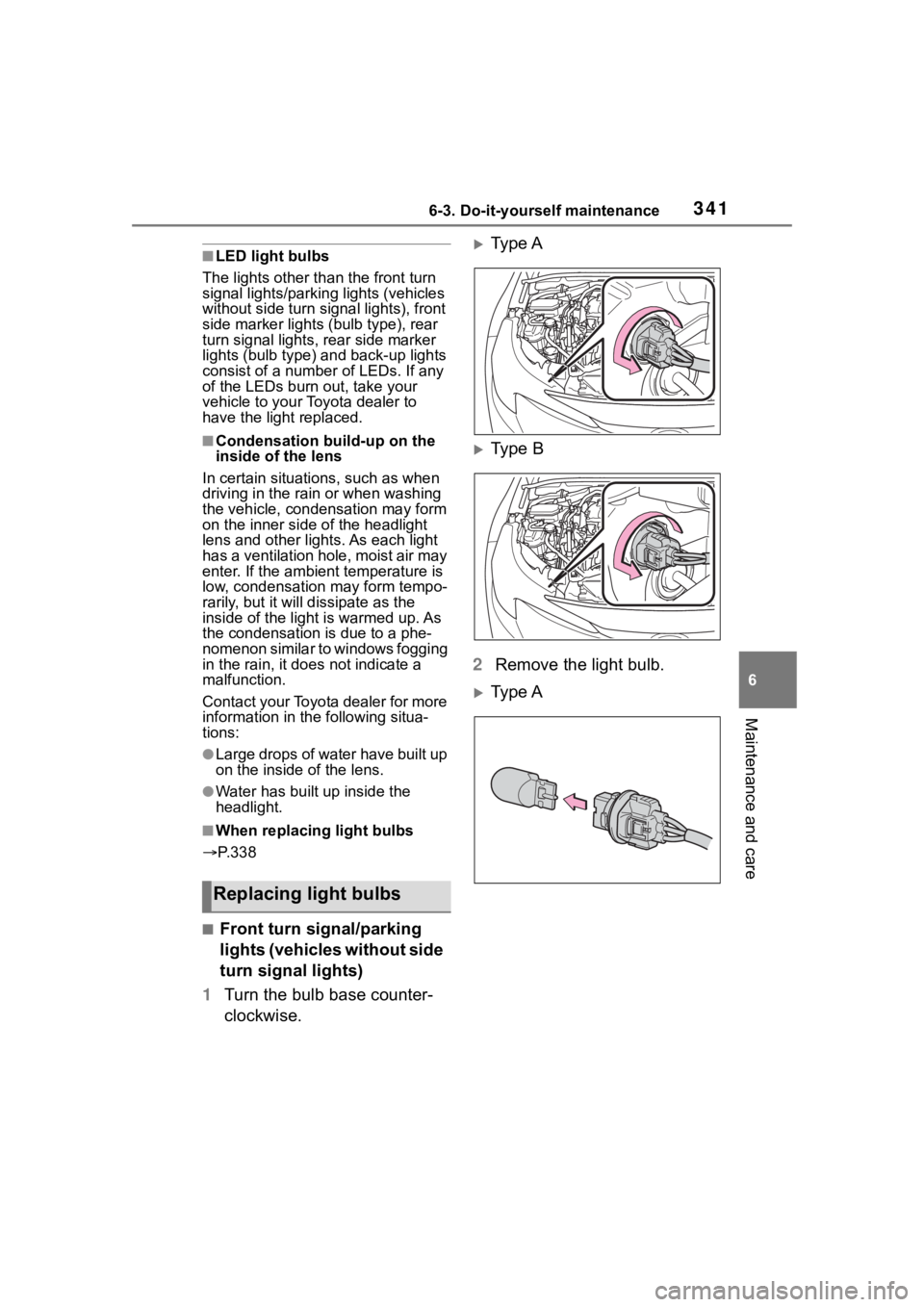
■Front turn signal/parking
lights (vehicles without side
turn signal lights)
1 Turn the bulb base counter-
clockwise.
Type A
Type B
2 Remove the light bulb.
Type A
Replacing light bulbs
Page 342 of 468
3426-3. Do-it-yourself maintenance
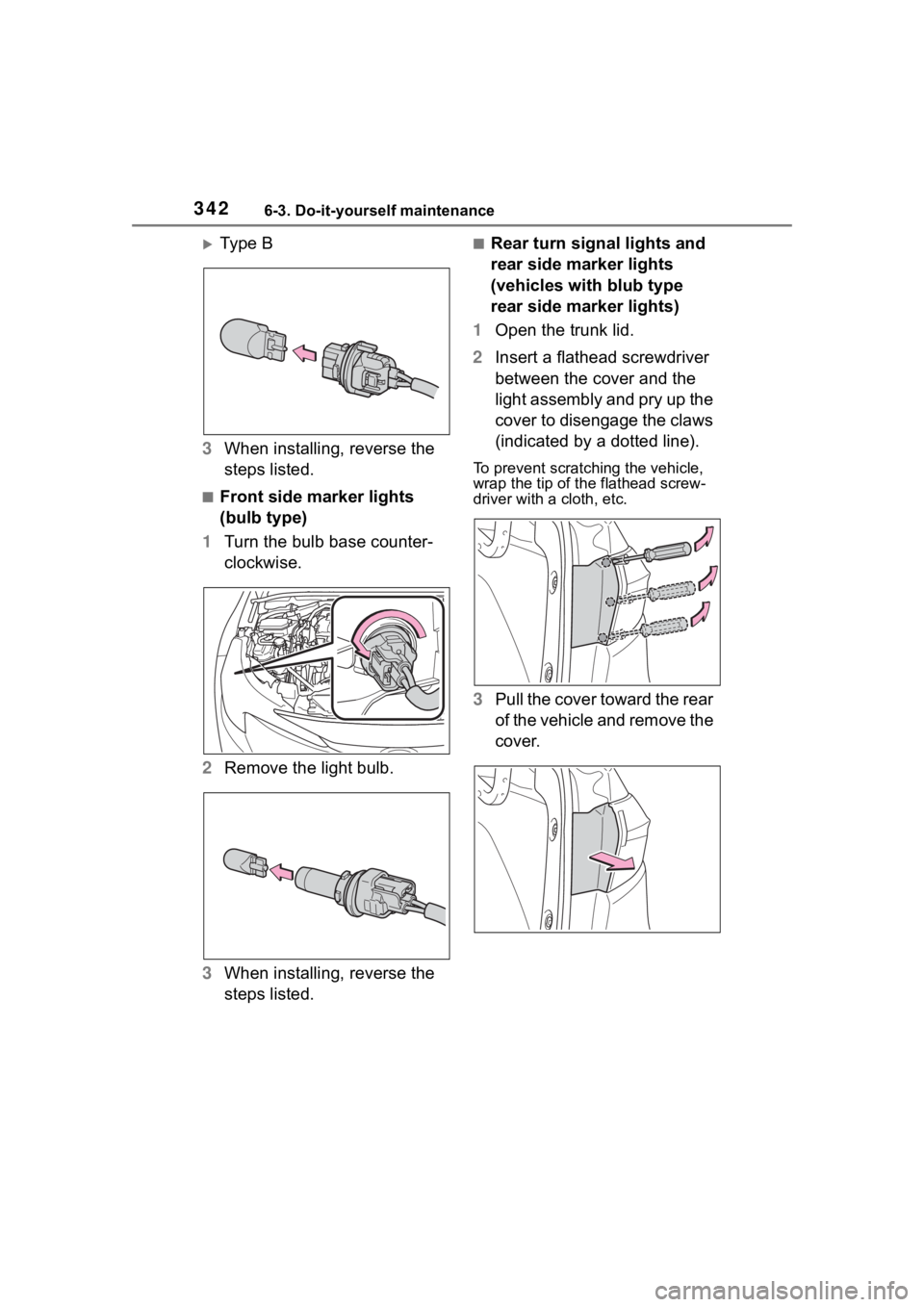
Ty p e B
3 When installing, reverse the
steps listed.
■Front side marker lights
(bulb type)
1 Turn the bulb base counter-
clockwise.
2 Remove the light bulb.
3 When installing, reverse the
steps listed.
■Rear turn signal lights and
rear side marker lights
(vehicles with blub type
rear side marker lights)
1 Open the trunk lid.
2 Insert a flathead screwdriver
between the cover and the
light assembly and pry up the
cover to disengage the claws
(indicated by a dotted line).
To prevent scratching the vehicle,
wrap the tip of th e flathead screw-
driver with a cloth, etc.
3Pull the cover toward the rear
of the vehicle and remove the
cover.
Page 343 of 468
3436-3. Do-it-yourself maintenance
6
Maintenance and care
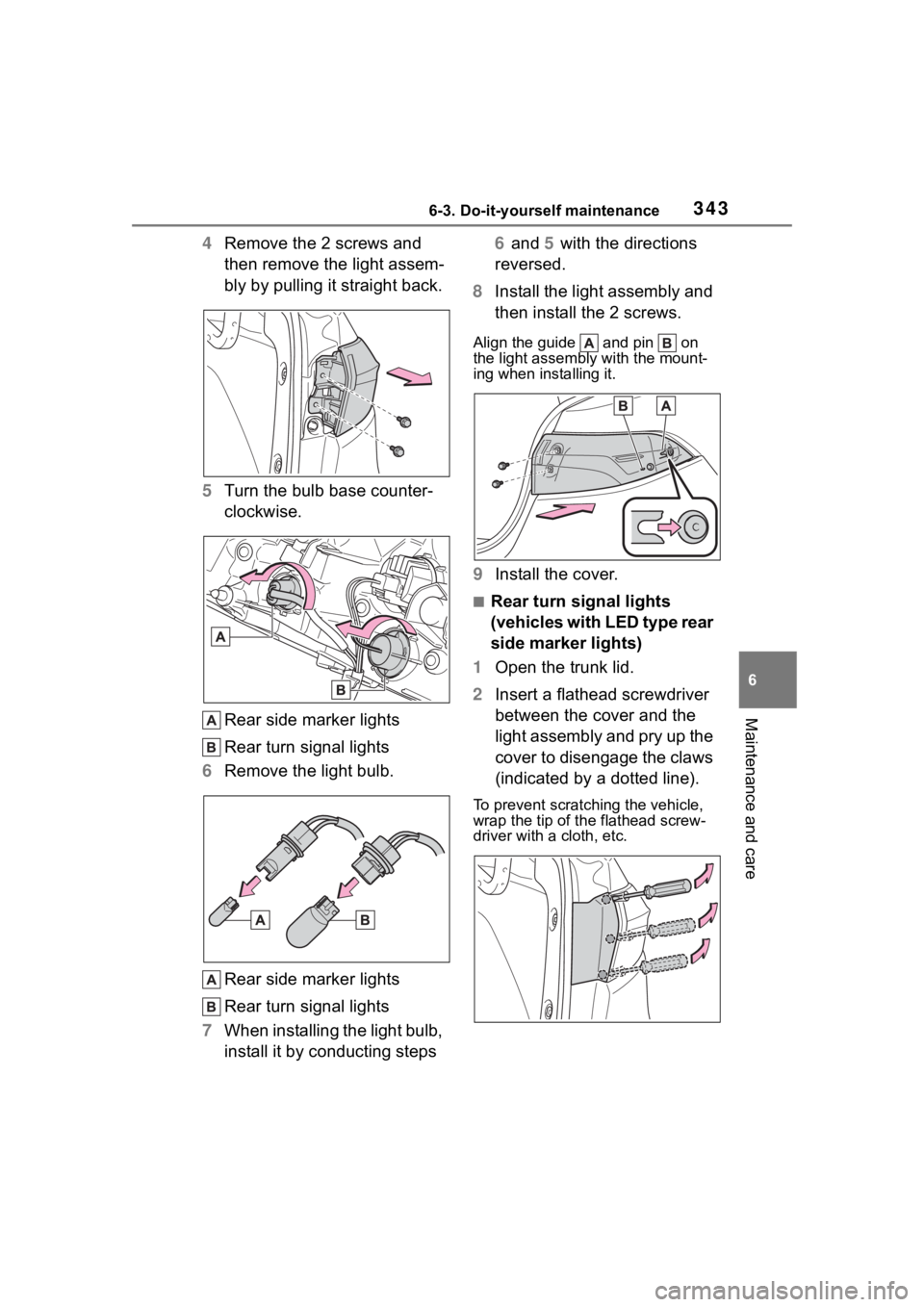
4Remove the 2 screws and
then remove the light assem-
bly by pulling it straight back.
5 Turn the bulb base counter-
clockwise.
Rear side marker lights
Rear turn signal lights
6 Remove the light bulb.
Rear side marker lights
Rear turn signal lights
7 When installing the light bulb,
install it by conducting steps 6 and 5 with the directions
reversed.
8 Install the light assembly and
then install the 2 screws.
Align the guide and pin on
the light assembl y with the mount-
ing when installing it.
9 Install the cover.
■Rear turn signal lights
(vehicles with LED type rear
side marker lights)
1 Open the trunk lid.
2 Insert a flathead screwdriver
between the cover and the
light assembly and pry up the
cover to disengage the claws
(indicated by a dotted line).
To prevent scratching the vehicle,
wrap the tip of th e flathead screw-
driver with a cloth, etc.
Page 344 of 468
3446-3. Do-it-yourself maintenance
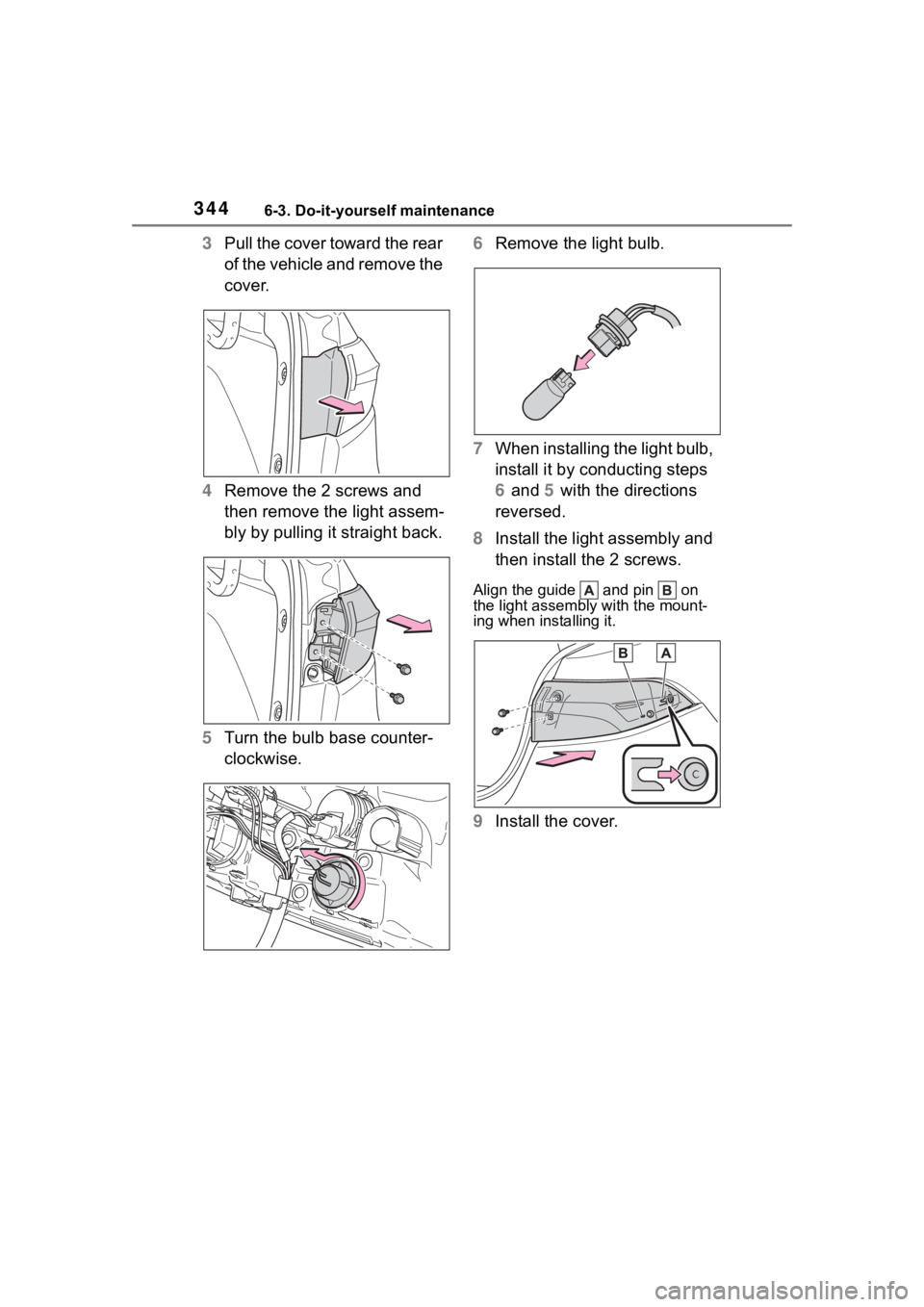
3Pull the cover toward the rear
of the vehicle and remove the
cover.
4 Remove the 2 screws and
then remove the light assem-
bly by pulling it straight back.
5 Turn the bulb base counter-
clockwise. 6
Remove the light bulb.
7 When installing the light bulb,
install it by conducting steps
6 and 5 with the directions
reversed.
8 Install the light assembly and
then install the 2 screws.
Align the guide and pin on
the light assembl y with the mount-
ing when installing it.
9 Install the cover.
Page 345 of 468
3456-3. Do-it-yourself maintenance
6
Maintenance and care
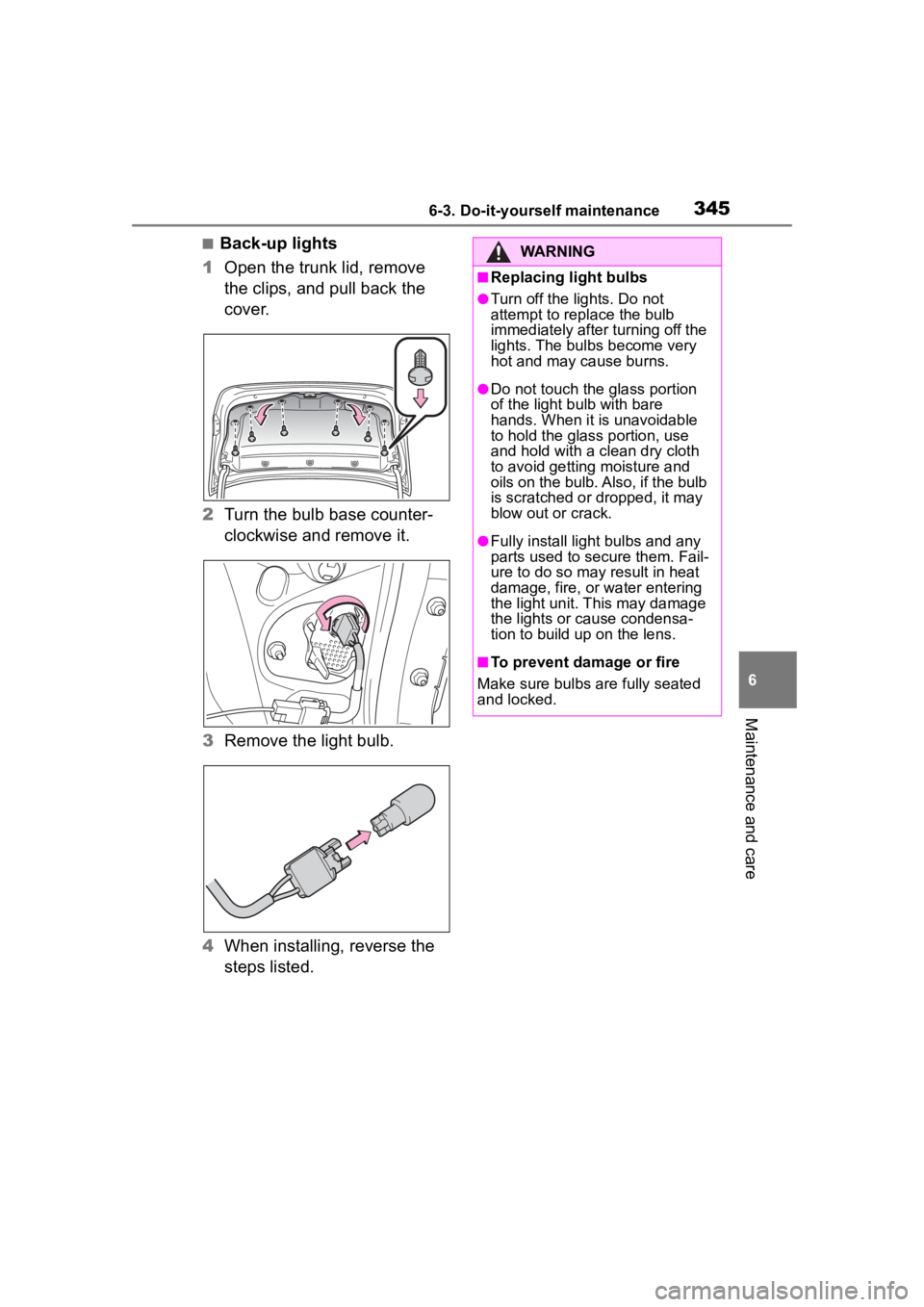
■Back-up lights
1 Open the trunk lid, remove
the clips, and pull back the
cover.
2 Turn the bulb base counter-
clockwise and remove it.
3 Remove the light bulb.
4 When installing, reverse the
steps listed.WARNING
■Replacing light bulbs
●Turn off the lights. Do not
attempt to replace the bulb
immediately after turning off the
lights. The bulbs become very
hot and may cause burns.
●Do not touch the glass portion
of the light bulb with bare
hands. When it is unavoidable
to hold the glass portion, use
and hold with a clean dry cloth
to avoid getting moisture and
oils on the bulb. Also, if the bulb
is scratched or dropped, it may
blow out or crack.
●Fully install light bulbs and any
parts used to secure them. Fail-
ure to do so may result in heat
damage, fire, or water entering
the light unit. This may damage
the lights or cause condensa-
tion to build up on the lens.
■To prevent damage or fire
Make sure bulbs are fully seated
and locked.
Page 346 of 468

3466-3. Do-it-yourself maintenance
Page 365 of 468
3657-2. Steps to take in an emergency
7
When trouble arises
WARNING
●Stop your vehicle in a safe place
as soon as possible. Adjust the
tire inflation pressure immedi-
ately.
●If the tire pressure warning light
comes on even after tire infla-
tion pressure adjustment, it is
probable that you have a flat
tire. Check the tires. If a tire is
flat, change it with the spare tire
and have the flat tire repaired by
the nearest Toy ota dealer.
●Avoid abrupt maneuvering and
braking.
If the vehicle tires deteriorate,
you could lose control of the
steering wheel or the brakes.
■If a blowout or sudden air
leakage should occur (vehi-
cles with a tire pressure warn-
ing system)
The tire pressure warning system
may not activate immediately.
■Maintenance of the tires
Each tire, including the spare (if
provided), should be checked
monthly when cold and inflated to
the inflation pressure recom-
mended by the vehicle manufac-
turer on the vehicle placard or tire
inflation pressure label (tire and
load information label). (If your
vehicle has tires of a different size
than the size indicated on the
vehicle placard or tire inflation
pressure label [tire and load infor-
mation label], you should deter-
mine the proper tire inflation
pressure for those tires.)
As an added safety feature, your
vehicle has been equipped with a
tire pressure monitoring system
(TPMS-tire pressure warning sys-
tem) that illuminates a low tire
pressure telltale (tire pressure
warning light) w hen one or more
of your tires is significantly
under-inflated. Accordingly, when
the low tire pressure telltale (tire
pressure warning light) illumi-
nates, you should stop and check
your tires as soon as possible,
and inflate them to the proper
pressure. Driving on a signifi-
cantly under-inflated tire causes
the tire to overhea t and can lead
to tire failure. Under-inflation also
reduces fuel efficiency and tire
tread life, and may affect the vehi-
cle’s handling and stopping ability.
Please note that the TPMS (tire
pressure warning system) is not a
substitute for proper tire mainte-
nance, and it is the driver’s
responsibility to m aintain correct
tire pressure, even if under-infla-
tion has not reached the level to
trigger illumination of the TPMS
low tire pressure te lltale (tire pres-
sure warning light).
Your vehicle has also been
equipped with a TPMS (tire pres-
sure warning system) malfunc-
tion indicator to indicate when the
system is not operating properly.
The TPMS (tire pressure warning
system) malfunction indicator is
combined with the low tire pres-
sure telltale (tire pressure warning
light). When the system detects a
malfunction, the te lltale will flash
for approximately one minute and
then remain continuously illumi-
nated. This sequence will con-
tinue upon subsequent vehicle
start-ups as long as the malfunc-
tion exists. When the malfunction
indicator is illuminated, the sys-
tem may not be ab le to detect or
signal low tire pressure as
intended.
Page 369 of 468
3697-2. Steps to take in an emergency
7
When trouble arises
■If “System Stopped Front Radar
In Self Calibration See Owner’s
Manual” is displayed
Indicates one of the following sys-
tems is disabled.
●PCS (Pre-Collision system)
●LDA (Lane Departure Alert)
●LTA (Lane Tracing Assist)
●AHB (Automatic High Beam)
●Dynamic radar cruise control
Follow the followi ng correction
methods.
• Check if there is any foreign mat- ter attached to the radar sensor or
radar sensor cover and clean
them if necessary ( P.186)
• The radar sensor may be mis- aligned and will be adjusted auto-
matically while driving. Continue
driving for a while.
■If “Cruise Control Unavailable
See Owner’s Manual” is dis-
played
Indicates one of the following sys-
tems is disabled.
●Dynamic radar cruise control
●Cruise control
A message is displayed when the
driving assist s witch is pushed
repeatedly.
Press the driving assist switch
quickly and firmly.
■If “Maintenance Required
Soon” is displayed
Indicates that all maintenance
according to the dr iven distance on
the maintenance schedule
* should
be performed soon.
Comes on approximately 4500
miles (7200 km) after the message
has been reset. If necessary, per-
form maintenance. Please reset the
message after the maintenance is
performed. ( P.295)
*: Refer to the separate “Scheduled
Maintenance” or “Owner’s Man- ual Supplement”
for the mainte-
nance interval applicable to your
vehicle.
■If “Maintenance Required Visit
Your Dealer” is displayed
Indicates that all maintenance is
required to correspond to the driven
distance on the maintenance sched-
ule
*.
Comes on approximately 5000
miles (8000 km) after the message
has been reset. (The indicator will
not work properly unless the mes-
sage has been rese t.) Perform the
necessary maintenance. Please
reset the message after the mainte-
nance is performed. ( P.295)
*: Refer to the separate “Scheduled
Maintenance” or “Owner’s Man-
ual Supplement” for the mainte-
nance interval applicable to your
vehicle.
■If “Engine Maintenance
Required Visit Your Dealer” is
shown
The engine or an engine component
is malfunctioning. Have the vehicle
inspected by your Toyota dealer
immediately.
■If a message that indicates the
need for visiting your Toyota
dealer is displayed
The system or part shown on the
multi-information di splay is malfunc-
tioning. Have the vehicle inspected
by your Toyota dealer immediately.
■If a message that indicates the
need for referring to Owner’s
Manual is displayed
●If “Engine Coolant Temp High” is
displayed, follow t he instructions
accordingly. ( P.387)
●If the following message is dis-
played on the multi-information
display, it may indicate a malfunc-
tion. Have the vehicle inspected
by your Toyota dealer immedi-
Page 391 of 468
391
8
8
Vehicle specifications
Vehicle specifications
.8-1. SpecificationsMaintenance data (fuel, oil level, etc.) .................. 392
Fuel information .......... 399
Tire information ........... 401
8-2. Customization Customizable features.................................. 412
8-3. Initialization Items to initialize ......... 422
Page 392 of 468
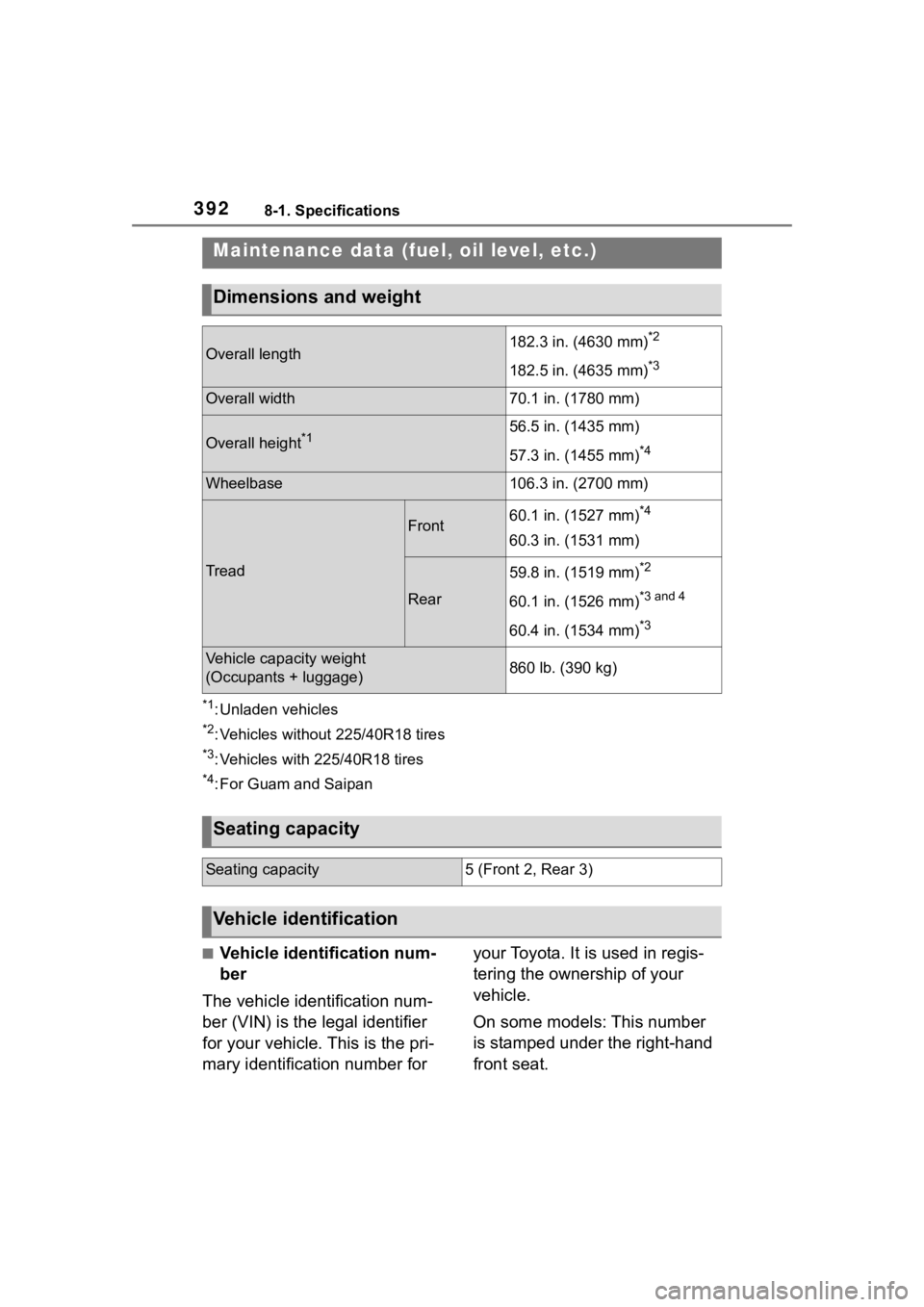
3928-1. Specifications
8-1.Specifications
*1: Unladen vehicles
*2: Vehicles without 225/40R18 tires
*3: Vehicles with 225/40R18 tires
*4: For Guam and Saipan
■Vehicle identification num-
ber
The vehicle identification num-
ber (VIN) is the legal identifier
for your vehicle. This is the pri-
mary identification number for your Toyota. It is used in regis-
tering the ownership of your
vehicle.
On some models: This number
is stamped under the right-hand
front seat.
Maintenance data (fuel, oil level, etc.)
Dimensions and weight
Overall length182.3 in. (4630 mm)*2
182.5 in. (4635 mm)*3
Overall width70.1 in. (1780 mm)
Overall height*156.5 in. (1435 mm)
57.3 in. (1455 mm)
*4
Wheelbase106.3 in. (2700 mm)
Tread
Front60.1 in. (1527 mm)*4
60.3 in. (1531 mm)
Rear
59.8 in. (1519 mm)*2
60.1 in. (1526 mm)*3 and 4
60.4 in. (1534 mm)*3
Vehicle capacity weight
(Occupants + luggage)860 lb. (390 kg)
Seating capacity
Seating capacity5 (Front 2, Rear 3)
Vehicle identification