Door unlocking TOYOTA COROLLA 2023 Owners Manual
[x] Cancel search | Manufacturer: TOYOTA, Model Year: 2023, Model line: COROLLA, Model: TOYOTA COROLLA 2023Pages: 468, PDF Size: 14.4 MB
Page 13 of 468
13Pictorial index
Pictorial index
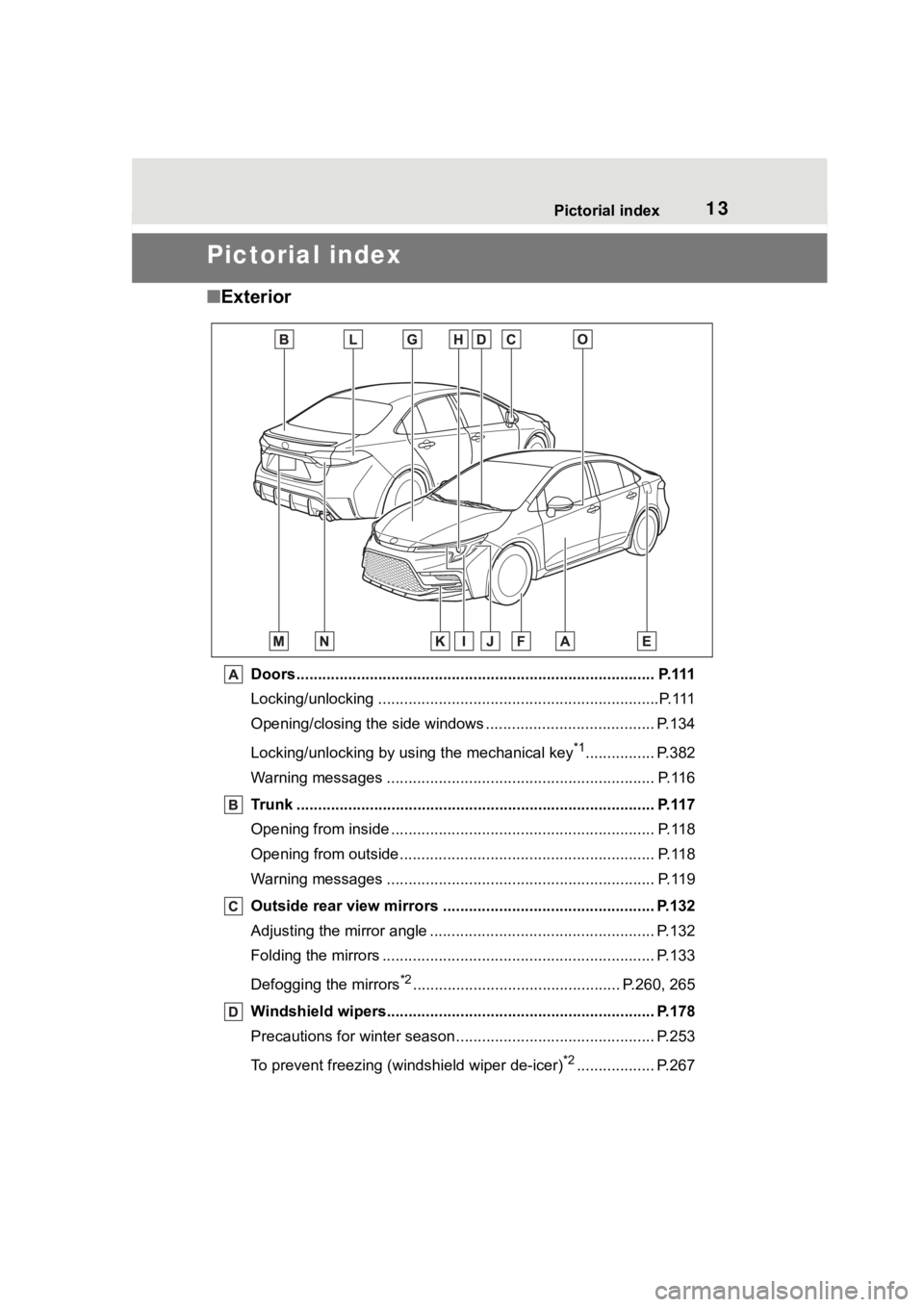
■Exterior
Doors.......................................................... ......................... P.111
Locking/unlocking .............................................. ...................P.111
Opening/closing the side windows ............................... ........ P.134
Locking/unlocking by using the mechanical key
*1................ P.382
Warning messages ............................................... ............... P.116
Trunk ................................................................................... P.117
Opening from inside ............................................ ................. P.118
Opening from outside........................................... ................ P.118
Warning messages ............................................... ............... P.119
Outside rear view mirrors ................................................. P.132
Adjusting the mirror angle ..................................... ............... P.132
Folding the mirrors ............................................ ................... P.133
Defogging the mirrors
*2................................................ P.260, 265
Windshield wipers.............................................. ................ P.178
Precautions for winter seas on.............................................. P.253
To prevent freezing (windshield wiper de-icer)
*2.................. P.267
Page 111 of 468
1113-2. Opening, closing and locking the doors
3
Before driving
3-2.Opening, closing and locking the doors
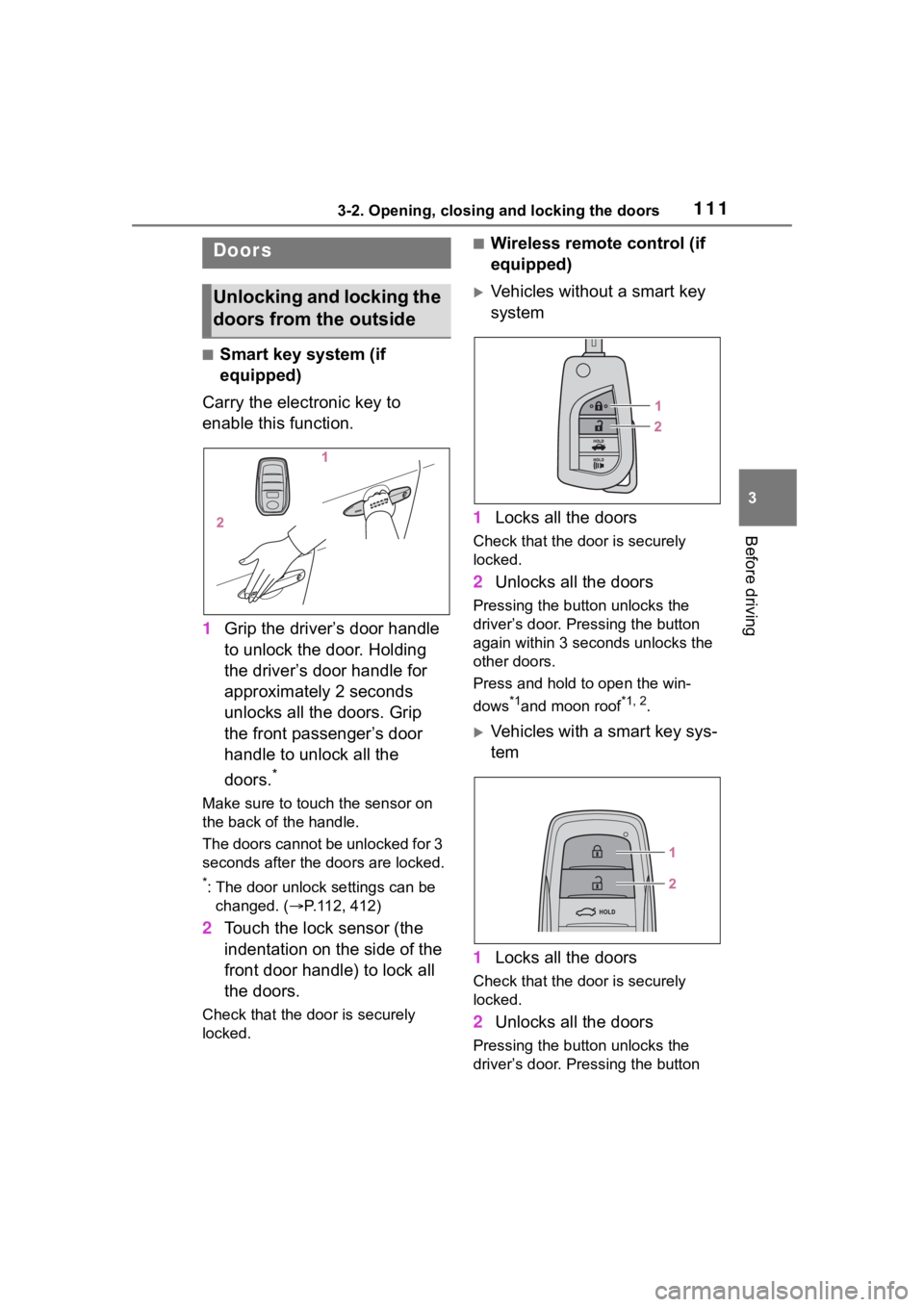
■Smart key system (if
equipped)
Carry the electronic key to
enable this function.
1 Grip the driver’s door handle
to unlock the door. Holding
the driver’s door handle for
approximately 2 seconds
unlocks all the doors. Grip
the front passenger’s door
handle to unlock all the
doors.
*
Make sure to touch the sensor on
the back of the handle.
The doors cannot be unlocked for 3
seconds after the doors are locked.
*: The door unlock settings can be
changed. ( P.112, 412)
2 Touch the lock sensor (the
indentation on the side of the
front door handle) to lock all
the doors.
Check that the door is securely
locked.
■Wireless remote control (if
equipped)
Vehicles without a smart key
system
1 Locks all the doors
Check that the d oor is securely
locked.
2 Unlocks all the doors
Pressing the button unlocks the
driver’s door. Pressing the button
again within 3 seconds unlocks the
other doors.
Press and hold to open the win-
dows
*1and moon roof*1, 2.
Vehicles with a smart key sys-
tem
1 Locks all the doors
Check that the d oor is securely
locked.
2 Unlocks all the doors
Pressing the button unlocks the
driver’s door. Pressing the button
Doors
Unlocking and locking the
doors from the outside
Page 112 of 468
1123-2. Opening, closing and locking the doors
again within 3 seconds unlocks the
other doors.
Press and hold to open the win-
dows
*1and moon roof.*1, 2
*1
:This setting mu st be customized
at your Toyota dealer.
*2: If equipped
■Key
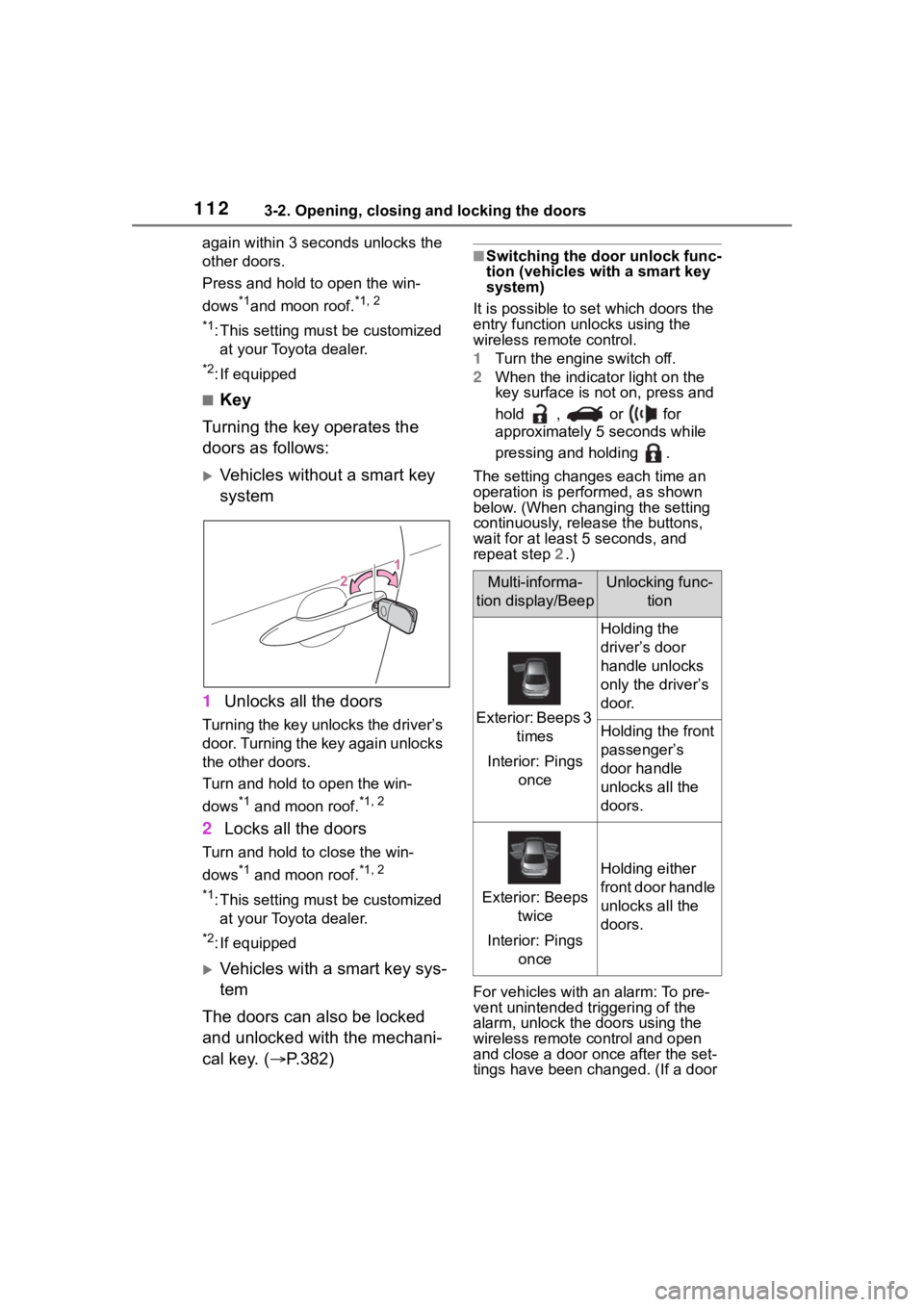
Turning the key operates the
doors as follows:
Vehicles without a smart key
system
1 Unlocks all the doors
Turning the key unlocks the driver’s
door. Turning the key again unlocks
the other doors.
Turn and hold to open the win-
dows
*1 and moon roof.*1, 2
2Locks all the doors
Turn and hold to close the win-
dows
*1 and moon roof.*1, 2
*1
:This setting mu st be customized
at your Toyota dealer.
*2: If equipped
Vehicles with a smart key sys-
tem
The doors can also be locked
and unlocked with the mechani-
cal key. ( P.382)
■Switching the door unlock func-
tion (vehicles with a smart key
system)
It is possible to set which doors the
entry function unlocks using the
wireless remote control.
1 Turn the engine switch off.
2 When the indicator light on the
key surface is not on, press and
hold , or for
approximately 5 seconds while
pressing and holding .
The setting changes each time an
operation is per formed, as shown
below. (When changing the setting
continuously, release the buttons,
wait for at least 5 seconds, and
repeat step 2 .)
For vehicles with an alarm: To pre-
vent unintended triggering of the
alarm, unlock the doors using the
wireless remote control and open
and close a door once after the set-
tings have been ch anged. (If a door
Multi-informa-
tion display/BeepUnlocking func- tion
Exterior: Beeps 3 times
Interior: Pings once
Holding the
driver’s door
handle unlocks
only the driver’s
door.
Holding the front
passenger’s
door handle
unlocks all the
doors.
Exterior: Beeps twice
Interior: Pings once
Holding either
front door handle
unlocks all the
doors.
Page 115 of 468
1153-2. Opening, closing and locking the doors
3
Before driving
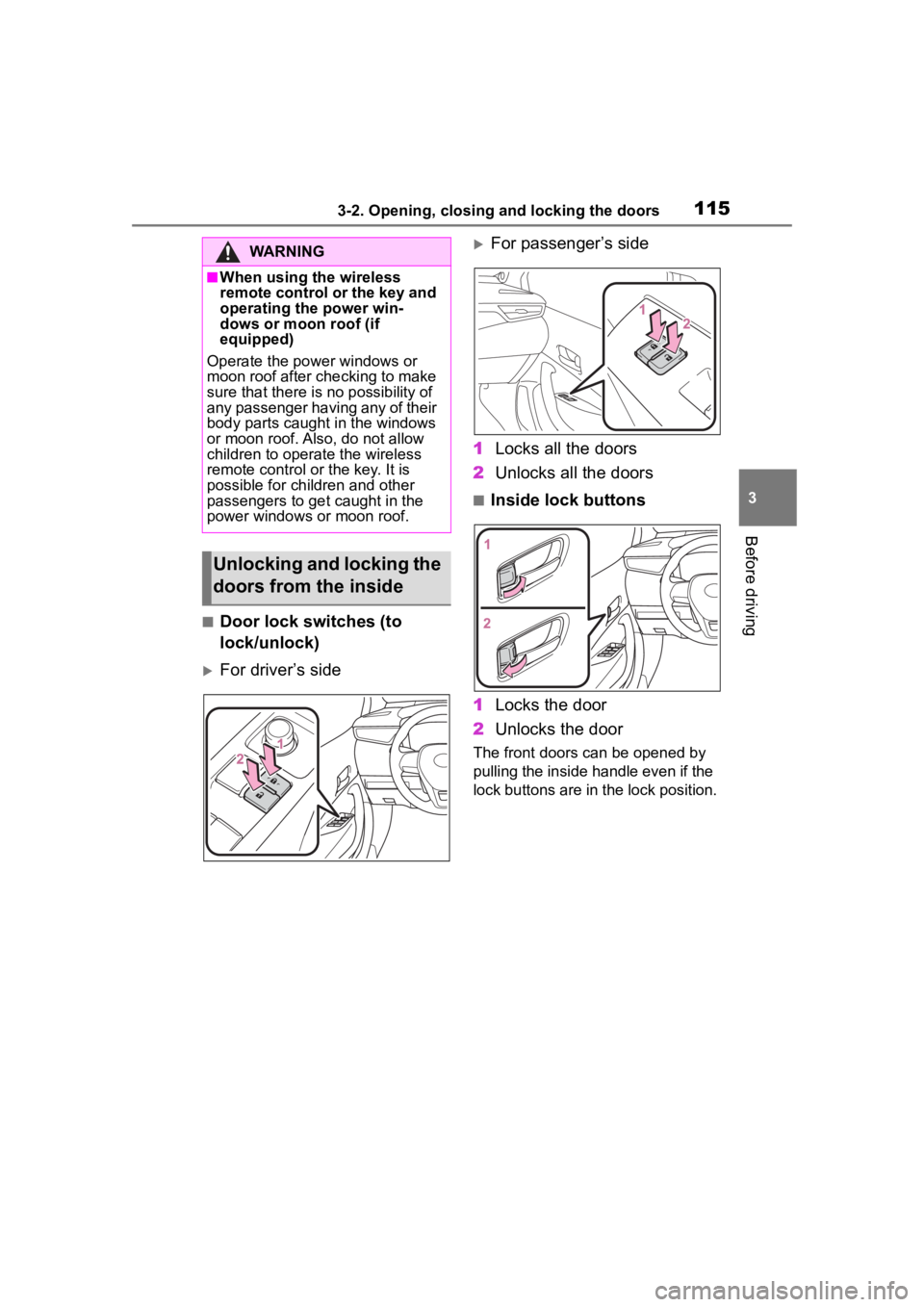
■Door lock switches (to
lock/unlock)
For driver’s side
For passenger’s side
1 Locks all the doors
2 Unlocks all the doors
■Inside lock buttons
1 Locks the door
2 Unlocks the door
The front doors can be opened by
pulling the inside handle even if the
lock buttons are in the lock position.
WARNING
■When using the wireless
remote control or the key and
operating the power win-
dows or moon roof (if
equipped)
Operate the power windows or
moon roof after checking to make
sure that there is n o possibility of
any passenger having any of their
body parts caugh t in the windows
or moon roof. Al so, do not allow
children to operate the wireless
remote control or the key. It is
possible for children and other
passengers to get caught in the
power windows or moon roof.
Unlocking and locking the
doors from the inside
Page 116 of 468
1163-2. Opening, closing and locking the doors
■Locking the front doors from
the outside without a key
1 Move the inside lock button to
the lock position.
2 Close the door.
Vehicles without a smart key sys-
tem
The door cannot be locked if the key
is in the engine switch.
Vehicles with a smart key system
The door cannot be locked if the
engine switch is in ACC or ON, or
the electronic key is left inside the
vehicle.
The key may not b e detected cor-
rectly and the door may be locked.
■Open door warning buzzer
If a door or the trunk is not fully
closed, a buzzer will sound when
the vehicle speed reaches 3 mph (5
km/h).
The open door(s) or trunk is indi-
cated on the multi -information dis-
play.
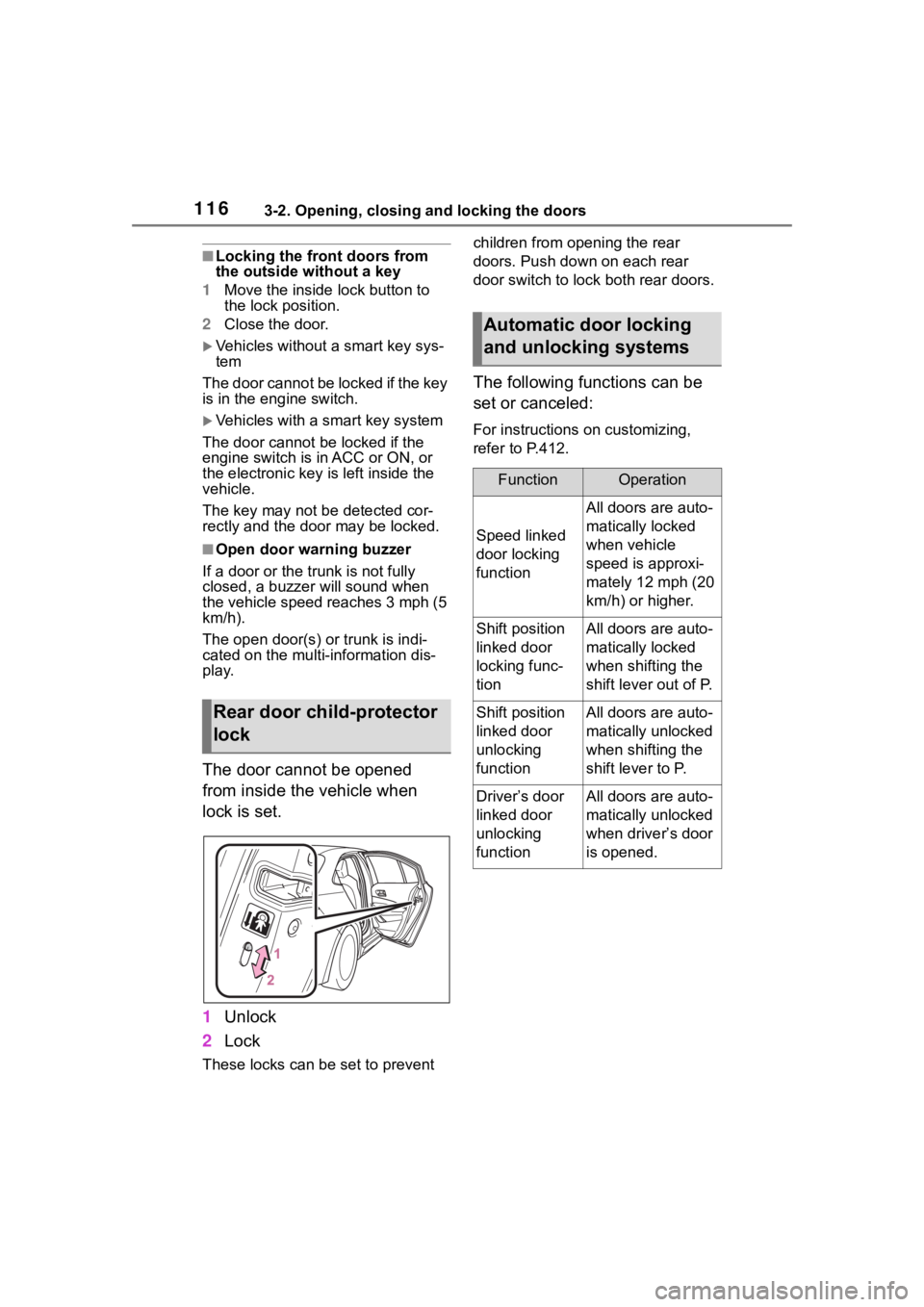
The door cannot be opened
from inside the vehicle when
lock is set.
1 Unlock
2 Lock
These locks can be set to prevent children from opening the rear
doors. Push down on each rear
door switch to lock both rear doors.
The following functions can be
set or canceled:
For instructions on customizing,
refer to P.412.
Rear door child-protector
lock
Automatic door locking
and unlocking systems
FunctionOperation
Speed linked
door locking
function
All doors are auto-
matically locked
when vehicle
speed is approxi-
mately 12 mph (20
km/h) or higher.
Shift position
linked door
locking func-
tionAll doors are auto-
matically locked
when shifting the
shift lever out of P.
Shift position
linked door
unlocking
functionAll doors are auto-
matically unlocked
when shifting the
shift lever to P.
Driver’s door
linked door
unlocking
functionAll doors are auto-
matically unlocked
when driver’s door
is opened.
Page 118 of 468
1183-2. Opening, closing and locking the doors
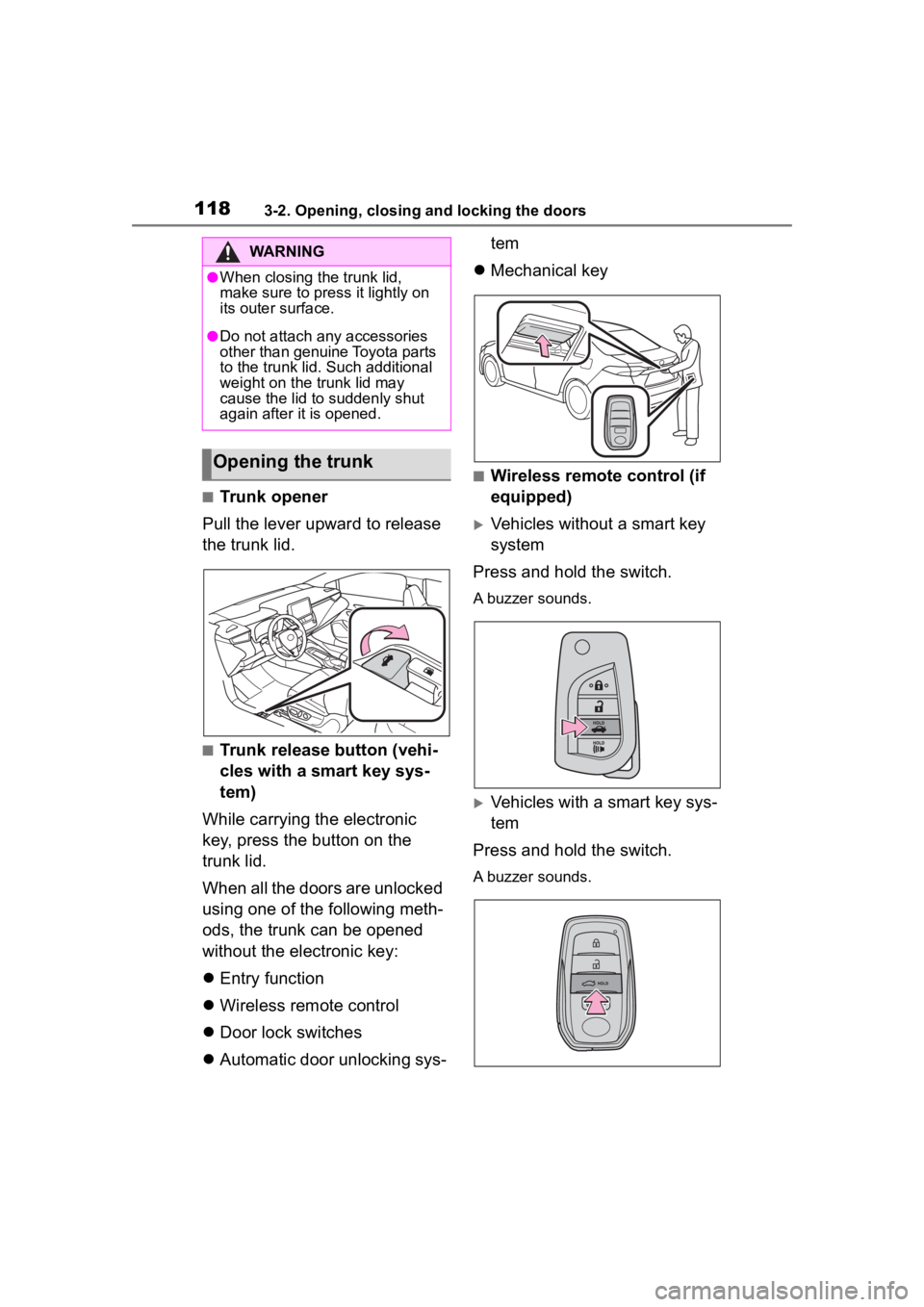
■Trunk opener
Pull the lever upward to release
the trunk lid.
■Trunk release button (vehi-
cles with a smart key sys-
tem)
While carrying the electronic
key, press the button on the
trunk lid.
When all the doors are unlocked
using one of the following meth-
ods, the trunk can be opened
without the electronic key:
Entry function
Wireless remote control
Door lock switches
Automatic door unlocking sys- tem
Mechanical key
■Wireless remote control (if
equipped)
Vehicles without a smart key
system
Press and hold the switch.
A buzzer sounds.
Vehicles with a smart key sys-
tem
Press and hold the switch.
A buzzer sounds.
WARNING
●When closing the trunk lid,
make sure to press it lightly on
its outer surface.
●Do not attach any accessories
other than genuine Toyota parts
to the trunk lid . Such additional
weight on the trunk lid may
cause the lid to suddenly shut
again after it is opened.
Opening the trunk
Page 120 of 468
1203-2. Opening, closing and locking the doors
*: If equipped
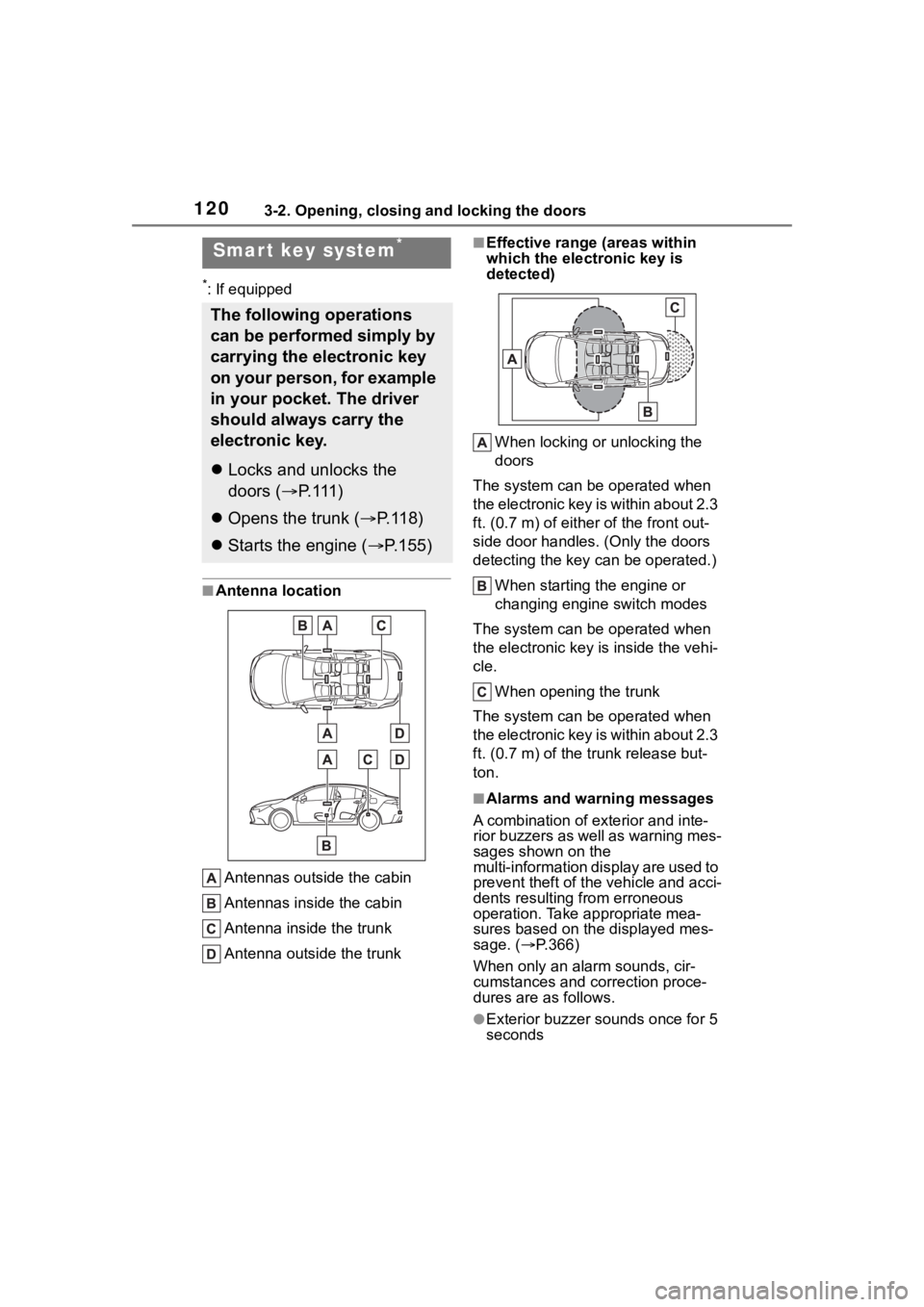
■Antenna locationAntennas outside the cabin
Antennas inside the cabin
Antenna inside the trunk
Antenna outside the trunk
■Effective range (areas within
which the electronic key is
detected)
When locking or unlocking the
doors
The system can be operated when
the electronic key is within about 2.3
ft. (0.7 m) of either of the front out-
side door handles. (Only the doors
detecting the key can be operated.)
When starting the engine or
changing engine switch modes
The system can be operated when
the electronic key i s inside the vehi-
cle.
When opening the trunk
The system can be operated when
the electronic key is within about 2.3
ft. (0.7 m) of the trunk release but-
ton.
■Alarms and warning messages
A combination of exterior and inte-
rior buzzers as well as warning mes-
sages shown on the
multi-information di splay are used to
prevent theft of the vehicle and acci-
dents resulting from erroneous
operation. Take appropriate mea-
sures based on the displayed mes-
sage. ( P.366)
When only an alarm sounds, cir-
cumstances and correction proce-
dures are as follows.
●Exterior buzzer sounds once for 5
seconds
Smar t key system*
The following operations
can be performed simply by
carrying the electronic key
on your person, for example
in your pocket. The driver
should always carry the
electronic key.
Locks and unlocks the
doors ( P. 1 1 1 )
Opens the trunk ( P. 1 1 8 )
Starts the engine ( P.155)
Page 124 of 468
1243-2. Opening, closing and locking the doors
●Do not leave the electronic key
inside the trunk.
The key confinement prevention
function may not operate, depend-
ing on the location of the key (the
inside edge of the trunk), condi-
tions (inside a met al bag, close to
metallic objects) and the radio
waves in the surrounding area.
( P.119)
■If the smart key system does
not operate properly
●Locking and unlocking the doors:
P. 3 8 2
●Starting the engine: P.382
■Customization
Some functions can be customized.
( P.412)
■If the smart key system has
been deactivated in a custom-
ized setting
●Locking and unlocking the doors:
Use the wireless remote control or
mechanical key. ( P.111, 382)
●Starting the engine and changing
engine switch modes: P. 3 8 2
●Stopping the engine: P. 1 5 7
WARNING
■Caution regarding interfer-
ence with electronic devices
●People with implantable car-
diac pacemakers, cardiac
resynchronization ther-
apy-pacemakers or implantable
cardioverter defib rillators should
keep away from the smart key
system antennas. ( P.120)
The radio waves may affect the
operation of such devices. If
necessary, the entry function
can be disabled. Ask your Toy-
ota dealer for details, such as
the frequency of radio waves
and timing of the emitted radio
waves. Then, consult your doc-
tor to see if you should disable
the entry function.
●Users of any electrical medical
device other than implantable
cardiac pacemakers, cardiac
resynchronization ther-
apy-pacemakers or implantable
cardioverter defibrillators should
consult the manufacturer of the
device for information about its
operation under the influence of
radio waves.
Radio waves could have unex-
pected effects on the operation
of such medical devices.
Ask your Toyota dealer for details
on disabling the entry function.
Page 309 of 468
3096-3. Do-it-yourself maintenance
6
Maintenance and care
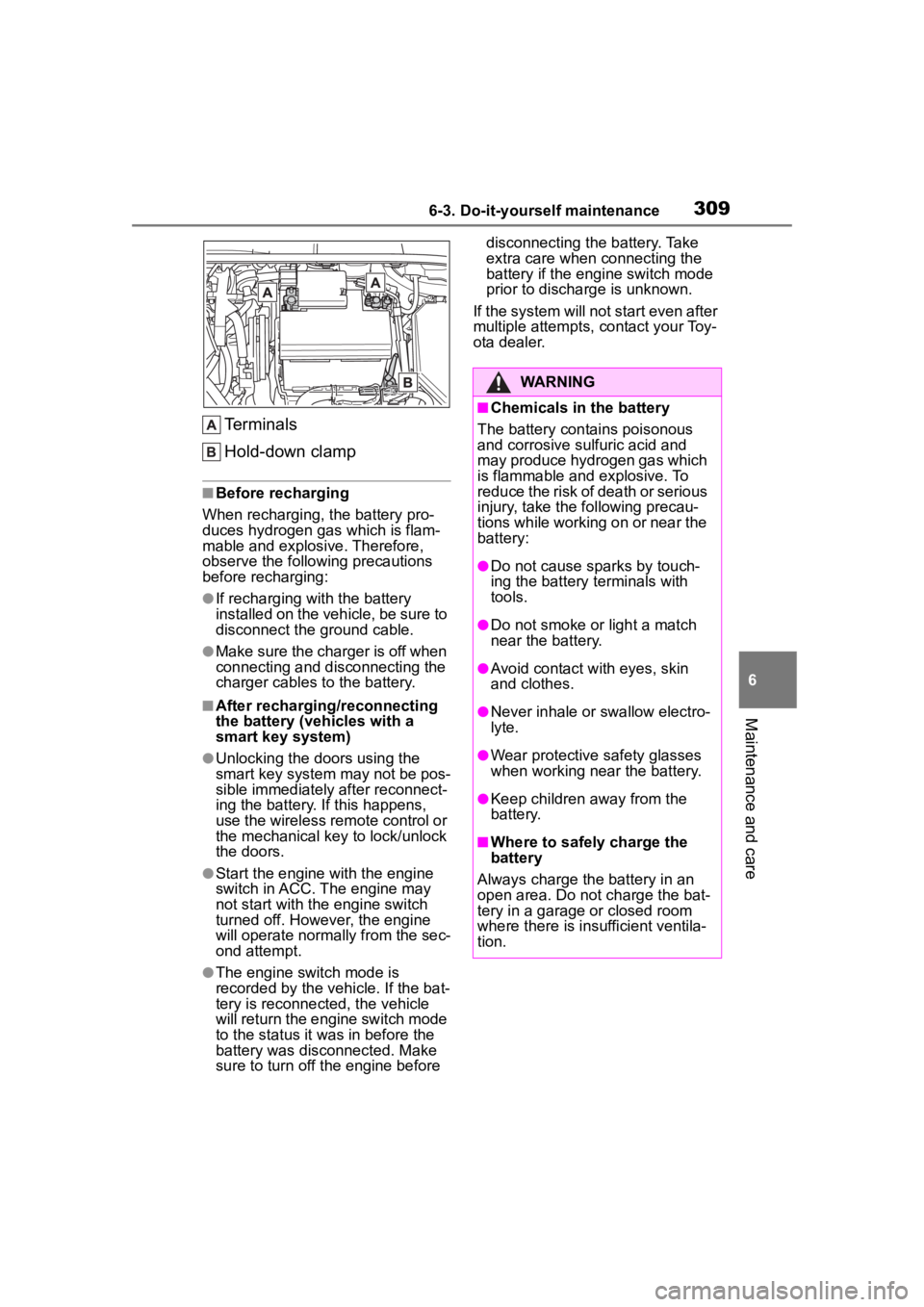
Terminals
Hold-down clamp
■Before recharging
When recharging, t he battery pro-
duces hydrogen ga s which is flam-
mable and explosive. Therefore,
observe the following precautions
before recharging:
●If recharging wi th the battery
installed on the vehicle, be sure to
disconnect the ground cable.
●Make sure the charger is off when
connecting and disconnecting the
charger cables to the battery.
■After recharging/reconnecting
the battery (vehicles with a
smart key system)
●Unlocking the doors using the
smart key system may not be pos-
sible immediately after reconnect-
ing the battery. If this happens,
use the wireless remote control or
the mechanical key to lock/unlock
the doors.
●Start the engine with the engine
switch in ACC. The engine may
not start with the engine switch
turned off. However, the engine
will operate normally from the sec-
ond attempt.
●The engine switch mode is
recorded by the vehicle. If the bat-
tery is reconnected, the vehicle
will return the engi ne switch mode
to the status it was in before the
battery was disconnected. Make
sure to turn off the engine before disconnecting the battery. Take
extra care when connecting the
battery if the engine switch mode
prior to discharge is unknown.
If the system will not start even after
multiple attempts, contact your Toy-
ota dealer.
WARNING
■Chemicals in the battery
The battery contains poisonous
and corrosive sulfuric acid and
may produce hydrogen gas which
is flammable and explosive. To
reduce the risk of death or serious
injury, take the following precau-
tions while working on or near the
battery:
●Do not cause sparks by touch-
ing the battery terminals with
tools.
●Do not smoke or light a match
near the battery.
●Avoid contact with eyes, skin
and clothes.
●Never inhale or swallow electro-
lyte.
●Wear protective safety glasses
when working near the battery.
●Keep children away from the
battery.
■Where to safely charge the
battery
Always charge the battery in an
open area. Do not charge the bat-
tery in a garage or closed room
where there is ins ufficient ventila-
tion.
Page 382 of 468
3827-2. Steps to take in an emergency
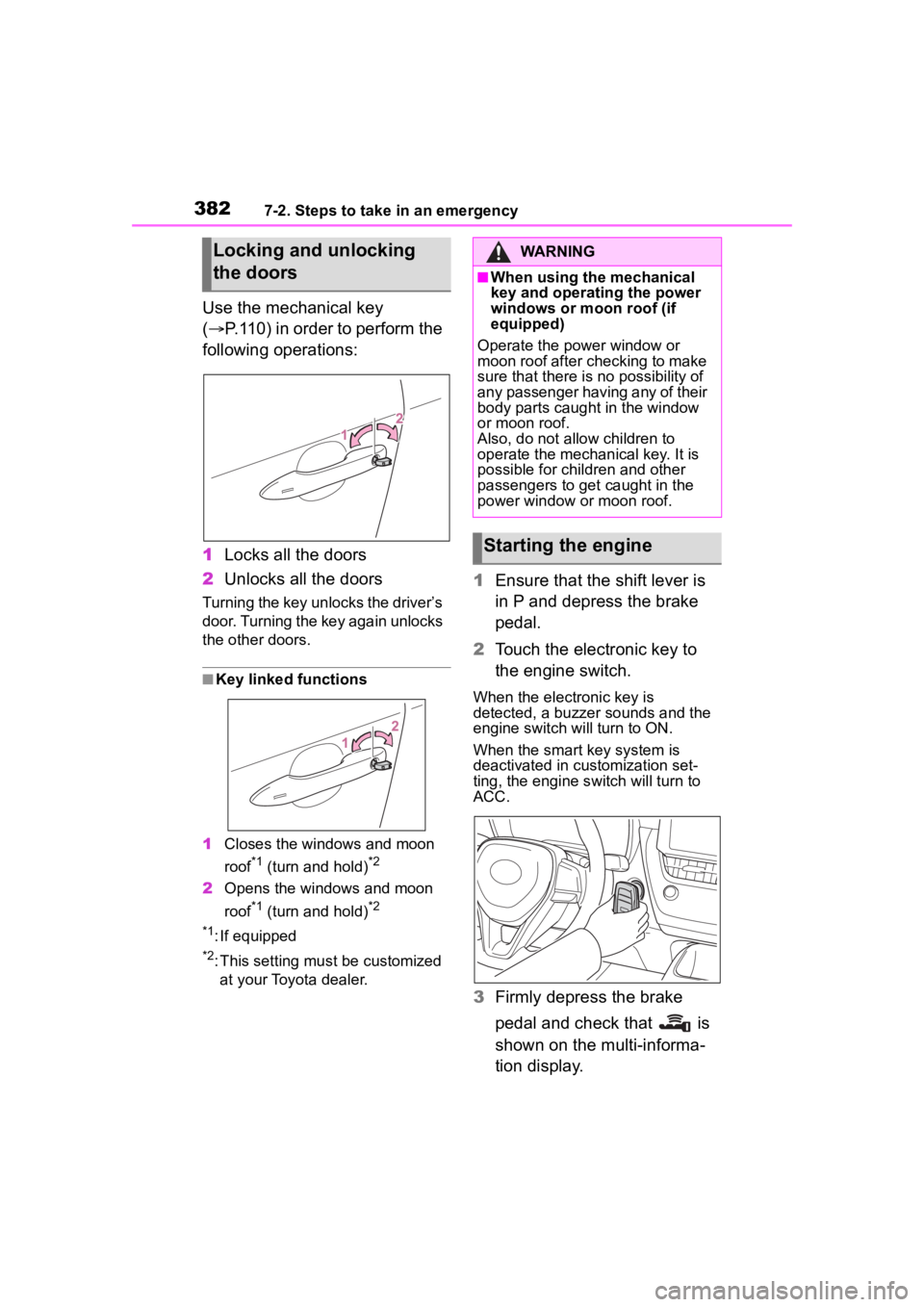
Use the mechanical key
(P.110) in order to perform the
following operations:
1 Locks all the doors
2 Unlocks all the doors
Turning the key unlocks the driver’s
door. Turning the key again unlocks
the other doors.
■Key linked functions
1 Closes the windows and moon
roof
*1 (turn and hold)*2
2Opens the windows and moon
roof
*1 (turn and hold)*2
*1
: If equipped
*2: This setting mu st be customized
at your Toyota dealer.
1 Ensure that the shift lever is
in P and depress the brake
pedal.
2 Touch the electronic key to
the engine switch.
When the electronic key is
detected, a buzzer sounds and the
engine switch will turn to ON.
When the smart key system is
deactivated in customization set-
ting, the engine switch will turn to
ACC.
3Firmly depress the brake
pedal and check that is
shown on the multi-informa-
tion display.
Locking and unlocking
the doorsWARNING
■When using the mechanical
key and operating the power
windows or moon roof (if
equipped)
Operate the power window or
moon roof after checking to make
sure that there is no possibility of
any passenger having any of their
body parts caught in the window
or moon roof.
Also, do not allo w children to
operate the mechanical key. It is
possible for children and other
passengers to get caught in the
power window or moon roof.
Starting the engine