phone TOYOTA COROLLA CROSS 2022 User Guide
[x] Cancel search | Manufacturer: TOYOTA, Model Year: 2022, Model line: COROLLA CROSS, Model: TOYOTA COROLLA CROSS 2022Pages: 612, PDF Size: 17.18 MB
Page 279 of 612
279
5
5
Audio
Audio
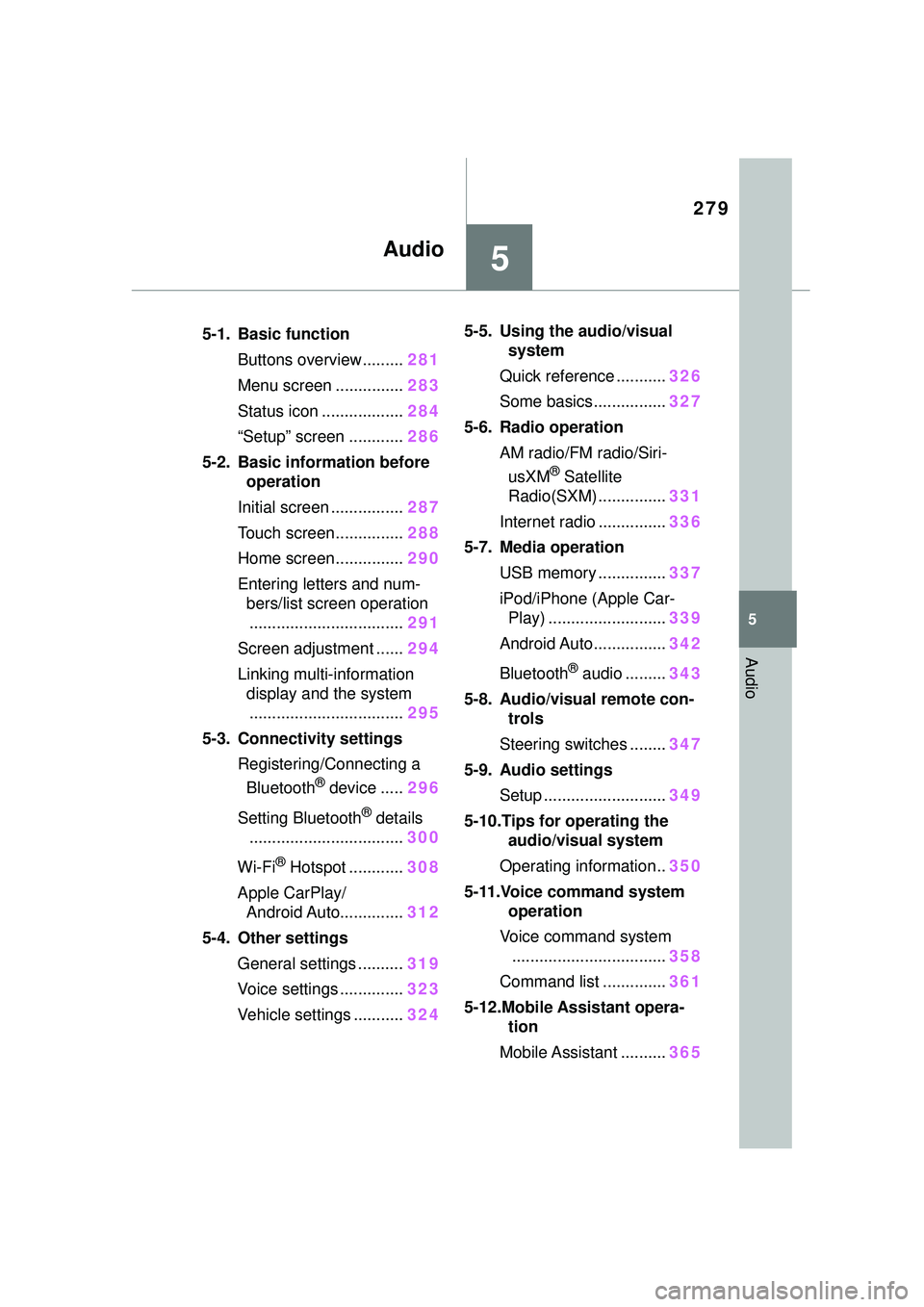
.5-1. Basic functionButtons overview......... 281
Menu screen ............... 283
Status icon .................. 284
“Setup” screen ............ 286
5-2. Basic information before operation
Initial screen ................ 287
Touch screen............... 288
Home screen............... 290
Entering letters and num- bers/list screen operation
.................................. 291
Screen adjustment ...... 294
Linking multi-information display and the system
.................................. 295
5-3. Connectivity settings Registering/Connecting a Bluetooth
® device ..... 296
Setting Bluetooth
® details
.................................. 300
Wi-Fi
® Hotspot ............ 308
Apple CarPlay/ Android Auto.............. 312
5-4. Other settings General settings .......... 319
Voice settings .............. 323
Vehicle settings ........... 3245-5. Using the audio/visual
system
Quick reference ........... 326
Some basics................ 327
5-6. Radio operation AM radio/FM radio/Siri-usXM
® Satellite
Radio(SXM) ............... 331
Internet radio ............... 336
5-7. Media operation USB memory ............... 337
iPod/iPhone (Apple Car- Play) .......................... 339
Android Auto................ 342
Bluetooth
® audio ......... 343
5-8. Audio/visual remote con- trols
Steering switches ........ 347
5-9. Audio settings Setup ........................... 349
5-10.Tips for operating the audio/visual system
Operating information.. 350
5-11.Voice command system operation
Voice command system .................................. 358
Command list .............. 361
5-12.Mobile Assistant opera- tion
Mobile Assistant .......... 365
Page 280 of 612
280
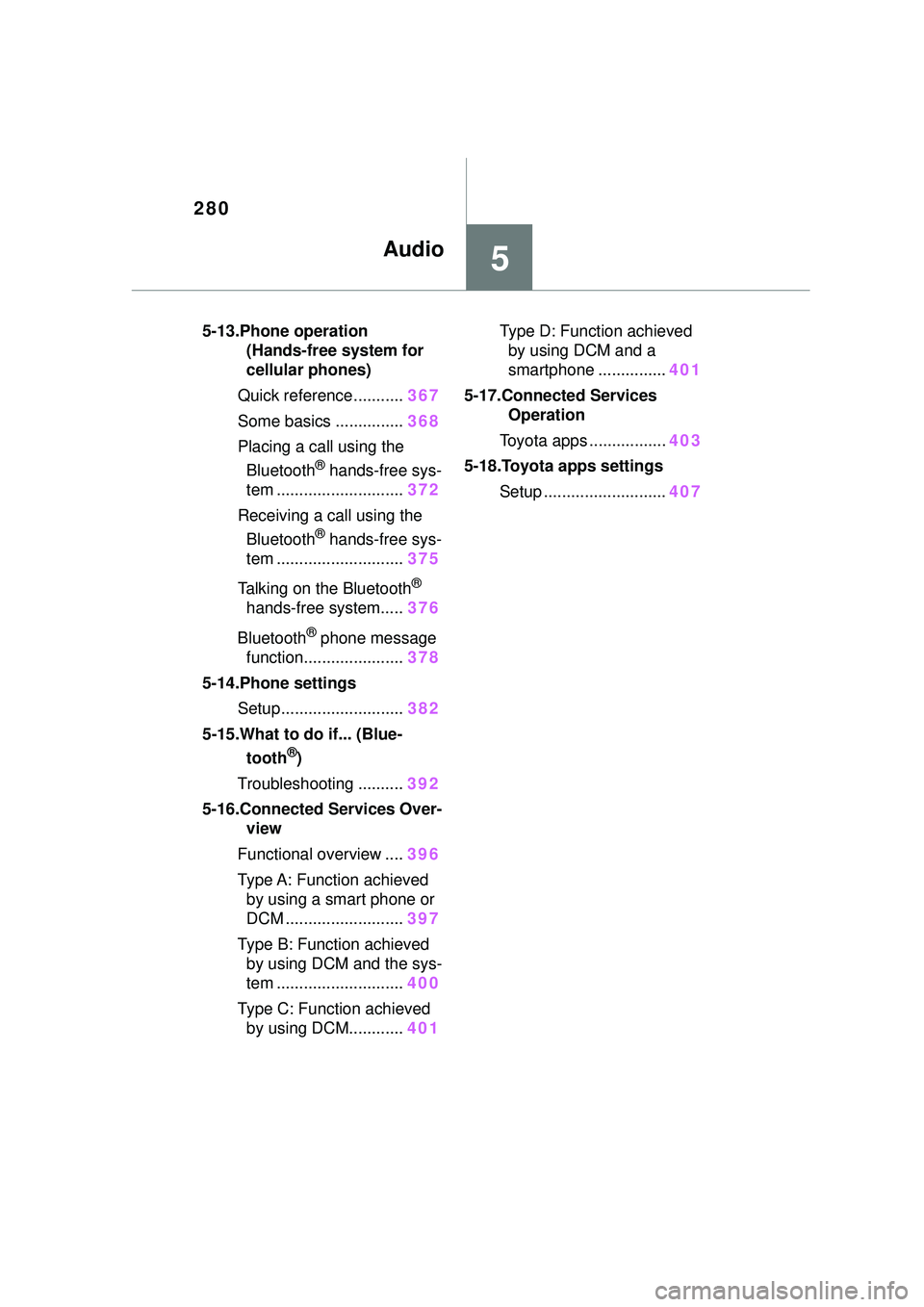
5-13.Phone operation(Hands-free system for
cellular phones)
Quick reference........... 367
Some basics ............... 368
Placing a call using the Bluetooth
® hands-free sys-
tem ............................ 372
Receiving a call using the Bluetooth
® hands-free sys-
tem ............................ 375
Talking on the Bluetooth
®
hands-free system..... 376
Bluetooth
® phone message
function...................... 378
5-14.Phone settings Setup........................... 382
5-15.What to do if... (Blue- tooth
®)
Troubleshooting .......... 392
5-16.Connected Services Over- view
Functional overview .... 396
Type A: Function achieved by using a smart phone or
DCM .......................... 397
Type B: Function achieved by using DCM and the sys-
tem ............................ 400
Type C: Function achieved by using DCM............ 401Type D: Function achieved
by using DCM and a
smartphone ............... 401
5-17.Connected Services Operation
Toyota apps ................. 403
5-18.Toyota apps settings Setup ........................... 407
5Audio
Page 281 of 612
2815-1. Basic function
5
Audio
5-1.Basic function
*: If equipped
Audio Plus
Owners of this system should refer to the “MULTIMEDIA OWNER’S
MANUAL”.
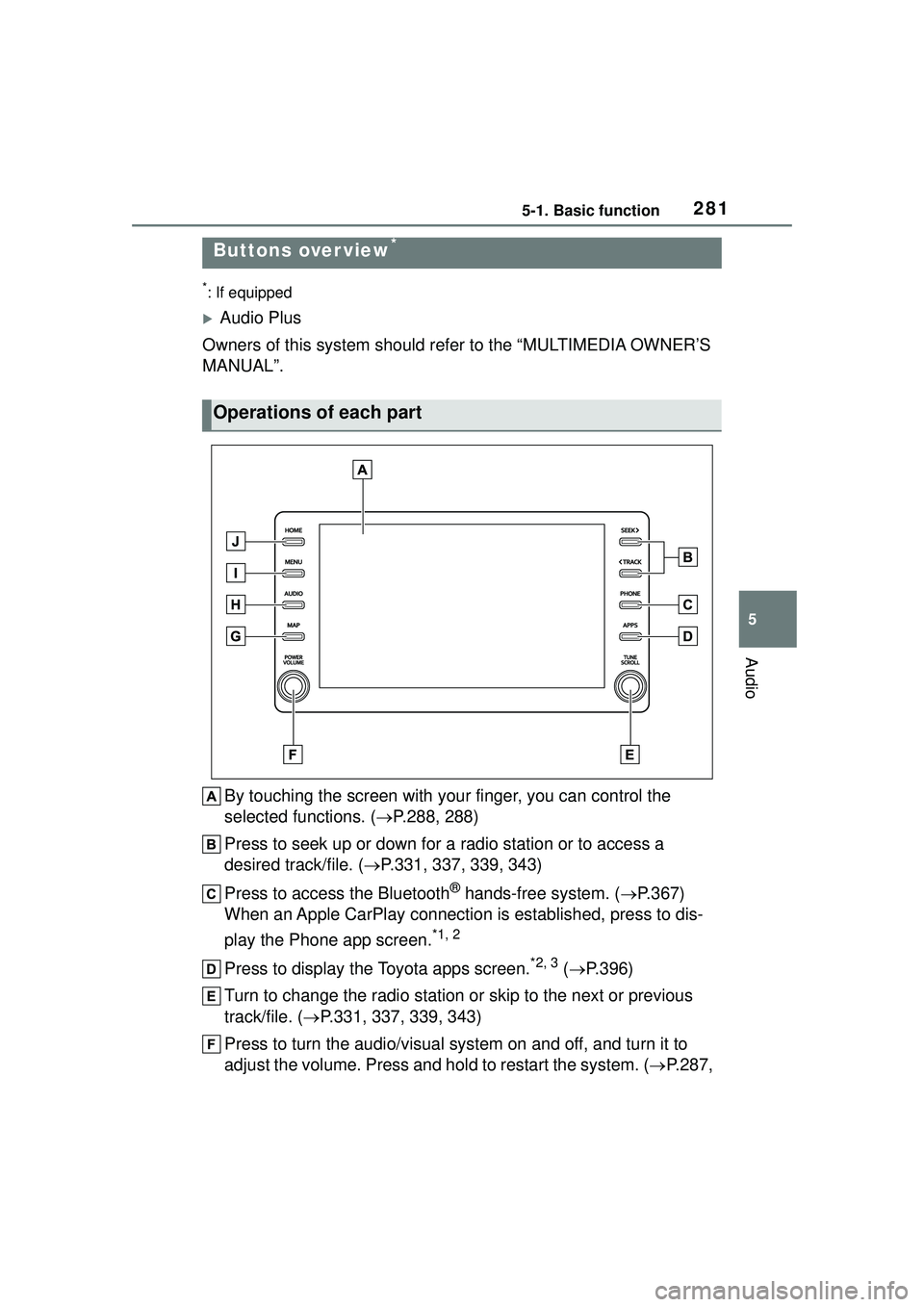
By touching the screen with your finger, you can control the
selected functions. ( P.288, 288)
Press to seek up or down for a radio station or to access a
desired track/file. ( P.331, 337, 339, 343)
Press to access the Bluetooth
® hands-free system. ( P.367)
When an Apple CarPlay connection is established, press to dis-
play the Phone app screen.
*1, 2
Press to display the Toyota apps screen.*2, 3 ( P.396)
Turn to change the radio station or skip to the next or previous
track/file. ( P.331, 337, 339, 343)
Press to turn the audio/visual system on and off, and turn it to
adjust the volume. Press and hold to restart the system. ( P.287,
Buttons over view*
Operations of each part
Page 283 of 612
2835-1. Basic function
5
Audio
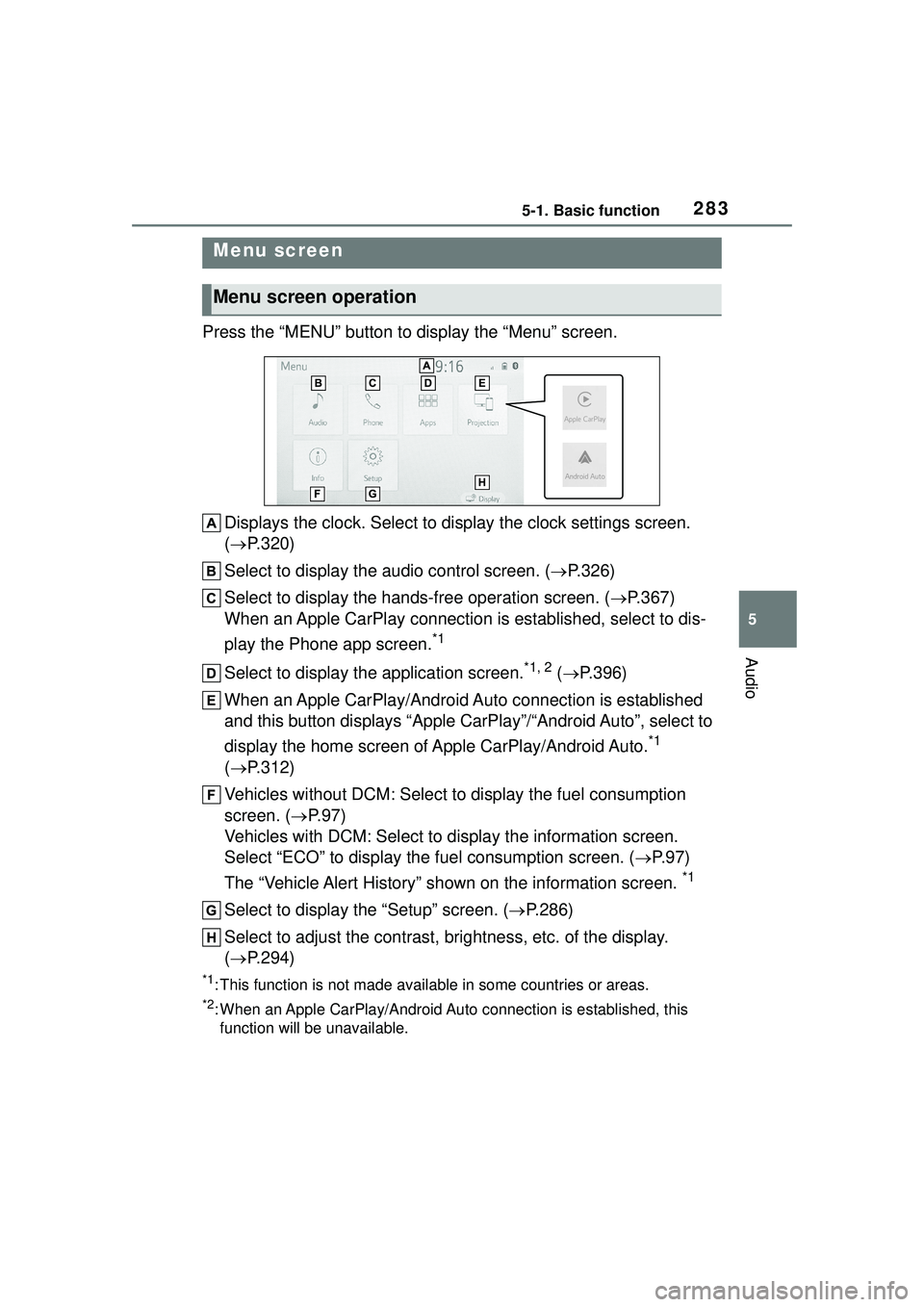
Press the “MENU” button to display the “Menu” screen.Displays the clock. Select to display the clock settings screen.
( P.320)
Select to display the audio control screen. ( P.326)
Select to display the hands-free operation screen. ( P.367)
When an Apple CarPlay connection is established, select to dis-
play the Phone app screen.
*1
Select to display the application screen.*1, 2 ( P.396)
When an Apple CarPlay/Android Auto connection is established
and this button displays “Apple CarPlay”/“Android Auto”, select to
display the home screen of Apple CarPlay/Android Auto.
*1
( P.312)
Vehicles without DCM: Select to display the fuel consumption
screen. ( P.97)
Vehicles with DCM: Select to display the information screen.
Select “ECO” to display the fuel consumption screen. ( P.97)
The “Vehicle Alert History” shown on the information screen.
*1
Select to display the “Setup” screen. ( P.286)
Select to adjust the contrast, brightness, etc. of the display.
( P.294)
*1: This function is not made available in some countries or areas.
*2: When an Apple CarPlay/Android Auto connection is established, this
function will be unavailable.
Menu screen
Menu screen operation
Page 284 of 612
2845-1. Basic function
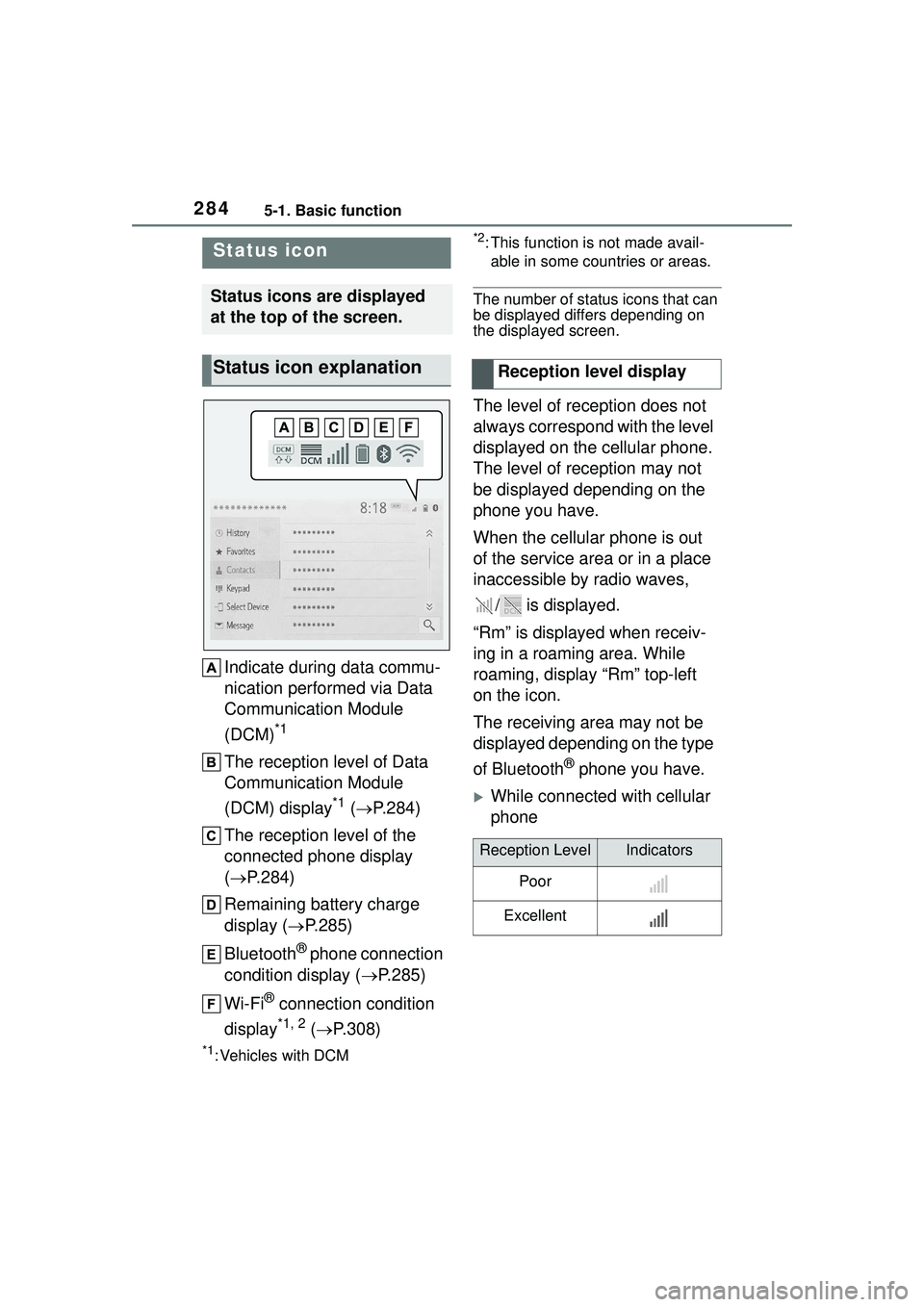
Indicate during data commu-
nication performed via Data
Communication Module
(DCM)
*1
The reception level of Data
Communication Module
(DCM) display
*1 ( P.284)
The reception level of the
connected phone display
( P.284)
Remaining battery charge
display ( P.285)
Bluetooth
® phone connection
condition display ( P.285)
Wi-Fi
® connection condition
display
*1, 2 ( P.308)
*1: Vehicles with DCM
*2: This function is not made avail-
able in some countries or areas.
The number of status icons that can
be displayed differs depending on
the displayed screen.
The level of reception does not
always correspond with the level
displayed on the cellular phone.
The level of reception may not
be displayed depending on the
phone you have.
When the cellular phone is out
of the service area or in a place
inaccessible by radio waves,
/ is displayed.
“Rm” is displayed when receiv-
ing in a roaming area. While
roaming, display “Rm” top-left
on the icon.
The receiving area may not be
displayed depending on the type
of Bluetooth
® phone you have.
While connected with cellular
phone
Status icon
Status icons are displayed
at the top of the screen.
Status icon explanationReception level display
Reception LevelIndicators
Poor
Excellent
Page 285 of 612
2855-1. Basic function
5
Audio
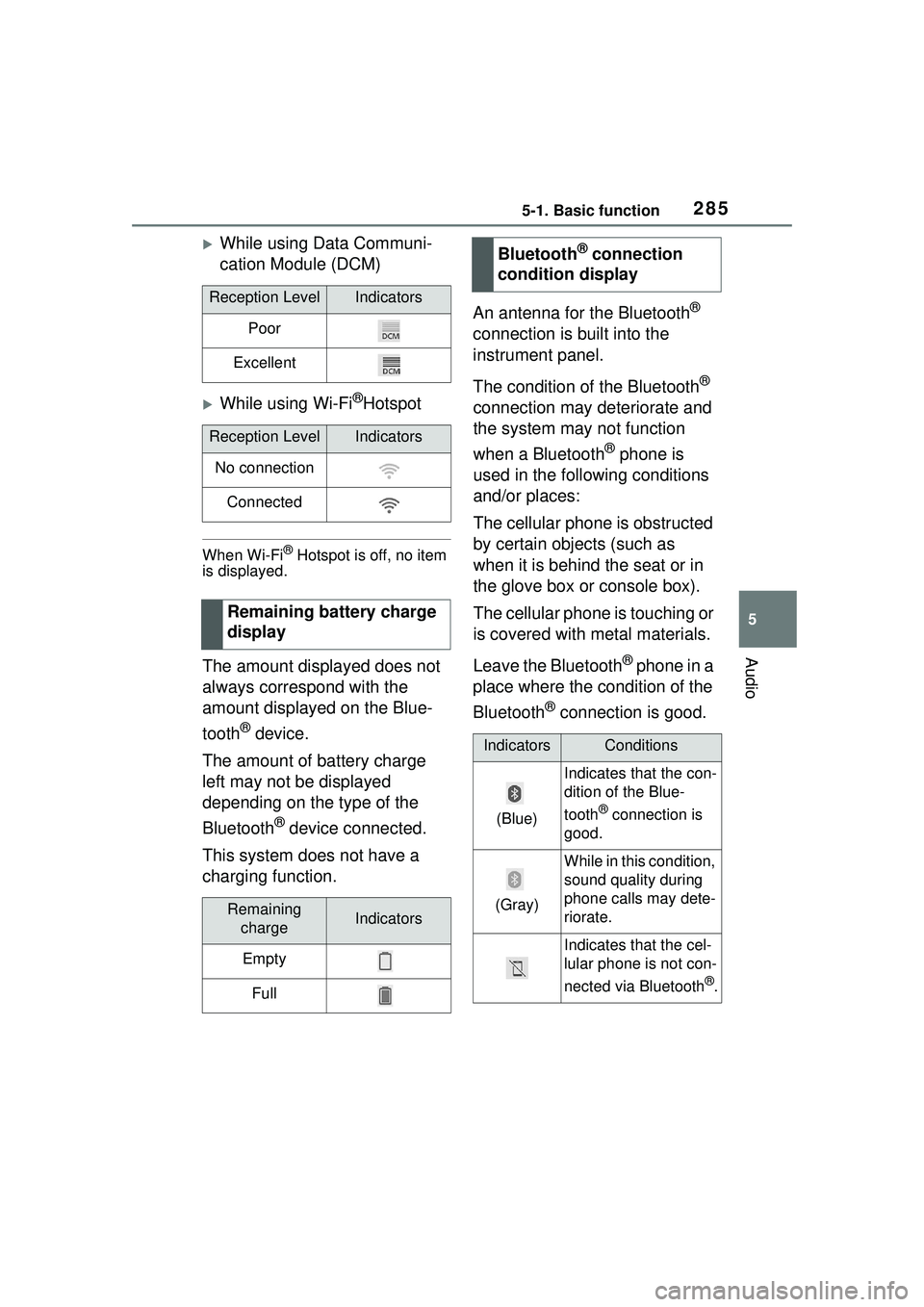
While using Data Communi-
cation Module (DCM)
While using Wi-Fi®Hotspot
When Wi-Fi® Hotspot is off, no item
is displayed.
The amount displayed does not
always correspond with the
amount displayed on the Blue-
tooth
® device.
The amount of battery charge
left may not be displayed
depending on the type of the
Bluetooth
® device connected.
This system does not have a
charging function. An antenna for the Bluetooth
®
connection is built into the
instrument panel.
The condition of the Bluetooth
®
connection may deteriorate and
the system may not function
when a Bluetooth
® phone is
used in the following conditions
and/or places:
The cellular phone is obstructed
by certain objects (such as
when it is behind the seat or in
the glove box or console box).
The cellular phone is touching or
is covered with metal materials.
Leave the Bluetooth
® phone in a
place where the condition of the
Bluetooth
® connection is good.
Reception LevelIndicators
Poor
Excellent
Reception LevelIndicators
No connection
Connected
Remaining battery charge
display
Remaining chargeIndicators
Empty
Full
Bluetooth® connection
condition display
IndicatorsConditions
(Blue)
Indicates that the con-
dition of the Blue-
tooth
® connection is
good.
(Gray)
While in this condition,
sound quality during
phone calls may dete-
riorate.
Indicates that the cel-
lular phone is not con-
nected via Bluetooth
®.
Page 286 of 612
2865-1. Basic function
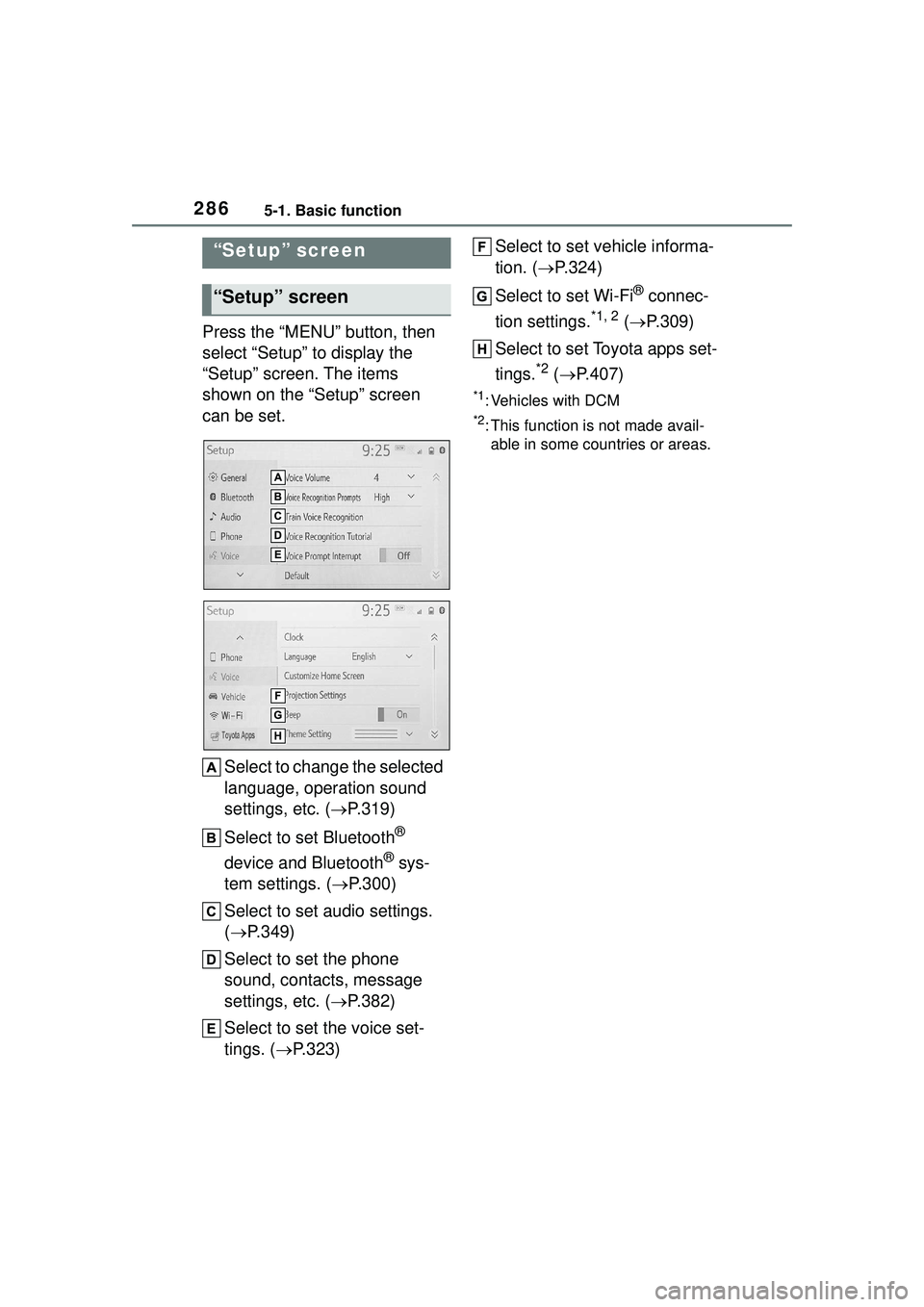
Press the “MENU” button, then
select “Setup” to display the
“Setup” screen. The items
shown on the “Setup” screen
can be set.Select to change the selected
language, operation sound
settings, etc. ( P.319)
Select to set Bluetooth
®
device and Bluetooth
® sys-
tem settings. ( P.300)
Select to set audio settings.
( P.349)
Select to set the phone
sound, contacts, message
settings, etc. ( P.382)
Select to set the voice set-
tings. ( P.323) Select to set vehicle informa-
tion. (
P.324)
Select to set Wi-Fi
® connec-
tion settings.
*1, 2 ( P.309)
Select to set Toyota apps set-
tings.
*2 ( P.407)
*1: Vehicles with DCM
*2: This function is not made avail-
able in some countries or areas.
“Setup” screen
“Setup” screen
Page 295 of 612
2955-2. Basic information before operation
5
Audio
Select “<” or “>” to select the
desired display.
“Contrast”
“+”: Select to strengthen the con-
trast of the screen.
“-”: Select to weaken the contrast of
the screen.
“Brightness”
“+”: Select to brighten the screen.
“-”: Select to darken the screen.
Linking multi-informa-
tion display and the
system
The following functions of
the system are linked with
the multi-information dis-
play in the instrument clus-
ter:
Audio
Phone
*
etc.
These functions can be
operated using multi-infor-
mation display control
switches on the steering
wheel. ( P.91)
*: When an Apple CarPlay con-
nection is established, this
function will be unavailable.
Page 296 of 612
2965-3. Connectivity settings
5-3.Connectivity settings
●This system is not guaranteed to
operate with all Bluetooth®
devices.
●If your cellular phone does not
support HFP, registering the Blue-
tooth
® phone or using OPP,
PBAP, MAP or SPP profiles indi-
vidually will not be possible.
●If the connected Bluetooth®
device version is older than rec-
ommended or incompatible, the
Bluetooth
® device function may
not work properly.
●Refer to
https://www.toyota.com/
audio-multimedia in the United
States,
https://www.toyota.ca/connected
in Canada, and
http://www.toyotapr.com/
audio-multimedia in Puerto Rico,
to find approved Bluetooth®
phones for this system.
■Registering from the sys-
tem
1 Turn the Bluetooth
® connec-
tion setting of your cellular
phone on.
This function is not available when
Bluetooth® connection setting of
your cellular phone is set to off.
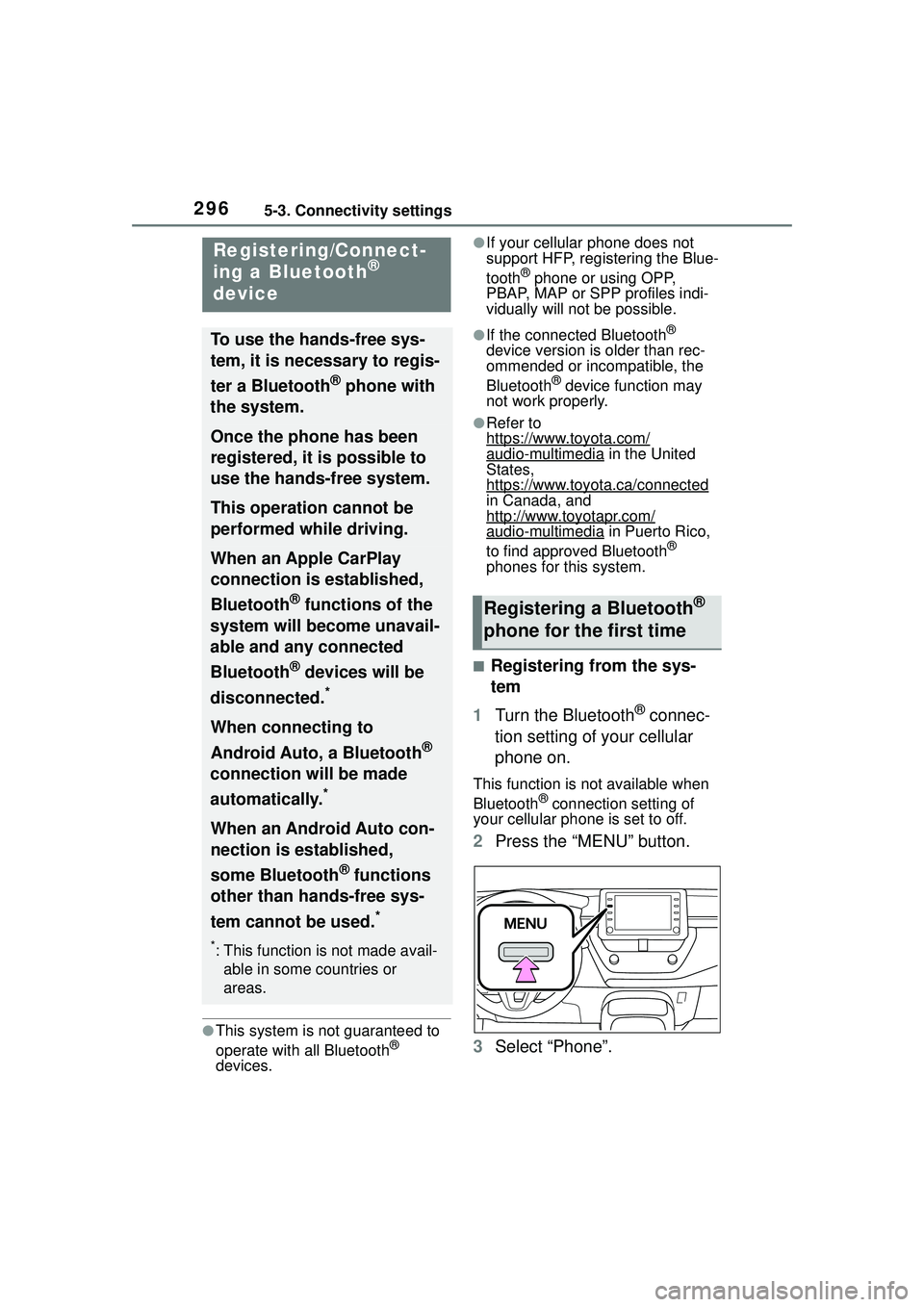
2 Press the “MENU” button.
3 Select “Phone”.
Registering/Connect-
ing a Bluetooth®
device
To use the hands-free sys-
tem, it is necessary to regis-
ter a Bluetooth
® phone with
the system.
Once the phone has been
registered, it is possible to
use the hands-free system.
This operation cannot be
performed while driving.
When an Apple CarPlay
connection is established,
Bluetooth
® functions of the
system will become unavail-
able and any connected
Bluetooth
® devices will be
disconnected.
*
When connecting to
Android Auto, a Bluetooth
®
connection will be made
automatically.
*
When an Android Auto con-
nection is established,
some Bluetooth
® functions
other than hands-free sys-
tem cannot be used.
*
*: This function is not made avail- able in some countries or
areas.
Registering a Bluetooth®
phone for the first time
Page 297 of 612
2975-3. Connectivity settings
5
Audio
Operations up to this point can also
be performed by pressing the
“PHONE” button on the instrument
panel.
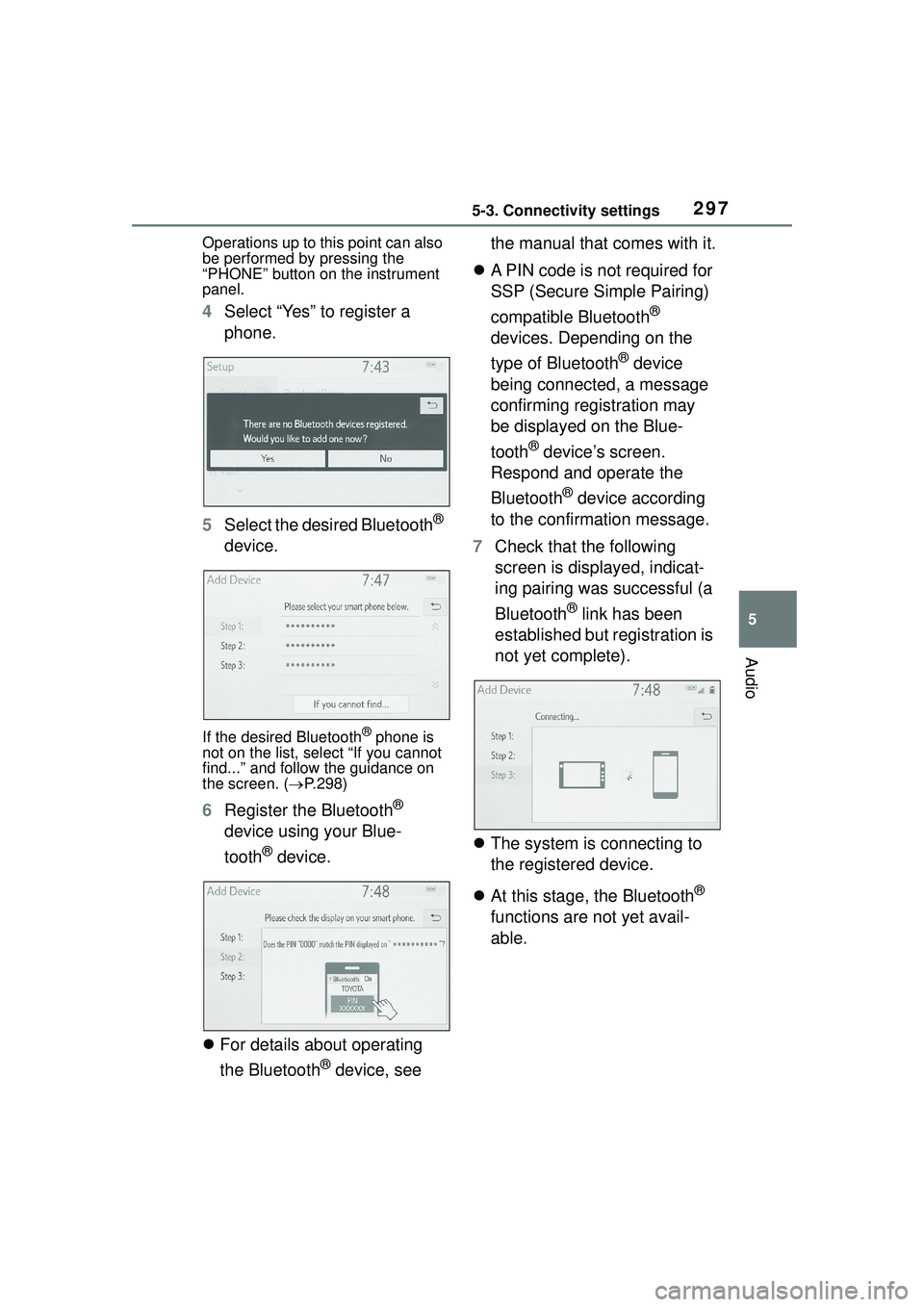
4Select “Yes” to register a
phone.
5 Select the desired Bluetooth
®
device.
If the desired Bluetooth® phone is
not on the list, select “If you cannot
find...” and follow the guidance on
the screen. ( P.298)
6 Register the Bluetooth®
device using your Blue-
tooth
® device.
For details about operating
the Bluetooth
® device, see the manual that comes with it.
A PIN code is not required for
SSP (Secure Simple Pairing)
compatible Bluetooth
®
devices. Depending on the
type of Bluetooth
® device
being connected, a message
confirming registration may
be displayed on the Blue-
tooth
® device’s screen.
Respond and operate the
Bluetooth
® device according
to the confirmation message.
7 Check that the following
screen is displayed, indicat-
ing pairing was successful (a
Bluetooth
® link has been
established but registration is
not yet complete).
The system is connecting to
the registered device.
At this stage, the Bluetooth
®
functions are not yet avail-
able.