reset TOYOTA COROLLA CROSS 2022 User Guide
[x] Cancel search | Manufacturer: TOYOTA, Model Year: 2022, Model line: COROLLA CROSS, Model: TOYOTA COROLLA CROSS 2022Pages: 612, PDF Size: 17.18 MB
Page 165 of 612
1654-2. Driving procedures
4
Driving
4Release the brake pedal and
check that “ACCESSORY” or
“IGNITION ON” is not shown
on the multi-information dis-
p l a y.
■Automatic engine shut off fea-
ture
●The vehicle is equipped with a
feature that automatically shuts off
the engine when the shift lever is
in P with the engine running for an
extended period.
●The engine will automatically shut
off after approximately 1 hour if it
has been left running while the
shift lever is in P.
●The timer for the automatic engine
shut off feature will reset if the
brake pedal is depressed or if the
shift lever is in a position other
than P.
●After the vehicle is parked, if the
door is locked with the door lock
switch ( P.107) from the inside or
the mechanical key ( P.530) from
the outside, the automatic engine
shut off feature will be disabled.
The timer for the automatic engine
shut off feature will be re-enabled
if the driver’s door is opened.
WARNING
■Stopping the engine in an
emergency
●If you want to stop the engine in
an emergency while driving the
vehicle, press and hold the
engine switch for more than 2
seconds, or press it briefly 3
times or more in succession.
(
P.496)
However, do not touch the
engine switch while driving
except in an emergency. Turn-
ing the engine off while driving
will not cause loss of steering or
braking control, but the power
assist to these systems will be
lost. This will make it more diffi-
cult to steer and brake, so you
should pull over and stop the
vehicle as soon as it is safe to
do so.
●If the engine switch is operated
while the vehicle is running, a
warning message will be shown
on the multi-information display
and a buzzer sounds.
●To restart the engine after per-
forming an emergency shut-
down, shift the shift lever to N
and then press the engine
switch.
■When parking
Exhaust gases include harmful
carbon monoxide (CO), which is
colorless and odorless. Observe
the following precautions.
Failure to do so may cause
exhaust gases to enter the vehicle
and may lead to an accident
caused by light-headedness, or
may lead to death or a serious
health hazard.
●If the vehicle is in a poorly venti-
lated area or a closed area,
such as a garage, stop the
engine.
Page 304 of 612
3045-3. Connectivity settings
The Bluetooth® device’s infor-
mation can be displayed on the
screen. The displayed informa-
tion can be edited.
This operation cannot be per-
formed while driving.
1 Display the Bluetooth
® set-
tings screen. ( P.300)
2 Select “Registered Device”.
3 Select the desired device to
be edited.
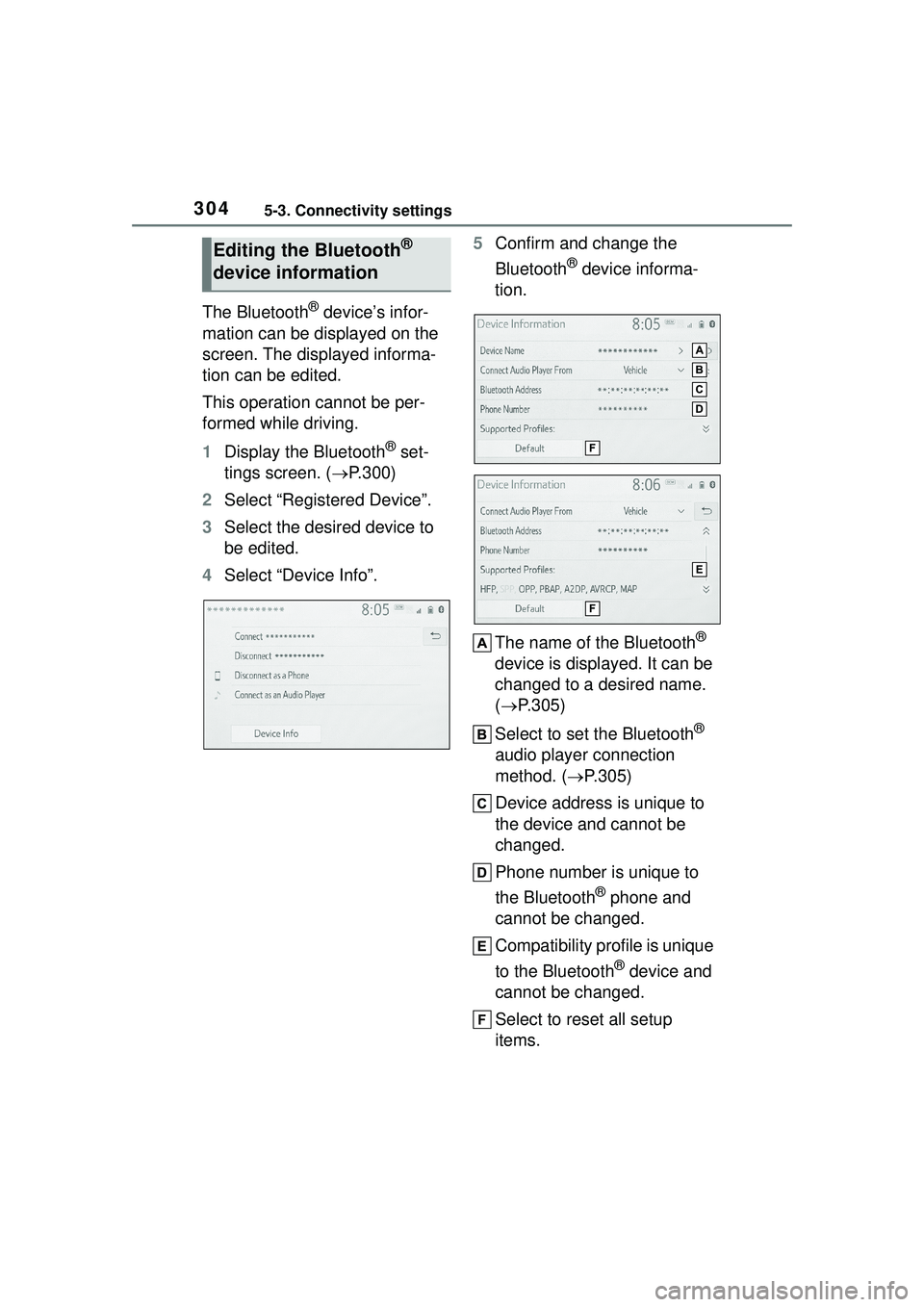
4 Select “Device Info”. 5
Confirm and change the
Bluetooth
® device informa-
tion.
The name of the Bluetooth
®
device is displayed. It can be
changed to a desired name.
( P.305)
Select to set the Bluetooth
®
audio player connection
method. ( P.305)
Device address is unique to
the device and cannot be
changed.
Phone number is unique to
the Bluetooth
® phone and
cannot be changed.
Compatibility profile is unique
to the Bluetooth
® device and
cannot be changed.
Select to reset all setup
items.
Editing the Bluetooth®
device information
Page 305 of 612
3055-3. Connectivity settings
5
Audio
●If 2 Bluetooth® devices have been
registered with the same device
name, the devices can be distin-
guished referring to the device’s
address.
●Depending on the type of Blue-
tooth® phone, some information
may not be displayed.
1 Select “Device Name”.
2 Enter the name and select
“OK”.
Even if the device name is changed,
the name registered in your Blue-
tooth
® device does not change.
1Select “Connect Audio Player
From”.
2 Select the desired connec-
tion method.
“Vehicle”: Select to connect the
audio player from the vehicle’s
audio/visual system.
“Device”: Select to connect the
vehicle’s audio/visual system from
the audio player.
Depending on the audio player, the
“Vehicle” or “Device” connection
method may be best. As such, refer to the manual that comes with the
audio player.
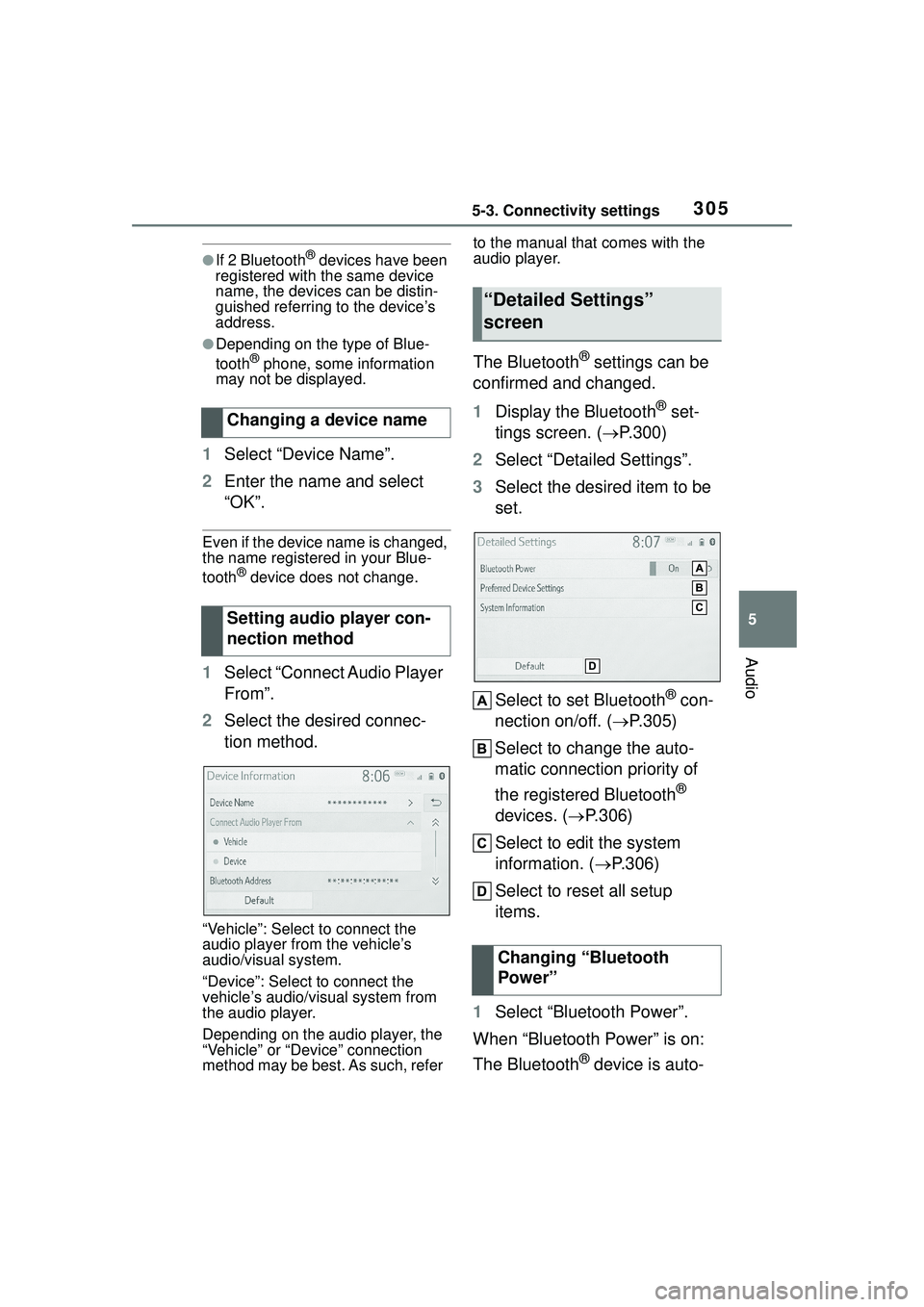
The Bluetooth® settings can be
confirmed and changed.
1 Display the Bluetooth
® set-
tings screen. ( P.300)
2 Select “Detailed Settings”.
3 Select the desired item to be
set.
Select to set Bluetooth
® con-
nection on/off. ( P.305)
Select to change the auto-
matic connection priority of
the registered Bluetooth
®
devices. ( P.306)
Select to edit the system
information. ( P.306)
Select to reset all setup
items.
1 Select “Bluetooth Power”.
When “Bluetooth Power” is on:
The Bluetooth
® device is auto-
Changing a device name
Setting audio player con-
nection method
“Detailed Settings”
screen
Changing “Bluetooth
Power”
Page 306 of 612
3065-3. Connectivity settings
matically connected when the
engine switch is in ACC or ON.
When “Bluetooth Power” is off:
The Bluetooth
® device is dis-
connected, and the system will
not connect to it next time.
While driving, the auto connection
state can be changed from off to on,
but cannot be changed from on to
off.
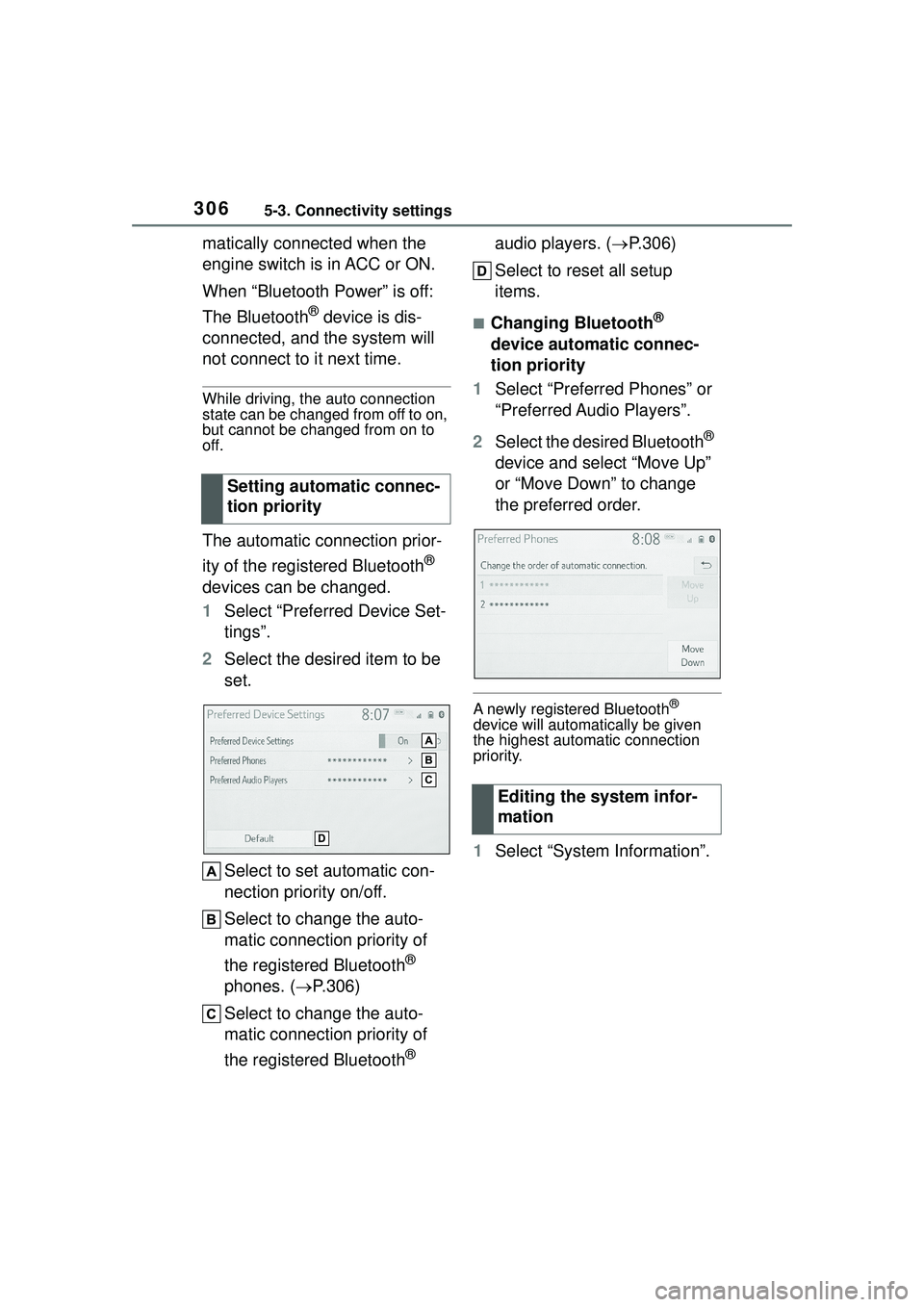
The automatic connection prior-
ity of the registered Bluetooth
®
devices can be changed.
1 Select “Preferred Device Set-
tings”.
2 Select the desired item to be
set.
Select to set automatic con-
nection priority on/off.
Select to change the auto-
matic connection priority of
the registered Bluetooth
®
phones. ( P.306)
Select to change the auto-
matic connection priority of
the registered Bluetooth
® audio players. (
P.306)
Select to reset all setup
items.
■Changing Bluetooth®
device automatic connec-
tion priority
1 Select “Preferred Phones” or
“Preferred Audio Players”.
2 Select the desired Bluetooth
®
device and select “Move Up”
or “Move Down” to change
the preferred order.
A newly registered Bluetooth®
device will automatically be given
the highest automatic connection
priority.
1 Select “System Information”.
Setting automatic connec-
tion priority
Editing the system infor-
mation
Page 307 of 612
3075-3. Connectivity settings
5
Audio
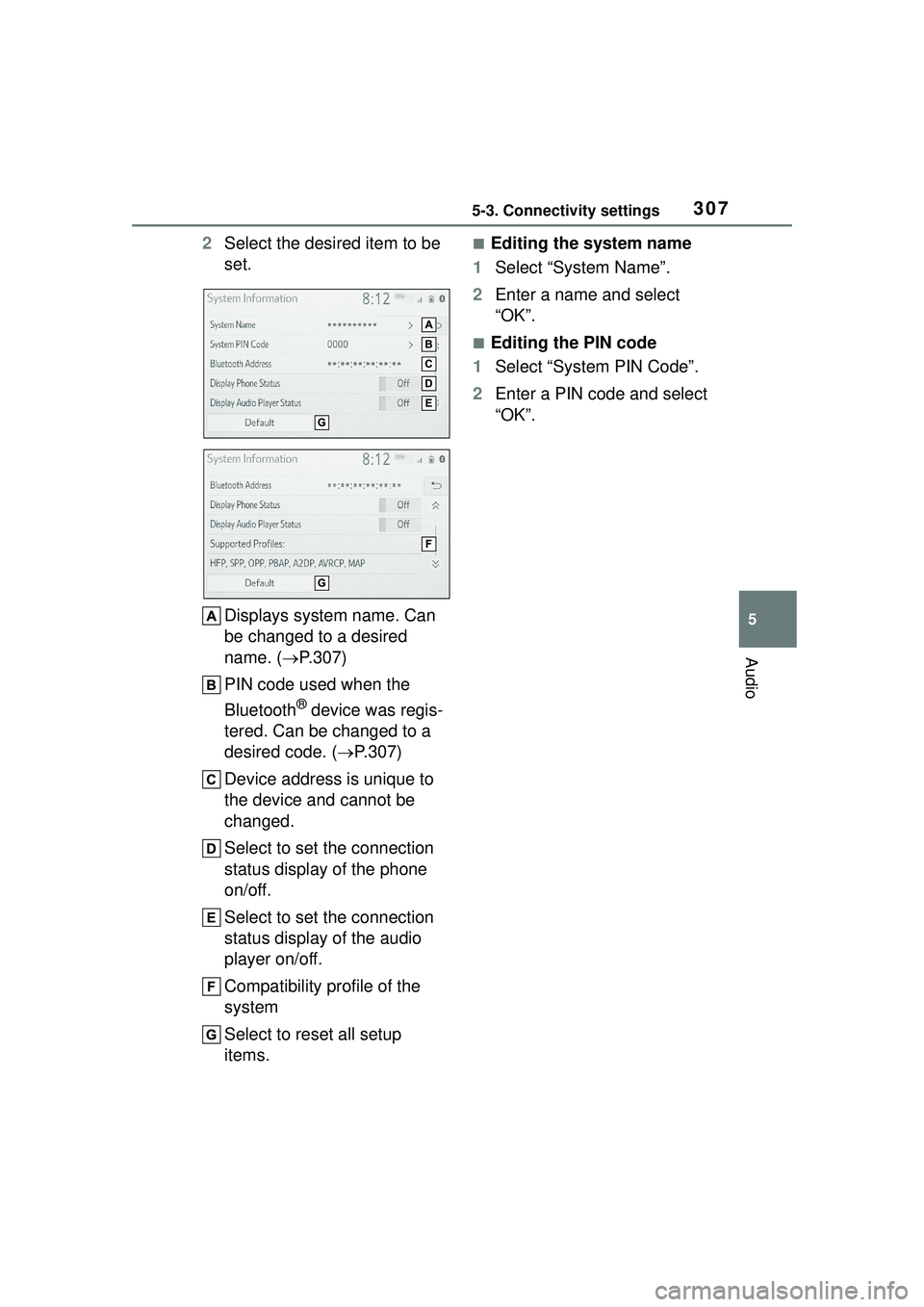
2Select the desired item to be
set.
Displays system name. Can
be changed to a desired
name. ( P.307)
PIN code used when the
Bluetooth
® device was regis-
tered. Can be changed to a
desired code. ( P.307)
Device address is unique to
the device and cannot be
changed.
Select to set the connection
status display of the phone
on/off.
Select to set the connection
status display of the audio
player on/off.
Compatibility profile of the
system
Select to reset all setup
items.
■Editing the system name
1 Select “System Name”.
2 Enter a name and select
“OK”.
■Editing the PIN code
1 Select “System PIN Code”.
2 Enter a PIN code and select
“OK”.
Page 309 of 612
3095-3. Connectivity settings
5
Audio
1Press the “MENU” button.
2 Select “Setup”.
3 Select “Wi-Fi
*”.
*:Wi-Fi® is a registered trademark
of Wi-Fi Alliance
®.
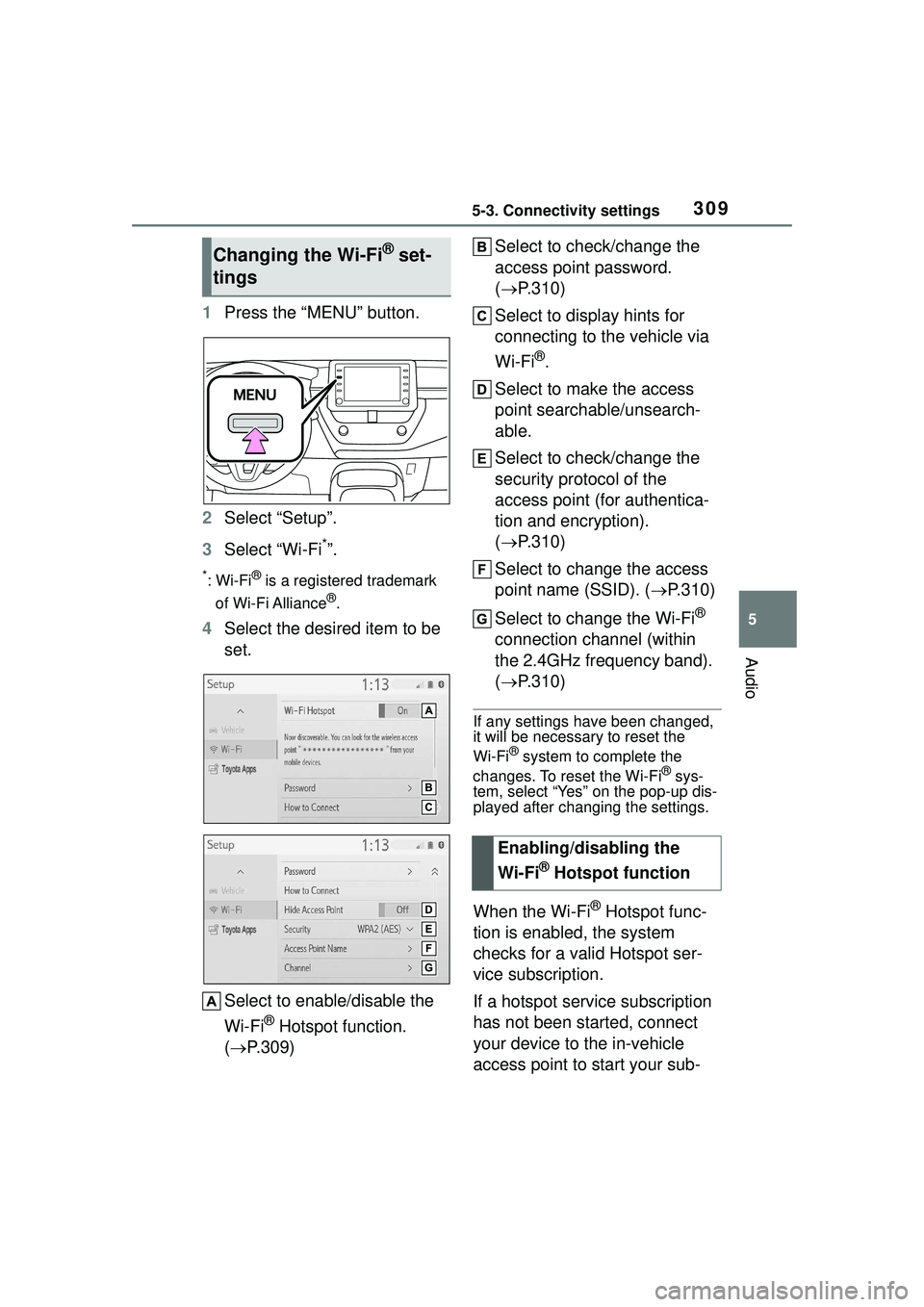
4 Select the desired item to be
set.
Select to enable/disable the
Wi-Fi
® Hotspot function.
( P.309) Select to check/change the
access point password.
(
P.310)
Select to display hints for
connecting to the vehicle via
Wi-Fi
®.
Select to make the access
point searchable/unsearch-
able.
Select to check/change the
security protocol of the
access point (for authentica-
tion and encryption).
( P.310)
Select to change the access
point name (SSID). ( P.310)
Select to change the Wi-Fi
®
connection channel (within
the 2.4GHz frequency band).
( P.310)
If any settings have been changed,
it will be necessary to reset the
Wi-Fi
® system to complete the
changes. To reset the Wi-Fi® sys-
tem, select “Yes” on the pop-up dis-
played after changing the settings.
When the Wi-Fi® Hotspot func-
tion is enabled, the system
checks for a valid Hotspot ser-
vice subscription.
If a hotspot service subscription
has not been started, connect
your device to the in-vehicle
access point to start your sub-
Changing the Wi-Fi® set-
tings
Enabling/disabling the
Wi-Fi
® Hotspot function
Page 323 of 612
3235-4. Other settings
5
Audio
1Press the “MENU” button.
2 Select “Setup”.
3 Select “Voice”.
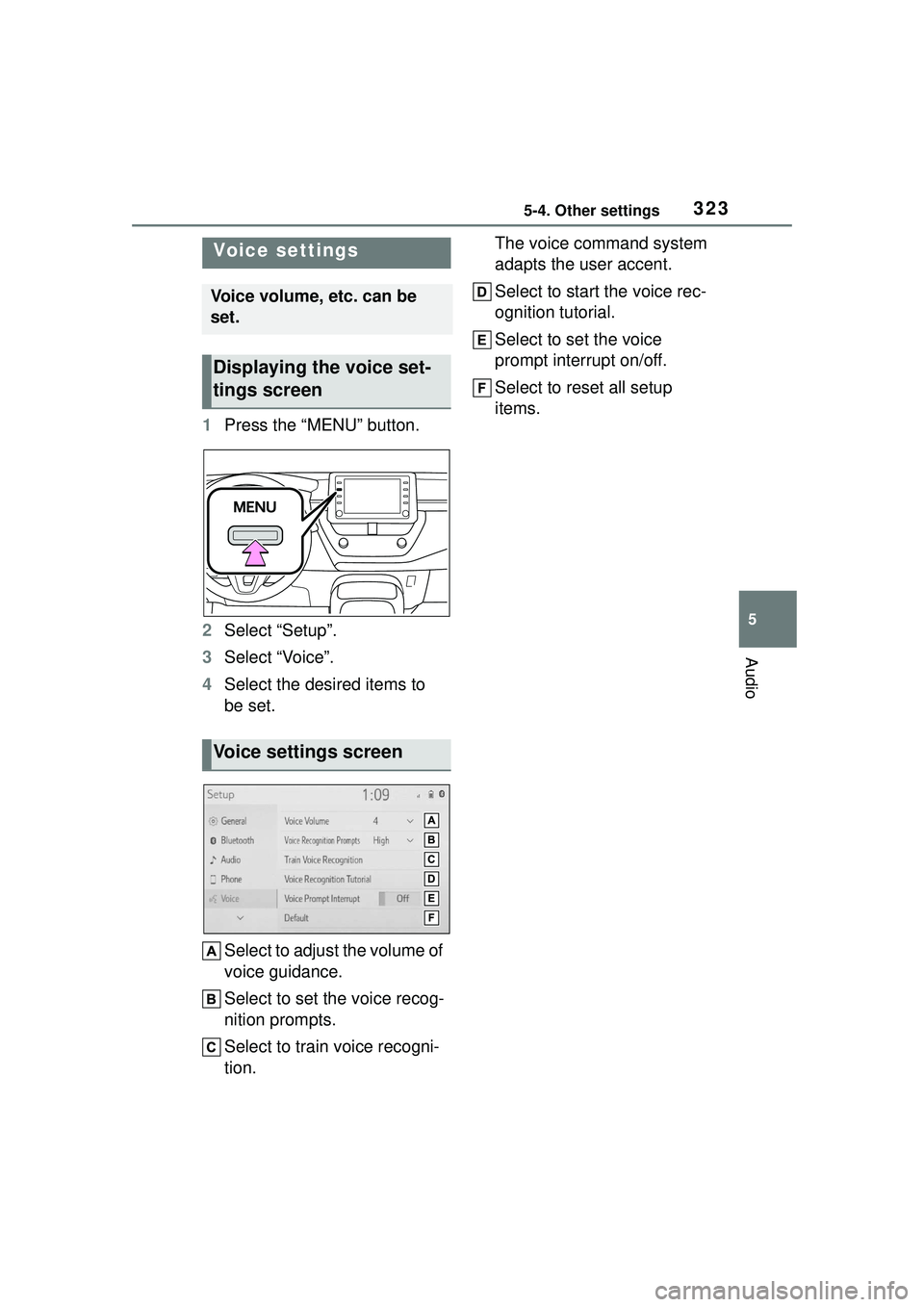
4 Select the desired items to
be set.
Select to adjust the volume of
voice guidance.
Select to set the voice recog-
nition prompts.
Select to train voice recogni-
tion. The voice command system
adapts the user accent.
Select to start the voice rec-
ognition tutorial.
Select to set the voice
prompt interrupt on/off.
Select to reset all setup
items.
Voice settings
Voice volume, etc. can be
set.
Displaying the voice set-
tings screen
Voice settings screen
Page 331 of 612
3315-6. Radio operation
5
Audio
5-6.Radio operation
*: If equipped
The radio operation screen can
be reached by the following
methods:
P. 3 2 7
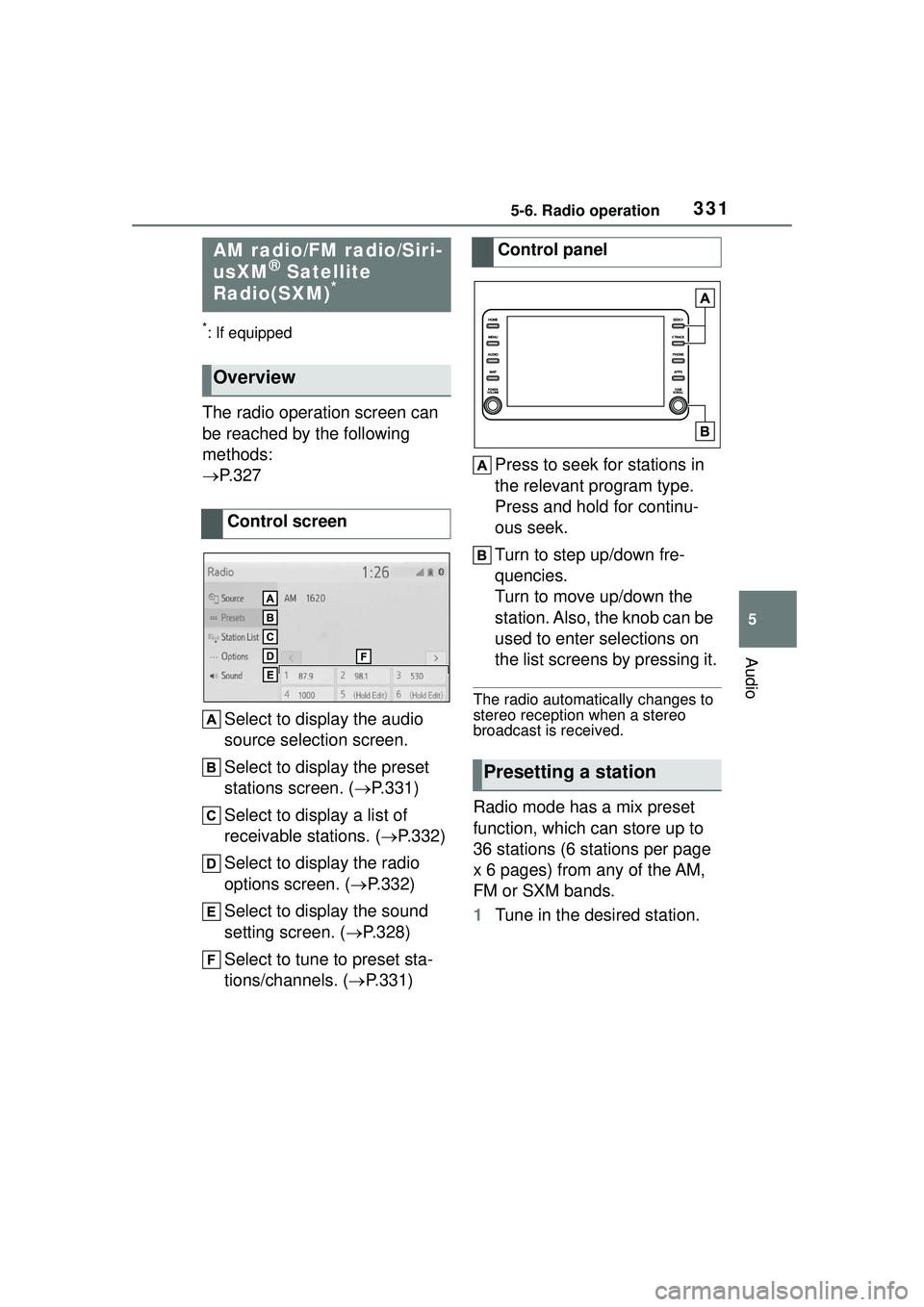
Select to display the audio
source selection screen.
Select to display the preset
stations screen. ( P.331)
Select to display a list of
receivable stations. ( P.332)
Select to display the radio
options screen. ( P.332)
Select to display the sound
setting screen. ( P.328)
Select to tune to preset sta-
tions/channels. ( P.331) Press to seek for stations in
the relevant program type.
Press and hold for continu-
ous seek.
Turn to step up/down fre-
quencies.
Turn to move up/down the
station. Also, the knob can be
used to enter selections on
the list screens by pressing it.
The radio automatically changes to
stereo reception when a stereo
broadcast is received.
Radio mode has a mix preset
function, which can store up to
36 stations (6 stations per page
x 6 pages) from any of the AM,
FM or SXM bands.
1
Tune in the desired station.
AM radio/FM radio/Siri-
usXM® Satellite
Radio(SXM)*
Overview
Control screen
Control panel
Presetting a station
Page 332 of 612
3325-6. Radio operation
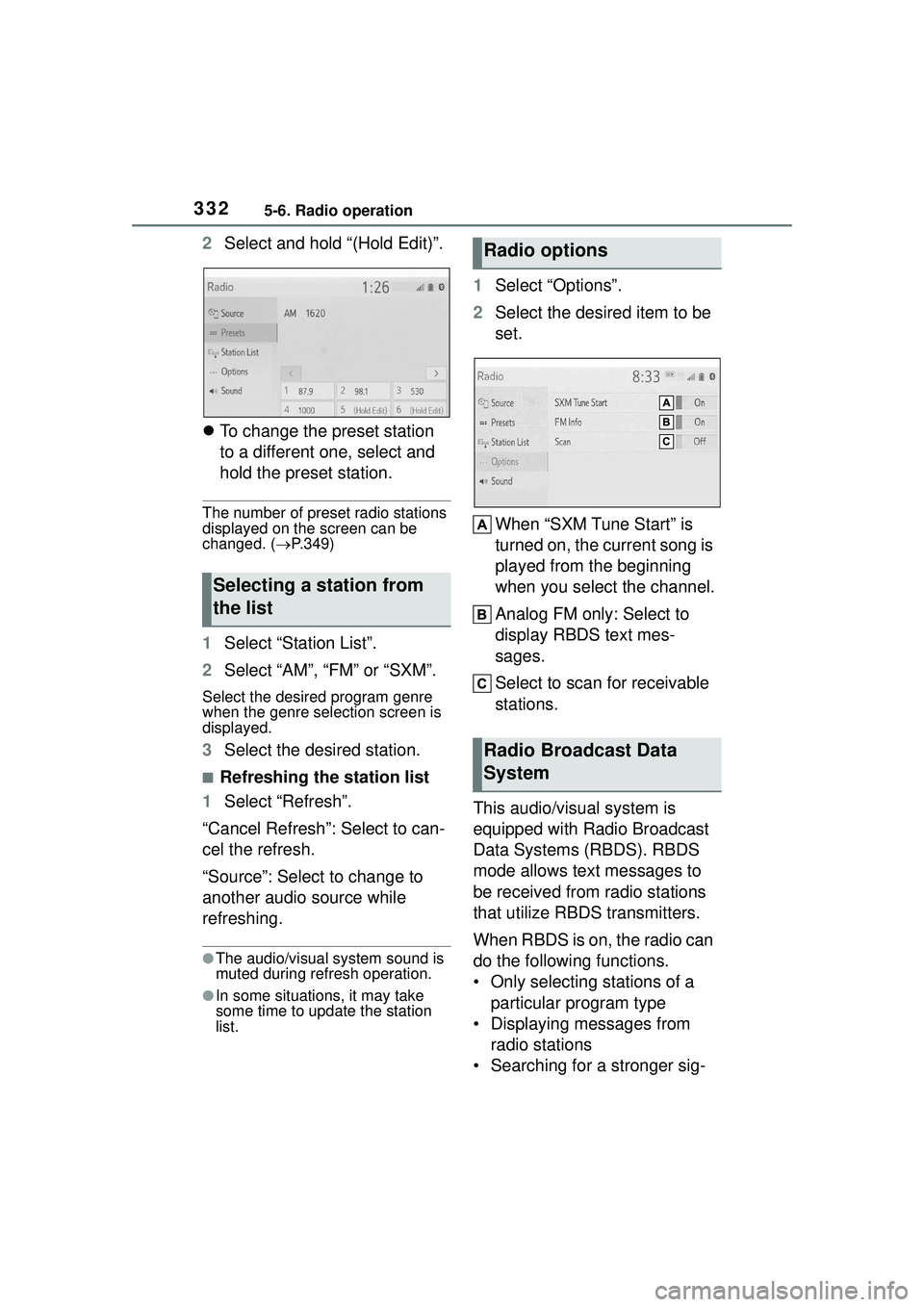
2Select and hold “(Hold Edit)”.
To change the preset station
to a different one, select and
hold the preset station.
The number of preset radio stations
displayed on the screen can be
changed. ( P.349)
1 Select “Station List”.
2 Select “AM”, “FM” or “SXM”.
Select the desired program genre
when the genre selection screen is
displayed.
3Select the desired station.
■Refreshing the station list
1 Select “Refresh”.
“Cancel Refresh”: Select to can-
cel the refresh.
“Source”: Select to change to
another audio source while
refreshing.
●The audio/visual system sound is
muted during refresh operation.
●In some situations, it may take
some time to update the station
list.
1 Select “Options”.
2 Select the desired item to be
set.
When “SXM Tune Start” is
turned on, the current song is
played from the beginning
when you select the channel.
Analog FM only: Select to
display RBDS text mes-
sages.
Select to scan for receivable
stations.
This audio/visual system is
equipped with Radio Broadcast
Data Systems (RBDS). RBDS
mode allows text messages to
be received from radio stations
that utilize RBDS transmitters.
When RBDS is on, the radio can
do the following functions.
• Only selecting stations of a particular program type
• Displaying messages from radio stations
• Searching for a stronger sig-
Selecting a station from
the list
Radio options
Radio Broadcast Data
System
Page 347 of 612
3475-8. Audio/visual remote controls
5
Audio
5-8.Audio/visual remote controls
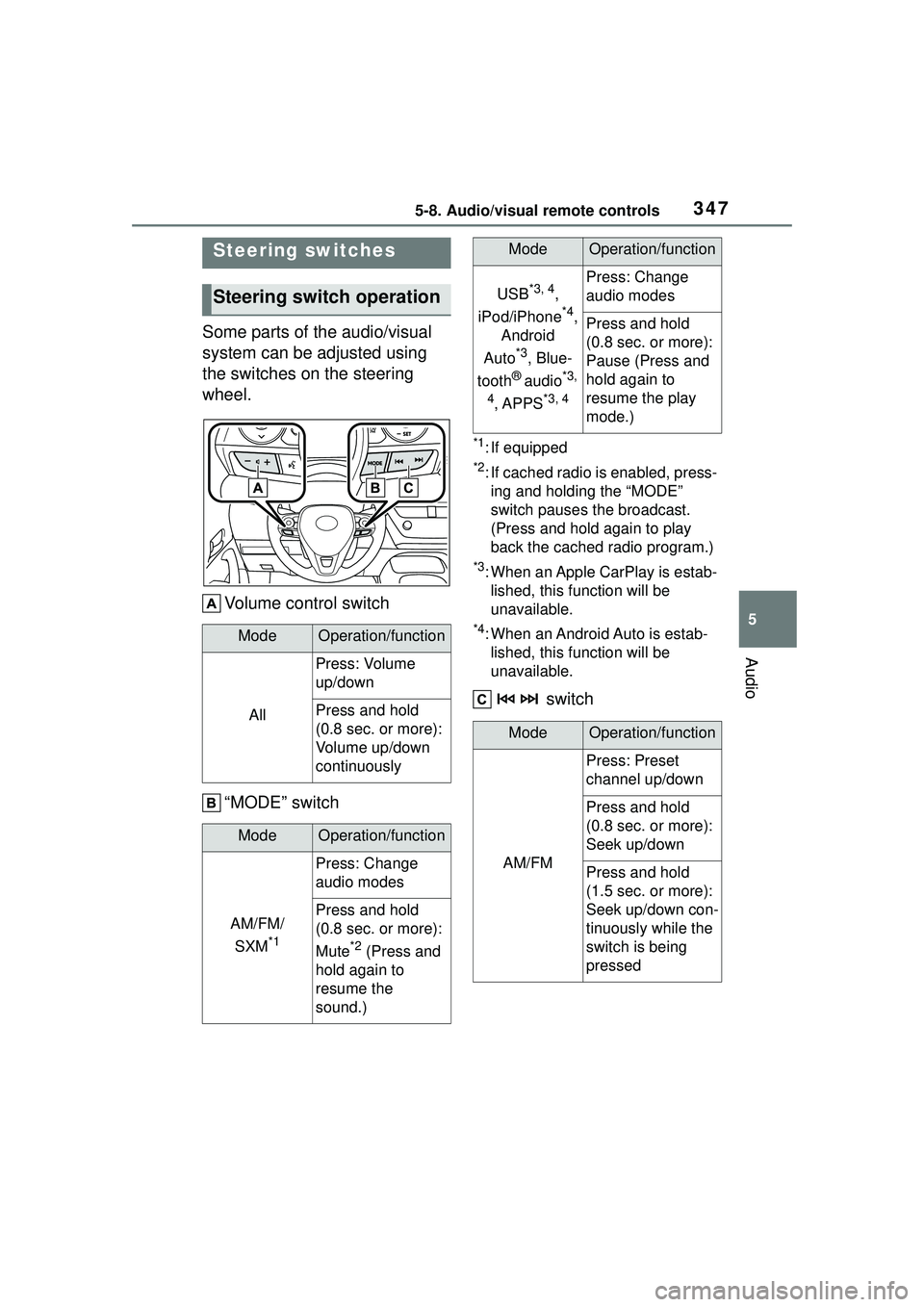
Some parts of the audio/visual
system can be adjusted using
the switches on the steering
wheel.Volume control switch
“MODE” switch
*1: If equipped
*2: If cached radio is enabled, press-ing and holding the “MODE”
switch pauses the broadcast.
(Press and hold again to play
back the cached radio program.)
*3: When an Apple CarPlay is estab-lished, this function will be
unavailable.
*4: When an Android Auto is estab-lished, this function will be
unavailable.
switch
Steering switches
Steering switch operation
ModeOperation/function
All
Press: Volume
up/down
Press and hold
(0.8 sec. or more):
Volume up/down
continuously
ModeOperation/function
AM/FM/
SXM
*1
Press: Change
audio modes
Press and hold
(0.8 sec. or more):
Mute
*2 (Press and
hold again to
resume the
sound.)
USB*3, 4,
iPod/iPhone
*4,
Android
Auto
*3, Blue-
tooth
® audio*3,
4
, APPS*3, 4
Press: Change
audio modes
Press and hold
(0.8 sec. or more):
Pause (Press and
hold again to
resume the play
mode.)
ModeOperation/function
AM/FM
Press: Preset
channel up/down
Press and hold
(0.8 sec. or more):
Seek up/down
Press and hold
(1.5 sec. or more):
Seek up/down con-
tinuously while the
switch is being
pressed
ModeOperation/function