android auto TOYOTA COROLLA CROSS 2022 Owner's Manual
[x] Cancel search | Manufacturer: TOYOTA, Model Year: 2022, Model line: COROLLA CROSS, Model: TOYOTA COROLLA CROSS 2022Pages: 612, PDF Size: 17.18 MB
Page 342 of 612
3425-7. Media operation
*: This function is not made avail-able in some countries or areas.
The Android Auto operation
screen can be reached by the
following methods: P.327
Connecting an Android device
( P.312, 328)
When an Apple CarPlay con-
nection is established, this func-
tion will be unavailable.
*
*: This function is not made avail- able in some countries or areas.
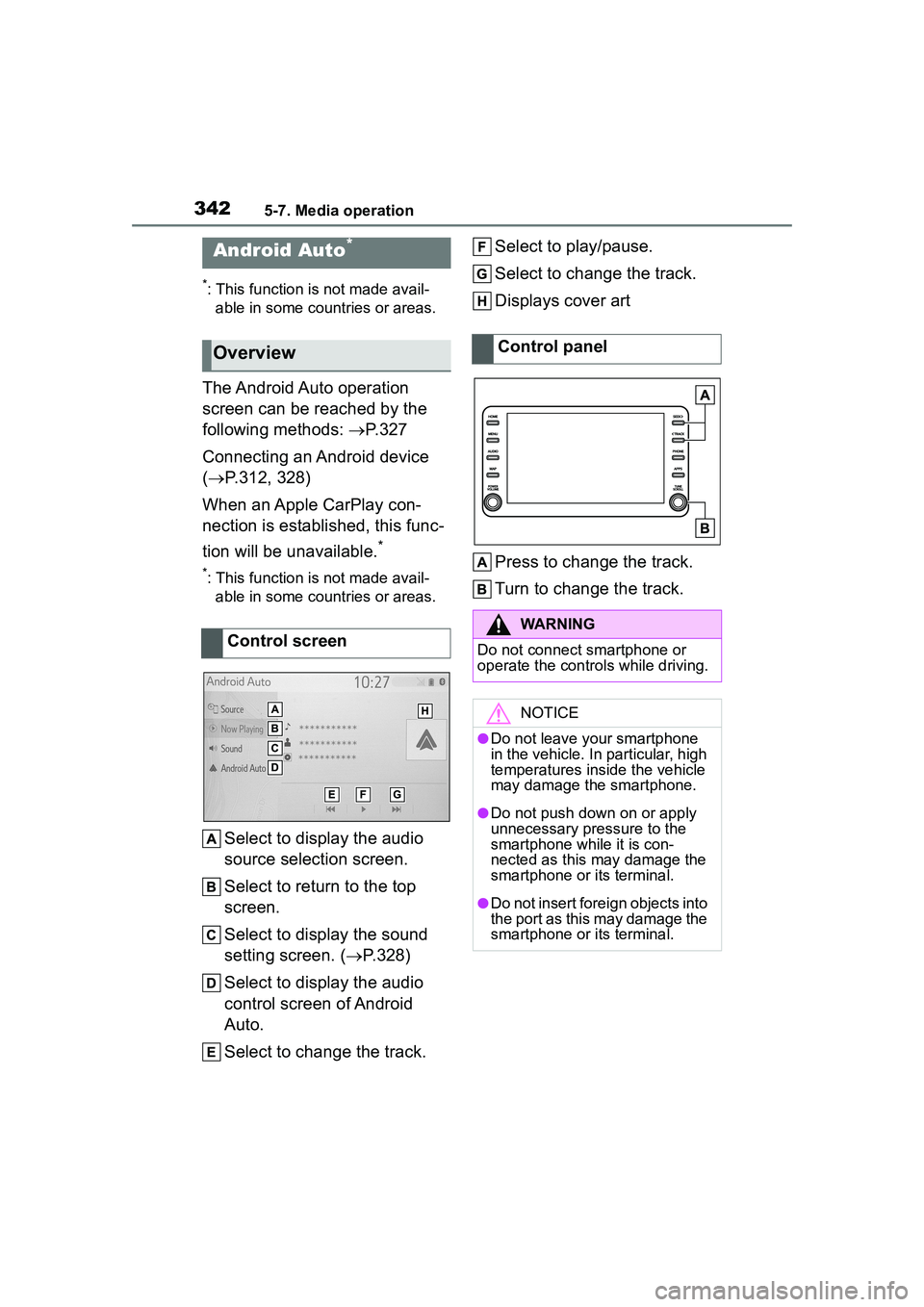
Select to display the audio
source selection screen.
Select to return to the top
screen.
Select to display the sound
setting screen. ( P.328)
Select to display the audio
control screen of Android
Auto.
Select to change the track. Select to play/pause.
Select to change the track.
Displays cover art
Press to change the track.
Turn to change the track.
Android Auto*
Overview
Control screen
Control panel
WARNING
Do not connect smartphone or
operate the contro
ls while driving.
NOTICE
●Do not leave your smartphone
in the vehicle. In particular, high
temperatures inside the vehicle
may damage the smartphone.
●Do not push down on or apply
unnecessary pressure to the
smartphone while it is con-
nected as this may damage the
smartphone or its terminal.
●Do not insert foreign objects into
the port as this may damage the
smartphone or its terminal.
Page 344 of 612
3445-7. Media operation
The Bluetooth® audio operation
screen can be reached by the
following methods: P.327
Connecting a Bluetooth
® audio
device ( P.345)
Depending on the type of porta-
ble player connected, some
functions may not be available and/or the screen may look dif-
ferently than shown in this man-
ual.
When an Apple CarPlay/Android
Auto connection is established,
Bluetooth
® audio will be sus-
pended and become unavail-
able
*.
*: This function is not made avail- able in some countries or areas.
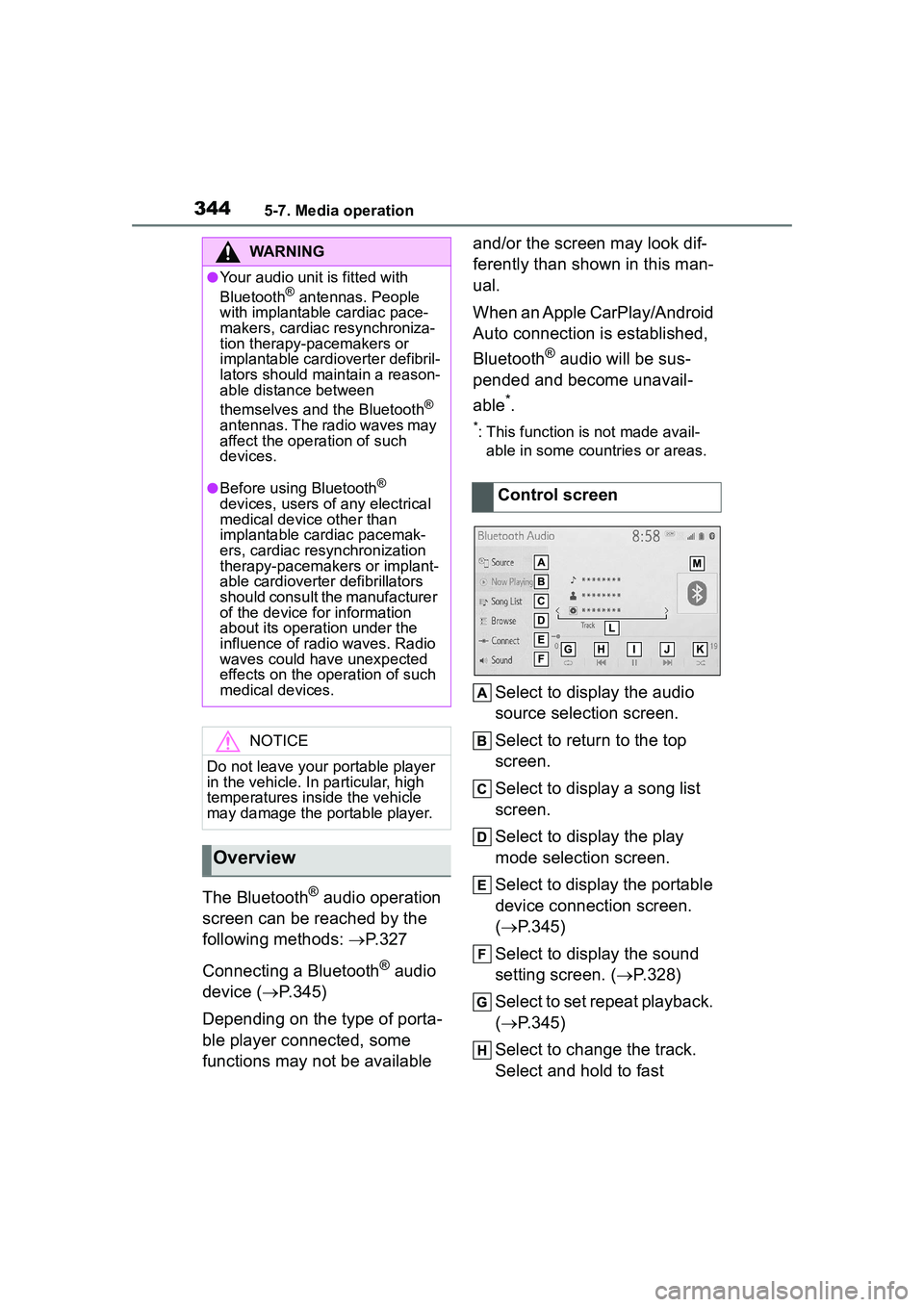
Select to display the audio
source selection screen.
Select to return to the top
screen.
Select to display a song list
screen.
Select to display the play
mode selection screen.
Select to display the portable
device connection screen.
( P.345)
Select to display the sound
setting screen. ( P.328)
Select to set repeat playback.
( P.345)
Select to change the track.
Select and hold to fast
WARNING
●Your audio unit is fitted with
Bluetooth® antennas. People
with implantable cardiac pace-
makers, cardiac resynchroniza-
tion therapy-pacemakers or
implantable cardioverter defibril-
lators should ma intain a reason-
able distance between
themselves and the Bluetooth
®
antennas. The radio waves may
affect the operation of such
devices.
●Before using Bluetooth®
devices, users of any electrical
medical device other than
implantable cardiac pacemak-
ers, cardiac resynchronization
therapy-pacemakers or implant-
able cardioverter defibrillators
should consult the manufacturer
of the device for information
about its operation under the
influence of radio waves. Radio
waves could have unexpected
effects on the operation of such
medical devices.
NOTICE
Do not leave your portable player
in the vehicle. In particular, high
temperatures inside the vehicle
may damage the portable player.
Overview
Control screen
Page 347 of 612
3475-8. Audio/visual remote controls
5
Audio
5-8.Audio/visual remote controls
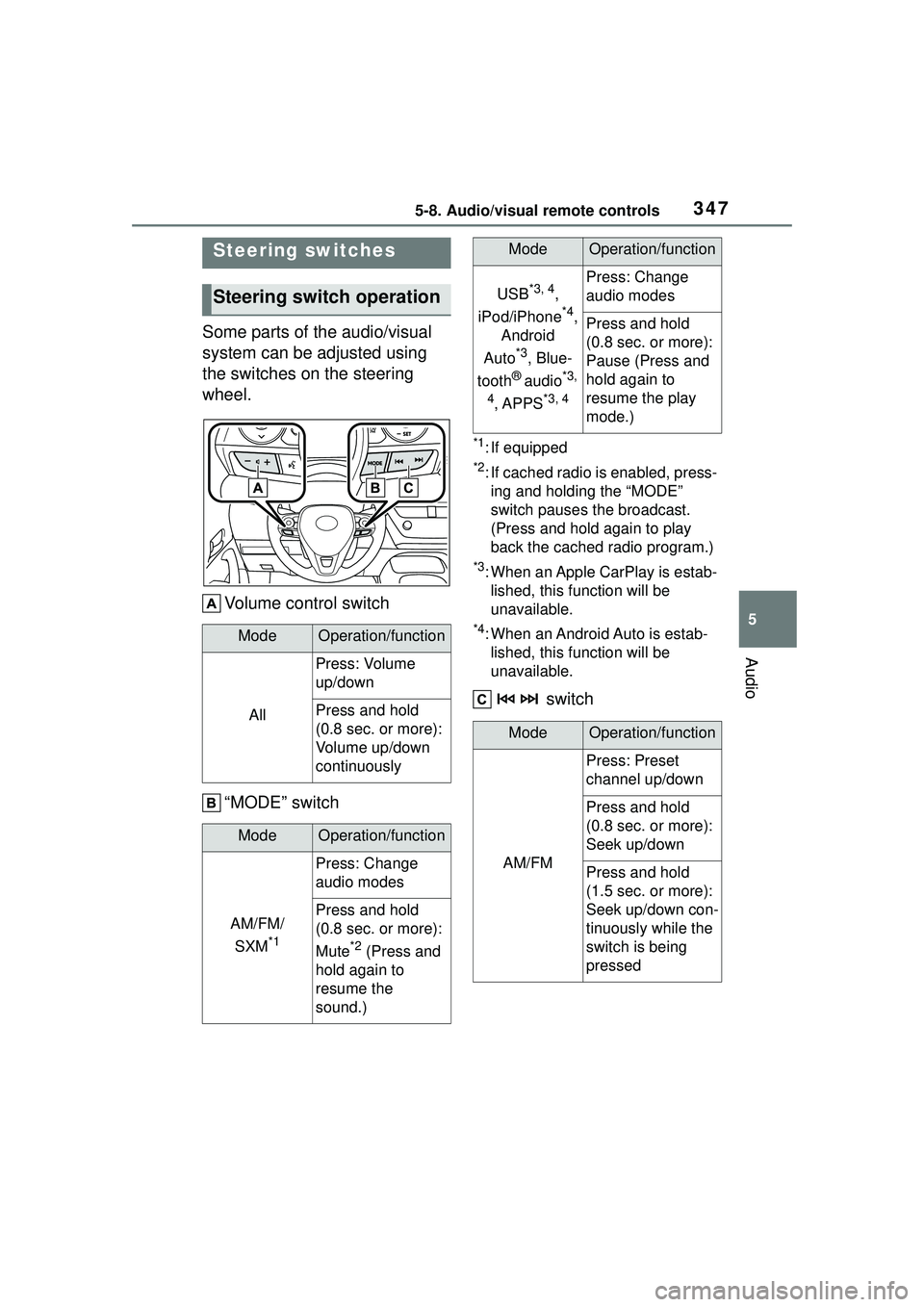
Some parts of the audio/visual
system can be adjusted using
the switches on the steering
wheel.Volume control switch
“MODE” switch
*1: If equipped
*2: If cached radio is enabled, press-ing and holding the “MODE”
switch pauses the broadcast.
(Press and hold again to play
back the cached radio program.)
*3: When an Apple CarPlay is estab-lished, this function will be
unavailable.
*4: When an Android Auto is estab-lished, this function will be
unavailable.
switch
Steering switches
Steering switch operation
ModeOperation/function
All
Press: Volume
up/down
Press and hold
(0.8 sec. or more):
Volume up/down
continuously
ModeOperation/function
AM/FM/
SXM
*1
Press: Change
audio modes
Press and hold
(0.8 sec. or more):
Mute
*2 (Press and
hold again to
resume the
sound.)
USB*3, 4,
iPod/iPhone
*4,
Android
Auto
*3, Blue-
tooth
® audio*3,
4
, APPS*3, 4
Press: Change
audio modes
Press and hold
(0.8 sec. or more):
Pause (Press and
hold again to
resume the play
mode.)
ModeOperation/function
AM/FM
Press: Preset
channel up/down
Press and hold
(0.8 sec. or more):
Seek up/down
Press and hold
(1.5 sec. or more):
Seek up/down con-
tinuously while the
switch is being
pressed
ModeOperation/function
Page 348 of 612
3485-8. Audio/visual remote controls
*1: If equipped
*2: When an Apple CarPlay is estab-lished, this function will be
unavailable.
*3: When an Android Auto is estab-lished, this function will be
unavailable.
In the APPS mode, some operation
may be done on the screen depend
on the selected APPS.
SXM*1
Press: Preset
channel up/down
Press and hold
(0.8 sec. or more):
Seek for stations in
the relevant pro-
gram type/channel
category
Press and hold
(1.5 sec. or more):
Fast channel
up/down
USB*2, 3,
iPod/iPhone
*3,
Bluetooth
®
audio
*2, 3
Press: Track/file
up/down
Press and hold
(0.8 sec. or more):
Fast for-
ward/rewind
Android Auto*2Press: Track
up/down
ModeOperation/function
Page 358 of 612
3585-11. Voice command system operation
5-11.Voice command system operation
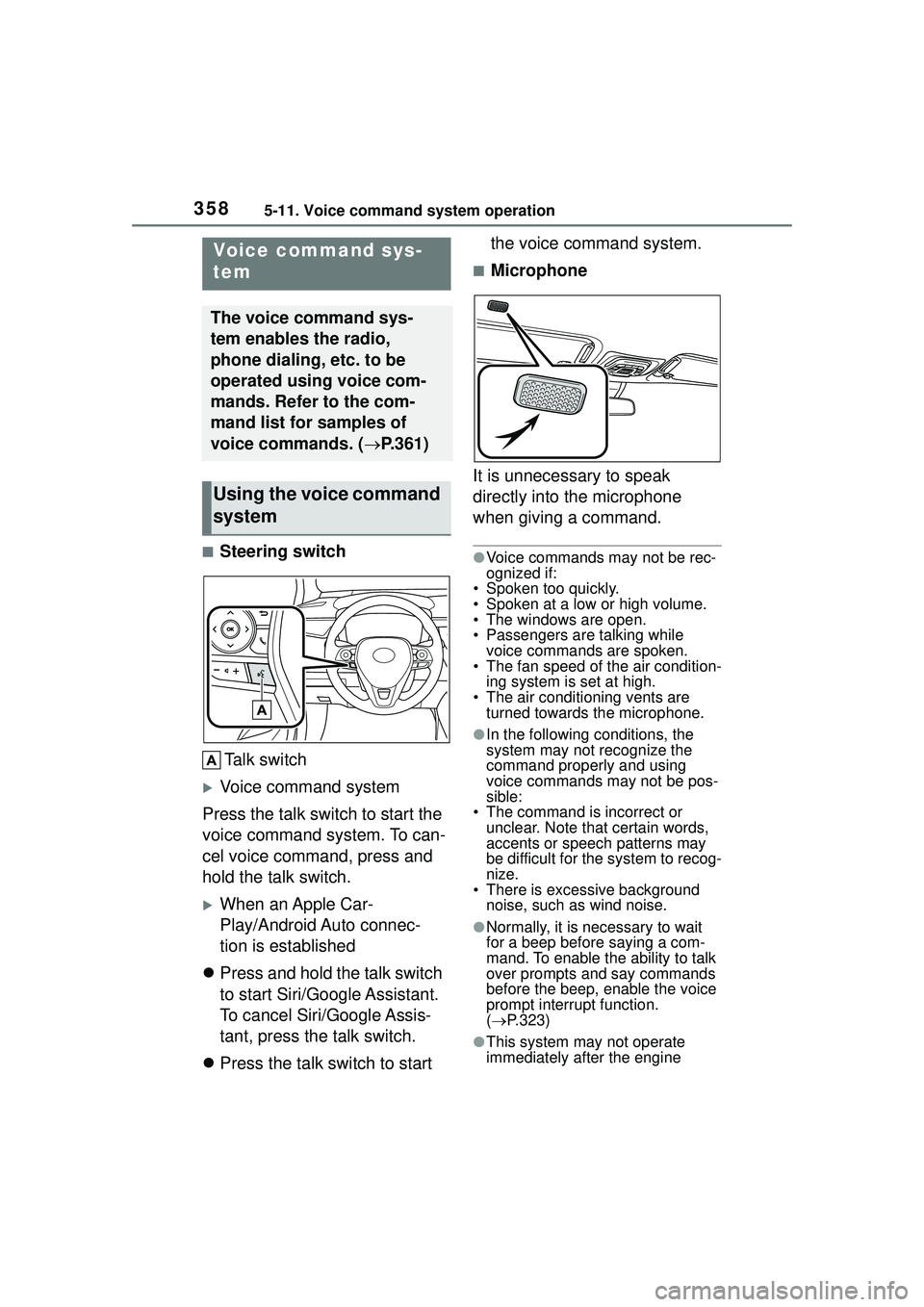
■Steering switchTalk switch
Voice command system
Press the talk switch to start the
voice command system. To can-
cel voice command, press and
hold the talk switch.
When an Apple Car-
Play/Android Auto connec-
tion is established
Press and hold the talk switch
to start Siri/Google Assistant.
To cancel Siri/Google Assis-
tant, press the talk switch.
Press the talk switch to start the voice command system.
■Microphone
It is unnecessary to speak
directly into the microphone
when giving a command.
●Voice commands may not be rec-
ognized if:
• Spoken too quickly.
• Spoken at a low or high volume.
• The windows are open.
• Passengers are talking while voice commands are spoken.
• The fan speed of the air condition-
ing system is set at high.
• The air conditioning vents are turned towards the microphone.
●In the following conditions, the
system may not recognize the
command properly and using
voice commands may not be pos-
sible:
• The command is incorrect or unclear. Note that certain words,
accents or speech patterns may
be difficult for the system to recog-
nize.
• There is excessive background
noise, such as wind noise.
●Normally, it is necessary to wait
for a beep before saying a com-
mand. To enable the ability to talk
over prompts and say commands
before the beep, enable the voice
prompt interrupt function.
( P.323)
●This system may not operate
immediately after the engine
Voice command sys-
tem
The voice command sys-
tem enables the radio,
phone dialing, etc. to be
operated using voice com-
mands. Refer to the com-
mand list for samples of
voice commands. ( P.361)
Using the voice command
system
Page 361 of 612
3615-11. Voice command system operation
5
Audio
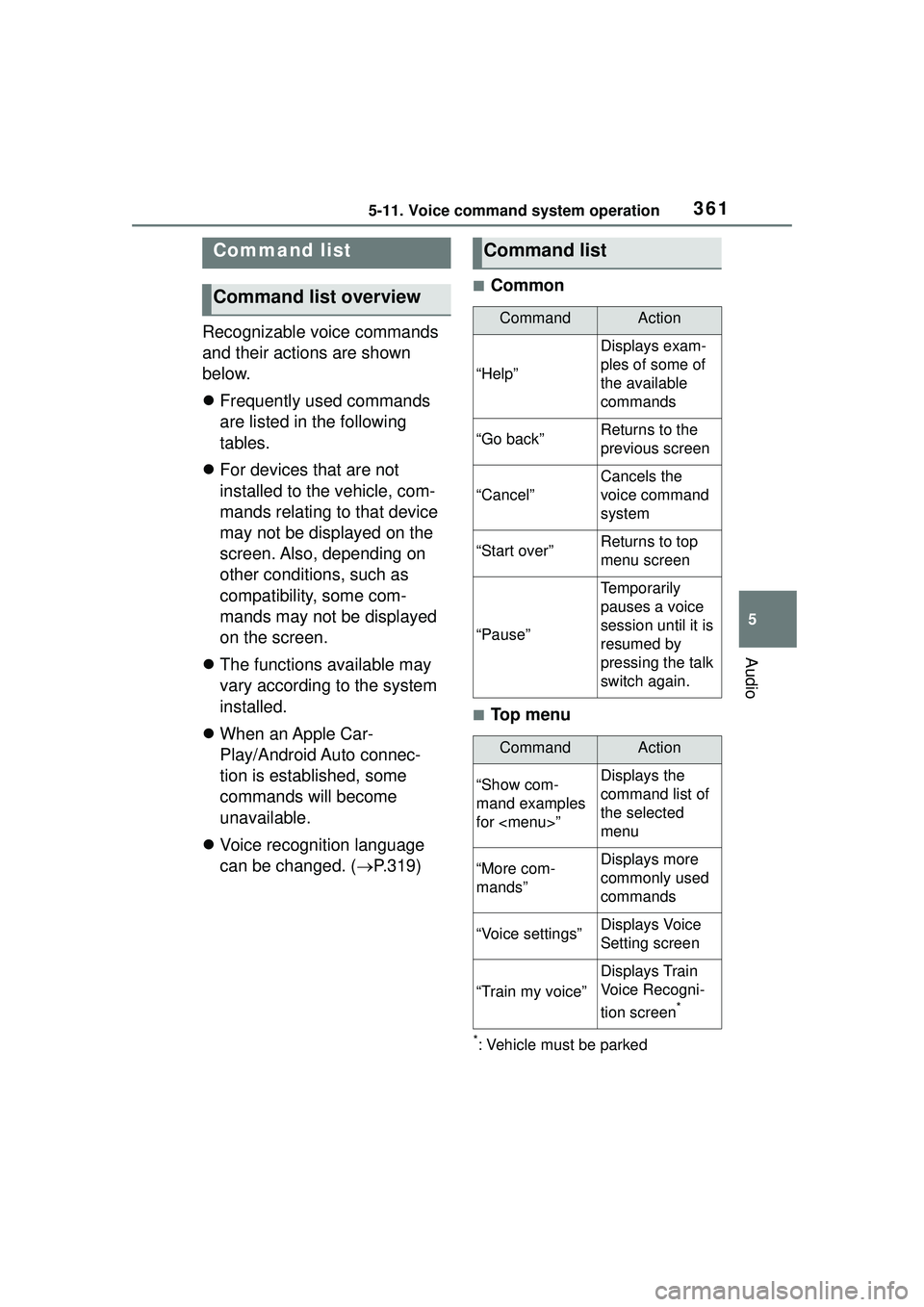
Recognizable voice commands
and their actions are shown
below.
Frequently used commands
are listed in the following
tables.
For devices that are not
installed to the vehicle, com-
mands relating to that device
may not be displayed on the
screen. Also, depending on
other conditions, such as
compatibility, some com-
mands may not be displayed
on the screen.
The functions available may
vary according to the system
installed.
When an Apple Car-
Play/Android Auto connec-
tion is established, some
commands will become
unavailable.
Voice recognition language
can be changed. ( P.319)
■Common
■Top menu
*: Vehicle must be parked
Command list
Command list overview
Command list
CommandAction
“Help”
Displays exam-
ples of some of
the available
commands
“Go back”Returns to the
previous screen
“Cancel”
Cancels the
voice command
system
“Start over”Returns to top
menu screen
“Pause”
Temporarily
pauses a voice
session until it is
resumed by
pressing the talk
switch again.
CommandAction
“Show com-
mand examples
for
Page 386 of 612
3865-14. Phone settings
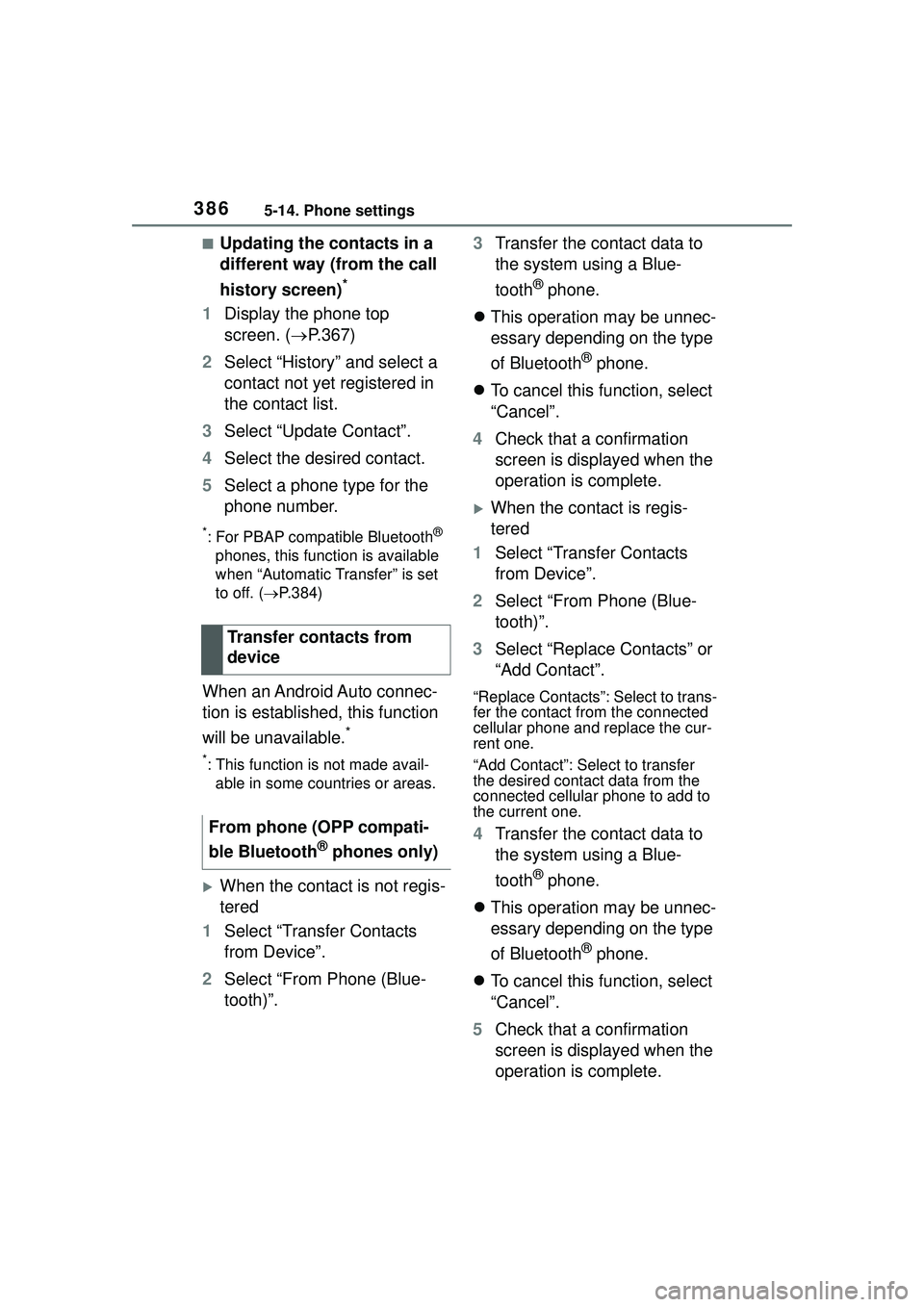
■Updating the contacts in a
different way (from the call
history screen)
*
1Display the phone top
screen. ( P.367)
2 Select “History” and select a
contact not yet registered in
the contact list.
3 Select “Update Contact”.
4 Select the desired contact.
5 Select a phone type for the
phone number.
*: For PBAP compatible Bluetooth®
phones, this function is available
when “Automatic Transfer” is set
to off. ( P.384)
When an Android Auto connec-
tion is established, this function
will be unavailable.
*
*: This function is not made avail-
able in some countries or areas.
When the contact is not regis-
tered
1 Select “Transfer Contacts
from Device”.
2 Select “From Phone (Blue-
tooth)”. 3
Transfer the contact data to
the system using a Blue-
tooth
® phone.
This operation may be unnec-
essary depending on the type
of Bluetooth
® phone.
To cancel this function, select
“Cancel”.
4 Check that a confirmation
screen is displayed when the
operation is complete.
When the contact is regis-
tered
1 Select “Transfer Contacts
from Device”.
2 Select “From Phone (Blue-
tooth)”.
3 Select “Replace Contacts” or
“Add Contact”.
“Replace Contacts”: Select to trans-
fer the contact from the connected
cellular phone and replace the cur-
rent one.
“Add Contact”: Sele ct to transfer
the desired contact data from the
connected cellular phone to add to
the current one.
4 Transfer the contact data to
the system using a Blue-
tooth
® phone.
This operation may be unnec-
essary depending on the type
of Bluetooth
® phone.
To cancel this function, select
“Cancel”.
5 Check that a confirmation
screen is displayed when the
operation is complete.
Transfer contacts from
device
From phone (OPP compati-
ble Bluetooth
® phones only)
Page 587 of 612

587Alphabetical Index
Alphabetical Index
A
A/CAir conditioning filter ............. 482
Automatic air conditioning sys-tem ..................................... 416
Front seat concentrated airflow mode (S-FLOW) ................. 421
Manual air conditioning system ........................................... 410
ABS (Anti-lock Brake System) ............................................... 269Warning light ........................ 507
ACA (Active Cornering Assist) ............................................... 269
Active Cornering Assist (ACA) ............................................... 269
Adaptive Front-lighting System (AFS)...................................... 180
AFS (Adaptive Front-lighting System) ................................. 180
Air conditioning filter ............. 482
Air conditioning system Air conditioning filter ............. 482
Automatic air conditioning sys-tem ..................................... 416
Front seat concentrated airflow mode (S-FLOW) ................. 421
Manual air conditioning system ........................................... 410
Airbags Airbag operating conditions.... 33
Airbag precautions for your child............................................. 36
Correct driving posture ........... 25
Curtain shield airbag operating conditions ............................. 34
Curtain shield airbag precautions ............................................. 36
Front passenger occupant clas- sification system ................... 40
General airbag precautions .... 36 Locations of airbags ...............31
Modification and disposal of air-
bags......................................39
Side airbag operating conditions .............................................34
Side airbag precautions..........36
Side and curtain shield airbags operating conditions .............34
Side and curtain shield airbags precautions ...........................36
SRS airbags ...........................31
SRS warning light .................506
Alarm Alarm ......................................72
Warning buzzer ....................505
AM ............................................331
Anchor brackets .................48, 64
Android Auto ...........................342
Antennas (smart key system) 119
Anti-lock Brake System (ABS) ...............................................269Warning light.........................507
Apple CarPlay/Android Auto .312 Troubleshooting ....................315
Approach warning ..................223
Apps button (Menu screen) ...283
Armrest ......... ......................... ..442
Assist grips .............................442
Audio .......................................326 Audio source ........................327
Operating information ...........350
Reordering the audio source 327
Screen adjustment ...............329
Some basics .........................327
Sound settings......................328
Turning the system on and off...........................................327
USB port ...............................328
Voice command system .......330
AUDIO button ..........................281
Audio button (Menu screen) ..283
Audio buttons overview .........281
Page 591 of 612
591Alphabetical Index
Ignition switch (engine switch)................................... 162, 163
Overheating.......................... 536
Tachometer ...................... 81, 85
Engine coolant Capacity ............................... 545
Checking .............................. 463
Preparing and checking before winter.................................. 274
Engine coolant temperature gauge................................. 81, 85
Engine immobilizer system ..... 71
Engine oil Capacity ............................... 544
Checking .............................. 461
Preparing and checking before winter.................................. 274
Warning light ........................ 506
Engine switch ................. 162, 163 Auto power off function ........ 166
Changing the engine switch modes ................................ 166
If your vehicle has to be stopped in an emergency................. 496
Enhanced VSC ........................ 269
Entering letters and num- bers/list screen operation ... 291Entering letters and numbers291
List screen ............................ 292
EPS (Electric Power Steering) ............................................... 269Warning light ........................ 507
Establishing an Android Auto connection ............................ 313
Establishing an Apple CarPlay connection ............................ 312
Event data record er (EDR)......... 9
Extended Headlight Lighting. 179F
Flat tire Tire pressure warning system...........................................470
Vehicles with a spare tire......518
Floor mats .................................24
Fluid Brake ....................................547
Continuously variable transmis-sion .....................................546
Washer .................................467
FM ............................................331
Fog lights ................................184 Switch ...................................184
Front passenger occupant clas- sification system ....................40
Front seats Adjustment ...........................124
Cleaning ...............................449
Correct driving posture ...........25
Head restraints .....................127
Seat heaters .........................424
Front side marker lights Light switch...........................177
Replacing light bulbs ............489
Wattage ................................549
Front turn signal lights Replacing light bulbs ............489
Turn signal lever ...................170
Wattage ................................549
Fuel Capacity ...............................544
Fuel gauge .......................81, 85
Fuel pump shut off system ...504
Information ......... ..................550
Refueling ..............................188
Type......................................544
Warning light.........................508
Fuel consumption Average fuel economy ............92
Current fuel consumption .......92