android auto TOYOTA COROLLA CROSS 2022 User Guide
[x] Cancel search | Manufacturer: TOYOTA, Model Year: 2022, Model line: COROLLA CROSS, Model: TOYOTA COROLLA CROSS 2022Pages: 612, PDF Size: 17.18 MB
Page 315 of 612
3155-3. Connectivity settings
5
Audio
or its compliance with safety and
regulatory standards. Please note
that the use of this product with
iPhone or iPod may affect wire-
less performance.
●Apple CarPlay is a trademark of
Apple Inc.
●Compatible models
Made for
• iPhone X
• iPhone 8
• iPhone 8 Plus
• iPhone 7
• iPhone 7 Plus
• iPhone SE
• iPhone 6s
• iPhone 6s Plus
• iPhone 6
• iPhone 6 Plus
• iPhone 5s
• iPhone 5c
• iPhone 5
●Android and Android Auto are
trademarks of Google LLC.
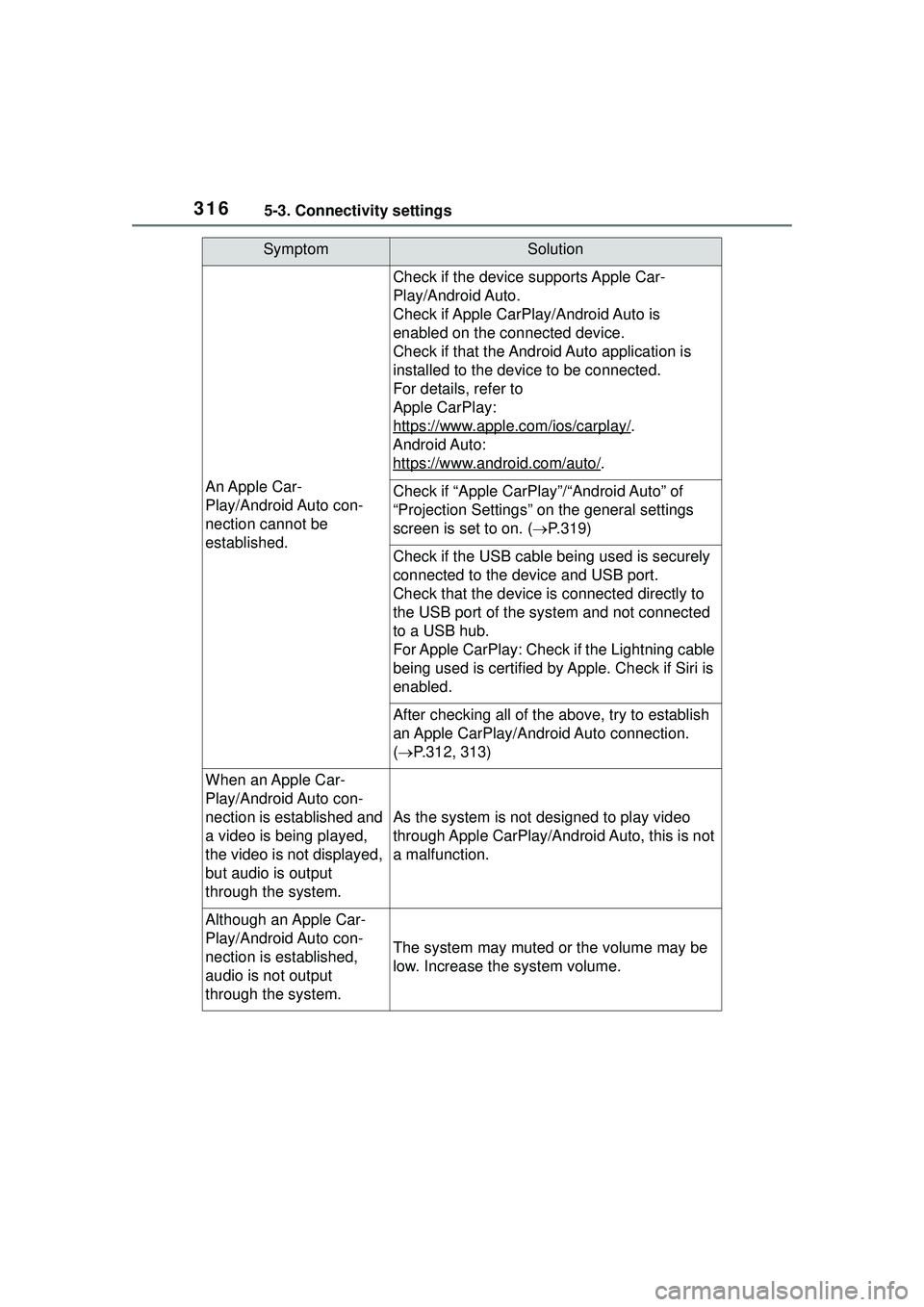
If you are experiencing di fficulties with Apple CarPlay/Android Auto,
check the following table.
WARNING
Do not connect iPhone or operate
the controls while driving.
NOTICE
●Do not leave your iPhone in the
vehicle. In particular, high tem-
peratures inside the vehicle
may damage the iPhone.
●Do not push down on or apply
unnecessary pressure to the
iPhone while it is connected as
this may damage the iPhone or
its terminal.
●Do not insert foreign objects into
the port as this may damage the
iPhone or its terminal.
Troubleshooting
Page 316 of 612
3165-3. Connectivity settings
SymptomSolution
An Apple Car-
Play/Android Auto con-
nection cannot be
established.
Check if the device supports Apple Car-
Play/Android Auto.
Check if Apple CarPlay/Android Auto is
enabled on the connected device.
Check if that the Android Auto application is
installed to the device to be connected.
For details, refer to
Apple CarPlay:
https://www.apple.com/ios/carplay/
.
Android Auto:
https://www.android.com/auto/
.
Check if “Apple CarPlay”/“Android Auto” of
“Projection Settings” on the general settings
screen is set to on. ( P.319)
Check if the USB cable be ing used is securely
connected to the device and USB port.
Check that the device is connected directly to
the USB port of the system and not connected
to a USB hub.
For Apple CarPlay: Check if the Lightning cable
being used is certified by Apple. Check if Siri is
enabled.
After checking all of the above, try to establish
an Apple CarPlay/Android Auto connection.
( P.312, 313)
When an Apple Car-
Play/Android Auto con-
nection is established and
a video is being played,
the video is not displayed,
but audio is output
through the system.
As the system is not designed to play video
through Apple CarPlay/Android Auto, this is not
a malfunction.
Although an Apple Car-
Play/Android Auto con-
nection is established,
audio is not output
through the system.
The system may muted or the volume may be
low. Increase the system volume.
Page 317 of 612
3175-3. Connectivity settings
5
Audio
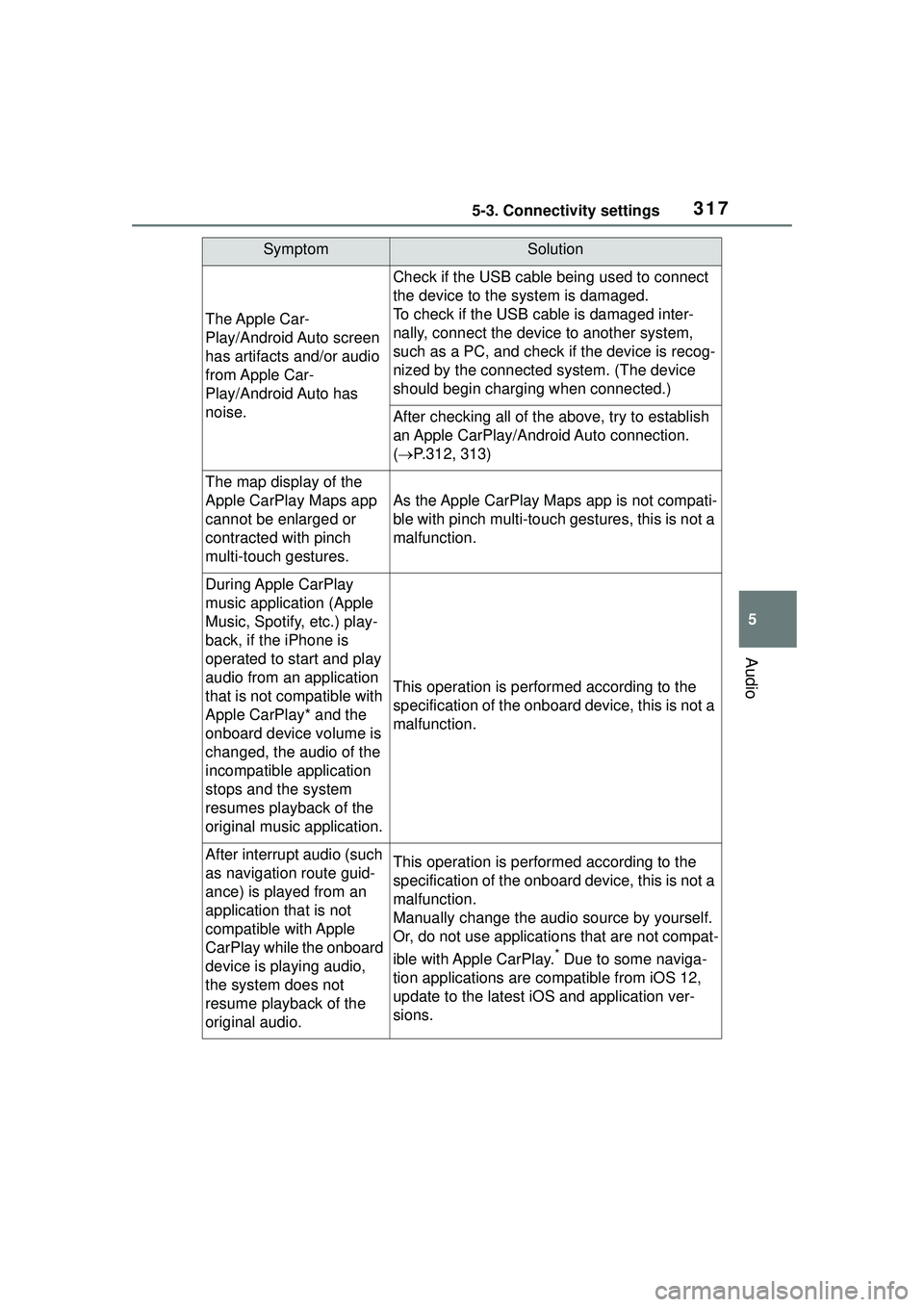
The Apple Car-
Play/Android Auto screen
has artifacts and/or audio
from Apple Car-
Play/Android Auto has
noise.
Check if the USB cable being used to connect
the device to the system is damaged.
To check if the USB cable is damaged inter-
nally, connect the device to another system,
such as a PC, and check if the device is recog-
nized by the connected system. (The device
should begin charging when connected.)
After checking all of the above, try to establish
an Apple CarPlay/Android Auto connection.
( P.312, 313)
The map display of the
Apple CarPlay Maps app
cannot be enlarged or
contracted with pinch
multi-touch gestures.
As the Apple CarPlay Maps app is not compati-
ble with pinch multi-touch gestures, this is not a
malfunction.
During Apple CarPlay
music application (Apple
Music, Spotify, etc.) play-
back, if the iPhone is
operated to start and play
audio from an application
that is not compatible with
Apple CarPlay* and the
onboard device volume is
changed, the audio of the
incompatible application
stops and the system
resumes playback of the
original music application.
This operation is performed according to the
specification of the onboard device, this is not a
malfunction.
After interrup t audio (such
as navigation route guid-
ance) is played from an
application that is not
compatible with Apple
CarPlay while the onboard
device is playing audio,
the system does not
resume playback of the
original audio.This operation is performed according to the
specification of the onboard device, this is not a
malfunction.
Manually change the audio source by yourself.
Or, do not use applications that are not compat-
ible with Apple CarPlay.
* Due to some naviga-
tion applications are compatible from iOS 12,
update to the latest iOS and application ver-
sions.
SymptomSolution
Page 318 of 612
3185-3. Connectivity settings
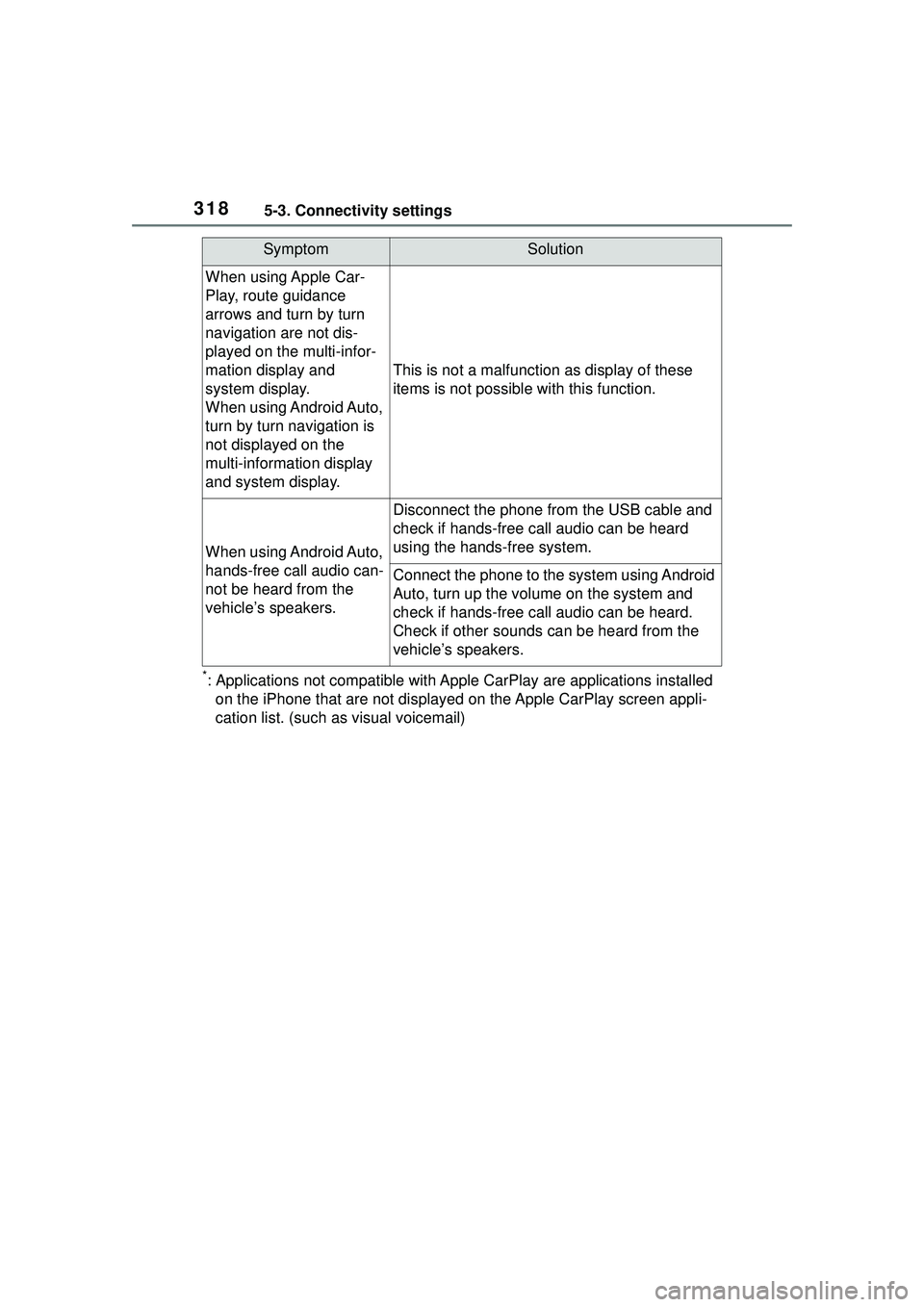
*: Applications not compatible with Apple CarPlay are applications installed
on the iPhone that are not displayed on the Apple CarPlay screen appli-
cation list. (such as visual voicemail)
When using Apple Car-
Play, route guidance
arrows and turn by turn
navigation are not dis-
played on the multi-infor-
mation display and
system display.
When using Android Auto,
turn by turn navigation is
not displayed on the
multi-information display
and system display.
This is not a malfunction as display of these
items is not possible with this function.
When using Android Auto,
hands-free call audio can-
not be heard from the
vehicle’s speakers.
Disconnect the phone from the USB cable and
check if hands-free call audio can be heard
using the hands-free system.
Connect the phone to the system using Android
Auto, turn up the volume on the system and
check if hands-free call audio can be heard.
Check if other sounds can be heard from the
vehicle’s speakers.
SymptomSolution
Page 319 of 612
3195-4. Other settings
5
Audio
5-4.Other settings
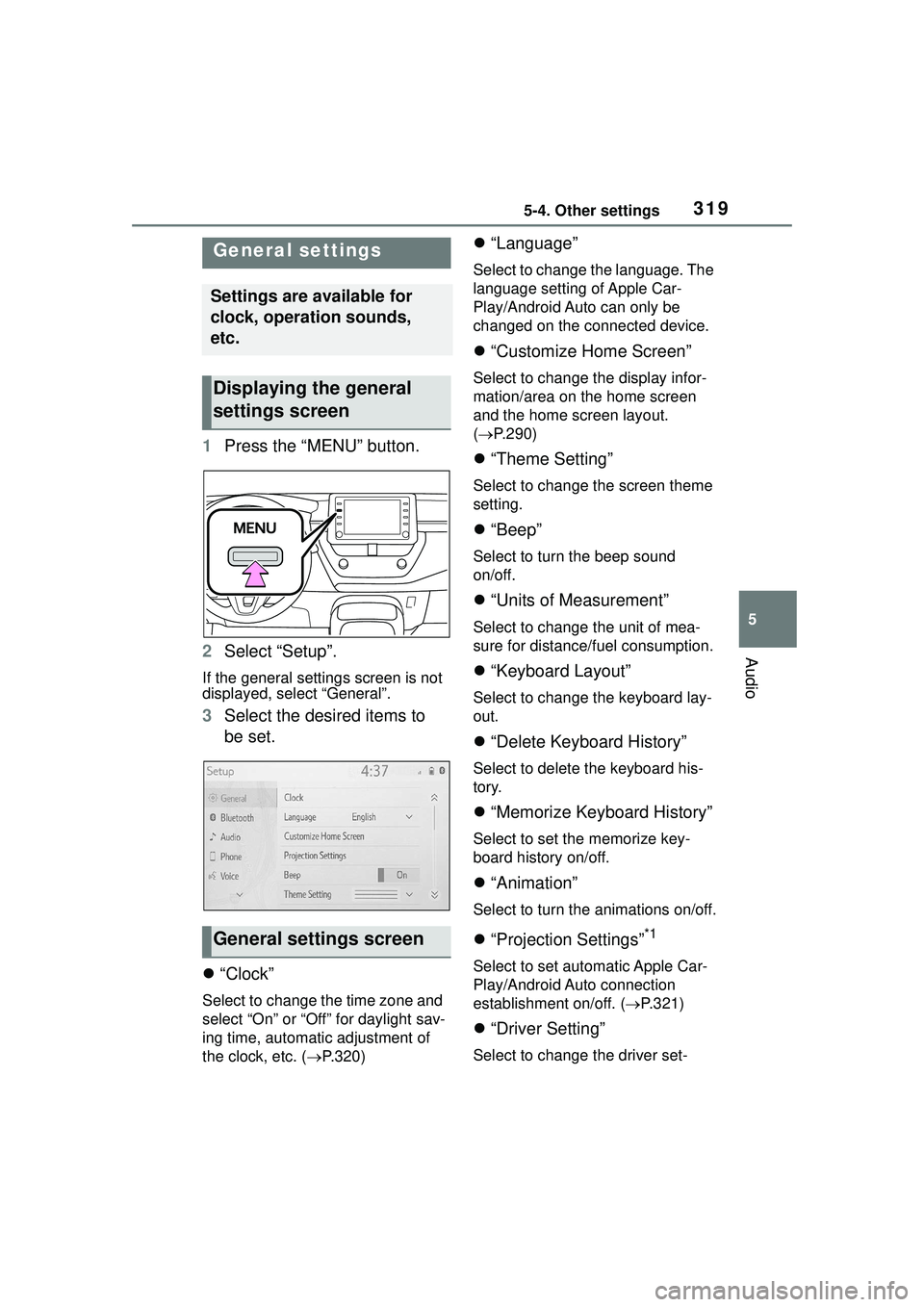
1Press the “MENU” button.
2 Select “Setup”.
If the general settings screen is not
displayed, select “General”.
3Select the desired items to
be set.
“Clock”
Select to change the time zone and
select “On” or “Off” for daylight sav-
ing time, automatic adjustment of
the clock, etc. ( P.320)
“Language”
Select to change the language. The
language setting of Apple Car-
Play/Android Auto can only be
changed on the connected device.
“Customize Home Screen”
Select to change the display infor-
mation/area on the home screen
and the home screen layout.
( P.290)
“Theme Setting”
Select to change the screen theme
setting.
“Beep”
Select to turn the beep sound
on/off.
“Units of Measurement”
Select to change the unit of mea-
sure for distance/fuel consumption.
“Keyboard Layout”
Select to change the keyboard lay-
out.
“Delete Keyboard History”
Select to delete the keyboard his-
tory.
“Memorize Keyboard History”
Select to set the memorize key-
board history on/off.
“Animation”
Select to turn the animations on/off.
“Projection Settings”*1
Select to set automatic Apple Car-
Play/Android Auto connection
establishment on/off. ( P.321)
“Driver Setting”
Select to change the driver set-
General settings
Settings are available for
clock, operation sounds,
etc.
Displaying the general
settings screen
General settings screen
Page 321 of 612
3215-4. Other settings
5
Audio
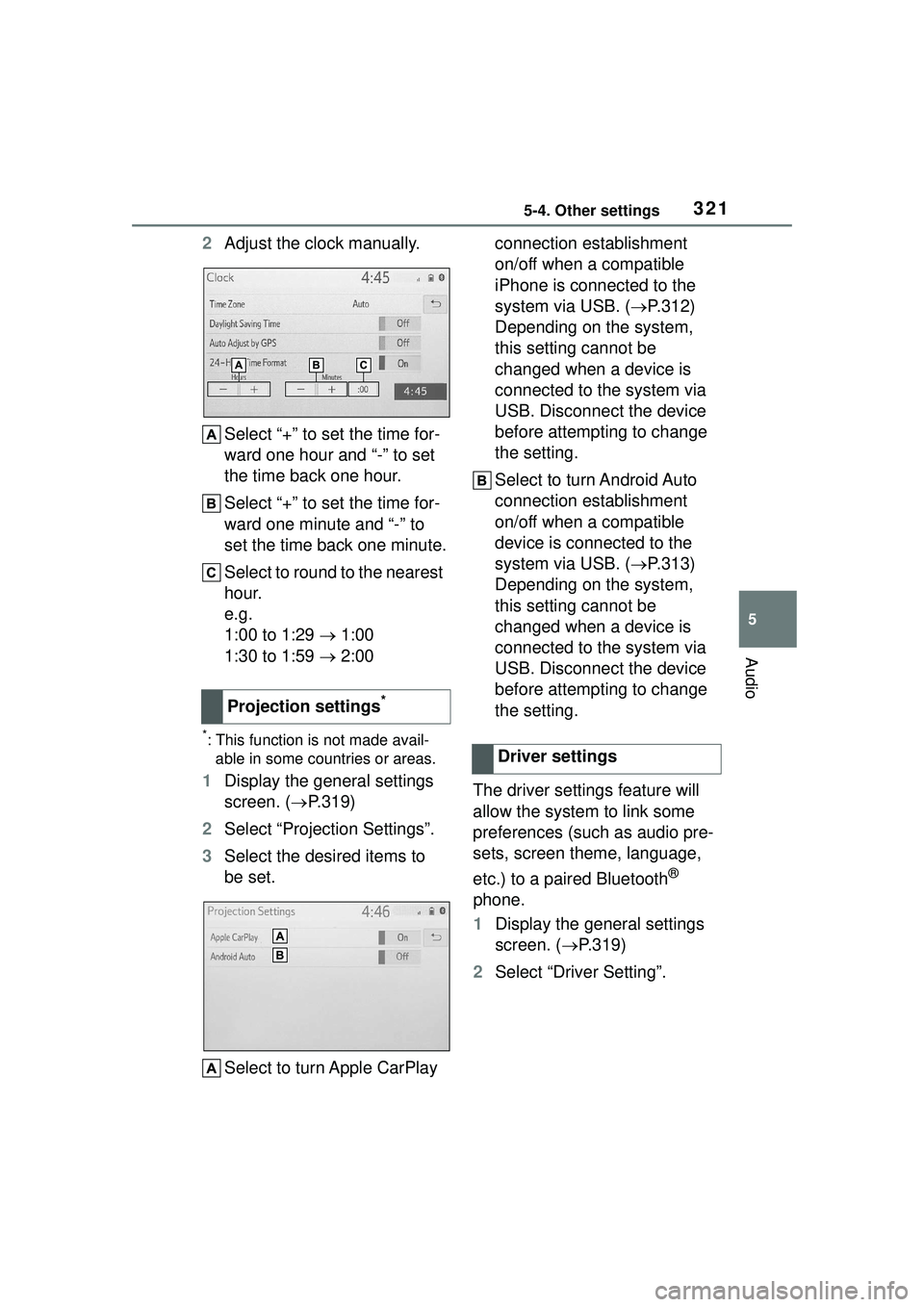
2Adjust the clock manually.
Select “+” to set the time for-
ward one hour and “-” to set
the time back one hour.
Select “+” to set the time for-
ward one minute and “-” to
set the time back one minute.
Select to round to the nearest
hour.
e.g.
1:00 to 1:29 1:00
1:30 to 1:59 2:00
*: This function is not made avail-
able in some countries or areas.
1 Display the general settings
screen. ( P.319)
2 Select “Projection Settings”.
3 Select the desired items to
be set.
Select to turn Apple CarPlay connection establishment
on/off when a compatible
iPhone is connected to the
system via USB. (
P.312)
Depending on the system,
this setting cannot be
changed when a device is
connected to the system via
USB. Disconnect the device
before attempting to change
the setting.
Select to turn Android Auto
connection establishment
on/off when a compatible
device is connected to the
system via USB. ( P.313)
Depending on the system,
this setting cannot be
changed when a device is
connected to the system via
USB. Disconnect the device
before attempting to change
the setting.
The driver settings feature will
allow the system to link some
preferences (such as audio pre-
sets, screen theme, language,
etc.) to a paired Bluetooth
®
phone.
1 Display the general settings
screen. ( P.319)
2 Select “Driver Setting”.
Projection settings
*
Driver settings
Page 326 of 612
3265-5. Using the audio/visual system
5-5.Using the audio/visual system
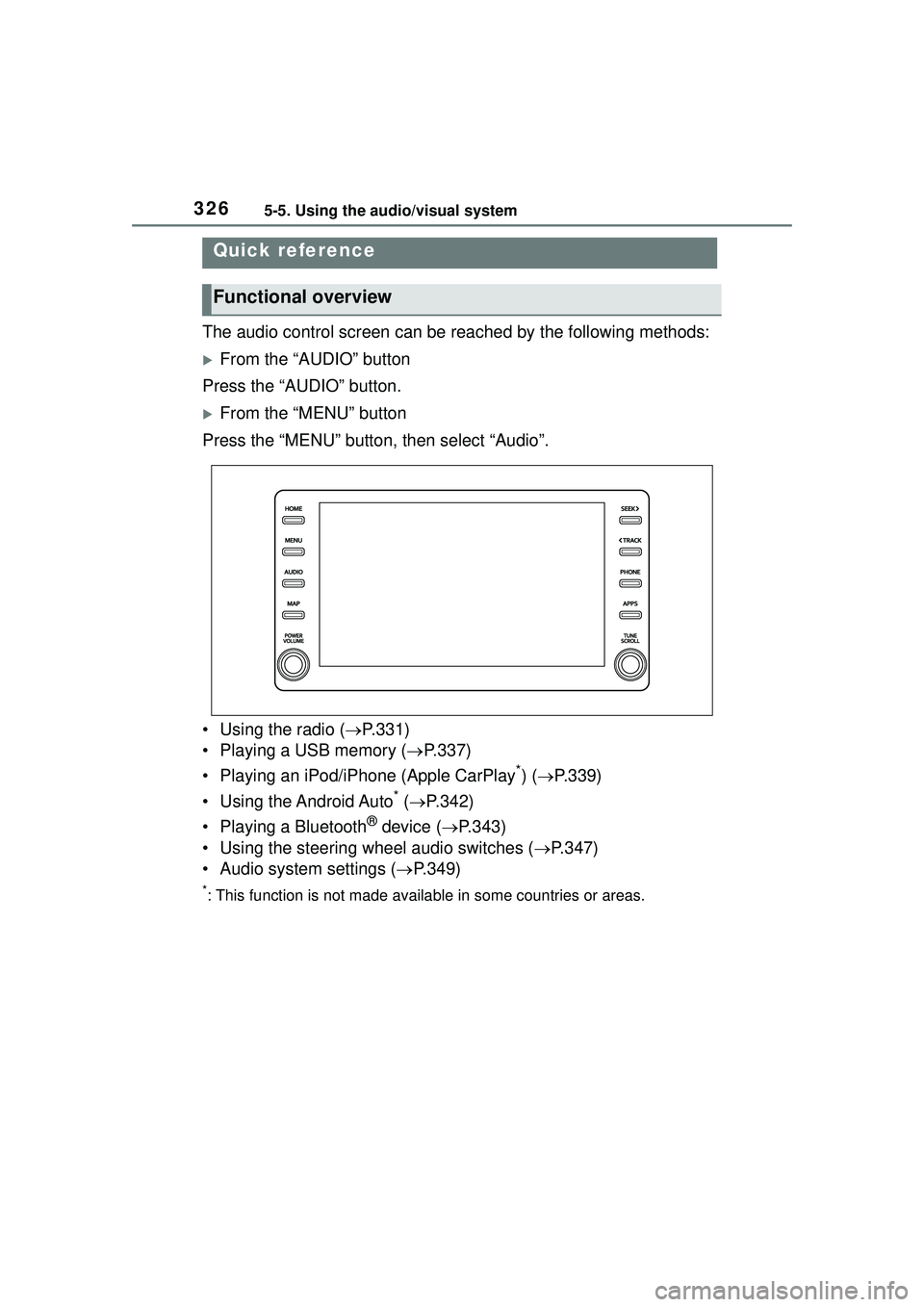
The audio control screen can be reached by the following methods:
From the “AUDIO” button
Press the “AUDIO” button.
From the “MENU” button
Press the “MENU” button, then select “Audio”.
• Using the radio ( P.331)
• Playing a USB memory ( P.337)
• Playing an iPod/iPhone (Apple CarPlay
*) ( P.339)
• Using the Android Auto
* ( P.342)
• Playing a Bluetooth
® device ( P.343)
• Using the steering wheel audio switches ( P.347)
• Audio system settings ( P.349)
*: This function is not made availa ble in some countries or areas.
Quick reference
Functional overview
Page 327 of 612
3275-5. Using the audio/visual system
5
Audio
“POWER VOLUME” knob:
Press to turn the audio/visual
system on and off. The system
turns on in the last mode used.
Turn this knob to adjust the vol-
ume.1
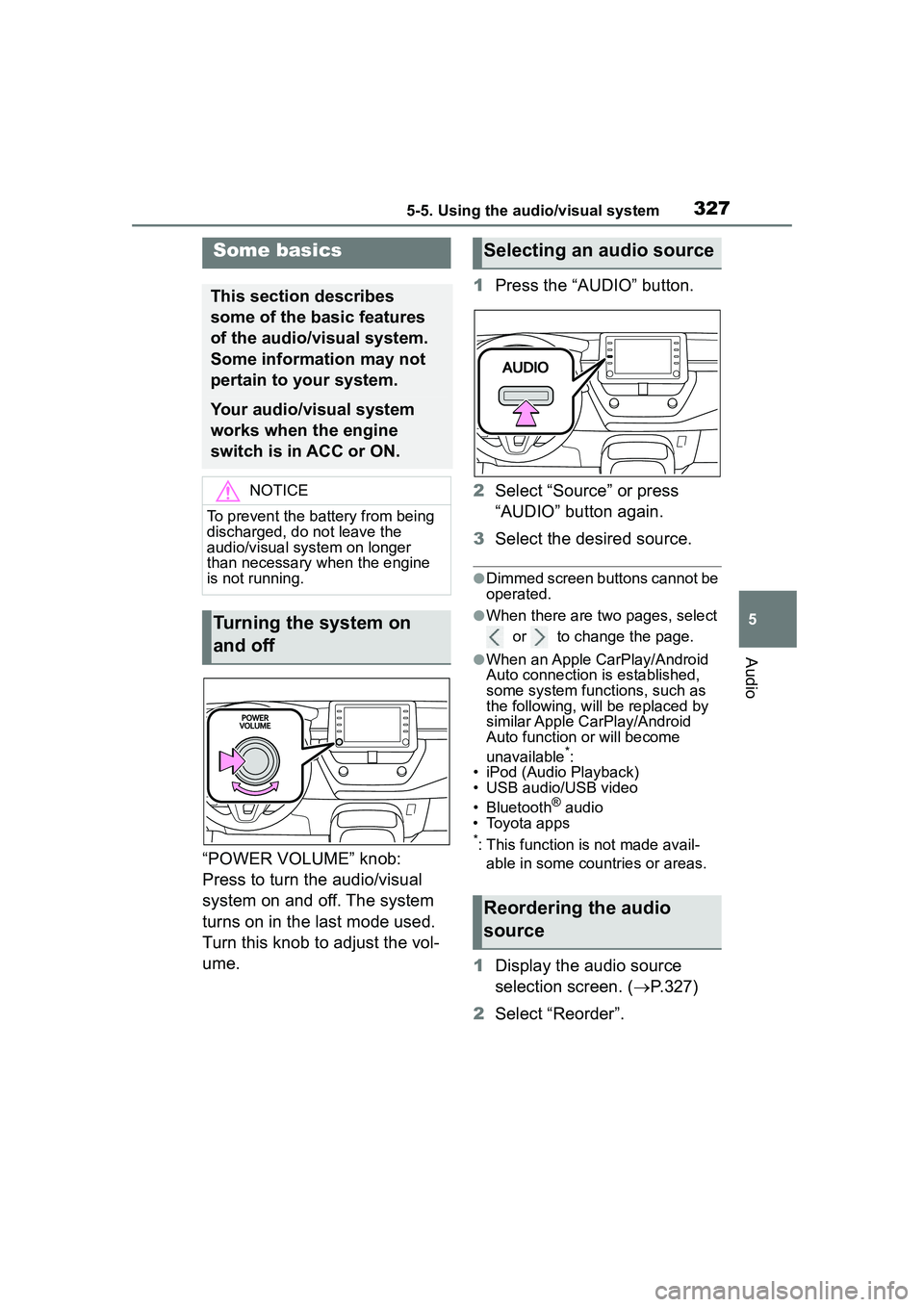
Press the “AUDIO” button.
2 Select “Source” or press
“AUDIO” button again.
3 Select the desired source.
●Dimmed screen buttons cannot be
operated.
●When there are two pages, select
or to change the page.
●When an Apple CarPlay/Android
Auto connection is established,
some system functions, such as
the following, will be replaced by
similar Apple CarPlay/Android
Auto function or will become
unavailable
*:
• iPod (Audio Playback)
• USB audio/USB video
• Bluetooth
® audio
• Toyota apps
*: This function is not made avail-
able in some countries or areas.
1 Display the audio source
selection screen. ( P.327)
2 Select “Reorder”.
Some basics
This section describes
some of the basic features
of the audio/visual system.
Some information may not
pertain to your system.
Your audio/visual system
works when the engine
switch is in ACC or ON.
NOTICE
To prevent the battery from being
discharged, do not leave the
audio/visual system on longer
than necessary when the engine
is not running.
Turning the system on
and off
Selecting an audio source
Reordering the audio
source
Page 337 of 612
3375-7. Media operation
5
Audio
5-7.Media operation
The USB memory operation
screen can be reached by the
following methods: P.327
Connecting a USB memory
( P.328)
When an Apple CarPlay/Android
Auto connection is established,
this function will be unavailable
*.
*: This function is not made avail- able in some countries or areas.
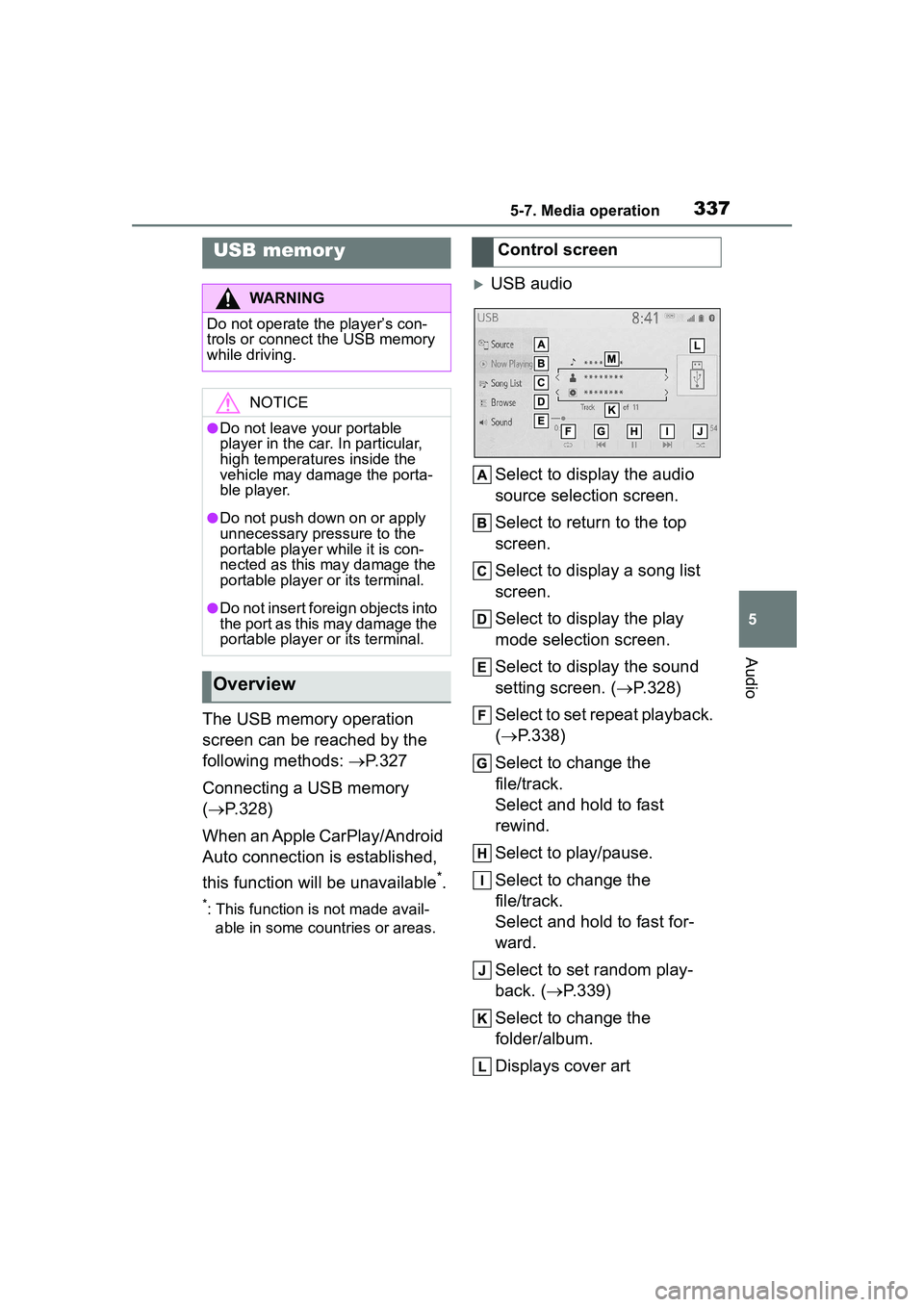
USB audio
Select to display the audio
source selection screen.
Select to return to the top
screen.
Select to display a song list
screen.
Select to display the play
mode selection screen.
Select to display the sound
setting screen. ( P.328)
Select to set repeat playback.
( P.338)
Select to change the
file/track.
Select and hold to fast
rewind.
Select to play/pause.
Select to change the
file/track.
Select and hold to fast for-
ward.
Select to set random play-
back. (P.339)
Select to change the
folder/album.
Displays cover art
USB memor y
WARNING
Do not operate the player’s con-
trols or connect the USB memory
while driving.
NOTICE
●Do not leave your portable
player in the car. In particular,
high temperatures inside the
vehicle may damage the porta-
ble player.
●Do not push down on or apply
unnecessary pressure to the
portable player while it is con-
nected as this may damage the
portable player or its terminal.
●Do not insert foreign objects into
the port as this may damage the
portable player or its terminal.
Overview
Control screen
Page 339 of 612
3395-7. Media operation
5
Audio
Files/tracks or folders/albums
can be automatically and ran-
domly selected.
Select .
Each time is selected, the
mode changes as follows:
Random (1 folder/album random)
folder/album random (all
folder/album random) off
*: This function is not made avail-
able in some countries or areas.
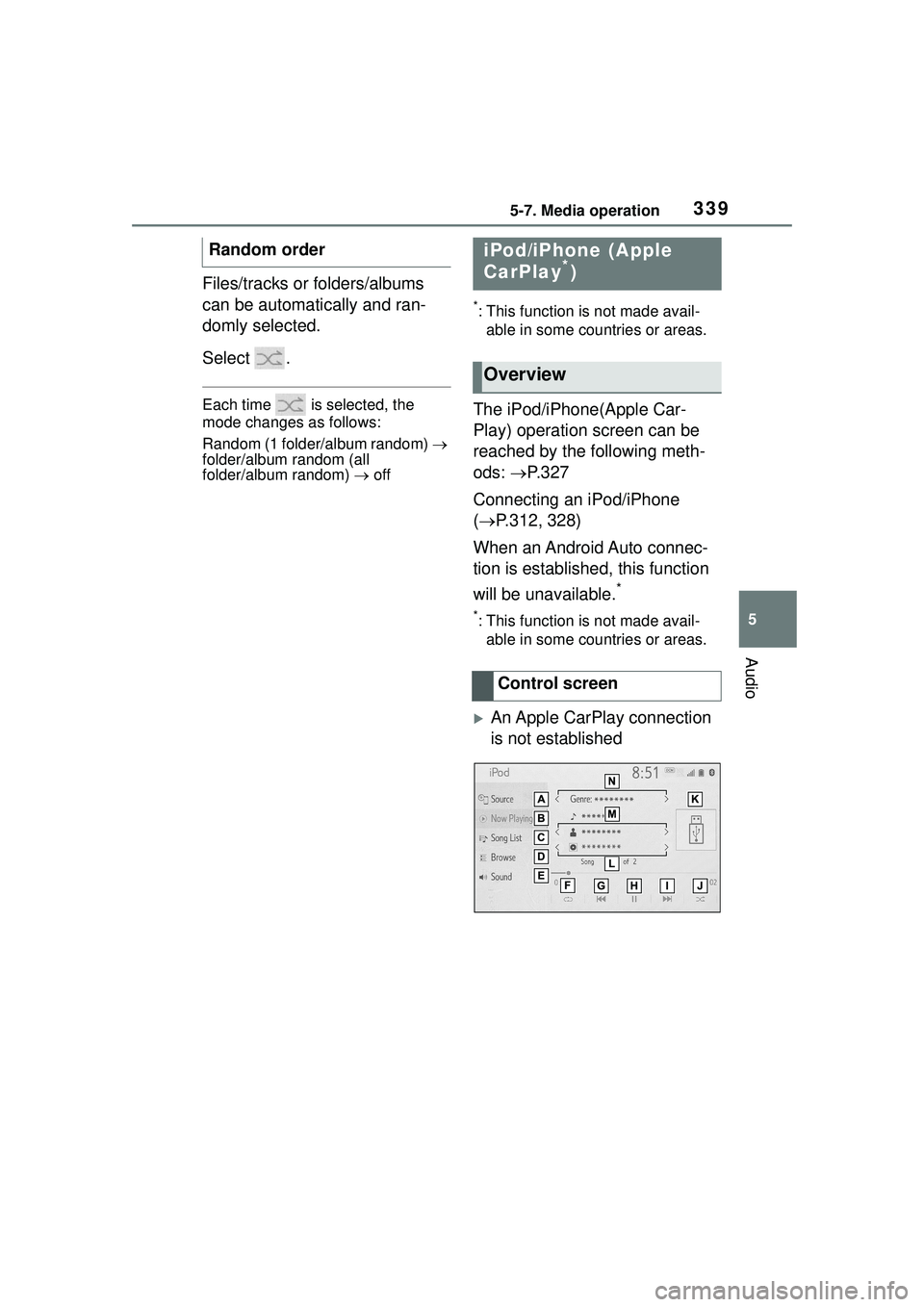
The iPod/iPhone(Apple Car-
Play) operation screen can be
reached by the following meth-
ods: P.327
Connecting an iPod/iPhone
( P.312, 328)
When an Android Auto connec-
tion is established, this function
will be unavailable.
*
*: This function is not made avail- able in some countries or areas.
An Apple CarPlay connection
is not established
Random order
iPod/iPhone (Apple
CarPlay*)
Overview
Control screen