Door button TOYOTA COROLLA CROSS 2022 Owners Manual
[x] Cancel search | Manufacturer: TOYOTA, Model Year: 2022, Model line: COROLLA CROSS, Model: TOYOTA COROLLA CROSS 2022Pages: 612, PDF Size: 17.18 MB
Page 33 of 612
331-1. For safe use
1
For safety and security
airbag sensor assembly (ECU) controls airbag deployment based on
information obtained from the sensors etc. shown in the system
components diagram above. This information includes crash sever-
ity and occupant information. As the airbags deploy, a chemical
reaction in the inflators quickly fills the airbags with non-toxic gas to
help restrain the motion of the occupants.
■If the SRS airbags deploy
(inflate)
●Slight abrasions, burns, bruising
etc., may be sustained from SRS
airbags, due to the extremely high
speed deployment (inflation) by
hot gases.
●A loud noise and white powder will
be emitted.
●Parts of the airbag module (steer-
ing wheel hub, airbag cover and
inflator) as well as the front seats,
parts of the front and rear pillars,
and roof side rails, may be hot for
several minutes. The airbag itself
may also be hot.
●The windshield may crack.
●All of the doors will be unlocked.
( P.106)
●The brakes and st op lights will be
controlled automatically. ( P.270)
●The interior lights will turn on auto-
matically. ( P.427)
●The emergency flashers will turn
on automatically. ( P.496)
●Fuel supply to the engine will be
stopped. ( P.504)
●For Safety Connect subscribers, if
any of the following situations
occur, the system is designed to
send an emergency call to the
response center, notifying them of
the vehicle’s location (without
needing to push the “SOS” button)
and an agent will a ttempt to speak
with the occupants to ascertain
the level of emergency and assis-
tance required. If the occupants
are unable to communicate, the
agent automatically treats the call as an emergency and helps to dis-
patch the necessary emergency
services. (
P. 6 7 )
• An SRS airbag is deployed.
• A seat belt pretensioner is acti-
vated.
• The vehicle is involved in a severe
rear-end collision.
■SRS airbag deployment condi-
tions (SRS front airbags)
●The SRS front airbags will deploy
in the event of an impact that
exceeds the set threshold level
(the level of force corresponding
to an approximately 12 - 18 mph
[20 - 30 km/h] fr ontal collision with
a fixed wall that does not move or
deform).
However, this threshold velocity will
be considerably higher in the follow-
ing situations:
• If the vehicle strikes an object, such as a parked vehicle or sign
pole, which can move or deform
on impact
• If the vehicle is involved in an underride collision, such as a colli-
sion in which the front of the vehi-
cle “underrides”, or goes under,
the bed of a truck
●Depending on the type of collision,
it is possible that only the seat belt
pretensioners will activate.
●The SRS front airbags for the front
passenger will not activate if there
is no passenger sitting in the front
passenger seat. However, the
SRS front airbags for the front
passenger may deploy if luggage
is put in the seat, even if the seat
is unoccupied.
Page 73 of 612
731-4. Theft deterrent system
1
For safety and security
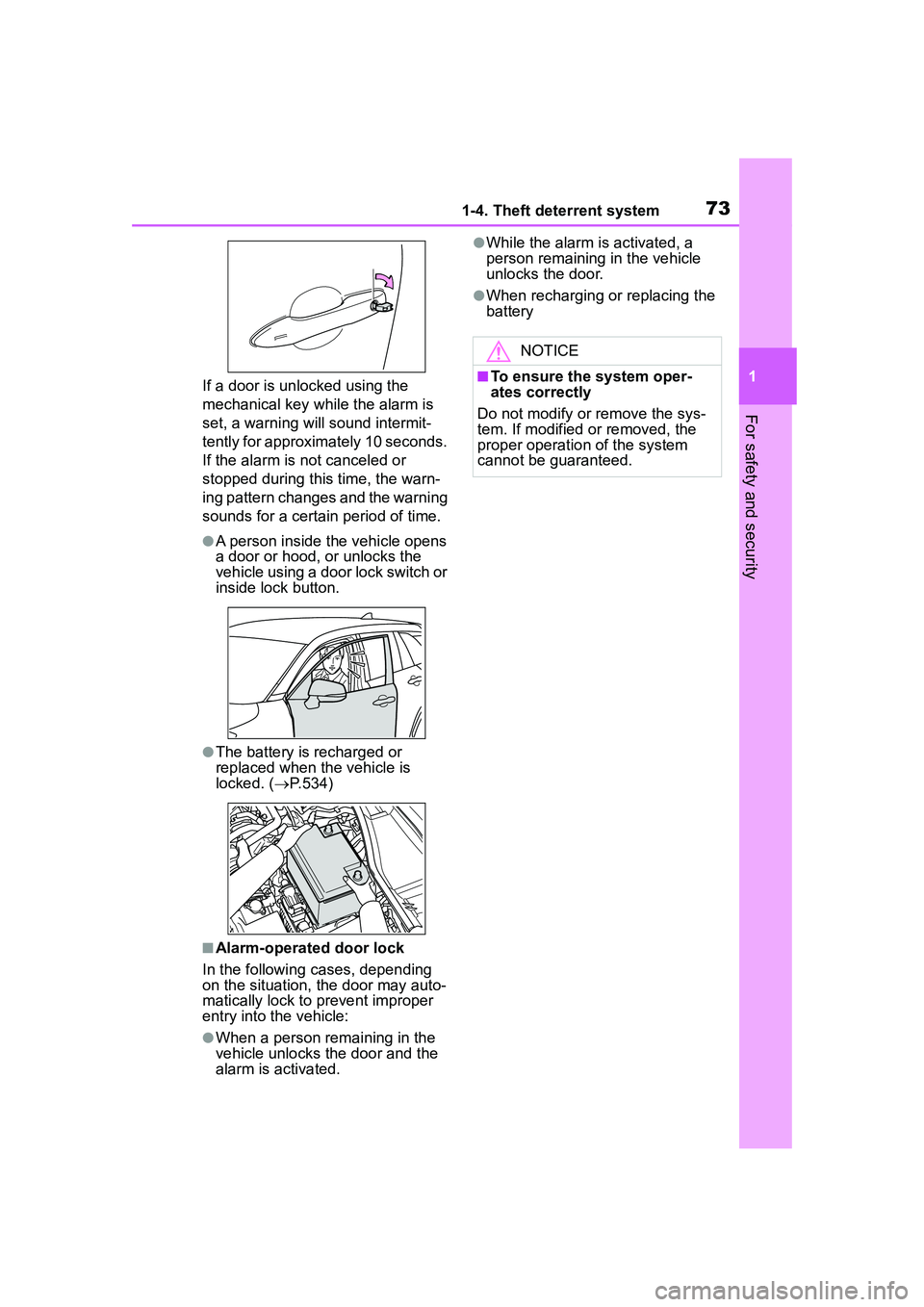
If a door is unlocked using the
mechanical key while the alarm is
set, a warning will sound intermit-
tently for approximately 10 seconds.
If the alarm is not canceled or
stopped during this time, the warn-
ing pattern changes and the warning
sounds for a certain period of time.
●A person inside the vehicle opens
a door or hood, or unlocks the
vehicle using a door lock switch or
inside lock button.
●The battery is recharged or
replaced when the vehicle is
locked. (P.534)
■Alarm-operated door lock
In the following cases, depending
on the situation, the door may auto-
matically lock to prevent improper
entry into the vehicle:
●When a person remaining in the
vehicle unlocks the door and the
alarm is activated.
●While the alarm is activated, a
person remaining in the vehicle
unlocks the door.
●When recharging or replacing the
battery
NOTICE
■To ensure the system oper-
ates correctly
Do not modify or remove the sys-
tem. If modified or removed, the
proper operation of the system
cannot be guaranteed.
Page 102 of 612
1023-1. Key information
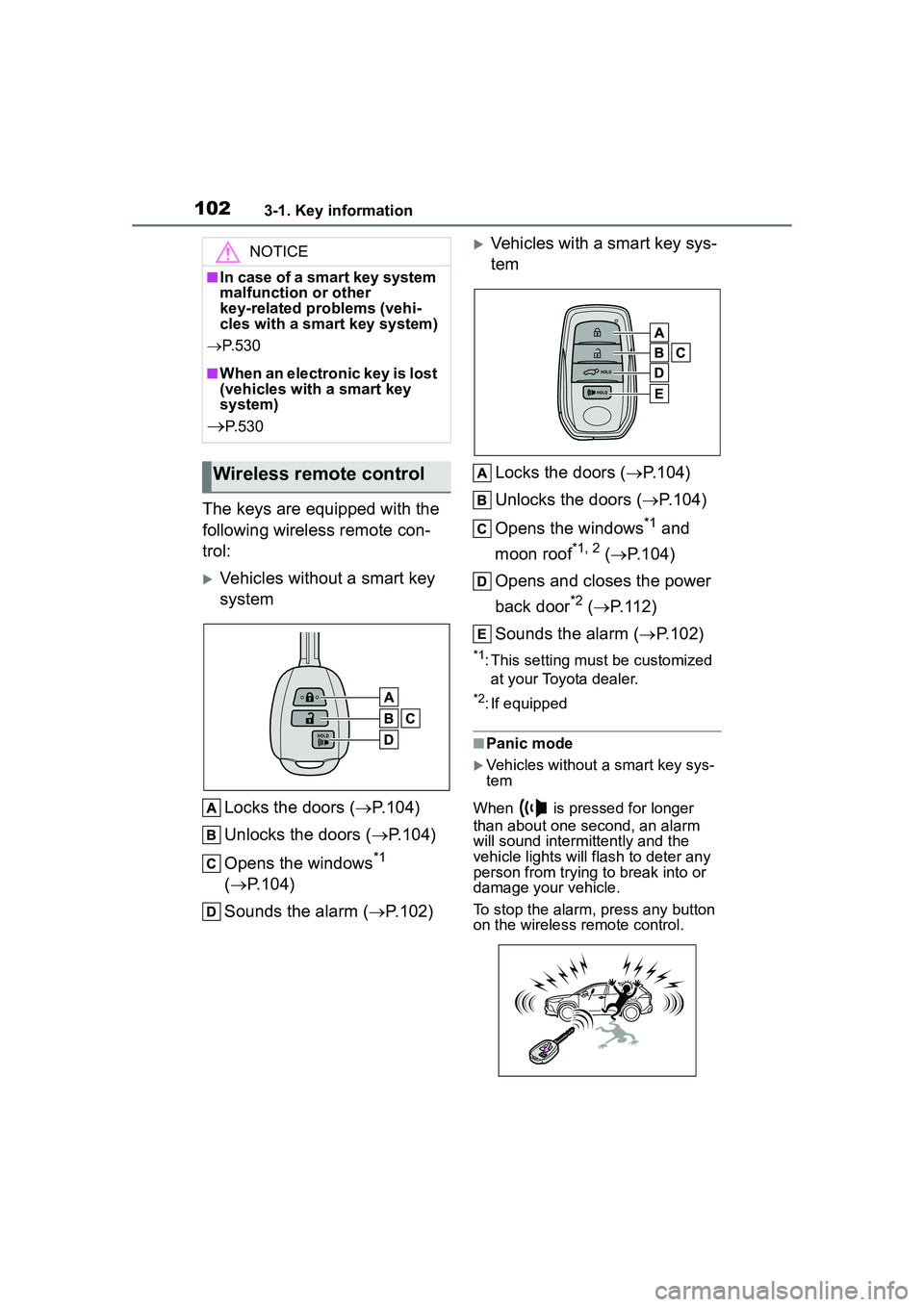
The keys are equipped with the
following wireless remote con-
trol:
Vehicles without a smart key
systemLocks the doors ( P.104)
Unlocks the doors ( P.104)
Opens the windows
*1
( P.104)
Sounds the alarm ( P.102)
Vehicles with a smart key sys-
tem
Locks the doors ( P.104)
Unlocks the doors ( P.104)
Opens the windows
*1 and
moon roof
*1, 2 ( P.104)
Opens and closes the power
back door
*2 ( P.112)
Sounds the alarm ( P.102)
*1: This setting must be customized
at your Toyota dealer.
*2: If equipped
■Panic mode
Vehicles without a smart key sys-
tem
When is pressed for longer
than about one second, an alarm
will sound intermittently and the
vehicle lights will flash to deter any
person from trying to break into or
damage your vehicle.
To stop the alarm, press any button
on the wireless remote control.
NOTICE
■In case of a smart key system
malfunction or other
key-related problems (vehi-
cles with a smart key system)
P. 5 3 0
■When an electronic key is lost
(vehicles with a smart key
system)
P. 5 3 0
Wireless remote control
Page 104 of 612
1043-2. Opening, closing and locking the doors
3-2.Opening, closing and locking the doors
■Smart key system (if
equipped)
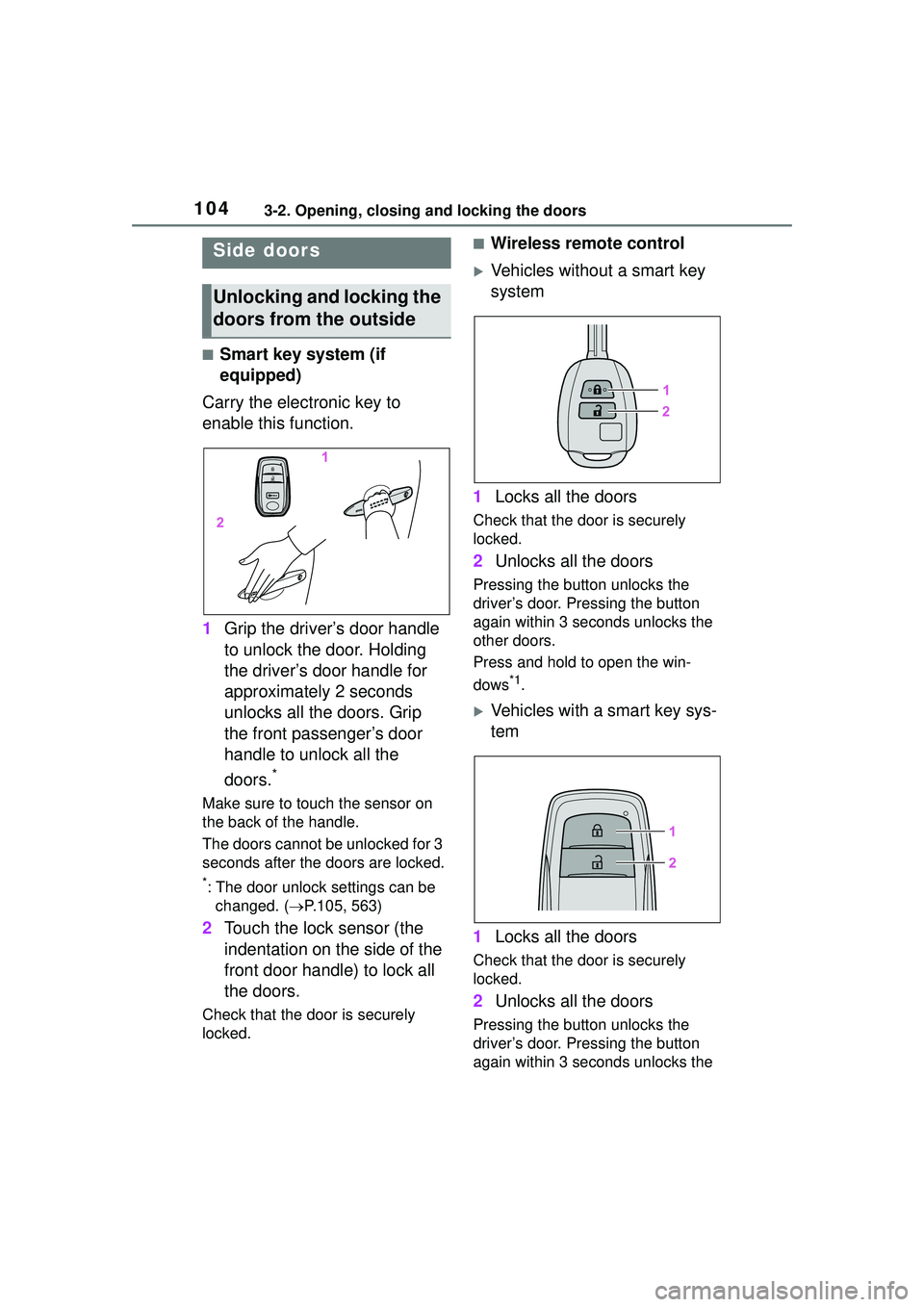
Carry the electronic key to
enable this function.
1 Grip the driver’s door handle
to unlock the door. Holding
the driver’s door handle for
approximately 2 seconds
unlocks all the doors. Grip
the front passenger’s door
handle to unlock all the
doors.
*
Make sure to touch the sensor on
the back of the handle.
The doors cannot be unlocked for 3
seconds after the doors are locked.
*: The door unlock settings can be
changed. ( P.105, 563)
2 Touch the lock sensor (the
indentation on the side of the
front door handle) to lock all
the doors.
Check that the door is securely
locked.
■Wireless remote control
Vehicles without a smart key
system
1 Locks all the doors
Check that the do or is securely
locked.
2 Unlocks all the doors
Pressing the button unlocks the
driver’s door. Pressing the button
again within 3 seconds unlocks the
other doors.
Press and hold to open the win-
dows
*1.
Vehicles with a smart key sys-
tem
1 Locks all the doors
Check that the do or is securely
locked.
2 Unlocks all the doors
Pressing the button unlocks the
driver’s door. Pressing the button
again within 3 seconds unlocks the
Side doors
Unlocking and locking the
doors from the outside
Page 105 of 612
1053-2. Opening, closing and locking the doors
3
Before driving
other doors.
Press and hold to open the win-
dows
*1and moon roof*1, 2.
*1: This setting must be customized at your Toyota dealer.
*2: If equipped
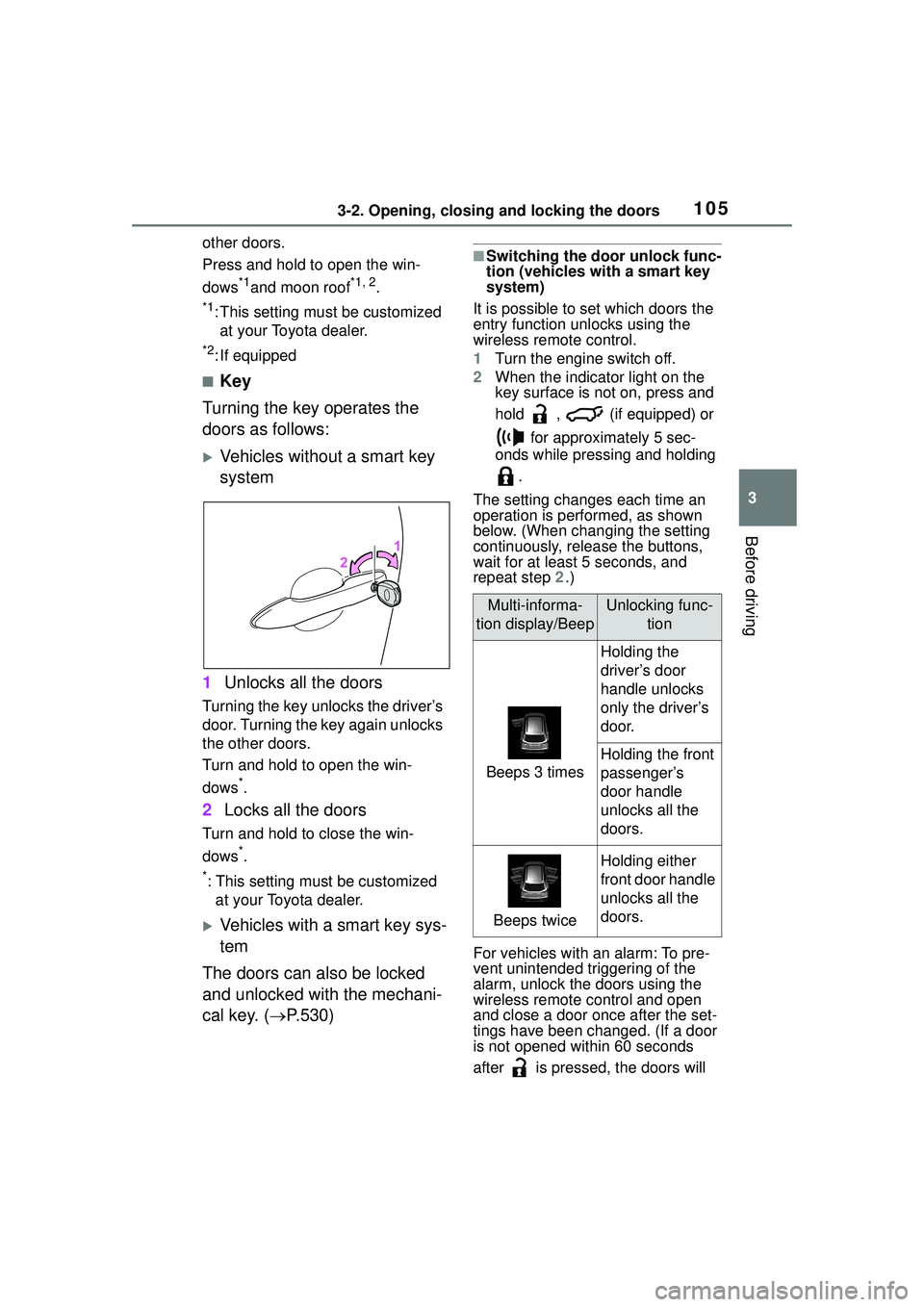
■Key
Turning the key operates the
doors as follows:
Vehicles without a smart key
system
1 Unlocks all the doors
Turning the key unlocks the driver’s
door. Turning the key again unlocks
the other doors.
Turn and hold to open the win-
dows
*.
2Locks all the doors
Turn and hold to close the win-
dows
*.
*: This setting must be customized
at your Toyota dealer.
Vehicles with a smart key sys-
tem
The doors can also be locked
and unlocked with the mechani-
cal key. ( P.530)
■Switching the door unlock func-
tion (vehicles with a smart key
system)
It is possible to set which doors the
entry function unlocks using the
wireless remote control.
1 Turn the engine switch off.
2 When the indicator light on the
key surface is not on, press and
hold , (if equipped) or
for approximately 5 sec-
onds while pressing and holding
.
The setting changes each time an
operation is performed, as shown
below. (When changing the setting
continuously, release the buttons,
wait for at least 5 seconds, and
repeat step 2.)
For vehicles with an alarm: To pre-
vent unintended triggering of the
alarm, unlock the doors using the
wireless remote control and open
and close a door once after the set-
tings have been changed. (If a door
is not opened within 60 seconds
after is pressed, the doors will
Multi-informa-
tion display/BeepUnlocking func- tion
Beeps 3 times
Holding the
driver’s door
handle unlocks
only the driver’s
door.
Holding the front
passenger’s
door handle
unlocks all the
doors.
Beeps twice
Holding either
front door handle
unlocks all the
doors.
Page 107 of 612
1073-2. Opening, closing and locking the doors
3
Before driving
Vehicles with a smart key system
Use the mechanical key to lock and
unlock the doors. ( P.530)
Replace the key battery with a new
one if it is depleted. ( P.483)
■If the battery is discharged
(vehicles with a smart key sys-
tem)
The doors cannot be locked and
unlocked using the smart key sys-
tem or wireless remote control. Lock
or unlock the doors using the
mechanical key. ( P.530)
■Customization
Some functions can be customized.
( P.563)
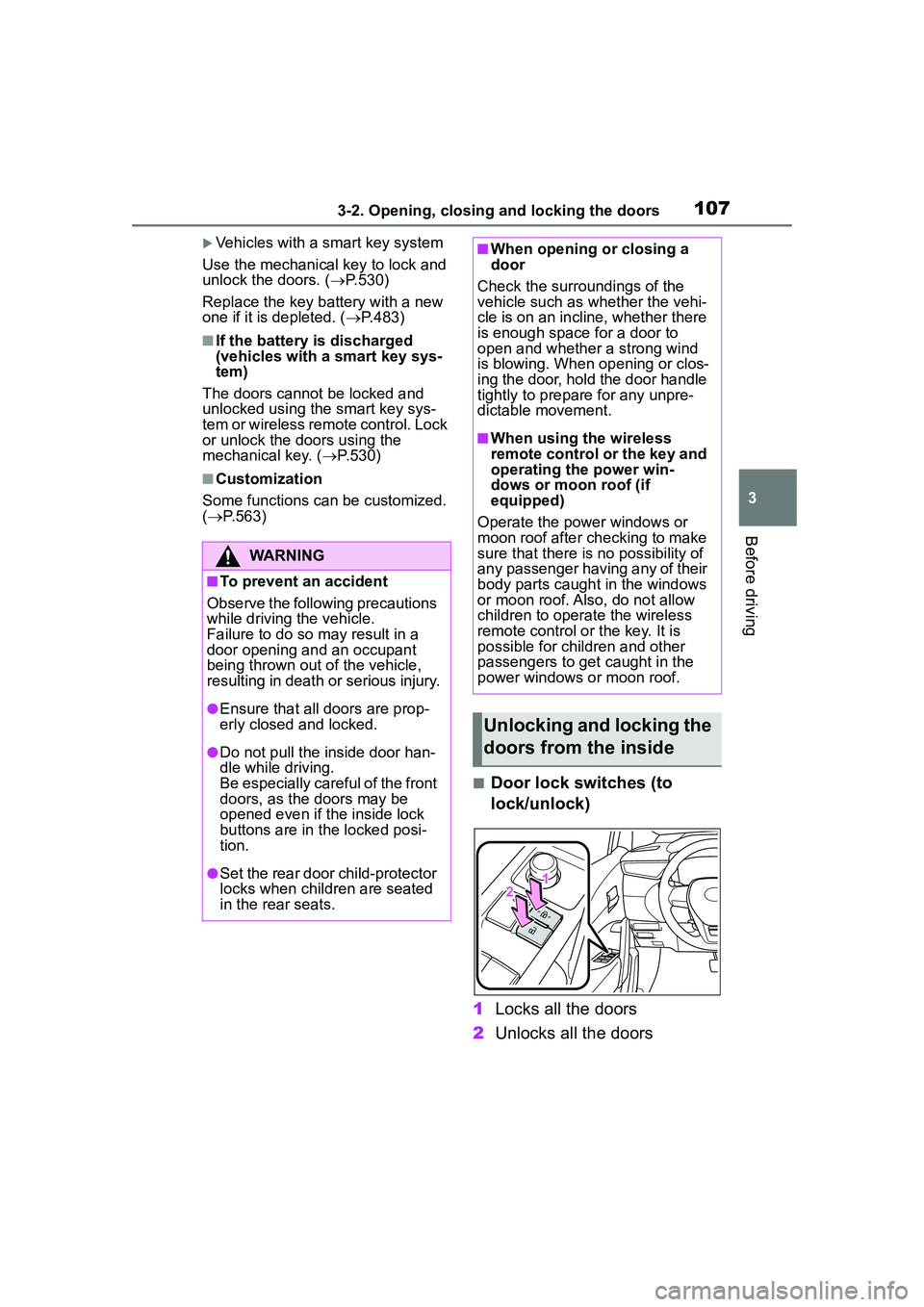
■Door lock switches (to
lock/unlock)
1 Locks all the doors
2 Unlocks all the doors
WARNING
■To prevent an accident
Observe the following precautions
while driving the vehicle.
Failure to do so may result in a
door opening and an occupant
being thrown out of the vehicle,
resulting in death or serious injury.
●Ensure that all doors are prop-
erly closed and locked.
●Do not pull the inside door han-
dle while driving.
Be especially careful of the front
doors, as the doors may be
opened even if the inside lock
buttons are in the locked posi-
tion.
●Set the rear door child-protector
locks when children are seated
in the rear seats.
■When opening or closing a
door
Check the surroundings of the
vehicle such as whether the vehi-
cle is on an incline, whether there
is enough space for a door to
open and whether a strong wind
is blowing. When opening or clos-
ing the door, hold the door handle
tightly to prepare for any unpre-
dictable movement.
■When using the wireless
remote control or the key and
operating the power win-
dows or moon roof (if
equipped)
Operate the power windows or
moon roof after ch ecking to make
sure that there is no possibility of
any passenger having any of their
body parts caught in the windows
or moon roof. Also, do not allow
children to operate the wireless
remote control or the key. It is
possible for children and other
passengers to get caught in the
power windows or moon roof.
Unlocking and locking the
doors from the inside
Page 108 of 612
1083-2. Opening, closing and locking the doors
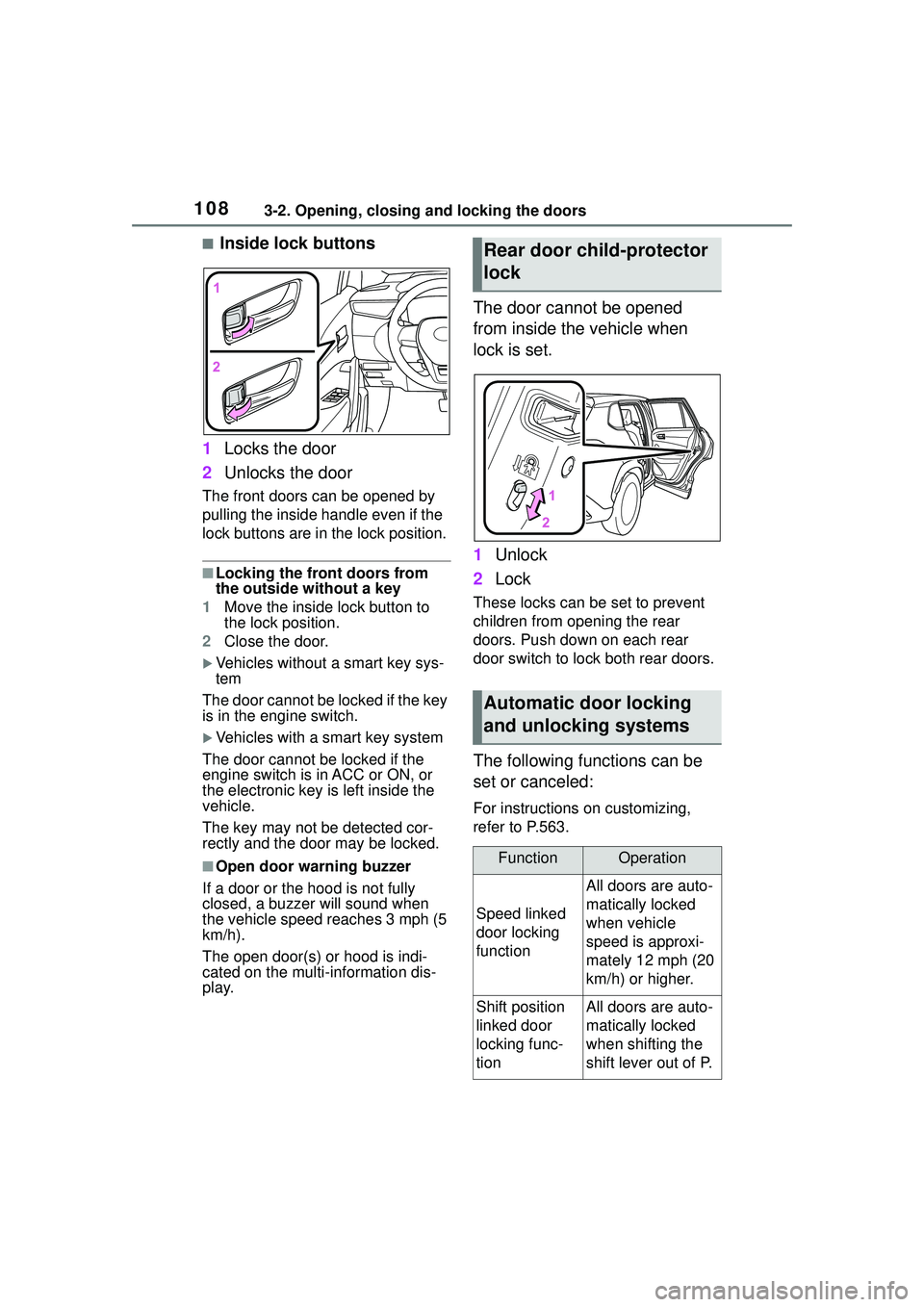
■Inside lock buttons
1 Locks the door
2 Unlocks the door
The front doors can be opened by
pulling the inside ha ndle even if the
lock buttons are in the lock position.
■Locking the front doors from
the outside without a key
1 Move the inside lock button to
the lock position.
2 Close the door.
Vehicles without a smart key sys-
tem
The door cannot be locked if the key
is in the engine switch.
Vehicles with a smart key system
The door cannot be locked if the
engine switch is in ACC or ON, or
the electronic key is left inside the
vehicle.
The key may not be detected cor-
rectly and the door may be locked.
■Open door warning buzzer
If a door or the hood is not fully
closed, a buzzer will sound when
the vehicle speed reaches 3 mph (5
km/h).
The open door(s) or hood is indi-
cated on the multi-information dis-
play.
The door cannot be opened
from inside the vehicle when
lock is set.
1 Unlock
2 Lock
These locks can be set to prevent
children from opening the rear
doors. Push down on each rear
door switch to lock both rear doors.
The following functions can be
set or canceled:
For instructions on customizing,
refer to P.563.
Rear door child-protector
lock
Automatic door locking
and unlocking systems
FunctionOperation
Speed linked
door locking
function
All doors are auto-
matically locked
when vehicle
speed is approxi-
mately 12 mph (20
km/h) or higher.
Shift position
linked door
locking func-
tionAll doors are auto-
matically locked
when shifting the
shift lever out of P.
Page 120 of 612
1203-2. Opening, closing and locking the doors
●Interior buzzer sounds continu-
ously
■Battery-saving function
The battery-saving function will be
activated in order to prevent the
electronic key battery and the vehi-
cle battery from being discharged
while the vehicle is not operated for
a long time.
●In the following situations, the
smart key system may take some
time to unlock the doors.
• The electronic key has been left within approximately 11 ft. (3.5 m)
of the outside of the vehicle for 2
minutes or longer.
• The smart key system has not
been used for 5 days or longer.
●If the smart key system has not
been used for 14 days or longer,
the doors cannot be unlocked
from any door except the driver’s
door. In this case, hold the driver’s
door handle, or use the wireless
remote control or mechanical key
to unlock the doors.
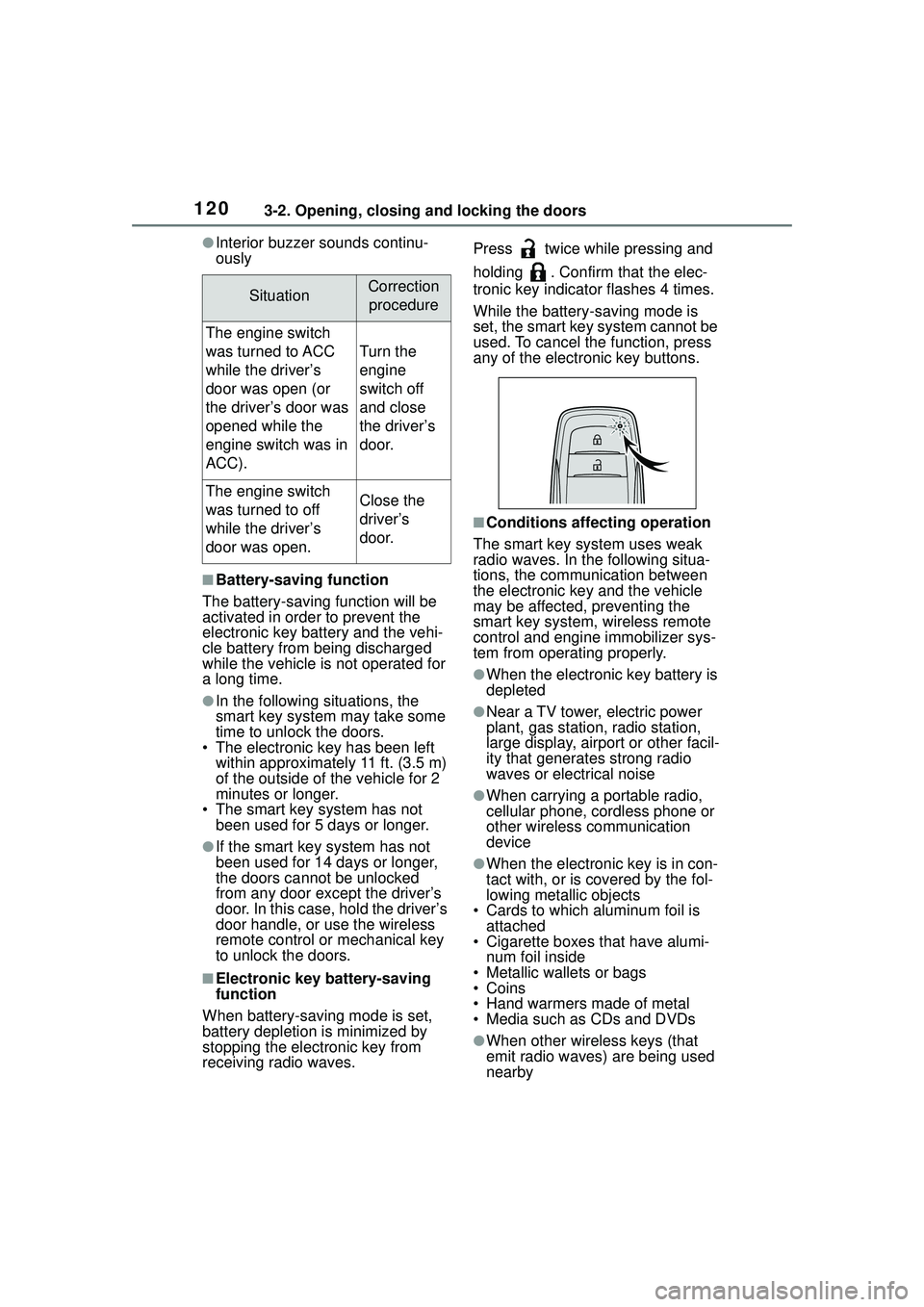
■Electronic key battery-saving
function
When battery-saving mode is set,
battery depletion is minimized by
stopping the electronic key from
receiving radio waves. Press twice while pressing and
holding . Confirm that the elec-
tronic key indicator flashes 4 times.
While the battery-saving mode is
set, the smart key system cannot be
used. To cancel the function, press
any of the electronic key buttons.
■Conditions affecting operation
The smart key system uses weak
radio waves. In the following situa-
tions, the communication between
the electronic key and the vehicle
may be affected, preventing the
smart key system, wireless remote
control and engine immobilizer sys-
tem from operating properly.
●When the electronic key battery is
depleted
●Near a TV tower, electric power
plant, gas station, radio station,
large display, airport or other facil-
ity that generates strong radio
waves or electrical noise
●When carrying a portable radio,
cellular phone, cordless phone or
other wireless communication
device
●When the electronic key is in con-
tact with, or is covered by the fol-
lowing metallic objects
• Cards to which aluminum foil is attached
• Cigarette boxes that have alumi- num foil inside
• Metallic wallets or bags
•Coins
• Hand warmers made of metal
• Media such as CDs and DVDs
●When other wireless keys (that
emit radio waves) are being used
nearby
SituationCorrection
procedure
The engine switch
was turned to ACC
while the driver’s
door was open (or
the driver’s door was
opened while the
engine switch was in
ACC).
Turn the
engine
switch off
and close
the driver’s
door.
The engine switch
was turned to off
while the driver’s
door was open.Close the
driver’s
door.
Page 485 of 612
4857-3. Do-it-yourself maintenance
7
Maintenance and care
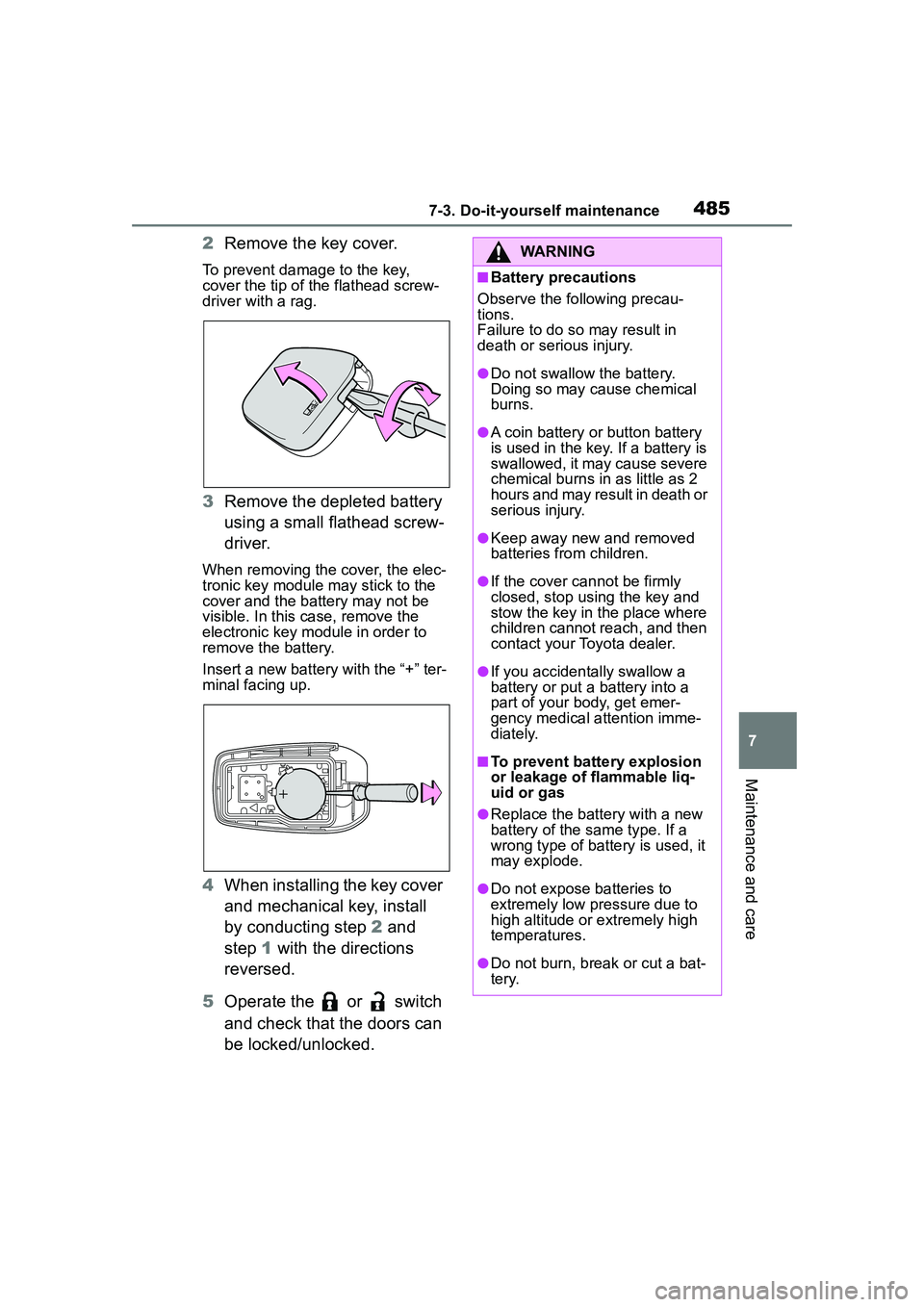
2Remove the key cover.
To prevent damage to the key,
cover the tip of the flathead screw-
driver with a rag.
3Remove the depleted battery
using a small flathead screw-
driver.
When removing the cover, the elec-
tronic key module may stick to the
cover and the battery may not be
visible. In this case, remove the
electronic key module in order to
remove the battery.
Insert a new battery with the “+” ter-
minal facing up.
4When installing the key cover
and mechanical key, install
by conducting step 2 and
step 1 with the directions
reversed.
5 Operate the or switch
and check that the doors can
be locked/unlocked.
WARNING
■Battery precautions
Observe the following precau-
tions.
Failure to do so may result in
death or serious injury.
●Do not swallow the battery.
Doing so may cause chemical
burns.
●A coin battery or button battery
is used in the key. If a battery is
swallowed, it may cause severe
chemical burns in as little as 2
hours and may result in death or
serious injury.
●Keep away new and removed
batteries from children.
●If the cover cannot be firmly
closed, stop using the key and
stow the key in the place where
children cannot reach, and then
contact your Toyota dealer.
●If you accidentally swallow a
battery or put a battery into a
part of your body, get emer-
gency medical attention imme-
diately.
■To prevent battery explosion
or leakage of flammable liq-
uid or gas
●Replace the battery with a new
battery of the same type. If a
wrong type of battery is used, it
may explode.
●Do not expose batteries to
extremely low pressure due to
high altitude or extremely high
temperatures.
●Do not burn, break or cut a bat-
tery.
Page 588 of 612
588Alphabetical Index
Audio settings ........................ 349Common settings ................. 349
Radio settings ...................... 349
Audio source .......................... 327
Audio system-linked display ... 93
Automatic air conditioning sys- tem ......................................... 416
Automatic headlight leveling system ................................... 178
Automatic High Beam ............ 180
Automatic light control system ............................................... 178
Auxiliary boxes ....................... 432
Average fuel economy ............. 92
Average vehicle speed............. 94
AWD Control ............................. 94
B
Back door ................................ 109
Back-up light Replacing light bulbs ............ 489
Back-up lights Wattage ................................ 549
Battery Battery checking................... 465
If the battery is discharged ... 532
Preparing and checking before winter.................................. 274
Warning light ........................ 506
Blind Spot Monitor (BSM) ...... 233
Bluetooth
® audio .................... 343
Registering/Connecting a Blue- tooth
® device...................... 345
Bluetooth® button (Setup
screen) .................................. 286
Bluetooth
® details settings ... 300
Bluetooth® setup screen ...... 301
Connecting a Bluetooth® device
........................................... 301
Deleting a Bluetooth
® device303
Detailed settings screen ....... 305 Displaying the Bluetooth
® setup
screen.................................300
Editing the Bluetooth
® device
information..........................304
Registering a Bluetooth
® device
...........................................303
Bluetooth
® device information
...............................................304
Bluetooth
® hands-free system
...............................................367
Bluetooth
® phone message func-
tion .........................................378 Calling the message sender .381
Checking received messages ...........................................379
Displaying the message screen ...........................................378
Receiving a mess age ...........378
Replying to a message (dicta- tion reply)............................380
Replying to a message (quick reply) ..................................380
Bottle holders .........................429
Brake Brake hold ............................174
Fluid..............................464, 547
Parking brake .......................171
Warning light.........................505
Brake assist ............................269
Break-in tips ............................142
Brightness control Instrument panel light control83, 88
BSM (Blind Spot Monitor) ......233
C
Care Exterior .................................446
Interior ..................................449
Seat belts .............................449
Wheels and wheel ornaments...........................................446