horn TOYOTA COROLLA CROSS 2022 Owners Manual
[x] Cancel search | Manufacturer: TOYOTA, Model Year: 2022, Model line: COROLLA CROSS, Model: TOYOTA COROLLA CROSS 2022Pages: 612, PDF Size: 17.18 MB
Page 129 of 612
1293-4. Adjusting the steering wheel and mirrors
3
Before driving
3-4.Adjusting the steering wheel and mirrors
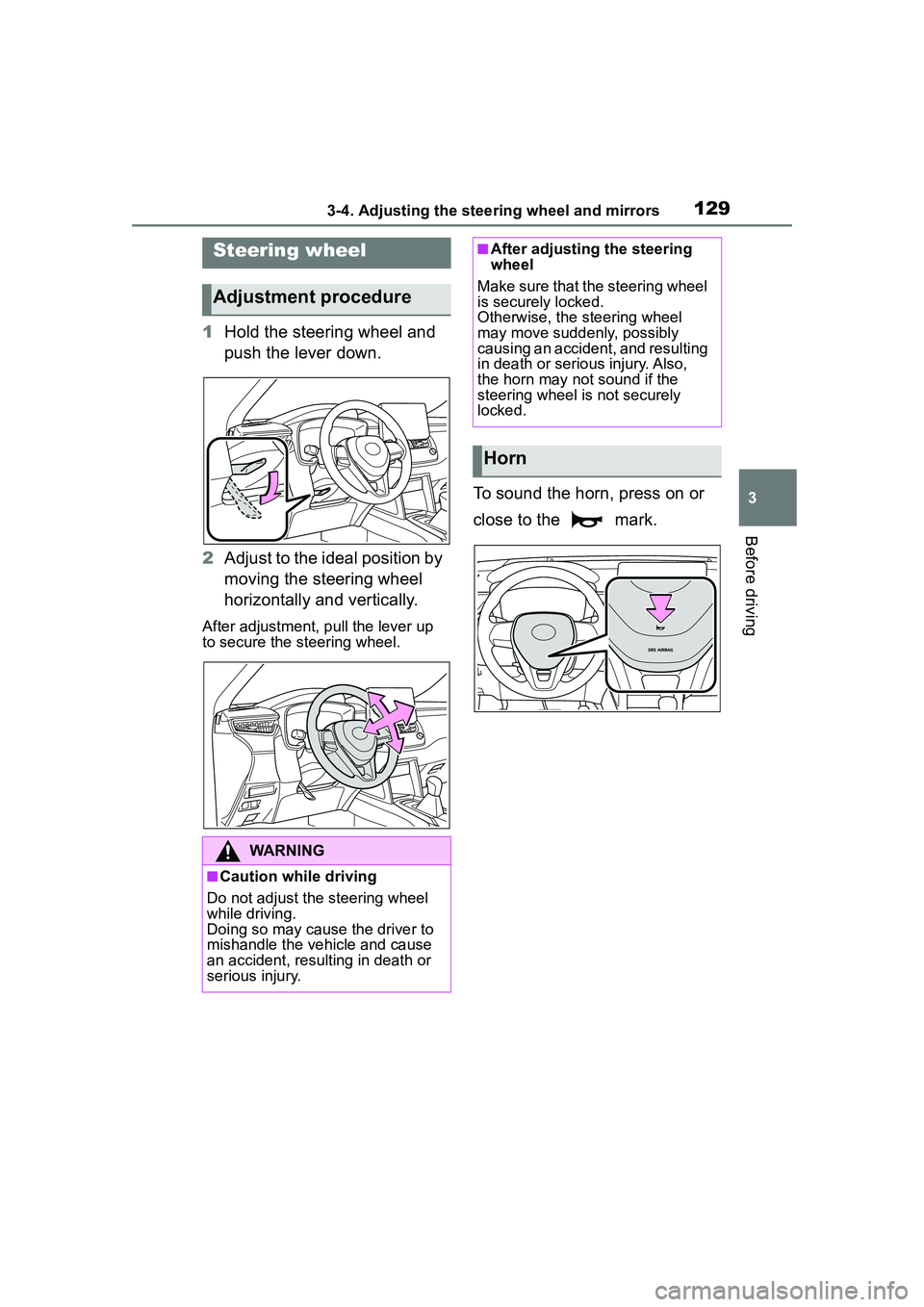
1Hold the steering wheel and
push the lever down.
2 Adjust to the ideal position by
moving the steering wheel
horizontally and vertically.
After adjustment, pull the lever up
to secure the steering wheel.
To sound the horn, press on or
close to the mark.
Steering wheel
Adjustment procedure
WARNING
■Caution while driving
Do not adjust the steering wheel
while driving.
Doing so may cause the driver to
mishandle the vehicle and cause
an accident, resulting in death or
serious injury.
■After adjusting the steering
wheel
Make sure that the steering wheel
is securely locked.
Otherwise, the steering wheel
may move suddenly, possibly
causing an accident, and resulting
in death or serious injury. Also,
the horn may not sound if the
steering wheel is not securely
locked.
Horn
Page 254 of 612
2544-5. Using the driving support systems
determines that it is normal, the sys-
tem will return to normal.
■Sensor detection information
●The sensors may be able to only
detect objects near the front and
rear bumpers.
●The following situations may occur
during use.
• Depending on the shape of the object and other factors, the
detection distance may shorten, or
detection may be impossible.
• Detection may be impossible if static objects draw too close to the
sensor.
• After the static object detection, there will be a short delay before a
graphic is shown on displays, and
warning buzzer sounds. Even at
low speeds, there is a possibility
that the object will come within the
sensor’s detection areas before
the display is shown and the warn-
ing beep sounds.
• It might be difficult to hear the buzzer due to the volume of the
audio system or air flow noise of
the air conditioning system.
• It may be difficult to hear the
buzzer if buzzers for other sys-
tems are sounding.
■Objects which the system may
not be properly detected
The shape of the object may pre-
vent the sensor from detecting it.
Pay particular attention to the follow-
ing objects:
●Wires, fences, ropes, etc.
●Cotton, snow and other materials
that absorb sound waves
●Sharply-angled objects
●Low objects
●Tall objects with upper sections
projecting outwards in the direc-
tion of your vehicle
●People may not be detected if
they are wearing certain types of
clothing.
■Situations in which the system
may not operate properly
Certain vehicle conditions and the
surrounding environment may affect
the ability of a sens or to correctly
detect objects. Pa rticular instances
where this may occur are listed
below.
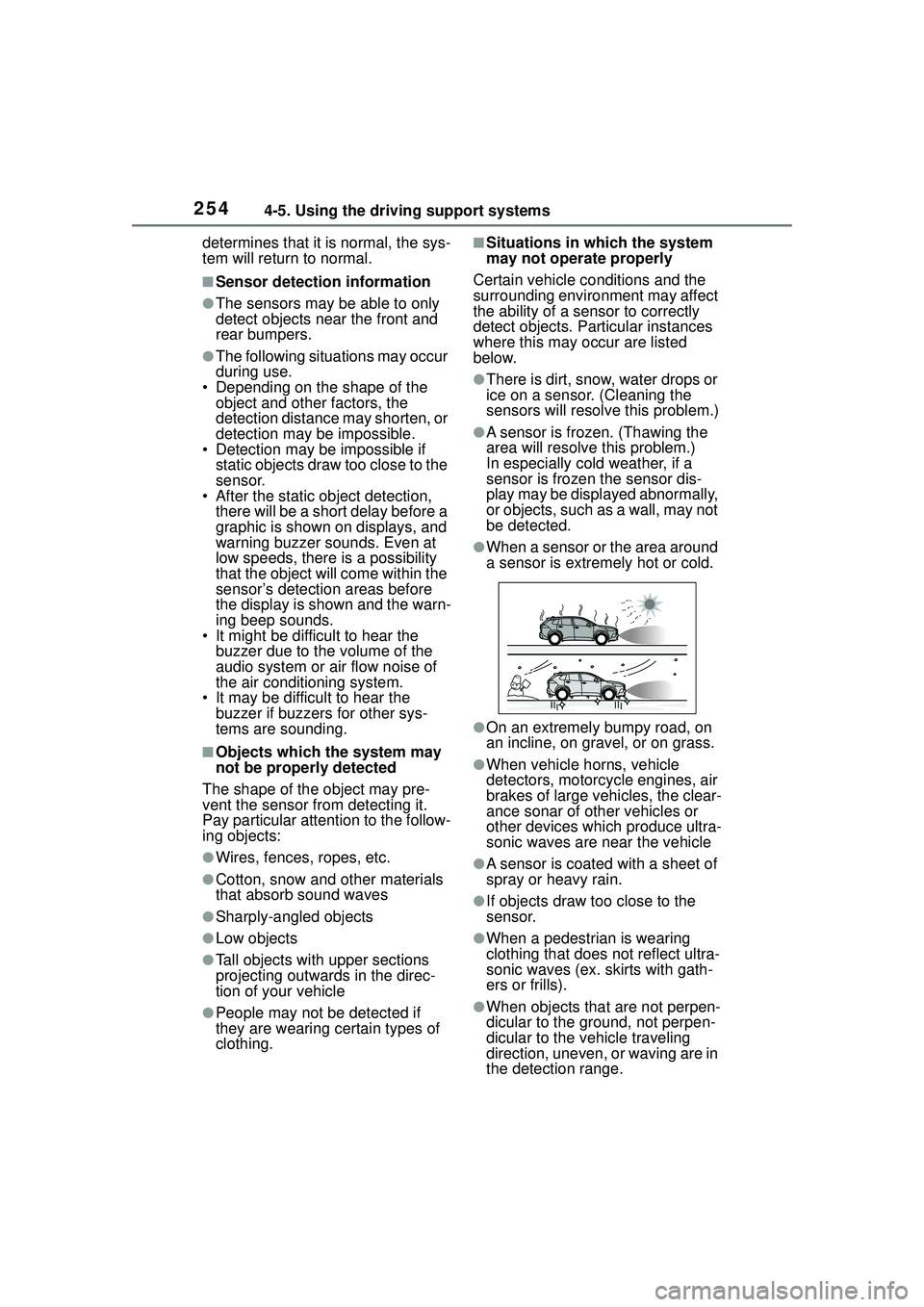
●There is dirt, snow, water drops or
ice on a sensor. (Cleaning the
sensors will resolv e this problem.)
●A sensor is frozen. (Thawing the
area will resolve this problem.)
In especially cold weather, if a
sensor is frozen the sensor dis-
play may be displayed abnormally,
or objects, such as a wall, may not
be detected.
●When a sensor or the area around
a sensor is extremely hot or cold.
●On an extremely bumpy road, on
an incline, on gravel, or on grass.
●When vehicle horns, vehicle
detectors, motorcycle engines, air
brakes of large vehicles, the clear-
ance sonar of other vehicles or
other devices which produce ultra-
sonic waves are near the vehicle
●A sensor is coated with a sheet of
spray or heavy rain.
●If objects draw too close to the
sensor.
●When a pedestrian is wearing
clothing that does not reflect ultra-
sonic waves (ex. skirts with gath-
ers or frills).
●When objects that are not perpen-
dicular to the ground, not perpen-
dicular to the vehicle traveling
direction, uneven, or waving are in
the detection range.
Page 255 of 612
2554-5. Using the driving support systems
4
Driving
●Strong wind is blowing
●When driving in inclement weather
such as fog, snow or a sandstorm
●When an object that cannot be
detected is between the vehicle
and a detected object
●If an object such as a vehicle,
motorcycle, bicycle or pedestrian
cuts in front of th e vehicle or runs
out from the side of the vehicle
●If the orientation of a sensor has
been changed due to a collision or
other impact
●When equipment that may
obstruct a sensor is installed, such
as a towing eyelet, bumper pro-
tector (an additional trim strip,
etc.), bicycle carrier, or snow plow
●If the front of the vehicle is raised
or lowered due to the carried load
●If the vehicle cannot be driven in a
stable manner, such as when the
vehicle has been in an accident or
is malfunctioning
●When a tire chains, compact
spare tire or an emergency tire
puncture repair kit is used
■Situations in which the system
may operate even if there is no
possibility of a collision
In some situations, such as the fol-
lowing, the system may operate
even though there is no possibility of
a collision.
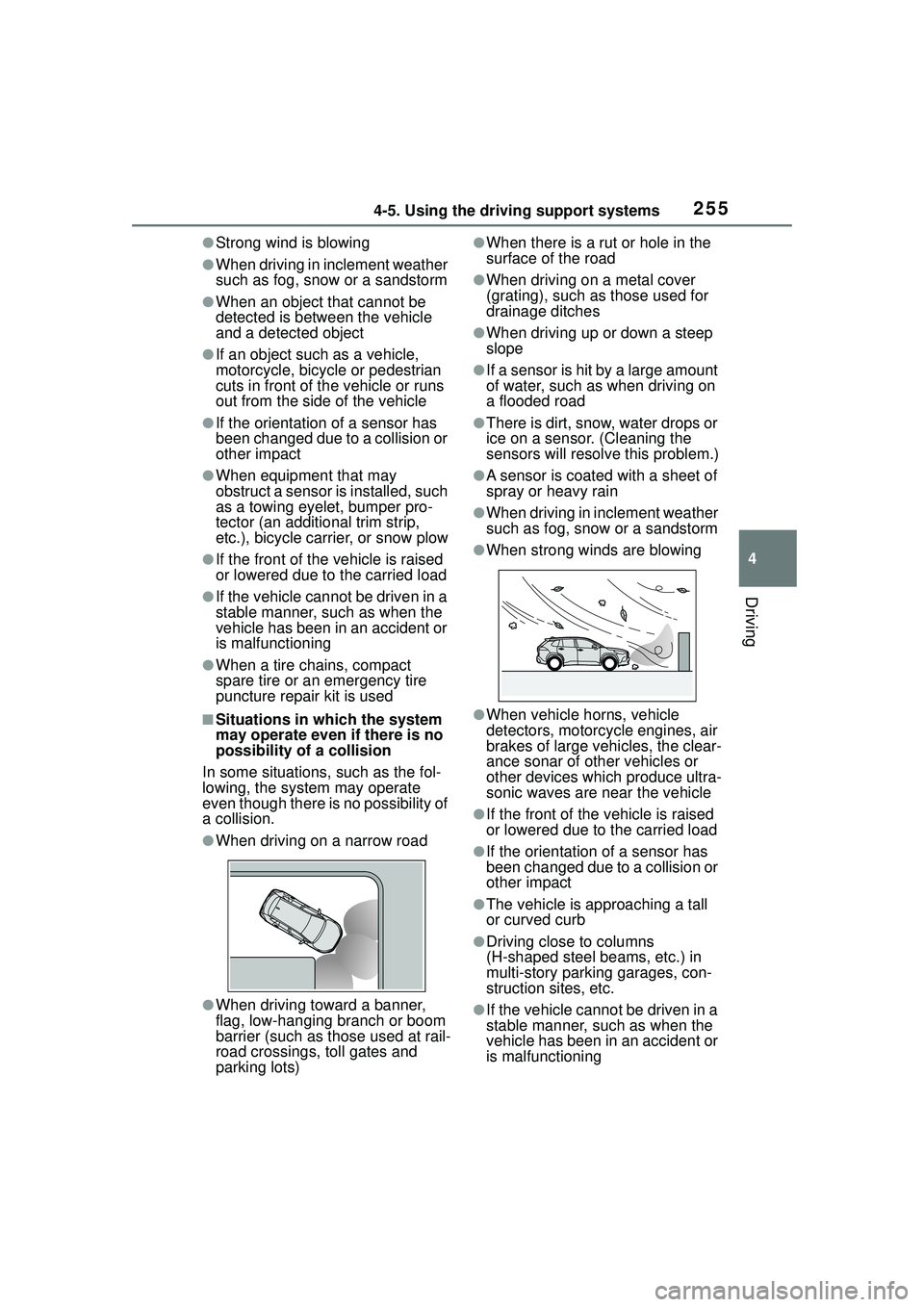
●When driving on a narrow road
●When driving toward a banner,
flag, low-hanging branch or boom
barrier (such as those used at rail-
road crossings, toll gates and
parking lots)
●When there is a ru t or hole in the
surface of the road
●When driving on a metal cover
(grating), such as those used for
drainage ditches
●When driving up or down a steep
slope
●If a sensor is hit by a large amount
of water, such as when driving on
a flooded road
●There is dirt, snow, water drops or
ice on a sensor. (Cleaning the
sensors will resolv e this problem.)
●A sensor is coated with a sheet of
spray or heavy rain
●When driving in inclement weather
such as fog, snow or a sandstorm
●When strong winds are blowing
●When vehicle horns, vehicle
detectors, motorcycle engines, air
brakes of large vehicles, the clear-
ance sonar of other vehicles or
other devices which produce ultra-
sonic waves are near the vehicle
●If the front of the vehicle is raised
or lowered due to the carried load
●If the orientation of a sensor has
been changed due to a collision or
other impact
●The vehicle is approaching a tall
or curved curb
●Driving close to columns
(H-shaped steel beams, etc.) in
multi-story parking garages, con-
struction sites, etc.
●If the vehicle cannot be driven in a
stable manner, such as when the
vehicle has been in an accident or
is malfunctioning
Page 528 of 612
5288-2. Steps to take in an emergency
One of the following may be the
cause of the problem:
There may not be sufficient
fuel in the vehicle’s tank.
Refuel the vehicle.
The engine may be flooded.
Try to restart the engine again
following correct starting pro-
cedures. ( P.162, 163)
There may be a malfunction
in the engine immobilizer sys-
tem. ( P.71)
One of the following may be the
cause of the problem:
The battery may be dis-
charged. ( P.532)
NOTICE
■When replacing the tires
When removing or fitting the
wheels, tires or t he tire pressure
warning valve and transmitter,
contact your Toyota dealer as the
tire pressure warning valve and
transmitter may be damaged if not
handled correctly.
■To avoid damage to the tire
pressure warning valves and
transmitters
When a tire is repaired with liquid
sealants, the tire pressure warn-
ing valve and transmitter may not
operate properly. If a liquid seal-
ant is used, contact your Toyota
dealer or other qualified service
shop as soon as possible. Make
sure to replace the tire pressure
warning valve and transmitter
when replacing the tire.
If the engine will not
star t
If the engine will not start
even though correct starting
procedures are being fol-
lowed ( P.162, 163), con-
sider each of the following
points:
The engine will not start
even though the starter
motor operates normally.
The starter motor turns
over slowly, the interior
lights and headlights are
dim, or the horn does not
sound or sounds at a low
volume.
Page 529 of 612
5298-2. Steps to take in an emergency
8
When trouble arises
The battery terminal connec-
tions may be loose or cor-
roded. ( P.465)
The engine starting system may
be malfunctioning due to an
electrical problem such as elec-
tronic key battery depletion or a
blown fuse. However, an interim
measure is available to start the
engine. ( P.529)
One of the following may be the
cause of the problem:
The battery may be dis-
charged. ( P.532)
One or both of the battery ter-
minals may be disconnected.
( P.465)
Contact your Toyota dealer if the
problem cannot be repaired, or if
repair procedures are unknown.
When the engine does not start,
the following steps can be used as an interim measure to start
the engine if the engine switch is
functioning normally.
Do not use this starting proce-
dure except in case of emer-
gency.
1
Set the parking brake.
( P.171)
2 Check that the shift lever is in
P.
3 Turn the engine switch to
ACC.
4 Press and hold the engine
switch for about 15 seconds
while depressing the brake
pedal firmly.
Even if the engine can be started
using the above steps, the system
may be malfunctioning. Have the
vehicle inspected by your Toyota
dealer.
The starter motor does
not turn over (vehicles
with a smart key system)
The starter motor does
not turn over, the interior
lights and headlights do
not turn on, or the horn
does not sound.
Emergency start function
(vehicles with a smart key
system)
Page 585 of 612
585What to do if... (Troubleshooting)
Is the electronic key any-
where detectable inside the
vehicle? ( P.119)
Is the electronic key battery
weak or depleted?
In this case, the engine can be
started in a temporary way.
( P.531)
Is the battery discharged?
( P.532)
Is the engine switch in ON?
If you cannot release the shift lever
by depressing the brake pedal with
the engine switch in ON. ( P.168)
Is the window lock switch
pressed?
The power window except for the
one at the driver’s seat cannot be
operated if the win dow lock switch
is pressed. ( P.135)
The auto power off function
will be operated if the vehicle
is left in ACC or ON (the
engine is not running) for a
period of time. ( P.166)
The seat belt reminder light is
flashing
Are the driver and the passenger
wearing the seat belts? ( P.508)
The parking brake indicator is
on
Is the parking brake released?
( P.171)
Depending on the situation,
other types of warning buzzer
may also sound. ( P.505, 515)
Did anyone inside the vehicle
open a door during setting the
alarm?
The sensor detects it and the alarm
sounds. ( P. 7 2 )
Do one of the following to deac-
tivate or stop the alarms:
Unlock the doors.
Turn the engine switch to
ACC or ON, or start the
engine. (The alarm will be
deactivated or stopped after a
few seconds.)
Is the electronic key left inside
The shift lever cannot be
shifted from P even if you
depress the brake pedal
The windows do not open
or close by operating the
power window switches
The engine switch is
turned off automatically
(vehicles with a smart key
system)
A warning buzzer sounds
during driving
An alarm is activated and
the horn sounds (vehicles
with an alarm)
A warning buzzer sounds
when leaving the vehicle
(vehicles with a smart key
system)
Page 592 of 612
592Alphabetical Index
Fuel economy ........................... 92
Fuel filler door Refueling .............................. 188
Fuel gauge .......................... 81, 85
Fuel pump shut off system.... 504
Functional overview ............... 396
Fuses ....................................... 486
G
Gauges ................................ 81, 85
General button (Setup screen) ....................................... 286, 319
General settings ..................... 319 Displaying the general settings screen ................................ 319
General settings screen ....... 319
Glove box ................................ 429
Glove box light ....................... 429
H
Hands-free system ................. 367
Head restraints ....................... 127
Headlight aim .......................... 488
Headlights Adaptive Front-lighting System (AFS) .................................. 180
Automatic High Beam system ........................................... 180
Extended Headlight Lighting 179
Light switch .......................... 177
Replacing light bulbs ............ 490
Headlights/daytime running lightsReplacing light bulbs ............ 490
Heated steering wheel ........... 424
Heaters Automatic air conditioning sys-tem ..................................... 416
Heated steering wheel ......... 424
Manual air conditioning system ........................................... 410 Outside rear view mirrors ...412,
419
Seat heaters .........................424
High mounted stoplight Replacing light bulbs ............490
Hill-start assist control...........269
HOME button...........................290
Home screen ...........................290
Hood Open.....................................459
Hooks Coat hooks ...........................443
Retaining hooks (floor mat) ....24
Horn .........................................129
I
I/M test .....................................456
Identification Engine ..................................543
Vehicle ..................................543
Ignition switch (engine switch) .......................................162, 163Auto power off function .........166
Changing the engine switch modes.................................166
If your vehicle has to be stopped in an emergency .................496
Illuminated entry system .......427
Indicators ..................................78
Info button (Menu screen) .....283
Initial screen............................287 Caution screen .....................287
Restarting the system ...........287
Initialization Items to initialize ...................572
Maintenance .........................453
Power windows ....................133
Tire pressure warning system...........................................473
Inside rear view mirror ...........130
Instrument panel light control83,
88