light TOYOTA COROLLA CROSS 2023 Owner's Manual
[x] Cancel search | Manufacturer: TOYOTA, Model Year: 2023, Model line: COROLLA CROSS, Model: TOYOTA COROLLA CROSS 2023Pages: 500, PDF Size: 15.11 MB
Page 50 of 500
501-2. Child safety
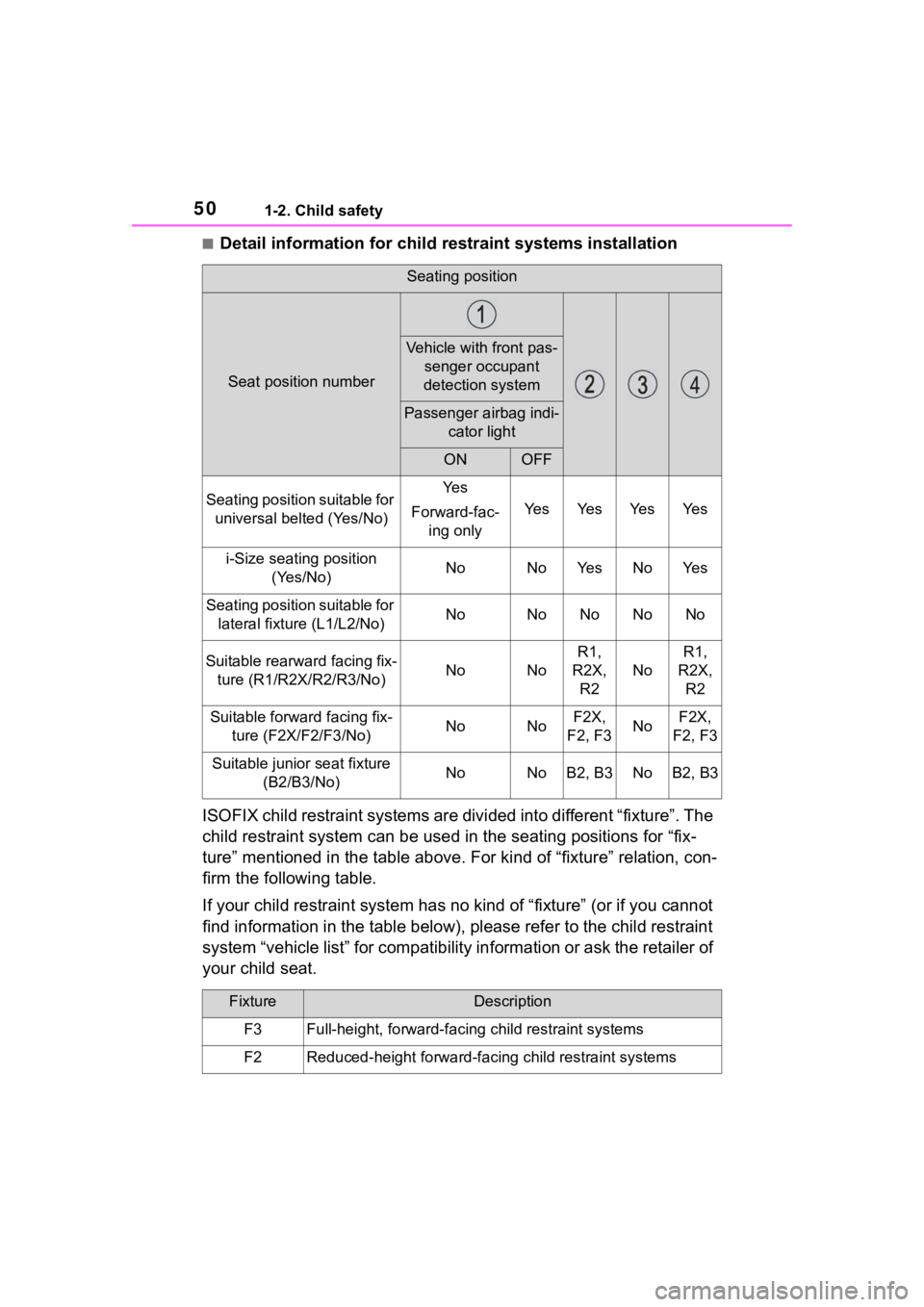
■Detail information for child restraint systems installation
ISOFIX child restraint systems a re divided into different “fixture”. The
child restraint system can be used in the seating positions for “fix-
ture” mentioned in the table above. For kind of “fixture” relat ion, con-
firm the following table.
If your child restraint system has no kind of “fixture” (or if you cannot
find information in the table below), please refer to the child restraint
system “vehicle list” for compat ibility information or ask the retailer of
your child seat.
Seating position
Seat position number
Vehicle with front pas- senger occupant
detection system
Passenger airbag indi- cator light
ONOFF
Seating position suitable for universal belted (Yes/No)Ye s
Forward-fac- ing only
Ye sYe sYe sYe s
i-Size seating position (Yes/No)NoNoYe sNoYe s
Seating position suitable for lateral fixture (L1/L2/No)NoNoNoNoNo
Suitable rearward facing fix-ture (R1/R2X/R2/R3/No)NoNo
R1,
R2X, R2
No
R1,
R2X, R2
Suitable forwa rd facing fix-
ture (F2X/F2/F3/No)NoNoF2X,
F2, F3NoF2X,
F2, F3
Suitable junior seat fixture (B2/B3/No)NoNoB2, B3NoB2, B3
FixtureDescription
F3Full-height, forward-facing child restraint systems
F2Reduced-height forward-faci ng child restraint systems
Page 51 of 500
511-2. Child safety
1
For safety and security
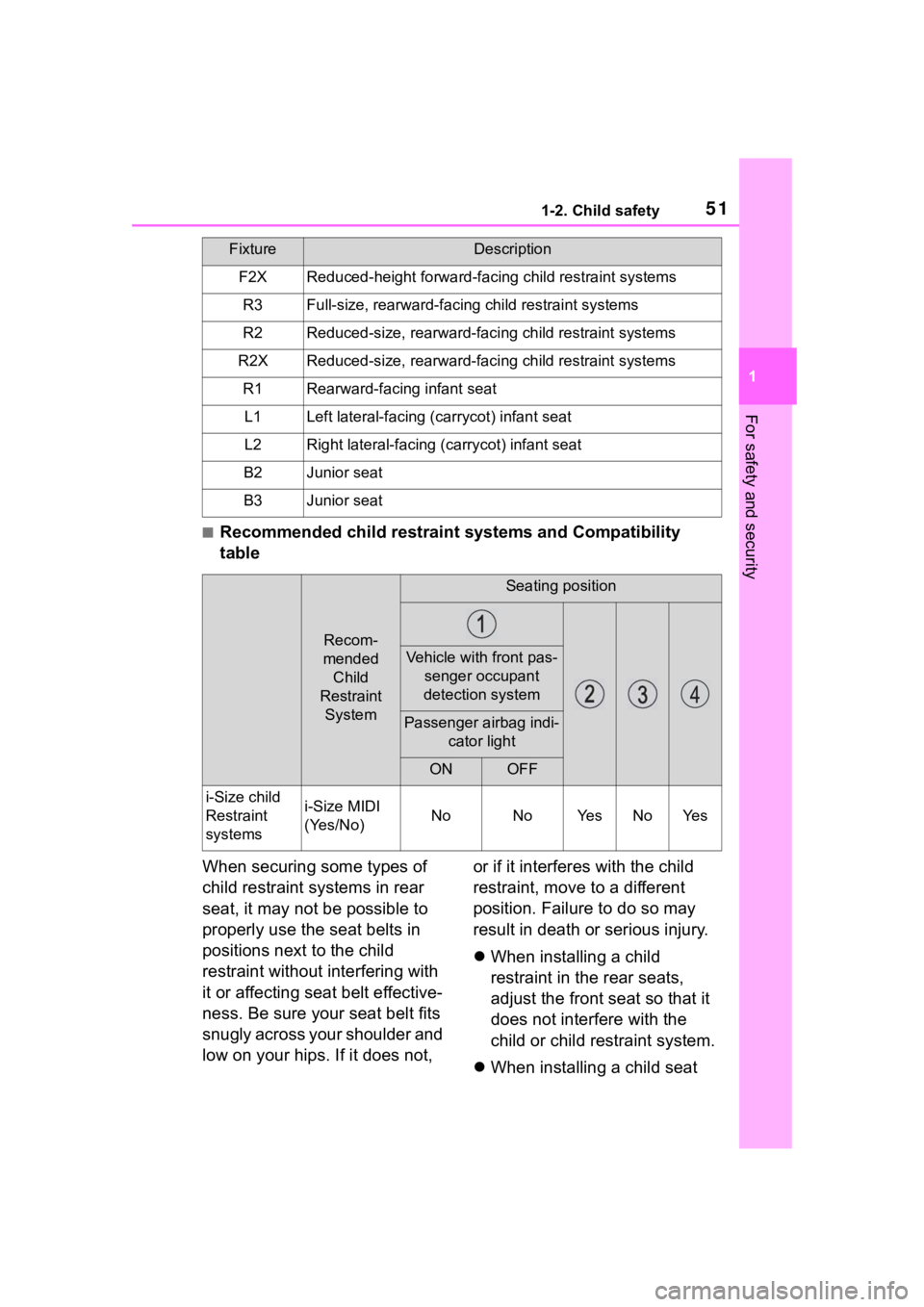
■Recommended child restraint systems and Compatibility
table
When securing some types of
child restraint systems in rear
seat, it may not be possible to
properly use the seat belts in
positions next to the child
restraint without interfering with
it or affecting seat belt effective-
ness. Be sure your seat belt fits
snugly across your shoulder and
low on your hips. If it does not, or if it interferes with the child
restraint, move to a different
position. Failure to do so may
result in death or serious injury.
When installing a child
restraint in the rear seats,
adjust the front seat so that it
does not interfere with the
child or child restraint system.
When installing a child seat
F2XReduced-height forward-faci ng child restraint systems
R3Full-size, rearward-facing child restraint systems
R2Reduced-size, rearward-facing child restraint systems
R2XReduced-size, rearward-facing child restraint systems
R1Rearward-facing infant seat
L1Left lateral-facing (carrycot) infant seat
L2Right lateral-facing ( carrycot) infant seat
B2Junior seat
B3Junior seat
Recom-
mended Child
Restraint System
Seating position
Vehicle with front pas- senger occupant
detection system
Passenger airbag indi- cator light
ONOFF
i-Size child
Restraint
systemsi-Size MIDI
(Yes/No)NoNoYe sNoYe s
FixtureDescription
Page 64 of 500
641-3. Emergency assistance
1-3.Emergency assistance
*: If equipped
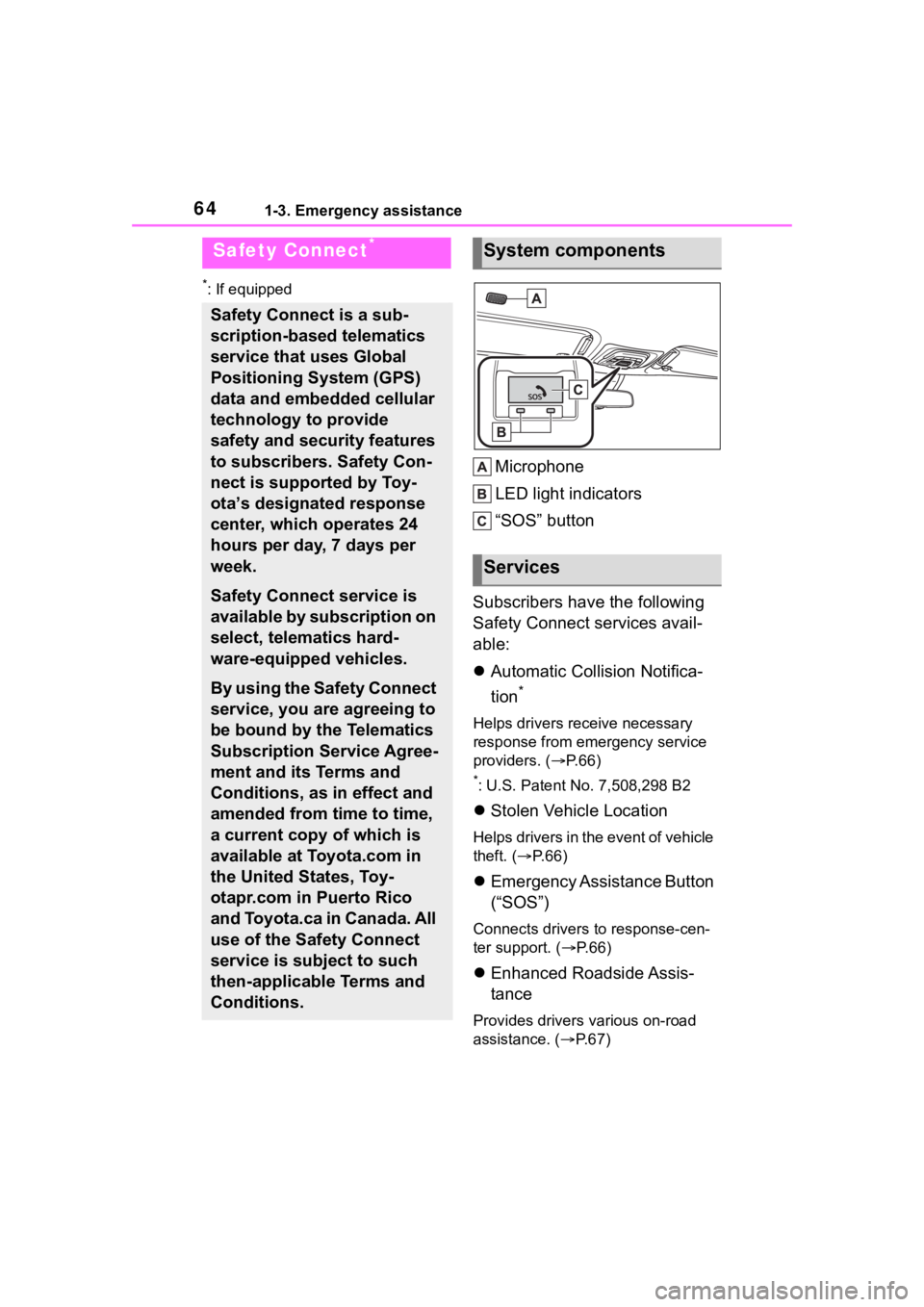
Microphone
LED light indicators
“SOS” button
Subscribers have the following
Safety Connect services avail-
able:
Automatic Collision Notifica-
tion
*
Helps drivers receive necessary
response from emergency service
providers. ( P. 6 6 )
*: U.S. Patent No. 7,508,298 B2
Stolen Vehicle Location
Helps drivers in the event of vehicle
theft. ( P. 6 6 )
Emergency Assistance Button
(“SOS”)
Connects drivers to response-cen-
ter support. ( P. 6 6 )
Enhanced Roadside Assis-
tance
Provides drivers various on-road
assistance. ( P.67)
Safety Connect*
Safety Connect is a sub-
scription-based telematics
service that uses Global
Positioning System (GPS)
data and embedded cellular
technology to provide
safety and security features
to subscribers. Safety Con-
nect is supported by Toy-
ota’s designated response
center, which operates 24
hours per day, 7 days per
week.
Safety Connect service is
available by subscription on
select, telematics hard-
ware-equipped vehicles.
By using the Safety Connect
service, you are agreeing to
be bound by the Telematics
Subscription Service Agree-
ment and its Terms and
Conditions, as in effect and
amended from time to time,
a current copy of which is
available at Toyota.com in
the United States, Toy-
otapr.com in Puerto Rico
and Toyota.ca in Canada. All
use of the Safety Connect
service is subject to such
then-applicable Terms and
Conditions.
System components
Services
Page 65 of 500
651-3. Emergency assistance
1
For safety and security
After you have signed the
Telematics Subscription Service
Agreement and are enrolled,
you can begin receiving ser-
vices.
A variety of subscription terms
are available for purchase. Con-
tact your Toyota dealer, call the
following appropriate Customer
Experience Center or push the
“SOS” button in your vehicle for
further subscription details.
• The United States
1-800-331-4331
• Canada
1-888-869-6828
•Puerto Rico
1-877-855-8377
■Safety Connect Services Infor-
mation
●Phone calls using the vehicle’s
Bluetooth® technology will not be
possible when Safety Connect is
active and in use.
●Safety Connect is available begin-
ning Fall 2009 on select Toyota
models (in the contiguous United
States only). Contact with the
Safety Connect response center
is dependent upon the telematics
device being in operative condi-
tion, cellular connection availabil-
ity, and GPS satellite signal
reception, which can limit the abil-
ity to reach the response center or
receive emergency service sup-
port. Enrollment and Telematics
Subscription Service Agreement
are required. A variety of subscrip-
tion terms are available; charges
vary by subscription term selected
and location.
●Automatic Collision Notification,
Emergency Assistance and Stolen
Vehicle Location are available in
the United States, including
Hawaii and Alaska , Puerto Rico
and Canada, and Enhanced
Roadside Assist ance are avail-
able in the United States, Puerto
Rico and Canada.
●Automatic Collision Notification,
Emergency Assistance, Stolen
Vehicle and Enhanced Road
Assistance are not available in the
U.S. Virgin Islands.
For vehicles first sold in the U.S.
Virgin Islands, no Safety Connect
services will function in or outside
the U.S. Virgin Islands.
●Safety Connect services are not
subject to section 255 of the Tele-
communications Act and the
device is not TTY compatible.
■Languages
The Safety Connect response cen-
ter will offer suppor t in multiple lan-
guages.
The Safety Connect system will
offer voice prompts in English,
Spanish, and French. Please indi-
cate your language of choice when
enrolling.
■When contacting the response
center
You may be unable to contact the
response center if the network is
busy.
When the engine switch is
turned to ON, the red indicator
light comes on for 2 seconds
then turns off. Afterward, the
green indicator light comes on,
indicating that the service is
active.
Subscription
Safety Connect LED light
Indicators
Page 66 of 500
661-3. Emergency assistance
The following indicator light pat-
terns indicate specific system
usage conditions:
Green indicator light on =
Active service
Green indicator light flashing
= Safety Connect call in pro-
cess
Red indicator light (except at
vehicle start-up) = System
malfunction (contact your Toy-
ota dealer)
No indicator light (off) =
Safety Connect service not
active
■Automatic Collision Notifi-
cation
In case of either airbag deploy-
ment or severe rear-end colli-
sion, the system is designed to
automatically call the response
center. The responding agent
receives the vehicle’s location
and attempts to speak with the
vehicle occupants to assess the
level of emergency. If the occu-
pants are unable to communi-
cate, the agent automatically
treats the call as an emergency,
contacts the nearest emer-
gency services provider to
describe the situation, and
requests that assistance be sent
to the location.
■Stolen Vehicle Location
If your vehicle is stolen, Safety
Connect can work with local
authorities to assist them in
locating and recovering the
vehicle. After filing a police
report, call the Customer Experi-
ence Center at 1-800-331-4331
in the United States,
1-877-855-8377 in Puerto Rico
or 1- 888-869-6828 in Canada,
and follow the prompts for
Safety Connect to initiate this
service.
In addition to assisting law
enforcement with recovery of a
stolen vehicle, Safety-Con-
nect-equipped vehicle location
data may, under certain circum-
stances, be shared with third
parties to locate your vehicle.
Further information is available
at Toyota.com in the United
States, Toyotapr.com in Puerto
Rico and Toyota.ca in Canada.
■Emergency Assistance But-
ton (“SOS”)
In the event of an emergency on
the road, push the “SOS” button
to reach the Safety Connect
response center. The answer-
ing agent will determine your
vehicle’s location, assess the
emergency, and dispatch the
necessary assistance required.
If you accidentally press the “SOS”
button, tell the response-center
agent that you are not experiencing
an emergency.
Safety Connect services
Page 68 of 500
681-4. Theft deterrent system
1-4.Theft deterrent system
Vehicles without a smart key
system
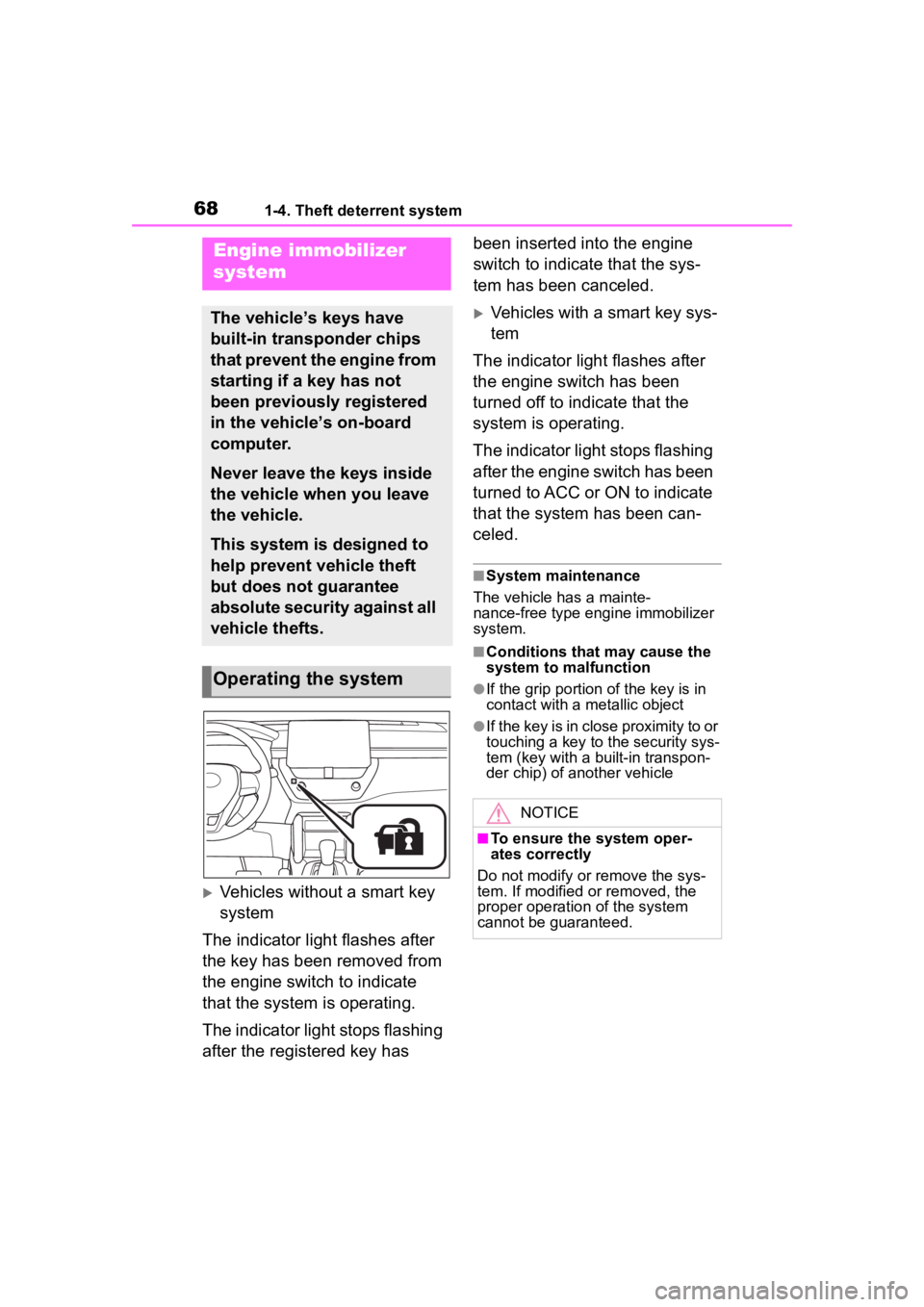
The indicator light flashes after
the key has been removed from
the engine switch to indicate
that the system is operating.
The indicator light stops flashing
after the registered key has been inserted into the engine
switch to indicate that the sys-
tem has been canceled.
Vehicles with a smart key sys-
tem
The indicator light flashes after
the engine switch has been
turned off to indicate that the
system is operating.
The indicator light stops flashing
after the engine switch has been
turned to ACC or ON to indicate
that the system has been can-
celed.
■System maintenance
The vehicle has a mainte-
nance-free type engine immobilizer
system.
■Conditions that may cause the
system to malfunction
●If the grip portion of the key is in
contact with a metallic object
●If the key is in close proximity to or
touching a key to the security sys-
tem (key with a built-in transpon-
der chip) of another vehicle
Engine immobilizer
system
The vehicle’s keys have
built-in transponder chips
that prevent the engine from
starting if a key has not
been previously registered
in the vehicle’s on-board
computer.
Never leave the keys inside
the vehicle when you leave
the vehicle.
This system is designed to
help prevent vehicle theft
but does not guarantee
absolute security against all
vehicle thefts.
Operating the system
NOTICE
■To ensure the system oper-
ates correctly
Do not modify or remove the sys-
tem. If modified or removed, the
proper operation of the system
cannot be guaranteed.
Page 69 of 500
691-4. Theft deterrent system
1
For safety and security
*: If equipped
■Items to check before lock-
ing the vehicle
To prevent unexpected trigger-
ing of the alarm and vehicle
theft, make sure of the following:
Nobody is in the vehicle.
The windows and moon roof
(if equipped) are closed
before the alarm is set.
No valuables or other per-
sonal items are left in the
vehicle.
■Setting
Close the doors and hood, and
lock all the doors. The system
will set automatically after 30
seconds.
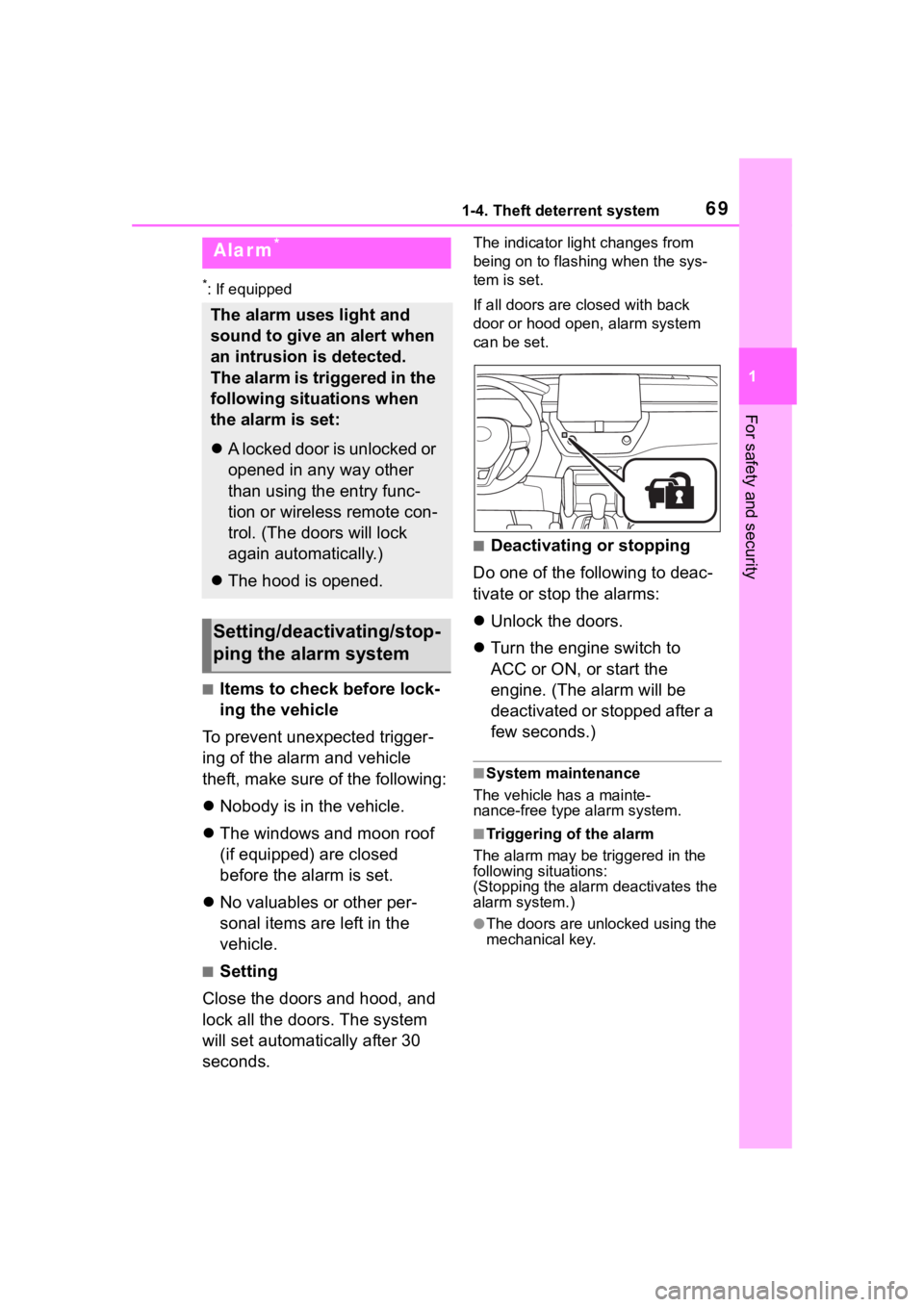
The indicator light changes from
being on to flashing when the sys-
tem is set.
If all doors are cl osed with back
door or hood open, alarm system
can be set.
■Deactivating or stopping
Do one of the following to deac-
tivate or stop the alarms:
Unlock the doors.
Turn the engine switch to
ACC or ON, or start the
engine. (The alarm will be
deactivated or stopped after a
few seconds.)
■System maintenance
The vehicle has a mainte-
nance-free type alarm system.
■Triggering of the alarm
The alarm may be triggered in the
following situations:
(Stopping the alarm deactivates the
alarm system.)
●The doors are unlocked using the
mechanical key.
Alarm*
The alarm uses light and
sound to give an alert when
an intrusion is detected.
The alarm is triggered in the
following situations when
the alarm is set:
A locked door is unlocked or
opened in any way other
than using the entry func-
tion or wireless remote con-
trol. (The doors will lock
again automatically.)
The hood is opened.
Setting/deactivating/stop-
ping the alarm system
Page 71 of 500
71
2
2
Vehicle status information and indicators
Vehicle status informationand indicators
.2-1. Instrument cluster
Warning lights and indica-tors ............................... 72
Gauges and meters (4.2-inch display) .......... 76
Gauges and meters (7-inch display) ......................... 79
Multi-information display (4.2-inch display) .......... 82
Multi-information display (7-inch display) ............. 89
Fuel consumption informa- tion ............................... 95
Page 72 of 500
722-1. Instrument cluster
2-1.Instrument cluster
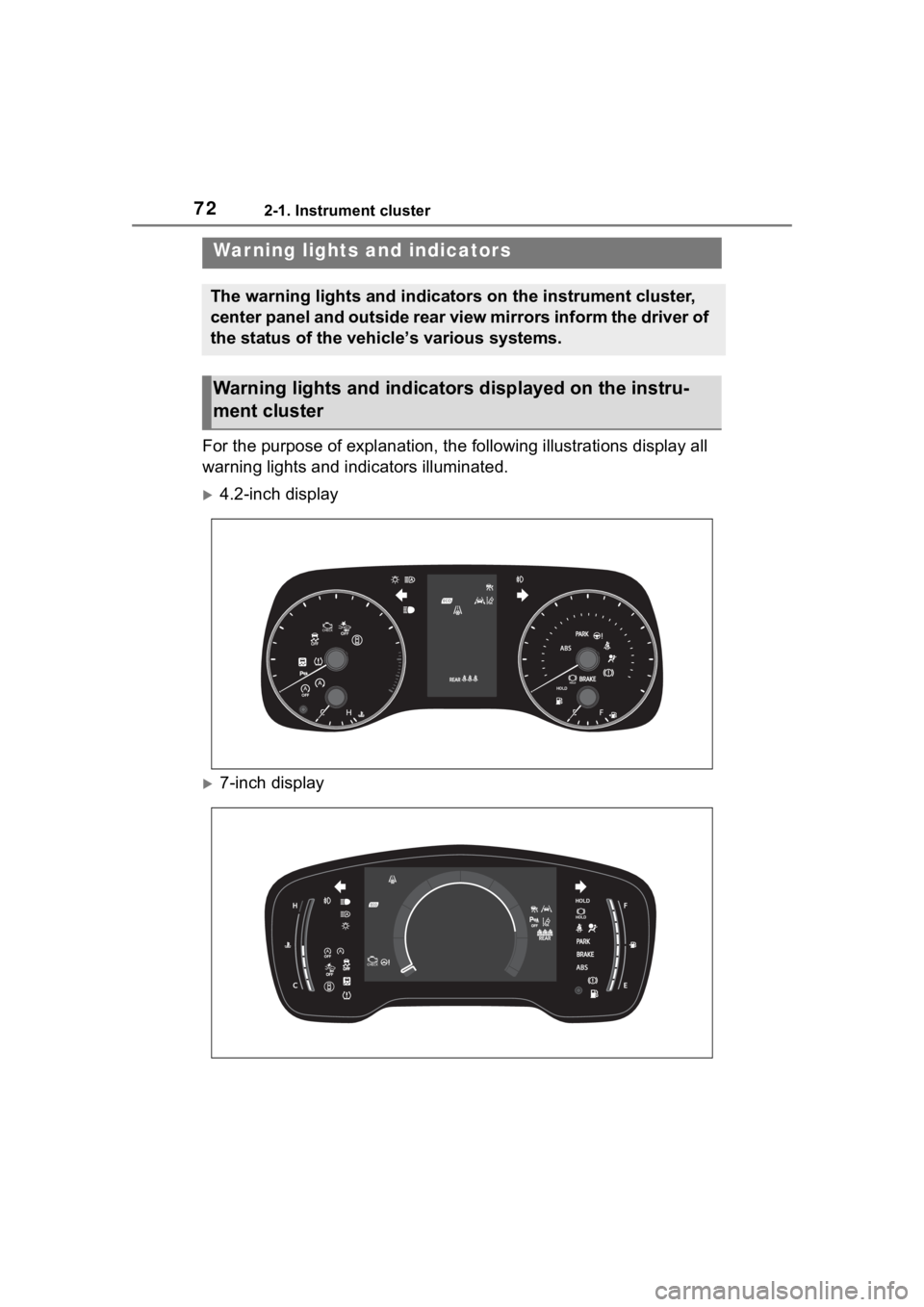
For the purpose of explanation, the following illustrations display all
warning lights and indicators illuminated.
4.2-inch display
7-inch display
War ning lights and indicators
The warning lights and indicators on the instrument cluster,
center panel and outside rear view mirrors inform the driver of
the status of the vehicle’s various systems.
Warning lights and indicators displayed on the instru-
ment cluster
Page 73 of 500
732-1. Instrument cluster
2
Vehicle status information and indicators
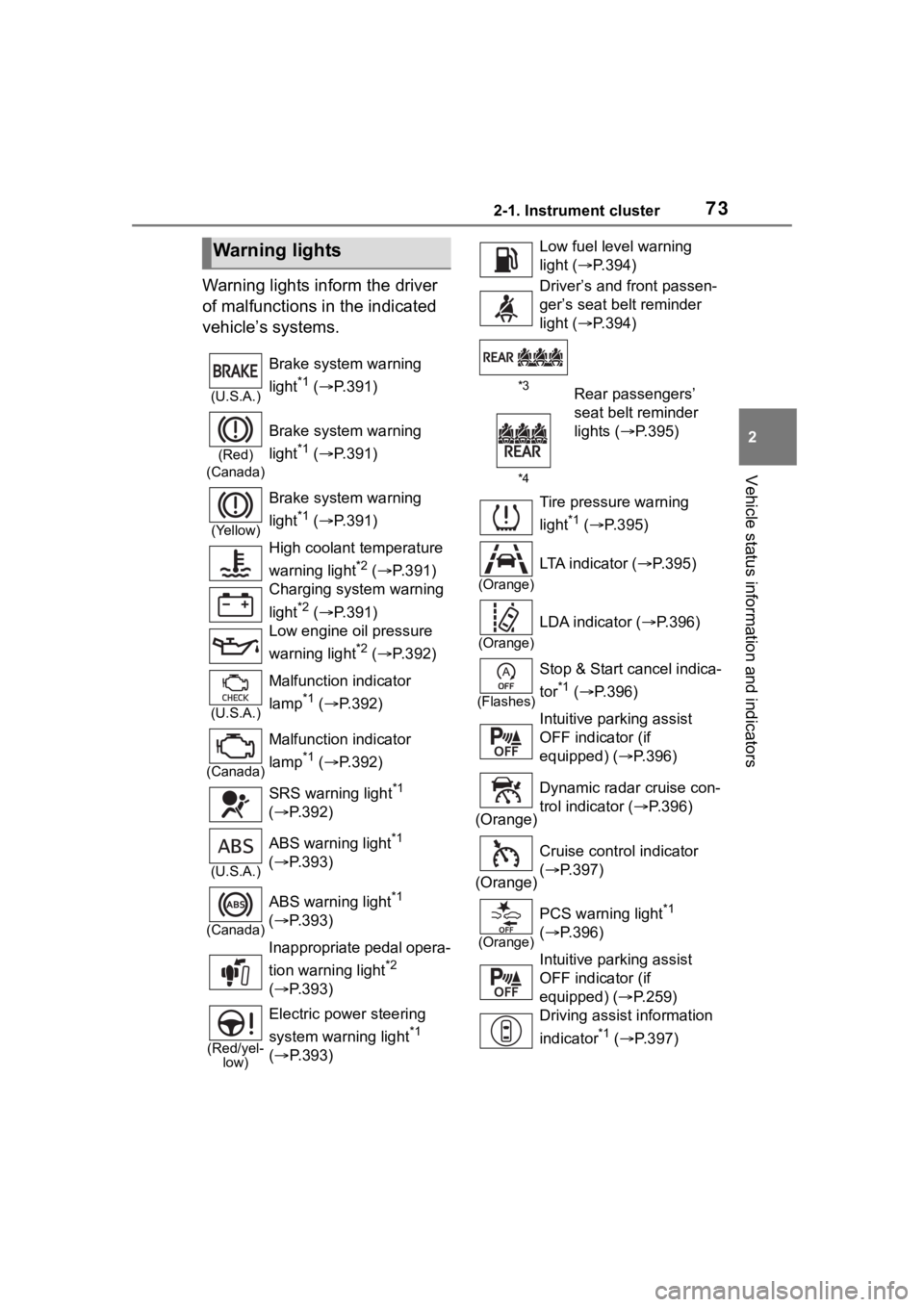
Warning lights inform the driver
of malfunctions in the indicated
vehicle’s systems.
Warning lights
(U.S.A.)
Brake system warning
light
*1 ( P.391)
(Red)
(Canada)
Brake system warning
light
*1 ( P.391)
(Yellow)
Brake system warning
light
*1 ( P.391)
High coolant temperature
warning light
*2 ( P.391)
Charging system warning
light
*2 ( P.391)
Low engine oil pressure
warning light
*2 ( P.392)
(U.S.A.)
Malfunction indicator
lamp
*1 ( P.392)
(Canada)
Malfunction indicator
lamp
*1 ( P.392)
SRS warning light
*1
( P.392)
(U.S.A.)
ABS warning light*1
( P.393)
(Canada)
ABS warning light*1
( P.393)
Inappropriate pedal opera-
tion warning light
*2
( P.393)
(Red/yel-
low)
Electric power steering
system warning light
*1
( P.393)
Low fuel leve l warning
light ( P.394)
Driver’s and front passen-
ger’s seat belt reminder
light ( P.394)
*3
*4Rear passengers’
seat belt reminder
lights ( P.395)
Tire pressure warning
light
*1 ( P.395)
(Orange)
LTA indicator ( P.395)
(Orange)
LDA indicator ( P.396)
(Flashes)
Stop & Start cancel indica-
tor
*1 ( P.396)
Intuitive parking assist
OFF indicator (if
equipped) ( P.396)
(Orange) Dynamic radar cruise con-
trol indicator (
P.396)
(Orange) Cruise control indicator
(
P.397)
(Orange)
PCS warning light*1
( P.396)
Intuitive parking assist
OFF indicator (if
equipped) ( P.259)
Driving assist information
indicator
*1 ( P.397)