light TOYOTA COROLLA CROSS 2023 Owner's Guide
[x] Cancel search | Manufacturer: TOYOTA, Model Year: 2023, Model line: COROLLA CROSS, Model: TOYOTA COROLLA CROSS 2023Pages: 500, PDF Size: 15.11 MB
Page 74 of 500
742-1. Instrument cluster
*1: These lights come on when the engine switch is turned to ON to
indicate that a system check is
being performed. They will turn
off after the engine is started, or
after a few seconds. There may
be a malfunction in a system if
the lights do not come on, or turn
off. Have the vehicle inspected
by your Toyota dealer.
*2: This light illuminates on the multi-information display.
*3: 4.2-inch display.
*4: 7-inch display.
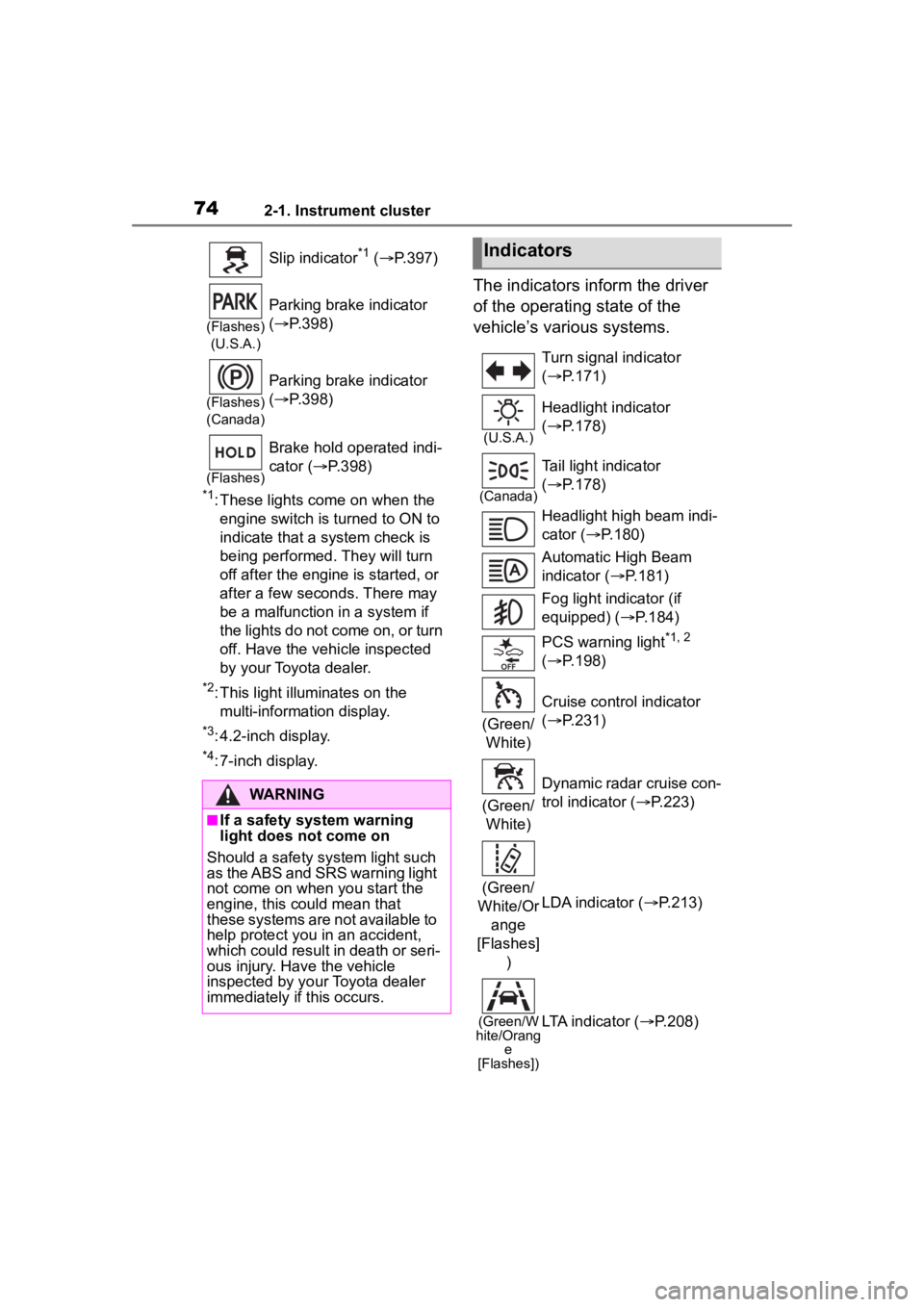
The indicators inform the driver
of the operating state of the
vehicle’s various systems.
Slip indicator*1 ( P.397)
(Flashes)
(U.S.A.)
Parking brake indicator
( P.398)
(Flashes)
(Canada)
Parking brake indicator
( P.398)
(Flashes)
Brake hold operated indi-
cator ( P.398)
WARNING
■If a safety system warning
light does not come on
Should a safety system light such
as the ABS and SRS warning light
not come on when you start the
engine, this could mean that
these systems are not available to
help protect you in an accident,
which could result in death or seri-
ous injury. Have the vehicle
inspected by your Toyota dealer
immediately if this occurs.
Indicators
Turn signal indicator
( P.171)
(U.S.A.)
Headlight indicator
( P.178)
(Canada)
Tail light indicator
( P.178)
Headlight high beam indi-
cator ( P.180)
Automatic High Beam
indicator ( P.181)
Fog light indicator (if
equipped) ( P.184)
PCS warning light
*1, 2
( P.198)
(Green/ White) Cruise control indicator
(
P.231)
(Green/ White) Dynamic radar cruise con-
trol indicator (
P.223)
(Green/
White/Or ange
[Flashes] ) LDA indicator (
P.213)
(Green/W
hite/Orang e
[Flashes])LTA indicator ( P.208)
Page 75 of 500
752-1. Instrument cluster
2
Vehicle status information and indicators
*1: These lights come on when the engine switch is turned to ON to
indicate that a system check is being performed.
They will turn
off after the engine is started, or
after a few seconds. There may
be a malfunction in a system if
the lights do not come on, or turn
off. Have the vehicle inspected
by your Toyota dealer.
*2: This light comes on when the system is turned off.
*3: This light illuminates on the out-side rear view mirrors.
*4: This light illuminates on the multi-information display.
*5: When the outside temperature is approximately 37°F (3°C) or
lower, this indicator will flash for
approximately 10 seconds, then
stay on.
*6: This light illuminates on the air conditioning operation panel.
*7: This light illumina tes on the front
interior/personal lights.
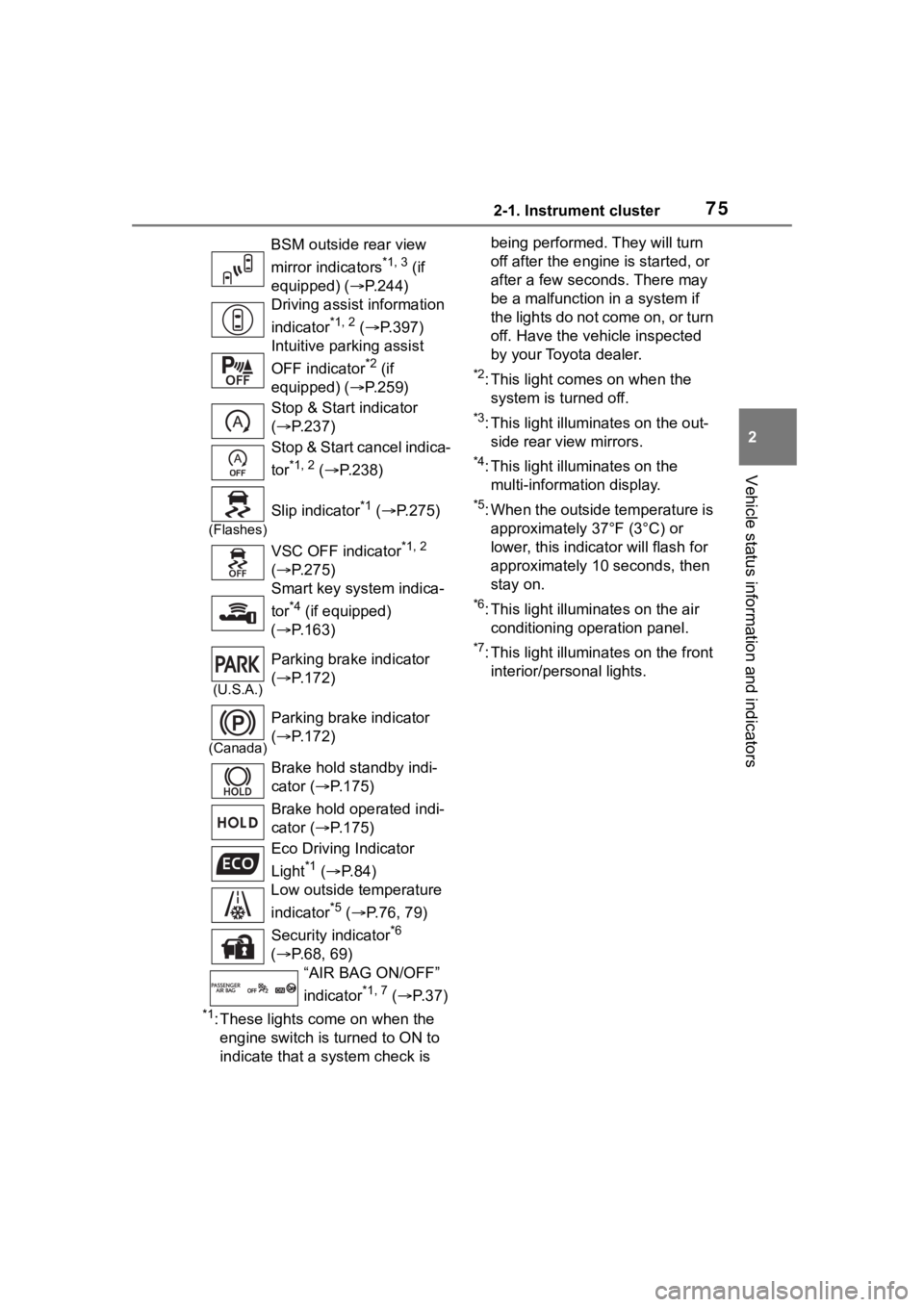
BSM outside rear view
mirror indicators
*1, 3 (if
equipped) ( P.244)
Driving assist information
indicator
*1, 2 ( P.397)
Intuitive parking assist
OFF indicator
*2 (if
equipped) ( P.259)
Stop & Start indicator
( P.237)
Stop & Start cancel indica-
tor
*1, 2 ( P.238)
(Flashes)
Slip indicator*1 ( P.275)
VSC OFF indicator
*1, 2
( P.275)
Smart key system indica-
tor
*4 (if equipped)
( P.163)
(U.S.A.)
Parking brake indicator
( P.172)
(Canada)
Parking brake indicator
( P.172)
Brake hold standby indi-
cator ( P.175)
Brake hold operated indi-
cator ( P.175)
Eco Driving Indicator
Light
*1 ( P. 8 4 )
Low outside temperature
indicator
*5 ( P.76, 79)
Security indicator
*6
( P.68, 69)
“AIR BAG ON/OFF”
indicator
*1, 7 ( P. 3 7 )
Page 78 of 500
782-1. Instrument cluster
different distances independently.
To reset, display the desired trip
meter and press and hold the dis-
play change button.
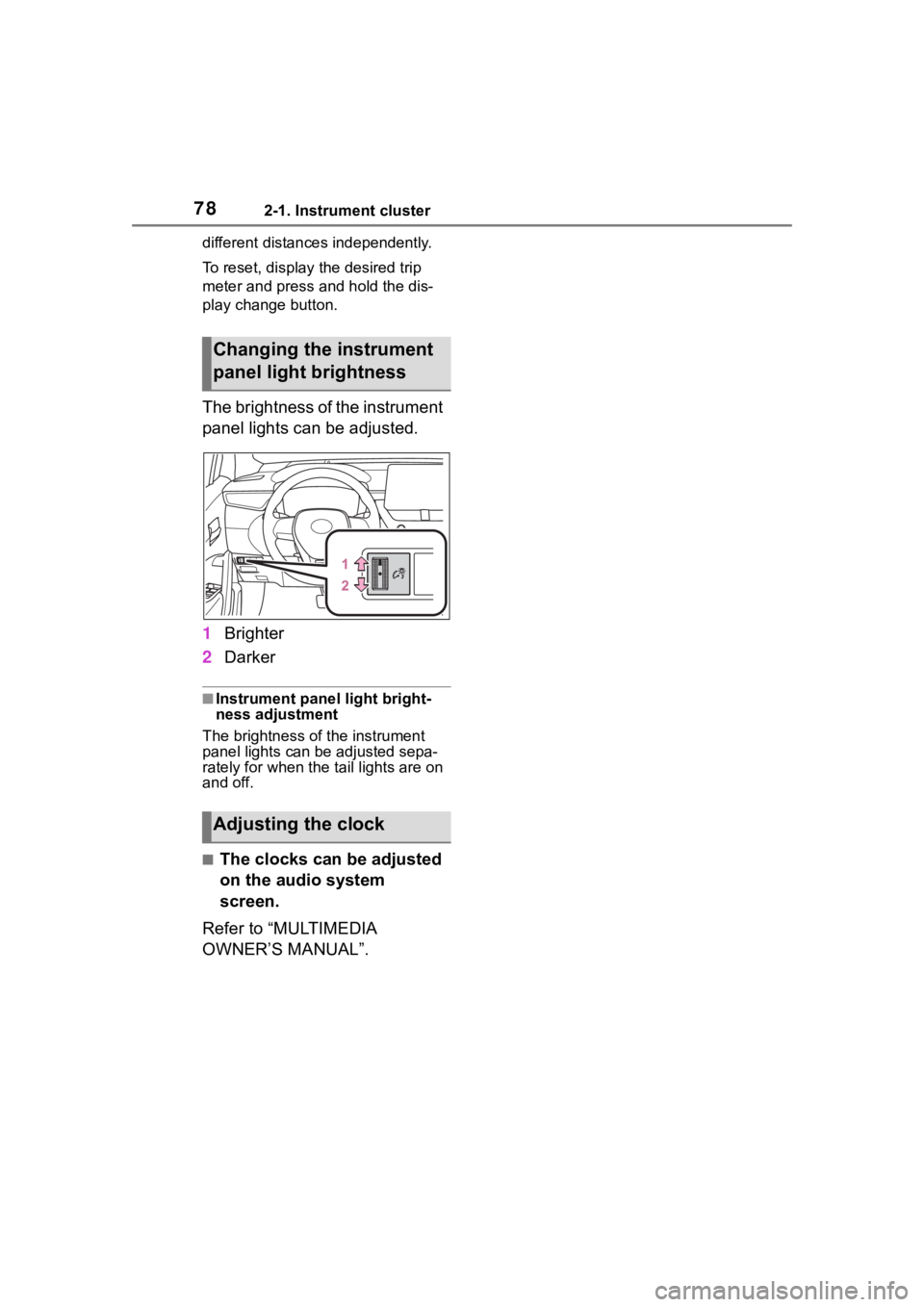
The brightness of the instrument
panel lights can be adjusted.
1Brighter
2 Darker
■Instrument panel light bright-
ness adjustment
The brightness of the instrument
panel lights can be adjusted sepa-
rately for when the tail lights are on
and off.
■The clocks can be adjusted
on the audio system
screen.
Refer to “MULTIMEDIA
OWNER’S MANUAL”.
Changing the instrument
panel light brightness
Adjusting the clock
Page 81 of 500
812-1. Instrument cluster
2
Vehicle status information and indicators
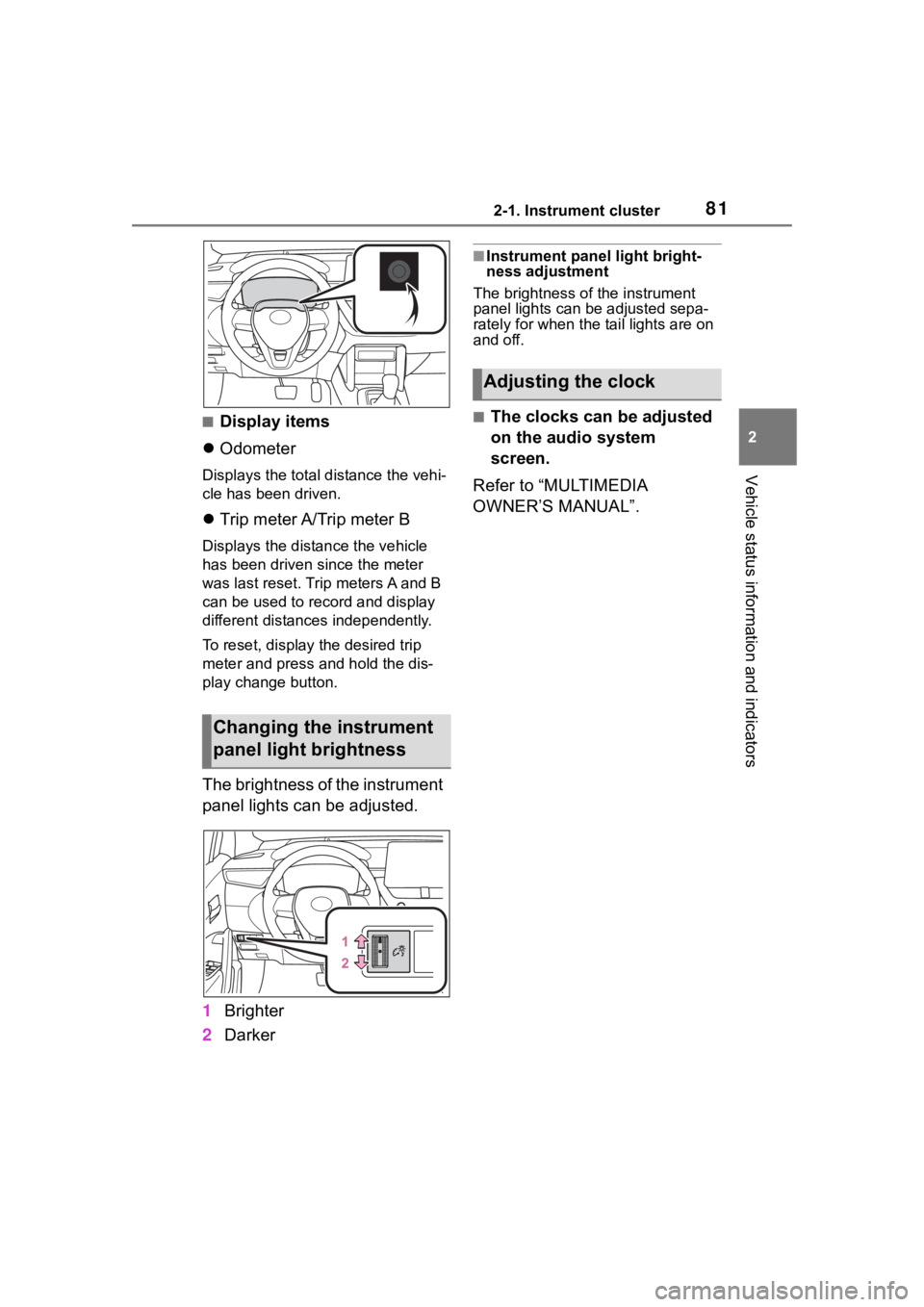
■Display items
Odometer
Displays the total distance the vehi-
cle has been driven.
Trip meter A/Trip meter B
Displays the distan ce the vehicle
has been driven si nce the meter
was last reset. Trip meters A and B
can be used to record and display
different distances independently.
To reset, display the desired trip
meter and press and hold the dis-
play change button.
The brightness of the instrument
panel lights can be adjusted.
1 Brighter
2 Darker
■Instrument panel light bright-
ness adjustment
The brightness of the instrument
panel lights can be adjusted sepa-
rately for when the tail lights are on
and off.
■The clocks can be adjusted
on the audio system
screen.
Refer to “MULTIMEDIA
OWNER’S MANUAL”.
Changing the instrument
panel light brightness
Adjusting the clock
Page 82 of 500
822-1. Instrument cluster
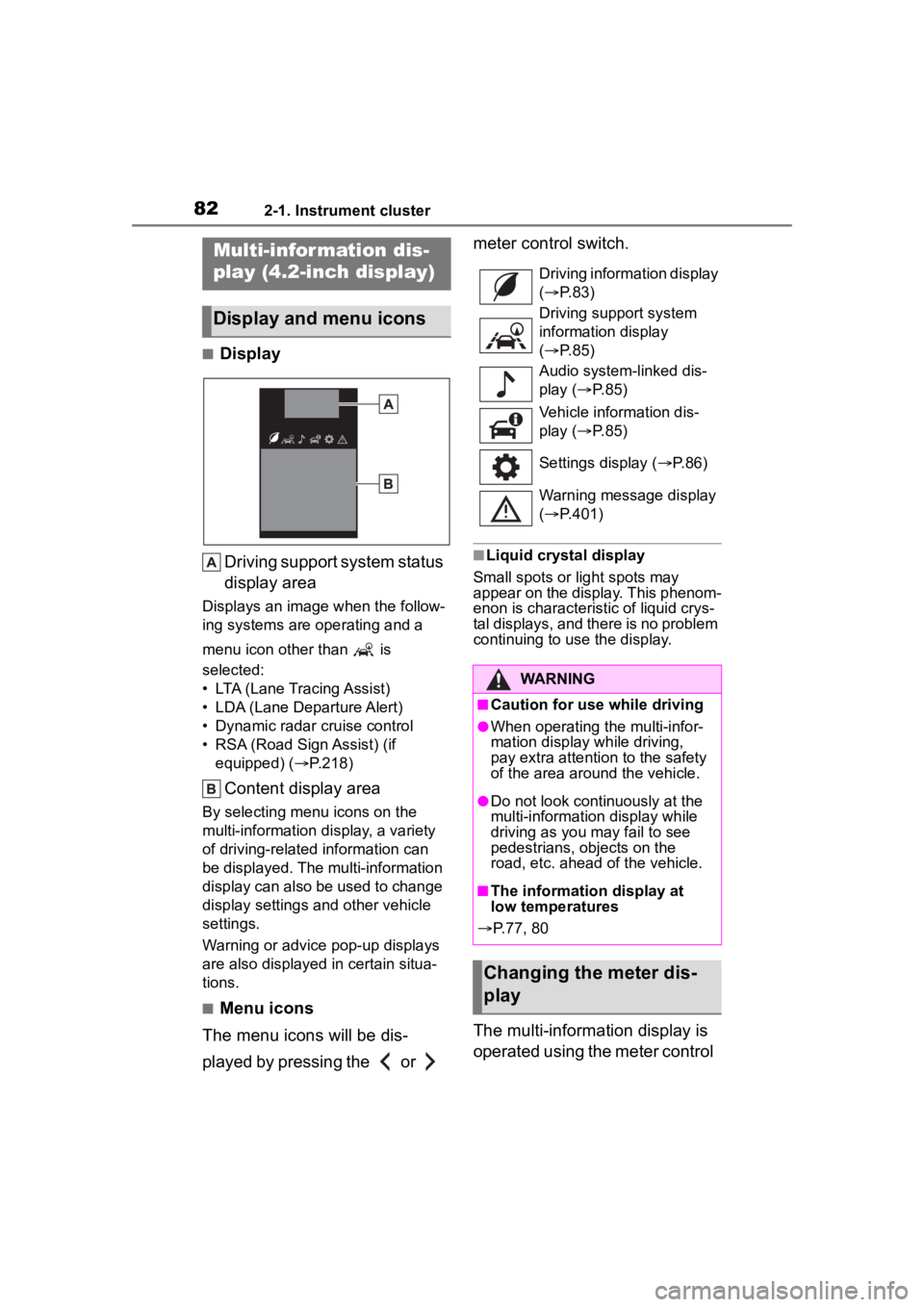
■DisplayDriving support system status
display area
Displays an image when the follow-
ing systems are operating and a
menu icon other than is
selected:
• LTA (Lane Tracing Assist)
• LDA (Lane Departure Alert)
• Dynamic radar cruise control
• RSA (Road Sign Assist) (if equipped) ( P.218)
Content display area
By selecting menu icons on the
multi-information display, a variety
of driving-related information can
be displayed. The multi-information
display can also be used to change
display settings and other vehicle
settings.
Warning or advice pop-up displays
are also displayed in certain situa-
tions.
■Menu icons
The menu icons will be dis-
played by pressing the or meter control switch.
■Liquid crystal display
Small spots or light spots may
appear on the display. This phenom-
enon is characteristic of liquid crys-
tal displays, and there is no problem
continuing to use the display.
The multi-information display is
operated using the meter control
Multi-infor mation dis-
play (4.2-inch display)
Display and menu icons
Driving information display
( P. 8 3 )
Driving support system
information display
( P. 8 5 )
Audio system-linked dis-
play ( P. 8 5 )
Vehicle information dis-
play ( P. 8 5 )
Settings display ( P.86)
Warning message display
( P.401)
WARNING
■Caution for use while driving
●When operating the multi-infor-
mation display while driving,
pay extra attention to the safety
of the area around the vehicle.
●Do not look continuously at the
multi-informatio n display while
driving as you may fail to see
pedestrians, objects on the
road, etc. ahead of the vehicle.
■The information display at
low temperatures
P.77, 80
Changing the meter dis-
play
Page 84 of 500
842-1. Instrument cluster
Driving range
Displays driving range with remain-
ing fuel.
This distance is computed based
on your average fuel consumption.
As a result, the actual distance that
can be driven may differ from that
displayed.
When only a small amount of fuel is
added to the tank, the display may
not be updated.
When refueling, turn the engine
switch off. If the vehicle is refueled
without turning the engine switch
off, the display may not be updated.
The average fuel economy dis-
play can be changed in .
( P. 8 6 )
Average fuel economy (after
start)
Displays the average fuel con-
sumption since engine start.
Average fuel economy (after
refuel)
Displays the average fuel con-
sumption since the vehicle was
refueled.
To reset the average fuel economy
display, press and hold the
meter control switch.
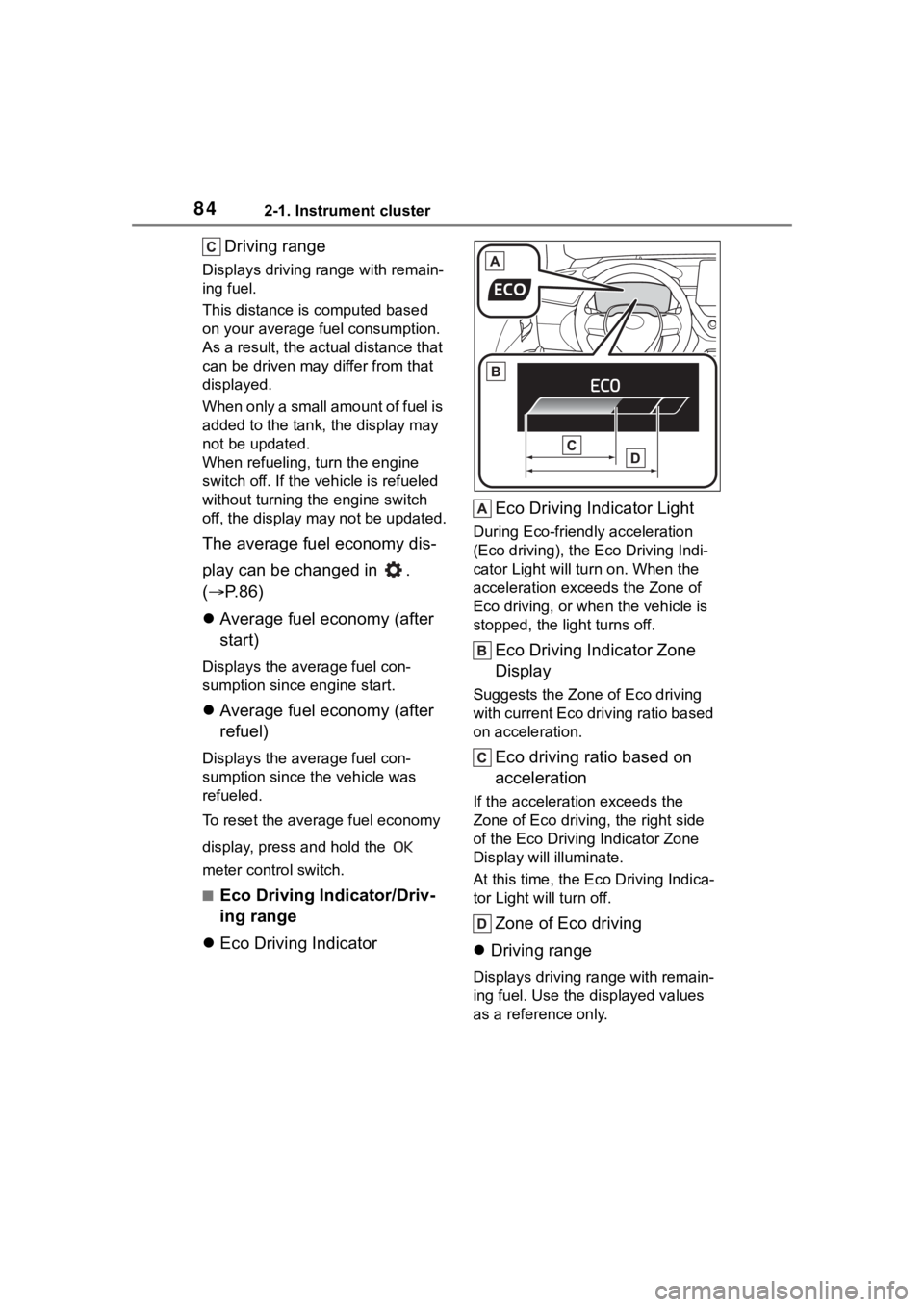
■Eco Driving Indicator/Driv-
ing range
Eco Driving Indicator Eco Driving Indicator Light
During Eco-friendly acceleration
(Eco driving), the Eco Driving Indi-
cator Light will tu
rn on. When the
acceleration exceeds the Zone of
Eco driving, or when the vehicle is
stopped, the light turns off.
Eco Driving Indicator Zone
Display
Suggests the Zone of Eco driving
with current Eco driving ratio based
on acceleration.
Eco driving ratio based on
acceleration
If the acceleration exceeds the
Zone of Eco driving, the right side
of the Eco Driving Indicator Zone
Display will illuminate.
At this time, the Ec o Driving Indica-
tor Light will turn off.
Zone of Eco driving
Driving range
Displays driving ra nge with remain-
ing fuel. Use the displayed values
as a reference only.
Page 86 of 500
862-1. Instrument cluster
type and drive information items
were selected in . (P.86)
After start
• Distance: Displays the distance
driven since e ngine start
• Elapsed time: Displays the elapsed time since engine start
• Average vehicle speed: Displays the average vehi cle speed since
engine start
After reset
• Distance: Displays the distance
driven since the display was
reset
*
• Elapsed time: Displays the elapsed time since the display
was reset
*
• Average vehicle speed: Displays the average vehi cle speed since
the display was reset
*
*
: To reset, display the desired item
and press and hold the
meter control switch.
■Tire pressure
P. 3 5 3
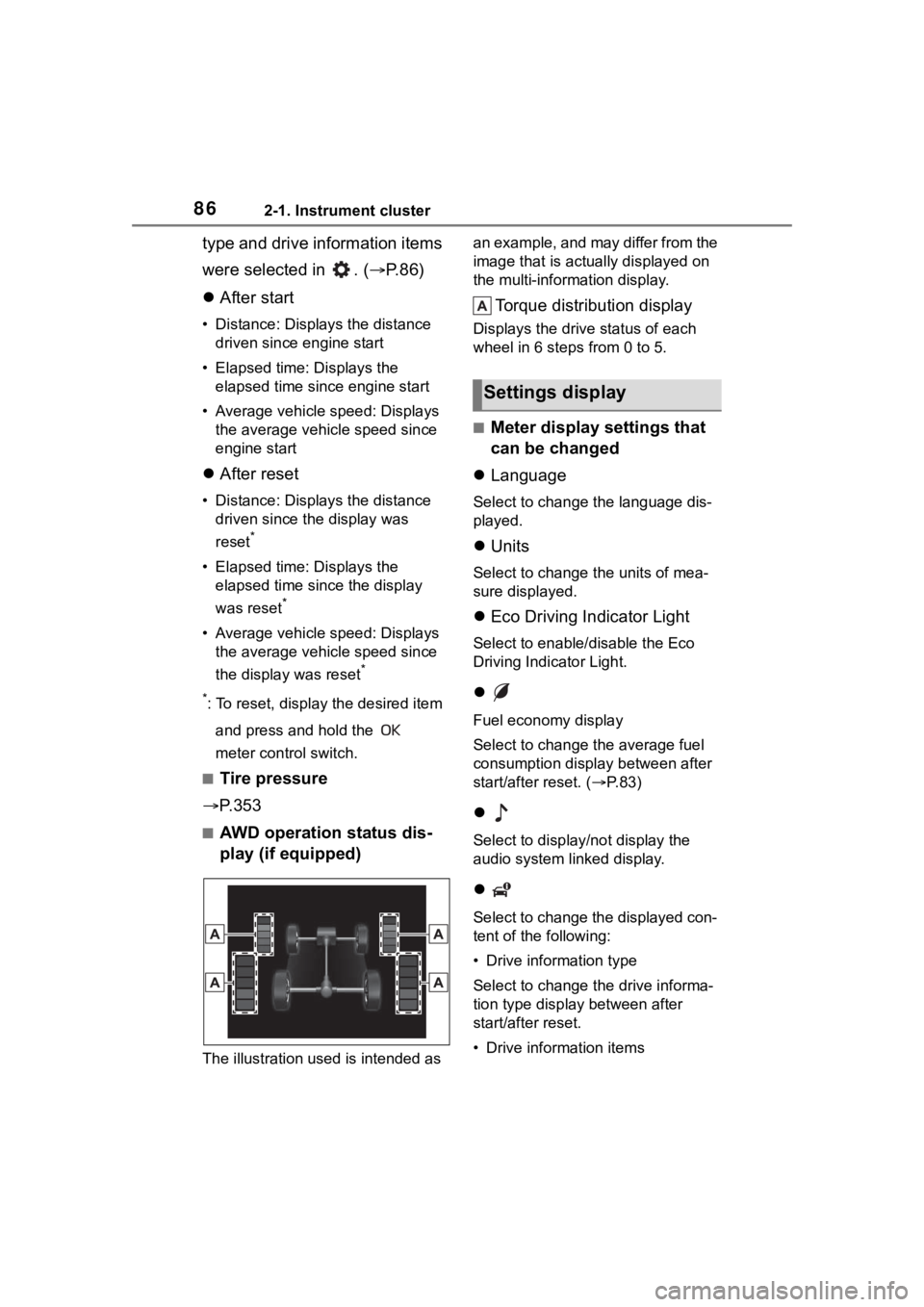
■AWD operation status dis-
play (if equipped)
The illustration used is intended as an example, and may differ from the
image that is actually displayed on
the multi-information display.
Torque distribution display
Displays the drive status of each
wheel in 6 steps from 0 to 5.
■Meter display settings that
can be changed
Language
Select to change the language dis-
played.
Units
Select to change the units of mea-
sure displayed.
Eco Driving Indicator Light
Select to enable/disable the Eco
Driving Indi cator Light.
Fuel economy display
Select to change the average fuel
consumption display between after
start/after reset. ( P. 8 3 )
Select to displa y/not display the
audio system linked display.
Select to change the displayed con-
tent of the following:
• Drive information type
Select to change the drive informa-
tion type display between after
start/after reset.
• Drive information items
Settings display
Page 88 of 500
882-1. Instrument cluster
To select a response to a dis-
played suggestion, use the
meter control switches.
■Suggestion to enable the
power back door (if
equipped)
If the power back door system is
disabled (setting on set to
off) and the power back door
switch on the instrument panel
is operated, a suggestion mes-
sage will be displayed asking if
you wish to enable the power
back door system.
To enable the power back door
system, select “Yes”.
After enabling the power back door
system, press the power back door
switch again to open or close the
power back door.
■Suggestion to turn off the
headlights
If the headlights are left on for a
certain amount of time after the
engine switch has been turned
off, if the headlight switch is in
the “AUTO” position, a sugges-
tion message will be displayed
asking if you wish to turn the
headlights off.
To turn the headlights off, select
“Yes”.
If the driver's door is opened after
the engine switch is turned off, this
suggestion message will not be dis-
played.
■Customization
Some functions can be customized.
( P.449)
Page 89 of 500
892-1. Instrument cluster
2
Vehicle status information and indicators
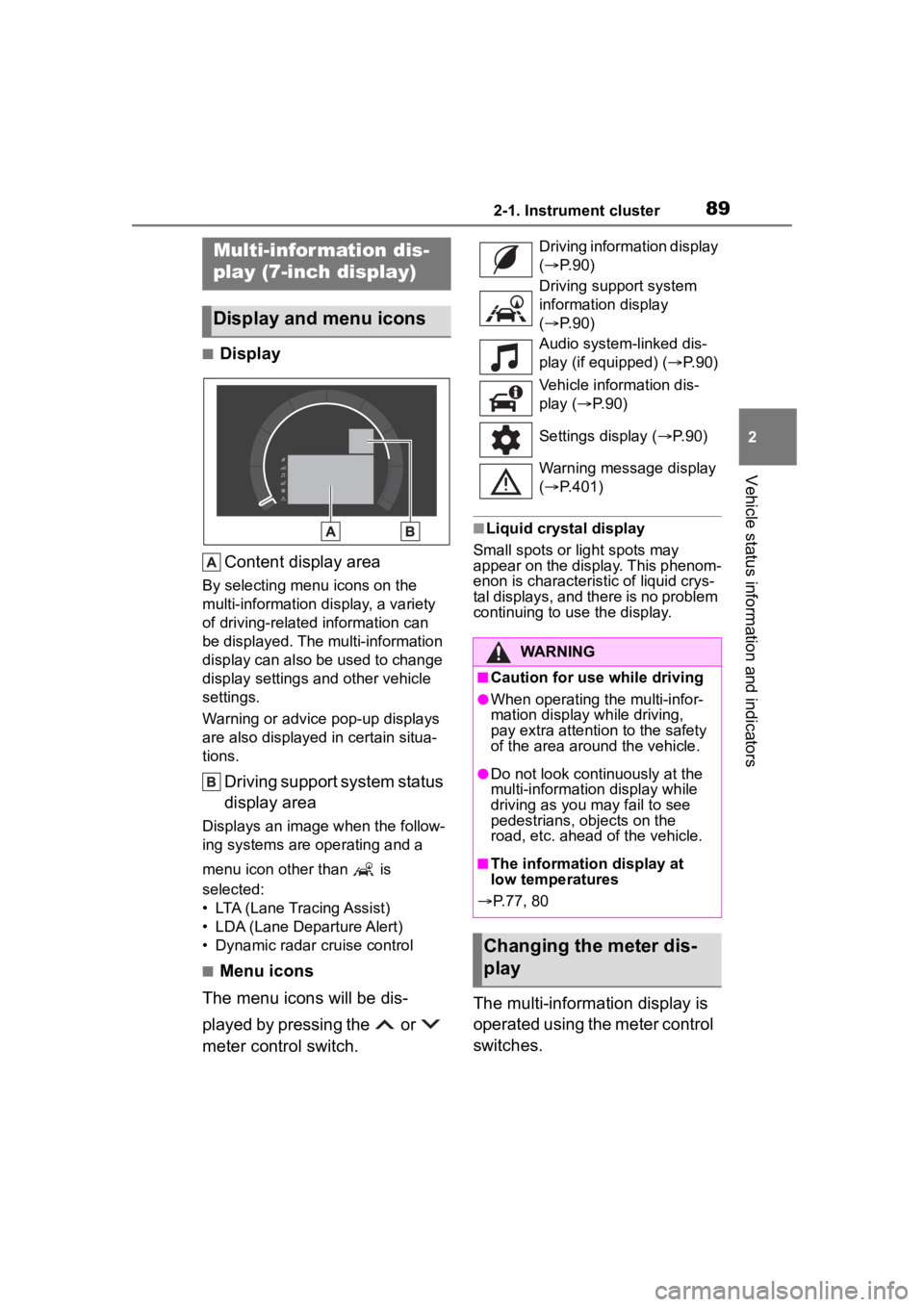
■DisplayContent display area
By selecting menu icons on the
multi-information display, a variety
of driving-related information can
be displayed. The multi-information
display can also be used to change
display settings and other vehicle
settings.
Warning or advice pop-up displays
are also displayed in certain situa-
tions.
Driving support system status
display area
Displays an image when the follow-
ing systems are operating and a
menu icon other than is
selected:
• LTA (Lane Tracing Assist)
• LDA (Lane Departure Alert)
• Dynamic radar cruise control
■Menu icons
The menu icons will be dis-
played by pressing the or
meter control switch.
■Liquid crystal display
Small spots or light spots may
appear on the display. This phenom-
enon is characteristic of liquid crys-
tal displays, and there is no problem
continuing to use the display.
The multi-information display is
operated using the meter control
switches.
Multi-infor mation dis-
play (7-inch display)
Display and menu icons
Driving information display
( P. 9 0 )
Driving support system
information display
( P. 9 0 )
Audio system-linked dis-
play (if equipped) ( P. 9 0 )
Vehicle information dis-
play ( P. 9 0 )
Settings display ( P.90)
Warning message display
( P.401)
WARNING
■Caution for use while driving
●When operating the multi-infor-
mation display while driving,
pay extra attention to the safety
of the area around the vehicle.
●Do not look continuously at the
multi-informatio n display while
driving as you may fail to see
pedestrians, objects on the
road, etc. ahead of the vehicle.
■The information display at
low temperatures
P.77, 80
Changing the meter dis-
play
Page 91 of 500
912-1. Instrument cluster
2
Vehicle status information and indicators
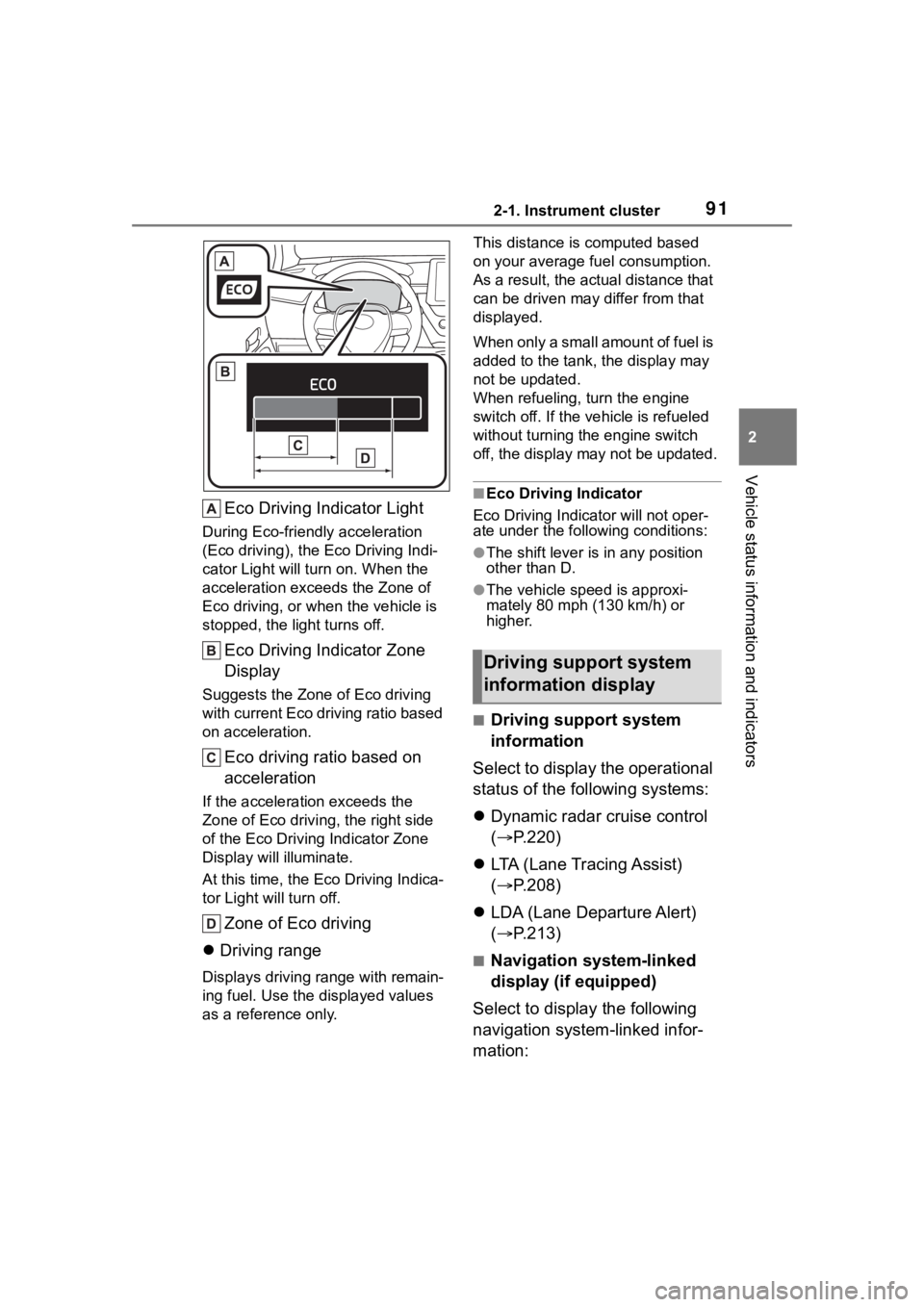
Eco Driving Indicator Light
During Eco-friendly acceleration
(Eco driving), the Eco Driving Indi-
cator Light will turn on. When the
acceleration exceeds the Zone of
Eco driving, or when the vehicle is
stopped, the light turns off.
Eco Driving Indicator Zone
Display
Suggests the Zone of Eco driving
with current Eco driving ratio based
on acceleration.
Eco driving ratio based on
acceleration
If the acceleration exceeds the
Zone of Eco driving, the right side
of the Eco Driving Indicator Zone
Display will illuminate.
At this time, the Eco Driving Indica-
tor Light will turn off.
Zone of Eco driving
Driving range
Displays driving range with remain-
ing fuel. Use the d isplayed values
as a reference only. This distance is computed based
on your average f
uel consumption.
As a result, the actual distance that
can be driven may differ from that
displayed.
When only a small amount of fuel is
added to the tank, the display may
not be updated.
When refueling, turn the engine
switch off. If the ve hicle is refueled
without turning the engine switch
off, the display may not be updated.
■Eco Driving Indicator
Eco Driving Indicator will not oper-
ate under the following conditions:
●The shift lever is in any position
other than D.
●The vehicle spe ed is approxi-
mately 80 mph (130 km/h) or
higher.
■Driving support system
information
Select to display the operational
status of the following systems:
Dynamic radar cruise control
( P.220)
LTA (Lane Tracing Assist)
( P.208)
LDA (Lane Departure Alert)
( P.213)
■Navigation system-linked
display (if equipped)
Select to display the following
navigation system-linked infor-
mation:
Driving support system
information display