change time TOYOTA COROLLA CROSS HYBRID 2023 User Guide
[x] Cancel search | Manufacturer: TOYOTA, Model Year: 2023, Model line: COROLLA CROSS HYBRID, Model: TOYOTA COROLLA CROSS HYBRID 2023Pages: 516, PDF Size: 15.96 MB
Page 101 of 516
1012-1. Instrument cluster
2
Vehicle status information and indicators
Zone of Eco acceleration
Displayed as a blue bar, and rep-
resents an estimated suitable
accelerator pedal operation range
for the current driving conditions,
such as starting off or cruising.
This display changes according to
situation, such as when starting off
or cruising.
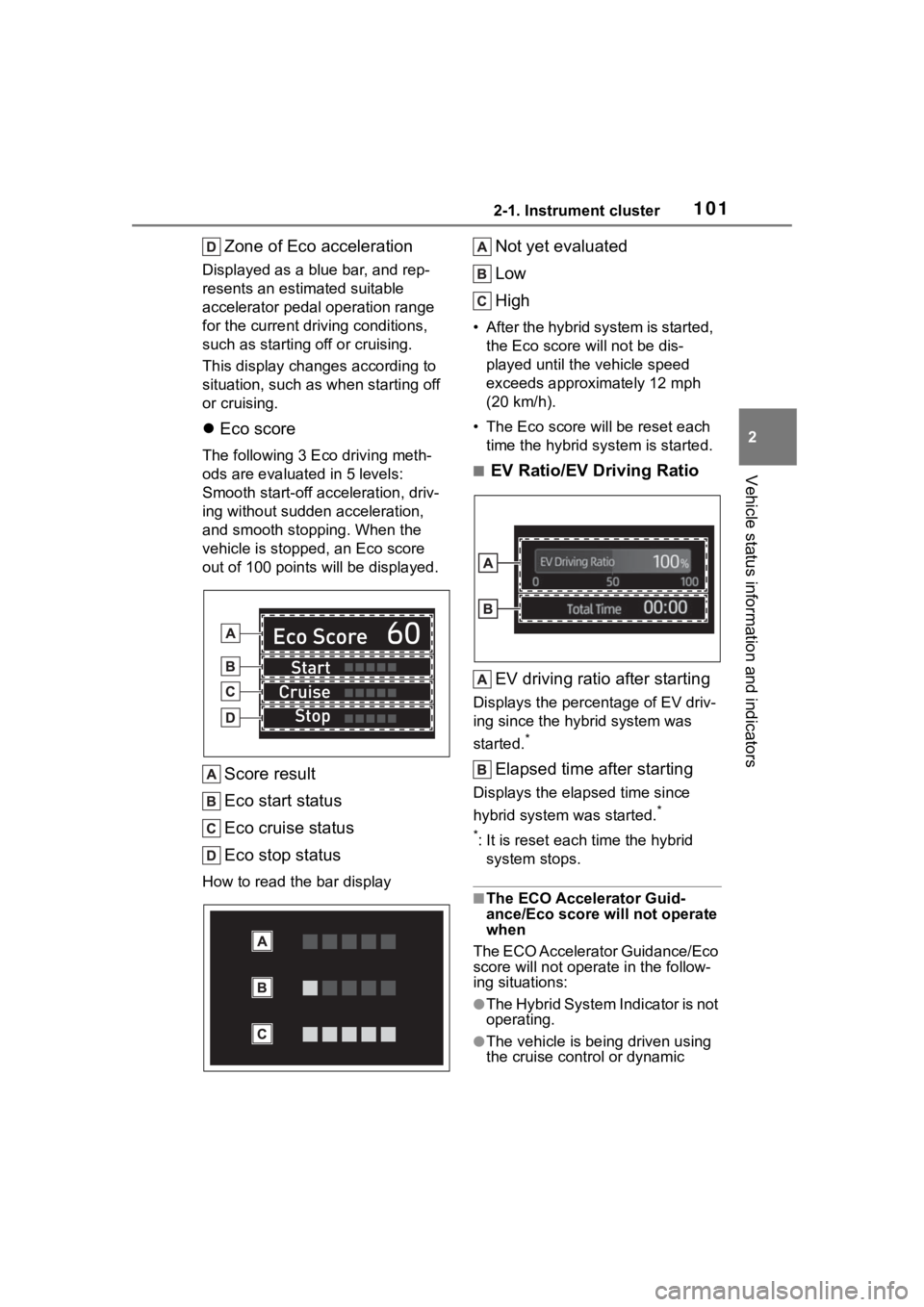
Eco score
The following 3 E co driving meth-
ods are evaluated in 5 levels:
Smooth start-off acceleration, driv-
ing without sudden acceleration,
and smooth stopping. When the
vehicle is stopped , an Eco score
out of 100 po ints will be displayed.
Score result
Eco start status
Eco cruise status
Eco stop status
How to read the bar display
Not yet evaluated
Low
High
• After the hybrid system is started,
the Eco score will not be dis-
played until the vehicle speed
exceeds approximately 12 mph
(20 km/h).
• The Eco score will be reset each
time the hybrid system is started.
■EV Ratio/EV Driving Ratio
EV driving ratio after starting
Displays the percentage of EV driv-
ing since the hybrid system was
started.
*
Elapsed time after starting
Displays the elapsed time since
hybrid system was started.
*
*
: It is reset each time the hybrid
system stops.
■The ECO Accelerator Guid-
ance/Eco score will not operate
when
The ECO Accelerator Guidance/Eco
score will not operate in the follow-
ing situations:
●The Hybrid System Indicator is not
operating.
●The vehicle is bei ng driven using
the cruise control or dynamic
Page 103 of 516
1032-1. Instrument cluster
2
Vehicle status information and indicators
reset*
• Elapsed time: Displays the elapsed time since the display
was reset
*
• Average vehicle speed: Displays the average vehi cle speed since
the display was reset
*
*
: To reset, display the desired item
and press and hold the
meter control switch.
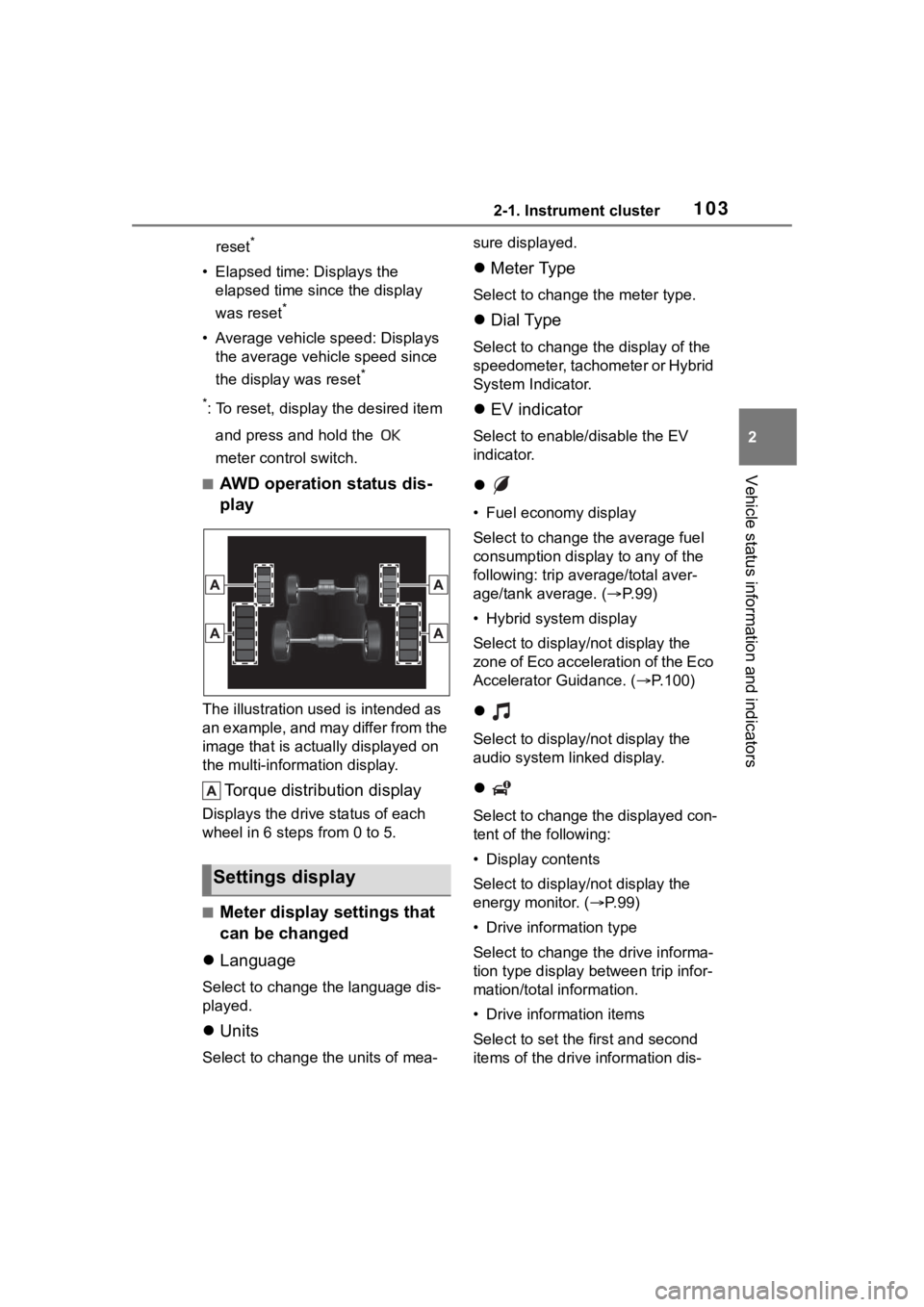
■AWD operation status dis-
play
The illustration used is intended as
an example, and may differ from the
image that is actually displayed on
the multi-information display.
Torque distribution display
Displays the drive status of each
wheel in 6 steps from 0 to 5.
■Meter display settings that
can be changed
Language
Select to change the language dis-
played.
Units
Select to change t he units of mea- sure displayed.
Meter Type
Select to change the meter type.
Dial Type
Select to change the display of the
speedometer, tachometer or Hybrid
System Indicator.
EV indicator
Select to enable/disable the EV
indicator.
• Fuel economy display
Select to change the average fuel
consumption display to any of the
following: trip average/total aver-
age/tank average. ( P. 9 9 )
• Hybrid system display
Select to displa y/not display the
zone of Eco acceleration of the Eco
Accelerator Guidance. (P.100)
Select to displa y/not display the
audio system linked display.
Select to change the displayed con-
tent of the following:
• Display contents
Select to displa y/not display the
energy monitor. (P.99)
• Drive information type
Select to change the drive informa-
tion type display between trip infor-
mation/total information.
• Drive information items
Select to set the first and second
items of the drive information dis-
Settings display
Page 104 of 516
1042-1. Instrument cluster
play to any of the following: aver-
age vehicle
speed/distance/elapsed time.
Pop-up display
Select to enable/disable pop-up
displays for each relevant system.
Multi-information display off
Select to turn the m ulti-information
display off.
To turn the multi-in formation display
on again, press any of the following
meter control switches
//// /.
Default setting
Select to reset the meter display
settings to the default setting.
■Vehicle functions and set-
tings that can be changed
P.463
■Suspension of the settings dis-
play
●Some settings cannot be changed
while driving. When changing set-
tings, park the vehicle in a safe
place.
●If a warning message is displayed,
operation of the settings display
will be suspended.
Displays suggestions to the
driver in the following situations.
To select a response to a dis-
played suggestion, use the
meter control switches.
■Suggestion to enable the
power back door (if
equipped)
If the power back door system is
disabled (setting on set to
off) and the power back door
switch on the instrument panel
is operated, a suggestion mes-
sage will be displayed asking if
you wish to enable the power
back door system.
WARNING
■Cautions during setting up
the display
If the hybrid system is operating
while changing certain settings on
the settings display, ensure that
the vehicle is parked in a place
with adequate ventilation. In a
closed area such as a garage,
exhaust gases in cluding harmful
carbon monoxide (CO) may col-
lect and enter the vehicle. This
may lead to death or a serious
health hazard.
NOTICE
■During setting up the display
To prevent 12-volt battery dis-
charge, ensure that the hybrid
system is operating while setting
up the display features.
Suggestion function (if
equipped)
Page 115 of 516
1153-2. Opening, closing and locking the doors
3
Before driving
3-2.Opening, closing and locking the doors
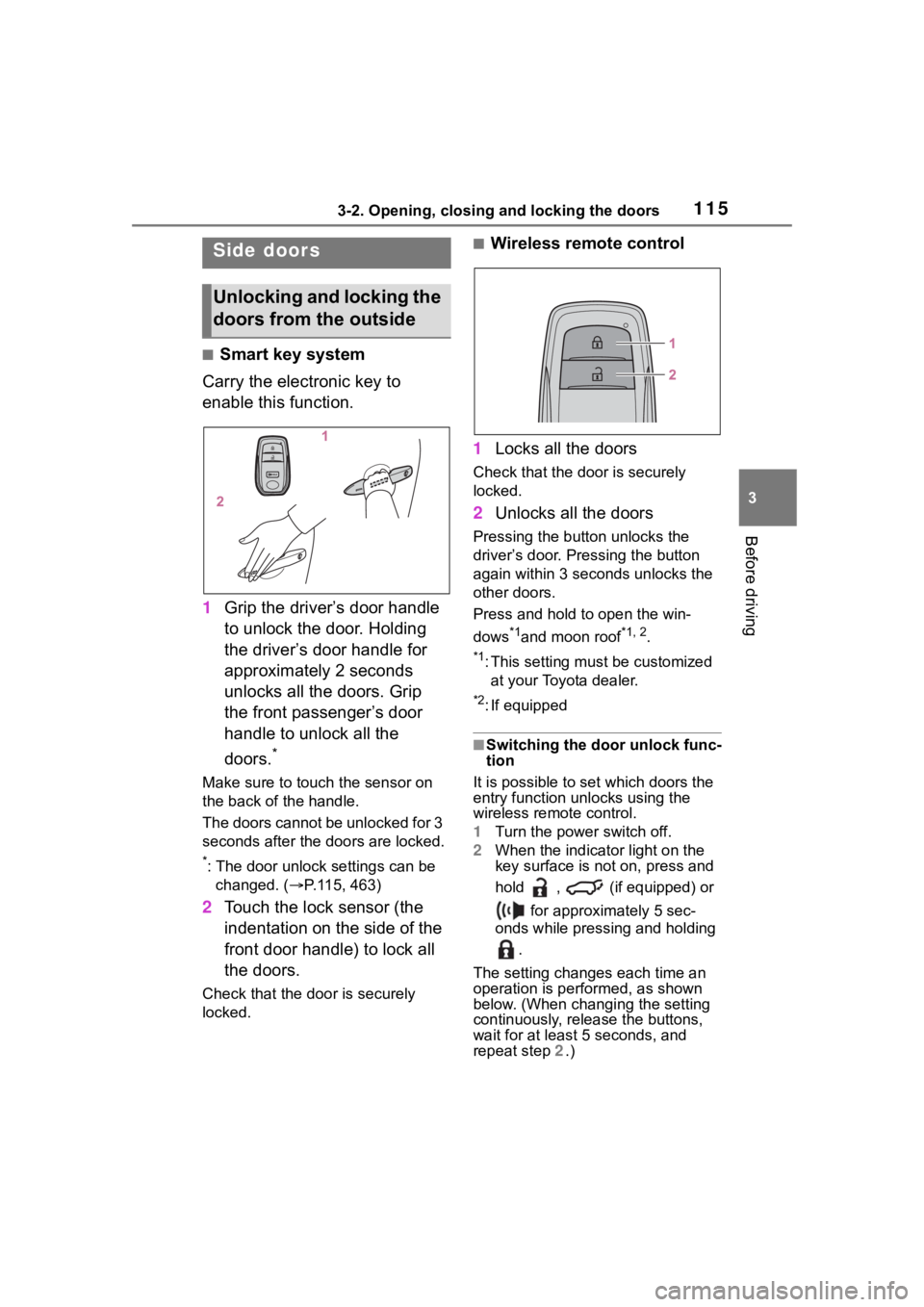
■Smart key system
Carry the electronic key to
enable this function.
1 Grip the driver’s door handle
to unlock the door. Holding
the driver’s door handle for
approximately 2 seconds
unlocks all the doors. Grip
the front passenger’s door
handle to unlock all the
doors.
*
Make sure to touch the sensor on
the back of the handle.
The doors cannot be unlocked for 3
seconds after the doors are locked.
*: The door unlock settings can be
changed. ( P.115, 463)
2 Touch the lock sensor (the
indentation on the side of the
front door handle) to lock all
the doors.
Check that the door is securely
locked.
■Wireless remote control
1 Locks all the doors
Check that the d oor is securely
locked.
2 Unlocks all the doors
Pressing the button unlocks the
driver’s door. Pressing the button
again within 3 seconds unlocks the
other doors.
Press and hold to open the win-
dows
*1and moon roof*1, 2.
*1: This setting must be customized
at your Toyota dealer.
*2: If equipped
■Switching the door unlock func-
tion
It is possible to set which doors the
entry function unlocks using the
wireless remote control.
1 Turn the power switch off.
2 When the indicator light on the
key surface is not on, press and
hold , (if equipped) or
for approximately 5 sec-
onds while pressing and holding
.
The setting changes each time an
operation is per formed, as shown
below. (When changing the setting
continuously, release the buttons,
wait for at least 5 seconds, and
repeat step 2 .)
Side doors
Unlocking and locking the
doors from the outside
Page 116 of 516
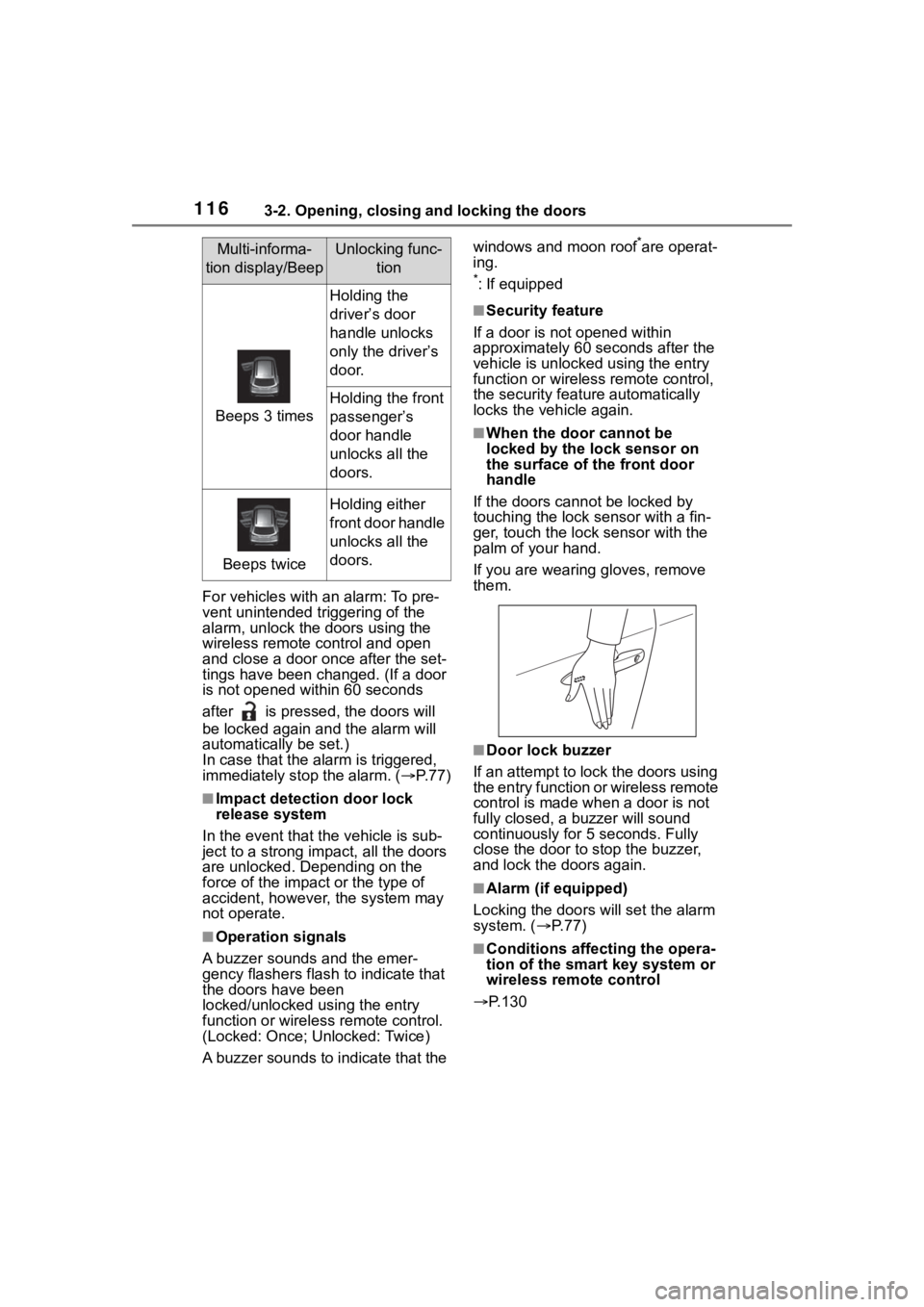
1163-2. Opening, closing and locking the doors
For vehicles with an alarm: To pre-
vent unintended triggering of the
alarm, unlock the doors using the
wireless remote control and open
and close a door once after the set-
tings have been changed. (If a door
is not opened within 60 seconds
after is press ed, the doors will
be locked again an d the alarm will
automatically be set.)
In case that the alarm is triggered,
immediately stop the alarm. ( P. 7 7 )
■Impact detection door lock
release system
In the event that t he vehicle is sub-
ject to a strong impact, all the doors
are unlocked. Depending on the
force of the impact or the type of
accident, however, the system may
not operate.
■Operation signals
A buzzer sounds and the emer-
gency flashers flash to indicate that
the doors have been
locked/unlocked using the entry
function or wireless remote control.
(Locked: Once; Unlocked: Twice)
A buzzer sounds to indicate that the windows and moon roof
*are operat-
ing.
*: If equipped
■Security feature
If a door is not opened within
approximately 60 s econds after the
vehicle is unlocked using the entry
function or wireles s remote control,
the security featur e automatically
locks the vehicle again.
■When the door cannot be
locked by the lock sensor on
the surface of the front door
handle
If the doors cannot be locked by
touching the lock se nsor with a fin-
ger, touch the lock sensor with the
palm of your hand.
If you are wearing gloves, remove
them.
■Door lock buzzer
If an attempt to lock the doors using
the entry function or wireless remote
control is made when a door is not
fully closed, a b uzzer will sound
continuously for 5 seconds. Fully
close the door to stop the buzzer,
and lock the doors again.
■Alarm (if equipped)
Locking the doors will set the alarm
system. ( P. 7 7 )
■Conditions affecting the opera-
tion of the smart key system or
wireless remote control
P.130
Multi-informa-
tion display/BeepUnlocking func- tion
Beeps 3 times
Holding the
driver’s door
handle unlocks
only the driver’s
door.
Holding the front
passenger’s
door handle
unlocks all the
doors.
Beeps twice
Holding either
front door handle
unlocks all the
doors.
Page 130 of 516
1303-2. Opening, closing and locking the doors
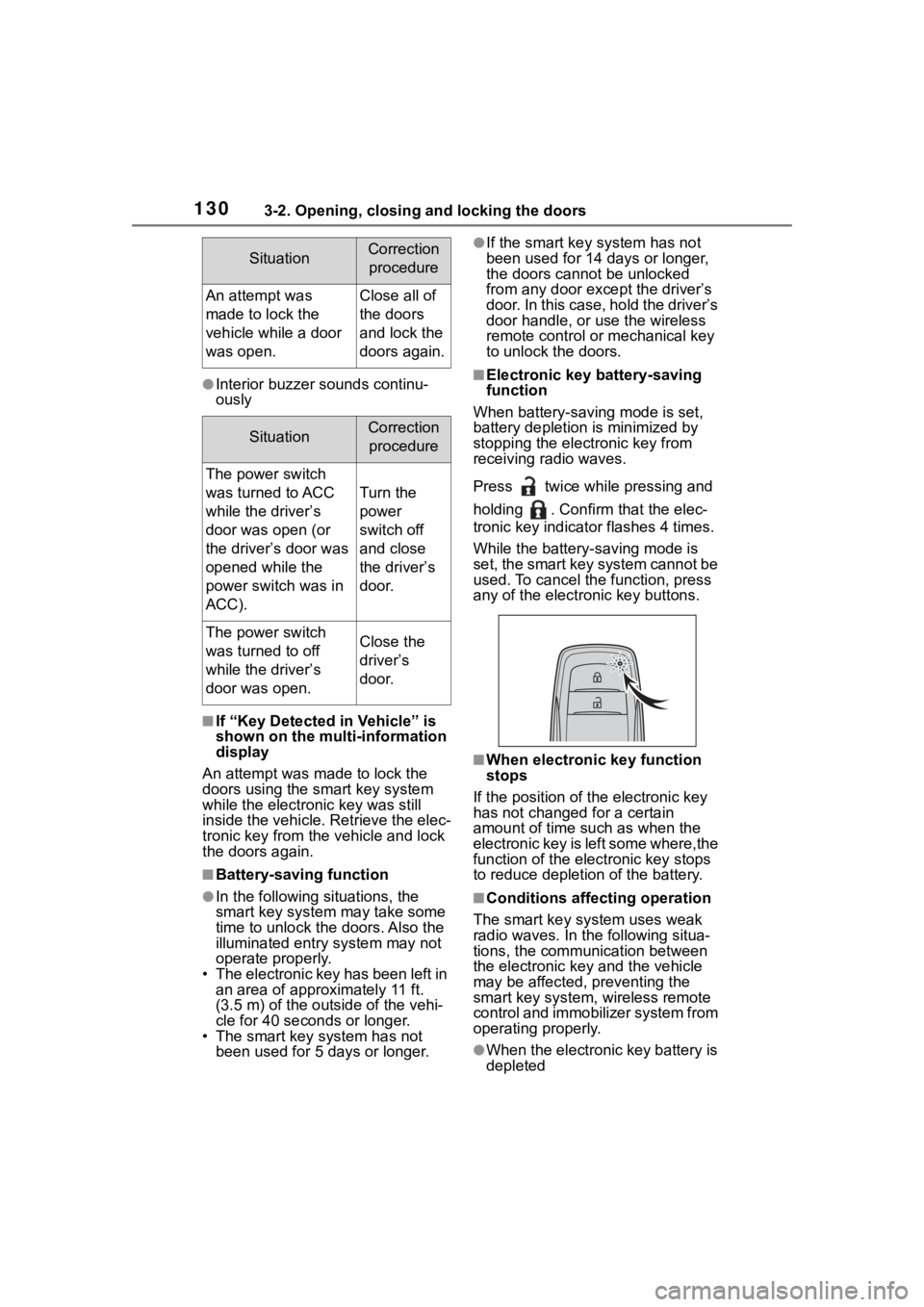
●Interior buzzer sounds continu-
ously
■If “Key Detected in Vehicle” is
shown on the multi-information
display
An attempt was m ade to lock the
doors using the smart key system
while the electronic key was still
inside the vehicle. Retrieve the elec-
tronic key from the vehicle and lock
the doors again.
■Battery-saving function
●In the following situations, the
smart key system may take some
time to unlock the doors. Also the
illuminated entry system may not
operate properly.
• The electronic key has been left in
an area of approximately 11 ft.
(3.5 m) of the outside of the vehi-
cle for 40 seconds or longer.
• The smart key system has not been used for 5 days or longer.
●If the smart key system has not
been used for 14 days or longer,
the doors cannot be unlocked
from any door except the driver’s
door. In this case, hold the driver’s
door handle, or use the wireless
remote control or mechanical key
to unlock the doors.
■Electronic key battery-saving
function
When battery-saving mode is set,
battery depletion is minimized by
stopping the electronic key from
receiving radio waves.
Press twice while pressing and
holding . Confirm that the elec-
tronic key indicator flashes 4 times.
While the battery-saving mode is
set, the smart key system cannot be
used. To cancel the function, press
any of the electronic key buttons.
■When electronic key function
stops
If the position of the electronic key
has not changed for a certain
amount of time suc h as when the
electronic key is left some where,the
function of the elec tronic key stops
to reduce depletion of the battery.
■Conditions affecting operation
The smart key system uses weak
radio waves. In the following situa-
tions, the communication between
the electronic key and the vehicle
may be affected, preventing the
smart key system, wireless remote
control and immobilizer system from
operating properly.
●When the electronic key battery is
depleted
SituationCorrection
procedure
An attempt was
made to lock the
vehicle while a door
was open.Close all of
the doors
and lock the
doors again.
SituationCorrection procedure
The power switch
was turned to ACC
while the driver’s
door was open (or
the driver’s door was
opened while the
power switch was in
ACC).
Turn the
power
switch off
and close
the driver’s
door.
The power switch
was turned to off
while the driver’s
door was open.Close the
driver’s
door.
Page 177 of 516
1774-2. Driving procedures
4
Driving
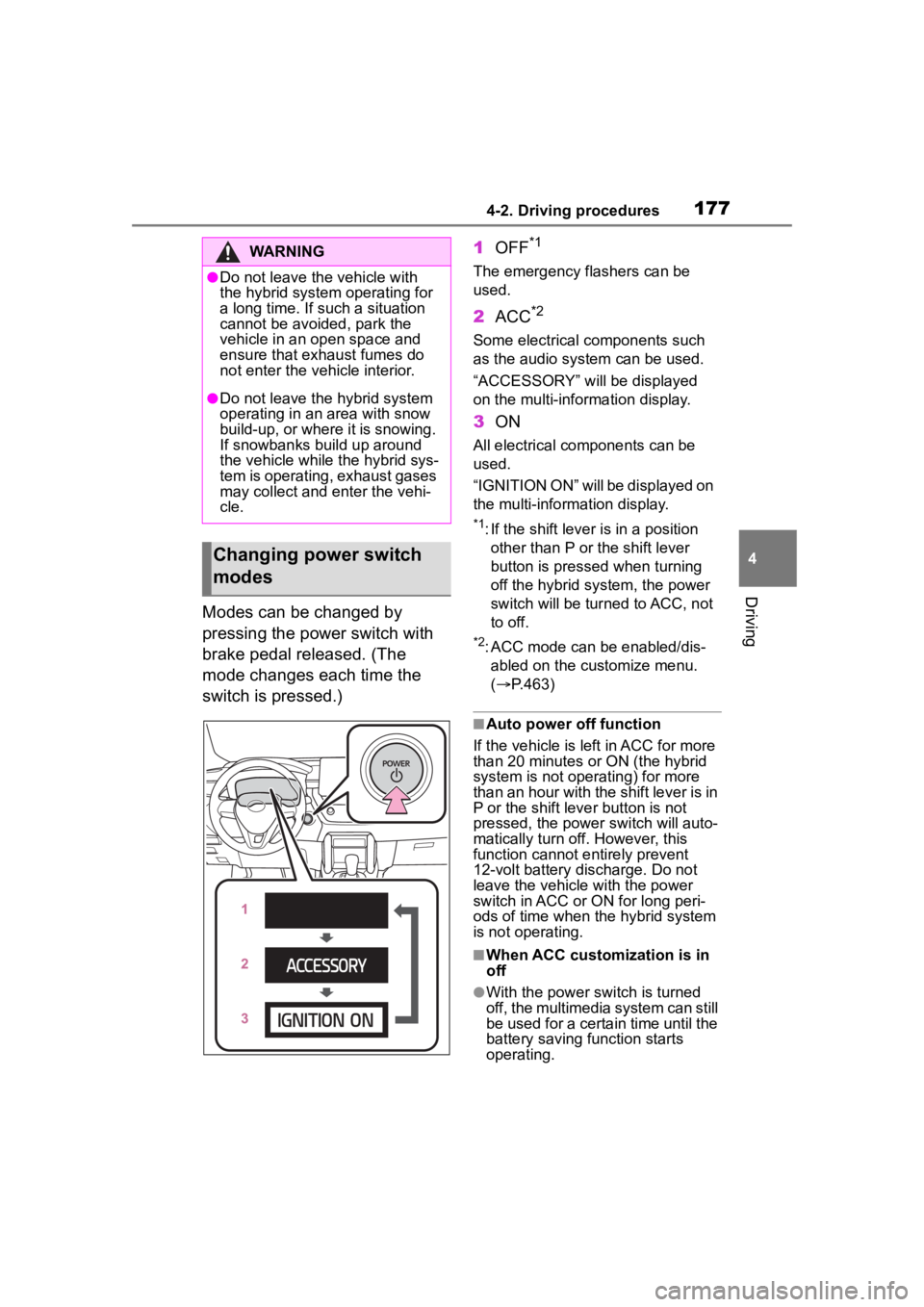
Modes can be changed by
pressing the power switch with
brake pedal released. (The
mode changes each time the
switch is pressed.)1
OFF
*1
The emergency flashers can be
used.
2ACC*2
Some electrical components such
as the audio sys tem can be used.
“ACCESSORY” will be displayed
on the multi-information display.
3 ON
All electrical components can be
used.
“IGNITION ON” will be displayed on
the multi-information display.
*1: If the shift lever is in a position
other than P or the shift lever
button is pressed when turning
off the hybrid system, the power
switch will be tur ned to ACC, not
to off.
*2: ACC mode can be enabled/dis- abled on the customize menu.
( P.463)
■Auto power off function
If the vehicle is left in ACC for more
than 20 minutes or ON (the hybrid
system is not operating) for more
than an hour with the shift lever is in
P or the shift leve r button is not
pressed, the power switch will auto-
matically turn off. However, this
function cannot entirely prevent
12-volt battery discharge. Do not
leave the vehicle with the power
switch in ACC or ON for long peri-
ods of time when the hybrid system
is not operating.
■When ACC customization is in
off
●With the power switch is turned
off, the multimedia system can still
be used for a certain time until the
battery saving function starts
operating.
WARNING
●Do not leave the vehicle with
the hybrid system operating for
a long time. If such a situation
cannot be avoided, park the
vehicle in an open space and
ensure that exhaust fumes do
not enter the vehicle interior.
●Do not leave the hybrid system
operating in an area with snow
build-up, or where it is snowing.
If snowbanks build up around
the vehicle while the hybrid sys-
tem is operating, exhaust gases
may collect and enter the vehi-
cle.
Changing power switch
modes
Page 181 of 516
1814-2. Driving procedures
4
Driving
*1: To improve fuel efficiency and reduce noise, shift the shift lever
to D for normal driving.
*2: By selecting shift ranges using S mode, you can control accelerat-
ing force and engine braking
force.
■Restraining sudden start
(Drive-Start Control)
P. 1 5 9
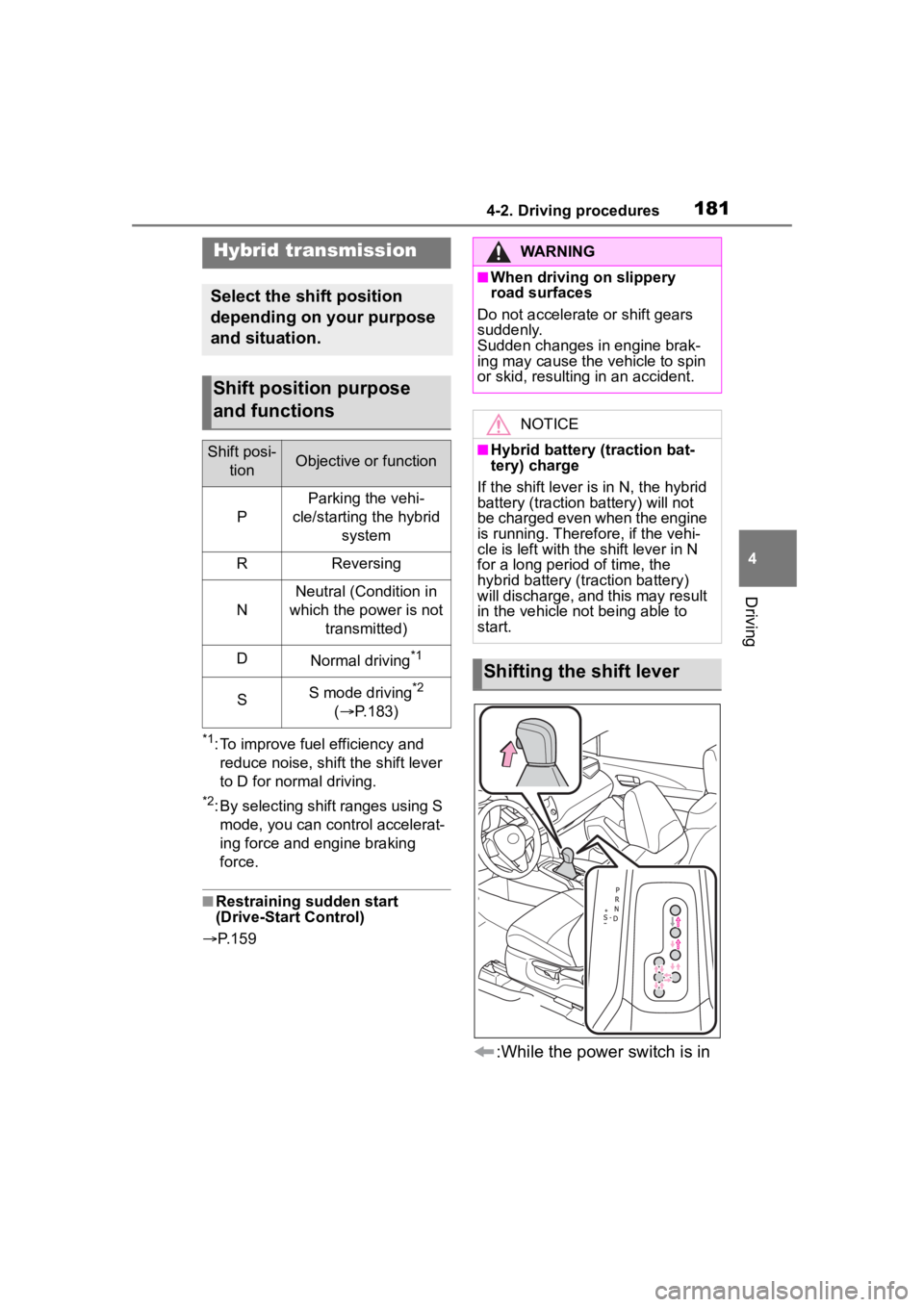
:While the power switch is in
Hybrid transmission
Select the shift position
depending on your purpose
and situation.
Shift position purpose
and functions
Shift posi-
tionObjective or function
P
Parking the vehi-
cle/starting the hybrid system
RReversing
N
Neutral (Condition in
which the power is not transmitted)
DNormal driving*1
SS mode driving*2
( P.183)
WARNING
■When driving on slippery
road surfaces
Do not accelerate or shift gears
suddenly.
Sudden changes in engine brak-
ing may cause the vehicle to spin
or skid, resulting in an accident.
NOTICE
■Hybrid battery (traction bat-
tery) charge
If the shift lever is in N, the hybrid
battery (traction battery) will not
be charged even when the engine
is running. Therefore, if the vehi-
cle is left with the shift lever in N
for a long period of time, the
hybrid battery (traction battery)
will discharge, and this may result
in the vehicle not being able to
start.
Shifting the shift lever
Page 184 of 516
1844-2. Driving procedures
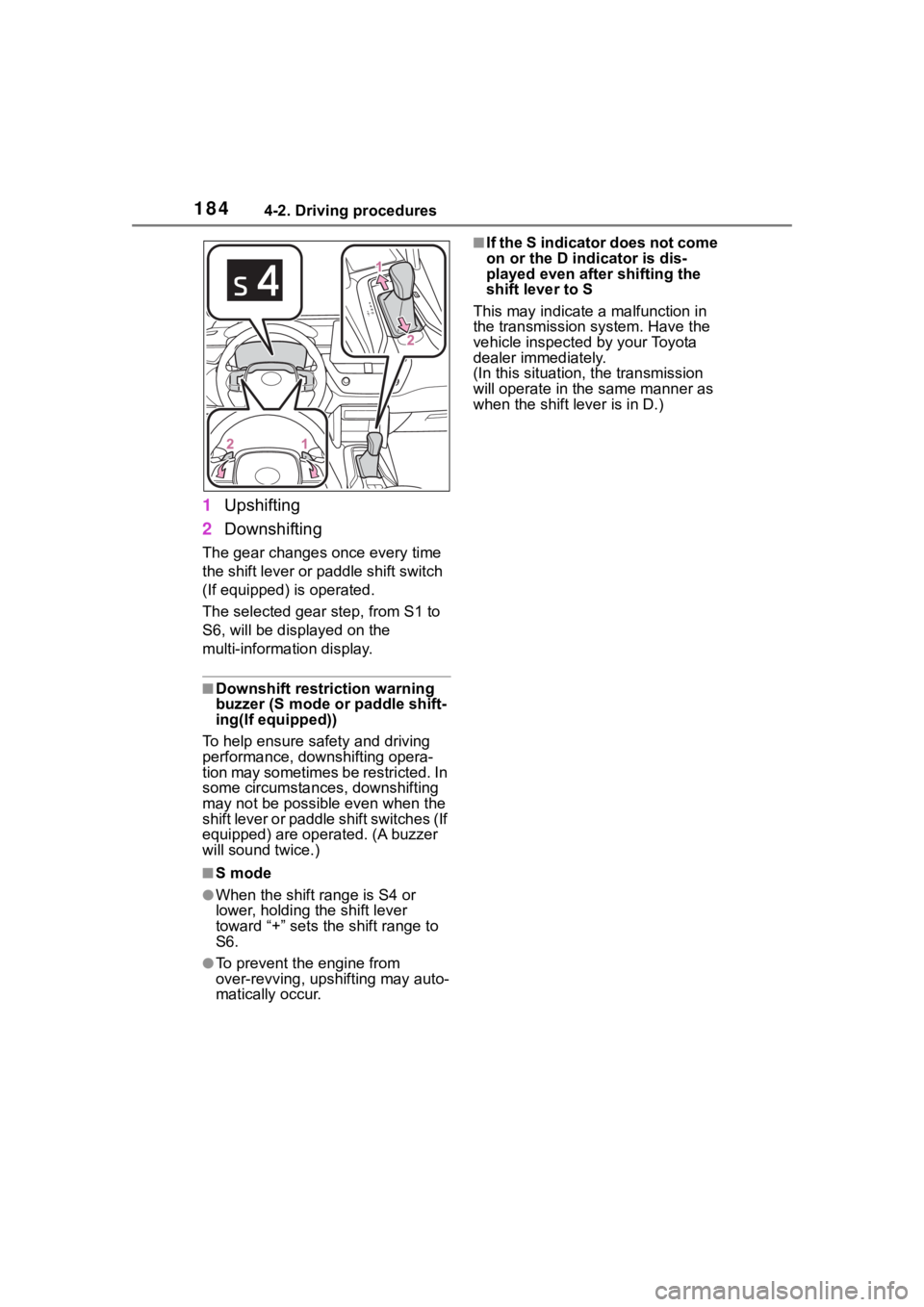
1Upshifting
2 Downshifting
The gear changes once every time
the shift lever or paddle shift switch
(If equipped) is operated.
The selected gear step, from S1 to
S6, will be displayed on the
multi-information display.
■Downshift restriction warning
buzzer (S mode or paddle shift-
ing(If equipped))
To help ensure safety and driving
performance, downshifting opera-
tion may sometimes b e restricted. In
some circumstances, downshifting
may not be possible even when the
shift lever or paddle shift switches (If
equipped) are operated. (A buzzer
will sound twice.)
■S mode
●When the shift range is S4 or
lower, holding the shift lever
toward “+” sets the shift range to
S6.
●To prevent the engine from
over-revving, upshifting may auto-
matically occur.
■If the S indicator does not come
on or the D indicator is dis-
played even after shifting the
shift lever to S
This may indicate a malfunction in
the transmission system. Have the
vehicle inspected by your Toyota
dealer immediately.
(In this situation , the transmission
will operate in the same manner as
when the shift lever is in D.)
Page 185 of 516
1854-2. Driving procedures
4
Driving
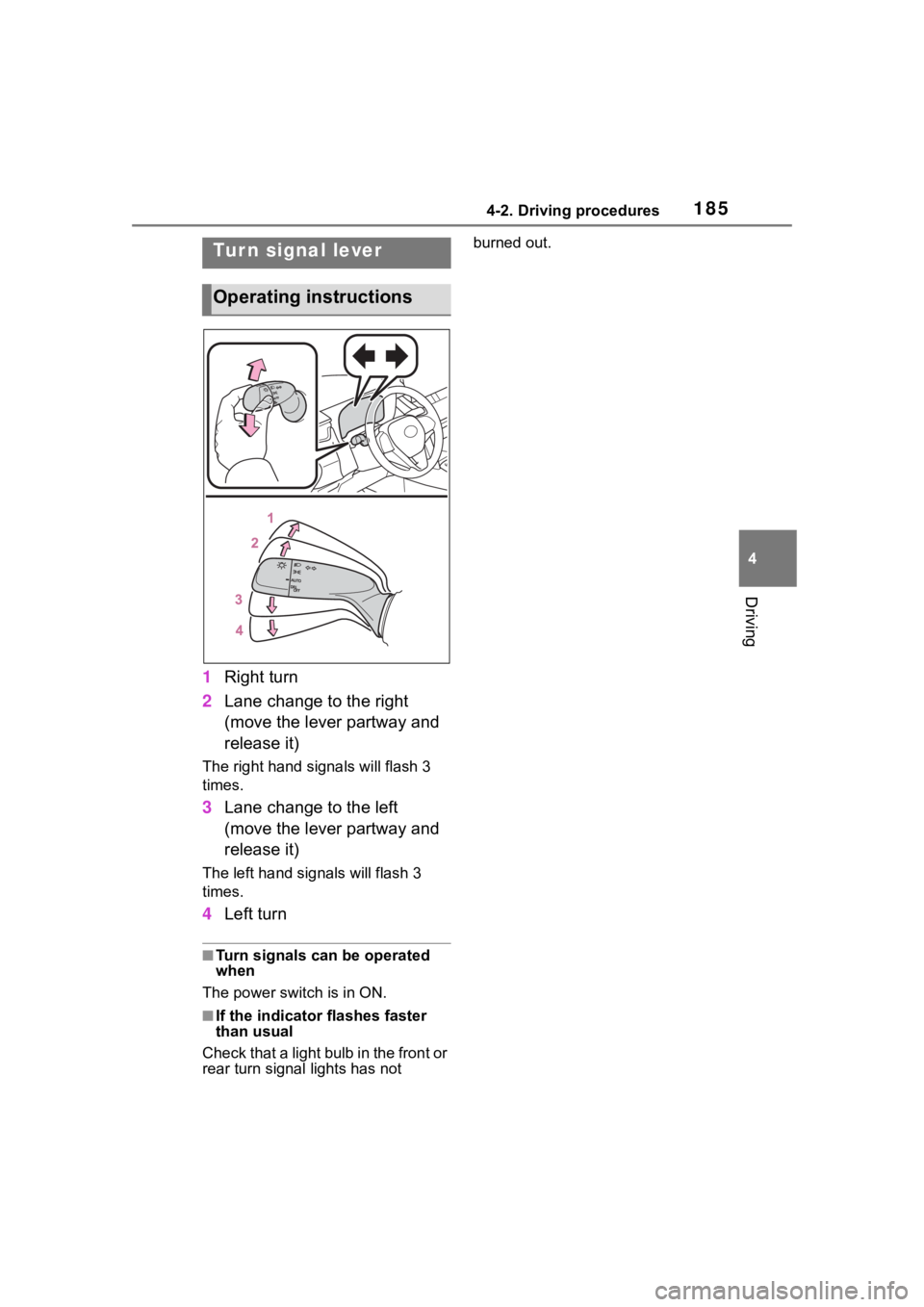
1Right turn
2 Lane change to the right
(move the lever partway and
release it)
The right hand signals will flash 3
times.
3Lane change to the left
(move the lever partway and
release it)
The left hand signals will flash 3
times.
4Left turn
■Turn signals can be operated
when
The power swit ch is in ON.
■If the indicator flashes faster
than usual
Check that a light bulb in the front or
rear turn signal lights has not burned out.
Tur n signal lever
Operating instructions