change time TOYOTA COROLLA CROSS HYBRID 2023 Owner's Manual
[x] Cancel search | Manufacturer: TOYOTA, Model Year: 2023, Model line: COROLLA CROSS HYBRID, Model: TOYOTA COROLLA CROSS HYBRID 2023Pages: 516, PDF Size: 15.96 MB
Page 197 of 516
1974-3. Operating the lights and wipers
4
Driving
position quickly 10 times, then
leave the lever in its original posi-
tion.
4 If the sensitivity is changed, the
Automatic High Beam indicator
will blink 3 times.
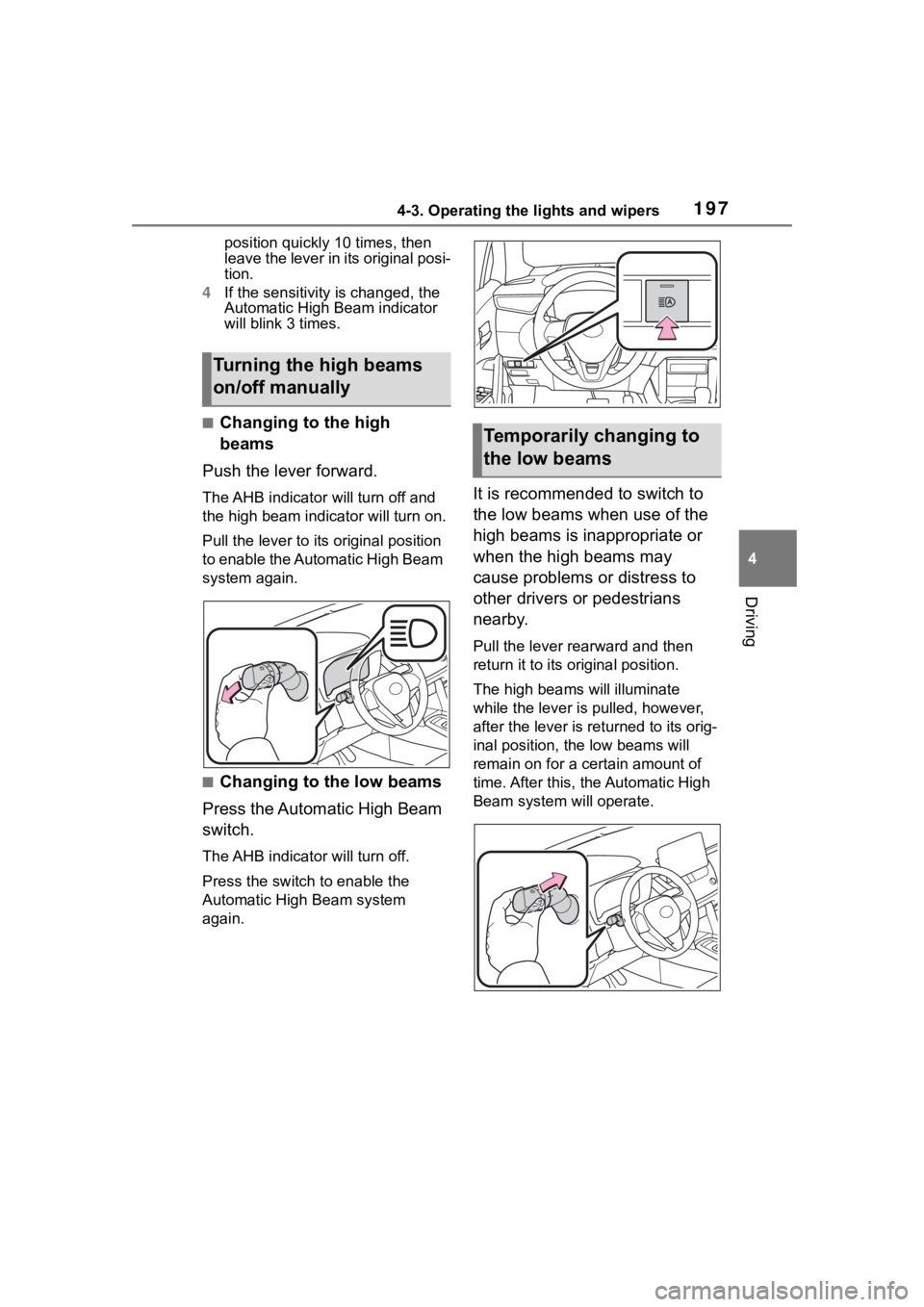
■Changing to the high
beams
Push the lever forward.
The AHB indicator will turn off and
the high bea m indicator will turn on.
Pull the lever to its original position
to enable the Automatic High Beam
system again.
■Changing to the low beams
Press the Automatic High Beam
switch.
The AHB indicator will turn off.
Press the switch to enable the
Automatic High Beam system
again.
It is recommended to switch to
the low beams when use of the
high beams is inappropriate or
when the high beams may
cause problems or distress to
other drivers or pedestrians
nearby.
Pull the lever rearward and then
return it to its original position.
The high beams will illuminate
while the lever is p ulled, however,
after the lever is returned to its orig-
inal position, the low beams will
remain on for a certain amount of
time. After this, the Automatic High
Beam system will operate.
Turning the high beams
on/off manually
Temporarily changing to
the low beams
Page 222 of 516
2224-5. Using the driving support systems
forward leaning rider, or has an
unusual shape (bicycles equipped
with a child seat, tandem bicycles,
etc.)
• If a pedestrian or bicycle is shorter than approximately 3.2 ft. (1 m) or
taller than approximately 6.5 ft. (2
m).
• When the silhouette of a pedes-
trian or bicycle is unclear (such as
when they are wearing a raincoat,
long skirt, etc.)
• When a pedestrian is bending for- ward or squatting
• When a pedestrian or bicycle is
moving at high speed
• When a pedestrian is pushing a stroller, wheelchair, bicycle or
other vehicle
• When a detectable object blends in with the surrounding area, such
a s w h e n i t i s d i m ( a t d a w n o r d u s k )
or dark (at night or in a tunnel)
• When the vehicle has not been
driven for a certain amount of time
after the hybr id system was
started
• While turning left /right or a few
seconds after turning left/right
• While driving around a curve and
a few seconds after driving around
a curve
• When turning left/right and an
oncoming vehicle i s driving in a
lane 3 or more l anes from the
vehicle
• When turning left/right and the direction of the vehicle differs
greatly from the direction traffic
flows in the oncoming lane
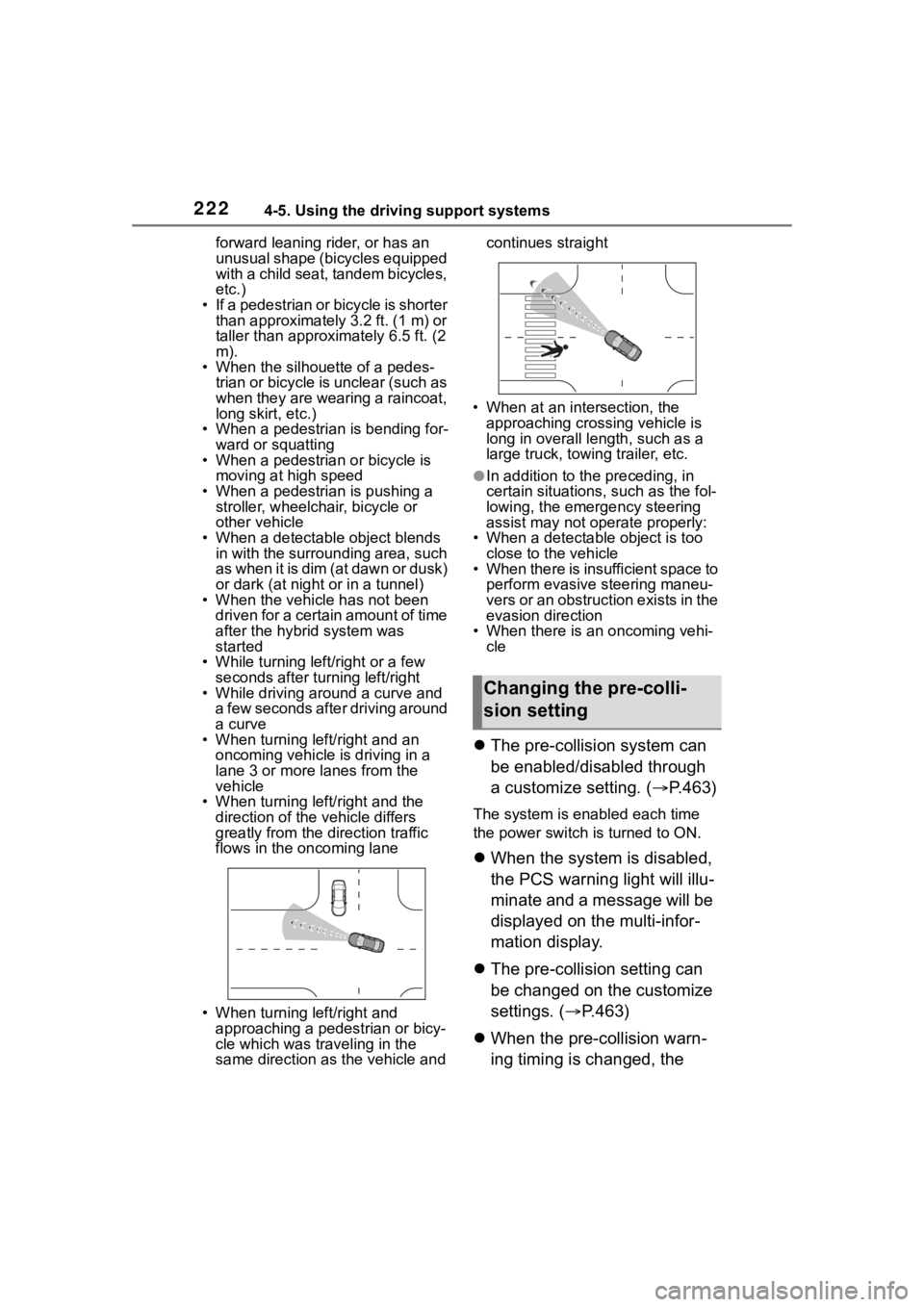
• When turning left/right and approaching a pedestrian or bicy-
cle which was traveling in the
same direction as the vehicle and continues straight
• When at an intersection, the approaching crossing vehicle is
long in overall length, such as a
large truck, towin g trailer, etc.
●In addition to the preceding, in
certain situations, such as the fol-
lowing, the emergency steering
assist may not operate properly:
• When a detectable object is too
close to the vehicle
• When there is insufficient space to perform evasive steering maneu-
vers or an obstruction exists in the
evasion direction
• When there is an oncoming vehi-
cle
The pre-collision system can
be enabled/disabled through
a customize setting. ( P.463)
The system is enabled each time
the power switch is turned to ON.
When the system is disabled,
the PCS warning light will illu-
minate and a message will be
displayed on the multi-infor-
mation display.
The pre-collision setting can
be changed on the customize
settings. ( P.463)
When the pre-collision warn-
ing timing is changed, the
Changing the pre-colli-
sion setting
Page 223 of 516
2234-5. Using the driving support systems
4
Driving
emergency steering assist
timing will also be changed.
When “Later” is selected, the
emergency steering assist will
not operate in most cases.
When the dynamic radar
cruise control is operating, the
pre-collision warning will
operate at the “Earlier” timing,
regardless of the user setting.
When driving on a road with
clear lane lines with the
dynamic radar cruise control
operating, lane lines and pre-
ceding and surrounding vehi-
cles are detected using the
front camera and radar sen-
sor, and the steering wheel is
operated to maintain the vehi-
cle’s lane position.
Use this function only on highways
and expressways.
If the dynamic radar cruise control
is not operating, the function will not
operate.
In situations where the lane lines
are difficult to see or are not visible,
such as when in a traffic jam, sup-
port will be provided using the path
of preceding and surrounding vehi-
cles.
If the system determines that the
steering wheel has not been oper-
ated for a certain amount of time or
the steering wheel is not being
firmly gripped, the driver will be
alerted and this function will be
temporarily canceled.
If the steering wheel is firmly
gripped, the func tion will begin
operating again.
LTA (Lane Tracing
Assist)
LTA functions
Page 225 of 516
2254-5. Using the driving support systems
4
Driving
the following conditions are met:
●The LTA system detects lane lines
or the path of preceding or sur-
rounding vehicles.
●The dynamic radar cruise control
is operating.
●The lane width is approximately
10 to 13 ft. (3 to 4 m).
●The turn signal le ver is not being
operated.
●The vehicle is not being driven
around a sharp curve.
●The vehicle is not accelerating or
decelerating more than a certain
amount.
●The steering wheel is not being
turned with a large force.
●The hands off steering wheel
warning ( P.225) is not operat-
ing.
●The vehicle is being driven in the
center of a lane.
■Temporary cancelation of func-
tions
●When the operating conditions are
no longer met, a function may be
temporarily canceled. However,
when the operation conditions are
met again, operation of the func-
tion will automatically be restored.
( P.224)
●If the operating conditions of a
function are no longer met while
the function is operating, a buzzer
may sound to indicate that the
function has been temporarily
canceled.
●The steering assist operation of
the function can be overridden by
the steering wheel operation of
the driver.
■Lane departure warning func-
tion when the LTA is operating
●Even if the LDA warning method is
changed to vibration of the steer-
ing wheel, if the vehicle deviates
from the lane while the LTA is
operating, the warning buzzer will sound to aler
t the driver.
●If steering wheel operation equiv-
alent to that necessary for a lane
change is detected, the system
will determine the vehicle is not
deviating from the lane and the
warning will not operate.
■Hands off steering wheel warn-
ing operation
●When the system determines the
driver is not hold ing the steering
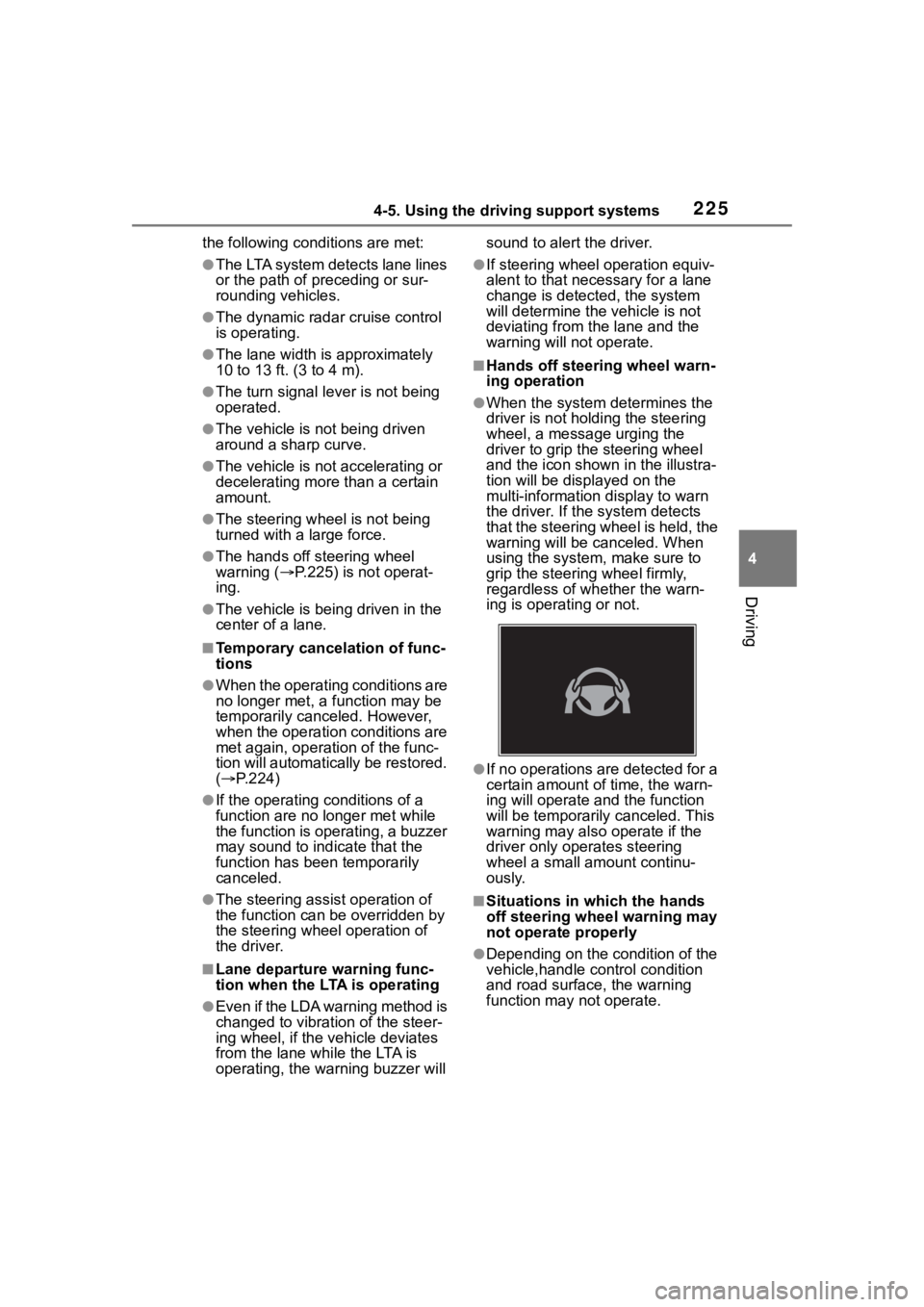
wheel, a message urging the
driver to grip the steering wheel
and the icon shown in the illustra-
tion will be dis played on the
multi-information display to warn
the driver. If the system detects
that the steering wheel is held, the
warning will be canceled. When
using the system, make sure to
grip the steering wheel firmly,
regardless of whether the warn-
ing is operating or not.
●If no operations are detected for a
certain amount of time, the warn-
ing will operate and the function
will be temporarily canceled. This
warning may also operate if the
driver only operates steering
wheel a small amount continu-
ously.
■Situations in which the hands
off steering wheel warning may
not operate properly
●Depending on the condition of the
vehicle,handle control condition
and road surface, the warning
function may not operate.
Page 226 of 516
2264-5. Using the driving support systems
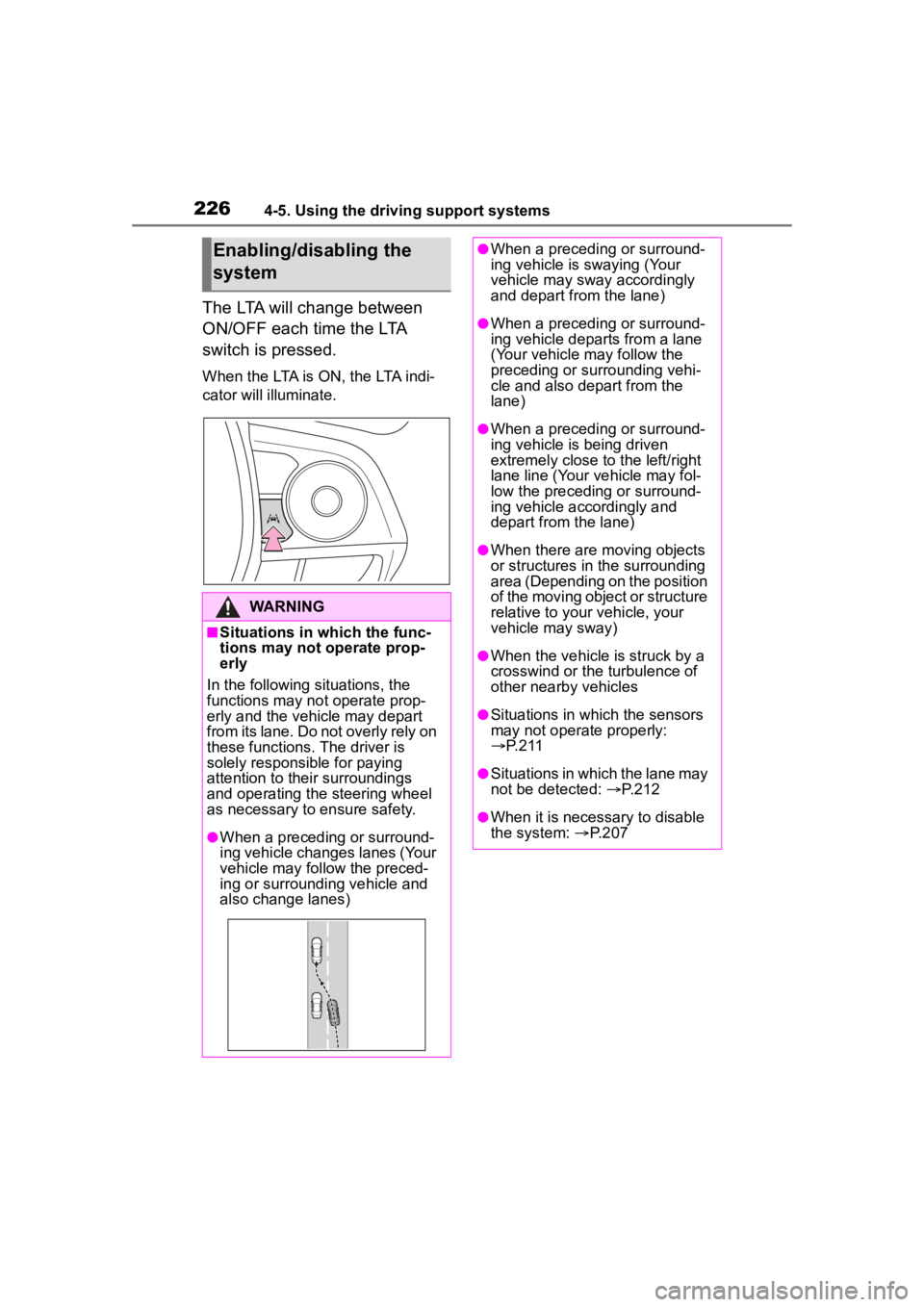
The LTA will change between
ON/OFF each time the LTA
switch is pressed.
When the LTA is ON, the LTA indi-
cator will illuminate.
Enabling/disabling the
system
WARNING
■Situations in which the func-
tions may not operate prop-
erly
In the following situations, the
functions may not operate prop-
erly and the vehicle may depart
from its lane. Do not overly rely on
these functions. The driver is
solely responsible for paying
attention to their surroundings
and operating the steering wheel
as necessary to ensure safety.
●When a preceding or surround-
ing vehicle changes lanes (Your
vehicle may follow the preced-
ing or surrounding vehicle and
also change lanes)
●When a preceding or surround-
ing vehicle is swaying (Your
vehicle may sway accordingly
and depart from the lane)
●When a preceding or surround-
ing vehicle departs from a lane
(Your vehicle may follow the
preceding or surrounding vehi-
cle and also depart from the
lane)
●When a preceding or surround-
ing vehicle is being driven
extremely close to the left/right
lane line (Your vehicle may fol-
low the preceding or surround-
ing vehicle accordingly and
depart from the lane)
●When there are moving objects
or structures in the surrounding
area (Depending on the position
of the moving object or structure
relative to your vehicle, your
vehicle may sway)
●When the vehicle is struck by a
crosswind or the turbulence of
other nearby vehicles
●Situations in which the sensors
may not operate properly:
P. 2 1 1
●Situations in which the lane may
not be detected: P.212
●When it is necessary to disable
the system: P.207
Page 231 of 516
2314-5. Using the driving support systems
4
Driving
the steering wheel, or the steering
wheel is not being operated when
the steering assist operation of the
lane departure prevention function
is operating
The length of time that the warning
buzzer operates will become longer
as the frequency o f the steering
assist operating increases. If the
system judges that the steering
wheel has been operated, the warn-
ing buzzer will stop.
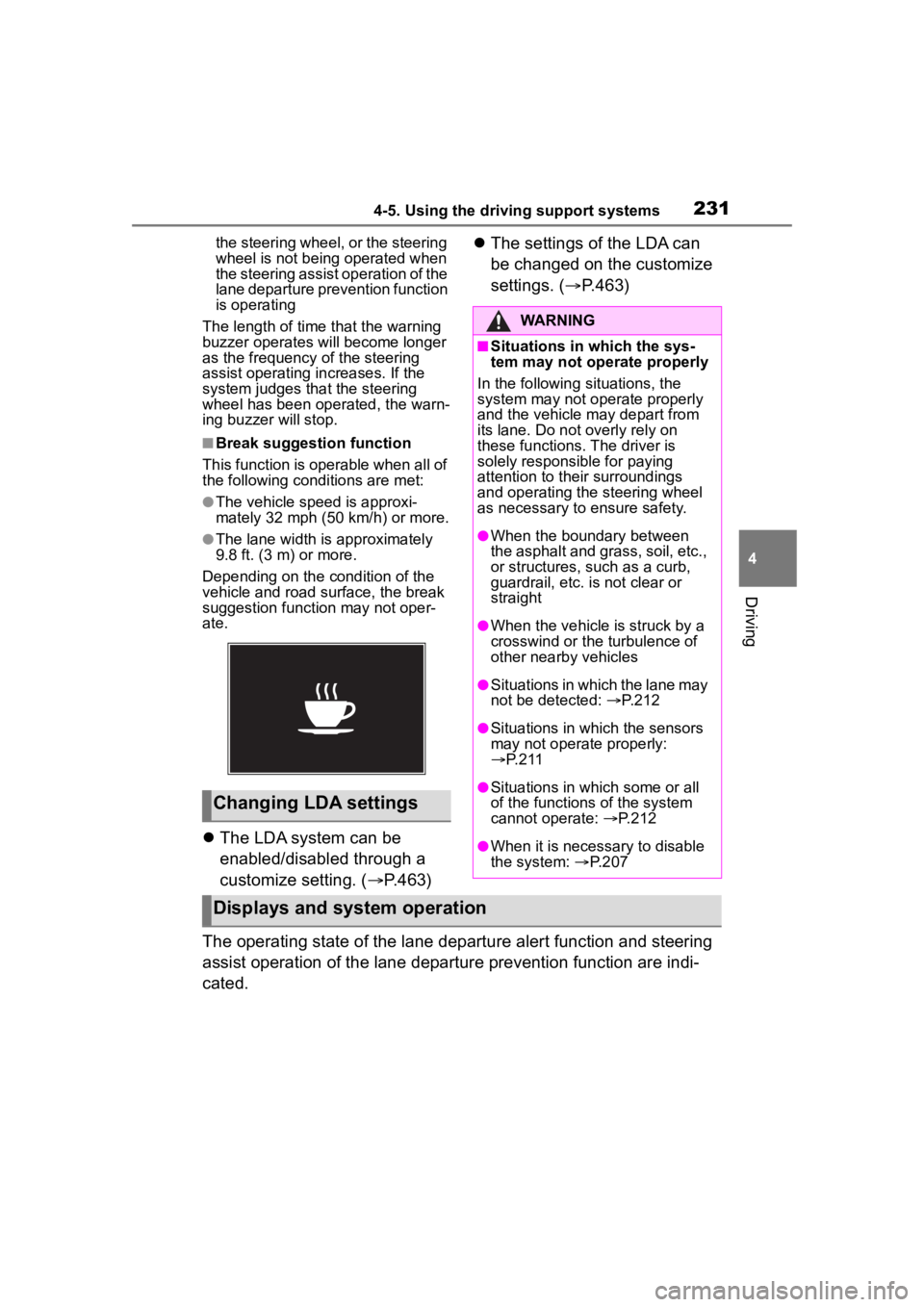
■Break suggestion function
This function is operable when all of
the following conditions are met:
●The vehicle speed is approxi-
mately 32 mph (50 km/h) or more.
●The lane width is approximately
9.8 ft. (3 m) or more.
Depending on the condition of the
vehicle and road surface, the break
suggestion functi on may not oper-
ate.
The LDA system can be
enabled/disabled through a
customize setting. ( P.463)
The settings of the LDA can
be changed on the customize
settings. ( P.463)
The operating state of the lane departure alert function and steering
assist operation of the lane departure prevention function are indi-
cated.
Changing LDA settings
WARNING
■Situations in which the sys-
tem may not ope rate properly
In the following situations, the
system may not operate properly
and the vehicle may depart from
its lane. Do not overly rely on
these functions. The driver is
solely responsible for paying
attention to their surroundings
and operating the steering wheel
as necessary to ensure safety.
●When the boundary between
the asphalt and grass, soil, etc.,
or structures, such as a curb,
guardrail, etc. is not clear or
straight
●When the vehicle is struck by a
crosswind or the turbulence of
other nearby vehicles
●Situations in which the lane may
not be detected: P.212
●Situations in which the sensors
may not operate properly:
P. 2 1 1
●Situations in which some or all
of the functions of the system
cannot operate: P.212
●When it is necessary to disable
the system: P.207
Displays and system operation
Page 233 of 516
2334-5. Using the driving support systems
4
Driving
*: If equipped
When the front camera detects a sign or information
of a sign is available from the
navigation system, the sign
will be displayed on the dis-
p l a y.
Multiple signs can be dis-
played.
Depending on the specifications of
the vehicle, the number of dis-
played signs may be limited.
■Operating conditions of sign
display
Signs will be displayed when the fol-
lowing conditions are met:
●The system has detected a sign
In the following si tuations, a dis-
played sign may stop being dis-
played:
●When a new sign has not been
detected for a certain distance
●When the system determines that
the road being driven on has
changed, such as after a left or
right turn
■Situations in which the display
function may not operate prop-
erly
In the following situ ations, the RSA
system may not operate properly
and may not detect signs or may
display the incorrect sign. However,
this does not indicate a malfunction.
●When a sign is dirty, faded, tilted
or bent
●When the contrast of an electronic
sign is low
●When all or part of a sign is hidden
by a tree, utility pole, etc.
●When a sign is d etected by the
front camera for a short amount of
time
●When the driving state (turning,
changing lanes, etc.) is judged
incorrectly
RSA (Road Sign
Assist)*
The RSA system detects
specific road signs using
the front camera and/or nav-
igation system (when speed
limit information is avail-
able) and warns the driver
via displays and buzzers.
WARNING
■For safe use
●Driving safely is solely the
responsibility of the driver. Pay
careful attention to the sur-
rounding conditions in order to
ensure safe driving.
●Do not rely solely upon the
RSA. The RSA assists the
driver by providing road sign
information, but it is not a
replacement for the driver’s own
vision and awareness. Driving
safely is solely the responsibility
of the driver. Pay careful atten-
tion to the surrounding condi-
tions in order to ensure safe
driving.
■Situations in which the RSA
should not be used
●When it is necessary to disable
the system: P. 2 0 7
■Situations in which the sys-
tem may not operate properly
●Situations in wh ich the sensors
may not operate properly:
P. 2 1 1
Display Function
Page 237 of 516
2374-5. Using the driving support systems
4
Driving
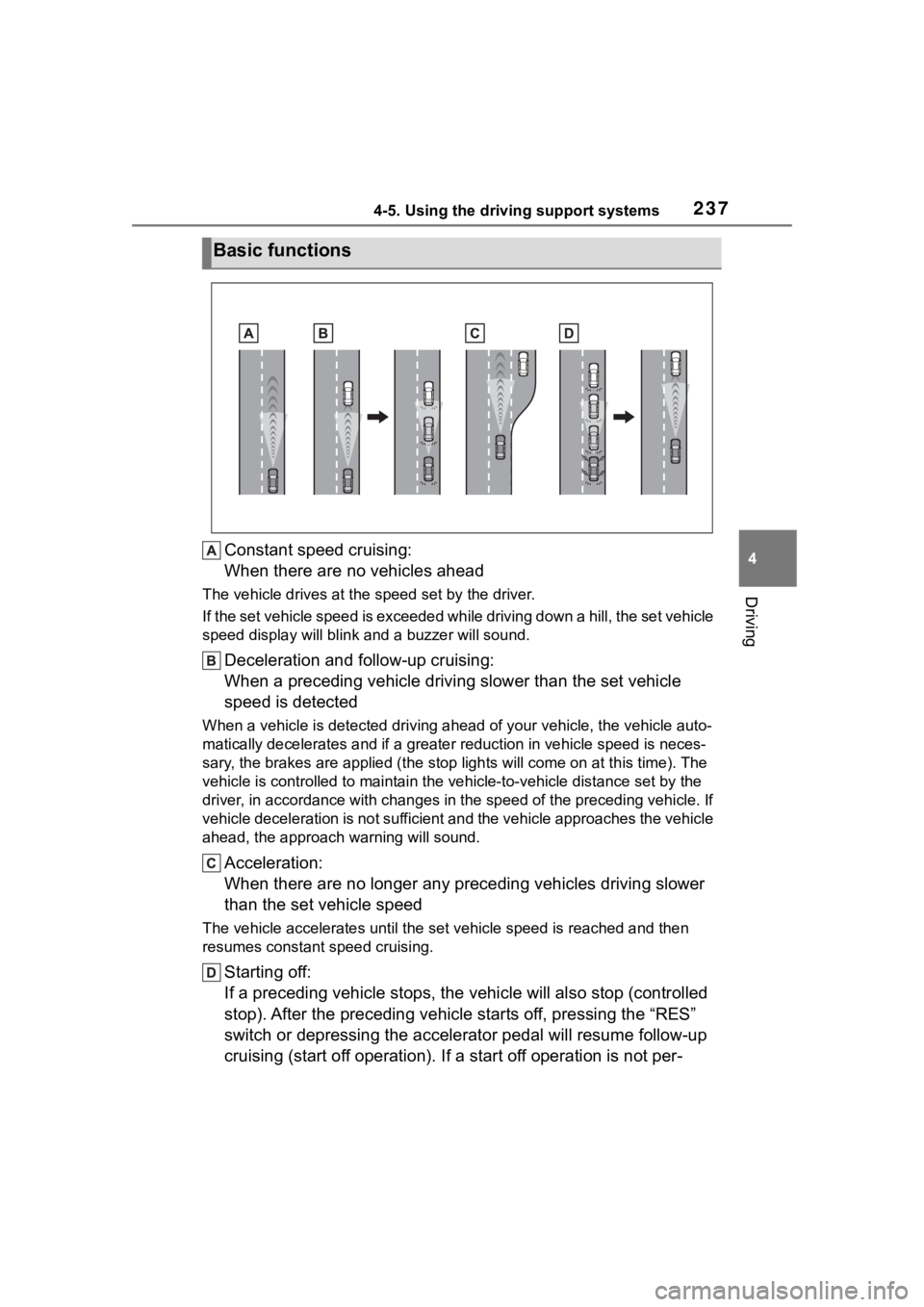
Constant speed cruising:
When there are no vehicles ahead
The vehicle drives at the speed set by the driver.
If the set vehicle speed is exceeded while driving down a hill, the set vehicle
speed display will blin k and a buzzer will sound.
Deceleration and follow-up cruising:
When a preceding vehicle driving slower than the set vehicle
speed is detected
When a vehicle is detected driving ahead of your vehicle, the v ehicle auto-
matically decelerates and if a greater reduction in vehicle spe ed is neces-
sary, the brakes are applied (the stop lights will come on at t his time). The
vehicle is controlled to maintai n the vehicle-to-vehicle distance set by the
driver, in accordance with changes in the speed of the precedin g vehicle. If
vehicle deceleration is not sufficient and the vehicle approaches the vehicle
ahead, the approach wa rning will sound.
Acceleration:
When there are no longer any preceding vehicles driving slower
than the set vehicle speed
The vehicle accelerates until th e set vehicle speed is reached and then
resumes constant speed cruising.
Starting off:
If a preceding vehicle stops, the vehicle will also stop (contr olled
stop). After the preceding vehicle starts off, pressing the “RES”
switch or depressing the accelerator pedal will resume follow-u p
cruising (start off operation). If a start off operation is not per-
Basic functions
Page 239 of 516
2394-5. Using the driving support systems
4
Driving
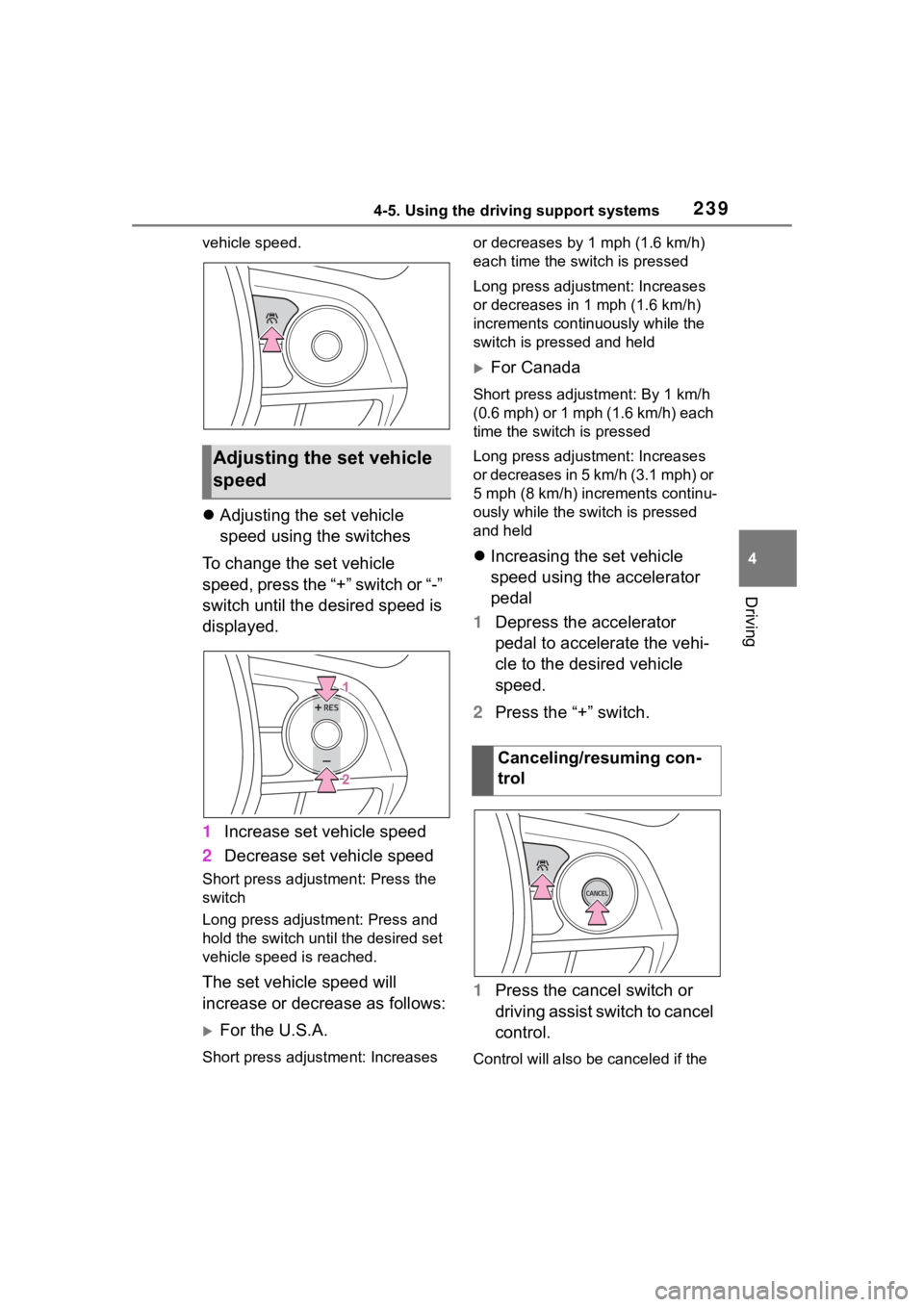
vehicle speed.
Adjusting the set vehicle
speed using the switches
To change the set vehicle
speed, press the “+” switch or “-”
switch until the desired speed is
displayed.
1 Increase set vehicle speed
2 Decrease set vehicle speed
Short press adjustment: Press the
switch
Long press adjustment: Press and
hold the switch until the desired set
vehicle speed is reached.
The set vehicle speed will
increase or decrease as follows:
For the U.S.A.
Short press adjus tment: Increases or decreases by 1 mph (1.6 km/h)
each time the switch is pressed
Long press adjustment: Increases
or decreases in 1
mph (1.6 km/h)
increments continuously while the
switch is pressed and held
For Canada
Short press adjust ment: By 1 km/h
(0.6 mph) or 1 mph (1.6 km/h) each
time the switch is pressed
Long press adjustment: Increases
or decreases in 5 km/h (3.1 mph) or
5 mph (8 km/h) inc rements continu-
ously while the switch is pressed
and held
Increasing the set vehicle
speed using the accelerator
pedal
1 Depress the accelerator
pedal to accelerate the vehi-
cle to the desired vehicle
speed.
2 Press the “+” switch.
1 Press the cancel switch or
driving assist switch to cancel
control.
Control will also be canceled if the
Adjusting the set vehicle
speed
Canceling/resuming con-
trol
Page 240 of 516
2404-5. Using the driving support systems
brake pedal is depressed.
(If the vehicle has been stopped by
system control, depressing the
brake pedal will not cancel control.)2Press the “RES” switch to
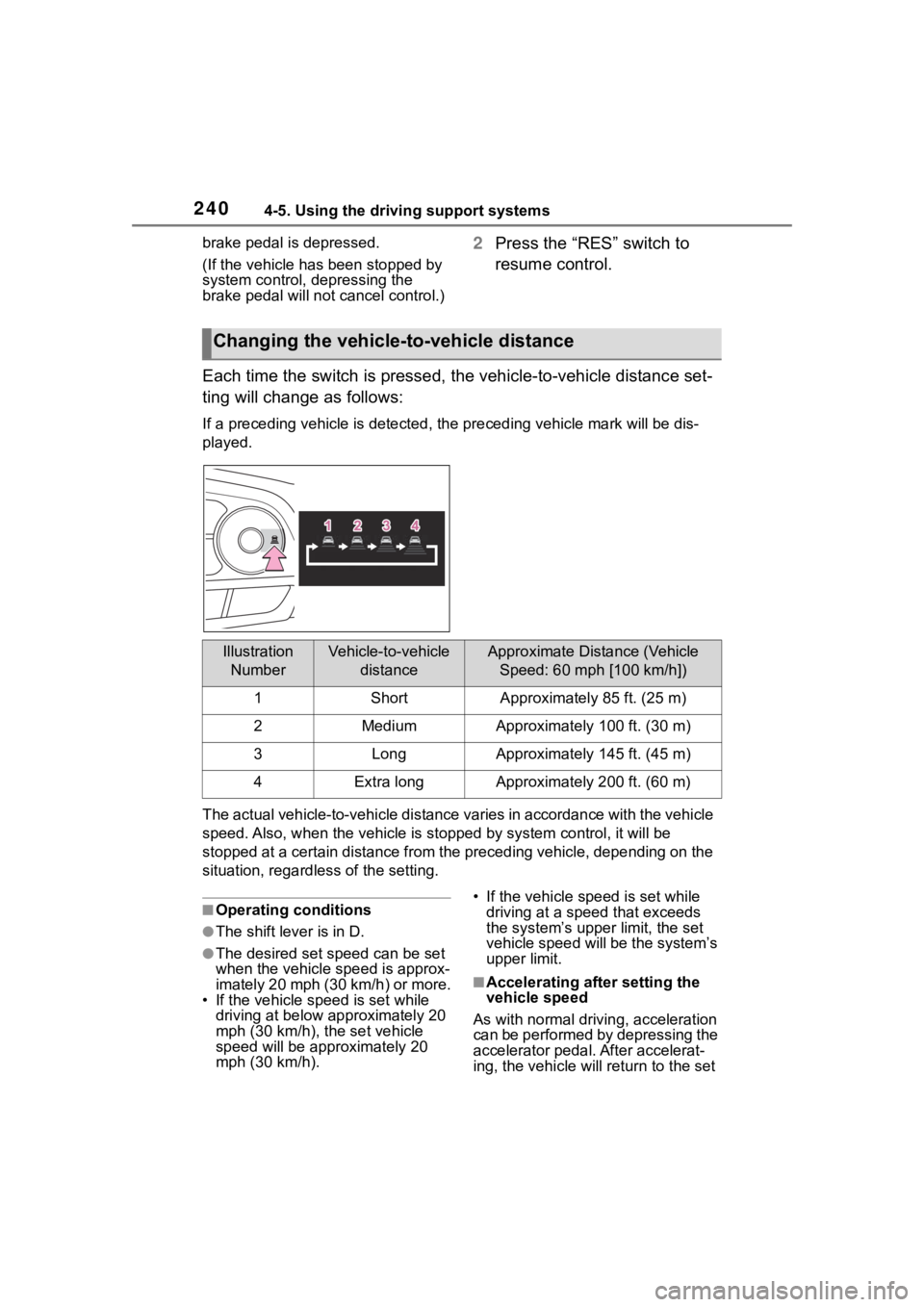
resume control.
Each time the switch is pressed , the vehicle-to-vehicle distance set-
ting will change as follows:
If a preceding vehicle is detecte d, the preceding vehicle mark will be dis-
played.
The actual vehicle-to-vehicle di stance varies in accordance wit h the vehicle
speed. Also, when the vehicle is stopped by system control, it will be
stopped at a certain distance from the preceding vehicle, depending on the
situation, regardless of the setting.
■Operating conditions
●The shift lever is in D.
●The desired set speed can be set
when the vehicle speed is approx-
imately 20 mph (30 km/h) or more.
• If the vehicle speed is set while driving at below approximately 20
mph (30 km/h), the set vehicle
speed will be approximately 20
mph (30 km/h). • If the vehicle speed is set while
driving at a speed that exceeds
the system’s upper limit, the set
vehicle speed will be the system’s
upper limit.
■Accelerating after setting the
vehicle speed
As with normal driving, acceleration
can be performed by depressing the
accelerator pedal. After accelerat-
ing, the vehicle will return to the set
Changing the vehicle-to-vehicle distance
Illustration NumberVehicle-to-vehicle distanceApproximate Distance (Vehicle Speed: 60 mph [100 km/h])
1ShortApproximately 85 ft. (25 m)
2MediumApproximately 100 ft. (30 m)
3LongApproximately 145 ft. (45 m)
4Extra longApproximately 200 ft. (60 m)