battery TOYOTA COROLLA CROSS HYBRID 2023 Owner's Manual
[x] Cancel search | Manufacturer: TOYOTA, Model Year: 2023, Model line: COROLLA CROSS HYBRID, Model: TOYOTA COROLLA CROSS HYBRID 2023Pages: 516, PDF Size: 15.96 MB
Page 126 of 516
1263-2. Opening, closing and locking the doors
WARNING
●Use caution when using the
back door closer as it still oper-
ates when the power back door
system is disabled.
■Power back door
Observe the following precautions
when operating the power back
door. Failure to d o so may cause
death or serious injury.
●Check the safety of the sur-
rounding area to make sure
there are no obstacles or any-
thing that could cause any of
your belongings to get caught.
●If anyone is in the vicinity, make
sure they are safe and let them
know that the back door is
about to open or close.
●If the power back door system is
disabled while the power back
door is operating, the back door
will stop operating. The back
door must then be operated
manually. Take extra care in this
situation, as th e back door may
open or close suddenly.
●If the operating conditions of the
power back door (
P.124) are
no longer met, a buzzer may
sound and the back door may
stop opening or closing. The
back door must then be oper-
ated manually. Take extra care
on an incline in this situation, as
the back door may move sud-
denly.
●On an incline, t he back door
may suddenly shut after it
opens. Make sure the back door
is fully open and secure.
●In the following si tuations, the
power back door may detect an
abnormality and automatic
operation may be stopped. In
this case, the back door must
then be operated manually.
Take extra care in this situation,
as the stopped back door may
suddenly open or close, causing
an accident.
• When the back door contacts an obstacle
• When the 12-volt battery volt- age suddenly drops, such as
when the power switch is turned
to ON or the hybrid system is
started during automatic opera-
tion
●If a heavy objec t is attached to
the back door, the back door
may not operate, causing a mal-
function, or the back door may
suddenly shut again after being
opened, causing someone’s
hands, arms, head or neck to be
caught and injured. Do not
attach any acce ssories other
than genuine Toyota parts to the
back door.
■Jam protection function
Observe the following precau-
tions. Failure to do so may cause
death or serious injury.
●Never use any part of your body
to intentionally activate the jam
protection function.
●The jam protection function may
not work if something gets
caught just before the back door
fully closes. Be careful not to
get fingers caught or anything
else.
●The jam protection function may
not work depending on the
shape of the object that is
caught. Be careful not to catch
fingers or anything else.
Page 130 of 516
1303-2. Opening, closing and locking the doors
●Interior buzzer sounds continu-
ously
■If “Key Detected in Vehicle” is
shown on the multi-information
display
An attempt was m ade to lock the
doors using the smart key system
while the electronic key was still
inside the vehicle. Retrieve the elec-
tronic key from the vehicle and lock
the doors again.
■Battery-saving function
●In the following situations, the
smart key system may take some
time to unlock the doors. Also the
illuminated entry system may not
operate properly.
• The electronic key has been left in
an area of approximately 11 ft.
(3.5 m) of the outside of the vehi-
cle for 40 seconds or longer.
• The smart key system has not been used for 5 days or longer.
●If the smart key system has not
been used for 14 days or longer,
the doors cannot be unlocked
from any door except the driver’s
door. In this case, hold the driver’s
door handle, or use the wireless
remote control or mechanical key
to unlock the doors.
■Electronic key battery-saving
function
When battery-saving mode is set,
battery depletion is minimized by
stopping the electronic key from
receiving radio waves.
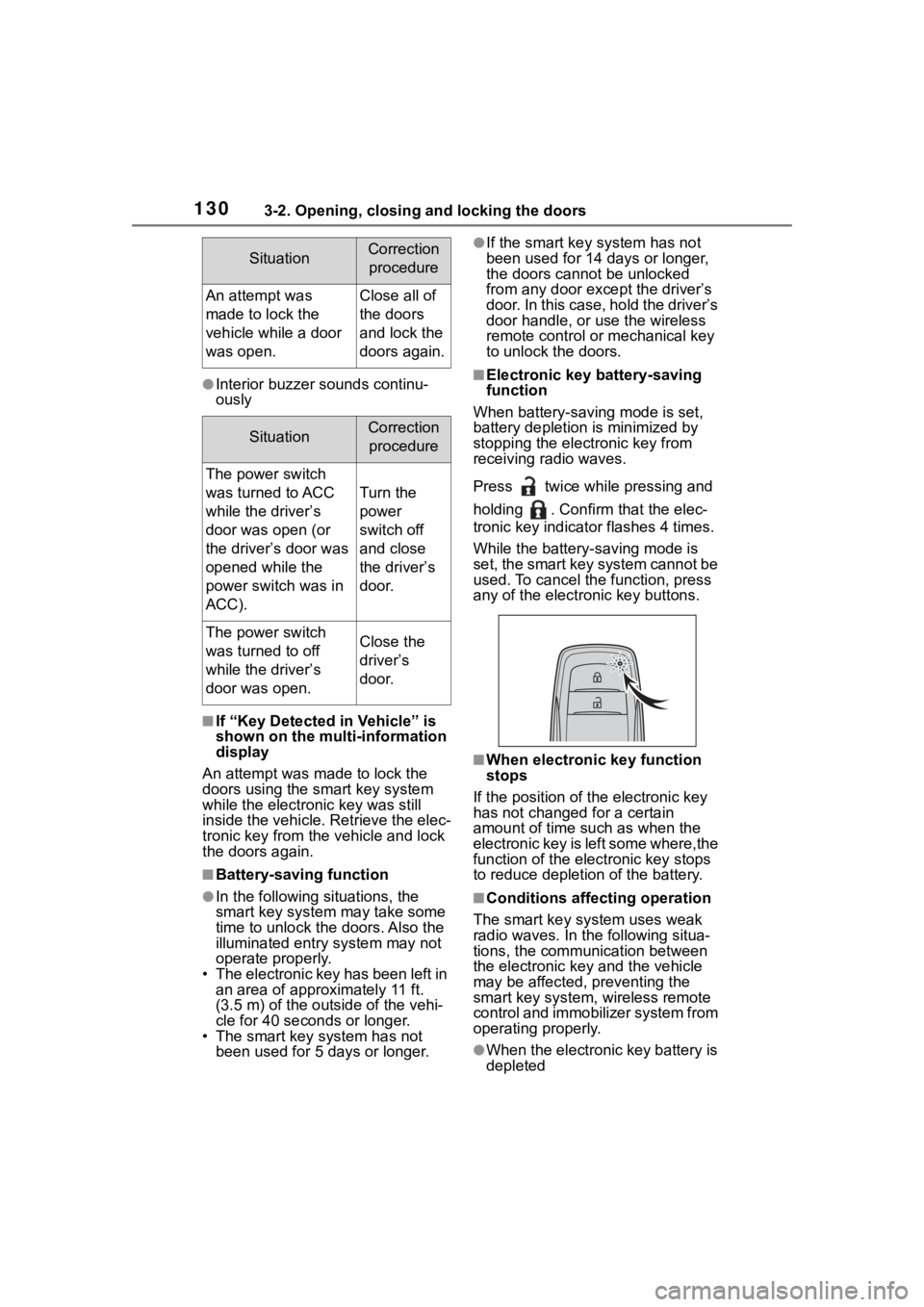
Press twice while pressing and
holding . Confirm that the elec-
tronic key indicator flashes 4 times.
While the battery-saving mode is
set, the smart key system cannot be
used. To cancel the function, press
any of the electronic key buttons.
■When electronic key function
stops
If the position of the electronic key
has not changed for a certain
amount of time suc h as when the
electronic key is left some where,the
function of the elec tronic key stops
to reduce depletion of the battery.
■Conditions affecting operation
The smart key system uses weak
radio waves. In the following situa-
tions, the communication between
the electronic key and the vehicle
may be affected, preventing the
smart key system, wireless remote
control and immobilizer system from
operating properly.
●When the electronic key battery is
depleted
SituationCorrection
procedure
An attempt was
made to lock the
vehicle while a door
was open.Close all of
the doors
and lock the
doors again.
SituationCorrection procedure
The power switch
was turned to ACC
while the driver’s
door was open (or
the driver’s door was
opened while the
power switch was in
ACC).
Turn the
power
switch off
and close
the driver’s
door.
The power switch
was turned to off
while the driver’s
door was open.Close the
driver’s
door.
Page 131 of 516

1313-2. Opening, closing and locking the doors
3
Before driving
●Near a TV tower, electric power
plant, gas station, radio station,
large display, airpo rt or other facil-
ity that generates strong radio
waves or electrical noise
●When carrying a portable radio,
cellular phone, cordless phone or
other wireless communication
device
●When the electronic key is in con-
tact with, or is covered by the fol-
lowing metallic objects
• Cards to which al uminum foil is
attached
• Cigarette boxes that have alumi- num foil inside
• Metallic wallets or bags
• Coins
• Hand warmers made of metal
• Media such as CDs and DVDs
●When other wireless keys (that
emit radio waves) are being used
nearby
●When carrying the electronic key
together with the following devices
that emit radio waves
• Another vehicle’s electronic key or a wireless key that emits radio
waves
• Personal computers or personal digital assistants (PDAs)
• Digital audio players
• Portable game systems
●If window tint with a metallic con-
tent or metallic objects are
attached to the rear window
●When the electronic key is placed
near a battery charger or elec-
tronic devices
●When the vehicle is parked in a
pay parking spot where radio
waves are emitted
If the doors cannot be
locked/unlocked using the smart key
system, lock/unlock the doors by
performing any of the following:
●Bring the electronic key close to
either front door handle and oper-
ate the entry function.
●Operate the wireless remote con- trol.
If the doors cannot be
locked/unlocked using the above
methods, use the mechanical key.
( P.431)
If the hybrid system cannot be
started using the smart key system,
refer to P.432.
■Note for the entry function
●Even when the electronic key is
within the effective range (detec-
tion areas), the system may not
operate properly in the following
cases:
• The electronic key is too close to the window or outside door han-
dle, near the ground, or in a high
place when the doors are locked
or unlocked.
• The electronic key is on the instru- ment panel, luggage compartment
or floor, or in the door pockets or
glove box when the hybrid system
is started or power switch modes
are changed.
●Do not leave the electronic key on
top of the instrument panel or near
the door pockets when exiting the
vehicle. Depending on the radio
wave reception conditions, it may
be detected by the antenna out-
side the cabin and the door will
become lockable from the outside,
possibly trapping the electronic
key inside the vehicle.
●As long as the electronic key is
within the effective range, the
doors may be locked or unlocked
by anyone. However, only the
doors detecting the electronic key
can be used to unlock the vehicle.
●Even if the electro nic key is not
inside the vehicle, it may be possi-
ble to start the hybrid system if the
electronic key is near the window.
●The doors may unlock or lock if a
large amount of water splashes on
the door handle, such as in the
rain or in a car wash when the
electronic key is within the effec-
tive range. (The doors will auto-
Page 132 of 516

1323-2. Opening, closing and locking the doors
matically be locked after
approximately 60 seconds if the
doors are not opened and closed.)
●If the wireless remote control is
used to lock the doors when the
electronic key is near the vehicle,
there is a possib ility that the door
may not be unlocke d by the entry
function. (Use the wireless remote
control to unloc k the doors.)
●If the doors have been locked
from outside of the vehicle and are
then not unlocked using the wire-
less remote contr ol or smart key
system, the hybri d system cannot
be started using the smart key
system. (However, if the doors
have been locked from inside the
vehicle, the hybrid system can be
started using the smart key sys-
tem.)
If it is necessary to start the hybrid
system, it can be started using the
procedure in “If the electronic key
dose not operate properly”
( P.432).
●Touching the door lock or unlock
sensor while wearing gloves may
prevent lock or unlock operation.
●When the lock op eration is per-
formed using the lock sensor, rec-
ognition signals will be shown up
to two consecutive times. After
this, no recogniti on signals will be
given.
●If the door handle becomes wet
while the electronic key is within
the effective ran ge, the door may
lock and unlock repeatedly. In that
case, follow the fo llowing correc-
tion procedures to wash the vehi-
cle:
• Place the electronic key in a loca-
tion 6 ft. (2 m) or more away from
the vehicle. (Take care to ensure
that the key is not stolen.)
• Set the electronic key to bat-
tery-saving mode to disable the
smart key system. ( P.130)
●If the electronic key is inside the
vehicle and a door handle
becomes wet during a car wash, a message may be shown on the
multi-information display and a
buzzer will sound outside the vehi-
cle. To turn off the alarm, lock all
the doors.
●The lock sensor may not work
properly if it comes into contact
with ice, snow, m
ud, etc. Clean
the lock sensor and attempt to
operate it again.
●A sudden handle operation or a
handle operation immediately
after entering the effective range
may prevent the doors from being
unlocked. Touch the door unlock
sensor and check that the doors
are unlocked befo re pulling the
door handle again.
●If there is another electronic key in
the detection area, it may take
slightly longer to unlock the doors
after the door handle is gripped.
●Fingernails may scrape against
the door during operation of the
door handle. Be careful not to
injure fingernails or damage the
surface of the door.
■When the vehicle is not driven
for extended periods
●To prevent theft of the vehicle, do
not leave the electronic key within
6 ft. (2 m) of the vehicle.
●The smart key system can be
deactivated in advance. ( P.463)
●Setting the electronic key to bat-
tery-saving mode helps to reduce
key battery depletion. ( P.130)
■To operate the system properly
Make sure to carry the electronic
key when operating the system. Do
not get the electronic key too close
to the vehicle when operating the
system from the out side of the vehi-
cle.
Depending on the position and hold-
ing condition of the electronic key,
the key may not be detected cor-
rectly and the system may not oper-
ate properly. (The alarm may go off
Page 145 of 516
1453-5. Opening and closing the windows
3
Before driving
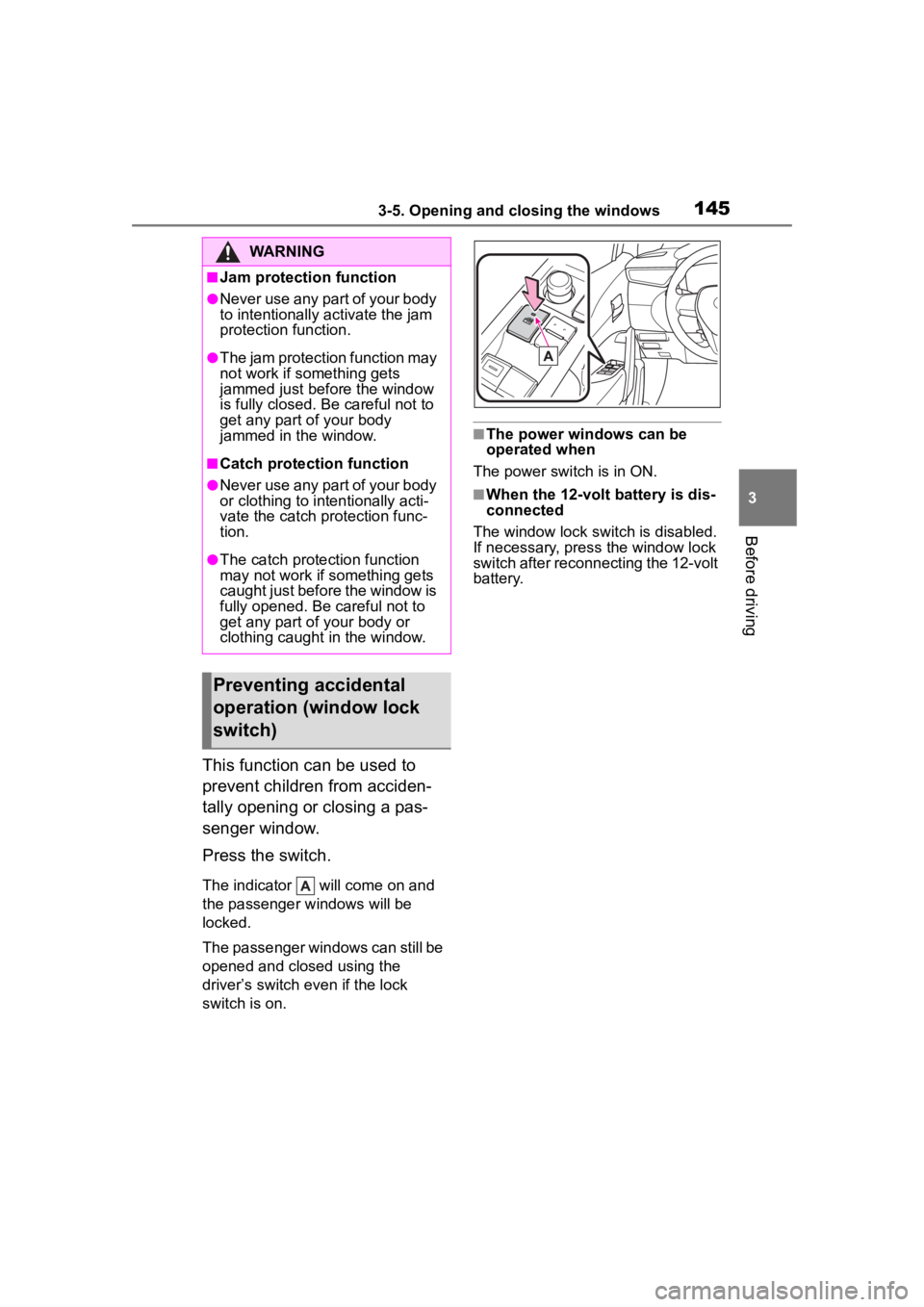
This function can be used to
prevent children from acciden-
tally opening or closing a pas-
senger window.
Press the switch.
The indicator will come on and
the passenger windows will be
locked.
The passenger windows can still be
opened and closed using the
driver’s switch even if the lock
switch is on.
■The power windows can be
operated when
The power switch is in ON.
■When the 12-volt battery is dis-
connected
The window lock switch is disabled.
If necessary, press the window lock
switch after reconnecting the 12-volt
battery.
WARNING
■Jam protection function
●Never use any part of your body
to intentionally a ctivate the jam
protection function.
●The jam protection function may
not work if something gets
jammed just before the window
is fully closed. Be careful not to
get any part of your body
jammed in the window.
■Catch protection function
●Never use any part of your body
or clothing to intentionally acti-
vate the catch p rotection func-
tion.
●The catch protection function
may not work if something gets
caught just before the window is
fully opened. Be careful not to
get any part of your body or
clothing caught in the window.
Preventing accidental
operation (window lock
switch)
Page 175 of 516
1754-2. Driving procedures
4
Driving
using the smart key system. Refer
to P.433 to restart the hybrid sys-
tem.
■If the “READY” indicator does
not come on
In the event that the “READY” indi-
cator does not come on even after
performing the proper procedures
for starting the vehicle, contact your
Toyota dealer immediately.
■If the hybrid system is malfunc-
tioning
P. 7 5
■Electronic key battery depletion
P. 1 1 2
■Conditions affecting operation
P. 1 3 0
■Notes for the entry function
P. 1 3 1
■Electronic key battery
P. 3 8 2
■Operation of the power switch
●If the switch is not pressed shortly
and firmly, the power switch mode
may not change or the hybrid sys-
tem may not start.
●If attempting to re start the hybrid
system immediately after turning
the power switch off, the hybrid
system may not start in some
cases. After turn ing the power
switch off, please wait a few sec-
onds before restarting the hybrid
system.
■Customization
If the smart key system has been
deactivated in a customized setting,
refer to P.431.
1 Stop the vehicle completely.
2 Set the parking brake
( P.186), and shift the shift
lever to P.
Check the parking brake indicator
is illuminated.
Do not press the shift lever button
after shifting the shit position to P.
3 Press the power switch.
The hybrid system will stop, and the
meter display will be extinguished.
WARNING
■When starting the hybrid sys-
tem
Always start the hybrid system
while sitting in the driver’s seat.
Do not depress t he accelerator
pedal while starting the hybrid
system under any circumstances.
Doing so may cause an accident
resulting in death o r serious injury.
NOTICE
■When starting the hybrid sys-
tem
If the hybrid system becomes diffi-
cult to start, have your vehicle
checked by your Toyota dealer
immediately.
■Symptoms indicating a mal-
function with the power
switch
If the power switch seems to be
operating somewhat differently
than usual, such as the switch
sticking slightly, there may be a
malfunction. Contact your Toyota
dealer immediately.
Stopping the hybrid sys-
tem
Page 177 of 516
1774-2. Driving procedures
4
Driving
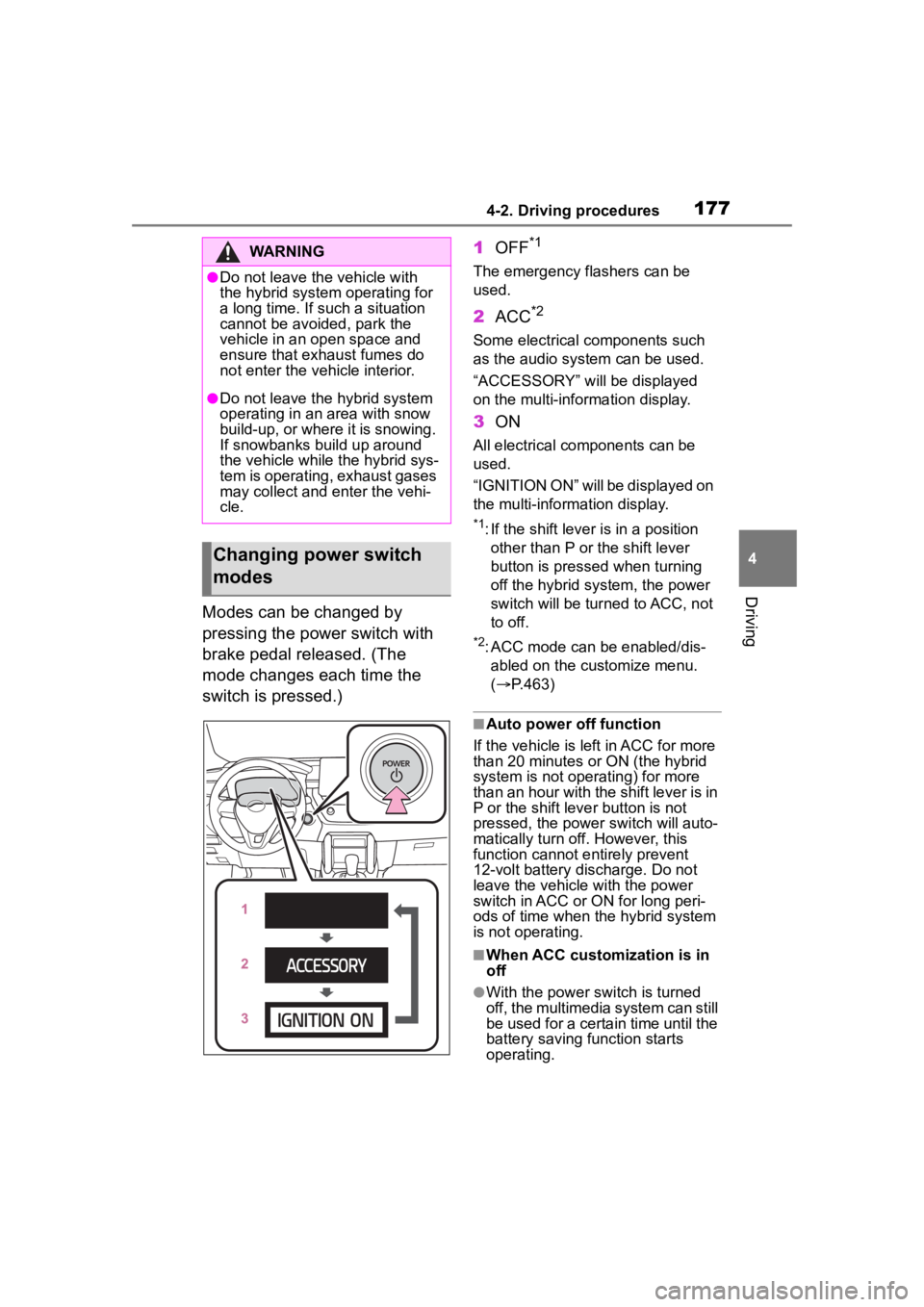
Modes can be changed by
pressing the power switch with
brake pedal released. (The
mode changes each time the
switch is pressed.)1
OFF
*1
The emergency flashers can be
used.
2ACC*2
Some electrical components such
as the audio sys tem can be used.
“ACCESSORY” will be displayed
on the multi-information display.
3 ON
All electrical components can be
used.
“IGNITION ON” will be displayed on
the multi-information display.
*1: If the shift lever is in a position
other than P or the shift lever
button is pressed when turning
off the hybrid system, the power
switch will be tur ned to ACC, not
to off.
*2: ACC mode can be enabled/dis- abled on the customize menu.
( P.463)
■Auto power off function
If the vehicle is left in ACC for more
than 20 minutes or ON (the hybrid
system is not operating) for more
than an hour with the shift lever is in
P or the shift leve r button is not
pressed, the power switch will auto-
matically turn off. However, this
function cannot entirely prevent
12-volt battery discharge. Do not
leave the vehicle with the power
switch in ACC or ON for long peri-
ods of time when the hybrid system
is not operating.
■When ACC customization is in
off
●With the power switch is turned
off, the multimedia system can still
be used for a certain time until the
battery saving function starts
operating.
WARNING
●Do not leave the vehicle with
the hybrid system operating for
a long time. If such a situation
cannot be avoided, park the
vehicle in an open space and
ensure that exhaust fumes do
not enter the vehicle interior.
●Do not leave the hybrid system
operating in an area with snow
build-up, or where it is snowing.
If snowbanks build up around
the vehicle while the hybrid sys-
tem is operating, exhaust gases
may collect and enter the vehi-
cle.
Changing power switch
modes
Page 178 of 516
1784-2. Driving procedures
●When the safe exit assist is oper-
ating, a buzzer will sound and a
voice guidance will be given.
(vehicles with safe exit assist)
If the hybrid system is stopped
when the shift lever is in a posi-
tion other than P or the shift
lever button is pressed, the
power switch will not be turned
off but instead be turned to
ACC. Perform the following pro-
cedure to turn the switch off:
1Check that the parking brake
is set.
2 Shift the shift lever to P.
Do not press the shift lever button
after shifting the shit position to P.
3Check that “ACCESSORY” is
displayed on the multi-infor-
mation display and press the
power switch shortly and
firmly. 4
Check that “ACCESSORY”
or “IGNITION ON” on the
multi-information display are
off.
NOTICE
■To prevent 12-volt battery dis-
charge
●Do not leave the power switch
in ACC or ON for long periods of
time without the hybrid system
on.
●If “ACCESSORY” or “IGNITION
ON” is displayed on the
multi-informatio n display, the
power switch is not off. Exit the
vehicle after turning the power
switch off.
When stopping the hybrid
system with the shift lever
in a position other than P
NOTICE
■To prevent 12-volt battery dis-
charge
Do not stop the hybrid system
with the shift lever in a position
other P or the shift lever button
pressed. If the hybrid system is
stopped with the shift lever in a
position other than P or the shift
lever button pressed, the power
switch will not be turned off but
instead be turned to ACC mode. If
the vehicle is left in ACC, 12-volt
battery dischar ge may occur.
Page 179 of 516
1794-2. Driving procedures
4
Driving
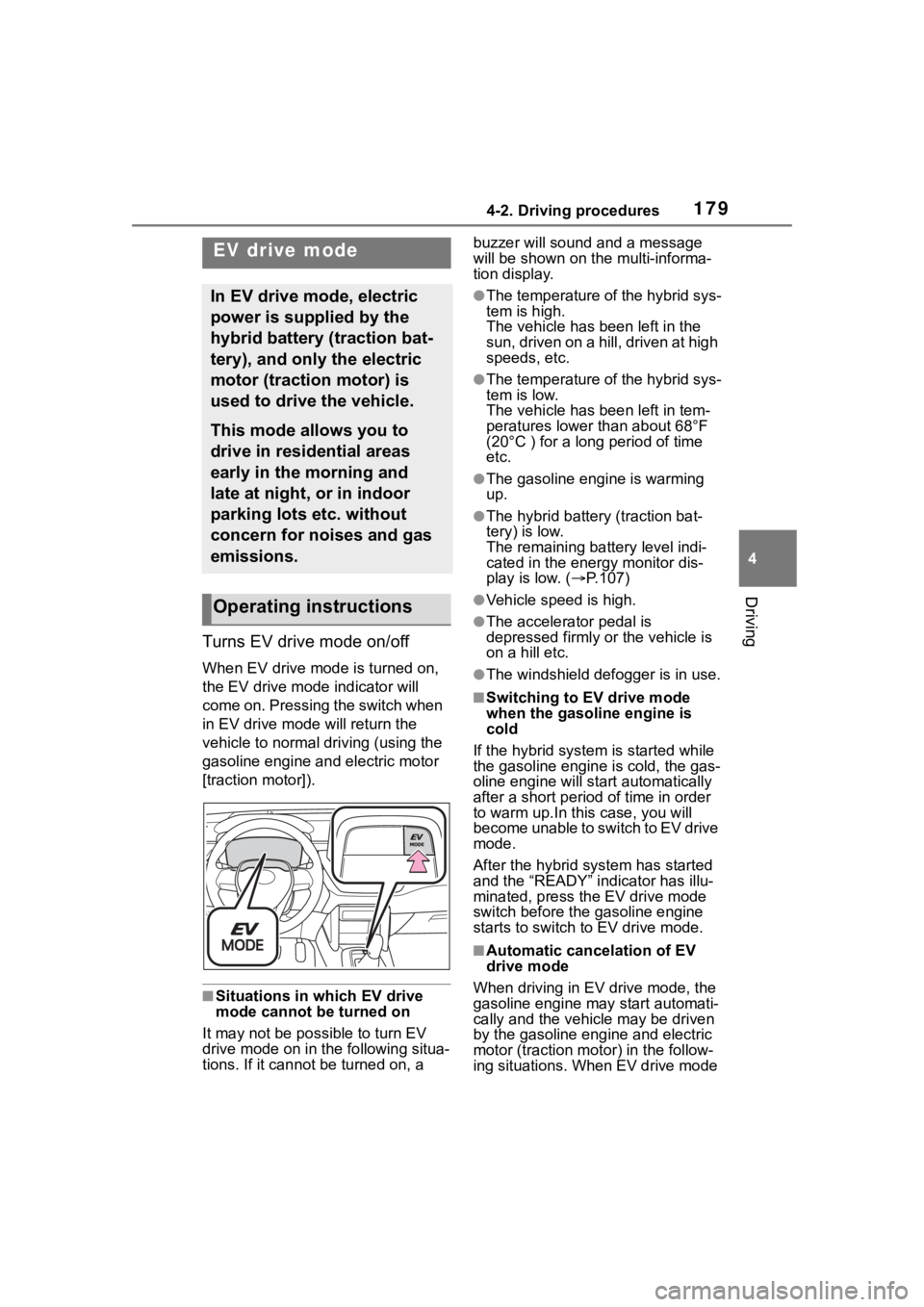
Turns EV drive mode on/off
When EV drive mode is turned on,
the EV drive mode indicator will
come on. Pressing the switch when
in EV drive mode will return the
vehicle to normal driving (using the
gasoline engine and electric motor
[traction motor]).
■Situations in which EV drive
mode cannot be turned on
It may not be po ssible to turn EV
drive mode on in t he following situa-
tions. If it cannot be turned on, a buzzer will sound
and a message
will be shown on the multi-informa-
tion display.
●The temperature of the hybrid sys-
tem is high.
The vehicle has been left in the
sun, driven on a hill, driven at high
speeds, etc.
●The temperature of the hybrid sys-
tem is low.
The vehicle has been left in tem-
peratures lower than about 68°F
(20°C ) for a long period of time
etc.
●The gasoline engine is warming
up.
●The hybrid battery (traction bat-
tery) is low.
The remaining batt ery level indi-
cated in the energy monitor dis-
play is low. ( P.107)
●Vehicle speed is high.
●The accelerator pedal is
depressed firmly or the vehicle is
on a hill etc.
●The windshield defogger is in use.
■Switching to EV drive mode
when the gasoline engine is
cold
If the hybrid system is started while
the gasoline engine is cold, the gas-
oline engine will st art automatically
after a short period of time in order
to warm up.I n this case, you will
become unable to switch to EV drive
mode.
After the hybrid s ystem has started
and the “READY” indicator has illu-
minated, press the EV drive mode
switch before the gasoline engine
starts to switch to EV drive mode.
■Automatic cancelation of EV
drive mode
When driving in EV drive mode, the
gasoline engine may start automati-
cally and the vehic le may be driven
by the gasoline engine and electric
motor (traction motor) in the follow-
ing situations. When EV drive mode
EV drive mode
In EV drive mode, electric
power is supplied by the
hybrid battery (traction bat-
tery), and only the electric
motor (traction motor) is
used to drive the vehicle.
This mode allows you to
drive in residential areas
early in the morning and
late at night, or in indoor
parking lots etc. without
concern for noises and gas
emissions.
Operating instructions
Page 180 of 516

1804-2. Driving procedures
is canceled, a buzzer will sound, the
EV drive mode indicator will flash,
and a message will be displayed on
the multi-information display.
●The hybrid battery (traction bat-
tery) becomes low.
The remaining battery level indi-
cated in the energy monitor dis-
play is low. ( P.107)
●Vehicle speed is high.
●The accelerator pedal is
depressed firmly or the vehicle is
on a hill etc.
■Possible driving distance when
driving in EV drive mode
EV drive mode’s possible driving
distance ranges from a few hundred
meters to approxima tely 0.6 mile (1
km). However, depending on vehicle
conditions, there are situations
when EV drive mode cannot be
used.
(The distance that is possible
depends on the hybrid battery [trac-
tion battery] level and driving condi-
tions.)
■Fuel economy
The hybrid system is designed to
achieve the best possible fuel econ-
omy during normal driving (using
the gasoline engi ne and electric
motor [traction motor]). Driving in
EV drive mode more than neces-
sary may lower fuel economy.
■If “EV Mode Unavailable” is
shown on the multi-information
display
The EV drive mode is not available.
The reason the EV drive mode is
not available (the vehicle is idling,
battery charge is low, vehicle speed
is higher than the EV drive mode
operating speed range or accelera-
tor pedal is depressed too much)
may be displayed. Use the EV drive
mode when it becomes available.
■If “EV Mode Deactivated” is
shown on the multi-information
display
The EV drive mode has been auto-
matically canceled. The reason the
EV drive mode is not available (the
battery charge is low, vehicle speed
is higher than the EV drive mode
operating speed r ange or accelera-
tor pedal is depressed too much)
may be displayed. Drive the vehicle
for a while before attempting to turn
on the EV drive mode again.
WARNING
■Caution while driving
When driving in EV drive mode,
pay special attention to the area
around the vehicle. Because
there is no engine noise, pedestri-
ans, people riding bicycles or
other people and vehicles in the
area may not be aware of the
vehicle starting off or approaching
them, so take extra care while
driving. Therefore, take extra care
while driving even if the vehicle
proximity notification system is
active.