phone TOYOTA COROLLA HATCHBACK 2021 (in English) Owner's Manual
[x] Cancel search | Manufacturer: TOYOTA, Model Year: 2021, Model line: COROLLA HATCHBACK, Model: TOYOTA COROLLA HATCHBACK 2021Pages: 576, PDF Size: 12.73 MB
Page 274 of 576
2745-3. Connectivity settings
COROLLA H/B_U
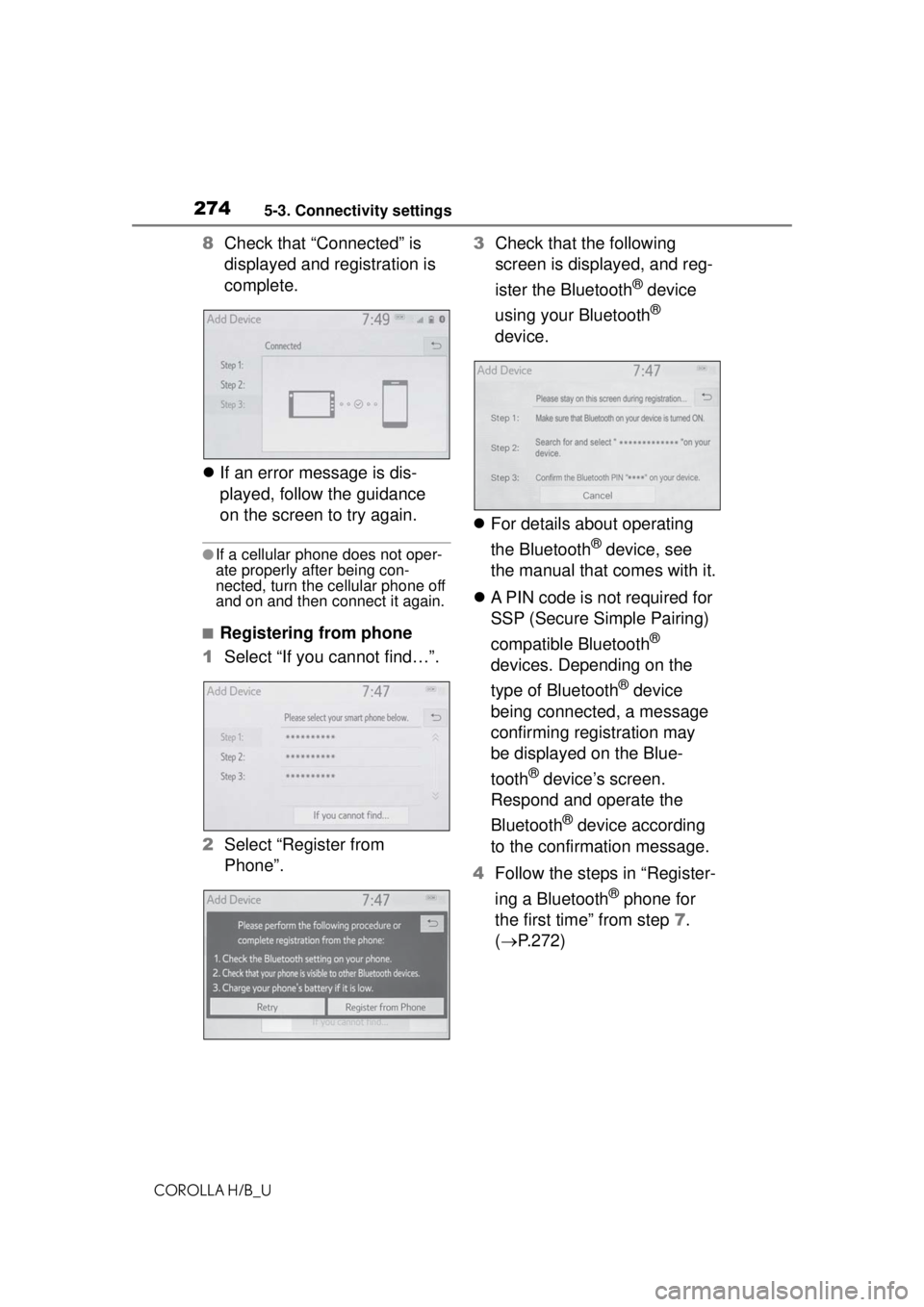
8Check that “Connected” is
displayed and registration is
complete.
If an error message is dis-
played, follow the guidance
on the screen to try again.
●If a cellular phone does not oper-
ate properly after being con-
nected, turn the cellular phone off
and on and then connect it again.
■Registering from phone
1 Select “If you cannot find…”.
2 Select “Register from
Phone”. 3
Check that the following
screen is displayed, and reg-
ister the Bluetooth
® device
using your Bluetooth
®
device.
For details about operating
the Bluetooth
® device, see
the manual that comes with it.
A PIN code is not required for
SSP (Secure Simple Pairing)
compatible Bluetooth
®
devices. Depending on the
type of Bluetooth
® device
being connected, a message
confirming registration may
be displayed on the Blue-
tooth
® device’s screen.
Respond and operate the
Bluetooth
® device according
to the confirmation message.
4 Follow the steps in “Register-
ing a Bluetooth
® phone for
the first time” from step 7.
( P.272)
Page 275 of 576
2755-3. Connectivity settings
COROLLA H/B_U
5
Audio
To use the Bluetooth® audio, it is
necessary to register an audio
player with the system.
Once the player has been regis-
tered, it is possible to use the
Bluetooth
® audio.
This operation cannot be per-
formed while driving.
For details about registering a
Bluetooth
® device: P.272
1 Turn the Bluetooth
® connec-
tion setting of your audio
player on.
This function is not available
when the Bluetooth
® connec-
tion setting of your audio
player is set to off.
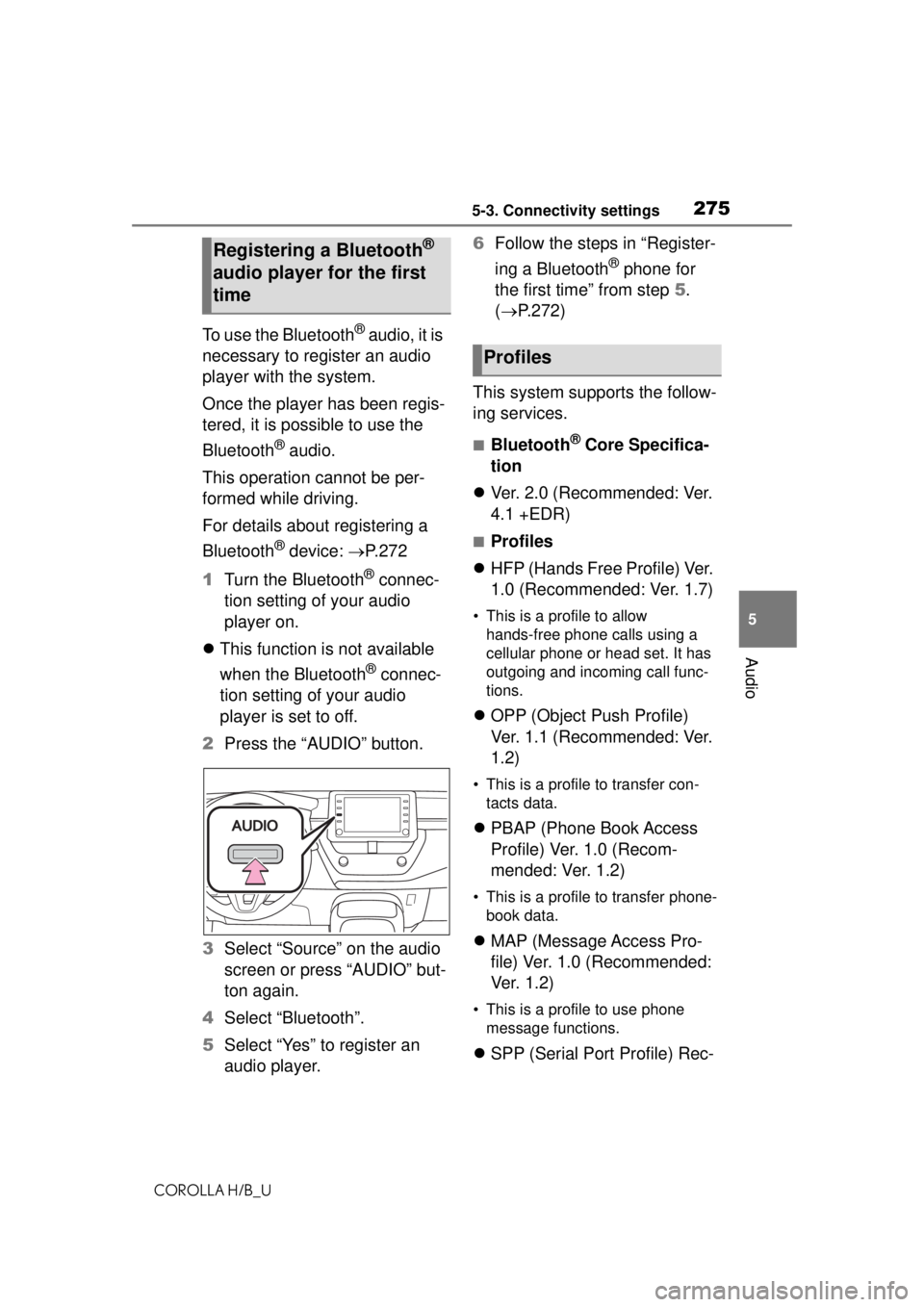
2 Press the “AUDIO” button.
3 Select “Source” on the audio
screen or press “AUDIO” but-
ton again.
4 Select “Bluetooth”.
5 Select “Yes” to register an
audio player. 6
Follow the steps in “Register-
ing a Bluetooth
® phone for
the first time” from step 5.
( P.272)
This system supports the follow-
ing services.
■Bluetooth® Core Specifica-
tion
Ver. 2.0 (Recommended: Ver.
4.1 +EDR)
■Profiles
HFP (Hands Free Profile) Ver.
1.0 (Recommended: Ver. 1.7)
• This is a profile to allow
hands-free phone calls using a
cellular phone or head set. It has
outgoing and incoming call func-
tions.
OPP (Object Push Profile)
Ver. 1.1 (Recommended: Ver.
1.2)
• This is a profile to transfer con-
tacts data.
PBAP (Phone Book Access
Profile) Ver. 1.0 (Recom-
mended: Ver. 1.2)
• This is a profile to transfer phone-
book data.
MAP (Message Access Pro-
file) Ver. 1.0 (Recommended:
Ve r. 1 . 2 )
• This is a profile to use phone
message functions.
SPP (Serial Port Profile) Rec-
Registering a Bluetooth®
audio player for the first
time
Profiles
Page 276 of 576
2765-3. Connectivity settings
COROLLA H/B_U
ommended: Ver. 1.2
• This is a profile to use the Toyota audio multimedia function.
A2DP (Advanced Audio Dis-
tribution Profile) Ver. 1.0 (Rec-
ommended: Ver. 1.3)
• This is a profile to transmit stereo
audio or high quality sound to the
audio system.
AVRCP (Audio/Video Remote
Control Profile) Ver. 1.0 (Rec-
ommended: Ver. 1.6)
• This is a profile to allow remote
control the A/V equipment.
●This system is not guaranteed to
operate with all Bluetooth®
devices.
●If your cellular phone does not
support HFP, registering the Blue-
tooth
® phone or using OPP,
PBAP, MAP or SPP profiles indi-
vidually will not be possible.
●If the connec ted Bluetooth®
device version is older than rec-
ommended or incompatible, the
Bluetooth
® device function may
not work properly.
●Refer to https:// www.toyota.com/
audio multimedia in the United
States,
https://www.toyota.ca/connected
in Canada, and
http://www.toyotapr.com/
audio-multimedia in Puerto Rico,
to find approved Bluetooth®
phones for this system.
●Certification Bluetooth is a registered trademark
of Bluetooth SIG, Inc.
Page 277 of 576
2775-3. Connectivity settings
COROLLA H/B_U
5
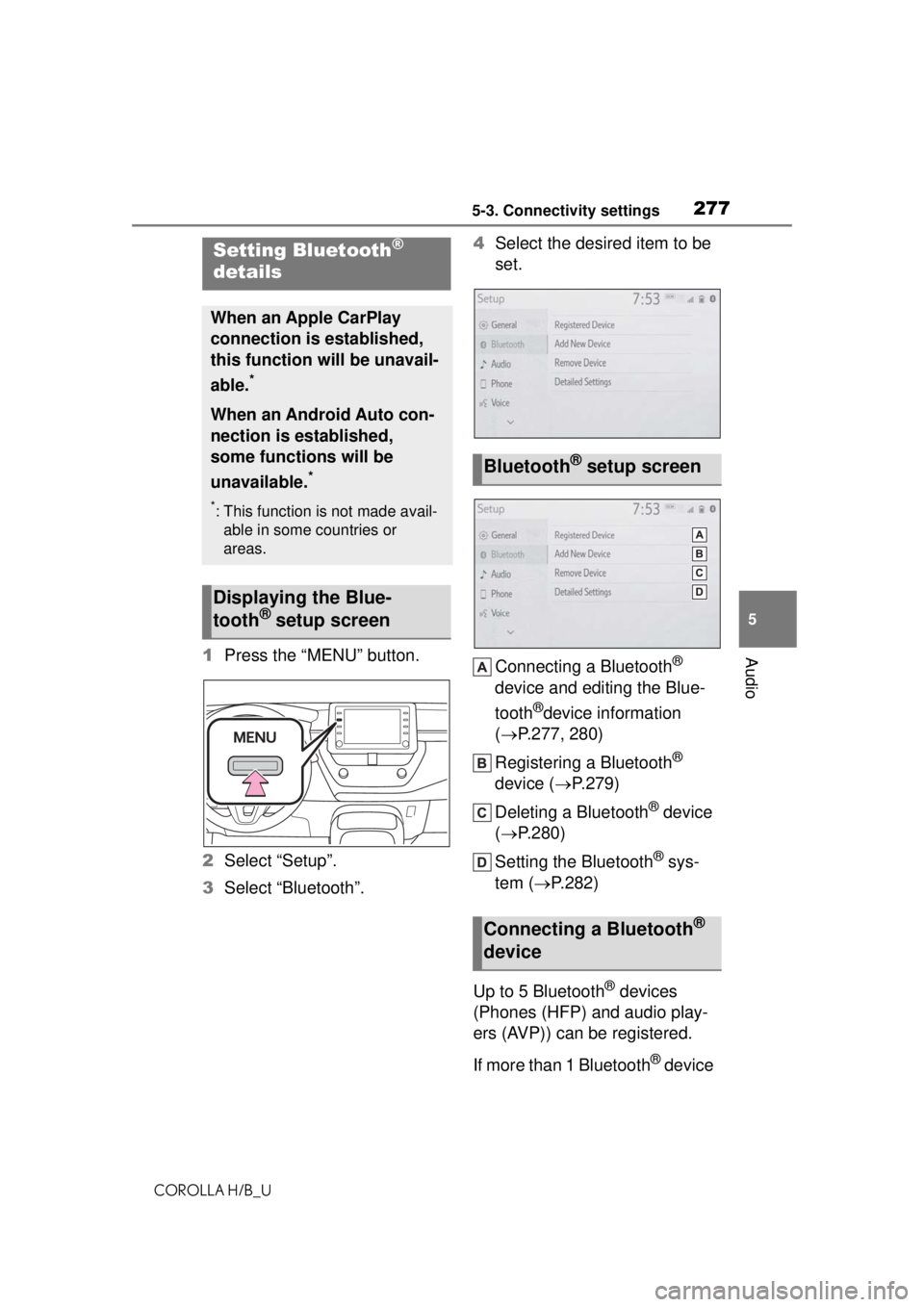
Audio1 Press the “MENU” button.
2 Select “Setup”.
3 Select “Bluetooth”. 4
Select the desired item to be
set.
Connecting a Bluetooth®
device and editing the Blue-
tooth
®device information
( P.277, 280)
Registering a Bluetooth
®
device ( P.279)
Deleting a Bluetooth
® device
( P.280)
Setting the Bluetooth
® sys-
tem ( P.282)
Up to 5 Bluetooth
® devices
(Phones (HFP) and audio play-
ers (AVP)) can be registered.
If more than 1 Bluetooth
® device
Setting Bluetooth®
details
When an Apple CarPlay
connection is established,
this function will be unavail-
able.
*
When an Android Auto con-
nection is established,
some functions will be
unavailable.
*
*: This function is not made avail-
able in some countries or
areas.
Displaying the Blue-
tooth® setup screen
Bluetooth® setup screen
Connecting a Bluetooth®
device
Page 278 of 576
2785-3. Connectivity settings
COROLLA H/B_U
has been registered, select
which device to connect to.
1Display the Bluetooth
® set-
tings screen. ( P.277)
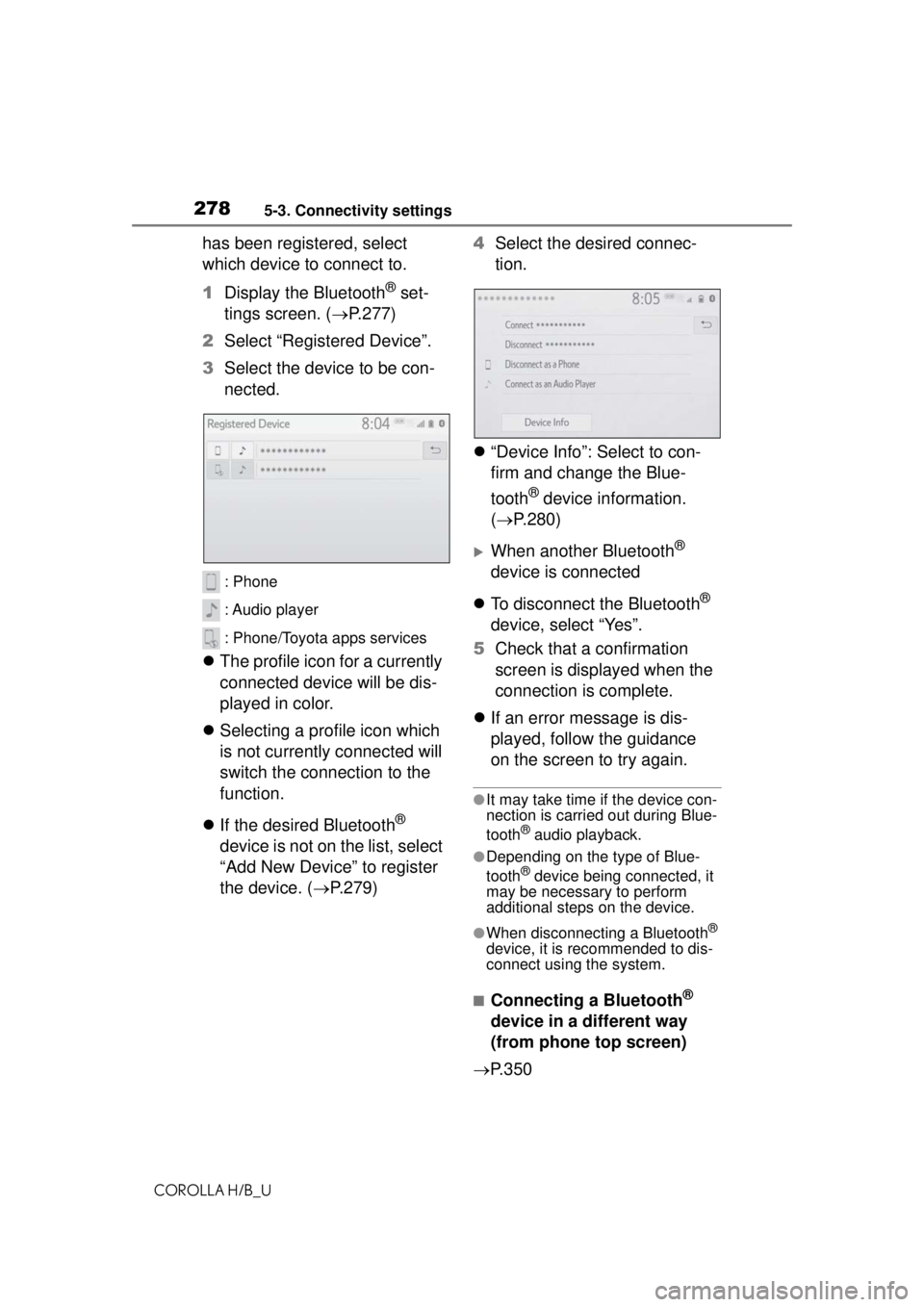
2 Select “Registered Device”.
3 Select the device to be con-
nected.
: Phone
: Audio player
: Phone/Toyota apps services
The profile icon for a currently
connected device will be dis-
played in color.
Selecting a profile icon which
is not currently connected will
switch the connection to the
function.
If the desired Bluetooth
®
device is not on the list, select
“Add New Device” to register
the device. ( P.279) 4
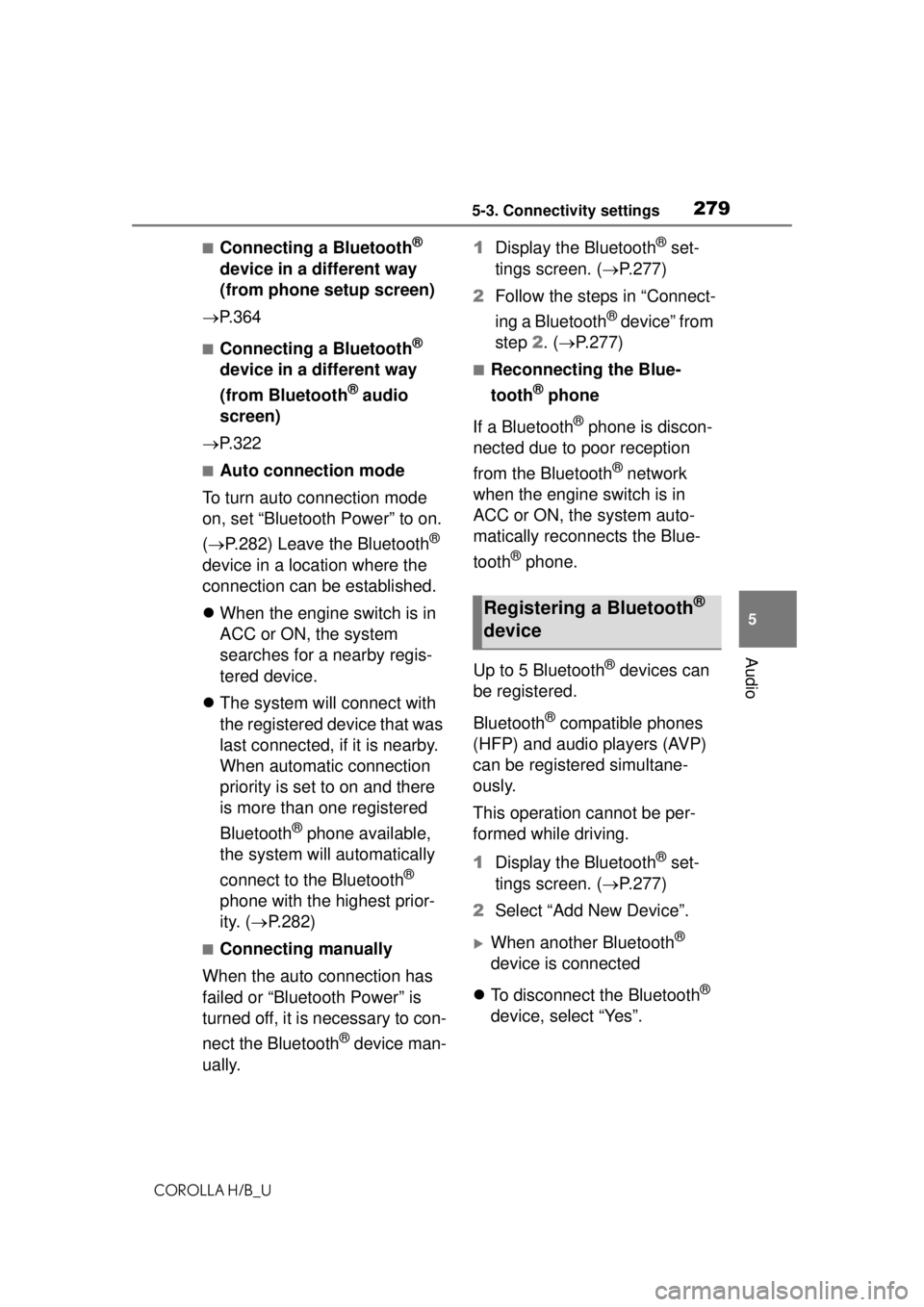
Select the desired connec-
tion.
“Device Info”: Select to con-
firm and change the Blue-
tooth
® device information.
( P.280)
When another Bluetooth®
device is connected
To disconnect the Bluetooth
®
device, select “Yes”.
5 Check that a confirmation
screen is displayed when the
connection is complete.
If an error message is dis-
played, follow the guidance
on the screen to try again.
●It may take time if the device con-
nection is carried out during Blue-
tooth
® audio playback.
●Depending on the type of Blue-
tooth® device being connected, it
may be necessary to perform
additional steps on the device.
●When disconnecting a Bluetooth®
device, it is recommended to dis-
connect using the system.
■Connecting a Bluetooth®
device in a different way
(from phone top screen)
P.350
Page 279 of 576
2795-3. Connectivity settings
COROLLA H/B_U
5
Audio
■Connecting a Bluetooth®
device in a different way
(from phone setup screen)
P. 3 6 4
■Connecting a Bluetooth®
device in a different way
(from Bluetooth
® audio
screen)
P. 3 2 2
■Auto connection mode
To turn auto connection mode
on, set “Bluetooth Power” to on.
( P.282) Leave the Bluetooth
®
device in a location where the
connection can be established.
When the engine switch is in
ACC or ON, the system
searches for a nearby regis-
tered device.
The system will connect with
the registered device that was
last connected, if it is nearby.
When automatic connection
priority is set to on and there
is more than one registered
Bluetooth
® phone available,
the system will automatically
connect to the Bluetooth
®
phone with the highest prior-
ity. ( P.282)
■Connecting manually
When the auto connection has
failed or “Bluetooth Power” is
turned off, it is necessary to con-
nect the Bluetooth
® device man-
ually. 1
Display the Bluetooth
® set-
tings screen. ( P.277)
2 Follow the steps in “Connect-
ing a Bluetooth
® device” from
step 2. ( P.277)
■Reconnecting the Blue-
tooth
® phone
If a Bluetooth
® phone is discon-
nected due to poor reception
from the Bluetooth
® network
when the engine switch is in
ACC or ON, the system auto-
matically reconnects the Blue-
tooth
® phone.
Up to 5 Bluetooth
® devices can
be registered.
Bluetooth
® compatible phones
(HFP) and audio players (AVP)
can be registered simultane-
ously.
This operation cannot be per-
formed while driving.
1 Display the Bluetooth
® set-
tings screen. ( P.277)
2 Select “Add New Device”.
When another Bluetooth®
device is connected
To disconnect the Bluetooth
®
device, select “Yes”.
Registering a Bluetooth®
device
Page 280 of 576
2805-3. Connectivity settings
COROLLA H/B_U
When 5 Bluetooth® devices
have already been registered
A registered device needs to
be replaced. Select “Yes”, and
select the device to be
replaced.
3 Follow the steps in “Register-
ing a Bluetooth
® phone for
the first time” from step 5.
( P.272)
This operation cannot be per-
formed while driving.
1 Display the Bluetooth
® set-
tings screen. ( P.277)
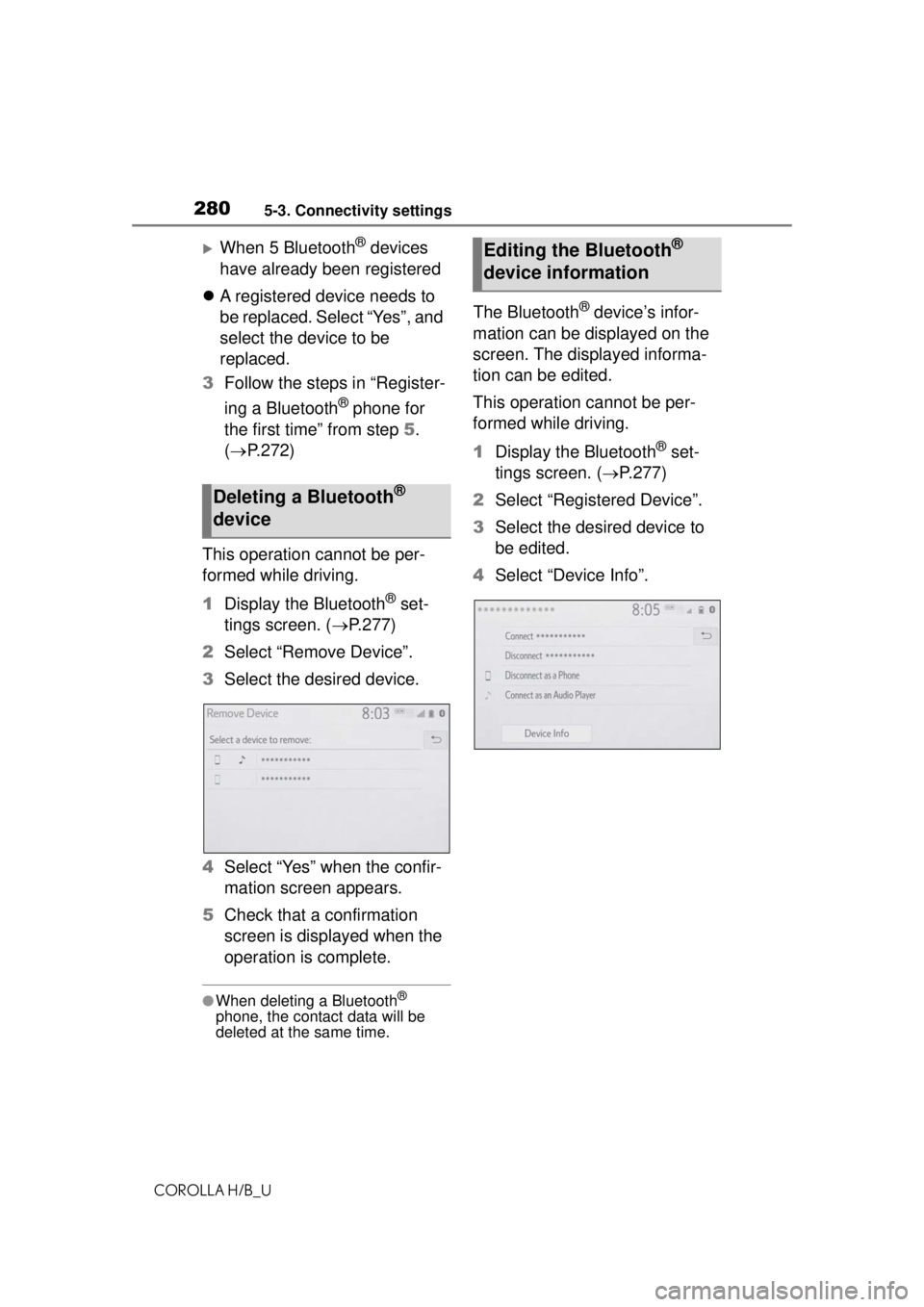
2 Select “Remove Device”.
3 Select the desired device.
4 Select “Yes” when the confir-
mation screen appears.
5 Check that a confirmation
screen is displayed when the
operation is complete.
●When deleting a Bluetooth®
phone, the contact data will be
deleted at the same time.
The Bluetooth® device’s infor-
mation can be displayed on the
screen. The displayed informa-
tion can be edited.
This operation cannot be per-
formed while driving.
1 Display the Bluetooth
® set-
tings screen. ( P.277)
2 Select “Registered Device”.
3 Select the desired device to
be edited.
4 Select “Device Info”.
Deleting a Bluetooth®
device
Editing the Bluetooth®
device information
Page 281 of 576
2815-3. Connectivity settings
COROLLA H/B_U
5
Audio
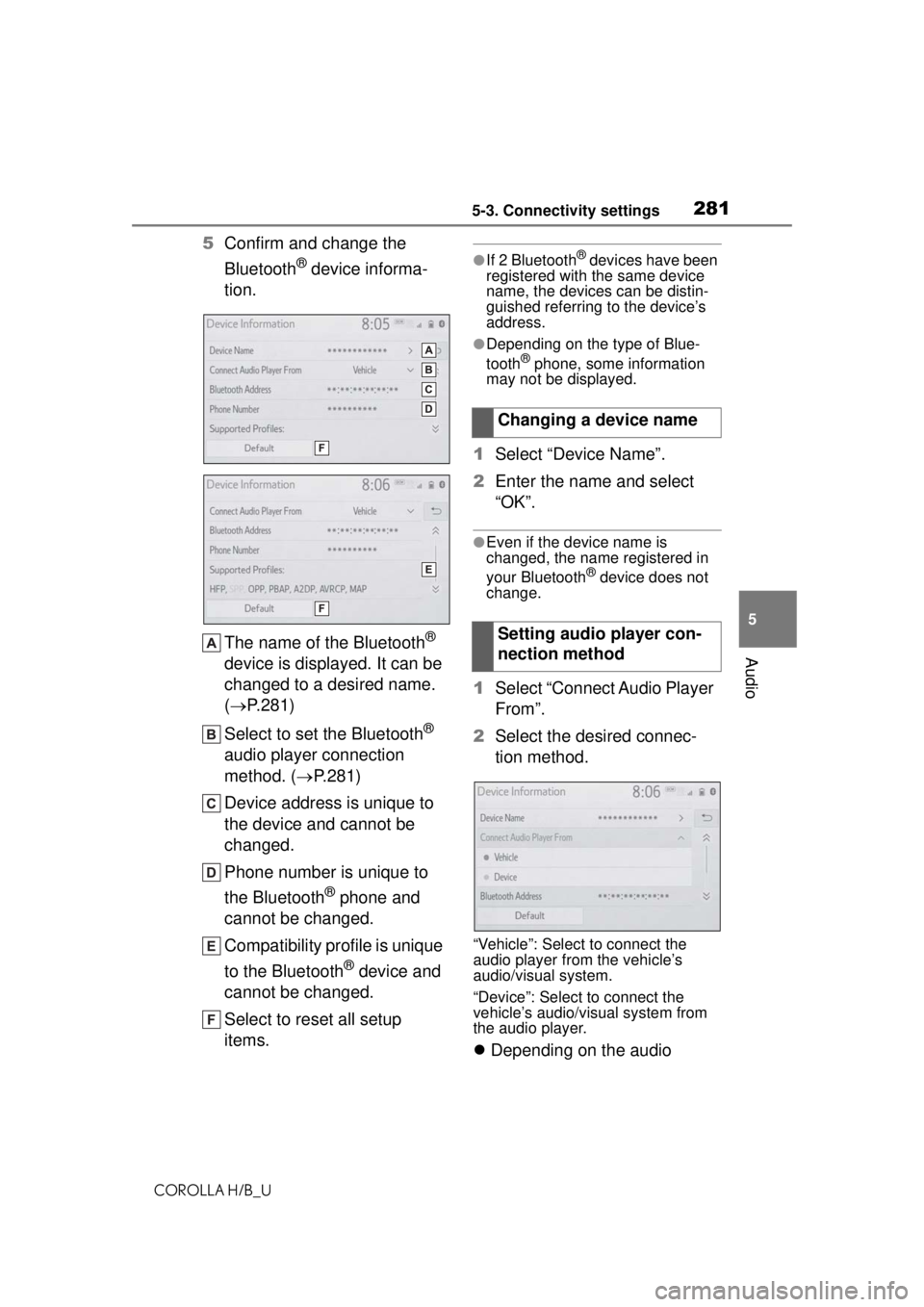
5 Confirm and change the
Bluetooth
® device informa-
tion.
The name of the Bluetooth
®
device is displayed. It can be
changed to a desired name.
( P.281)
Select to set the Bluetooth
®
audio player connection
method. ( P.281)
Device address is unique to
the device and cannot be
changed.
Phone number is unique to
the Bluetooth
® phone and
cannot be changed.
Compatibility profile is unique
to the Bluetooth
® device and
cannot be changed.
Select to reset all setup
items.
●If 2 Bluetooth® devices have been
registered with the same device
name, the devices can be distin-
guished referring to the device’s
address.
●Depending on the type of Blue-
tooth® phone, some information
may not be displayed.
1 Select “Device Name”.
2 Enter the name and select
“OK”.
●Even if the device name is
changed, the name registered in
your Bluetooth
® device does not
change.
1 Select “Connect Audio Player
From”.
2 Select the desired connec-
tion method.
“Vehicle”: Select to connect the
audio player from the vehicle’s
audio/visual system.
“Device”: Select to connect the
vehicle’s audio/visual system from
the audio player.
Depending on the audio
Changing a device name
Setting audio player con-
nection method
Page 283 of 576
2835-3. Connectivity settings
COROLLA H/B_U
5
Audio
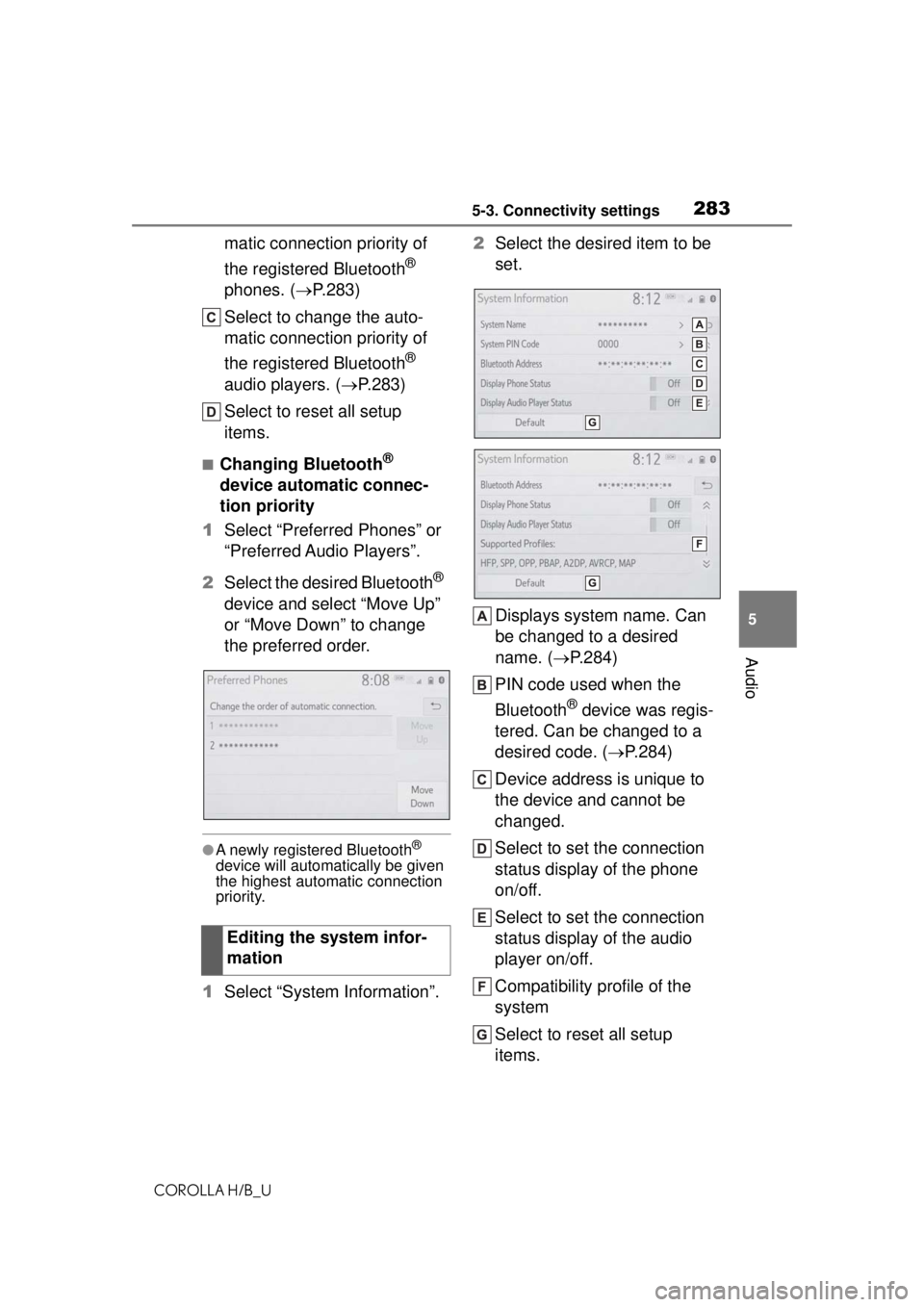
matic connection priority of
the registered Bluetooth
®
phones. ( P.283)
Select to change the auto-
matic connection priority of
the registered Bluetooth
®
audio players. ( P.283)
Select to reset all setup
items.
■Changing Bluetooth®
device automatic connec-
tion priority
1 Select “Preferred Phones” or
“Preferred Audio Players”.
2 Select the desired Bluetooth
®
device and select “Move Up”
or “Move Down” to change
the preferred order.
●A newly registered Bluetooth®
device will automatically be given
the highest automatic connection
priority.
1 Select “System Information”. 2
Select the desired item to be
set.
Displays system name. Can
be changed to a desired
name. ( P.284)
PIN code used when the
Bluetooth
® device was regis-
tered. Can be changed to a
desired code. ( P.284)
Device address is unique to
the device and cannot be
changed.
Select to set the connection
status display of the phone
on/off.
Select to set the connection
status display of the audio
player on/off.
Compatibility profile of the
system
Select to reset all setup
items.
Editing the system infor-
mation
Page 289 of 576
2895-3. Connectivity settings
COROLLA H/B_U
5
Audio
*: This function is not made avail- able in some countries or areas.
1 Enable Siri on the device to
be connected. 2
Connect the device to the
USB port. ( P.305)
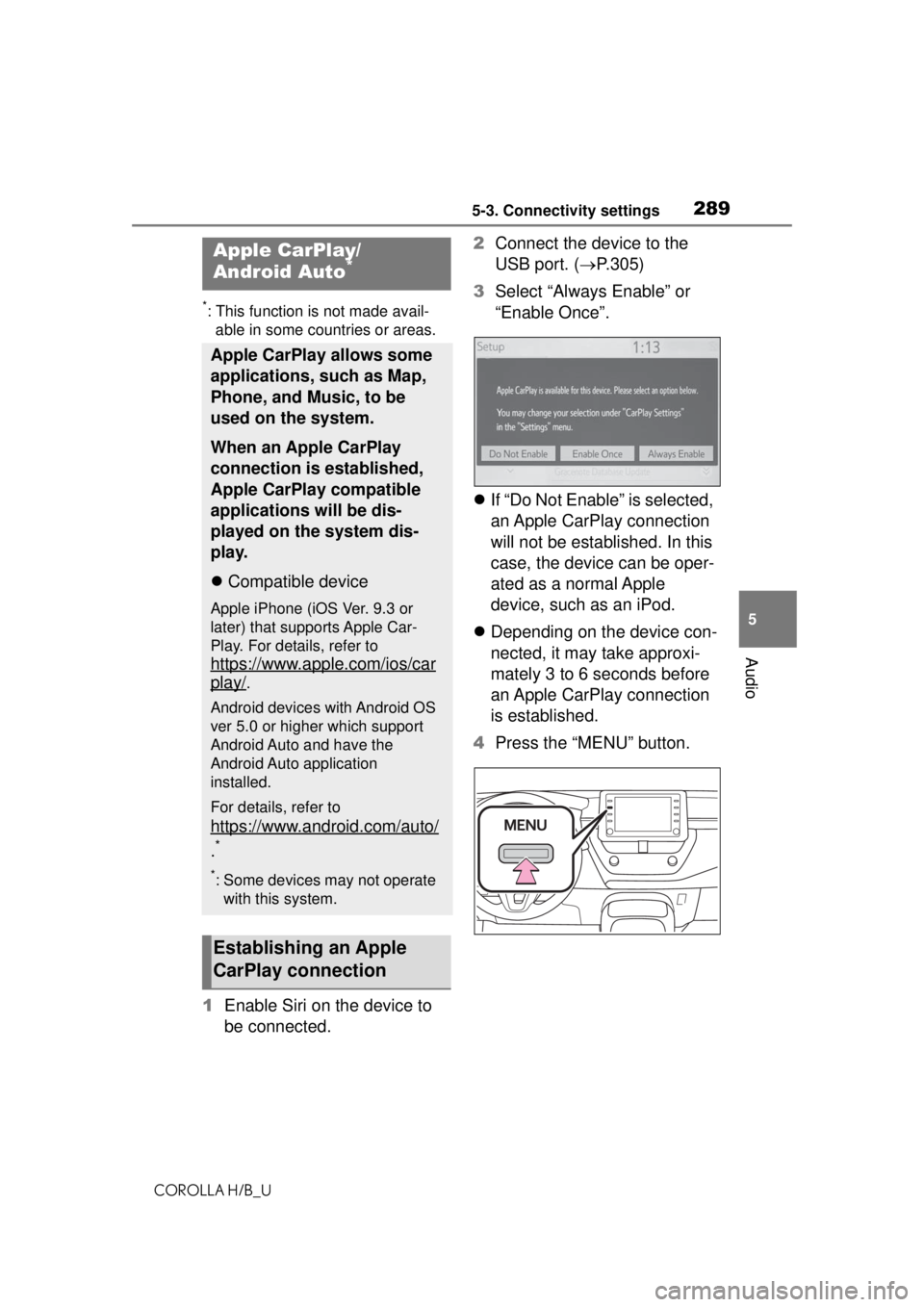
3 Select “Always Enable” or
“Enable Once”.
If “Do Not Enable” is selected,
an Apple CarPlay connection
will not be established. In this
case, the device can be oper-
ated as a normal Apple
device, such as an iPod.
Depending on the device con-
nected, it may take approxi-
mately 3 to 6 seconds before
an Apple CarPlay connection
is established.
4 Press the “MENU” button.
Apple CarPlay/
Android Auto*
Apple CarPlay allows some
applications, such as Map,
Phone, and Music, to be
used on the system.
When an Apple CarPlay
connection is established,
Apple CarPlay compatible
applications will be dis-
played on the system dis-
play.
Compatible device
Apple iPhone (iOS Ver. 9.3 or
later) that supports Apple Car-
Play. For details, refer to
https://www.apple.com/ios/car
play/.
Android devices with Android OS
ver 5.0 or higher which support
Android Auto and have the
Android Auto application
installed.
For details, refer to
https://www.android.com/auto/
.*
*: Some devices may not operate with this system.
Establishing an Apple
CarPlay connection