ad blue TOYOTA COROLLA HATCHBACK 2021 (in English) Service Manual
[x] Cancel search | Manufacturer: TOYOTA, Model Year: 2021, Model line: COROLLA HATCHBACK, Model: TOYOTA COROLLA HATCHBACK 2021Pages: 576, PDF Size: 12.73 MB
Page 355 of 576
3555-13. Phone operation (Hands-free system for cellular phones)
COROLLA H/B_U
5
Audio
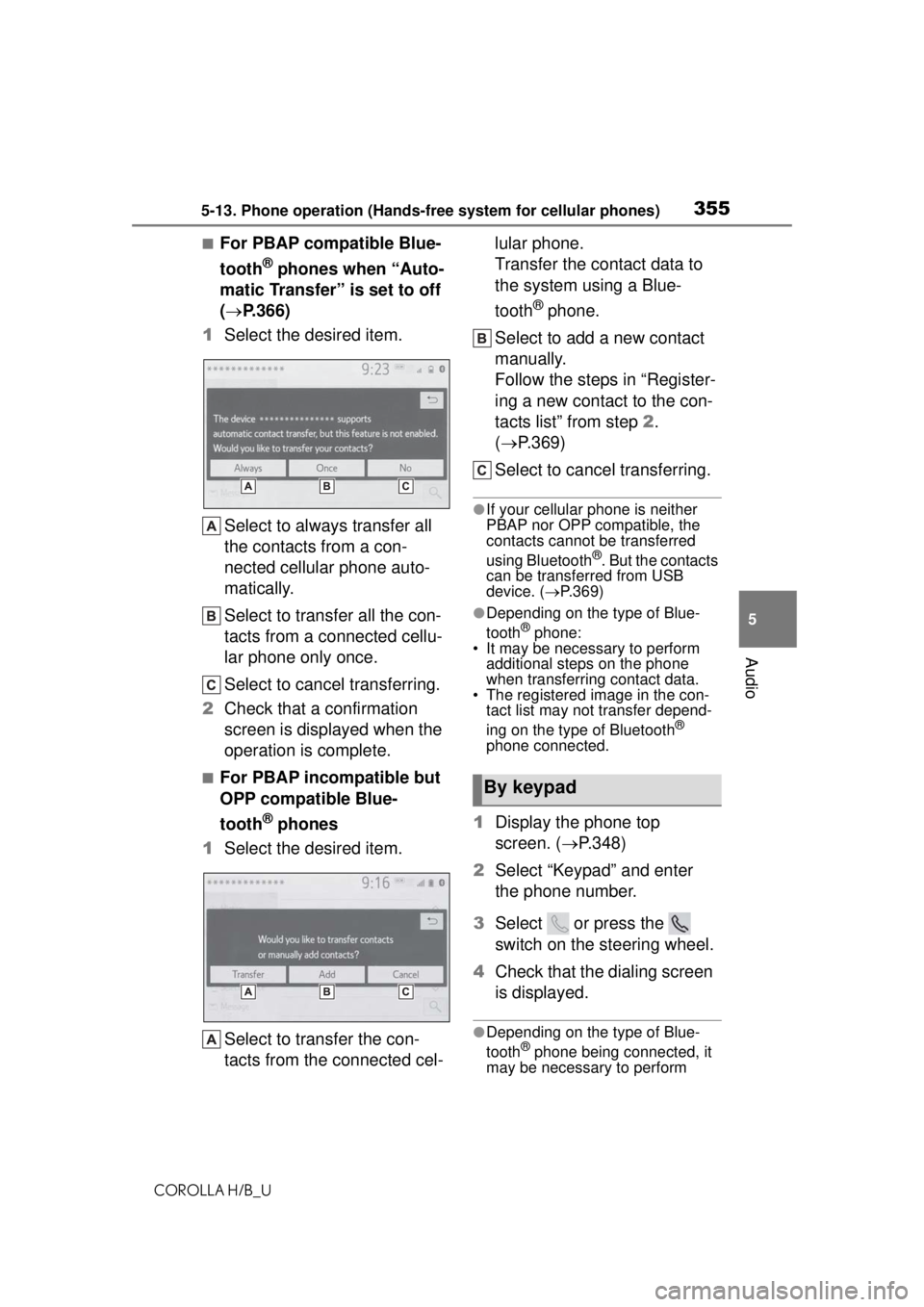
■For PBAP compatible Blue-
tooth
® phones when “Auto-
matic Transfer” is set to off
( P.366)
1 Select the desired item.
Select to always transfer all
the contacts from a con-
nected cellular phone auto-
matically.
Select to transfer all the con-
tacts from a connected cellu-
lar phone only once.
Select to cancel transferring.
2 Check that a confirmation
screen is displayed when the
operation is complete.
■For PBAP incompatible but
OPP compatible Blue-
tooth
® phones
1 Select the desired item.
Select to transfer the con-
tacts from the connected cel- lular phone.
Transfer the contact data to
the system using a Blue-
tooth
® phone.
Select to add a new contact
manually.
Follow the steps in “Register-
ing a new contact to the con-
tacts list” from step 2.
( P.369)
Select to cancel transferring.
●If your cellular phone is neither
PBAP nor OPP compatible, the
contacts cannot be transferred
using Bluetooth
®. But the contacts
can be transferred from USB
device. ( P.369)
●Depending on the type of Blue-
tooth® phone:
• It may be necessary to perform
additional steps on the phone
when transferring contact data.
• The registered image in the con-
tact list may not transfer depend-
ing on the type of Bluetooth
®
phone connected.
1 Display the phone top
screen. ( P.348)
2 Select “Keypad” and enter
the phone number.
3 Select or press the
switch on the steering wheel.
4 Check that the dialing screen
is displayed.
●Depending on the type of Blue-
tooth® phone being connected, it
may be necessary to perform
By keypad
Page 356 of 576
3565-13. Phone operation (Hands-free system for cellular phones)
COROLLA H/B_Uadditional steps on the phone.
1
Display the home screen.
( P.266)
2 Select the desired contact.
3 Check that the dialing screen
is displayed.
■Registering a new contact
1 Select and hold the screen
button to add a contact.
2 Select the desired contact.
3 Select the desired number.
●If there is no contact in the con-
tacts list, the contacts cannot be
registered at the home screen.
●The contact cannot be registered
at the home screen while driving.
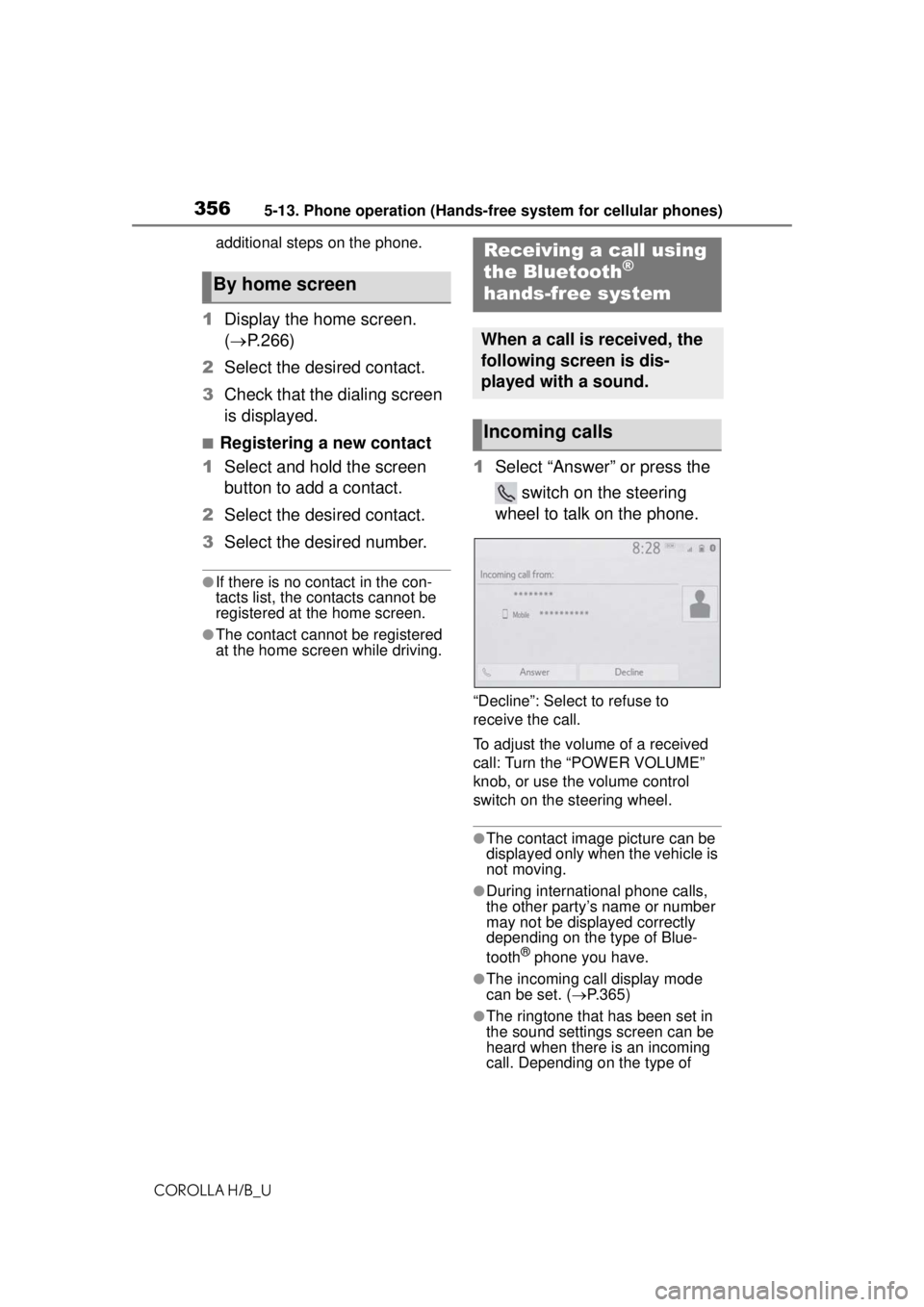
1Select “Answer” or press the
switch on the steering
wheel to talk on the phone.
“Decline”: Select to refuse to
receive the call.
To adjust the volume of a received
call: Turn the “POWER VOLUME”
knob, or use the volume control
switch on the steering wheel.
●The contact image picture can be
displayed only when the vehicle is
not moving.
●During international phone calls,
the other party’s name or number
may not be displayed correctly
depending on the type of Blue-
tooth
® phone you have.
●The incoming call display mode
can be set. ( P.365)
●The ringtone that has been set in
the sound settings screen can be
heard when there is an incoming
call. Depending on the type of
By home screen
Receiving a call using
the Bluetooth®
hands-free system
When a call is received, the
following screen is dis-
played with a sound.
Incoming calls
Page 357 of 576
3575-13. Phone operation (Hands-free system for cellular phones)
COROLLA H/B_U
5
Audio
Bluetooth® phone, both the sys-
tem and Bluetooth® phone may
ring simultaneously when there is
an incoming call. ( P.364)
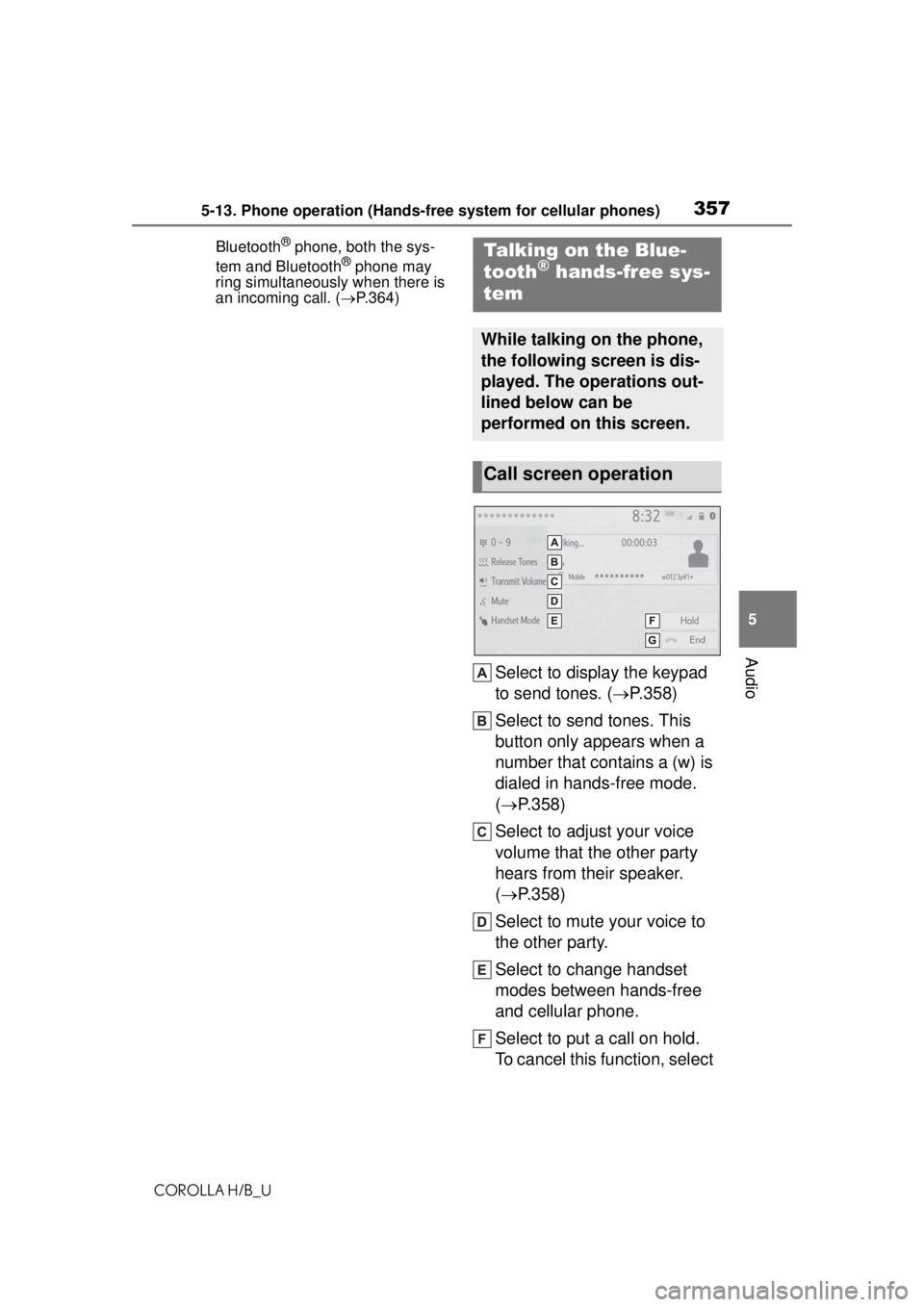
Select to display the keypad
to send tones. ( P.358)
Select to send tones. This
button only appears when a
number that contains a (w) is
dialed in hands-free mode.
( P.358)
Select to adjust your voice
volume that the other party
hears from their speaker.
( P.358)
Select to mute your voice to
the other party.
Select to change handset
modes between hands-free
and cellular phone.
Select to put a call on hold.
To cancel this function, select
Talking on the Blue-
tooth® hands-free sys-
tem
While talking on the phone,
the following screen is dis-
played. The operations out-
lined below can be
performed on this screen.
Call screen operation
Page 359 of 576
3595-13. Phone operation (Hands-free system for cellular phones)
COROLLA H/B_U
5
Audio
current call is placed on hold.
When there is no current call,
but there is a call on hold:
“Activate” is displayed. When
selected, the system switches
to the call that was on hold.
When there is another call on
hold during a call: “Swap
Calls” is displayed. When
selected, the current call is
placed on hold, and the sys-
tem switches to the call that
was on hold.
●This function may not be available
depending on the type of cellular
phone.
When a call is interrupted by a
third party while talking, the
incoming screen is displayed.
1 Select “Answer” or press the
switch on the steering
wheel to start talking with the
other party.
To refuse to receive the call:
Select “Decline”.
Each time “Swap Calls” is
selected, the party who is on
hold will be switched.
●This function may not be available
depending on the type of Blue-
tooth
® phone.
1 Display the phone top
screen. ( P.348)
2 Select “Message”.
A confirmation message
appears when the “Automatic
Message Transfer” function is
set to off ( P.372), select
“Yes”.
3 Check that the message
screen is displayed.
“Phone”: Select to change to phone
mode.
The account name is dis-
played on the left side of
Incoming call waiting
Bluetooth® phone
message function
Received messages can be
forwarded from the con-
nected Bluetooth
® phone,
enabling checking and
replying using the system.
Depending on the type of
Bluetooth
® phone con-
nected, received messages
may not be transferred to
the system.
If the phone does not sup-
port the message function,
this function cannot be
used. Even when the sup-
ported phone is used, reply
function may not be used.
Displaying the message
screen
Page 360 of 576
3605-13. Phone operation (Hands-free system for cellular phones)
COROLLA H/B_U
screen.
Account names are the
names of the accounts that
exist on the currently con-
nected phone.
The following functions can
be used on message function:
• Receiving a message ( P.360)
• Checking messages ( P.360)
• Replying to a message (dicta- tion reply) ( P.361)
• Replying to a message (quick reply) ( P.362)
• Calling the message sender ( P.362)
• Message settings ( P.372)
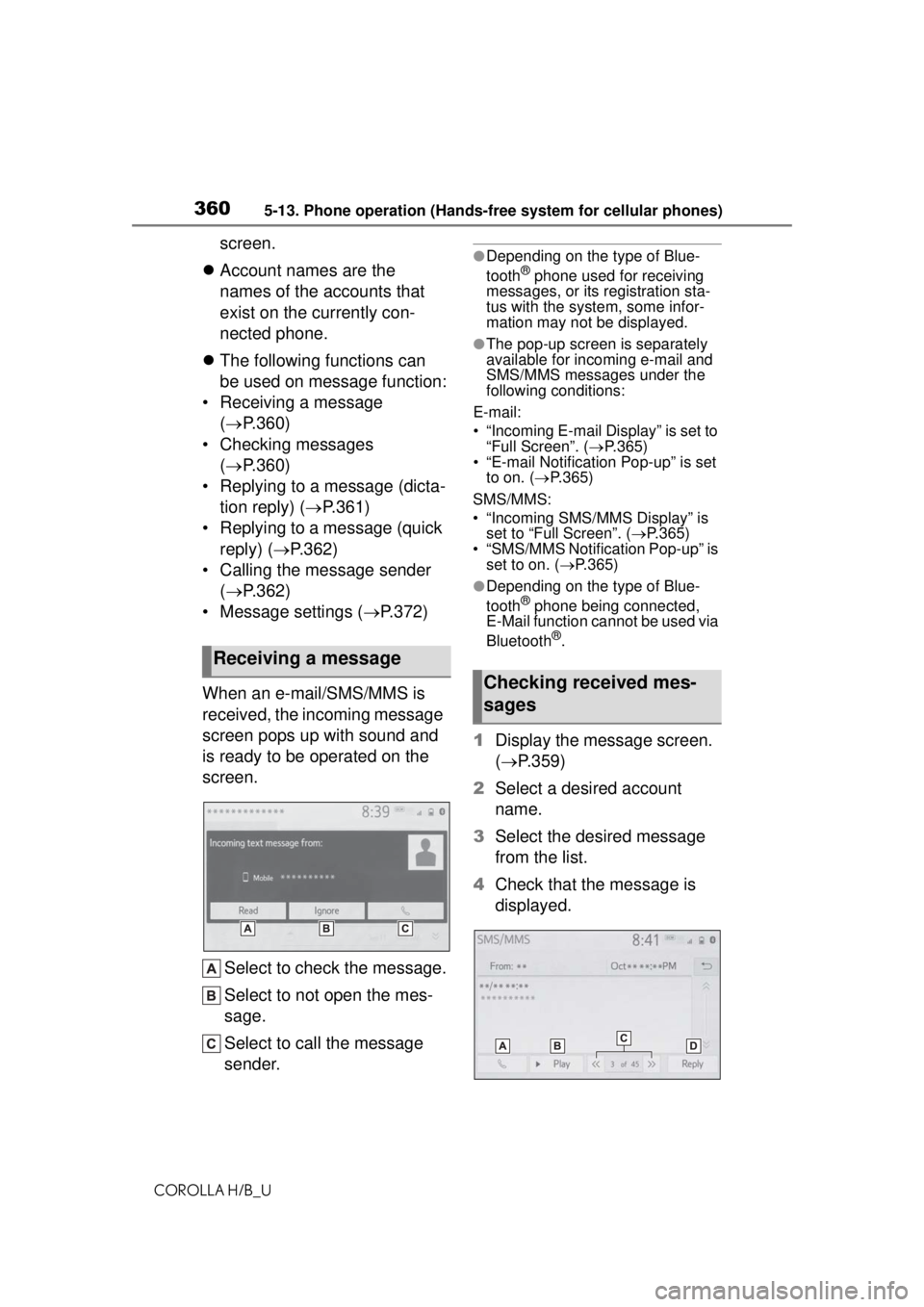
When an e-mail/SMS/MMS is
received, the incoming message
screen pops up with sound and
is ready to be operated on the
screen.
Select to check the message.
Select to not open the mes-
sage.
Select to call the message
sender.●Depending on the type of Blue-
tooth® phone used for receiving
messages, or its registration sta-
tus with the syste m, some infor-
mation may not be displayed.
●The pop-up screen is separately
available for incoming e-mail and
SMS/MMS messages under the
following conditions:
E-mail:
• “Incoming E-mail Display” is set to “Full Screen”. ( P.365)
• “E-mail Notification Pop-up” is set to on. ( P.365)
SMS/MMS:
• “Incoming SMS/MMS Display” is set to “Full Screen”. ( P.365)
• “SMS/MMS Notifica tion Pop-up” is
set to on. ( P.365)
●Depending on the type of Blue-
tooth® phone being connected,
E-Mail function cannot be used via
Bluetooth
®.
1 Display the message screen.
( P.359)
2 Select a desired account
name.
3 Select the desired message
from the list.
4 Check that the message is
displayed.
Receiving a message
Checking received mes-
sages
Page 361 of 576
3615-13. Phone operation (Hands-free system for cellular phones)
COROLLA H/B_U
5
Audio
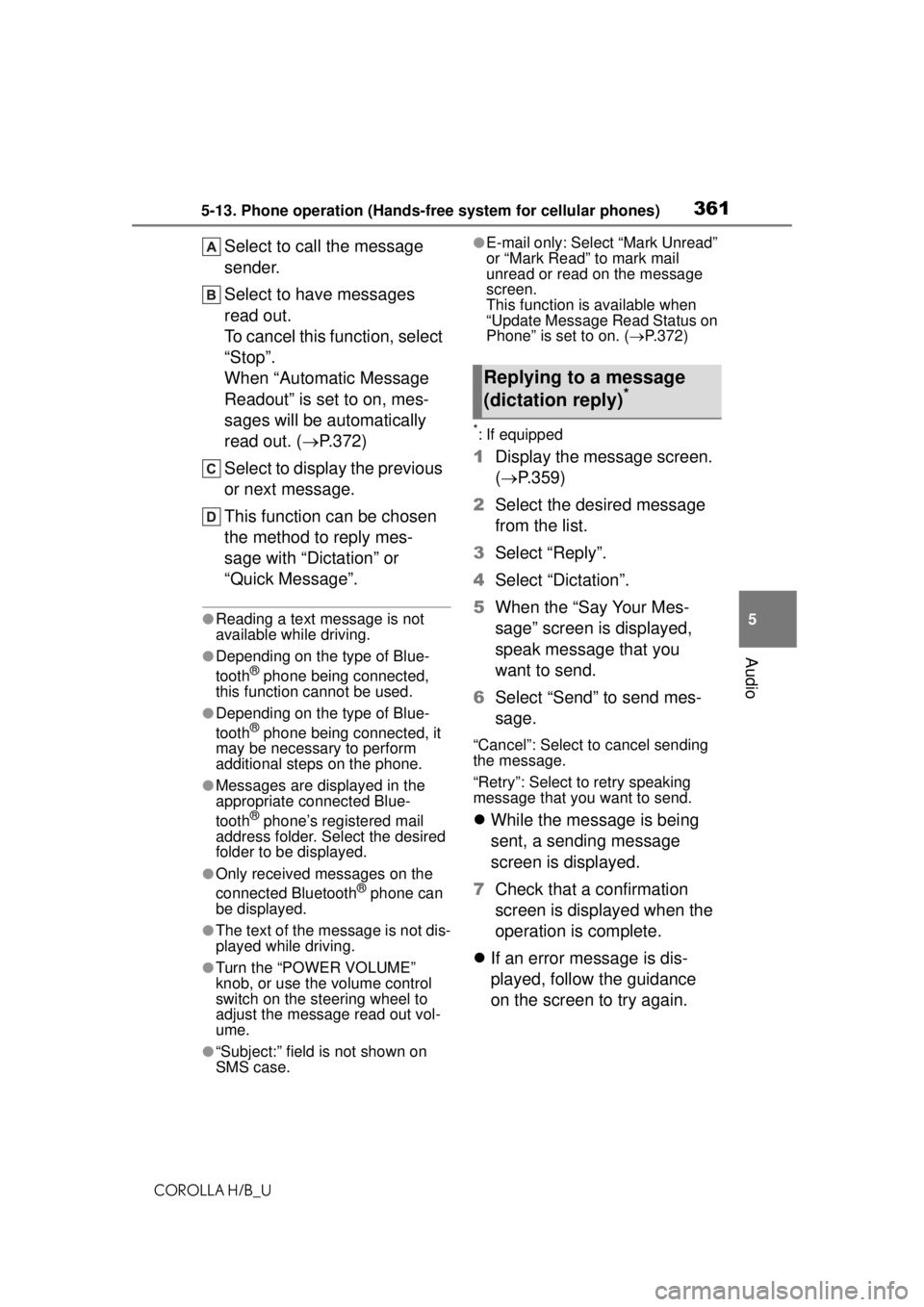
Select to call the message
sender.
Select to have messages
read out.
To cancel this function, select
“Stop”.
When “Automatic Message
Readout” is set to on, mes-
sages will be automatically
read out. ( P.372)
Select to display the previous
or next message.
This function can be chosen
the method to reply mes-
sage with “Dictation” or
“Quick Message”.
●Reading a text message is not
available while driving.
●Depending on the type of Blue-
tooth® phone being connected,
this function cannot be used.
●Depending on the type of Blue-
tooth® phone being connected, it
may be necessary to perform
additional steps on the phone.
●Messages are displayed in the
appropriate connected Blue-
tooth
® phone’s registered mail
address folder. Select the desired
folder to be displayed.
●Only received messages on the
connected Bluetooth® phone can
be displayed.
●The text of the message is not dis-
played while driving.
●Turn the “POWER VOLUME”
knob, or use the volume control
switch on the steering wheel to
adjust the message read out vol-
ume.
●“Subject:” field is not shown on
SMS case.
●E-mail only: Select “Mark Unread”
or “Mark Read” to mark mail
unread or read on the message
screen.
This function is available when
“Update Message Read Status on
Phone” is set to on. ( P.372)
*: If equipped
1 Display the message screen.
( P.359)
2 Select the desired message
from the list.
3 Select “Reply”.
4 Select “Dictation”.
5 When the “Say Your Mes-
sage” screen is displayed,
speak message that you
want to send.
6 Select “Send” to send mes-
sage.
“Cancel”: Select to cancel sending
the message.
“Retry”: Select to retry speaking
message that you want to send.
While the message is being
sent, a sending message
screen is displayed.
7 Check that a confirmation
screen is displayed when the
operation is complete.
If an error message is dis-
played, follow the guidance
on the screen to try again.
Replying to a message
(dictation reply)*
Page 362 of 576
3625-13. Phone operation (Hands-free system for cellular phones)
COROLLA H/B_U
15 messages have already
been stored.
1Display the message screen.
( P.359)
2 Select the desired message
from the list.
3 Select “Reply”.
4 Select “Quick Message”.
5 Select the desired message.
: Select to edit the message.
( P.362)
6 Select “Send”.
“Cancel”: Select to cancel sending
the message.
While the message is being
sent, a sending message
screen is displayed.
7 Check that a confirmation
screen is displayed when the
operation is complete.
If an error message is dis-
played, follow the guidance
on the screen to try again.
●Depending on the type of Blue-
tooth®phone, reply function is not
available.
■Editing quick reply mes-
sages
This operation cannot be per-
formed while driving.
1 Select corresponding to
the desired message to edit. 2
Select “OK” when editing is
completed.
●To reset the edited quick reply
messages, select “Default”.
Calls can be made to an
e-mail/SMS/MMS message
sender’s phone number.
This operation can be per-
formed while driving.
■Calling from
e-mail/SMS/MMS message
display
1 Display the message screen.
( P.359)
2 Select the desired message.
3 Select , or press the
switch on the steering wheel.
If there are 2 or more phone
numbers, select the desired
number.
4 Check that the dialing screen
is displayed.
■Calling from a number
within a message
Calls can be made to a number
identified in a message’s text
area.
This operation cannot be per-
formed while driving.
1 Display the message screen.
( P.359)
2 Select the desired message.
Replying to a message
(quick reply)
Calling the message
sender
Page 363 of 576
3635-13. Phone operation (Hands-free system for cellular phones)
COROLLA H/B_U
5
Audio
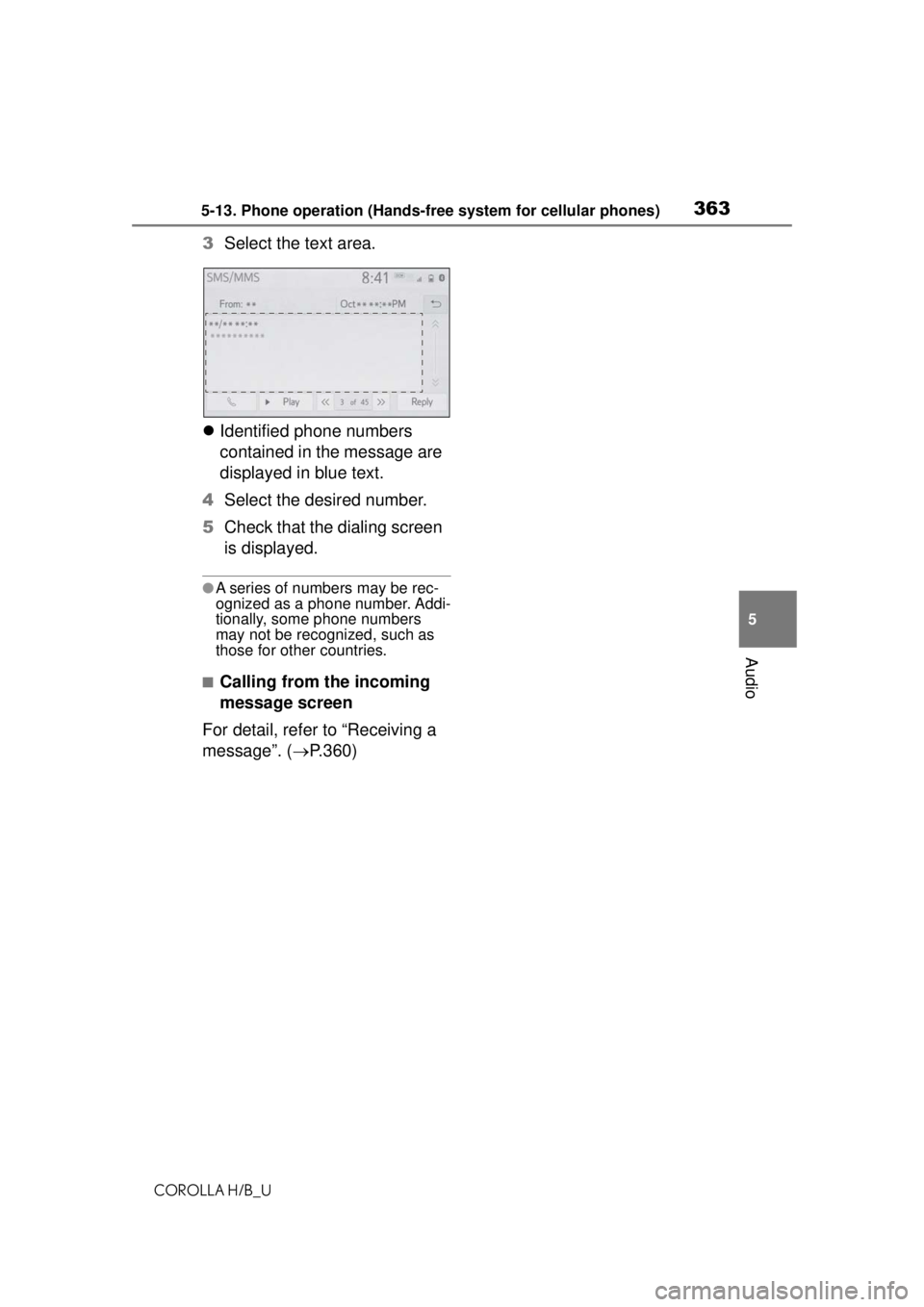
3 Select the text area.
Identified phone numbers
contained in the message are
displayed in blue text.
4 Select the desired number.
5 Check that the dialing screen
is displayed.
●A series of numbers may be rec-
ognized as a phone number. Addi-
tionally, some phone numbers
may not be recognized, such as
those for other countries.
■Calling from the incoming
message screen
For detail, refer to “Receiving a
message”. ( P.360)
Page 364 of 576
3645-14. Phone settings
COROLLA H/B_U
5-14.Phone settings
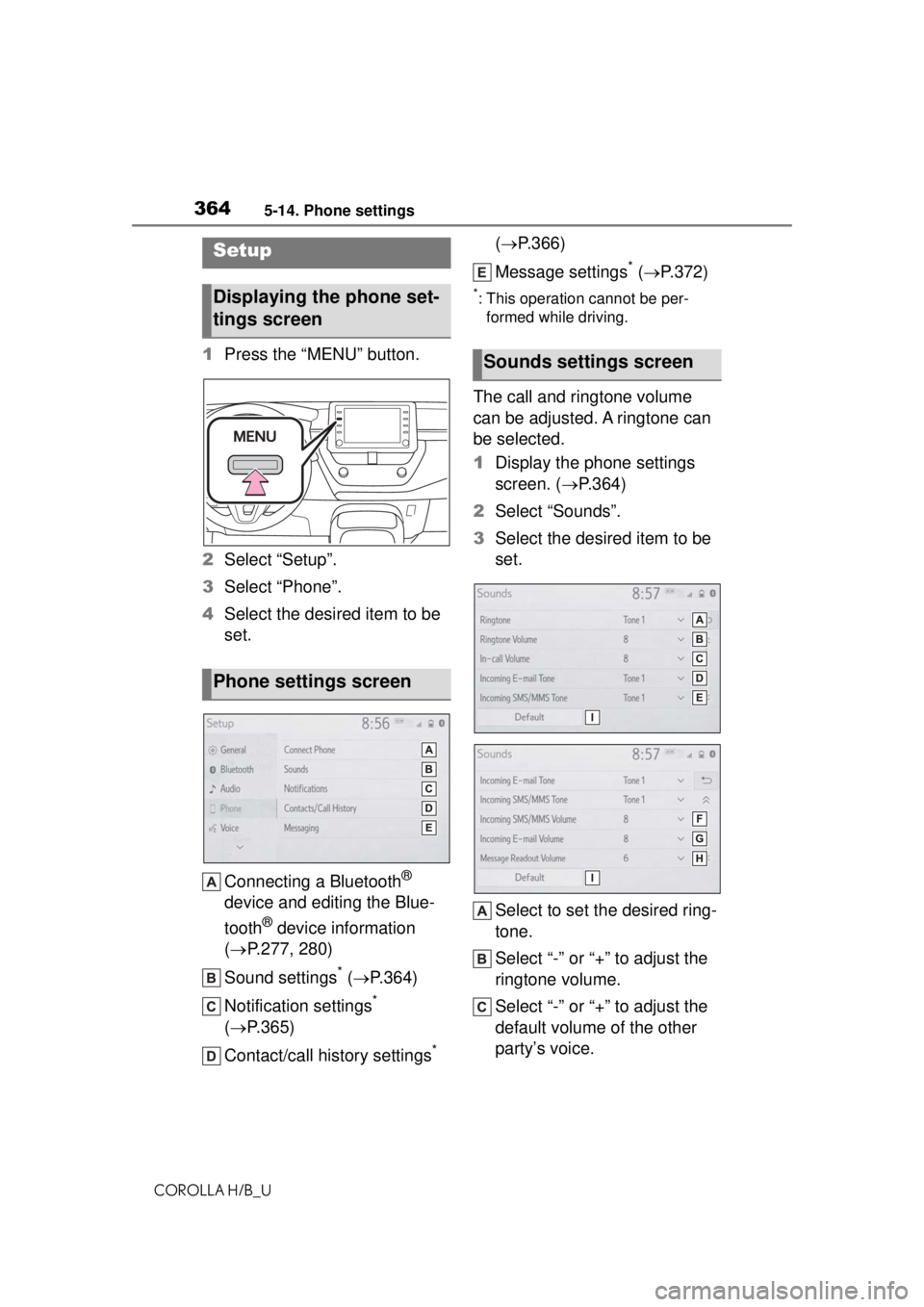
1Press the “MENU” button.
2 Select “Setup”.
3 Select “Phone”.
4 Select the desired item to be
set.
Connecting a Bluetooth
®
device and editing the Blue-
tooth
® device information
( P.277, 280)
Sound settings
* ( P.364)
Notification settings
*
( P.365)
Contact/call history settings
* (
P.366)
Message settings
* ( P.372)
*: This operation cannot be per-
formed while driving.
The call and ringtone volume
can be adjusted. A ringtone can
be selected.
1 Display the phone settings
screen. ( P.364)
2 Select “Sounds”.
3 Select the desired item to be
set.
Select to set the desired ring-
tone.
Select “-” or “+” to adjust the
ringtone volume.
Select “-” or “+” to adjust the
default volume of the other
party’s voice.
Setup
Displaying the phone set-
tings screen
Phone settings screen
Sounds settings screen
Page 365 of 576
3655-14. Phone settings
COROLLA H/B_U
5
Audio
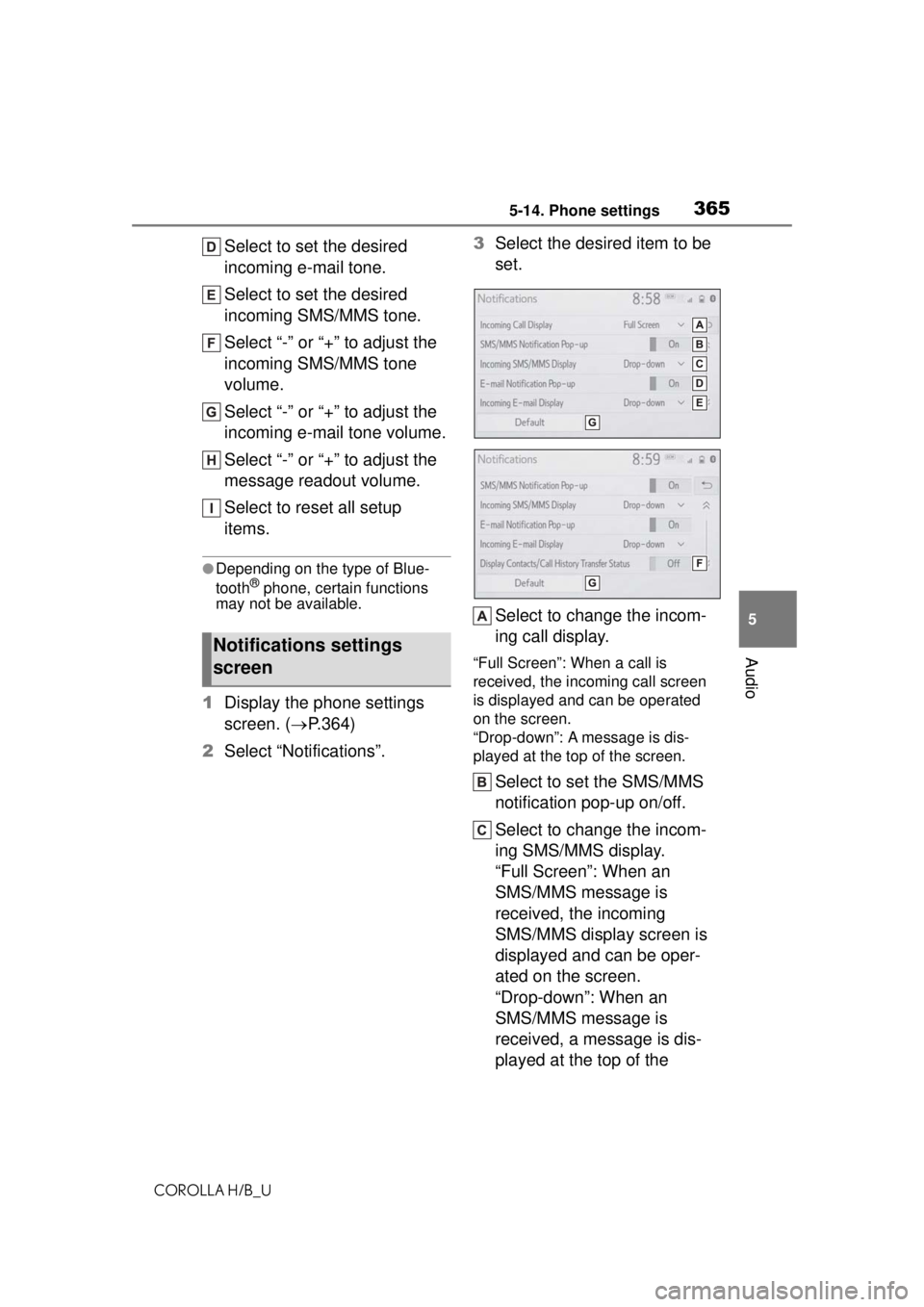
Select to set the desired
incoming e-mail tone.
Select to set the desired
incoming SMS/MMS tone.
Select “-” or “+” to adjust the
incoming SMS/MMS tone
volume.
Select “-” or “+” to adjust the
incoming e-mail tone volume.
Select “-” or “+” to adjust the
message readout volume.
Select to reset all setup
items.
●Depending on the type of Blue-
tooth® phone, certain functions
may not be available.
1 Display the phone settings
screen. ( P.364)
2 Select “Notifications”. 3
Select the desired item to be
set.
Select to change the incom-
ing call display.
“Full Screen”: When a call is
received, the incoming call screen
is displayed and can be operated
on the screen.
“Drop-down”: A message is dis-
played at the top of the screen.
Select to set the SMS/MMS
notification pop-up on/off.
Select to change the incom-
ing SMS/MMS display.
“Full Screen”: When an
SMS/MMS message is
received, the incoming
SMS/MMS display screen is
displayed and can be oper-
ated on the screen.
“Drop-down”: When an
SMS/MMS message is
received, a message is dis-
played at the top of the
Notifications settings
screen