trailer TOYOTA COROLLA HATCHBACK 2022 (in English) User Guide
[x] Cancel search | Manufacturer: TOYOTA, Model Year: 2022, Model line: COROLLA HATCHBACK, Model: TOYOTA COROLLA HATCHBACK 2022Pages: 758, PDF Size: 155.26 MB
Page 205 of 758
203
4
4-3. Operating the lights and wipers
Driving
beams in the following situations:
• When vehicles ahead suddenly appear from a curve
• When the vehicle is cut in front of by
another vehicle • When vehicles ahead are hidden from
sight due to repeated curves, road
dividers or roadside trees • When vehicles ahead appear from the
faraway lane on wide road
• When vehicles ahead have no lights
●The high beams may be changed to
the shaded high beams if a vehicle ahead that is using fog lights without
its headlights turned on is detected.
●House lights, streetlights, traffic sig-
nals, and illuminated billboards or
signs and other reflective objects may cause the high beams to change to
the shaded high beams, cause the
high beams not to change to the shaded high beams, or change the
area that is not illuminated.
●The following factors may affect the
amount of time taken to turn the high
beam on or off, or the speed by which the areas not illuminated change:
• The brightness of headlights, fog
lights, and tail lights of vehicles ahead • The movement and direction of vehi-
cles ahead
• When a vehicle ahead only has oper- ational lights on one side
• When a vehicle ahead is a
two-wheeled vehicle • The condition of the road (gradient,
curve, condition of the road surface
etc.) • The number of passengers and
amount of luggage
●The light distribution control of the
headlights may change unexpectedly.
●Bicycles or similar objects may not be detected.
●In the following sit uations the system may not be able to correctly detect the
surrounding brightness level. This
may cause the low beams to remain on or the high beams to flash or daz-
zle pedestrians or vehicles ahead. In
such a case, it is necessary to manu-
ally switch between the high and low beams.
• When driving in inclement weather
(heavy rain, snow, fog, sandstorms, etc.)
• When the windshield is obscured by
fog, mist, ice, dirt, etc. • When the windshield is cracked or
damaged
• When the camera sensor is deformed or dirty
• When the temperature of the camera
sensor is extremely high • When the surrounding brightness
level is equal to that of headlights, tail
lights or fog lights • When headlights or tail lights of vehi-
cles ahead are turned off, dirty, chang-
ing color, or not aimed properly • When the vehicle is hit by water,
snow, dust, etc. from a preceding
vehicle • When driving through an area of inter-
mittently changing brightness and
darkness • When frequently and repeatedly driv-
ing ascending/descending roads, or
roads with rough, bumpy or uneven surfaces (such as stone-paved roads,
gravel roads, etc.)
• When frequently and repeatedly tak- ing curves or driving on a winding
road
• When there is a highly reflective object ahead of the vehicle, such as a
sign or mirror
• When the back of a preceding vehicle is highly reflective, such as a con-
tainer on a truck
• When the vehicle’s headlights are damaged or dirty, or are not aimed
properly
• When the vehicle is listing or tilting
due to a flat tire, a trailer being towed, etc.
• When the headlights are changed
between the high beams and low beams repeatedly in an abnormal
manner
• When the driver believes that the high beams may be flashing or dazzling
pedestrians or other drivers
Page 231 of 758
229
4
4-5. Using the driving support systems
Driving
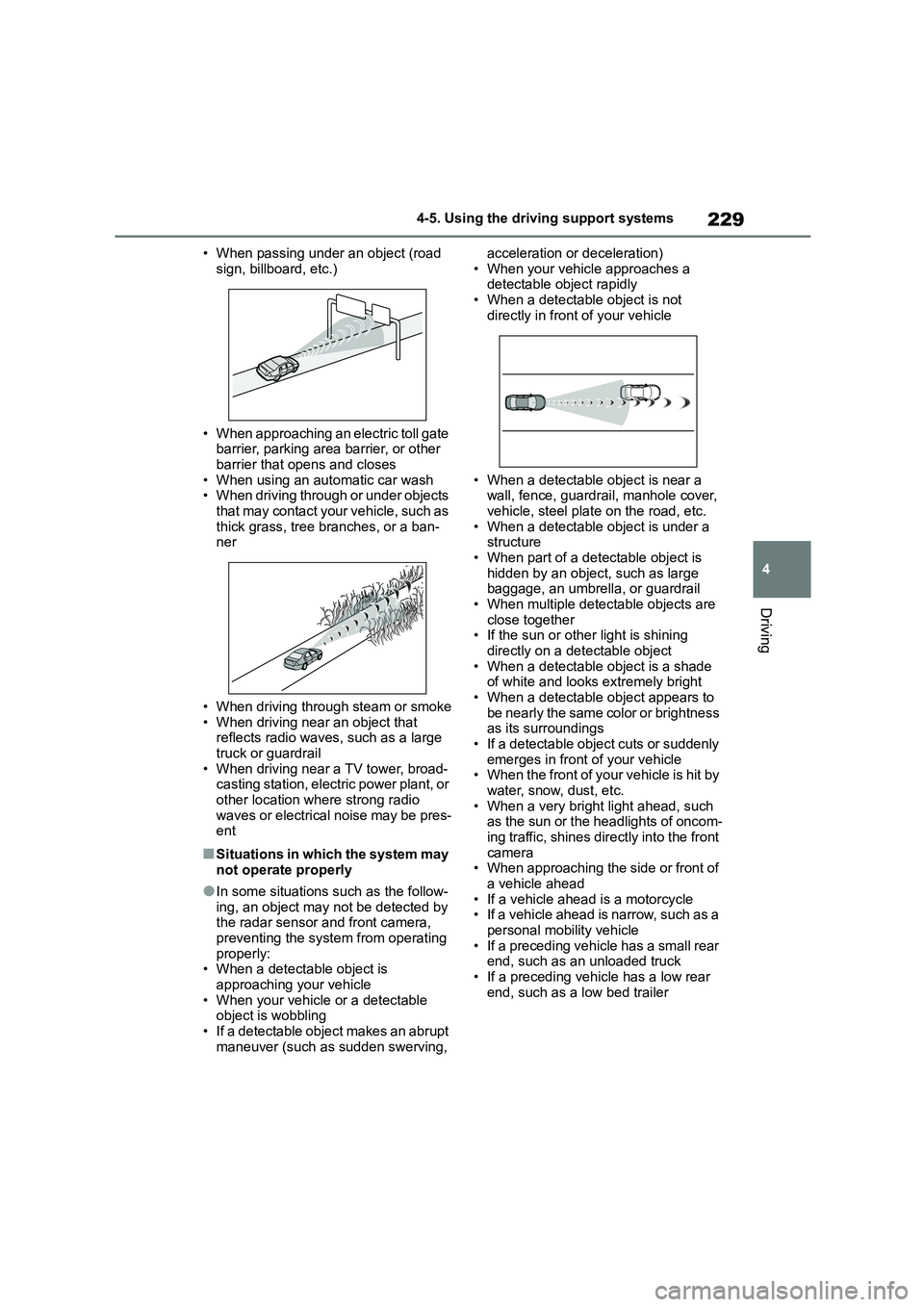
• When passing under an object (road
sign, billboard, etc.)
• When approaching an electric toll gate
barrier, parking area barrier, or other barrier that opens and closes
• When using an automatic car wash
• When driving through or under objects that may contact your vehicle, such as
thick grass, tree branches, or a ban-
ner
• When driving through steam or smoke
• When driving near an object that reflects radio waves, such as a large
truck or guardrail
• When driving near a TV tower, broad- casting station, electric power plant, or
other location where strong radio
waves or electrical noise may be pres- ent
■Situations in which the system may
not operate properly
●In some situations such as the follow-
ing, an object may not be detected by
the radar sensor and front camera, preventing the system from operating
properly:
• When a detectable object is
approaching your vehicle • When your vehicle or a detectable
object is wobbling
• If a detectable object makes an abrupt maneuver (such as sudden swerving,
acceleration or deceleration)
• When your vehicle approaches a detectable object rapidly
• When a detectable object is not
directly in front of your vehicle
• When a detectable object is near a
wall, fence, guardrail, manhole cover, vehicle, steel plate on the road, etc.
• When a detectable object is under a
structure • When part of a detectable object is
hidden by an object, such as large
baggage, an umbrella, or guardrail • When multiple detectable objects are
close together
• If the sun or other light is shining directly on a detectable object
• When a detectable object is a shade
of white and looks extremely bright • When a detectable object appears to
be nearly the same color or brightness
as its surroundings • If a detectable object cuts or suddenly
emerges in front of your vehicle
• When the front of your vehicle is hit by water, snow, dust, etc.
• When a very bright light ahead, such
as the sun or the headlights of oncom- ing traffic, shines directly into the front
camera
• When approaching the side or front of a vehicle ahead
• If a vehicle ahead is a motorcycle
• If a vehicle ahead is narrow, such as a personal mobility vehicle
• If a preceding vehicle has a small rear
end, such as an unloaded truck
• If a preceding vehicle has a low rear end, such as a low bed trailer
Page 234 of 758
2324-5. Using the driving support systems
WA R N I N G
■Before using LTA system
●Do not rely solely upon the LTA sys-
tem. The LTA system does not automatically drive the vehicle or
reduce the amount of attention that
must be paid to the area in front of the vehicle. The driver must always
assume full responsibility for driving
safely by paying careful attention to
the surrounding conditions and operating the steering wheel to cor-
rect the path of the vehicle. Also,
the driver must take adequate breaks when fatigued, such as from
driving for a long period of time.
●Failure to perform appropriate driv-
ing operations and pay careful
attention may lead to an accident, resulting in death or serious injury.
●When not using the LTA system, use the LTA switch to turn the sys-
tem off.
■Situations unsuitable for LTA
system
In the following situations, use the LTA switch to turn the system off. Fail-
ure to do so may lead to an accident,
resulting in death or serious injury.
●Vehicle is driven on a road surface
which is slippery due to rainy weather, fallen snow, freezing, etc.
●Vehicle is driven on a snow-cov-ered road.
●White (yellow) lines are difficult to see due to rain, snow, fog, dust,
etc.
●Vehicle is driven in a temporary
lane or restricted lane due to con-
struction work.
●Vehicle is driven in a construction
zone.
●A spare tire, tire chains, etc. are
equipped.
●When the tires have been exces- sively worn, or when the tire infla-
tion pressure is low.
●When tires of a size other than
specified are installed.
●Vehicle is driven in traffic lanes
other than that highways and free-
ways.
●When your vehicle is towing a
trailer or during emergency towing
■Preventing LTA system malfunc-
tions and operations performed by mistake
●Do not modify the headlights or
place stickers, etc. on the surface of the lights.
●Do not modify the suspension etc. If the suspension etc. needs to be
replaced, contact any authorized
Toyota retailer or Toyota authorized repairer, or any reliable repairer.
●Do not install or place anything on the hood or grille. Also, do not
install a grille guar d (bull bars, kan-
garoo bar, etc.).
●If your windshield needs repairs,
contact any authorized Toyota retailer or Toyota authorized
repairer, or any reliable repairer.
■Conditions in which functions
may not operate properly
In the following situations, the func- tions may not operate properly and
the vehicle may depart from its lane.
Drive safely by always paying careful attention to your surroundings and
operate the steering wheel to correct
the path of the vehicle without relying
solely on the functions.
Page 244 of 758
2424-5. Using the driving support systems
WA R N I N G
●When tires of a size other than
specified are installed.
●Vehicle is driven in traffic lanes
other than that highways and free-
ways.
●When your vehicle is towing a
trailer or during emergency towing
■Preventing LDA system malfunc-
tions and operations performed
by mistake
●Do not modify the headlights or
place stickers, etc. on the surface of
the lights.
●Do not modify the suspension etc. If
the suspension etc. needs to be replaced, contact any authorized
Toyota retailer or Toyota authorized
repairer, or any reliable repairer.
●Do not install or place anything on
the hood or grille. Also, do not install a grille guard (bull bars, kan-
garoo bar, etc.).
●If your windshield needs repairs,
contact any authorized Toyota
retailer or Toyota authorized repairer, or any reliable repairer.
■Conditions in which functions may not operate properly
In the following situations, the func-
tions may not operate properly and the vehicle may depart from its lane.
Drive safely by always paying careful
attention to your surroundings and operate the steering wheel to correct
the path of the vehicle without relying
solely on the functions.
●Vehicle is being driven around a
sharp curve.
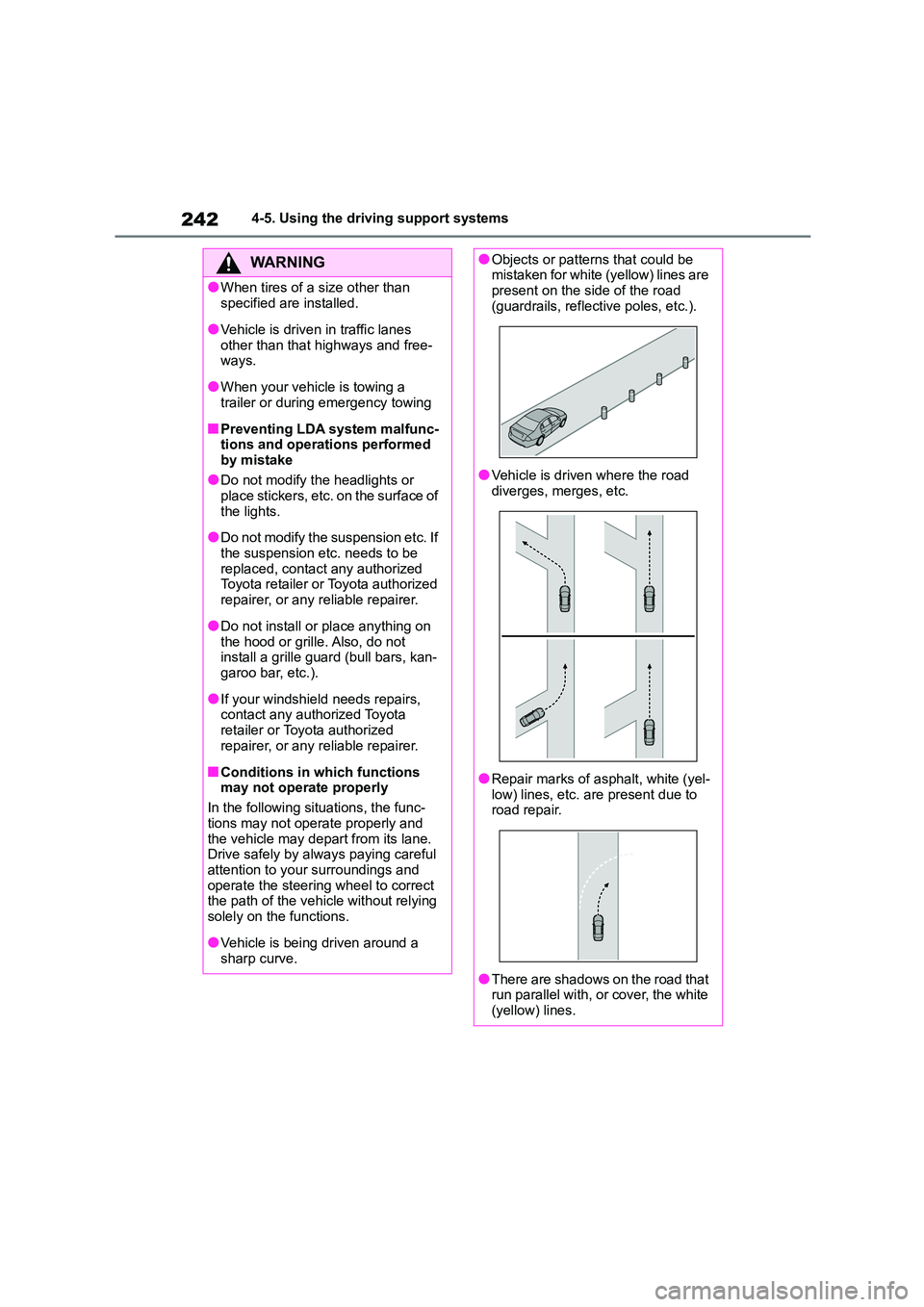
●Objects or patterns that could be mistaken for white (yellow) lines are
present on the side of the road
(guardrails, reflective poles, etc.).
●Vehicle is driven where the road
diverges, merges, etc.
●Repair marks of asphalt, white (yel- low) lines, etc. are present due to
road repair.
●There are shadows on the road that
run parallel with, or cover, the white
(yellow) lines.
Page 253 of 758
251
4
4-5. Using the driving support systems
Driving
WA R N I N G
■Situations unsuitable for
dynamic radar cruise control
with full-speed range
Do not use dynamic radar cruise con-
trol with full-speed range in any of the
following situations. Doing so may result in inappropriate speed control
and could cause an accident resulting
in death or serious injury.
●Roads where there are pedestrians,
cyclists, etc.
●In heavy traffic
●On roads with sharp bends
●On winding roads
●On slippery roads, such as those
covered with rain, ice or snow
●On steep downhills, or where there
are sudden changes between sharp
up and down gradients
Vehicle speed may exceed the set
speed when driving down a steep hill.
●At entrances to freeways and high-
ways
●When weather conditions are bad
enough that they may prevent the
sensors from detecting correctly (fog, snow, sandstorm, heavy rain,
etc.)
●When there is rain, snow, etc. on
the front surface of the radar or
front camera
●In traffic conditions that require fre-
quent repeated acceleration and deceleration
●When your vehicle is towing a trailer or during emergency towing
●When an approach warning buzzer is heard often
Page 261 of 758
259
4
4-5. Using the driving support systems
Driving
to inform the driver of the need for cau-
tion while driving. If a warning message is shown on the multi-information dis-
play, read the message and follow the
instructions. ( P.222, 520)
■When the sensor may not be cor- rectly detecting the vehicle ahead
In the case of the following and depend-
ing on the conditions, operate the brake pedal when deceleration of the system
is insufficient or operate the accelerator
pedal when acceleration is required.
As the sensor may not be able to cor-
rectly detect these types of vehicles, the
approach warning ( P.255) may not be activated.
●Vehicles that cut in suddenly
●Vehicles traveling at low speeds
●Vehicles that are not moving in the
same lane
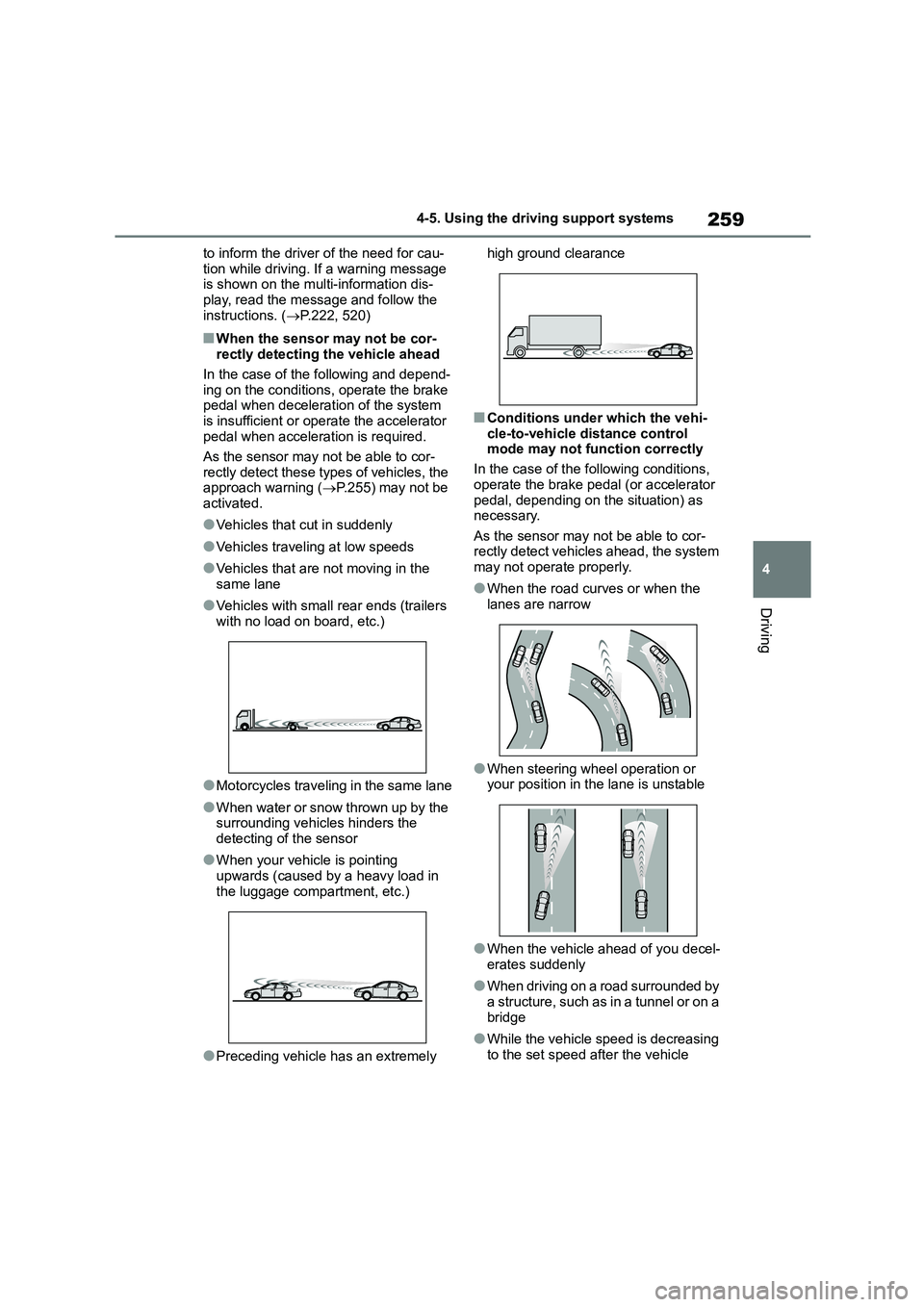
●Vehicles with small rear ends (trailers
with no load on board, etc.)
●Motorcycles traveling in the same lane
●When water or snow thrown up by the surrounding vehicles hinders the
detecting of the sensor
●When your vehicle is pointing
upwards (caused by a heavy load in
the luggage compartment, etc.)
●Preceding vehicle has an extremely
high ground clearance
■Conditions under which the vehi-
cle-to-vehicle distance control
mode may not function correctly
In the case of the following conditions,
operate the brake pedal (or accelerator
pedal, depending on the situation) as necessary.
As the sensor may not be able to cor-
rectly detect vehicl es ahead, the system may not operate properly.
●When the road curves or when the lanes are narrow
●When steering wheel operation or your position in the lane is unstable
●When the vehicle ahead of you decel-erates suddenly
●When driving on a road surrounded by a structure, such as in a tunnel or on a
bridge
●While the vehicle speed is decreasing to the set speed after the vehicle
Page 264 of 758
2624-5. Using the driving support systems
WA R N I N G
●Assisting the driver to judge proper
following distance
The dynamic radar cruise control determines whether the following dis-
tance between the driver’s own vehi-
cle and a designated vehicle traveling ahead is within a set range. It is not
capable of making any other type of
judgement. Therefore, it is absolutely
necessary for the driver to remain vig- ilant and to determine whether or not
there is a possibility of danger in any
given situation.
●Assisting the driver to operate the
vehicle
The dynamic radar cruise control
does not include functions which will
prevent or avoid collisions with vehi- cles ahead of your vehicle. Therefore,
if there is ever any possibility of dan-
ger, the driver must take immediate and direct control of the vehicle and
act appropriately in order to ensure
the safety of all involved.
■Situations unsuitable for
dynamic radar cruise control
Do not use dynamic radar cruise con-
trol in any of the following situations.
Doing so may result in inappropriate speed control and could cause an
accident resulting in death or serious
injury.
●Roads where there are pedestrians,
cyclists, etc.
●In heavy traffic
●On roads with sharp bends
●On winding roads
●On slippery roads, such as those
covered with rain, ice or snow
●On steep downhills, or where there are sudden changes between sharp
up and down gradients
Vehicle speed may exceed the set speed when driving down a steep hill.
●At entrances to freeways and high-ways
●When weather conditions are bad enough that they may prevent the
sensors from detecting correctly
(fog, snow, sandstorm, heavy rain, etc.)
●When there is rain, snow, etc. on the front surface of the radar or
front camera
●In traffic conditions that require fre-
quent repeated acceleration and
deceleration
●When your vehicle is towing a
trailer or during emergency towing
●When an approach warning buzzer
is heard often
Page 271 of 758
269
4
4-5. Using the driving support systems
Driving
■Automatic cancelation of constant
speed control mode
Constant speed control mode is auto-
matically canceled in the following situa-
tions:
●Actual vehicle speed is more than
approximately 16 km/h (10 mph) below the set vehicle speed.
●Actual vehicle speed falls below approximately 30 km/h (20 mph).
●VSC is activated.
●TRC is activated for a period of time.
●When the VSC or TRC system is
turned off.
●Pre-collision braking is activated.
●When the shift lever is in N or the clutch pedal is depressed for a certain
amount of time or more.
If constant speed control mode is auto- matically canceled for any reasons other
than the above, there may be a malfunc-
tion in the system. Contact any author- ized Toyota retailer or Toyota authorized
repairer, or any reliable repairer.
■The Dynamic Radar Cruise Control
with Road Sign Assist may not operate properly when
As the Dynamic Radar Cruise Control
with Road Sign Assist may not operate properly in conditions in which RSA may
not operate or detect correctly
( P.279), when using this function, make sure to check the speed limit sign
displayed.
In the following situations, the set speed may not be changed to the recognized
speed limit by pressing and holding the
“+RES”/“-SET” switch.
●If speed limit information is not availa-
ble
●When the recognized speed limit is
the same as the set speed
●When the recognized speed limit is
outside of the speed range that the
dynamic radar cruise control system can operate
■Brake operation
A brake operation sound may be heard and the brake pedal response may
change, but these are not malfunctions.
■Warning messages and buzzers for
dynamic radar cruise control
Warning messages and buzzers are
used to indicate a system malfunction or
to inform the driver of the need for cau- tion while driving. If a warning message
is shown on the multi-information dis-
play, read the message and follow the instructions. ( P.222, 520)
■When the sensor may not be cor-
rectly detecting the vehicle ahead
In the case of the following and depend- ing on the conditions, operate the brake
pedal when deceleration of the system
is insufficient or operate the accelerator pedal when acceleration is required.
As the sensor may not be able to cor-
rectly detect these types of vehicles, the approach warning ( P.266) may not be
activated.
●Vehicles that cut in suddenly
●Vehicles traveling at low speeds
●Vehicles that are not moving in the
same lane
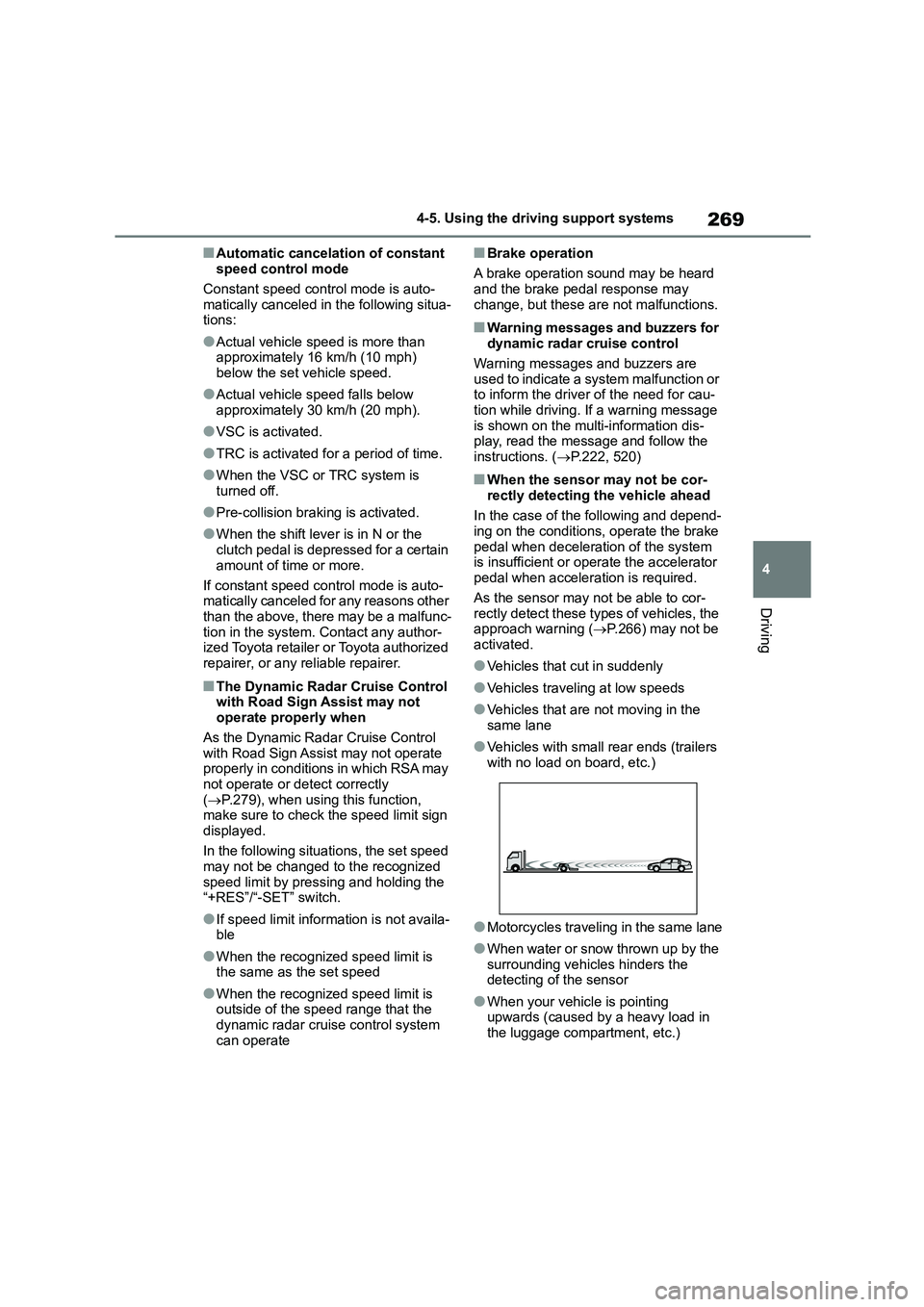
●Vehicles with small rear ends (trailers
with no load on board, etc.)
●Motorcycles traveling in the same lane
●When water or snow thrown up by the surrounding vehicles hinders the
detecting of the sensor
●When your vehicle is pointing
upwards (caused by a heavy load in
the luggage compartment, etc.)
Page 275 of 758
273
4
4-5. Using the driving support systems
Driving
●VSC is activated.
●TRC is activated for a period of time.
●When the VSC or TRC system is turned off by pressing the VSC off
switch.
■If the warning message for the
cruise control is shown on the multi-information display
Press the cruise control main switch
once to deactivate the system, and then press the switch again to reactivate the
system. If the cruise control speed can-
not be set or if the cruise control cancels immediately after being activated, there
may be a malfunction in the cruise con-
trol system. Have t he vehicle inspected by any authorized Toyota retailer or
Toyota authorized repairer, or any relia-
ble repairer.
*: If equipped
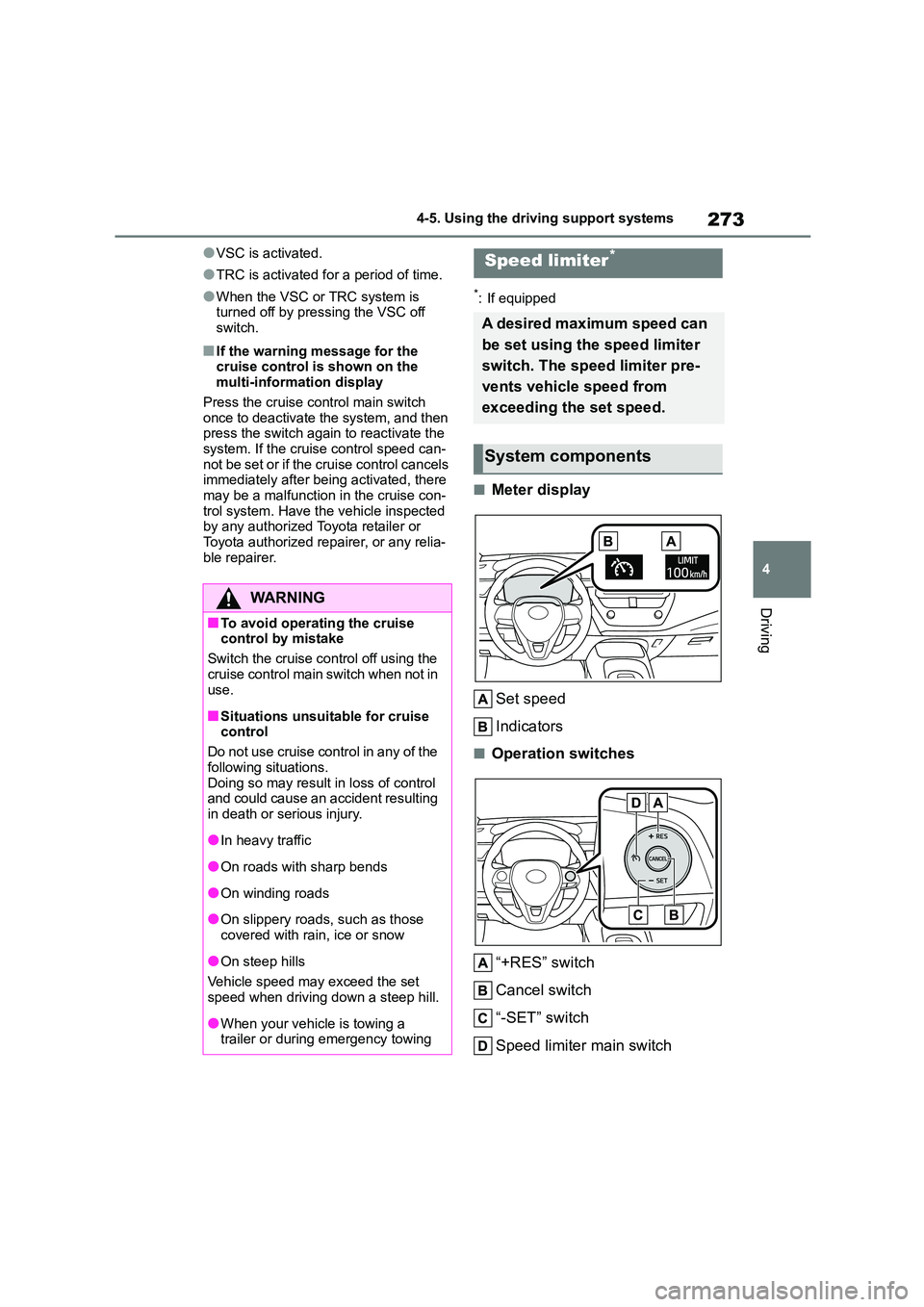
■Meter display
Set speed
Indicators
■Operation switches
“+RES” switch
Cancel switch
“-SET” switch
Speed limiter main switch
WA R N I N G
■To avoid operating the cruise control by mistake
Switch the cruise control off using the
cruise control main switch when not in use.
■Situations unsuitable for cruise control
Do not use cruise control in any of the
following situations. Doing so may result in loss of control
and could cause an accident resulting
in death or serious injury.
●In heavy traffic
●On roads with sharp bends
●On winding roads
●On slippery roads, such as those
covered with rain, ice or snow
●On steep hills
Vehicle speed may exceed the set speed when driving down a steep hill.
●When your vehicle is towing a trailer or during emergency towing
Speed limiter*
A desired maximum speed can
be set using the speed limiter
switch. The speed limiter pre-
vents vehicle speed from
exceeding the set speed.
System components
Page 277 of 758
275
4
4-5. Using the driving support systems
Driving
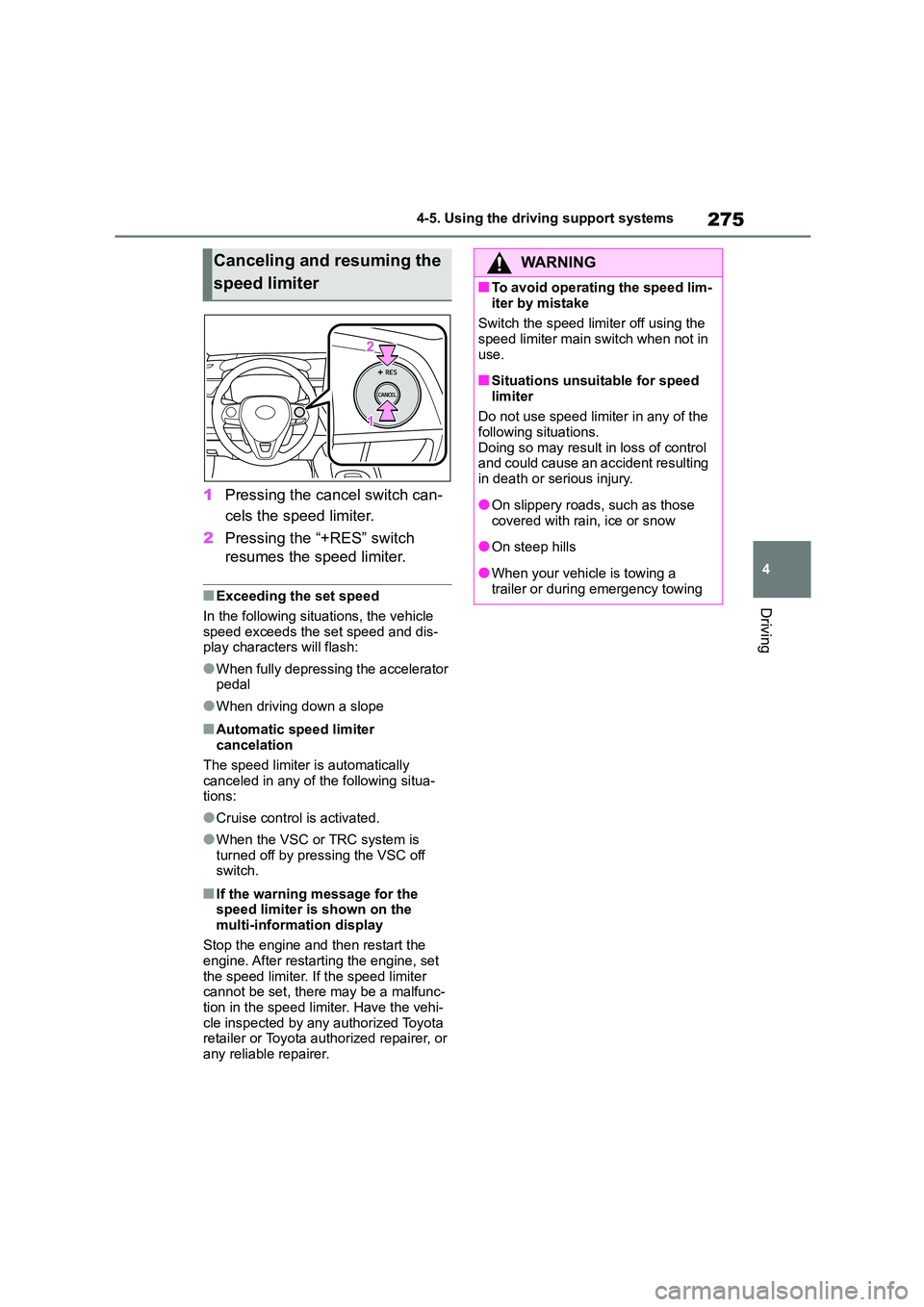
1 Pressing the cancel switch can-
cels the speed limiter.
2 Pressing the “+RES” switch
resumes the speed limiter.
■Exceeding the set speed
In the following situations, the vehicle
speed exceeds the set speed and dis-
play characters will flash:
●When fully depressing the accelerator
pedal
●When driving down a slope
■Automatic speed limiter
cancelation
The speed limiter is automatically
canceled in any of the following situa-
tions:
●Cruise control is activated.
●When the VSC or TRC system is
turned off by pressing the VSC off
switch.
■If the warning message for the speed limiter is shown on the
multi-information display
Stop the engine and then restart the
engine. After restarting the engine, set the speed limiter. If the speed limiter
cannot be set, there may be a malfunc-
tion in the speed limiter. Have the vehi- cle inspected by any authorized Toyota
retailer or Toyota authorized repairer, or
any reliable repairer.
Canceling and resuming the
speed limiter
WA R N I N G
■To avoid operating the speed lim-
iter by mistake
Switch the speed limiter off using the speed limiter main switch when not in
use.
■Situations unsuitable for speed
limiter
Do not use speed limiter in any of the
following situations. Doing so may result in loss of control
and could cause an accident resulting
in death or serious injury.
●On slippery roads, such as those
covered with rain, ice or snow
●On steep hills
●When your vehicle is towing a
trailer or during emergency towing