turn signal TOYOTA COROLLA HATCHBACK 2022 (in English) Owner's Manual
[x] Cancel search | Manufacturer: TOYOTA, Model Year: 2022, Model line: COROLLA HATCHBACK, Model: TOYOTA COROLLA HATCHBACK 2022Pages: 758, PDF Size: 155.26 MB
Page 280 of 758
2784-5. Using the driving support systems
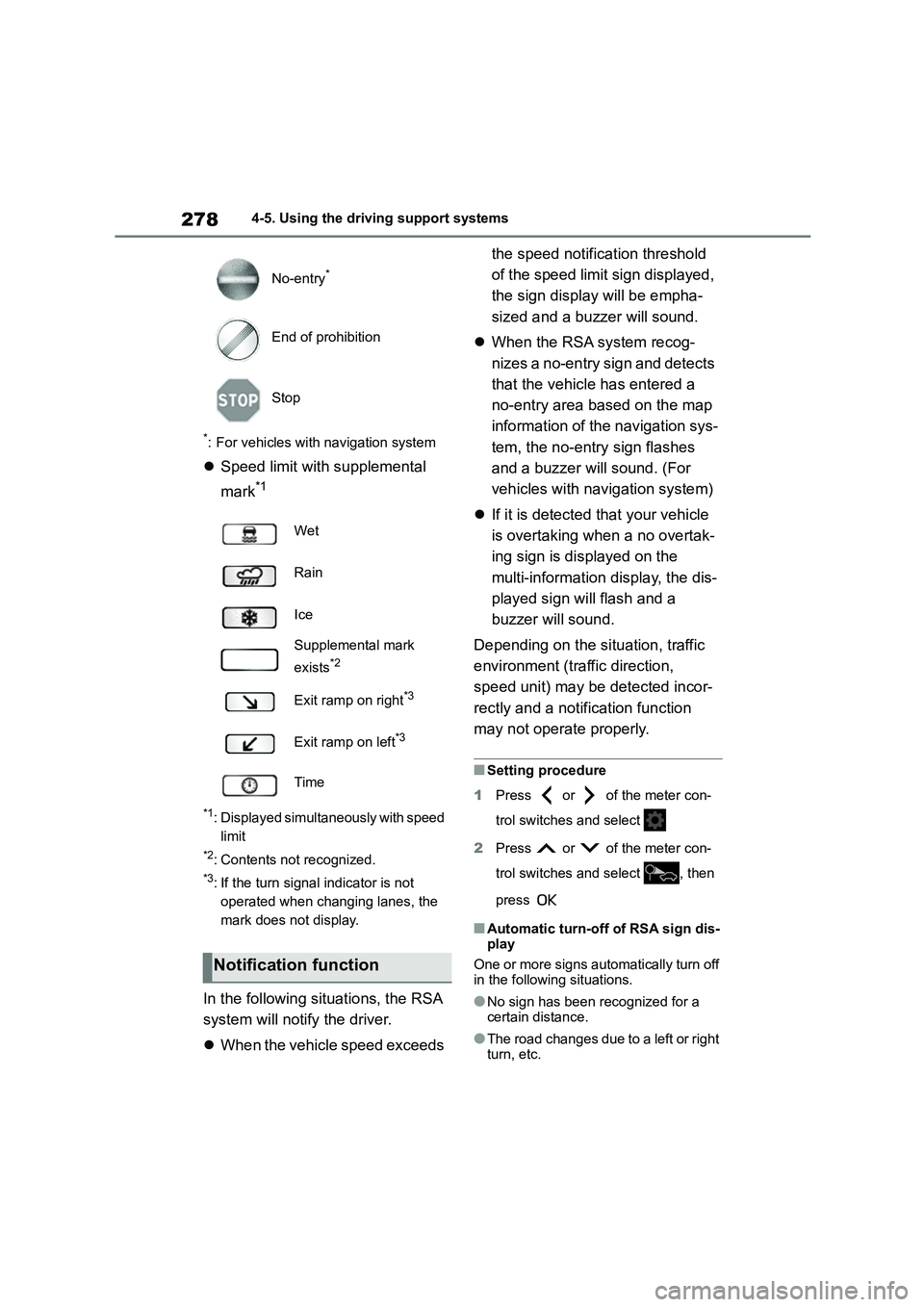
*: For vehicles with navigation system
Speed limit with supplemental
mark*1
*1: Displayed simultaneously with speed
limit
*2: Contents not recognized.
*3: If the turn signal indicator is not
operated when changing lanes, the
mark does not display.
In the following situations, the RSA
system will notify the driver.
When the vehicle speed exceeds
the speed notification threshold
of the speed limit sign displayed,
the sign display will be empha-
sized and a buzz er will sound.
When the RSA system recog-
nizes a no-entry sign and detects
that the vehicle has entered a
no-entry area based on the map
information of the navigation sys-
tem, the no-entry sign flashes
and a buzzer will sound. (For
vehicles with navigation system)
If it is detected that your vehicle
is overtaking when a no overtak-
ing sign is displayed on the
multi-information display, the dis-
played sign will flash and a
buzzer will sound.
Depending on the situation, traffic
environment (traffic direction,
speed unit) may be detected incor-
rectly and a notification function
may not operate properly.
■Setting procedure
1 Press or of the meter con-
trol switches and select
2 Press or of the meter con-
trol switches and select , then
press
■Automatic turn-off of RSA sign dis-
play
One or more signs automatically turn off in the following situations.
●No sign has been recognized for a certain distance.
●The road changes due to a left or right turn, etc.
No-entry*
End of prohibition
Stop
Wet
Rain
Ice
Supplemental mark
exists*2
Exit ramp on right*3
Exit ramp on left*3
Time
Notification function
Page 290 of 758
2884-5. Using the driving support systems
*: If equipped
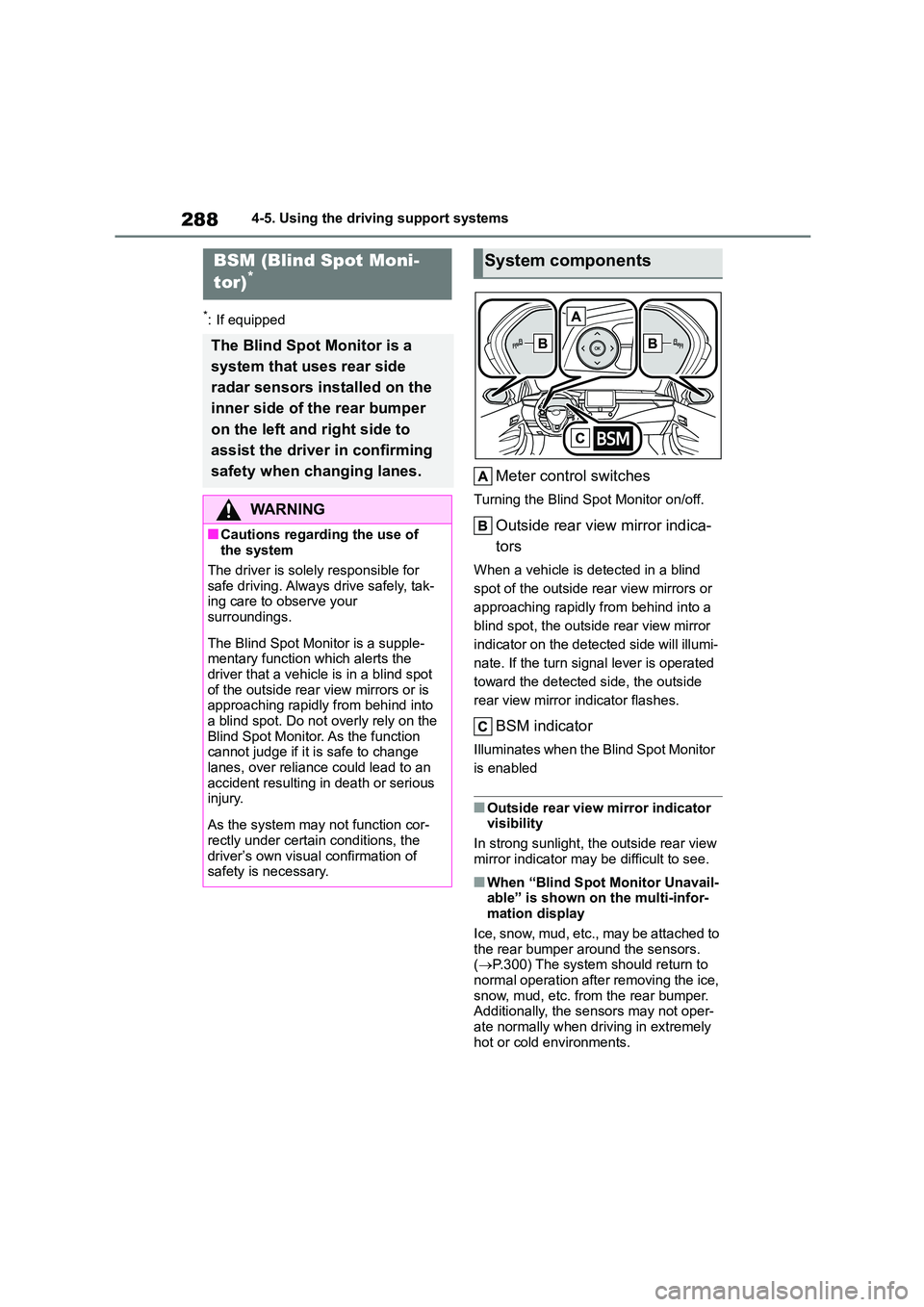
Meter control switches
Turning the Blind Spot Monitor on/off.
Outside rear view mirror indica-
tors
When a vehicle is detected in a blind
spot of the outside rear view mirrors or
approaching rapidly from behind into a
blind spot, the outside rear view mirror
indicator on the detected side will illumi-
nate. If the turn signal lever is operated
toward the detected side, the outside
rear view mirror indicator flashes.
BSM indicator
Illuminates when the Blind Spot Monitor
is enabled
■Outside rear view mirror indicator visibility
In strong sunlight, the outside rear view
mirror indicator may be difficult to see.
■When “Blind Spot Monitor Unavail- able” is shown on the multi-infor-
mation display
Ice, snow, mud, etc., may be attached to the rear bumper around the sensors.
( P.300) The system should return to
normal operation after removing the ice,
snow, mud, etc. from the rear bumper. Additionally, the sensors may not oper-
ate normally when driving in extremely
hot or cold environments.
BSM (Blind Spot Moni-
tor)*
The Blind Spot Monitor is a
system that uses rear side
radar sensors installed on the
inner side of the rear bumper
on the left and right side to
assist the driver in confirming
safety when changing lanes.
WA R N I N G
■Cautions regarding the use of the system
The driver is solely responsible for
safe driving. Always drive safely, tak- ing care to observe your
surroundings.
The Blind Spot Monitor is a supple-
mentary function which alerts the
driver that a vehicle is in a blind spot of the outside rear view mirrors or is
approaching rapidly from behind into
a blind spot. Do not overly rely on the Blind Spot Monitor. As the function
cannot judge if it is safe to change
lanes, over reliance could lead to an accident resulting in death or serious
injury.
As the system may not function cor-
rectly under certain conditions, the
driver’s own visual confirmation of safety is necessary.
System components
Page 336 of 758
3344-5. Using the driving support systems
ing space, guidance to starting points
for moving forward and backing up, as
well as the steering wheel auto opera-
tion, are repeated any time multi-turn
maneuvering is necessary following
step 3 from the time the vehicle begins
backing up until parking completes.
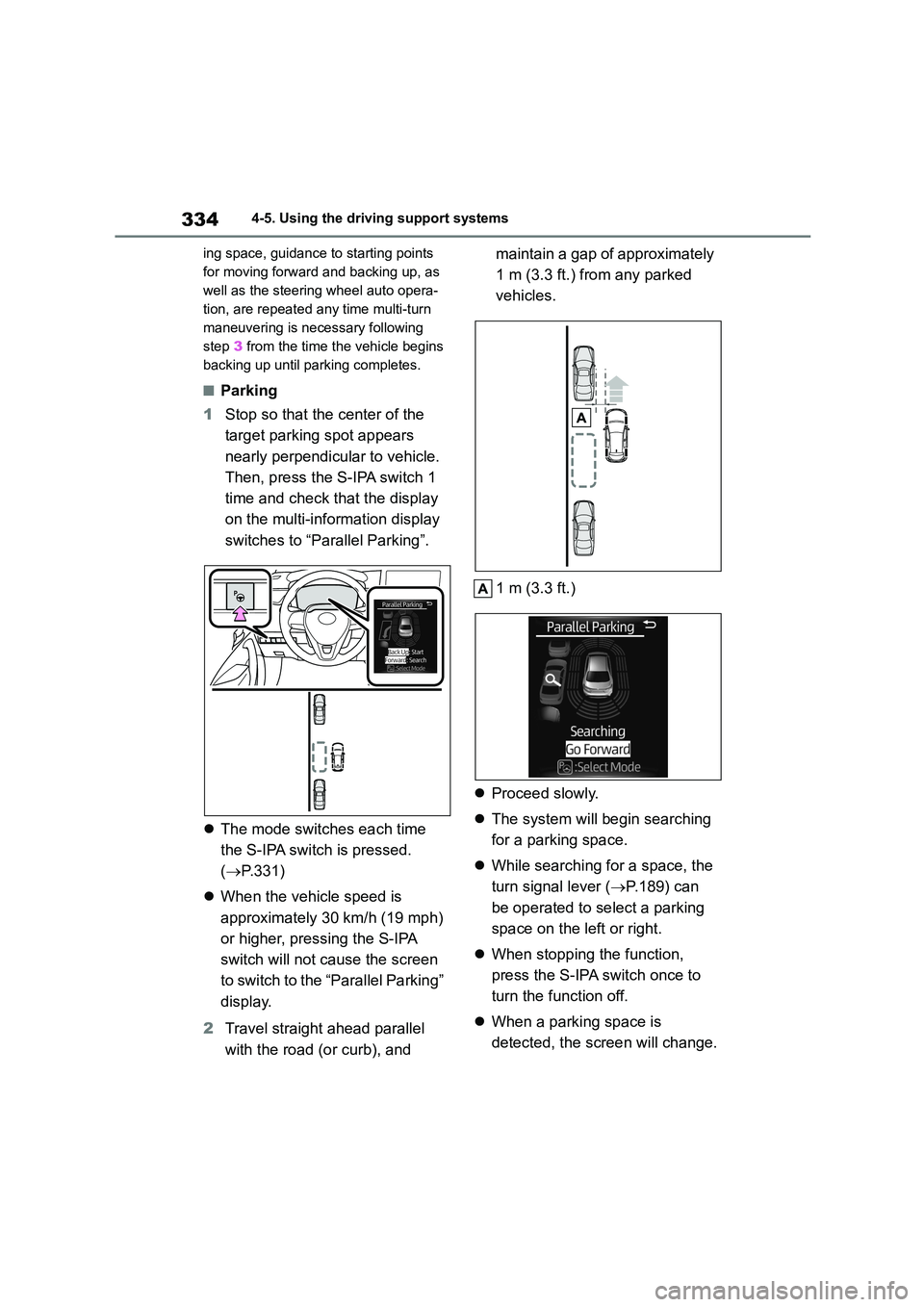
■Parking
1 Stop so that the center of the
target parking spot appears
nearly perpendicular to vehicle.
Then, press the S-IPA switch 1
time and check that the display
on the multi-information display
switches to “Parallel Parking”.
The mode switches each time
the S-IPA switch is pressed.
( P.331)
When the vehicle speed is
approximately 30 km/h (19 mph)
or higher, pressing the S-IPA
switch will not cause the screen
to switch to the “Parallel Parking”
display.
2 Travel straight ahead parallel
with the road (or curb), and
maintain a gap of approximately
1 m (3.3 ft.) from any parked
vehicles.
1 m (3.3 ft.)
Proceed slowly.
The system will begin searching
for a parking space.
While searching for a space, the
turn signal lever ( P.189) can
be operated to select a parking
space on the left or right.
When stopping the function,
press the S-IPA switch once to
turn the function off.
When a parking space is
detected, the screen will change.
Page 340 of 758
3384-5. Using the driving support systems
1With the shift lever in P, press
the S-IPA switch, select exit par-
allel parking assist mode, and
then operate the turn signal
lever to select the desired
departure direction.
2 Steering wheel auto operation
starts when the shift lever is
changed accordin g to guidance
provided by the system.
3 A sound is issued and a display
is shown to notify you when the
vehicle reaches a position from
which you can take off.
Depending on the condition of the park-
ing space, guidance to starting points
for moving forward and backing up, as
well as the steering wheel auto opera-
tion, are repeated any time multi-turn
maneuvering is necessary from the
time the steering wheel auto operation
begins in step 2 up until the vehicle
reaches a position from which it can
take off.
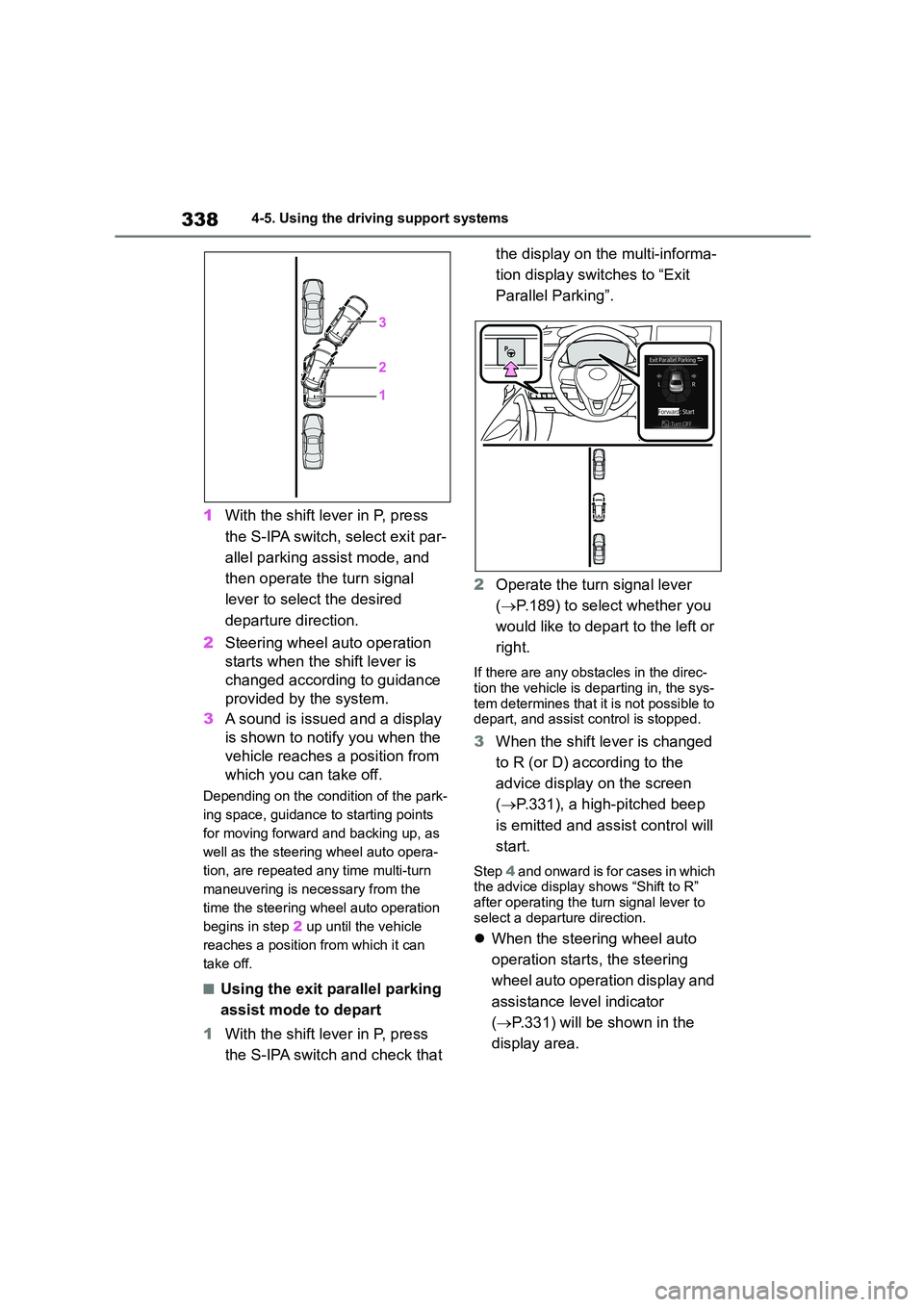
■Using the exit parallel parking
assist mode to depart
1 With the shift lever in P, press
the S-IPA switch and check that
the display on the multi-informa-
tion display switches to “Exit
Parallel Parking”.
2 Operate the turn signal lever
( P.189) to select whether you
would like to depart to the left or
right.
If there are any obstacles in the direc-
tion the vehicle is departing in, the sys-
tem determines that it is not possible to depart, and assist control is stopped.
3 When the shift lever is changed
to R (or D) according to the
advice display on the screen
( P.331), a high-pitched beep
is emitted and assist control will
start.
Step 4 and onward is for cases in which the advice display shows “Shift to R”
after operating the turn signal lever to
select a departure direction.
When the steering wheel auto
operation starts, the steering
wheel auto operation display and
assistance level indicator
( P.331) will be shown in the
display area.
Page 344 of 758
3424-5. Using the driving support systems
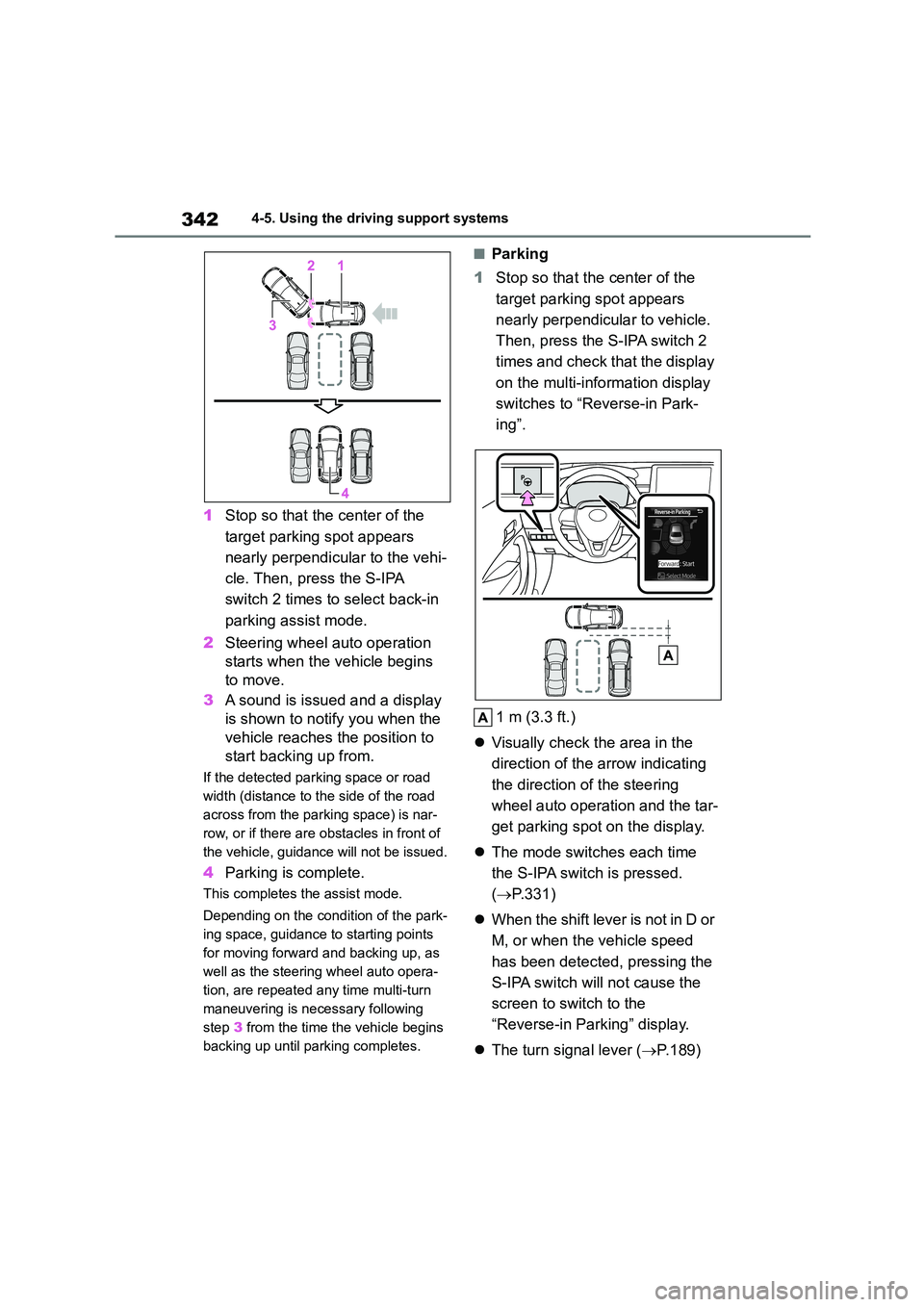
1Stop so that the center of the
target parking spot appears
nearly perpendicular to the vehi-
cle. Then, press the S-IPA
switch 2 times to select back-in
parking assist mode.
2 Steering wheel auto operation
starts when the vehicle begins
to move.
3 A sound is issued and a display
is shown to notify you when the
vehicle reaches the position to
start backing up from.
If the detected parking space or road
width (distance to the side of the road
across from the parking space) is nar-
row, or if there are obstacles in front of
the vehicle, guidance will not be issued.
4 Parking is complete.
This completes the assist mode.
Depending on the condition of the park-
ing space, guidance to starting points
for moving forward and backing up, as
well as the steering wheel auto opera-
tion, are repeated any time multi-turn
maneuvering is necessary following
step 3 from the time the vehicle begins
backing up until parking completes.
■Parking
1 Stop so that the center of the
target parking spot appears
nearly perpendicular to vehicle.
Then, press the S-IPA switch 2
times and check that the display
on the multi-information display
switches to “Reverse-in Park-
ing”.
1 m (3.3 ft.)
Visually check the area in the
direction of the arrow indicating
the direction of the steering
wheel auto operation and the tar-
get parking spot on the display.
The mode switches each time
the S-IPA switch is pressed.
( P.331)
When the shift lever is not in D or
M, or when the vehicle speed
has been detected, pressing the
S-IPA switch will not cause the
screen to switch to the
“Reverse-in Parking” display.
The turn signal lever (P.189)
Page 351 of 758
349
4
4-5. Using the driving support systems
Driving
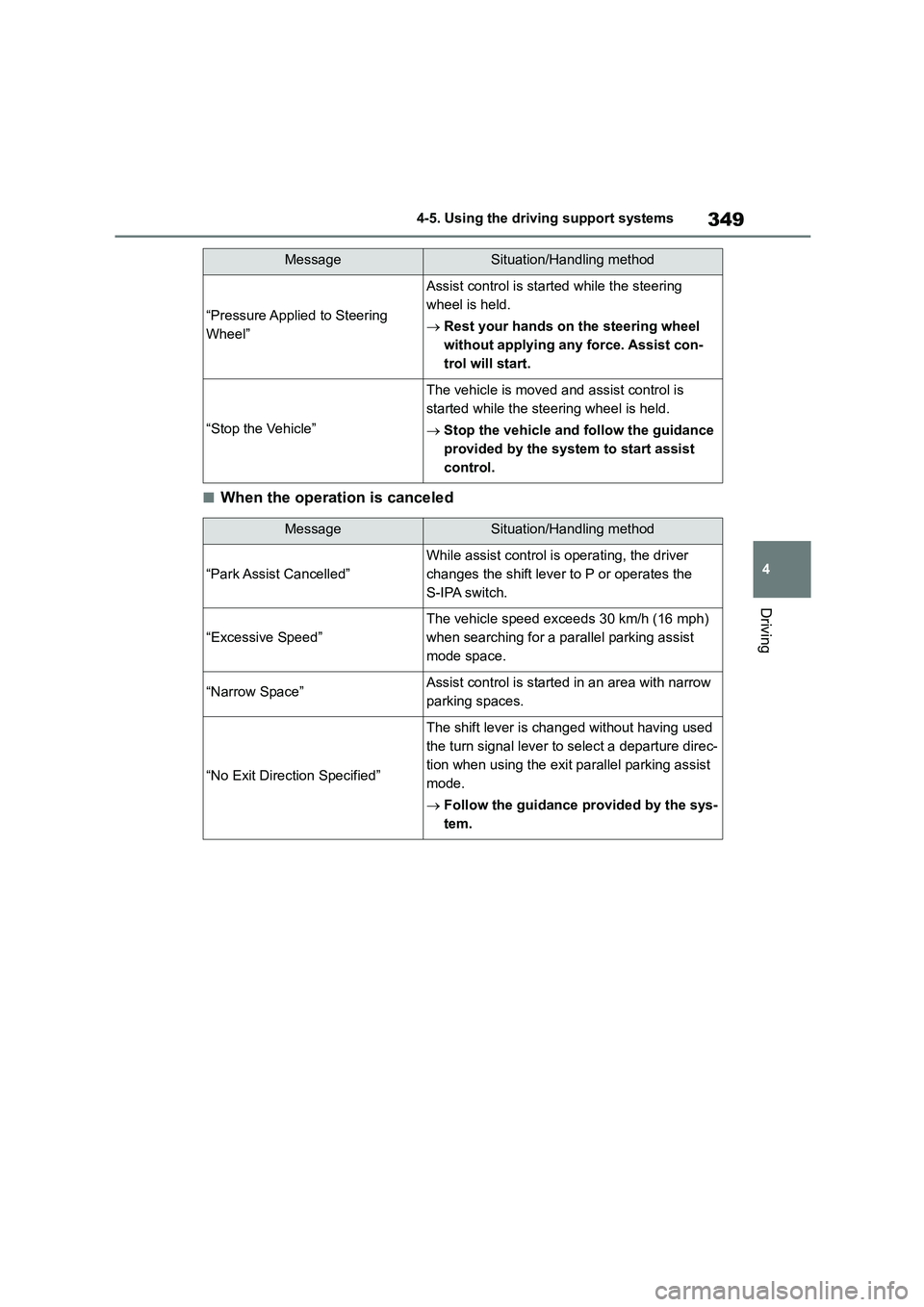
■When the operation is canceled
“Pressure Applied to Steering
Wheel”
Assist control is started while the steering
wheel is held.
Rest your hands on the steering wheel
without applying any force. Assist con-
trol will start.
“Stop the Vehicle”
The vehicle is moved and assist control is
started while the steering wheel is held.
Stop the vehicle and follow the guidance
provided by the system to start assist
control.
MessageSituation/Handling method
“Park Assist Cancelled”
While assist control is operating, the driver
changes the shift lever to P or operates the
S-IPA switch.
“Excessive Speed”
The vehicle speed exceeds 30 km/h (16 mph)
when searching for a parallel parking assist
mode space.
“Narrow Space”Assist control is started in an area with narrow
parking spaces.
“No Exit Direction Specified”
The shift lever is changed without having used
the turn signal lever to select a departure direc-
tion when using the exit parallel parking assist
mode.
Follow the guidance provided by the sys-
tem.
MessageSituation/Handling method
Page 359 of 758
357
4
4-5. Using the driving support systems
Driving
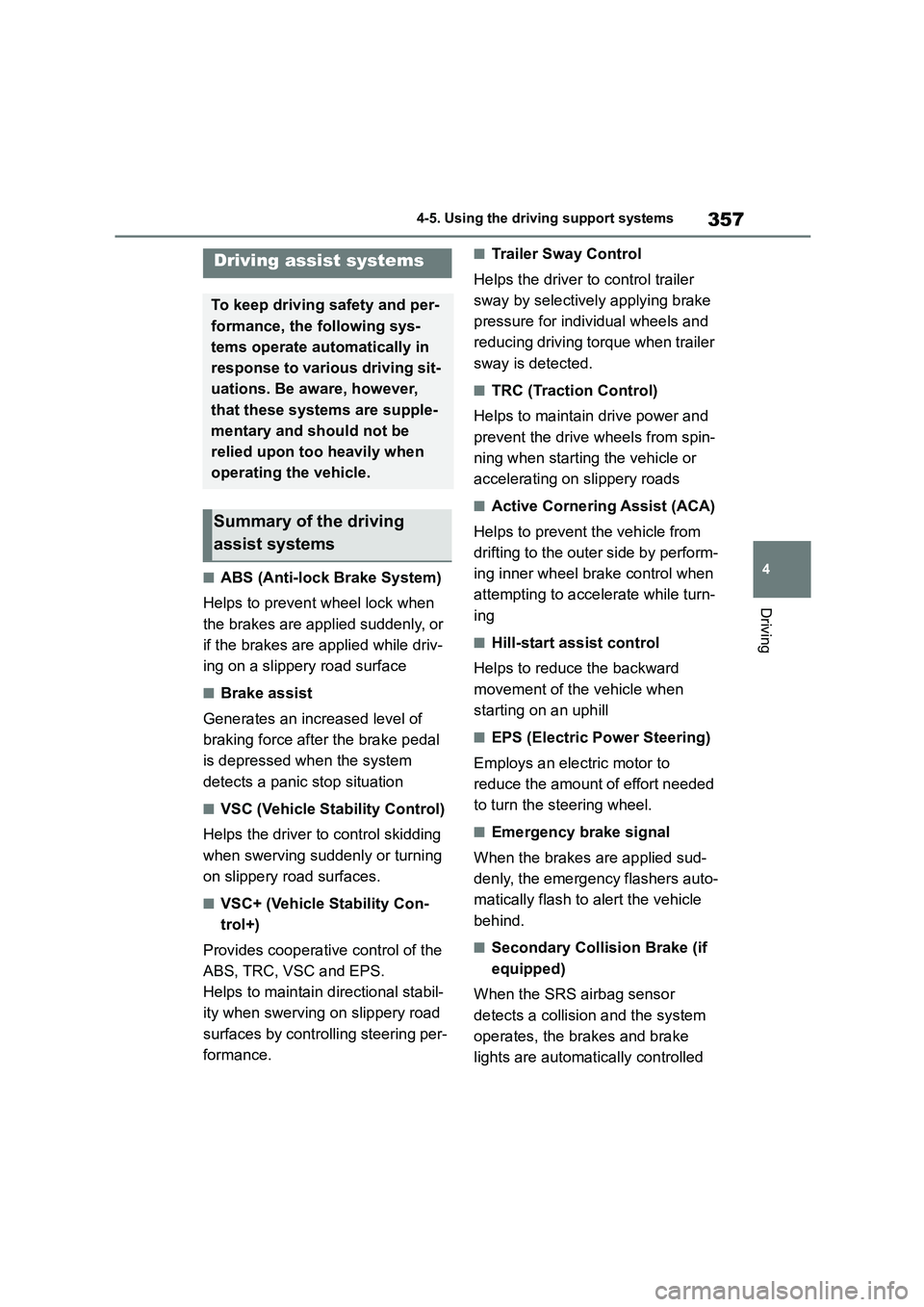
■ABS (Anti-lock Brake System)
Helps to prevent wheel lock when
the brakes are applied suddenly, or
if the brakes are applied while driv-
ing on a slippery road surface
■Brake assist
Generates an increased level of
braking force after the brake pedal
is depressed when the system
detects a panic stop situation
■VSC (Vehicle St ability Control)
Helps the driver to control skidding
when swerving suddenly or turning
on slippery road surfaces.
■VSC+ (Vehicle Stability Con-
trol+)
Provides cooperative control of the
ABS, TRC, VSC and EPS.
Helps to maintain directional stabil-
ity when swerving on slippery road
surfaces by controlling steering per-
formance.
■Trailer Sway Control
Helps the driver to control trailer
sway by selectively applying brake
pressure for individual wheels and
reducing driving torque when trailer
sway is detected.
■TRC (Traction Control)
Helps to maintain drive power and
prevent the drive wheels from spin-
ning when starting the vehicle or
accelerating on slippery roads
■Active Cornering Assist (ACA)
Helps to prevent the vehicle from
drifting to the outer side by perform-
ing inner wheel brake control when
attempting to acce lerate while turn-
ing
■Hill-start assist control
Helps to reduce the backward
movement of the vehicle when
starting on an uphill
■EPS (Electric Po wer Steering)
Employs an electric motor to
reduce the amount of effort needed
to turn the steering wheel.
■Emergency brake signal
When the brakes are applied sud-
denly, the emergency flashers auto-
matically flash to alert the vehicle
behind.
■Secondary Collision Brake (if
equipped)
When the SRS airbag sensor
detects a collisi on and the system
operates, the brakes and brake
lights are automatically controlled
Driving assist systems
To keep driving safety and per-
formance, the following sys-
tems operate au tomatically in
response to various driving sit-
uations. Be aware, however,
that these systems are supple-
mentary and should not be
relied upon too heavily when
operating the vehicle.
Summary of the driving
assist systems
Page 362 of 758
3604-5. Using the driving support systems
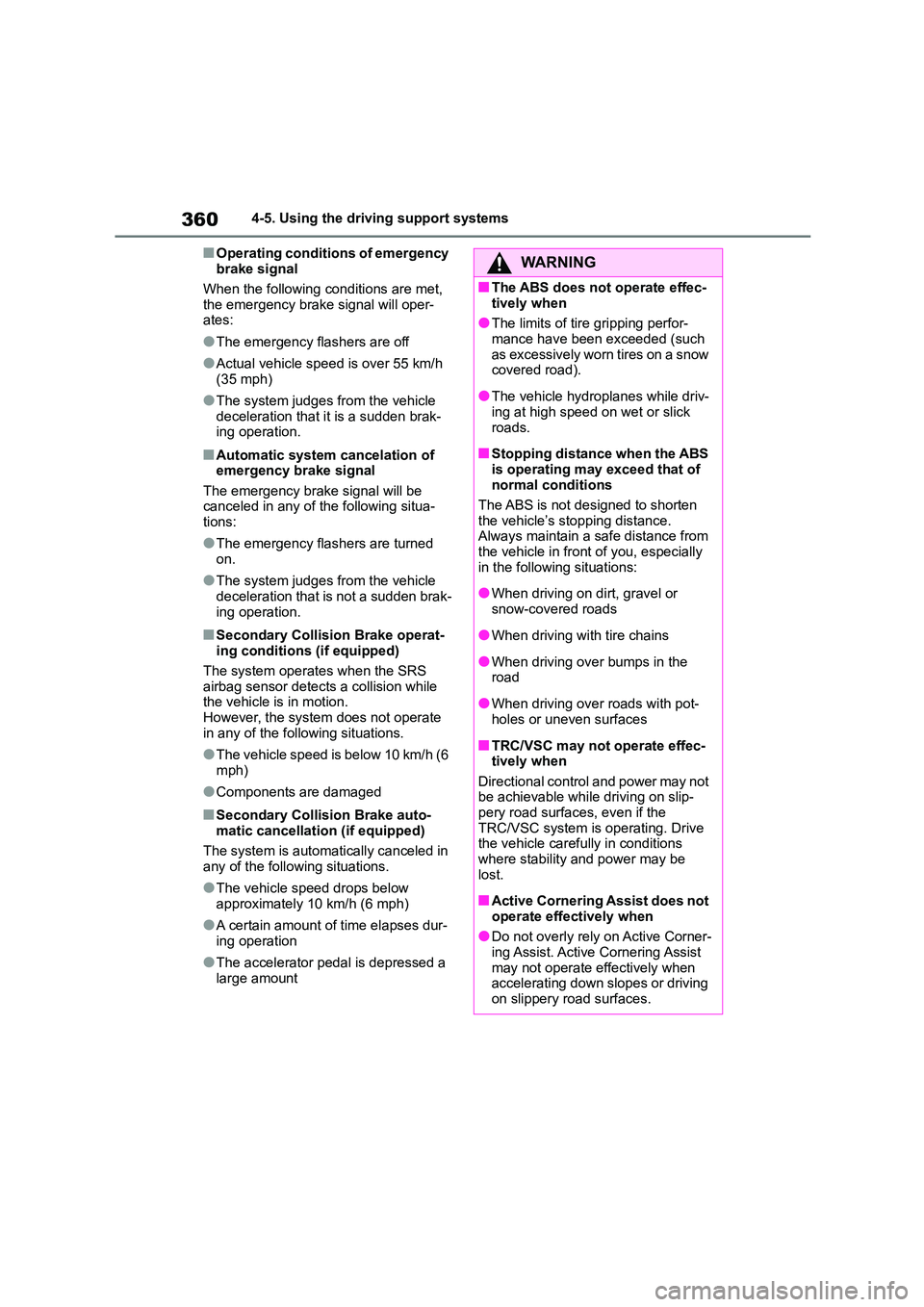
■Operating conditions of emergency
brake signal
When the following conditions are met,
the emergency brake signal will oper-
ates:
●The emergency flashers are off
●Actual vehicle speed is over 55 km/h
(35 mph)
●The system judges from the vehicle
deceleration that it is a sudden brak-
ing operation.
■Automatic system cancelation of emergency brake signal
The emergency brake signal will be
canceled in any of the following situa- tions:
●The emergency flashers are turned on.
●The system judges from the vehicle deceleration that is not a sudden brak-
ing operation.
■Secondary Collision Brake operat-
ing conditions (if equipped)
The system operates when the SRS
airbag sensor detects a collision while
the vehicle is in motion. However, the system does not operate
in any of the following situations.
●The vehicle speed is below 10 km/h (6
mph)
●Components are damaged
■Secondary Collision Brake auto-
matic cancellation (if equipped)
The system is automati cally canceled in any of the following situations.
●The vehicle speed drops below approximately 10 km/h (6 mph)
●A certain amount of time elapses dur-
ing operation
●The accelerator pedal is depressed a
large amount
WA R N I N G
■The ABS does not operate effec-
tively when
●The limits of tire gripping perfor- mance have been exceeded (such
as excessively worn tires on a snow
covered road).
●The vehicle hydroplanes while driv-
ing at high speed on wet or slick
roads.
■Stopping distance when the ABS
is operating may exceed that of normal conditions
The ABS is not designed to shorten
the vehicle’s stopping distance. Always maintain a safe distance from
the vehicle in front of you, especially
in the following situations:
●When driving on dirt, gravel or
snow-covered roads
●When driving with tire chains
●When driving over bumps in the
road
●When driving over roads with pot-
holes or uneven surfaces
■TRC/VSC may not operate effec-
tively when
Directional control and power may not be achievable while driving on slip-
pery road surfaces, even if the
TRC/VSC system is operating. Drive the vehicle carefu lly in conditions
where stability and power may be
lost.
■Active Cornering Assist does not
operate effectively when
●Do not overly rely on Active Corner-
ing Assist. Active Cornering Assist
may not operate effectively when accelerating down slopes or driving
on slippery road surfaces.
Page 375 of 758
373
5
5-3. Using the radio
Audio system
5-3.Using the radio
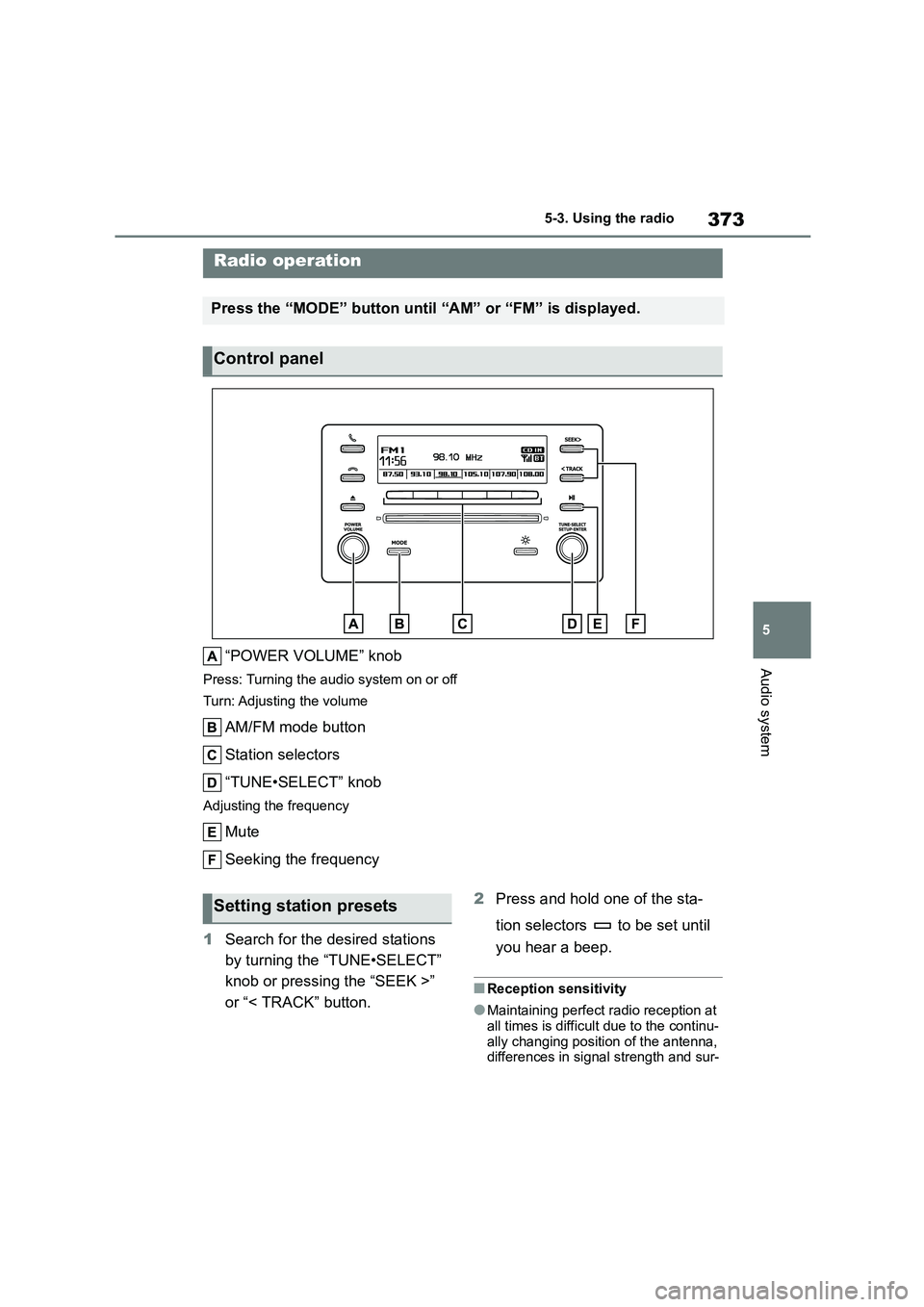
“POWER VOLUME” knob
Press: Turning the audio system on or off
Turn: Adjusting the volume
AM/FM mode button
Station selectors
“TUNE•SELECT” knob
Adjusting the frequency
Mute
Seeking the frequency
1 Search for the desired stations
by turning the “TUNE•SELECT”
knob or pressing the “SEEK >”
or “< TRACK” button.
2 Press and hold one of the sta-
tion selectors to be set until
you hear a beep.
■Reception sensitivity
●Maintaining perfect radio reception at
all times is difficult due to the continu-
ally changing position of the antenna, differences in signal strength and sur-
Radio operation
Press the “MODE” button until “AM” or “FM” is displayed.
Control panel
Setting station presets
Page 499 of 758
497
7
7-3. Do-it-yourself maintenance
Maintenance and care
Check the wattage of the light bulb
to be replaced. ( P.575)
P. 5 8 0
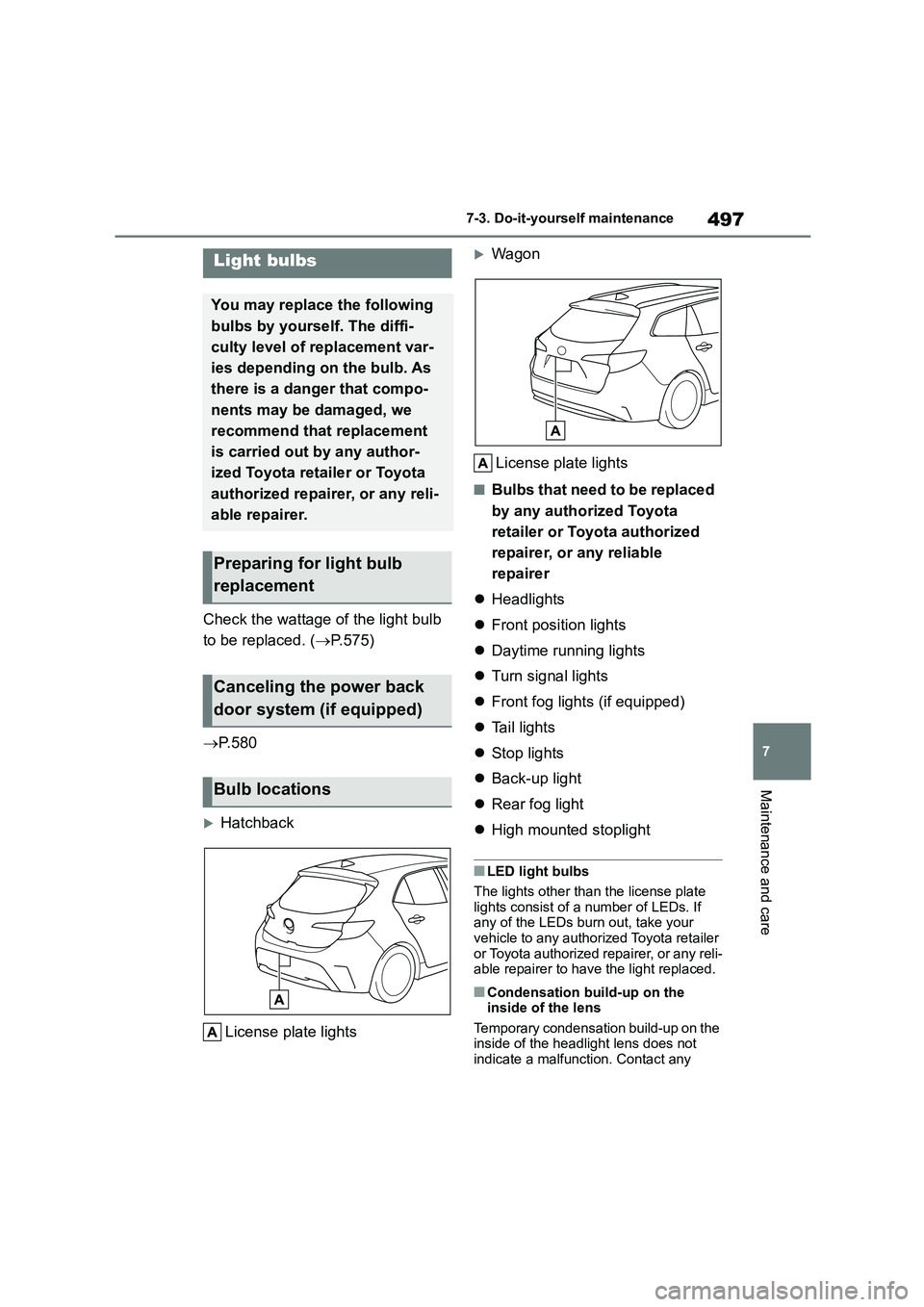
Hatchback
License plate lights
Wagon
License plate lights
■Bulbs that need to be replaced
by any authorized Toyota
retailer or Toyota authorized
repairer, or any reliable
repairer
Headlights
Front position lights
Daytime running lights
Turn signal lights
Front fog lights (if equipped)
Tail lights
Stop lights
Back-up light
Rear fog light
High mounted stoplight
■LED light bulbs
The lights other than the license plate
lights consist of a number of LEDs. If any of the LEDs burn out, take your
vehicle to any authorized Toyota retailer
or Toyota authorized repairer, or any reli- able repairer to have the light replaced.
■Condensation build-up on the
inside of the lens
Temporary condensation build-up on the inside of the headlight lens does not
indicate a malfunction. Contact any
Light bulbs
You may replace the following
bulbs by yourself. The diffi-
culty level of replacement var-
ies depending on the bulb. As
there is a danger that compo-
nents may be damaged, we
recommend that replacement
is carried out by any author-
ized Toyota reta iler or Toyota
authorized repairer, or any reli-
able repairer.
Preparing for light bulb
replacement
Canceling the power back
door system (if equipped)
Bulb locations