turn signal TOYOTA COROLLA HATCHBACK 2022 (in English) User Guide
[x] Cancel search | Manufacturer: TOYOTA, Model Year: 2022, Model line: COROLLA HATCHBACK, Model: TOYOTA COROLLA HATCHBACK 2022Pages: 758, PDF Size: 155.26 MB
Page 191 of 758
189
4
4-2. Driving procedures
Driving
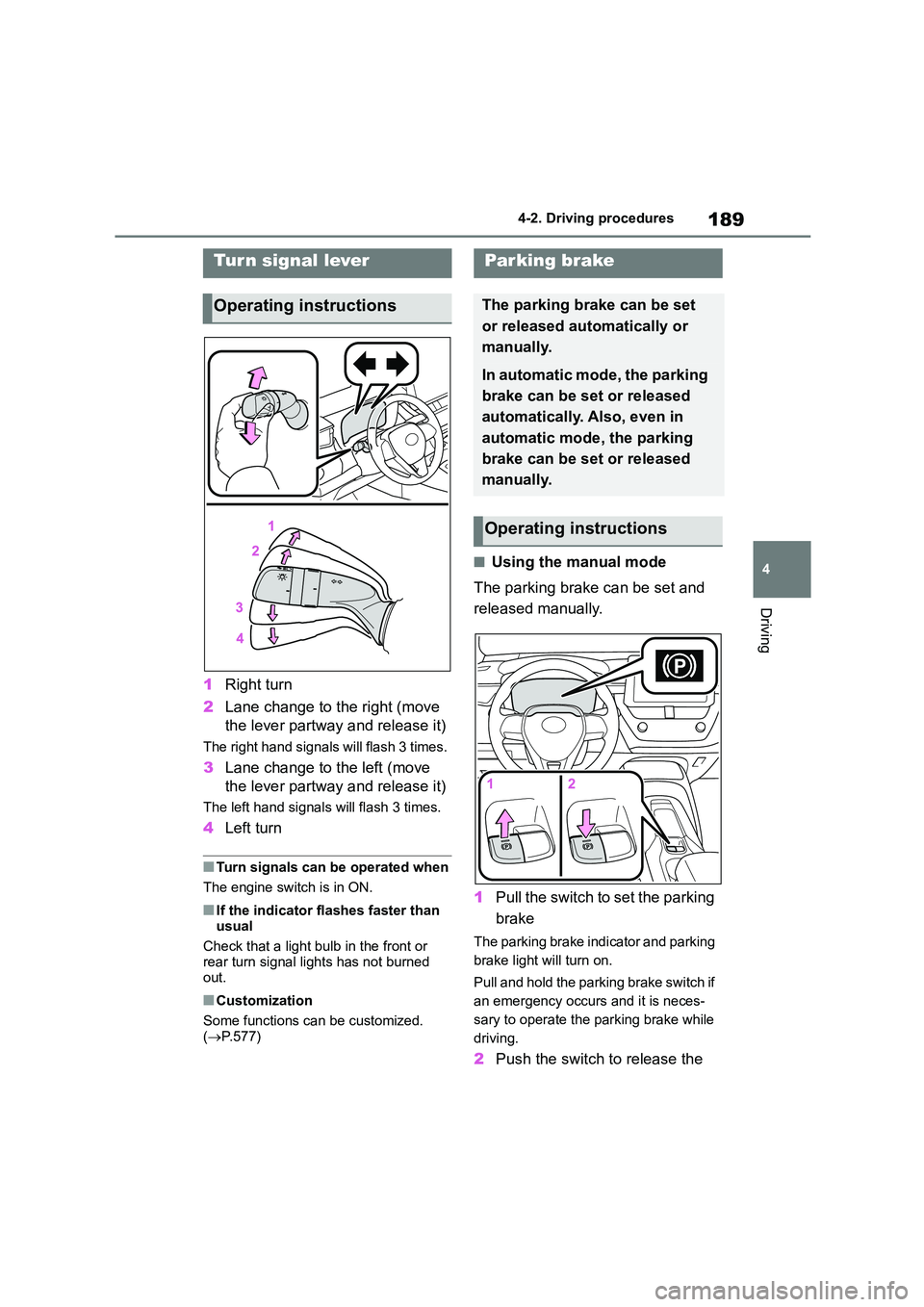
1 Right turn
2 Lane change to the right (move
the lever partway and release it)
The right hand signals will flash 3 times.
3 Lane change to the left (move
the lever partway and release it)
The left hand signals will flash 3 times.
4 Left turn
■Turn signals can be operated when
The engine switch is in ON.
■If the indicator flashes faster than
usual
Check that a light bulb in the front or rear turn signal lights has not burned
out.
■Customization
Some functions can be customized. ( P.577)
■Using the manual mode
The parking brake can be set and
released manually.
1 Pull the switch to set the parking
brake
The parking brake indicator and parking
brake light will turn on.
Pull and hold the parking brake switch if
an emergency occurs and it is neces-
sary to operate the parking brake while
driving.
2 Push the switch to release the
Turn signal lever
Operating instructions
Parking brake
The parking brake can be set
or released automatically or
manually.
In automatic mode, the parking
brake can be set or released
automatically. Also, even in
automatic mode , the parking
brake can be set or released
manually.
Operating instructions
Page 237 of 758
235
4
4-5. Using the driving support systems
Driving
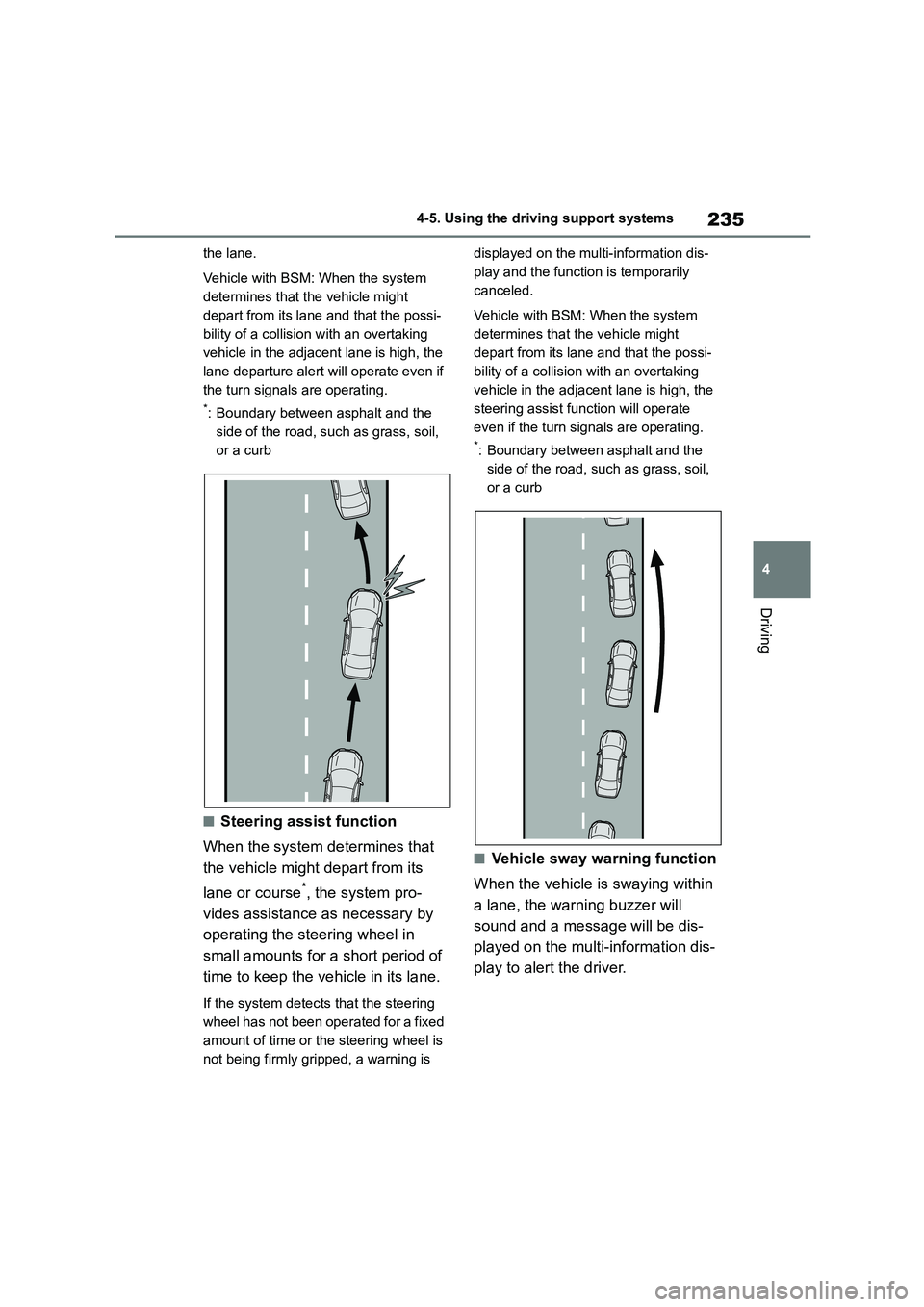
the lane.
Vehicle with BSM: When the system
determines that the vehicle might
depart from its lane and that the possi-
bility of a collision with an overtaking
vehicle in the adjacent lane is high, the
lane departure alert will operate even if
the turn signals are operating.
*: Boundary between asphalt and the
side of the road, such as grass, soil,
or a curb
■Steering assist function
When the system de termines that
the vehicle might depart from its
lane or course*, the system pro-
vides assistance as necessary by
operating the steering wheel in
small amounts for a short period of
time to keep the vehicle in its lane.
If the system detects that the steering
wheel has not been operated for a fixed
amount of time or the steering wheel is
not being firmly gripped, a warning is
displayed on the multi-information dis-
play and the function is temporarily
canceled.
Vehicle with BSM: When the system
determines that the vehicle might
depart from its lane and that the possi-
bility of a collision with an overtaking
vehicle in the adjacent lane is high, the
steering assist function will operate
even if the turn signals are operating.
*: Boundary between asphalt and the
side of the road, such as grass, soil,
or a curb
■Vehicle sway warning function
When the vehicle is swaying within
a lane, the warning buzzer will
sound and a message will be dis-
played on the multi-information dis-
play to alert the driver.
Page 240 of 758
2384-5. Using the driving support systems
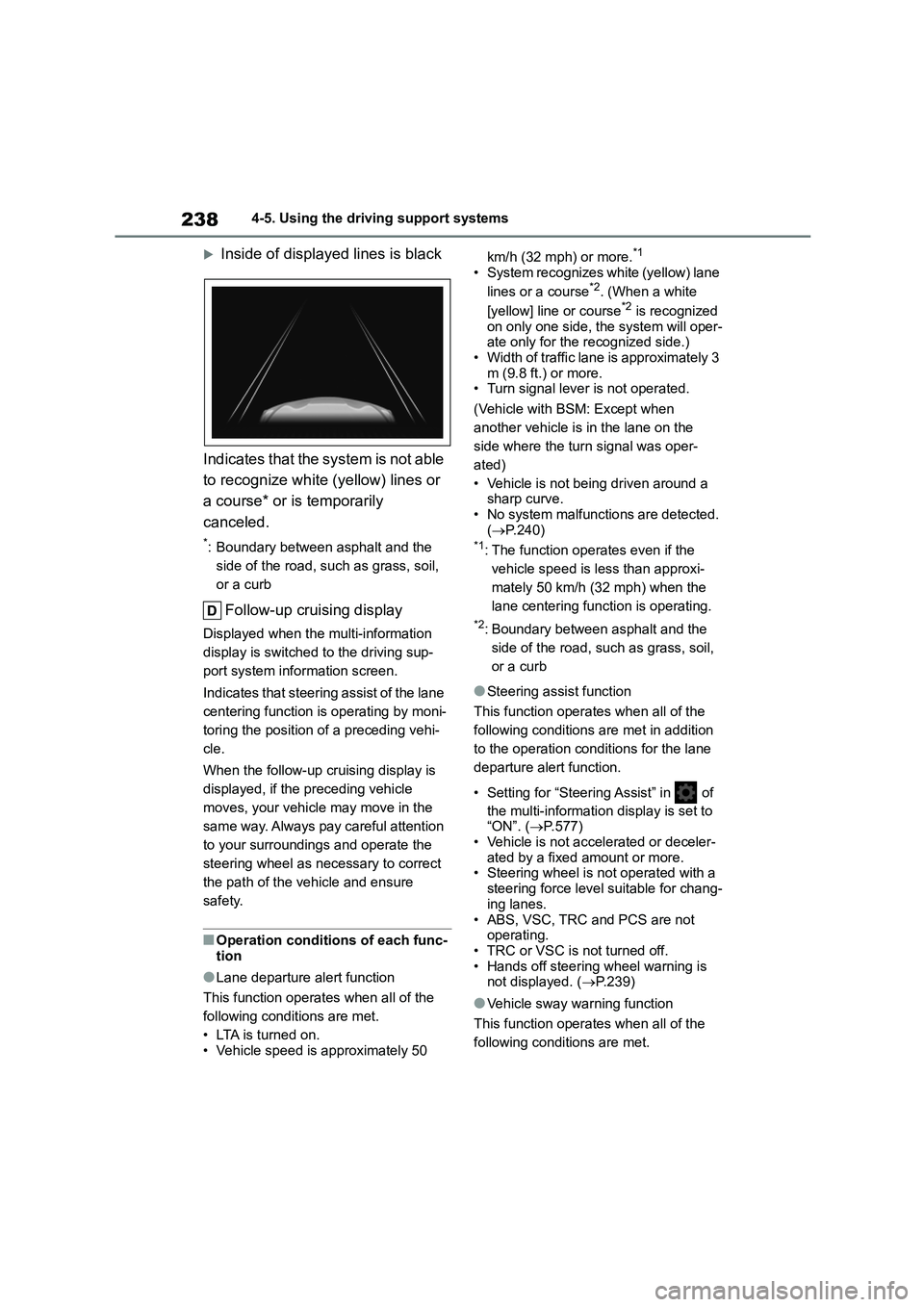
Inside of displayed lines is black
Indicates that the system is not able
to recognize white (yellow) lines or
a course* or is temporarily
canceled.
*: Boundary between asphalt and the
side of the road, such as grass, soil,
or a curb
Follow-up cruising display
Displayed when the multi-information
display is switched to the driving sup-
port system info rmation screen.
Indicates that steering assist of the lane
centering function is operating by moni-
toring the position of a preceding vehi-
cle.
When the follow-up cruising display is
displayed, if the preceding vehicle
moves, your vehicle may move in the
same way. Always pay careful attention
to your surroundings and operate the
steering wheel as necessary to correct
the path of the vehicle and ensure
safety.
■Operation conditions of each func-
tion
●Lane departure alert function
This function operates when all of the
following conditions are met.
• LTA is turned on. • Vehicle speed is approximately 50
km/h (32 mph) or more.*1
• System recognizes white (yellow) lane
lines or a course*2. (When a white
[yellow] line or course*2 is recognized
on only one side, the system will oper- ate only for the recognized side.)
• Width of traffic lane is approximately 3
m (9.8 ft.) or more. • Turn signal lever is not operated.
(Vehicle with BSM: Except when
another vehicle is in the lane on the
side where the turn signal was oper-
ated)
• Vehicle is not being driven around a
sharp curve. • No system malfunctio ns are detected.
( P.240)*1: The function operates even if the
vehicle speed is less than approxi-
mately 50 km/h (32 mph) when the
lane centering function is operating.
*2: Boundary between asphalt and the
side of the road, such as grass, soil,
or a curb
●Steering assist function
This function operates when all of the
following conditions are met in addition
to the operation conditions for the lane
departure alert function.
• Setting for “Steering Assist” in of
the multi-information display is set to “ON”. ( P.577)
• Vehicle is not accelerated or deceler-
ated by a fixed amount or more. • Steering wheel is not operated with a
steering force level suitable for chang-
ing lanes.
• ABS, VSC, TRC and PCS are not operating.
• TRC or VSC is not turned off.
• Hands off steering wheel warning is not displayed. ( P.239)
●Vehicle sway warning function
This function operates when all of the
following conditions are met.
Page 241 of 758
239
4
4-5. Using the driving support systems
Driving
• Setting for “Sway Warning” in of
the multi-information display is set to “ON”. ( P.577)
• Vehicle speed is approximately 50
km/h (32 mph) or more. • Width of traffic lane is approximately 3
m (9.8 ft.) or more.
• No system malfunctions are detected. ( P.240)
●Lane centering function
This function operates when all of the
following conditions are met.
• LTA is turned on.
• Setting for “Steering Assist” and “Lane
Centre” in of th e multi-information
display are set to “ON” ( P.577)
• This function recognizes white (yel-
low) lane lines or the position of a preceding vehicle (except when the
preceding vehicle is small, such as a
motorcycle). • The dynamic radar cruise control with
full-speed range is operating in vehi-
cle-to-vehicle distance control mode. • Width of traffic lane is approximately 3
to 4 m (10 to 13 ft.).
• Turn signal lever is not operated. • Vehicle is not being driven around a
sharp curve.
• No system malfunctions are detected. ( P.240)
• Vehicle does not accelerate or
decelerate by a fixed amount or more. • Steering wheel is not operated with a
steering force level suitable for chang-
ing lanes.
• ABS, VSC, TRC and PCS are not operating.
• TRC or VSC is not turned off.
• Hands off steering wheel warning is not displayed. ( P.239)
• The vehicle is being driven in the
center of a lane. • Steering assist function is not operat-
ing.
■Temporary cancellation of func-
tions
●When operation conditions are no
longer met, a function may be tempo-
rarily canceled. However, when the
operation conditions are met again, operation of the function is automati-
cally restored. ( P.238)
●If the operation conditions (P.238)
are no longer met while the lane cen-
tering function is operating, the buzzer may sound to indicate that the func-
tion has been temporarily canceled.
■Steering assist function/lane cen-
tering function
●Depending on the vehicle speed, lane
departure situation, road conditions, etc., the driver may not feel the func-
tion is operating or the function may
not operate at all.
●The steering control of the function is
overridden by the driver’s steering wheel operation.
●Do not attempt to test the operation of the steering assist function.
■Lane departure alert function
●The warning buzzer may be difficult to hear due to external noise, audio play-
back, etc.
●If the edge of the course* is not clear
or straight, the lane departure alert
function may not operate.
●Vehicle with BSM: It may not be possi-
ble for the system to determine if there is a danger of a collision with a vehicle
in an adjacent lane.
●Do not attempt to test the operation of
the lane departure alert function.*: Boundary between asphalt and the
side of the road, such as grass, soil,
or a curb
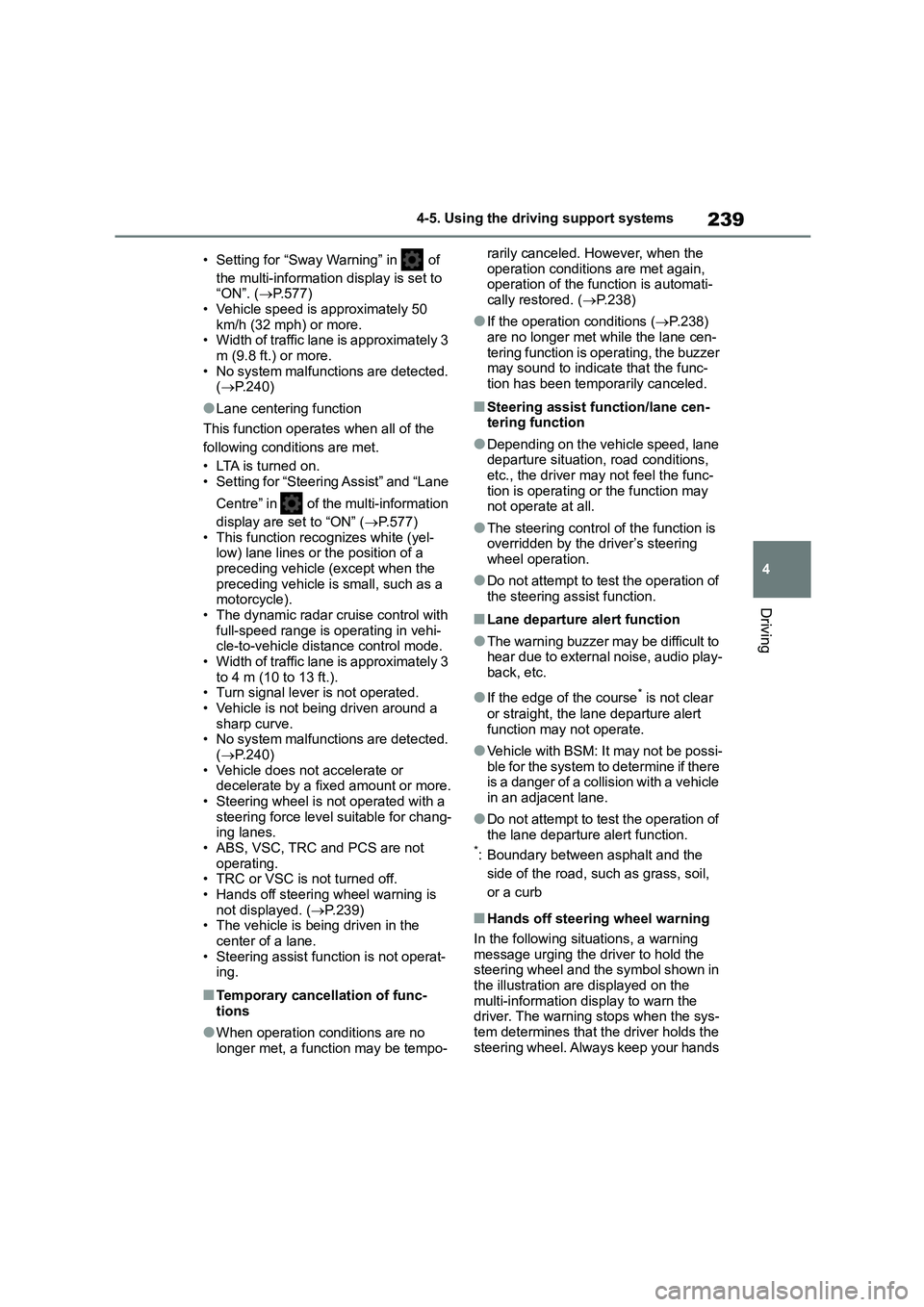
■Hands off steering wheel warning
In the following situations, a warning message urging the driver to hold the
steering wheel and the symbol shown in
the illustration are displayed on the multi-information display to warn the
driver. The warning stops when the sys-
tem determines that the driver holds the steering wheel. Always keep your hands
Page 246 of 758
2444-5. Using the driving support systems
vehicle in the adjacent lane is high, the
lane departure alert will operate even if
the turn signals are operating.
*: Boundary between asphalt and the
side of the road, such as grass, soil,
or a curb
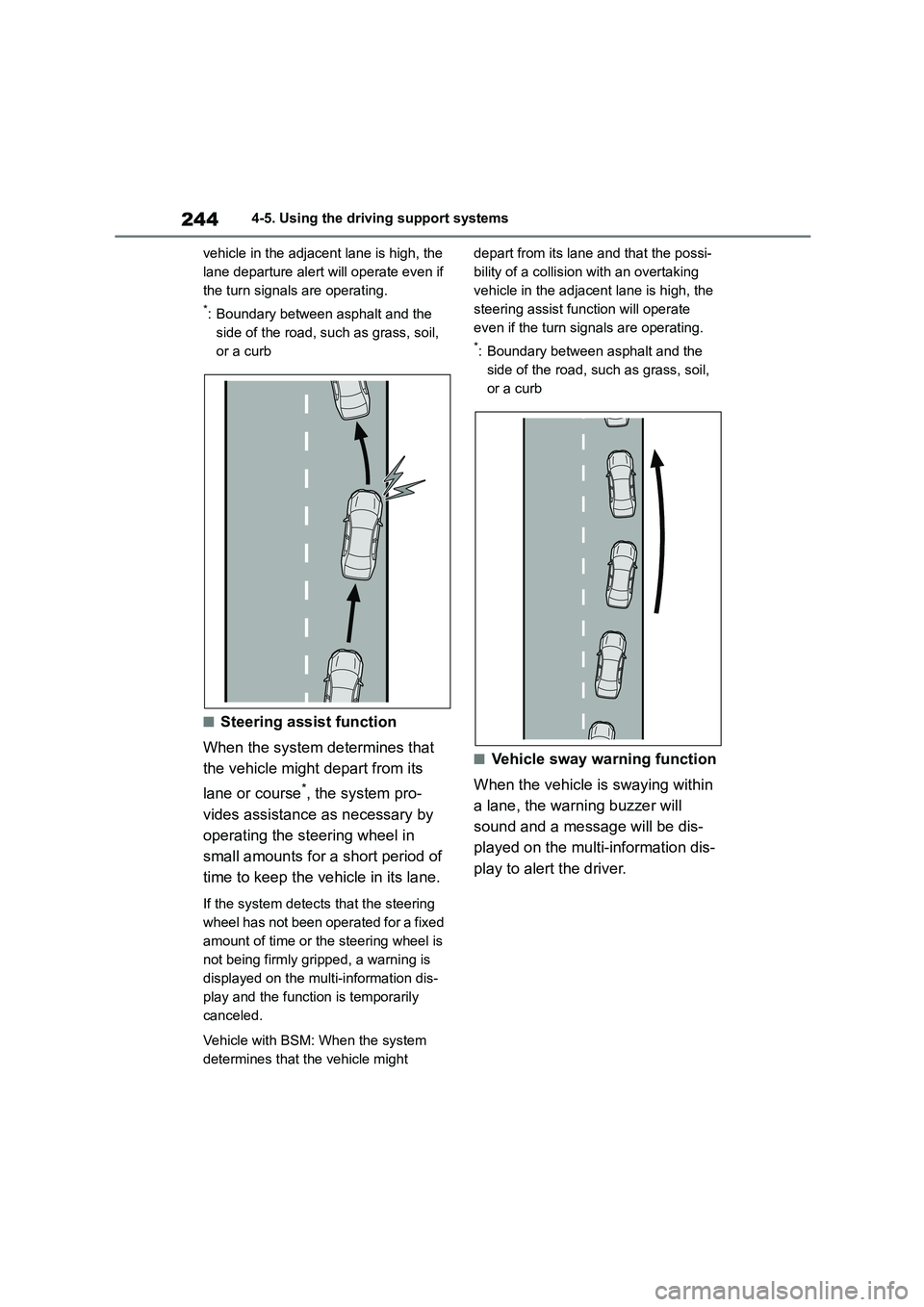
■Steering assist function
When the system de termines that
the vehicle might depart from its
lane or course*, the system pro-
vides assistance as necessary by
operating the steering wheel in
small amounts for a short period of
time to keep the vehicle in its lane.
If the system detects that the steering
wheel has not been operated for a fixed
amount of time or the steering wheel is
not being firmly gripped, a warning is
displayed on the multi-information dis-
play and the function is temporarily
canceled.
Vehicle with BSM: When the system
determines that the vehicle might
depart from its lane and that the possi-
bility of a collision with an overtaking
vehicle in the adjacent lane is high, the
steering assist function will operate
even if the turn signals are operating.
*: Boundary between asphalt and the
side of the road, such as grass, soil,
or a curb
■Vehicle sway warning function
When the vehicle is swaying within
a lane, the warning buzzer will
sound and a message will be dis-
played on the multi-information dis-
play to alert the driver.
Page 248 of 758
2464-5. Using the driving support systems
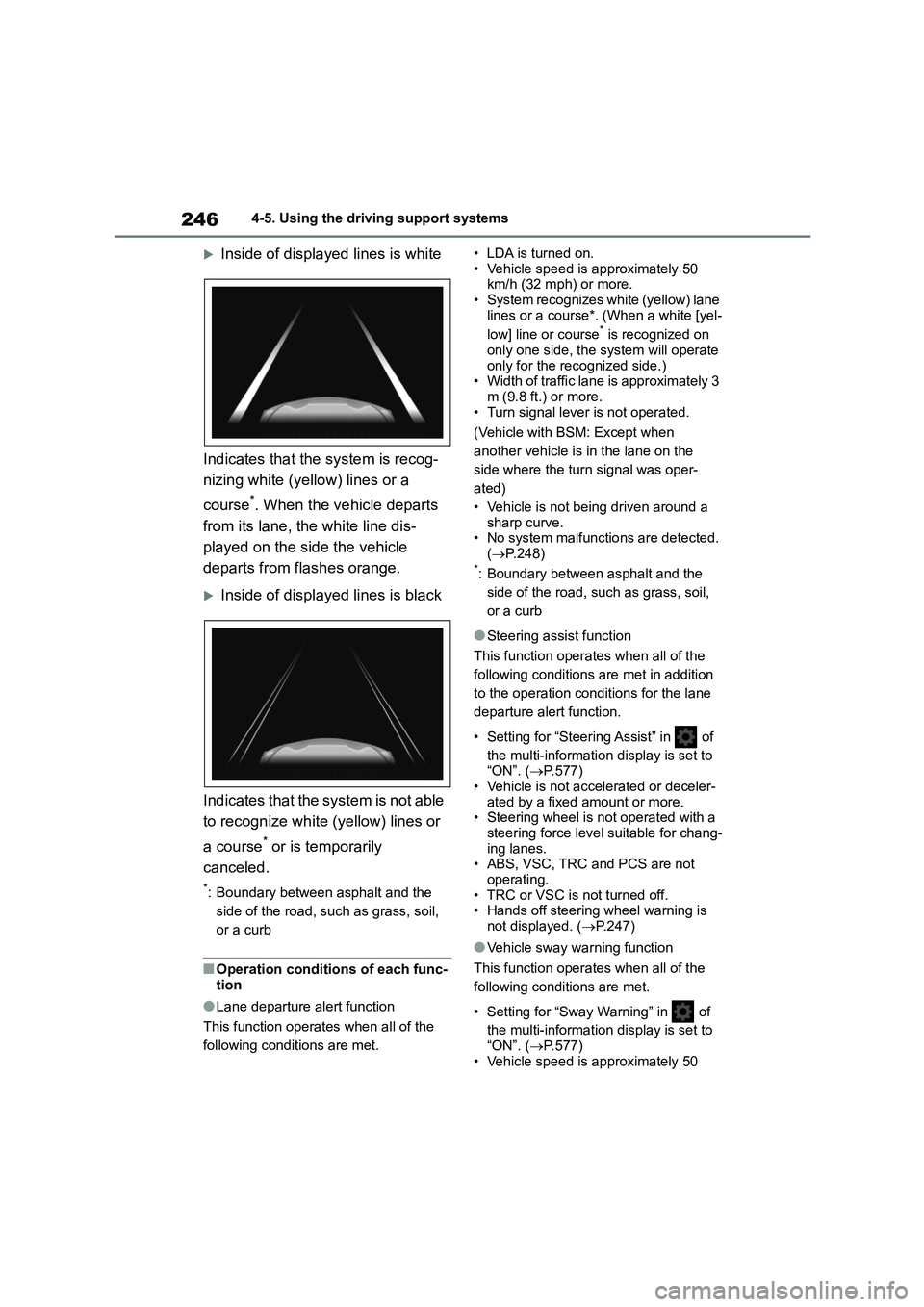
Inside of displayed lines is white
Indicates that the system is recog-
nizing white (yellow) lines or a
course*. When the vehicle departs
from its lane, the white line dis-
played on the side the vehicle
departs from flashes orange.
Inside of displayed lines is black
Indicates that the system is not able
to recognize white (yellow) lines or
a course* or is temporarily
canceled.
*: Boundary between asphalt and the
side of the road, such as grass, soil,
or a curb
■Operation conditions of each func-
tion
●Lane departure alert function
This function operates when all of the
following conditions are met.
• LDA is turned on.
• Vehicle speed is approximately 50 km/h (32 mph) or more.
• System recognizes white (yellow) lane
lines or a course*. (When a white [yel-
low] line or course* is recognized on
only one side, the system will operate
only for the recognized side.) • Width of traffic lane is approximately 3
m (9.8 ft.) or more.
• Turn signal lever is not operated.
(Vehicle with BSM: Except when
another vehicle is in the lane on the
side where the turn signal was oper-
ated)
• Vehicle is not being driven around a
sharp curve.
• No system malfunctio ns are detected. ( P.248)*: Boundary between asphalt and the
side of the road, such as grass, soil,
or a curb
●Steering assist function
This function operates when all of the
following conditions are met in addition
to the operation conditions for the lane
departure alert function.
• Setting for “Steering Assist” in of
the multi-information display is set to
“ON”. ( P.577) • Vehicle is not accelerated or deceler-
ated by a fixed amount or more.
• Steering wheel is not operated with a steering force level suitable for chang-
ing lanes.
• ABS, VSC, TRC and PCS are not operating.
• TRC or VSC is not turned off.
• Hands off steering wheel warning is
not displayed. ( P.247)
●Vehicle sway warning function
This function operates when all of the
following conditions are met.
• Setting for “Sway Warning” in of
the multi-information display is set to
“ON”. ( P.577)
• Vehicle speed is approximately 50
Page 254 of 758
2524-5. Using the driving support systems
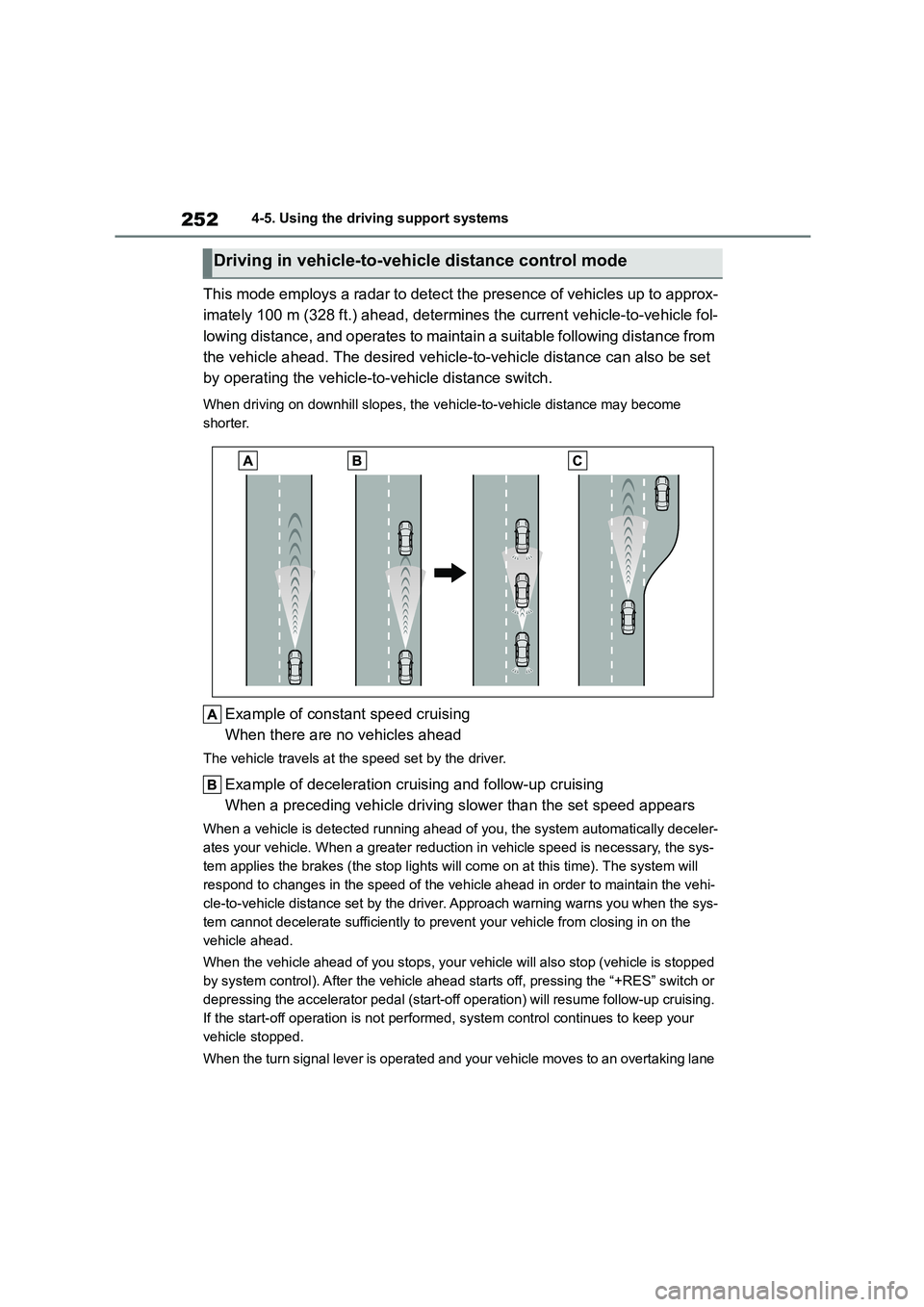
This mode employs a radar to detect the presence of vehicles up to approx-
imately 100 m (328 ft.) ahead, determines the current vehicle-to-vehicle fol-
lowing distance, and operates to maintain a suitable following distance from
the vehicle ahead. The desired vehicle-to-vehicle distance can also be set
by operating the vehicle-to -vehicle distance switch.
When driving on downhill slopes, the vehicle-to-vehicle distance may become
shorter.
Example of const ant speed cruising
When there are no vehicles ahead
The vehicle travels at the speed set by the driver.
Example of deceleration cruising and follow-up cruising
When a preceding vehicle driving slower than the set speed appears
When a vehicle is de tected running ahead of you, the system automatically deceler-
ates your vehicle. When a greater reduction in vehicle speed is necessary, the sys-
tem applies the brakes (the stop lights will come on at this time). The system will
respond to changes in the speed of the vehicle ahead in order to maintain the vehi-
cle-to-vehicle distance set by the driver. Approach warning warns you when the sys-
tem cannot decelerate sufficiently to prevent your vehicle from closing in on the
vehicle ahead.
When the vehicle ahead of you stops, your vehicle will also stop (vehicle is stopped
by system control). After the vehicle ahead starts off, pressing the “+RES” switch or
depressing the accelerator pedal (start-off operation) will resume follow-up cruising.
If the start-off operation is not performed, system control continues to keep your
vehicle stopped.
When the turn signal lever is operated and your vehicle moves to an overtaking lane
Driving in vehicle-to-vehicle distance control mode
Page 255 of 758
253
4
4-5. Using the driving support systems
Driving
while driving at 80 km/h (50 mph) or more, the vehicle will accelerate to help to over-
take a passing vehicle.
The system’s identificat ion of what is an overtaking lane may be determined solely
based on the location of the steering wheel in the vehicle (left side driver position
versus right side driver position.) If the v ehicle is driven to a region where the over-
taking lane is on a different side from wher e the vehicle is normally driven, the vehi-
cle may accelerate when the turn signal lever is operated in the opposite direction to
the overtaking lane (e.g., if the driver normally operates the vehicle in a region
where the overtaking lane is to the right but then drives to a region where the over-
taking lane is to the left, the vehicle may accelerate when the right turn signal is acti-
vated).
Example of acceleration
When there are no longer any precedi ng vehicles driving slower than the
set speed
The system accelerates until the set speed is reached. The system then returns to
constant speed cruising.
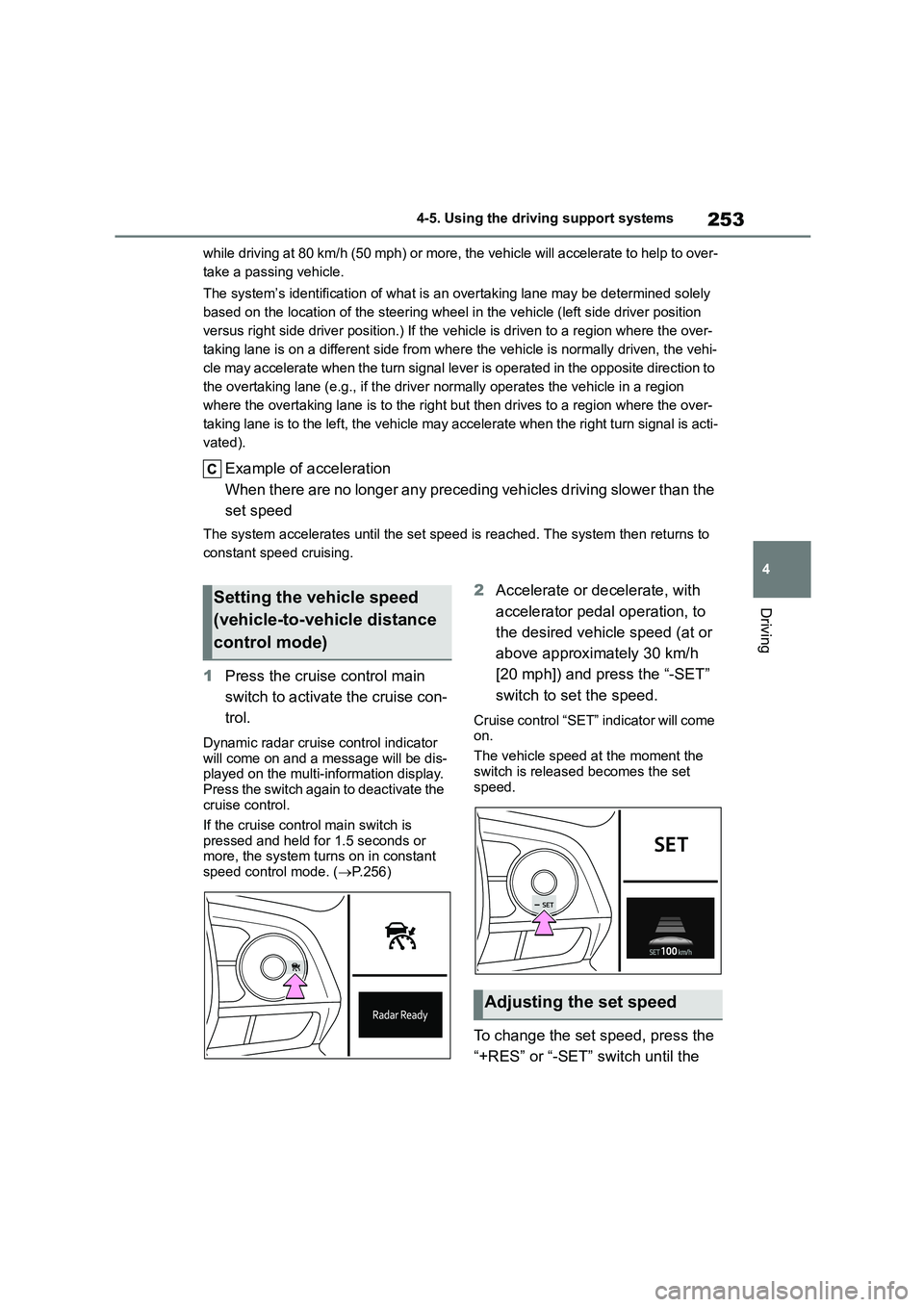
1 Press the cruise control main
switch to activate the cruise con-
trol.
Dynamic radar cruise control indicator will come on and a message will be dis-
played on the multi-information display.
Press the switch again to deactivate the cruise control.
If the cruise control main switch is
pressed and held for 1.5 seconds or more, the system turns on in constant
speed control mode. ( P.256)
2Accelerate or decelerate, with
accelerator pedal operation, to
the desired vehicle speed (at or
above approximately 30 km/h
[20 mph]) and press the “-SET”
switch to set the speed.
Cruise control “SET” indicator will come
on.
The vehicle speed at the moment the
switch is released becomes the set
speed.
To change the set speed, press the
“+RES” or “-SET” switch until the
Setting the vehicle speed
(vehicle-to-vehicle distance
control mode)
Adjusting the set speed
Page 265 of 758
263
4
4-5. Using the driving support systems
Driving
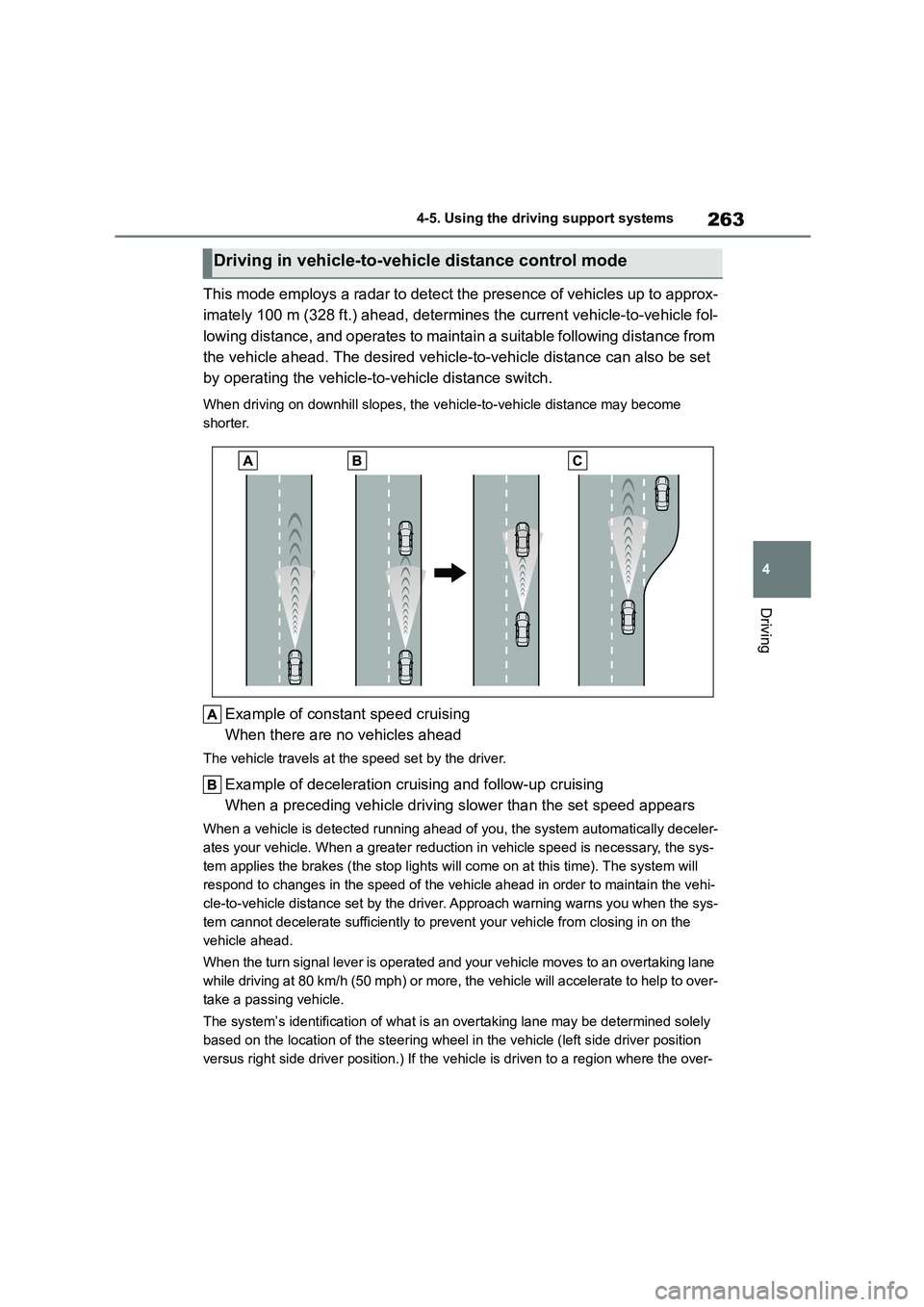
This mode employs a radar to detect the presence of vehicles up to approx-
imately 100 m (328 ft.) ahead, determines the current vehicle-to-vehicle fol-
lowing distance, and operates to maintain a suitable following distance from
the vehicle ahead. The desired vehicle-to-vehicle distance can also be set
by operating the vehicle-to -vehicle distance switch.
When driving on downhill slopes, the vehicle-to-vehicle distance may become
shorter.
Example of const ant speed cruising
When there are no vehicles ahead
The vehicle travels at the speed set by the driver.
Example of deceleration cruising and follow-up cruising
When a preceding vehicle driving slower than the set speed appears
When a vehicle is de tected running ahead of you, the system automatically deceler-
ates your vehicle. When a greater reduction in vehicle speed is necessary, the sys-
tem applies the brakes (the stop lights will come on at this time). The system will
respond to changes in the speed of the vehicle ahead in order to maintain the vehi-
cle-to-vehicle distance set by the driver. Approach warning warns you when the sys-
tem cannot decelerate sufficiently to prevent your vehicle from closing in on the
vehicle ahead.
When the turn signal lever is operated and your vehicle moves to an overtaking lane
while driving at 80 km/h (50 mph) or more, the vehicle will accelerate to help to over-
take a passing vehicle.
The system’s identificat ion of what is an overtaking lane may be determined solely
based on the location of the steering wheel in the vehicle (left side driver position
versus right side driver position.) If the v ehicle is driven to a region where the over-
Driving in vehicle-to-vehicle distance control mode
Page 266 of 758
2644-5. Using the driving support systems
taking lane is on a different side from wher e the vehicle is normally driven, the vehi-
cle may accelerate when the turn signal lever is operated in the opposite direction to
the overtaking lane (e.g., if the driver normally operates the vehicle in a region
where the overtaking lane is to the right but then drives to a region where the over-
taking lane is to the left, the vehicle may accelerate when the right turn signal is acti-
vated).
Example of acceleration
When there are no longer any precedi ng vehicles driving slower than the
set speed
The system accelerates until the set speed is reached. The system then returns to
constant speed cruising.
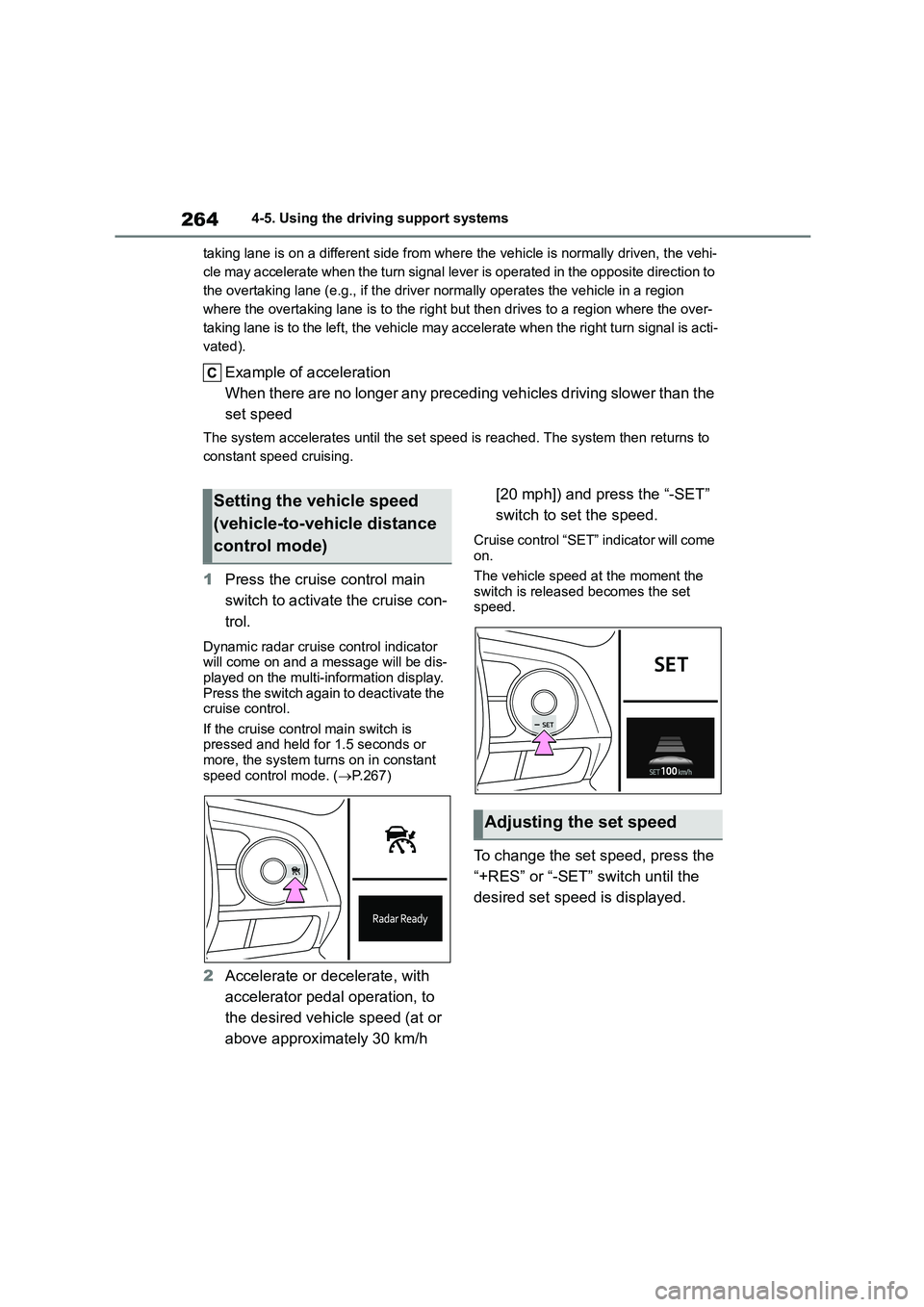
1 Press the cruise control main
switch to activate the cruise con-
trol.
Dynamic radar cruise control indicator
will come on and a message will be dis-
played on the multi-information display. Press the switch again to deactivate the
cruise control.
If the cruise control main switch is pressed and held for 1.5 seconds or
more, the system turns on in constant
speed control mode. ( P.267)
2Accelerate or decelerate, with
accelerator pedal operation, to
the desired vehicle speed (at or
above approximately 30 km/h
[20 mph]) and press the “-SET”
switch to set the speed.
Cruise control “SET” indicator will come on.
The vehicle speed at the moment the
switch is released becomes the set speed.
To change the set speed, press the
“+RES” or “-SET” switch until the
desired set speed is displayed.
Setting the vehicle speed
(vehicle-to-vehicle distance
control mode)
Adjusting the set speed