instrument cluster TOYOTA COROLLA HYBRID 2020 Owners Manual (in English)
[x] Cancel search | Manufacturer: TOYOTA, Model Year: 2020, Model line: COROLLA HYBRID, Model: TOYOTA COROLLA HYBRID 2020Pages: 556, PDF Size: 19.28 MB
Page 2 of 556
2
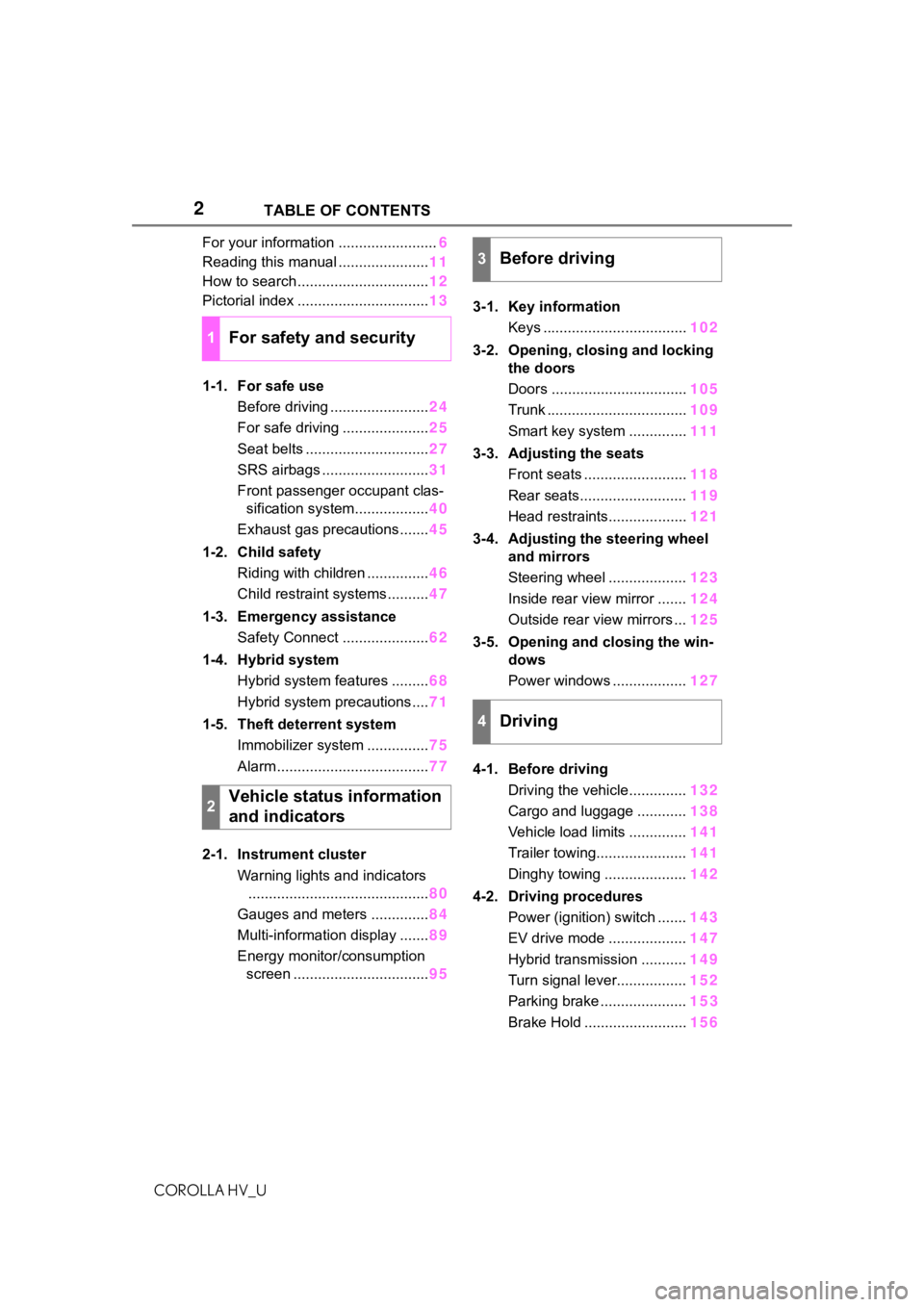
COROLLA HV_UTABLE OF CONTENTS
For your information ........................
6
Reading this manual ...................... 11
How to search ................................ 12
Pictorial index ................................ 13
1-1. For safe use Before driving ........................ 24
For safe driving ..................... 25
Seat belts .............................. 27
SRS airbags .......................... 31
Front passenger occupant clas- sification system.................. 40
Exhaust gas precautions....... 45
1-2. Child safety Riding with children ............... 46
Child restraint systems .......... 47
1-3. Emergency assistance Safety Connect ..................... 62
1-4. Hybrid system Hybrid system features ......... 68
Hybrid system precautions .... 71
1-5. Theft deterrent system Immobilizer system ............... 75
Alarm ..................................... 77
2-1. Instrument cluster Warning lights and indicators............................................ 80
Gauges and meters .............. 84
Multi-information display ....... 89
Energy monitor/consumption screen ................................. 953-1. Key information
Keys ................................... 102
3-2. Opening, closing and locking the doors
Doors ................................. 105
Trunk .................................. 109
Smart key system .............. 111
3-3. Adjusting the seats Front seats ......................... 118
Rear seats.......................... 119
Head restraints................... 121
3-4. Adjusting the steering wheel and mirrors
Steering wheel ................... 123
Inside rear view mirror ....... 124
Outside rear view mirrors ... 125
3-5. Opening and closing the win- dows
Power windows .................. 127
4-1. Before driving Driving the vehicle.............. 132
Cargo and luggage ............ 138
Vehicle load limits .............. 141
Trailer towing...................... 141
Dinghy towing .................... 142
4-2. Driving procedures Power (ignition) switch ....... 143
EV drive mode ................... 147
Hybrid transmission ........... 149
Turn signal lever................. 152
Parking brake ..................... 15
3
Brake Hold
......................... 156
1For safety and security
2Vehicle status information
and indicators
3Before driving
4Driving
Page 79 of 556
79
COROLLA HV_U
2
2
Vehicle status information and indicators
Vehicle status informationand indicators
.2-1. Instrument cluster
Warning lights and indica-tors ............................... 80
Gauges and meters ....... 84
Multi-information display ..................................... 89
Energy monitor/consump- tion screen.................... 95
Page 80 of 556
802-1. Instrument cluster
COROLLA HV_U
2-1.Instrument cluster
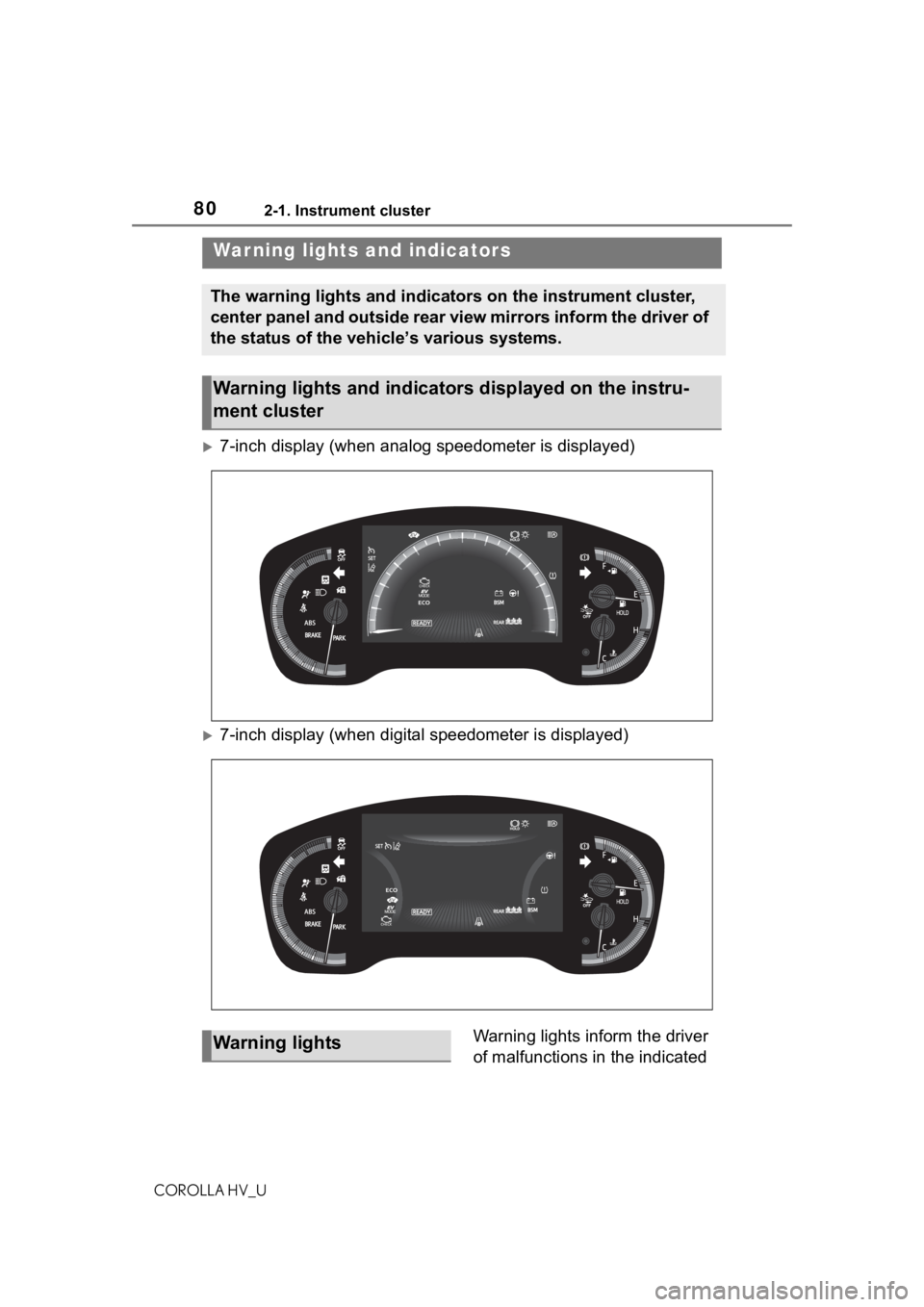
7-inch display (when analog speedometer is displayed)
7-inch display (when digital speedometer is displayed)Warning lights inform the driver
of malfunctions in the indicated
War ning lights and indicators
The warning lights and indicators on the instrument cluster,
center panel and outside rear view mirrors inform the driver of
the status of the vehicle’s various systems.
Warning lights and indicators displayed on the instru-
ment cluster
Warning lights
Page 81 of 556
812-1. Instrument cluster
COROLLA HV_U
2
Vehicle status information and indicators
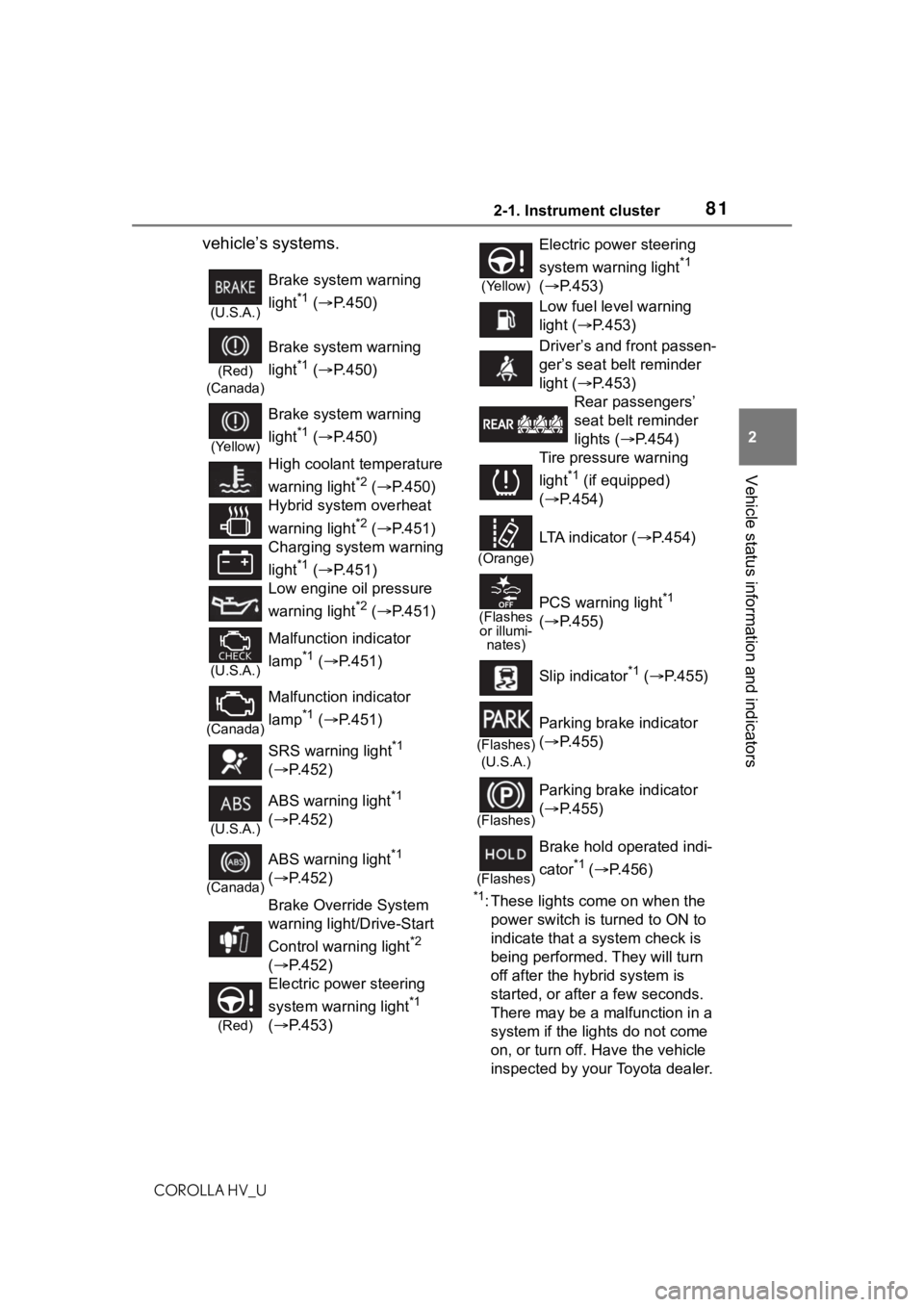
vehicle’s systems.
*1: These lights come on when the power switch is turned to ON to
indicate that a system check is
being performed. They will turn
off after the hybrid system is
started, or after a few seconds.
There may be a malfunction in a
system if the lights do not come
on, or turn off. Have the vehicle
inspected by your Toyota dealer.
(U.S.A.)
Brake system warning
light
*1 ( P.450)
(Red)
(Canada)
Brake system warning
light
*1 ( P.450)
(Yellow)
Brake system warning
light
*1 ( P.450)
High coolant temperature
warning light
*2 ( P.450)
Hybrid system overheat
warning light
*2 ( P.451)
Charging system warning
light
*1 ( P.451)
Low engine oil pressure
warning light
*2 ( P.451)
(U.S.A.)
Malfunction indicator
lamp
*1 ( P.451)
(Canada)
Malfunction indicator
lamp
*1 ( P.451)
SRS warning light
*1
( P.452)
(U.S.A.)
ABS warning light*1
( P.452)
(Canada)
ABS warning light*1
( P.452)
Brake Override System
warning light/Drive-Start
Control warning light
*2
( P.452)
(Red)
Electric power steering
system warning light
*1
( P.453)
(Yellow)
Electric power steering
system warning light
*1
( P.453)
Low fuel level warning
light ( P.453)
Driver’s and front passen-
ger’s seat belt reminder
light ( P.453)
Rear passengers’
seat belt reminder
lights ( P.454)
Tire pressure warning
light
*1 (if equipped)
( P.454)
(Orange)
LTA indicator ( P.454)
(Flashes
or illumi- nates)PCS warning light*1
( P.455)
Slip indicator
*1 ( P.455)
(Flashes)
(U.S.A.)
Parking brake indicator
( P.455)
(Flashes)
Parking brake indicator
( P.455)
(Flashes)
Brake hold operated indi-
cator
*1 ( P.456)
Page 82 of 556
822-1. Instrument cluster
COROLLA HV_U
*2: This light illuminates on the multi-information display.
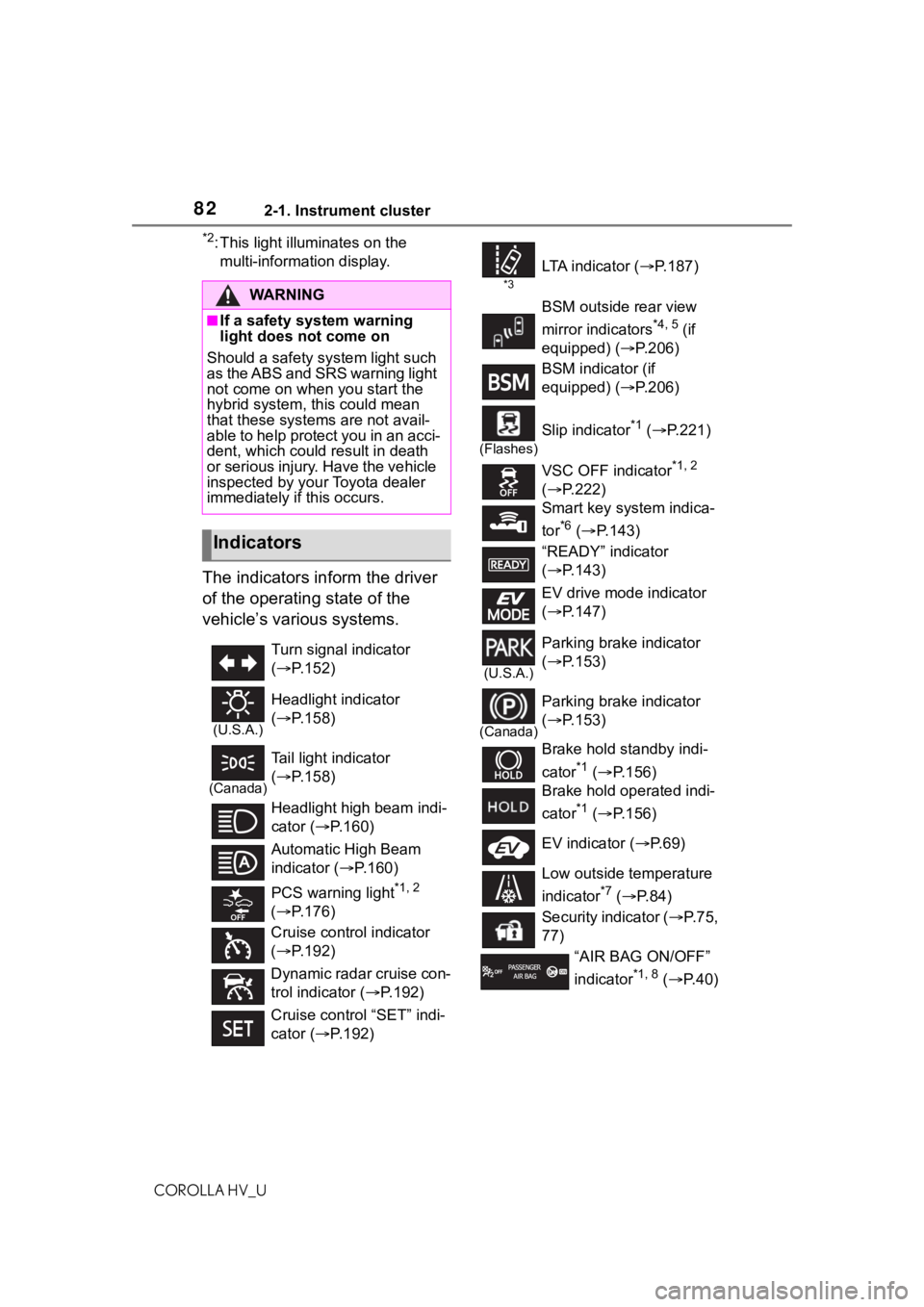
The indicators inform the driver
of the operating state of the
vehicle’s various systems.
WA R N I N G
■If a safety system warning
light does not come on
Should a safety system light such
as the ABS and SRS warning light
not come on when you start the
hybrid system, th is could mean
that these systems are not avail-
able to help protect you in an acci-
dent, which could result in death
or serious injury. Have the vehicle
inspected by your Toyota dealer
immediately if this occurs.
Indicators
Turn signal indicator
( P.152)
(U.S.A.)
Headlight indicator
( P.158)
(Canada)
Tail light indicator
( P.158)
Headlight high beam indi-
cator ( P.160)
Automatic High Beam
indicator ( P.160)
PCS warning light
*1, 2
( P.176)
Cruise control indicator
( P.192)
Dynamic radar cruise con-
trol indicator ( P.192)
Cruise control “SET” indi-
cator ( P.192)
*3
LTA i n d i c a t o r ( P.187)
BSM outside rear view
mirror indicators
*4, 5 (if
equipped) (P.206)
BSM indicator (if
equipped) (P.206)
(Flashes)
Slip indicator*1 ( P.221)
VSC OFF indicator
*1, 2
( P.222)
Smart key system indica-
tor
*6 ( P.143)
“READY” indicator
( P.143)
EV drive mode indicator
( P.147)
(U.S.A.)
Parking brake indicator
( P.153)
(Canada)
Parking brake indicator
( P.153)
Brake hold standby indi-
cator
*1 ( P.156)
Brake hold operated indi-
cator
*1 ( P.156)
EV indicator ( P.69)
Low outside temperature
indicator
*7 ( P. 8 4 )
Security indicator ( P. 7 5 ,
77)
“AIR BAG ON/OFF”
indicator
*1, 8 ( P. 4 0 )
Page 83 of 556
832-1. Instrument cluster
COROLLA HV_U
2
Vehicle status information and indicators
*1: These lights come on when the power switch is turned to ON to
indicate that a system check is
being performed. They will turn
off after the hybrid system is
started, or after a few seconds.
There may be a malfunction in a
system if the lights do not come
on, or turn off. Have the vehicle
inspected by your Toyota dealer.
*2: This light comes on when the system is turned off.
*3: Depending on the operating con-dition, the color and illuminat-
ing/flashing state of the light
change.
*4: In order to confirm operation, the BSM outside rear view mirror
indicators illumina te in the follow-
ing situations:
• When the power switch is in
ON, the BSM function is
enabled on of the
multi-information display.
• When the BSM function is
enabled on of the
multi-information display, the
power switch is turned to ON.
If the system is functioning cor-
rectly, the BSM outside rear view
mirror indicators will turn off after a
few seconds.
If the BSM outside rear view mirror
indicators do not illuminate or do
not turn off, there may be a mal-
function in the system. If this occurs, have the vehicle
inspected by your Toyota dealer.
*5: This light illuminates on the out-
side rear view mirrors.
*6: This light illuminates on the multi-information display.
*7: When the outside temperature is approximately 37°F (3°C) or
lower, this indicator will flash for
approximately 10 seconds, then
stay on.
*8: This light illuminates on the cen-ter panel.
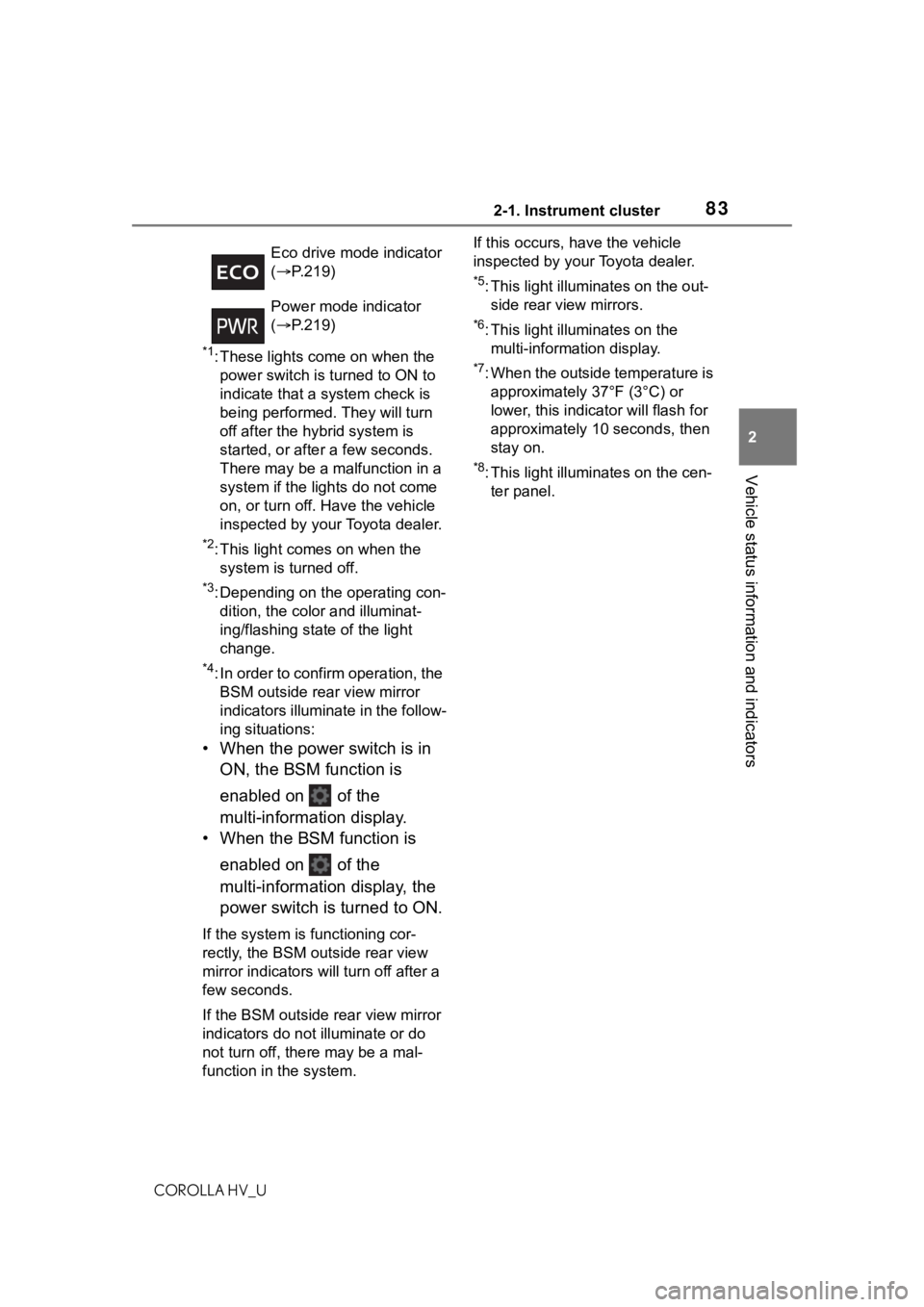
Eco drive mode indicator
(
P.219)
Power mode indicator
( P.219)
Page 84 of 556
842-1. Instrument cluster
COROLLA HV_U
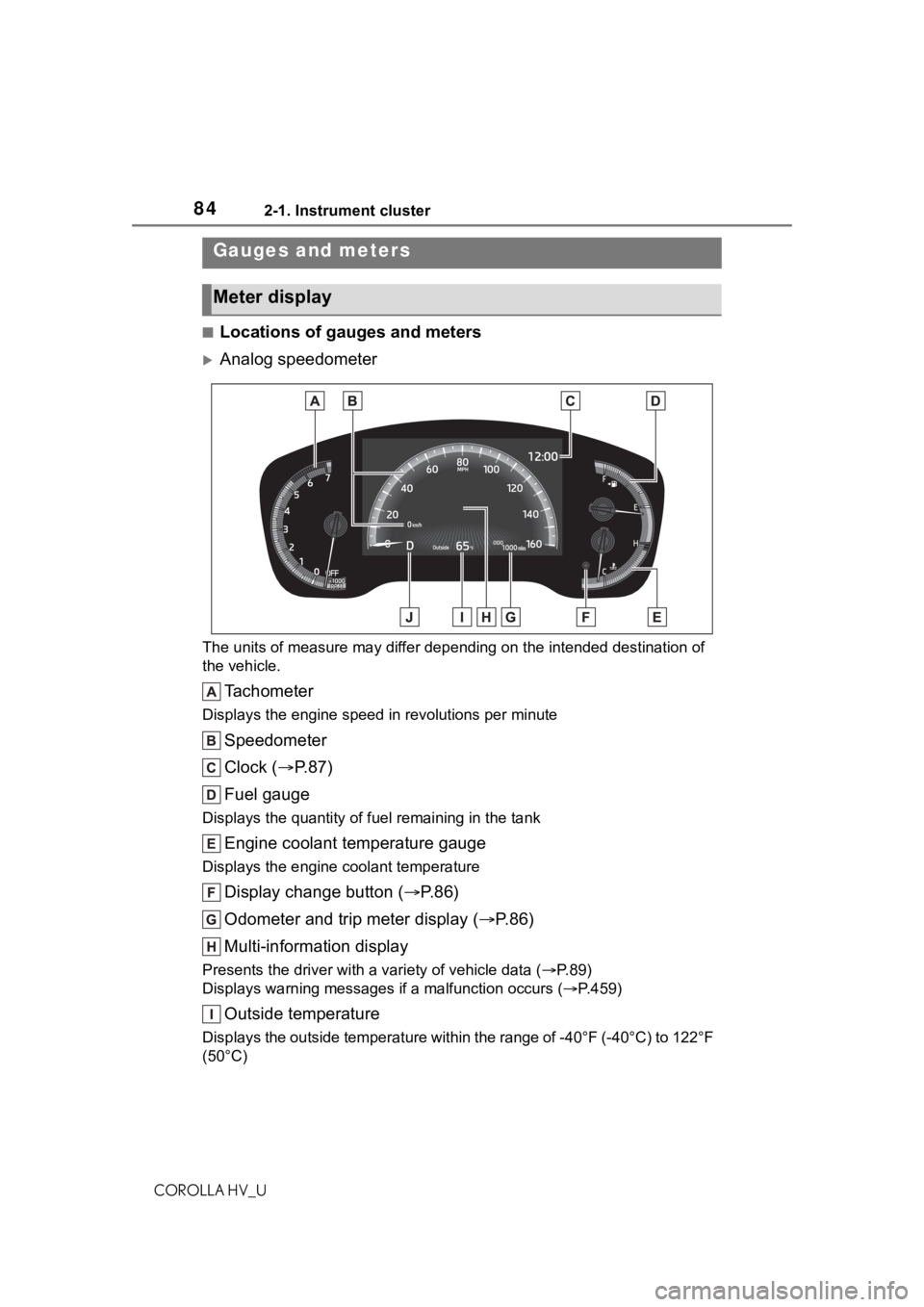
■Locations of gauges and meters
Analog speedometer
The units of measure may differ depending on the intended destination of
the vehicle.
Tachometer
Displays the engine speed in revolutions per minute
Speedometer
Clock ( P. 8 7 )
Fuel gauge
Displays the quantity of fu el remaining in the tank
Engine coolant temperature gauge
Displays the engine coolant temperature
Display change button ( P.86)
Odometer and trip meter display ( P.86)
Multi-information display
Presents the driver with a variety of vehicle data (P.89)
Displays warning messages if a malfunction occurs (P.459)
Outside temperature
Displays the outside temperature within the range of -40°F (-40 °C) to 122°F
(50°C)
Gauges and meters
Meter display
Page 85 of 556
852-1. Instrument cluster
COROLLA HV_U
2
Vehicle status information and indicators
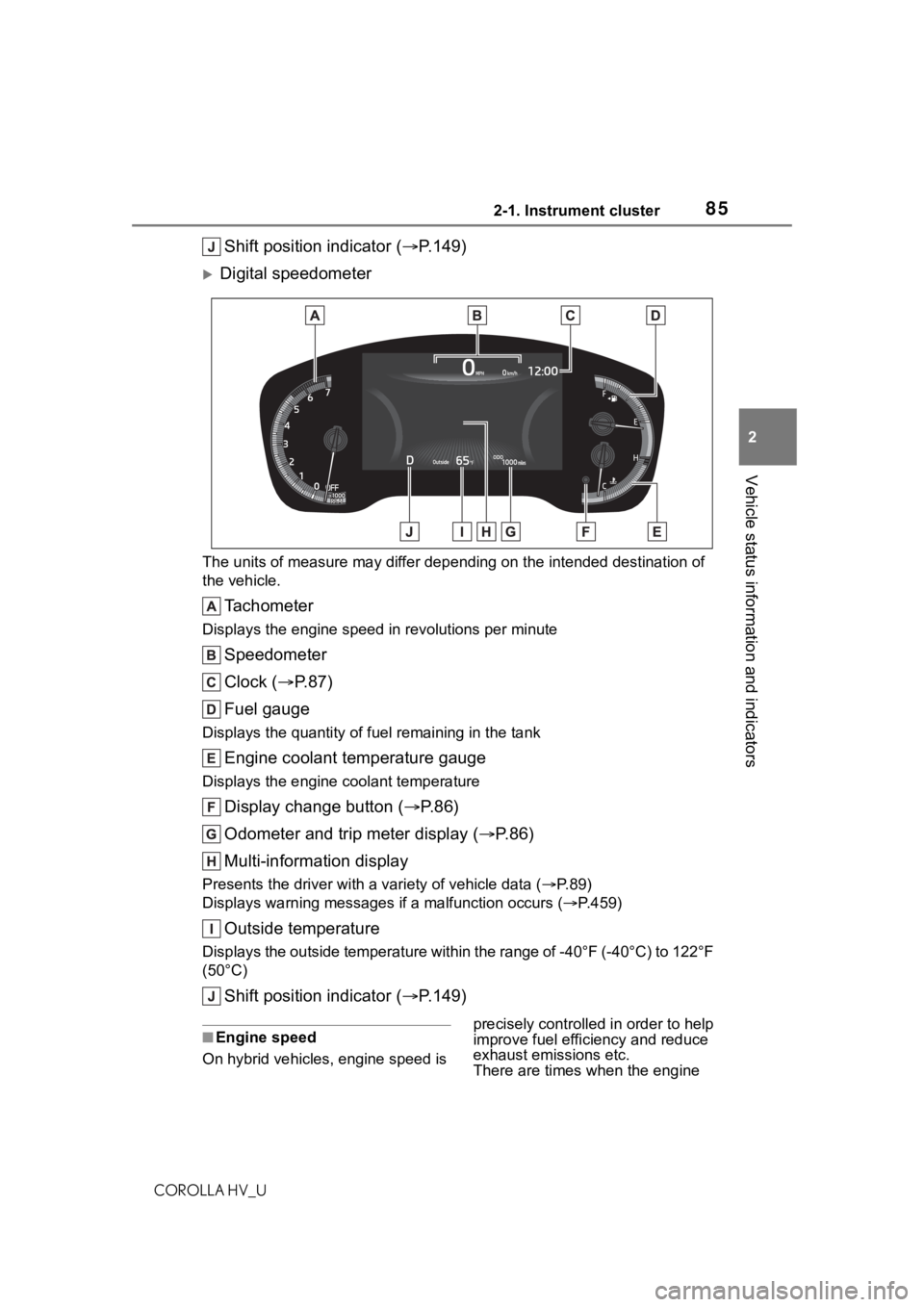
Shift position indicator ( P.149)
Digital speedometer
The units of measure may differ depending on the intended desti nation of
the vehicle.
Tachometer
Displays the engine speed in revolutions per minute
Speedometer
Clock ( P. 8 7 )
Fuel gauge
Displays the quantity of fu el remaining in the tank
Engine coolant temperature gauge
Displays the engine coolant temperature
Display change button ( P.86)
Odometer and trip meter display ( P.86)
Multi-information display
Presents the driver with a variety of vehicle data (P.89)
Displays warning messages if a malfunction occurs (P.459)
Outside temperature
Displays the outside temperature within the range of -40°F (-40 °C) to 122°F
(50°C)
Shift position indicator ( P.149)
■Engine speed
On hybrid vehicles, engine speed is precisely controlled in order to help
improve fuel efficiency and reduce
exhaust emissions etc.
There are times when the engine
Page 86 of 556
862-1. Instrument cluster
COROLLA HV_Uspeed that is displayed may differ
even when vehicle operation and
driving conditions are the same.
■Outside temperature display
●In the following si
tuations, the cor-
rect outside tempe rature may not
be displayed, or the display may
take longer than normal to
change:
• When stopped, or driving at low speeds (less than 16 mph [25
km/h])
• When the outside temperature has changed su ddenly (at the
entrance/exit of a garage, tunnel,
etc.)
●When “--” or “E” is displayed, the
system may be malfunctioning.
Take your vehicle to your Toyota
dealer.
■Liquid crystal display
P. 8 9
■Customization
The gauges and met ers can be cus-
tomized in of the multi-informa-
tion display. ( P. 9 4 )
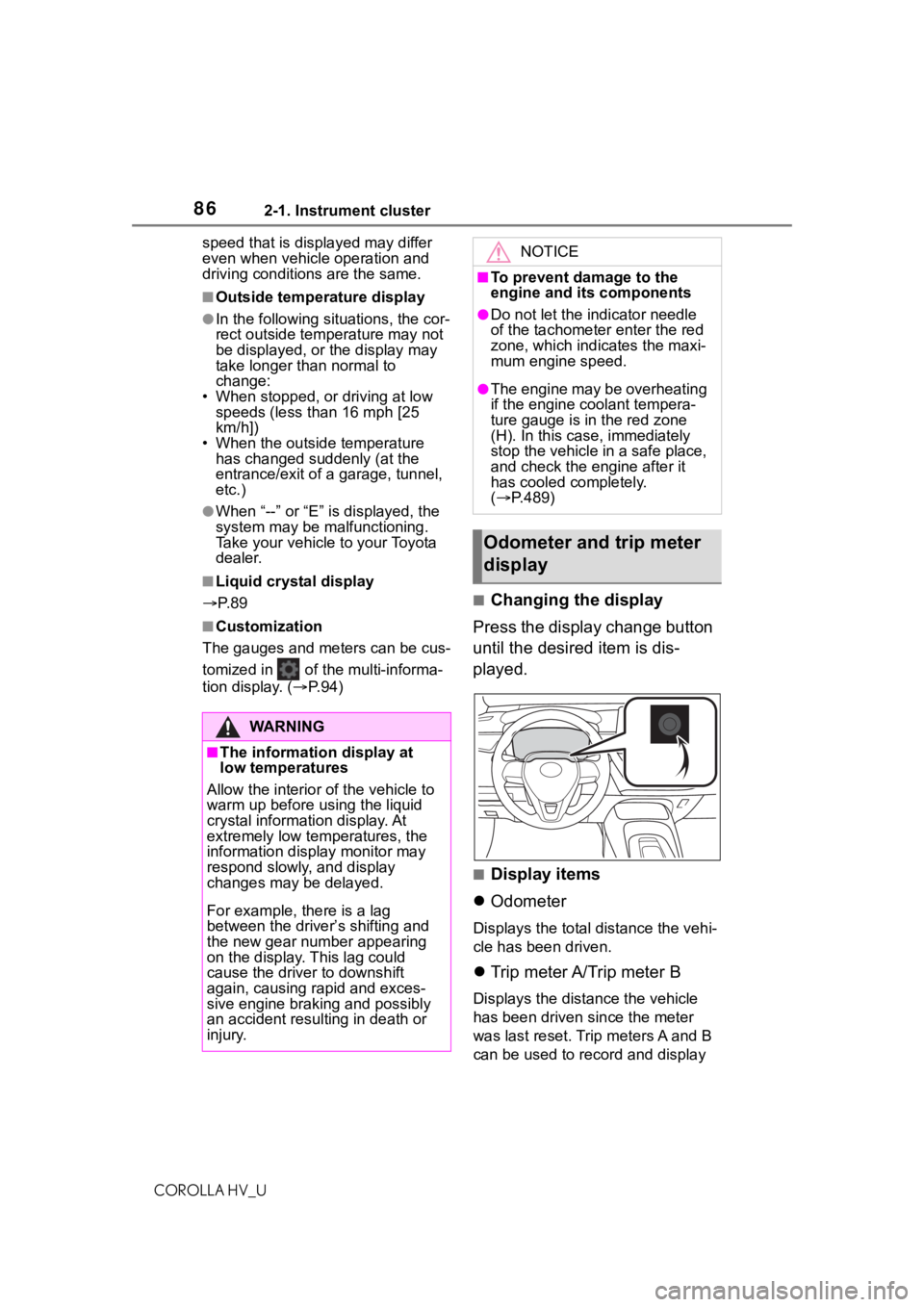
■Changing the display
Press the display change button
until the desired item is dis-
played.
■Display items
Odometer
Displays the total distance the vehi-
cle has been driven.
Trip meter A/Trip meter B
Displays the distance the vehicle
has been driven since the meter
was last reset. Trip meters A and B
can be used to record and display
WA R N I N G
■The information display at
low temperatures
Allow the interior of the vehicle to
warm up before u sing the liquid
crystal informat ion display. At
extremely low temperatures, the
information display monitor may
respond slowly, and display
changes may be delayed.
For example, there is a lag
between the driver’s shifting and
the new gear number appearing
on the display. This lag could
cause the driver to downshift
again, causing rapid and exces-
sive engine braking and possibly
an accident resulting in death or
injury.
NOTICE
■To prevent damage to the
engine and its components
●Do not let the indicator needle
of the tachometer enter the red
zone, which indicates the maxi-
mum engine speed.
●The engine may be overheating
if the engine coolant tempera-
ture gauge is in the red zone
(H). In this case, immediately
stop the vehicle in a safe place,
and check the engine after it
has cooled completely.
( P.489)
Odometer and trip meter
display
Page 87 of 556
872-1. Instrument cluster
COROLLA HV_U
2
Vehicle status information and indicators
different distances independently.
To reset, display the desired trip
meter and press and hold the dis-
play change button.
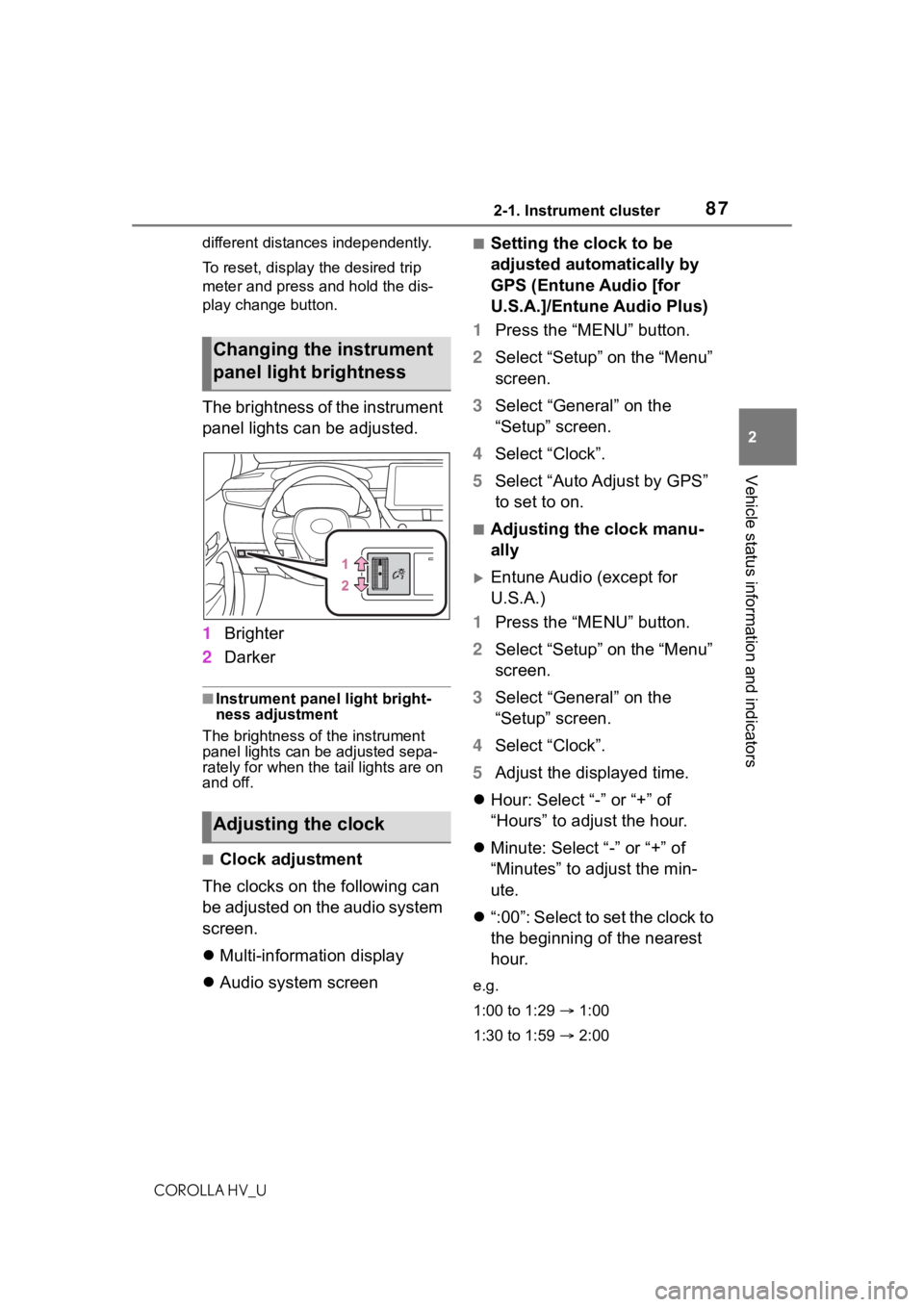
The brightness of the instrument
panel lights can be adjusted.
1 Brighter
2 Darker
■Instrument panel light bright-
ness adjustment
The brightness of the instrument
panel lights can be adjusted sepa-
rately for when the tail lights are on
and off.
■Clock adjustment
The clocks on the following can
be adjusted on the audio system
screen.
Multi-information display
Audio system screen
■Setting the clock to be
adjusted automatically by
GPS (Entune Audio [for
U.S.A.]/Entune Audio Plus)
1 Press the “MENU” button.
2 Select “Setup” on the “Menu”
screen.
3 Select “General” on the
“Setup” screen.
4 Select “Clock”.
5 Select “Auto Adjust by GPS”
to set to on.
■Adjusting the clock manu-
ally
Entune Audio (except for
U.S.A.)
1 Press the “MENU” button.
2 Select “Setup” on the “Menu”
screen.
3 Select “General” on the
“Setup” screen.
4 Select “Clock”.
5 Adjust the displayed time.
Hour: Select “-” or “+” of
“Hours” to adjust the hour.
Minute: Select “-” or “+” of
“Minutes” to adjust the min-
ute.
“:00”: Select to set the clock to
the beginning of the nearest
hour.
e.g.
1:00 to 1:29 1:00
1:30 to 1:59 2:00
Changing the instrument
panel light brightness
Adjusting the clock