brake light TOYOTA COROLLA HYBRID 2021 (in English) User Guide
[x] Cancel search | Manufacturer: TOYOTA, Model Year: 2021, Model line: COROLLA HYBRID, Model: TOYOTA COROLLA HYBRID 2021Pages: 584, PDF Size: 19.59 MB
Page 160 of 584
1604-2. Driving procedures
COROLLA HV_U
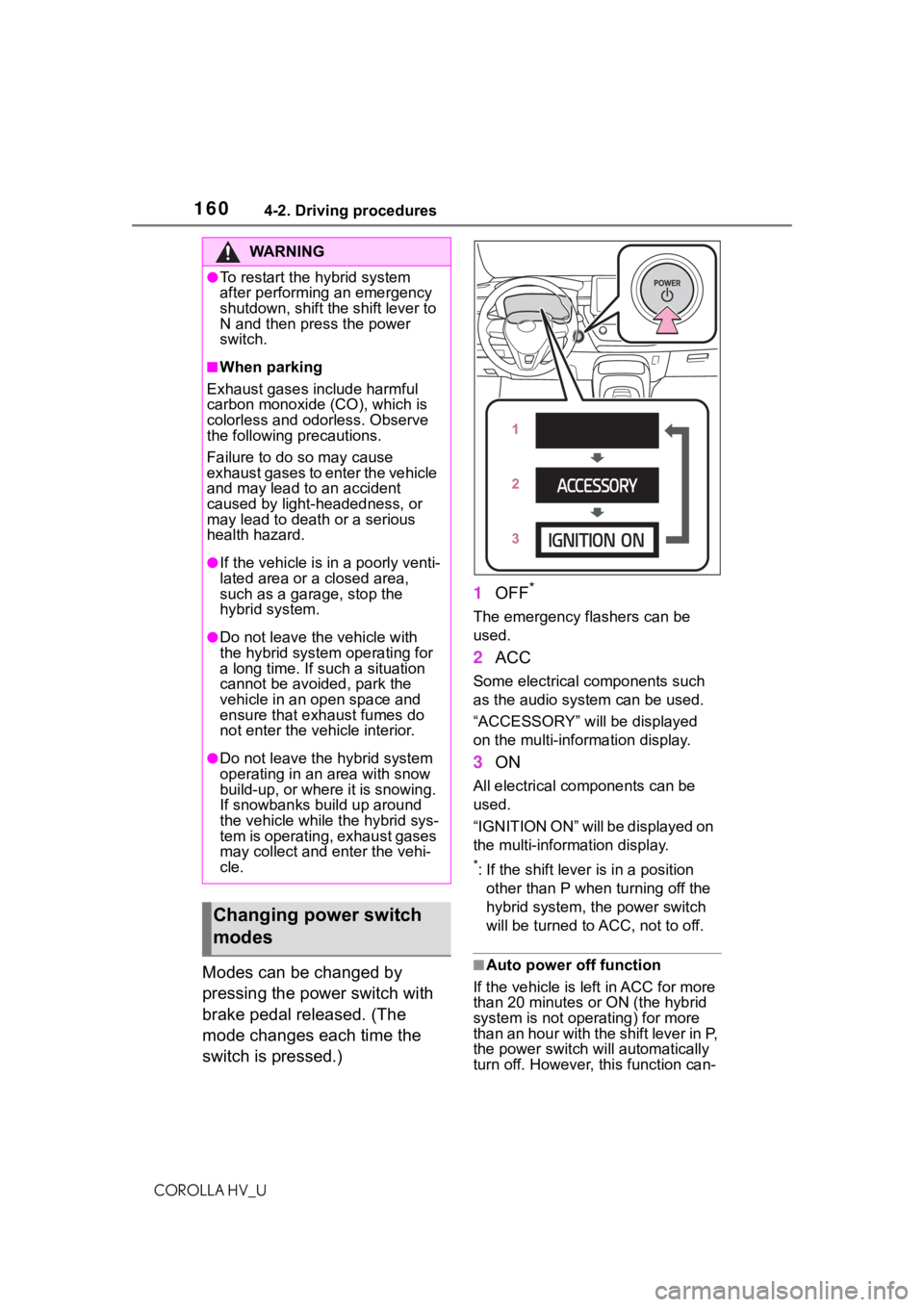
Modes can be changed by
pressing the power switch with
brake pedal released. (The
mode changes each time the
switch is pressed.)1
OFF
*
The emergency flashers can be
used.
2ACC
Some electrical components such
as the audio sys tem can be used.
“ACCESSORY” will be displayed
on the multi-information display.
3 ON
All electrical components can be
used.
“IGNITION ON” will be displayed on
the multi-information display.
*: If the shift lever is in a position
other than P when turning off the
hybrid system, the power switch
will be turned to ACC, not to off.
■Auto power off function
If the vehicle is left in ACC for more
than 20 minutes or ON (the hybrid
system is not operating) for more
than an hour with the shift lever in P,
the power switch will automatically
turn off. However, this function can-
WA R N I N G
●To restart the hybrid system
after performing an emergency
shutdown, shift the shift lever to
N and then press the power
switch.
■When parking
Exhaust gases include harmful
carbon monoxide (CO), which is
colorless and odorless. Observe
the following precautions.
Failure to do so may cause
exhaust gases to enter the vehicle
and may lead to an accident
caused by light-headedness, or
may lead to death or a serious
health hazard.
●If the vehicle is in a poorly venti-
lated area or a closed area,
such as a garage, stop the
hybrid system.
●Do not leave the vehicle with
the hybrid system operating for
a long time. If such a situation
cannot be avoided, park the
vehicle in an open space and
ensure that exhaust fumes do
not enter the vehicle interior.
●Do not leave the hybrid system
operating in an area with snow
build-up, or where it is snowing.
If snowbanks build up around
the vehicle while the hybrid sys-
tem is operating, exhaust gases
may collect and enter the vehi-
cle.
Changing power switch
modes
Page 166 of 584
1664-2. Driving procedures
COROLLA HV_U
P. 2 3 9
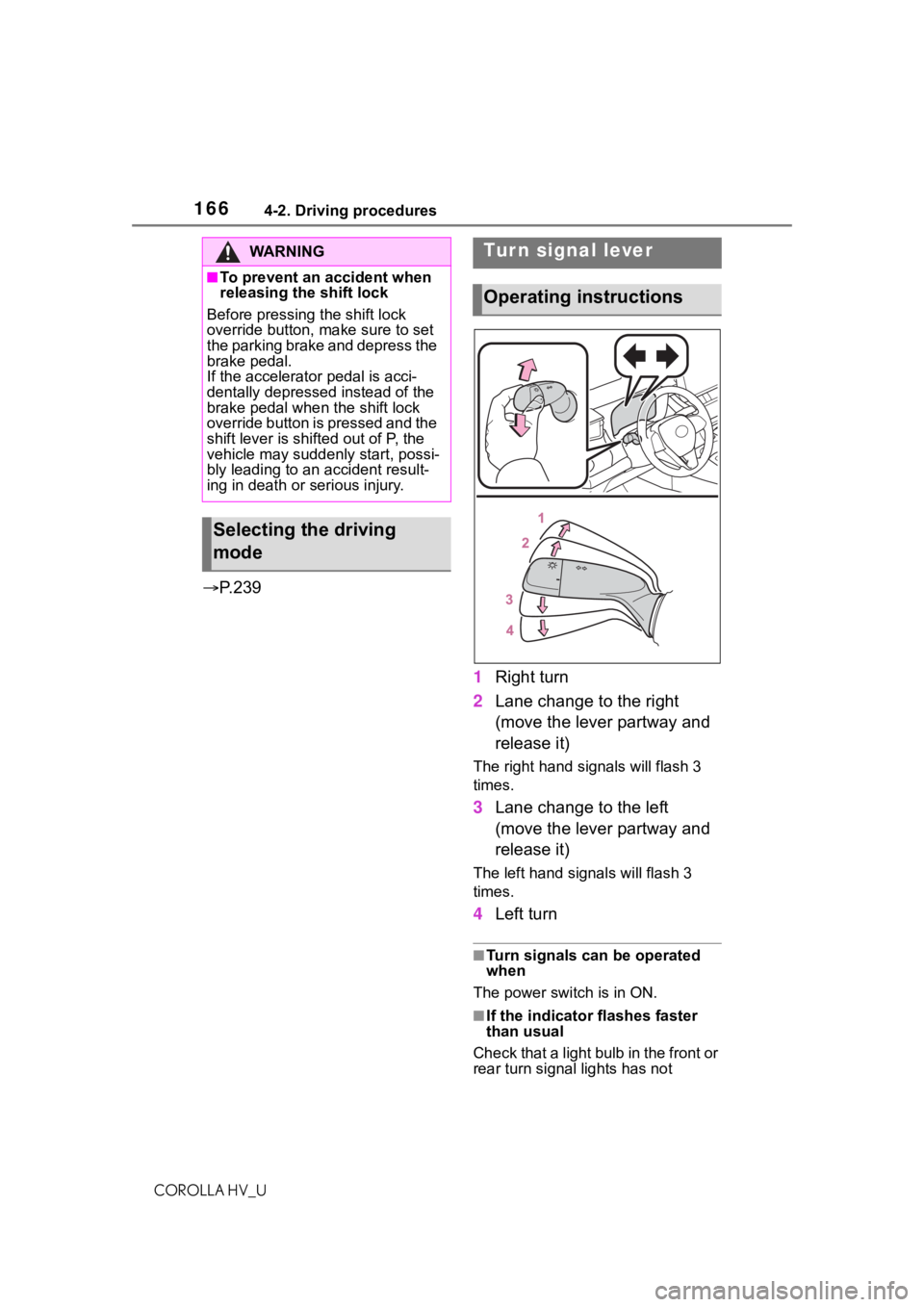
1Right turn
2 Lane change to the right
(move the lever partway and
release it)
The right hand s ignals will flash 3
times.
3 Lane change to the left
(move the lever partway and
release it)
The left hand signals will flash 3
times.
4Left turn
■Turn signals can be operated
when
The power switch is in ON.
■If the indicator flashes faster
than usual
Check that a light bulb in the front or
rear turn signal lights has not
WA R N I N G
■To prevent an accident when
releasing the shift lock
Before pressing the shift lock
override button, make sure to set
the parking brake and depress the
brake pedal.
If the accelerator pedal is acci-
dentally depressed instead of the
brake pedal when the shift lock
override button is pressed and the
shift lever is shifted out of P, the
vehicle may suddenly start, possi-
bly leading to an accident result-
ing in death or serious injury.
Selecting the driving
mode
Tur n signal lever
Operating instructions
Page 167 of 584
1674-2. Driving procedures
COROLLA HV_U
4
Driving
burned out.
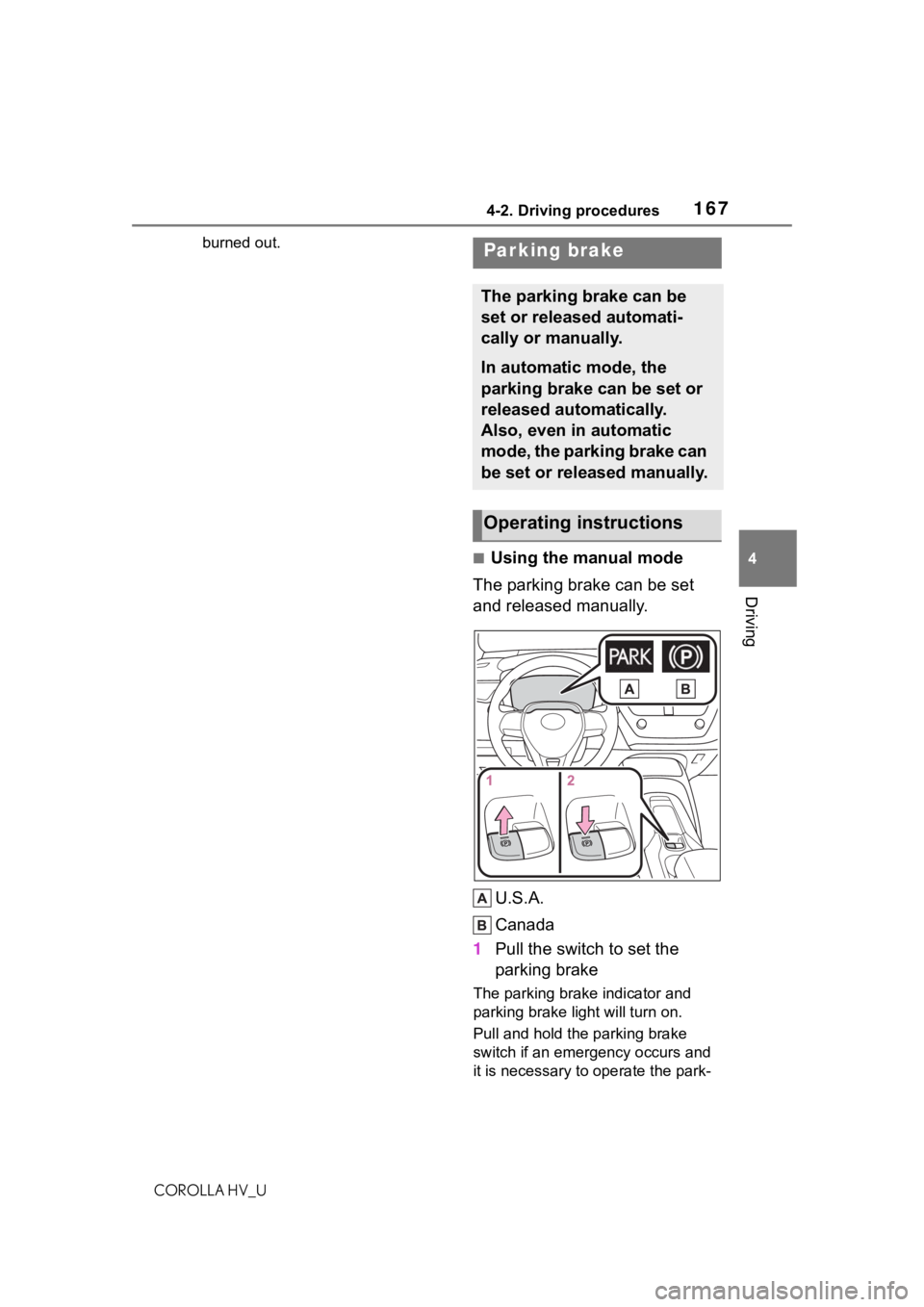
■Using the manual mode
The parking brake can be set
and released manually.
U.S.A.
Canada
1 Pull the switch to set the
parking brake
The parking brake indicator and
parking brake light will turn on.
Pull and hold the parking brake
switch if an emergency occurs and
it is necessary to operate the park-
Parking brake
The parking brake can be
set or released automati-
cally or manually.
In automatic mode, the
parking brake can be set or
released automatically.
Also, even in automatic
mode, the parking brake can
be set or released manually.
Operating instructions
Page 168 of 584
1684-2. Driving procedures
COROLLA HV_Uing brake while driving.
2
Push the switch to release
the parking brake
• Operate the parking brake switch
while depressing the brake pedal.
• Using the parking brake auto- matic release function, the park-
ing brake can be released by
depressing the accelerator pedal.
When using this function, slowly
depress the accelerator pedal.
Make sure that t he parking brake
indicator and par king brake light
turn off.
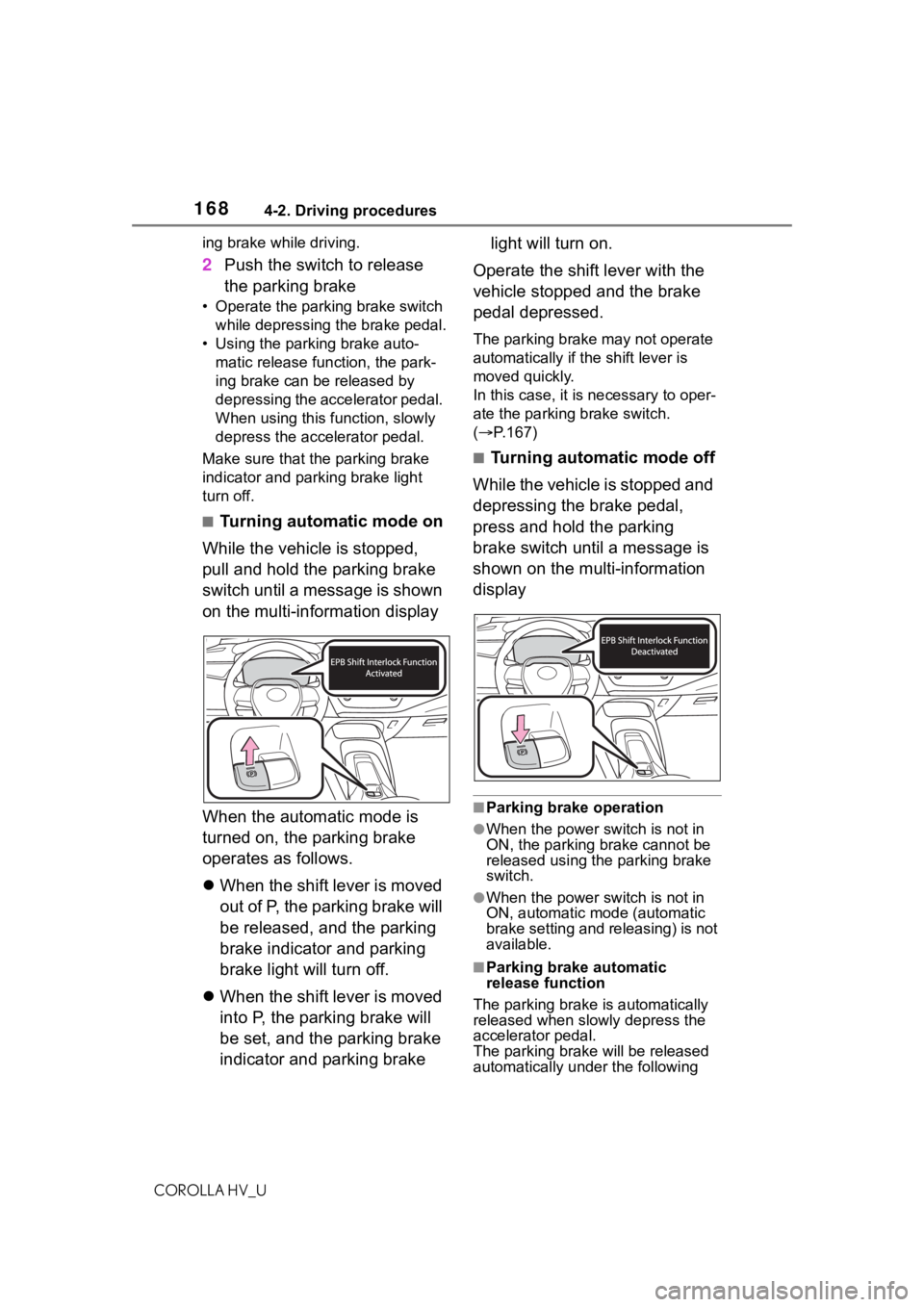
■Turning automatic mode on
While the vehicle is stopped,
pull and hold the parking brake
switch until a message is shown
on the multi-information display
When the automatic mode is
turned on, the parking brake
operates as follows.
When the shift lever is moved
out of P, the parking brake will
be released, and the parking
brake indicator and parking
brake light will turn off.
When the shift lever is moved
into P, the parking brake will
be set, and the parking brake
indicator and parking brake light will turn on.
Operate the shift lever with the
vehicle stopped and the brake
pedal depressed.
The parking brake may not operate
automatically if the shift lever is
moved quickly.
In this case, it is necessary to oper-
ate the parking brake switch.
( P.167)
■Turning automatic mode off
While the vehicle is stopped and
depressing the brake pedal,
press and hold the parking
brake switch until a message is
shown on the multi-information
display
■Parking brake operation
●When the power switch is not in
ON, the parking brake cannot be
released using the parking brake
switch.
●When the power switch is not in
ON, automatic mode (automatic
brake setting and releasing) is not
available.
■Parking brake automatic
release function
The parking brake is automatically
released when slowly depress the
accelerator pedal.
The parking brake will be released
automatically under the following
Page 169 of 584
1694-2. Driving procedures
COROLLA HV_U
4
Driving
conditions:
●The driver’s door is closed
●The driver is wearing the seat belt
●The shift lever is a forward or
reverse position.
●The malfunction in dicator lamp or
brake system warning light is not
illuminated.
If the automatic release function
does not operate, manually release
the parking brake.
■If “Parking Brake Temporarily
Unavailable” i s displayed on
the multi-information display
If the parking brake is operated
repeatedly over a short period of
time, the system may restrict opera-
tion to prevent overheating. If this
happens, refrain from operating the
parking brake. Nor mal operation will
return after about 1 minute.
■If “Parking Brake Unavailable”
is displayed on the multi-infor-
mation display
Operate the parking brake switch. If
the message does not disappear
after operating the switch several
times, the system may be malfunc-
tioning. Have the vehicle inspected
by your Toyota dealer.
■Parking brake operation sound
When the parking brake operates, a
motor sound (whirring sound) may
be heard. This does not indicate a
malfunction.
■Parking brake operation
●Depending on the power switch
mode, the parking brake indicator
and parking brake light will turn on
and stay on as described below:
ON: Comes on until the parking
brake is released.
Not in ON: Stays on for approxi-
mately 15 seconds.
●When the power switch is turned
off with the parking brake set, the
parking brake indicator and park-
ing brake light w ill stay on for about 15 seconds. This does not
indicate a malfunction.
■When the parking brake switch
malfunctions
Automatic mode (automatic brake
setting and releas ing) will be turned
on automatically.
■Parking the vehicle
P.146
■Parking brake engaged warning
buzzer
A buzzer will sound if the vehicle is
driven with the parking brake
engaged. “Parking Brake ON” is dis-
played on the multi-information dis-
play.
■If the brake system warning
light comes on
P.478
■Usage in winter time
P.247
WA R N I N G
■When parking the vehicle
Do not leave a child in the vehicle
alone. The parking brake may be
released unintentionally and there
is the danger of the vehicle mov-
ing that may lead to an accident
resulting in death o r serious injury.
■Parking brake switch
Do not set any objects near the
parking brake switch.
Objects may inte rfere with the
switch and may lead the parking
brake to unexpec tedly operate.
NOTICE
■When parking the vehicle
Before you leave the vehicle, set
the parking brake, shift the shift
lever to P and mak e sure that the
vehicle does not move.
Page 171 of 584
1714-2. Driving procedures
COROLLA HV_U
4
Driving
If any of the conditions above are
detected when the brake hold sys-
tem is enabled, the system will turn
off and the brake hold standby indi-
cator light will go of f. In addition, if
any of the conditions are detected
while the system is holding the
brake, a warning buzzer will sound
and a message will be shown on the
multi-information display. The park-
ing brake will then be set automati-
cally.
■Brake hold function
●If the brake pedal is left released
for a period of about 3 minutes
after the system has started hold-
ing the brake, the parking brake
will be set automat ically. In this
case, a warning buzzer sounds
and a message is shown on the
multi-informat ion display.
●To turn the system off while the
system is holding the brake, firmly
depress the brake pedal and
press the button again.
●The brake hold function may not
hold the vehicle wh en the vehicle
is on a steep inclin e. In this situa-
tion, it may be necessary for the
driver to apply the brakes. A warn-
ing buzzer will sound and the
multi-informatio n display will
inform the driver of this situation. If
a warning message is shown on
the multi-information display, read
the message and follow the
instructions.
■When the parking brake is set
automatically while the system
is holding the brakes
Perform any of the following opera-
tions to release the parking brake.
●Depress the accelerator pedal.
(The parking brake will not be
released automatic ally if the seat
belt is not fastened.)
●Operate the parking brake switch
with the brake pedal depressed.
Make sure that t he parking brake
indicator light goes off. ( P.167)
■When an inspection at your
Toyota dealer is necessary
When the brake hold standby indi-
cator (green) does not illuminate
even when the brake hold switch is
pressed with the brake hold system
operating conditions met, the sys-
tem may be malf unctioning. Have
the vehicle inspected at your Toyota
dealer.
■If “Brake Hold Malfunction
Press Brake to Deactivate Visit
Your Dealer” or “Brake Hold
Malfunction Visit Your Dealer”
is displayed on the multi-infor-
mation display
The system may be malfunctioning.
Have the vehicle inspected by your
Toyota dealer.
■Warning messages and buzzers
Warning messages and buzzers are
used to indicate a system malfunc-
tion or to inform the driver of the
need for caution. If a warning mes-
sage is shown on the multi-informa-
tion display, read the message and
follow the instructions.
■If the brake hold operated indi-
cator flashes
P.484
WA R N I N G
■When the vehicle is on a
steep incline
When using the br ake hold sys-
tem on a steep inc line exercise
caution. The brake hold function
may not hold the vehicle in such a
situation.
■When stopped on a slippery
road
The system cannot stop the vehi-
cle when the gripping ability of the
tires has been exceeded. Do not
use the system w hen stopped on
a slippery road.
Page 173 of 584
1734-3. Operating the lights and wipers
COROLLA HV_U
4
Driving
4-3.Operating the lights and wipers
Operating the switch
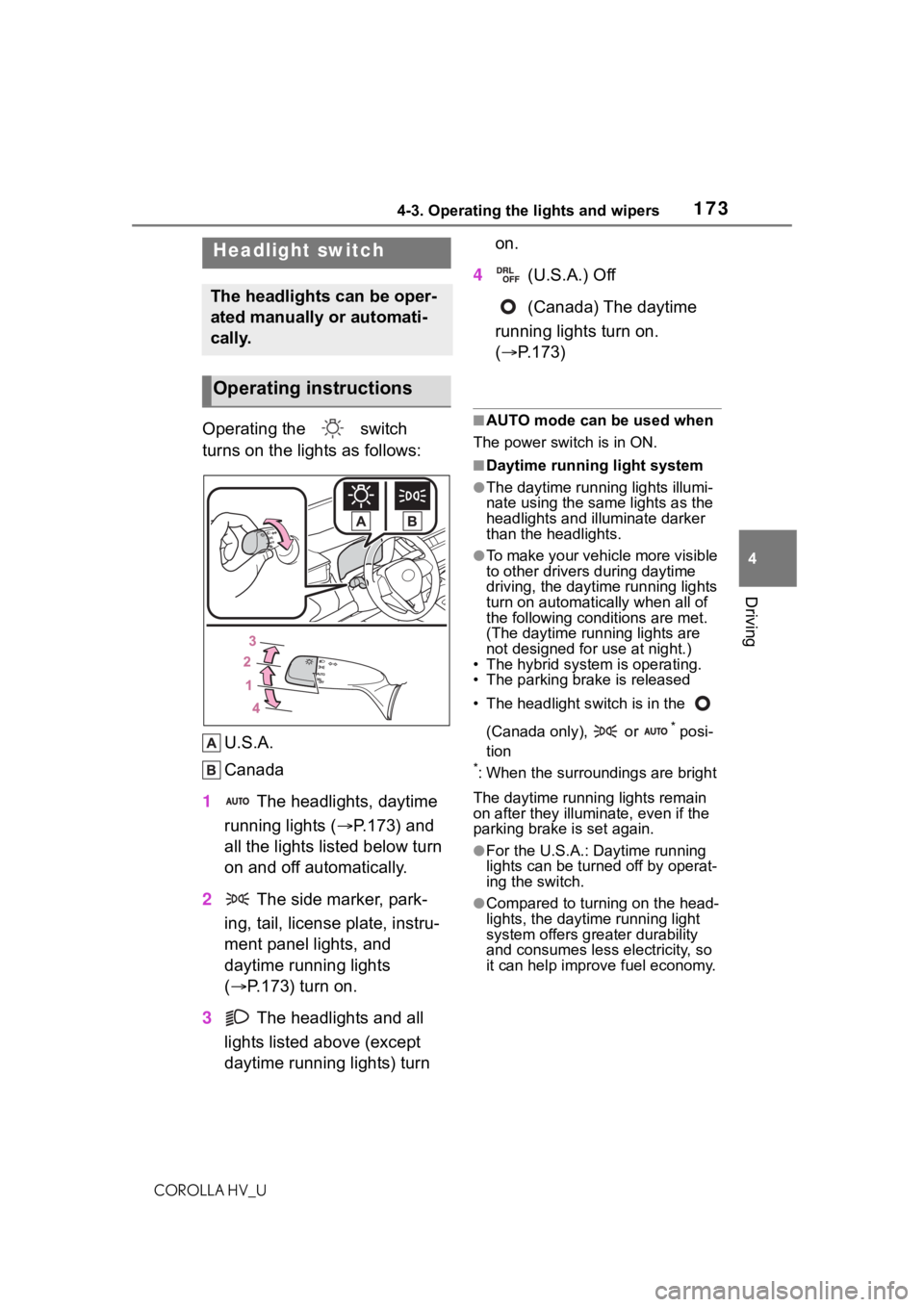
turns on the lights as follows: U.S.A.
Canada
1 The headlights, daytime
running lights ( P.173) and
all the lights listed below turn
on and off automatically.
2 The side marker, park-
ing, tail, license plate, instru-
ment panel lights, and
daytime running lights
( P.173) turn on.
3 The headlights and all
lights listed above (except
daytime running lights) turn on.
4 (U.S.A.) Off
(Canada) The daytime
running lights turn on.
( P.173)■AUTO mode can be used when
The power switch is in ON.
■Daytime running light system
●The daytime runn ing lights illumi-
nate using the same lights as the
headlights and illu minate darker
than the headlights.
●To make your vehicle more visible
to other drivers during daytime
driving, the daytime running lights
turn on automatically when all of
the following conditions are met.
(The daytime running lights are
not designed for use at night.)
• The hybrid system is operating.
• The parking brake is released
• The headlight s witch is in the
(Canada only), or
* posi-
tion
*: When the surroundings are bright
The daytime running lights remain
on after they illumi nate, even if the
parking brake is set again.
●For the U.S.A.: Daytime running
lights can be turned off by operat-
ing the switch.
●Compared to turning on the head-
lights, the daytime running light
system offers greater durability
and consumes less electricity, so
it can help improve fuel economy.
Headlight switch
The headlights can be oper-
ated manually or automati-
cally.
Operating instructions
Page 196 of 584
1964-5. Using the driving support systems
COROLLA HV_U• When driving through steam or
smoke
• When the surrounding area is dim,
such as at dawn or dusk, or while
at night or in a t unnel, making a
detectable object appear to be
nearly the same color as its sur-
roundings
• When driving in a place where the
surrounding brightness changes
suddenly, such as at the entrance
or exit of a tunnel
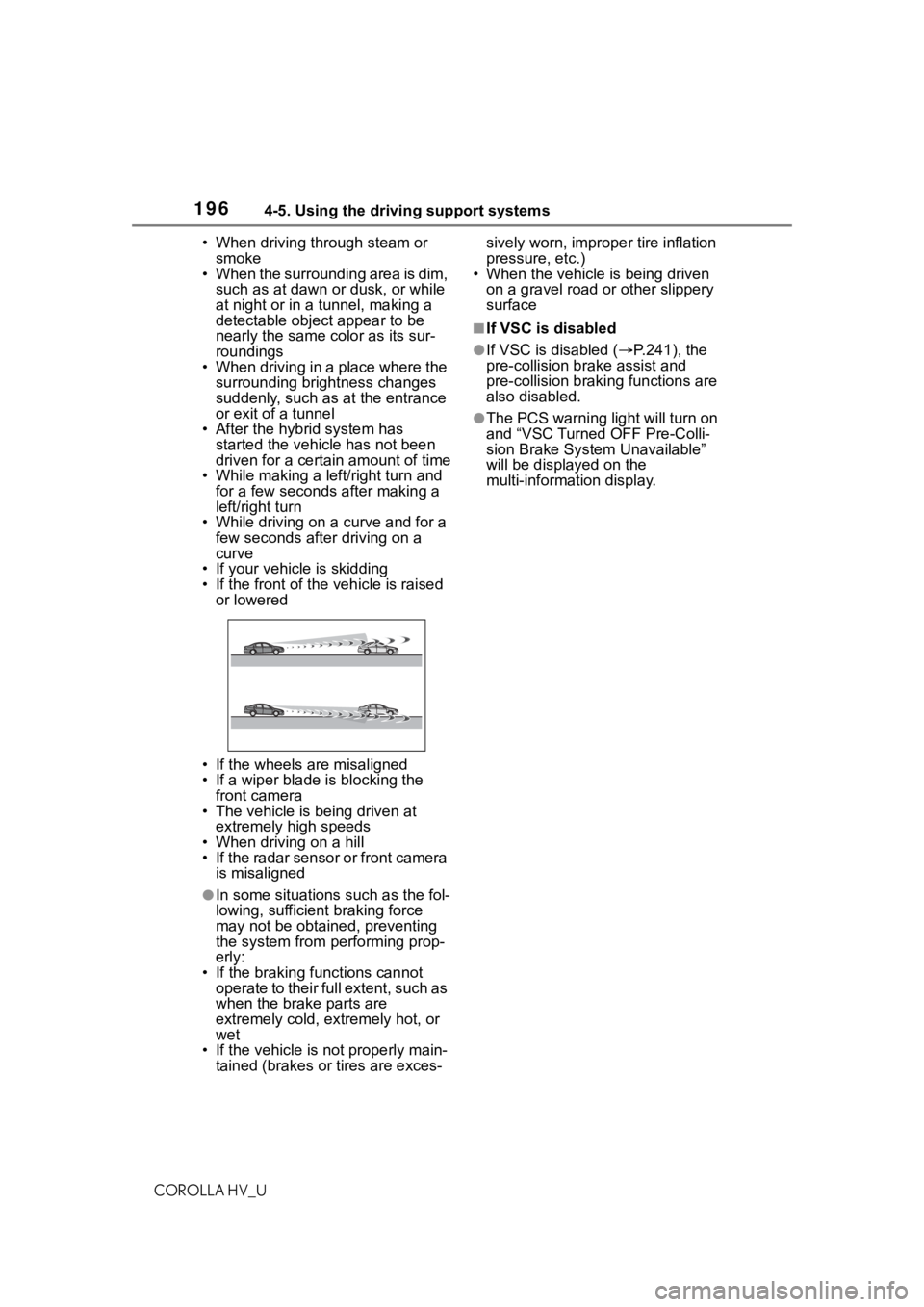
• After the hybrid system has started the vehicle has not been
driven for a certain amount of time
• While making a left/right turn and for a few seconds after making a
left/right turn
• While driving on a curve and for a
few seconds after driving on a
curve
• If your vehicle is skidding
• If the front of the vehicle is raised or lowered
• If the wheels are misaligned
• If a wiper blade is blocking the front camera
• The vehicle is being driven at extremely high speeds
• When driving on a hill
• If the radar sensor or front camera is misaligned
●In some situations such as the fol-
lowing, sufficient braking force
may not be obtained, preventing
the system from performing prop-
erly:
• If the braking functions cannot operate to their full extent, such as
when the brake parts are
extremely cold, extremely hot, or
wet
• If the vehicle is not properly main- tained (brakes or tires are exces- sively worn, imprope
r tire inflation
pressure, etc.)
• When the vehicle is being driven
on a gravel road or other slippery
surface
■If VSC is disabled
●If VSC is disabled ( P.241), the
pre-collision br ake assist and
pre-collision brakin g functions are
also disabled.
●The PCS warning light will turn on
and “VSC Turned OFF Pre-Colli-
sion Brake System Unavailable”
will be displayed on the
multi-information display.
Page 210 of 584
2104-5. Using the driving support systems
COROLLA HV_U
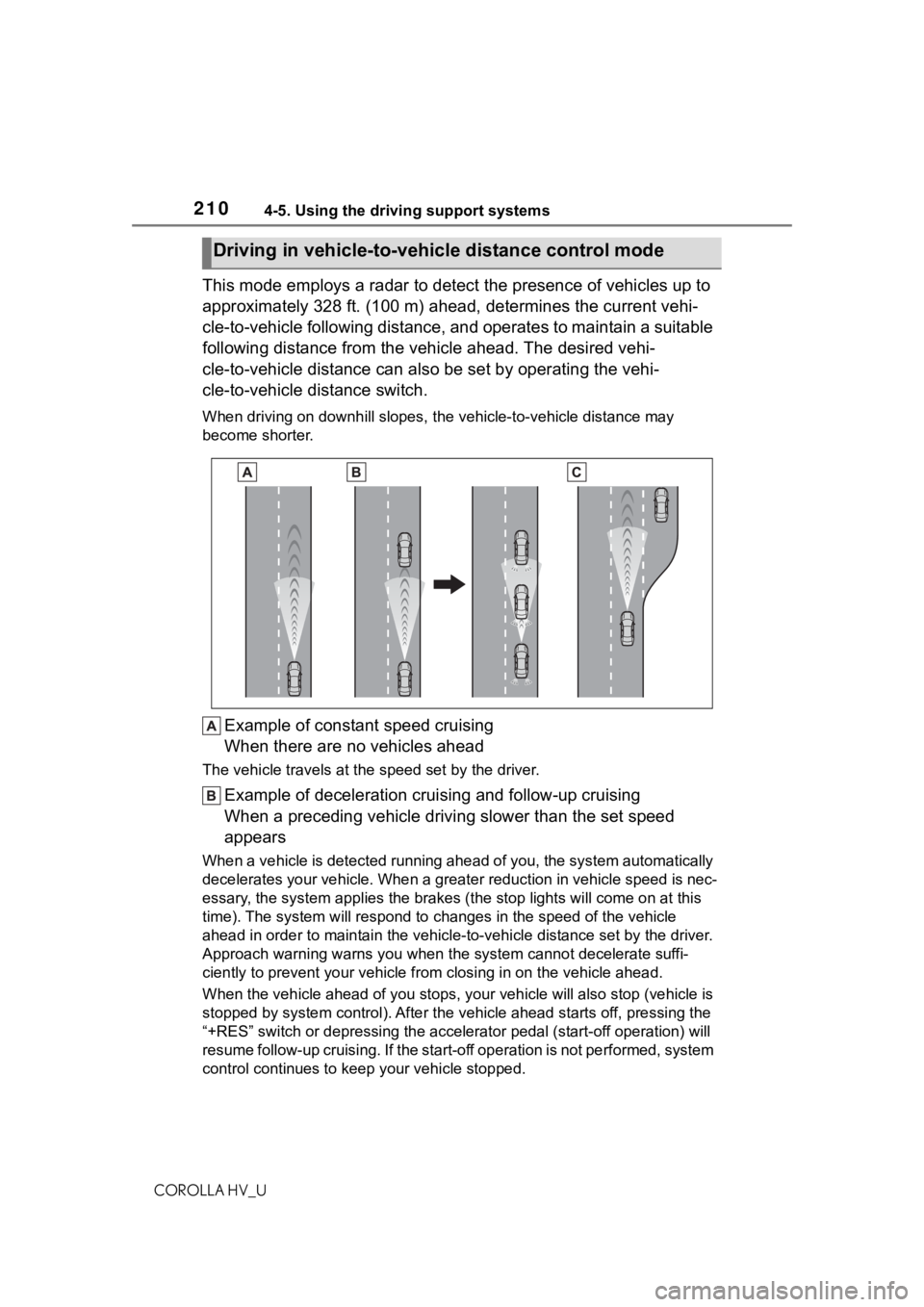
This mode employs a radar to detect the presence of vehicles up to
approximately 328 ft. (100 m) ahead, determines the current vehi-
cle-to-vehicle following distance, and operates to maintain a s uitable
following distance from the vehicle ahead. The desired vehi-
cle-to-vehicle distance can also be set by operating the vehi-
cle-to-vehicle distance switch.
When driving on downhill slopes, t he vehicle-to-vehicle distance may
become shorter.
Example of constant speed cruising
When there are no vehicles ahead
The vehicle travels at the speed set by the driver.
Example of deceleration crui sing and follow-up cruising
When a preceding vehicle driving slower than the set speed
appears
When a vehicle is detected runni ng ahead of you, the system automatically
decelerates your vehicle. When a greater reduction in vehicle s peed is nec-
essary, the system applies the brakes (the stop lights will come on at this
time). The system will respond to changes in the speed of the vehicle
ahead in order to maintain the vehicle-to-vehicle distance set by the driver.
Approach warning warns you when the system cannot decelerate suffi-
ciently to prevent your vehicle from closing in on the vehicle ahead.
When the vehicle ahead of you st ops, your vehicle will also stop (vehicle is
stopped by system control). Afte r the vehicle ahead starts off, pressing the
“+RES” switch or depressing the accelerator pedal (start-off operation) will
resume follow-up cruising. If the start-off operation is not pe rformed, system
control continues to keep your vehicle stopped.
Driving in vehicle-to-vehicle distance control mode
Page 241 of 584
2414-5. Using the driving support systems
COROLLA HV_U
4
Driving
■The Secondary Collision
Brake
When the SRS airbag sensor
detects a collision and the sys-
tem operates, the brakes and
brake lights are automatically
controlled to reduce the vehicle
speed and help reduce the pos-
sibility of further damage due to
a secondary collision.
■When the TRAC/VSC/ABS sys-
tems are operating
The slip indicator light will flash
while the TRAC/VSC/ABS systems
are operating.
■Disabling the TRAC system
If the vehicle gets stuck in mud, dirt
or snow, the TRAC system may
reduce power from the hybrid sys-
tem to the wheels. Pressing to
turn the system off may make it eas-
ier for you to rock the vehicle in
order to free it.
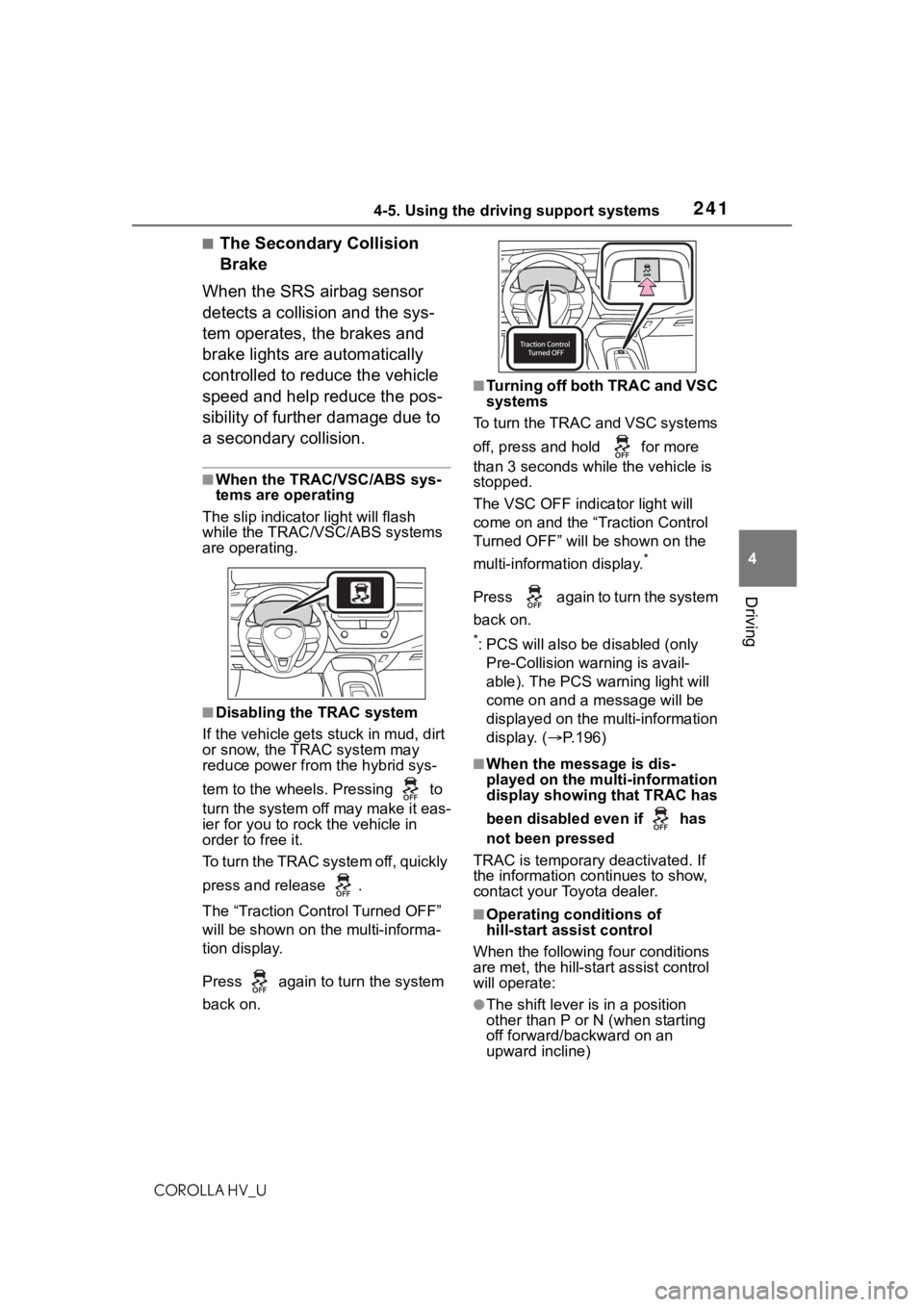
To turn the TRAC system off, quickly
press and release .
The “Traction Control Turned OFF”
will be shown on the multi-informa-
tion display.
Press again to turn the system
back on.
■Turning off both TRAC and VSC
systems
To turn the TRAC and VSC systems
off, press and hold for more
than 3 seconds while the vehicle is
stopped.
The VSC OFF indicator light will
come on and the “Traction Control
Turned OFF” will be shown on the
multi-information display.
*
Press again to turn the system
back on.
*: PCS will also be disabled (only
Pre-Collision warning is avail-
able). The PCS warning light will
come on and a message will be
displayed on the multi-information
display. ( P.196)
■When the message is dis-
played on the multi-information
display showing that TRAC has
been disabled even if has
not been pressed
TRAC is temporary deactivated. If
the information continues to show,
contact your Toyota dealer.
■Operating conditions of
hill-start assist control
When the following four conditions
are met, the hill-star t assist control
will operate:
●The shift lever is in a position
other than P or N (when starting
off forward/backward on an
upward incline)