tow TOYOTA FJ CRUISER 2010 1.G User Guide
[x] Cancel search | Manufacturer: TOYOTA, Model Year: 2010, Model line: FJ CRUISER, Model: TOYOTA FJ CRUISER 2010 1.GPages: 439, PDF Size: 11.02 MB
Page 118 of 439

118 2-1. Driving procedures
Lightly depress the accelerator pedal at the same time as
gradually releasing the clutch pedal.
Release the parking brake.
■Driving in the rain
●Drive carefully when it is raining, because visibility will be reduced, the
windows may become fogged-up, and the road will be slippery.
●Drive carefully when it starts to rain, because the road surface will be
especially slippery.
●Refrain from high speeds when driving on an expressway in the rain,
because there may be a layer of water between the tires and the road
surface, preventing the steering and brakes from operating properly.
■Breaking in your new Toyota
To extend the life of the vehicle, the following precautions are recommended
to observe:
●For the first 200 miles (300 km):
Avoid sudden stops.
●For the first 500 miles (800 km):
Do not tow a trailer.
●For the first 1000 miles (1600 km):
• Do not drive at extremely high speeds.
• Avoid sudden acceleration.
• Do not drive continuously in the low gears.
• Do not drive at a constant speed for extended periods.
■Drum-in disc type parking brake system
Your vehicle has a drum-in-disc type parking brake system. This type of
brake system needs bedding-down of the brake shoes periodically or when-
ever the parking brake shoes and/or drum are replaced. Have your Toyota
dealer perform the bedding down.
■Operating your vehicle in a foreign country
Comply with the relevant vehicle registration laws and confirm the availability
of the correct fuel. (P. 390)
Page 145 of 439
145
2
When driving
2-3. Operating the lights and wipers
Headlight switch
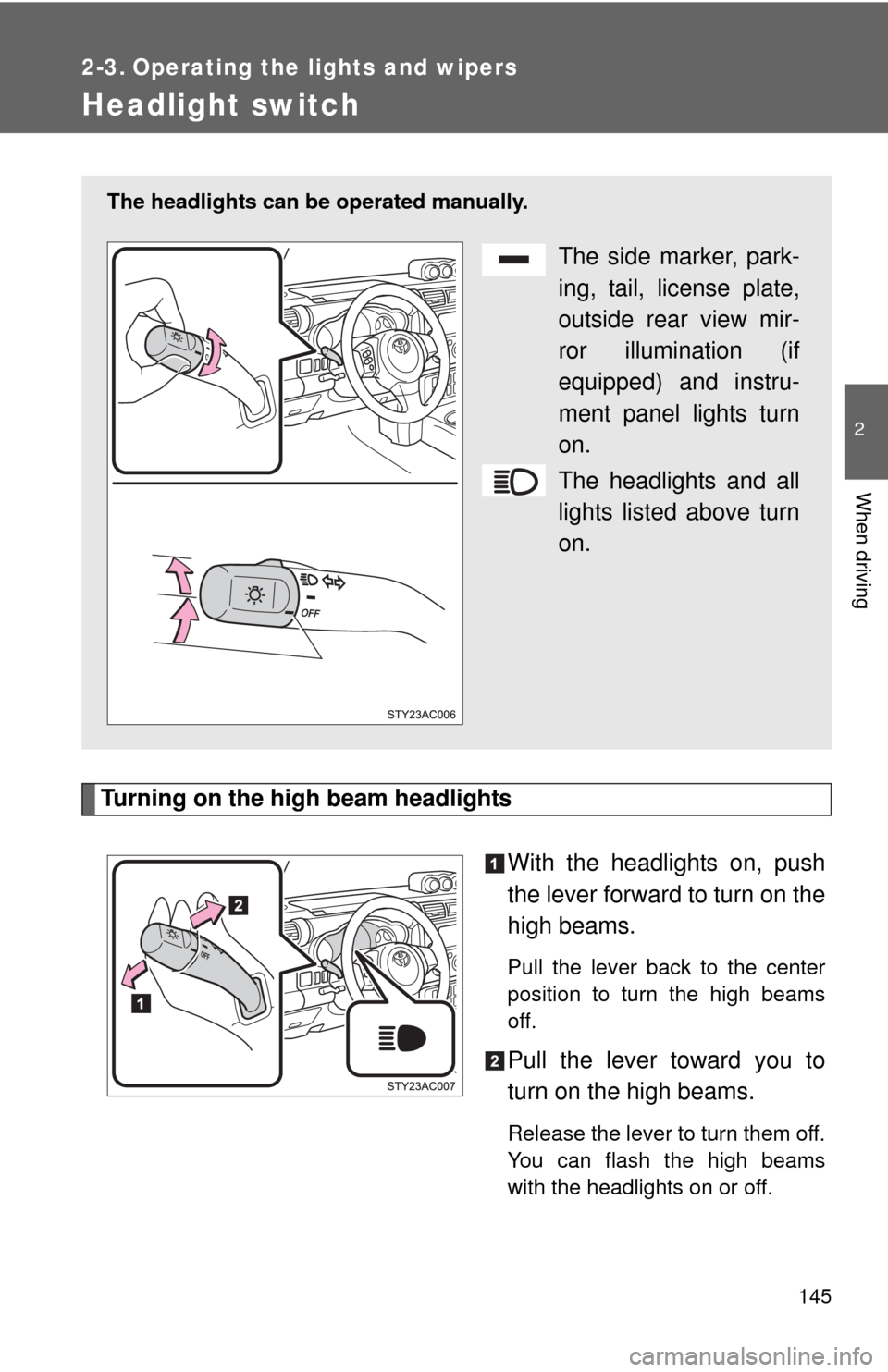
Turning on the high beam headlights
With the headlights on, push
the lever forward to turn on the
high beams.
Pull the lever back to the center
position to turn the high beams
off.
Pull the lever toward you to
turn on the high beams.
Release the lever to turn them off.
You can flash the high beams
with the headlights on or off.
The headlights can be operated manually.
The side marker, park-
ing, tail, license plate,
outside rear view mir-
ror illumination (if
equipped) and instru-
ment panel lights turn
on.
The headlights and all
lights listed above turn
on.
Page 148 of 439
148 2-3. Operating the lights and wipers
■The windshield wiper and washer can be operated when
The engine switch must be in the ON position.
■If no windshield washer fluid sprays
Check that the washer nozzles are not blocked and if there is washer fluid in
the windshield washer fluid reservoir.
NOTICE
■When the windshield is dry
Do not use the wipers, as they may damage the windshield.
■When there is no washer fluid spray from the nozzle
Damage to the washer fluid pump may be caused if the lever is pulled
toward you and held continually.
■When a nozzle becomes blocked
In this case, contact your Toyota dealer immediately.
Do not try to clear it with a pin or other object. The nozzle will be damaged.
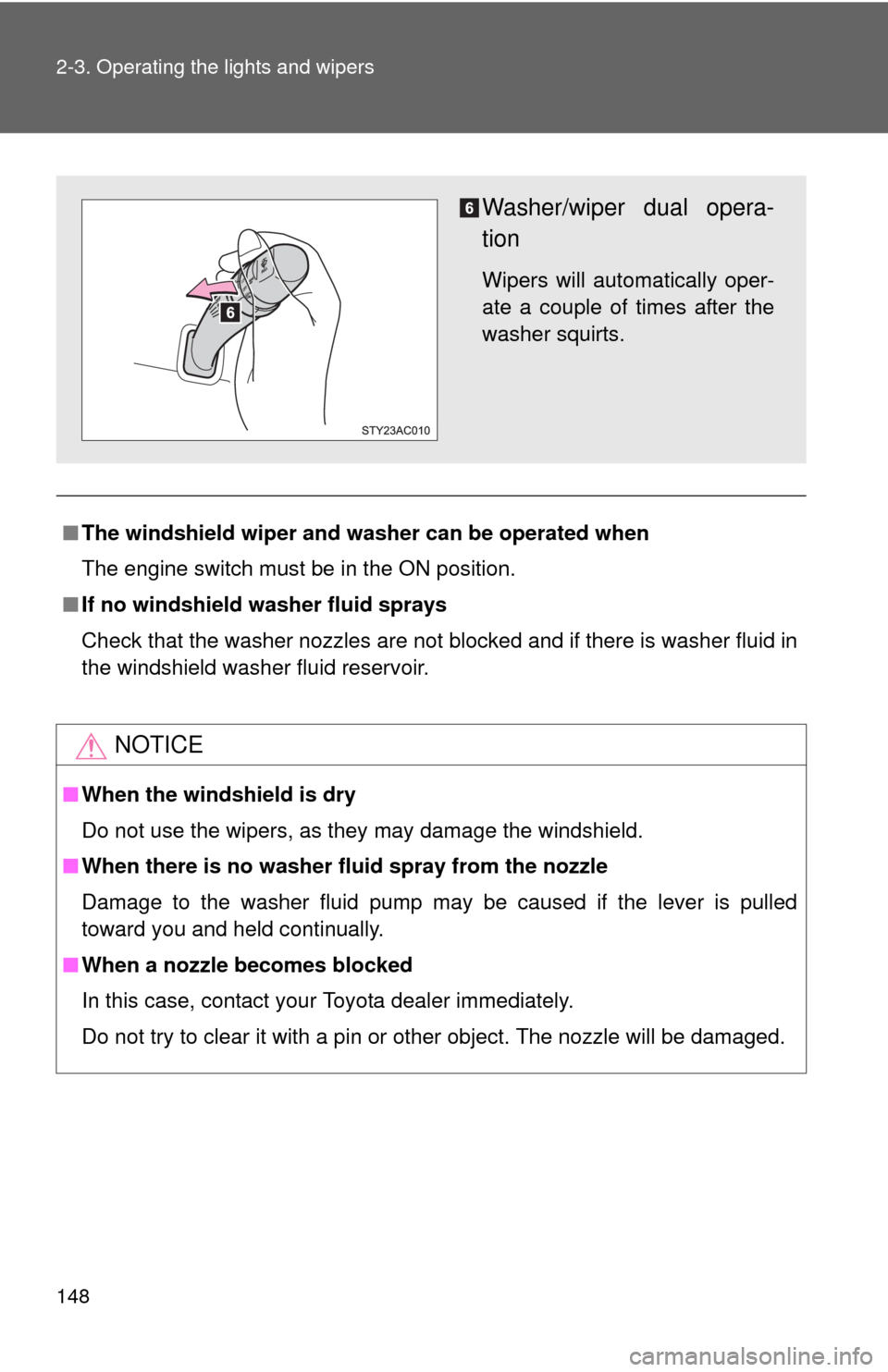
Washer/wiper dual opera-
tion
Wipers will automatically oper-
ate a couple of times after the
washer squirts.
Page 151 of 439
151 2-4. Using other driving systems
2
When driving
■Cruise control can be set when
●The shift lever is in D or 4 (vehicles with an automatic transmission).
●Vehicle speed is more than approximately 25 mph (40 km/h).
■Accelerating
The vehicle can be accelerated normally. After acceleration, the set speed
resumes.
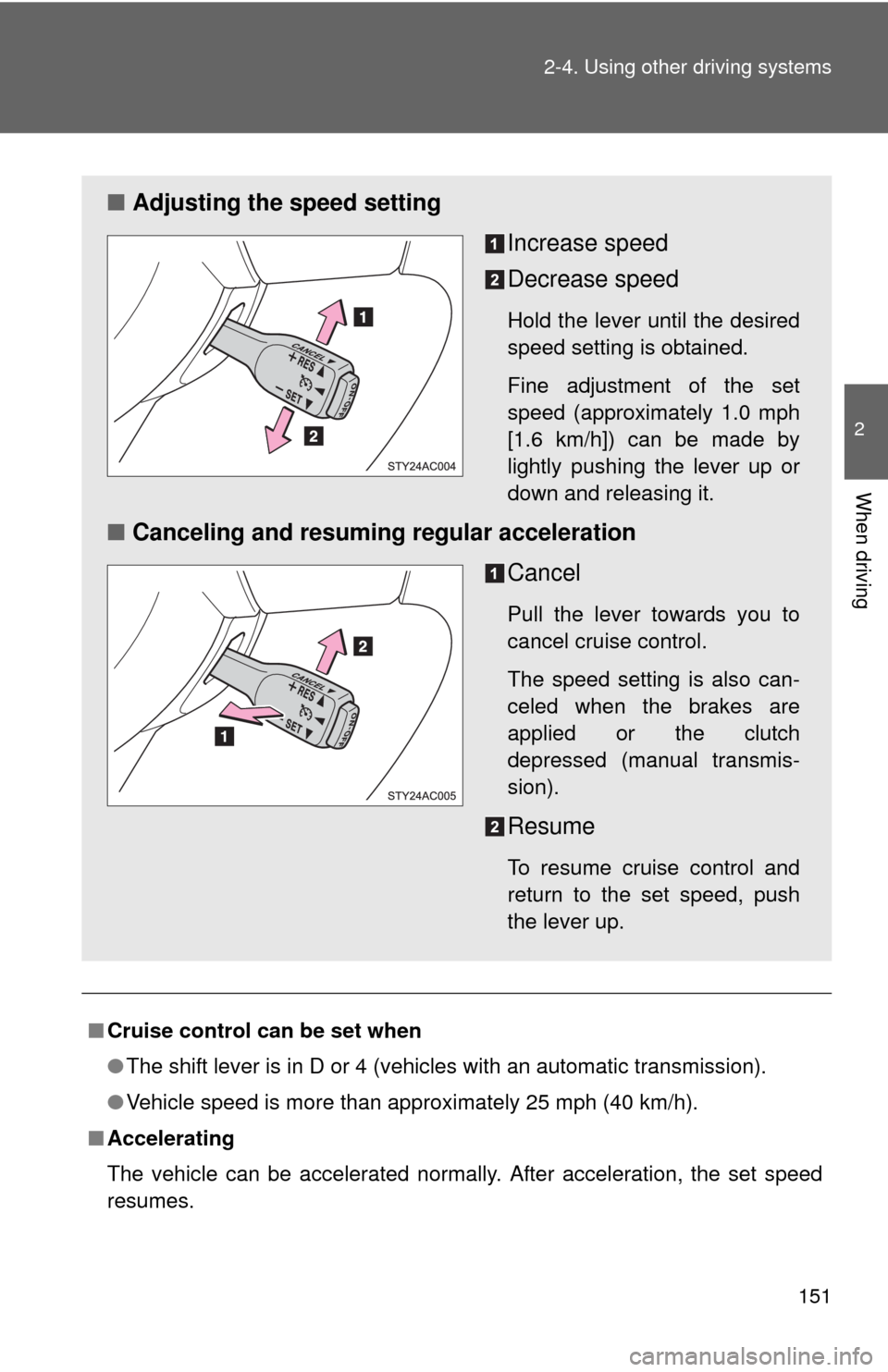
■Adjusting the speed setting
Increase speed
Decrease speed
Hold the lever until the desired
speed setting is obtained.
Fine adjustment of the set
speed (approximately 1.0 mph
[1.6 km/h]) can be made by
lightly pushing the lever up or
down and releasing it.
■Canceling and resuming regular acceleration
Cancel
Pull the lever towards you to
cancel cruise control.
The speed setting is also can-
celed when the brakes are
applied or the clutch
depressed (manual transmis-
sion).
Resume
To resume cruise control and
return to the set speed, push
the lever up.
Page 152 of 439
152 2-4. Using other driving systems
■Automatic cruise control cancellation
The set speed is automatically canceled in any of the following situations.
●Actual vehicle speed falls more than approximately 10 mph (16 km/h)
below the preset vehicle speed.
At this time, the memorized set speed is not retained.
●Actual vehicle speed is below approximately 25 mph (40 km/h).
●VSC is activated.
■If the cruise control indicator flashes
Press the ON-OFF button to turn the cruise control off, and then reactivate
the system.
If the cruise control speed cannot be set or if the cruise control cancels
immediately after being activated, there may be a malfunction in the cruise
control system. Have the vehicle inspected by your Toyota dealer.
CAUTION
■To avoid operating the cruise control by mistake
Keep the ON-OFF button off when not in use.
■Situations unsuitable for cruise control
Do not use cruise control in any of the following situations.
Doing so may result in control of the vehicle being lost and could cause an
accident resulting in death or serious injury.
●In heavy traffic
●On roads with sharp bends
●On winding roads
●On slippery roads, such as those covered with rain, ice or snow
●On steep hills
Vehicle speed may exceed the set speed when driving down a steep hill
●When towing a trailer or emergency towing
Page 156 of 439

156 2-4. Using other driving systems
■The intuitive parking assist system can be operated when
●The engine switch is at the ON position.
●The shift lever is in R.
■Sensor detection information
●Certain vehicle conditions and the surrounding environment may affect
the ability of a sensor to correctly detect an obstacle. Particular instances
where this may occur are listed below.
• There is dirt, snow or ice on a sensor.
• A sensor is frozen.
• A sensor is covered in any way.
• The vehicle is leaning considerably to one side.
• On an extremely bumpy road, on an incline, on gravel, or on grass.
• The vicinity of the vehicle is noisy due to vehicle horns, motorcycle
engines, air brakes of large vehicles, or other loud noises producing
ultrasonic waves.
• There is another vehicle equipped with parking assist sensors in the
vicinity.
• A sensor is coated with a sheet of spray or heavy rain.
• The vehicle is equipped with a fender pole or radio antenna.
• A bumper or sensor receives a strong impact.
• The vehicle is approaching a tall or right-angled curb.
• In harsh sunlight or intense cold weather.
• The area directly under the bumpers is not detected.
Objects lower than the sensors or thin stakes etc. may be detected ini-
tially, but as they draw closer, they may cease to be detected.
• A towing hitch is mounted to the vehicle.
• A non-genuine Toyota suspension (lowered suspension etc.) is
installed.
• When attaching a two-way radio antenna.
• When a towing eyelet is mounted on your vehicle.
• When the bumper is damaged.
In addition to the examples above, there are instances in which, because of
their shapes, signs and other objects may be judged by a sensor to be closer
than they are.
Page 184 of 439
184
2-5. Driving information
Cargo and luggage
Capacity and distribution
Cargo capacity depends on the total weight of the occupants.
(Cargo capacity) = (Total load capacity) (Total weight of occupants)
Steps for Determining Correct Load Limit—
(1) Locate the statement “The combined weight of occupants and
cargo should never exceed XXX kg or XXX lbs.” on your vehicle’s
placard.
(2) Determine the combined weight of the driver and passengers that
will be riding in your vehicle.
(3)Subtract the combined weight of the driver and passengers from
XXX kg or XXX lbs.
(4) The resulting figure equals the available amount of cargo and lug-
gage load capacity.
For example, if the “XXX” amount equals 1400 lbs. and there will
be five 150 lb passengers in your vehicle, the amount of available
cargo and luggage load capacity is 650 lbs. (1400 750 (5 150)
= 650 lbs.)
(5) Determine the combined weight of luggage and cargo being
loaded on the vehicle. That weight may not safely exceed the
available cargo and luggage load capacity calculated in Step 4.
Take notice of the following information about storage precau-
tions, cargo capacity and load.
●Stow cargo and luggage in the luggage compartment whenever
possible.
●Be sure all items are secured in place.
●Be careful to keep the vehicle level. Placing the weight as far for-
ward as possible helps maintain vehicle balance.
●For better fuel economy, do not carry unnecessary weight.
Page 185 of 439
185 2-5. Driving information
2
When driving
(6) If your vehicle will be towing a trailer, load from your trailer will be
transferred to your vehicle. Consult this manual to determine how
this reduces the available cargo and luggage load capacity of your
vehicle.
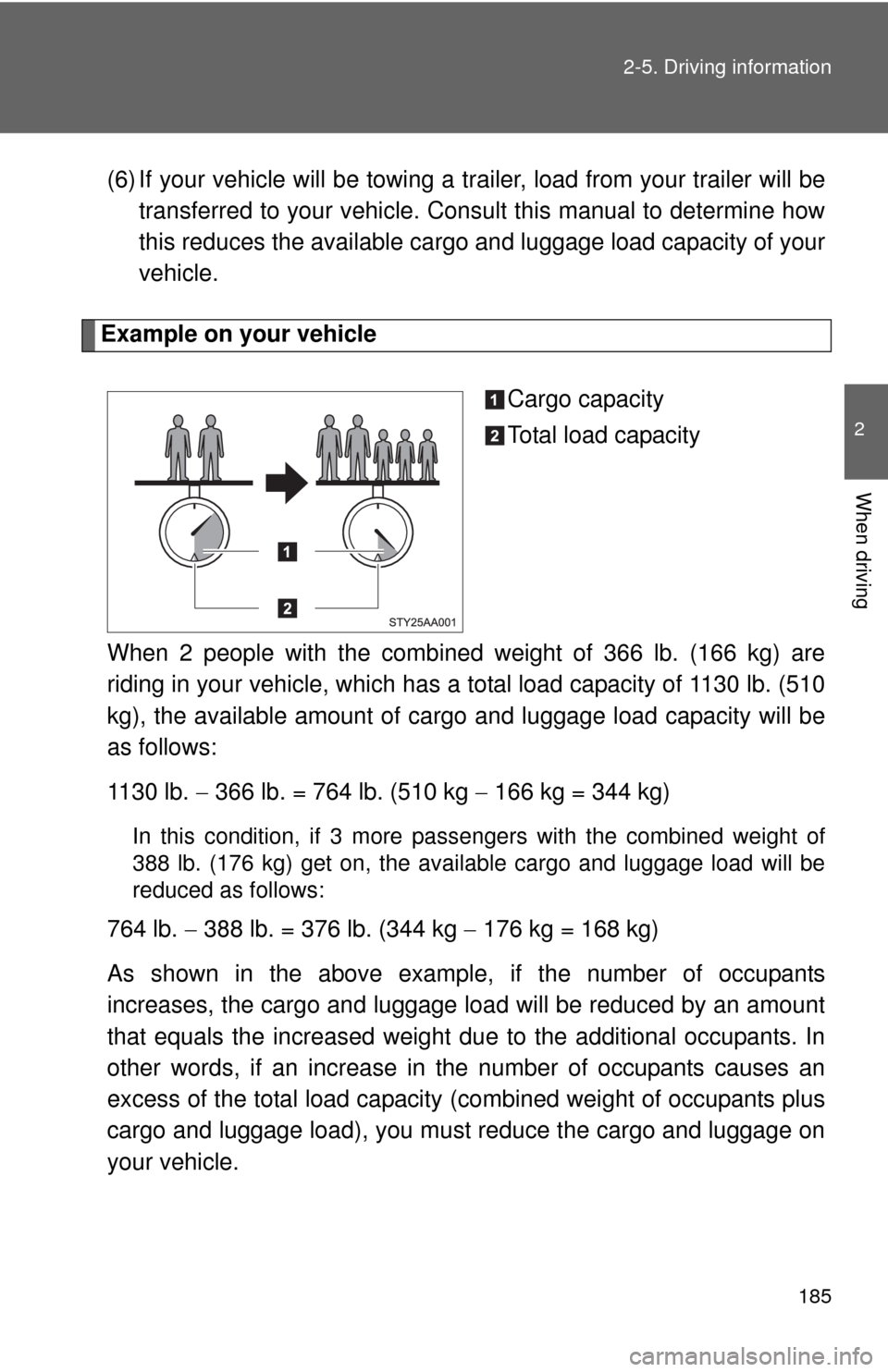
Example on your vehicle
Cargo capacity
Total load capacity
When 2 people with the combined weight of 366 lb. (166 kg) are
riding in your vehicle, which has a total load capacity of 1130 lb. (510
kg), the available amount of cargo and luggage load capacity will be
as follows:
1130 lb. 366 lb. = 764 lb. (510 kg 166 kg = 344 kg)
In this condition, if 3 more passengers with the combined weight of
388 lb. (176 kg) get on, the available cargo and luggage load will be
reduced as follows:
764 lb. 388 lb. = 376 lb. (344 kg 176 kg = 168 kg)
As shown in the above example, if the number of occupants
increases, the cargo and luggage load will be reduced by an amount
that equals the increased weight due to the additional occupants. In
other words, if an increase in the number of occupants causes an
excess of the total load capacity (combined weight of occupants plus
cargo and luggage load), you must reduce the cargo and luggage on
your vehicle.
Page 187 of 439
187
2-5. Driving information
2
When driving
Vehicle load limits
■Total load capacity and seating capacity
These details are also described on the tire and loading information
label.(P. 313)
CAUTION
■Overloading the vehicle
Do not overload the vehicle.
It may not only cause damage to the tires, but also degrade steering and
braking ability, resulting in an accident.
Vehicle load limits include total load capacity, seating capacity,
towing capacity and cargo capacity.
■Total load capacity: 1130 lb. (510 kg)
Total load capacity means the combined weight of occupants,
cargo and luggage.
■Seating capacity: 5 occupants (Front 2, Rear 3)
Seating capacity means the maximum number of occupants
whose estimated average weight is 150 lb. (68 kg) per person.
Even if the number of occupants are within the seating capacity,
do not exceed the total load capacity.
■Towing capacity: 5000 lb. (2265 kg)
Towing capacity means the maximum gross trailer weight (trailer
weight plus its cargo weight) that your vehicle is able to tow.
■Cargo capacity
Cargo capacity may increase or decrease depending on the
weight and the number of occupants.
Page 191 of 439
191
2-5. Driving information
2
When driving
Trailer towing
Your vehicle is designed primarily as a passenger-carrying vehicle,
thus towing a trailer will have an adverse effect on handling, perfor-
mance, braking, durability, and fuel consumption. For your safety
and the safety of others, do not overload the vehicle or trailer.
Toyota warranties do not apply to damage or malfunction caused by
towing a trailer for commercial purposes.
■Weight limits
Confirm the total trailer weight, gross vehicle weight, gross axle
weight and trailer tongue load are all within the limits.
■Gross vehicle weight
The gross vehicle weight must not exceed the Gross Vehicle
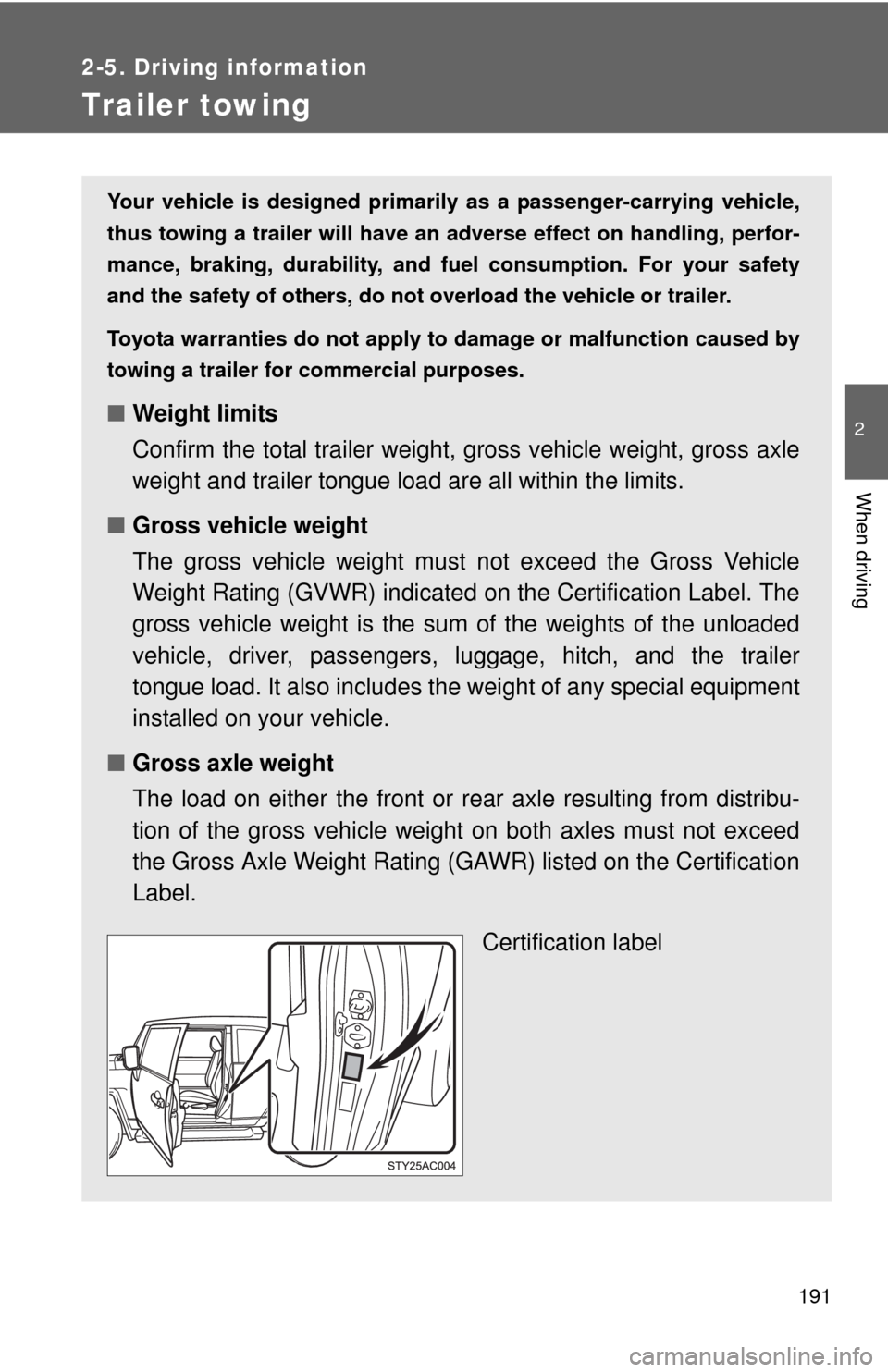
Weight Rating (GVWR) indicated on the Certification Label. The
gross vehicle weight is the sum of the weights of the unloaded
vehicle, driver, passengers, luggage, hitch, and the trailer
tongue load. It also includes the weight of any special equipment
installed on your vehicle.
■Gross axle weight
The load on either the front or rear axle resulting from distribu-
tion of the gross vehicle weight on both axles must not exceed
the Gross Axle Weight Rating (GAWR) listed on the Certification
Label.
Certification label