audio TOYOTA FJ CRUISER 2014 1.G Owner's Guide
[x] Cancel search | Manufacturer: TOYOTA, Model Year: 2014, Model line: FJ CRUISER, Model: TOYOTA FJ CRUISER 2014 1.GPages: 572, PDF Size: 9.45 MB
Page 268 of 572
268 3-2. Using the audio system
●Compatible disc formats
The following disc formats can be used.
• Disc formats: CD-ROM Mode 1 and Mode 2
CD-ROM XA Mode 2, Form 1 and Form 2
• File formats: ISO9660 Level 1, Level 2, (Romeo, Joliet) MP3 and WMA files written in any format other than those listed above
may not play correctly, and their file names and folder names may not
be displayed correctly.
Items related to standards and limitations are as follows.
• Maximum directory hierarchy: 8 levels
• Maximum length of folder names/file names: 32 characters
• Maximum number of folders: 192 (including the root)
• Maximum number of files per disc: 255
● File names
The only files that can be recognized as MP3/WMA and played are those
with the extension .mp3 or .wma.
● Multi-sessions
As the audio system is compatible with multi-sessions, it is possible to play
discs that contain MP3 and WMA files. However, only the first session can
be played.
● ID3 and WMA tags
ID3 tags can be added to MP3 files, making it possible to record the track
title and artist name, etc.
The system is compatible with ID3 Ver. 1.0, 1.1, and Ver. 2.2, 2.3 ID3 tags.
(The number of characters is based on ID3 Ver. 1.0 and 1.1.)
WMA tags can be added to WMA files, making it possible to record the
track title and artist name in the same way as with ID3 tags.
● MP3 and WMA playback
When a disc containing MP3 or WMA files is inserted, all files on the disc
are first checked. Once the file check is finished, the first MP3 or WMA\
file
is played. To make the file check finish more quickly, we recommend you
do not write in any files other than MP3 or WMA files or create any unnec-
essary folders.
If the discs contain a mixture of music data and MP3 or WMA format data,
only music data can be played.
Page 269 of 572
269
3-2. Using the audio system
3
Interior features
●
Extensions
If the file extensions .mp3 and .wma are used for files other than MP3 and
WMA files, they will be mistakenly recognized and played as MP3 and
WMA files. This may result in large amounts of interference and damage
to the speakers.
● Playback
• To play MP3 files with steady sound quality, we recommend a fixed bit
rate of 128 kbps and a sampling frequency of 44.1 kHz.
• CD-R or CD-RW playback may not be possible in some instances, depending on the characteristics of the disc.
• There is a wide variety of freeware and other encoding software for MP3 and WMA files on the market, and depending on the status of the
encoding and the file format, poor sound quality or noise at the start of
playback may result. In some cases, playback may not be possible at
all.
• When files other than MP3 or WMA files are recorded on a disc, it may take more time to recognize the disc. In some cases, playback may not
be possible at all.
• Microsoft, Windows, and Windows Media are the registered trade- marks of Microsoft Corporation in the U.S. and other countries.
NOTICE
■ CDs and adapters that cannot be used ( P. 261)
■ CD player precautions ( P. 262)
Page 270 of 572
270
3-2. Using the audio system
Operating an iPod
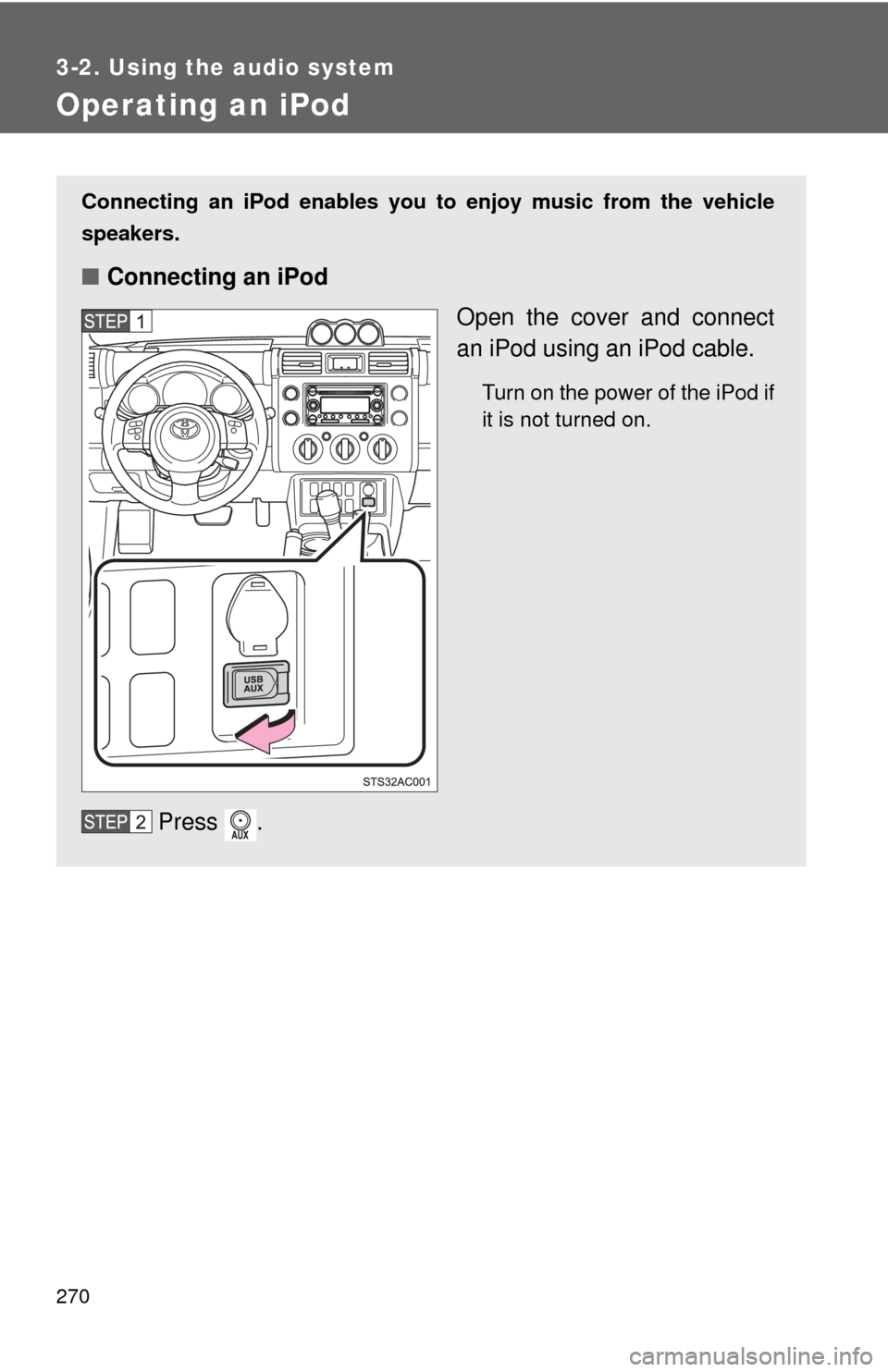
Connecting an iPod enables you to enjoy music from the vehicle
speakers.
■ Connecting an iPod
Open the cover and connect
an iPod using an iPod cable.
Turn on the power of the iPod if
it is not turned on.
Press .
Page 271 of 572
271
3-2. Using the audio system
3
Interior features
■
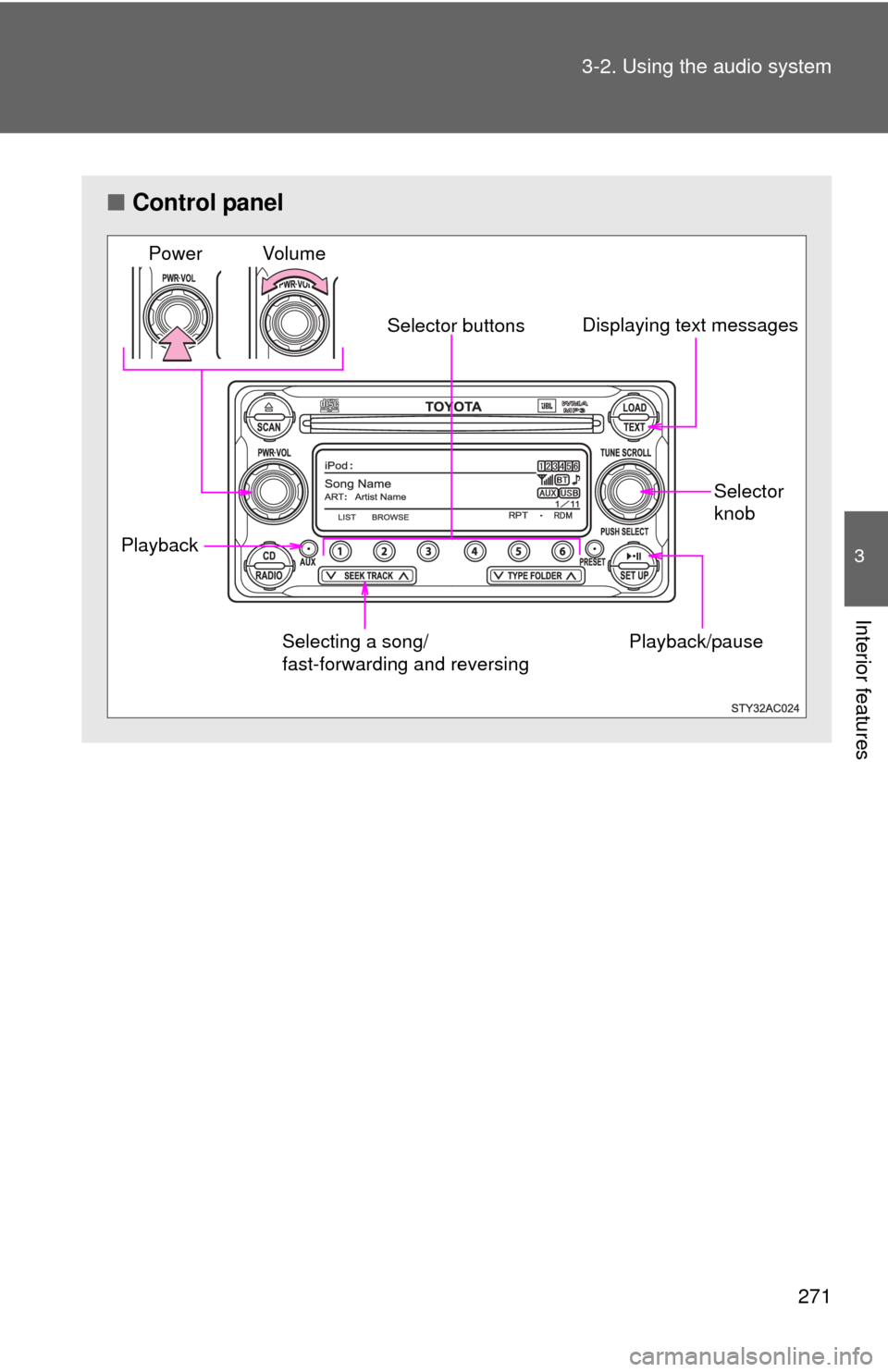
Control panel
Playback/pause
Displaying text messages
Selector
knob
Selector buttons
Selecting a song/
fast-forwarding and reversing
Playback Vo lu m e
Power
Page 272 of 572
272 3-2. Using the audio system
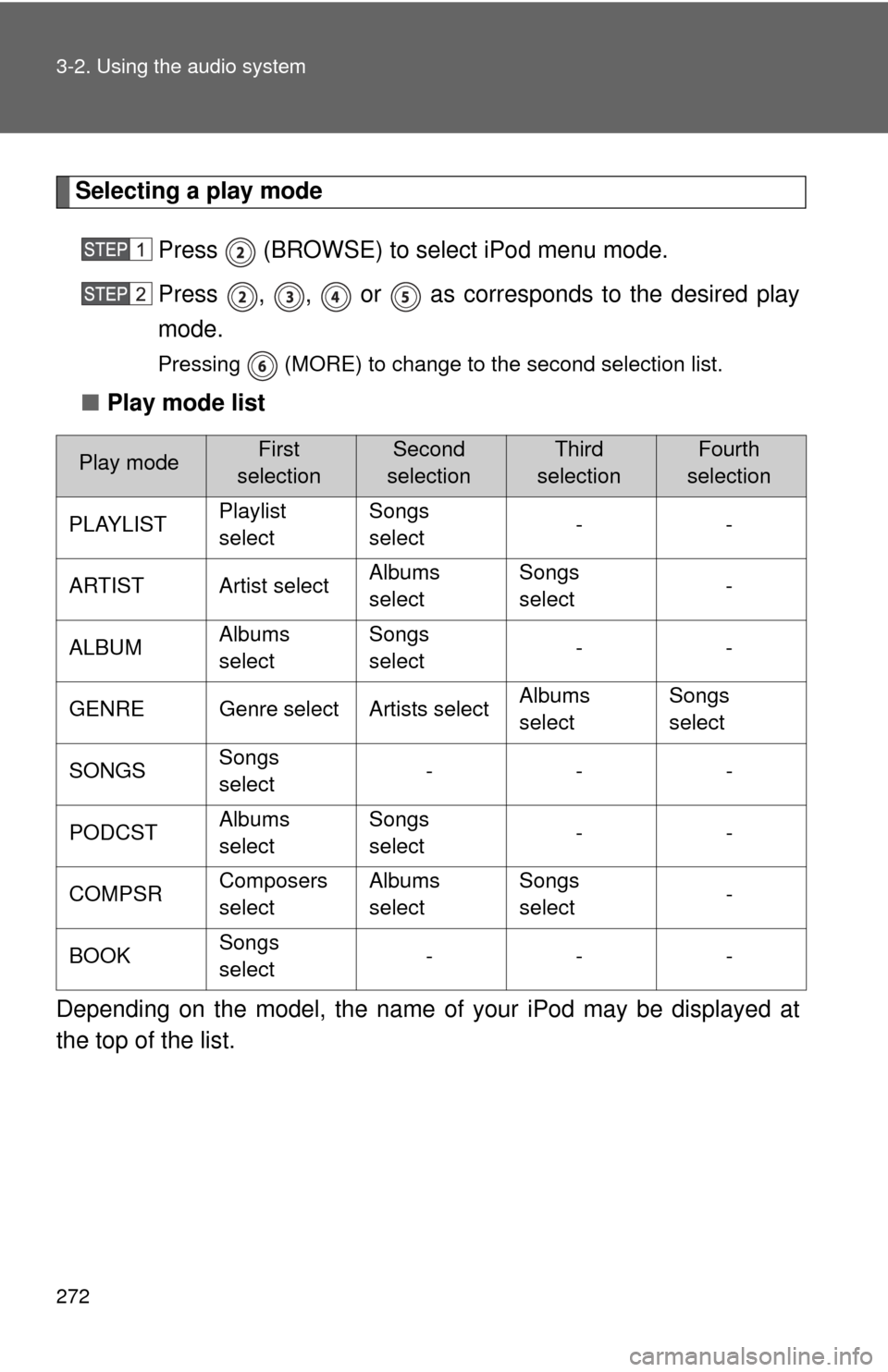
Selecting a play modePress (BROWSE) to select iPod menu mode.
Press , , or as corresponds to the desired play
mode.
Pressing (MORE) to change to the second selection list.
■Play mode list
Depending on the model, the name of your iPod may be displayed at
the top of the list.
Play modeFirst
selectionSecond
selectionThird
selectionFourth
selection
PLAYLIST Playlist
selectSongs
select
--
ARTIST Artist select Albums
selectSongs
select
-
ALBUM Albums
selectSongs
select
--
GENRE Genre select Artists select Albums
selectSongs
select
SONGS Songs
select ---
PODCST Albums
selectSongs
select
--
COMPSR Composers
selectAlbums
select Songs
select
-
BOOK Songs
select ---
Page 273 of 572
273
3-2. Using the audio system
3
Interior features
■
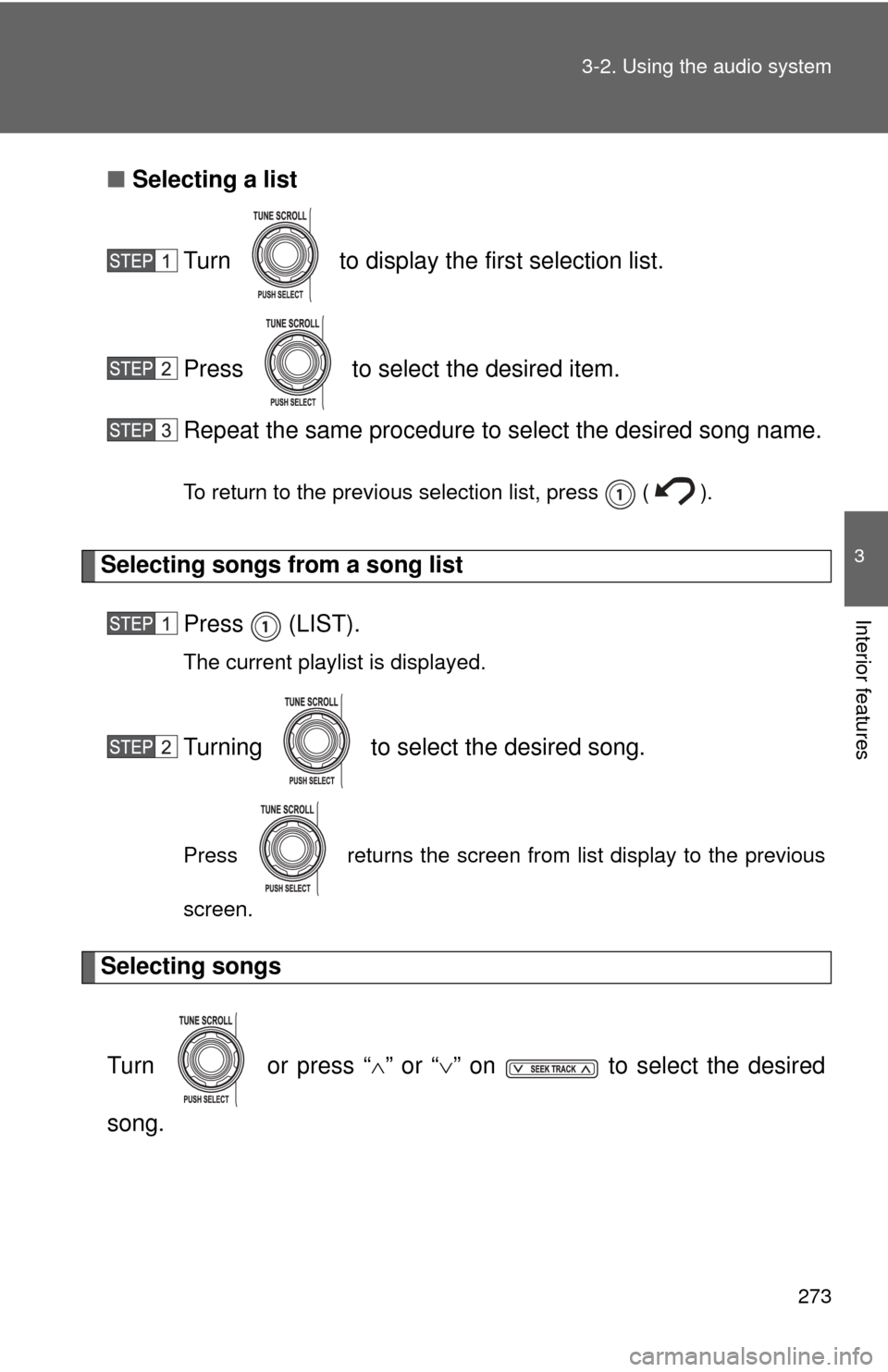
Selecting a list
Turn to display the first selection list.
Press to select the desired item.
Repeat the same procedure to select the desired song name.
To return to the previous selection list, press ( ).
Selecting songs from a song list Press (LIST).
The current playlist is displayed.
Turning to select the desired song.
Press returns the screen from list display to the previous
screen.
Selecting songs
Turn or press “ ” or “ ” on to select the desired
song.
Page 274 of 572
274 3-2. Using the audio system
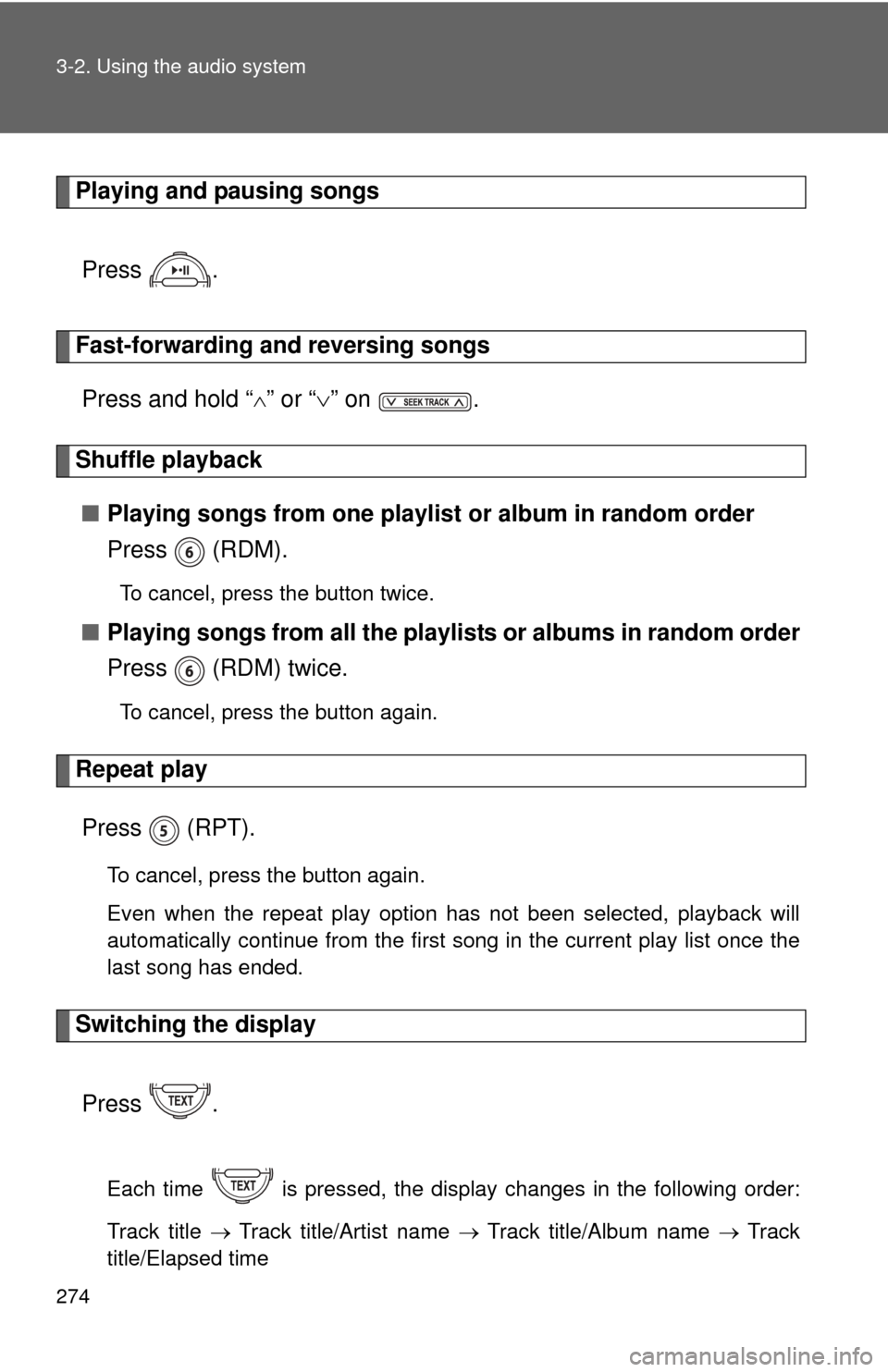
Playing and pausing songsPress .
Fast-forwarding and reversing songsPress and hold “
” or “ ” on .
Shuffle playback
■ Playing songs from one playlis t or album in random order
Press (RDM).
To cancel, press the button twice.
■ Playing songs from a ll the playlists or albums in random order
Press (RDM) twice.
To cancel, press the button again.
Repeat play
Press (RPT).
To cancel, press the button again.
Even when the repeat play option has not been selected, playback will
automatically continue from the first song in the current play list once the
last song has ended.
Switching the display
Press .
Each time is pressed, the display changes in the following order:
Track title Track title/Artist name Track title/Album name Track
title/Elapsed time
Page 275 of 572
275
3-2. Using the audio system
3
Interior features
■
About iPod
●Apple is not responsible for the operation of this device or its compliance
with safety and regulatory standards.
● iPod is a trademark of Apple Inc., registered in the U.S. and other coun-
tries.
■ iPod functions
●When an iPod is connected and the audio source is changed to iPod
mode, the iPod will resume play from the same point at which it was last
used.
● Depending on the iPod that is connected to the system, certain functions
may not be available. Disconnecting the device and reconnecting it once
again may resolve some malfunctions.
■ iPod problems
To resolve most problems encountered when using your iPod, disconnect
your iPod from the vehicle iPod connection and reset it.
For instructions on how to reset your iPod, refer to your iPod Owner’s Man-
ual.
■ Error messages
“iPod ERROR”: This indicates a problem in the iPod, inside the USB box or
the connection between them.
“NO SONGS”: This indicates that there is no music data in the iPod.
“UPDATE YOUR iPod”: This indicates that the version of the iPod is not compatible.
Page 276 of 572
276 3-2. Using the audio system
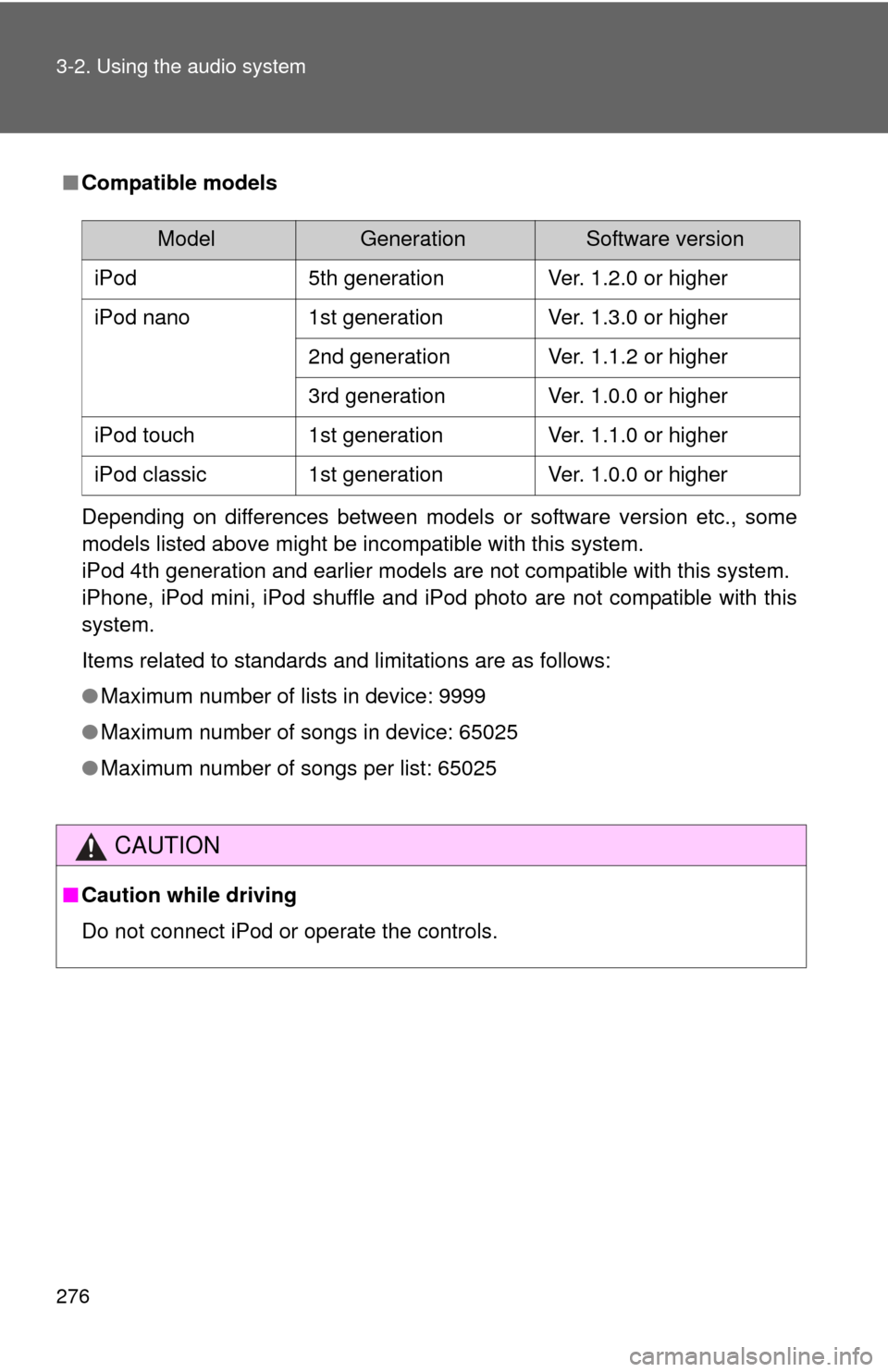
■Compatible models
Depending on differences between models or software version etc., some
models listed above might be incompatible with this system.
iPod 4th generation and earlier models are not compatible with this system.
iPhone, iPod mini, iPod shuffle and iPod photo are not compatible with this
system.
Items related to standards and limitations are as follows:
●Maximum number of lists in device: 9999
● Maximum number of songs in device: 65025
● Maximum number of songs per list: 65025
CAUTION
■Caution while driving
Do not connect iPod or operate the controls.
ModelGenerationSoftware version
iPod 5th generation Ver. 1.2.0 or higher
iPod nano 1st generation Ver. 1.3.0 or higher
2nd generation Ver. 1.1.2 or higher
3rd generation Ver. 1.0.0 or higher
iPod touch 1st generation Ver. 1.1.0 or higher
iPod classic 1st generation Ver. 1.0.0 or higher
Page 277 of 572
277
3-2. Using the audio system
3
Interior features
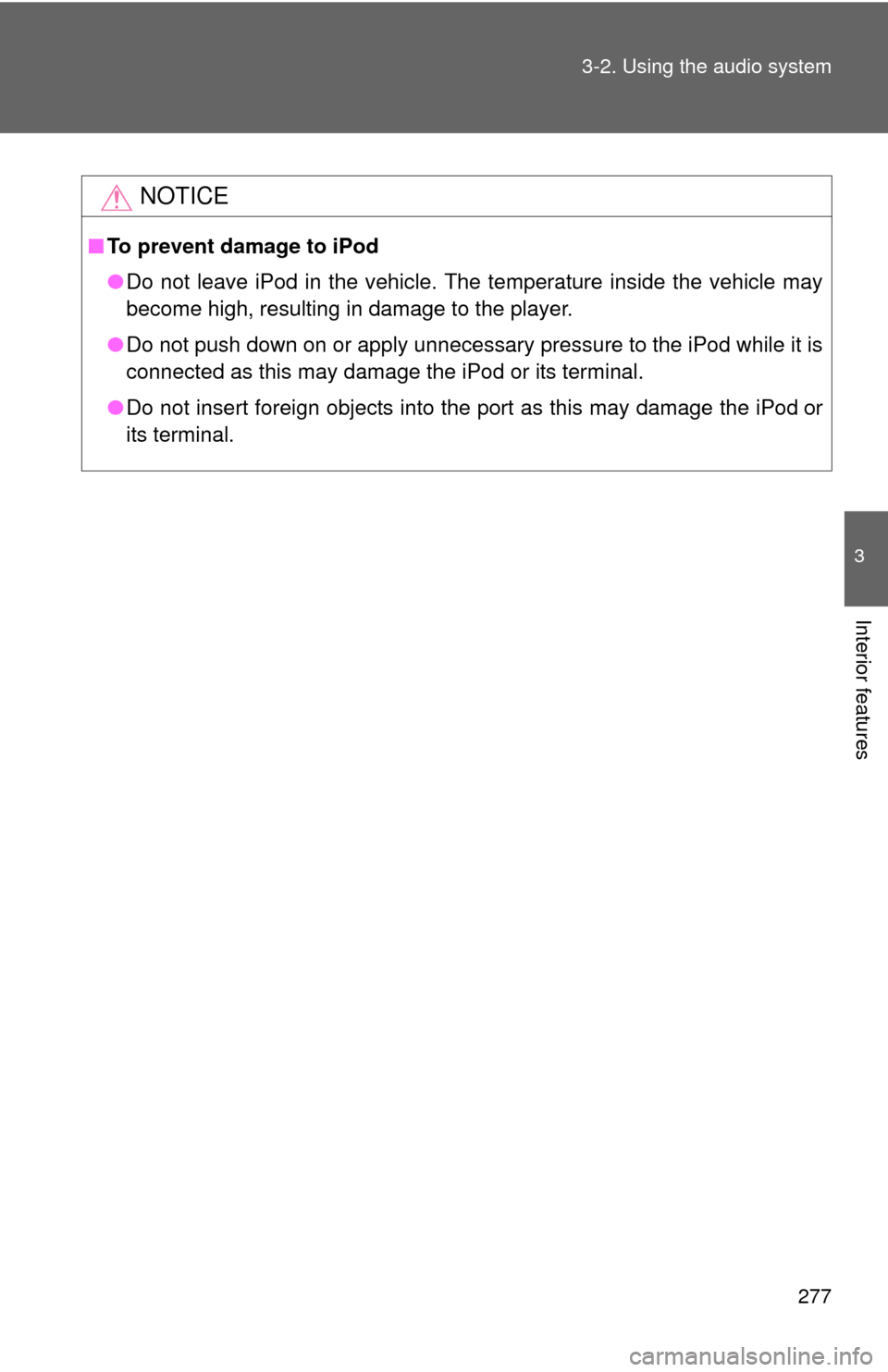
NOTICE
■
To prevent damage to iPod
●Do not leave iPod in the vehicle. The temperature inside the vehicle may
become high, resulting in damage to the player.
● Do not push down on or apply unnecessary pressure to the iPod while it is
connected as this may damage the iPod or its terminal.
● Do not insert foreign objects into the port as this may damage the iPod
or
its terminal.