light TOYOTA GR YARIS 2023 Manual Online
[x] Cancel search | Manufacturer: TOYOTA, Model Year: 2023, Model line: GR YARIS, Model: TOYOTA GR YARIS 2023Pages: 470, PDF Size: 113.17 MB
Page 207 of 470
205
4
Owner's Manual_Europe_M52P63_en
4-5. Using the driving support systems
Driving
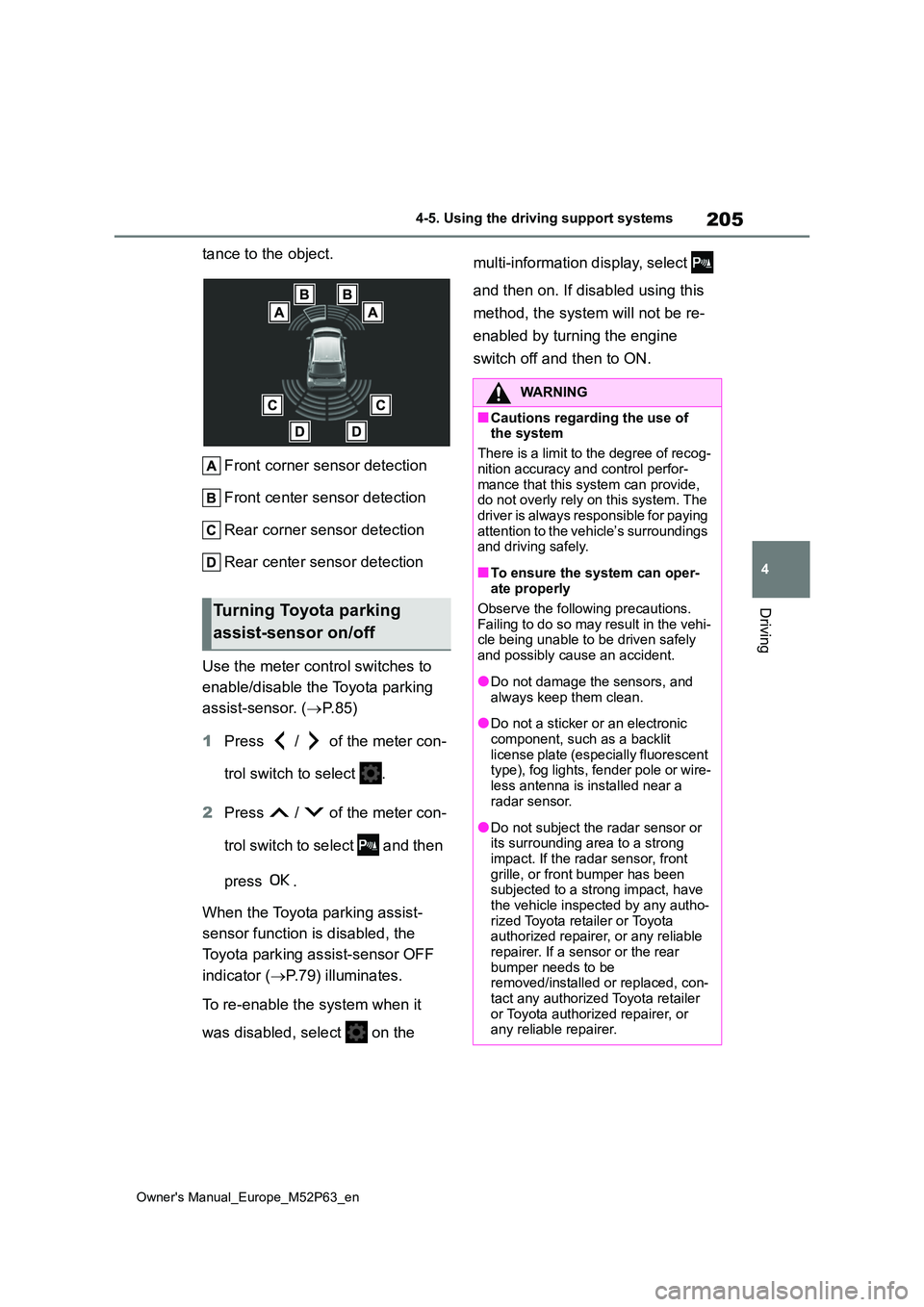
tance to the object.
Front corner sensor detection
Front center sensor detection
Rear corner sensor detection
Rear center sensor detection
Use the meter control switches to
enable/disable the Toyota parking
assist-sensor. ( P. 8 5 )
1 Press / of the meter con-
trol switch to select .
2 Press / of the meter con-
trol switch to select and then
press .
When the Toyota parking assist-
sensor function is disabled, the
Toyota parking assist-sensor OFF
indicator ( P.79) illuminates.
To re-enable the system when it
was disabled, select on the
multi-information display, select
and then on. If disabled using this
method, the system will not be re-
enabled by turning the engine
switch off and then to ON.
Turning Toyota parking
assist-sensor on/off
WARNING
■Cautions regarding the use of the system
There is a limit to the degree of recog-
nition accuracy and control perfor- mance that this system can provide, do not overly rely on this system. The
driver is always responsible for paying attention to the vehicle’s surroundings and driving safely.
■To ensure the system can oper-ate properly
Observe the following precautions. Failing to do so may result in the vehi-cle being unable to be driven safely
and possibly cause an accident.
●Do not damage the sensors, and
always keep them clean.
●Do not a sticker or an electronic
component, such as a backlit license plate (especially fluorescent type), fog lights, fender pole or wire-
less antenna is installed near a radar sensor.
●Do not subject the radar sensor or its surrounding area to a strong
impact. If the radar sensor, front grille, or front bumper has been subjected to a strong impact, have
the vehicle inspected by any autho- rized Toyota retailer or Toyota authorized repairer, or any reliable
repairer. If a sensor or the rear bumper needs to be removed/installed or replaced, con-
tact any authorized Toyota retailer or Toyota authorized repairer, or any reliable repairer.
Page 213 of 470
211
4
Owner's Manual_Europe_M52P63_en
4-5. Using the driving support systems
Driving
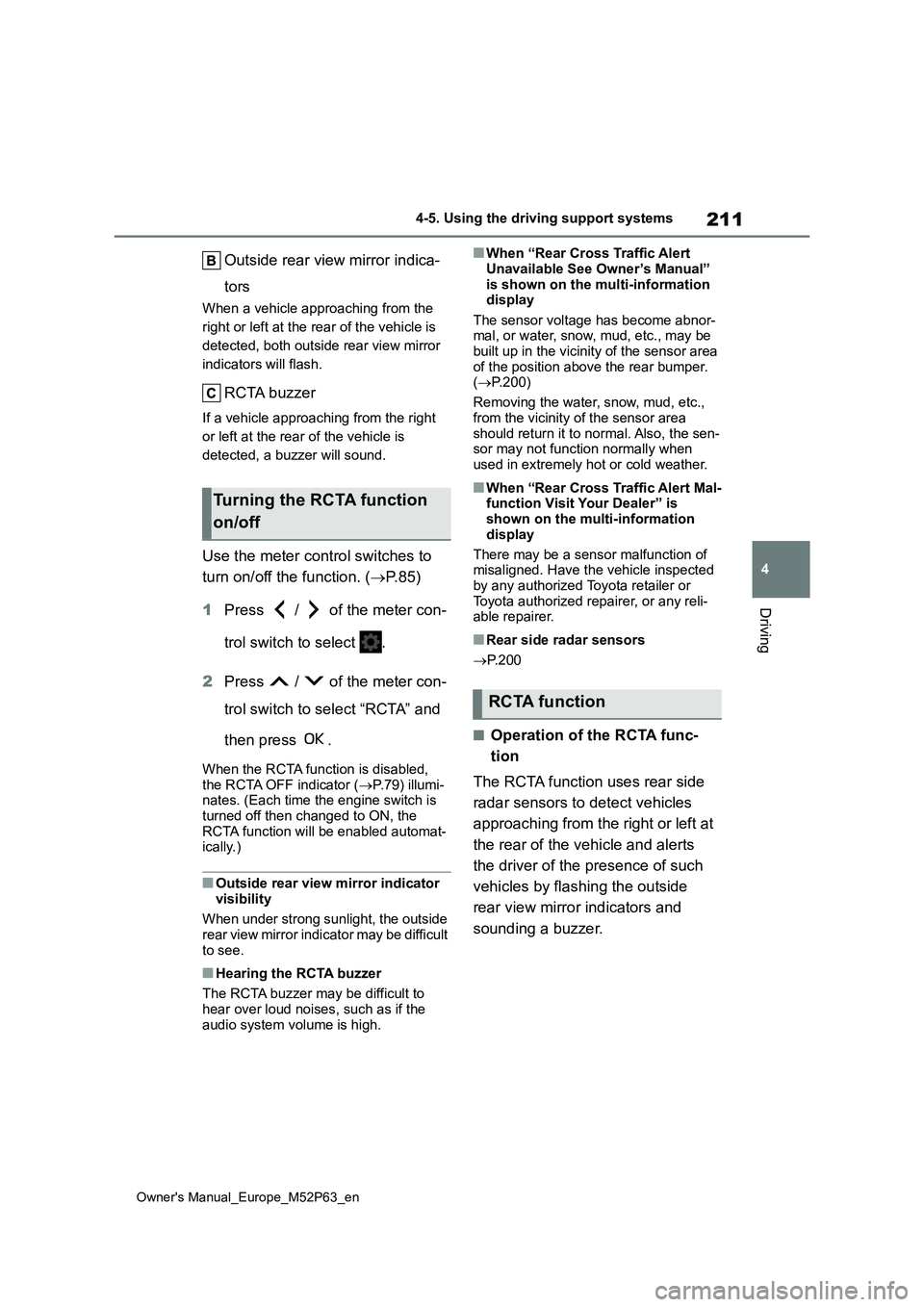
Outside rear view mirror indica-
tors
When a vehicle approaching from the
right or left at the rear of the vehicle is
detected, both outside rear view mirror
indicators will flash.
RCTA buzzer
If a vehicle approaching from the right
or left at the rear of the vehicle is
detected, a buzzer will sound.
Use the meter control switches to
turn on/off the function. ( P.85)
1 Press / of the meter con-
trol switch to select .
2 Press / of the meter con-
trol switch to select “RCTA” and
then press .
When the RCTA function is disabled, the RCTA OFF indicator ( P.79) illumi- nates. (Each time the engine switch is
turned off then changed to ON, the RCTA function will be enabled automat-ically.)
■Outside rear view mirror indicator
visibility
When under strong sunlight, the outside rear view mirror indicator may be difficult
to see.
■Hearing the RCTA buzzer
The RCTA buzzer may be difficult to hear over loud noises, such as if the
audio system volume is high.
■When “Rear Cross Traffic Alert
Unavailable See Owner’s Manual” is shown on the multi-information display
The sensor voltage has become abnor- mal, or water, snow, mud, etc., may be built up in the vicinity of the sensor area
of the position above the rear bumper. ( P.200)
Removing the water, snow, mud, etc.,
from the vicinity of the sensor area should return it to normal. Also, the sen-sor may not function normally when
used in extremely hot or cold weather.
■When “Rear Cross Traffic Alert Mal- function Visit Your Dealer” is shown on the multi-information
display
There may be a sensor malfunction of misaligned. Have the vehicle inspected
by any authorized Toyota retailer or Toyota authorized repairer, or any reli-able repairer.
■Rear side radar sensors
P. 2 0 0
■Operation of the RCTA func-
tion
The RCTA function uses rear side
radar sensors to detect vehicles
approaching from the right or left at
the rear of the vehicle and alerts
the driver of the presence of such
vehicles by flashing the outside
rear view mirror indicators and
sounding a buzzer.
Turning the RCTA function
on/off
RCTA function
Page 220 of 470
218
Owner's Manual_Europe_M52P63_en
4-5. Using the driving support systems
■TRC (Traction Control)
Helps to maintain drive power and
prevent the drive wheels from spin-
ning when starting the vehicle or
accelerating on slippery roads
■Hill-start assist control
Helps to reduce the backward
movement of the vehicle when
starting on an uphill
■EPS (Electric Power Steering)
Employs an electric motor to
reduce the amount of effort needed
to turn the steering wheel.
■Active Torque Split AWD sys-
tem
Automatically switches from front-
wheel drive to all-wheel drive
(AWD) according to the driving con-
ditions, helping to ensure reliable
handling and stability. Examples of
conditions where the system will
switch to AWD are when cornering,
going uphill, starting off or acceler-
ating, and when the road surface is
slippery due to snow, rain, etc.
■Emergency brake signal
When the brakes are applied sud-
denly, the emergency flashers auto-
matically flash to alert the vehicle
behind.
■The secondary Collision Brake
(if equipped)
When the SRS airbag sensor
detects a collision and the system
operates, the brakes and brake
lights are automatically controlled
to reduce the vehicle speed and
help reduce the possibility of further
damage due to a secondary colli-
sion.
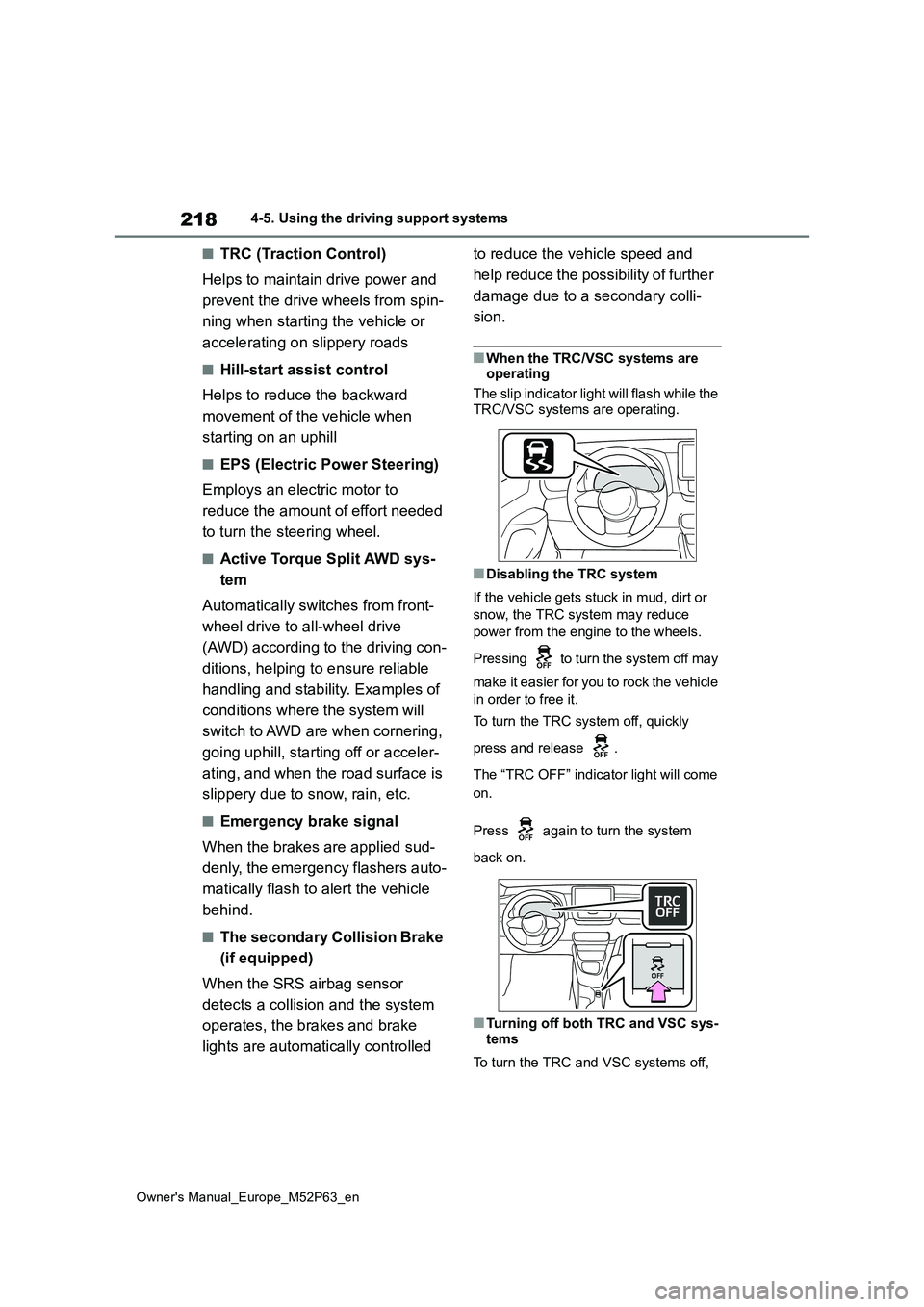
■When the TRC/VSC systems are operating
The slip indicator light will flash while the
TRC/VSC systems are operating.
■Disabling the TRC system
If the vehicle gets stuck in mud, dirt or
snow, the TRC system may reduce
power from the engine to the wheels.
Pressing to turn the system off may
make it easier for you to rock the vehicle
in order to free it.
To turn the TRC system off, quickly
press and release .
The “TRC OFF” indicator light will come
on.
Press again to turn the system
back on.
■Turning off both TRC and VSC sys-
tems
To turn the TRC and VSC systems off,
Page 221 of 470
219
4
Owner's Manual_Europe_M52P63_en
4-5. Using the driving support systems
Driving
press and hold for more than 3 sec-
onds while the vehicle is stopped.
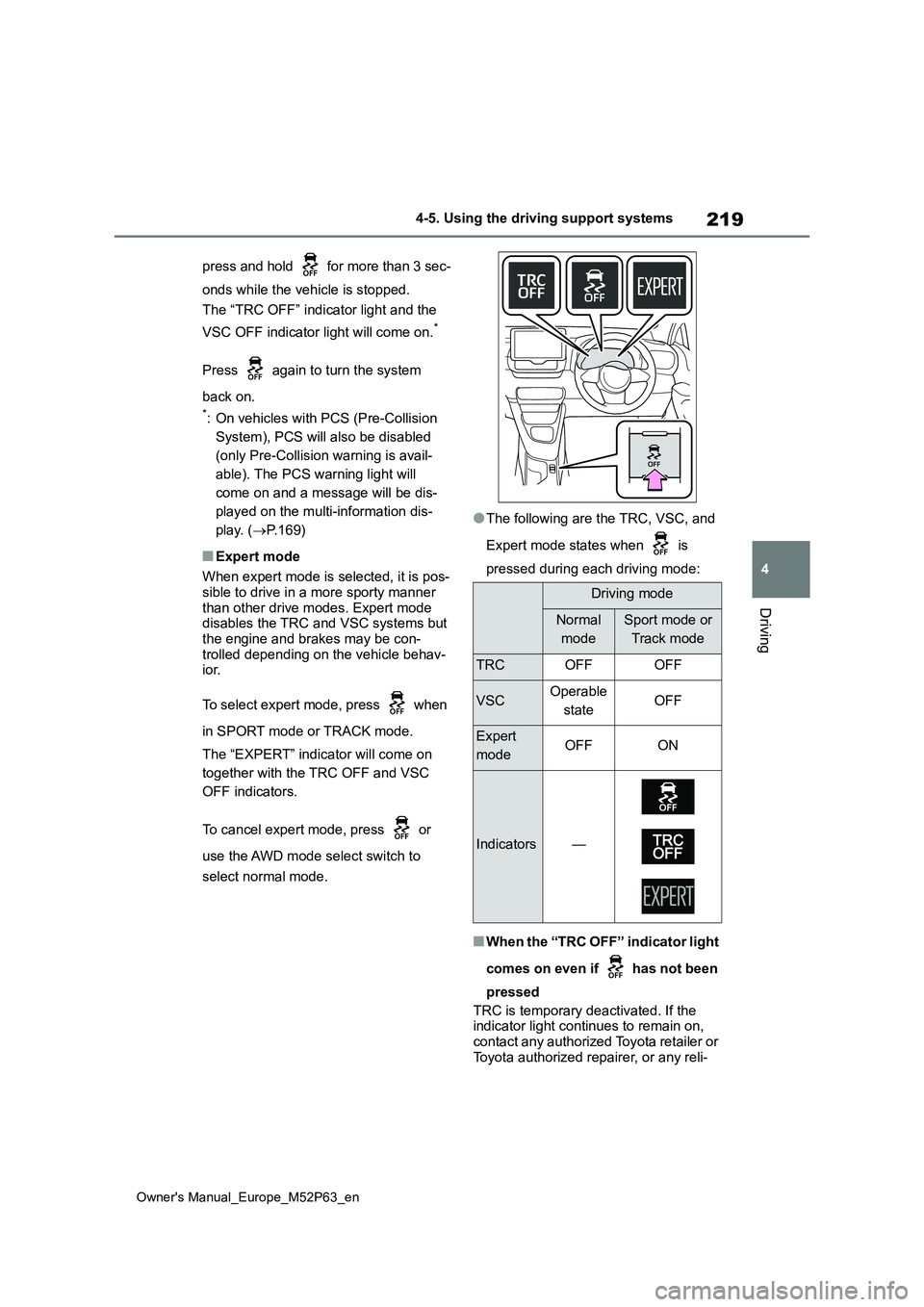
The “TRC OFF” indicator light and the
VSC OFF indicator light will come on.*
Press again to turn the system
back on.
*: On vehicles with PCS (Pre-Collision
System), PCS will also be disabled
(only Pre-Collision warning is avail-
able). The PCS warning light will
come on and a message will be dis-
played on the multi-information dis-
play. ( P.169)
■Expert mode
When expert mode is selected, it is pos- sible to drive in a more sporty manner
than other drive modes. Expert mode disables the TRC and VSC systems but the engine and brakes may be con-
trolled depending on the vehicle behav- ior.
To select expert mode, press when
in SPORT mode or TRACK mode.
The “EXPERT” indicator will come on
together with the TRC OFF and VSC
OFF indicators.
To cancel expert mode, press or
use the AWD mode select switch to
select normal mode.
●The following are the TRC, VSC, and
Expert mode states when is
pressed during each driving mode:
■When the “TRC OFF” indicator light
comes on even if has not been
pressed
TRC is temporary deactivated. If the indicator light continues to remain on, contact any authorized Toyota retailer or
Toyota authorized repairer, or any reli-
Driving mode
Normal
mode
Sport mode or
Track mode
TRCOFFOFF
VSCOperable
stateOFF
Expert
modeOFFON
Indicators—
Page 222 of 470

220
Owner's Manual_Europe_M52P63_en
4-5. Using the driving support systems
able repairer.
■Operating conditions of hill-start
assist control
When the following four conditions are met, the hill-start assist control will oper-
ate:
●The shift lever is in a position other
than R when starting off forward on an upward incline, or the shift lever is in R when starting off backward on an
upward incline.
●The vehicle is stopped
●The accelerator pedal is not depressed
●The parking brake is not engaged
●Engine switch is turned to ON
■Automatic system cancelation of hill-start assist control
The hill-start assist control will turn off in
any of the following situations:
●The shift lever is shifted to R when
starting off forward on an upward incline, or the shift lever is shifted to other than R when starting off back-
ward on an upward incline.
●The accelerator pedal is depressed
●The parking brake is engaged
●2 seconds at maximum elapsed after the brake pedal is released
●Engine switch is turned to OFF
■Sounds and vibrations caused by the ABS, brake assist, VSC, TRC and hill-start assist control sys-
tems
●A sound may be heard from the
engine compartment when the brake pedal is depressed repeatedly, when the engine is started or just after the
vehicle begins to move. This sound does not indicate that a malfunction has occurred in any of these systems.
●Any of the following conditions may occur when the above systems are
operating. None of these indicates that a malfunction has occurred.• Vibrations may be felt through the
vehicle body and steering.
• A motor sound may be heard also after the vehicle comes to a stop.• The brake pedal may pulsate slightly
after the ABS is activated. • The brake pedal may move down slightly after the ABS is activated.
■EPS operation sound
When the steering wheel is operated, a motor sound (whirring sound) may be heard. This does not indicate a malfunc-
tion.
■Automatic reactivation of TRC and VSC systems
After turning the TRC and VSC systems
off, the systems will be automatically re- enabled in the following situations:
●When the engine switch is turned off
●If only the TRC system is turned off,
the TRC will turn on when vehicle speed increases.If both the TRC and VSC systems are
turned off, automatic re-enabling will not occur when vehicle speed increases.
■Reduced effectiveness of the EPS
system
The effectiveness of the EPS system is reduced to prevent the system from
overheating when there is frequent steering input over an extended period of time. The steering wheel may feel
heavy as a result. Should this occur, refrain from excessive steering input or stop the vehicle and turn the engine off.
The EPS system should return to nor- mal within 10 minutes.
■Operating conditions of emergency brake signal
When the following conditions are met, the emergency brake signal will oper-ates:
●The emergency flashers are off
●Actual vehicle speed is over 55 km/h (35 mph)
●The system judges from the vehicle deceleration that it is a sudden brak-
Page 225 of 470
223
4
Owner's Manual_Europe_M52P63_en
4-5. Using the driving support systems
Driving
WARNING
●Unlike the parking brake, hill-start assist control is not intended to hold
the vehicle stationary for an extended period of time. Do not attempt to use hill-start assist con-
trol to hold the vehicle on an incline, as doing so may lead to an acci-dent.
■When the TRC/VSC is activated
The slip indicator light flashes. Always
drive carefully. Reckless driving may cause an accident. Exercise particular care when the indicator light flashes.
■When the TRC/VSC systems are turned off
Be especially careful and drive at a speed appropriate to the road condi-tions. As these are the systems to
help ensure vehicle stability and driv- ing force, do not turn the TRC/VSC systems off unless necessary.
■Expert mode precautions
●Do not use on public roads.
●Use only when the road conditions and safely of the surrounding area
can be ensured.
●Proper use of expert mode requires
a professional level of driving skill. When using expert mode, always check the road conditions and sur-
rounding area and drive more care- fully than usual.
■Replacing tires
Make sure that all tires are of the specified size, brand, tread pattern
and total load capacity. In addition, make sure that the tires are inflated to the recommended tire inflation pres-
sure level. The ABS, TRC and VSC systems will not function correctly if different tires
are installed on the vehicle. Contact any authorized Toyota retailer or Toyota authorized repairer, or any
reliable repairer for further information when replacing tires or wheels.
■Handling of tires and the suspen-sion
Using tires with any kind of problem
or modifying the suspension will affect the driving assist systems, and may cause a system to malfunction.
■Secondary Collision Brake (if equipped)
Do not rely solely upon the Secondary Collision Brake. This system is designed to help reduce the possibil-
ity of further damage due to a second- ary collision, however, that effect changes according to various condi-
tions. Overly relying on the system may result in death or serious injury.
■Active Torque Split AWD system
●The Active Torque Split AWD sys-tem is designed to ensure driving
stability on general roads and not for off-road driving such as for rally-ing. Do not subject the system to
extreme driving conditions.
●Drive carefully on slippery road sur-
faces.
Page 227 of 470
225
4
Owner's Manual_Europe_M52P63_en
4-6. Driving tips
Driving
the driving conditions:
Do not try to forcibly open a win-
dow or move a wiper that is fro-
zen. Pour warm water over the
frozen area to melt the ice. Wipe
away the water immediately to
prevent it from freezing.
To ensure proper operation of
the climate control system fan,
remove any snow that has accu-
mulated on the air inlet vents in
front of the windshield.
Check for and remove any
excess ice or snow that may
have accumulated on the exte-
rior lights, vehicle’s roof, chassis,
around the tires or on the brakes.
Remove any snow or mud from
the bottom of your shoes before
getting in the vehicle.
Accelerate the vehicle slowly, keep
a safe distance between you and
the vehicle ahead, and drive at a
reduced speed suitable to road
conditions.
Park the vehicle and shift the
shift lever to 1 or R without set-
ting the parking brake. The park-
ing brake may freeze up,
preventing it from being
released. If the vehicle is parked
without setting the parking brake,
make sure to block the wheels.
Failure to do so may be danger-
ous because it may cause the
vehicle to move unexpectedly,
possibly leading to an accident.
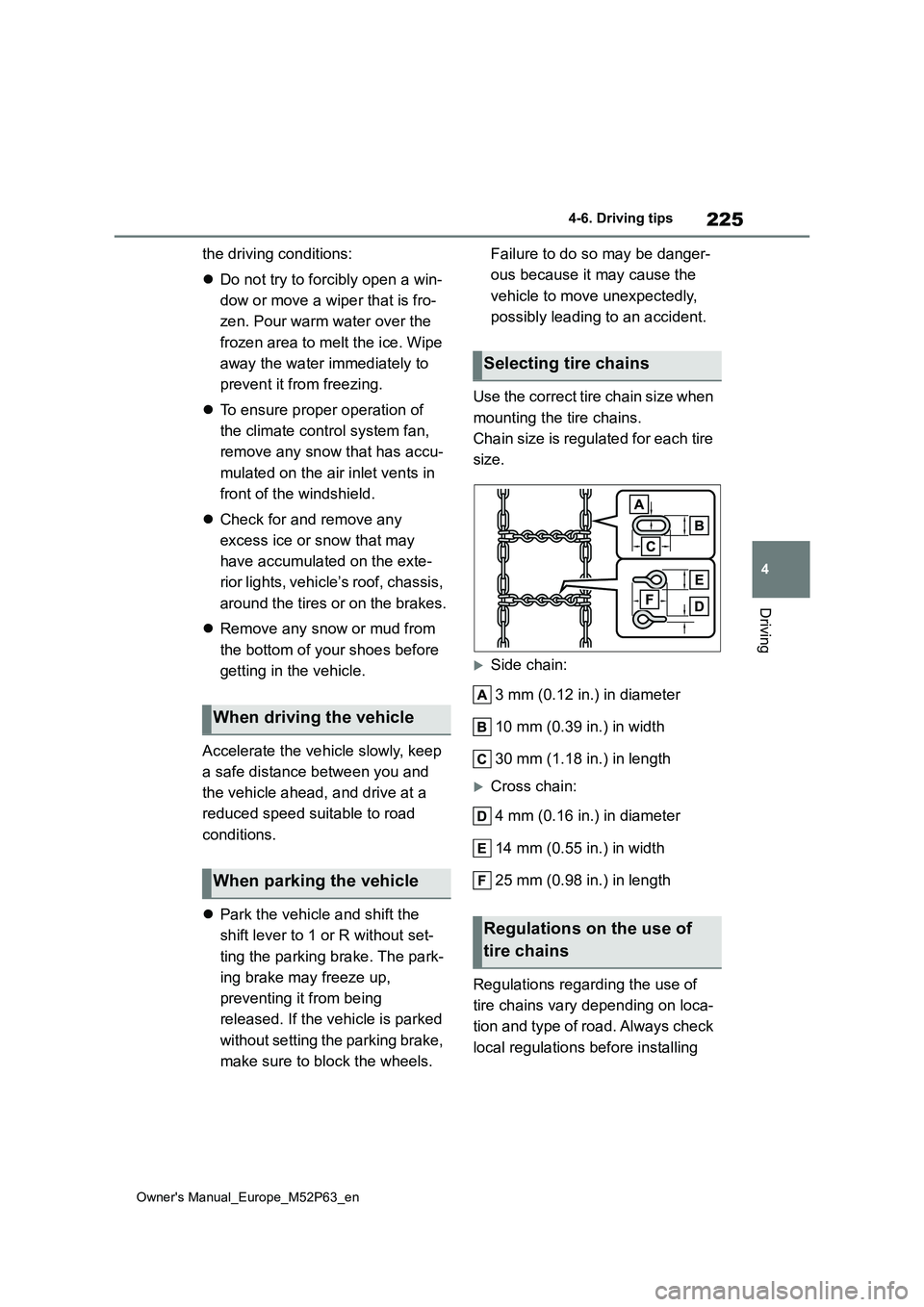
Use the correct tire chain size when
mounting the tire chains.
Chain size is regulated for each tire
size.
Side chain:
3 mm (0.12 in.) in diameter
10 mm (0.39 in.) in width
30 mm (1.18 in.) in length
Cross chain:
4 mm (0.16 in.) in diameter
14 mm (0.55 in.) in width
25 mm (0.98 in.) in length
Regulations regarding the use of
tire chains vary depending on loca-
tion and type of road. Always check
local regulations before installing
When driving the vehicle
When parking the vehicle
Selecting tire chains
Regulations on the use of
tire chains
Page 229 of 470
5
227
Owner's Manual_Europe_M52P63_en
5
Interior features
Interior features
5-1. Using the air conditioning
system and defogger
Automatic air conditioning sys-
tem ................................. 228
Heated steering wheel/seat
heaters ........................... 233
5-2. Using the interior lights
Interior lights list................ 235
5-3. Using the storage features
List of storage features ..... 237
Luggage compartment features
....................................... 239
5-4. Other interior features
Other interior features....... 242
Page 237 of 470
235
5
Owner's Manual_Europe_M52P63_en
5-2. Using the interior lights
Interior features
5-2.Using the interior lights
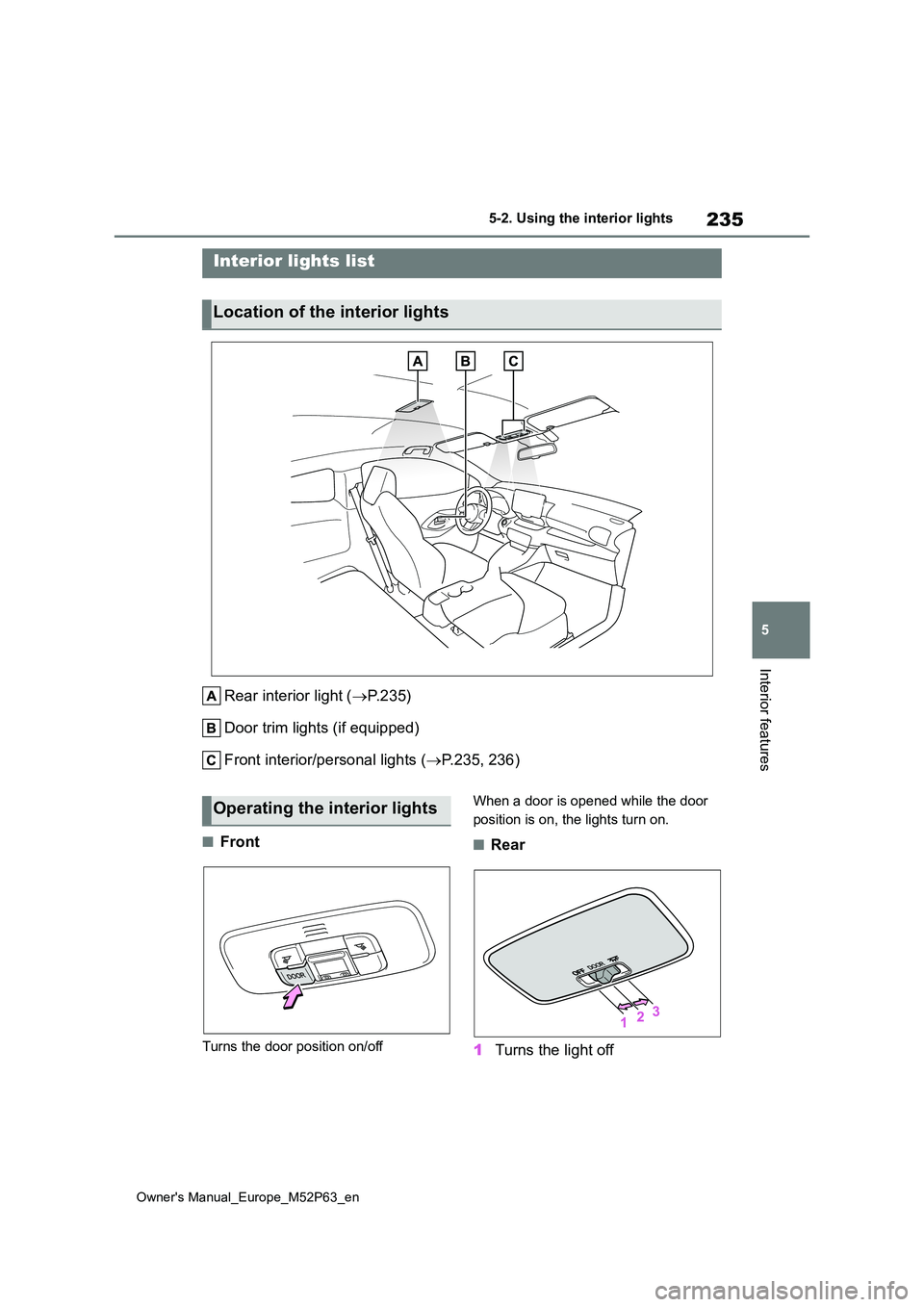
Rear interior light (P. 2 3 5 )
Door trim lights (if equipped)
Front interior/personal lights ( P.235, 236)
■Front
Turns the door position on/off
When a door is opened while the door
position is on, the lights turn on.
■Rear
1 Turns the light off
Interior lights list
Location of the interior lights
Operating the interior lights
Page 238 of 470
236
Owner's Manual_Europe_M52P63_en
5-2. Using the interior lights
2Turns the door position on
3 Turns the light on
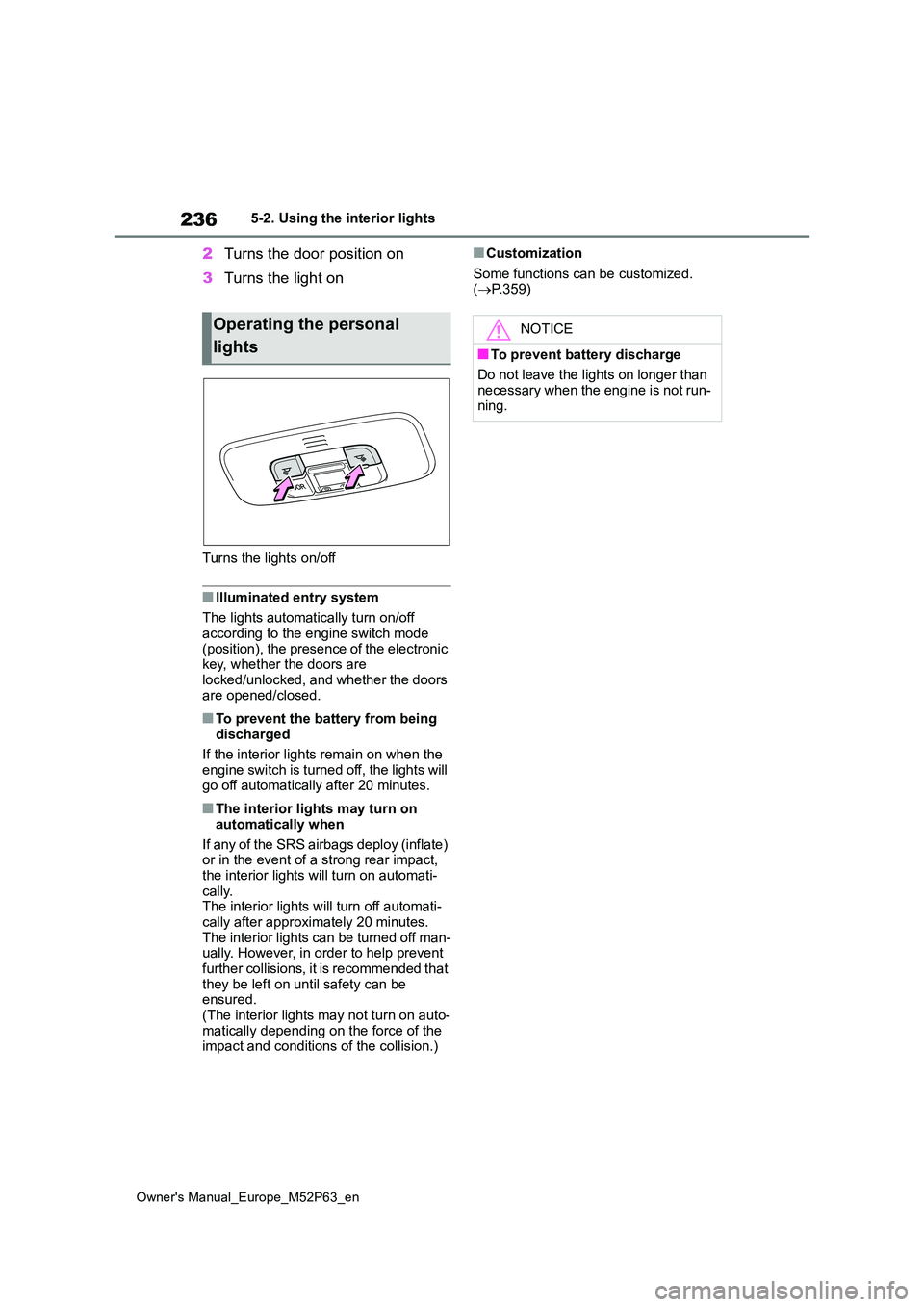
Turns the lights on/off
■Illuminated entry system
The lights automatically turn on/off
according to the engine switch mode (position), the presence of the electronic key, whether the doors are
locked/unlocked, and whether the doors are opened/closed.
■To prevent the battery from being discharged
If the interior lights remain on when the engine switch is turned off, the lights will go off automatically after 20 minutes.
■The interior lights may turn on
automatically when
If any of the SRS airbags deploy (inflate) or in the event of a strong rear impact,
the interior lights will turn on automati- cally.The interior lights will turn off automati-
cally after approximately 20 minutes. The interior lights can be turned off man-ually. However, in order to help prevent
further collisions, it is recommended that they be left on until safety can be ensured.
(The interior lights may not turn on auto- matically depending on the force of the impact and conditions of the collision.)
■Customization
Some functions can be customized. ( P.359)
Operating the personal
lights
NOTICE
■To prevent battery discharge
Do not leave the lights on longer than necessary when the engine is not run-ning.