instrument panel TOYOTA HIGHLANDER 2008 XU40 / 2.G Owners Manual
[x] Cancel search | Manufacturer: TOYOTA, Model Year: 2008, Model line: HIGHLANDER, Model: TOYOTA HIGHLANDER 2008 XU40 / 2.GPages: 577, PDF Size: 11.46 MB
Page 16 of 577
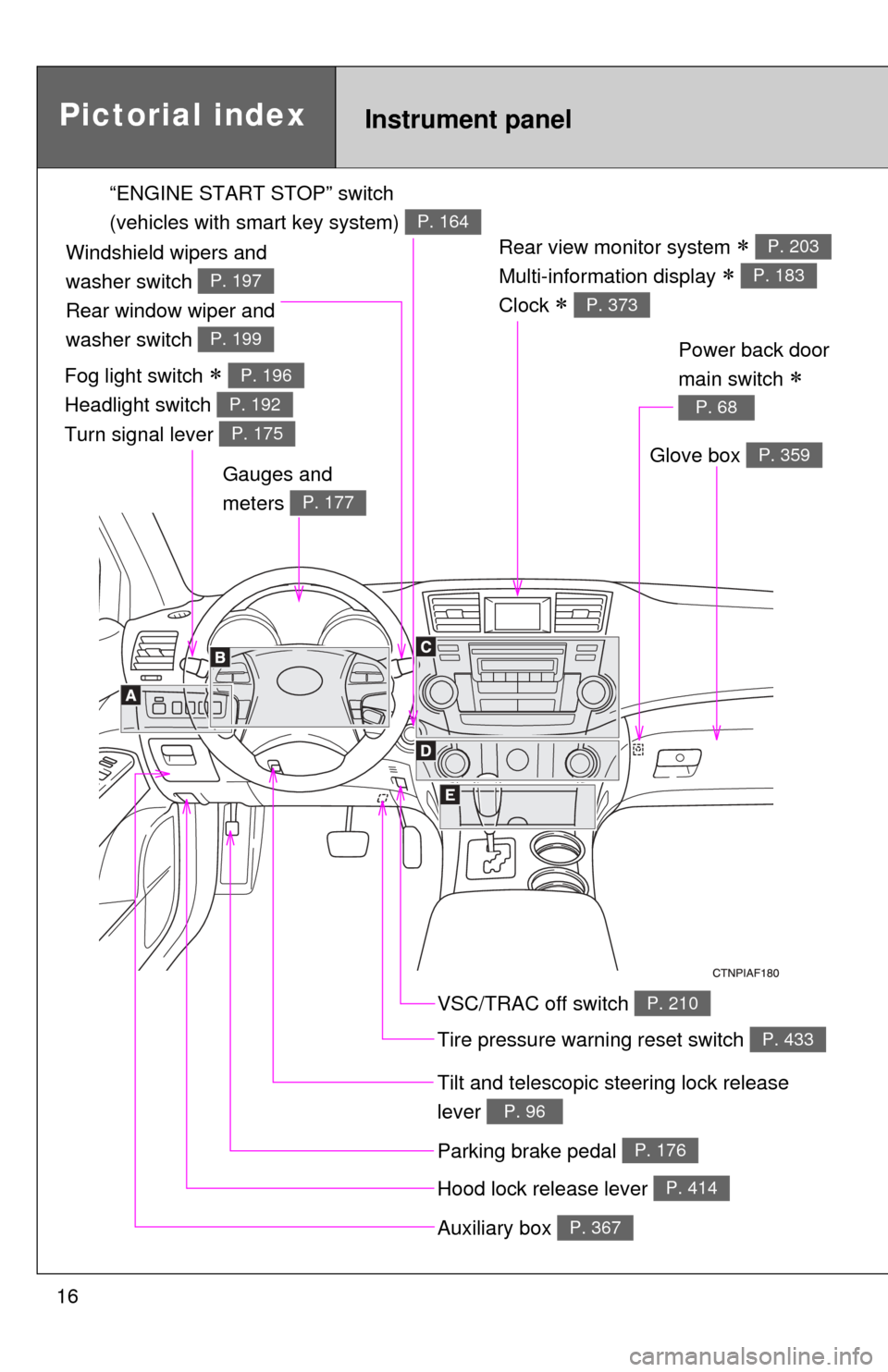
16
Rear view monitor system
Multi-information display
Clock
P. 203
P. 183
P. 373
Gauges and
meters
P. 177
Tilt and telescopic steering lock release
lever
P. 96
Glove box P. 359
Pictorial indexInstrument panel
Power back door
main switch
P. 68
VSC/TRAC off switch P. 210
Tire pressure warning reset switch P. 433
Parking brake pedal P. 176
Hood lock release lever P. 414
Auxiliary box P. 367
“ENGINE START STOP” switch
(vehicles with smart key system)
P. 164
Fog light switch
Headlight switch
Turn signal lever P. 196
P. 192
P. 175
Windshield wipers and
washer switch
Rear window wiper and
washer switch
P. 197
P. 199
Page 17 of 577
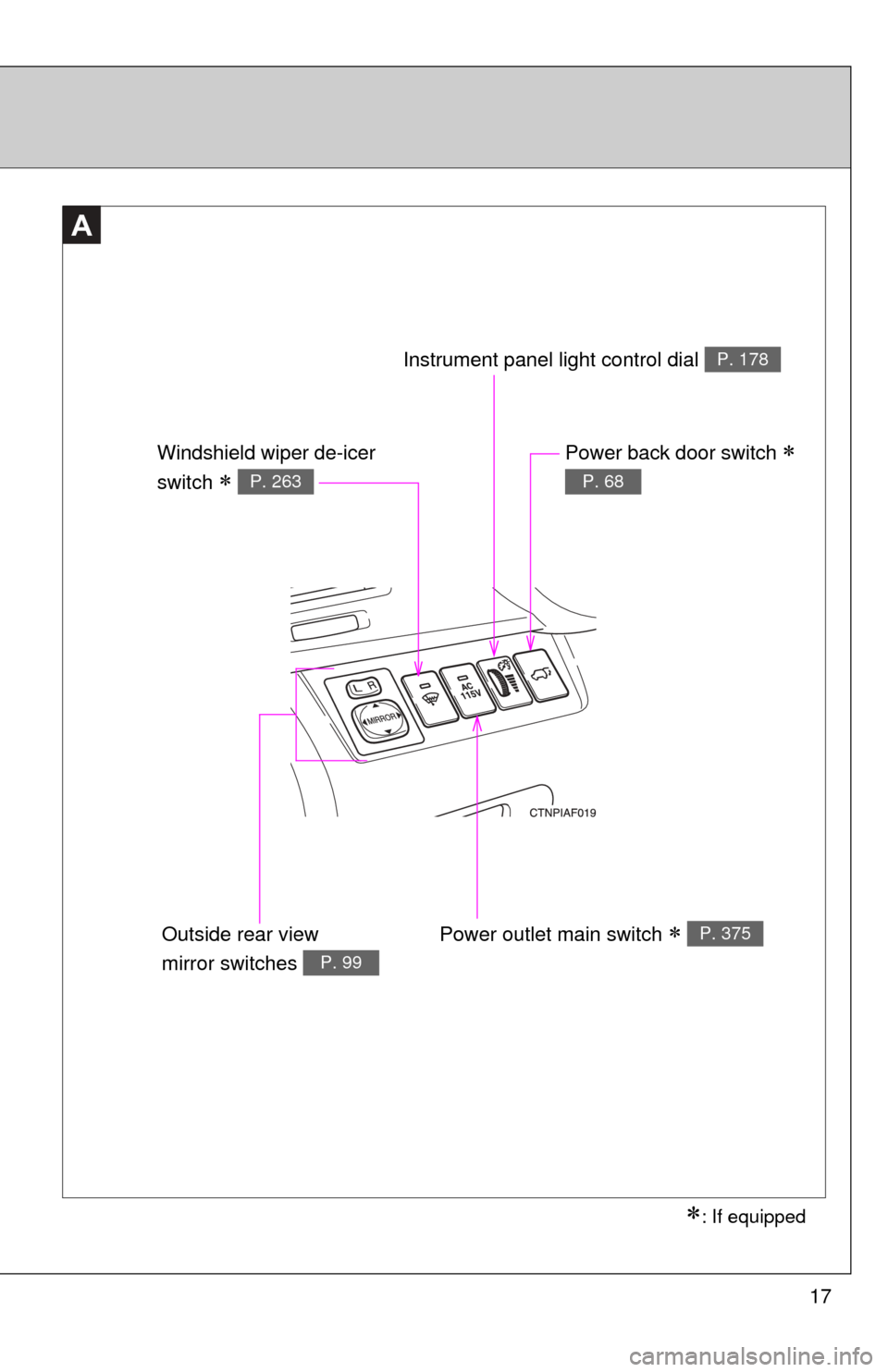
17
A
: If equipped
Power outlet main switch P. 375
Power back door switch
P. 68
Instrument panel light control dial P. 178
Windshield wiper de-icer
switch
P. 263
Outside rear view
mirror switches
P. 99
Page 18 of 577
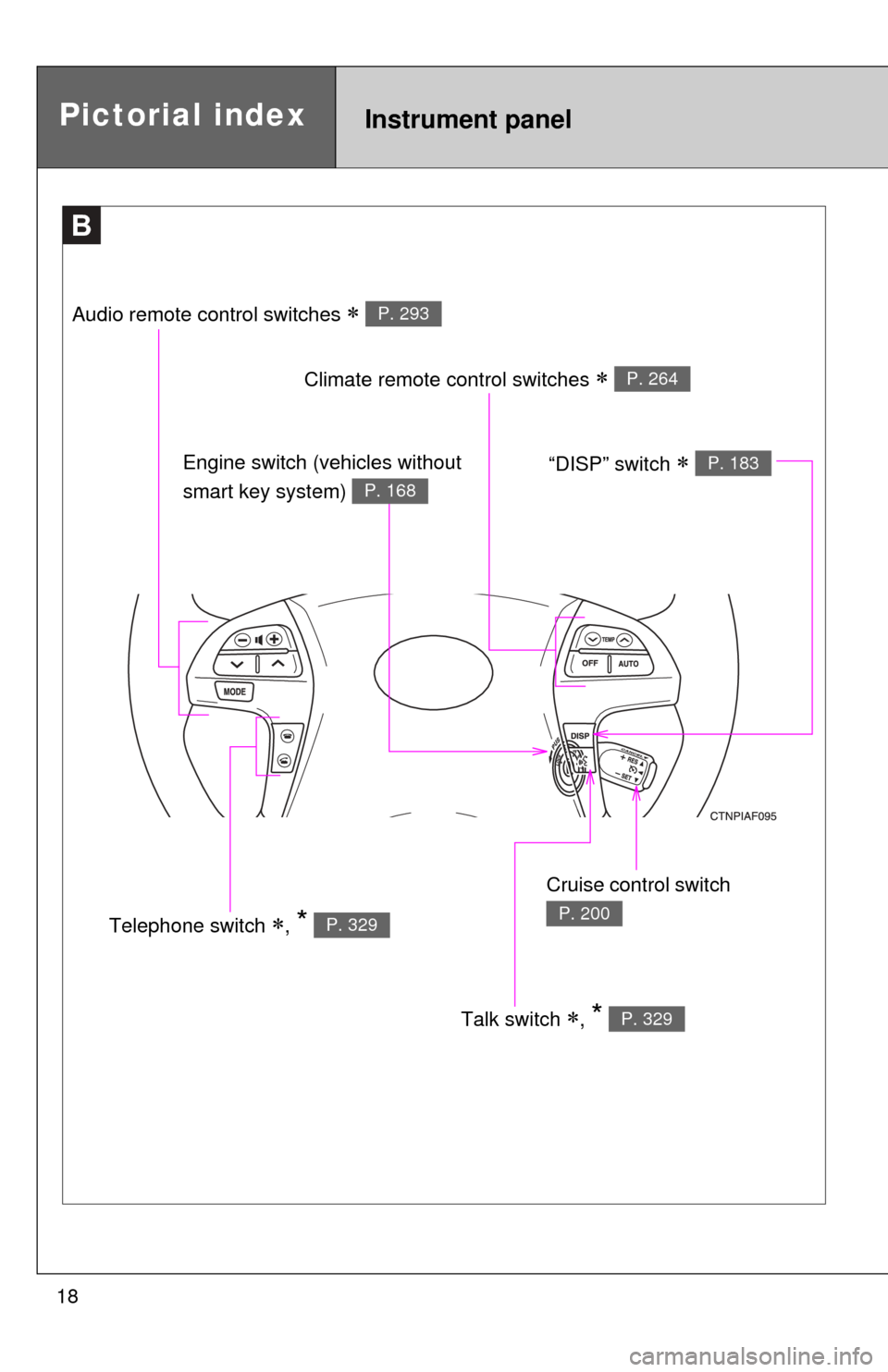
18
B
Talk switch , * P. 329
Pictorial indexInstrument panel
Audio remote control switches P. 293
Climate remote control switches P. 264
Cruise control switch
P. 200Telephone switch , * P. 329
Engine switch (vehicles without
smart key system)
P. 168
“DISP” switch P. 183
Page 20 of 577
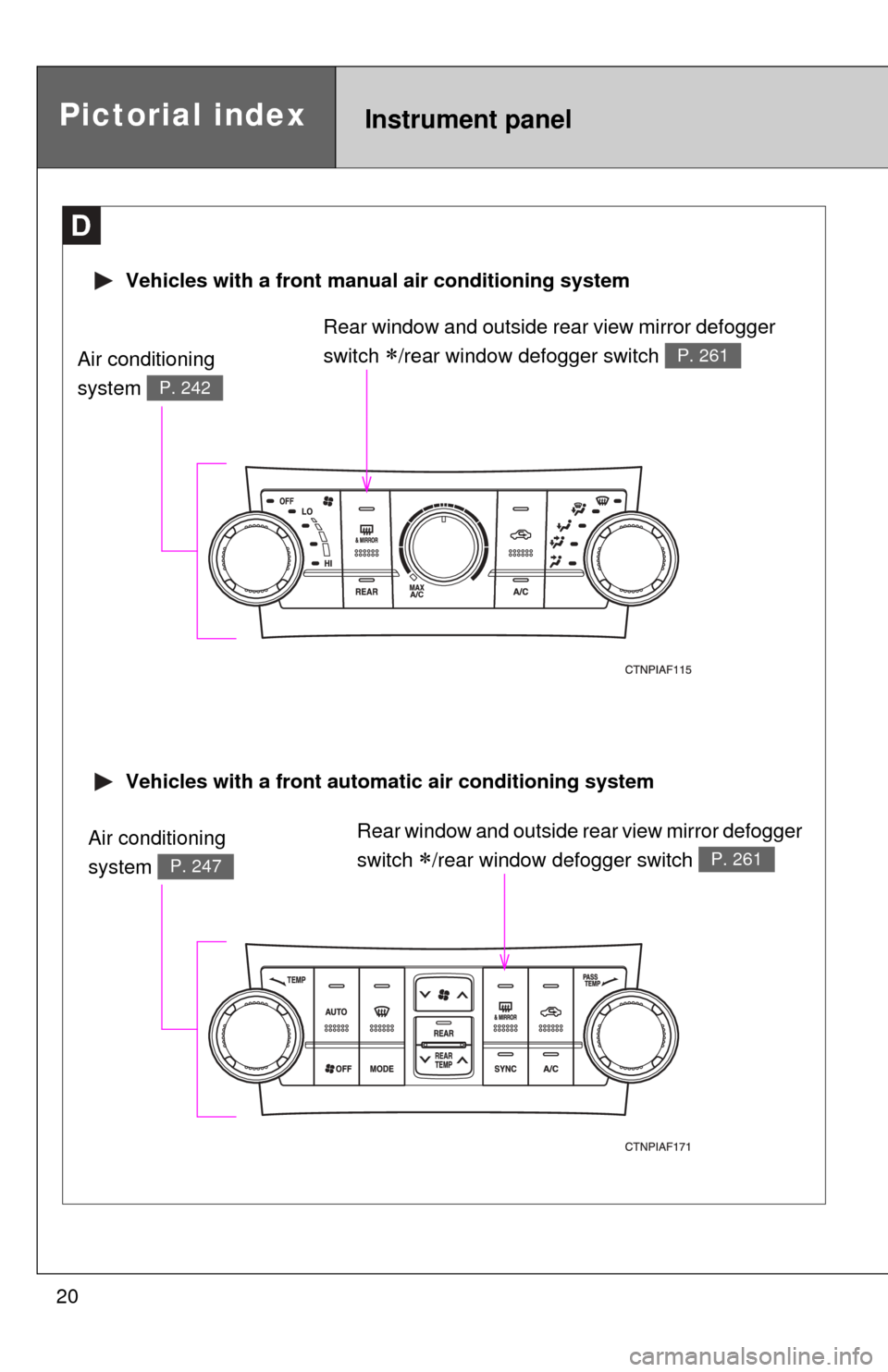
20
Pictorial indexInstrument panel
Rear window and outside rear view mirror defogger
switch
/rear window defogger switch P. 261
D
Vehicles with a front automatic air conditioning system
Vehicles with a front manual air conditioning system
Rear window and outside rear view mirror defogger
switch
/rear window defogger switch P. 261
Air conditioning
system
P. 247
Air conditioning
system
P. 242
Page 39 of 577

39
1-2. Opening, closing and locking the doors
1
Before driving
■
Key battery depletion
●The standard battery life is 1 to 2 years. (The battery becomes depleted
even if the electronic key is not used.) If the smart key system or the
wireless remote control function does not operate, or the detection area
becomes smaller, the battery may be depleted. Replace the battery when
necessary. ( P. 453)
● To avoid serious deterioration, do not leave the electronic key within 3 ft.
(1 m) of the following electrical appliances that produce a magnetic field.
•TVs
• Personal computers
• Recharging cellular phones or cordless phones
• Table lamps
■ To operate the system properly
Make sure to carry the electronic key when operating the system. Do not get
the electronic key too close to the vehicle when operating the system from
the outside of the vehicle.
Depending on the position and holding condition of the electronic key, the
key may not be detected correctly and the system may not operate properly.
(The alarm may go off accidentally, or the door lock prevention may not func-
tion.)
■ Note for the entry function
●Even when the electronic key is within the effective range (detection
areas), the system may not operate properly in the following cases.
• The electronic key is too close to the window or outside door handle,
near the ground, or in a high place when the doors are locked or
unlocked.
• The electronic key is on the instrument panel, luggage cover, floor or in the glove box when the engine is started or “ENGINE START STOP”
switch modes are changed.
● As long as the electronic key is within the effective range, the doors may
be locked or unlocked by anyone.
● Even if the electronic key is not inside the vehicle, it may be possible to
start the engine if the electronic key is near the window.
Page 68 of 577
68
1-2. Opening, closing and locking the doors
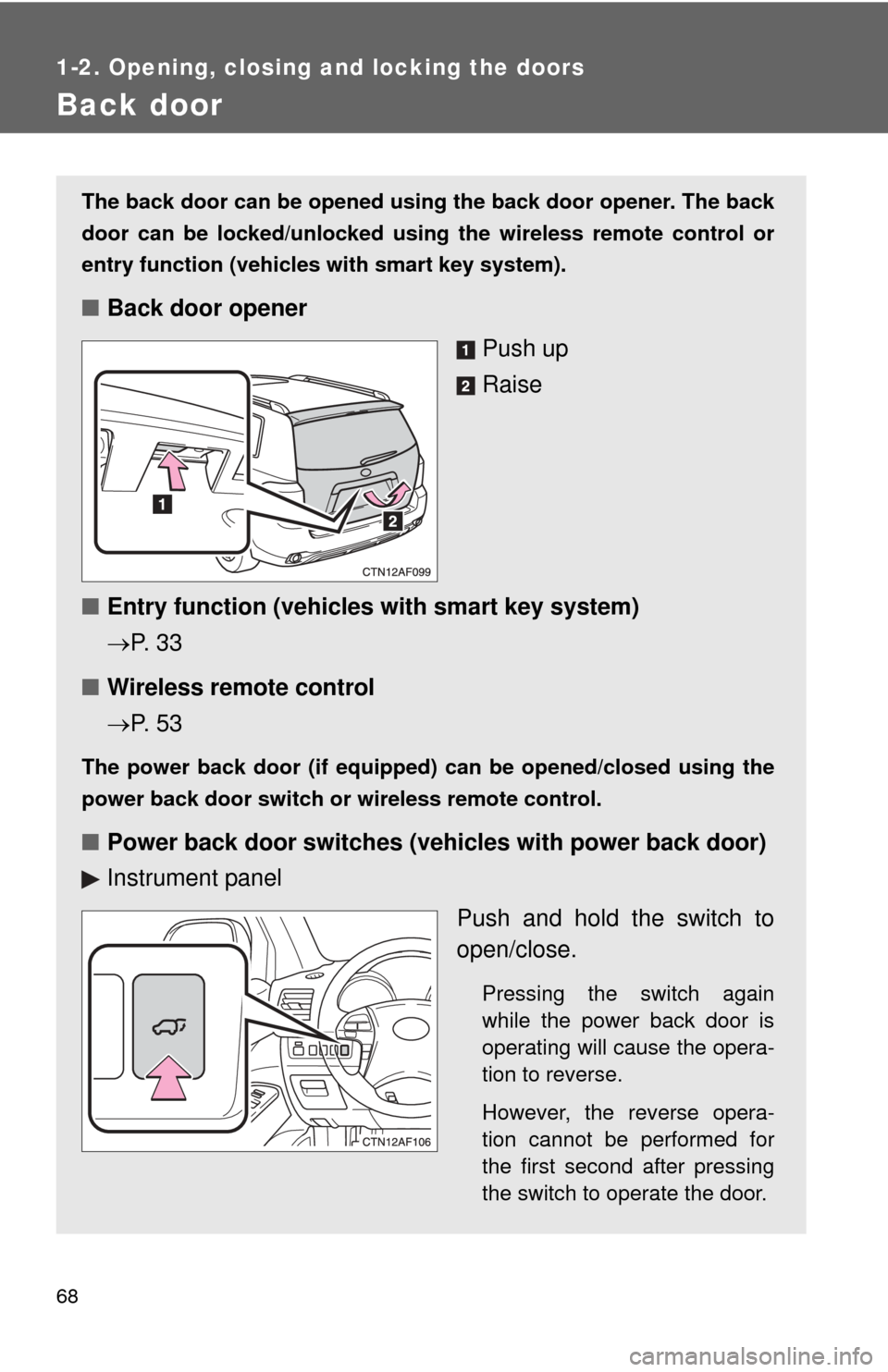
Back door
The back door can be opened using the back door opener. The back
door can be locked/unlocked using the wireless remote control or
entry function (vehicles with smart key system).
■ Back door opener
Push up
Raise
■ Entry function (vehicles with smart key system)
P. 3 3
■ Wireless remote control
P. 5 3
The power back door (if equipped) can be opened/closed using the
power back door switch or wireless remote control.
■ Power back door switch es (vehicles with power back door)
Instrument panel
Push and hold the switch to
open/close.
Pressing the switch again
while the power back door is
operating will cause the opera-
tion to reverse.
However, the reverse opera-
tion cannot be performed for
the first second after pressing
the switch to operate the door.
Page 128 of 577
128 1-7. Safety information
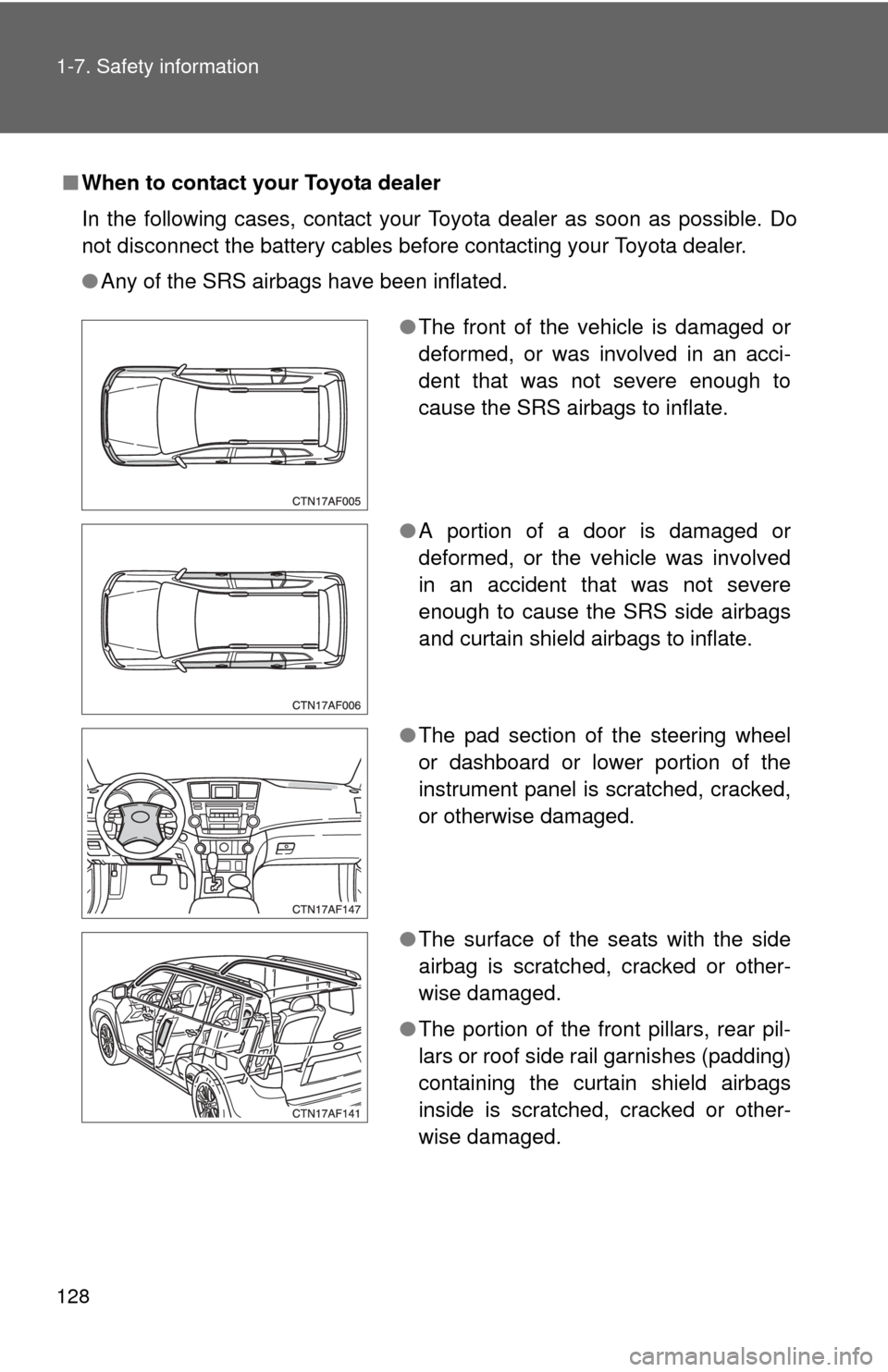
■When to contact your Toyota dealer
In the following cases, contact your Toyota dealer as soon as possible. Do
not disconnect the battery cables before contacting your Toyota dealer.
●Any of the SRS airbags have been inflated.
●The front of the vehicle is damaged or
deformed, or was involved in an acci-
dent that was not severe enough to
cause the SRS airbags to inflate.
● A portion of a door is damaged or
deformed, or the vehicle was involved
in an accident that was not severe
enough to cause the SRS side airbags
and curtain shield airbags to inflate.
● The pad section of the steering wheel
or dashboard or lower portion of the
instrument panel is scratched, cracked,
or otherwise damaged.
● The surface of the seats with the side
airbag is scratched, cracked or other-
wise damaged.
● The portion of the front pillars, rear pil-
lars or roof side rail garnishes (padding)
containing the curtain shield airbags
inside is scratched, cracked or other-
wise damaged.
Page 129 of 577

129
1-7. Safety information
1
Before driving
CAUTION
■
SRS airbag precautions
Observe the following precautions regarding the airbags.
Failure to do so may cause death or serious injury.
●The driver and all passengers in the vehicle must wear their seat belts
properly.
The SRS airbags are supplemental devices to be used with the seat belts.
● The SRS driver airbag deploys with considerable force, and can cause
death or serious injury especially if the driver is very close to the airbag.
The National Highway Traffic Safety Administration (“NHTSA”) advises:
Since the risk zone for the driver’s airbag is the first 2 - 3 in. (50 - 75 mm) of
inflation, placing yourself 10 in. (250 mm) from your driver airbag provides
you with a clear margin of safety. This distance is measured from the center
of the steering wheel to your breastbone. If you sit less than 10 in. (250 mm)
away now, you can change your driving position in several ways:
• Move your seat to the rear as far as you can while still reaching thepedals comfortably.
• Slightly recline the back of the seat. Although vehicle designs vary, many drivers can achieve the 10 in.
(250 mm) distance, even with the driver seat all the way forward, sim-
ply by reclining the back of the seat somewhat. If reclining the back of
your seat makes it hard to see the road, raise yourself by using a firm,
non-slippery cushion, or raise the seat if your vehicle has that feature\
.
• If your steering wheel is adjustable, tilt it downward. This points the air- bag toward your chest instead of your head and neck.
The seat should be adjusted as recommended by NHTSA above, while still
maintaining control of the foot pedals, steering wheel, and your view of the
instrument panel controls.
Page 132 of 577
132 1-7. Safety information
CAUTION
■SRS airbag precautions
●If the vinyl cover is put on the area where the SRS knee airbag will deploy,
be sure to remove it.
● Do not use seat accessories which cover the parts where the SRS side
airbags inflate as they may interf ere with inflation of the airbags.
● Do not strike or apply significant levels of force to the area of the SRS air-
bag components ( P. 123).
Doing so can cause the SRS airbags to malfunction.
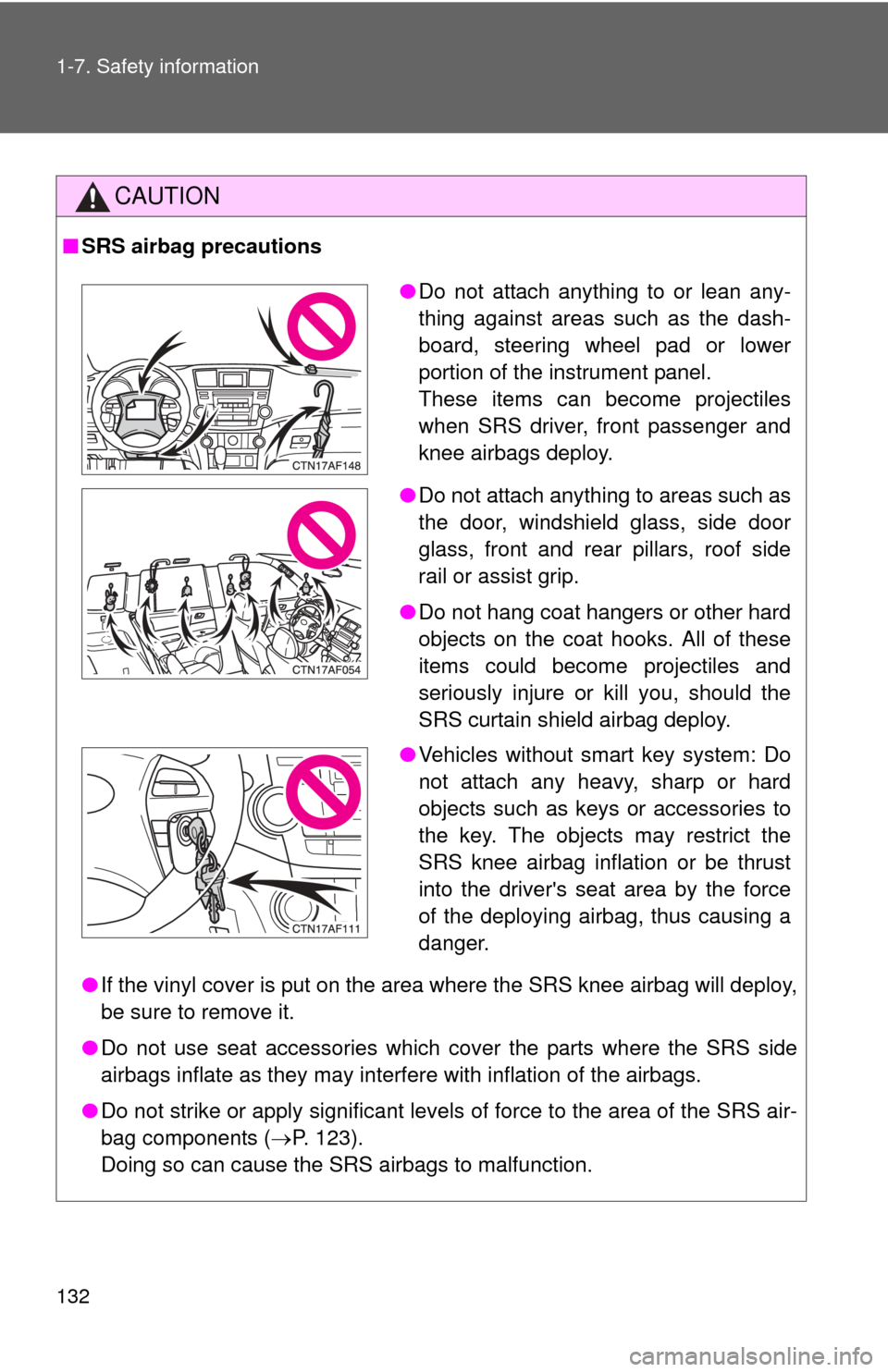
● Do not attach anything to or lean any-
thing against areas such as the dash-
board, steering wheel pad or lower
portion of the instrument panel.
These items can become projectiles
when SRS driver, front passenger and
knee airbags deploy.
● Do not attach anything to areas such as
the door, windshield glass, side door
glass, front and rear pillars, roof side
rail or assist grip.
● Do not hang coat hangers or other hard
objects on the coat hooks. All of these
items could become projectiles and
seriously injure or kill you, should the
SRS curtain shield airbag deploy.
● Vehicles without smart key system: Do
not attach any heavy, sharp or hard
objects such as keys or accessories to
the key. The objects may restrict the
SRS knee airbag inflation or be thrust
into the driver's seat area by the force
of the deploying airbag, thus causing a
danger.
Page 133 of 577

133
1-7. Safety information
1
Before driving
CAUTION
■
SRS airbag precautions
●Do not touch any of the component parts immediately after the SRS air-
bags have deployed (inflated) as they may be hot.
● If breathing becomes difficult after the SRS airbag has deployed, open a
door or window to allow fresh air in, or leave the vehicle if it is safe to do
so. Wash off any residue as soon as possible to prevent skin irritation.
● If the areas where the SRS airbags are stored, such as the steering wheel
pad and front and rear pillar garnishes, are damaged or cracked, have
them replaced by your Toyota dealer.
■ Modification and disposal of SRS airbag system components
Do not dispose of your vehicle or per form any of the following modifications
without consulting your Toyota dealer.
The SRS airbags may malfunction or deploy (inflate) accidentally, causing
death or serious injury.
● Installation, removal, disassembly and repair of the SRS airbags.
● Repairs, modifications, removal or replacement of the steering wheel,
instrument panel, dashboard, seats or seat upholstery, front, side and rear
pillars or roof side rails.
● Repairs or modifications of the front fender, front bumper, or side of the
occupant compartment.
● Installation of snow plows, winches, etc. to the front grille (bull bars, kan-
garoo bar etc.).
● Modifications to the vehicle's suspension system.
● Installation of electronic devices such as mobile two-way radios or CD
players.
● Modifications to your vehicle for a person with a physical disability.