cover TOYOTA HIGHLANDER 2018 (in English) User Guide
[x] Cancel search | Manufacturer: TOYOTA, Model Year: 2018, Model line: HIGHLANDER, Model: TOYOTA HIGHLANDER 2018Pages: 732, PDF Size: 14.5 MB
Page 231 of 732
2314-2. Driving procedures
4
Driving
HIGHLANDER_U (OM0E031U)■
Shift lock system
The shift lock system is a system to prevent accidental operation of the shift
lever in starting.
The shift lever can be shifted from P only when the engine switch is in the
“ON” position (vehicles without a smart key system) or IGNITION ON mode
(vehicles with a smart key system) and the brake pedal is being depressed.
■ If the shift lever cannot be shifted from P
First, check whether the brake pedal is being depressed.
If the shift lever cannot be shifted with your foot on the brak e pedal, there may
be a problem with the shift lock system. Have the vehicle inspected by your
Toyota dealer immediately.
The following steps may be used as an emergency measure to ensu re that
the shift lever can be shifted.
Releasing the shift lock:
Set the parking brake.
Vehicles without a smart key system: Turn the engine switch to the “LOCK”
position.
Vehicles with a smart key system: Turn the engine switch off.
Depress the brake pedal.
■ If the S indicator does not come on or the D indicator is displayed even
after shifting the shift lever to S
This may indicate a malfunction in the automatic transmission s ystem. Have
the vehicle inspected by your Toyota dealer immediately.
(In this situation, the transmission will operate in the same m anner as when
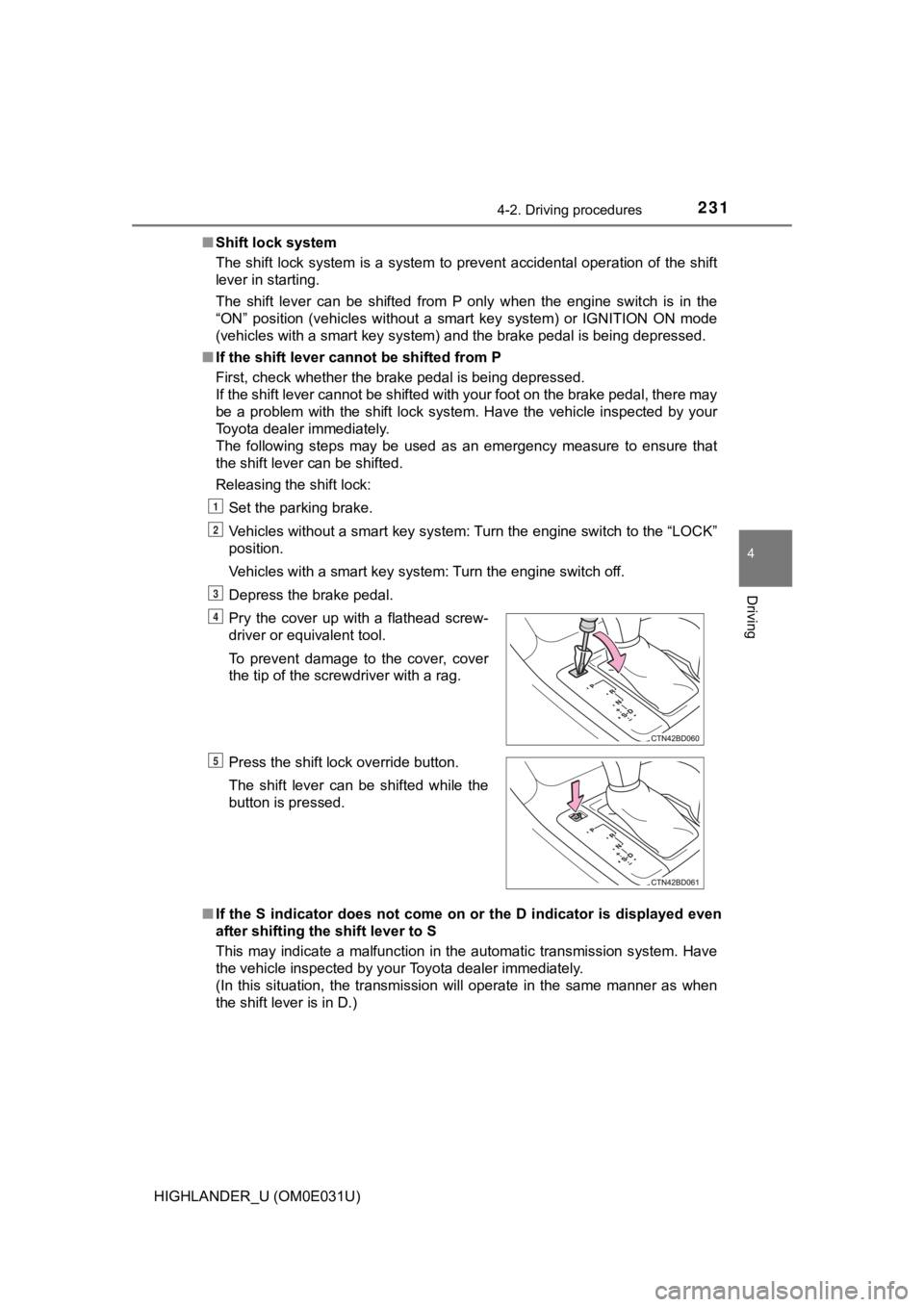
the shift lever is in D.) Pry the cover up with a flathead screw-
driver or equivalent tool.
To prevent damage to the cover, cover
the tip of the screwdriver with a rag.
Press the shift lock override button.
The shift lever can be shifted while the
button is pressed.
1
2
3
4
5
Page 252 of 732
2524-4. Refueling
HIGHLANDER_U (OM0E031U)
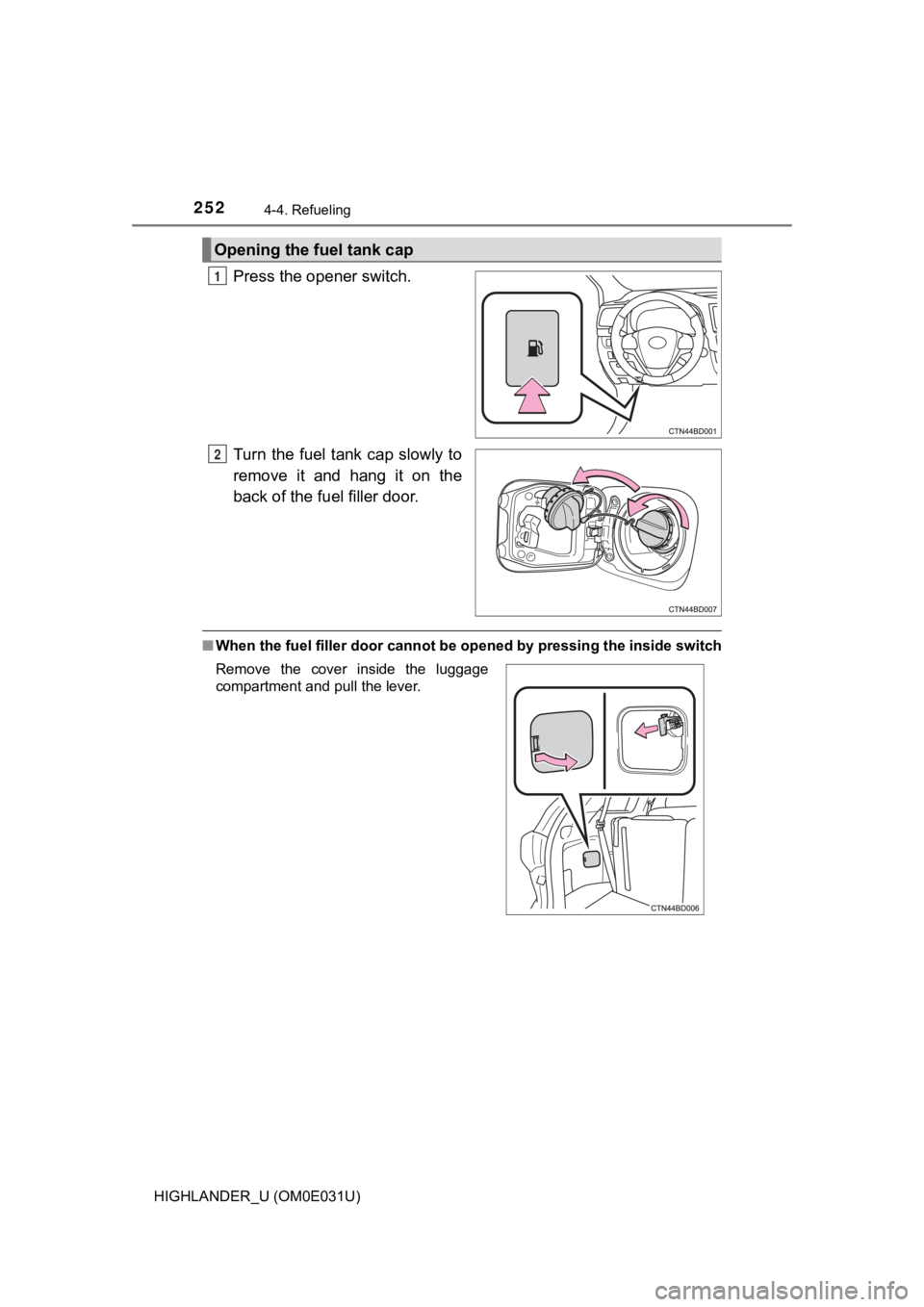
Press the opener switch.
Turn the fuel tank cap slowly to
remove it and hang it on the
back of the fuel filler door.
■When the fuel filler door cannot be opened by pressing the insi de switch
Opening the fuel tank cap
1
2
Remove the cover inside the luggage
compartment and pull the lever.
Page 256 of 732
2564-5. Using the driving support systems
HIGHLANDER_U (OM0E031U)
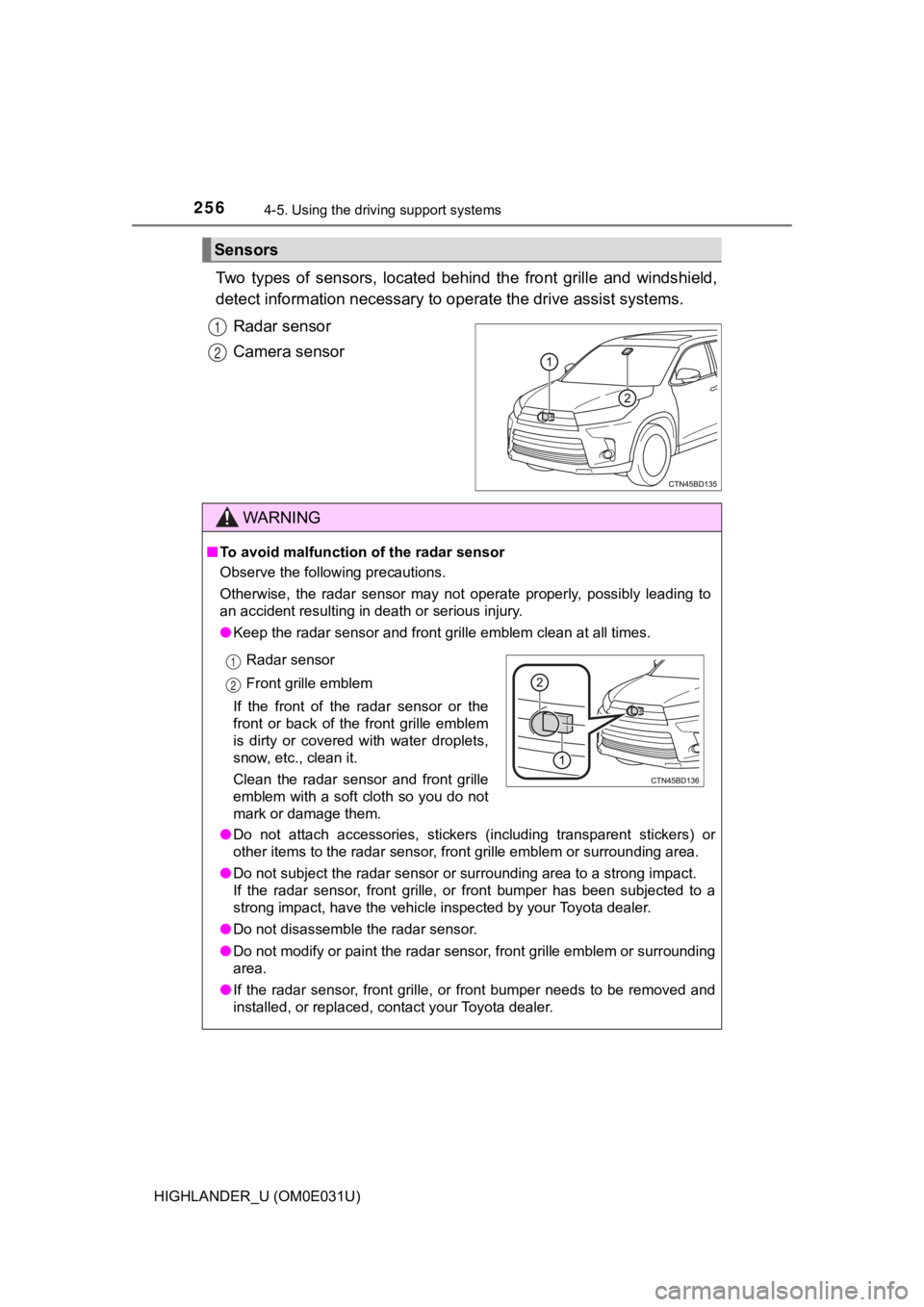
Two types of sensors, located behind the front grille and winds hield,
detect information necessary to operate the drive assist systems.
Radar sensor
Camera sensor
Sensors
1
2
WARNING
■ To avoid malfunction of the radar sensor
Observe the following precautions.
Otherwise, the radar sensor may not operate properly, possibly leading to
an accident resulting in death or serious injury.
● Keep the radar sensor and front g rille emblem clean at all times.
● Do not attach accessories, stickers (including transparent stic kers) or
other items to the radar sensor, front grille emblem or surroun ding area.
● Do not subject the radar sensor or surrounding area to a strong impact.
If the radar sensor, front grille, or front bumper has been sub jected to a
strong impact, have the vehicle inspected by your Toyota dealer .
● Do not disassemble the radar sensor.
● Do not modify or paint the radar sensor, front grille emblem or surrounding
area.
● If the radar sensor, front grille, or front bumper needs to be removed and
installed, or replaced, contact your Toyota dealer.
Radar sensor
Front grille emblem
If the front of the radar sensor or the
front or back of the front grille emblem
is dirty or covered with water droplets,
snow, etc., clean it.
Clean the radar sensor and front grille
emblem with a soft cloth so you do not
mark or damage them.1
12
Page 257 of 732
2574-5. Using the driving support systems
4
Driving
HIGHLANDER_U (OM0E031U)
WARNING
■To avoid malfunction of the camera sensor
Observe the following precautions.
Otherwise, the camera sensor may not operate properly, possibly leading to
an accident resulting in death or serious injury.
● Keep the windshield clean at all times.
• If the windshield is dirty or covered with an oily film, water droplets,
snow, etc., clear the windshield.
• If a glass coating agent is applied to the windshield, it will still be neces-
sary to use the windshield wipers to remove water droplets, etc . from
the area of the windshield in front of the camera sensor.
• If the inner side of the windshield where the camera sensor is installed
is dirty, contact your Toyota dealer.
● If the part of the windshield in front of the camera sensor is fogged up or
covered with condensation or ice, use the windshield defogger t o remove
the fog, condensation or ice. ( P. 437, 444)
● If water droplets cannot be properly removed from the area of t he wind-
shield in front of the camera sensor by the windshield wipers, replace the
wiper insert or wiper blade.
If the wiper inserts or wiper b lades need to be replaced, conta ct your
Toyota dealer.
● Do not attach window tinting to the windshield.
● Replace the windshield if it is damaged or cracked.
If the windshield needs to be replaced, contact your Toyota dea ler.
● Do not get the camera sensor wet.
● Do not allow bright lights to shine into the camera sensor.
● Do not dirty or damage the camera sensor.
When cleaning the inside of the windshield, do not allow glass cleaner to
contact the lens. Also, do not touch the lens.
If the lens is dirty or damaged, contact your Toyota dealer.
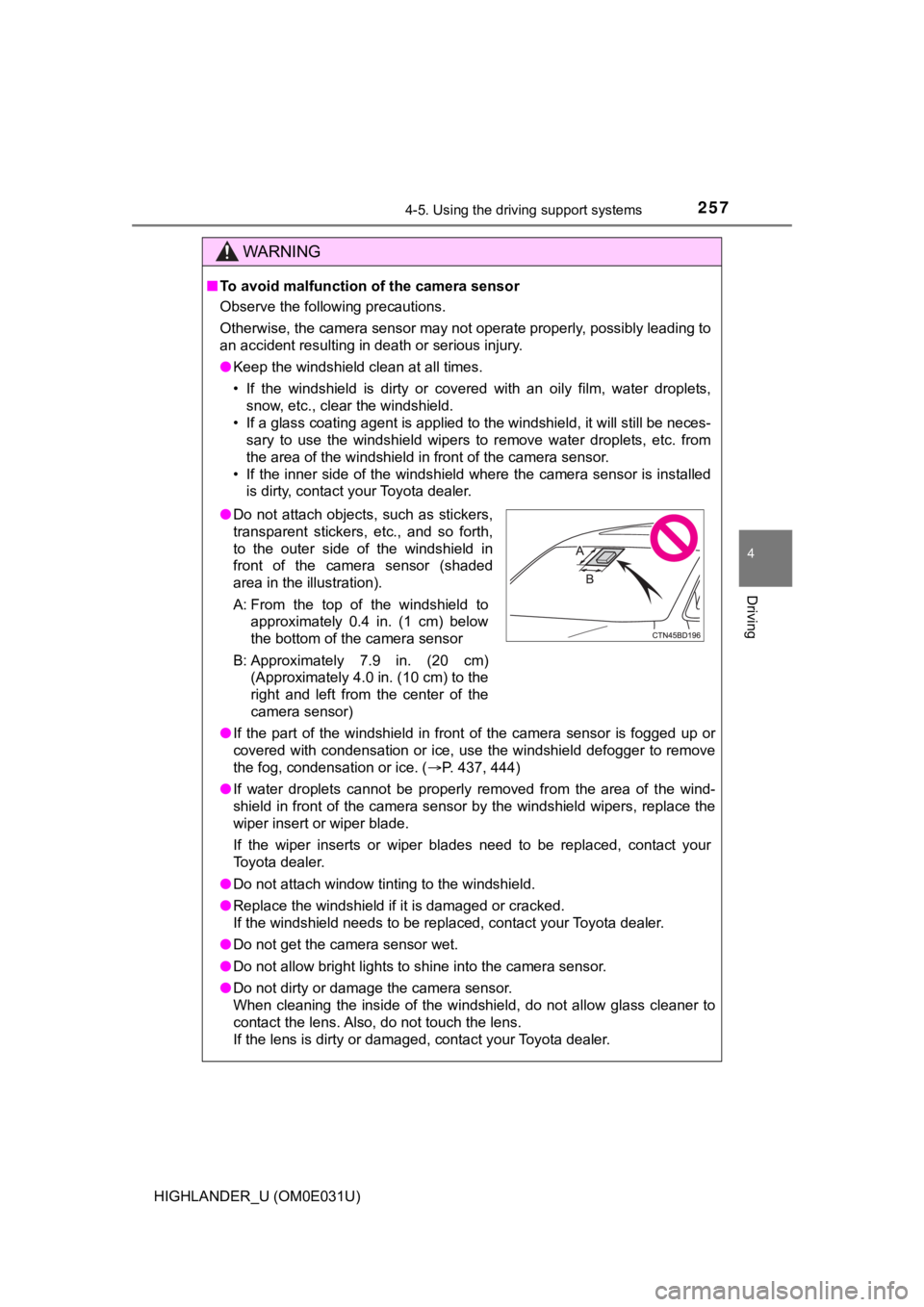
● Do not attach objects, such as stickers,
transparent stickers, etc., and so forth,
to the outer side of the windshield in
front of the camera sensor (shaded
area in the illustration).
A: From the top of the windshield to
approximately 0.4 in. (1 cm) below
the bottom of the camera sensor
B: Approximately 7.9 in. (20 cm) (Approximately 4.0 in. (10 cm) to the
right and left from the center of the
camera sensor)
Page 269 of 732
2694-5. Using the driving support systems
4
Driving
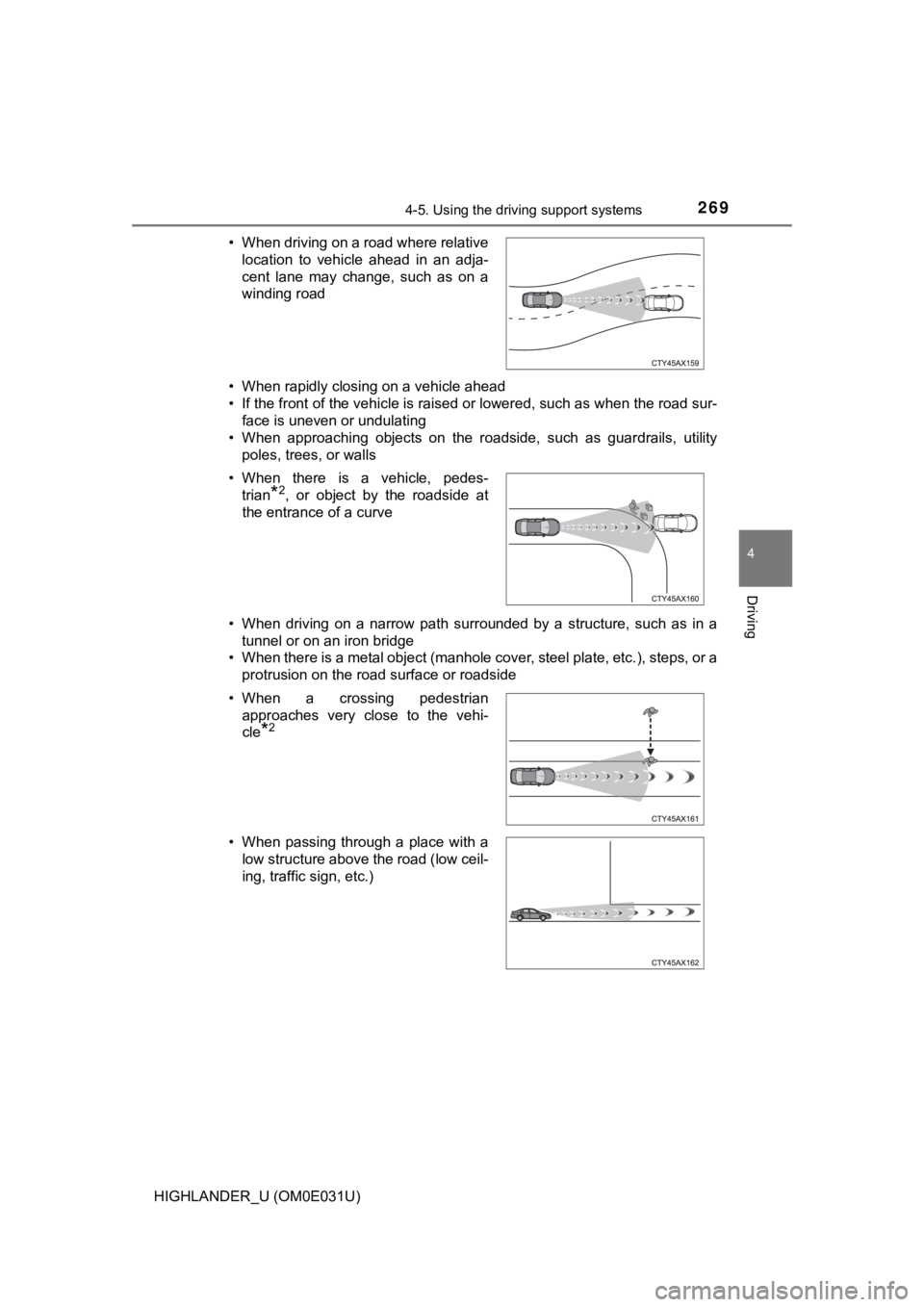
HIGHLANDER_U (OM0E031U)• When rapidly closing on a vehicle ahead
• If the front of the vehicle is raised or lowered, such as when
the road sur-
face is uneven or undulating
• When approaching objects on the roadside, such as guardrails, utility
poles, trees, or walls
• When driving on a narrow path surrounded by a structure, such as in a tunnel or on an iron bridge
• When there is a metal object (manhole cover, steel plate, etc. ), steps, or a
protrusion on the road surface or roadside
• When driving on a road where relative
location to vehicle ahead in an adja-
cent lane may change, such as on a
winding road
• When there is a vehicle, pedes- trian
*2, or object by the roadside at
the entrance of a curve
• When a crossing pedestrian approaches very close to the vehi-
cle
*2
• When passing through a place with alow structure above the road (low ceil-
ing, traffic sign, etc.)
Page 273 of 732

2734-5. Using the driving support systems
4
Driving
HIGHLANDER_U (OM0E031U)●
Some pedestrians such as the following may not be detected by t he radar
sensor and camera sensor, preventing the system from operating prop-
erly
*2:
• Pedestrians shorter than approximately 3.2 ft. (1 m) or taller than approx-
imately 6.5 ft. (2 m)
• Pedestrians wearing oversized clothing (a rain coat, long skir t, etc.), mak-
ing their silhouette obscure
• Pedestrians who are carrying large baggage, holding an umbrella, etc., hiding part of their body
• Pedestrians who are bending forward or squatting
• Pedestrians who are pushing a stroller, wheelchair, bicycle or other vehi-
cle
• Groups of pedestrians which are close together
• Pedestrians who are wearing white and look extremely bright
• Pedestrians in the dark, such as at night or while in a tunnel
• Pedestrians whose clothing appears to be nearly the same color or
brightness as their surroundings
• Pedestrians near walls, fences, guardrails, or large objects
• Pedestrians who are on a metal object (manhole cover, steel plate, etc.)
on the road
• Pedestrians who are walking fast
• Pedestrians who are changing speed abruptly
• Pedestrians running out from behind a vehicle or a large objec t
• Pedestrians who are extremely close to the side of the vehicle (outside rear view mirror, etc.)
*2: For countries/areas specified as Region B (P. 261), the pedestrian
detection function may not be available.
■ If the PCS warning light flashes or illuminates and a warning m essage is
displayed on the multi-information display
The pre-collision system may be temporarily unavailable or ther e may be a
malfunction in the system.
● In the following situations, the warning light will turn off, t he message will
disappear and the system will become operational when normal op erating
conditions return:
• When the radar sensor or camera sensor or the area around eith er sen-
sor is hot, such as in the sun
• When the radar sensor or camera sensor or the area around eith er sen-
sor is cold, such as in an extremely cold environment
• When a front sensor is dirty or covered with snow, etc.
• When the part of the windshield in front of the camera sensor is fogged
up or covered with condensation or ice
(Defogging the windshield: P. 437, 444)
• If the camera sensor is obstructed, such as when the hood is open or a sticker is attached to the windshield near the camera sensor
Page 277 of 732

2774-5. Using the driving support systems
4
Driving
HIGHLANDER_U (OM0E031U)
WARNING
■Before using LDA system
Do not rely solely upon the LDA system. The LDA system does not auto-
matically drive the vehicle or reduce the amount of attention that must be
paid to the area in front of the vehicle. The driver must always assume full
responsibility for driving safely by paying careful attention to the surround-
ing conditions and operating the steering wheel to correct the path of the
vehicle. Also, the driver must take adequate breaks when fatigu ed, such as
from driving for a long period of time.
Failure to perform appropriate driving operations and pay careful attention
may lead to an accident, resulting in death or serious injury.
■ To avoid operating LDA system by mistake
When not using the LDA system, use the LDA switch to turn the s ystem off.
■ Situations unsuitable for LDA system
Do not use the LDA system in the following situations.
The system may not operate properly and lead to an accident, re sulting in
death or serious injury.
● A spare tire, tire chains, etc., are equipped.
● When the tires have been excessively worn, or when the tire inf lation pres-
sure is low.
● Tires which differ by structure, manufacturer, brand or tread p attern are
used.
● Objects or patterns that could be mistaken for white (yellow) l ines are
present on the side of the road (guardrails, curbs, reflective poles, etc.).
● Vehicle is driven on a snow-covered road.
● White (yellow) lines are difficult to see due to rain, snow, fo g, dust, etc.
● Asphalt repair marks, white (yellow) line marks, etc. are prese nt due to
road repair.
● Vehicle is driven in a temporary lane or restricted lane due to construction
work.
● Vehicle is driven on a road surface which is slippery due to rainy weather,
fallen snow, freezing, etc.
● Vehicle is driven in traffic lanes other than on highways and freeways.
● Vehicle is driven in a construction zone.
● Vehicle is towing a trailer or another vehicle.
Page 283 of 732

2834-5. Using the driving support systems
4
Driving
HIGHLANDER_U (OM0E031U)■
Conditions in which functions may not operate properly
In the following situations, the camera sensor may not detect w hite (yellow)
lines and various functions may not operate normally.
● There are shadows on the road that run parallel with, or cover, the white
(yellow) lines.
● The vehicle is driven in an area without white (yellow) lines, such as in front
of a tollgate or checkpoint, or at an intersection, etc.
● The white (yellow) lines are cracked, “Botts’ dots”, “Raised pa vement
marker” or stones are present.
● The white (yellow) lines cannot be seen or are difficult to see due to sand,
etc.
● The vehicle is driven on a road surface that is wet due to rain , puddles, etc.
● The traffic lines are yellow (which may be more difficult to re cognize than
lines that are white).
● The white (yellow) lines cross over a curb, etc.
● The vehicle is driven on a bright surface, such as concrete.
● The vehicle is driven on a surface that is bright due to reflec ted light, etc.
● The vehicle is driven in an area where the brightness changes s uddenly,
such as at the entrances and exits of tunnels, etc.
● Light from the headlights of an oncoming vehicle, the sun, etc. enters the
camera.
● The vehicle is driven where the road diverges, merges, etc.
● The vehicle is driven on a slope.
● The vehicle is driven on a road which tilts left or right, or a winding road.
● The vehicle is driven on an unpaved or rough road.
● The vehicle is driven around a sharp curve.
● The traffic lane is excessively narrow or wide.
● The vehicle is extremely tilted due to carrying heavy luggage or having
improper tire pressure.
● The distance to the preceding vehicle is extremely short.
● The vehicle is moving up and down a large amount due to road co nditions
during driving (poor roads or road seams).
● The headlight lenses are dirty and emit a faint amount of light at night, or the
beam axis has deviated.
● The vehicle is struck by a crosswind.
● The vehicle has just changed lanes or crossed an intersection.
● Snow tires, etc. are equipped.
Page 287 of 732

2874-5. Using the driving support systems
4
Driving
HIGHLANDER_U (OM0E031U)
WARNING
■Situations unsuitable for dynamic radar cruise control
Do not use dynamic radar cruise control in any of the following situations.
Doing so may result in inappropriate speed control and could ca use an acci-
dent resulting in death or serious injury.
● Roads where there are pedestrians, cyclers, etc.
● In heavy traffic
● On roads with sharp bends
● On winding roads
● On slippery roads, such as those covered with rain, ice or snow
● On steep downhills, or where there are sudden changes between s harp up
and down gradients
Vehicle speed may exceed the set speed when driving down a stee p hill.
● At entrances to freeways and highways
● When weather conditions are bad enough that they may prevent the sen-
sors from detecting correctly (fog, snow, sandstorm, heavy rain, etc.)
● When there is rain, snow, etc. on the front surface of the radar sensor or
camera sensor
● In traffic conditions that require frequent repeated acceleration and decel-
eration
● When your vehicle is towing a trailer or during emergency towin g
● When an approach warning buzzer is heard often
Page 294 of 732

2944-5. Using the driving support systems
HIGHLANDER_U (OM0E031U)
■Dynamic radar cruise control can be set when
●The shift lever is in D or range 4 or higher of S has been sele cted.
● Vehicle speed is at or above approximately 30 mph (50 km/h).
■ Accelerating after setting the vehicle speed
The vehicle can accelerate by operating the accelerator pedal. After acceler-
ating, the set speed resumes. However, during vehicle-to-vehicl e distance
control mode, the vehicle speed may decrease below the set spee d in order
to maintain the distance to the preceding vehicle.
■ Automatic cancelation of vehicle-to-vehicle distance control mode
Vehicle-to-vehicle distance control mode is automatically cance led in the fol-
lowing situations.
● Actual vehicle speed falls at or below approximately 25 mph (40 km/h).
● VSC is activated.
● TRAC is activated for a period of time.
● When the VSC or TRAC system is turned off.
● When snow mode is set.
● The sensor cannot detect correctly because it is covered in some way.
● Pre-collision braking is activated.
If vehicle-to-vehicle distance control mode is automatically ca nceled for any
other reason, there may be a malfunction in the system. Contact your Toyota
dealer.