cover TOYOTA HIGHLANDER 2018 (in English) Owner's Manual
[x] Cancel search | Manufacturer: TOYOTA, Model Year: 2018, Model line: HIGHLANDER, Model: TOYOTA HIGHLANDER 2018Pages: 732, PDF Size: 14.5 MB
Page 304 of 732
3044-5. Using the driving support systems
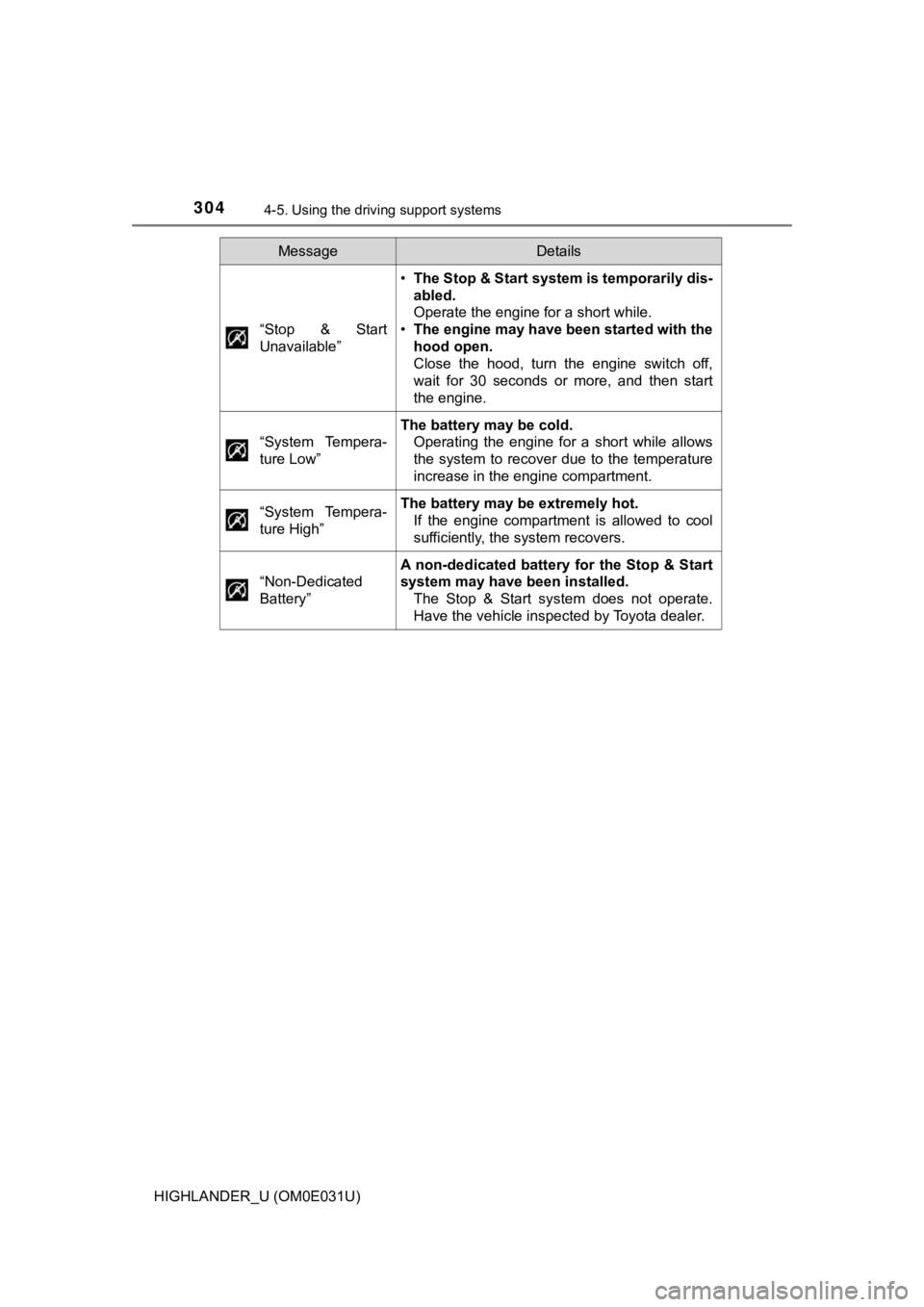
HIGHLANDER_U (OM0E031U)“Stop & Start
Unavailable”
•
The Stop & Start system is temporarily dis-
abled.
Operate the engine for a short while.
• The engine may have been started with the
hood open.
Close the hood, turn the engine switch off,
wait for 30 seconds or more, and then start
the engine.
“System Tempera-
ture Low”
The battery may be cold. Operating the engine for a short while allows
the system to recover due to the temperature
increase in the engine compartment.
“System Tempera-
ture High”
The battery may be extremely hot. If the engine compartment is allowed to cool
sufficiently, the system recovers.
“Non-Dedicated
Battery”
A non-dedicated battery for the Stop & Start
system may have been installed. The Stop & Start system does not operate.
Have the vehicle inspected by Toyota dealer.
MessageDetails
Page 305 of 732
3054-5. Using the driving support systems
4
Driving
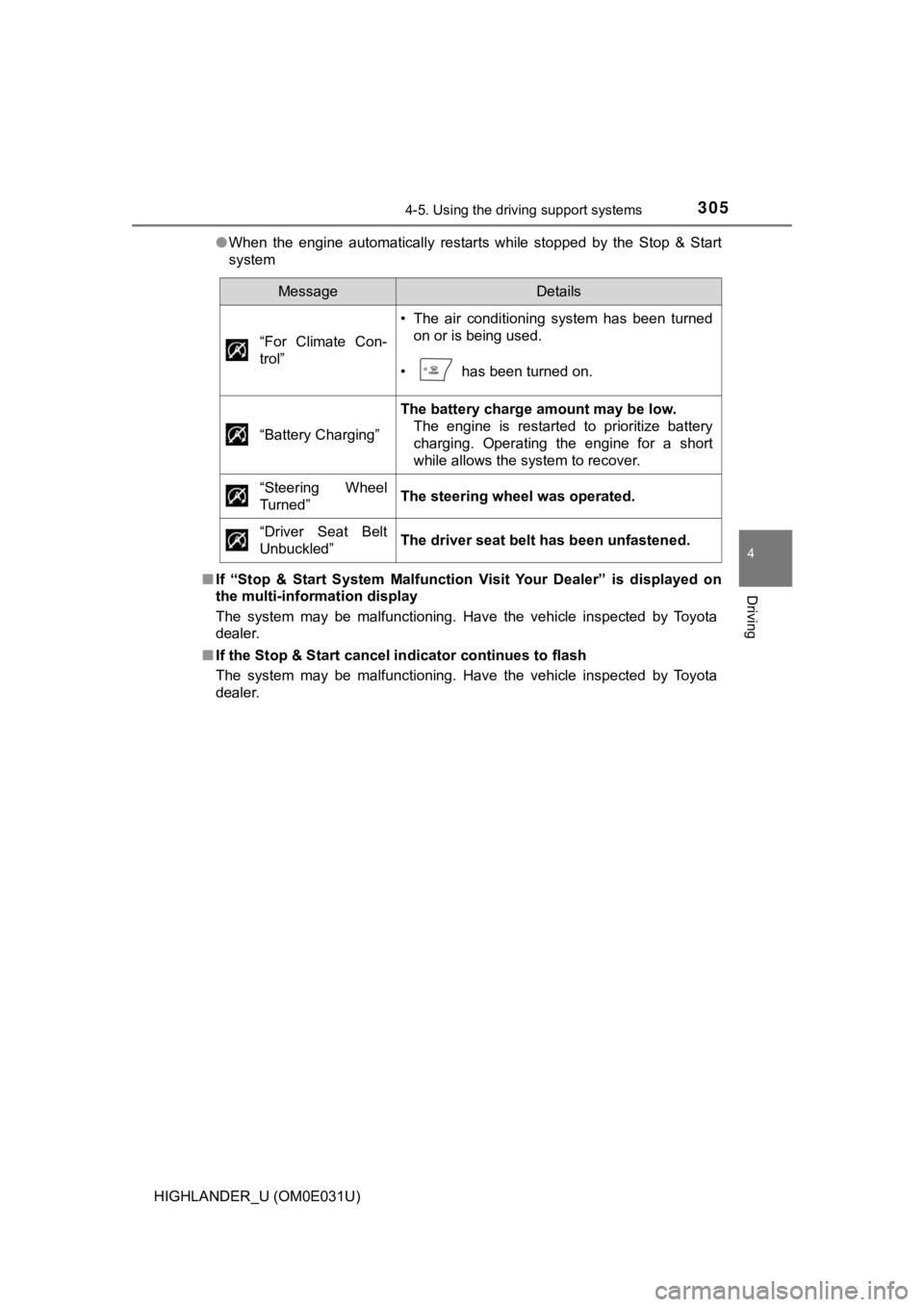
HIGHLANDER_U (OM0E031U)●
When the engine automatically restarts while stopped by the Sto p & Start
system
■ If “Stop & Start System Malfunction Visit Your Dealer” is displ ayed on
the multi-information display
The system may be malfunctioning. Have the vehicle inspected by Toyota
dealer.
■ If the Stop & Start cancel indicator continues to flash
The system may be malfunctioning. Have the vehicle inspected by Toyota
dealer.
MessageDetails
“For Climate Con-
trol”
• The air conditioning system has been turned on or is being used.
• has been turned on.
“Battery Charging”
The battery charge amount may be low. The engine is restarted to prioritize battery
charging. Operating the engine for a short
while allows the system to recover.
“Steering Wheel
Turned”
The steering wheel was operated.
“Driver Seat Belt
Unbuckled”
The driver seat belt has been unfastened.
Page 318 of 732

3184-5. Using the driving support systems
HIGHLANDER_U (OM0E031U)
Press “” or “” of the meter control switches, select .
Press “ ” or “ ” of the meter control switches, select “BSM”.
■ Outside rear view mirror indicator visibility
In strong sunlight, the outside rear view mirror indicator may be difficult to
see.
■ Hearing the RCTA buzzer
The RCTA buzzer may be difficult to hear over loud noises, such as if the
audio system volume is high.
■ When there is a malfunction in the Blind Spot Monitor
If a system malfunction is detected due to any of the following , a warning
message will be displayed: ( P. 591)
● A sensor is malfunctioning
● A sensor is dirty or covered with snow or a sticker
● The outside temperature is extremely high or low
● Sensor voltage is abnormal
● A sensor is misaligned
Turning the BSM function/RCTA function on/off
1
2
Page 320 of 732
3204-5. Using the driving support systems
HIGHLANDER_U (OM0E031U)
WARNING
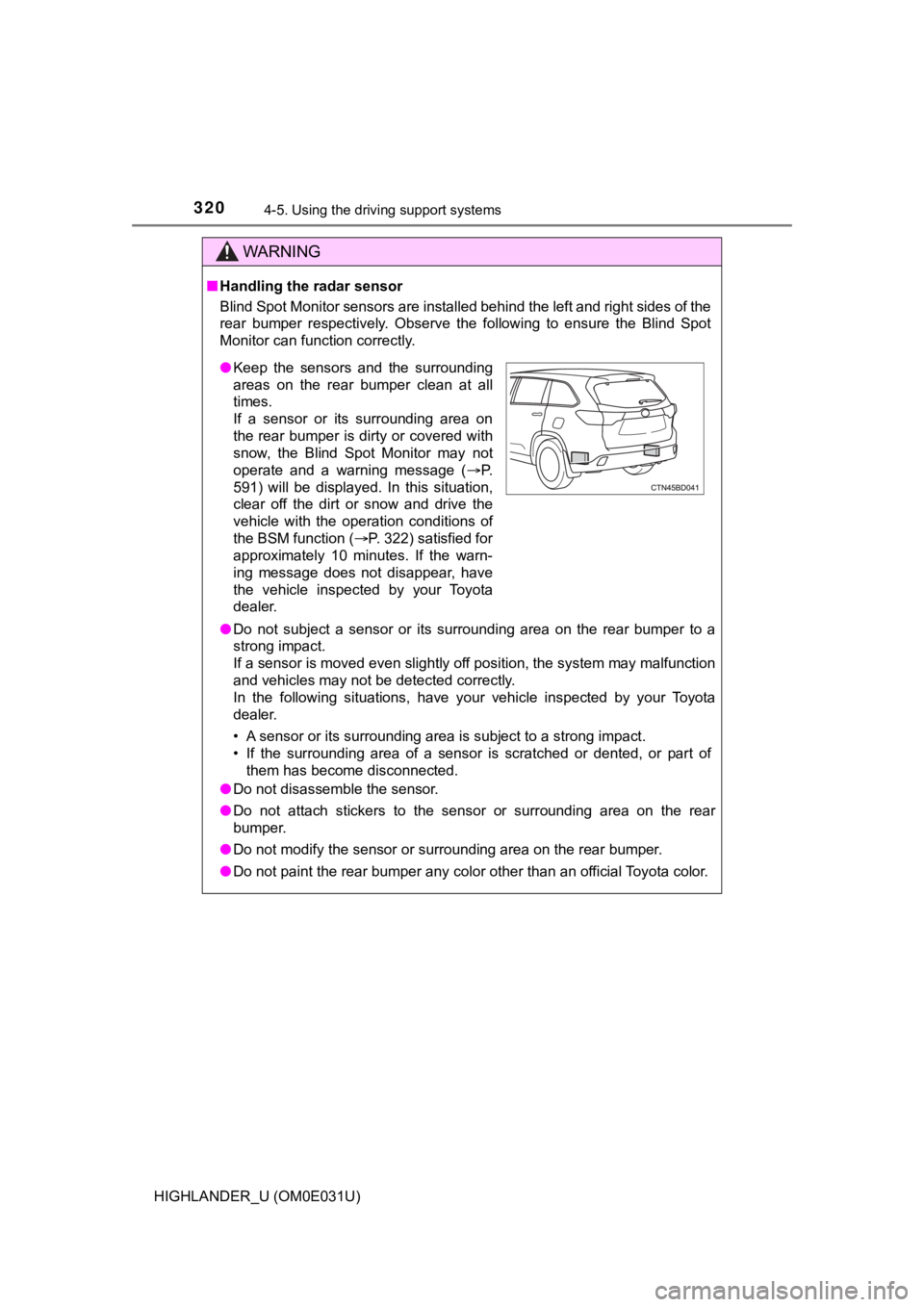
■Handling the radar sensor
Blind Spot Monitor sensors are installed behind the left and ri ght sides of the
rear bumper respectively. Observe the following to ensure the B lind Spot
Monitor can function correctly.
● Do not subject a sensor or its surrounding area on the rear bum per to a
strong impact.
If a sensor is moved even slightly off position, the system may malfunction
and vehicles may not be detected correctly.
In the following situations, have your vehicle inspected by your Toyota
dealer.
• A sensor or its surrounding area is subject to a strong impact .
• If the surrounding area of a sensor is scratched or dented, or part of
them has become disconnected.
● Do not disassemble the sensor.
● Do not attach stickers to the sensor or surrounding area on the rear
bumper.
● Do not modify the sensor or surrounding area on the rear bumper .
● Do not paint the rear bumper any color other than an official Toyota color.
●Keep the sensors and the surrounding
areas on the rear bumper clean at all
times.
If a sensor or its surrounding area on
the rear bumper is dirty or covered with
snow, the Blind Spot Monitor may not
operate and a warning message ( P.
591) will be displayed. In this situation,
clear off the dirt or snow and drive the
vehicle with the operation conditions of
the BSM function ( P. 322) satisfied for
approximately 10 minutes. If the warn-
ing message does not disappear, have
the vehicle inspected by your Toyota
dealer.
Page 322 of 732

3224-5. Using the driving support systems
HIGHLANDER_U (OM0E031U)
■The BSM function is operational when
The BSM function is operational when all of the following condi tions are met:
● The BSM function is on.
● The shift lever is in a position other than R.
● The vehicle speed is greater than approximately 10 mph (16 km/h ).
■ The BSM function will detect a vehicle when
The BSM function will detect a vehicle present in the detection area in the fol-
lowing situations:
● A vehicle in an adjacent lane overtakes your vehicle.
● Another vehicle enters the detection area when it changes lanes.
■ Conditions under which the BSM function will not detect a vehicle
The BSM function is not designed to detect the following types of vehicles
and/or objects:
● Small motorcycles, bicycles, pedestrians, etc.
*
●Vehicles traveling in the opposite direction
● Guardrails, walls, signs, parked vehicles and similar stationar y objects
*
●Following vehicles that are in the same lane*
●Vehicles traveling 2 lanes away from your vehicle*
*
: Depending on the conditions, detection of a vehicle and/or obj ect may
occur.
■ Conditions under which the BSM function may not function correc tly
● The BSM function may not detect vehicles correctly in the follo wing situa-
tions:
• When the sensor is misaligned due to a strong impact to the se nsor or its
surrounding area
• When mud, snow, ice, a sticker, etc. is covering the sensor or surround-
ing area on the rear bumper
• When driving on a road surface that is wet with standing water during bad
weather, such as heavy rain, snow, or fog
• When multiple vehicles are approaching with only a small gap b etween
each vehicle
• When the distance between your vehicle and a following vehicle is short
• When there is a significant difference in speed between your v ehicle and
the vehicle that enters the detection area
• When the difference in speed between your vehicle and another vehicle
is changing
• When a vehicle enters a detection area traveling at about the same
speed as your vehicle
• As your vehicle starts from a stop, a vehicle remains in the d etection area
• When driving up and down consecutive steep inclines, such as hills, dips
on the road, etc.
• When driving on roads with sharp bends, consecutive curves, or uneven
surfaces
Page 327 of 732
3274-5. Using the driving support systems
4
Driving
HIGHLANDER_U (OM0E031U)■
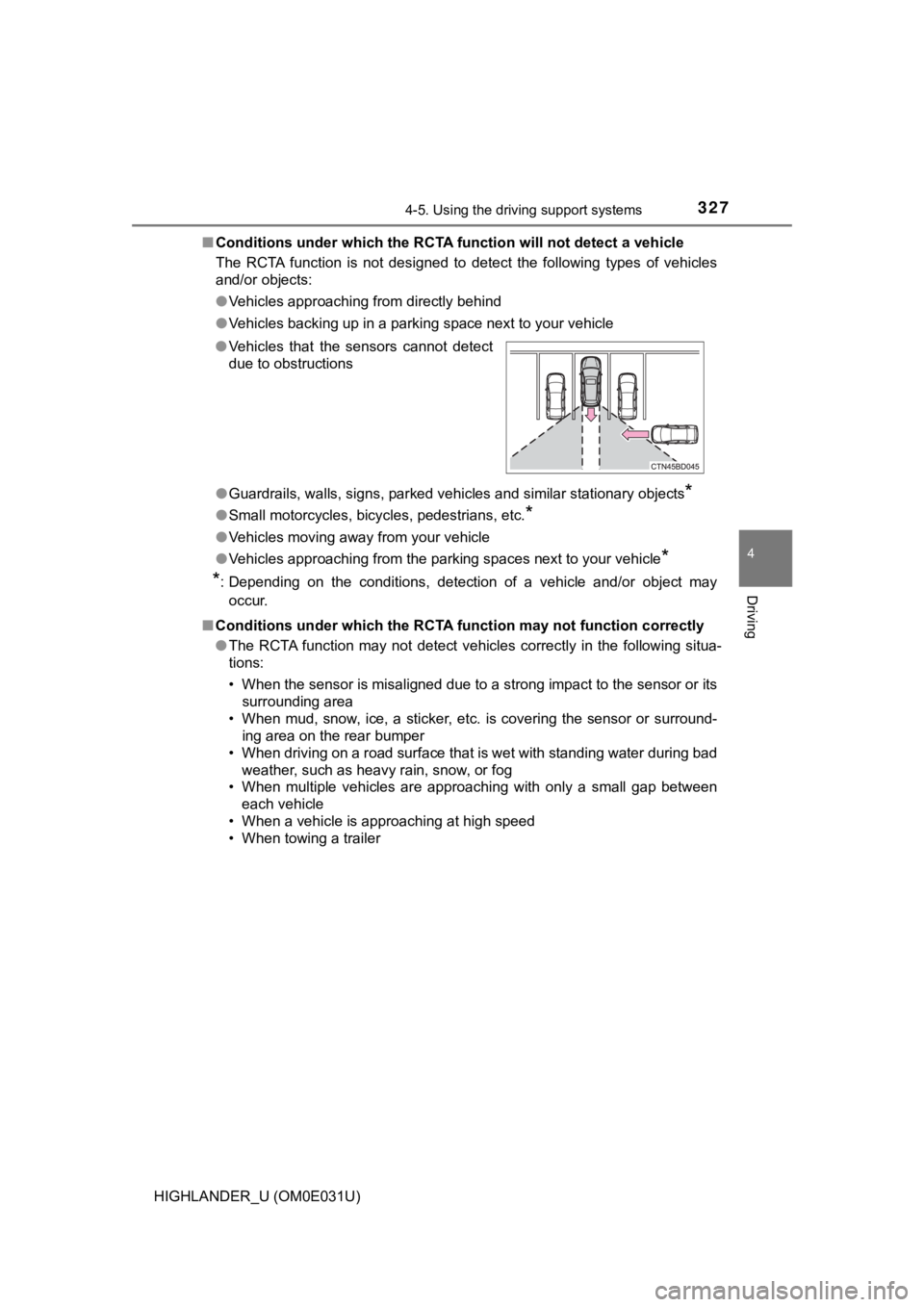
Conditions under which the RCTA function will not detect a vehicle
The RCTA function is not designed to detect the following types of vehicles
and/or objects:
● Vehicles approaching from directly behind
● Vehicles backing up in a parking space next to your vehicle
● Guardrails, walls, signs, parked vehicles and similar stationar y objects
*
●Small motorcycles, bicycles, pedestrians, etc.*
●Vehicles moving away from your vehicle
● Vehicles approaching from the parking spaces next to your vehic le
*
*
: Depending on the conditions, detection of a vehicle and/or obj ect may
occur.
■ Conditions under which the RCTA function may not function corre ctly
● The RCTA function may not detect vehicles correctly in the following situa-
tions:
• When the sensor is misaligned due to a strong impact to the se nsor or its
surrounding area
• When mud, snow, ice, a sticker, etc. is covering the sensor or surround-
ing area on the rear bumper
• When driving on a road surface that is wet with standing water during bad
weather, such as heavy rain, snow, or fog
• When multiple vehicles are approaching with only a small gap b etween
each vehicle
• When a vehicle is approaching at high speed
• When towing a trailer
●
Vehicles that the sensors cannot detect
due to obstructions
Page 335 of 732
3354-5. Using the driving support systems
4
Driving
HIGHLANDER_U (OM0E031U)■
EPS operation sound
When the steering wheel is operated, a motor sound (whirring so und) may be
heard. This does not indicate a malfunction.
■ Automatic reactivation of TRAC and VSC systems
After turning the TRAC and VSC systems off, the systems will be automati-
cally re-enabled in the following situations:
● Vehicles without a smart key system: When the engine switch is turned to
the “LOCK” position
Vehicles with a smart key system: When the engine switch is tur ned off
● If only the TRAC system is turned off, the TRAC will turn on wh en vehicle
speed increases
If both the TRAC and VSC systems are turned off, automatic re-e nabling will
not occur when vehicle speed increases.
■ Reduced effectiveness of the EPS system
The effectiveness of the EPS system is reduced to prevent the s ystem from
overheating when there is frequent steering input over an exten ded period of
time. The steering wheel may feel heavy as a result. Should thi s occur, refrain
from excessive steering input or stop the vehicle and turn the engine off. The
EPS system should return to normal within 10 minutes.
WARNING
■ The ABS does not operate effectively when
● The limits of tire gripping performance have been exceeded (suc h as
excessively worn tires on a snow covered road).
● The vehicle hydroplanes while driving at high speed on wet or s lick roads.
■ Stopping distance when the ABS is operating may exceed that of nor-
mal conditions
The ABS is not designed to shorten the vehicle’s stopping distance. Always
maintain a safe distance from the vehicle in front of you, espe cially in the
following situations:
● When driving on dirt, gravel or snow-covered roads
● When driving with tire chains
● When driving over bumps on the road
● When driving over roads with potholes or uneven surfaces
Page 336 of 732

3364-5. Using the driving support systems
HIGHLANDER_U (OM0E031U)
WARNING
■TRAC/VSC may not operate effectively when
Directional control and power may not be achievable while driving on slip-
pery road surfaces, even if the TRAC/VSC system is operating.
Drive the vehicle carefully in conditions where stability and p ower may be
lost.
■ Hill- start assist control does not operate effectively when
● Do not overly rely on hill-start assist control. Hill-start ass ist control may
not operate effectively on steep inclines and roads covered wit h ice.
● Unlike the parking brake, hill-start assist control is not inte nded to hold the
vehicle stationary for an extended period of time. Do not attempt to use
hill-start assist control to hold the vehicle on an incline, as doing so may
lead to an accident.
■ When the VSC is activated
The slip indicator light flashes. Always drive carefully. Reckless driving may
cause an accident. Exercise particular care when the indicator light flashes.
■ When the TRAC/VSC systems are turned off
Be especially careful and drive at a speed appropriate to the r oad condi-
tions. As these are the systems to help ensure vehicle stabilit y and driving
force, do not turn the TRAC/VSC systems off unless necessary.
Trailer Sway Control is part of the VSC system and will not ope rate if VSC
turned off or experiences a malfunction.
■ Replacing tires
Make sure that all tires are of the specified size, brand, trea d pattern and
total load capacity. In addition, make sure that the tires are inflated to the
recommended tire inflation pressure level.
The ABS, TRAC and VSC systems will not function correctly if di fferent tires
are installed on the vehicle.
Contact your Toyota dealer for further information when replaci ng tires or
wheels.
■ Handling of tires and the suspension
Using tires with any kind of problem or modifying the suspensio n will affect
the driving assist systems, and may cause a system to malfuncti on.
Page 355 of 732
3555-1. Basic Operations
5
Audio system
HIGHLANDER_U (OM0E031U)■
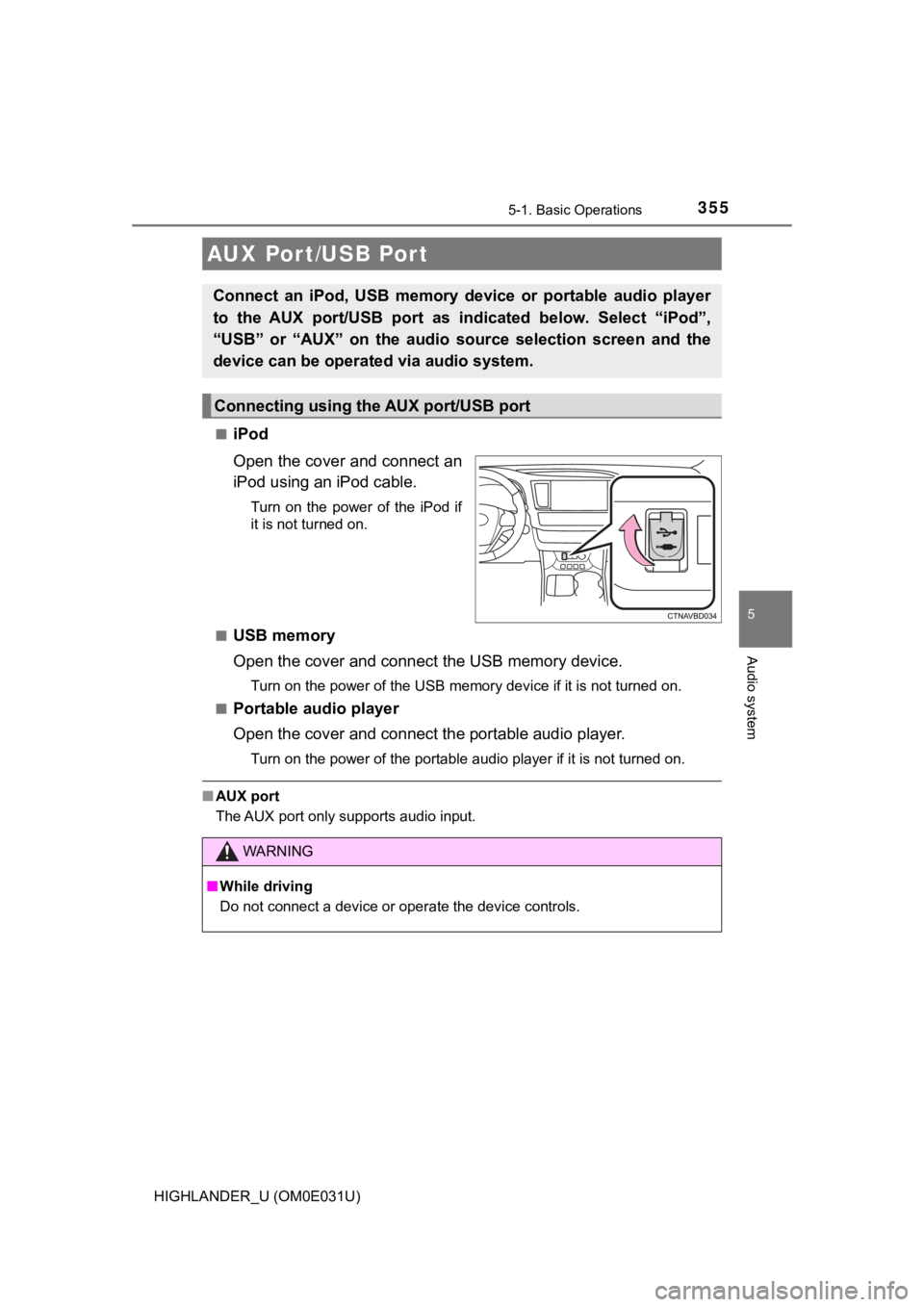
iPod
Open the cover and connect an
iPod using an iPod cable.
Turn on the power of the iPod if
it is not turned on.
■
USB memory
Open the cover and connec t the USB memory device.
Turn on the power of the USB memory device if it is not turned on.
■
Portable audio player
Open the cover and connect the portable audio player.
Turn on the power of the portable audio player if it is not tur ned on.
■AUX port
The AUX port only supports audio input.
AUX Por t/USB Por t
Connect an iPod, USB memory device or portable audio player
to the AUX port/USB port as indi cated below. Select “iPod”,
“USB” or “AUX” on th e audio source selection screen and the
device can be operated via audio system.
Connecting using the AUX port/USB port
WARNING
■ While driving
Do not connect a device or operate the device controls.
Page 360 of 732
3605-2. Setup
HIGHLANDER_U (OM0E031U)
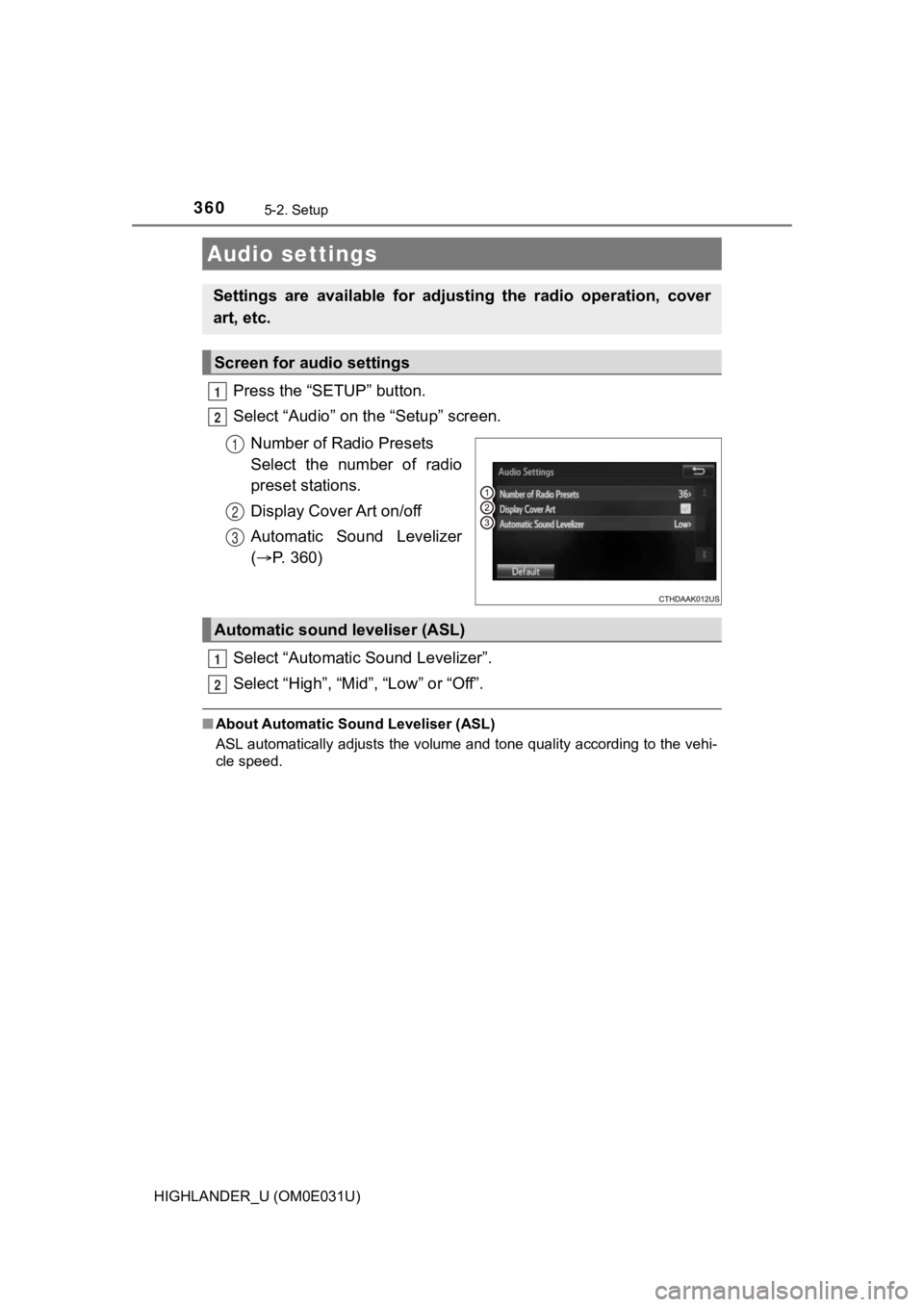
Press the “SETUP” button.
Select “Audio” on the “Setup” screen.Number of Radio Presets
Select the number of radio
preset stations.
Display Cover Art on/off
Automatic Sound Levelizer
( P. 360)
Select “Automatic Sound Levelizer”.
Select “High”, “Mid”, “Low” or “Off”.
■ About Automatic So und Leveliser (ASL)
ASL automatically adjusts the volume and tone quality according to the vehi-
cle speed.
Audio settings
Settings are available for adjusting the radio operation, cover
art, etc.
Screen for audio settings
1
2
1
2
3
Automatic sound leveliser (ASL)
1
2