door lock TOYOTA HIGHLANDER 2018 (in English) Service Manual
[x] Cancel search | Manufacturer: TOYOTA, Model Year: 2018, Model line: HIGHLANDER, Model: TOYOTA HIGHLANDER 2018Pages: 732, PDF Size: 14.5 MB
Page 143 of 732
1433-2. Opening, closing and locking the doors
3
Operation of each component
HIGHLANDER_U (OM0E031U)■
Battery-saving function
The battery-saving function will be activated in order to preve nt the electronic
key battery and the vehicle battery from being discharged while the vehicle is
not in operation for a long time.
● In the following situations, the smart key system may take some time to
unlock the doors.
• The electronic key has been left in an area of approximately 6 ft. (2 m) of
the outside of the vehicle for 10 minutes or longer.
• The smart key system has not been used for 5 days or longer.
● If the smart key system has not been used for 14 days or longer , the doors
cannot be unlocked at any doors except the driver’s door. In th is case, take
hold of the driver’s door handle, or use the wireless remote co ntrol or the
mechanical key, to unlock the doors.
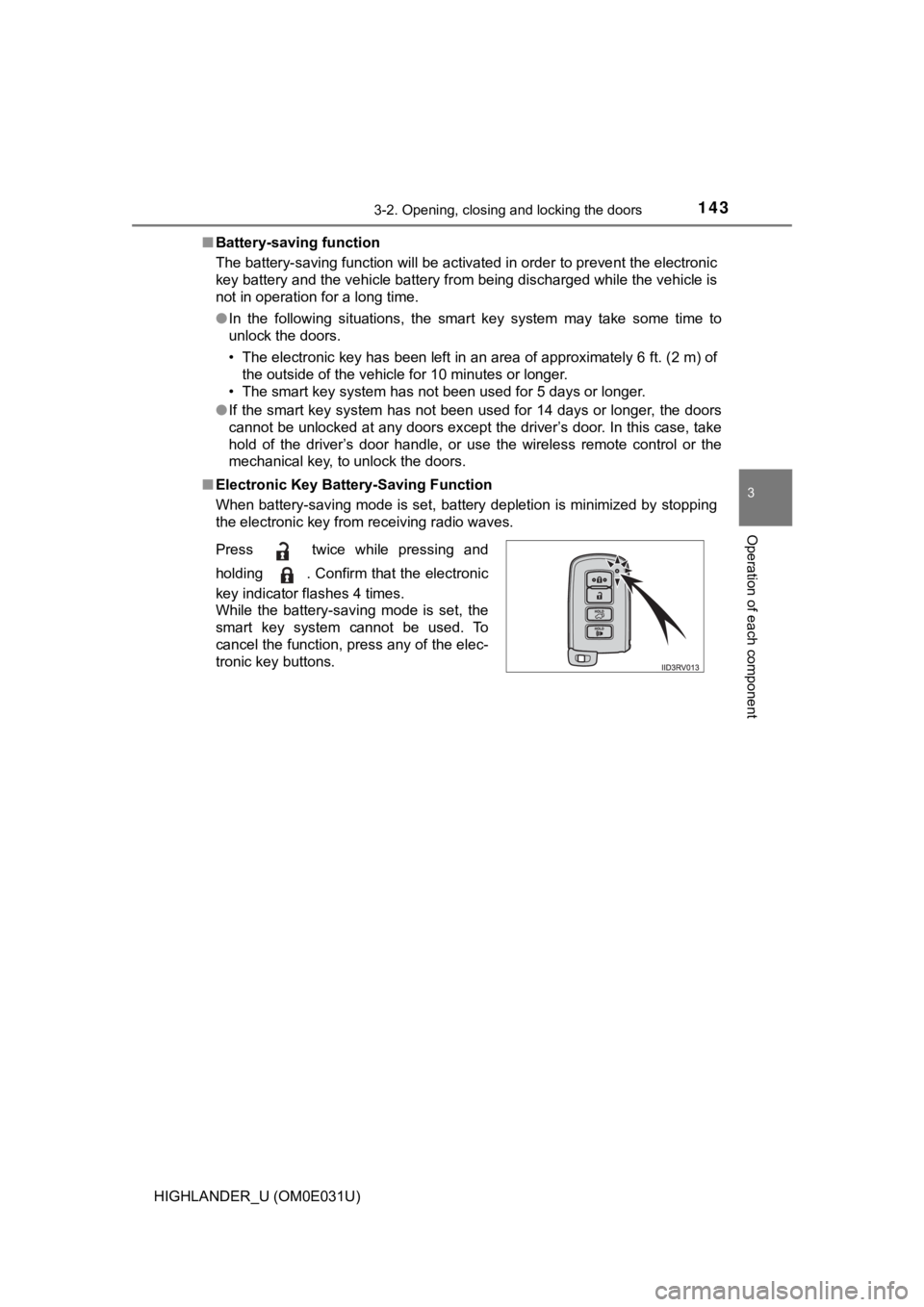
■ Electronic Key Battery-Saving Function
When battery-saving mode is set, battery depletion is minimized by stopping
the electronic key from receiving radio waves.
Press twice while pressing and
holding . Confirm that the electronic
key indicator flashes 4 times.
While the battery-saving mode is set, the
smart key system cannot be used. To
cancel the function, press any of the elec-
tronic key buttons.
Page 144 of 732

1443-2. Opening, closing and locking the doors
HIGHLANDER_U (OM0E031U)■
Conditions affecting operation
The smart key system uses weak radio waves. In the following si tuations, the
communication between the electronic key and the vehicle may be affected,
preventing the smart key system, wireless remote control and en gine immobi-
lizer system from operating properly. (Ways of coping: P. 635)
● When the electronic key battery is depleted
● Near a TV tower, electric power plant, gas station, radio stati on, large dis-
play, airport or other facility that generates strong radio wav es or electrical
noise
● When carrying a portable radio, cellular phone, cordless phone or other
wireless communication device
● When the electronic key is in contact with, or is covered by the following
metallic objects
• Cards to which aluminum foil is attached
• Cigarette boxes that have aluminum foil inside
• Metallic wallets or bags
• Coins
• Hand warmers made of metal
• Media such as CDs and DVDs
● When other wireless keys (that emit radio waves) are being used nearby
● When carrying the electronic key together with the following devices that
emit radio waves
• Another vehicle’s electronic key or a wireless key that emits radio waves
• Personal computers or personal digital assistants (PDAs)
• Digital audio players
• Portable game systems
● If window tint with a metallic content or metallic objects are attached to the
rear window
● When the electronic key is placed near a battery charger or ele ctronic
devices
Page 145 of 732

1453-2. Opening, closing and locking the doors
3
Operation of each component
HIGHLANDER_U (OM0E031U)■
Note for the entry function
●Even when the electronic key is within the effective range (det ection areas),
the system may not operate properly in the following cases:
• The electronic key is too close to the window or outside door handle, near
the ground, or in a high place when the doors are locked or unl ocked.
• The electronic key is near the ground or in a high place, or t oo close to
the rear bumper center when the back door is opened.
• The electronic key is on the instrument panel or floor, or in the auxiliary
box of the driver's side instrument panel, door pockets or glove box when
the engine is started or engine switch modes are changed.
● Do not leave the electronic key on top of the instrument panel or near the
door pockets when exiting the vehicle. Depending on the radio w ave recep-
tion conditions, it may be detected by the antenna outside the cabin and the
door will become lockable from the outside, possibly trapping the electronic
key inside the vehicle.
● As long as the electronic key is within the effective range, th e doors may be
locked or unlocked by anyone. However, only the doors detecting the elec-
tronic key can be used to unlock the vehicle.
● Even if the electronic key is not inside the vehicle, it may be possible to start
the engine if the electronic key is near the window.
● The doors may unlock or lock if a large amount of water splashe s on the
door handle, such as in the rain or in a car wash when the elec tronic key is
within the effective range. (The doors will automatically be lo cked after
approximately 60 seconds if the doors are not opened and closed.)
● If the wireless remote control is used to lock the doors when t he electronic
key is near the vehicle, there is a possibility that the door m ay not be
unlocked by the entry function. (Use the wireless remote contro l to unlock
the doors.)
● Touching the door lock or unlock sensor while wearing gloves ma y prevent
lock or unlock operation. Remove the gloves and touch the lock or unlock
sensor again.
● When the lock operation is performed using the lock sensor, rec ognition sig-
nals will be shown up to two consecutive times. After this, no recognition
signals will be given.
● If the door handle becomes wet while the electronic key is with in the effec-
tive range, the door may lock and unlock repeatedly. In that ca se, follow the
following correction procedures to wash the vehicle:
• Place the electronic key in a location 6 ft. (2 m) or more awa y from the
vehicle. (Take care to ensure that the key is not stolen.)
• Set the electronic key to battery-saving mode to disable the s mart key
system. ( P. 143)
Page 146 of 732

1463-2. Opening, closing and locking the doors
HIGHLANDER_U (OM0E031U)●
If the electronic key is inside the vehicle and a door handle b ecomes wet
during a car wash, a message may be shown on the multi-informat ion dis-
play and a buzzer will sound outside the vehicle. To turn off t he alarm, lock
all the doors.
● The lock sensor may not work properly if it comes into contact with ice,
snow, mud, etc. Clean the lock sensor and attempt to operate it again, or
use the lock sensor on the lower part of the door handle.
● A sudden handle operation or a handle operation immediately aft er entering
the effective range may prevent the doors from being unlocked. Touch the
door unlock sensor and check that the doors are unlocked before pulling the
door handle again.
● Unlocking the vehicle may take more time if another electronic key is within
the effective range.
■ When the vehicle is not driven for extended periods
●To prevent theft of the vehicle, do not leave the electronic ke y within 6 ft. (2
m) of the vehicle.
● The smart key system can be deactivated in advance. ( P. 680)
■ To operate the system properly
Make sure to carry the electronic key when operating the system. Do not get
the electronic key too close to the vehicle when operating the system from the
outside of the vehicle.
Depending on the position and holding condition of the electron ic key, the key
may not be detected correctly and the system may not operate pr operly. (The
alarm may go off accidentally, or the door lock prevention func tion may not
operate.)
■ If the smart key system does not operate properly
●Locking and unlocking the doors: Use the mechanical key. ( P. 635)
● Starting the engine: P. 636
■ Customization
Settings (e. g. smart key system) can be changed.
(Customizable features: P. 680)
■ If the smart key system has been d eactivated in a customized setting
● Locking and unlocking the doors:
Use the wireless remote control or mechanical key. ( P. 116, 635)
● Starting the engine and changing engine switch modes: P. 636
● Stopping the engine: P. 222
Page 147 of 732

1473-2. Opening, closing and locking the doors
3
Operation of each component
HIGHLANDER_U (OM0E031U)■
Certification for the smart key system
For vehicles sold in the U.S.A.
FCC ID: HYQ23AAB FCC ID: HYQ14FBA
NOTE:
This device complies with part 15 of the FCC Rules. Operation is subject to
the following two conditions: (1) This device may not cause har mful interfer-
ence, and (2) this device must accept any interference received, including
interference that may cause undesired operation.
FCC WARNING:
Changes or modifications not expressly approved by the party re sponsible for
compliance could void the user’s authority to operate the equip ment.
For vehicles sold in Canada
NOTE:
This device complies with Industry Canada’s licence-exempt RSSs . Opera-
tion is subject to the following two conditions:
(1) This device may not cause interference; and
(2) This device must accept any interference, including interference that may
cause undesired operation of the device.
For vehicles sold in the U.S.A.
FCC ID: NI4TMLF12-1
This device complies with part 15 of the FCC Rules. Operation is subject to
the following two conditions: (1) This device may not cause har mful interfer-
ence; and (2) This device must accept any interference received, including
interference that may cause undesired operation.
Changes or modifications not expressly approved by the party re sponsible for
compliance could void the user’s authority to operate the equip ment.
For vehicles sold in Canada
This device complies with Industry Canada licence-exempt RSSs. Operation
is subject to the following two conditions: (1) This device may not cause inter-
ference; and (2) This device must accept any interference, incl uding interfer-
ence that may cause undesired operation of the device.
NOTE:
Le présent appareil est conforme aux CNR d'lndustrie Canada app li-
cables aux appareils radio exempts de licence. L'exploitation e st autori-
sée aux deux conditions suivantes: (1) l'appareil ne doit pas p roduire de
brouillage; (2) l'utilisateur de l'appareil doit accepter tout brouillage
radioélectrique subi, même si le brouillage est susceptible d'en compro-
mettre le fonctionnement.
Page 148 of 732

1483-2. Opening, closing and locking the doors
HIGHLANDER_U (OM0E031U)
WARNING
■Caution regarding interfer ence with electronic devices
● People with implantable cardiac pacemakers, cardiac resynchroni zation
therapy-pacemakers or implantable cardioverter defibrillators s hould keep
away from the smart key system antennas. ( P. 141)
The radio waves may affect the operation of such devices. If ne cessary,
the entry function can be disabled. Ask your Toyota dealer for details, such
as the frequency of radio waves and timing of the emitted radio waves.
Then, consult your doctor to see if you should disable the entr y function.
● Users of any electrical medical device other than implantable c ardiac
pacemakers, cardiac resynchronization therapy-pacemakers or implant-
able cardioverter defibrillators should consult the manufacture r of the
device for information about its operation under the influence of radio
waves.
Radio waves could have unexpected effects on the operation of such
medical devices.
Ask your Toyota dealer for details on disabling the entry function.
Page 160 of 732
1603-3. Adjusting the seats
HIGHLANDER_U (OM0E031U)
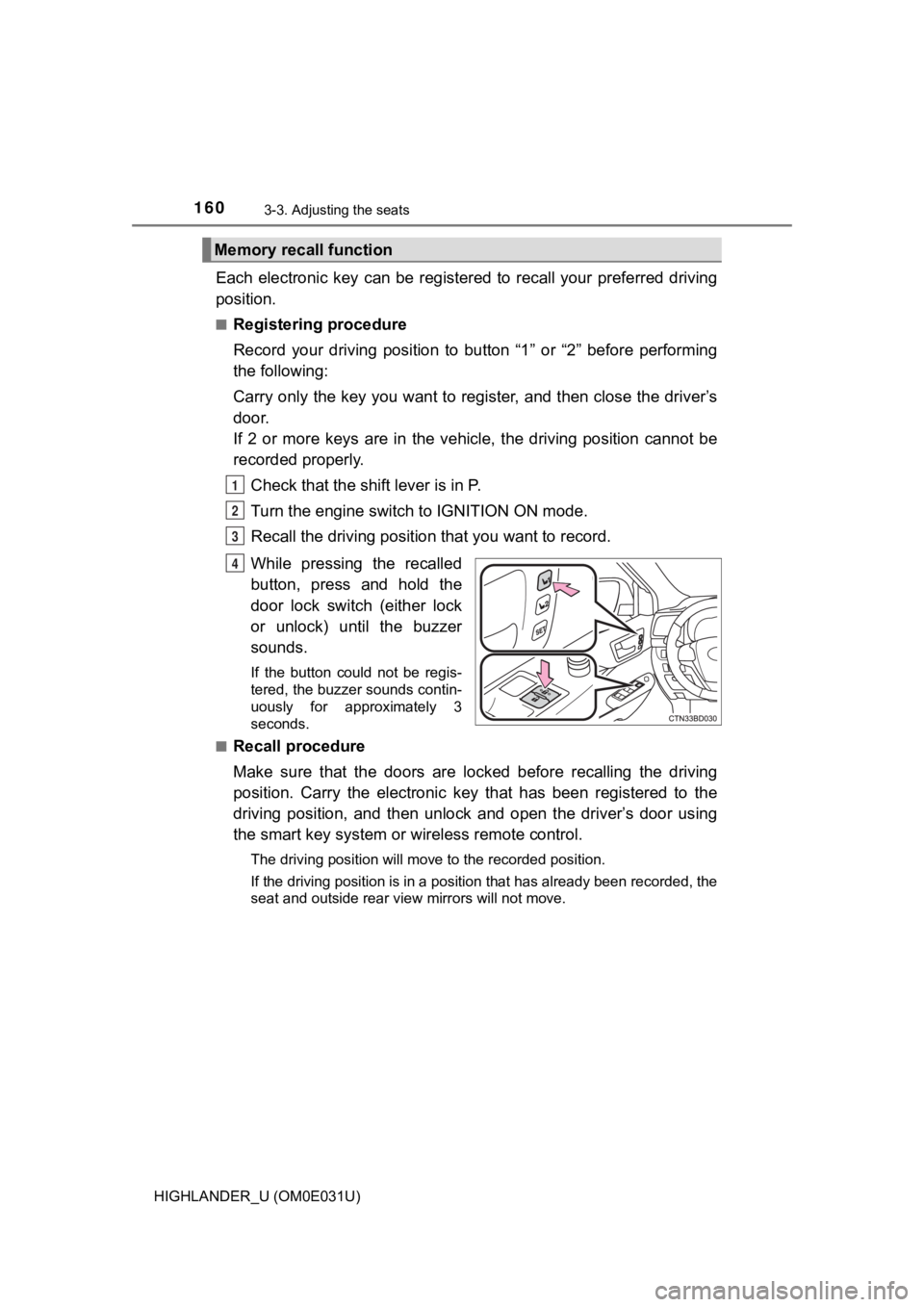
Each electronic key can be registered to recall your preferred driving
position.
■Registering procedure
Record your driving position to button “1” or “2” before perfor ming
the following:
Carry only the key you want to register, and then close the dri ver’s
door.
If 2 or more keys are in the vehicle, the driving position cann ot be
recorded properly.
Check that the shift lever is in P.
Turn the engine switch to IGNITION ON mode.
Recall the driving position that you want to record.
While pressing the recalled
button, press and hold the
door lock switch (either lock
or unlock) until the buzzer
sounds.
If the button could not be regis-
tered, the buzzer sounds contin-
uously for approximately 3
seconds.
■
Recall procedure
Make sure that the doors are locked before recalling the drivin g
position. Carry the electronic k ey that has been registered to the
driving position, and then unlock and open the driver’s door us ing
the smart key system or wireless remote control.
The driving position will move to the recorded position.
If the driving position is in a position that has already been recorded, the
seat and outside rear view mirrors will not move.
Memory recall function
1
2
3
4
Page 161 of 732

1613-3. Adjusting the seats
3
Operation of each component
HIGHLANDER_U (OM0E031U)■
Cancelation procedure
Carry only the key you want to cancel and then close the driver
’s
door.
If 2 or more keys are in the vehicle, the driving position cann ot be
canceled properly.
Check that the shift lever is in P.
Turn the engine switch to IGNITION ON mode.
While pressing the “SET” button, press and hold the door lock
switch (either lock or unlock) until the buzzer sounds twice.
If the button could not be canceled, the buzzer sounds continuo usly for
approximately 3 seconds.
■ Recalling the driving position u sing the memory recall function
● Different driving positions can be registered for each electronic key. There-
fore, the driving position that is recalled may be different de pending on the
key being carried.
● If a door other than the driver’s door is unlocked with the sma rt key system,
the driving position cannot be recalled. In this case, press the driving posi-
tion button which has been set.
■ Customization
The unlock door settings of the memory recall function can be customized.
(Customizable features: P. 687)
WARNING
■Seat adjustment caution
Take care during seat adjustment so that the seat does not stri ke the rear
passenger or squeeze your body against the steering wheel.
1
2
3
Page 173 of 732
1733-5. Opening and closing the windows
3
Operation of each component
HIGHLANDER_U (OM0E031U)
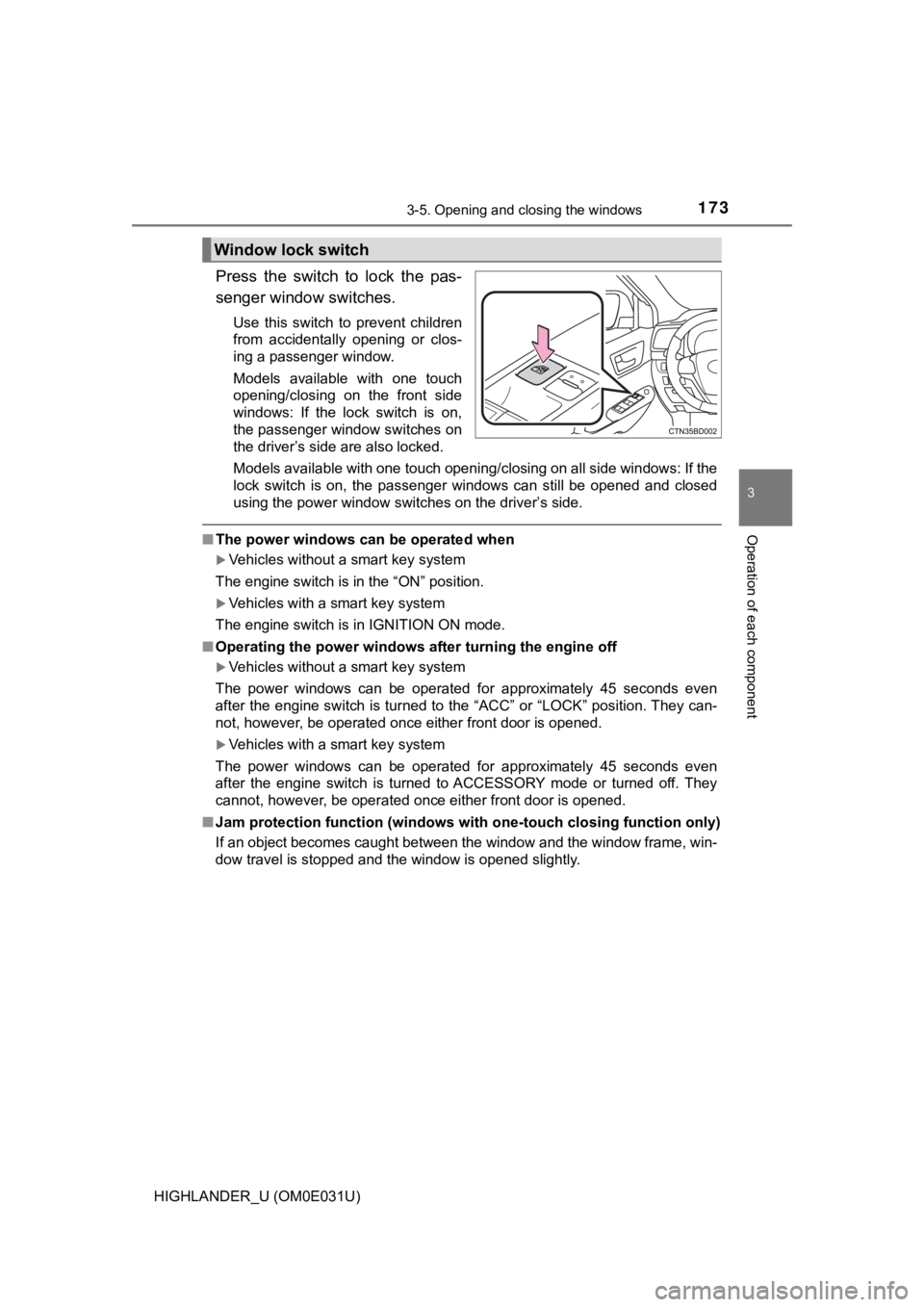
Press the switch to lock the pas-
senger window switches.
Use this switch to prevent children
from accidentally opening or clos-
ing a passenger window.
Models available with one touch
opening/closing on the front side
windows: If the lock switch is on,
the passenger window switches on
the driver’s side are also locked.
Models available with one touch opening/closing on all side windows: If the
lock switch is on, the passenger windows can still be opened an d closed
using the power window switches on the driver’s side.
■ The power windows can be operated when
Vehicles without a smart key system
The engine switch is in the “ON” position.
Vehicles with a smart key system
The engine switch is in IGNITION ON mode.
■ Operating the power windows after turning the engine off
Vehicles without a smart key system
The power windows can be operated for approximately 45 seconds even
after the engine switch is turned to the “ACC” or “LOCK” positi on. They can-
not, however, be operated once either front door is opened.
Vehicles with a smart key system
The power windows can be operated for approximately 45 seconds even
after the engine switch is turned to ACCESSORY mode or turned o ff. They
cannot, however, be operated once either front door is opened.
■ Jam protection function (windows with one-touch closing functio n only)
If an object becomes caught between the window and the window f rame, win-
dow travel is stopped and the window is opened slightly.
Window lock switch
Page 174 of 732

1743-5. Opening and closing the windows
HIGHLANDER_U (OM0E031U)■
When the power window does not close normally (windows with one -
touch closing function only)
If the jam protection function is operating abnormally and a wi ndow cannot be
closed, perform the following operations using the power window switch on
the relevant door.
● Vehicles without a smart key system: After stopping the vehicle, the window
can be closed by holding the power window switch in the one-tou ch closing
position while the engine switch is turned to the “ON” position .
Vehicles with a smart key system: After stopping the vehicle, the window
can be closed by holding the power window switch in the one-tou ch closing
position while the engine switch is turned to IGNITION ON mode.
● If the window still cannot be closed even by carrying out the operation
explained above, initialize the function by performing the foll owing proce-
dure.
Hold the power window switch in the one-touch closing position. Continue
holding the switch for a further 6 seconds after the window has closed.
Hold the power window switch in the one-touch opening position. Con-
tinue holding the switch for a further 2 seconds after the window has
opened completely.
Hold the power window switch in the one-touch closing position once
again. Continue holding the switch for a further 2 seconds afte r the win-
dow has closed.
If you release the switch while the window is moving, start aga in from the
beginning.
If the window continues to close but then re-open slightly even after perform-
ing the above procedure correctly, have the vehicle inspected b y your Toyota
dealer.
■ Door lock linked window operatio n (windows with one-touch closing
function only)
● The power windows can be opened and closed using the key or mechanical
key.
* ( P. 117, 635)
● The power windows can be opened using the wireless remote control.
*
(P. 116)
*: These settings must be customized at your Toyota dealer.
■ Customization
Settings (e.g. linked door lock operation) can be changed.
(Customizable features: P. 680)
1
2
3