ECU TOYOTA HIGHLANDER 2020 Accessories, Audio & Navigation (in English)
[x] Cancel search | Manufacturer: TOYOTA, Model Year: 2020, Model line: HIGHLANDER, Model: TOYOTA HIGHLANDER 2020Pages: 402, PDF Size: 18.72 MB
Page 41 of 402
412-2. Connectivity settings
HIGHLANDER_HIGHLANDER
HV_NAVI_(U)
2
Basic function
*: Except 12.3-inch display model
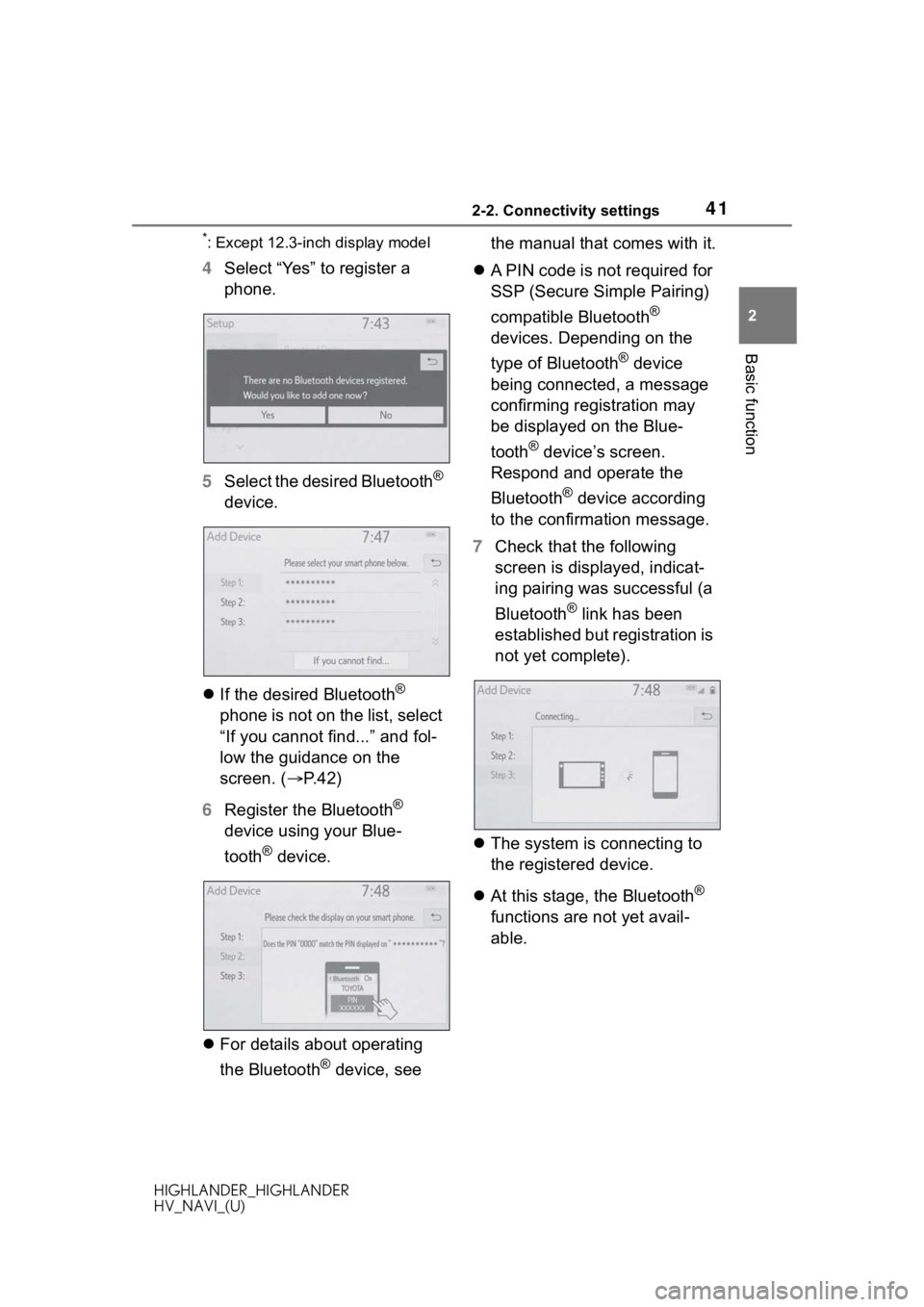
4 Select “Yes” to register a
phone.
5 Select the desired Bluetooth
®
device.
If the desired Bluetooth
®
phone is not on the list, select
“If you cannot find...” and fol-
low the guidance on the
screen. ( P. 4 2 )
6 Register the Bluetooth
®
device using your Blue-
tooth
® device.
For details about operating
the Bluetooth
® device, see the manual that comes with it.
A PIN code is not required for
SSP (Secure Simple Pairing)
compatible Bluetooth
®
devices. Depending on the
type of Bluetooth
® device
being connected, a message
confirming registration may
be displayed on the Blue-
tooth
® device’s screen.
Respond and operate the
Bluetooth
® device according
to the confirmation message.
7 Check that the following
screen is displayed, indicat-
ing pairing was successful (a
Bluetooth
® link has been
established but registration is
not yet complete).
The system is connecting to
the registered device.
At this stage, the Bluetooth
®
functions are not yet avail-
able.
Page 42 of 402
422-2. Connectivity settings
HIGHLANDER_HIGHLANDER
HV_NAVI_(U)
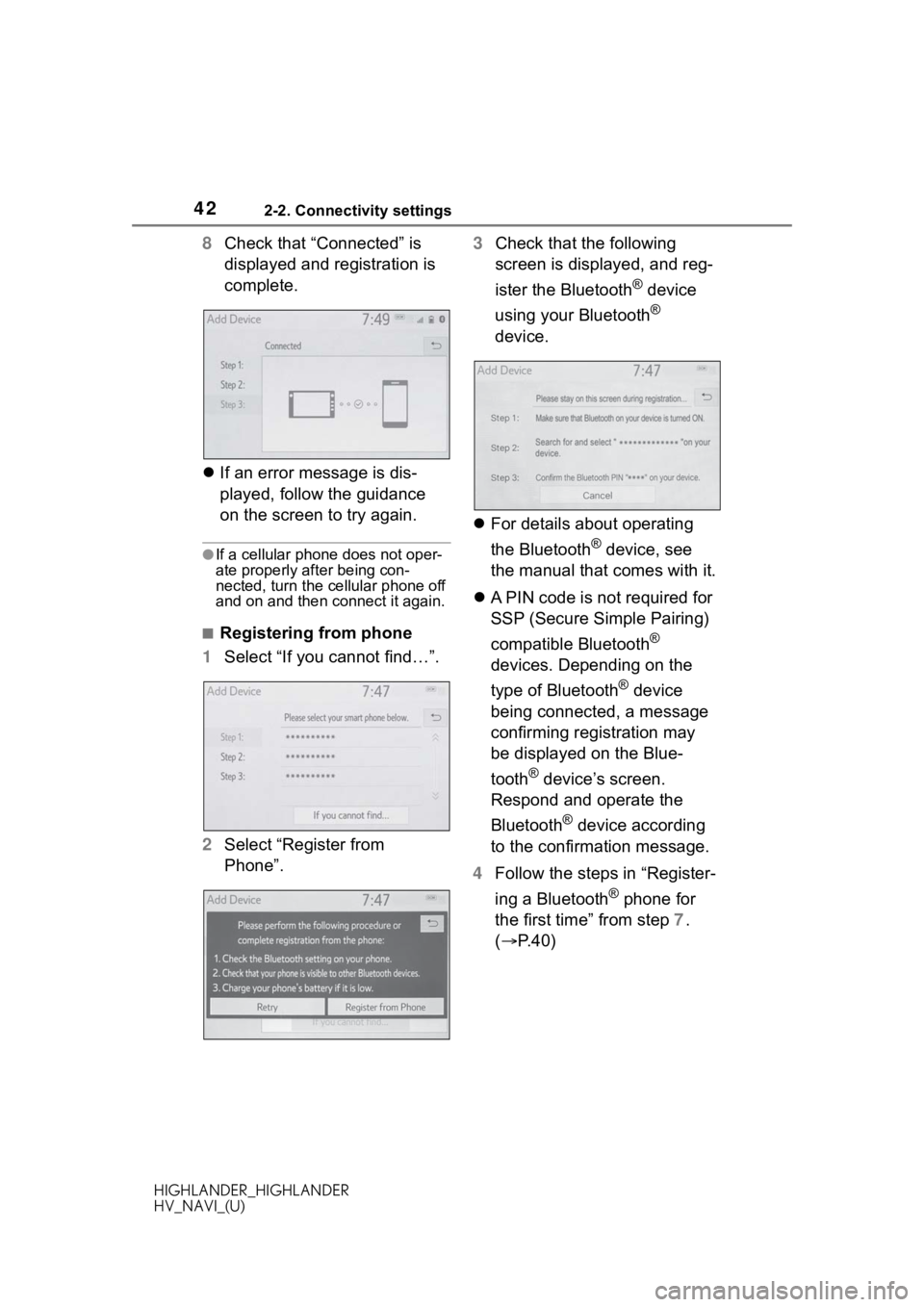
8Check that “Connected” is
displayed and registration is
complete.
If an error message is dis-
played, follow the guidance
on the screen to try again.
●If a cellular phone does not oper-
ate properly after being con-
nected, turn the cellular phone off
and on and then c onnect it again.
■Registering from phone
1 Select “If you cannot find…”.
2 Select “Register from
Phone”. 3
Check that the following
screen is displayed, and reg-
ister the Bluetooth
® device
using your Bluetooth
®
device.
For details about operating
the Bluetooth
® device, see
the manual that comes with it.
A PIN code is not required for
SSP (Secure Simple Pairing)
compatible Bluetooth
®
devices. Depending on the
type of Bluetooth
® device
being connected, a message
confirming registration may
be displayed on the Blue-
tooth
® device’s screen.
Respond and operate the
Bluetooth
® device according
to the confirmation message.
4 Follow the steps in “Register-
ing a Bluetooth
® phone for
the first time” from step 7.
( P.40)
Page 53 of 402
532-2. Connectivity settings
HIGHLANDER_HIGHLANDER
HV_NAVI_(U)
2
Basic function
*: Vehicles with DCM
1 Enable the Wi-Fi® hotspot
function. ( P. 5 4 )
2 Disable the “Hide Access
Point” function. ( P.54)
3 Search for the vehicle access
point using the device you
wish to connect.
For details about operating
the device, refer to the docu- mentation which came with it.
4 Operate the device to con-
nect it to the vehicle access
point.
To check the vehicle access
point password, check “Pass-
word”. ( P. 5 4 )
●Hints for connecting to the vehicle
via Wi-Fi® can be displayed.
( P. 5 4 )
1 Enable the Wi-Fi® hotspot
function. ( P. 5 4 )
2 Enable the “Hide Access
Point” function. ( P. 5 4 )
3 Enter the access point name
(SSID) into the device you
wish to connect and connect
it.
To check the vehicle access
point password, check “Pass-
word”. ( P. 5 4 )
The security settings on the
device must be the same as
that displayed for “Security”.
( P.54)
For details about operating
the device, refer to the docu-
mentation which came with it.
Wi-Fi® Hotspot*
By connecting a device to
the vehicle via Wi-Fi
®, it can
access the internet through
the DCM(Data Communica-
tion Module).
To use this function, a
Wi-Fi
® hotspot service sub-
scription from AT&T is
required. Connect your
device to the in-vehicle
access point (see instruc-
tions below), or contact your
Toyota dealer for details.
This function is not made
available in some countries
or areas.
Connecting a device to
the in-vehicle access
point
Searching for and con-
necting a device to the
vehicle access point
Connecting a device to the
in-vehicle access point
using the access point
name (SSID)
Page 54 of 402
542-2. Connectivity settings
HIGHLANDER_HIGHLANDER
HV_NAVI_(U)
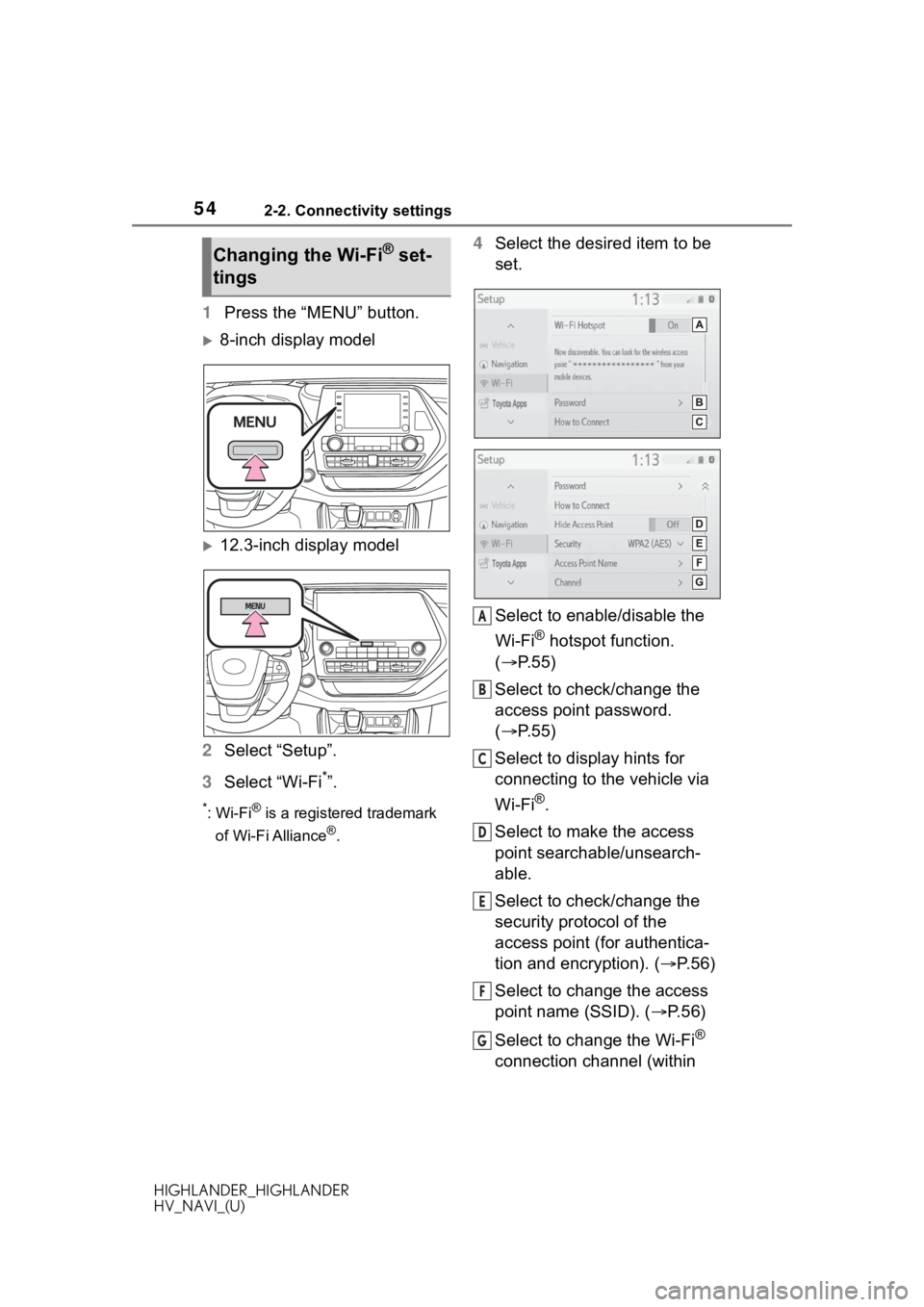
1Press the “MENU” button.
8-inch display model
12.3-inch display model
2 Select “Setup”.
3 Select “Wi-Fi
*”.
*:Wi-Fi® is a registered trademark
of Wi-Fi Alliance
®.
4 Select the desired item to be
set.
Select to enable/disable the
Wi-Fi
® hotspot function.
( P.55)
Select to check/change the
access point password.
( P.55)
Select to display hints for
connecting to the vehicle via
Wi-Fi
®.
Select to make the access
point searchable/unsearch-
able.
Select to check/change the
security protocol of the
access point (for authentica-
tion and encryption). ( P.56)
Select to change the access
point name (SSID). ( P.56)
Select to change the Wi-Fi
®
connection channel (within
Changing the Wi-Fi® set-
tings
A
B
C
D
E
F
G
Page 56 of 402
562-2. Connectivity settings
HIGHLANDER_HIGHLANDER
HV_NAVI_(U)• Do not use the same or a similar
password to that for other
accounts.
• Avoid using easy to identify words, such as your vehicle’s
model name or license plate
number, simple dictionary words,
or words with simple obfuscation,
such as c@t (for cat), as your
password.
1 Select “Security”.
2 Select the desired security
protocol.
1 Select “Access Point Name”.
2 Enter the desired access
point name (SSID) and select
“OK”. 1
Select “Channel”.
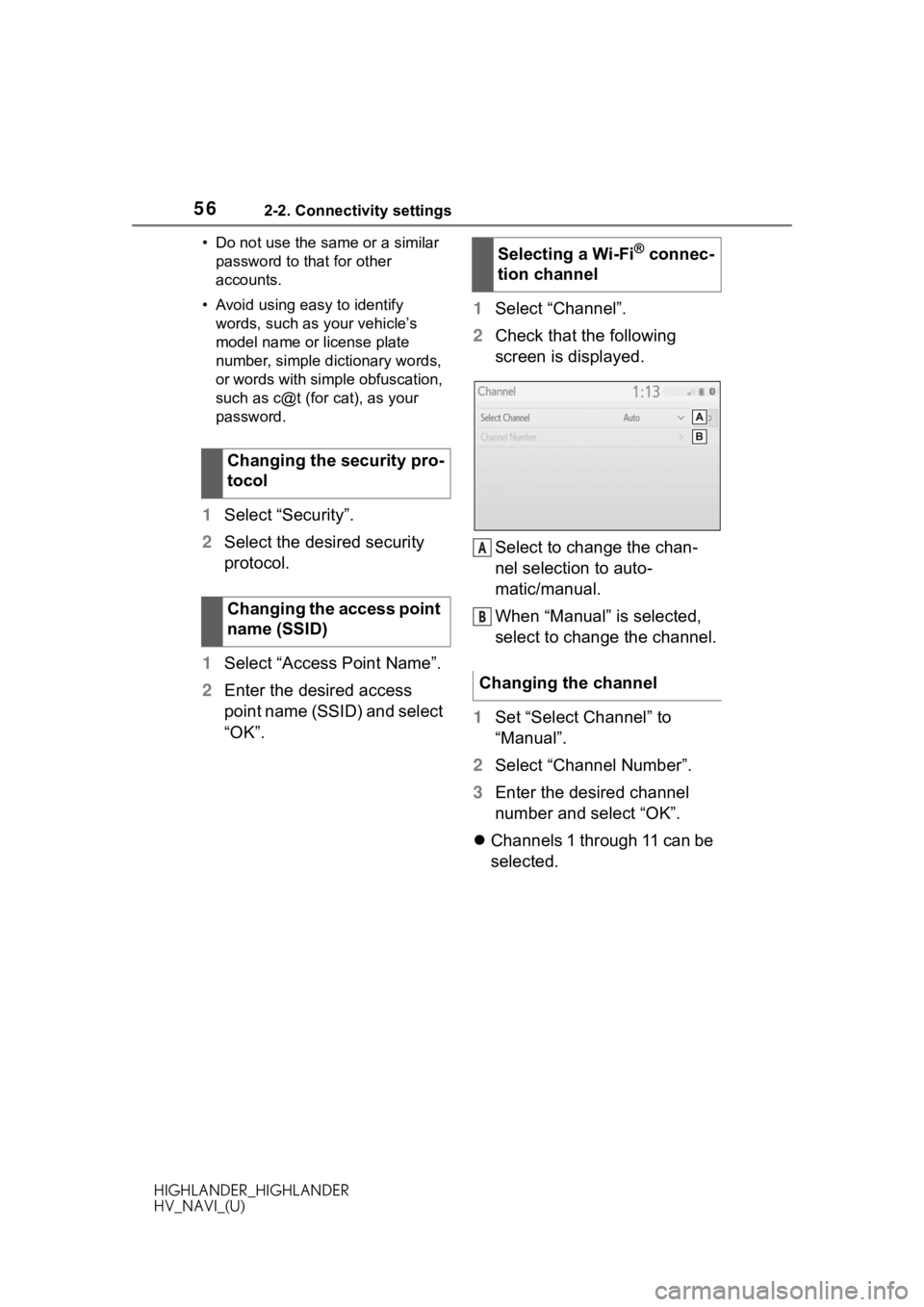
2 Check that the following
screen is displayed.
Select to change the chan-
nel selection to auto-
matic/manual.
When “Manual” is selected,
select to change the channel.
1 Set “Select Channel” to
“Manual”.
2 Select “Channel Number”.
3 Enter the desired channel
number and select “OK”.
Channels 1 through 11 can be
selected.
Changing the security pro-
tocol
Changing the access point
name (SSID)
Selecting a Wi-Fi® connec-
tion channel
Changing the channel
A
B
Page 57 of 402
572-2. Connectivity settings
HIGHLANDER_HIGHLANDER
HV_NAVI_(U)
2
Basic function
●If a connected devi ce is taken out
of the Wi-Fi® connection area, the
connection will be severed.
●If the vehicle is driven out of the
cellular communication coverage
area, connecting to the internet
via the Wi-Fi
® hotspot will not be
possible.
●If a Bluetooth® device is used
while a device is connected using
the Wi-Fi
® hotspot function, the
communication speed may
decrease.
●If the vehicle is near a radio
antenna, radio station or other
source of strong radio waves and
electrical noise, communication
may be slow or impossible.The condition of Wi-Fi® connec-
tion appears on the right upper
side of the screen. ( P.17)
Communication standards
IEEE 802.11b
IEEE 802.11g
IEEE 802.11n (2.4GHz)
Security
WPA™
WPA2™
• WPA™ and WPA2™ are trade-
marks of Wi-Fi Alliance
®.
Wi-Fi® function operating
hints
WA R N I N G
●Use Wi-Fi® devices only when
safe and legal to do so.
●Your audio unit is fitted with
Wi-Fi® antennas. People with
implantable cardiac pacemak-
ers, cardiac resynchronization
therapy-pacemakers or implant-
able cardioverter defibrillators
should maintain a reasonable
distance between themselves
and the Wi-Fi
® antennas.
The radio waves may affect the
operation of such devices.
●Before using Wi-Fi® devices,
users of any electrical medical
device other than implantable
cardiac pacemakers, cardiac
resynchronization ther-
apy-pacemakers or implantable
cardioverter defibrillators should
consult the manufacturer of the
device for information about its
operation under the influence of
radio waves.
Radio waves could have unex-
pected effects on the operation
of such medical devices.
Conditions displayed with
Wi-Fi
® icon
Specifications
Page 62 of 402
622-3. Apple CarPlay/Android Auto
HIGHLANDER_HIGHLANDER
HV_NAVI_(U)
If you are experiencing difficulties with Apple CarPlay/Android Auto,
check the following table.
Troubleshooting
Troubleshooting
SymptomSolution
An Apple CarPlay/
Android Auto connection
cannot be established.
Check if the device supports Apple CarPlay/
Android Auto.
Check if Apple CarPl ay/Android Auto is
enabled on the connected device.
Check if that the Androi d Auto application is
installed to the device to be connected.
For details, refer to
Apple CarPlay: https: //www.apple.com/ios/
carplay/.
Android Auto: https://w ww.android.com/auto/
.
For available countries or areas for Apple
CarPlay,
refer to https://ww w.apple.com/ios/
feature-availability/#apple-carplay.
Check if “Apple CarPla y”/“Android Auto” of
“Projection Settings” on the general settings
screen is set to on. ( P. 6 6 )
Check if the USB cable be ing used is securely
connected to the device and USB port.
Check that the device is connected directly to
the USB port of the system and not connected
to a USB hub.
For Apple CarPlay: Check if the Lightning cable
being used is certified by Apple. Check if Siri is
enabled.
After checking all of the above, try to establish
an Apple CarPlay/Android Auto connection.
( P.58, 59)
Page 75 of 402
752-4. Other settings
HIGHLANDER_HIGHLANDER
HV_NAVI_(U)
2
Basic function
( P. 9 9 )
1 Select “Dealer” or “Contact”.
2 Enter the name and select
“OK”.
1 Select “Location”.
2 Scroll the map to the desired
point ( P.82) and select
“Enter”.
1 Select “Phone #”.
2 Enter the phone number and
select “OK”.
The security system can be set
to on by entering a security code
(4-digit number).
When set to on, the system will
become inoperative once the
electrical power source is dis-
connected until the security
code is entered.
1 Display the vehicle settings
screen. ( P.72)
2 Select “Valet Mode”.
3 Enter the 4-digit personal
code and select “OK”. 4
Enter the same 4-digit per-
sonal code again and select
“OK”.
The system will request that
you input the security code
again to confirm that you
remember it correctly.
When valet mode activates,
the system stops and a secu-
rity code (4-digit number)
standby screen is displayed.
●If the 4-digit personal code is for-
gotten, please contact your Toyota
dealer.
1 Enter the 4-digit personal
code and select “OK”.
●If an incorrect security code
(4-digit number) is entered 6
times, the system will not accept
another security code (4-digit
number) for 10 minutes.
Editing dealer or contact
name
Editing the location
Editing phone number
Setting the valet mode
If the valet mode has been
activated
Page 149 of 402
1494-2. Radio operation
HIGHLANDER_HIGHLANDER
HV_NAVI_(U)
4
Audio/visual system
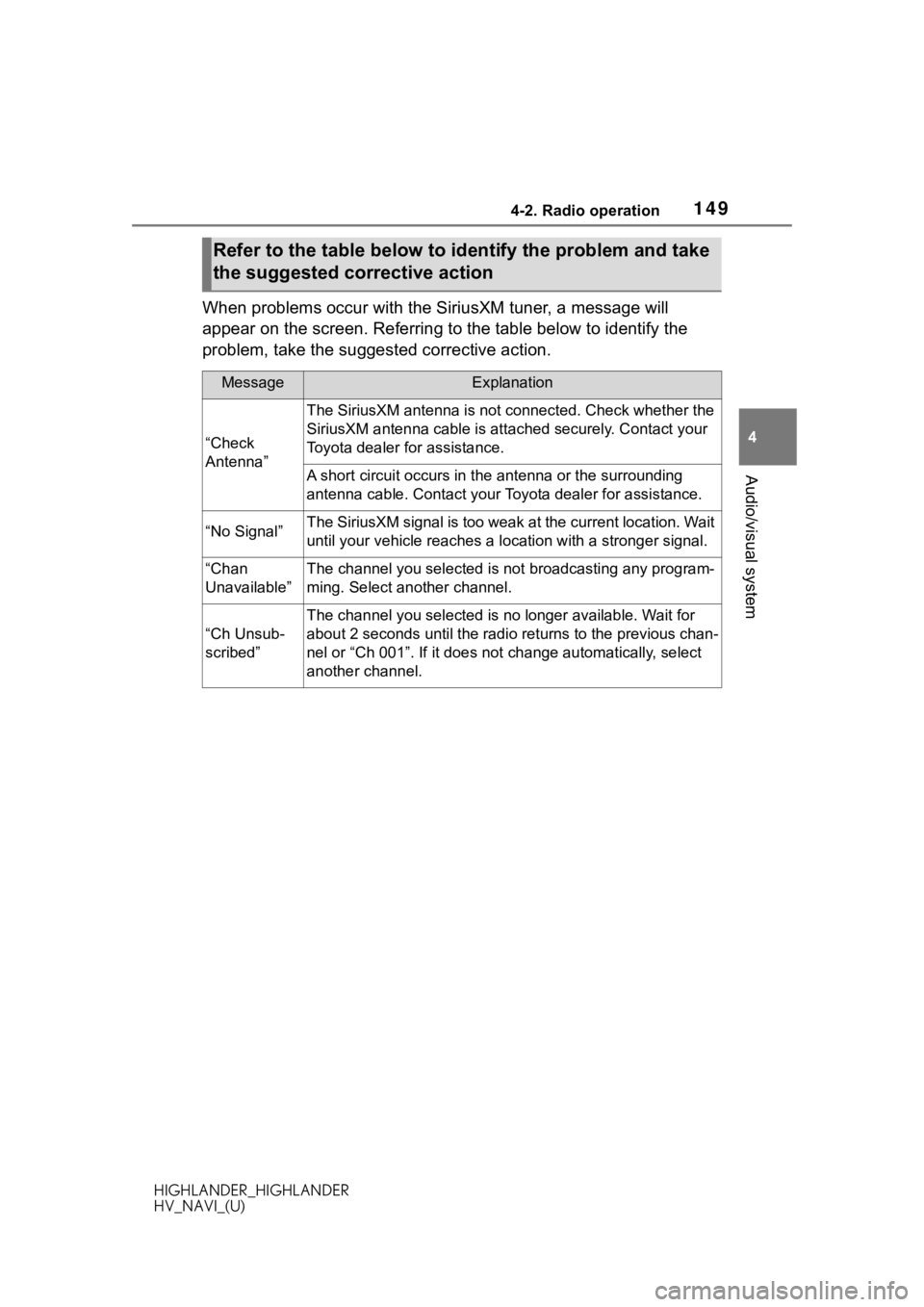
When problems occur with the SiriusXM tuner, a message will
appear on the screen. Referring to the table below to identify the
problem, take the suggested corrective action.
Refer to the table below to identify the problem and take
the suggested corrective action
MessageExplanation
“Check
Antenna”
The SiriusXM antenna is not c onnected. Check whether the
SiriusXM antenna cable is at tached securely. Contact your
Toyota dealer for assistance.
A short circuit occurs in the antenna or the surrounding
antenna cable. Contact your T oyota dealer for assistance.
“No Signal”The SiriusXM signal is too weak at the current location. Wait
until your vehicle reaches a location with a stronger signal.
“Chan
Unavailable”The channel you selected is not broadcasting any program-
ming. Select another channel.
“Ch Unsub-
scribed”
The channel you selected is no longer available. Wait for
about 2 seconds until the radio returns to the previous chan-
nel or “Ch 001”. If i t does not change automatically, select
another channel.
Page 246 of 402
2465-1. Voice command system operation
HIGHLANDER_HIGHLANDER
HV_NAVI_(U)
voice command operation,
select “Resume” or press the
talk switch.
●If the system does not respond or
the confirmation screen does not
disappear, press the talk switch
and try again.
●If a voice command cannot be rec-
ognized 3 consecutive times,
voice recognition will be canceled.
●The amount of spoken feedback
received from the system while
using the voice command system
(voice recognition prompts) can
be changed on the voice settings
screen. (P. 7 1 )
●Some voice guidance can be can-
celed by setting voice prompts to
off. Use this setting when it is
desirable to say a command
immediately after pressing the talk
switch and hearing a beep.
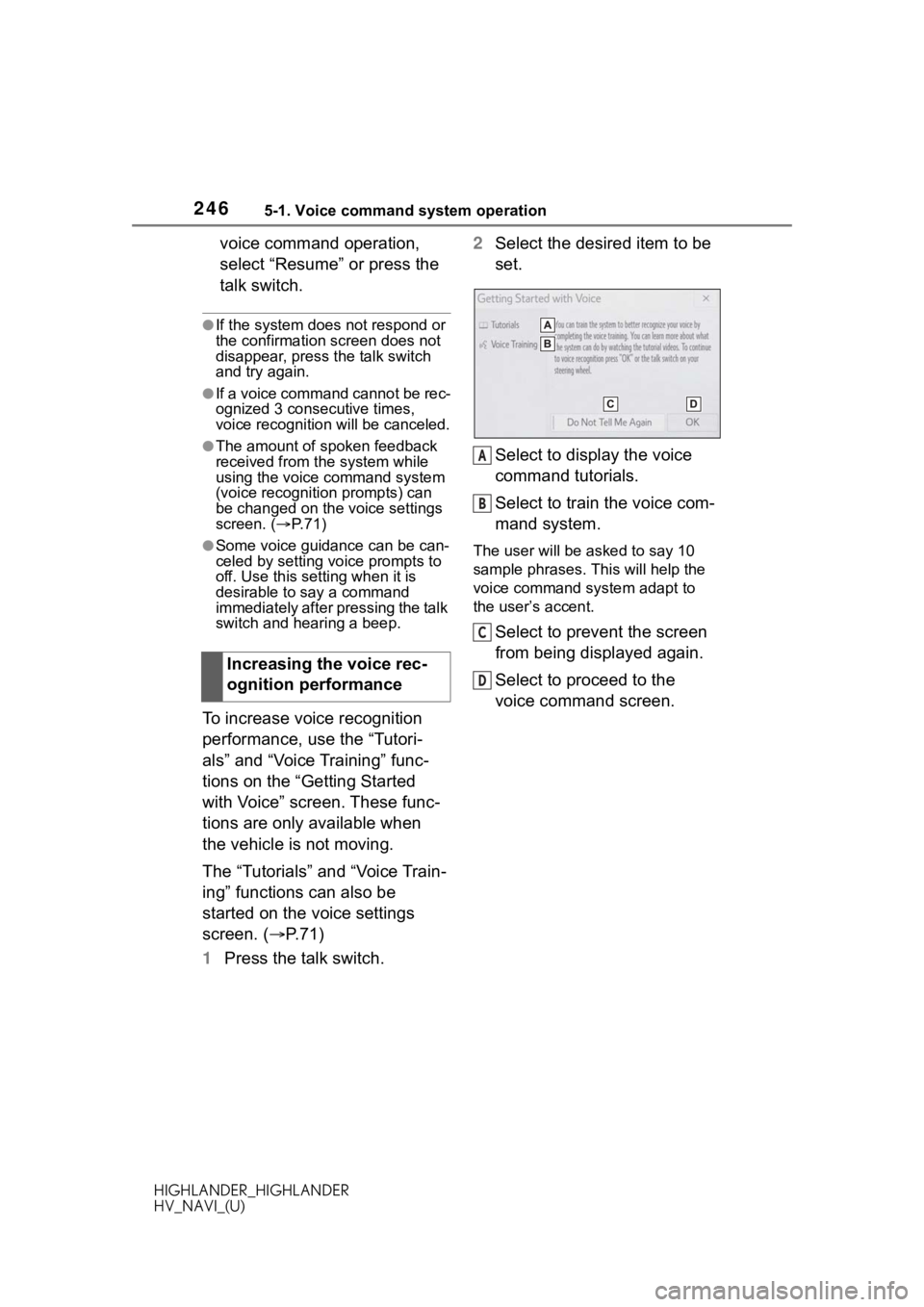
To increase voice recognition
performance, use the “Tutori-
als” and “Voice Training” func-
tions on the “Getting Started
with Voice” screen. These func-
tions are only available when
the vehicle is not moving.
The “Tutorials” and “Voice Train-
ing” functions can also be
started on the voice settings
screen. (P. 7 1 )
1 Press the talk switch. 2
Select the desired item to be
set.
Select to display the voice
command tutorials.
Select to train the voice com-
mand system.
The user will be a sked to say 10
sample phrases. This will help the
voice command system adapt to
the user’s accent.
Select to prevent the screen
from being displayed again.
Select to proceed to the
voice command screen.
Increasing the voice rec-
ognition performance
A
B
C
D