warning lights TOYOTA HIGHLANDER 2022 User Guide
[x] Cancel search | Manufacturer: TOYOTA, Model Year: 2022, Model line: HIGHLANDER, Model: TOYOTA HIGHLANDER 2022Pages: 568, PDF Size: 13.73 MB
Page 77 of 568
772-1. Instrument cluster
2
Vehicle status information and indicators
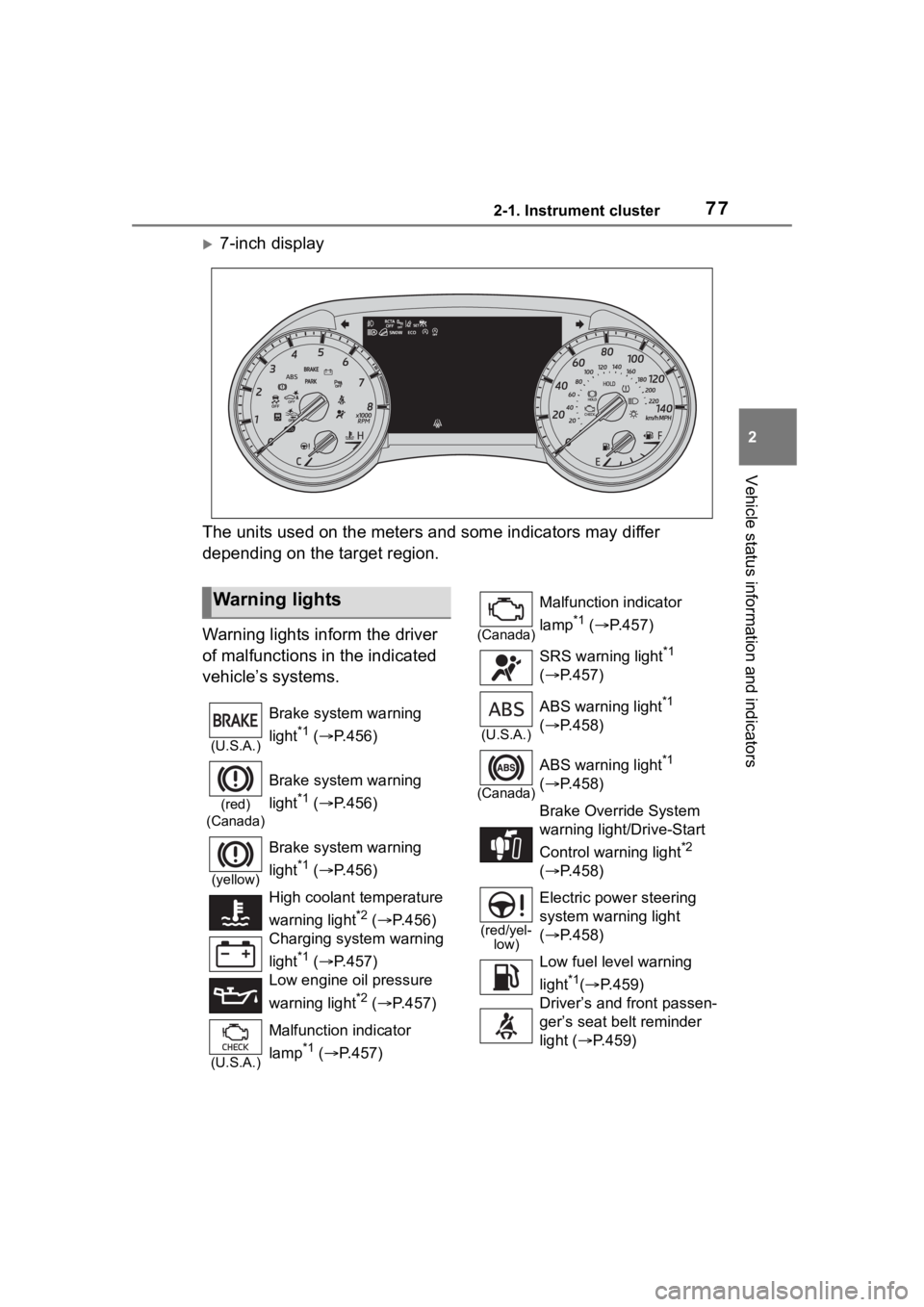
7-inch display
The units used on the meters and some indicators may differ
depending on the target region.
Warning lights inform the driver
of malfunctions in the indicated
vehicle’s systems.
Warning lights
(U.S.A.)
Brake system warning
light
*1 ( P.456)
(red)
(Canada)
Brake system warning
light
*1 ( P.456)
(yellow)
Brake system warning
light
*1 ( P.456)
High coolant temperature
warning light
*2 ( P.456)
Charging system warning
light
*1 ( P.457)
Low engine oil pressure
warning light
*2 ( P.457)
(U.S.A.)
Malfunction indicator
lamp
*1 ( P.457)
(Canada)
Malfunction indicator
lamp
*1 ( P.457)
SRS warning light
*1
( P.457)
(U.S.A.)
ABS warning light*1
( P.458)
(Canada)
ABS warning light*1
( P.458)
Brake Overri de System
warning light/Drive-Start
Control warning light
*2
( P.458)
(red/yel-
low)
Electric power steering
system warning light
( P.458)
Low fuel leve l warning
light
*1( P.459)
Driver’s and front passen-
ger’s seat belt reminder
light ( P.459)
Page 78 of 568
782-1. Instrument cluster
*1: These lights turn on when the engine switch is turned to ON to
indicate that a system check is
being performed. They will turn off after the engine is started, or
after a few seconds. There may
be a malfunction in a system if a
light does not come on, or turn
off. Have the vehicle inspected
by your Toyota dealer.
*2: This light illuminates on the
multi-information display.
*3: 7-inch display only : This light illu-
minates on the mu lti-information
display.
*4: This light comes on when the system is turned off.
*5: 4.2-inch display only: These lights turn on when the engine
switch is turned to ON to indicate
that a system check is being per-
formed. They will turn off after
the engine is started, or after a
few seconds. There may be a
malfunction in a system if a light
does not come on, or turn off.
Have the vehicle inspected by
your Toyota dealer.
*6: 7-inch display only
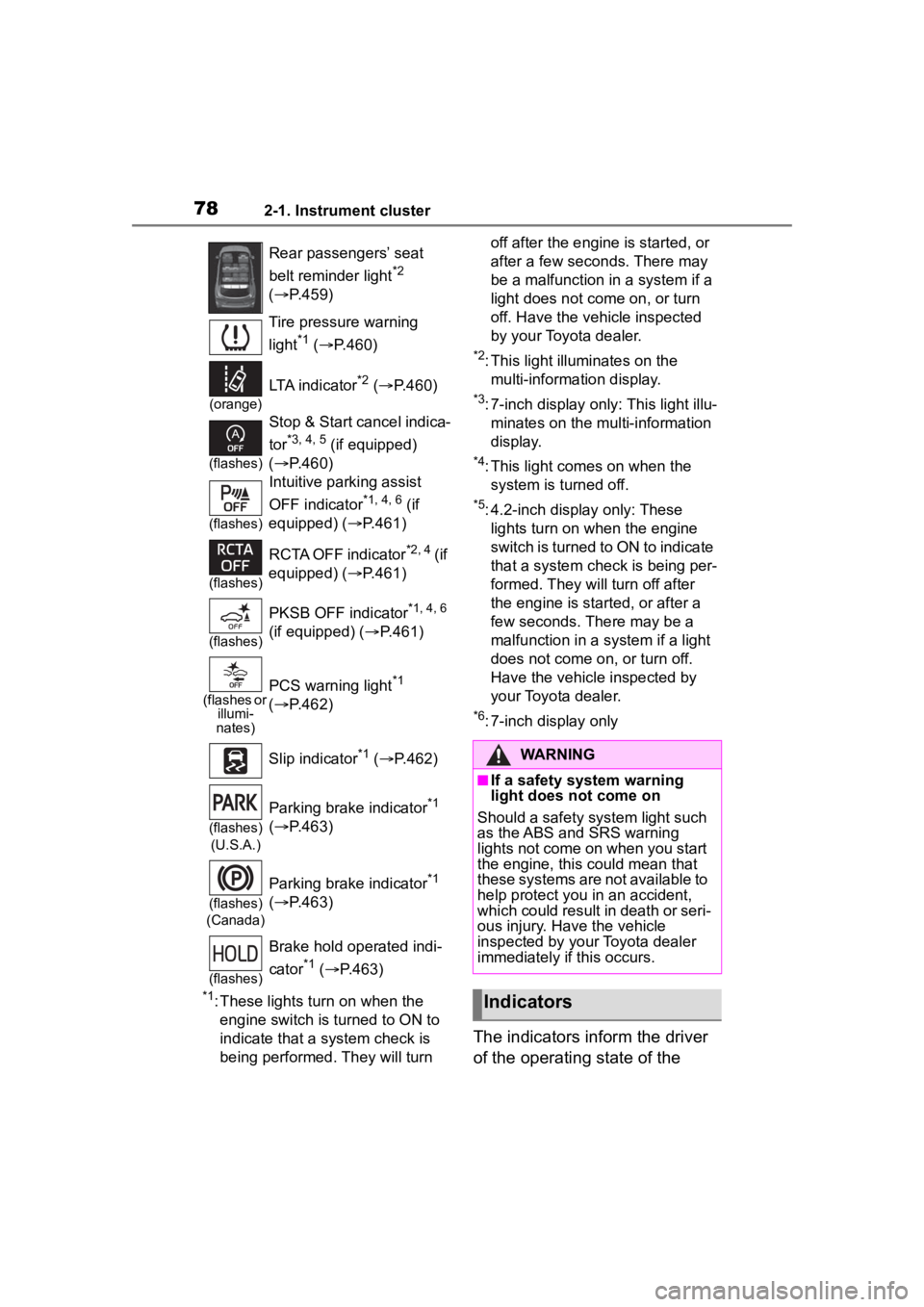
The indicators inform the driver
of the operating state of the
Rear passengers’ seat
belt reminder light
*2
( P.459)
Tire pressure warning
light
*1 ( P.460)
(orange)
LTA indicator*2 ( P.460)
(flashes)
Stop & Start cancel indica-
tor
*3, 4, 5 (if equipped)
( P.460)
(flashes)
Intuitive parking assist
OFF indicator
*1, 4, 6 (if
equipped) ( P.461)
(flashes)
RCTA OFF indicator*2, 4 ( if
equipped) ( P.461)
(flashes)
PKSB OFF indicator*1, 4, 6
(if equipped) ( P.461)
(flashes or
illumi-
nates)PCS warning light*1
( P.462)
Slip indicator
*1 ( P.462)
(flashes)
(U.S.A.)
Parking brake indicator*1
( P.463)
(flashes)
(Canada)
Parking brake indicator*1
( P.463)
(flashes)
Brake hold operated indi-
cator
*1 ( P.463)
WARNING
■If a safety system warning
light does not come on
Should a safety system light such
as the ABS and SRS warning
lights not come on when you start
the engine, this could mean that
these systems are not available to
help protect you in an accident,
which could result in death or seri-
ous injury. Have the vehicle
inspected by you r Toyota dealer
immediately if this occurs.
Indicators
Page 83 of 568
832-1. Instrument cluster
2
Vehicle status information and indicators
■Display items
Odometer
Displays the total distance the vehi-
cle has been driven.
Trip meter A/trip meter B
Displays the distan ce the vehicle
has been driven si nce the meter
was last reset. Trip meters A and B
can be used to record and display
different distances independently.
Distance until next engine oil
change
Displays the distan ce the vehicle
can be driven until an oil change is
necessary.
■Changing the display
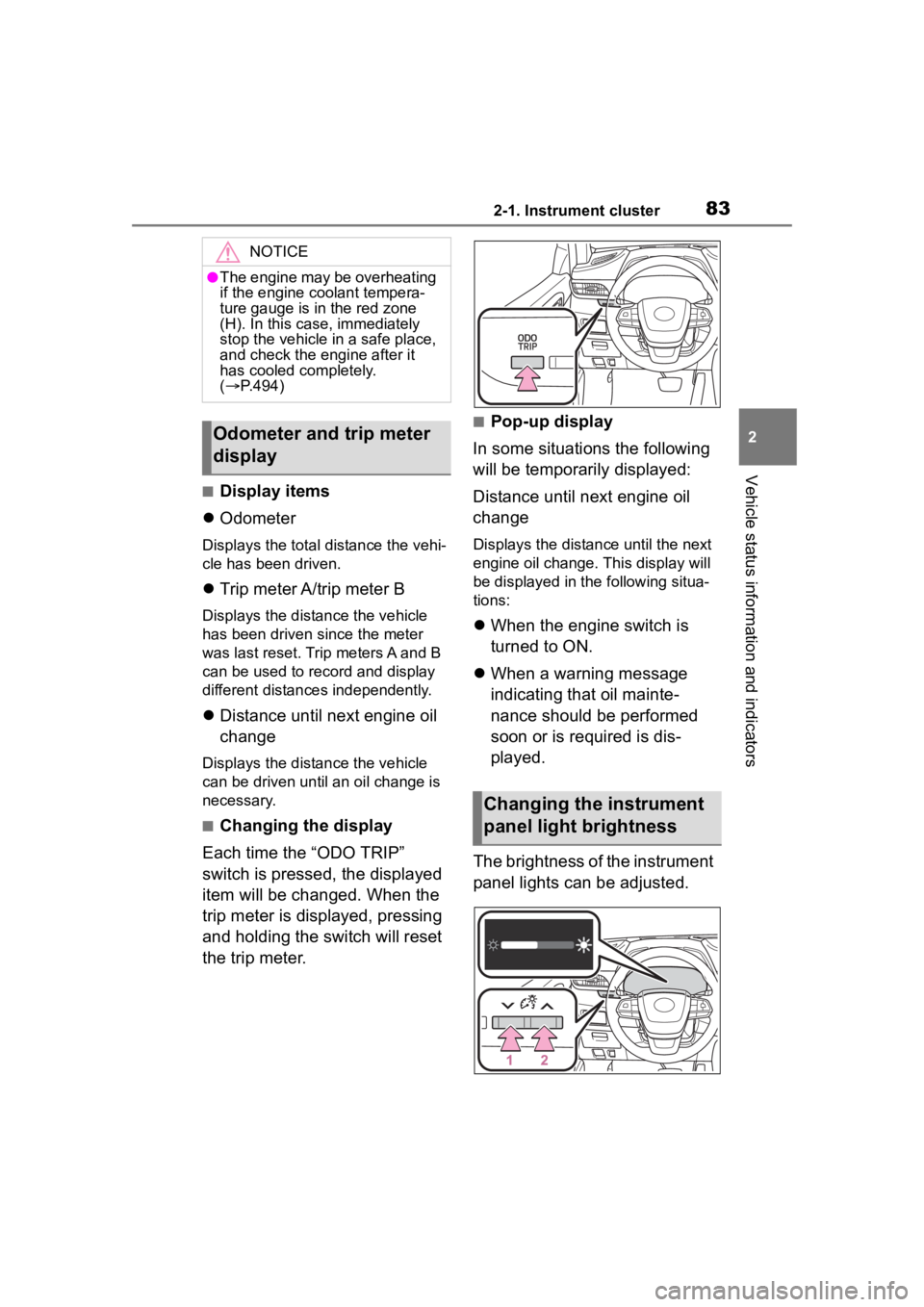
Each time the “ODO TRIP”
switch is pressed, the displayed
item will be changed. When the
trip meter is displayed, pressing
and holding the switch will reset
the trip meter.
■Pop-up display
In some situations the following
will be temporarily displayed:
Distance until next engine oil
change
Displays the distance until the next
engine oil change. This display will
be displayed in the following situa-
tions:
When the engine switch is
turned to ON.
When a warning message
indicating that oil mainte-
nance should be performed
soon or is required is dis-
played.
The brightness of the instrument
panel lights can be adjusted.
NOTICE
●The engine may be overheating
if the engine coolant tempera-
ture gauge is in the red zone
(H). In this case, immediately
stop the vehicle in a safe place,
and check the engine after it
has cooled completely.
( P.494)
Odometer and trip meter
display
Changing the instrument
panel light brightness
Page 92 of 568
922-1. Instrument cluster
Select to set the first and second
items of the drive information dis-
play to any of the following: aver-
age vehicle
speed/distance/elapsed time.
Pop-up display
Select to enable/disable pop-up
displays for each relevant system.
Multi-information display off
Displays a blank screen.
Default setting
Select to reset the meter display
settings to the default setting.
■Vehicle functions and set-
tings that can be changed
P.521
■Suspension of the settings dis-
play
●Some settings cannot be changed
while driving. When changing set-
tings, park the vehicle in a safe
place.
●If a warning message is displayed,
operation of the settings display
will be suspended.
■Pop-up displays
Depending on the pop-up display,
the currently disp layed item in the
message display area may be tem-
porarily not displayed. The item will
be displayed after the pop-up dis-
play is no longer displayed.
Select to display warning mes-
sages and measures to be
taken if a malfunction is
detected. ( P.467)
Displays suggestions to the
driver in the following situations.
To select a response to a dis-
played suggestion, use the
meter control switches.
■Suggestion to turn off the
headlights
If the headlights are left on for a
certain amount of time after the
engine switch has been turned
off, if the headlight switch is in
WARNING
■Cautions during setting up
the display
As the engine needs to be run-
ning during setting up the display,
ensure that the vehicle is parked
in a place with adequate ventila-
tion. In a closed area such as a
garage, exhaust gases including
harmful carbon monoxide (CO)
may collect and enter the vehicle.
This may lead to death or a seri-
ous health hazard.
NOTICE
■During setting up the display
To prevent batte ry discharge,
ensure that the engine is running
while setting up the display fea-
tures.
Warning message display
()
Suggestion function
Page 93 of 568
932-1. Instrument cluster
2
Vehicle status information and indicators
the “AUTO” position, a sugges-
tion message will be displayed
asking if you wish to turn the
headlights off.
To turn the headlights off, select
“Yes”.
If the driver's door is opened after
the engine switch is turned off, this
suggestion message will not be dis-
played.
■Customization
Some functions can be customized.
( P.521)
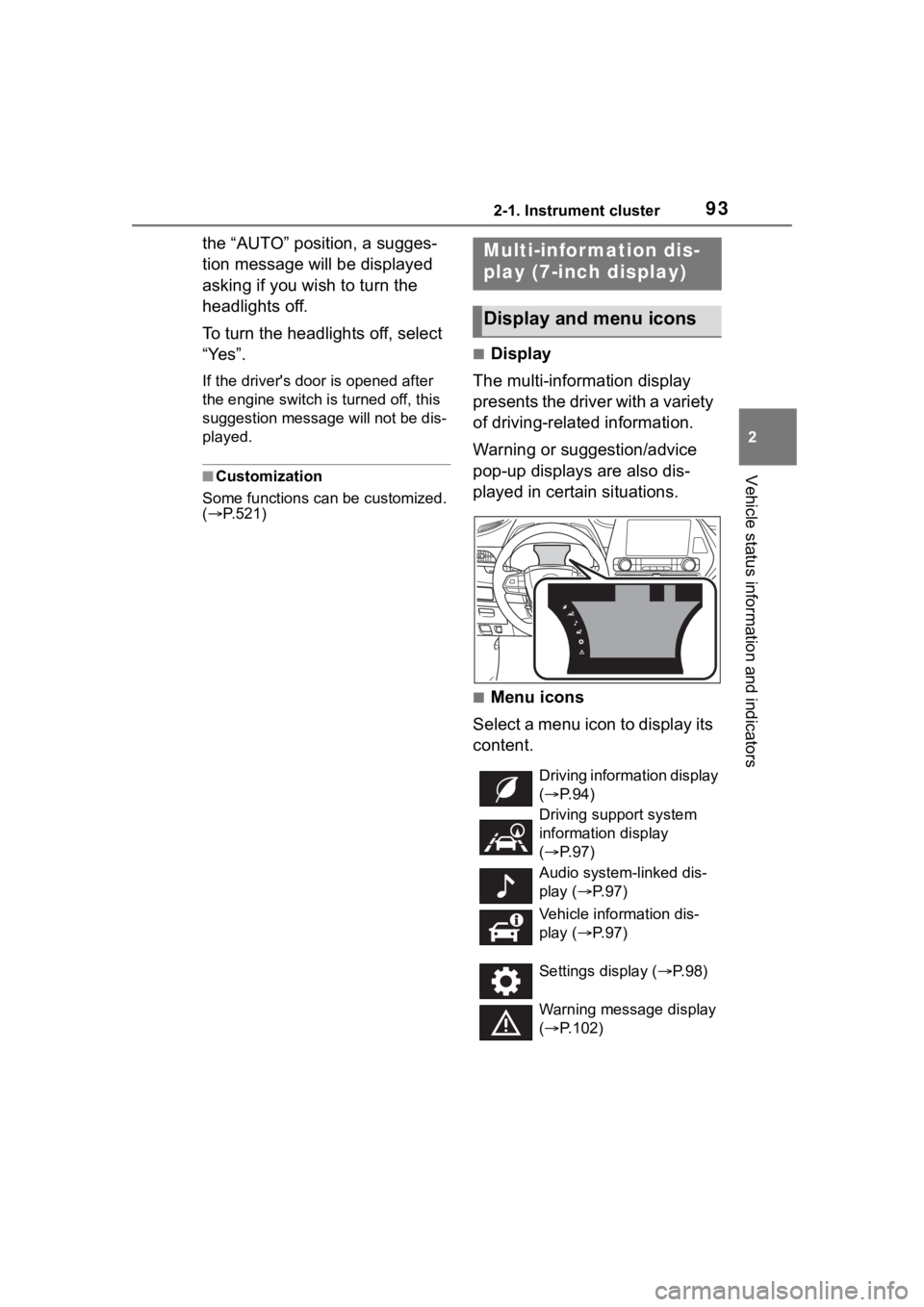
■Display
The multi-information display
presents the driver with a variety
of driving-related information.
Warning or suggestion/advice
pop-up displays are also dis-
played in certain situations.
■Menu icons
Select a menu icon to display its
content.
Multi-infor mation dis-
play (7-inch display)
Display and menu icons
Driving information display
( P. 9 4 )
Driving support system
information display
( P. 9 7 )
Audio system-linked dis-
play ( P. 9 7 )
Vehicle information dis-
play ( P. 9 7 )
Settings display ( P.98)
Warning message display
( P.102)
Page 102 of 568
1022-1. Instrument cluster
■Pop-up displays
Depending on the pop-up display,
the currently disp layed item in the
message display area may be tem-
porarily not displayed. The item will
be displayed after the pop-up dis-
play is no longer displayed.
Select to display warning mes-
sages and measures to be
taken if a malfunction is
detected. ( P.467)
Displays suggestions to the
driver in the following situations.
To select a response to a dis-
played suggestion, use the
meter control switches.
■Suggestion to turn off the
headlights
If the headlights are left on for a
certain amount of time after the
engine switch has been turned
off, if the headlight switch is in
the “AUTO” position, a sugges-
tion message will be displayed
asking if you wish to turn the
headlights off.
To turn the headlights off, select
“Yes”.
If the driver's door is opened after
the engine switch is turned off, this
suggestion message will not be dis-
played.
■Customization
Some functions can be customized.
( P.521)
WARNING
■Cautions during setting up
the display
As the engine needs to be run-
ning during setting up the display,
ensure that the vehicle is parked
in a place with adequate ventila-
tion. In a closed area such as a
garage, exhaust gases including
harmful carbon monoxide (CO)
may collect and enter the vehicle.
This may lead to death or a seri-
ous health hazard.
NOTICE
■During setting up the display
To prevent battery discharge,
ensure that the engine is running
while setting up the display fea-
tures.
Warning message display
()
Suggestion function
Page 154 of 568
1543-4. Adjusting the steering wheel and mirrors
*: If equipped
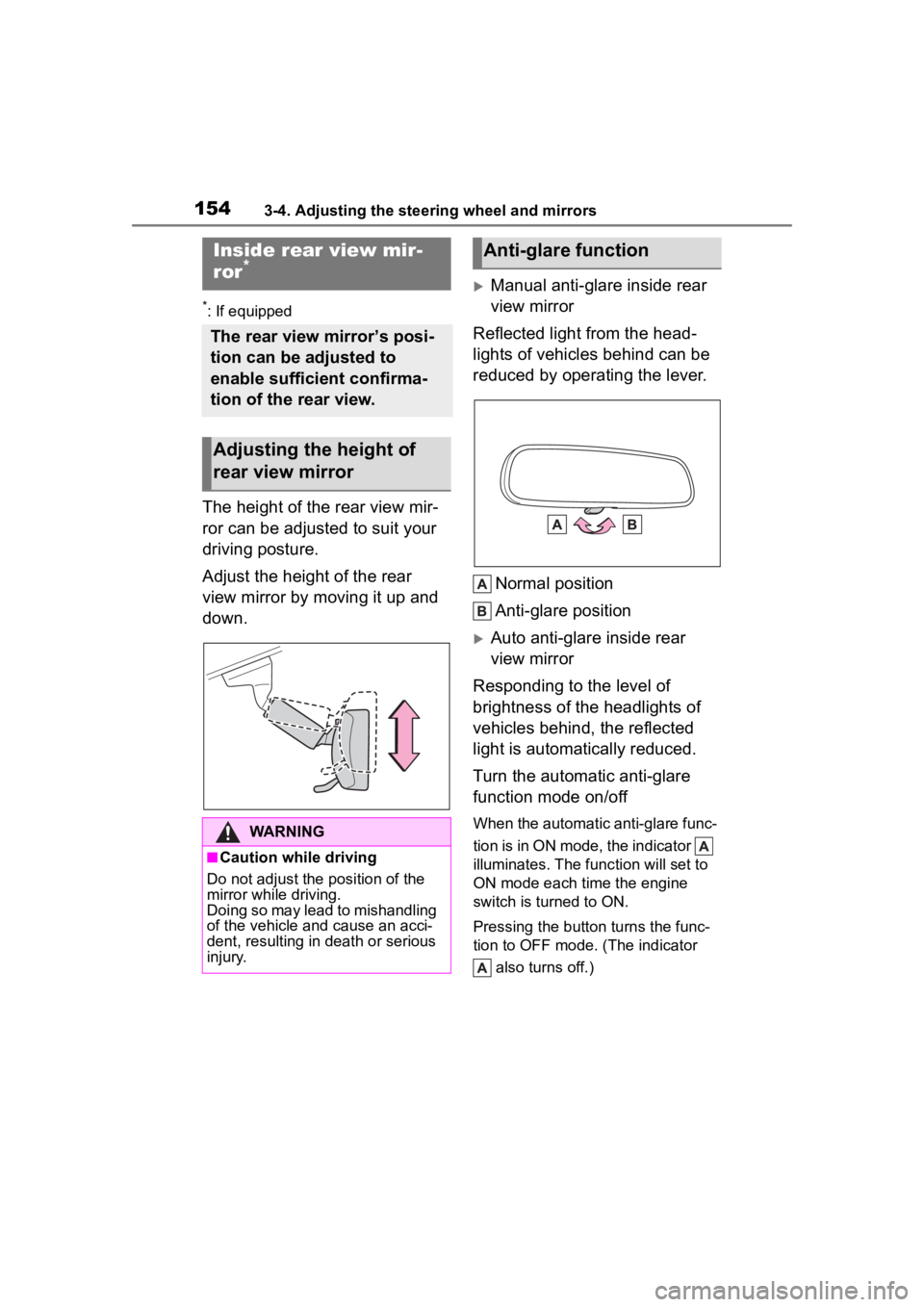
The height of the rear view mir-
ror can be adjusted to suit your
driving posture.
Adjust the height of the rear
view mirror by moving it up and
down.
Manual anti-glare inside rear
view mirror
Reflected light from the head-
lights of vehicles behind can be
reduced by operating the lever.
Normal position
Anti-glare position
Auto anti-glare inside rear
view mirror
Responding to the level of
brightness of the headlights of
vehicles behind, the reflected
light is automatically reduced.
Turn the automatic anti-glare
function mode on/off
When the automatic anti-glare func-
tion is in ON mode, the indicator
illuminates. The func tion will set to
ON mode each time the engine
switch is turned to ON.
Pressing the button turns the func-
tion to OFF mode. (The indicator
also turns off.)
Inside rear view mir-
ror*
The rear view mirror’s posi-
tion can be adjusted to
enable sufficient confirma-
tion of the rear view.
Adjusting the height of
rear view mirror
WARNING
■Caution while driving
Do not adjust the position of the
mirror while driving.
Doing so may lead to mishandling
of the vehicle and cause an acci-
dent, resulting in death or serious
injury.
Anti-glare function
Page 156 of 568
1563-4. Adjusting the steering wheel and mirrors
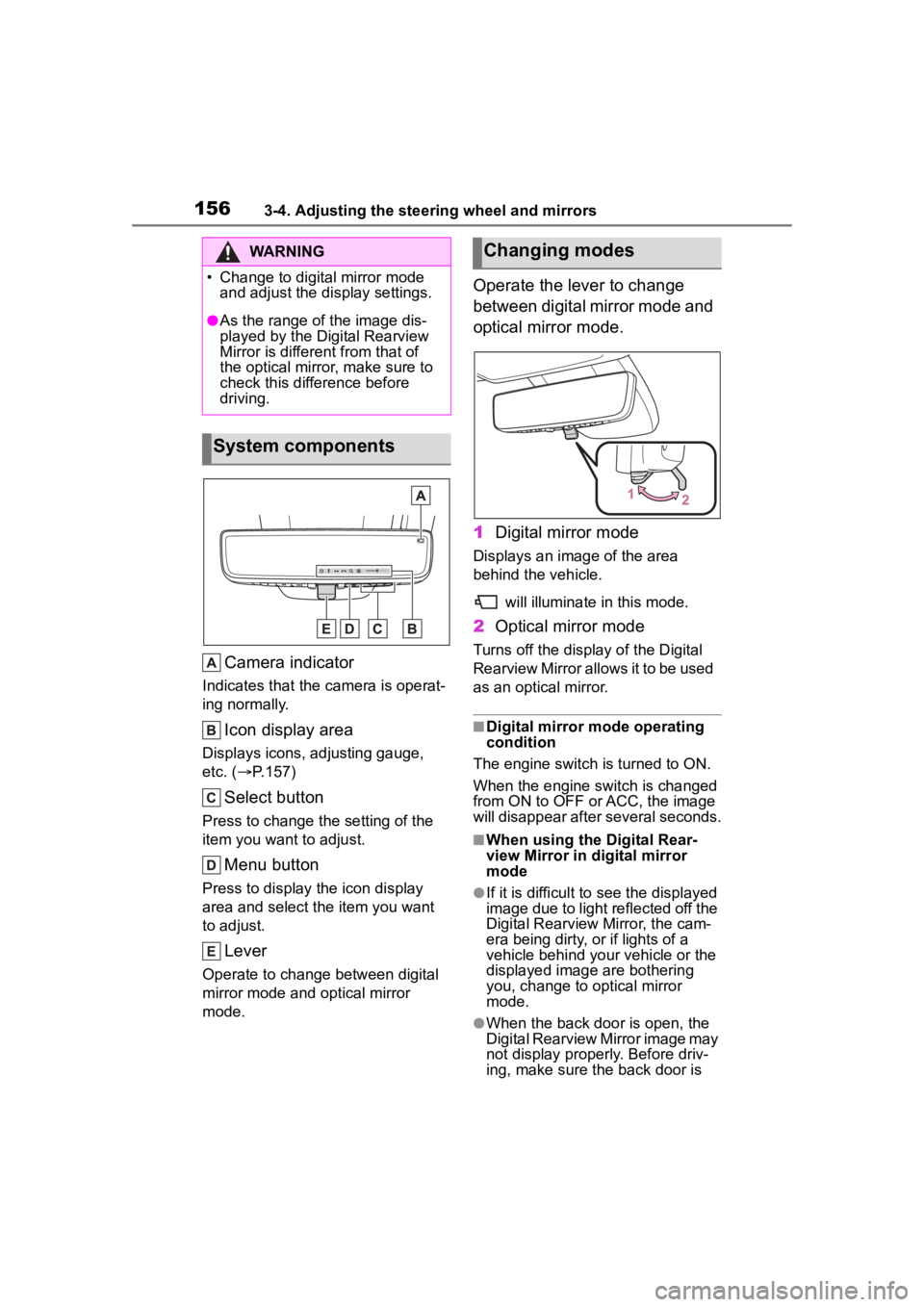
Camera indicator
Indicates that the camera is operat-
ing normally.
Icon display area
Displays icons, adjusting gauge,
etc. ( P.157)
Select button
Press to change the setting of the
item you want to adjust.
Menu button
Press to display the icon display
area and select the item you want
to adjust.
Lever
Operate to change between digital
mirror mode and optical mirror
mode.
Operate the lever to change
between digital mirror mode and
optical mirror mode.
1 Digital mirror mode
Displays an ima ge of the area
behind the vehicle.
will illuminate in this mode.
2Optical mirror mode
Turns off the display of the Digital
Rearview Mirror allows it to be used
as an optical mirror.
■Digital mirror mode operating
condition
The engine switch is turned to ON.
When the engine switch is changed
from ON to OFF o r ACC, the image
will disappear after several seconds.
■When using the Digital Rear-
view Mirror in d igital mirror
mode
●If it is difficult to see the displayed
image due to light reflected off the
Digital Rearview Mirror, the cam-
era being dirty, or if lights of a
vehicle behind your vehicle or the
displayed image are bothering
you, change to optical mirror
mode.
●When the back door is open, the
Digital Rearview Mirror image may
not display properly. Before driv-
ing, make sure the back door is
WARNING
Page 219 of 568
2194-3. Operating the lights and wipers
4
Driving
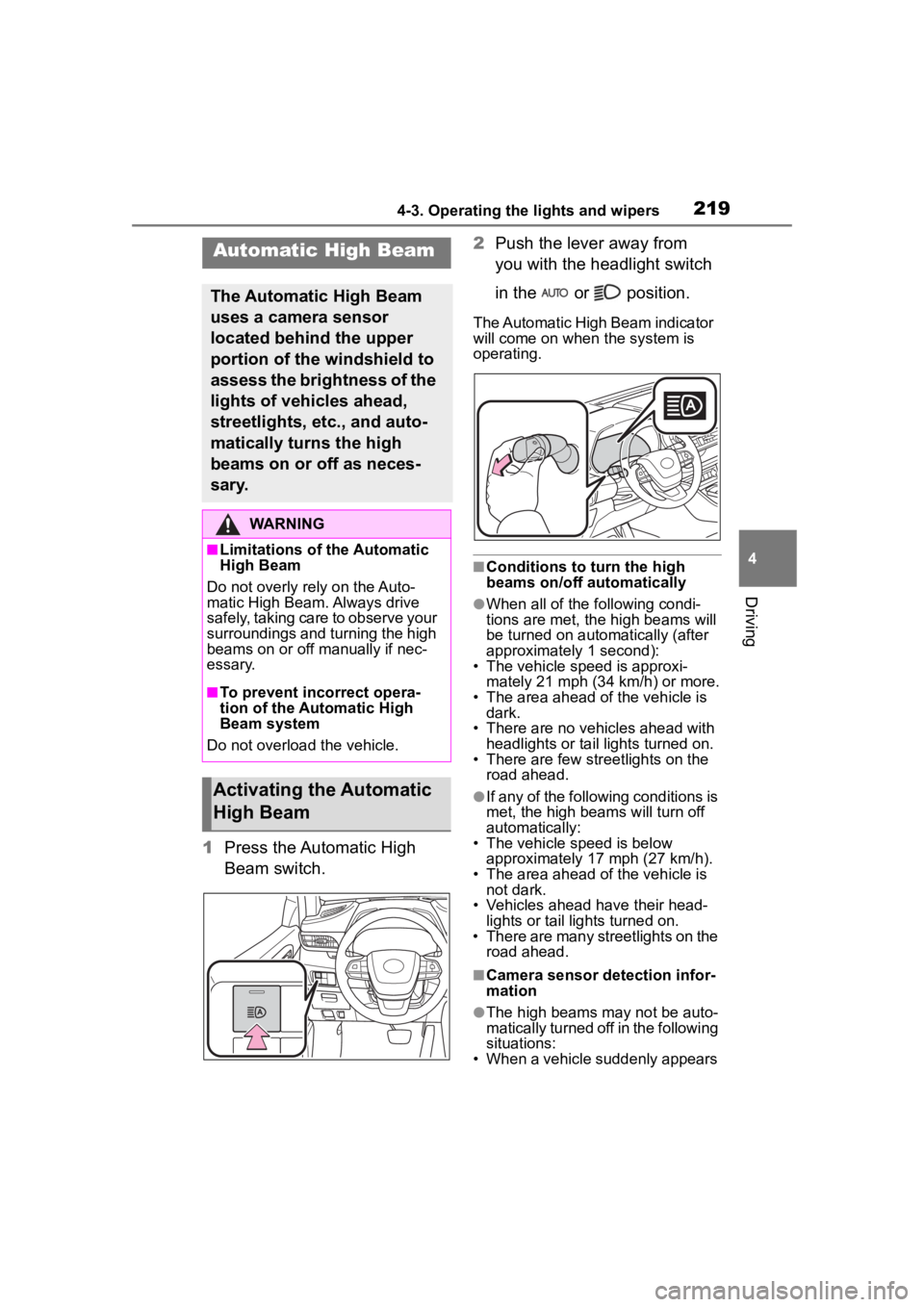
1Press the Automatic High
Beam switch. 2
Push the lever away from
you with the headlight switch
in the or position.
The Automatic High Beam indicator
will come on when the system is
operating.
■Conditions to turn the high
beams on/off automatically
●When all of the following condi-
tions are met, the high beams will
be turned on autom atically (after
approximately 1 second):
• The vehicle speed is approxi-
mately 21 mph (34 km/h) or more.
• The area ahead of the vehicle is dark.
• There are no vehicles ahead with headlights or tail lights turned on.
• There are few str eetlights on the
road ahead.
●If any of the following conditions is
met, the high beams will turn off
automatically:
• The vehicle speed is below
approximately 17 mph (27 km/h).
• The area ahead of the vehicle is not dark.
• Vehicles ahead have their head- lights or tail lights turned on.
• There are many streetlights on the road ahead.
■Camera sensor detection infor-
mation
●The high beams m ay not be auto-
matically turned off in the following
situations:
• When a vehicle suddenly appears
Automatic High Beam
The Automatic High Beam
uses a camera sensor
located behind the upper
portion of the windshield to
assess the brightness of the
lights of vehicles ahead,
streetlights, etc., and auto-
matically turns the high
beams on or off as neces-
sary.
WARNING
■Limitations of the Automatic
High Beam
Do not overly rely on the Auto-
matic High Beam. Always drive
safely, taking care to observe your
surroundings and turning the high
beams on or off manually if nec-
essary.
■To prevent incorrect opera-
tion of the Automatic High
Beam system
Do not overload the vehicle.
Activating the Automatic
High Beam
Page 225 of 568
2254-3. Operating the lights and wipers
4
Driving
windshield wipers are operating, if a
front door is opened, the operation
of the windshield wipers will be
stopped to prevent anyone enter-
ing/exiting the vehicle from being
sprayed by water from the wipers,
provided the vehicle is stopped with
the parking brake applied or the shift
lever in P. When the front door is
closed, wiper operation will resume.
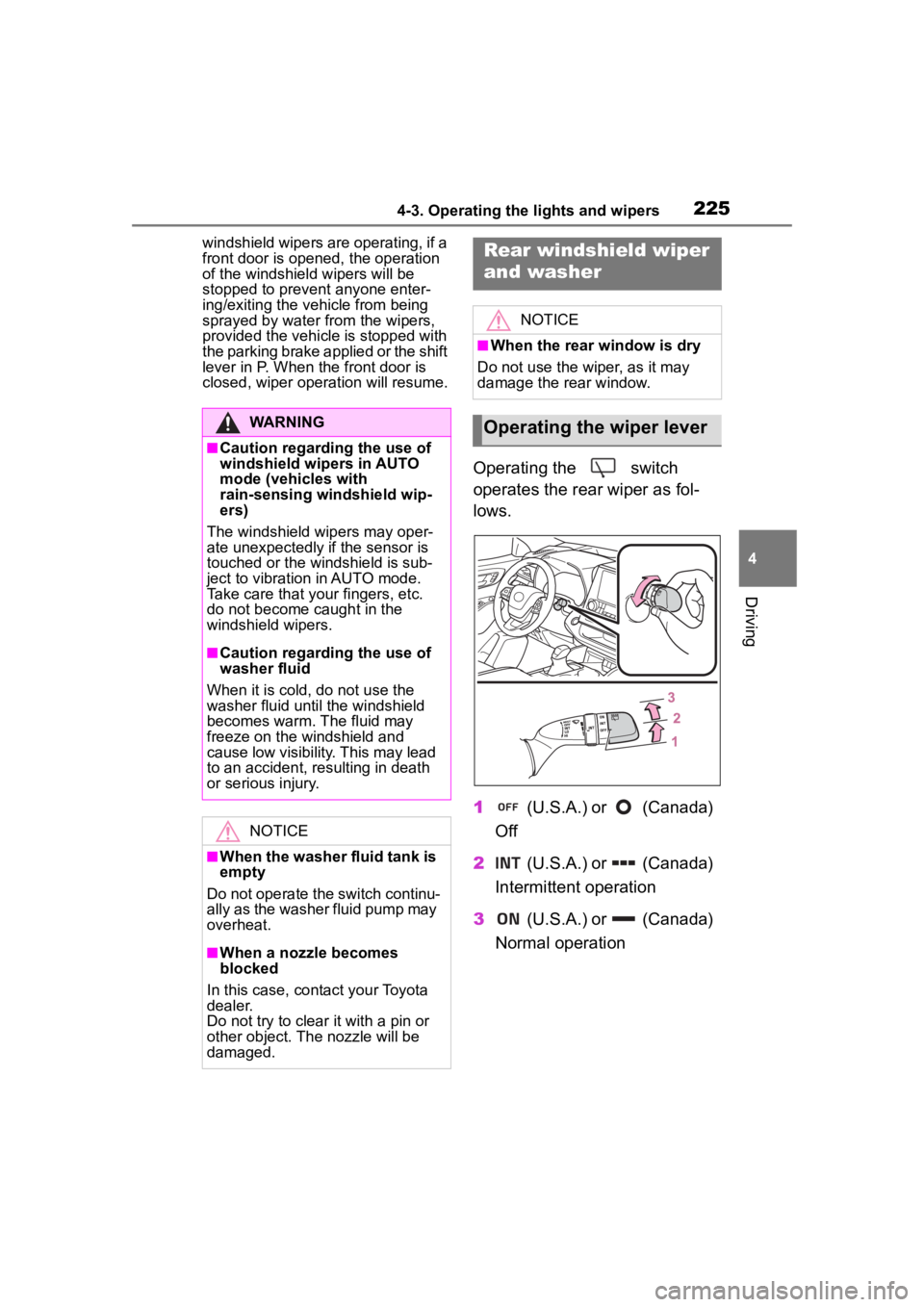
Operating the switch
operates the rear wiper as fol-
lows.
1 (U.S.A.) or (Canada)
Off
2 (U.S.A.) or (Canada)
Intermittent operation
3 (U.S.A.) or (Canada)
Normal operation
WARNING
■Caution regarding the use of
windshield wipers in AUTO
mode (vehicles with
rain-sensing windshield wip-
ers)
The windshield wipers may oper-
ate unexpectedly if the sensor is
touched or the windshield is sub-
ject to vibration in AUTO mode.
Take care that your fingers, etc.
do not become caught in the
windshield wipers.
■Caution regarding the use of
washer fluid
When it is cold, do not use the
washer fluid until the windshield
becomes warm. The fluid may
freeze on the windshield and
cause low visibility. This may lead
to an accident, resulting in death
or serious injury.
NOTICE
■When the washer fluid tank is
empty
Do not operate the switch continu-
ally as the washer fluid pump may
overheat.
■When a nozzle becomes
blocked
In this case, contact your Toyota
dealer.
Do not try to clear it with a pin or
other object. The nozzle will be
damaged.
Rear windshield wiper
and washer
NOTICE
■When the rear window is dry
Do not use the wiper, as it may
damage the rear window.
Operating the wiper lever