Lights TOYOTA HIGHLANDER 2022 Owner's Manual
[x] Cancel search | Manufacturer: TOYOTA, Model Year: 2022, Model line: HIGHLANDER, Model: TOYOTA HIGHLANDER 2022Pages: 568, PDF Size: 13.73 MB
Page 102 of 568
1022-1. Instrument cluster
■Pop-up displays
Depending on the pop-up display,
the currently disp layed item in the
message display area may be tem-
porarily not displayed. The item will
be displayed after the pop-up dis-
play is no longer displayed.
Select to display warning mes-
sages and measures to be
taken if a malfunction is
detected. ( P.467)
Displays suggestions to the
driver in the following situations.
To select a response to a dis-
played suggestion, use the
meter control switches.
■Suggestion to turn off the
headlights
If the headlights are left on for a
certain amount of time after the
engine switch has been turned
off, if the headlight switch is in
the “AUTO” position, a sugges-
tion message will be displayed
asking if you wish to turn the
headlights off.
To turn the headlights off, select
“Yes”.
If the driver's door is opened after
the engine switch is turned off, this
suggestion message will not be dis-
played.
■Customization
Some functions can be customized.
( P.521)
WARNING
■Cautions during setting up
the display
As the engine needs to be run-
ning during setting up the display,
ensure that the vehicle is parked
in a place with adequate ventila-
tion. In a closed area such as a
garage, exhaust gases including
harmful carbon monoxide (CO)
may collect and enter the vehicle.
This may lead to death or a seri-
ous health hazard.
NOTICE
■During setting up the display
To prevent battery discharge,
ensure that the engine is running
while setting up the display fea-
tures.
Warning message display
()
Suggestion function
Page 116 of 568
1163-1. Key information
*2: If equipped
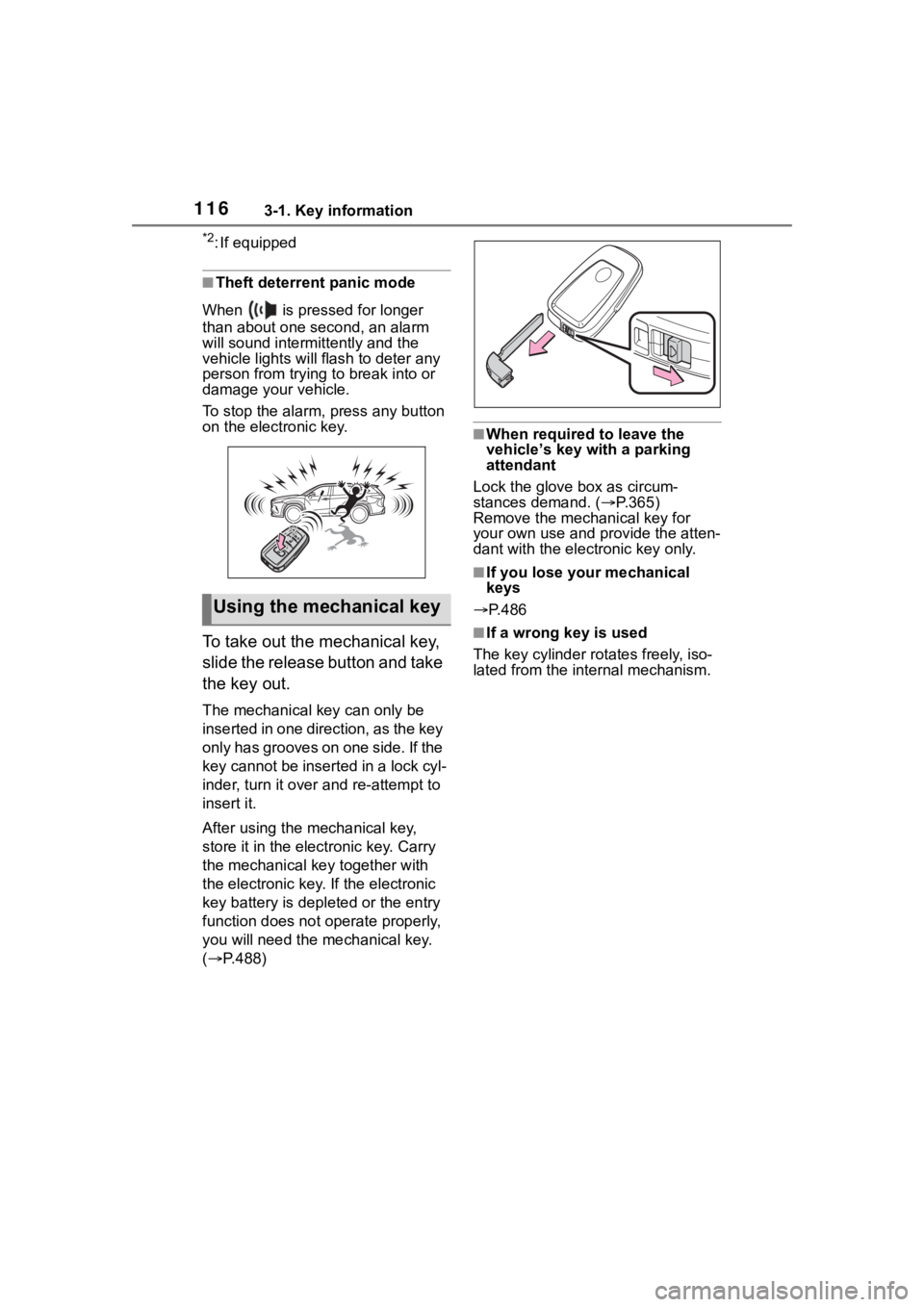
■Theft deterrent panic mode
When is pressed for longer
than about one second, an alarm
will sound intermittently and the
vehicle lights will f lash to deter any
person from trying to break into or
damage your vehicle.
To stop the alarm, press any button
on the electronic key.
To take out the mechanical key,
slide the release button and take
the key out.
The mechanical key can only be
inserted in one direction, as the key
only has grooves on one side. If the
key cannot be inserted in a lock cyl-
inder, turn it over and re-attempt to
insert it.
After using the mechanical key,
store it in the electronic key. Carry
the mechanical k ey together with
the electronic key. If the electronic
key battery is dep leted or the entry
function does not operate properly,
you will need the m echanical key.
( P.488)
■When required to leave the
vehicle’s key wi th a parking
attendant
Lock the glove box as circum-
stances demand. ( P.365)
Remove the mechanical key for
your own use and p rovide the atten-
dant with the elec tronic key only.
■If you lose your mechanical
keys
P.486
■If a wrong key is used
The key cylinder rotates freely, iso-
lated from the internal mechanism.
Using the mechanical key
Page 154 of 568
1543-4. Adjusting the steering wheel and mirrors
*: If equipped
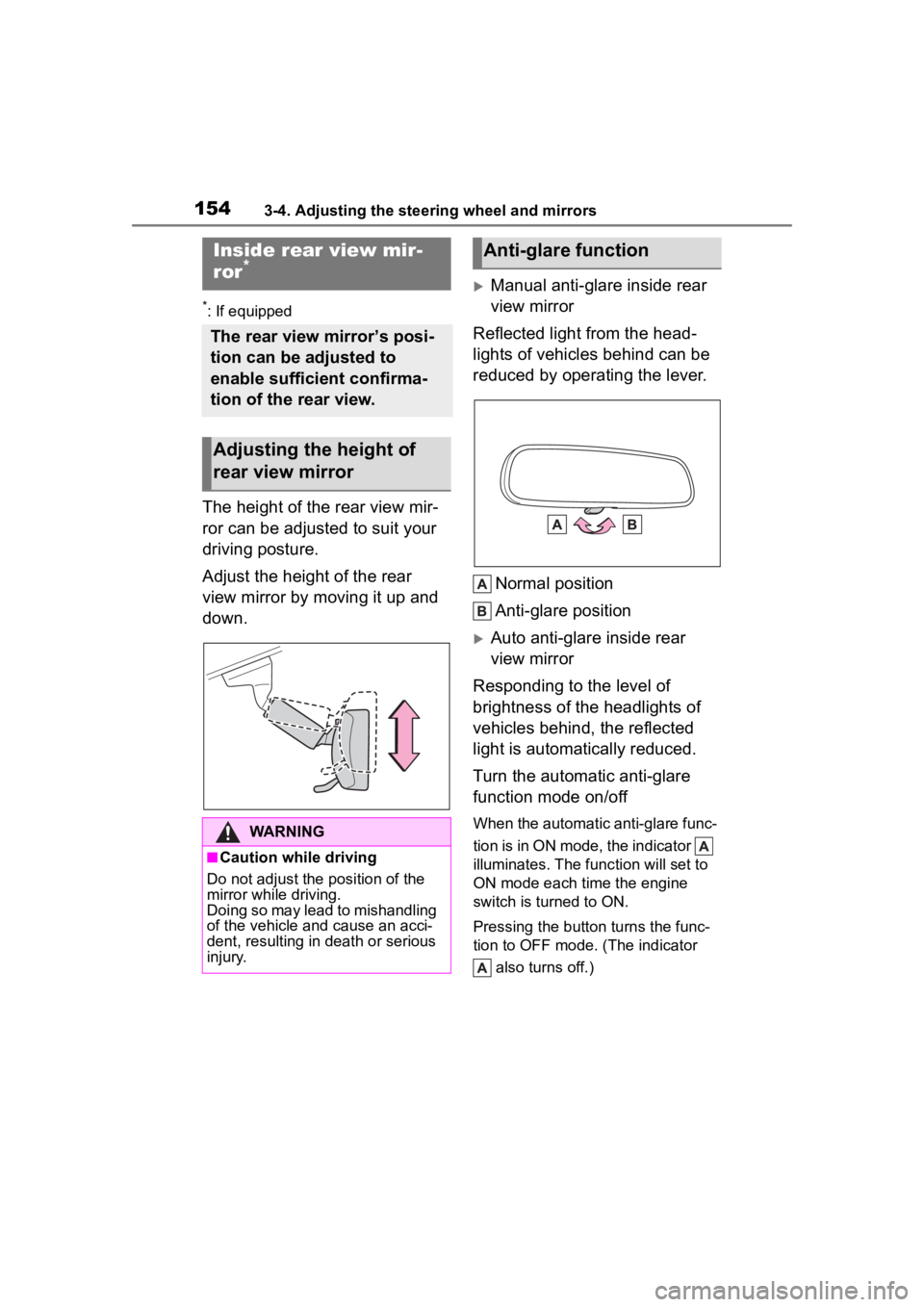
The height of the rear view mir-
ror can be adjusted to suit your
driving posture.
Adjust the height of the rear
view mirror by moving it up and
down.
Manual anti-glare inside rear
view mirror
Reflected light from the head-
lights of vehicles behind can be
reduced by operating the lever.
Normal position
Anti-glare position
Auto anti-glare inside rear
view mirror
Responding to the level of
brightness of the headlights of
vehicles behind, the reflected
light is automatically reduced.
Turn the automatic anti-glare
function mode on/off
When the automatic anti-glare func-
tion is in ON mode, the indicator
illuminates. The func tion will set to
ON mode each time the engine
switch is turned to ON.
Pressing the button turns the func-
tion to OFF mode. (The indicator
also turns off.)
Inside rear view mir-
ror*
The rear view mirror’s posi-
tion can be adjusted to
enable sufficient confirma-
tion of the rear view.
Adjusting the height of
rear view mirror
WARNING
■Caution while driving
Do not adjust the position of the
mirror while driving.
Doing so may lead to mishandling
of the vehicle and cause an acci-
dent, resulting in death or serious
injury.
Anti-glare function
Page 156 of 568
1563-4. Adjusting the steering wheel and mirrors
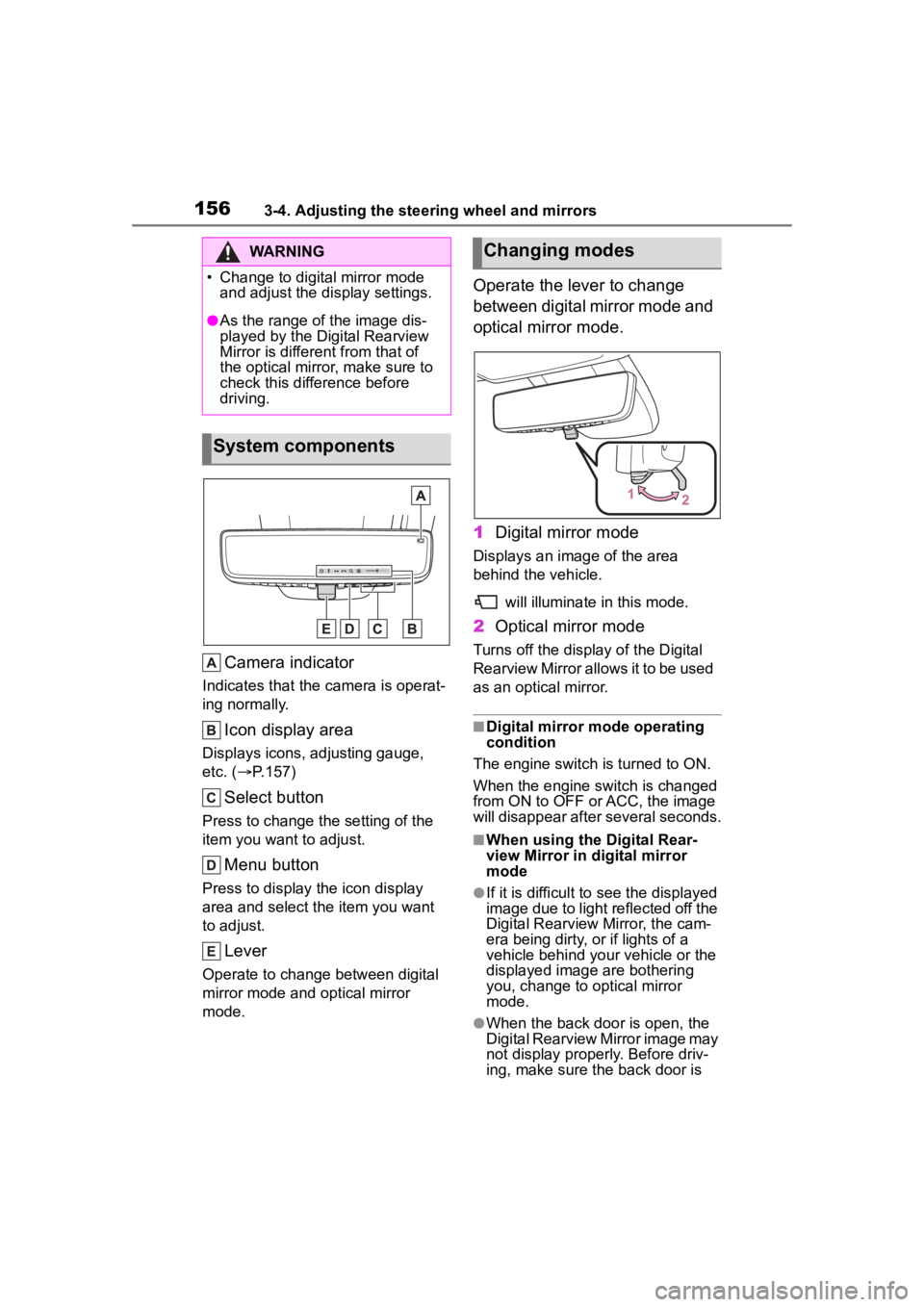
Camera indicator
Indicates that the camera is operat-
ing normally.
Icon display area
Displays icons, adjusting gauge,
etc. ( P.157)
Select button
Press to change the setting of the
item you want to adjust.
Menu button
Press to display the icon display
area and select the item you want
to adjust.
Lever
Operate to change between digital
mirror mode and optical mirror
mode.
Operate the lever to change
between digital mirror mode and
optical mirror mode.
1 Digital mirror mode
Displays an ima ge of the area
behind the vehicle.
will illuminate in this mode.
2Optical mirror mode
Turns off the display of the Digital
Rearview Mirror allows it to be used
as an optical mirror.
■Digital mirror mode operating
condition
The engine switch is turned to ON.
When the engine switch is changed
from ON to OFF o r ACC, the image
will disappear after several seconds.
■When using the Digital Rear-
view Mirror in d igital mirror
mode
●If it is difficult to see the displayed
image due to light reflected off the
Digital Rearview Mirror, the cam-
era being dirty, or if lights of a
vehicle behind your vehicle or the
displayed image are bothering
you, change to optical mirror
mode.
●When the back door is open, the
Digital Rearview Mirror image may
not display properly. Before driv-
ing, make sure the back door is
WARNING
Page 157 of 568
1573-4. Adjusting the steering wheel and mirrors
3
Before driving
closed.
●If the display is difficult to see due
to reflected light, close the sun-
shade for the moon roof or the
electronic sunshade for the pan-
oramic moon roof.
●Any of the following conditions
may occur when d riving in the
dark, such as at night. None of
them indicates that a malfunction
has occurred.
• Colors of objects in the displayed image may differ f rom their actual
color.
• Depending on the height of the lights of the vehicle behind, the
area around the vehicle may
appear white and blurry.
• Automatic image adjustment for
brighter surrounding image may
cause flickering.
If it is difficult to see the displayed
image or flickering bothers you,
change to optical mirror mode.
●The Digital Rearview Mirror may
become hot while it is in digital
mirror mode.
This is not a malfunction.
●Depending on your physical con-
dition or age, it may take longer
than usual to focus on the dis-
played image. In this case,
change to optical mirror mode.
●Do not let passengers stare at the
displayed image when the vehicle
is being driven, as doing so may
cause motion sickness.
■When the system malfunctions
If the symbol show n in the illustra-
tion is displayed when using the
Digital Rearview Mirror in digital mir-
ror mode, the system may be mal-
functioning. The symbol will
disappear in a few seconds. Oper-
ate the lever, chang e to optical mir-
ror mode and have the vehicle
inspected by your Toyota dealer.
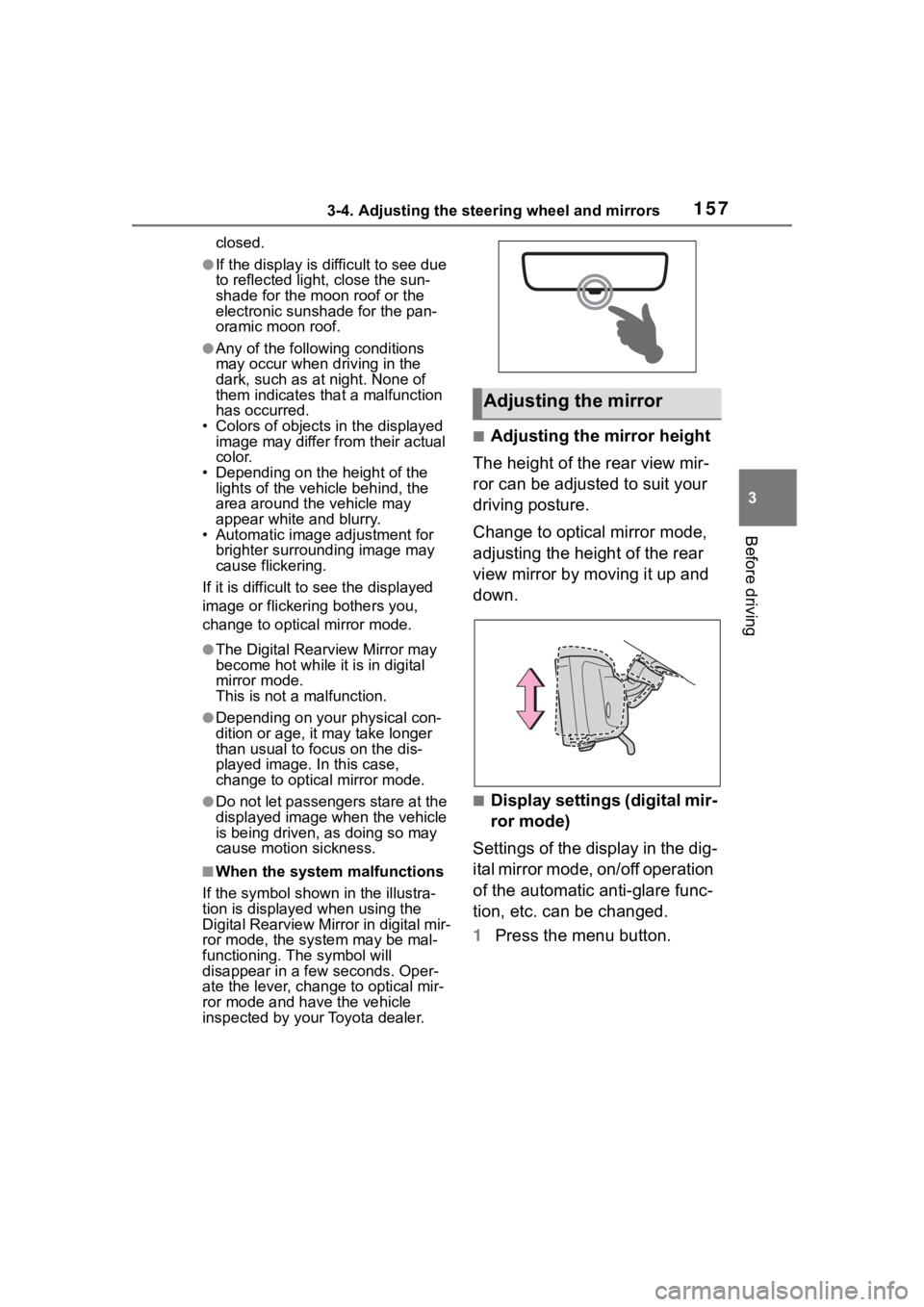
■Adjusting the mirror height
The height of the rear view mir-
ror can be adjusted to suit your
driving posture.
Change to optical mirror mode,
adjusting the height of the rear
view mirror by moving it up and
down.
■Display settings (digital mir-
ror mode)
Settings of the display in the dig-
ital mirror mode, on/off operation
of the automatic anti-glare func-
tion, etc. can be changed.
1 Press the menu button.
Adjusting the mirror
Page 158 of 568
1583-4. Adjusting the steering wheel and mirrors
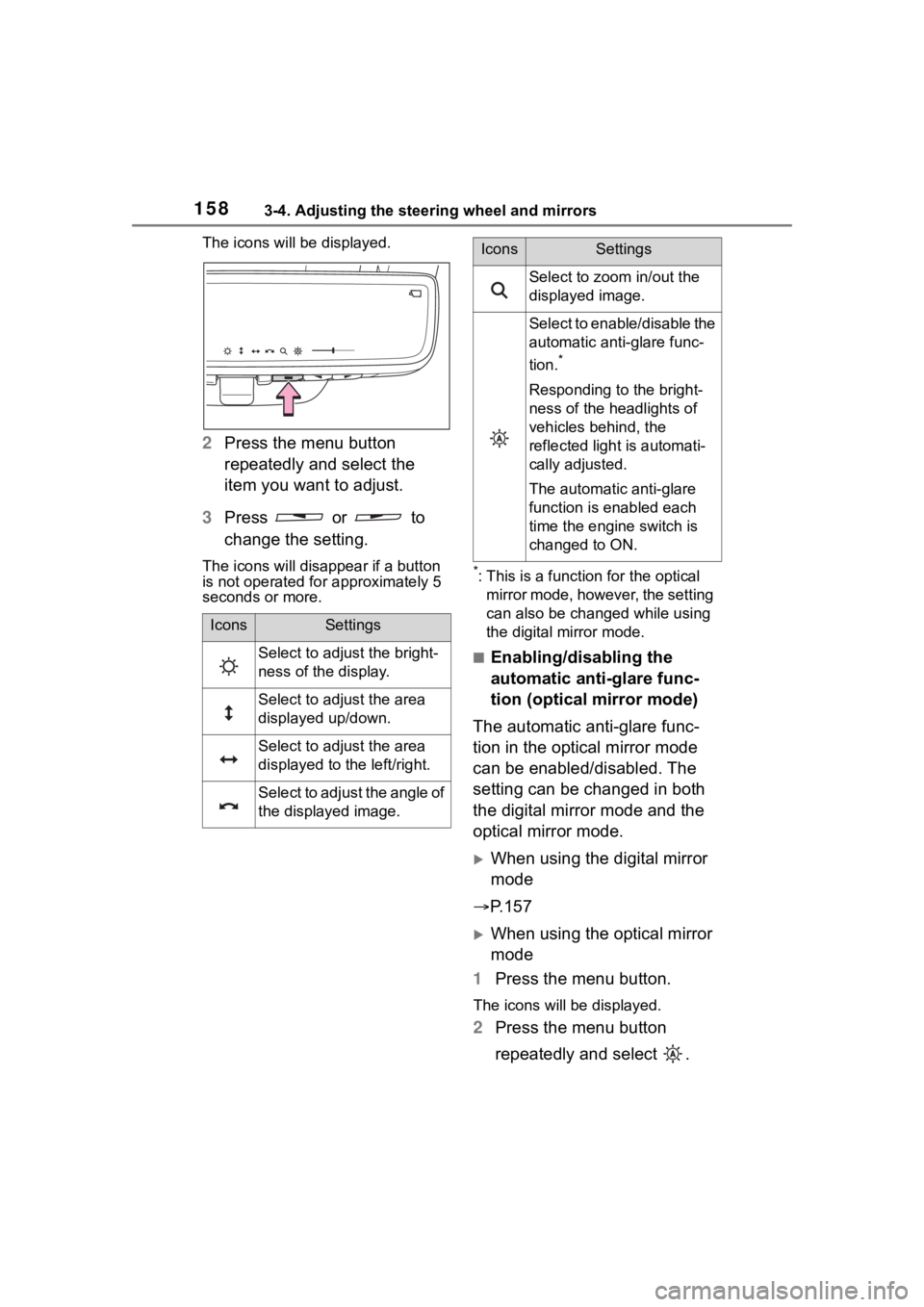
The icons will be displayed.
2Press the menu button
repeatedly and select the
item you want to adjust.
3 Press or to
change the setting.
The icons will disapp ear if a button
is not operated fo r approximately 5
seconds or more.*: This is a functi on for the optical
mirror mode, however, the setting
can also be changed while using
the digital mirror mode.
■Enabling/disabling the
automatic anti-glare func-
tion (optical mirror mode)
The automatic anti-glare func-
tion in the optical mirror mode
can be enabled/disabled. The
setting can be changed in both
the digital mirror mode and the
optical mirror mode.
When using the digital mirror
mode
P.157
When using the optical mirror
mode
1 Press the menu button.
The icons will be displayed.
2Press the menu button
repeatedly and select .
IconsSettings
Select to adjust the bright-
ness of the display.
Select to adjust the area
displayed up/down.
Select to adjust the area
displayed to the left/right.
Select to adjust the angle of
the displayed image.
Select to zoom in/out the
displayed image.
Select to enable/disable the
automatic anti-glare func-
tion.
*
Responding to the bright-
ness of the headlights of
vehicles behind, the
reflected light is automati-
cally adjusted.
The automatic anti-glare
function is enabled each
time the engine switch is
changed to ON.
IconsSettings
Page 162 of 568
1623-4. Adjusting the steering wheel and mirrors
SymptomLikely causeSolution
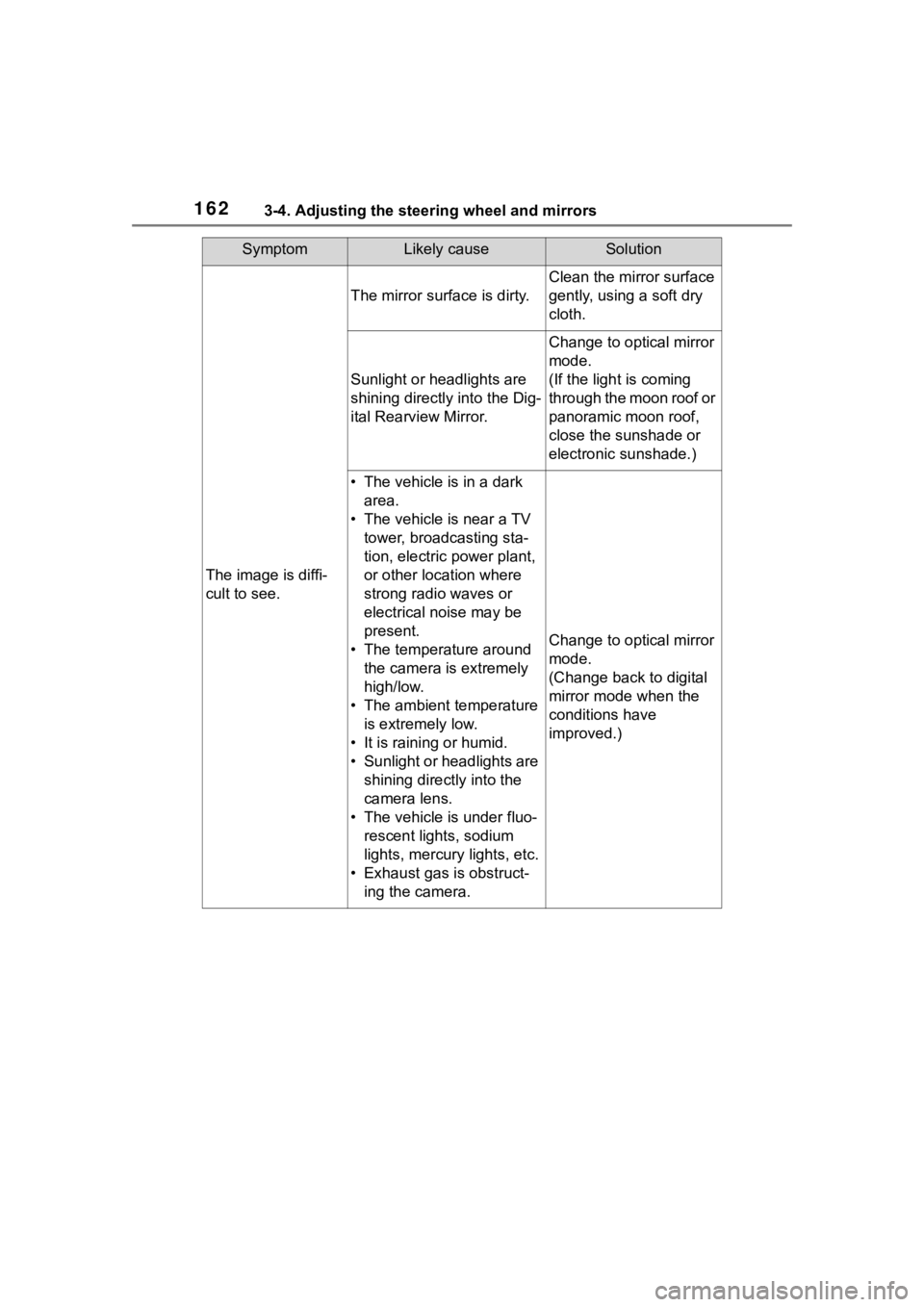
The image is diffi-
cult to see.
The mirror surface is dirty.
Clean the mirror surface
gently, using a soft dry
cloth.
Sunlight or headlights are
shining directly into the Dig-
ital Rearview Mirror.
Change to optical mirror
mode.
(If the light is coming
through the moon roof or
panoramic moon roof,
close the sunshade or
electronic sunshade.)
• The vehicle is in a dark area.
• The vehicle is near a TV tower, broadcasting sta-
tion, electric power plant,
or other location where
strong radio waves or
electrical noise may be
present.
• The temperature around the camera is extremely
high/low.
• The ambient temperature is extremely low.
• It is raining or humid.
• Sunlight or headlights are shining directly into the
camera lens.
• The vehicle is under fluo- rescent lights, sodium
lights, mercury lights, etc.
• Exhaust gas is obstruct- ing the camera.
Change to optical mirror
mode.
(Change back to digital
mirror mode when the
conditions have
improved.)
Page 177 of 568
177
4
4
Driving
Driving
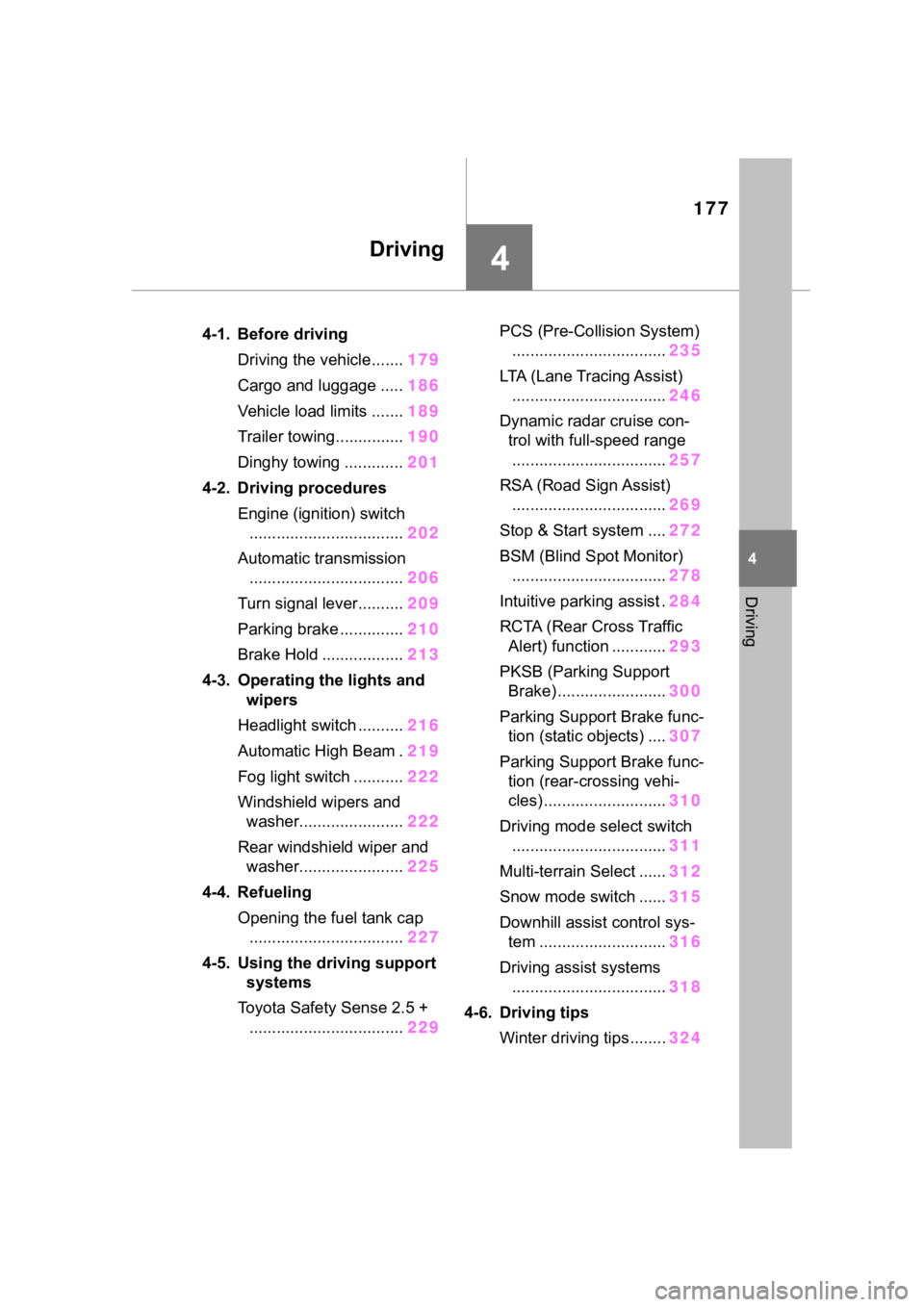
.4-1. Before drivingDriving the vehicle....... 179
Cargo and luggage ..... 186
Vehicle load limits ....... 189
Trailer towing............... 190
Dinghy towing ............. 201
4-2. Driving procedures Engine (ignition) switch.................................. 202
Automatic transmission .................................. 206
Turn signal lever.......... 209
Parking brake .............. 210
Brake Hold .................. 213
4-3. Operating the lights and wipers
Headlight switch .......... 216
Automatic High Beam . 219
Fog light switch ........... 222
Windshield wipers and washer....................... 222
Rear windshield wiper and washer....................... 225
4-4. Refueling Opening the fuel tank cap.................................. 227
4-5. Using the driving support
systems
Toyota Safety Sense 2.5 + .................................. 229PCS (Pre-Collision System)
.................................. 235
LTA (Lane Tracing Assist) .................................. 246
Dynamic radar cruise con- trol with full-speed range
.................................. 257
RSA (Road Sign Assist) .................................. 269
Stop & Start system .... 272
BSM (Blind Spot Monitor) .................................. 278
Intuitive parking assist . 284
RCTA (Rear Cross Traffic Alert) function ............ 293
PKSB (Parking Support Brake) ........................ 300
Parking Support Brake func- tion (static objects) .... 307
Parking Support Brake func- tion (rear-crossing vehi-
cles) ........................... 310
Driving mode select switch .................................. 311
Multi-terrain Select ...... 312
Snow mode switch ...... 315
Downhill assist control sys- tem ............................ 316
Driving assist systems .................................. 318
4-6. Driving tips Winter driving tips........ 324
Page 191 of 568
1914-1. Before driving
4
Driving
●All trailer lights work as required
by law.
●All lights work each time you con-
nect them.
●The trailer ball is set at the proper
height for the coupler on the
trailer.
●The trailer is level when it is
hitched.
Do not drive if the trailer is not
level, and check for improper
tongue weight, overloading, worn
suspension, or other possible
causes.
●The trailer cargo is securely
loaded.
●The rear view mirrors conform to
all applicable federal, state/provin-
cial or local regu lations. If they do
not, install rear view mirrors
appropriate for towing purposes.
■Break-in schedule
If your vehicle is new or equipped
with any new power train compo-
nents (such as an engine, transaxle,
transfer [AWD models], rear differ-
ential [AWD models] or wheel bear-
ing), Toyota recommends that you
do not tow a trailer until the vehicle
has been driven for over 500 miles
(800 km).
After the vehicle has been driven for
over 500 miles (800 km), you can
start towing. However, for the next
500 miles (800 km), drive the vehi-
cle at a speed of less than 50 mph
(80 km/h) when towing a trailer, and
avoid full throttle acceleration.
■Maintenance
●If you tow a trailer, your vehicle
will require more f requent mainte-
nance due to the additional load.
(See “Scheduled Maintenance
Guide” or “Owner’s Manual Sup-
plement”.)
●Retighten the fixing bolts of the
towing ball and bracket after
approximately 600 miles (1000
km) of trailer towing.
■If trailer sway occurs
One or more factors (crosswinds,
passing vehicles, rough roads, etc.)
can adversely affect handling of
your vehicle and trailer, causing
instability.
●If trailer swaying occurs:
• Firmly grip the steering wheel. Steer straight ahead.
Do not try to contr ol trailer sway-
ing by turning the steering wheel.
• Begin releasing the accelerator pedal immediately but very gradu-
ally to reduce speed.
Do not increase speed. Do not
apply vehicle brakes.
If you make no extreme correction
with the steering or brakes, your
vehicle and trailer should stabilize.
(if enabled, Trailer Sway Control can
also help to stabilize the vehicle and
trailer.)
●After the trailer swaying has
stopped:
• Stop in a safe place. Get all occu- pants out of the vehicle.
• Check the tires of the vehicle and the trailer.
• Check the load in the trailer.
Make sure the load has not
shifted.
Make sure the tongue weight is
appropriate, if possible.
• Check the load in the vehicle. Make sure the vehicle is not over-
loaded after occupants get in.
If you cannot find any problems, the
speed at which trailer swaying
occurred is beyond the limit of your
particular vehicle-trailer combina-
tion. Drive at a lower speed to pre-
vent instability. Remember that
swaying of the towing vehicle-trailer
increases as speed increases.
Page 197 of 568
1974-1. Before driving
4
Driving
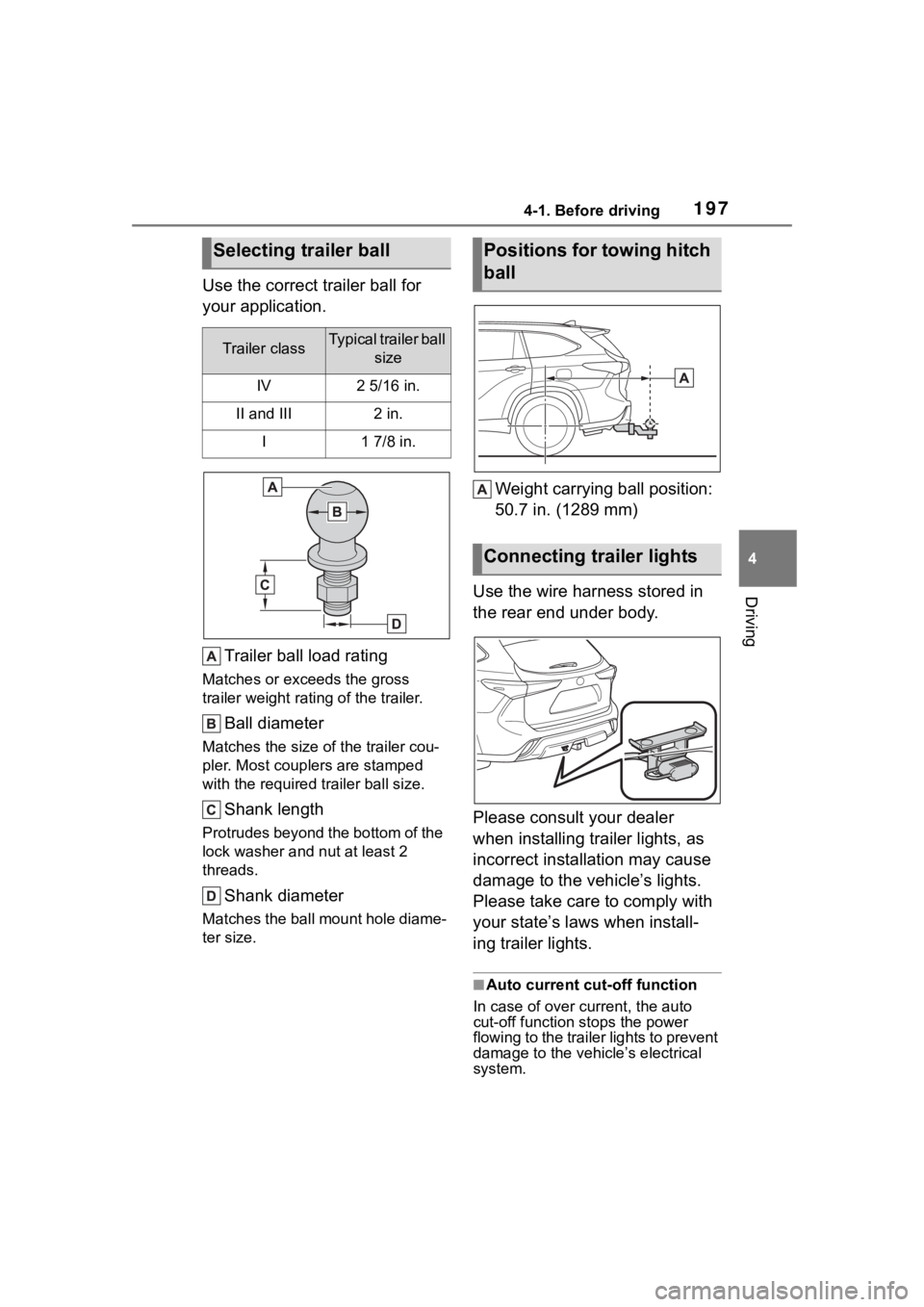
Use the correct trailer ball for
your application.Trailer ball load rating
Matches or exceeds the gross
trailer weight rat ing of the trailer.
Ball diameter
Matches the size of the trailer cou-
pler. Most couplers are stamped
with the required tr ailer ball size.
Shank length
Protrudes beyond the bottom of the
lock washer and nut at least 2
threads.
Shank diameter
Matches the ball mount hole diame-
ter size.
Weight carrying ball position:
50.7 in. (1289 mm)
Use the wire harness stored in
the rear end under body.
Please consult your dealer
when installing trailer lights, as
incorrect installation may cause
damage to the vehicle’s lights.
Please take care to comply with
your state’s laws when install-
ing trailer lights.
■Auto current cut-off function
In case of over current, the auto
cut-off function stops the power
flowing to the trailer lights to prevent
damage to the vehicle’s electrical
system.
Selecting trailer ball
Trailer classTypical trailer ball size
IV2 5/16 in.
II and III2 in.
I1 7/8 in.
Positions for towing hitch
ball
Connecting trailer lights