Lights TOYOTA HIGHLANDER 2022 Repair Manual
[x] Cancel search | Manufacturer: TOYOTA, Model Year: 2022, Model line: HIGHLANDER, Model: TOYOTA HIGHLANDER 2022Pages: 568, PDF Size: 13.73 MB
Page 362 of 568
3625-3. Using the interior lights
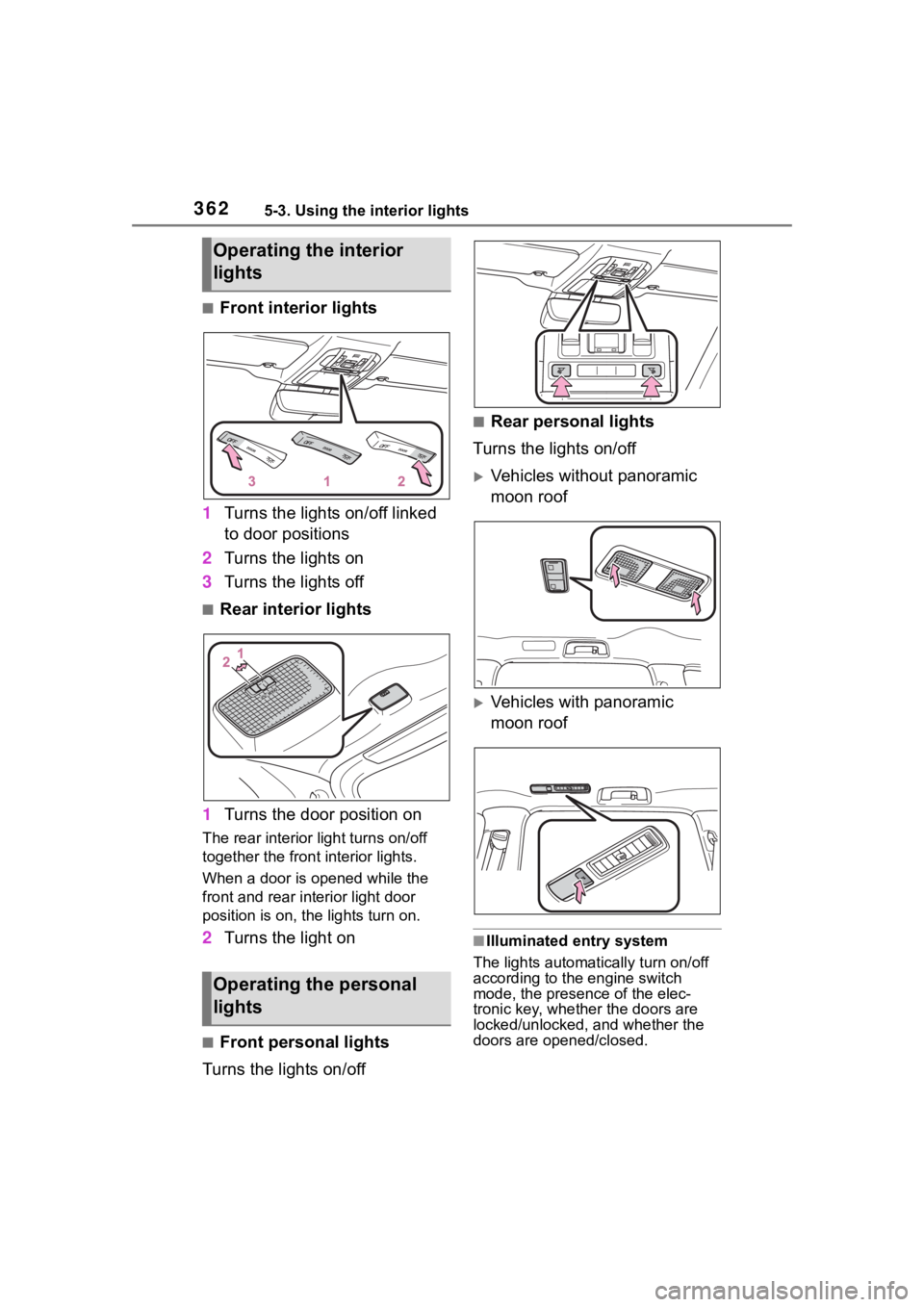
■Front interior lights
1 Turns the lights on/off linked
to door positions
2 Turns the lights on
3 Turns the lights off
■Rear interior lights
1 Turns the door position on
The rear interior light turns on/off
together the front interior lights.
When a door is opened while the
front and rear interior light door
position is on, the lights turn on.
2Turns the light on
■Front personal lights
Turns the lights on/off
■Rear personal lights
Turns the lights on/off
Vehicles without panoramic
moon roof
Vehicles with panoramic
moon roof
■Illuminated entry system
The lights automatically turn on/off
according to the engine switch
mode, the presence of the elec-
tronic key, whether the doors are
locked/unlocked, and whether the
doors are opened/closed.
Operating the interior
lights
Operating the personal
lights
Page 363 of 568
3635-3. Using the interior lights
5
Interior features
■To prevent the battery from
being discharged
If the interior lights remain on when
the engine switch is turned off, the
lights will go off automatically after
20 minutes.
■The interior lights may turn on
automatically when
If any of the SRS airbags deploy
(inflate) or in the event of a strong
rear impact, the interior lights will
turn on automatically.
The interior lights will turn off auto-
matically after approximately 20
minutes.
The interior lights can be turned off
manually. However, in order to help
prevent further collisions, it is rec-
ommended that they be left on until
safety can be ensured.
(The interior lights may not turn on
automatically depending on the
force of the impact and conditions of
the collision.)
■Customization
Some functions can be customized.
( P.521)
NOTICE
■To prevent battery discharge
Do not leave the lights on longer
than necessary when the engine
is not running.
Page 365 of 568
3655-4. Using the storage features
5
Interior features
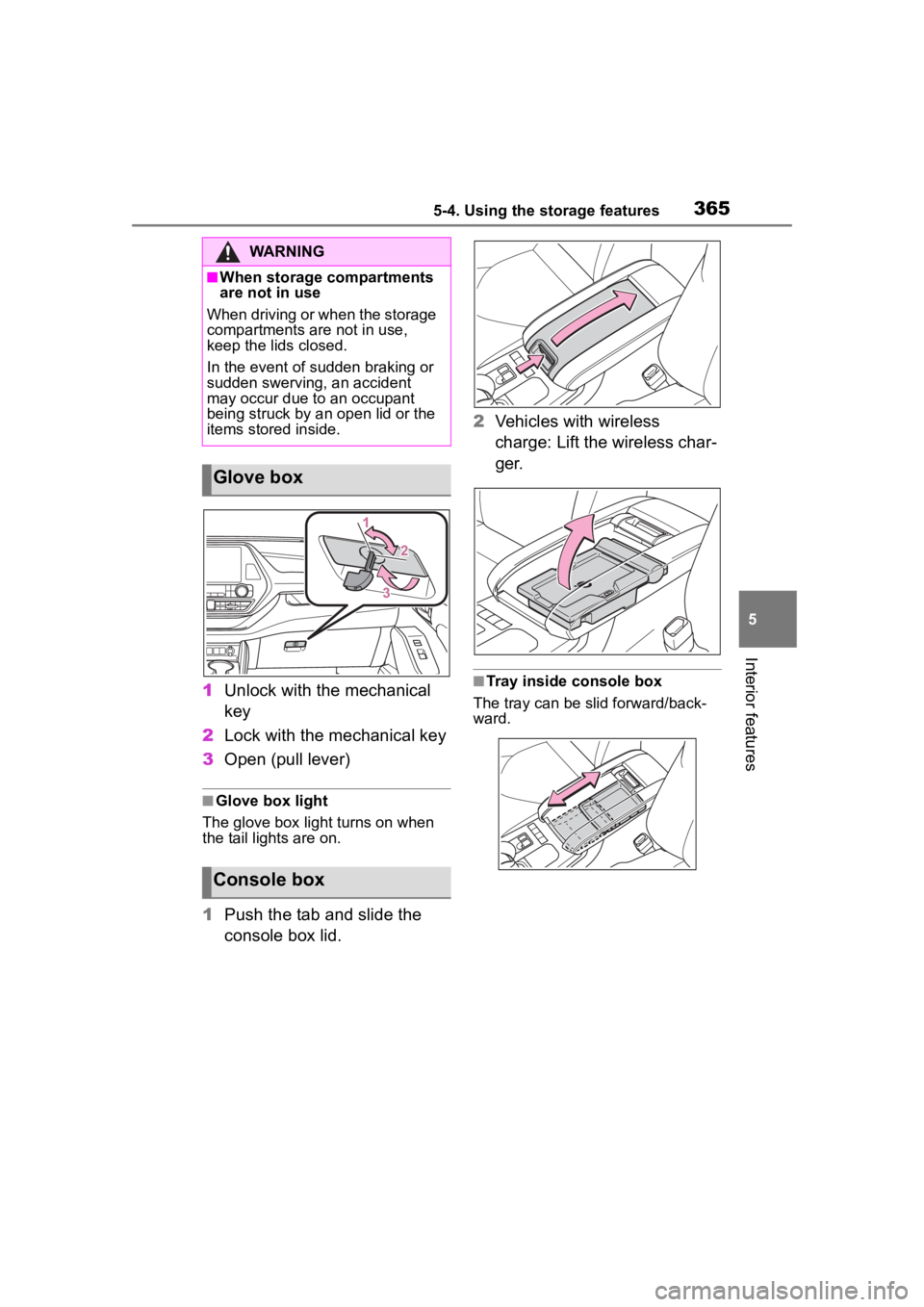
1Unlock with the mechanical
key
2 Lock with the mechanical key
3 Open (pull lever)
■Glove box light
The glove box light turns on when
the tail lights are on.
1 Push the tab and slide the
console box lid. 2
Vehicles with wireless
charge: Lift the wireless char-
ger.
■Tray inside console box
The tray can be slid forward/back-
ward.
WARNING
■When storage compartments
are not in use
When driving or when the storage
compartments are not in use,
keep the lids closed.
In the event of sudden braking or
sudden swerving, an accident
may occur due to an occupant
being struck by an open lid or the
items stored inside.
Glove box
Console box
Page 375 of 568
3755-5. Using the other interior features
5
Interior features
charger will be memorized.
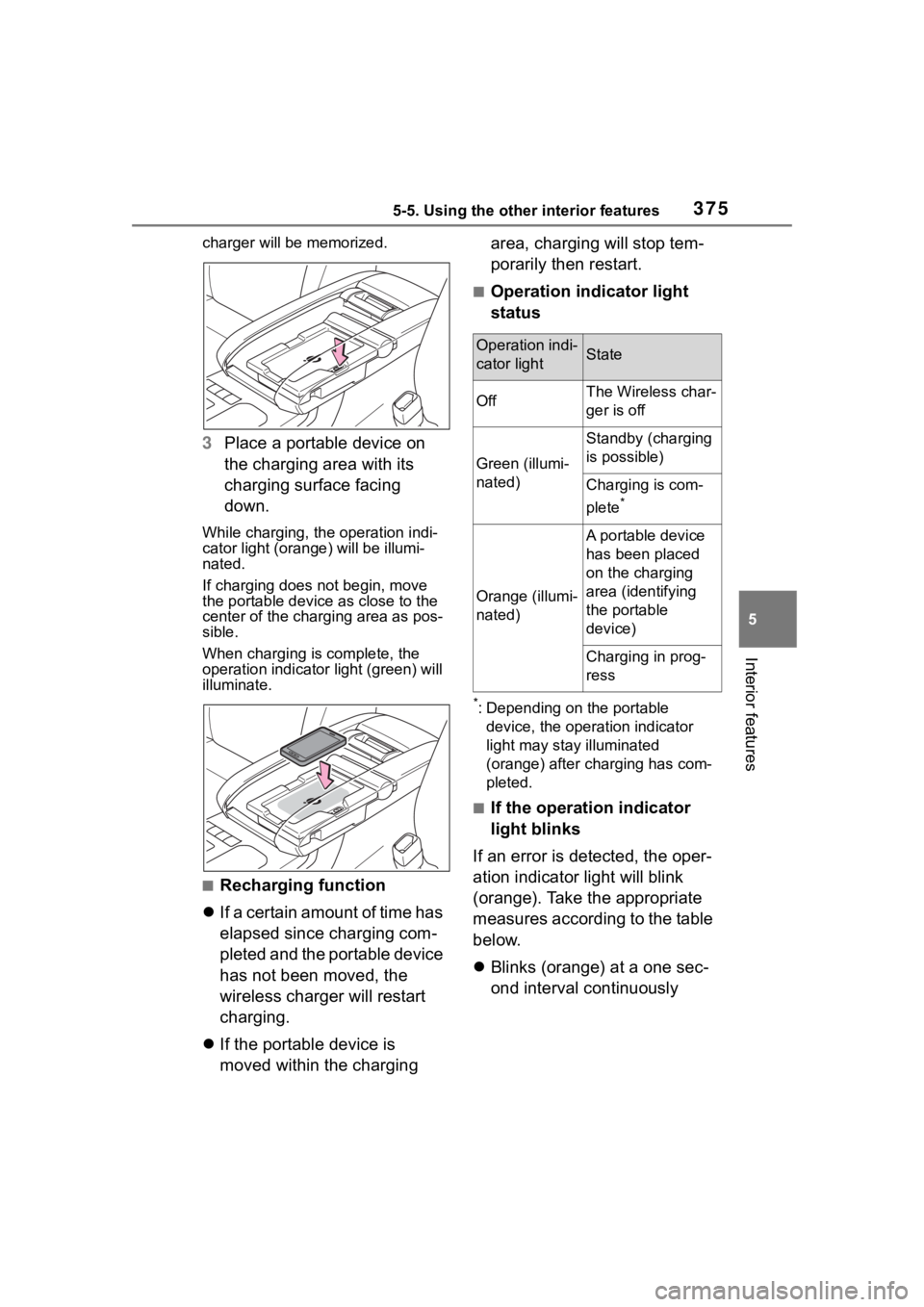
3Place a portable device on
the charging area with its
charging surface facing
down.
While charging, the operation indi-
cator light (orang e) will be illumi-
nated.
If charging does not begin, move
the portable device as close to the
center of the charging area as pos-
sible.
When charging is complete, the
operation indicator light (green) will
illuminate.
■Recharging function
If a certain amount of time has
elapsed since charging com-
pleted and the portable device
has not been moved, the
wireless charger will restart
charging.
If the portable device is
moved within the charging area, charging will stop tem-
porarily then restart.
■Operation indicator light
status
*: Depending on the portable
device, the operation indicator
light may stay illuminated
(orange) after charging has com-
pleted.
■If the operation indicator
light blinks
If an error is detected, the oper-
ation indicator light will blink
(orange). Take the appropriate
measures according to the table
below.
Blinks (orange) at a one sec-
ond interval continuously
Operation indi-
cator lightState
OffThe Wireless char-
ger is off
Green (illumi-
nated)
Standby (charging
is possible)
Charging is com-
plete
*
Orange (illumi-
nated)
A portable device
has been placed
on the charging
area (identifying
the portable
device)
Charging in prog-
ress
Page 384 of 568
3845-5. Using the other interior features
■To prevent battery discharge
If the vanity light s remain on when
the engine switch is turned off, the
lights will go off automatically after
20 minutes.
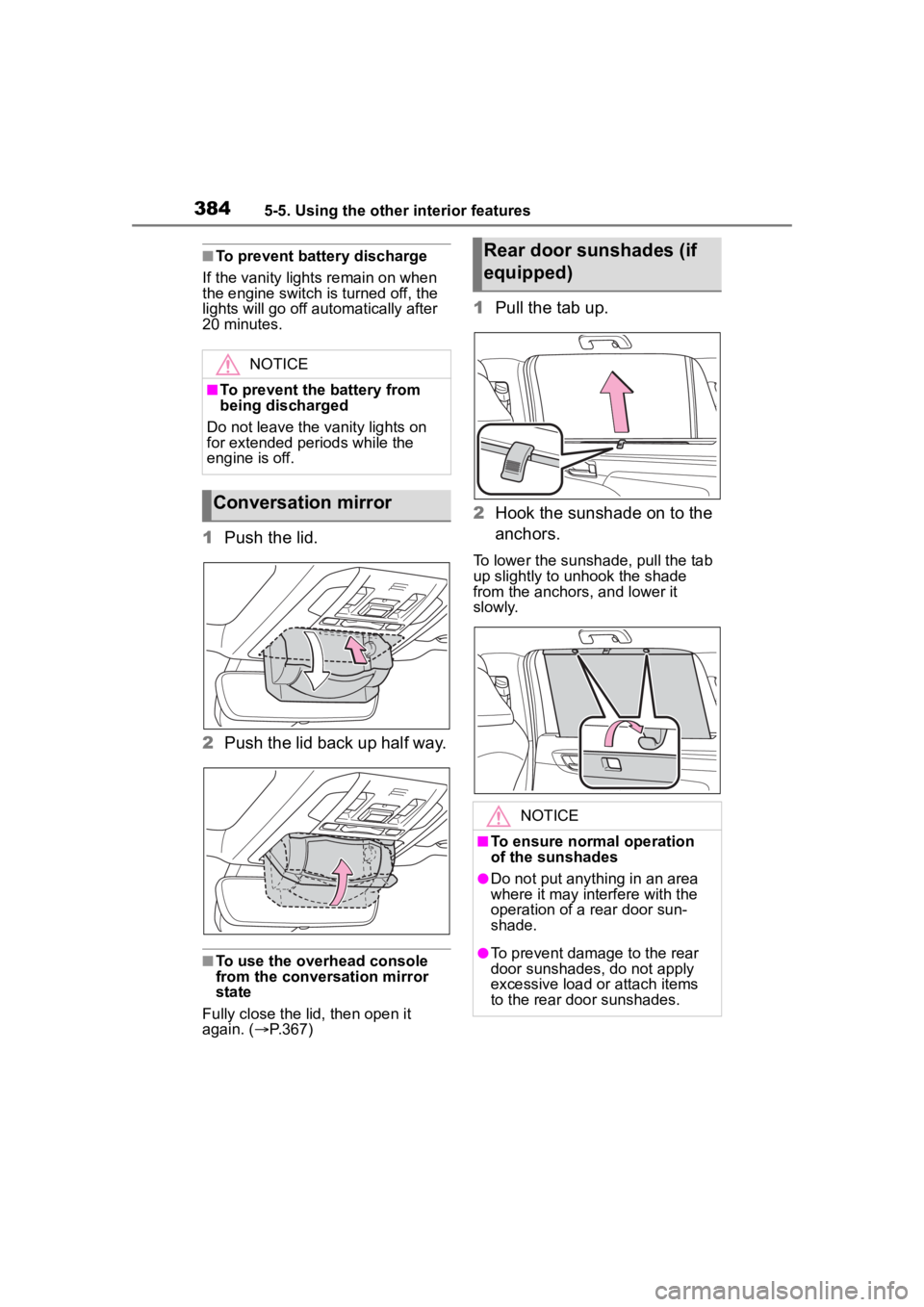
1 Push the lid.
2 Push the lid back up half way.
■To use the overhead console
from the conversation mirror
state
Fully close the lid, then open it
again. ( P.367)
1 Pull the tab up.
2 Hook the sunshade on to the
anchors.
To lower the sunshade, pull the tab
up slightly to unhook the shade
from the anchors, and lower it
slowly.
NOTICE
■To prevent the battery from
being discharged
Do not leave the vanity lights on
for extended periods while the
engine is off.
Conversation mirror
Rear door sunshades (if
equipped)
NOTICE
■To ensure normal operation
of the sunshades
●Do not put anyth ing in an area
where it may int erfere with the
operation of a rear door sun-
shade.
●To prevent damage to the rear
door sunshades, do not apply
excessive load or attach items
to the rear door sunshades.
Page 396 of 568
3966-1. Maintenance and care
NOTICE
• After driving in an area contami-nated with soot, oily smoke,
mine dust, iron powder or chem-
ical substances
• If the vehicle becomes heavily soiled with dust or mud
• If liquids such as benzene and gasoline are spilled on the paint
surface
●If the paint is chipped or
scratched, have it repaired
immediately.
●To prevent the wheels from cor-
roding, remove any dirt and
store in a place with low humid-
ity when storing the wheels.
■Cleaning the exterior lights
●Wash carefully. Do not use
organic substances or scrub
with a hard brush.
This may damage the surfaces
of the lights.
●Do not apply wax to the sur-
faces of the lights.
Wax may cause damage to the
lenses.
■When using an automatic car
wash (vehicles with
rain-sensing windshield wip-
ers)
Set the wiper switch to the off
position.
If the wiper switch is in “AUTO”,
the wipers may operate and the
wiper blades may be damaged.
■When using a high pressure
car wash
●When washing the vehicle, do
not spray the came ra or its sur-
rounding area directly with a
high pressure washer. Shock
applied from high pressure
water may cause the device to
not operate normally.
●Do not spray water directly on
the radar which is equipped
behind the emblem. Otherwise
it may cause the device to be
damaged.
●Do not bring the nozzle tip close
to boots (rubber or resin manu-
factured cover), connectors or
the following parts. The parts
may be damaged if they come
into contact with high-pressure
water.
• Traction related parts
• Steering parts
• Suspension parts
• Brake parts
●Keep the cleaning nozzle at
least 11.9 in. (30 cm) away from
the vehicle body. Otherwise
resin section, s uch as moldings
and bumpers, may be deformed
and damaged.
Also, do not continuously hold the
nozzle in the same place.
●Do not spray the lower part of
the windshield continuously.
If water enters the air conditioning
system intake located near the
lower part of the windshield, the
air conditioning system may not
operate correctly.
●Do not wash the underside of
the vehicle using a high pres-
sure car washer.
Page 403 of 568
4036-2. Maintenance
6
Maintenance and care
Brake pedal
• Does the brake pedal move
smoothly?
• Does the brake pedal have
appropriate
clearance from
the floor?
( P.504)
• Does the brake pedal have the
correct amount
of free play?
( P.504)
Brakes
• The vehicle
should not pull to
one side when
the brakes are
applied.
• The brakes should work
effectively.
• The brake pedal should not feel
spongy.
• The brake pedal should not get
too close to the
floor when the
brakes are
applied.
Head
restraints
• Do the head restraints move
smoothly and
lock securely?
Horn• Works properly?
Indica-
tors/buzzers
• Do the indica-tors and buzzers
function prop-
erly?
ItemsCheck points
Lights
• Do all the lights come on?
• Are the head- lights aimed cor-
rectly? (P.438)
Parking brake
• Does the park-ing brake switch
operate nor-
mally?
• When parked on a slope and the
parking brake is
on, is the vehicle
securely
stopped?
Seat belts
• Do the seat belts operate
smoothly?
• The seat belts should not be
damaged.
Seats
• Do the seat con-trols operate
properly?
Steering wheel
• Does the steer-ing wheel rotate
smoothly?
• Does the steer- ing wheel have
the correct
amount of free
play?
• There should not be any strange
sounds coming
from the steer-
ing wheel.
ItemsCheck points
Page 437 of 568
4376-3. Do-it-yourself maintenance
6
Maintenance and care
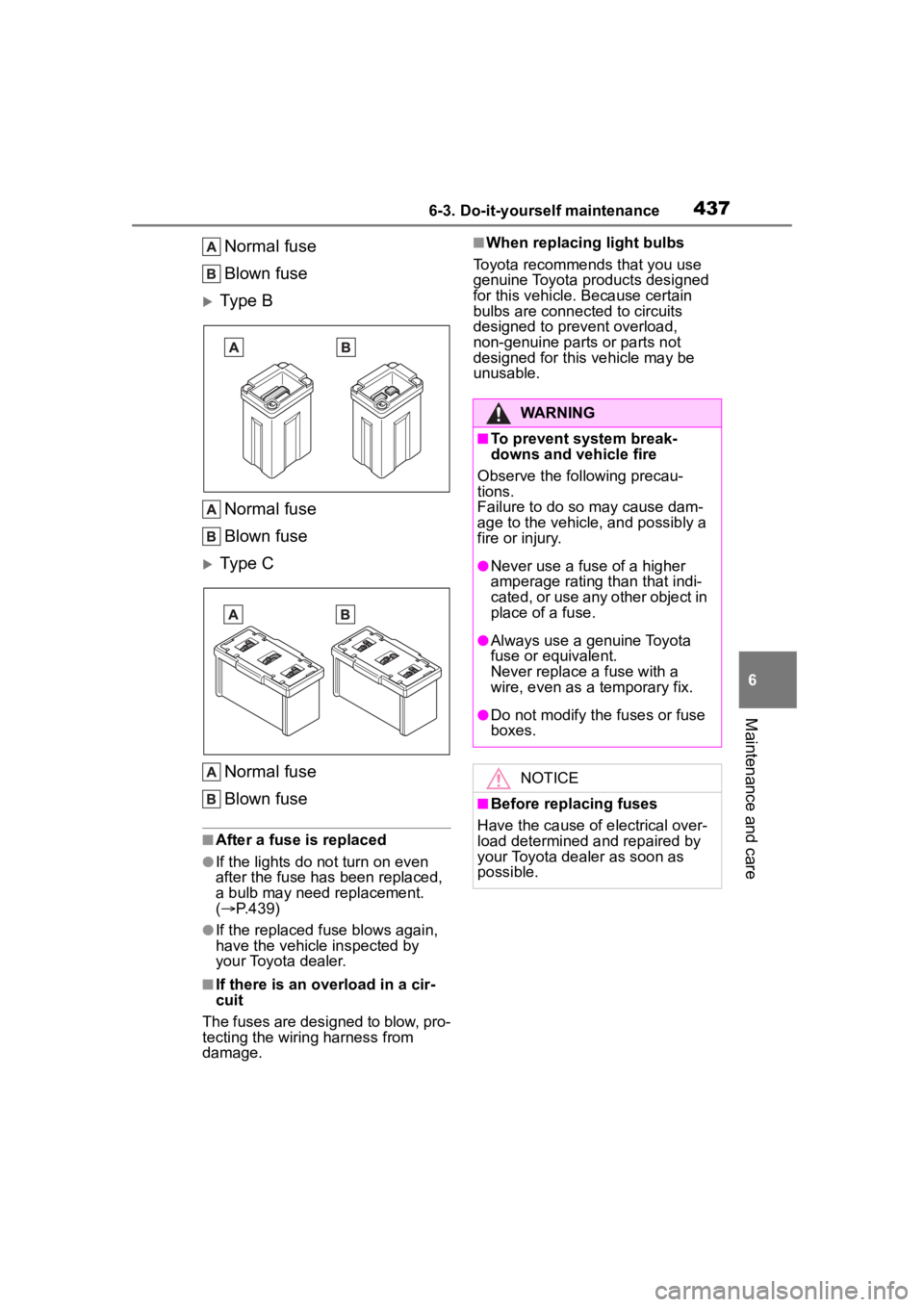
Normal fuse
Blown fuse
Type BNormal fuse
Blown fuse
Type CNormal fuse
Blown fuse
■After a fuse is replaced
●If the lights do n ot turn on even
after the fuse has been replaced,
a bulb may need replacement.
( P.439)
●If the replaced fuse blows again,
have the vehicle inspected by
your Toyota dealer.
■If there is an overload in a cir-
cuit
The fuses are designed to blow, pro-
tecting the wiring harness from
damage.
■When replacing light bulbs
Toyota recommends that you use
genuine Toyota pr oducts designed
for this vehicle. Because certain
bulbs are connected to circuits
designed to prevent overload,
non-genuine parts or parts not
designed for this vehicle may be
unusable.
WARNING
■To prevent system break-
downs and vehicle fire
Observe the following precau-
tions.
Failure to do so may cause dam-
age to the vehicle, and possibly a
fire or injury.
●Never use a fuse of a higher
amperage rating than that indi-
cated, or use any other object in
place of a fuse.
●Always use a genuine Toyota
fuse or equivalent.
Never replace a fuse with a
wire, even as a temporary fix.
●Do not modify the fuses or fuse
boxes.
NOTICE
■Before replacing fuses
Have the cause of electrical over-
load determined and repaired by
your Toyota dealer as soon as
possible.
Page 439 of 568
4396-3. Do-it-yourself maintenance
6
Maintenance and care
Check the wattage of the light
bulb to be replaced. (P.507)
P. 5 2 6
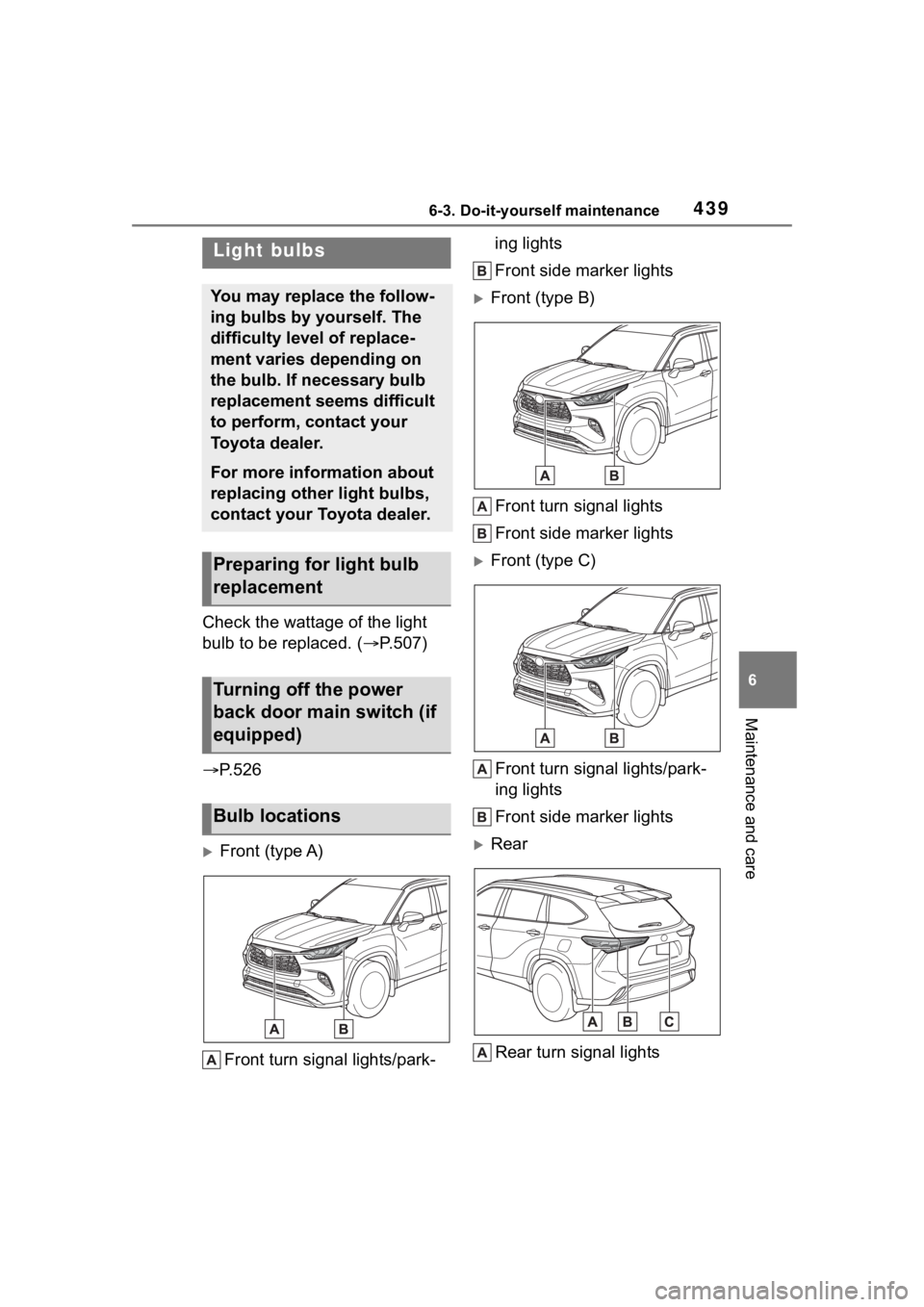
Front (type A)
Front turn signal lights/park- ing lights
Front side marker lights
Front (type B)
Front turn signal lights
Front side marker lights
Front (type C)
Front turn signal lights/park-
ing lights
Front side marker lights
RearRear turn signal lights
Light bulbs
You may replace the follow-
ing bulbs by yourself. The
difficulty level of replace-
ment varies depending on
the bulb. If necessary bulb
replacement seems difficult
to perform, contact your
Toyota dealer.
For more information about
replacing other light bulbs,
contact your Toyota dealer.
Preparing for light bulb
replacement
Turning off the power
back door main switch (if
equipped)
Bulb locations
Page 440 of 568
4406-3. Do-it-yourself maintenance
Back-up lights
License plate lights
■Lights that need to be
replaced by your Toyota
dealer
Headlight low beams
Headlight high beams
Daytime running lights (types
A and C)
Daytime running lights/park-
ing lights (type B)
Front fog lights (if equipped)
Side turn signal lights
Tail lights/stop lights
Rear side marker lights
Tail lights
High mounted stoplight
Outer foot lights (if equipped)
■LED lights
The lights other than the following
lights each consist of a number of
LEDs. If any of the LEDs burn out,
take your vehicle to your Toyota
dealer to have the light replaced.
●Front turn signal lights/parking
lights (types A and C)
●Front turn signal lights (type B)
●Front side marker lights
●Rear turn signal lights
●Back-up lights
●License plate lights
■Condensation build-up on the
inside of the lens
Temporary condensation build-up
on the inside of the light lens does
not indicate a malfunction. Contact
your Toyota dealer for more informa- tion in the following situations:
●Large drops of water have built up
on the inside of the lens.
●Water has built up
inside the light.
■When replacing light bulbs
P.437
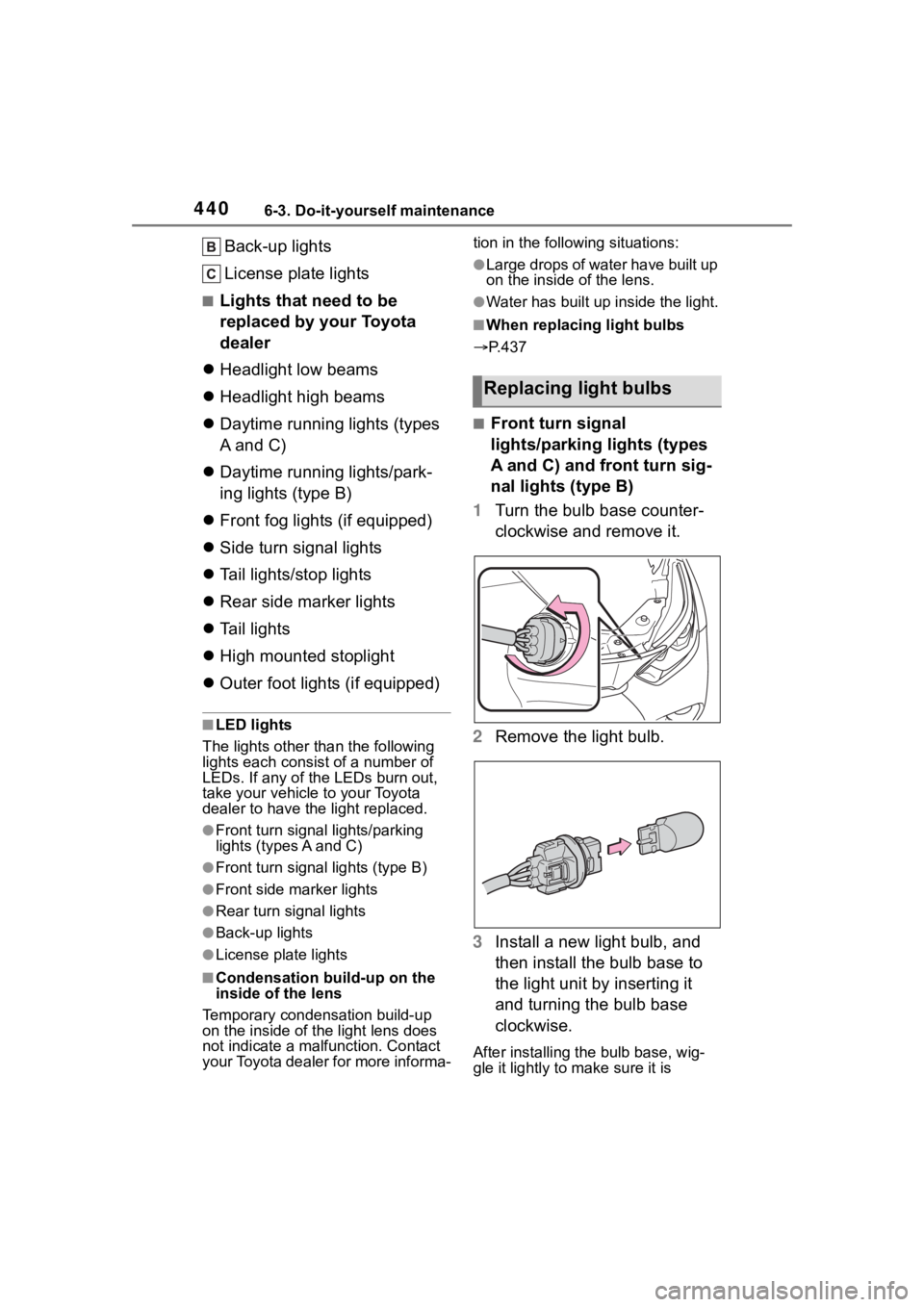
■Front turn signal
lights/parking lights (types
A and C) and front turn sig-
nal lights (type B)
1 Turn the bulb base counter-
clockwise and remove it.
2 Remove the light bulb.
3 Install a new light bulb, and
then install the bulb base to
the light unit by inserting it
and turning the bulb base
clockwise.
After installing the bulb base, wig-
gle it lightly to make sure it is
Replacing light bulbs