audio TOYOTA HIGHLANDER 2022 Owner's Manual
[x] Cancel search | Manufacturer: TOYOTA, Model Year: 2022, Model line: HIGHLANDER, Model: TOYOTA HIGHLANDER 2022Pages: 568, PDF Size: 13.73 MB
Page 287 of 568
2874-5. Using the driving support systems
4
Driving
●Initialization may not have been
performed after a battery terminal
was disconnected and recon-
nected. Initialize the system.
( P.287) If this message contin-
ues to be displayed even after ini-
tialization, have the vehicle
inspected by you r Toyota dealer.
■If “Parking Assist Unavailable
Clean Parking Assist Sensor” is
displayed on the multi-informa-
tion display
A sensor may be covered with ice,
snow, dirt, etc. Remove the ice,
snow, dirt, etc., from the sensor to
return the syste m to normal.
Also, due to ice forming on a sensor
at low temperatures, a warning
message may be displayed or the
sensor may not be able to detect an
object. Once the ice melts, the sys-
tem will return to normal.
■If a battery terminal has been
disconnected and reconnected
The system needs to be initialized.
To initialize the system, drive the
vehicle straight ahead for 5 seconds
or more at a speed of approximately
22 mph (35 km/h) or more.
■Sensor detection information
●The following situations may occur
during use.
• The sensor's detection areas are limited to the areas around the
vehicle front and rear bumpers.
• Depending on the shape of the object and other factors, the
detection distance may shorten, or
detection may be impossible.
• If an object is extremely close to a sensor, it may not be detected.
• There will be a short delay
between object detection and dis-
play. Even at low speeds, there is
a possibility that the object will
come within the sensor’s detec-
tion areas before the display is
shown and the warning beep
sounds.
• It might be difficult to hear the buzzer due to the volume of the audio system or air flow noise of
the air conditioning system.
• It may be diffi cult to hear the
buzzer if buzzers for other sys-
tems are sounding.
■Objects which the system may
not be properly detected
The shape of the object may pre-
vent the sensor from detecting it.
Pay particular attent ion to the follow-
ing objects:
●Wires, fences, ropes, etc.
●Cotton, snow and other materials
that absorb sound waves
●Sharply-angled objects
●Low objects
●Tall objects with upper sections
projecting outwards in the direc-
tion of your vehicle
People may not be detected if they
are wearing certain types of cloth-
ing.
■Situations in which the system
may not operate properly
Certain vehicle conditions and the
surrounding environment may affect
the ability of a sensor to correctly
detect objects. Part icular instances
where this may occur are listed
below.
●There is dirt, snow, water drops or
ice on a sensor. (Cleaning the
sensors will resolve this problem.)
●A sensor is froz en. (Thawing the
area will resolve this problem.)
In especially cold weather, if a
sensor is frozen the sensor dis-
play may be displayed abnormally,
or objects, such as a wall, may not
be detected.
●When a sensor or the area around
a sensor is extremely hot or cold.
Page 290 of 568
2904-5. Using the driving support systems
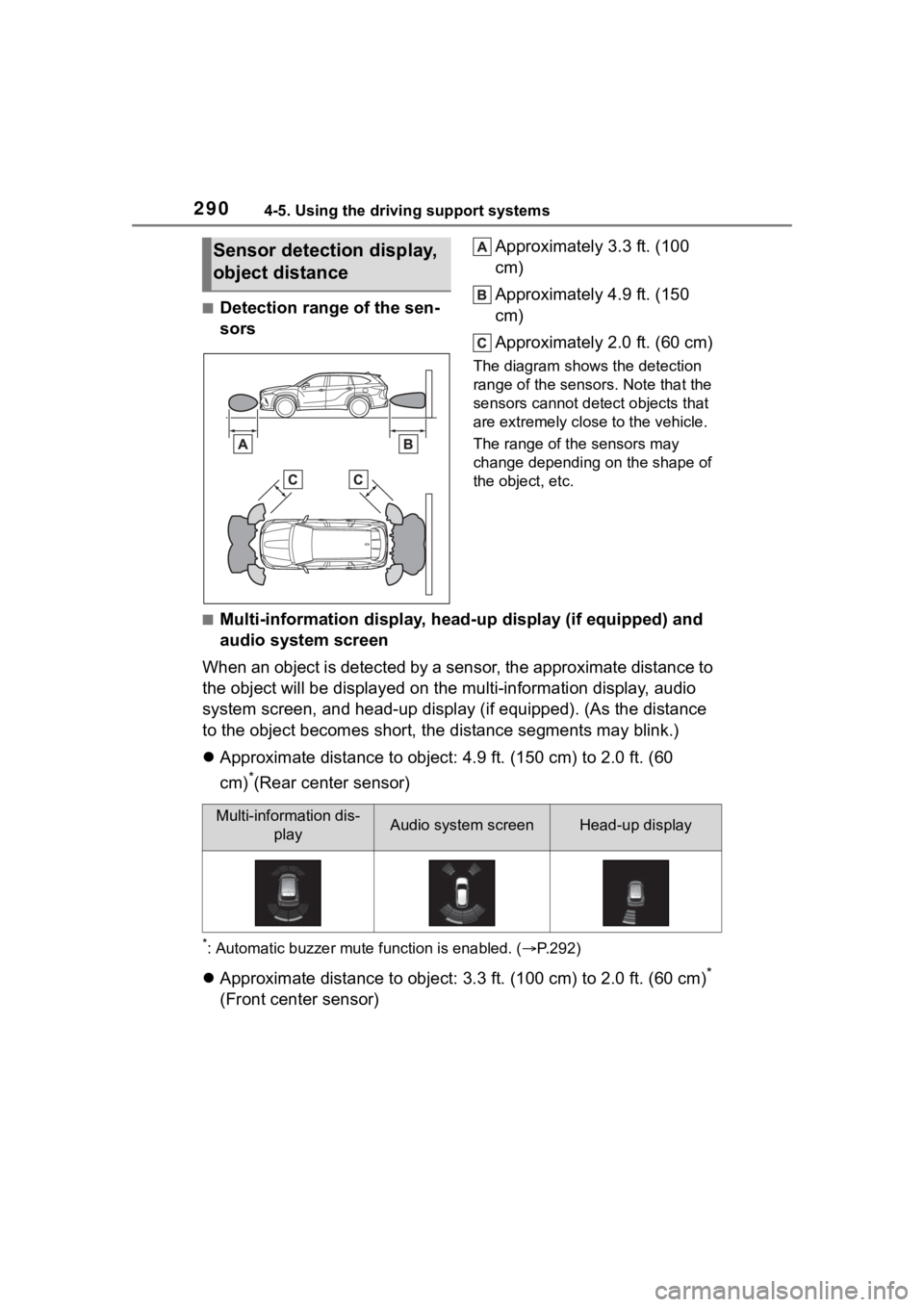
■Detection range of the sen-
sorsApproximately 3.3 ft. (100
cm)
Approximately 4.9 ft. (150
cm)
Approximately 2.0 ft. (60 cm)
The diagram shows the detection
range of the sensors. Note that the
sensors cannot detect objects that
are extremely clos
e to the vehicle.
The range of the sensors may
change depending on the shape of
the object, etc.
■Multi-information display, head-up display (if equipped) and
audio system screen
When an object is detected by a sensor, the approximate distanc e to
the object will be displayed on th e multi-information display, audio
system screen, and head-up display (if equipped). (As the dista nce
to the object becomes short, the distance segments may blink.)
Approximate distance to object: 4.9 ft. (150 cm) to 2.0 ft. (60
cm)
*(Rear center sensor)
*: Automatic buzzer mute function is enabled. ( P.292)
Approximate distance to object: 3.3 ft. (100 cm) to 2.0 ft. (60 cm)*
(Front center sensor)
Sensor detection display,
object distance
Multi-information dis- playAudio system screenHead-up display
Page 291 of 568
2914-5. Using the driving support systems
4
Driving
*: Automatic buzzer mute function is enabled. (P.292)
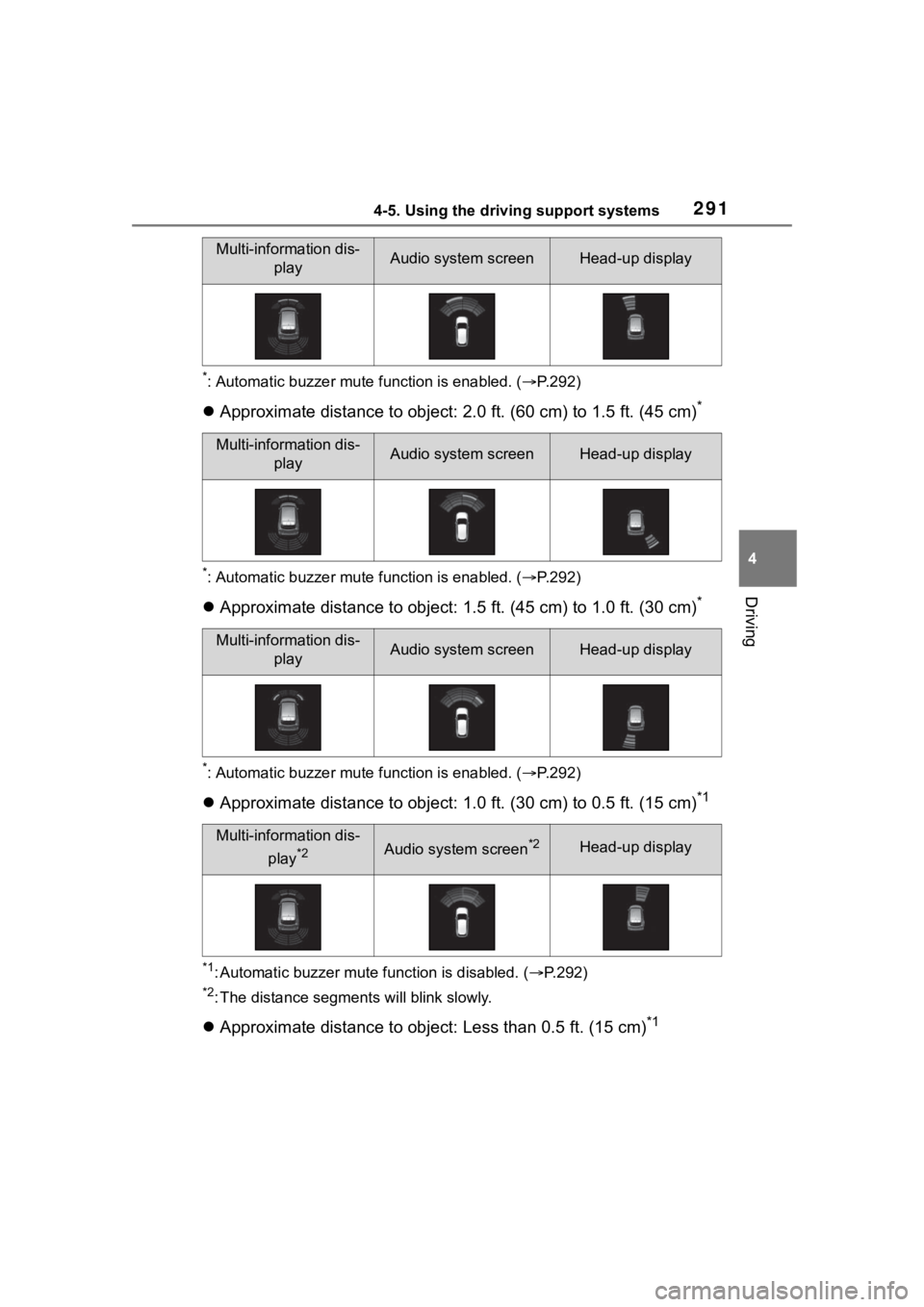
Approximate distance to object: 2.0 ft. (60 cm) to 1.5 ft. (45 cm)*
*: Automatic buzzer mute function is enabled. (P.292)
Approximate distance to object: 1.5 ft. (45 cm) to 1.0 ft. (30 cm)*
*: Automatic buzzer mute function is enabled. (P.292)
Approximate distance to object: 1.0 ft. (30 cm) to 0.5 ft. (15 cm)*1
*1: Automatic buzzer mute function is disabled. (P.292)
*2: The distance segments will blink slowly.
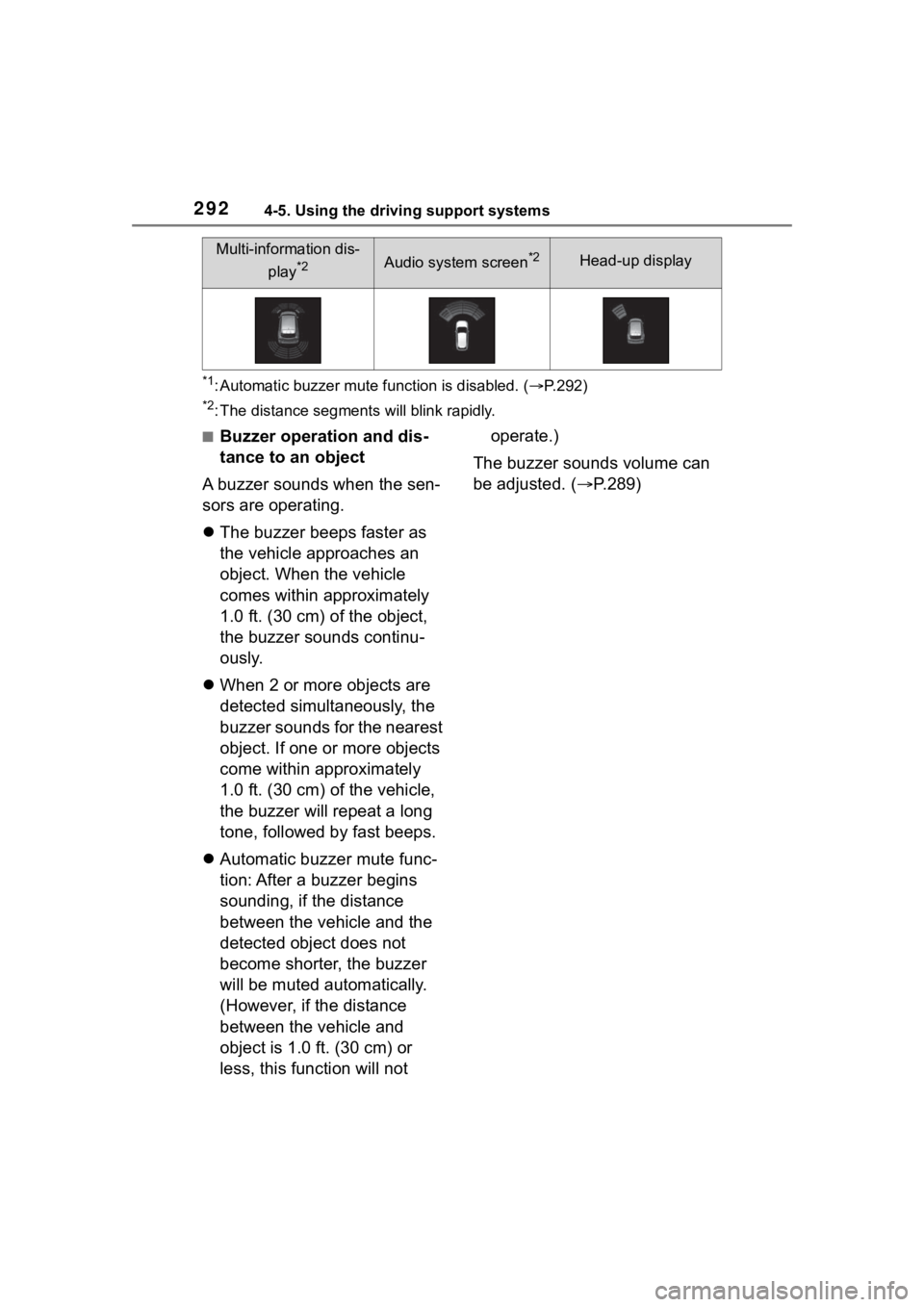
Approximate distance to object: Less than 0.5 ft. (15 cm)*1
Multi-information dis-
playAudio system screenHead-up display
Multi-information dis-playAudio system screenHead-up display
Multi-information dis-playAudio system screenHead-up display
Multi-information dis-
play
*2Audio system screen*2Head-up display
Page 292 of 568
2924-5. Using the driving support systems
*1: Automatic buzzer mute function is disabled. (P.292)
*2: The distance segments will blink rapidly.
■Buzzer operation and dis-
tance to an object
A buzzer sounds when the sen-
sors are operating.
The buzzer beeps faster as
the vehicle approaches an
object. When the vehicle
comes within approximately
1.0 ft. (30 cm) of the object,
the buzzer sounds continu-
ously.
When 2 or more objects are
detected simultaneously, the
buzzer sounds for the nearest
object. If one or more objects
come within approximately
1.0 ft. (30 cm) of the vehicle,
the buzzer will repeat a long
tone, followed by fast beeps.
Automatic buzzer mute func-
tion: After a buzzer begins
sounding, if the distance
between the vehicle and the
detected object does not
become shorter, the buzzer
will be muted automatically.
(However, if the distance
between the vehicle and
object is 1.0 ft. (30 cm) or
less, this function will not operate.)
The buzzer sounds volume can
be adjusted. ( P.289)
Multi-information dis-
play
*2Audio system screen*2Head-up display
Page 293 of 568
2934-5. Using the driving support systems
4
Driving
*: If equipped
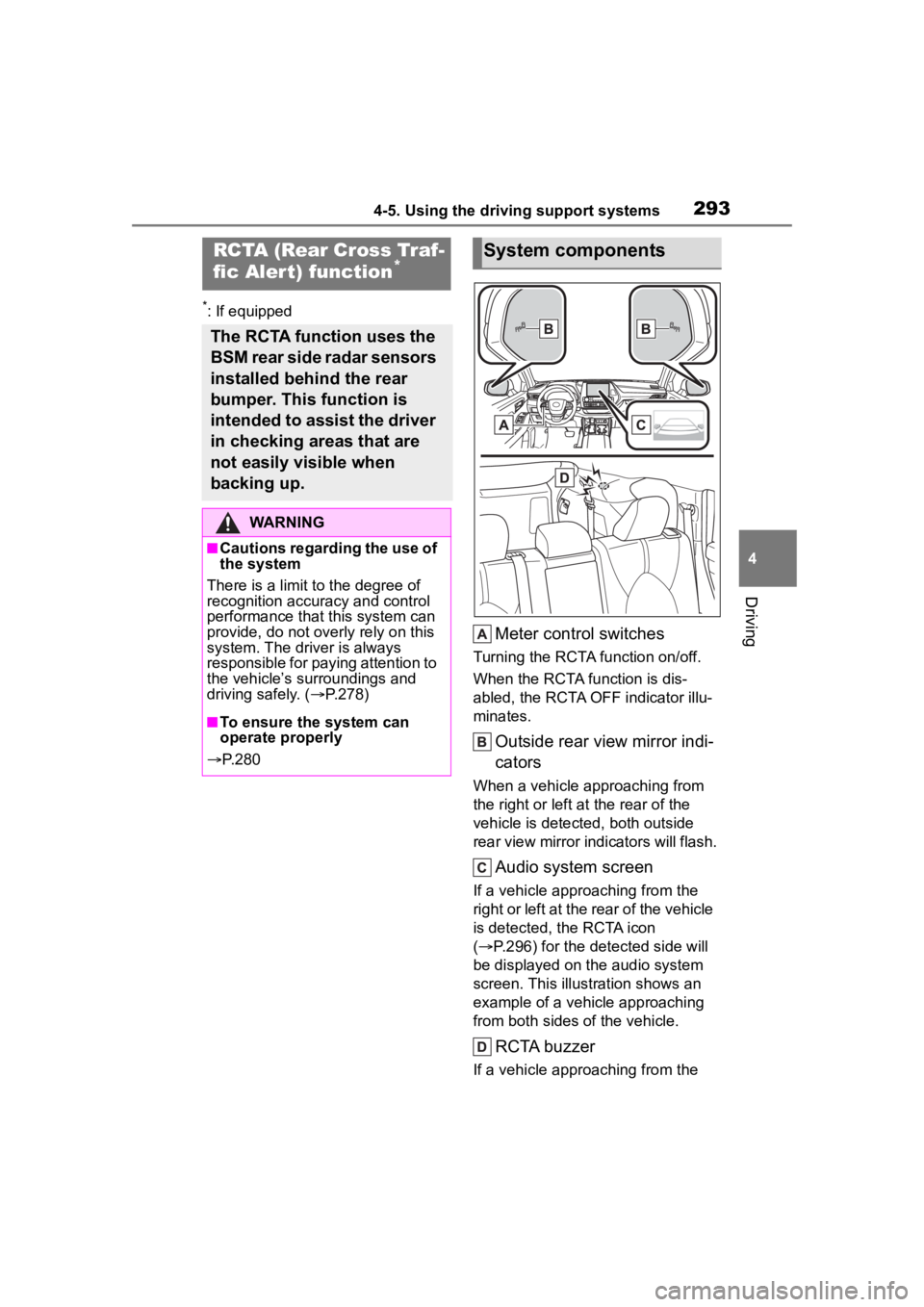
Meter control switches
Turning the RCTA function on/off.
When the RCTA function is dis-
abled, the RCTA OFF indicator illu-
minates.
Outside rear view mirror indi-
cators
When a vehicle approaching from
the right or left at the rear of the
vehicle is detected, both outside
rear view mirror indicators will flash.
Audio system screen
If a vehicle approaching from the
right or left at the rear of the vehicle
is detected, the RCTA icon
( P.296) for the detected side will
be displayed on the audio system
screen. This illust ration shows an
example of a vehicle approaching
from both sides of the vehicle.
RCTA buzzer
If a vehicle approaching from the
RCTA (Rear Cross Traf-
fic Aler t) function*
The RCTA function uses the
BSM rear side radar sensors
installed behind the rear
bumper. This function is
intended to assist the driver
in checking areas that are
not easily visible when
backing up.
WARNING
■Cautions regarding the use of
the system
There is a limit to the degree of
recognition accuracy and control
performance that this system can
provide, do not ov erly rely on this
system. The driver is always
responsible for paying attention to
the vehicle’s surroundings and
driving safely. ( P.278)
■To ensure the system can
operate properly
P. 2 8 0
System components
Page 294 of 568
2944-5. Using the driving support systems
right or left at the rear of the vehicle
is detected, a buzzer will sound.
4.2-inch display
Use the meter control switches
to enable/disable the RCTA
function. ( P.89)
1 Press or to select .
2 Press or to select
“RCTA” and then press .
7-inch display
Use the meter control switches
to enable/disable the RCTA
function. ( P.98)
1 Press or to select .
2 Press or to select
“RCTA” and then press .
When the RCTA function is dis-
abled, the RCTA OFF indicator
( P.78) illuminates on the
multi-information display. (Each
time the engine switch is turned off
then changed to ON, the RCTA
function will be enabled automati-
cally.)■Outside rear vie w mirror indica-
tor visibility
In strong sunlight, the outside rear
view mirror indicator may be difficult
to see.
■Hearing the RCTA buzzer
The RCTA buzzer may be difficult to
hear over loud noises, such as if the
audio system volume is high.
■When “Rear Cross Traffic Alert
Unavailable” is shown on the
multi-information display
Water, ice, snow, mud, etc., may be
attached to the rear bumper around
the sensors. ( P.280) Removing
the water, ice, snow, mud, etc., from
the attached to the rear bumper
around the sensors to return the
function to normal.
Additionally, the function may not
Turning the RCTA func-
tion on/off
WARNING
■Cautions regarding the use of
the function
The driver is solely responsible for
safe driving. Always drive safely,
taking care to observe your sur-
roundings.
The RCTA function is only a sup-
plementary function which alerts
the driver that a vehicle is
approaching from the right or left
at the rear of the vehicle. As the
RCTA function may not function
correctly under certain condi-
tions, the driver’s own visual con-
firmation of safety is necessary.
Over reliance on this function may
lead to an accident resulting
death or serious injury.
NOTICE
■Before using the RCTA func-
tion
Do not place objects near the sen-
sors.
Page 296 of 568
2964-5. Using the driving support systems
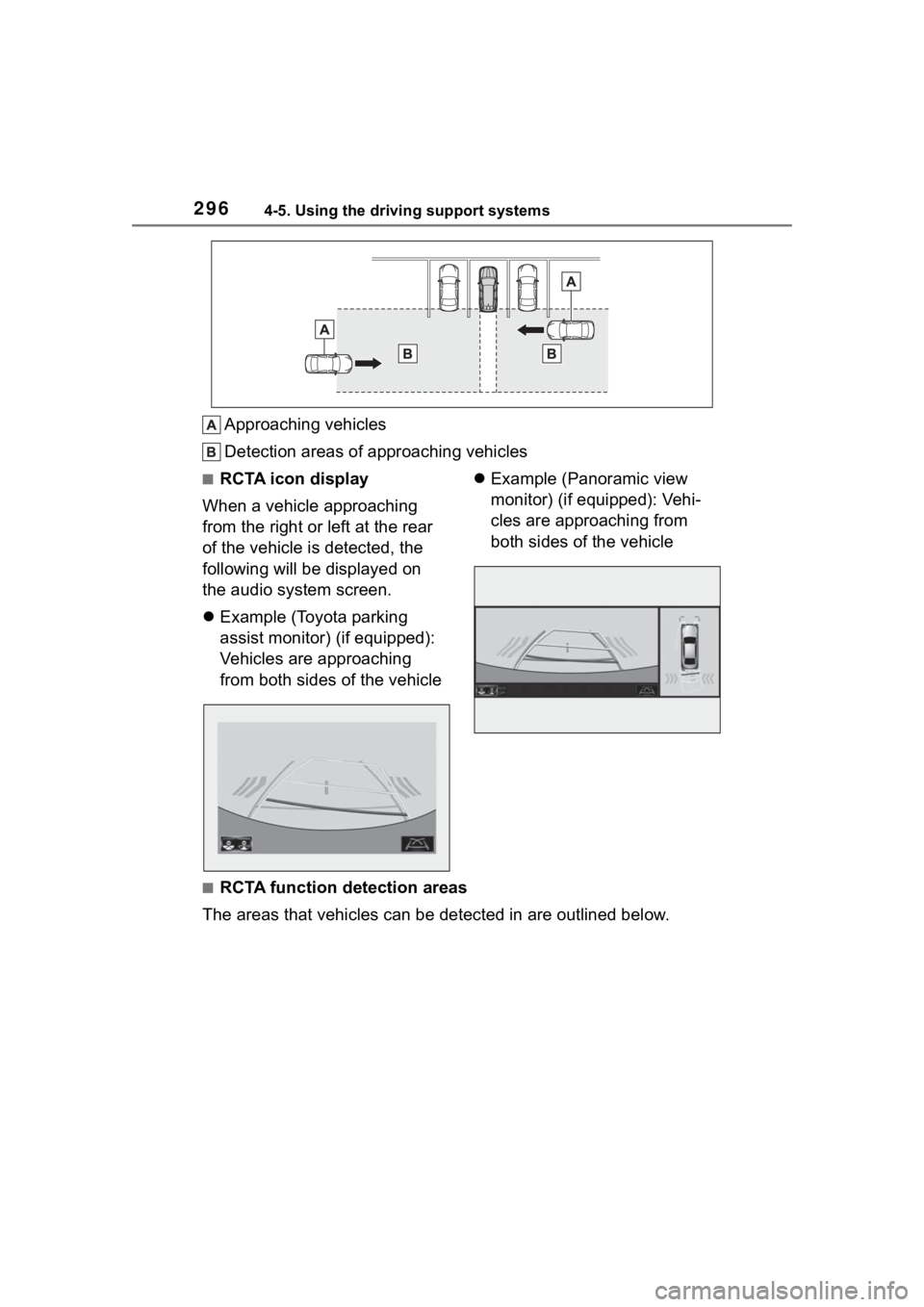
Approaching vehicles
Detection areas of approaching vehicles
■RCTA icon display
When a vehicle approaching
from the right or left at the rear
of the vehicle is detected, the
following will be displayed on
the audio system screen.
Example (Toyota parking
assist monitor) (if equipped):
Vehicles are approaching
from both sides of the vehicle
Example (Panoramic view
monitor) (if equipped): Vehi-
cles are approaching from
both sides of the vehicle
■RCTA function detection areas
The areas that vehicles can be detected in are outlined below.
Page 302 of 568
3024-5. Using the driving support systems
ment cluster.
To re-enable the system when it
was disabled, select on the
multi-information display, select
and turn it on. If the system is dis-
abled, it will remain off even if the
engine switch is turned to ON after
the engine switch has been turned
off.
If the engine output restriction con-
trol or brake control operates, a
buzzer will sound and a message
will be displayed on the audio sys-
tem screen and mu lti-information
display, to alert the driver.
Depending on the situation, engine
output restriction control will oper-
ate to either limit acceleration or
restrict output as much as possible.
Engine output restriction con-
trol is operating (acceleration
restriction)
Acceleration greater than a certain
amount is restricted by the system.
Audio system screen (Panoramic
view monitor) (if equipped): No
warning displayed
Multi-information display: “Object
Detected Acceleration Reduced”
PKSB OFF indicator: Not illumi-
nated
Buzzer: Does not sound
Engine output restriction con-
trol is operating (output
restricted as much as possi-
ble)
The system has determined that
stronger-than-normal brake opera-
tion is necessary.
Audio system screen (Panoramic
view monitor) (if equipped):
“BRAKE!”
Multi-information display/Head-up
display (if equipped): “BRAKE!”
PKSB OFF indicator: Not illumi-
nated
Buzzer: Short beep
Brake control is operating
The system determined that emer-
gency braking is necessary.
Audio system screen (Panoramic
view monitor) (if equipped):
“BRAKE!”
Multi-information display/Head-up
display (if equipped): “BRAKE!”
PKSB OFF indicator: Not illumi-
nated
Buzzer: Short beep
Vehicle stopped by system
operation
The vehicle has been stopped by
brake control operation.
Audio system screen (Panoramic
view monitor) (if equipped): “Press
Brake Pedal”
Multi-information display/Head-up
display (if equipped): “Switch to
Brake” (If the acce lerator pedal is
not depressed, “Press Brake Pedal”
will be displayed.)
PKSB OFF indicato r: Illuminated
Buzzer: Short beep
Displays and buzzers for
engine output restriction
control and brake control
Page 332 of 568
3325-1. Toyota multi-operation touch
5-1.Toyota multi-operation touch
*: Vehicle with the 12.3-inch display
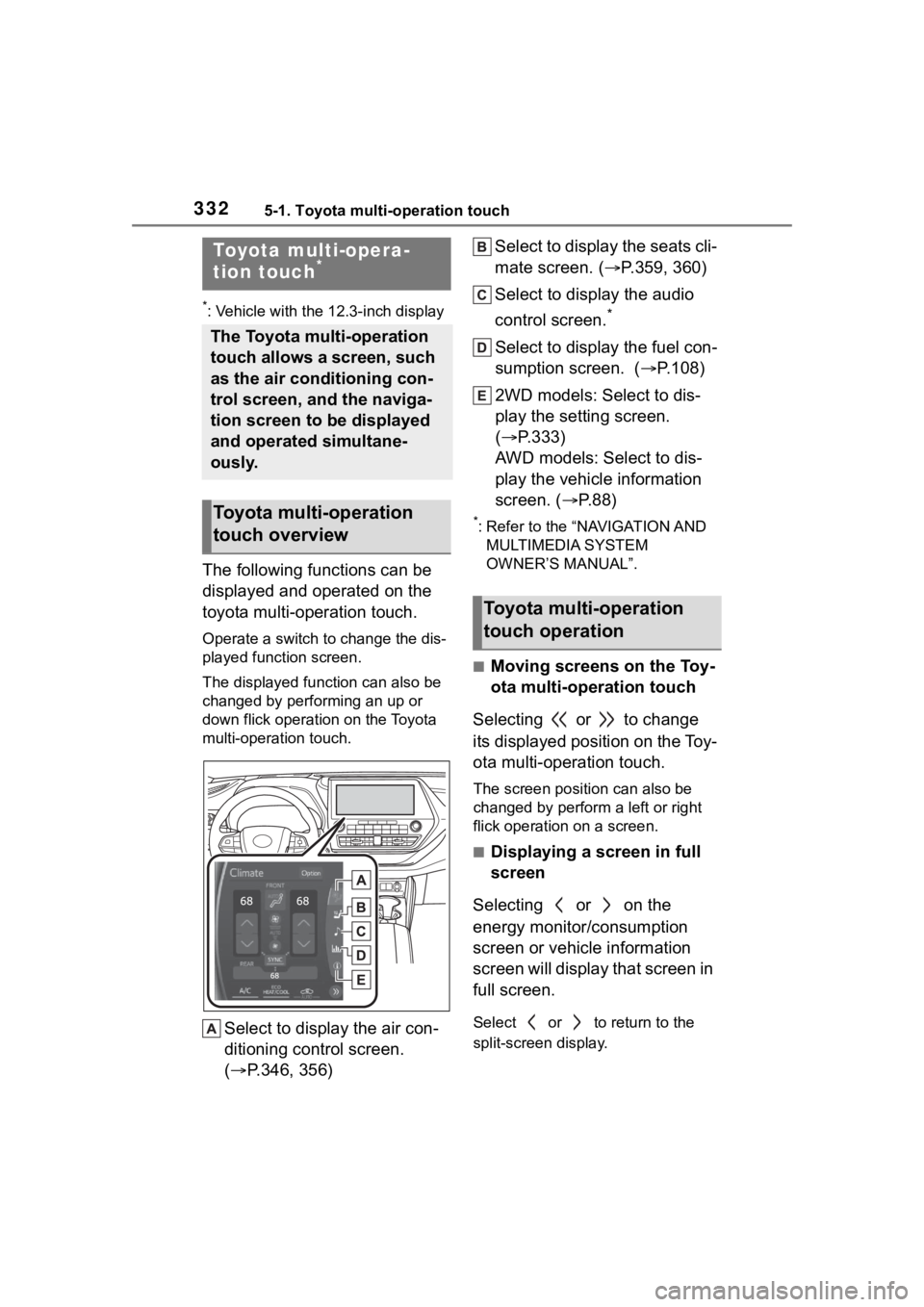
The following functions can be
displayed and operated on the
toyota multi-operation touch.
Operate a switch to change the dis-
played function screen.
The displayed function can also be
changed by performing an up or
down flick operation on the Toyota
multi-operation touch.
Select to display the air con-
ditioning control screen.
( P.346, 356) Select to display the seats cli-
mate screen. (
P.359, 360)
Select to display the audio
control screen.
*
Select to display the fuel con-
sumption screen. ( P.108)
2WD models: Select to dis-
play the setting screen.
( P.333)
AWD models: Select to dis-
play the vehicle information
screen. ( P. 8 8 )
*: Refer to the “NAVIGATION AND
MULTIMEDIA SYSTEM
OWNER’S MANUAL”.
■Moving screens on the Toy-
ota multi-operation touch
Selecting or to change
its displayed position on the Toy-
ota multi-operation touch.
The screen posit ion can also be
changed by perform a left or right
flick operation on a screen.
■Displaying a screen in full
screen
Selecting or on the
energy monitor/consumption
screen or vehicle information
screen will display that screen in
full screen.
Select or to return to the
split-screen display.
Toyota multi-opera-
tion touch*
The Toyota multi-operation
touch allows a screen, such
as the air conditioning con-
trol screen, and the naviga-
tion screen to be displayed
and operated simultane-
ously.
Toyota multi-operation
touch overview
Toyota multi-operation
touch operation
Page 398 of 568
3986-1. Maintenance and care
Remove dirt and dust using a
vacuum cleaner.
Wipe off any excess dirt and
dust with a soft cloth damp-
ened with diluted detergent.
Use a diluted water solution of
approximately 5% neutral wool
detergent.
Wring out any excess water
from the cloth and thoroughly
wipe off all remaining traces
of detergent.
Wipe the surface with a dry,
soft cloth to remove any
remaining moisture. Allow the
leather to dry in a shaded and
ventilated area.
■Caring for leather areas
Toyota recommends cleaning the
interior of the vehicle at least twice a
year tomaintain the quality of the
vehicle’s interior.
NOTICE
●Do not use polish wax or polish
cleaner. The instrument panel’s
or other interior part’s painted
surface may be damaged.
■Preventing damage to leather
surfaces
Observe the following precautions
to avoid damage to and deteriora-
tion of leather surfaces:
●Remove any dust or dirt from
leather surfaces immediately.
●Do not expose the vehicle to
direct sunlight for extended peri-
ods of time. Park the vehicle in
the shade, especially during
summer.
●Do not place items made of
vinyl, plastic, or containing wax
on the upholstery, as they may
stick to the leather surface if the
vehicle interior heats up signifi-
cantly.
■Water on the floor
Do not wash the vehicle floor with
water.
Vehicle systems such as the
audio system may be damaged if
water comes into contact with
electrical components such as the
audio system above or under the
floor of the vehicle. Water may
also cause the body to rust.
■When cleaning the inside of
the windshield
Do not allow glass cleaner to con-
tact the lens. Also, do not touch
the lens. (
P.229)
■Cleaning the inside of the rear
window
●Do not use glass cleaner to
clean the rear window, as this
may cause damage to the rear
window defogger heater wires
or antenna. Use a cloth damp-
ened with lukewarm water to
gently wipe the window clean.
Wipe the window in strokes run-
ning parallel to the heater wires
or antenna.
●Be careful not to scratch or
damage the heater wires or
antenna.
Cleaning the leather areas