mirror TOYOTA HIGHLANDER 2022 Owner's Guide
[x] Cancel search | Manufacturer: TOYOTA, Model Year: 2022, Model line: HIGHLANDER, Model: TOYOTA HIGHLANDER 2022Pages: 568, PDF Size: 13.73 MB
Page 220 of 568
2204-3. Operating the lights and wipers
from around a curve
• When the vehicle is cut in front of by another vehicle
• When vehicles ahead cannot be detected due to repeated curves,
road dividers or roadside trees
• When vehicles ahead appear in a faraway lane on a wide road
• When the lights of vehicles ahead
are not on
●The high beams may be turned off
if a vehicle ahead that is using fog
lights without its headlights turned
on is detected.
●House lights, street lights, traffic
signals, and illumi nated billboards
or signs and other reflective
objects may cause the high
beams to change to the low
beams, or the low beams to
remain on.
●The following factors may affect
the amount of time taken for the
high beams to turn on or off:
• The brightness of the headlights, fog lights, and ta il lights of vehi-
cles ahead
• The movement and direction of vehicles ahead
• When a vehicle ahead only has
operational lights on one side
• When a vehicle ahead is a two-wheeled vehicle
• The condition of the road (gradi-
ent, curve, condi tion of the road
surface, etc.)
• The number of passengers and amount of luggage in the vehicle
●The high beams may turn on or off
unexpectedly.
●Bicycles or similar vehicles may
not be detected.
●In the following situations the sys-
tem may not be abl e to correctly
detect the surrounding brightness
level. This may cause the low
beams to remain on or the high
beams to flash or dazzle pedestri-
ans or vehicles ahead. In such a
case, it is necess ary to manually
switch between the high and low
beams. • When driving in inclement weather
(heavy rain, snow, fog, sand-
storms, etc.)
• When the windshi eld is obscured
by fog, mist, ice, dirt, etc.
• When the windshield is cracked or
damaged
• When the camera sensor is deformed or dirty
• When the temperature of the cam- era sensor is extremely high
• When the surrounding brightness
level is equal to that of headlights,
tail lights or fog lights
• When headlights or tail lights of
vehicles ahead are turned off,
dirty, changing color, or not aimed
properly
• When the vehicle is hit by water,
snow, dust, etc. from a preceding
vehicle
• When driving through an area of intermittently changing brightness
and darkness
• When frequently and repeatedly driving ascending/descending
roads, or roads with rough, bumpy
or uneven surfaces (such as
stone-paved roads, gravel roads,
etc.)
• When frequently and repeatedly taking curves or driving on a wind-
ing road
• When there is a h ighly reflective
object ahead of the vehicle, such
as a sign or mirror
• When the back of a preceding vehicle is highly reflective, such as
a container on a truck
• When the vehicle’s headlights are damaged or dirty, or are not aimed
properly
• When the vehicle is listing or titling due to a flat tire, a trailer being
towed, etc.
• When the headlights are changed between the high beams and low
beams repeatedly in an abnormal
manner
• When the driver believes that the high beams may be flashing or
dazzling pedestrians or other driv-
ers
Page 226 of 568
2264-3. Operating the lights and wipers
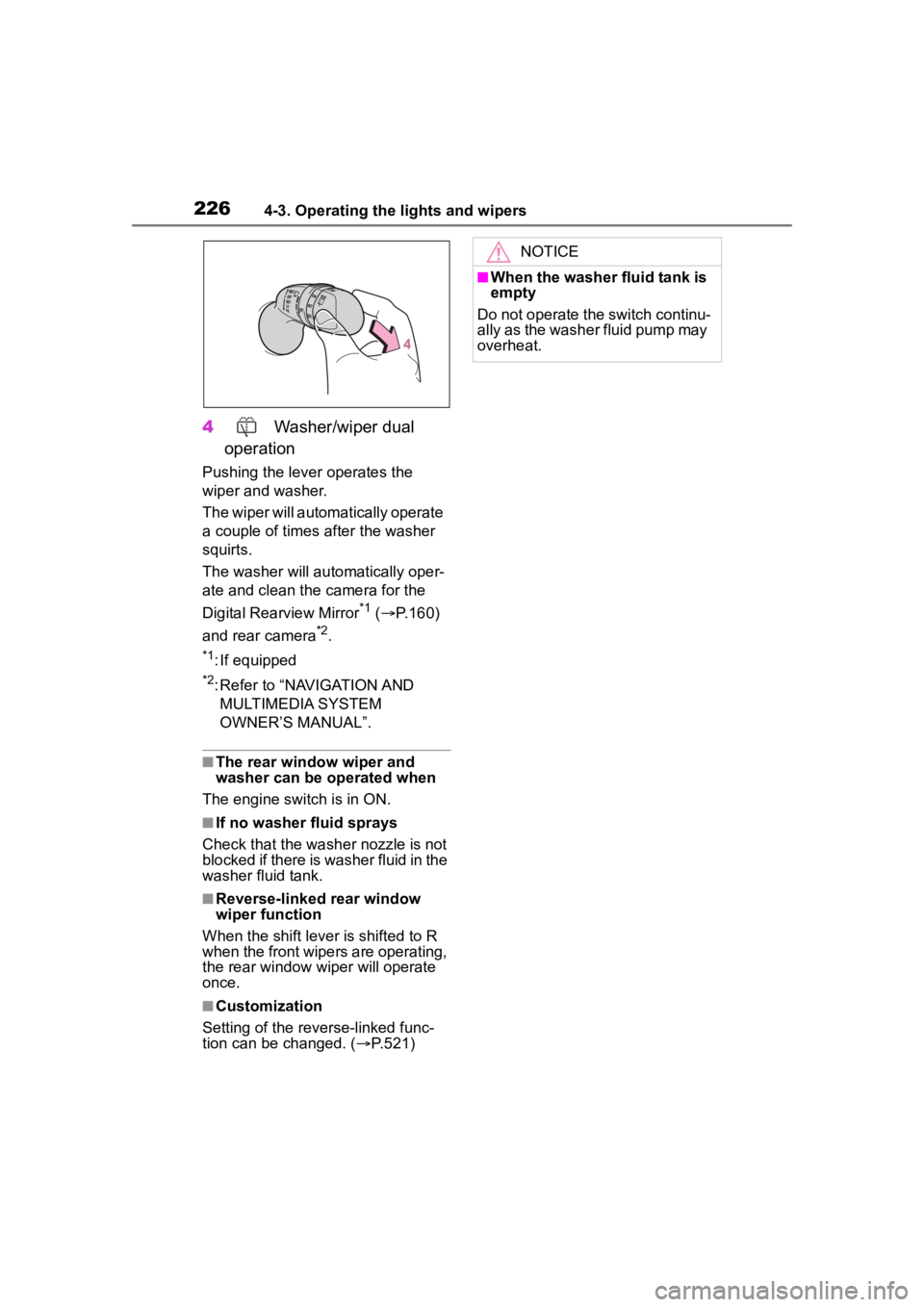
4 Washer/wiper dual
operation
Pushing the lever operates the
wiper and washer.
The wiper will automatically operate
a couple of times after the washer
squirts.
The washer will automatically oper-
ate and clean the camera for the
Digital Rearview Mirror
*1 ( P.160)
and rear camera
*2.
*1: If equipped
*2: Refer to “NAVIGATION AND MULTIMEDIA SYSTEM
OWNER’S MANUAL”.
■The rear window wiper and
washer can be operated when
The engine switch is in ON.
■If no washer fluid sprays
Check that the washer nozzle is not
blocked if there is washer fluid in the
washer fluid tank.
■Reverse-linked rear window
wiper function
When the shift lever is shifted to R
when the front wipers are operating,
the rear window wiper will operate
once.
■Customization
Setting of the reverse-linked func-
tion can be changed. ( P.521)
NOTICE
■When the washer fluid tank is
empty
Do not operate the switch continu-
ally as the washer fluid pump may
overheat.
Page 231 of 568
2314-5. Using the driving support systems
4
Driving
WARNING
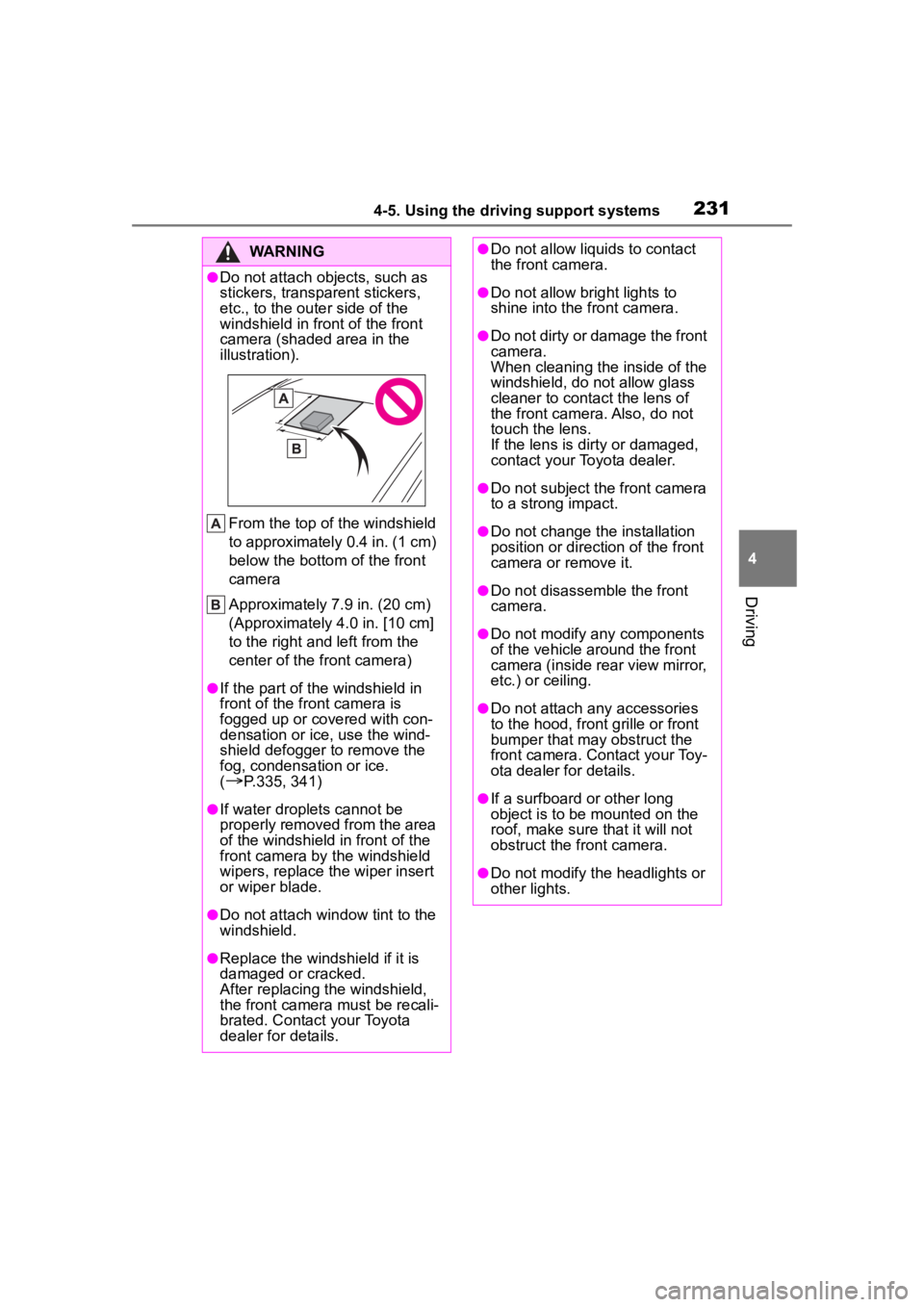
●Do not attach objects, such as
stickers, transparent stickers,
etc., to the outer side of the
windshield in fr ont of the front
camera (shaded area in the
illustration).
From the top of the windshield
to approximately 0.4 in. (1 cm)
below the bottom of the front
camera
Approximately 7.9 in. (20 cm)
(Approximately 4.0 in. [10 cm]
to the right and left from the
center of the front camera)
●If the part of the windshield in
front of the front camera is
fogged up or covered with con-
densation or ice, use the wind-
shield defogger to remove the
fog, condensation or ice.
(
P.335, 341)
●If water droplets cannot be
properly removed from the area
of the windshield in front of the
front camera by the windshield
wipers, replace the wiper insert
or wiper blade.
●Do not attach win dow tint to the
windshield.
●Replace the windshield if it is
damaged or cracked.
After replacing the windshield,
the front camera must be recali-
brated. Contact your Toyota
dealer for details.
●Do not allow liquids to contact
the front camera.
●Do not allow bright lights to
shine into the front camera.
●Do not dirty or damage the front
camera.
When cleaning the inside of the
windshield, do not allow glass
cleaner to contact the lens of
the front camera. Also, do not
touch the lens.
If the lens is dirty or damaged,
contact your Toyota dealer.
●Do not subject the front camera
to a strong impact.
●Do not change the installation
position or direction of the front
camera or remove it.
●Do not disassemble the front
camera.
●Do not modify any components
of the vehicle around the front
camera (inside rear view mirror,
etc.) or ceiling.
●Do not attach any accessories
to the hood, front grille or front
bumper that may obstruct the
front camera. Contact your Toy-
ota dealer for details.
●If a surfboard or other long
object is to be mounted on the
roof, make sure that it will not
obstruct the front camera.
●Do not modify the headlights or
other lights.
Page 278 of 568
2784-5. Using the driving support systems
*: If equipped
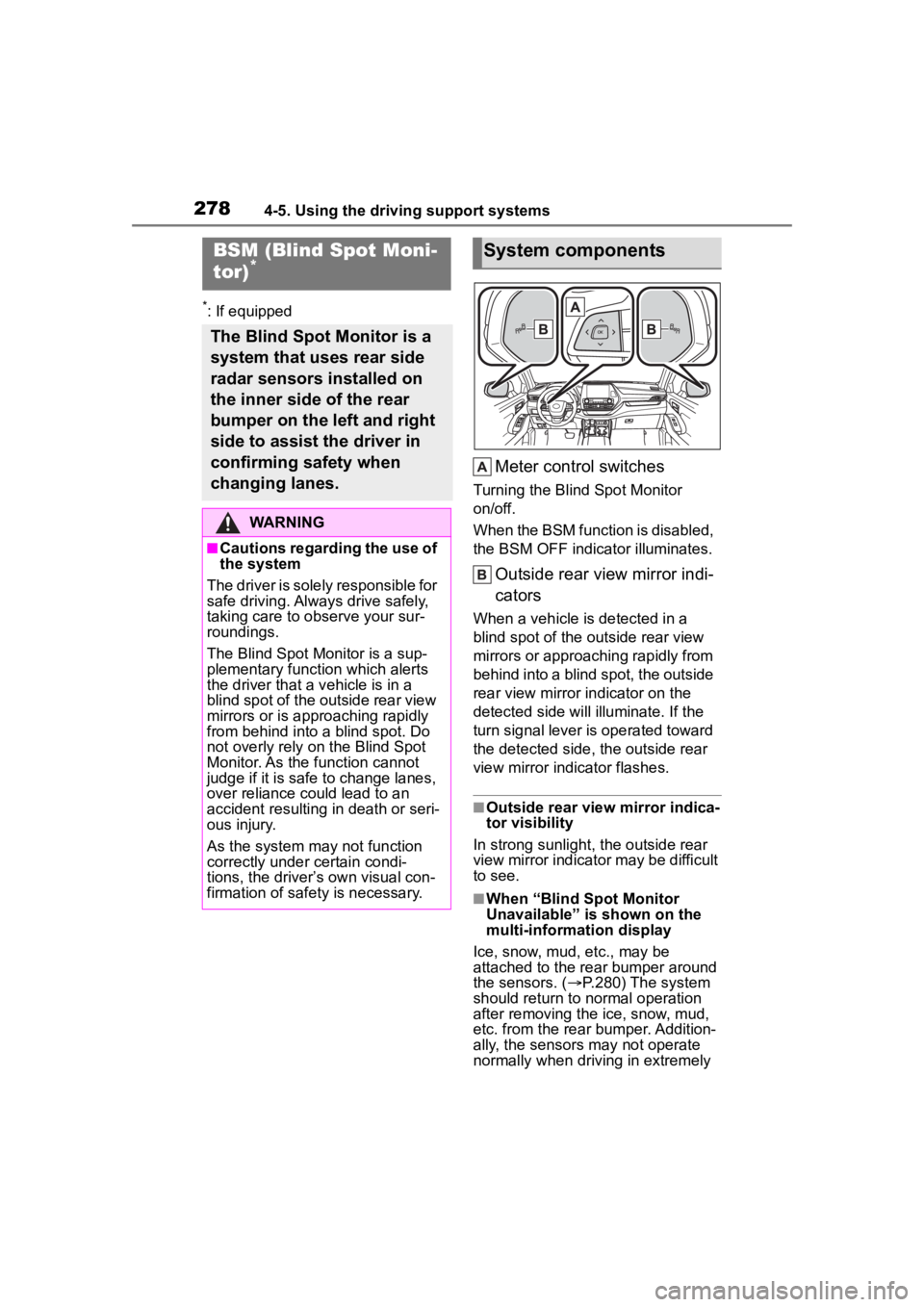
Meter control switches
Turning the Blind Spot Monitor
on/off.
When the BSM function is disabled,
the BSM OFF indicator illuminates.
Outside rear view mirror indi-
cators
When a vehicle is detected in a
blind spot of the outside rear view
mirrors or approaching rapidly from
behind into a blind spot, the outside
rear view mirror indicator on the
detected side will illuminate. If the
turn signal lever is operated toward
the detected side, the outside rear
view mirror indicator flashes.
■Outside rear view mirror indica-
tor visibility
In strong sunlight, the outside rear
view mirror indicator may be difficult
to see.
■When “Blind Spot Monitor
Unavailable” is shown on the
multi-information display
Ice, snow, mud, etc., may be
attached to the rear bumper around
the sensors. ( P.280) The system
should return to normal operation
after removing the ice, snow, mud,
etc. from the rear bumper. Addition-
ally, the sensors may not operate
normally when drivin g in extremely
BSM (Blind Spot Moni-
tor)*
The Blind Spot Monitor is a
system that uses rear side
radar sensors installed on
the inner side of the rear
bumper on the left and right
side to assist the driver in
confirming safety when
changing lanes.
WARNING
■Cautions regarding the use of
the system
The driver is solely responsible for
safe driving. Always drive safely,
taking care to o bserve your sur-
roundings.
The Blind Spot Monitor is a sup-
plementary function which alerts
the driver that a v ehicle is in a
blind spot of the outside rear view
mirrors or is approaching rapidly
from behind into a blind spot. Do
not overly rely on the Blind Spot
Monitor. As the function cannot
judge if it is safe to change lanes,
over reliance could lead to an
accident resulting in death or seri-
ous injury.
As the system may not function
correctly under certain condi-
tions, the driver’s own visual con-
firmation of safety is necessary.
System components
Page 281 of 568
2814-5. Using the driving support systems
4
Driving
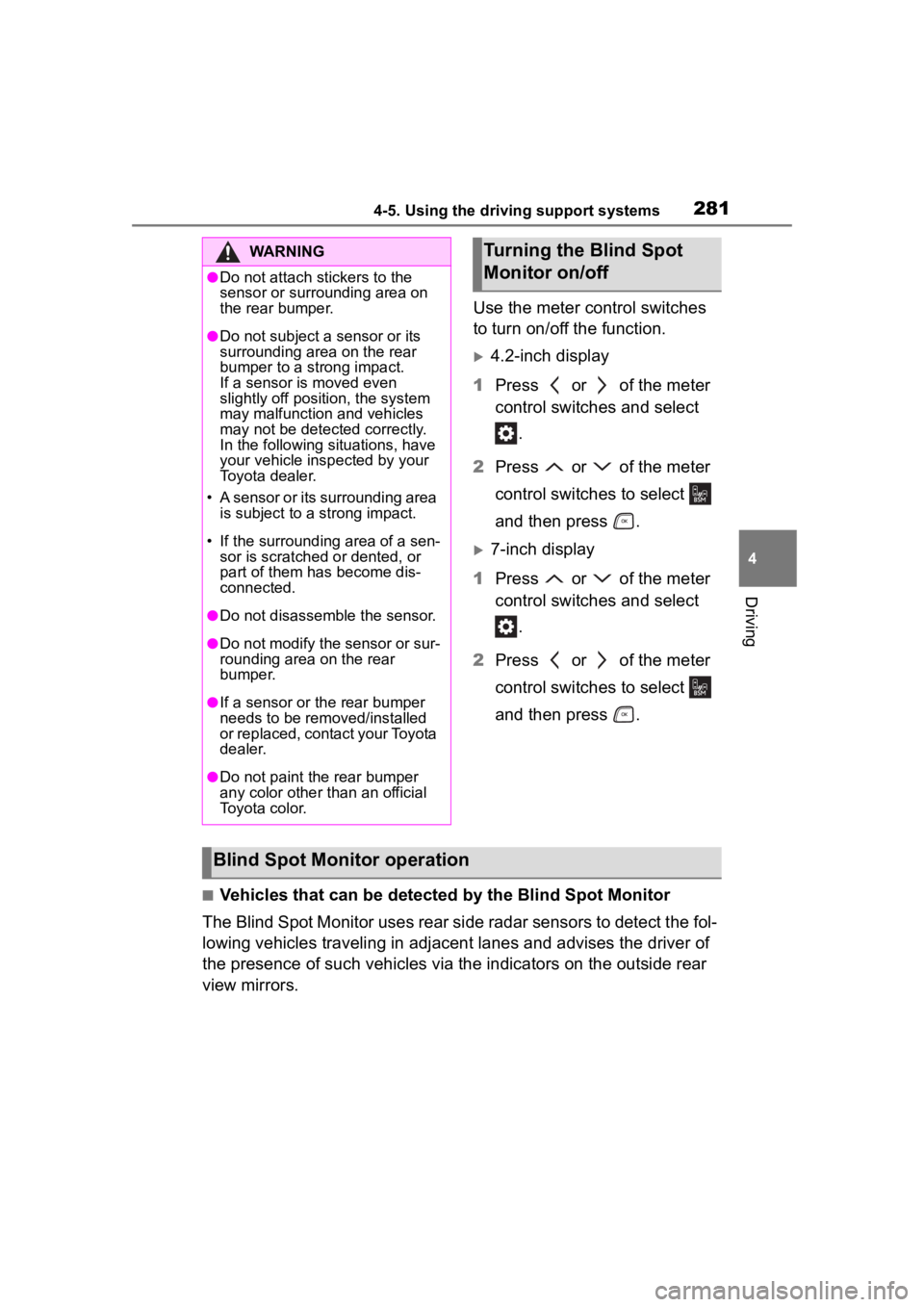
Use the meter control switches
to turn on/off the function.
4.2-inch display
1 Press or of the meter
control switches and select
.
2 Press or of the meter
control switches to select
and then press .
7-inch display
1 Press or of the meter
control switches and select
.
2 Press or of the meter
control switches to select
and then press .
■Vehicles that can be detected by the Blind Spot Monitor
The Blind Spot Monitor uses rear side radar sensors to detect the fol-
lowing vehicles traveling in adjacent lanes and advises the driver of
the presence of such vehicles via the indicators on the outside rear
view mirrors.
WARNING
●Do not attach stickers to the
sensor or surrounding area on
the rear bumper.
●Do not subject a sensor or its
surrounding area on the rear
bumper to a strong impact.
If a sensor is moved even
slightly off position, the system
may malfunction and vehicles
may not be detected correctly.
In the following si tuations, have
your vehicle inspected by your
Toyota dealer.
• A sensor or its surrounding area is subject to a strong impact.
• If the surrounding area of a sen- sor is scratched or dented, or
part of them has become dis-
connected.
●Do not disassemble the sensor.
●Do not modify the sensor or sur-
rounding area on the rear
bumper.
●If a sensor or th e rear bumper
needs to be removed/installed
or replaced, contact your Toyota
dealer.
●Do not paint the rear bumper
any color other than an official
Toyota color.
Turning the Blind Spot
Monitor on/off
Blind Spot Monitor operation
Page 282 of 568
2824-5. Using the driving support systems
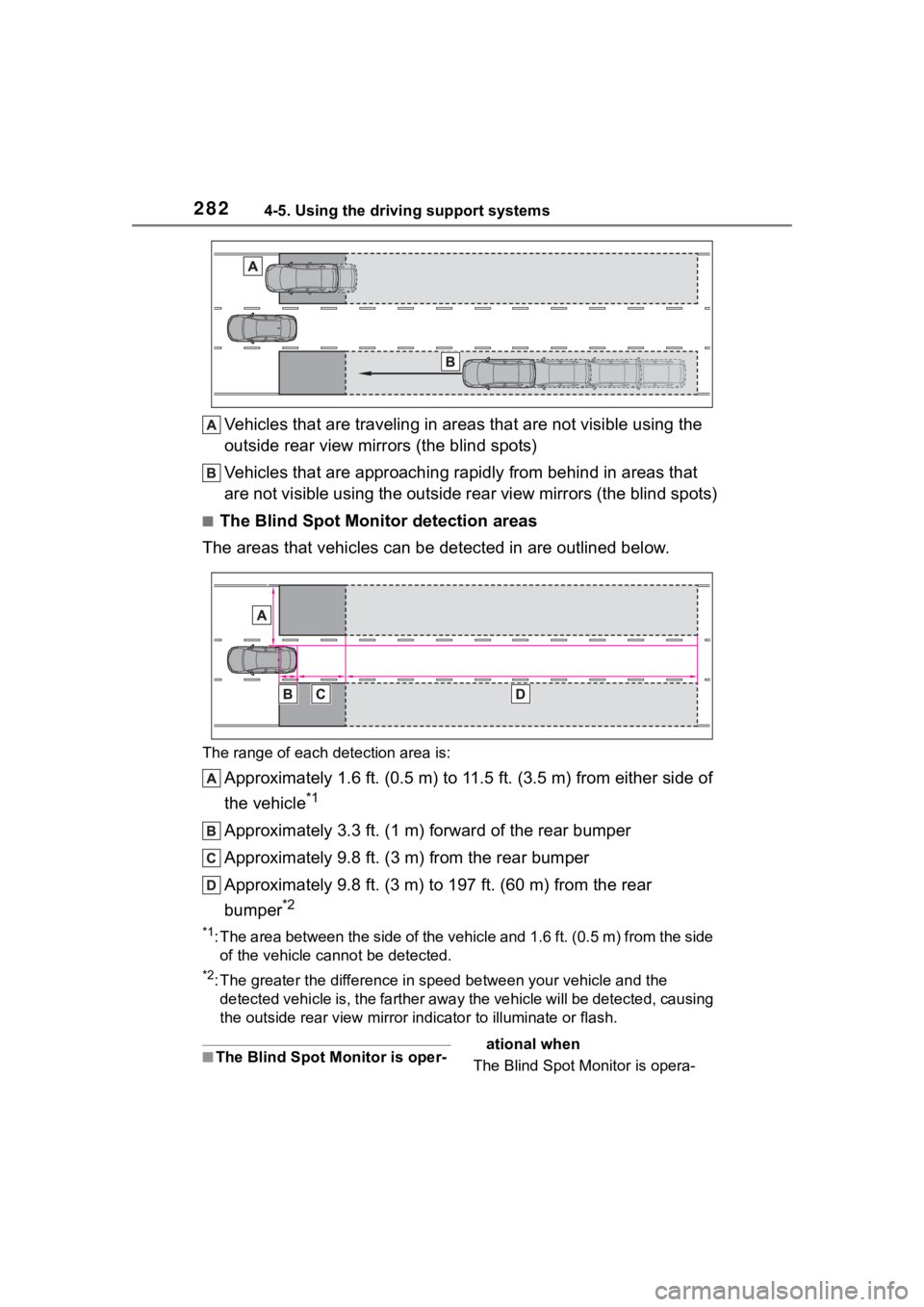
Vehicles that are traveling in areas that are not visible using the
outside rear view mirrors (the blind spots)
Vehicles that are approaching r apidly from behind in areas that
are not visible using the outside rear view mirrors (the blind spots)
■The Blind Spot Monitor detection areas
The areas that vehicles can be detected in are outlined below.
The range of each detection area is:
Approximately 1.6 ft. (0.5 m) to 11.5 ft. (3.5 m) from either s ide of
the vehicle
*1
Approximately 3.3 ft. (1 m) forward of the rear bumper
Approximately 9.8 ft. (3 m) from the rear bumper
Approximately 9.8 ft. (3 m) to 197 ft. (60 m) from the rear
bumper
*2
*1: The area between the side of the vehicle and 1.6 ft. (0.5 m) f rom the side
of the vehicle cannot be detected.
*2: The greater the difference in speed between your vehicle and t he
detected vehicle is, the farthe r away the vehicle will be detec ted, causing
the outside r ear view mirror indicato r to illuminate or flash.
■The Blind Spot Monitor is oper- ational when
The Blind Spot Monitor is opera-
Page 293 of 568
2934-5. Using the driving support systems
4
Driving
*: If equipped
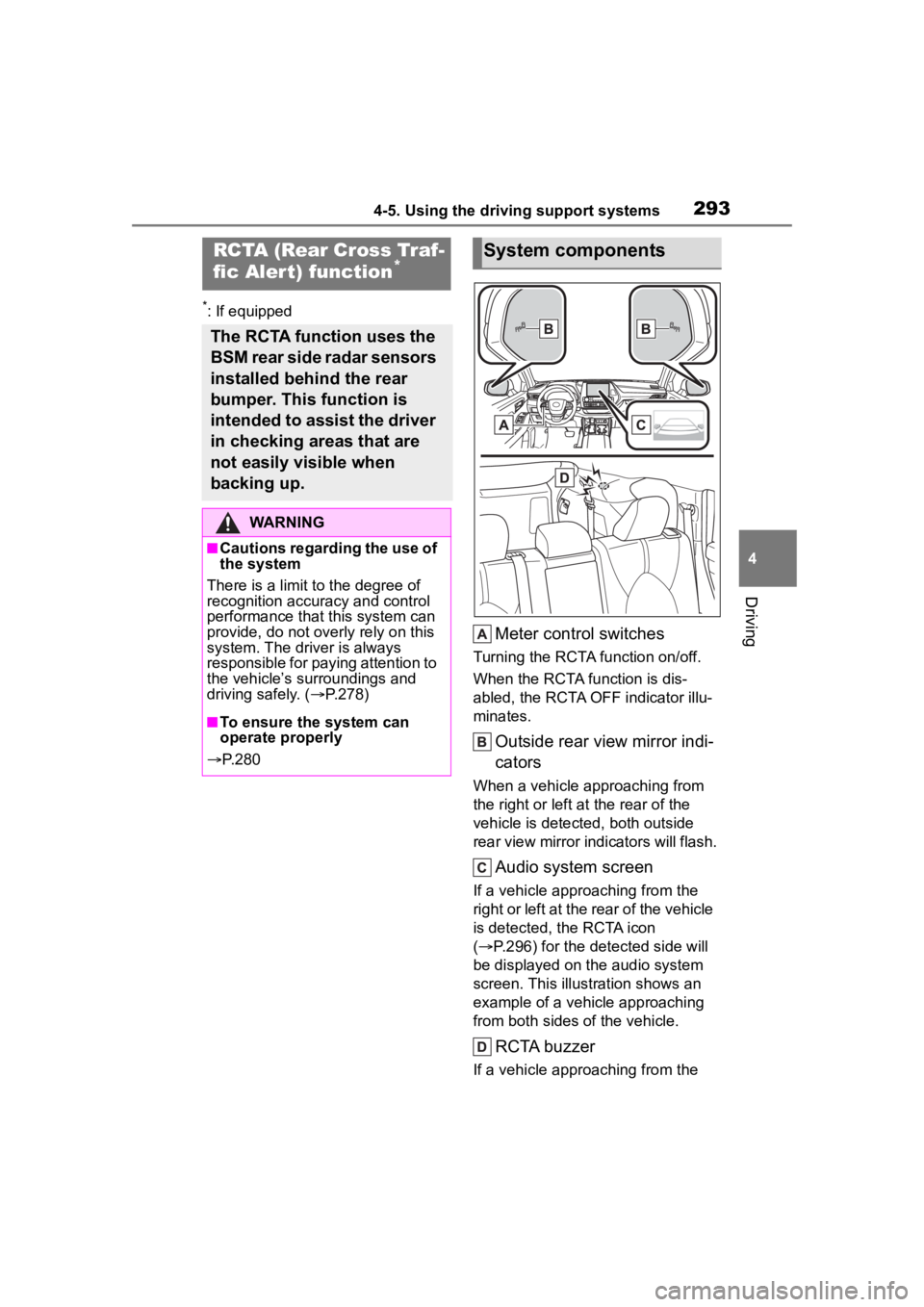
Meter control switches
Turning the RCTA function on/off.
When the RCTA function is dis-
abled, the RCTA OFF indicator illu-
minates.
Outside rear view mirror indi-
cators
When a vehicle approaching from
the right or left at the rear of the
vehicle is detected, both outside
rear view mirror indicators will flash.
Audio system screen
If a vehicle approaching from the
right or left at the rear of the vehicle
is detected, the RCTA icon
( P.296) for the detected side will
be displayed on the audio system
screen. This illust ration shows an
example of a vehicle approaching
from both sides of the vehicle.
RCTA buzzer
If a vehicle approaching from the
RCTA (Rear Cross Traf-
fic Aler t) function*
The RCTA function uses the
BSM rear side radar sensors
installed behind the rear
bumper. This function is
intended to assist the driver
in checking areas that are
not easily visible when
backing up.
WARNING
■Cautions regarding the use of
the system
There is a limit to the degree of
recognition accuracy and control
performance that this system can
provide, do not ov erly rely on this
system. The driver is always
responsible for paying attention to
the vehicle’s surroundings and
driving safely. ( P.278)
■To ensure the system can
operate properly
P. 2 8 0
System components
Page 294 of 568
2944-5. Using the driving support systems
right or left at the rear of the vehicle
is detected, a buzzer will sound.
4.2-inch display
Use the meter control switches
to enable/disable the RCTA
function. ( P.89)
1 Press or to select .
2 Press or to select
“RCTA” and then press .
7-inch display
Use the meter control switches
to enable/disable the RCTA
function. ( P.98)
1 Press or to select .
2 Press or to select
“RCTA” and then press .
When the RCTA function is dis-
abled, the RCTA OFF indicator
( P.78) illuminates on the
multi-information display. (Each
time the engine switch is turned off
then changed to ON, the RCTA
function will be enabled automati-
cally.)■Outside rear vie w mirror indica-
tor visibility
In strong sunlight, the outside rear
view mirror indicator may be difficult
to see.
■Hearing the RCTA buzzer
The RCTA buzzer may be difficult to
hear over loud noises, such as if the
audio system volume is high.
■When “Rear Cross Traffic Alert
Unavailable” is shown on the
multi-information display
Water, ice, snow, mud, etc., may be
attached to the rear bumper around
the sensors. ( P.280) Removing
the water, ice, snow, mud, etc., from
the attached to the rear bumper
around the sensors to return the
function to normal.
Additionally, the function may not
Turning the RCTA func-
tion on/off
WARNING
■Cautions regarding the use of
the function
The driver is solely responsible for
safe driving. Always drive safely,
taking care to observe your sur-
roundings.
The RCTA function is only a sup-
plementary function which alerts
the driver that a vehicle is
approaching from the right or left
at the rear of the vehicle. As the
RCTA function may not function
correctly under certain condi-
tions, the driver’s own visual con-
firmation of safety is necessary.
Over reliance on this function may
lead to an accident resulting
death or serious injury.
NOTICE
■Before using the RCTA func-
tion
Do not place objects near the sen-
sors.
Page 295 of 568
2954-5. Using the driving support systems
4
Driving
operate normally when driving in
extremely hot or cold environments.
■Rear side radar sensors
P. 2 8 0
■Adjusting the buzzer vol-
ume
The buzzer volume can be
adjusted on the multi-informa-
tion display.
4.2-inch display
Use the meter control switches
to change settings. ( P. 8 9 )
1 Press or to select .
2 Press or to select
“RCTA” and then press and
hold .
3 Select the volume and then
press .
Each time the switch is pressed,
the volume lev el will change
between 1, 2, and 3.
7-inch display
Use the meter control switches
to change settings. ( P. 9 8 )1
Press or to select .
2 Press or to select and
“RCTA” then press and hold
.
3 Select the volume and then
press .
Each time the switch is pressed,
the volume level will change
between 1, 2, and 3.
■Muting a buzzer temporarily
A mute button will be displayed
on the multi-information display
when an object is detected. To
mute the buzzer, press .
Mute will be canceled automati-
cally in the following situations:
When the shift lever is
changed.
When the vehicle speed
exceeds a certain speed.
When the operating function
is temporarily canceled.
When the operating function
is disabled manually.
When the engine switch is
turned off.
■Operation of the RCTA function
The RCTA function uses rear side radar sensors to detect vehicles
approaching from the right or left at the rear of the vehicle a nd alerts
the driver of the presence of such vehicles by flashing the out side
rear view mirror indicators and sounding a buzzer.
Setting the buzzer volume
(vehicles with a Intuitive
parking assist)
RCTA function
Page 334 of 568
3345-2. Using the air conditioning system and defogger
5-2.Using the air conditioning system and defogger
*: If equipped
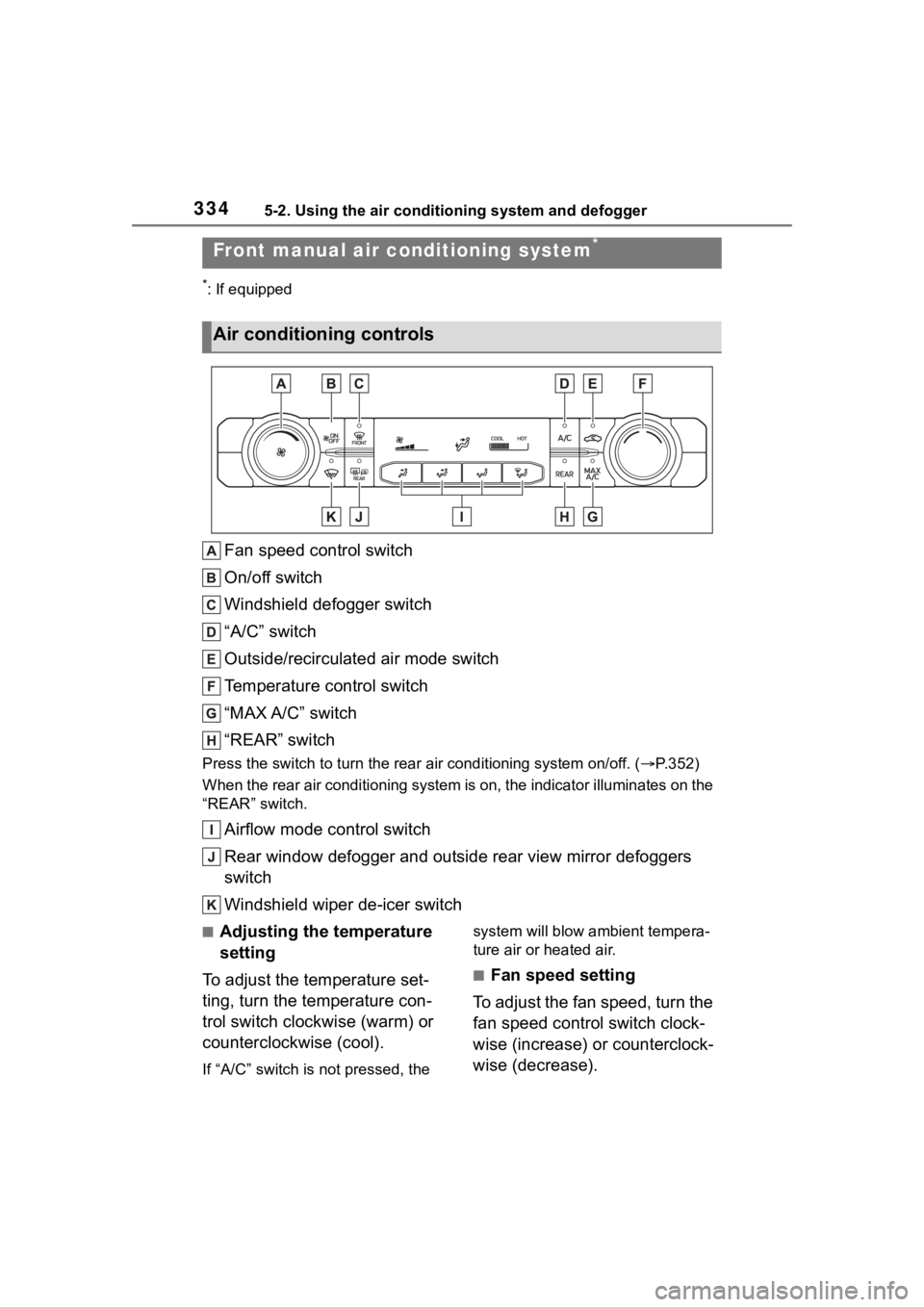
Fan speed control switch
On/off switch
Windshield defogger switch
“A/C” switch
Outside/recirculated air mode switch
Temperature control switch
“MAX A/C” switch
“REAR” switch
Press the switch to turn the rear air conditioning system on/off. (P.352)
When the rear air conditioning system is on, the indicator illuminates on the
“REAR” switch.
Airflow mode control switch
Rear window defogger and outside rear view mirror defoggers
switch
Windshield wiper de-icer switch
■Adjusting the temperature
setting
To adjust the temperature set-
ting, turn the temperature con-
trol switch clockwise (warm) or
counterclockwise (cool).
If “A/C” switch is not pressed, the system will blow ambient tempera-
ture air or heated air.
■Fan speed setting
To adjust the fan speed, turn the
fan speed control switch clock-
wise (increase) or counterclock-
wise (decrease).
Front manual air c onditioning system*
Air conditioning controls