clock TOYOTA HIGHLANDER 2023 User Guide
[x] Cancel search | Manufacturer: TOYOTA, Model Year: 2023, Model line: HIGHLANDER, Model: TOYOTA HIGHLANDER 2023Pages: 552, PDF Size: 13.36 MB
Page 418 of 552
4186-3. Do-it-yourself maintenance
vehicle.
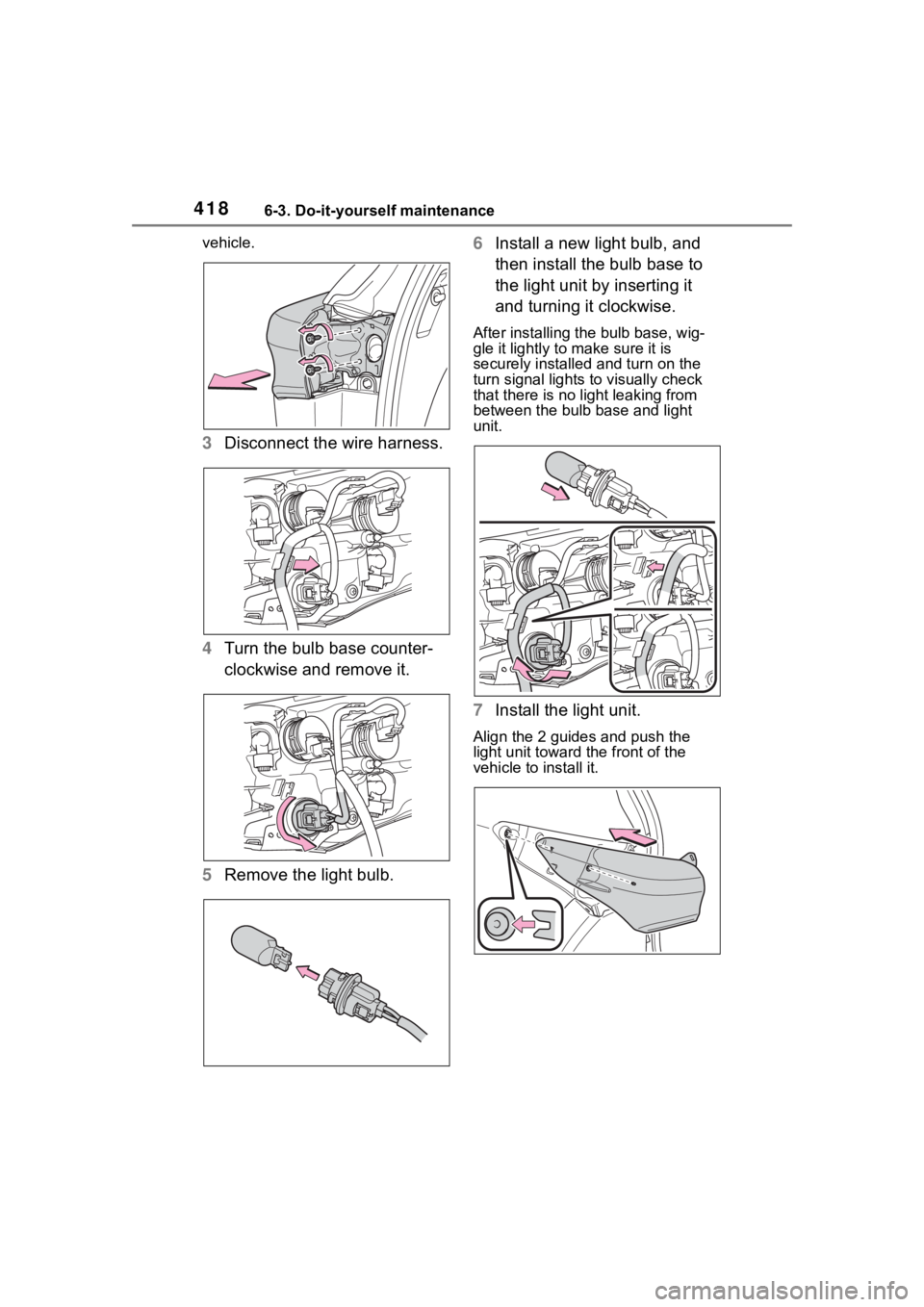
3Disconnect the wire harness.
4 Turn the bulb base counter-
clockwise and remove it.
5 Remove the light bulb. 6
Install a new light bulb, and
then install the bulb base to
the light unit by inserting it
and turning it clockwise.
After installing the bulb base, wig-
gle it lightly to make sure it is
securely installed and turn on the
turn signal lights to visually check
that there is no light leaking from
between the bulb base and light
unit.
7Install the light unit.
Align the 2 guides and push the
light unit toward the front of the
vehicle to install it.
Page 419 of 552
4196-3. Do-it-yourself maintenance
6
Maintenance and care
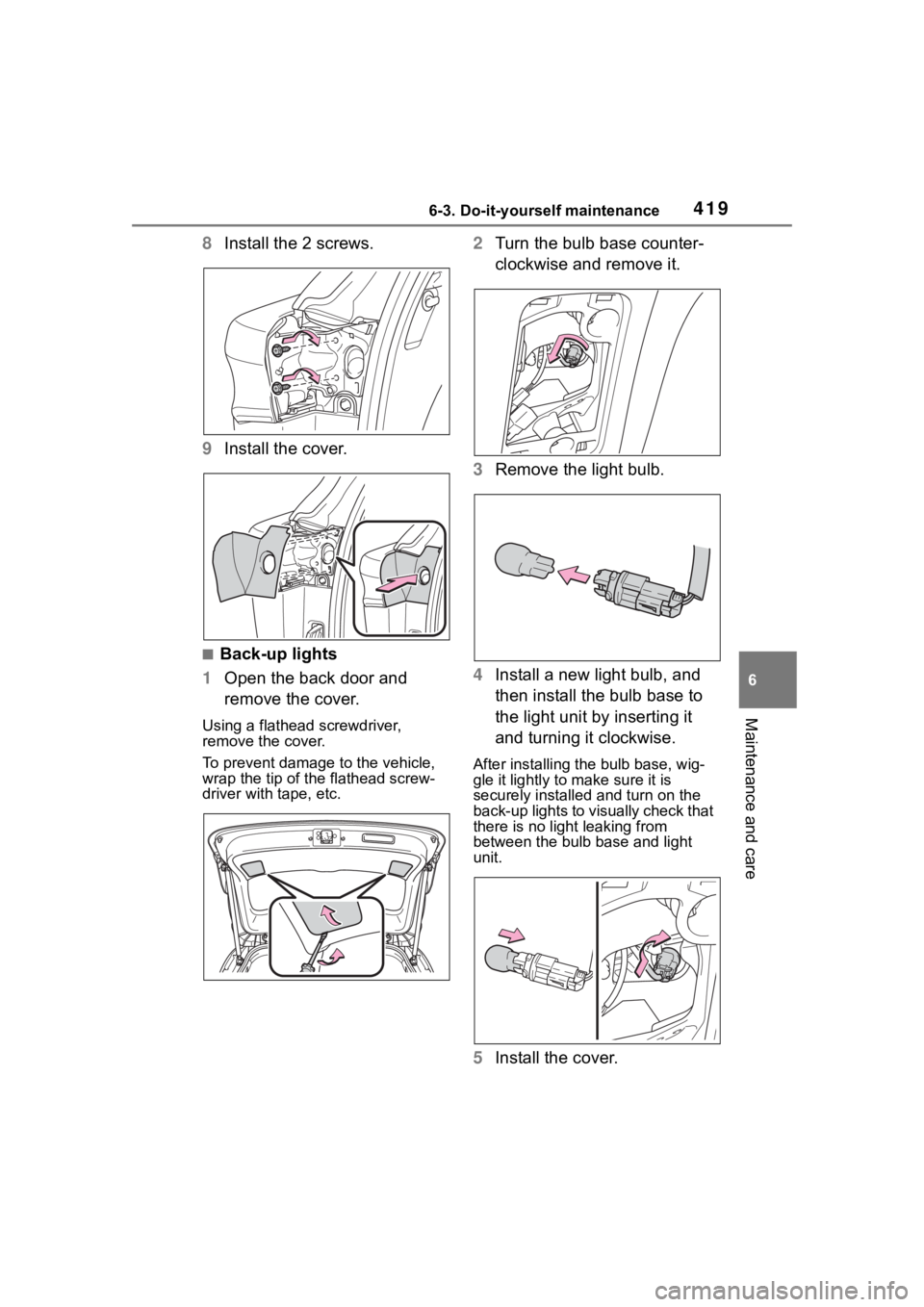
8Install the 2 screws.
9 Install the cover.
■Back-up lights
1 Open the back door and
remove the cover.
Using a flathead screwdriver,
remove the cover.
To prevent damage to the vehicle,
wrap the tip of the flathead screw-
driver with tape, etc.
2Turn the bulb base counter-
clockwise and remove it.
3 Remove the light bulb.
4 Install a new light bulb, and
then install the bulb base to
the light unit by inserting it
and turning it clockwise.
After installing the bulb base, wig-
gle it lightly to make sure it is
securely installed and turn on the
back-up lights to visually check that
there is no light leaking from
between the bulb base and light
unit.
5Install the cover.
Page 450 of 552
4507-2. Steps to take in an emergency
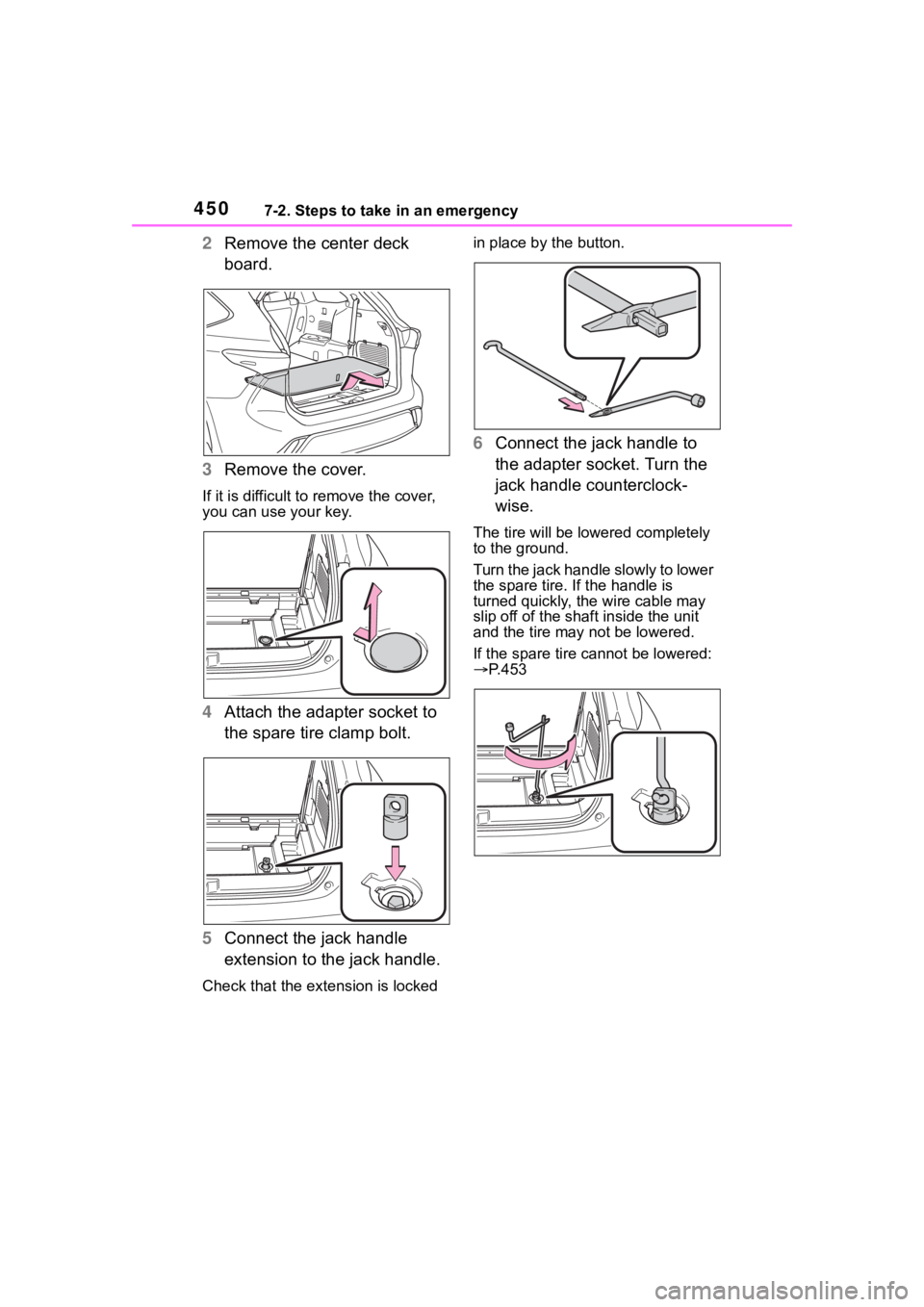
2Remove the center deck
board.
3 Remove the cover.
If it is difficult to remove the cover,
you can use your key.
4Attach the adapter socket to
the spare tire clamp bolt.
5 Connect the jack handle
extension to the jack handle.
Check that the extension is locked in place by the button.
6
Connect the jack handle to
the adapter socket. Turn the
jack handle counterclock-
wise.
The tire will be low ered completely
to the ground.
Turn the jack handle slowly to lower
the spare tire. If the handle is
turned quickly, the wire cable may
slip off of the shaf t inside the unit
and the tire may not be lowered.
If the spare tire cannot be lowered:
P.453
Page 453 of 552
4537-2. Steps to take in an emergency
7
When trouble arises
lock.
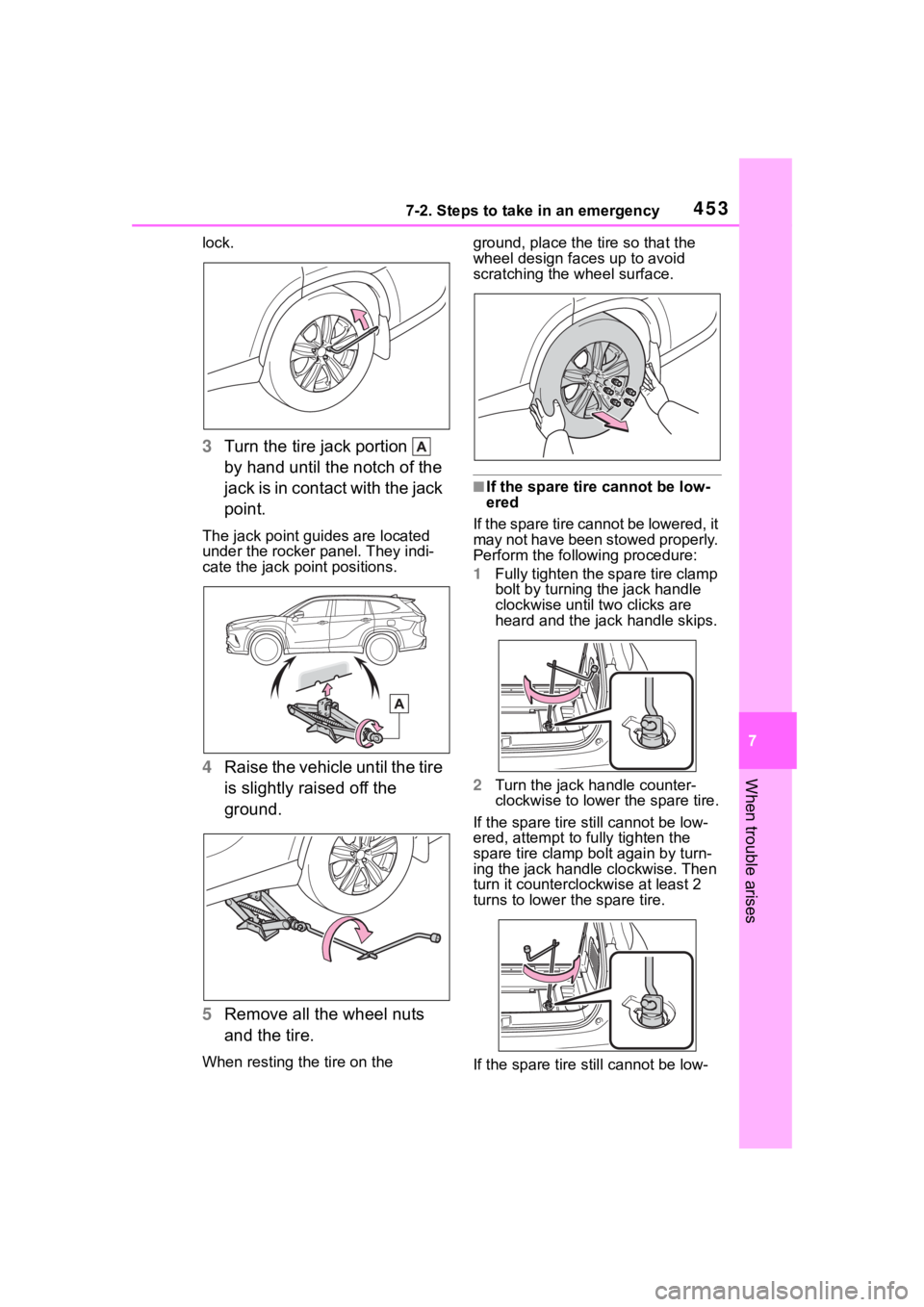
3Turn the tire jack portion
by hand until the notch of the
jack is in contact with the jack
point.
The jack point guides are located
under the rocker panel. They indi-
cate the jack po int positions.
4Raise the vehicle until the tire
is slightly raised off the
ground.
5 Remove all the wheel nuts
and the tire.
When resting the tire on the ground, place the tire so that the
wheel design faces up to avoid
scratching the wheel surface.
■If the spare tire cannot be low-
ered
If the spare tire cannot be lowered, it
may not have been stowed properly.
Perform the following procedure:
1 Fully tighten the spare tire clamp
bolt by turning the jack handle
clockwise until two clicks are
heard and the jack handle skips.
2 Turn the jack handle counter-
clockwise to lower the spare tire.
If the spare tire still cannot be low-
ered, attempt to fully tighten the
spare tire clamp bolt again by turn-
ing the jack handle clockwise. Then
turn it counterclockwise at least 2
turns to lower the spare tire.
If the spare tire still cannot be low-
Page 457 of 552
4577-2. Steps to take in an emergency
7
When trouble arises
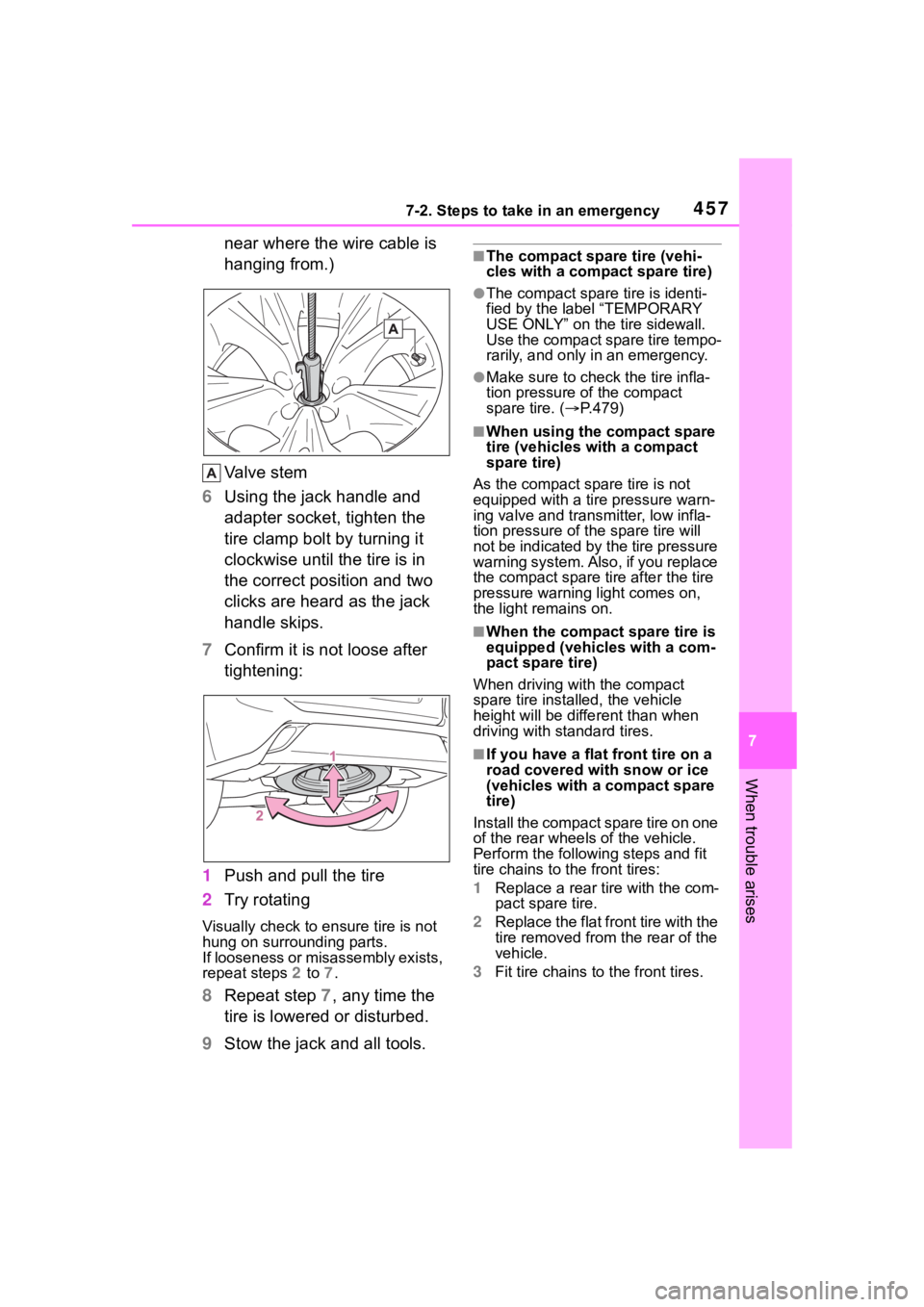
near where the wire cable is
hanging from.)
Valve stem
6 Using the jack handle and
adapter socket, tighten the
tire clamp bolt by turning it
clockwise until the tire is in
the correct position and two
clicks are heard as the jack
handle skips.
7 Confirm it is not loose after
tightening:
1 Push and pull the tire
2 Try rotating
Visually check to ensure tire is not
hung on surrounding parts.
If looseness or misassembly exists,
repeat steps 2 to 7.
8 Repeat step 7, any time the
tire is lowered or disturbed.
9 Stow the jack and all tools.
■The compact spare tire (vehi-
cles with a compact spare tire)
●The compact spare tire is identi-
fied by the label “TEMPORARY
USE ONLY” on the tire sidewall.
Use the compact spare tire tempo-
rarily, and only in an emergency.
●Make sure to check the tire infla-
tion pressure of the compact
spare tire. ( P.479)
■When using the compact spare
tire (vehicles with a compact
spare tire)
As the compact spare tire is not
equipped with a tire pressure warn-
ing valve and transm itter, low infla-
tion pressure of t he spare tire will
not be indicated by the tire pressure
warning system. Also , if you replace
the compact spare ti re after the tire
pressure warning light comes on,
the light remains on.
■When the compact spare tire is
equipped (vehicles with a com-
pact spare tire)
When driving with the compact
spare tire installed, the vehicle
height will be diffe rent than when
driving with standard tires.
■If you have a flat front tire on a
road covered wit h snow or ice
(vehicles with a compact spare
tire)
Install the compact spare tire on one
of the rear wheels of the vehicle.
Perform the following steps and fit
tire chains to the front tires:
1 Replace a rear tire with the com-
pact spare tire.
2 Replace the flat front tire with the
tire removed from the rear of the
vehicle.
3 Fit tire chains to the front tires.
Page 526 of 552

526Alphabetical Index
AWD Control ............................. 91
B
Back door ................................ 119
Back-up lightsReplacing light bulbs ............ 415
Battery Battery checking................... 391
If the battery is discharged ... 465
Preparing and c hecking before
winter.................................. 314
Replacing ............................. 467
Warning light ........................ 432
Blind Spot Monitor (BSM) ...... 270
Brake Brake hold ............................ 208
Fluid ............................. 390, 479
Parking brake ....................... 205
Warning light ........................ 431
Brake assist ............................ 307
Break-in tips ........ ................... 175
Brightness control Instrument panel light control81, 86
BSM (Blind Spot Monitor) ...... 270
Buzzer Hands off steering wheel warn-ing (LTA) ............................. 248
C
Care Exterior ................................. 370
Interior .................................. 373
Seat belts ............................. 373
Wheels and wheel ornaments........................................... 370
Cargo capacity ....................... 184
Cargo net hooks .. ................... 344
Chains ..................................... 315
Child restraint system Fixed with a LATCH system ... 60 Fixed with a seat belt..............55
Front passenger occupant clas-
sification system ...................43
Points to remember ................50
Riding with children ................49
Types of child restraint system installation method ...............52
Using an anchor bracket ........62
Child safety Airbag precautions .................39
Back door precautions.......... 119
Battery precautions ......392, 468
Child restraint system .............52
Heated steering wheel and seat heater precautio ns..............335
How your child should wear the seat belt ................................28
Moon roof precautions..........166
Panoramic moon roof precau- tions ....................................170
Power window lock switch ....164
Power window precautions...163
Rear door child-protectors .... 118
Seat belt extender precautions .............................................29
Seat belt precautions..............49
Child-protectors...................... 118
Cleaning Exterior .................................370
Interior ..................................373
Radar sensor ........................224
Seat belts .............................373
Wheels and wheel ornaments...........................................370
Clock ................... .....79, 81, 82, 86
Coat hooks ..............................357
Condenser ............. ..................390
Console box ............................341
Consumption screen ..............108
Conversation mirror ...............359
Cooling system .......................389 Engine overheating ..............469
Page 531 of 552

531Alphabetical Index
Replacing light bulbs ............ 415
Light bulbs Replacing ............................. 415
Lights Automatic High Beam system........................................... 213
Fog light switch .................... 216
Front interior lights ............... 338
Front personal lights............. 338
Headlight switch ................... 210
Interior lights......................... 337
Interior lights list ................... 337
Rear interior lights ................ 338
Rear personal lights ............. 338
Replacing light bulbs ............ 415
Turn signal lever ................... 204
Vanity lights .......................... 359
Welcome light illumination con- trol ...................................... 211
LTA (Lane Tracing Assist) Operation ............................. 239
Warning messages............... 249
Luggage cover........ ................ 345
M
Maintenance
Do-it-yourself maintenance .. 382
General maintenance ........... 378
Maintenance data................. 474
Maintenance requirements... 376
Malfunction indicator lamp.... 432
Menu icons ............................... 87
Meter Clock .......................... 79, 81, 82
Indicators................................ 76
Instrument panel light control81, 86
Meter control switches ..... 87, 97
Meters .............................. 79, 82
Multi-information display .. 87, 96
Settings .......................... 92, 102
Warning lights....................... 431 Warning message.................442
Mirrors Digital Rearview Mirror .........150
Inside rear view mirror ..........149
Outside rear view mirror defog-gers ....................................324
Outside rear view mirrors .....160
Vanity mirrors........................359
Moon roof Door lock linked moon roof oper-ation....................................165
Jam protection function ........165
Operation..............................165
Mud & Sand mode ..................301
Multi-information display Audio system-linked display .91, 100
AWD Control...........................91
Clock ......................................86
Driving information display .....88
Driving support system ...........91
Driving support system informa- tion display .............90, 98, 100
Dynamic radar cruise control with full-speed range ..........249
Eco Driving Indicator ..............89
Fuel economy ...................88, 99
LTA (Lane Tracing Assist) .....245
Menu icons .............................87
Meter control switches......87, 97
Navigation system-linked display ...............................90, 98, 100
Pop-up display........................87
Settings ..........................92, 102
Suggestion function ........95, 101
Tire pressure ...... ............91, 396
Vehicle information display .....91
Warning message...........95, 442
Multi-terrain Select .................301