audio TOYOTA HIGHLANDER 2023 Owner's Manual
[x] Cancel search | Manufacturer: TOYOTA, Model Year: 2023, Model line: HIGHLANDER, Model: TOYOTA HIGHLANDER 2023Pages: 552, PDF Size: 13.36 MB
Page 268 of 552

2684-5. Using the driving support systems
After a refresh charge for up to
an hour completes, the system can
be operated.
• If displayed continuously for a long time (more than an hour)
The battery may b e deteriorated.
Contact your Toyota dealer for
details.
“Stop & Start System Unavail-
able”
• The Stop & Start system is tempo- rarily disabled.
Allow the engine to run for some
time.
• The engine may have been started with the hood open.
Close the hood , turn the engine
switch off, wait for 30 seconds or
more, and then start the engine.
“In Preparation”
• The vehicle is being driven in a high altitude area.
• The brake booster vacuum is low.
When the brake booster vacuum
reaches a predetermined level, the
system will be enabled.
“For Climate Control”
• The air conditioning system is being used when the ambient
temperature is high or low.
If the difference between the set
temperature and cabin temperature
becomes small, the system will be
enabled.
• The windshield defogger is on.
●When the engine automatically
restarts while stopped by the Stop
& Start system
“In Preparation”
• The brake pedal has been depressed further or pumped.
The system will be enabled after
the engine runs and the brake
booster vacuum reaches a predeter-
mined level.
“For Climate Control”
• The air conditioning system is being used.
• The windshield defogger has been turned on.
“Battery Charging”
• The battery charge may be low.
The system will be enabled after
the engine runs to sufficiently
charge the battery.
■When the buzzer sounds
If the driver’s door is opened when
the engine is stopped by the Stop &
Start system and the shift lever is in
D, a buzzer will soun d and the Stop
& Start system indicator will flash. To
stop the buzzer, c lose the driver’s
door.
■The Stop & Start system protec-
tion function
●When the volume of the audio
system is excessively high, sound
output from the audio system may
suddenly be cut off in order to
reduce battery consumption. To
prevent the audio system from
being cut off, keep the volume of
audio system at a moderate level.
If the audio system has been cut
off, turn the engine switch off, wait
for 3 seconds or more and then
turn it to ACC or ON to re-enable
the audio system.
●The audio system may not be acti-
vated if the battery terminals are
disconnected and then recon-
nected. If this o ccurs, turn the
engine switch off and then repeat
the following oper ation twice to
activate the audio system nor-
mally.
• Turn the engine switch to ON and then to OFF.
Page 275 of 552
2754-5. Using the driving support systems
4
Driving
*: If equipped
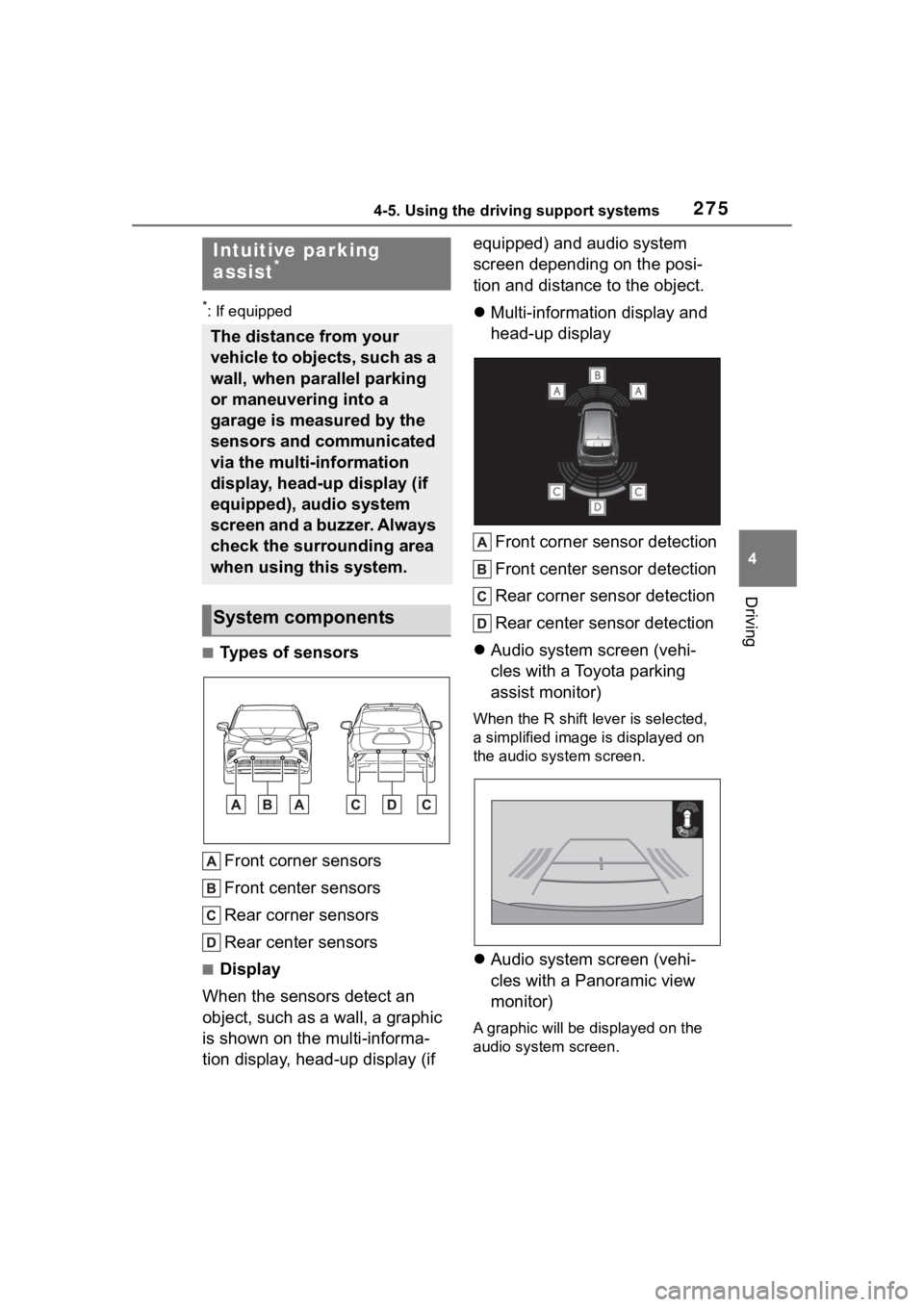
■Types of sensorsFront corner sensors
Front center sensors
Rear corner sensors
Rear center sensors
■Display
When the sensors detect an
object, such as a wall, a graphic
is shown on the multi-informa-
tion display, head-up display (if equipped) and audio system
screen depending on the posi-
tion and distance to the object.
Multi-information display and
head-up display
Front corner sensor detection
Front center sensor detection
Rear corner sensor detection
Rear center sensor detection
Audio system screen (vehi-
cles with a Toyota parking
assist monitor)
When the R shift le ver is selected,
a simplified image is displayed on
the audio system screen.
Audio system screen (vehi-
cles with a Panoramic view
monitor)
A graphic will be di splayed on the
audio system screen.
Intuitive parking
assist*
The distance from your
vehicle to objects, such as a
wall, when parallel parking
or maneuvering into a
garage is measured by the
sensors and communicated
via the multi-information
display, head-up display (if
equipped), audio system
screen and a buzzer. Always
check the surrounding area
when using this system.
System components
Page 278 of 552
2784-5. Using the driving support systems
• It might be difficult to hear the buzzer due to the volume of the
audio system or air flow noise of
the air conditioning system.
• It may be difficult to hear the buzzer if buzzers for other sys-
tems are sounding.
■Objects which the system may
not be properly detected
The shape of the object may pre-
vent the sensor from detecting it.
Pay particular attention to the follow-
ing objects:
●Wires, fences, ropes, etc.
●Cotton, snow and other materials
that absorb sound waves
●Sharply-angled objects
●Low objects
●Tall objects with upper sections
projecting outwards in the direc-
tion of your vehicle
People may not be detected if they
are wearing certain types of cloth-
ing.
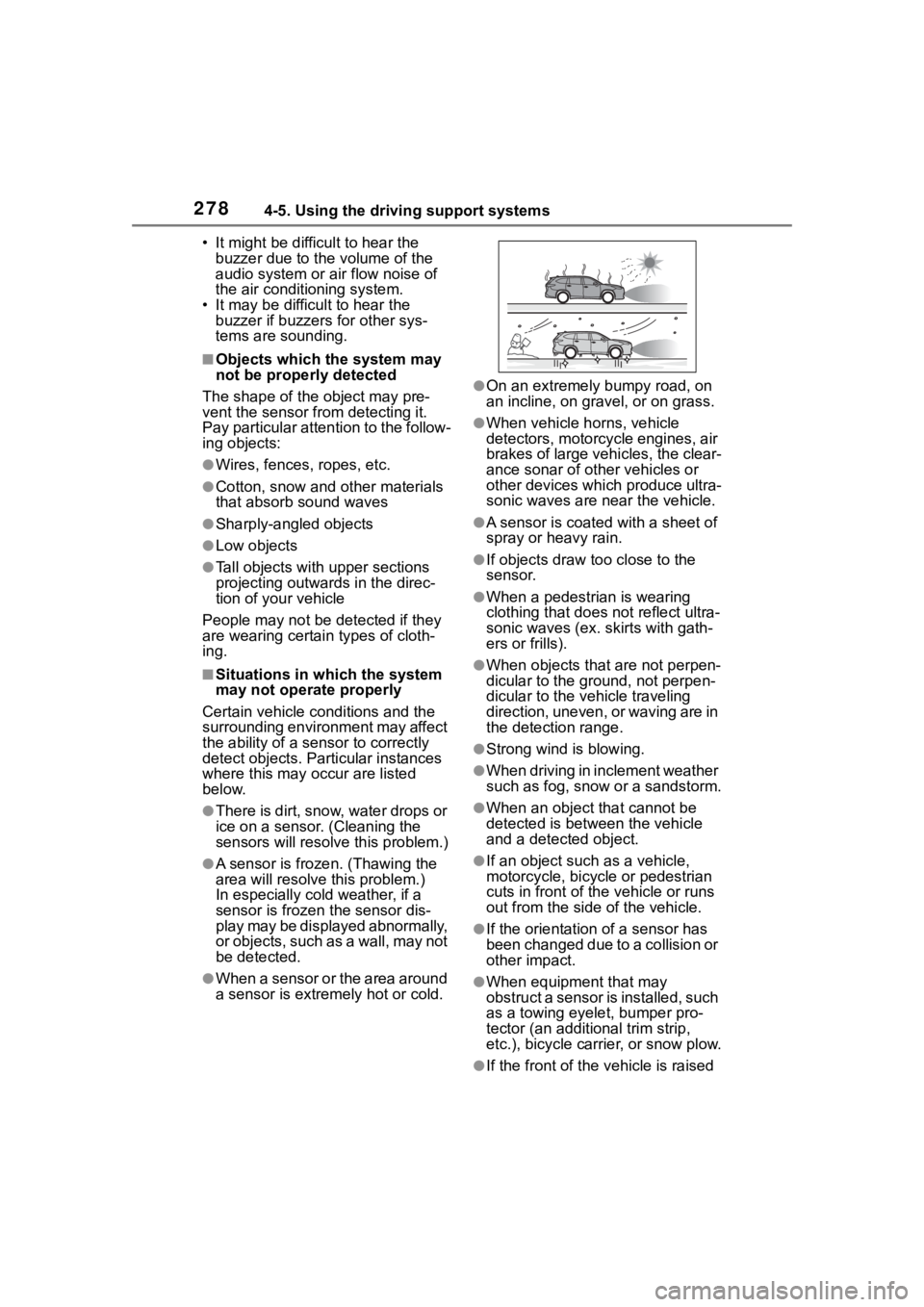
■Situations in which the system
may not operate properly
Certain vehicle conditions and the
surrounding environment may affect
the ability of a sensor to correctly
detect objects. Particular instances
where this may occur are listed
below.
●There is dirt, snow, water drops or
ice on a sensor. (Cleaning the
sensors will resolve this problem.)
●A sensor is frozen. (Thawing the
area will resolve this problem.)
In especially cold weather, if a
sensor is frozen the sensor dis-
play may be displayed abnormally,
or objects, such as a wall, may not
be detected.
●When a sensor or the area around
a sensor is extremely hot or cold.
●On an extremely bumpy road, on
an incline, on gravel, or on grass.
●When vehicle horns, vehicle
detectors, motorcycle engines, air
brakes of large vehicles, the clear-
ance sonar of ot her vehicles or
other devices which produce ultra-
sonic waves are near the vehicle.
●A sensor is coated with a sheet of
spray or heavy rain.
●If objects draw too close to the
sensor.
●When a pedestrian is wearing
clothing that does not reflect ultra-
sonic waves (ex. skirts with gath-
ers or frills).
●When objects that are not perpen-
dicular to the ground, not perpen-
dicular to the vehicle traveling
direction, uneven, or waving are in
the detection range.
●Strong wind is blowing.
●When driving in inclement weather
such as fog, snow or a sandstorm.
●When an object that cannot be
detected is between the vehicle
and a detected object.
●If an object such as a vehicle,
motorcycle, bicycle or pedestrian
cuts in front of the vehicle or runs
out from the side of the vehicle.
●If the orientation of a sensor has
been changed due to a collision or
other impact.
●When equipment that may
obstruct a sensor is installed, such
as a towing eyelet, bumper pro-
tector (an additional trim strip,
etc.), bicycle carrier, or snow plow.
●If the front of the v ehicle is raised
Page 281 of 552
2814-5. Using the driving support systems
4
Driving
■Multi-information display, head-up display (if equipped) and
audio system screen
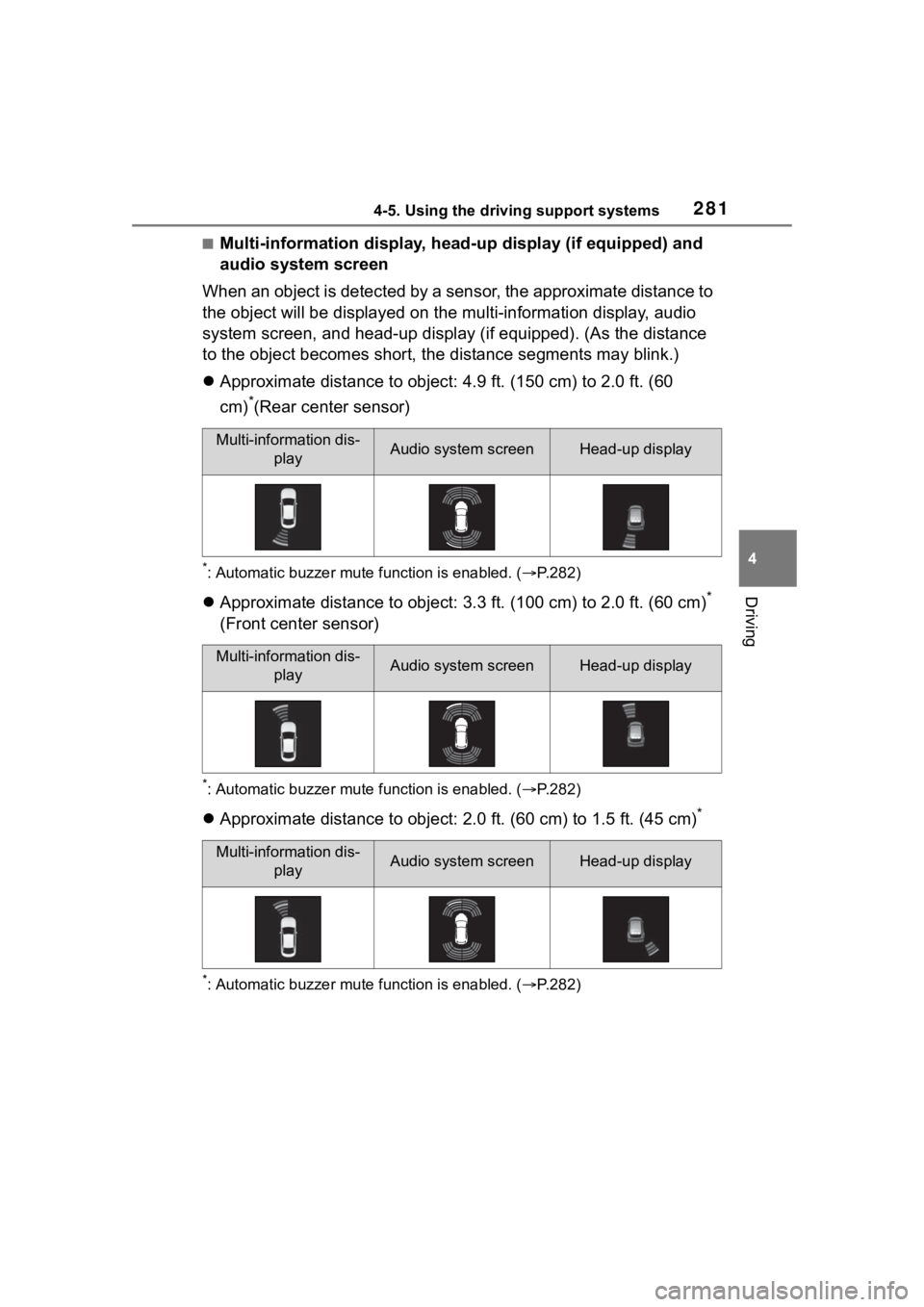
When an object is detected by a sensor, the approximate distanc e to
the object will be displayed on th e multi-information display, audio
system screen, and head-up display (if equipped). (As the dista nce
to the object becomes short, the distance segments may blink.)
Approximate distance to object: 4.9 ft. (150 cm) to 2.0 ft. (60
cm)
*(Rear center sensor)
*: Automatic buzzer mute function is enabled. ( P.282)
Approximate distance to object: 3.3 ft. (100 cm) to 2.0 ft. (60 cm)*
(Front center sensor)
*: Automatic buzzer mute function is enabled. ( P.282)
Approximate distance to object: 2.0 ft. (60 cm) to 1.5 ft. (45 cm)*
*: Automatic buzzer mute function is enabled. (P.282)
Multi-information dis-
playAudio system screenHead-up display
Multi-information dis-playAudio system screenHead-up display
Multi-information dis-playAudio system screenHead-up display
Page 282 of 552
2824-5. Using the driving support systems
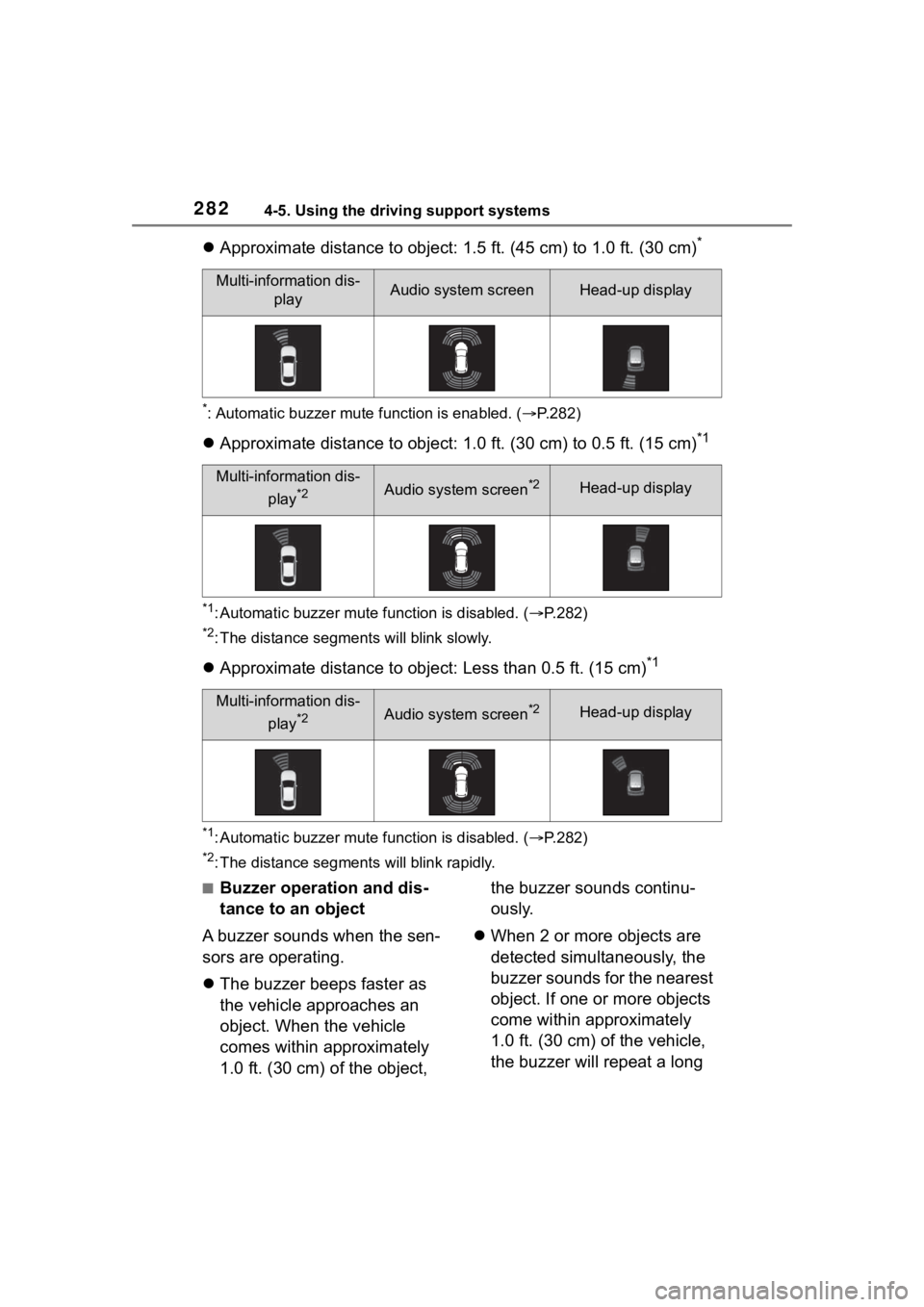
Approximate distance to object: 1.5 ft. (45 cm) to 1.0 ft. (30 cm)*
*: Automatic buzzer mute function is enabled. (P.282)
Approximate distance to object: 1.0 ft. (30 cm) to 0.5 ft. (15 cm)*1
*1: Automatic buzzer mute function is disabled. (P.282)
*2: The distance segments will blink slowly.
Approximate distance to object: Less than 0.5 ft. (15 cm)*1
*1: Automatic buzzer mute function is disabled. ( P.282)
*2: The distance segments will blink rapidly.
■Buzzer operation and dis-
tance to an object
A buzzer sounds when the sen-
sors are operating.
The buzzer beeps faster as
the vehicle approaches an
object. When the vehicle
comes within approximately
1.0 ft. (30 cm) of the object, the buzzer sounds continu-
ously.
When 2 or more objects are
detected simultaneously, the
buzzer sounds for the nearest
object. If one or more objects
come within approximately
1.0 ft. (30 cm) of the vehicle,
the buzzer will repeat a long
Multi-information dis-
playAudio system screenHead-up display
Multi-information dis-
play
*2Audio system screen*2Head-up display
Multi-information dis-play
*2Audio system screen*2Head-up display
Page 284 of 552
2844-5. Using the driving support systems
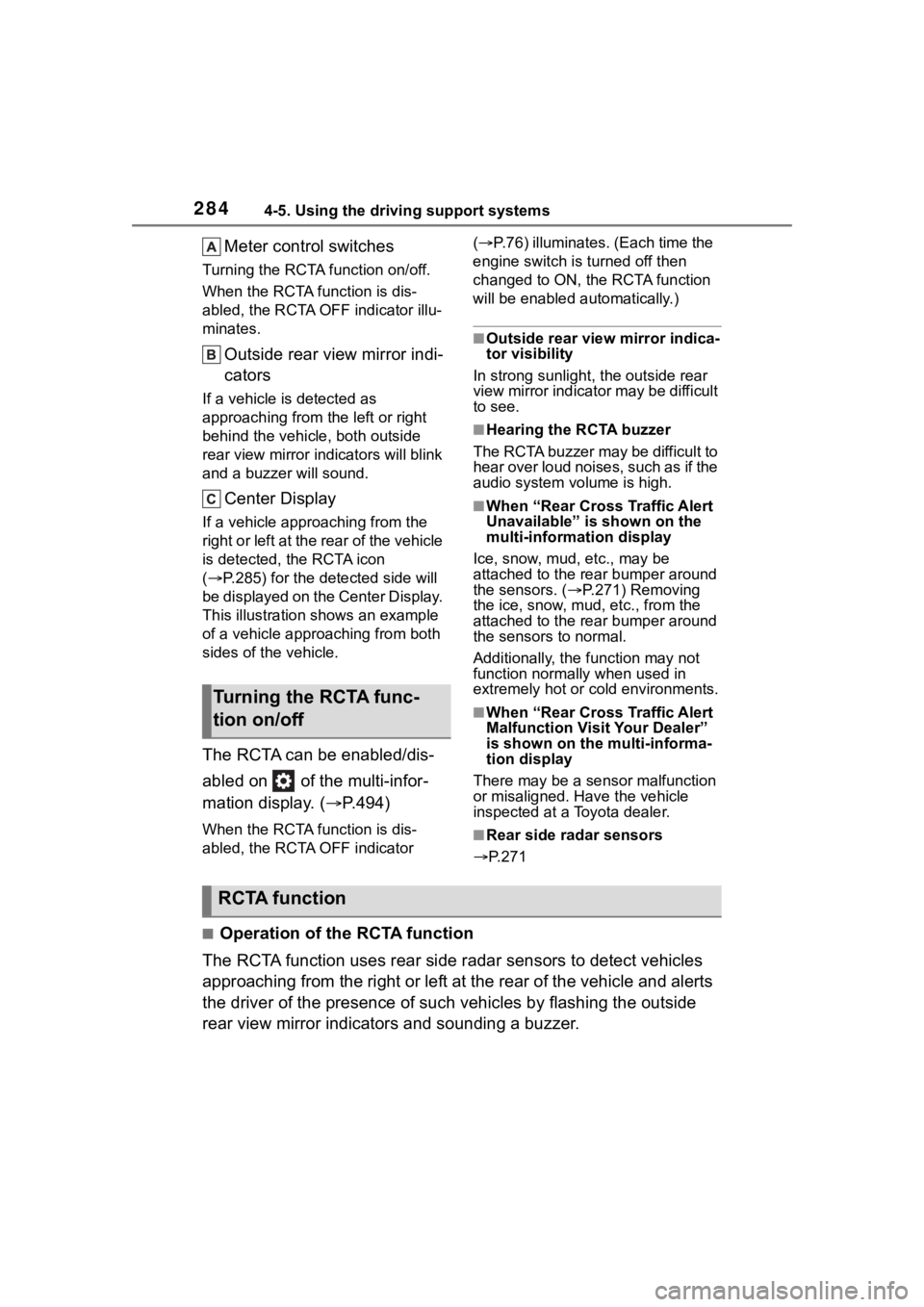
Meter control switches
Turning the RCTA function on/off.
When the RCTA function is dis-
abled, the RCTA OFF indicator illu-
minates.
Outside rear view mirror indi-
cators
If a vehicle is detected as
approaching from the left or right
behind the vehicle, both outside
rear view mirror indicators will blink
and a buzzer will sound.
Center Display
If a vehicle approaching from the
right or left at the rear of the vehicle
is detected, the RCTA icon
( P.285) for the det ected side will
be displayed on the Center Display.
This illustration shows an example
of a vehicle approaching from both
sides of the vehicle.
The RCTA can be enabled/dis-
abled on of the multi-infor-
mation display. ( P.494)
When the RCTA function is dis-
abled, the RCTA OFF indicator (
P.76) illuminates. (Each time the
engine switch is turned off then
changed to ON, t he RCTA function
will be enabled a utomatically.)
■Outside rear vie w mirror indica-
tor visibility
In strong sunlight, the outside rear
view mirror indicator may be difficult
to see.
■Hearing the RCTA buzzer
The RCTA buzzer may be difficult to
hear over loud noises, such as if the
audio system volume is high.
■When “Rear Cross Traffic Alert
Unavailable” is shown on the
multi-information display
Ice, snow, mud, etc., may be
attached to the rear bumper around
the sensors. ( P.271) Removing
the ice, snow, mud, etc., from the
attached to the rear bumper around
the sensors to normal.
Additionally, the function may not
function normally when used in
extremely hot or cold environments.
■When “Rear Cross Traffic Alert
Malfunction Visit Your Dealer”
is shown on the multi-informa-
tion display
There may be a sensor malfunction
or misaligned. Have the vehicle
inspected at a Toyota dealer.
■Rear side radar sensors
P.271
■Operation of the RCTA function
The RCTA function uses rear side radar sensors to detect vehicles
approaching from the right or left at the rear of the vehicle a nd alerts
the driver of the presence of such vehicles by flashing the out side
rear view mirror indicators and sounding a buzzer.
Turning the RCTA func-
tion on/off
RCTA function
Page 291 of 552
2914-5. Using the driving support systems
4
Driving
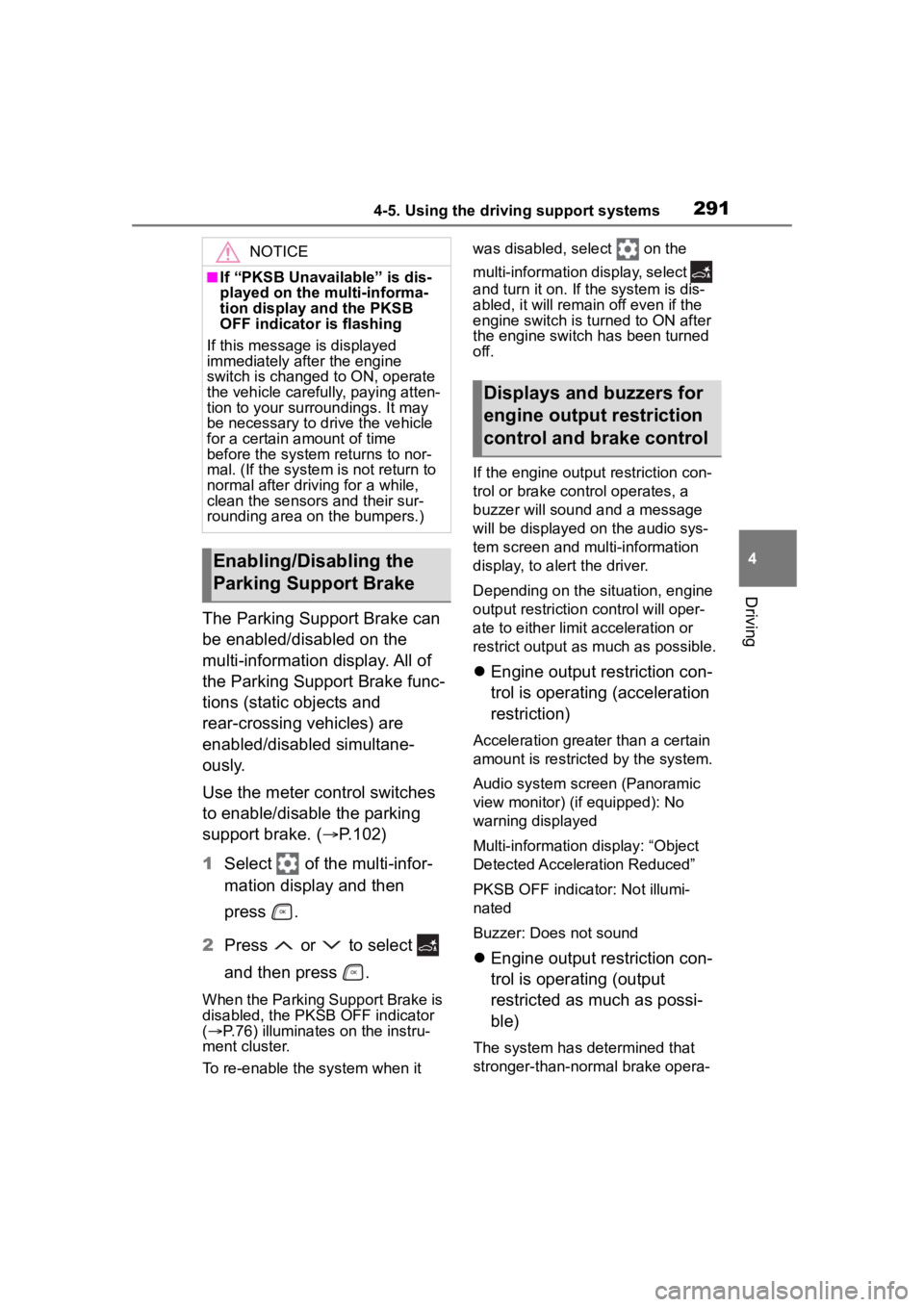
The Parking Support Brake can
be enabled/disabled on the
multi-information display. All of
the Parking Support Brake func-
tions (static objects and
rear-crossing vehicles) are
enabled/disabled simultane-
ously.
Use the meter control switches
to enable/disable the parking
support brake. (P.102)
1 Select of the multi-infor-
mation display and then
press .
2 Press or to select
and then press .
When the Parking Support Brake is
disabled, the PKSB OFF indicator
( P.76) illuminates on the instru-
ment cluster.
To re-enable the system when it was disabled, select on the
multi-information
display, select
and turn it on. If the system is dis-
abled, it will remain off even if the
engine switch is turned to ON after
the engine switch has been turned
off.
If the engine output restriction con-
trol or brake control operates, a
buzzer will sound and a message
will be displayed on the audio sys-
tem screen and multi-information
display, to alert the driver.
Depending on the situation, engine
output restriction control will oper-
ate to either limit acceleration or
restrict output as much as possible.
Engine output restriction con-
trol is operating (acceleration
restriction)
Acceleration greater than a certain
amount is restric ted by the system.
Audio system screen (Panoramic
view monitor) (if equipped): No
warning displayed
Multi-information display: “Object
Detected Acceleration Reduced”
PKSB OFF indicator: Not illumi-
nated
Buzzer: Does not sound
Engine output restriction con-
trol is operating (output
restricted as much as possi-
ble)
The system has determined that
stronger-than-normal brake opera-
NOTICE
■If “PKSB Unavailable” is dis-
played on the multi-informa-
tion display and the PKSB
OFF indicator is flashing
If this message is displayed
immediately after the engine
switch is changed to ON, operate
the vehicle carefully, paying atten-
tion to your surroundings. It may
be necessary to drive the vehicle
for a certain amount of time
before the system returns to nor-
mal. (If the system is not return to
normal after driving for a while,
clean the sensors and their sur-
rounding area on the bumpers.)
Enabling/Disabling the
Parking Support Brake
Displays and buzzers for
engine output restriction
control and brake control
Page 292 of 552

2924-5. Using the driving support systems
tion is necessary.
Audio system screen (Panoramic
view monitor) (if equipped):
“BRAKE!”
Multi-information display/Head-up
display (if equip ped): “BRAKE!”
PKSB OFF indicator: Not illumi-
nated
Buzzer: Short beep
Brake control is operating
The system determ ined that emer-
gency braking is necessary.
Audio system screen (Panoramic
view monitor) (if equipped):
“BRAKE!”
Multi-information display/Head-up
display (if equip ped): “BRAKE!” PKSB OFF indicator: Not illumi-
nated
Buzzer: Short beep
Vehicle stopped by system
operation
The vehicle has been stopped by
brake control operation.
Audio system screen (Panoramic
view monitor) (if equipped): “Press
Brake Pedal”
Multi-information display/Head-up
display (if equipped): “Switch to
Brake” (If the acce lerator pedal is
not depressed, “Press Brake Pedal”
will be displayed.)
PKSB OFF indicato r: Illuminated
Buzzer: Short beep
If the Parking Support Brake dete rmines that a collision with a
detected object is possible, the engine output will be restrict ed to
restrain any increase in the vehicle speed. (Engine output restriction
control: See figure 2.)
Additionally, if the accelerator pedal continues to be depresse d, the
brakes will be applied automatica lly to reduce the vehicle speed.
(Brake control: See figure 3.)
Figure 1 When the PKSB (Parking Support Brake) is disabled
System overview
Page 301 of 552
3014-5. Using the driving support systems
4
Driving
driving on roads with many curves.
When Sport mode is selected,
Sport mode indicator comes on.
3Eco drive mode
Helps the driver a ccelerate in an
eco-friendly manner and improve
fuel economy through moderate
throttle characteri stics and by con-
trolling the operation of the air con-
ditioning system (heating/cooling).
When Eco drive mode is selected,
Eco drive mode indicator comes
on.
■When changing to a driving
mode other than normal mode
Switches to AWD control suitable for
the selected mode. (for Dynamic
Torque Vectoring AWD vehicles
only)
■Air conditioning system opera-
tion in Eco drive mode
In Eco drive mode, heating/cooling
operations and the fan speed is con-
trolled to improve fuel efficiency.
Perform the following procedures to
increase the air conditioning perfor-
mance.
●Vehicle with 12.3-inch audio sys-
tem screen: Turn eco air condi-
tioning mode off ( P.328)
●Adjust the fan speed ( P.323)
●Cancel Eco drive mode
■Canceling a driving mode
●Sport mode is automatically can-
celed and the driving mode
returns to normal mode when the
engine switch is turned off.
●Normal mode and Eco drive mode
are not canceled until another
driving mode is sel ected. (Even if
the engine switch is turned off,
normal mode and Eco drive mode
will not be automatically can-
celed.)
Multi-terrain Select
(AWD models)
Multi-terrain Select is a sys-
tem that improves drivabil-
ity in off-road situations.
When driving over muddy,
sandy or rough road sur-
faces, the system selects a
suitable driving mode to
switch AWD, brake and
drive force control to per-
form control suitable for the
road condition.
WARNING
■Before using Multi-terrain
Select
Make sure to observe the follow-
ing precautions. Failure to
observe these precautions may
result in an unexp ected accident.
●Check that the Mud & Sand and
Rock & Dirt indicators are illumi-
nated before driving. Multi-ter-
rain Select will not operate
when the indicators are off.
●Do not rely solely upon the
Multi-terrain Select. This func-
tion is not inten ded to expand
the limits of the vehicle. If the
system is continuously used for
a long period of time, the load
on related parts increases and
the system may be unable to
operate normally, which may
lead to an accident. Thoroughly
check the road conditions and
driving route before driving, and
drive with caution.
Page 322 of 552
3225-1. Using the air conditioning system and defogger
5-1.Using the air conditioning system and defogger
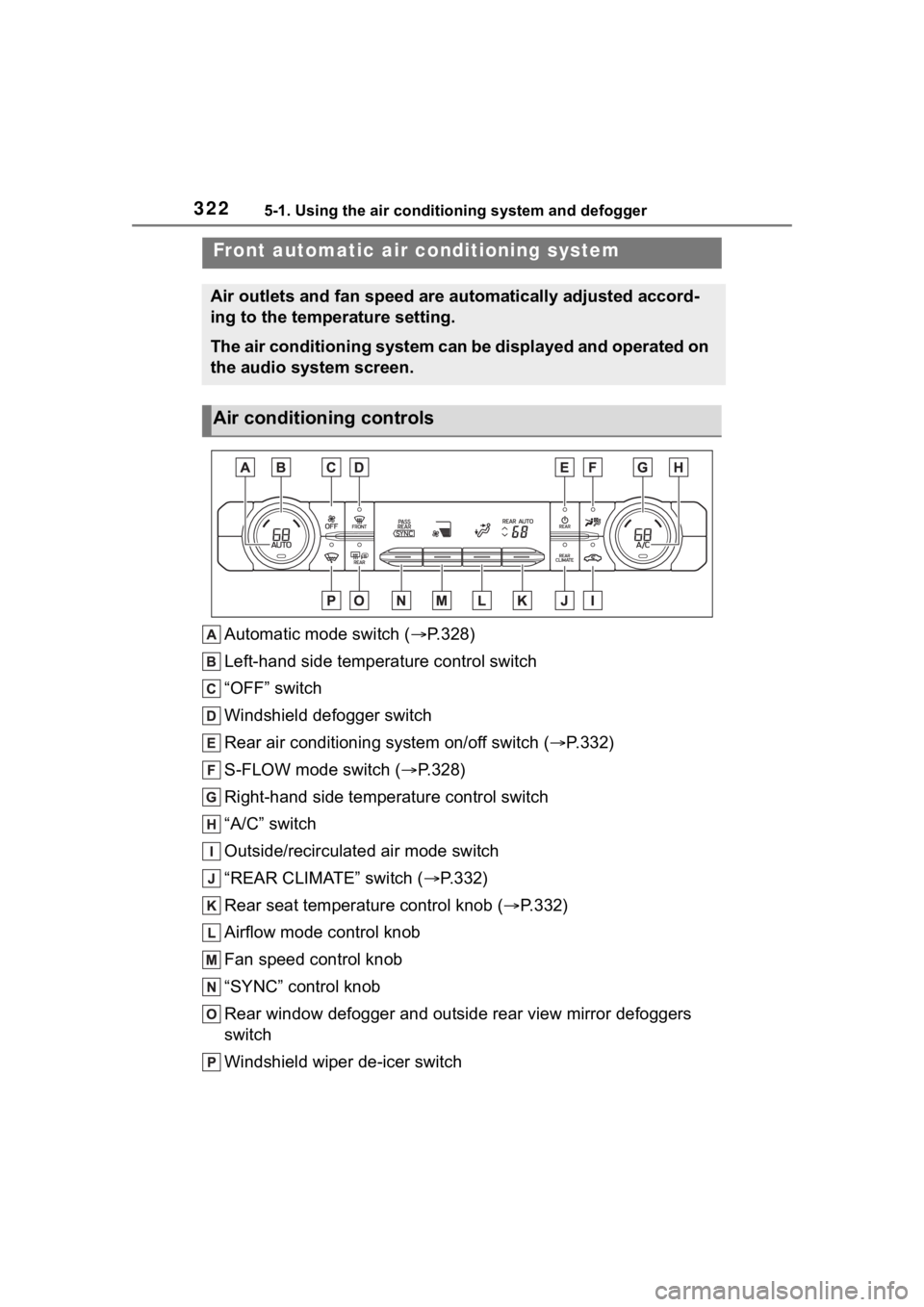
Automatic mode switch (P.328)
Left-hand side temperature control switch
“OFF” switch
Windshield defogger switch
Rear air conditioning system on/off switch ( P.332)
S-FLOW mode switch ( P.328)
Right-hand side temperature control switch
“A/C” switch
Outside/recirculated air mode switch
“REAR CLIMATE” switch ( P.332)
Rear seat temperature control knob ( P.332)
Airflow mode control knob
Fan speed control knob
“SYNC” control knob
Rear window defogger and outside rear view mirror defoggers
switch
Windshield wiper de-icer switch
Front automatic ai r conditioning system
Air outlets and fan speed are automatically adjusted accord-
ing to the temperature setting.
The air conditioning system can be displayed and operated on
the audio system screen.
Air conditioning controls