stop start TOYOTA HIGHLANDER 2023 Workshop Manual
[x] Cancel search | Manufacturer: TOYOTA, Model Year: 2023, Model line: HIGHLANDER, Model: TOYOTA HIGHLANDER 2023Pages: 552, PDF Size: 13.36 MB
Page 329 of 552
3295-1. Using the air conditioning system and defogger
5
Interior features
■Manually turning front seat
concentrated airflow mode
on/off
In front seat concentrated air-
flow mode, directing airflow to
the front seats only and to all
seats can be switched via switch
operation. When the mode has
been switched manually, auto-
matic airflow control stops oper-
ating.
Select on the main con-
trol screen or press the S-FLOW
mode switch on the air condi-
tioning operation panel and
switch the airflow.
Indicator illuminated: Airflow
to the front seats only
Indicator off: Airflow to all the
seats
■Operation of automatic airflow
control
●In order to maintain a comfortable
interior, airflow ma y be directed to
seats without pa ssengers immedi-
ately after the e ngine is started
and at other times depending on
the outside temperature.
●After the engine is started, if pas-
sengers move around inside or
enter/exit the vehicle, the system
cannot accurately detect the pres-
ence of passengers and automatic
airflow control will not operate.
■Operation of manual airflow
control
Even if the function is manually
switched to directi ng airflow to only
the front seats, whe n a rear seat is
occupied, it may automatically direct
airflow to all seats.
■To return to automatic airflow
control
1 With the indicator off, turn the
engine switch off.
2 After 60 minutes or more elapse,
turn the engine switch to ON.
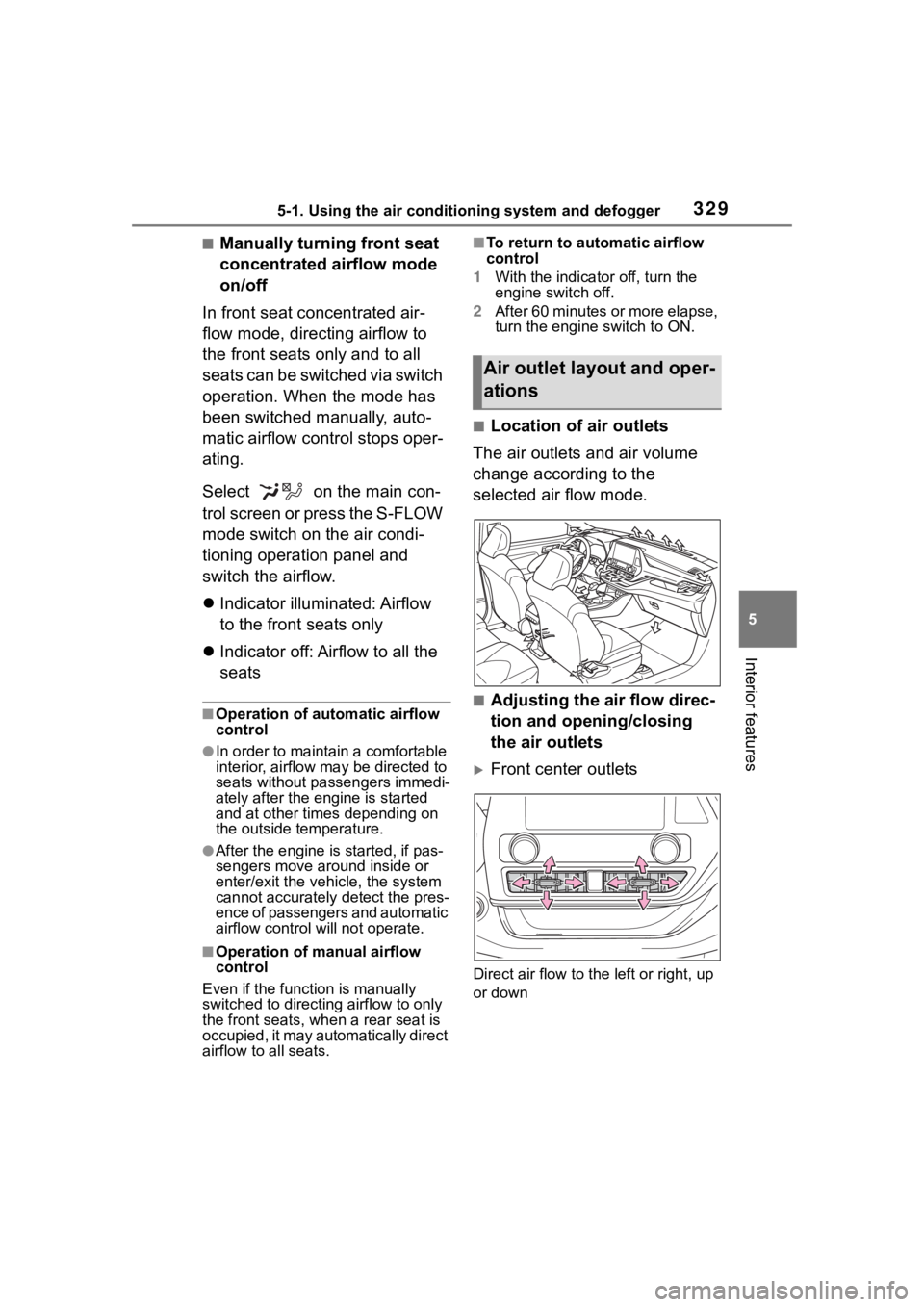
■Location of air outlets
The air outlets and air volume
change according to the
selected air flow mode.
■Adjusting the air flow direc-
tion and opening/closing
the air outlets
Front center outlets
Direct air flow to the left or right, up
or down
Air outlet lay out and oper-
ations
Page 351 of 552
3515-4. Using the other interior features
5
Interior features
slowly illuminate in green and
orange alternatively and a sound of
charging coil operation may be
heard repeatedly.
When charging is complete, the
operation indicator light (green) will
illuminate.
■Rapid charging function
The following portable
devices support rapid
charging.
• Portable devices compliant with
WPC Ver1.2.4 and compatible
with rapid charging
• iPhone’s with an iOS version that supports 7.5 W charging (iPhone
8 and later models)
When a portable device that
supports rapid charging is
charged, charging automati-
cally switches to the rapid
charging function.
■Recharging function
If a certain amount of time has
elapsed since charging com-
pleted and the portable device
has not been moved, the
wireless charger will restart
charging.
If a portable device is moved
significantly within the
charging area, the charging
coil may disconnect and
charging may temporarily be
stopped. However, if a
charging coil is detected
within the charging area, the
charging coil inside the wire-
less charger will move near
the other coil and charging
will resume.
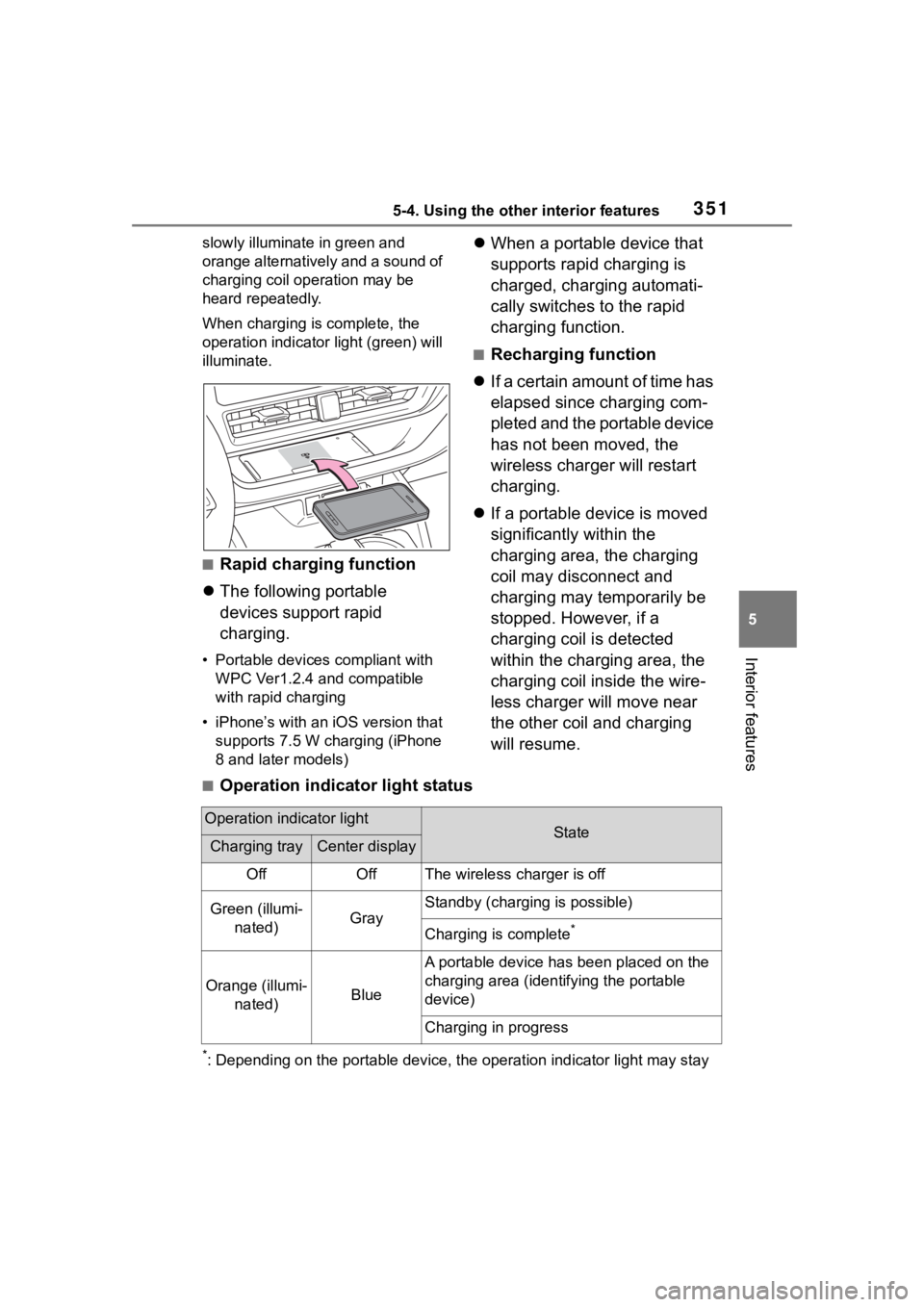
■Operation indicator light status
*: Depending on the portable devic e, the operation indicator light may stay
Operation indicator lightStateCharging trayCenter display
OffOffThe wireless charger is off
Green (illumi-
nated)Gray
Standby (charging is possible)
Charging is complete*
Orange (illumi- nated)Blue
A portable device has been placed on the
charging area (ident ifying the portable
device)
Charging in progress
Page 352 of 552
3525-4. Using the other interior features
illuminated (orange) after charging has completed.
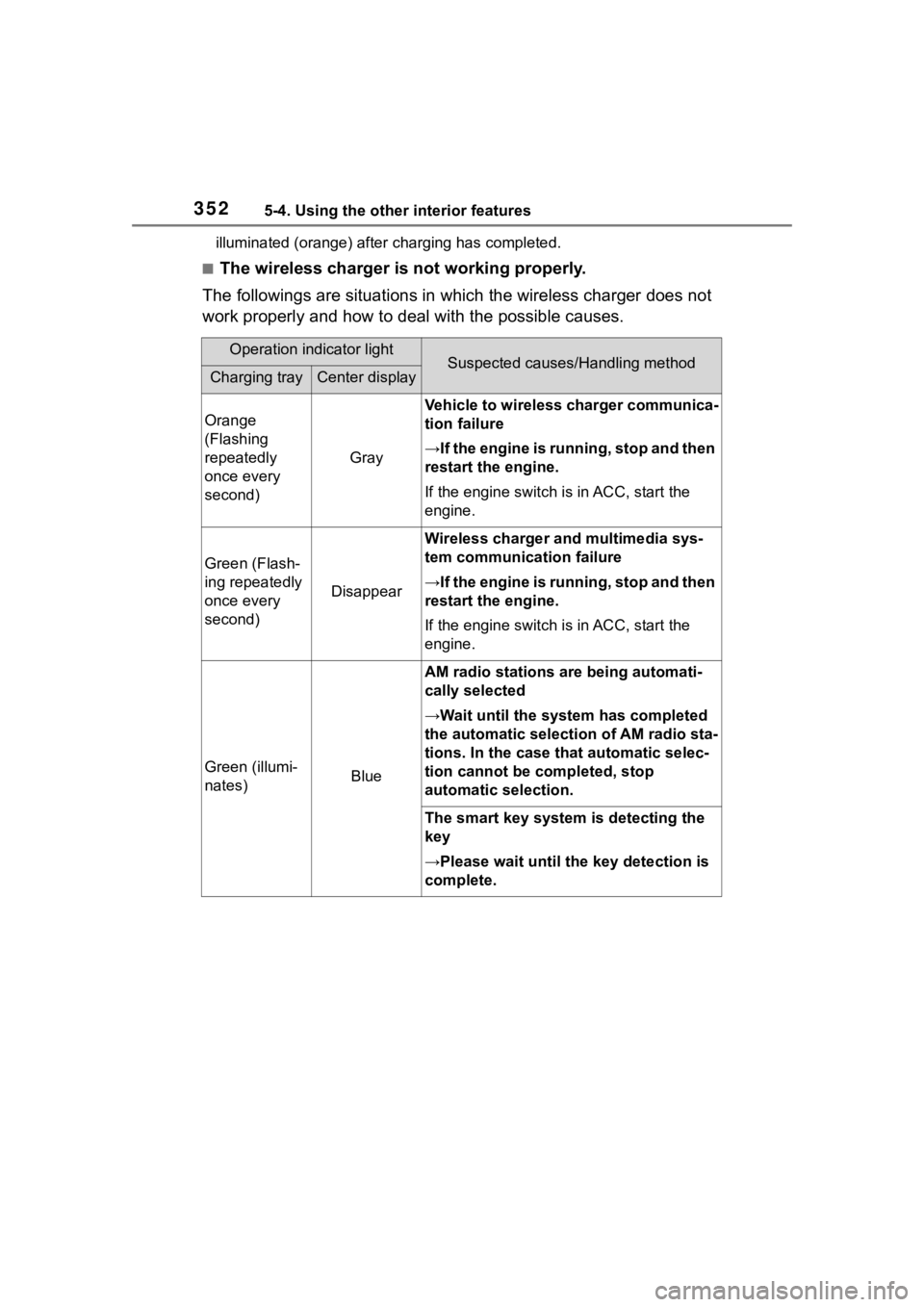
■The wireless charger is not working properly.
The followings are situations in which the wireless charger doe s not
work properly and how to deal with the possible causes.
Operation indicator lightSuspected causes/Handling methodCharging trayCenter display
Orange
(Flashing
repeatedly
once every
second)
Gray
Vehicle to wireless charger communica-
tion failure
→If the engine is running, stop and then
restart the engine.
If the engine switch is in ACC, start the
engine.
Green (Flash-
ing repeatedly
once every
second)
Disappear
Wireless charger and multimedia sys-
tem communica tion failure
→If the engine is running, stop and then
restart the engine.
If the engine switch is in ACC, start the
engine.
Green (illumi-
nates)Blue
AM radio stations are being automati-
cally selected
→Wait until the sys tem has completed
the automatic select ion of AM radio sta-
tions. In the case that automatic selec-
tion cannot be completed, stop
automatic selection.
The smart key system is detecting the
key
→Please wait until the key detection is
complete.
Page 353 of 552
3535-4. Using the other interior features
5
Interior features
■The wireless charger can be
operated when
The engine switch is in ACC or ON.
■Portable devices that can be
charged
●Portable devices compatible with
the Qi wireless charging standard
can be charged by the wireless
charger. However, compatibility
with all devices which meet the Qi
wireless charging standard is not
guaranteed.
●The wireless charger is designed
to supply low power electricity (5
W or less) to a cellular phone,
smartphone, or other portable
device.
●Failure to do so may result in the
possibility of fire, However, porta- ble devices, such as the following,
can be charged with more than 5
W.
• 7.5 W charging compatible iPhones can be charged at 7.5 W
or less.
• Portable devices which conform to WPC Ver 1.2.4 (Extended Power
profile ) can be charged at 10 W or
less.
■If a cover or accessory is
attached to the portable device
Do not charge a portable device if a
cover or accessory w hich is not Qi
compatible is atta ched. Depending
on the type of cover (including for
certain genuine manufacturer parts)
and/or accessory a ttached, it may
not be possible to charge the porta-
ble device. If the portable device is
placed on the charging area and
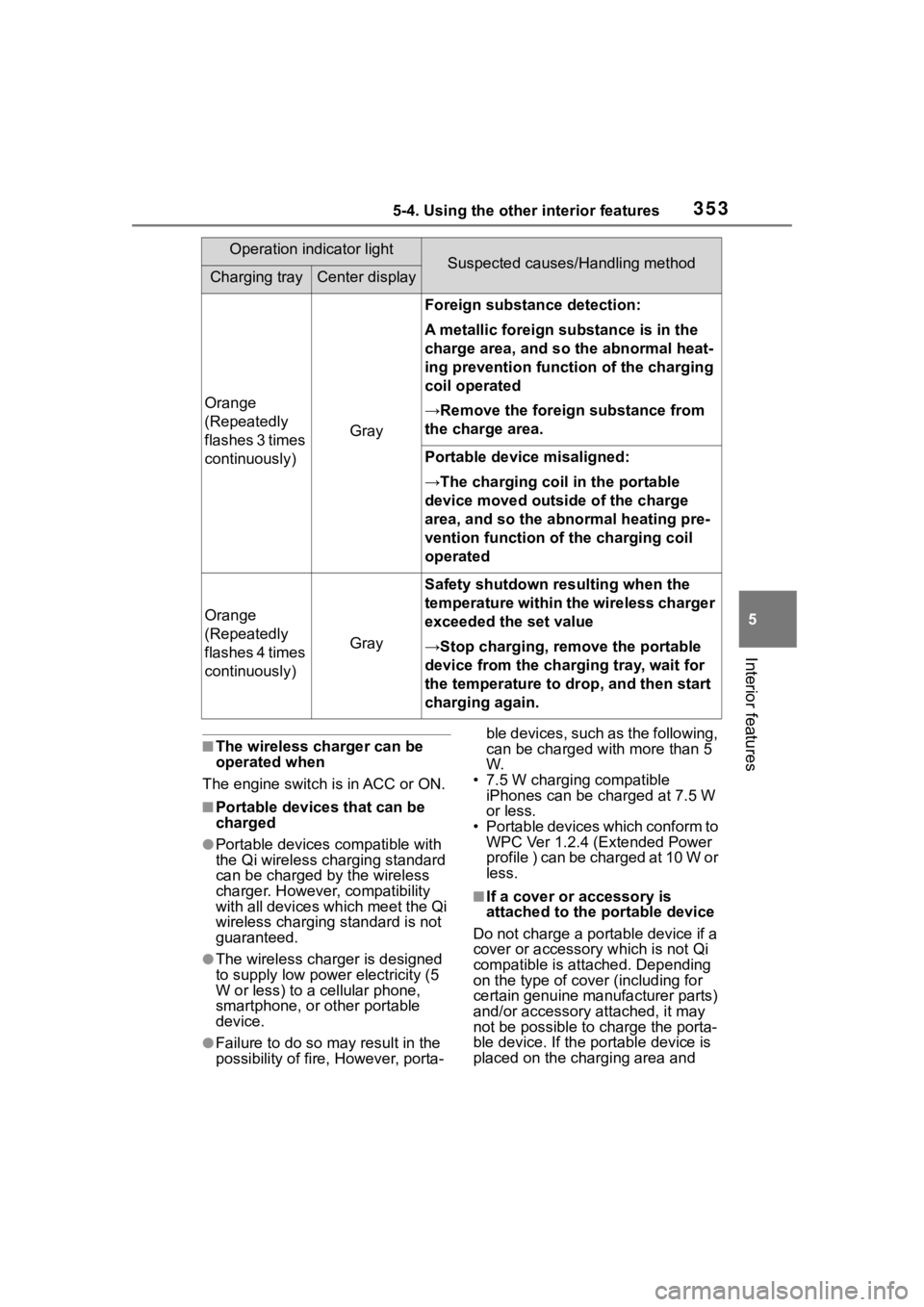
Orange
(Repeatedly
flashes 3 times
continuously)
Gray
Foreign substance detection:
A metallic foreign substance is in the
charge area, and so the abnormal heat-
ing prevention function of the charging
coil operated
→Remove the foreign substance from
the charge area.
Portable device misaligned:
→The charging coil in the portable
device moved outside of the charge
area, and so the abnormal heating pre-
vention function of the charging coil
operated
Orange
(Repeatedly
flashes 4 times
continuously)
Gray
Safety shutdown resulting when the
temperature within the wireless charger
exceeded the set value
→Stop charging, remove the portable
device from the charging tray, wait for
the temperature to drop, and then start
charging again.
Operation indicator lightSuspected causes/Handling methodCharging trayCenter display
Page 354 of 552
3545-4. Using the other interior features
does not charge, remove the cover
and/or accessories.
■AM radio cooperation function
during charging
●When noise enters the AM radio
during charging, charging fre-
quency will be automatically
changed to reduce noise.
●While the AM radio automatic tun-
ing, charging is temporarily
stopped in order to prevent tuning
error due to noise caused by
charging. When tuning is finished,
charging will be automatically
resumed.
■Charging precautions
●If the electronic key cannot be
detected in the cabin, charging
cannot be performed. When a
door is opened and closed,
charging may be temporarily sus-
pended.
●While charging, the wireless char-
ger and the portable device will
become warm. This is not a mal-
function. If a portable device
becomes warm while charging
and charging stops due to the pro-
tection function of the portable
device, wait until the portable
device cools down and charge it
again.
The fan may start operating to
lower the temperature inside the
wireless charger, however this is
not a malfunction.
■Sound generated during opera-
tion
When the power su pply switch is
turned on or while a portable device
is being identified, operation sounds
may be heard. This is not a malfunc-
tion.
■Cleaning the wireless charger
P. 3 7 3
WARNING
■Caution while driving
When charging a portable device,
for safety reasons, the driver
should not operate the main part
of the portable device while driv-
ing.
■Caution while in motion
Do not charge lightweight devices
such as wireless headphones
while in motion. These devices
are very light and may be ejected
from the charging tray, which may
lead to unforeseen accidents.
■Caution regarding interfer-
ence with electronic devices
People with implantable cardiac
pacemakers, cardiac resynchroni-
zation therapy pacemakers or
implantable cardioverter def ibrilla-
tors, as well as any other electri-
cal medical device, should consult
their physician about the usage of
the wireless charger.
■To prevent malfunctions or
burns
Observe the following precau-
tions.
Failure to do so may result in an
equipment failure and damage,
catch fire, burns due to overheat
or electric shock.
●Do not insert any metallic
objects between the charging
area and the portable device
while charging.
●Do not attach a n aluminum
sticker or other metallic objects
to the charge area.
●Do not attach a n aluminum
sticker or other metallic objects
to the side of the portable
device (or to its case or cover)
that touches the charge area.
Page 358 of 552
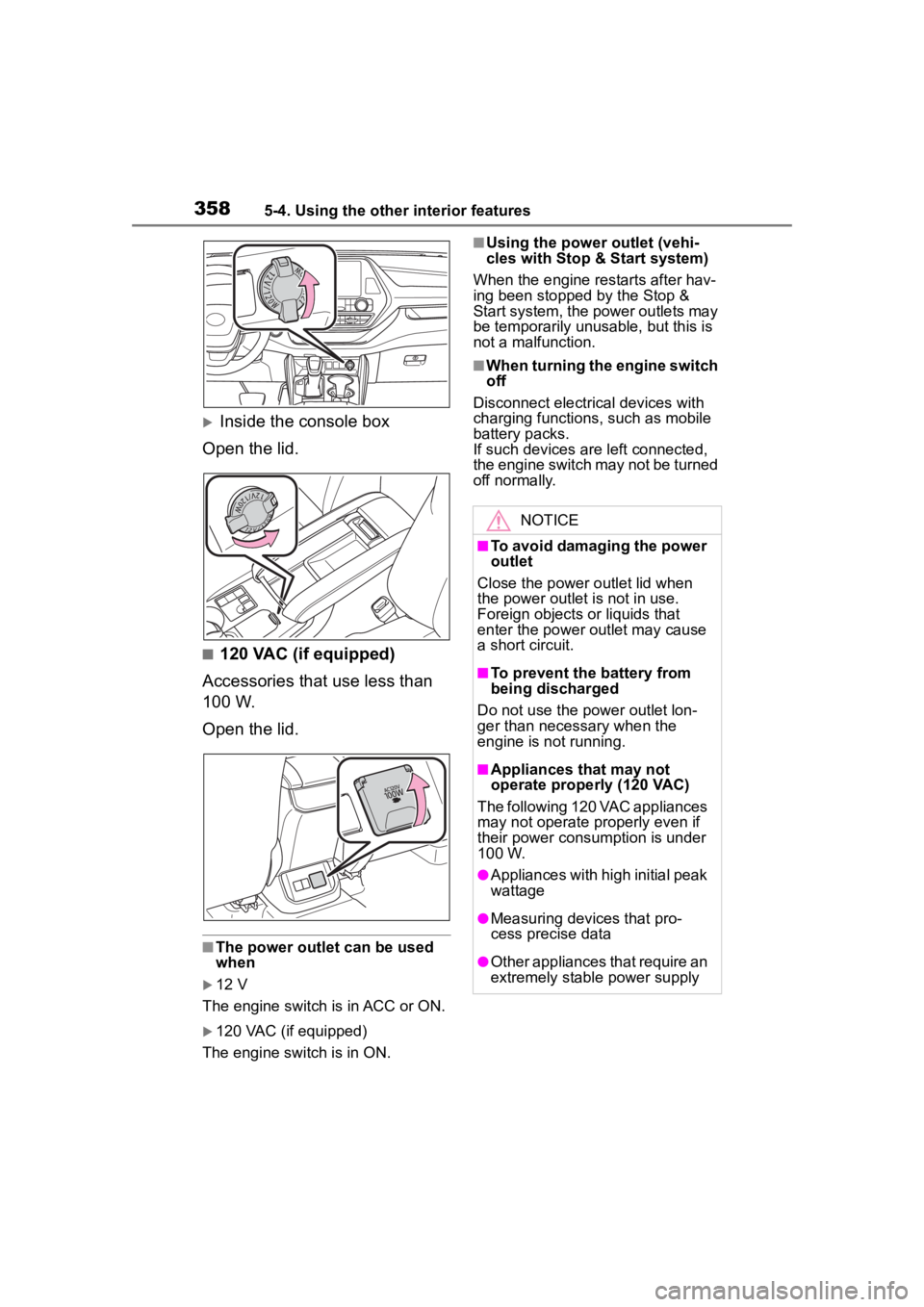
3585-4. Using the other interior features
Inside the console box
Open the lid.
■120 VAC (if equipped)
Accessories that use less than
100 W.
Open the lid.
■The power outlet can be used
when
12 V
The engine switch is in ACC or ON.
120 VAC (if equipped)
The engine switch is in ON.
■Using the power outlet (vehi-
cles with Stop & Start system)
When the engine restarts after hav-
ing been stopped by the Stop &
Start system, the power outlets may
be temporarily unusable, but this is
not a malfunction.
■When turning the engine switch
off
Disconnect electrical devices with
charging functions, such as mobile
battery packs.
If such devices are left connected,
the engine switch may not be turned
off normally.
NOTICE
■To avoid damaging the power
outlet
Close the power outlet lid when
the power outlet is not in use.
Foreign objects or liquids that
enter the power outlet may cause
a short circuit.
■To prevent the battery from
being discharged
Do not use the p ower outlet lon-
ger than necessary when the
engine is not running.
■Appliances that may not
operate properl y (120 VAC)
The following 120 VAC appliances
may not operate properly even if
their power consumption is under
100 W.
●Appliances with high initial peak
wattage
●Measuring devices that pro-
cess precise data
●Other appliances that require an
extremely stable power supply
Page 365 of 552
3655-4. Using the other interior features
5
Interior features
ble device. (To check device
compatibility, refer to
www.homelink.com.)
1Within 5 seconds after pro-
gramming the garage door
opener has been completed,
if the garage door opener
motor is trained to Home-
Link
®, both garage door
operation indicators will flash
rapidly (green) and the light
on the garage door opener
motor will blink twice, indicat-
ing that 2-way communica-
tion is enabled.
If the indicators do not flash, per-
form 2 and 3 within the first 10
presses of the HomeLink
® button
after programming has been com-
pleted.
2 Press a programmed Home-
Link
® button to operate a
garage door.
3 Within 1 minute of pressing
the HomeLink
® button, after
the garage door operation
has stopped, press the
“Learn” or “Smart” button on
the garage door opener
motor. Within 5 seconds of
the establishment of 2-way
communication with the
garage door opener, both
garage door operation indica-
tors in the vehicle will flash
rapidly (green) and the light
on the garage door opener
motor will blink twice, indicat- ing that 2-way communica-
tion is enabled.
■Reprogramming a single
HomeLink
® button
When the following procedure is
performed, buttons which
already have devices registered
to them can be overwritten:
1 Press and hold the desired
HomeLink
® button.
2 When the HomeLink
® indica-
tor starts flashing orange,
release the HomeLink
® but-
ton and perform “Program-
ming HomeLink
®” 1 (it takes
20 seconds for the Home-
Link
® indicator to start flash-
ing).
■Before programming
●Install a new battery in the trans-
mitter.
●The battery side of the transmitter
must be pointed away from the
HomeLink
® buttons.
Press the appropriate Home-
Link
® button. The HomeLink®
indicator light should turn on.
The status of the opening and
closing of a garage door is
shown by the garage door
opener indicators.
Operating HomeLink®
Page 423 of 552
423
7
7
When trouble arises
When trouble arises
.7-1. Essential informationEmergency flashers .... 424
If your vehicle has to be stopped in an emergency.................................. 424
If the vehicle is submerged or water on the road is ris-
ing ............................. 425
7-2. Steps to take in an emer- gency
If your vehicle needs to be towed......................... 427
If you think something is wrong ........................ 429
Fuel pump shut off system .................................. 430
If a warning light turns on or a warning buzzer sounds.................................. 431
If a warning message is dis- played........................ 442
If you have a flat tire.... 446
If the engine will not start .................................. 460
If you lose your keys ... 461
If the fuel filler door cannot be opened ................. 462
If the electronic key does not operate properly .. 463
If the vehicle battery is dis- charged ..................... 465
If your vehicle overheats .................................. 469If the vehicle becomes stuck
.................................. 471
Page 428 of 552
4287-2. Steps to take in an emergency
When using a flat-bed truck to
transport the vehicle, use tire
strapping belts. Refer to the
owner's manual of the flat-bed
WARNING
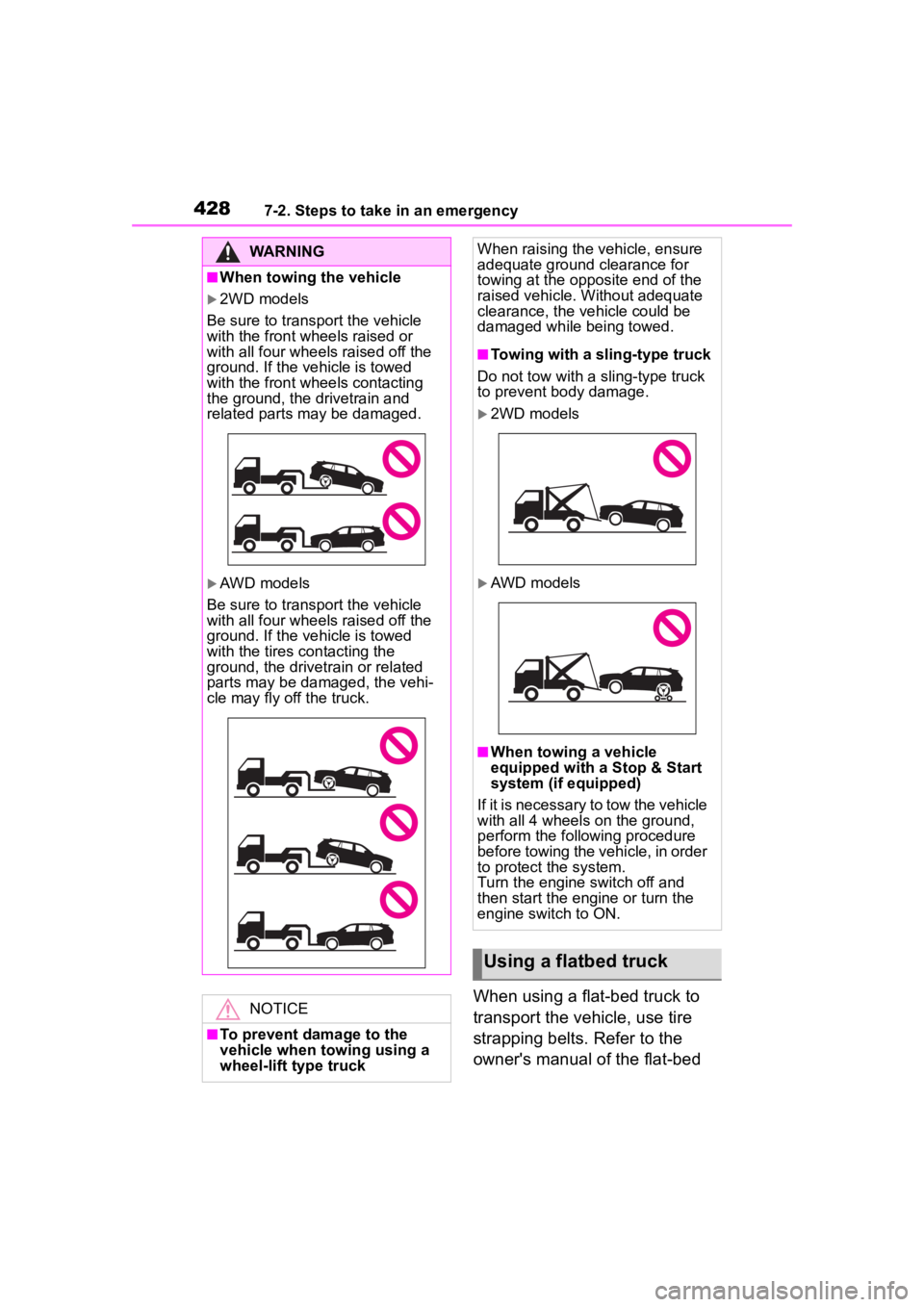
■When towing the vehicle
2WD models
Be sure to transport the vehicle
with the front wh eels raised or
with all four wheels raised off the
ground. If the vehicle is towed
with the front wh eels contacting
the ground, the drivetrain and
related parts may be damaged.
AWD models
Be sure to transport the vehicle
with all four wheels raised off the
ground. If the vehicle is towed
with the tires contacting the
ground, the drivetrain or related
parts may be damaged, the vehi-
cle may fly off the truck.
NOTICE
■To prevent damage to the
vehicle when towing using a
wheel-lift type truck
When raising the vehicle, ensure
adequate ground clearance for
towing at the opposite end of the
raised vehicle. Without adequate
clearance, the vehicle could be
damaged while being towed.
■Towing with a sling-type truck
Do not tow with a sling-type truck
to prevent body damage.
2WD models
AWD models
■When towing a vehicle
equipped with a Stop & Start
system (if equipped)
If it is necessary to tow the vehicle
with all 4 wheels on the ground,
perform the following procedure
before towing the vehicle, in order
to protect the system.
Turn the engine switch off and
then start the engine or turn the
engine switch to ON.
Using a flatbed truck
Page 430 of 552
4307-2. Steps to take in an emergency
side when braking
Vehicle pulls heavily to one
side when driving on a level
road
Loss of brake effectiveness,
spongy feeling, pedal almost
touches the floor
Follow the procedure below to
restart the engine after the sys-
tem is activated.
1Turn the engine switch to
ACC or turn it OFF.
2 Restart the engine.Fuel pump shut off
system
To minimize the risk of fuel
leakage when the engine
stalls or when an airbag
inflates upon collision, the
fuel pump shut off system
stops the supply of fuel to
the engine.
Restarting the engine
NOTICE
■Before starting the engine
Inspect the ground under the
vehicle.
If you find that fuel has leaked
onto the ground, the fuel system
has been damaged and is in need
of repair. Do not restart the
engine.