ECO mode TOYOTA HIGHLANDER HYBRID 2012 XU40 / 2.G User Guide
[x] Cancel search | Manufacturer: TOYOTA, Model Year: 2012, Model line: HIGHLANDER HYBRID, Model: TOYOTA HIGHLANDER HYBRID 2012 XU40 / 2.GPages: 636, PDF Size: 11.26 MB
Page 189 of 636
189
2-1. Driving procedures
2
When driving
■
Automatic cancelation of EV-Drive Mode
When driving in EV-Drive Mode, the gasoline engine may automatically
restart in the following situations. When EV-Drive Mode is canceled, a
buzzer will sound and the EV-Drive Mode indicator will flash and go off.
●The hybrid battery (traction battery) becomes low.
The remaining battery level indicated in the “Energy Monitor” display is
level 2 or lower. ( P. 37)
● Vehicle speed becomes more than about 25 mph (40 km/h).
● The accelerator pedal is depressed firmly or the vehicle is on a hill etc.
■ Possible driving distance when driving in EV-Drive Mode
Possible driving distance when driving in EV-Drive Mode is up to about 1/2
mile (1 km) if driven at a speed of about 25 mph (40 km/h) or less. (Possible
driving distance depends on the hybrid battery [traction battery] level and
driving conditions.)
■ Fuel economy
Highlander is designed to achieve the best possible fuel economy during
normal driving (using the gasoline engine and electric motor [traction
motor]). Driving in EV-Drive Mode more than necessary may lower fuel
economy.
CAUTION
■Caution while driving
When driving in EV-Drive Mode, pay special attention to the area around the
vehicle. Because there is no engine noise, pedestrians, people riding bicy-
cles or other people and vehicles in the area may not be aware of the vehicle
starting off or approaching them, so take extra care while driving.
Page 191 of 636
191
2-1. Driving procedures
2
When driving
■
Shift position uses
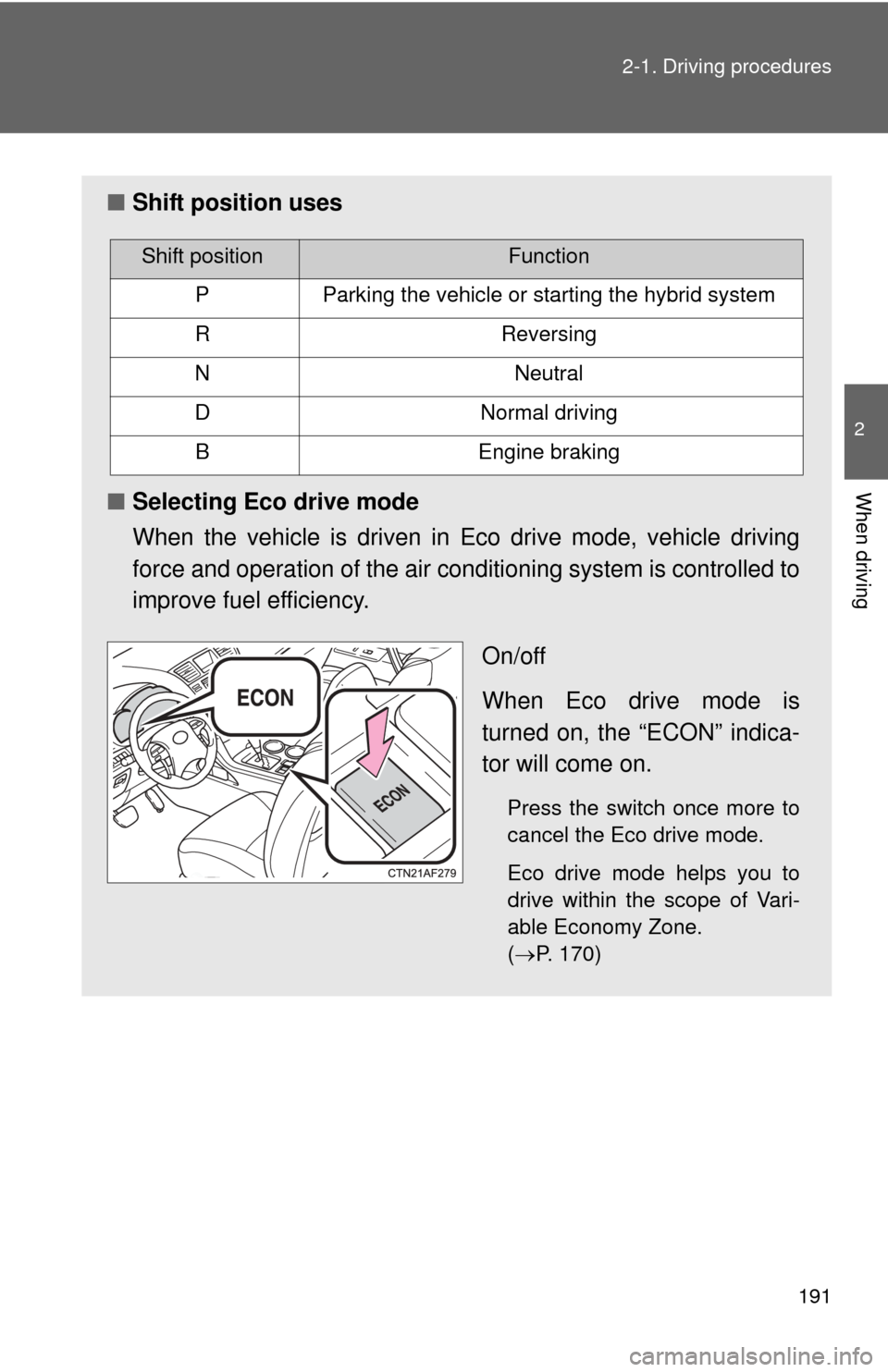
■ Selecting Eco drive mode
When the vehicle is driven in Eco drive mode, vehicle driving
force and operation of the air conditioning system is controlled to
improve fuel efficiency.
On/off
When Eco drive mode is
turned on, the “ECON” indica-
tor will come on.
Press the switch once more to
cancel the Eco drive mode.
Eco drive mode helps you to
drive within the scope of Vari-
able Economy Zone.
(P. 170)
Shift positionFunction
PParking the vehicle or starting the hybrid system
RReversing
NNeutral
DNormal driving
BEngine braking
Page 192 of 636

192 2-1. Driving procedures
■When in heavy traffic
If the shift lever is in N, the hybrid battery (traction battery) will not be
charged. To help prevent the battery from discharging, avoid putting the shift
lever in N for an extended period of time.
■ Eco drive mode
●When the accelerator pedal is depressed in Eco drive mode, it may take
more time to accelerate than usual. This is normal operation.
● Operation of the air conditioning system is controlled when in Eco drive
mode.
■ If the shift lever cannot be shifted from P
P. 554
Page 200 of 636
200 2-2. Instrument cluster
*1: For vehicles sold in U.S.A.
*2: For vehicles sold in Canada
*3: These lights turn on when the engine switch is turned to the “ON”
position (vehicles without smart key system) or the “POWER”
switch is turned to ON mode (vehicles with smart key system) to
indicate that a system check is being performed. They will turn off
after the hybrid system is started, or after a few seconds. There may
be a malfunction in a system if a light does not come on, or if the
lights do not turn off. Have the vehicle inspected by your Toyota
dealer for details.
*4: The light flashes to indicate that the system is operating.
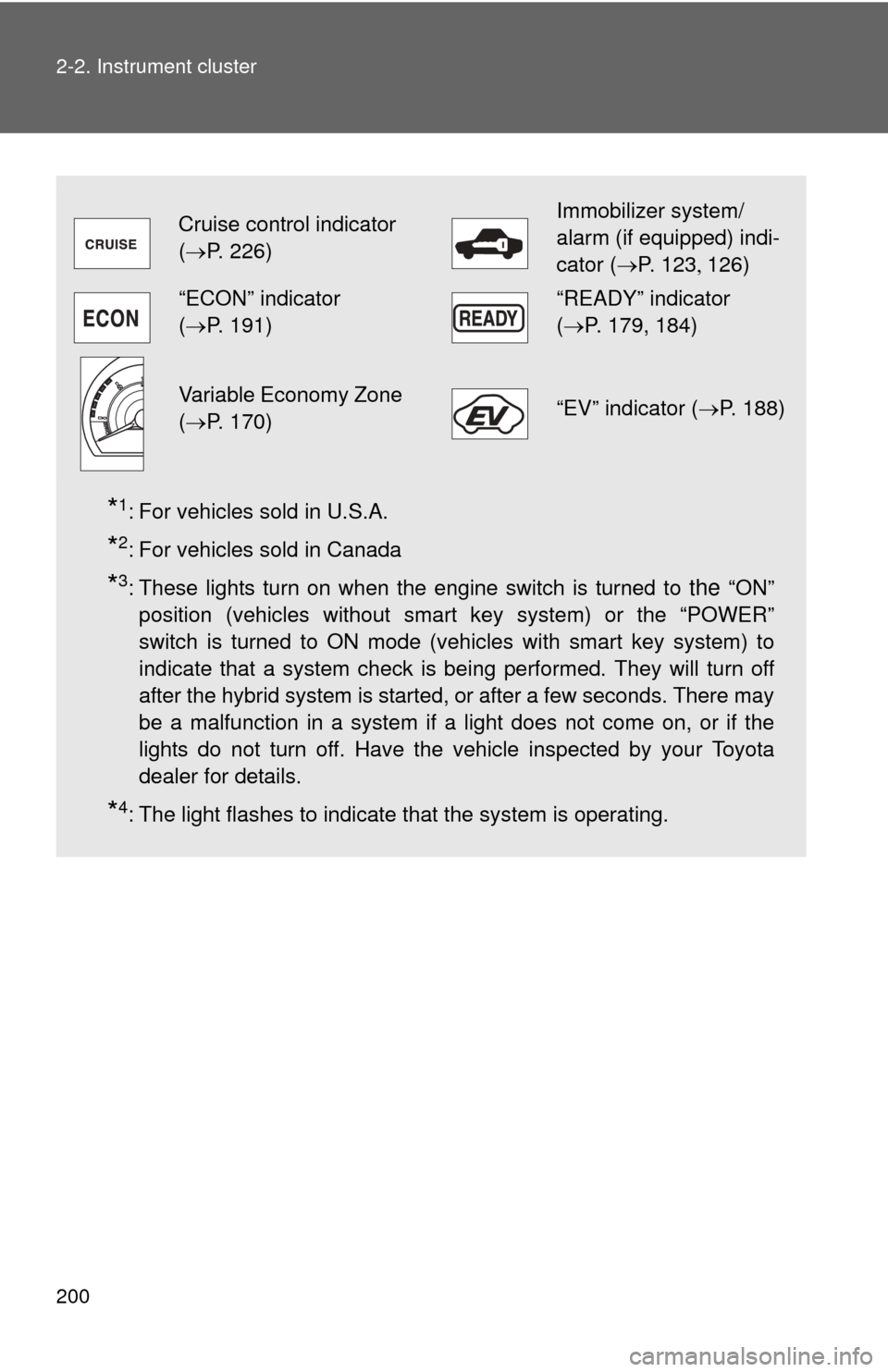
Cruise control indicator
( P. 226)Immobilizer system/
alarm (if equipped) indi-
cator (P. 123 126)
“ECON” indicator
(P. 191)“READY” indicator
( P. 179, 184)
Variable Economy Zone
(P. 170)“EV” indicator ( P. 188)
Page 201 of 636
201
2-2. Instrument cluster
2
When driving
■
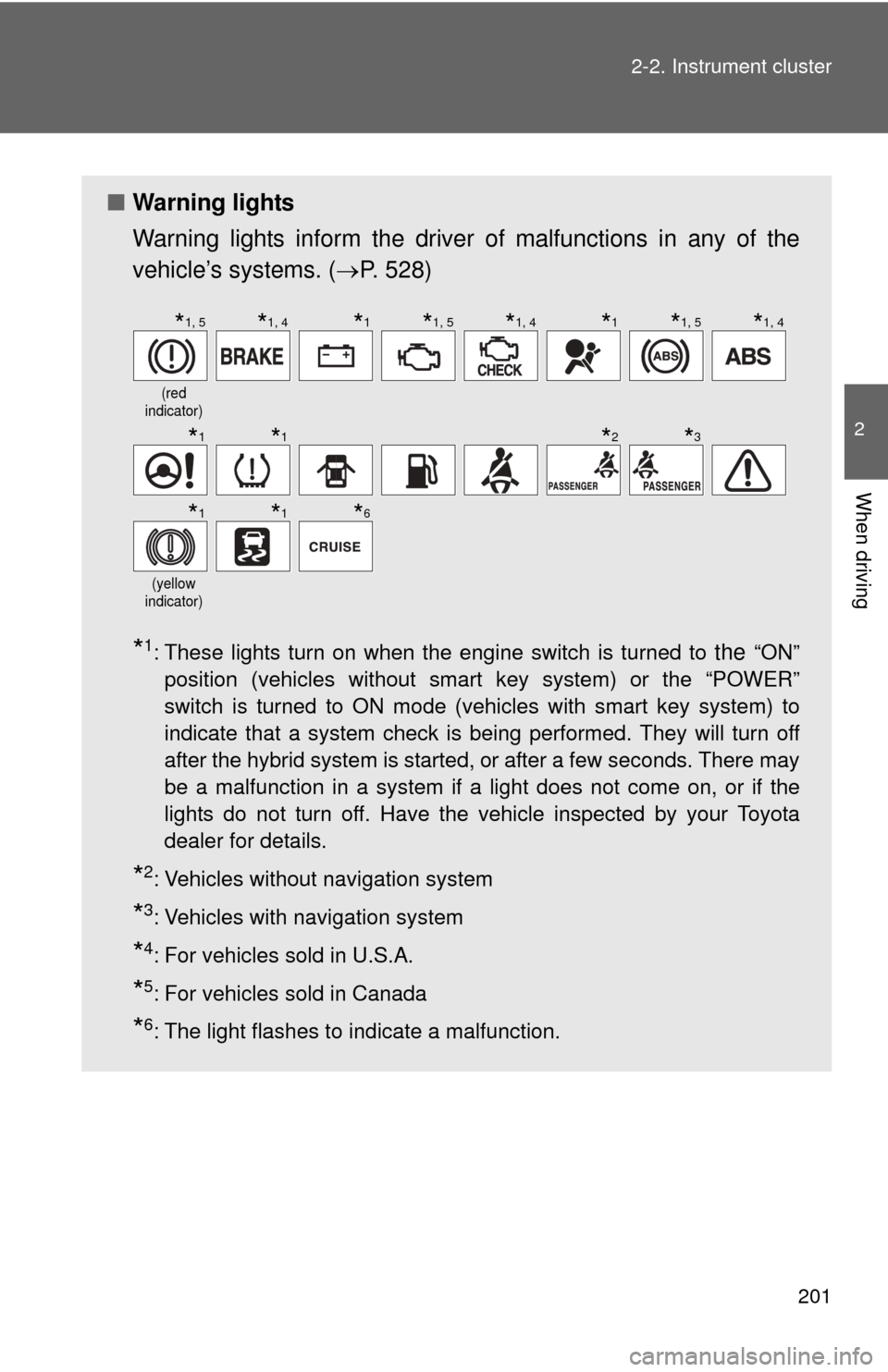
Warning lights
Warning lights inform the driver of malfunctions in any of the
vehicle’s systems. ( P. 528)
*1: These lights turn on when the engine switch is turned to the “ON”
position (vehicles without smart key system) or the “POWER”
switch is turned to ON mode (vehicles with smart key system) to
indicate that a system check is being performed. They will turn off
after the hybrid system is started, or after a few seconds. There may
be a malfunction in a system if a light does not come on, or if the
lights do not turn off. Have the vehicle inspected by your Toyota
dealer for details.
*2: Vehicles without navigation system
*3: Vehicles with navigation system
*4: For vehicles sold in U.S.A.
*5: For vehicles sold in Canada
*6: The light flashes to indicate a malfunction.
(red
indicator)
(yellow
indicator)
*1, 5*1, 4*1*1, 5*1, 4*1*1, 5*1, 4
*1*1*2*3
*1*1*6
Page 207 of 636
207
2-2. Instrument cluster
2
When driving
■
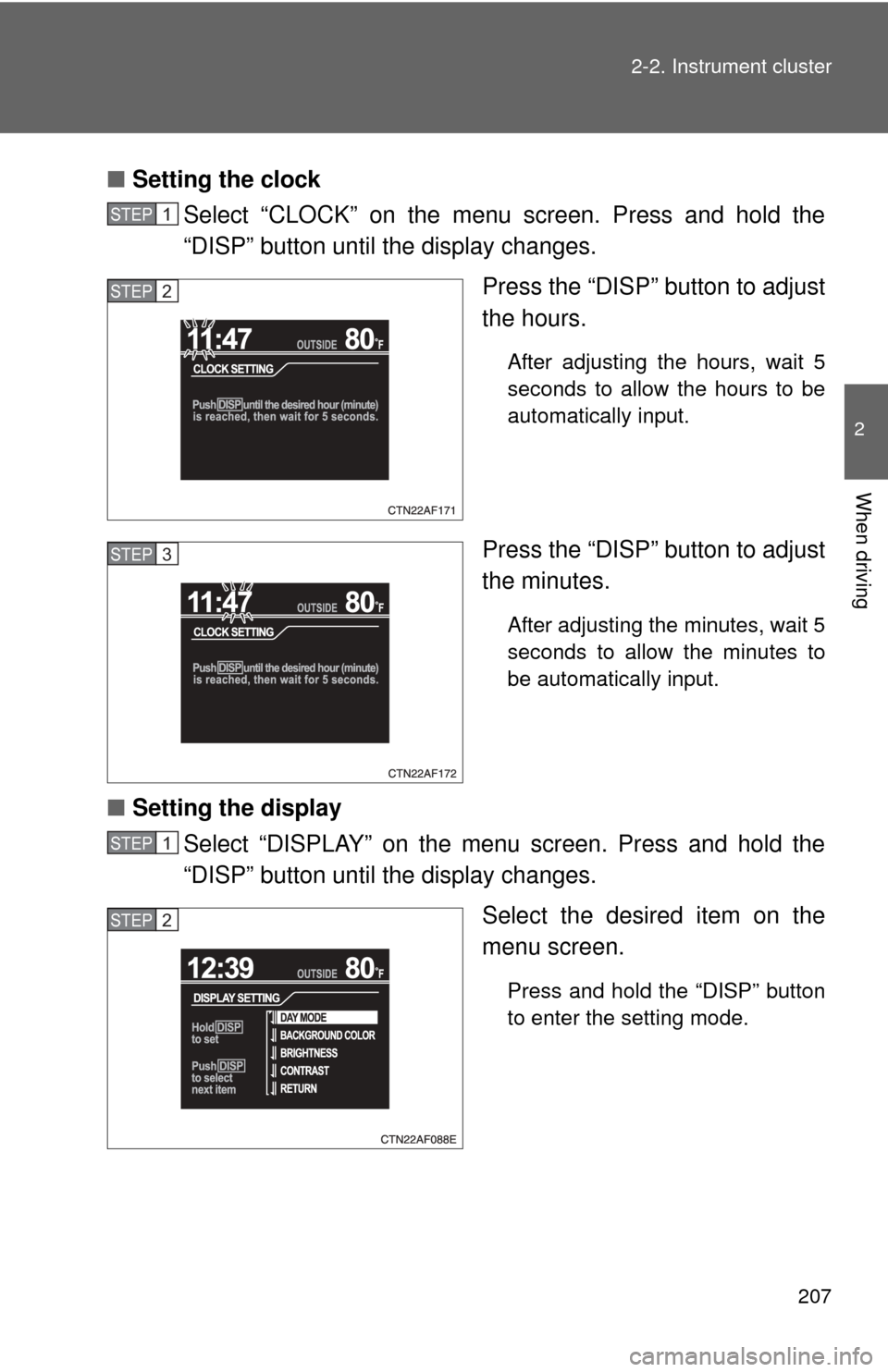
Setting the clock
Select “CLOCK” on the menu screen. Press and hold the
“DISP” button until the display changes.
Press the “DISP” button to adjust
the hours.
After adjusting the hours, wait 5
seconds to allow the hours to be
automatically input.
Press the “DISP” button to adjust
the minutes.
After adjusting the minutes, wait 5
seconds to allow the minutes to
be automatically input.
■Setting the display
Select “DISPLAY” on the menu screen. Press and hold the
“DISP” button until the display changes.
Select the desired item on the
menu screen.
Press and hold the “DISP” button
to enter the setting mode.
STEP1
STEP2
STEP3
STEP1
STEP2
Page 208 of 636
208 2-2. Instrument cluster
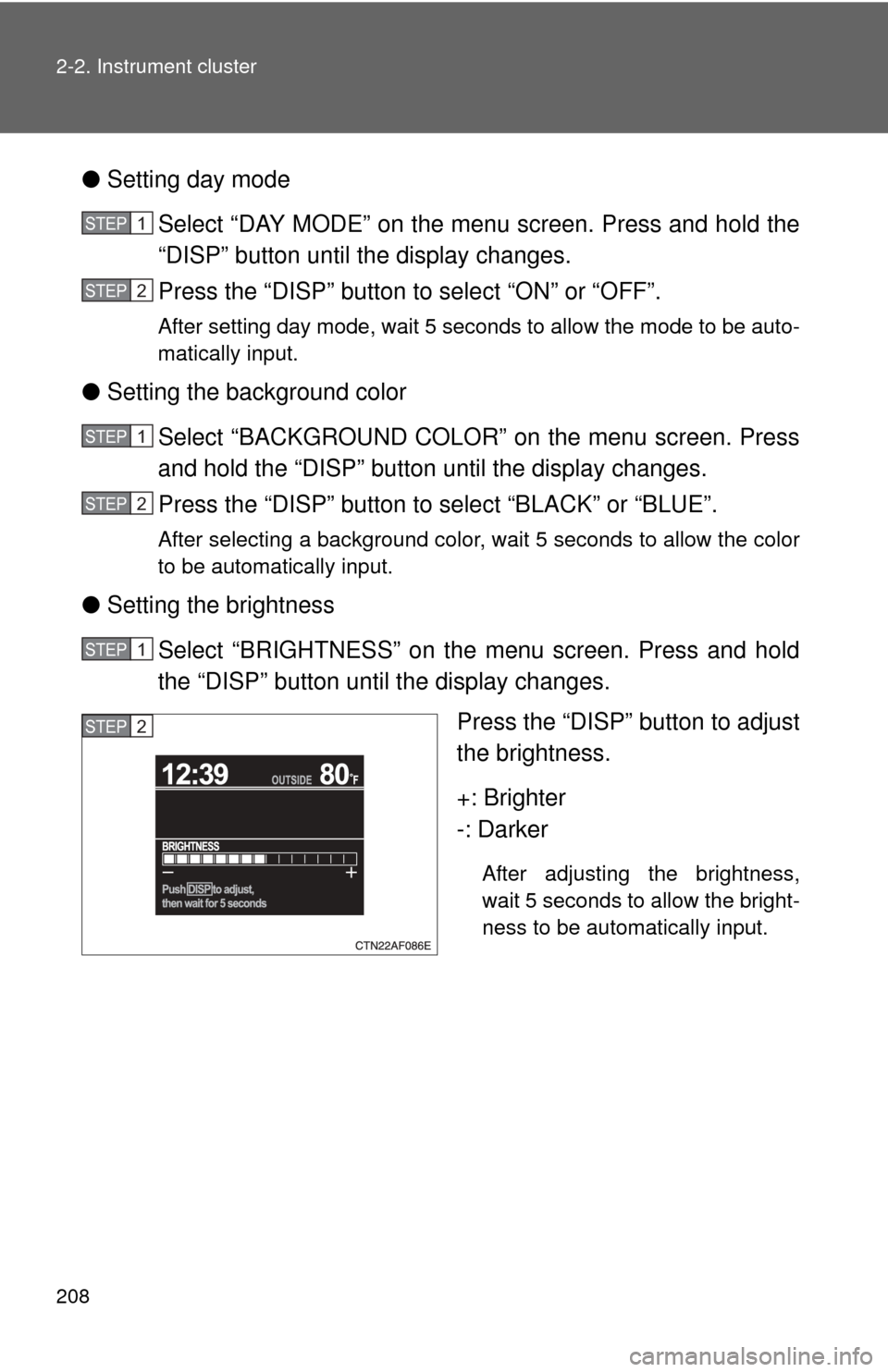
●Setting day mode
Select “DAY MODE” on the menu screen. Press and hold the
“DISP” button until the display changes.
Press the “DISP” button to select “ON” or “OFF”.
After setting day mode, wait 5 seconds to allow the mode to be auto-
matically input.
●Setting the background color
Select “BACKGROUND COLOR” on the menu screen. Press
and hold the “DISP” button until the display changes.
Press the “DISP” button to select “BLACK” or “BLUE”.
After selecting a background color, wait 5 seconds to allow the color
to be automatically input.
●Setting the brightness
Select “BRIGHTNESS” on the menu screen. Press and hold
the “DISP” button until the display changes. Press the “DISP” button to adjust
the brightness.
+: Brighter
-: Darker
After adjusting the brightness,
wait 5 seconds to allow the bright-
ness to be automatically input.
STEP1
STEP2
STEP1
STEP2
STEP1
STEP2
Page 210 of 636
210 2-2. Instrument cluster
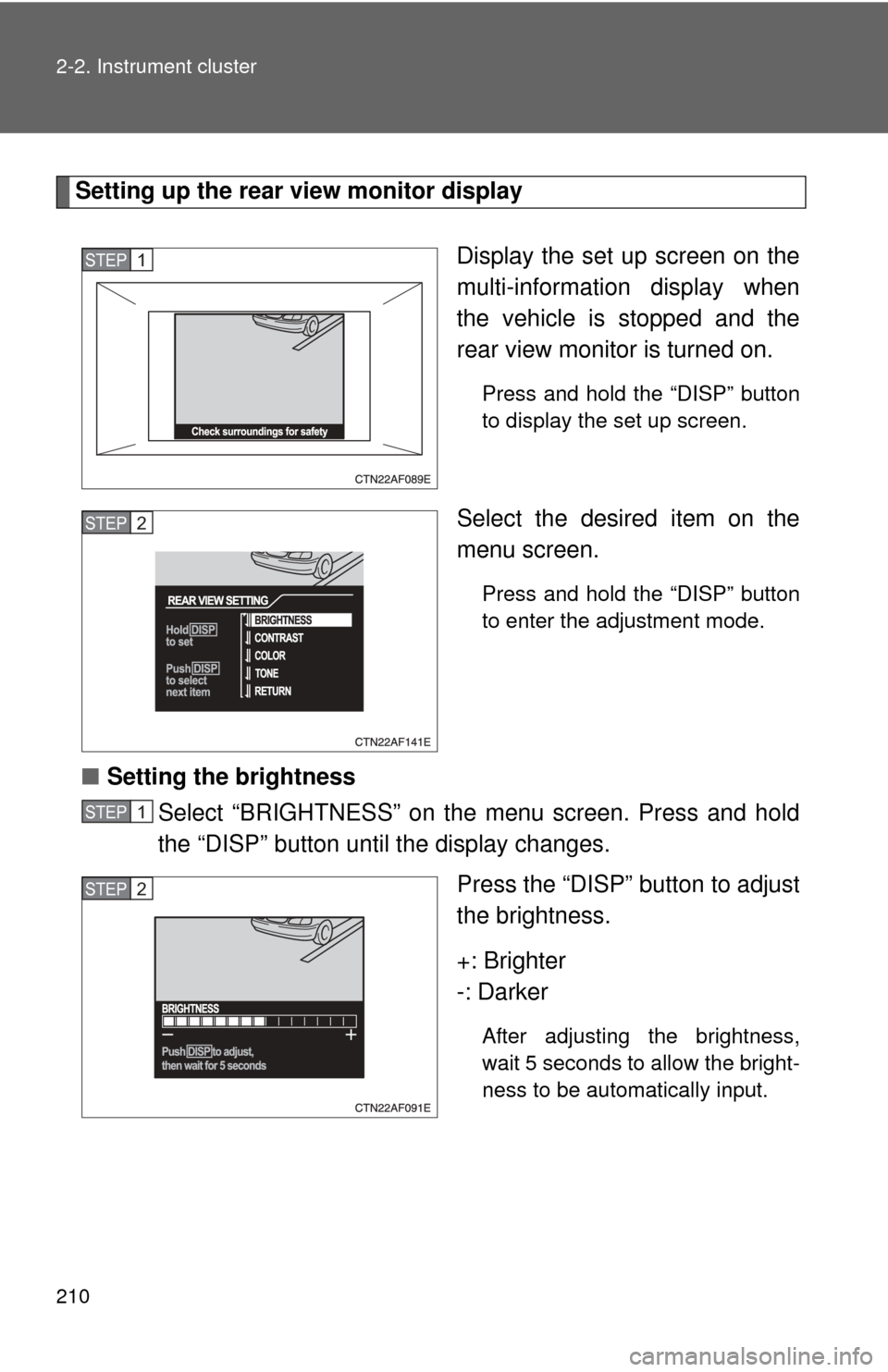
Setting up the rear view monitor displayDisplay the set up screen on the
multi-information display when
the vehicle is stopped and the
rear view monitor is turned on.
Press and hold the “DISP” button
to display the set up screen.
Select the desired item on the
menu screen.
Press and hold the “DISP” button
to enter the adjustment mode.
■Setting the brightness
Select “BRIGHTNESS” on the menu screen. Press and hold
the “DISP” button until the display changes.
Press the “DISP” button to adjust
the brightness.
+: Brighter
-: Darker
After adjusting the brightness,
wait 5 seconds to allow the bright-
ness to be automatically input.
STEP1
STEP2
STEP1
STEP2
Page 218 of 636
218 2-3. Operating the lights and wipers
■Automatic light off system
Vehicles without smart key system
● When the headlights come on: The headlights and tail lights turn off 30
seconds after a door is opened and closed if the engine switch is turned
to the “ACC” or “LOCK” position. (The lights turn off immediately if
on the wireless remote control is pressed after all the doors are
locked.)
● When only the tail lights come on: The tail lights turn off automatically if
the engine switch is turned to the “ACC” or “LOCK” position and the
driver’s door is opened.
To turn the lights on again, turn the engine switch to the “ON” position, or
turn the light switch off and then back to or .
Vehicles with smart key system
● When the headlights come on: The headlights and tail lights turn off 30
seconds after a door is opened and closed if the “POWER” switch is
turned to ACCESSORY mode or turned off. (The lights turn off immedi-
ately if on the key is pressed after all the doors are locked.)
● When only the tail lights come on: The tail lights turn off automatically if
the “POWER” switch is turned to ACCESSORY mode or turned off and
the driver’s door is opened.
To turn the lights on again, turn the “POWER” switch to ON mode, or turn the
light switch off and then back to or .
■ Customization that can be co nfigured at Toyota dealer
Settings (e.g. daytime running light system) can be changed.
(Customizable features P. 599)
NOTICE
■To prevent 12-volt battery from being discharged
Do not leave the lights on longer than necessary when the hybrid system is
off.
Page 282 of 636
282 3-1. Using the air conditioning system and defogger
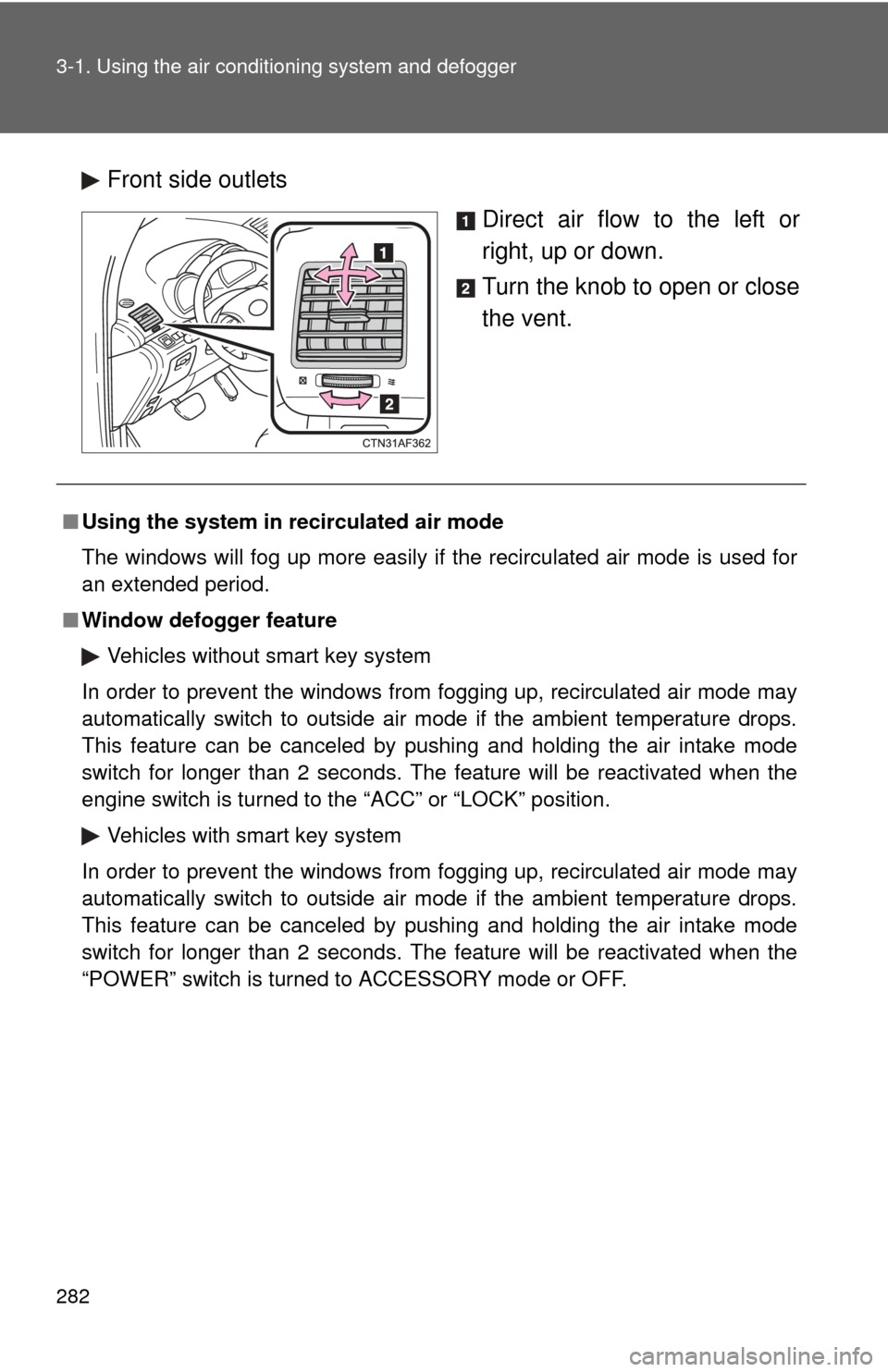
Front side outlets
Direct air flow to the left or
right, up or down.
Turn the knob to open or close
the vent.
■Using the system in recirculated air mode
The windows will fog up more easily if the recirculated air mode is used for
an extended period.
■ Window defogger feature
Vehicles without smart key system
In order to prevent the windows from fogging up, recirculated air mode may
automatically switch to outside air mode if the ambient temperature drops.
This feature can be canceled by pushing and holding the air intake mode
switch for longer than 2 seconds. The feature will be reactivated when the
engine switch is turned to the “ACC” or “LOCK” position.
Vehicles with smart key system
In order to prevent the windows from fogging up, recirculated air mode may
automatically switch to outside air mode if the ambient temperature drops.
This feature can be canceled by pushing and holding the air intake mode
switch for longer than 2 seconds. The feature will be reactivated when the
“POWER” switch is turned to ACCESSORY mode or OFF.