power steering TOYOTA HIGHLANDER HYBRID 2018 (in English) User Guide
[x] Cancel search | Manufacturer: TOYOTA, Model Year: 2018, Model line: HIGHLANDER HYBRID, Model: TOYOTA HIGHLANDER HYBRID 2018Pages: 716, PDF Size: 12.03 MB
Page 191 of 716

191
4Driving
HIGHLANDER_HV_U (OM0E032U)4-1. Before driving
Driving the vehicle ............. 192
Cargo and luggage ........... 202
Vehicle load limits ............. 207
Trailer towing..................... 208
Dinghy towing ................... 224
4-2. Driving procedures Power (ignition) switch ...... 225
EV drive mode .................. 231
Hybrid transmission........... 233
Turn signal lever................ 239
Parking brake .................... 240
4-3. Operating the lights and wipers
Headlight switch ................ 241
Automatic High Beam ....... 245
Fog light switch ................. 249
Windshield wipers and washer ............................ 250
Rear window wiper and washer ............................ 254 4-4. Refueling
Opening the fuel tank cap .................................. 256
4-5. Using the driving support systems
Toyota Safety Sense P ..... 261
PCS (Pre-Collision System) .... 268
LDA (Lane Departure Alert
with steering control) ....... 282
Dynamic radar cruise control ............................. 292
Rear view monitor system ............................ 304
BSM (Blind Spot Monitor) ........ 313
• BSM function ................ 318
• RCTA function .............. 322
Driving assist systems ...... 328
4-6. Driving tips Hybrid vehicle driving tips .................................. 334
Winter driving tips ............. 337
Utility vehicle precautions ..................... 341
Page 195 of 716

1954-1. Before driving
4
Driving
HIGHLANDER_HV_U (OM0E032U)
WARNING
Observe the following precautions.
Failure to do so may result in death or serious injury.
■When starting the vehicle
Always keep your foot on the brake pedal while stopped with the “READY”
indicator is illuminated. This prevents the vehicle from creeping.
■ When driving the vehicle
● Do not drive if you are unfamiliar with the location of the brake and ac\
cel-
erator pedals to avoid depressing the wrong pedal.
• Accidentally depressing the accelerator pedal instead of the brake
pedal will result in sudden acceleration that may lead to an accident.
• When backing up, you may twist your body around, leading to a diffi- culty in operating the pedals. Make sure to operate the pedals properly.
• Make sure to keep a correct driving posture even when moving the vehicle only slightly. This allows you to depress the brake and accelera-
tor pedals properly.
• Depress the brake pedal using your right foot. Depressing the brake pedal using your left foot may delay response in an emergency, result-
ing in an accident.
● The driver should pay extra attention to pedestrians when the vehicle is
powered only by the electric motor (traction motor). As there is no engine
noise, the pedestrians may misjudge the vehicle’s movement. Even
though the vehicle is equipped with the vehicle proximity notification sys-
tem, drive with care as pedestrians in the vicinity may still not notice the
vehicle if the surrounding area is noisy.
● Do not drive the vehicle over or stop the vehicle near flammable materials.
The exhaust system and exhaust gases can be extremely hot. These hot
parts may cause a fire if there is any flammable material nearby.
● During normal driving, do not turn off the hybrid system. Turning the hybrid
system off while driving will not cause loss of steering or braking control,
however, power assist to the steering will be lost. This will make it more
difficult to steer smoothly, so you should pull over and stop the vehicle as
soon as it is safe to do so.
In the event of an emergency, such as if it becomes impossible to stop the
vehicle in the normal way: →P. 561
Page 201 of 716
2014-1. Before driving
4
Driving
HIGHLANDER_HV_U (OM0E032U)
NOTICE
■When parking the vehicle
Always set the parking brake and shift the shift lever to P. Failure to do so
may cause the vehicle to move or the vehicle may accelerate suddenly if
the accelerator pedal is accidentally depressed.
■ Avoiding damage to vehicle parts
● Do not turn the steering wheel fully in either direction and hold it there for
an extended period of time.
Doing so may damage the power steering motor.
● When driving over bumps on the road, dr ive as slowly as possible to avoid
damaging the wheels, underside of the vehicle, etc.
■ If you get a flat tire while driving
A flat or damaged tire may cause the following situations. Hold the steering
wheel firmly and gradually depress the brake pedal to slow down the vehi-
cle.
● It may be difficult to control your vehicle.
● The vehicle will make abnormal sounds or vibrations.
● The vehicle will lean abnormally.
Information on what to do in case of a flat tire ( →P. 596)
■ When encounterin g flooded roads
Do not drive on a road that has flooded after heavy rain etc. Doing so may
cause the following serious damage to the vehicle:
● Engine stalling
● Short in electrical components
● Engine damage caused by water immersion
In the event that you drive on a flooded road and the vehicle is flooded, be
sure to have your Toyota dealer check the following:
● Brake function
● Changes in quantity and quality of oil and fluid used for the engine, hybrid
transmission, rear electric motor (traction motor), etc.
● Lubricant condition for the bearings and suspension joints (where possi-
ble), and the function of all joints, bearings, etc.
Page 221 of 716

2214-1. Before driving
4
Driving
HIGHLANDER_HV_U (OM0E032U)■
Break-in schedule
If your vehicle is new or equipped with any new power train components
(such as an engine, transmission, differential or wheel bearing), Toyota rec-
ommends that you do not tow a trailer until the vehicle has been driven for
over 500 miles (800 km).
After the vehicle has been driven for over 500 miles (800 km), you can start
towing. However, for the next 500 miles (800 km), drive the vehicle at a speed
of less than 50 mph (80 km/h) when towing a trailer, and avoid full throttle
acceleration.
■ Maintenance
●If you tow a trailer, your vehicle will require more frequent maintenance due
to the additional load. (See “Scheduled Maintenance Guide” or “Owner’s
Manual Supplement”.)
● Retighten the fixing bolts of the towing ball and bracket after approximately
600 miles (1000 km) of trailer towing.
■ If trailer sway occurs
One or more factors (crosswinds, passing vehicles, rough roads, etc.) can
adversely affect handling of your vehicle and trailer, causing instability.
●If trailer swaying occurs:
• Firmly grip the steering wheel. Steer straight ahead.
Do not try to control trailer swaying by turning the steering wheel.
• Begin releasing the accelerator pedal immediately but very gradually to
reduce speed.
Do not increase speed. Do not apply vehicle brakes.
If you make no extreme correction with the steering or brakes, your vehicle
and trailer should stabilize. (if enabled, Trailer Sway Control can also help to
stabilize the vehicle and trailer.)
● After the trailer swaying has stopped:
• Stop in a safe place. Get all occupants out of the vehicle.
• Check the tires of the vehicle and the trailer.
• Check the load in the trailer.
Make sure the load has not shifted.
Make sure the tongue weight is appropriate, if possible.
• Check the load in the vehicle. Make sure the vehicle is not overloaded after occupants get in.
If you cannot find any problems, the speed at which trailer swaying occurred
is beyond the limit of your particular vehicle-trailer combination. Drive at a
lower speed to prevent instability. Remember that swaying of the towing vehi-
cle-trailer increases as speed increases.
Page 228 of 716
2284-2. Driving procedures
HIGHLANDER_HV_U (OM0E032U)■
If the hybrid system does not start
●The immobilizer system may not have been deactivated. ( →P. 91)
Contact your Toyota dealer.
● Check that the shift lever is securely set in P. The hybrid system may not
start if the shift lever is displaced out of P.
■ Steering lock
After turning the power switch off and opening and closing the doors, the
steering wheel will be locked due to the steering lock function. Operating the
power switch again automatically cancels the steering lock.
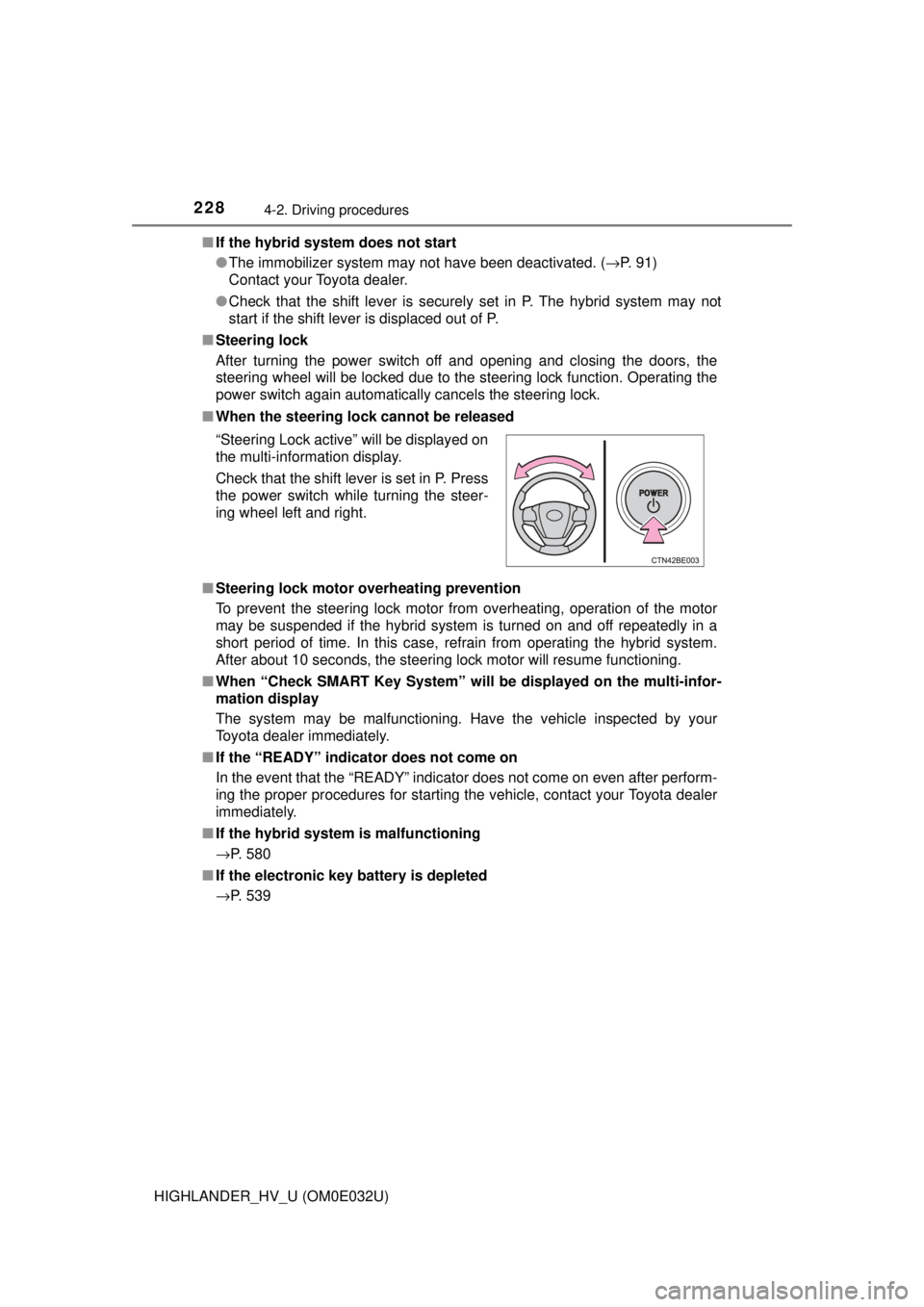
■ When the steering lock cannot be released
■ Steering lock motor o verheating prevention
To prevent the steering lock motor from overheating, operation of the motor
may be suspended if the hybrid system is turned on and off repeatedly in a
short period of time. In this case, refrain from operating the hybrid system.
After about 10 seconds, the steering lock motor will resume functioning.
■ When “Check SMART Key System” will be displayed on the multi-infor-
mation display
The system may be malfunctioning. Have the vehicle inspected by your
Toyota dealer immediately.
■ If the “READY” indicator does not come on
In the event that the “READY” indicator does not come on even after perform-
ing the proper procedures for starting the vehicle, contact your Toyota dealer
immediately.
■ If the hybrid system is malfunctioning
→P. 580
■ If the electronic key battery is depleted
→P. 539 “Steering Lock active” will be displayed on
the multi-information display.
Check that the shift lever is set in P. Press
the power switch while turning the steer-
ing wheel left and right.
Page 229 of 716

2294-2. Driving procedures
4
Driving
HIGHLANDER_HV_U (OM0E032U)■
Operation of the power switch
●If the switch is not pressed shortly and firmly, the power switch mode may
not change or the hybrid system may not start.
● If attempting to restart the hybrid system immediately after turning the power
switch off, the hybrid system may not start in some cases. After turning the
power switch off, please wait a few seconds before restarting the hybrid sys-
tem.
■ If the smart key system has been deactivated in a customized setting
→P. 622
WARNING
■When starting the hybrid system
Always start the hybrid system while sitting in the driver’s seat. Do not
depress the accelerator pedal while starting the hybrid system under any
circumstances.
Doing so may cause an accident resulting in death or serious injury.
■ Caution while driving
If hybrid system failure occurs while the vehicle is moving, do not lock or
open the doors until the vehicle reaches a safe and complete stop. Activa-
tion of the steering lock in this circumstance may lead to an accident, result-
ing in death or serious injury.
■ Stopping the hybrid system in an emergency
If you want to stop the hybrid system in an emergency while driving the
vehicle, press and hold the power switch for more than 2 seconds, or press
it briefly 3 times or more in succession. ( →P. 561)
However, do not touch the power switch while driving except in an emer-
gency. Turning the hybrid system off while driving will not cause loss of
steering or braking control, however, power assist to the steering will be
lost. This will make it more difficult to steer smoothly, so you should pull over
and stop the vehicle as soon as it is safe to do so.
Page 328 of 716
3284-5. Using the driving support systems
HIGHLANDER_HV_U (OM0E032U)
◆ECB (Electronically Controlled Brake System)
The electronically controlled system generates braking force corre-
sponding to the brake operation
◆ABS (Anti-lock Brake System)
Helps to prevent wheel lock when the brakes are applied suddenly,
or if the brakes are applied while driving on a slippery road surface
◆Brake assist
Generates an increased level of braking force after the brake pedal
is depressed when the system detects a panic stop situation
◆VSC (Vehicle Stability Control)
Helps the driver to control skidding when swerving suddenly or
turning on slippery road surfaces
◆Enhanced VSC (Enhanced Ve hicle Stability Control)
Provides cooperative control of the ABS, TRAC, VSC and EPS.
Helps to maintain directional stability when swerving on slippery
road surfaces by controllin g steering performance.
◆Trailer Sway Control
Helps the driver to control trailer sway by selectively applying brake
pressure for individual wheels and reducing driving torque when
trailer sway is detected.
◆TRAC (Traction Control)
Helps to maintain drive power and prevent the drive wheels from
spinning when starting the vehicle or accelerating on slippery roads
Driving assist systems
To help enhance driving safety and performance, the following
systems operate automatically in response to various driving
situations. Be aware, however, that these systems are supple-
mentary and should not be relied upon too heavily when operat-
ing the vehicle.
Page 329 of 716

3294-5. Using the driving support systems
4
Driving
HIGHLANDER_HV_U (OM0E032U)
◆Hill-start assist control
Helps to reduce the backward movement of the vehicle when start-
ing on an uphill
◆EPS (Electric Power Steering)
Employs an electric motor to redu ce the amount of effort needed to
turn the steering wheel
◆VDIM (Vehicle Dynamics Integrated Management)
Provides integrated control of the ABS, brake assist, TRAC, VSC,
hill-start assist control, and EPS systems
Helps to maintain vehicle stab ility when swerving on slippery road
surfaces by controlling the br akes and hybrid system output
Page 332 of 716

3324-5. Using the driving support systems
HIGHLANDER_HV_U (OM0E032U)■
ECB operation sound
ECB operating sound may be heard in the following cases, but it does not
indicate that a malfunction has occurred.
●Operating sound heard from the engine compartment when the brake pedal
is operated.
● Motor sound of the brake system heard from the front part of the vehicle
when the driver’s door is opened.
● Operating sound heard from the engine compartment when one or two min-
utes passed after the stop of the hybrid system.
■ EPS operating sound
When the steering wheel is operated, a motor sound (whirring sound) may be
heard. This does not indicate a malfunction.
■ Automatic reactivation of TRAC and VSC systems
After turning the TRAC and VSC systems off, the systems will be automati-
cally re-enabled in the following situations:
● When the power switch is turned off
● If only the TRAC system is turned off, the TRAC will turn on when vehicle
speed increases
If both the TRAC and VSC systems are turned off, automatic re-enabling will
not occur when vehicle speed increases.
■ Reduced effectiveness of the EPS system
The effectiveness of the EPS system is reduced to prevent the system from
overheating when there is frequent steering input over an extended period of
time. The steering wheel may feel heavy as a result. Should this occur, refrain
from excessive steering input or stop the vehicle and turn the hybrid system
off. The EPS system should return to normal within 10 minutes.
WARNING
■The ABS does not operate effectively when
● The limits of tire gripping performance have been exceeded (such as
excessively worn tires on a snow covered road).
● The vehicle hydroplanes while driving at high speed on wet or slick roads.
■ Stopping distance when the ABS is operating may exceed that of nor-
mal conditions
The ABS is not designed to shorten the vehicle’s stopping distance. Always
maintain a safe distance from the vehicle in front of you, especially in the
following situations:
● When driving on dirt, gravel or snow-covered roads
● When driving with tire chains
● When driving over bumps on the road
● When driving over roads with potholes or uneven surfaces
Page 433 of 716

433
6Interior features
HIGHLANDER_HV_U (OM0E032U)6-1. Using the air
conditioning system
and defogger
Front automatic air conditioning system ........ 434
Rear automatic air conditioning system ........ 441
Heated steering wheel/ seat heaters/
seat ventilators ................ 444
6-2. Using the interior lights
Interior lights list ................ 447
• Interior lights ................. 448
• Personal lights .............. 448
6-3. Using the storage features
List of storage features ..... 449
• Glove box...................... 450
• Console box .................. 450
• Bottle holders ................ 451
• Cup holders .................. 452
• Auxiliary boxes.............. 454
• Open tray ...................... 455
Luggage compartment features ........................... 456 6-4. Using the other
interior features
Other interior features ....... 461
• Sun visors ..................... 461
• Vanity mirrors................ 461
• Conversation mirror ...... 462
• Clock ............................. 462
• Outside temperature display........................... 463
• Power outlets ................ 464
• USB charging ports....... 466
• Rear sunshades............ 468
• Armrest ......................... 469
• Coat hooks.................... 470
• Assist grips ................... 470
• Side table ...................... 471
Garage door opener.......... 472
Safety Connect ................. 479
Compass ........................... 485