warning light TOYOTA HIGHLANDER HYBRID 2018 (in English) Owner's Manual
[x] Cancel search | Manufacturer: TOYOTA, Model Year: 2018, Model line: HIGHLANDER HYBRID, Model: TOYOTA HIGHLANDER HYBRID 2018Pages: 716, PDF Size: 12.03 MB
Page 87 of 716
871-2. Hybrid system
1
For safety and security
HIGHLANDER_HV_U (OM0E032U)
■If a warning light comes on, a warn ing message is displayed, or the 12-
volt battery is disconnected
The hybrid system may not start. In this case, try to start the system again. If
the “READY” indicator does not come on, contact your Toyota dealer.
■ When refueling, the fuel filler door may take a few moments to open
As part of emission system operation, it may take up to 10 seconds for the
fuel filler door to automatically release after the opener switch is pressed.
Before refueling is possible, a message will be shown on the multi-informa-
tion display. ( →P. 256)
■ Running out of fuel
When the vehicle has run out of fuel and the hybrid system cannot be started,
refuel the vehicle with at least enough gasoline to make the low fuel le\
vel
warning light ( →P. 568) go off. If there is only a small amount of fuel, the
hybrid system may not be able to start. (The standard amount of fuel is about
2.6 gal. [9.7 L, 2.1 Imp. gal.], when the vehicle is on a level surface. This
value may vary when the vehicle is on a slope. Add extra fuel when the vehi-
cle is inclined.)
■ Electromagnetic waves
●High voltage parts and cables on hybrid vehicles incorporate electromag-
netic shielding, and therefore emit approximately the same amount of elec-
tromagnetic waves as conventional gasoline powered vehicles or home
electronic appliances.
● Your vehicle may cause sound interference in some third party-produced
radio parts.
■ Hybrid battery (traction battery)
The hybrid battery (traction battery) has a limited service life. The lifespan of
the hybrid battery (traction battery) can change in accordance with driving
style and driving conditions.
Page 97 of 716
97
Instrument cluster2
HIGHLANDER_HV_U (OM0E032U)2. Instrument cluster
Warning lights and indicators .......................... 98
Gauge and meters ............ 103
Multi-information display ... 107
Energy monitor/ consumption screen ........ 113
Page 98 of 716
98
HIGHLANDER_HV_U (OM0E032U)
2. Instrument cluster
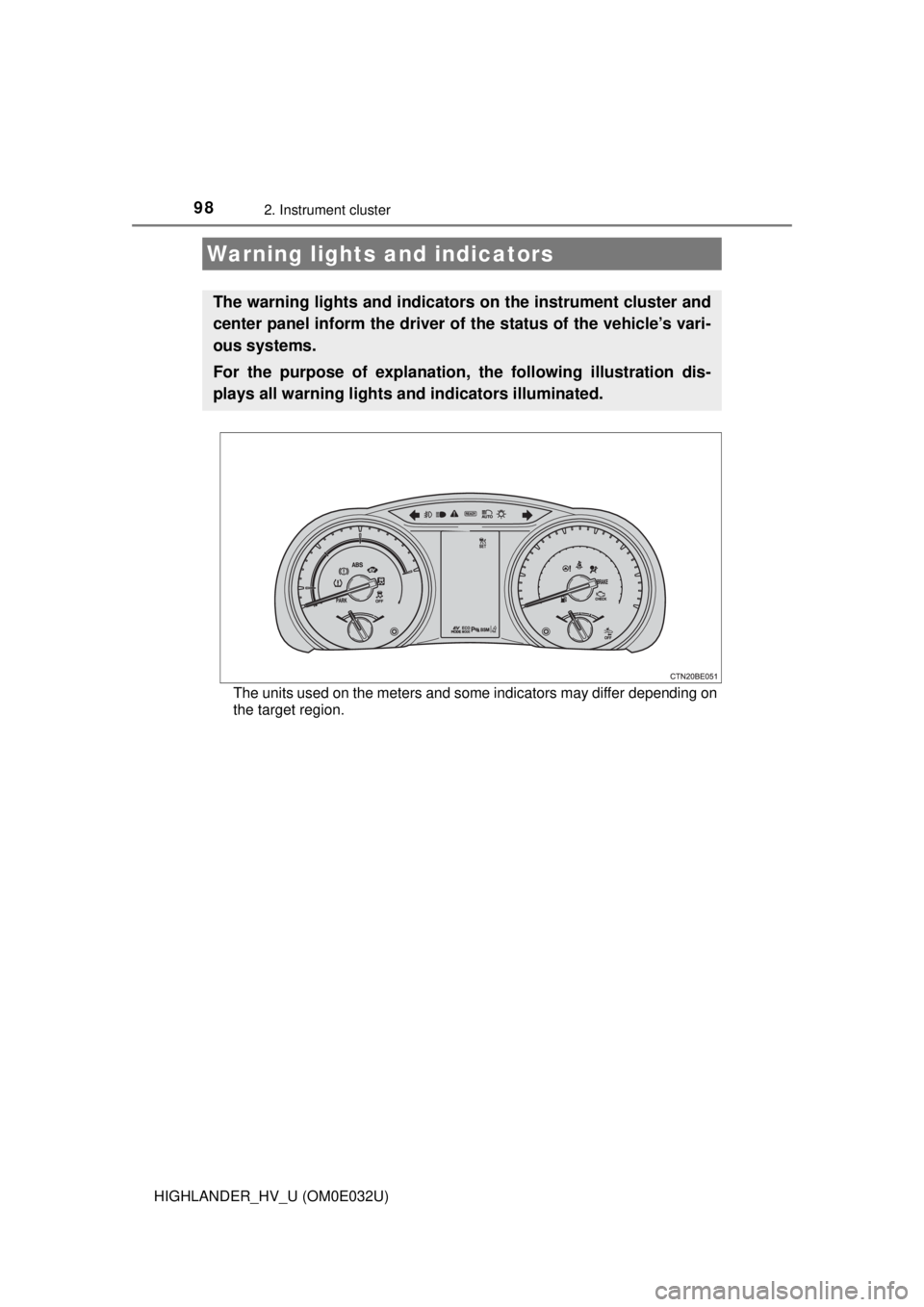
The units used on the meters and some indicators may differ depending on
the target region.
Warning lights and indicators
The warning lights and indicators on the instrument cluster and
center panel inform the driver of the status of the vehicle’s vari-
ous systems.
For the purpose of explanation, the following illustration dis-
plays all warning lights a nd indicators illuminated.
Page 99 of 716
992. Instrument cluster
2
Instrument cluster
HIGHLANDER_HV_U (OM0E032U)
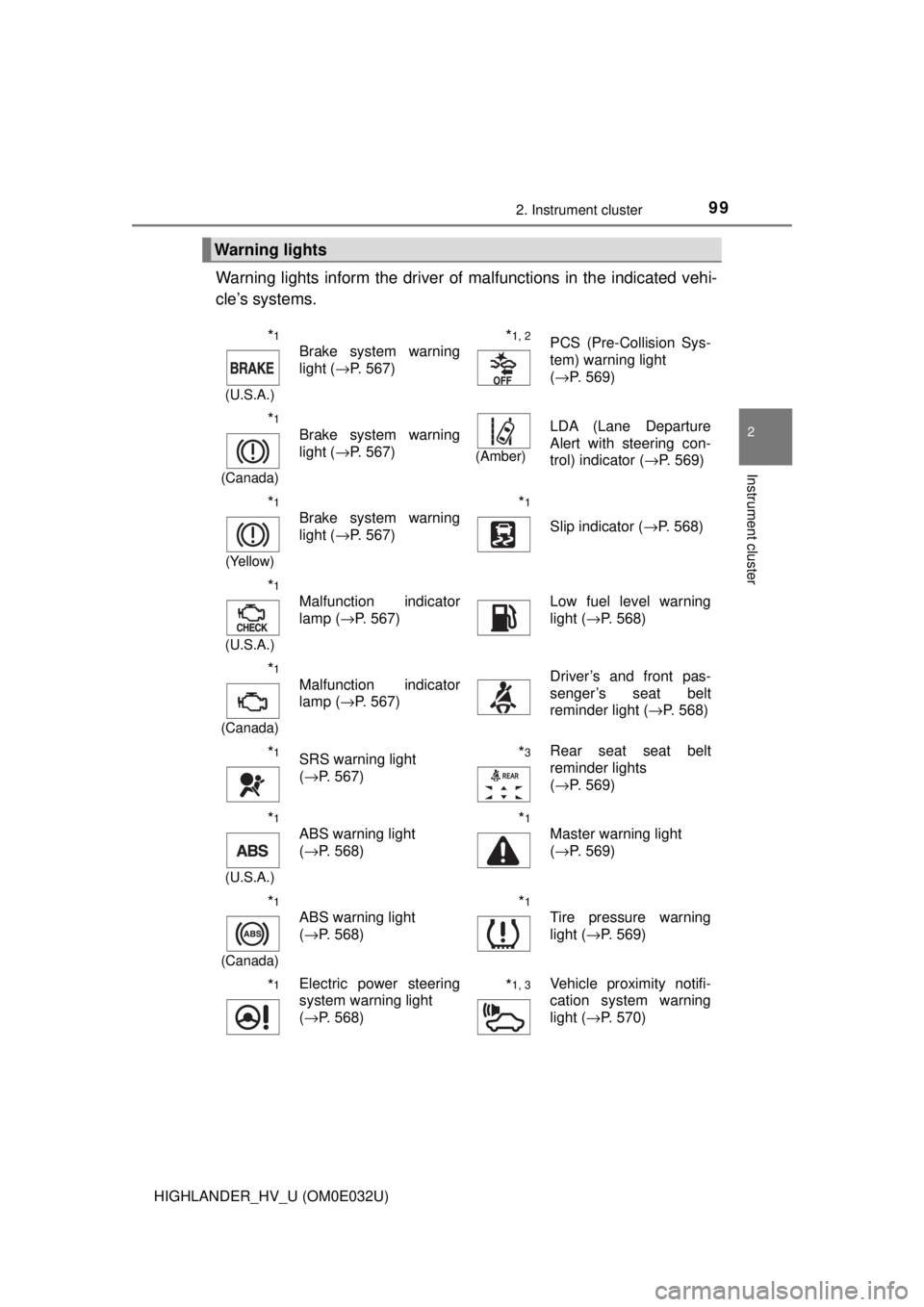
Warning lights inform the driver of malfunctions in the indicated vehi-
cle’s systems.
Warning lights
*1
(U.S.A.)
Brake system warning
light ( →P. 567)*1, 2PCS (Pre-Collision Sys-
tem) warning light
(→P. 569)
*1
(Canada)
Brake system warning
light ( →P. 567)
(Amber)
LDA (Lane Departure
Alert with steering con-
trol) indicator ( →P. 569)
*1
(Yellow)
Brake system warning
light (→P. 567)*1
Slip indicator ( →P. 568)
*1
(U.S.A.)
Malfunction indicator
lamp (→P. 567)Low fuel level warning
light (→P. 568)
*1
(Canada)
Malfunction indicator
lamp ( →P. 567)Driver’s and front pas-
senger’s seat belt
reminder light ( →P. 568)
*1SRS warning light
(→P. 567)*3Rear seat seat belt
reminder lights
(→P. 569)
*1
(U.S.A.)
ABS warning light
(→P. 568)*1
Master warning light
(→P. 569)
*1
(Canada)
ABS warning light
(→P. 568)*1
Tire pressure warning
light ( →P. 569)
*1Electric power steering
system warning light
(→P. 568)*1, 3Vehicle proximity notifi-
cation system warning
light ( →P. 570)
Page 100 of 716

1002. Instrument cluster
HIGHLANDER_HV_U (OM0E032U)
*1: These lights turn on when the power switch is turned to ON mode to indi-cate that a system check is being performed. They will turn off after the
hybrid system is on, or after a few seconds. There may be a malfunction in
a system if a light does not come on, or if the lights do not turn off. Have
the vehicle inspected by your Toyota dealer.
*2: This light flashes to indicate a malfunction.
*3: This light illuminates on the center panel.
*1
(U.S.A)
Parking brake warning
light ( →P. 568)*1
(Canada)
Parking brake warning
light (→P. 568)
Page 101 of 716
1012. Instrument cluster
2
Instrument cluster
HIGHLANDER_HV_U (OM0E032U)
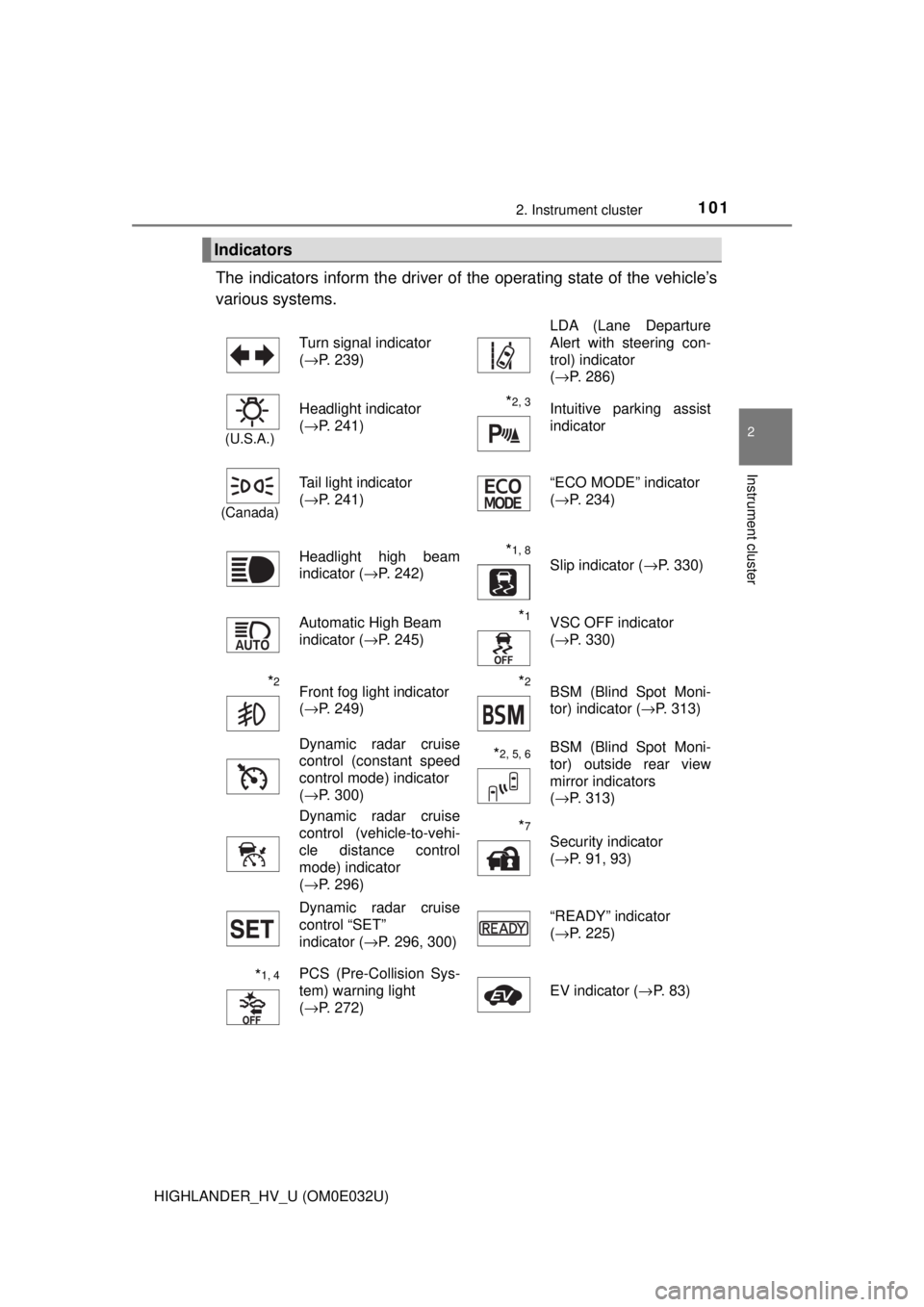
The indicators inform the driver of the operating state of the vehicle’s
various systems.
Indicators
Turn signal indicator
( →P. 239) LDA (Lane Departure
Alert with steering con-
trol) indicator
(
→P. 286)
(U.S.A.)
Headlight indicator
(→P. 241)*2, 3 Intuitive parking assist
indicator
(Canada)
Tail light indicator
(→P. 241) “ECO MODE” indicator
(
→P. 234)
Headlight high beam
indicator ( →P. 242)
*1, 8 Slip indicator ( →P. 330)
Automatic High Beam
indicator ( →P. 245)
*1VSC OFF indicator
(→P. 330)
*2Front fog light indicator
(→P. 249)*2BSM (Blind Spot Moni-
tor) indicator ( →P. 313)
Dynamic radar cruise
control (constant speed
control mode) indicator
( →P. 300)
*2, 5, 6BSM (Blind Spot Moni-
tor) outside rear view
mirror indicators
(→P. 313)
Dynamic radar cruise
control (vehicle-to-vehi-
cle distance control
mode) indicator
( →P. 296)
*7
Security indicator
(→P. 91, 93)
Dynamic radar cruise
control “SET”
indicator ( →P. 296, 300) “READY” indicator
(
→P. 225)
*1, 4PCS (Pre-Collision Sys-
tem) warning light
(→P. 272) EV indicator (
→P. 83)
Page 102 of 716
1022. Instrument cluster
HIGHLANDER_HV_U (OM0E032U)
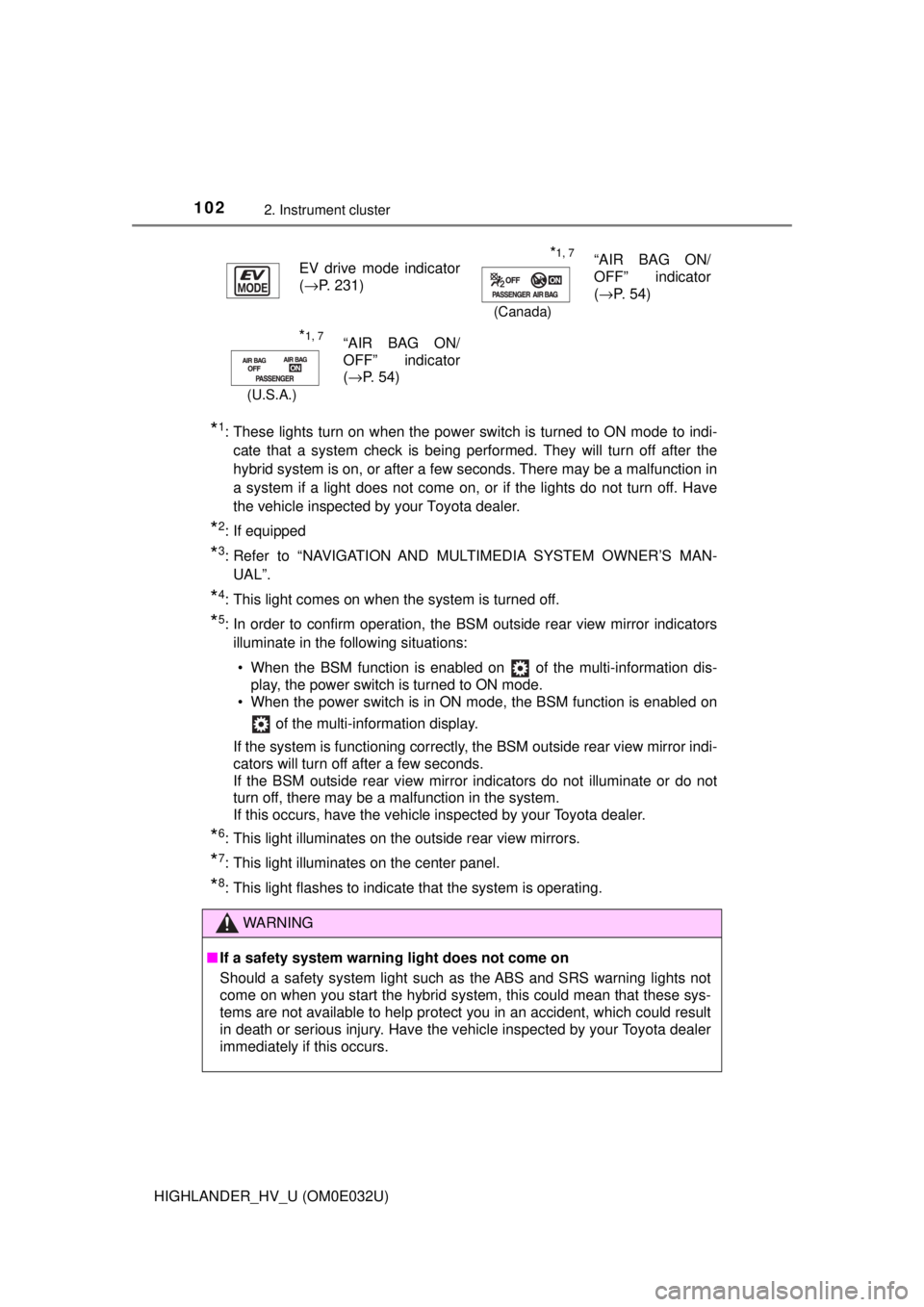
*1: These lights turn on when the power switch is turned to ON mode to indi-cate that a system check is being performed. They will turn off after the
hybrid system is on, or after a few seconds. There may be a malfunction in
a system if a light does not come on, or if the lights do not turn off. Have
the vehicle inspected by your Toyota dealer.
*2: If equipped
*3: Refer to “NAVIGATION AND MULTIMEDIA SYSTEM OWNER’S MAN-UAL”.
*4: This light comes on when the system is turned off.
*5: In order to confirm operation, the BS M outside rear view mirror indicators
illuminate in the following situations:
• When the BSM function is enabled on of the multi-information dis- play, the power switch is turned to ON mode.
• When the power switch is in ON mode, the BSM function is enabled on
of the multi-information display.
If the system is functioning correctly, the BSM outside rear view mirror indi-
cators will turn off after a few seconds.
If the BSM outside rear view mirror indicators do not illuminate or do not
turn off, there may be a malfunction in the system.
If this occurs, have the vehicle inspected by your Toyota dealer.
*6: This light illuminates on the outside rear view mirrors.
*7: This light illuminates on the center panel.
*8: This light flashes to indicate that the system is operating. EV drive mode indicator
(
→P. 231)
*1, 7
(Canada)
“AIR BAG ON/
OFF” indicator
(→P. 54)
*1, 7
(U.S.A.)
“AIR BAG ON/
OFF” indicator
(→P. 54)
WARNING
■ If a safety system warning light does not come on
Should a safety system light such as the ABS and SRS warning lights not
come on when you start the hybrid system, this could mean that these sys-
tems are not available to help protect you in an accident, which could r\
esult
in death or serious injury. Have the vehicle inspected by your Toyota dealer
immediately if this occurs.
Page 111 of 716
1112. Instrument cluster
2
Instrument cluster
HIGHLANDER_HV_U (OM0E032U)
●Accent color
Select to change the accent colors on the screen, such as the
cursor color.
● Speed limit display
* (if equipped)
Select to set the display of speed limit information stored in the
navigation system to on with the speed limit caution indicator
(yellow) enabled, on with the sp eed limit caution not enabled, or
off. If enabled, the s peed limit caution indicator will come on if the
vehicle speed exceeds th e displayed speed limit.
● Initialization
Registered or changed meter settings will be deleted or returned
to their default setting.
*: Speed limit display may not be available for some regions.
■Settings can be changed
Customizable features: →P. 666
■ Pop-up display
In some situations, such as when a switch operation is performed, a pop-up
display, will be temporarily displayed on the multi-information display.
The pop-up display function can be set on/off.
■ Setting display automatic cancelation
In the following situations, setting display in which the settings can b\
e
changed through the meter control switch will automatically be turned off.
●When a warning message appears while the setting display is displayed
● When the vehicle begins to move while the setting display is displayed
■ Liquid crystal display
Small spots or light spots may appear on the display. This phenomenon is
characteristic of liquid crystal displays, and there is no problem continuing to
use the display.
Page 137 of 716
1373-2. Opening, closing and locking the doors
3
Operation of each component
HIGHLANDER_HV_U (OM0E032U)
WARNING
■Operating the back door
Observe the following precautions.
Failure to do so may cause parts of the body to be caught, resulting in death
or serious injury.
● Remove any heavy loads, such as snow and ice, from the back door
before opening it. Failure to do so may cause the back door to suddenly
shut again after it is opened.
● When opening or closing the back door, thoroughly check to make sure
the surrounding area is safe.
● If anyone is in the vicinity, make sure they are safe and let them know that
the back door is about to open or close.
● Use caution when opening or closing the back door in windy weather as it
may move abruptly in strong wind.
● Do not pull on the back door damper stay (vehicles without a power back
door) or back door spindle (vehicles with a power back door) to close the
back door, and do not hang on the back door damper stay (vehicles with-
out a power back door) or back door spindle (vehicles with a power back
door).
Doing so may cause hands to be caught or the back door damper stay
(vehicles without a power back door) or back door spindle (vehicles with a
power back door) to break, causing an accident.
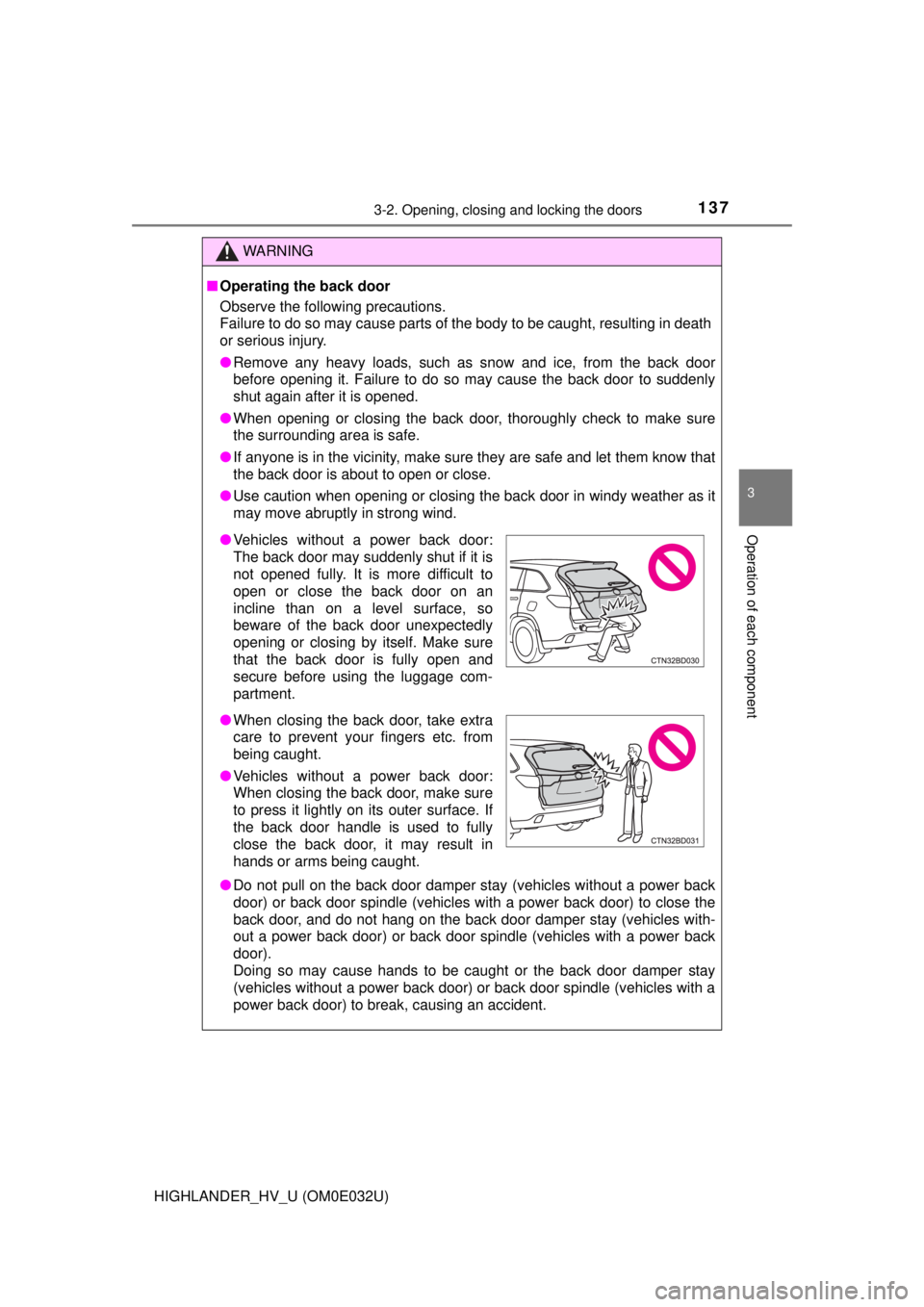
●Vehicles without a power back door:
The back door may suddenly shut if it is
not opened fully. It is more difficult to
open or close the back door on an
incline than on a level surface, so
beware of the back door unexpectedly
opening or closing by itself. Make sure
that the back door is fully open and
secure before using the luggage com-
partment.
● When closing the back door, take extra
care to prevent your fingers etc. from
being caught.
● Vehicles without a power back door:
When closing the back door, make sure
to press it lightly on its outer surface. If
the back door handle is used to fully
close the back door, it may result in
hands or arms being caught.
Page 138 of 716
1383-2. Opening, closing and locking the doors
HIGHLANDER_HV_U (OM0E032U)
WARNING
●Vehicles without a power back door: If a bicycle carrier or similar heavy
object is attached to the back door, it may suddenly shut again after being
opened, causing someone’s hands, head or neck to be caught and
injured. When installing an accessory part to the back door, using a genu-
ine Toyota part is recommended.
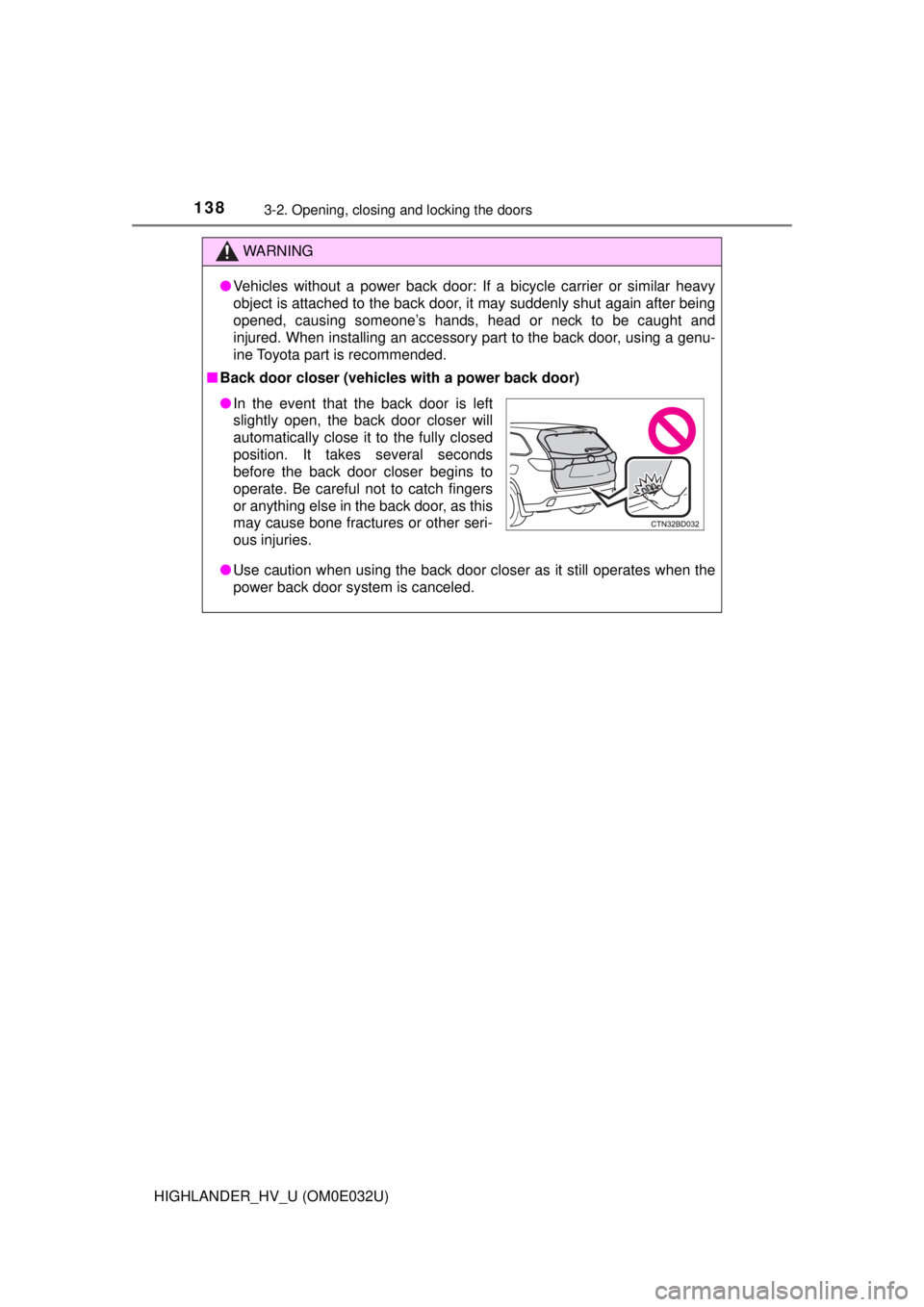
■ Back door closer (vehicles with a power back door)
● Use caution when using the back door closer as it still operates when the
power back door system is canceled.
●In the event that the back door is left
slightly open, the back door closer will
automatically close it to the fully closed
position. It takes several seconds
before the back door closer begins to
operate. Be careful not to catch fingers
or anything else in the back door, as this
may cause bone fractures or other seri-
ous injuries.