AUX TOYOTA HIGHLANDER HYBRID 2019 Owners Manual (in English)
[x] Cancel search | Manufacturer: TOYOTA, Model Year: 2019, Model line: HIGHLANDER HYBRID, Model: TOYOTA HIGHLANDER HYBRID 2019Pages: 716, PDF Size: 14.31 MB
Page 4 of 716

TABLE OF CONTENTS4
HIGHLANDER_HV_U5-1. Basic Operations
Audio system types ........... 354
Entune Audio..................... 355
Steering wheel audio switches ................ 358
AUX Port/USB Port ........... 359
Basic audio operations ...... 360
5-2. Setup Setup menu ....................... 362
General settings ................ 363
Audio settings.................... 364
Display settings ................. 365
Voice settings .................... 366
5-3. Using Entune Audio Selecting the audio source ................... 367
List screen operation ......... 368
Optimal use of Entune Audio .................. 370
5-4. Using the radio Radio operation ................. 371
5-5. Playing an audio CD and MP3/WMA/AAC discs
CD player operation .......... 373
5-6. Using an external device
Listening to an iPod........... 379
Listening to a USB memory device................ 383
Using the AUX port ........... 387 5-7. Connecting Bluetooth
®
Preparations to
use wireless
communication ................ 388
Registering a Bluetooth
®
audio player
for the first time................ 392
Registering a Bluetooth
®
phone for the first time..... 393
Registering a Bluetooth
®
device .............................. 394
Connecting a Bluetooth
®
device .............................. 396
Displaying a Bluetooth
®
device details................... 398
Detailed Bluetooth
®
system settings................ 399
5-8. Bluetooth
® Audio
Listening to Bluetooth®
Audio ............................... 400
5-9. Bluetooth
® phone
Using a Bluetooth®
Phone .............................. 401
Making a call...................... 403
Receiving a call ................. 406
Speaking on the phone...... 407
Bluetooth
® phone
message function ............ 410
Using the steering wheel switches ................ 414
Bluetooth
® phone
settings ............................ 415
Contact/Call History Settings ........................... 416
What to do if... (Troubleshooting) ............ 425
5Audio system
Page 5 of 716
5
1
9 8 6 5
4
3
2
HIGHLANDER_HV_U
10
7
5-10. Bluetooth®
Bluetooth®......................... 429
5-11. Using the voice command system
Voice command system .... 433
6-1. Using the air conditioning system
and defogger
Front automatic air conditioning system ........ 440
Rear automatic air conditioning system ........ 447
Heated steering wheel/ seat heaters/
seat ventilators ................ 450
6-2. Using the interior lights Interior lights list ................ 453
• Interior lights ................. 454
• Personal lights .............. 454
6-3. Using the storage features
List of storage features...... 455
• Glove box...................... 456
• Console box .................. 456
• Bottle holders ................ 457
• Cup holders .................. 458
• Auxiliary boxes .............. 460
• Open tray ...................... 461
Luggage compartment features ........................... 462 6-4. Using the other
interior features
Other interior features........ 467
• Sun visors ..................... 467
• Vanity mirrors ................ 467
• Conversation mirror ....... 468
• Clock ............................. 468
• Outside temperature display ........................... 469
• Power outlets ................ 470
• USB charging ports ....... 472
• Rear sunshades ............ 474
• Armrest.......................... 475
• Coat hooks .................... 476
• Assist grips .................... 476
• Side table ...................... 477
Garage door opener .......... 478
Compass ........................... 485
6Interior features
Page 25 of 716
25Pictorial index
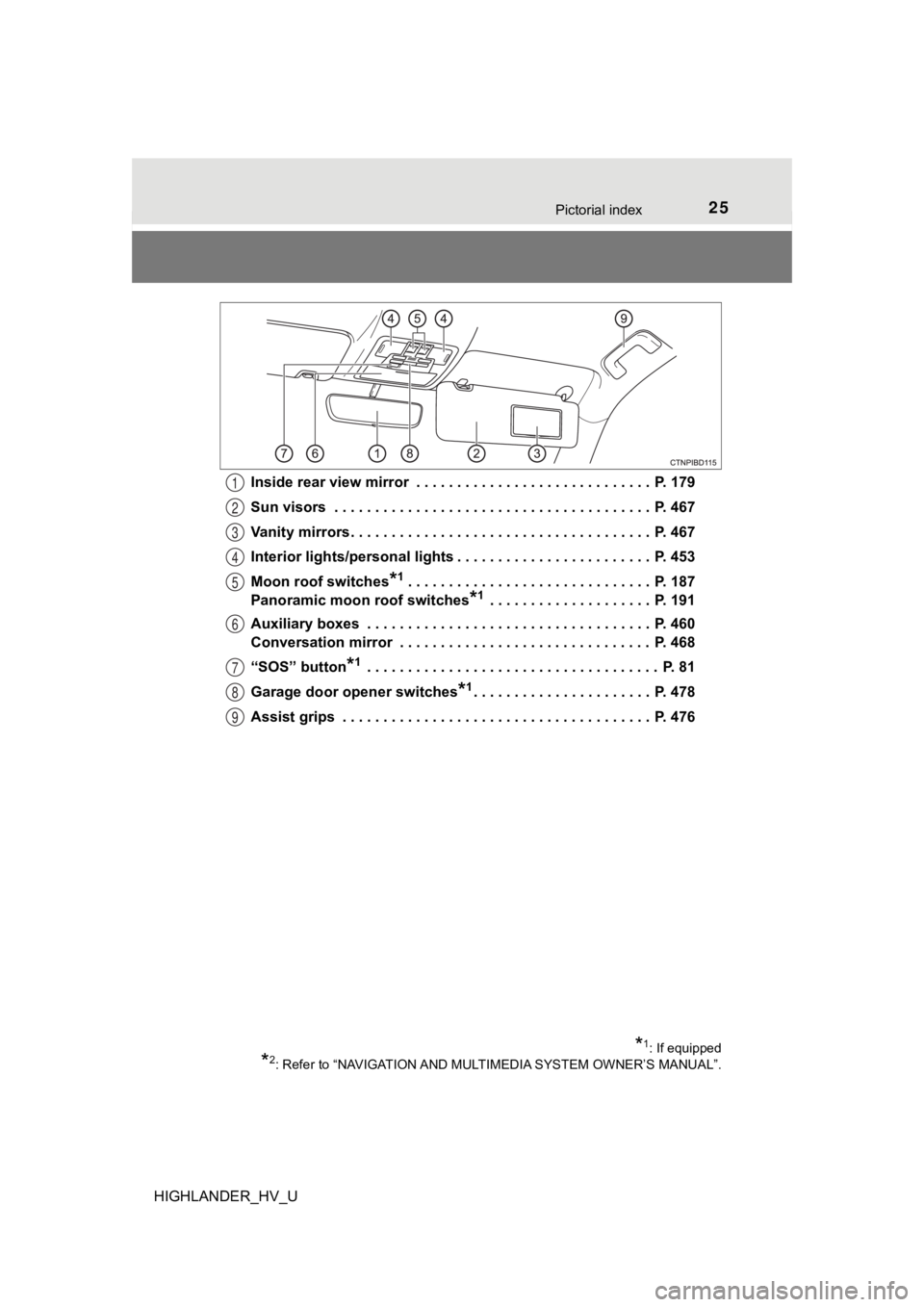
HIGHLANDER_HV_UInside rear view mirror . . . . . . . . . . . . . . . . . . . . . . . . . . . . . P. 179
Sun visors . . . . . . . . . . . . . . . . . . . . . . . . . . . . . . . . . . . . . . . P. 467
Vanity mirrors . . . . . . . . . . . . . . . . . . . . . . . . . . . . . . . . . . . . . P. 467
Interior lights/personal lights . . . . . . . . . . . . . . . . . . . . . . . . P. 453
Moon roof switches
*1 . . . . . . . . . . . . . . . . . . . . . . . . . . . . . . P.
187
Panoramic moon roof switches
*1 . . . . . . . . . . . . . . . . . . . . P. 191
Auxiliary boxes . . . . . . . . . . . . . . . . . . . . . . . . . . . . . . . . . . . P. 460
Conversation mirror . . . . . . . . . . . . . . . . . . . . . . . . . . . . . . . P. 468
“SOS” button
*1 . . . . . . . . . . . . . . . . . . . . . . . . . . . . . . . . . . . . P. 81
Garage door opener switches
*1. . . . . . . . . . . . . . . . . . . . . . P. 478
Assist grips . . . . . . . . . . . . . . . . . . . . . . . . . . . . . . . . . . . . . . P. 476
1
2
3
4
5
6
7
8
9
*1: If equipped
*2: Refer to “NAVIGATION AND MULT IMEDIA SYSTEM OWNER’S MANUAL”.
Page 98 of 716

981-4. Theft deterrent system
HIGHLANDER_HV_U■
Certification for the immobilizer system
For vehicles sold in the U.S.A.
FCC ID: NI4TMIMB-3
This device complies with part 15 of the FCC Rules. Operation is subject to
the following two conditions: (1) This device may not cause har mful interfer-
ence; and (2) This device must accept any interference received, including
interference that may cause undesired operation.
Changes or modifications not expressly approved by the party re sponsible for
compliance could void the user's authority to operate the equip ment.
For vehicles sold in Canada
This device complies with Industry Canada licence-exempt RSSs. Operation
is subject to the following two conditions: (1) This device may not cause inter-
ference; and (2) This device must accept any interference, incl uding interfer-
ence that may cause undesired operation of the device.
Le présent appareil est conforme aux CNR d'lndustrie Canada app licables
aux appareils radio exempts de licence. L'exploitation est auto risée aux deux
conditions suivantes: (1) l'appareil ne doit pas produire de br ouillage; (2) l'util-
isateur de l'appareil doit accepter tout brouillage radioélectr ique subi, même
si le brouillage est susceptible d'en compromettre le fonctionn ement.
NOTICE
■To ensure the system operates correctly
Do not modify or remove the system. If modified or removed, the proper
operation of the system cannot be guaranteed.
Page 156 of 716

1563-2. Opening, closing and locking the doors
HIGHLANDER_HV_U■
Note for the entry function
●Even when the electronic key is within the effective range (det ection areas),
the system may not operate properly in the following cases:
• The electronic key is too close to the window or outside door handle, near
the ground, or in a high place when the doors are locked or unl ocked.
• The electronic key is near the ground or in a high place, or t oo close to
the rear bumper center when the back door is opened.
• The electronic key is on the instrument panel or floor, or in the auxiliary
box of the driver's side instrument panel, door pockets or glove box when
the hybrid system is started or power switch modes are changed.
● Do not leave the electronic key on top of the instrument panel or near the
door pockets when exiting the vehicle. Depending on the radio w ave recep-
tion conditions, it may be detected by the antenna outside the cabin and the
door will become lockable from the outside, possibly trapping the electronic
key inside the vehicle.
● As long as the electronic key is within the effective range, th e doors may be
locked or unlocked by anyone. However, only the doors detecting the elec-
tronic key can be used to unlock the vehicle.
● Even if the electronic key is not inside the vehicle, it may be possible to start
the hybrid system if the electronic key is near the window.
● The doors may unlock or lock if a large amount of water splashe s on the
door handle, such as in the rain or in a car wash when the elec tronic key is
within the effective range. (The doors will automatically be lo cked after
approximately 60 seconds if the doors are not opened and closed.)
● If the wireless remote control is used to lock the doors when t he electronic
key is near the vehicle, there is a possibility that the door m ay not be
unlocked by the entry function. (Use the wireless remote contro l to unlock
the doors.)
● Touching the door lock or unlock sensor while wearing gloves ma y prevent
lock or unlock operation. Remove the gloves and touch the lock or unlock
sensor again.
● When the lock operation is performed using the lock sensor, rec ognition sig-
nals will be shown up to two consecutive times. After this, no recognition
signals will be given.
● If the door handle becomes wet while the electronic key is with in the effec-
tive range, the door may lock and unlock repeatedly. In that ca se, follow the
following correction procedures to wash the vehicle:
• Place the electronic key in a location 6 ft. (2 m) or more awa y from the
vehicle. (Take care to ensure that the key is not stolen.)
• Set the electronic key to battery-saving mode to disable the s mart key
system. ( P. 154)
Page 158 of 716

1583-2. Opening, closing and locking the doors
HIGHLANDER_HV_U■
Certification for the smart key system
For vehicles sold in the U.S.A.
FCC ID: HYQ23AAB FCC ID: HYQ14FBA
NOTE:
This device complies with part 15 of the FCC Rules. Operation is subject to
the following two conditions: (1) This device may not cause har mful interfer-
ence, and (2) this device must accept any interference received, including
interference that may cause undesired operation.
FCC WARNING:
Changes or modifications not expressly approved by the party re sponsible for
compliance could void the user’s authority to operate the equip ment.
For vehicles sold in Canada
NOTE:
This device complies with Industry Canada's licence-exempt RSSs . Opera-
tion is subject to the following two conditions:
(1) This device may not cause interference; and
(2) This device must accept any interference, including interference that may
cause undesired operation of the device.
For vehicles sold in the U.S.A.
FCC ID: NI4TMLF12-6
This device complies with part 15 of the FCC Rules. Operation is subject to
the following two conditions: (1) This device may not cause har mful interfer-
ence; and (2) This device must accept any interference received, including
interference that may cause undesired operation.
Changes or modifications not expressly approved by the party re sponsible for
compliance could void the user’s authority to operate the equip ment.
For vehicles sold in Canada
This device complies with Industry Canada licence-exempt RSSs. Operation
is subject to the following two conditions: (1) This device may not cause inter-
ference; and (2) This device must accept any interference, incl uding interfer-
ence that may cause undesired operation of the device.
NOTE:
Le présent appareil est conforme aux CNR d'lndustrie Canada app licables
aux appareils radio exempts de licence. L'exploitation est auto risée aux deux
conditions suivantes: (1) l'appareil ne doit pas produire de br ouillage; (2) l'util-
isateur de l'appareil doit accepter tout brouillage radioélectr ique subi, même
si le brouillage est susceptible d'en compromettre le fonctionn ement.
Page 323 of 716

3234-5. Using the driving support systems
4
Driving
HIGHLANDER_HV_U■
Certification for the Blind Spot Monitor
For vehicles sold in the U.S.A.
FCC ID : OAYSRR3A
This device complies with part 15 of the FCC Rules. Operation is subject to
the following two conditions:
(1) This device may not cause harmful interference, and
(2) this device must accept any interference received, including interference that may cause undesired operation.
FCC Warning
Changes or modifications not expressly approved by the party re sponsible for
compliance could void the user's authority to operate the equip ment.
For vehicles sold in Canada
Applicable law : Canada 310
This device complies with Industry Canada licence-exempt RSS standard(s).
Operation is subject to the following two conditions: (1) this device may not
cause interference, and (2) this device must accept any interfe rence, includ-
ing interference that may cause undesired operation of the devi ce.
Frequency bands : 24.05 - 24.25GHz
Output power : less than 20 milliwatts
Droit applicable : Canada 310
Le présent appareil est conforme aux CNR d’Industrie Canada app licables
aux appareils radio exempts de licence. L’exploitation est auto risée aux deux
conditions suivantes : (1) l’ appareil ne doit pas produire de b rouillage, et (2)
l’utilisateur de l’appareil doit accepter tout brouillage radio électrique subi,
même si le brouillage est susceptible d’en compromettre le fonctionnement.
Bandes de fréquences : 24.05 - 24.25GHz
Puissance émise : Moins de 20 milliwatts
Page 352 of 716

352
HIGHLANDER_HV_U5-1. Basic Operations
Audio system types ........... 354
Entune Audio .................... 355
Steering wheel audio switches ................ 358
AUX Port/USB Port ........... 359
Basic audio operations...... 360
5-2. Setup Setup menu....................... 362
General settings ................ 363
Audio settings ................... 364
Display settings ................. 365
Voice settings.................... 366
5-3. Using Entune Audio Selecting the audio source ................... 367
List screen operation......... 368
Optimal use of Entune Audio .................. 370
5-4. Using the radio Radio operation................. 371
5-5. Playing an audio CD and MP3/WMA/AAC discs
CD player operation .......... 373
5Audio system
Page 353 of 716

353
5Audio system
HIGHLANDER_HV_U5-6. Using an external device
Listening to an iPod .......... 379
Listening to a USB memory device................ 383
Using the AUX port ........... 387
5-7. Connecting Bluetooth
®
Preparations to use wireless
communication ................ 388
Registering a Bluetooth
®
audio player for the
first time .......................... 392
Registering a Bluetooth
®
phone for the
first time .......................... 393
Registering a Bluetooth
®
device.............................. 394
Connecting a Bluetooth
®
device.............................. 396
Displaying a Bluetooth
®
device details .................. 398
Detailed Bluetooth
®
system settings ............... 399
5-8. Bluetooth
® Audio
Listening to Bluetooth®
Audio ............................... 400 5-9. Bluetooth
® phone
Using a Bluetooth®
Phone ............................. 401
Making a call ..................... 403
Receiving a call ................. 406
Speaking on the phone .............................. 407
Bluetooth
® phone
message function ............ 410
Using the steering wheel switches ................ 414
Bluetooth
® phone
settings ........................... 415
Contact/Call History Settings ........................... 416
What to do if... (Troubleshooting) ............ 425
5-10. Bluetooth
®
Bluetooth®......................... 429
5-11. Using the voice command system
Voice command system ............................ 433
Page 359 of 716
3595-1. Basic Operations
5
Audio system
HIGHLANDER_HV_U■
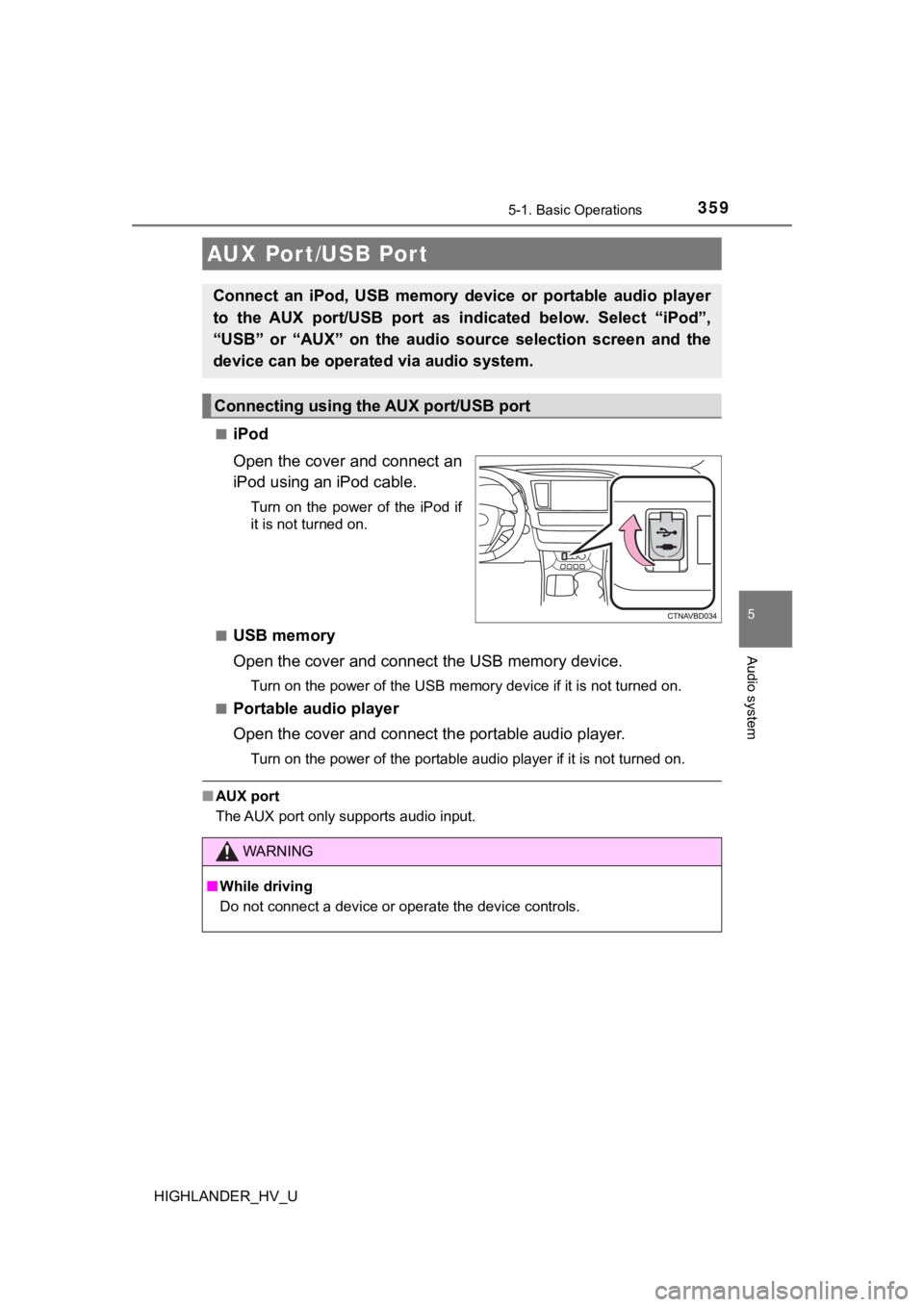
iPod
Open the cover and connect an
iPod using an iPod cable.
Turn on the power of the iPod if
it is not turned on.
■
USB memory
Open the cover and connec t the USB memory device.
Turn on the power of the USB memory device if it is not turned on.
■
Portable audio player
Open the cover and connect the portable audio player.
Turn on the power of the portable audio player if it is not tur ned on.
■AUX port
The AUX port only supports audio input.
AUX Por t/USB Por t
Connect an iPod, USB memory device or portable audio player
to the AUX port/USB port as indi cated below. Select “iPod”,
“USB” or “AUX” on th e audio source selection screen and the
device can be operated via audio system.
Connecting using the AUX port/USB port
WARNING
■ While driving
Do not connect a device or operate the device controls.