battery cover TOYOTA HIGHLANDER HYBRID 2019 Owners Manual (in English)
[x] Cancel search | Manufacturer: TOYOTA, Model Year: 2019, Model line: HIGHLANDER HYBRID, Model: TOYOTA HIGHLANDER HYBRID 2019Pages: 716, PDF Size: 14.31 MB
Page 155 of 716

1553-2. Opening, closing and locking the doors
3
Operation of each component
HIGHLANDER_HV_U■
Conditions affecting operation
The smart key system uses weak radio waves. In the following si tuations, the
communication between the electronic key and the vehicle may be affected,
preventing the smart key system, wireless remote control and immobilizer
system from operating properly. (Ways of coping: P. 622)
● When the electronic key battery is depleted
● Near a TV tower, electric power plant, gas station, radio stati on, large dis-
play, airport or other facility that generates strong radio wav es or electrical
noise
● When carrying a portable radio, cellular phone, cordless phone or other
wireless communication devices
● When the electronic key is in contact with, or is covered by the following
metallic objects
• Cards to which aluminum foil is attached
• Cigarette boxes that have aluminum foil inside
• Metallic wallets or bags
• Coins
• Hand warmers made of metal
• Media such as CDs and DVDs
● When other wireless keys (that emit radio waves) are being used nearby
● When carrying the electronic key together with the following devices that
emit radio waves
• Another vehicle’s electronic key or a wireless key that emits radio waves
• Personal computers or personal digital assistants (PDAs)
• Digital audio players
• Portable game systems
● If window tint with a metallic content or metallic objects are attached to the
rear window
● When the electronic key is placed near a battery charger or ele ctronic
devices
Page 380 of 716

3805-6. Using an external device
HIGHLANDER_HV_U
■About iPod
●“Made for iPod”, “Made for iPhone” and “Made for iPad” mean that an elec-
tronic accessory has been designed to connect specifically to i Pod or
iPhone, or iPad, respectively, and has been certified by the de veloper to
meet Apple performance standards.
● Apple is not responsible for the operation of this device or it s compliance
with safety and regulatory standards. Please note that the use of this acces-
sory with iPod, iPhone or iPad may affect wireless performance.
● iPad, iPhone, iPod, iPod classic, iPod nano, and iPod touch are trademarks
of Apple Inc., registered in the U.S. and other countries. Lightning is a trade-
mark of Apple Inc.
■ iPod cover art
●Depending on the iPod and songs in the iPod, iPod cover art may be dis-
played.
● This function can be changed to on/off. ( P. 364)
● It may take time to display iPod cover art, and the iPod may no t be operated
while the cover art display is in process.
● Only iPod cover art that is saved in JPEG format can be display ed.
■ iPod functions
●When an iPod is connected and the audio source is changed to iP od mode,
the iPod will resume play from the same point in which it was last used.
● Depending on the iPod that is connected to the system, certain functions
may not be available. If a function is unavailable due to a mal function (as
opposed to a system specification), disconnecting the device and recon-
necting it may resolve the problem.
● While connected to the system, the iPod cannot be operated with its own
controls. It is necessary to use the controls of the vehicle's Entune Audio
instead.
● When the battery level of an iPod is very low, the iPod may not operate. If
so, charge the iPod before use.
● Compatible models ( P. 3 8 2 )
Page 429 of 716
429
5
Audio system
HIGHLANDER_HV_U
5-10. Bluetooth®
■When using the Bluetooth® audio system
● In the following conditions, the system may not function.
• If the portable audio player is turned off
• If the portable audio player is not connected
• If the portable audio player’s battery is low
● There may be a delay if a cellular phone connection is made dur ing
Bluetooth
® audio play.
● Depending on the type of portable audio player that is connecte d to the sys-
tem, operation may differ slightly and certain functions may no t be available.
■ When using the hands-free system
●Entune Audio is muted when making a call.
● If both parties speak at the same time, it may be difficult to hear.
● If the received call volume is overly loud, an echo may be heard.
If the Bluetooth
® phone is too close to the system, quality of the sound may
deteriorate and connection status may deteriorate.
● In the following circumstances, it may be difficult to hear the other party:
• When driving on unpaved roads
• When driving at high speeds
• If a roof or window is open
• If the air conditioning is blowing directly on the microphone
• If there is interference from the network of the cellular phon e
■ Conditions under which the system will not operate
●If using a cellular phone that does not support Bluetooth
®
●If the cellular phone is turned off
● If you are outside of cellular phone service coverage
● If the cellular phone is not connected
● If the cellular phone’s battery is low
● When outgoing calls are controlled, due to heavy traffic on tel ephone lines,
etc.
● When the cellular phone itself cannot be used
● When transferring contact data from the cellular phone
Bluetooth®
Page 430 of 716

4305-10. Bluetooth®
HIGHLANDER_HV_U■
Bluetooth
® antenna
The antenna is built into the display.
If the portable audio player is behind the seat or in the glove box or console
box, or is touching or covered by metal objects, the connection status may
deteriorate.
If the cellular phone is behind the seat or in the console box, or touching or
covered by metal objects, the connection status may deteriorate .
■ Battery charge/signal status
●This display may not correspond exactly with the portable audio player or
cellular phone itself.
● This system does not have a charging function.
● The portable audio player or cellular phone battery will be dep leted quickly
when the device is connected to Bluetooth
®.
■ When using the Bluetooth
® audio and hands-free system at the same
time
The following problems may occur.
● The Bluetooth
® audio connection may be interrupted.
● Noise may be heard during Bluetooth
® audio playback.
■ About the contact in this system
The following data is stored for every registered cellular phone. When
another phone is connecting, you cannot read the registered dat a.
● Contact data
● Call history
● Favorite
● Message
When removing a Bluetooth
® phone from the system, the above-mentioned
data is also deleted.
Page 450 of 716
4506-1. Using the air conditioning system and defogger
HIGHLANDER_HV_U
Heated steering wheel/seat heaters/
seat ventilators
: If equipped
The heated steering wheel and seat heaters heat the side grips
of the steering wheel and seats, respectively. Seat ventilators
maintain good airflow by blo wing air from the seats.
WARNING
●Care should be taken to prevent injury if anyone in the following categories
comes in contact with the steering wheel and seats when the hea ter is on:
• Babies, small children, the elderly, the sick and the physical ly chal-
lenged
• Persons with sensitive skin
• Persons who are fatigued
• Persons who have taken alcohol or drugs that induce sleep (sle eping
drugs, cold remedies, etc.)
● Observe the following precautions to prevent minor burns or ove rheating
• Do not cover the seat with a blanket or cushion when using the seat
heater.
• Do not use the seat heaters more than necessary.
NOTICE
● Do not put heavy objects that have an uneven surface on the sea t and do
not stick sharp objects (needles, nails, etc.) into the seat.
● To prevent 12-volt battery discharge, do not use the functions when the
hybrid system is off.
Page 467 of 716
467
6
Interior features
HIGHLANDER_HV_U
6-4. Using the other interior features
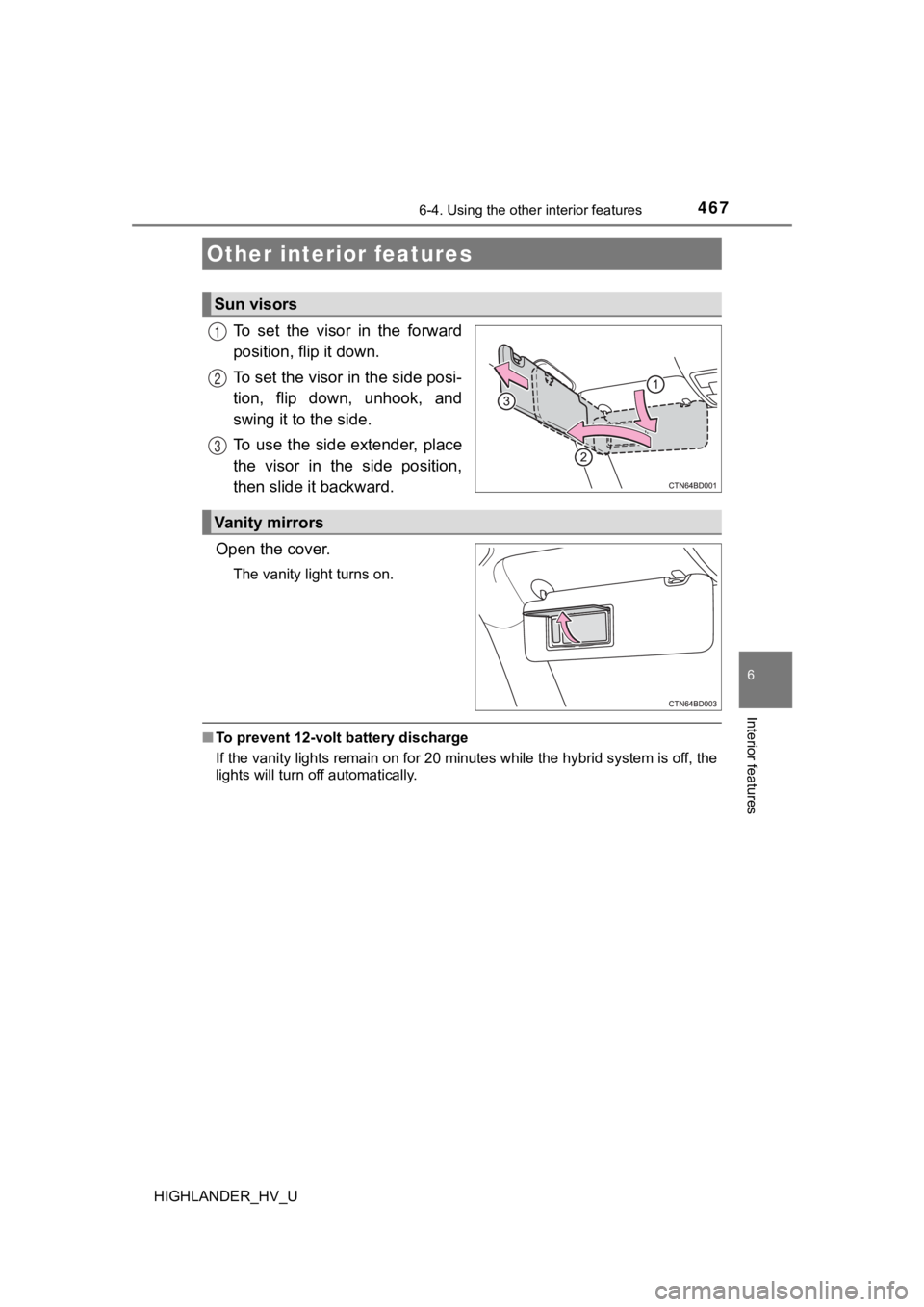
To set the visor in the forward
position, flip it down.
To set the visor in the side posi-
tion, flip down, unhook, and
swing it to the side.
To use the side extender, place
the visor in the side position,
then slide it backward.
Open the cover.
The vanity light turns on.
■ To prevent 12-volt battery discharge
If the vanity lights remain on for 20 minutes while the hybrid system is off, the
lights will turn off automatically.
Other interior features
Sun visors
1
2
3
Vanity mirrors
Page 517 of 716
5177-3. Do-it-yourself maintenance
7
Maintenance and care
HIGHLANDER_HV_U■
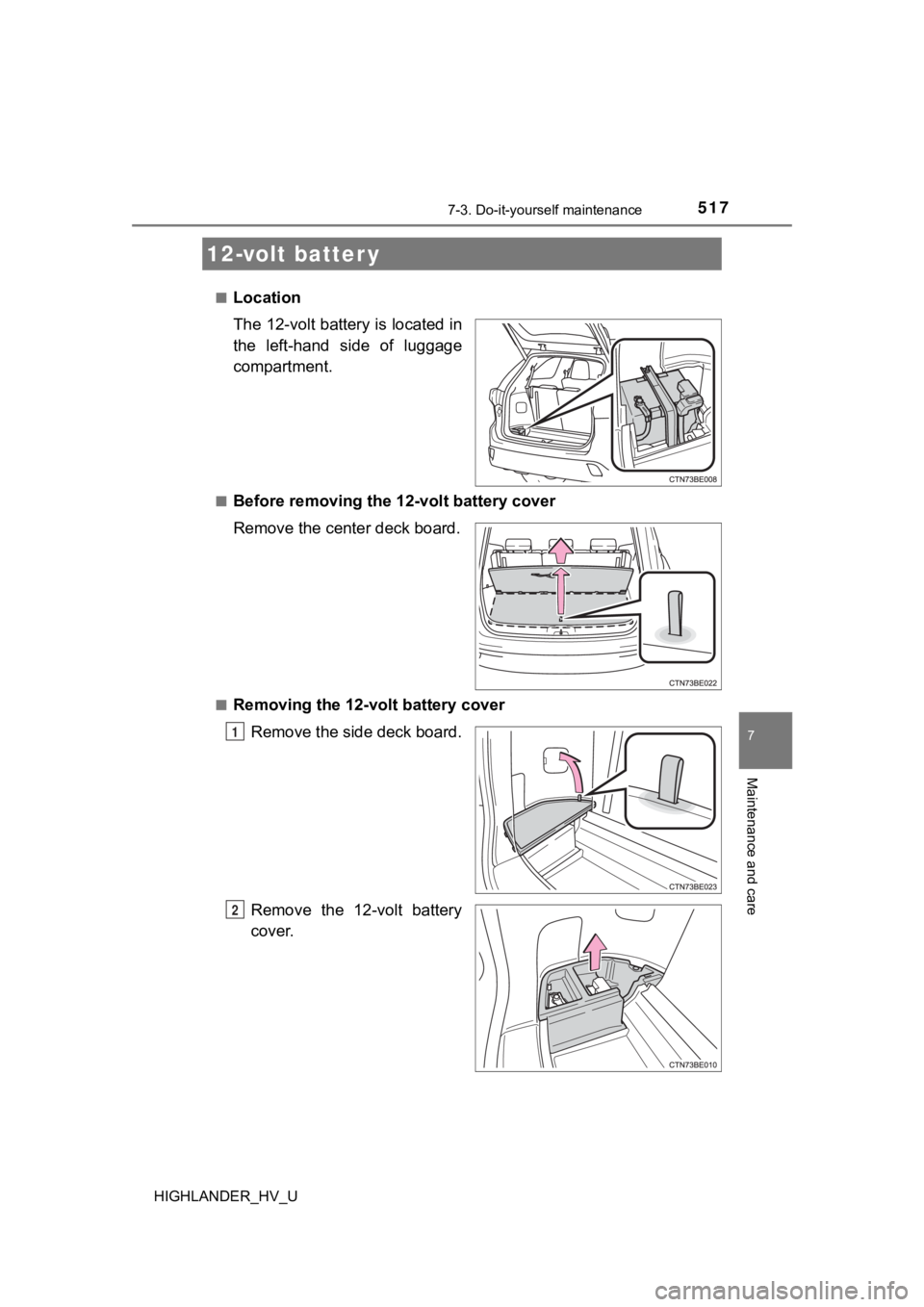
Location
The 12-volt battery is located in
the left-hand side of luggage
compartment.
■Before removing the 12-volt battery cover
Remove the center deck board.
■Removing the 12-volt battery cover
Remove the side deck board.
Remove the 12-volt battery
cover.
12-volt batter y
1
2
Page 518 of 716
5187-3. Do-it-yourself maintenance
HIGHLANDER_HV_U
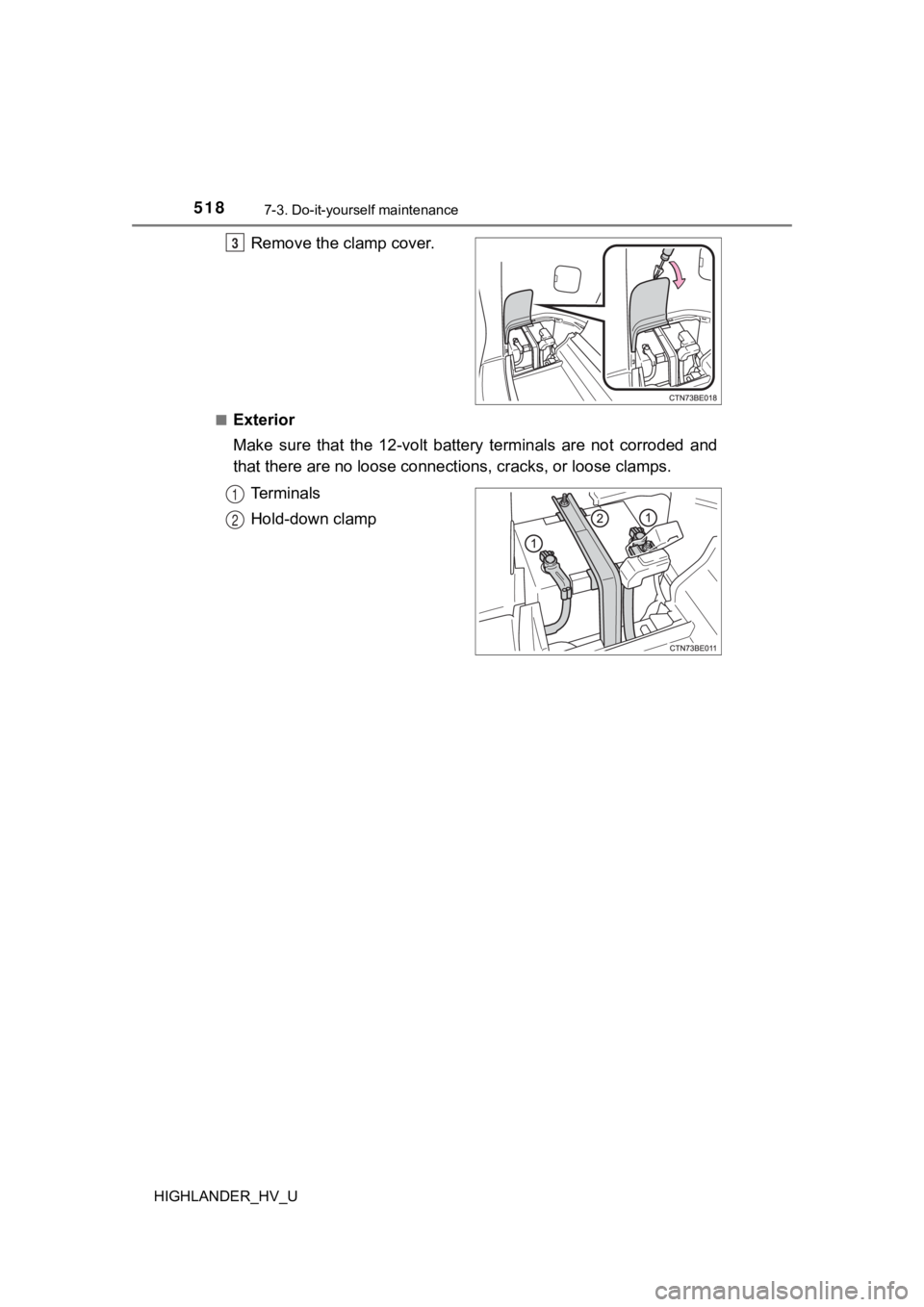
Remove the clamp cover.
■Exterior
Make sure that the 12-volt battery terminals are not corroded and
that there are no loose connecti ons, cracks, or loose clamps.
Terminals
Hold-down clamp
3
1
2
Page 519 of 716
5197-3. Do-it-yourself maintenance
7
Maintenance and care
HIGHLANDER_HV_U■
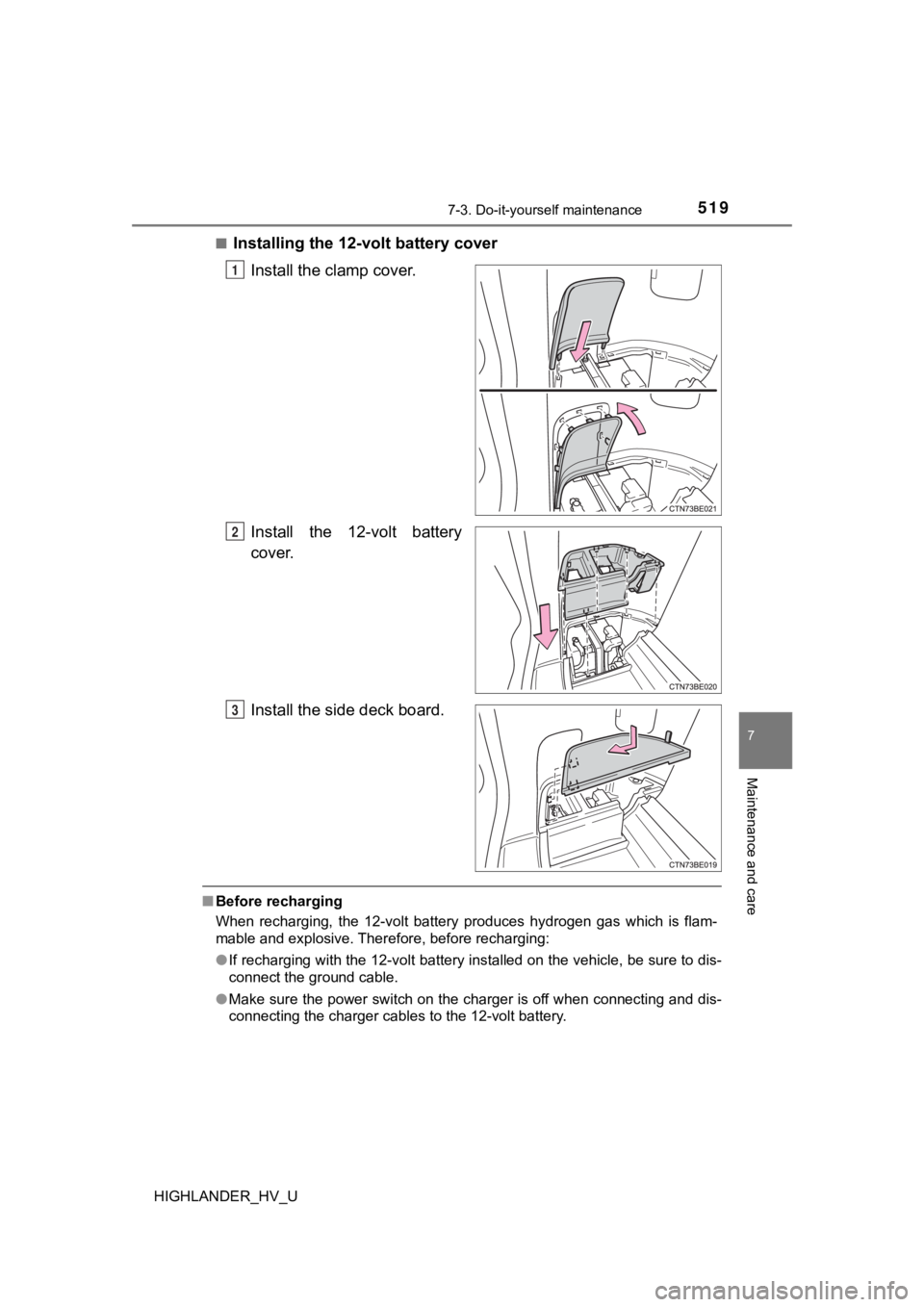
Installing the 12-volt battery cover
Install the clamp cover.
Install the 12-volt battery
cover.
Install the side deck board.
■Before recharging
When recharging, the 12-volt battery produces hydrogen gas which is flam-
mable and explosive. Therefore, before recharging:
●If recharging with the 12-volt battery installed on the vehicle , be sure to dis-
connect the ground cable.
● Make sure the power switch on the charger is off when connectin g and dis-
connecting the charger cables to the 12-volt battery.
1
2
3
Page 539 of 716
5397-3. Do-it-yourself maintenance
7
Maintenance and care
HIGHLANDER_HV_U
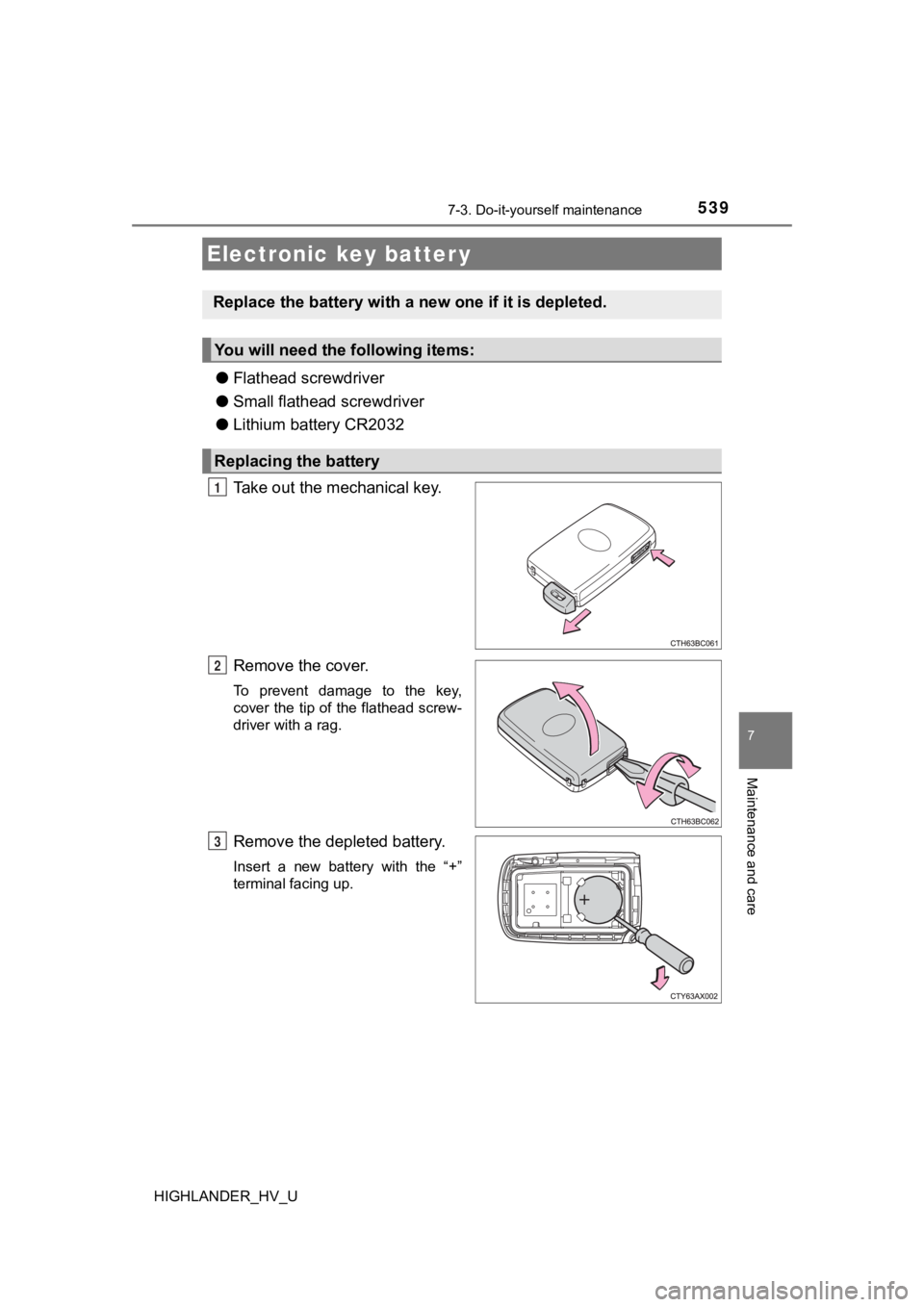
●Flathead screwdriver
● Small flathead screwdriver
● Lithium battery CR2032
Take out the mechanical key.
Remove the cover.
To prevent damage to the key,
cover the tip of the flathead screw-
driver with a rag.
Remove the depleted battery.
Insert a new battery with the “+”
terminal facing up.
Electronic key batter y
Replace the battery with a n ew one if it is depleted.
You will need the following items:
Replacing the battery
1
2
3