Box TOYOTA HIGHLANDER HYBRID 2023 User Guide
[x] Cancel search | Manufacturer: TOYOTA, Model Year: 2023, Model line: HIGHLANDER HYBRID, Model: TOYOTA HIGHLANDER HYBRID 2023Pages: 572, PDF Size: 14.07 MB
Page 355 of 572
3555-4. Using the other interior features
5
Interior features
5-4.Using the other interior features
The USB charging ports are
used to supply 3 A of electricity
at 5 V to external devices.
The USB charging ports are for
charging only. They are not
designed for data transfer or
other purposes.
Depending on the external
device, it may not charge prop-
erly. Refer to the manual
included with the device before
using a USB charging port.
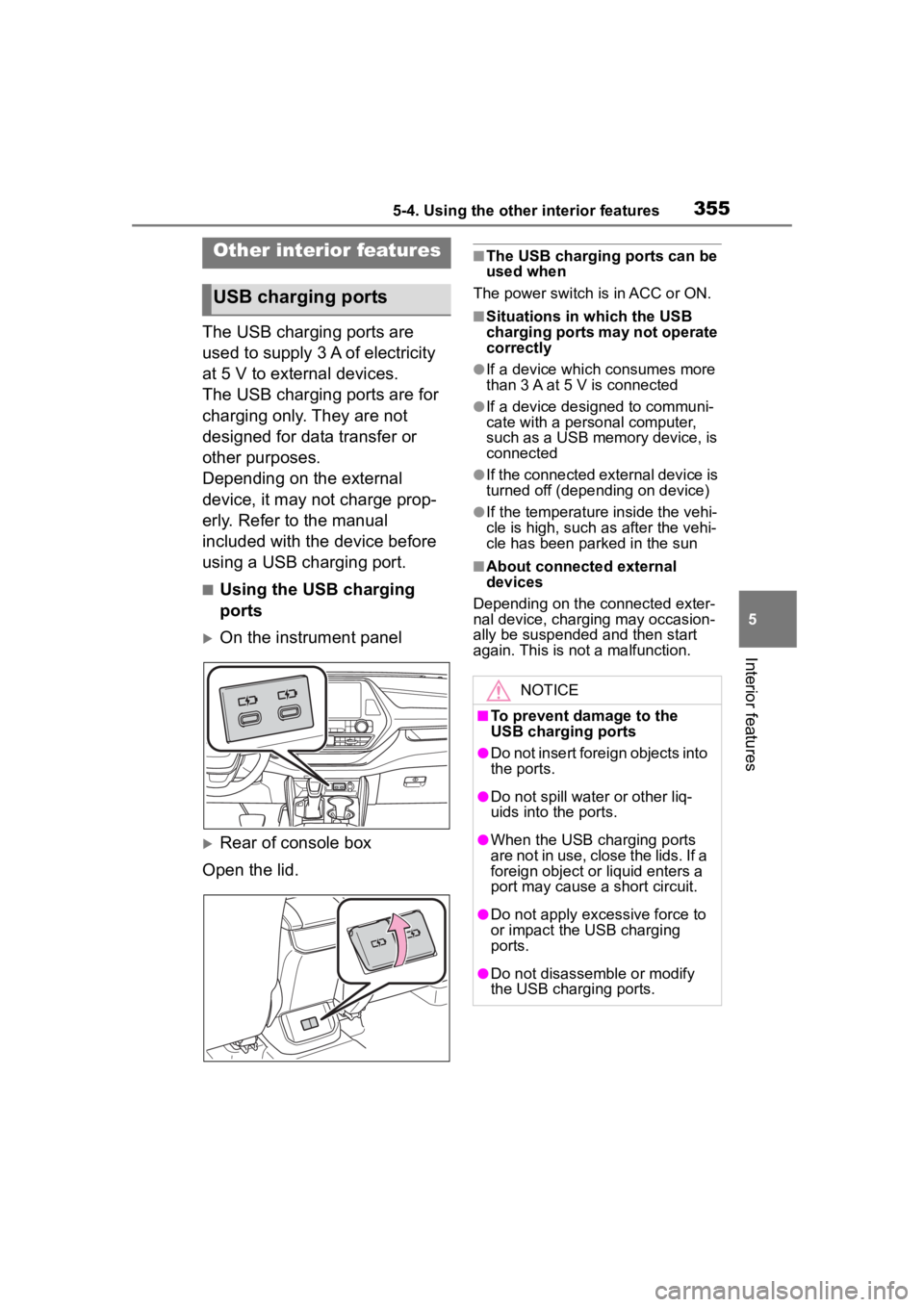
■Using the USB charging
ports
On the instrument panel
Rear of console box
Open the lid.
■The USB charging ports can be
used when
The power switch is in ACC or ON.
■Situations in which the USB
charging ports may not operate
correctly
●If a device which consumes more
than 3 A at 5 V is connected
●If a device designed to communi-
cate with a personal computer,
such as a USB memory device, is
connected
●If the connected external device is
turned off (depend ing on device)
●If the temperature inside the vehi-
cle is high, such as after the vehi-
cle has been parked in the sun
■About connected external
devices
Depending on the connected exter-
nal device, charging may occasion-
ally be suspended and then start
again. This is not a malfunction.
Other interior features
USB charging ports
NOTICE
■To prevent damage to the
USB charging ports
●Do not insert foreign objects into
the ports.
●Do not spill water or other liq-
uids into the ports.
●When the USB charging ports
are not in use, close the lids. If a
foreign object or liquid enters a
port may cause a short circuit.
●Do not apply excessive force to
or impact the USB charging
ports.
●Do not disassemble or modify
the USB charging ports.
Page 364 of 572
3645-4. Using the other interior features
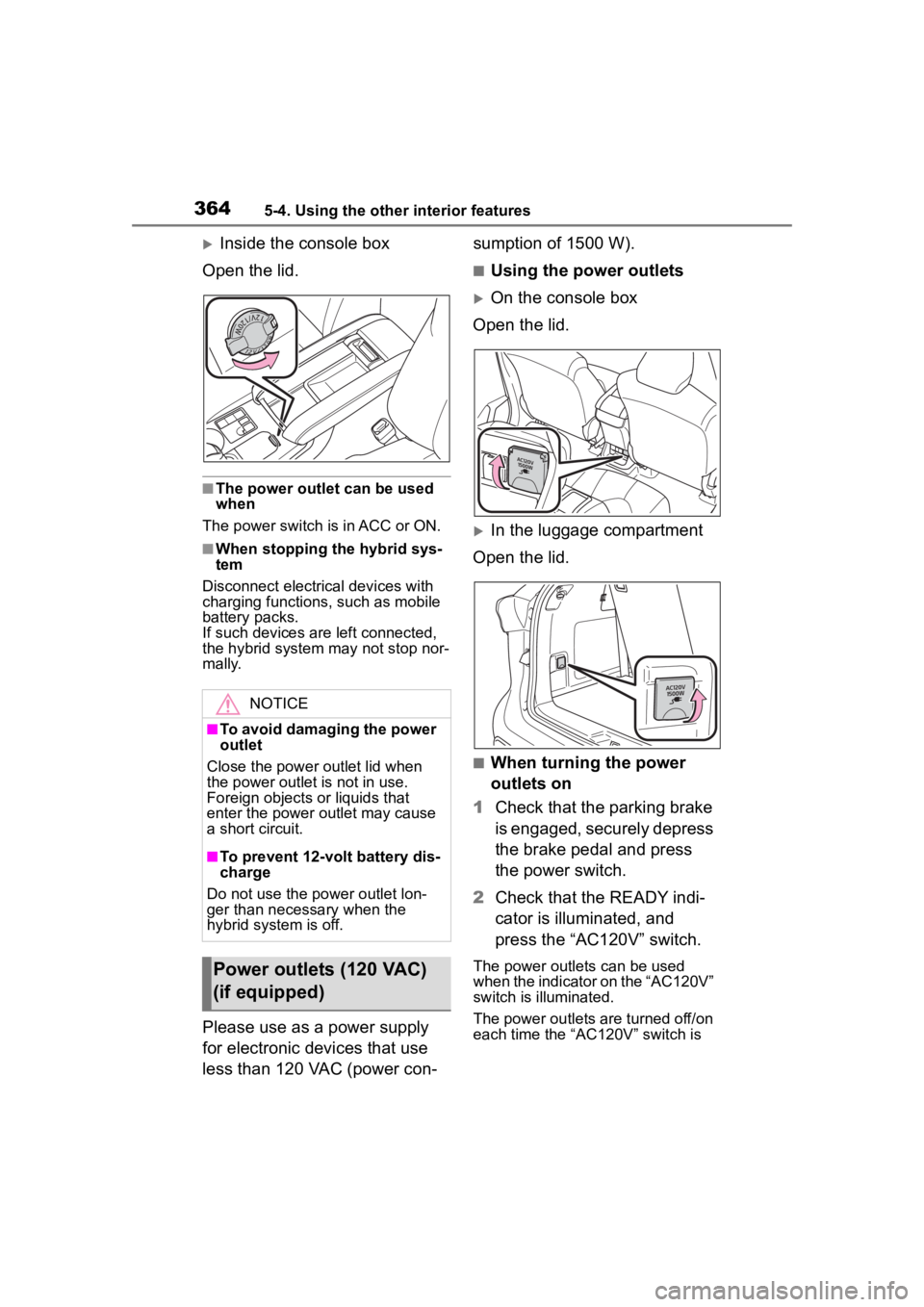
Inside the console box
Open the lid.
■The power outlet can be used
when
The power switch i s in ACC or ON.
■When stopping the hybrid sys-
tem
Disconnect electrical devices with
charging functions, such as mobile
battery packs.
If such devices are left connected,
the hybrid system may not stop nor-
mally.
Please use as a power supply
for electronic devices that use
less than 120 VAC (power con- sumption of 1500 W).
■Using the power outlets
On the console box
Open the lid.
In the luggage compartment
Open the lid.
■When turning the power
outlets on
1 Check that the parking brake
is engaged, securely depress
the brake pedal and press
the power switch.
2 Check that the READY indi-
cator is illuminated, and
press the “AC120V” switch.
The power outlets can be used
when the indicator on the “AC120V”
switch is illuminated.
The power outlets are turned off/on
each time the “AC120V” switch is
NOTICE
■To avoid damaging the power
outlet
Close the power outlet lid when
the power outlet is not in use.
Foreign objects or liquids that
enter the power outlet may cause
a short circuit.
■To prevent 12-volt battery dis-
charge
Do not use the power outlet lon-
ger than necessary when the
hybrid system is off.
Power outlets (120 VAC)
(if equipped)
Page 365 of 572
3655-4. Using the other interior features
5
Interior features
pressed.
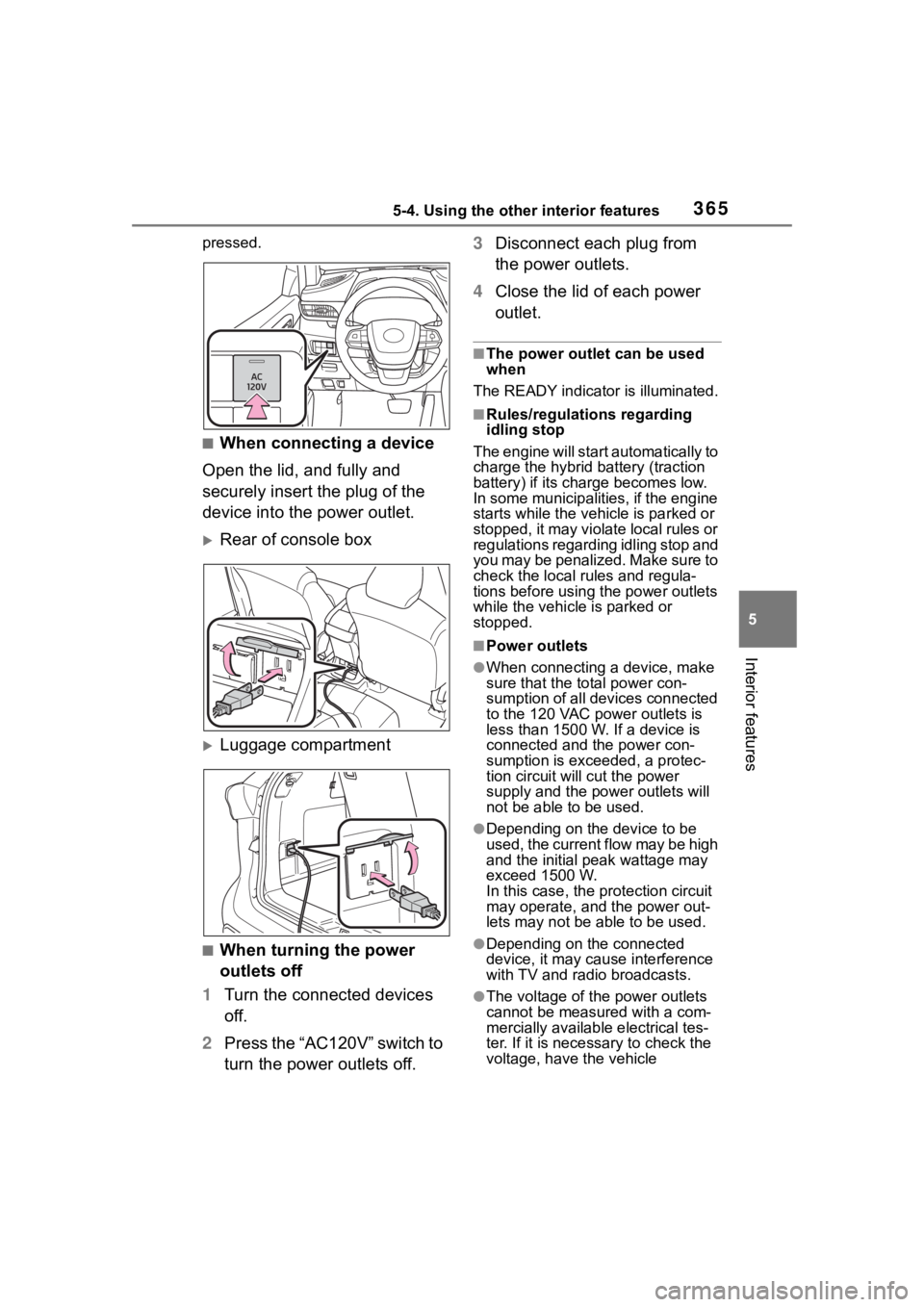
■When connecting a device
Open the lid, and fully and
securely insert the plug of the
device into the power outlet.
Rear of console box
Luggage compartment
■When turning the power
outlets off
1 Turn the connected devices
off.
2 Press the “AC120V” switch to
turn the power outlets off. 3
Disconnect each plug from
the power outlets.
4 Close the lid of each power
outlet.
■The power outlet can be used
when
The READY indicator is illuminated.
■Rules/regulations regarding
idling stop
The engine will star t automatically to
charge the hybrid battery (traction
battery) if its charge becomes low.
In some municipalities, if the engine
starts while the vehicle is parked or
stopped, it may violate local rules or
regulations regarding idling stop and
you may be penalized. Make sure to
check the local rules and regula-
tions before using the power outlets
while the vehicle is parked or
stopped.
■Power outlets
●When connecting a device, make
sure that the to tal power con-
sumption of all devices connected
to the 120 VAC power outlets is
less than 1500 W. If a device is
connected and the power con-
sumption is exce eded, a protec-
tion circuit will cut the power
supply and the p ower outlets will
not be able to be used.
●Depending on the device to be
used, the current flow may be high
and the initial peak wattage may
exceed 1500 W.
In this case, the protection circuit
may operate, and the power out-
lets may not be able to be used.
●Depending on the connected
device, it may cause interference
with TV and radio broadcasts.
●The voltage of the power outlets
cannot be measured with a com-
mercially available electrical tes-
ter. If it is necessary to check the
voltage, have the vehicle
Page 396 of 572
3966-3. Do-it-yourself maintenance
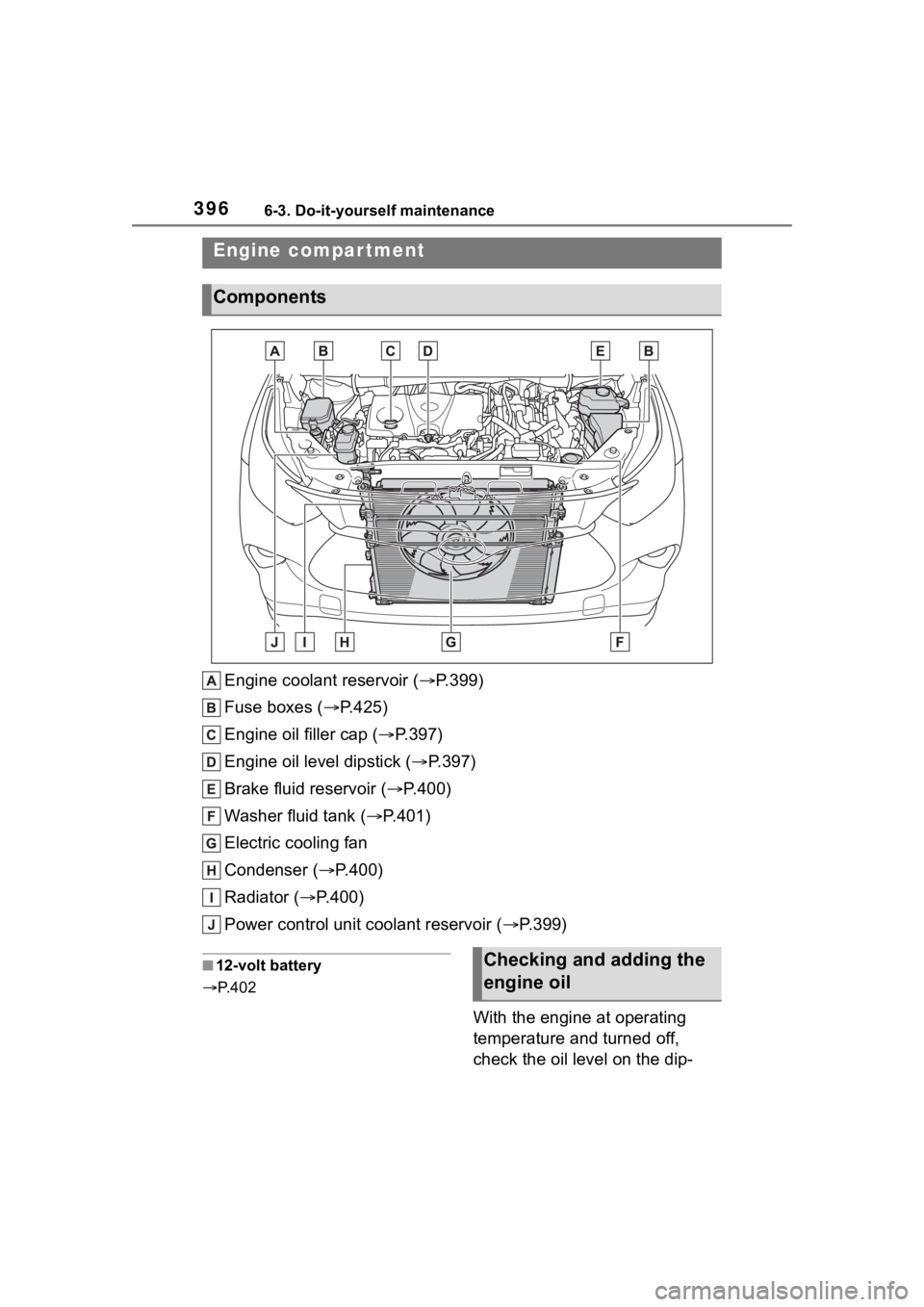
Engine coolant reservoir ( P.399)
Fuse boxes ( P.425)
Engine oil filler cap ( P.397)
Engine oil level dipstick ( P.397)
Brake fluid reservoir ( P.400)
Washer fluid tank ( P.401)
Electric cooling fan
Condenser ( P.400)
Radiator ( P.400)
Power control unit coolant reservoir ( P.399)
■12-volt battery
P. 4 0 2
With the engine at operating
temperature and turned off,
check the oil level on the dip-
Engine compar tment
Components
Checking and adding the
engine oil
Page 418 of 572
4186-3. Do-it-yourself maintenance
Use only Toyota wheel nuts
and wrenches designed for
use with your aluminum
wheels.
When rotating, repairing or
changing your tires, check
that the wheel nuts are still
tight after driving 1000 miles
(1600 km).
Be careful not to damage the
aluminum wheels when using
tire chains.
Use only Toyota genuine bal-
ance weights or equivalent
and a plastic or rubber ham-
mer when balancing your
wheels. 1
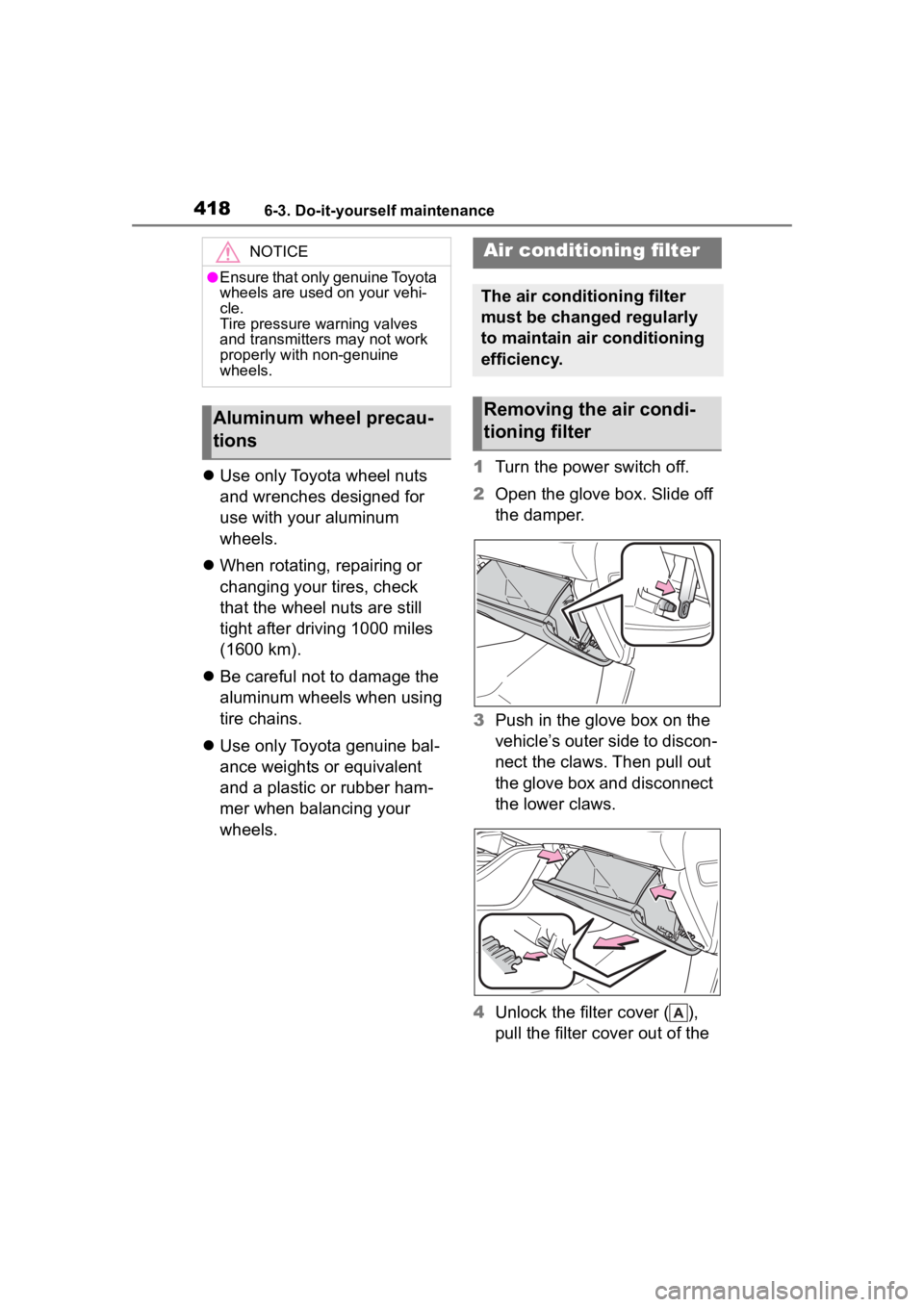
Turn the power switch off.
2 Open the glove box. Slide off
the damper.
3 Push in the glove box on the
vehicle’s outer side to discon-
nect the claws. Then pull out
the glove box and disconnect
the lower claws.
4 Unlock the filter cover ( ),
pull the filter cover out of the
NOTICE
●Ensure that only genuine Toyota
wheels are used on your vehi-
cle.
Tire pressure warning valves
and transmitters may not work
properly with non-genuine
wheels.
Aluminum wheel precau-
tions
Air conditioning filter
The air conditioning filter
must be changed regularly
to maintain air conditioning
efficiency.
Removing the air condi-
tioning filter
Page 425 of 572
4256-3. Do-it-yourself maintenance
6
Maintenance and care
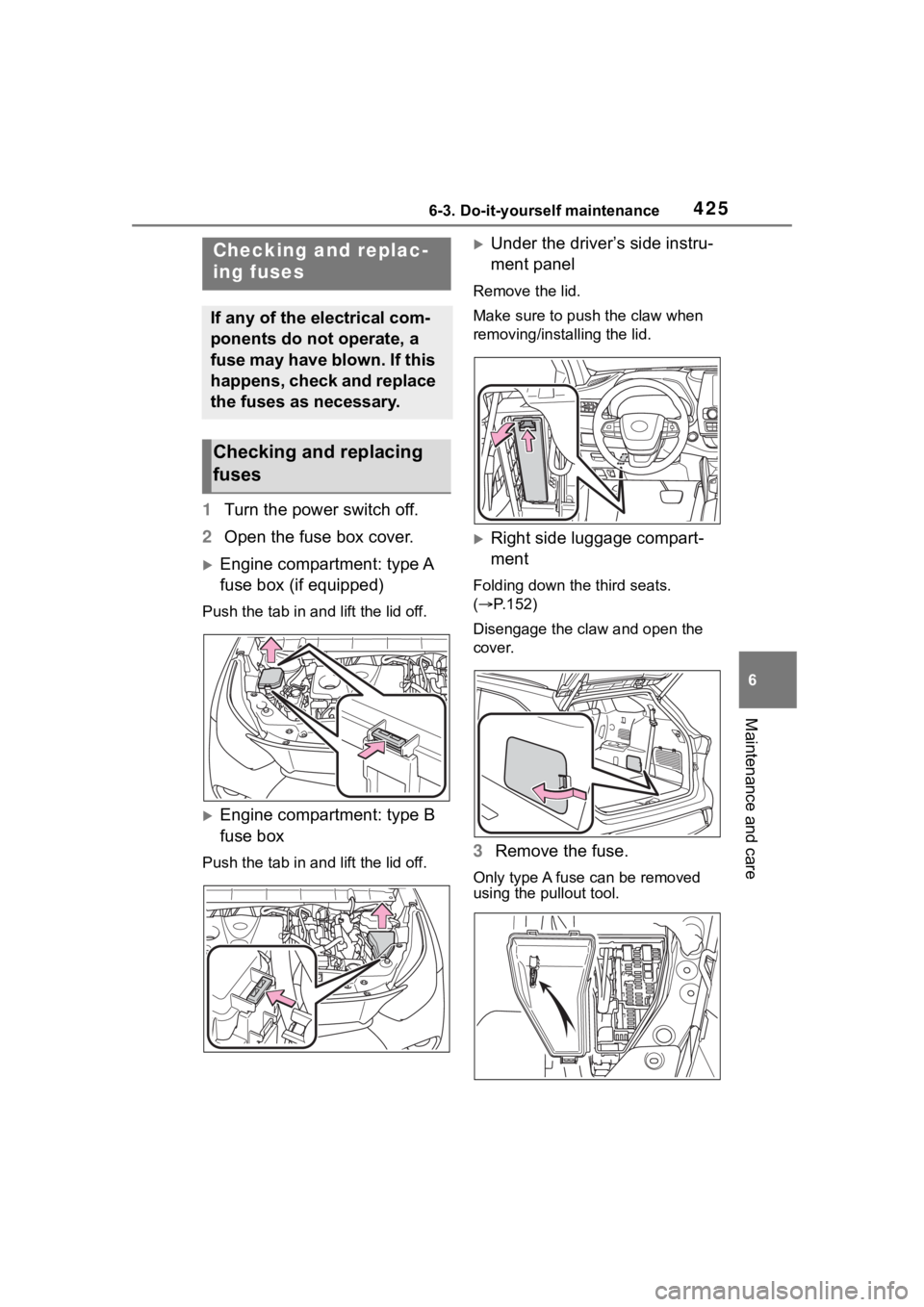
1Turn the power switch off.
2 Open the fuse box cover.
Engine compartment: type A
fuse box (if equipped)
Push the tab in and lift the lid off.
Engine compartment: type B
fuse box
Push the tab in and lift the lid off.
Under the driver’s side instru-
ment panel
Remove the lid.
Make sure to push the claw when
removing/installing the lid.
Right side luggage compart-
ment
Folding down the third seats.
( P.152)
Disengage the claw and open the
cover.
3 Remove the fuse.
Only type A fuse can be removed
using the pullout tool.
Checking and replac-
ing fuses
If any of the electrical com-
ponents do not operate, a
fuse may have blown. If this
happens, check and replace
the fuses as necessary.
Checking and replacing
fuses
Page 426 of 572
4266-3. Do-it-yourself maintenance
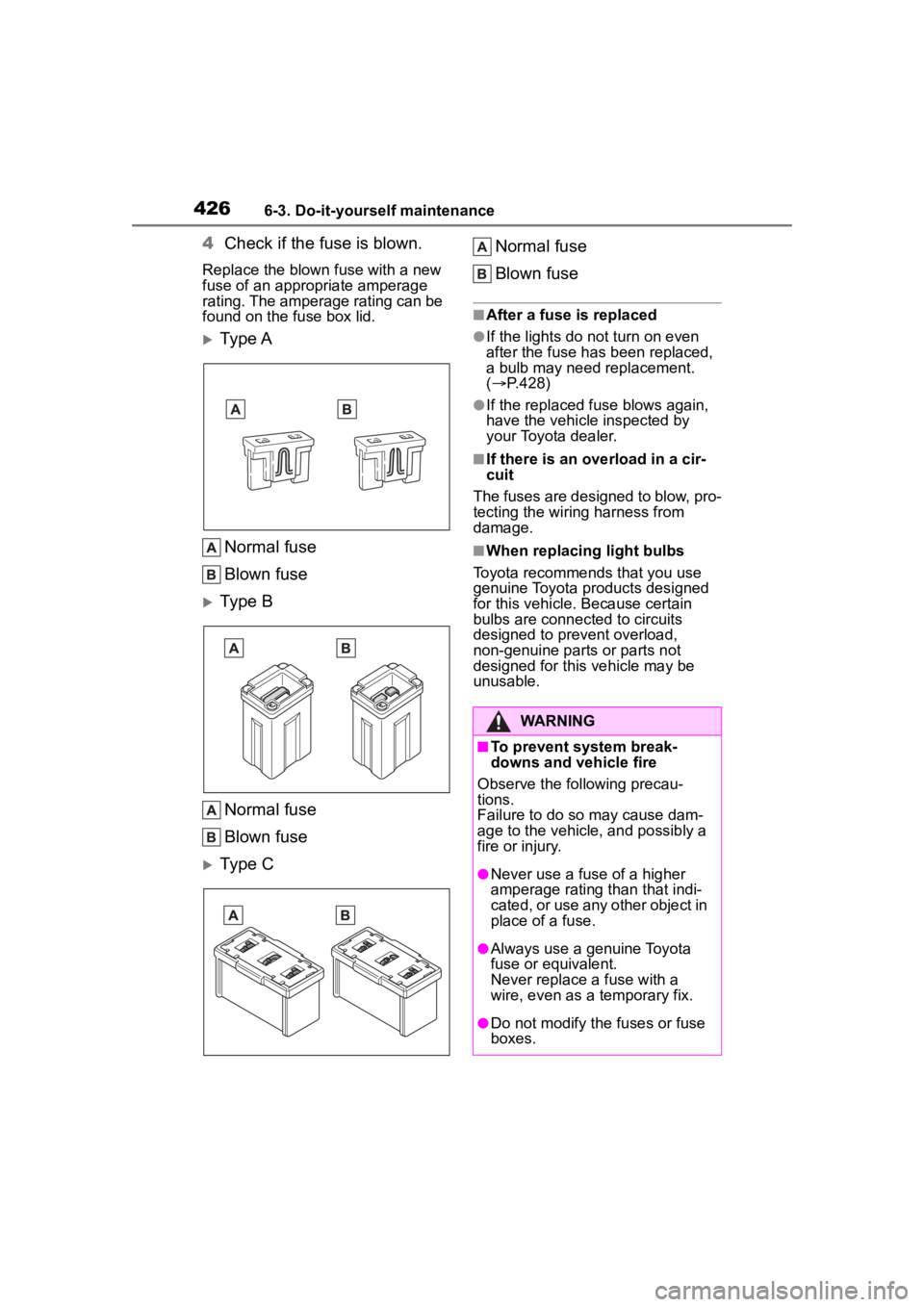
4Check if the fuse is blown.
Replace the blown fuse with a new
fuse of an appropriate amperage
rating. The amperage rating can be
found on the fuse box lid.
Ty p e A
Normal fuse
Blown fuse
Type B
Normal fuse
Blown fuse
Type C Normal fuse
Blown fuse
■After a fuse is replaced
●If the lights do not turn on even
after the fuse has been replaced,
a bulb may need replacement.
(
P.428)
●If the replaced fuse blows again,
have the vehicle inspected by
your Toyota dealer.
■If there is an ove rload in a cir-
cuit
The fuses are designed to blow, pro-
tecting the wiring harness from
damage.
■When replacing light bulbs
Toyota recommends that you use
genuine Toyota pr oducts designed
for this vehicle. Because certain
bulbs are connected to circuits
designed to prevent overload,
non-genuine parts or parts not
designed for this vehicle may be
unusable.
WARNING
■To prevent system break-
downs and vehicle fire
Observe the following precau-
tions.
Failure to do so may cause dam-
age to the vehicle, and possibly a
fire or injury.
●Never use a fuse of a higher
amperage rating than that indi-
cated, or use any other object in
place of a fuse.
●Always use a genuine Toyota
fuse or equivalent.
Never replace a fuse with a
wire, even as a temporary fix.
●Do not modify the fuses or fuse
boxes.
Page 427 of 572
4276-3. Do-it-yourself maintenance
6
Maintenance and care
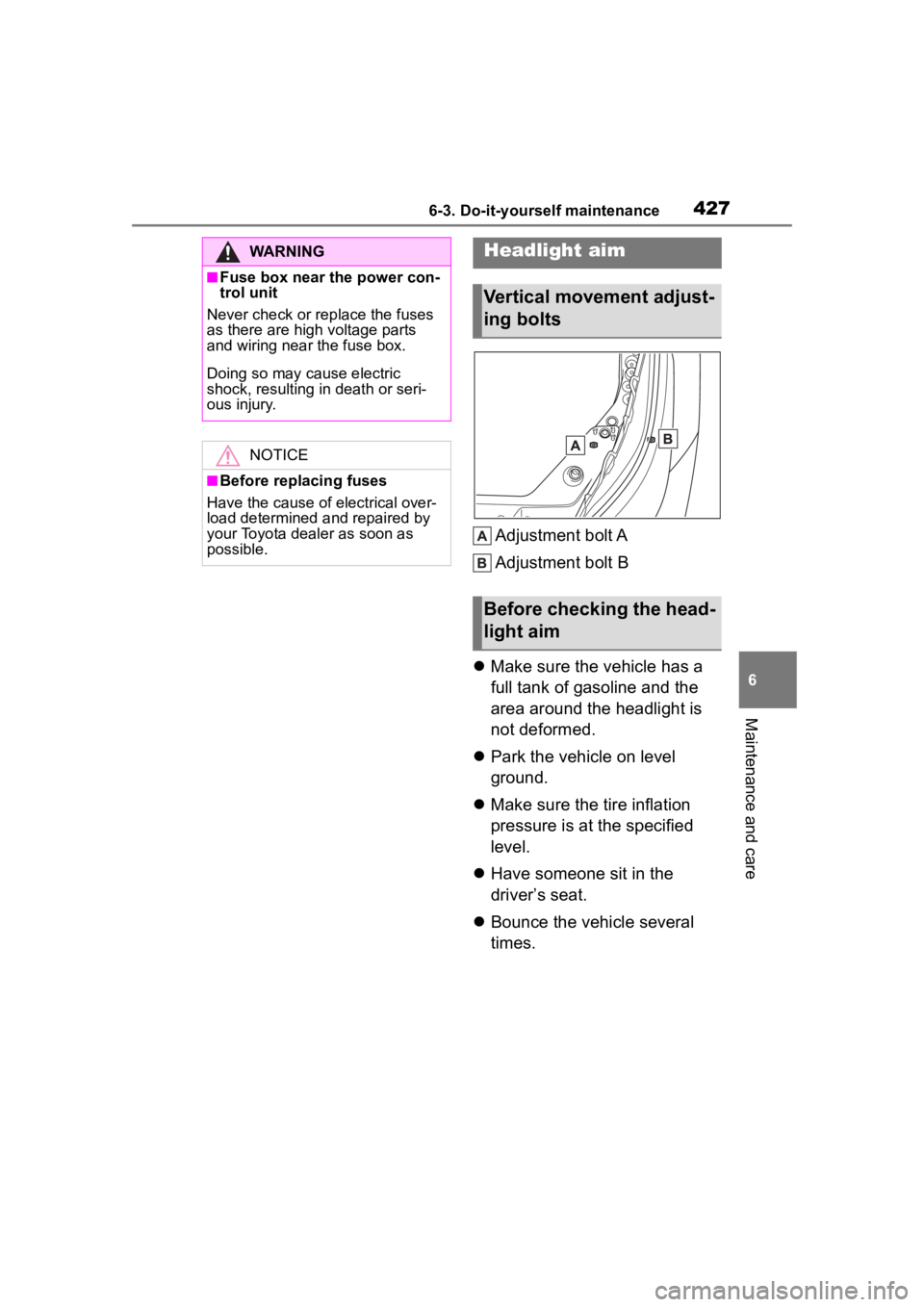
Adjustment bolt A
Adjustment bolt B
Make sure the vehicle has a
full tank of gasoline and the
area around the headlight is
not deformed.
Park the vehicle on level
ground.
Make sure the tire inflation
pressure is at the specified
level.
Have someone sit in the
driver’s seat.
Bounce the vehicle several
times.
WARNING
■Fuse box near the power con-
trol unit
Never check or replace the fuses
as there are high voltage parts
and wiring near the fuse box.
Doing so may cause electric
shock, resulting in death or seri-
ous injury.
NOTICE
■Before replacing fuses
Have the cause of electrical over-
load determined and repaired by
your Toyota dealer as soon as
possible.
Headlight aim
Vertical movement adjust-
ing bolts
Before checking the head-
light aim
Page 479 of 572
4797-2. Steps to take in an emergency
7
When trouble arises
If you have a set of jumper (or
booster) cables and a second
vehicle with a 12-volt battery,
you can jump start your vehicle
by following the steps below.
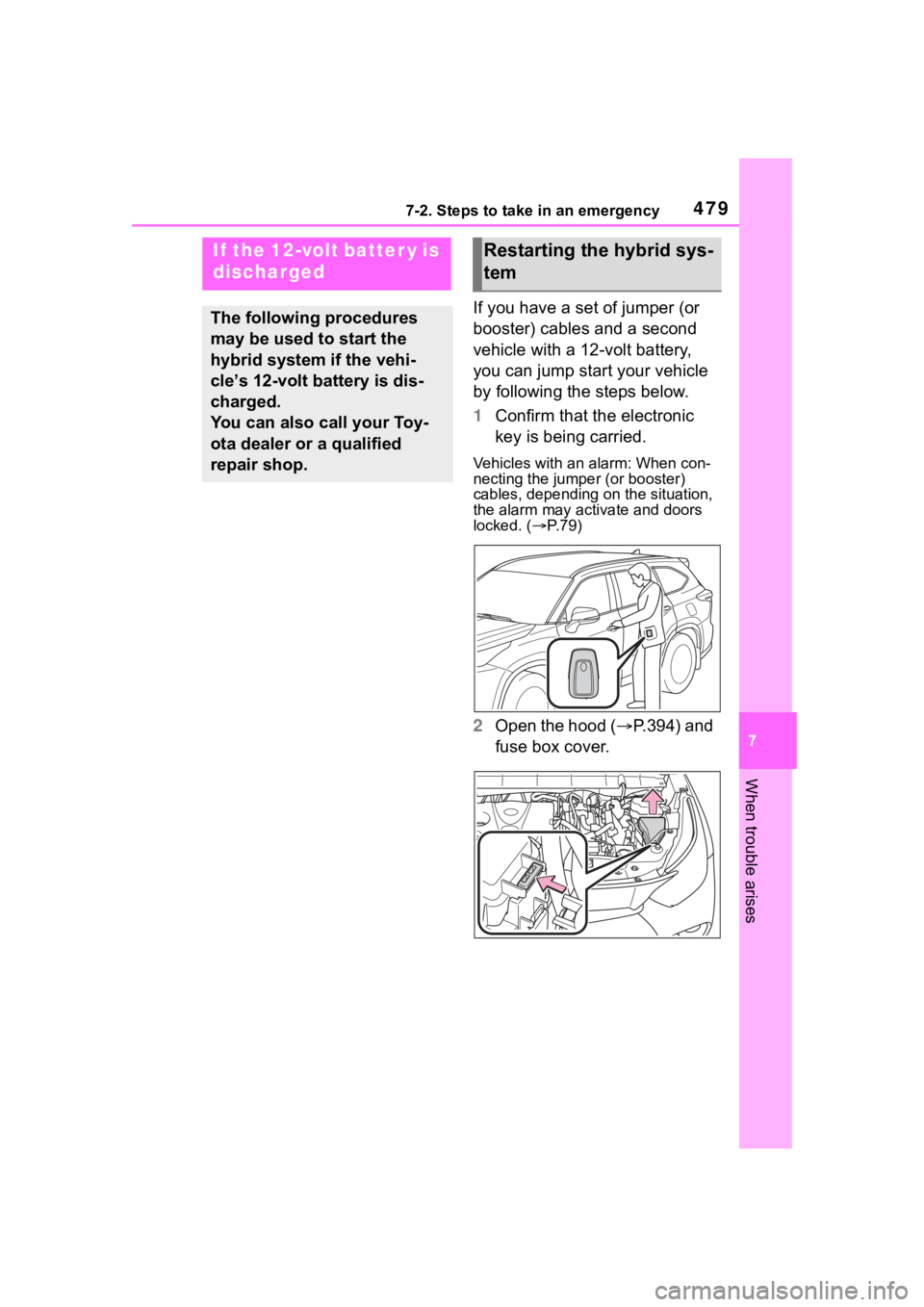
1Confirm that the electronic
key is being carried.
Vehicles with an alarm: When con-
necting the jumper (or booster)
cables, depending on the situation,
the alarm may activate and doors
locked. ( P. 7 9 )
2 Open the hood ( P.394) and
fuse box cover.
If the 12-volt batter y is
discharged
The following procedures
may be used to start the
hybrid system if the vehi-
cle’s 12-volt battery is dis-
charged.
You can also call your Toy-
ota dealer or a qualified
repair shop.
Restarting the hybrid sys-
tem
Page 481 of 572
4817-2. Steps to take in an emergency
7
When trouble arises
6Open and close any of the
doors of your vehicle with the
power switch OFF.
7 Maintain the engine speed of
the second vehicle and start
the hybrid system of your
vehicle by turning the power
switch to ON.
8 Make sure the “READY” indi-
cator comes on. If the indica-
tor light does not come on,
contact your Toyota dealer.
9 Once the hybrid system has
started, remove the jumper
cables in the exact reverse
order from which they were
connected.
10 Close the exclusive jump
starting terminal cover, and
reinstall the fuse box cover to
its original position.
Once the hybrid system starts,
have the vehicle inspected at
your Toyota dealer as soon as
possible.
■Starting the hybrid system
when the 12-volt battery is dis-
charged
The hybrid system cannot be started
by push-starting.
■To prevent 12-volt battery dis-
charge
●Turn off the headlights and the
audio system while the hybrid sys-
tem is off.
●Turn off any unnecessary electri-
cal components when the vehicle
is running at a low speed for an
extended period, such as in heavy
traffic.
■When the 12-volt battery is
removed or discharged
●Information stored in the ECU is
cleared. When the 12-volt battery
is depleted, have the vehicle
inspected at your Toyota dealer.
●Some systems may require initial-
ization. ( P.523)
■When removing the 12-volt bat-
tery terminals
When the 12-volt battery terminals
are removed, the information stored
in the ECU is cleared. Before
removing the 12-vo lt battery termi-
nals, contact you r Toyota dealer.
■Charging the 12-volt battery
The electricity stored in the 12-volt
battery will discha rge gradually even
when the vehicle i s not in use, due
to natural dischar ge and the drain-
ing effects of certain electrical appli-
ances. If the vehicle is left for a long
time, the 12-volt battery may dis-
charge, and the hybrid system may
be unable to start. (The 12-volt bat-
tery recharges automatically while
the hybrid system is operating.)
■When recharging or replacing
the 12-volt battery
●In some cases, it may not be pos-
sible to unlock the doors using the
smart key system when the
12-volt battery is discharged. Use
the wireless remote control or the
mechanical key to lock or unlock
the doors.
●The hybrid syste m may not start
on the first attempt after the
12-volt battery has recharged but
will start normally after the second
attempt. This is not a malfunction.
●The power switch mode is memo-
rized by the vehicle. When the
12-volt battery is reconnected, the
system will return to the mode it
was in before the 12-volt battery
was discharged. Before discon-
necting the 12-volt battery, turn
the power switch off.
If you are unsure what mode the